AI Agent Harness: Architecture, Core Components, and How to Build One
A language model can write an answer, propose a plan, or describe how to call a tool. But the model alone does not maintain your application's permissions, execute those calls, preserve long-running state, or verify whether an external action succeeded.
Something around the model must do that work.
That surrounding system is commonly called an AI agent harness, or agentic harness.
An agent harness provides the execution loop, tool interfaces, context assembly, state handling, and control boundaries that let a model perform useful multi-step work. It receives the model's decisions, decides what the application is allowed to do with them, executes permitted operations, and feeds observations back into the next model call.
The model provides intelligence. The harness provides the tools, context, execution loop, and controls that turn intelligence into useful action.
Google Cloud's agent harness guide describes the harness as the software environment surrounding an AI model so it can use tools, retain context, and complete multi-step tasks. Microsoft Agent Framework defines a harness as runtime scaffolding that drives model and tool calls, manages context and state, and applies approval policy.
Those descriptions are useful starting points. The practical question is how to assemble the pieces, what should remain outside the model's control, and when a full-featured harness is necessary.
Quick Answer: What Is an AI Agent Harness?
An AI agent harness is the application-side execution layer that connects a language model to its tools, relevant context, workflow state, and runtime controls. It repeatedly gets a model decision, interprets the result, runs permitted tools, stores observations, and continues until a verified completion condition or stop rule is reached.
USER GOAL
   ↓
HARNESS: BUILD CONTEXT
   ↓
MODEL: DECIDE NEXT STEP
   ├── Final answer → CHECK COMPLETION → RETURN
   └── Tool request
          ↓
      VALIDATE + AUTHORIZE
          ↓
      EXECUTE TOOL
          ↓
      RECORD RESULT + STATE
          ↓
      BUILD NEXT CONTEXT
          └────────────→ MODEL
Not every harness needs memory, multiple agents, or a complex planner. The smallest useful harness can be a bounded model-tool loop with a few well-defined read-only tools. Advanced harnesses add durable state, sandboxed execution, context compaction, approval checkpoints, background work, delegation, and observability.
Key Takeaways
- The model generates decisions; the harness manages execution and the boundaries around those decisions.
- The execution loop is the central primitive: model output, tool execution, observation, and another model call.
- Tool schemas influence model behavior, while server-side validation and authorization control actual access.
- Conversation history, working context, workflow state, and long-term memory are separate concerns.
- Agent planning, skills, background workers, and delegation are useful additions, not universal requirements.
- A harness is not a substitute for durable storage, proper identity checks, idempotency, or sandbox isolation.
- Start with one agent and the smallest set of tools that can solve the task.
- Test the full trajectory, including tool selection, arguments, state changes, permissions, and completion.
Table of Contents
- What Is an Agent Harness?
- Why a Language Model Alone Is Not an Agent
- Agent Harness Architecture
- Core Components
- The Agent Execution Loop
- Tool Calling and Tool Results
- Context Assembly and Memory
- Skills, Planning, and Delegation
- Permissions, Approvals, and Sandboxing
- Harness vs Framework vs Runtime
- Build a Minimal Agent Harness in TypeScript
- Extending a Harness for Production
- When You Need a Harness
- Common Mistakes
- Production Checklist
- Where PrompTessor Fits
- FAQ
What Is an Agent Harness?
Think of an agent harness as the operating environment for a model-driven task. The model may decide to retrieve a file, run a database query, search the web, inspect a repository, or answer directly. The harness determines how those possible actions are exposed, executed, bounded, and recorded.
In practical systems, the term harness is not a single standardized package boundary. One product may call the model-tool loop a runner; another may call the surrounding composition a harness. The important distinction is functional: what infrastructure exists around the model, and which responsibilities does it handle?
For example, the OpenAI Agents SDK runner loops through model outputs, tool calls, and handoffs until a final response or a limit is reached. LangChain Deep Agents describes itself as an agent harness that packages the core tool-calling loop together with planning, filesystem access, and subagents. Microsoft's harness adds composed providers, middleware, approvals, compaction, and session state.
Why a Language Model Alone Is Not an Agent
A language model predicts and generates outputs. It does not independently hold a production database connection, choose your organization's permission model, or guarantee a refund will happen exactly once.
Consider this request:
"Find our three most recent support tickets,
 summarize the recurring problem, and draft a reply."
The model can reason about the goal. But an application must provide a permitted ticket-search tool, return the ticket results, manage the conversation context, and decide whether the response is a draft or can actually be sent.
| Responsibility | Model | Harness / Application |
|---|---|---|
| Interpret the user's goal | Primary contributor | Supplies instructions and context |
| Select a tool | May propose a call | Exposes allowed tools and validates selection |
| Execute an API request | Does not execute by itself | Uses authenticated integration |
| Check authorization | May reason about policy | Must enforce it |
| Preserve workflow state | Can summarize state | Stores authoritative progress |
| Verify external side effects | Can interpret evidence | Retrieves and records actual outcome |
| Limit execution | Can follow instructions | Enforces turns, timeouts, cost, and approvals |
This separation is one of the core engineering principles behind reliable agents: model instructions are useful, but they are not equivalent to runtime controls.
AI Agent Harness Architecture
A practical architecture has a central runner surrounded by adapters, state providers, execution boundaries, and telemetry.
USER / APPLICATION
       ↓
INPUT + IDENTITY + GOAL
       ↓
HARNESS / RUNNER
 ├── Model adapter
 ├── Instruction + context builder
 ├── Tool registry and dispatcher
 ├── Session and workflow state
 ├── Authorization / approvals
 ├── Limits / timeouts / error handling
 └── Traces / metrics / events
       ↓
MODEL RESPONSE
 ├── Final output
 └── Tool / handoff request
       ↓
CONTROLLED EXECUTION
       ↓
OBSERVATION + STATE UPDATE
       ↓
NEXT TURN OR VERIFIED RESULT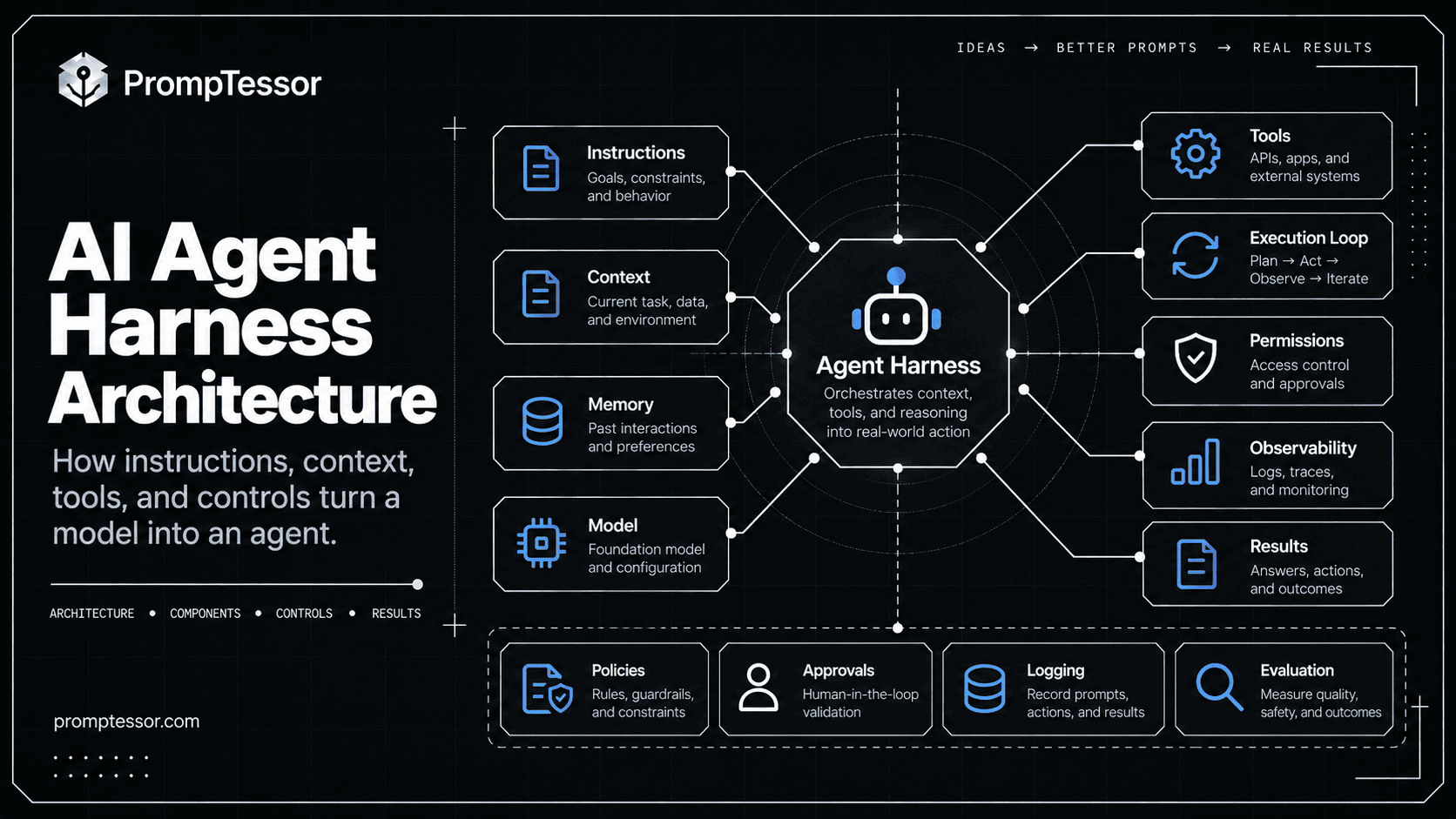
Microsoft's official harness documentation uses a comparable composition: chat client, chat pipeline, context providers, middleware, and application UX. It specifically notes that its harness composes existing building blocks rather than inventing an entirely separate agent runtime. Microsoft Agent Harness architecture.
Core Components of an AI Agent Harness
1. Model Adapter
The model adapter connects the harness to a model provider. It translates application messages and tool schemas into provider requests and normalizes the response into something the runner can process.
Where possible, keep business logic out of the adapter. Its job is to handle provider-specific formats, token limits, streaming, model errors, and response metadata.
2. Instructions and Context Builder
Before each model call, the harness determines what the model should receive: system instructions, current goal, relevant history, tool definitions, working artifacts, retrieval evidence, and state summaries.
The builder should not blindly insert every past message. It should select what is relevant, current, and authorized. For deeper design patterns, see Context Engineering.
3. Tool Registry and Dispatcher
A tool registry describes capabilities exposed to the model. A dispatcher maps a validated request to a trusted application function or external service.
Use clear tool names such as get_order_status or search_support_tickets. Validate structured arguments at runtime even when the model provider supports schema-constrained tool calls.
4. Session and Workflow State
Session history helps preserve the conversation. Workflow state represents which tasks ran, which operations committed, what is blocked, and what remains to be verified. Persistent memory may hold reusable preferences or knowledge. These should not all be treated as one interchangeable transcript.
The OpenAI Agents SDK sessions documentation covers managed conversation history, while the PrompTessor AI Agent Memory guide discusses the broader state model.
5. Policies, Approvals, and Execution Boundaries
The harness can filter tools by user, tenant, environment, or role; reject invalid arguments; pause before sensitive writes; and send approval requests to authorized reviewers.
A prompt such as "ask before sending an email" is not a reliable substitute for preventing send_email from running without recorded approval.
6. Observability
Record model calls, tool selections, arguments (with sensitive information redacted), timing, state changes, approval decisions, token usage, failures, and final outcomes.
OpenAI's Agents SDK tracing captures generations, tool calls, handoffs, and guardrails so developers can inspect the trajectory rather than only the final text.
How the Agent Execution Loop Works
The execution loop is the simplest part of the harness to describe—and the most important part to implement correctly.
- Build the model input. Include the goal, allowed tools, and just enough relevant context.
- Ask the model for a next step. The output may be a final answer, a tool request, or a handoff.
- Inspect the request. Confirm the tool exists and its arguments match the expected schema.
- Check authority. Enforce permission, cost, environment, and approval constraints.
- Execute if allowed. Run the trusted tool through the dispatcher and capture the real result.
- Update state and observations. Record what happened and construct the next model input.
- Stop or repeat. Continue only while the task needs more work and run limits permit it.
MODEL → TOOL CALL → POLICY CHECK → TOOL RESULT
  ↑                                     │
  └──────────── UPDATED CONTEXT ─────────┘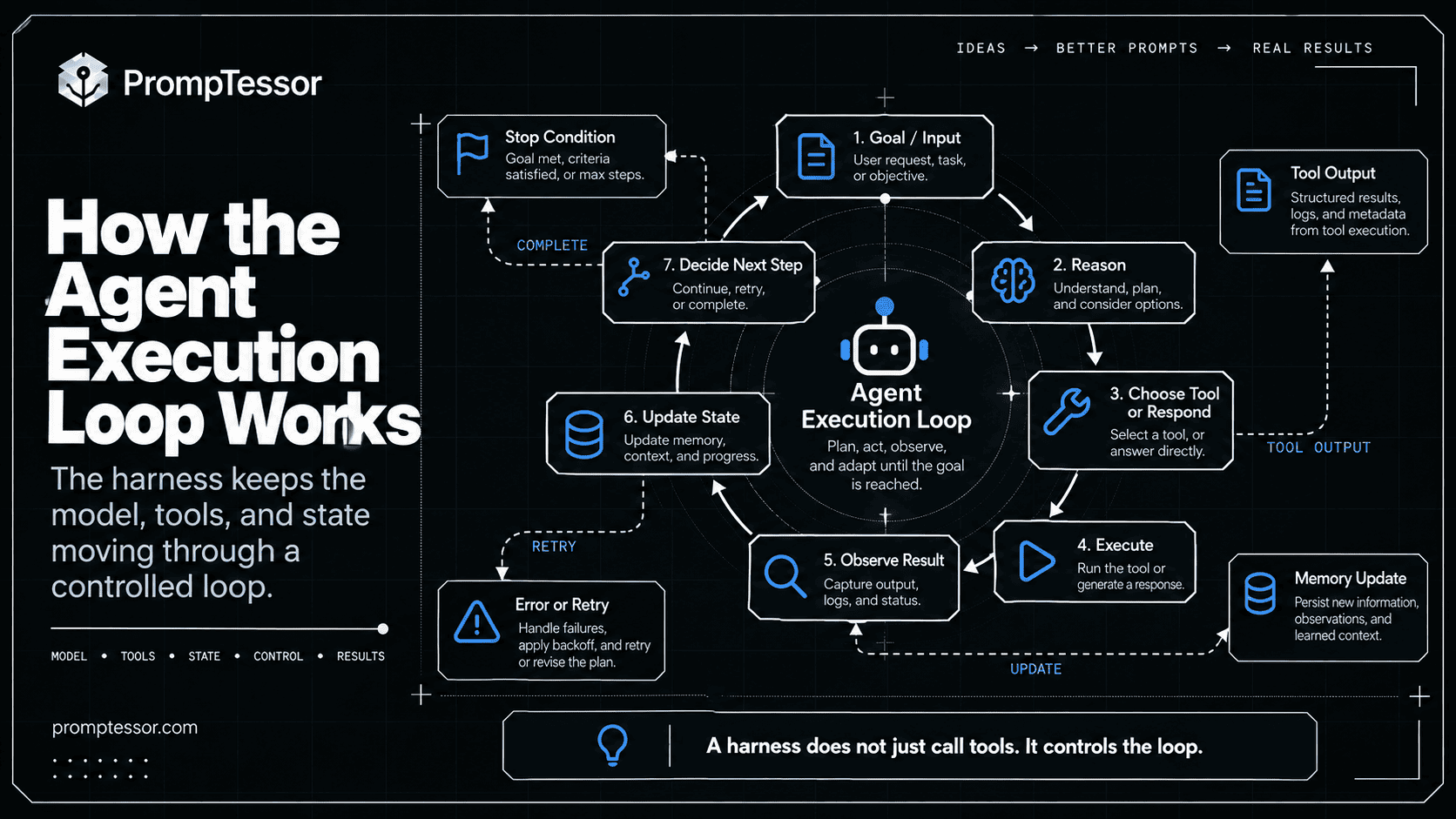
OpenAI documents this lifecycle explicitly: its runner calls the model, returns final output when appropriate, executes tool calls and loops again, or switches agents on a handoff. The runner can also apply a maximum-turn limit. OpenAI Runner lifecycle.
Tool Calling and Tool Results
Tool integration has two surfaces: the description the model sees, and the trusted implementation the application runs.
MODEL-FACING TOOL
Name: get_order_status
Description: Retrieve the current status of an order.
Inputs: order_id (required string)

APPLICATION IMPLEMENTATION
1. Verify user may access the order.
2. Validate the order ID.
3. Query the order service.
4. Redact unnecessary personal data.
5. Return a structured result.
A model can propose the correct tool and still provide invalid, unauthorized, or stale arguments. The harness should never confuse a syntactically valid tool call with permission to execute it.
Tool results are also data, not trusted instructions. A web page or database field saying "ignore all previous instructions" should not be allowed to override the application's rules.
For MCP-enabled agents, tool names, server instructions, resources, and schemas expand the available instruction surface. The MCP Prompting Guide covers how to keep those boundaries clear.
Context Assembly, Memory, and Compaction
Agents can run for many turns. The context naturally grows as the harness accumulates user messages, tool calls, results, files, and intermediate observations.
STABLE CONTEXT
- System / developer instructions
- Tool contracts
- Output requirements

DYNAMIC CONTEXT
- Current task
- Relevant history
- Fresh tool results
- Active workflow state

PERSISTENT OUTSIDE THE CONTEXT WINDOW
- Files and artifacts
- Authoritative workflow checkpoints
- Audit records
- Approved long-term memory
Context compaction can summarize older work, but summary text should not replace authoritative proof that an irreversible operation committed. A database record, operation receipt, or external verification is stronger than a model-generated memory of success.
Anthropic's engineering report on long-running agent harnesses highlights the need for explicit progress artifacts that allow work to continue across separate context windows.
Agent Skills, Planning, and Delegation
More advanced harnesses add optional capabilities to improve long-running work.
Agent Skills
Skills package reusable procedures, references, and task-specific guidance so an agent does not need every instruction in its active context at all times. The harness controls how skills are discovered and made available.
Planning and Todo Tracking
A planner can break a goal into tasks, track dependencies, and revise work after new observations. Microsoft Agent Framework's harness currently includes planning and todo support by default. Microsoft capability matrix.
For task decomposition, plan-and-execute, and replanning, see AI Agent Planning.
Delegation and Subagents
A harness may delegate bounded work to another agent, but delegation should be justified by specialization, context isolation, or parallelism. Many tasks work better with one agent and several tools.
Anthropic's agent engineering guidance recommends simple composable designs before increasing complexity.
For routing, handoffs, and manager-worker structures, see AI Agent Orchestration.
Permissions, Approvals, and Sandboxing
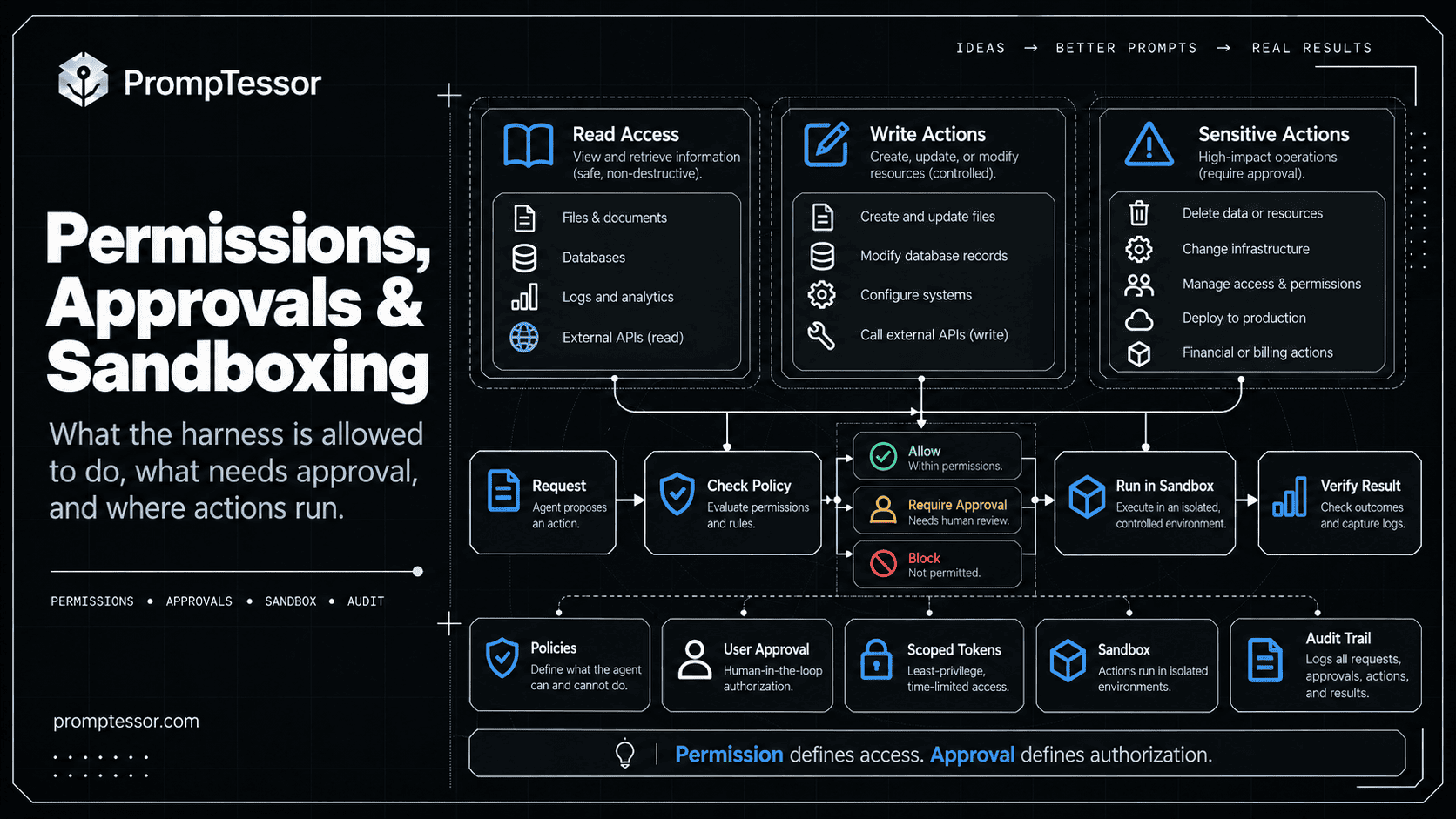
The harness's most consequential job may be deciding which model-proposed actions can actually run.
| Action | Suggested Runtime Control |
|---|---|
| Read permitted documentation | Allow with identity-aware access checks |
| Draft an email | Allow without sending |
| Send an email | Require the applicable send permission or approval |
| Issue a high-value refund | Require policy and authorized reviewer approval |
| Run untrusted code | Isolated sandbox with scoped resources |
| Access another tenant's data | Block |
Permission checks must happen inside the execution boundary. The model should not get to decide that it is authorized merely because it generated an argument like approved: true.
High-impact workflows also need durable approval state, expiration rules, and revalidation after long pauses. See Human-in-the-Loop AI Agents.
Agent Harness vs Agent Framework vs Agent Runtime
These terms overlap in product documentation, so the following is a practical distinction, not a universal naming standard.
| Term | Primary Concern | Example Responsibility |
|---|---|---|
| Agent framework | Developer primitives and APIs | Define agents, tools, workflows, middleware |
| Agent harness | Composed behavior around a model | Execution loop, context, tool access, approvals |
| Agent runtime / hosting | Where and how work operates | Processes, scheduling, storage, scaling, recovery |
| Agent orchestration | Coordination of participants | Route, delegate, sequence, aggregate, hand off |
A framework may ship its own harness. A harness may run inside a serverless application or a durable job system. A runtime may add checkpointing, isolation, or distributed execution. In real products, one library may cover several of these layers.
For implementation choices across the broader tooling ecosystem, see AI Agent Frameworks. This article focuses on the shared architecture rather than comparing vendors.
How to Build a Minimal AI Agent Harness in TypeScript
The following example demonstrates the essential structure. It is deliberately provider-agnostic and read-only: your application supplies a model adapter and a registry of trusted read-only tools.
Its job is to illustrate the control flow, not to claim production-level persistence or security. For simplicity, it handles one model-selected tool at a time and has no support for mutating actions.
// Educational example: single-turn, read-only harness.
// The model adapter and tools are supplied by the application.
type Message = {
  role: "system" | "user" | "assistant" | "tool";
  content: string;
  toolCallId?: string;
};

type ModelStep =
  | { kind: "final"; text: string }
  | { kind: "tool_call"; id: string; name: string; args: unknown };

type Tool = {
  validate(args: unknown): boolean;
  execute(args: unknown): Promise<unknown>;
};

type ModelAdapter = {
  next(messages: Message[], toolNames: string[]): Promise<ModelStep>;
};

type RunResult =
  | { status: "complete"; answer: string }
  | { status: "blocked"; reason: string };

async function runHarness(
  goal: string,
  model: ModelAdapter,
  readOnlyTools: Record<string, Tool>,
  maxSteps = 8
): Promise<RunResult> {
  const messages: Message[] = [
    {
      role: "system",
      content: "Use available read-only tools when needed. " +
        "Do not claim a fact was verified unless a tool confirmed it."
    },
    { role: "user", content: goal }
  ];

  for (let step = 0; step < maxSteps; step++) {
    const decision = await model.next(
      messages,
      Object.keys(readOnlyTools)
    );

    if (decision.kind === "final") {
      return { status: "complete", answer: decision.text };
    }

    const tool = readOnlyTools[decision.name];
    if (!tool || !tool.validate(decision.args)) {
      return { status: "blocked", reason: "Tool or arguments denied" };
    }

    messages.push({
      role: "assistant",
      content: JSON.stringify(decision)
    });

    try {
      const result = await tool.execute(decision.args);
      messages.push({
        role: "tool",
        toolCallId: decision.id,
        content: JSON.stringify(result)
      });
    } catch {
      messages.push({
        role: "tool",
        toolCallId: decision.id,
        content: JSON.stringify({ error: "tool_execution_failed" })
      });
    }
  }

  return { status: "blocked", reason: "Step limit reached" };
}
What This Example Actually Does
- Builds initial context: the model receives a goal and clear instructions.
- Exposes a restricted tool set: only tools registered as read-only are available.
- Validates calls: unknown tools and invalid arguments are blocked.
- Executes tool calls: real tool results are returned to the model.
- Limits work: a maximum number of steps prevents unlimited iteration.
- Returns a clear result: either complete or blocked.
To connect a real model, implement ModelAdapter.next() using its provider's tool-calling API and normalize the response into the two documented result types. To connect tools, supply concrete validate() and execute() implementations.
Important limitation: a model-generated final answer is not proof that external actions succeeded. This example deliberately does not support writes. A production harness must independently check effects, enforce timeouts, protect credentials, authorize each resource, and record durable state before it can safely support actions that change the world.
How to Extend the Harness for Production
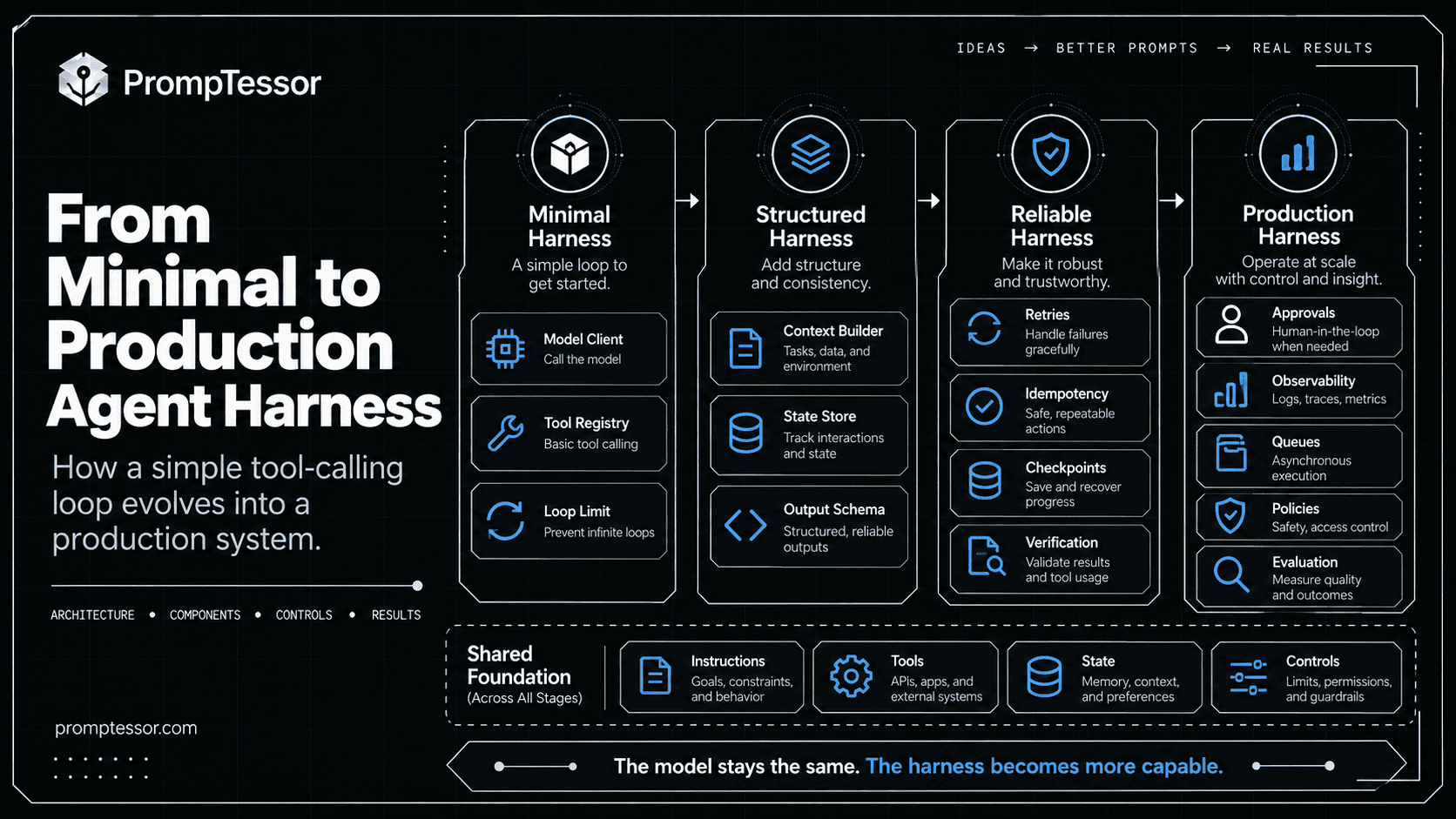
Once the minimal loop works, add capabilities based on the risks and requirements of the application.
1. Durable Sessions and Checkpoints
Store workflow progress, artifacts, and external operation identities independently from the active context window. Resume incomplete work rather than assuming every retry should start from the beginning.
2. Stable Operation IDs for Writes
Mutating operations should have idempotency keys or a reliable reconciliation strategy. A timeout does not prove that the external system failed to commit an action. The AI Agent Reliability guide covers ambiguous writes and safe recovery in detail.
3. Tool Authorization at the Resource Level
Check the caller's identity, resource scope, tenant, role, and approval status on every sensitive tool execution. Do not assume listing a tool for the model grants authority to use it.
4. Context Budget and Compaction
Manage the maximum context size; avoid dumping full files or large tool outputs into every step. Preserve references to large artifacts and retrieve only useful excerpts.
5. Observability and Evaluation
Trace what actually happened: model decisions, tool arguments, authorization outcomes, cost, latency, and result verification. Build evaluation cases for wrong-tool selection, missing arguments, skipped approval, repeated calls, and false completion.
The AI Agent Evaluation guide explains trajectory-level evaluation; LLM Observability explains tracing and monitoring.
6. Safe Recovery and Human Takeover
Support explicit states such as complete, partial, blocked, waiting_for_approval, and unknown_external_effect. When automated recovery cannot establish a safe next step, stop and escalate instead of pretending the task succeeded.
When Do You Actually Need an Agent Harness?
Not every AI feature needs a long-running agent harness.
| Task Type | Reasonable Starting Architecture |
|---|---|
| Rewrite a paragraph | Single model call |
| Summarize a known document | Model call with document context |
| Extract, validate, then store structured data | Deterministic workflow around model calls |
| Investigate an open-ended question across several tools | One agent with bounded tool loop |
| Long-running coding or research with artifacts | Harness with state, file access, and progress tracking |
| Multi-system automation with consequential writes | Harness plus authorization, approvals, durable execution, and verification |
Anthropic recommends starting with the simplest architecture that solves the actual task. More agentic flexibility can bring higher latency, cost, and complexity, so it should earn its place through measurable improvements. Anthropic on effective agent design.
Common AI Agent Harness Mistakes
Giving Every Tool to Every Agent
Tool sprawl increases ambiguity, cost, and access risk. Expose a focused tool set for the current responsibility.
Putting Permission Rules Only in the Prompt
Models can misunderstand instructions. The application must still enforce access and approval checks.
Treating Conversation History as Durable State
A transcript cannot prove whether a payment, deployment, or email send committed. Store authoritative outcomes separately.
Letting the Model Repeat Writes After Timeouts
Use reconciliation and idempotency rather than blindly repeating a potentially successful external action.
Running Without Limits
Set turn, time, tool, and cost boundaries. A model can remain active while making no material progress.
Adding Multiple Agents Before One Agent Works
Delegation adds coordination cost. Start with one tool-using agent unless specialized boundaries or real parallelism justify more.
Confusing a Good Final Answer With a Good Execution
Verify final state and review the trajectory. A convincing answer can hide unauthorized, duplicated, or incorrect operations.
AI Agent Harness Production Checklist
Core Loop
- Is every model output classified as final, tool call, handoff, or error?
- Are turns, time, token use, and tool calls bounded?
- Can the system distinguish blocked work from verified completion?
Tools and Authority
- Are tools registered with clear schemas and ownership?
- Are inputs validated independently of the model?
- Are user and tenant permissions checked at execution time?
- Do consequential actions require correct approval?
Context and State
- Is current task context assembled intentionally?
- Are untrusted tool results kept separate from instructions?
- Can progress survive restarts and context compaction?
- Are external effects recorded with authoritative operation IDs?
Safety and Reliability
- Are code execution and high-risk tools isolated?
- Do retries respect idempotency and external state?
- Can the application pause, escalate, or fail safely?
- Are outcomes verified rather than assumed?
Observability
- Can a developer reconstruct the tool trajectory?
- Are secrets excluded or redacted from logs and traces?
- Are model and tool changes evaluated on real tasks?
- Is cost per verified successful outcome measurable?
Where PrompTessor Fits
PrompTessor belongs in the instruction-design layer of an agent harness.
Even a technically strong harness can behave poorly if the instructions are vague about its goal, tool choices, boundaries, or completion conditions. A useful instruction contract should answer:
GOAL: What outcome should the agent achieve?
SCOPE: What is it responsible for?
TOOLS: Which capabilities should it use, and when?
CONTEXT: What information should it request or check?
AUTHORITY: When should it stop for approval?
FAILURE: What should happen after an error?
VERIFICATION: What evidence proves success?
COMPLETION: When should the harness end the run?
The ChatGPT Prompt Generator can help transform a rough responsibility into clearer instructions. The AI Prompt Analyzer can reveal ambiguous tool-selection rules, incomplete scope, and missing success criteria. The AI Prompt Optimizer can generate stronger instruction candidates for subsequent testing.
PrompTessor also offers a Developer Platform with REST API and Remote MCP access to prompt workflows. These are integration surfaces for prompt-related capabilities, not a claim that PrompTessor supplies the hosting, authorization, execution loop, or durable state for your agent.
For designing the agent instruction layer in depth, see AI Agent Prompts.
Use PrompTessor to improve what the agent is told to do. Use the harness and application runtime to control what it can actually do, what happened, and whether the goal was achieved.
Official and Engineering Resources
- Google Cloud — What Is an Agent Harness?
- Microsoft — Agent Harness
- Microsoft — Build a Harness Agent
- LangChain — Deep Agents Overview
- OpenAI Agents SDK — Running Agents
- OpenAI Agents SDK — Tracing
- Anthropic — Effective Harnesses for Long-Running Agents
- Anthropic — Building Effective Agents
FAQ
What is an AI agent harness?
An AI agent harness is the runtime scaffolding around a language model that assembles context, exposes and executes tools, stores observations and state, enforces controls, and repeats the model-tool loop until the task ends.
What is the difference between an AI agent and an agent harness?
An AI agent is the task-performing system or behavior. Its harness is the infrastructure that lets a model make decisions and safely interact with tools and state. Some products use the terms more broadly, but the model and its surrounding execution controls remain distinct.
What is the difference between an agent framework and a harness?
A framework provides developer primitives for agents, tools, and workflows. A harness composes capabilities such as the model loop, context, tool execution, policies, and state into a working agent environment. Frameworks frequently include harness functionality.
Does every AI agent need a harness?
Every agent needs some execution logic around the model, but not every application needs a large standalone harness package. A single model call or fixed workflow may be simpler for bounded tasks.
What is the core loop of an agent harness?
Build context, call the model, inspect the output, validate and execute any permitted tool calls, add observations to state, then call the model again or return a final result.
Can I build my own agent harness?
Yes. Start with a model adapter, a restricted tool registry, schema validation, a bounded model-tool loop, and a clear completion state. Add persistence, permissions, approvals, and telemetry according to the workload's risks.
Is an agent harness the same as MCP?
No. MCP provides a protocol for connecting compatible tools and context providers to AI applications. The harness decides how those capabilities are exposed, authorized, invoked, and integrated into a running workflow.
How do skills relate to an agent harness?
Skills are reusable task-specific guidance or resources. A harness may discover, load, and apply skills when they become relevant, but skills do not replace the execution loop or application security controls.
What makes an agent harness production-ready?
Important properties include resource-level authorization, reliable tool validation, bounded execution, durable state, safe handling of writes and retries, approval checkpoints, sandboxing where needed, observability, and outcome verification.
How does PrompTessor relate to an AI agent harness?
PrompTessor helps design and improve prompts and agent instructions. Its Developer Platform exposes prompt workflows through REST and MCP, but the application remains responsible for hosting, tool execution, permissions, state, and runtime reliability.
Conclusion
The useful distinction is simple: a model suggests what should happen next; an agent harness decides how to turn those suggestions into controlled execution.
Start with a small, inspectable loop. Give the model a clear objective and only the tools it needs. Validate arguments. Enforce authorization outside the prompt. Return actual tool results. Bound the number of steps. Stop when the requested outcome is verified or the workflow cannot proceed safely.
Then add capabilities only where the workload demands them: structured state for long-running tasks, compaction for growing context, skills for reusable procedures, sandboxing for risky tools, approval for consequential actions, and traces for debugging.
A better agent is not necessarily one with more autonomy. It is one with the right intelligence, the right tools, and an execution environment that keeps its actions understandable and controlled.
Build better prompts in one workspace
Generate prompts from ideas, analyze and optimize quality, refine with feedback, reverse-engineer content, and save reusable prompts in your Prompt Library.
Try PrompTessor Free