AI Agent Planning: How Agents Break Goals Into Tasks, Execute Plans, and Replan
AI agent planning starts with a simple problem: a user gives the agent a goal, but the goal is too large to solve in one step.
“Research this market.”
“Fix this production issue.”
“Build and launch this feature.”
“Prepare a complete customer proposal.”
Those requests describe outcomes, not executable plans.
A useful agent must decide what work is required, which steps depend on earlier results, what can happen in parallel, what evidence is missing, how progress should be tracked, and when the original plan should be changed.
A useful agent plan is not a to-do list. It is an executable representation of dependencies, constraints, success criteria, and what to do when reality changes.
Planning has become a first-class capability in modern agent runtimes. Microsoft Agent Framework provides dedicated planning and todo primitives for long-running work, including persistent todo state plus separate plan and execute modes. In plan mode, the agent can analyze requirements, create tasks, ask questions, present a plan, and wait before switching into execution. In execute mode, it works through that plan and marks tracked work complete. Microsoft's Planning and Todos documentation.
OpenAI similarly describes agents as systems that can plan and complete multi-step tasks with tools while maintaining context across steps. Its Agents API is designed for long-running work where the harness can save progress, operate with files and code, and persist intermediate results. OpenAI Agents documentation.
This guide explains the planning problem independently of any one framework.
Quick Answer: What Is AI Agent Planning?
AI agent planning is the process of converting a goal into a sequence or graph of executable work, tracking progress against that plan, and revising it as new information appears.
GOAL
  ↓
UNDERSTAND REQUIREMENTS
  ↓
DECOMPOSE INTO TASKS
  ↓
IDENTIFY DEPENDENCIES
  ↓
ORDER / PARALLELIZE WORK
  ↓
EXECUTE NEXT STEP
  ↓
OBSERVE RESULT
  ↓
PLAN STILL VALID?
  ├─ YES → UPDATE PROGRESS → NEXT STEP
  └─ NO  → REPLAN
  ↓
VERIFY COMPLETION
  ↓
DONE
The plan should make the agent more reliable, not merely make its internal process look more organized.
Key Takeaways
- Agent planning turns goals into trackable tasks, dependencies, execution order, and completion criteria.
- Planning and orchestration are related but different: planning decides what work is needed; orchestration decides who or what should perform it.
- Task decomposition should be detailed enough to execute but not so granular that the agent becomes brittle.
- Dependencies should be explicit. Some tasks cannot begin until earlier facts, artifacts, or decisions exist.
- Plans should distinguish sequential work from genuinely parallel work.
- Todo state should be persistent for long-running tasks instead of existing only in a prose answer.
- Plan mode and execute mode can reduce accidental action while requirements are still being clarified.
- Replanning should happen when assumptions break, required evidence changes, a tool fails, scope changes, or the current path no longer serves the goal.
- Agents need stop conditions and execution budgets so “keep working until done” does not become an unbounded loop.
- Completion should be verified against observable criteria, not inferred from the agent saying “done.”
- Externalized state—files, todos, tests, artifacts, logs, and checkpoints—helps agents stay coherent over long work.
- The best plan is often adaptive: stable on goals and constraints, flexible on the exact path.
Table of Contents
- What Is AI Agent Planning?
- Why AI Agents Need Plans
- Planning vs Reasoning vs Orchestration
- Goal Decomposition
- Choosing the Right Task Granularity
- Task Dependencies
- Sequential vs Parallel Tasks
- Plan-and-Execute
- Todo and Task Tracking
- Dynamic Planning
- Replanning
- When Should an Agent Replan?
- Detecting Plan Failure
- Handling Missing Information
- Handling Tool Failure
- Plan Validation
- Progress Tracking
- Stop Conditions
- Verification Before Completion
- Planning Budgets and Limits
- Planning for Long-Running Agents
- Planning in Multi-Agent Systems
- Practical Examples
- Common Planning Mistakes
- Production Checklist
- Where PrompTessor Fits
- FAQ
What Is AI Agent Planning?
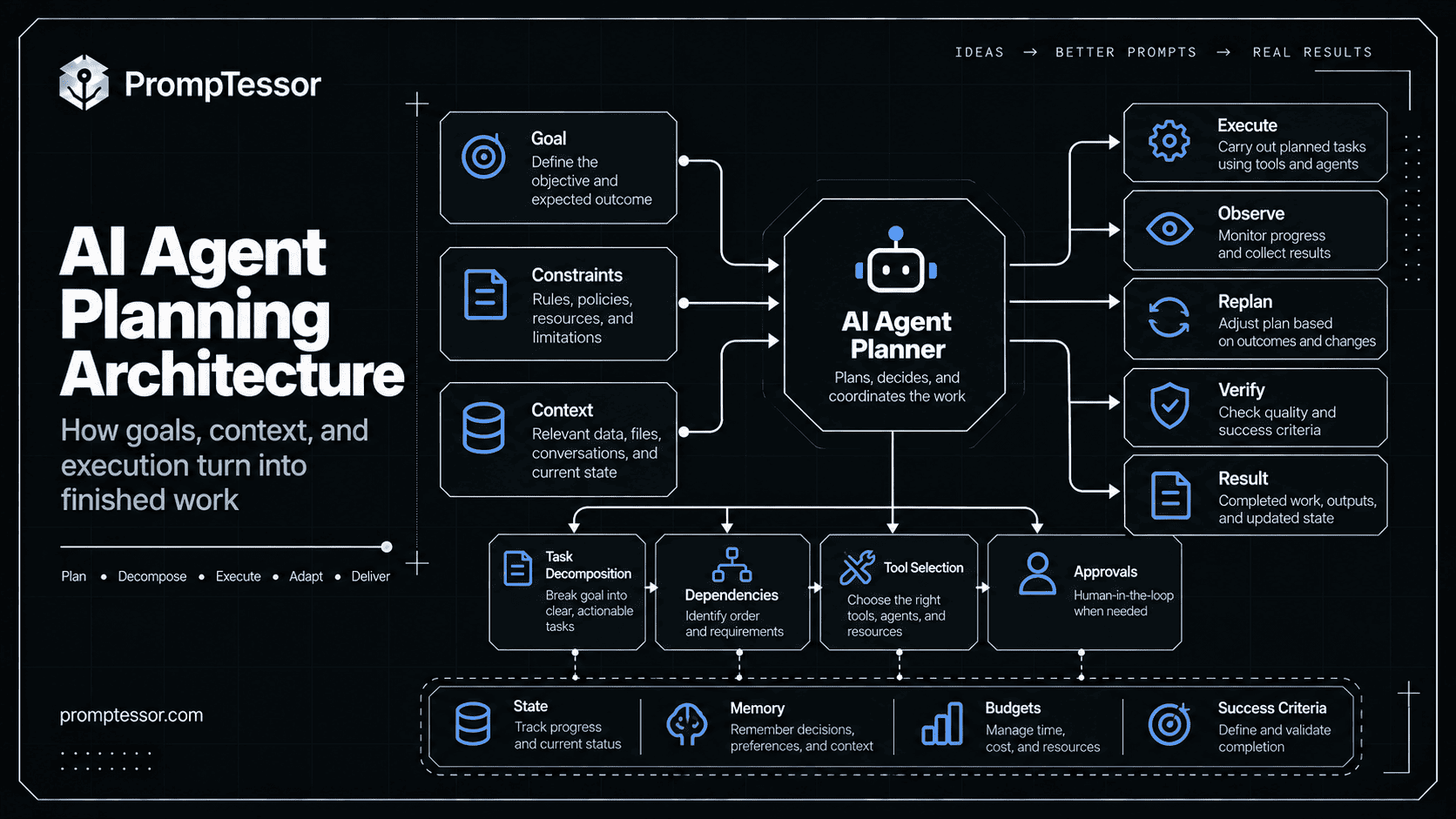
AI agent planning is the control process that sits between a high-level goal and concrete execution.
A plan can contain tasks, subtasks, dependencies, priority, required inputs, expected outputs, constraints, approval points, verification steps, and stop conditions.
For a simple task, the plan may be only a few steps:
GOAL
Prepare a current competitor pricing brief.

PLAN
1. Confirm competitor list.
2. Retrieve current pricing pages.
3. Extract plan names and prices.
4. Normalize billing periods.
5. Flag unavailable or ambiguous prices.
6. Verify dates and sources.
7. Produce comparison brief.
For a complex project, the plan may become a dependency graph rather than a linear list.
Why AI Agents Need Plans
Short tasks can often be solved reactively:
request
→ reason
→ use tool
→ answer
Longer work creates additional problems. The agent may need to remember what has already been completed. A later task may depend on an artifact that does not exist yet. The environment may change. One tool may fail. A human may change the requirements halfway through. Some branches may be safe to run in parallel, while others must wait.
Planning gives the runtime and the agent a shared representation of progress.
Microsoft's current Agent Harness includes planning and todo tracking by default for long, multi-step work. The harness combines that planning state with context management, memory, approvals, and observability. Microsoft Agent Harness documentation.
OpenAI makes a similar point in its long-horizon Codex guidance: long-running work depends less on one giant prompt and more on a loop of planning, editing or acting, running tools, observing results, repairing failures, updating state, and repeating. OpenAI's long-horizon Codex article.
Planning vs Reasoning vs Orchestration
Reasoning
Reasoning is the model's process for deciding what something means or what conclusion follows.
Planning
Planning decides what work should be performed to reach the goal.
Orchestration
Orchestration decides how the work is coordinated across agents, tools, functions, state, and humans.
Reasoning:
"What explains the conversion decline?"

Planning:
"What analyses must be performed to answer that?"

Orchestration:
"Which agent or tool should perform each analysis?"
Reasoning asks “what does this mean?” Planning asks “what work is needed?” Orchestration asks “who or what should do that work?”
For the coordination layer, see AI Agent Orchestration.
Goal Decomposition
The first planning step is usually decomposition: turning a large goal into smaller units that can be executed and verified.
Weak decomposition:
Goal: Launch a new pricing page

Plan:
1. Research
2. Build
3. Launch
Better:
Goal: Launch a new pricing page

1. Inspect current pricing structure.
2. Confirm approved plans, prices, and limits.
3. Identify pages and components affected.
4. Draft new page structure and copy.
5. Implement the pricing page.
6. Update internal links and CTAs.
7. Run responsive and functional checks.
8. Verify analytics events.
9. Review final production output.
Good decomposition gives each task a clear purpose and observable result. It also exposes where later work depends on earlier artifacts.
Choosing the Right Task Granularity
Plans fail when tasks are either too broad or too microscopic.
Too Broad
1. Analyze market
2. Build strategy
3. Finish report
Too Granular
1. Open browser
2. Open search
3. Type company name
4. Press Enter
5. Click result
6. Scroll
...
Better Level
1. Find the company's current official pricing page.
2. Extract public plans, prices, billing periods, and usage limits.
3. Record unavailable values as "not publicly listed."
4. Save source and date checked.
The task describes the outcome and constraints while leaving low-level execution to the agent.
Task Dependencies
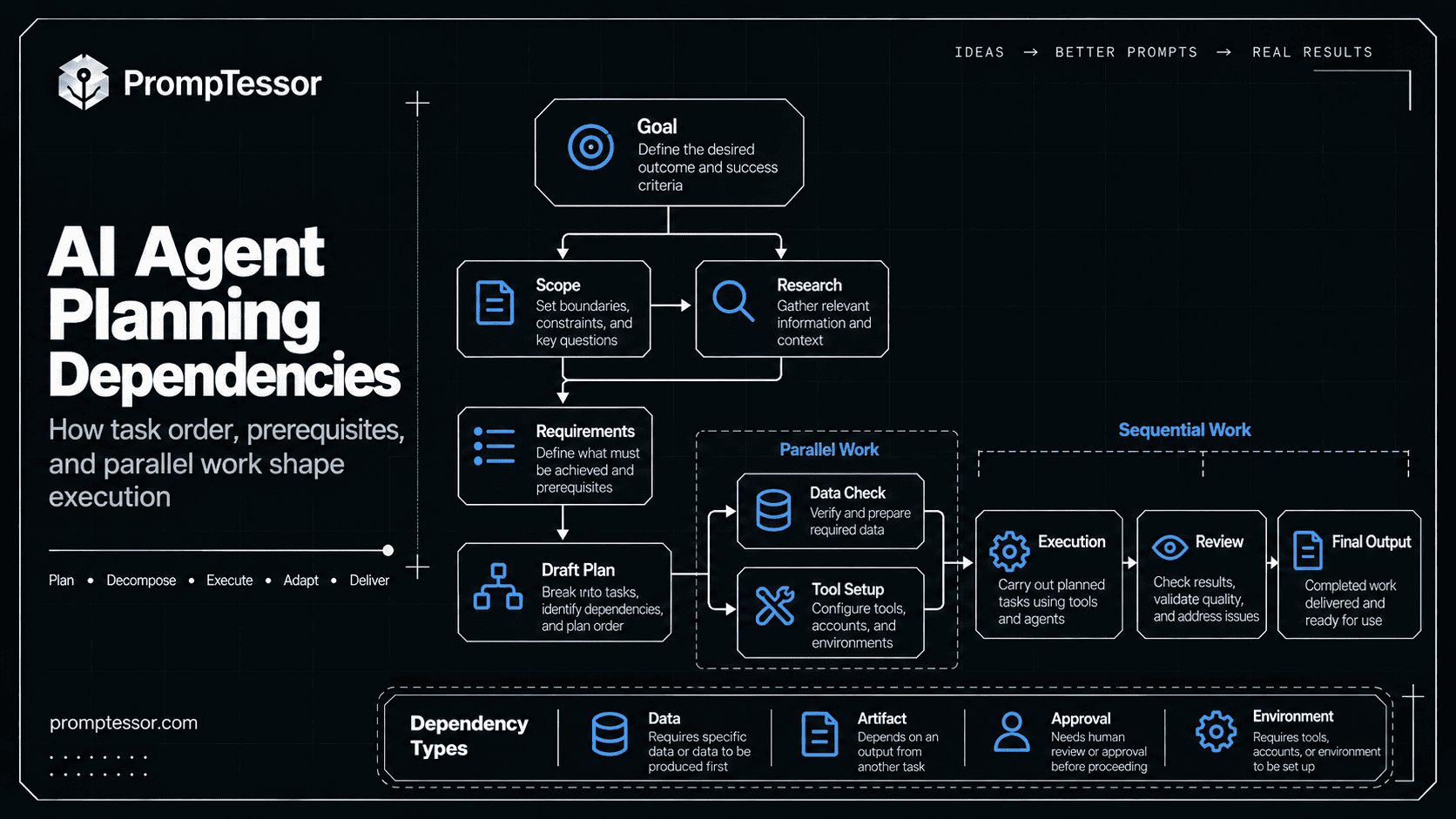
A plan should state when one task depends on another.
A. Confirm product plans
   ↓
B. Draft pricing table
   ↓
D. Implement page

C. Gather approved product copy
   ────────────────┘
Task D depends on both B and C.
Common dependency types include data dependencies, artifact dependencies, decision dependencies, permission dependencies, and environment dependencies.
Sequential vs Parallel Tasks
Some tasks must happen in order:
requirements
→ implementation
→ tests
→ deployment
Others can run independently:
                 ┌─ competitor research
goal → decompose ├─ customer demand research
                 └─ regulatory research
                         ↓
                       synthesize
Parallelization should be driven by dependency structure, not by a desire to use more agents.
Plan-and-Execute
Separating planning from execution can make long-running work easier to control.
Microsoft Agent Framework provides explicit plan and execute modes. In its default behavior, plan mode is interactive: the agent analyzes requirements, creates todos, asks clarifying questions, presents the plan, and waits before switching modes. Execute mode is designed to work through the plan autonomously. Microsoft planning modes.
PLAN MODE
  ↓
understand goal
  ↓
clarify uncertainty
  ↓
create tasks
  ↓
identify dependencies
  ↓
present plan
  ↓
permission to execute?

YES
  ↓

EXECUTE MODE
  ↓
work current task
  ↓
observe result
  ↓
update progress
  ↓
replan if needed
  ↓
continue until verified complete
Todo and Task Tracking
A plan written once in prose is easy to forget. For long-running work, track tasks as state.
Microsoft's planning provider gives agents todo tools to add, complete, remove, and inspect work. The current todo list can be injected back into later runs so unfinished work remains visible. Microsoft todo tools.
{
  "id": "task_4",
  "title": "Verify analytics events",
  "status": "blocked",
  "depends_on": ["task_3"],
  "required_output": "event validation report",
  "attempts": 0,
  "blocker": "production URL not deployed"
}
External todo state helps progress survive context compression, makes blockers visible, and lets replanning remove obsolete work without reconstructing the entire chat.
Dynamic Planning
Static plans assume the environment will behave as expected. Agents operate in changing environments.
GOAL
Prepare an evidence-backed pricing brief.

ORIGINAL PLAN
1. Check vendor pricing page.
2. Extract prices.
3. Compare plans.

OBSERVATION
Vendor removed public pricing.

UPDATED PLAN
1. Confirm no current official public pricing exists.
2. Search approved official documentation.
3. Record "contact sales" where applicable.
4. Do not infer missing price.
The goal remains the same. The execution path changes because the evidence environment changed.
Replanning
Replanning means revising the current plan based on new state. It is not simply generating another plan from scratch.
A good replanner asks what has already been completed, which facts are still valid, which tasks are obsolete, what new work became necessary, and whether completed artifacts can be reused.
OLD PLAN
A → B → C → D

A complete
B complete
C fails

REPLAN
keep A
keep B
replace C with C2
add verification V
then continue to D
Replanning should preserve valid work instead of discarding the entire trajectory.
When Should an Agent Replan?
Useful triggers include:
- a key assumption becoming false,
- new evidence changing the correct path,
- the user changing scope,
- a required tool or permission becoming unavailable,
- verification failing,
- a task becoming unnecessary,
- or execution exceeding its time or cost budget.
Do not replan after every minor observation. Excessive replanning can become another form of looping.
Detecting Plan Failure
An agent cannot replan reliably unless it can recognize that the current plan is failing.
Signals include repeated tool errors, multiple attempts with no new result, blocked dependencies, verification failures, contradictory state, missing required evidence, or no measurable progress.
IF
same step fails 3 times
OR
required dependency cannot be satisfied
OR
verification contradicts expected state

THEN
stop current execution
summarize blocker
replan or escalate
Handling Missing Information
Planning should distinguish between information that can be discovered and information only the user or an authorized person can provide.
MISSING INFORMATION
        ↓
CAN AGENT DISCOVER IT?
   ├─ YES → research
   └─ NO
        ↓
IS IT REQUIRED?
   ├─ NO → continue with explicit limitation
   └─ YES → ask / block
Do not silently invent a requirement simply to keep the plan moving.
Handling Tool Failure
Tool failure should change the plan only when it affects the task path.
PLAN
1. Fetch API data.
2. Analyze results.
3. Generate report.

TOOL RESULT
API unavailable.

RECOVERY
1. Retry within bounded policy.
2. Check approved alternate source.
3. Preserve valid partial data.
4. If no reliable source exists, report blocker.
5. Do not fabricate missing results.
OpenAI's long-running Codex guidance emphasizes a repeated plan → act → tool → observe → repair loop. External feedback such as tests, logs, and command results keeps execution grounded in what actually happened. OpenAI long-horizon agent loop.
Plan Validation
Before execution begins, validate whether the plan is operationally possible.
- Does every required outcome appear in the plan?
- Are dependencies satisfiable?
- Are required tools available?
- Does the agent have the necessary permissions?
- Are approval points included before high-impact actions?
- Can completion be verified?
- Is the plan within time, cost, and step budgets?
Progress Tracking
Long-running agents need visible progress.
pending
ready
in_progress
blocked
waiting_for_approval
failed
complete
removed
Progress should reflect real work, not narrative confidence.
Better than “90% complete”:
6 / 8 required tasks complete
1 blocked on approval
1 waiting on production deployment
verification not started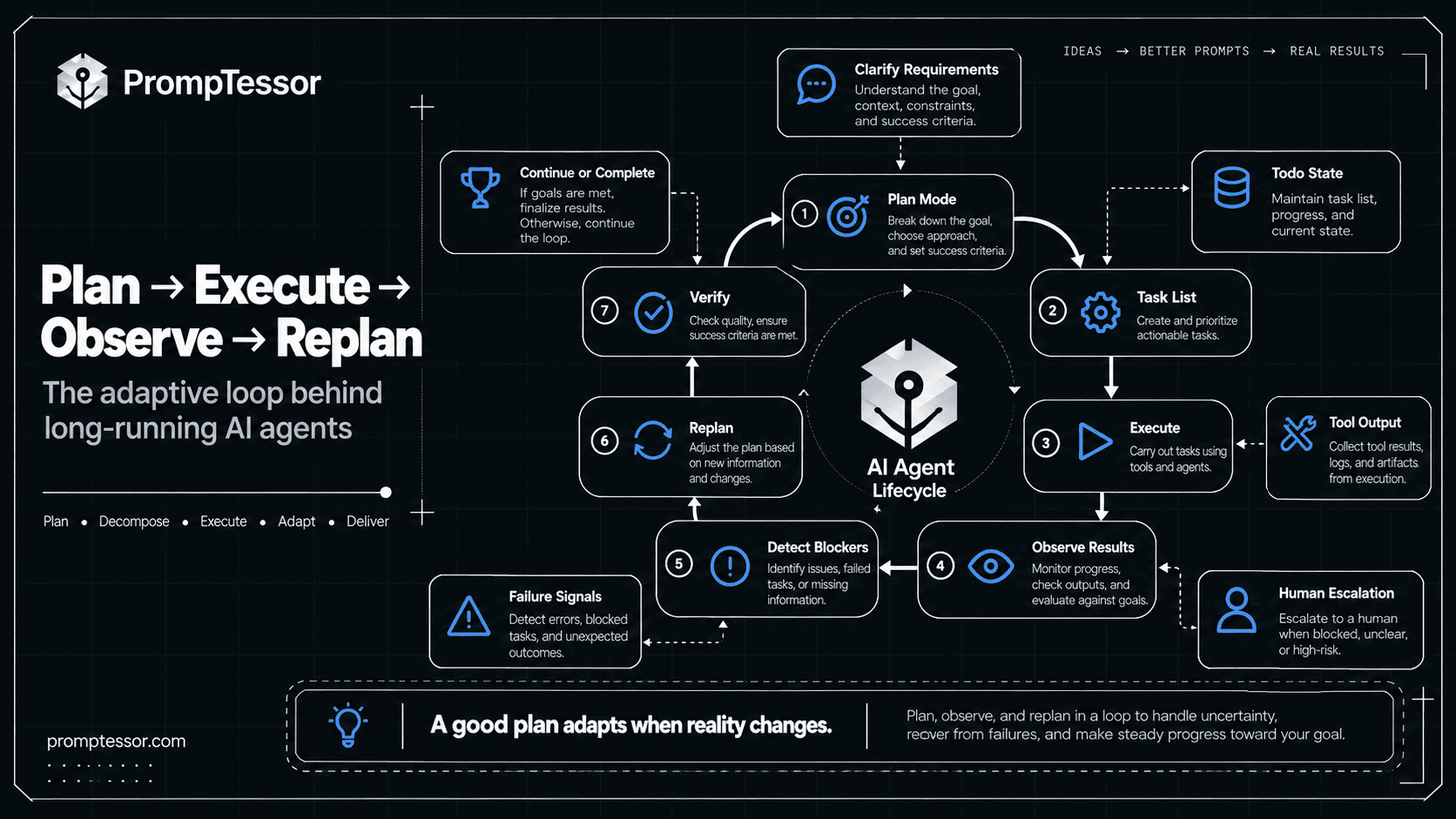
Stop Conditions
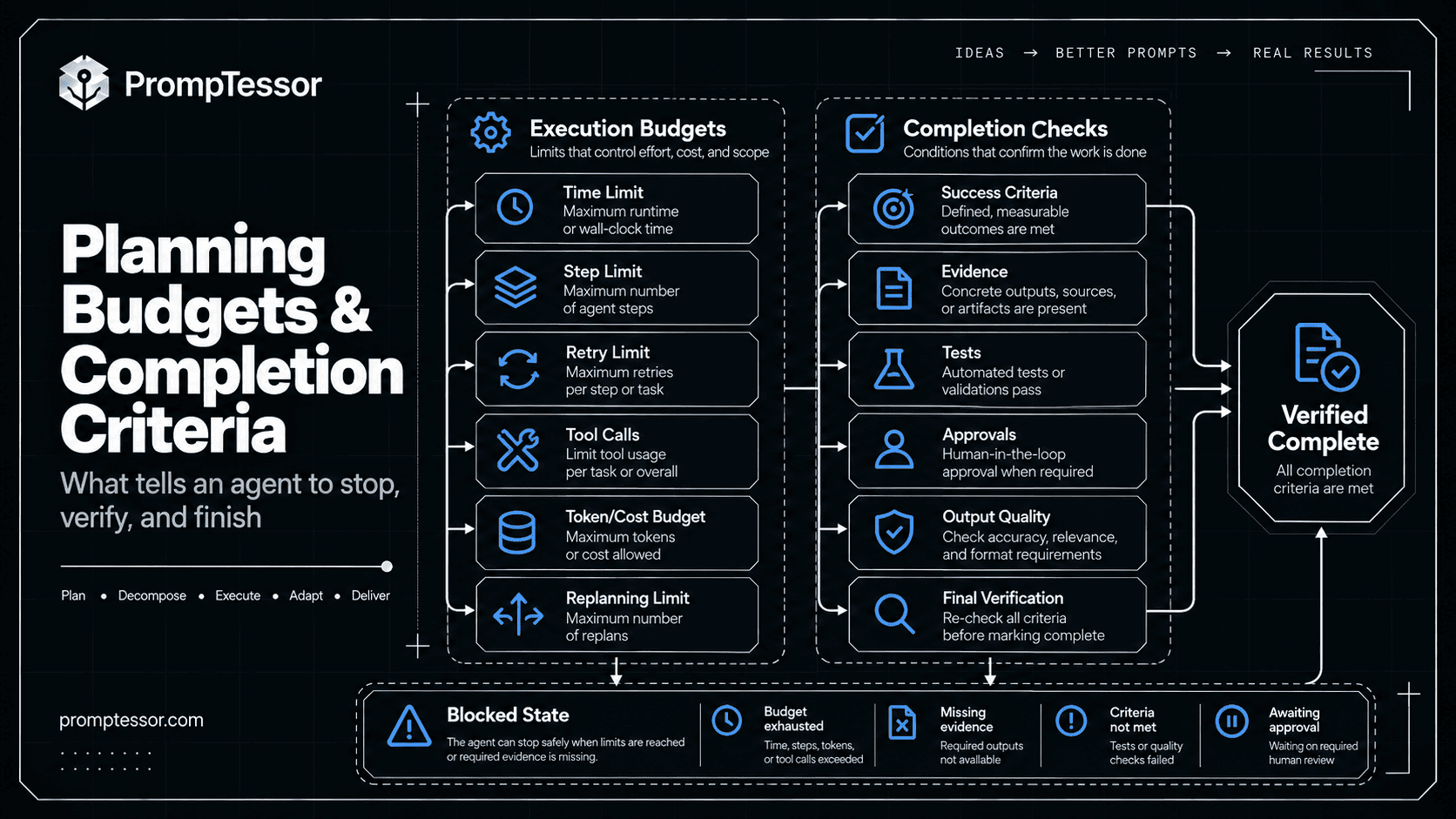
An agent plan should define when execution must stop.
- goal verified complete,
- required approval unavailable,
- critical dependency cannot be satisfied,
- step limit reached,
- token or cost budget reached,
- time window expired,
- repeated failures exceed retry policy,
- or continuing is unlikely to materially improve the result.
Microsoft's todo-driven execution examples use bounded loops with explicit maximum iterations rather than unlimited continuation. Microsoft bounded todo execution.
Verification Before Completion
The plan should not end when the agent marks the final task complete. It should end when the required real-world outcome has been verified.
Example: Landing Page
DONE WHEN
✓ production URL loads
✓ required copy is present
✓ CTA works
✓ mobile layout passes
✓ analytics event fires
✓ no blocking console error
Example: Research Brief
DONE WHEN
✓ every material claim has evidence
✓ sources are current enough
✓ conflicting evidence is surfaced
✓ required competitors are covered
✓ unknown values are marked unknown
✓ recommendation follows from evidence
OpenAI notes that long-running coding work benefits from external feedback such as tests, builds, diffs, logs, and a disciplined “done when” routine. OpenAI on verification in long tasks.
Planning Budgets and Limits
Plans need execution budgets.
- maximum model turns,
- maximum tool calls,
- maximum retry count,
- maximum number of subtasks,
- time limit,
- token budget,
- cost budget,
- or maximum replanning cycles.
Budget exhaustion should produce a useful blocked or incomplete state rather than silent failure.
Planning for Long-Running Agents
Long-running agents need planning state that can survive beyond one context window or one application process.
OpenAI's Agents API is built for long-running tasks where the managed harness can save progress while agents work with files, run code, and persist intermediate results. OpenAI Agents API announcement.
Microsoft's Harness Agent similarly keeps session state for plan, todos, and history across interactive work. Microsoft Agent Harness quickstart.
Useful external state may live in todo lists, files, checkpoints, issue trackers, database records, test results, artifact stores, or structured workflow state. The context window should not be the only place where the plan exists.
Planning in Multi-Agent Systems
A planner may create work that is later delegated to specialists.
GOAL
Prepare market-entry recommendation
       ↓
PLANNER
       ↓
PLAN
├─ market demand
├─ competitors
├─ regulation
└─ economics
       ↓
ORCHESTRATOR
├─ Research Agent A
├─ Research Agent B
├─ Research Agent C
└─ Finance Agent
       ↓
REVIEW GAPS
       ↓
REPLAN IF NEEDED
       ↓
FINAL SYNTHESIS
The planner should not create parallel agents unless the tasks are meaningfully separable.
For the coordination layer, see AI Agent Orchestration.
Practical AI Agent Planning Examples
1. Research Agent
GOAL
Recommend whether to enter a new market.

PLAN
1. Define market and time scope.
2. Gather current demand evidence.
3. Identify leading competitors.
4. Review customer pain points.
5. Check regulatory constraints.
6. Estimate economic attractiveness.
7. Identify unresolved uncertainties.
8. Verify important claims.
9. Produce recommendation.
2. Coding Agent
GOAL
Fix checkout failure.

PLAN
1. Reproduce the failure.
2. Inspect logs and recent changes.
3. Identify likely root cause.
4. Implement minimal fix.
5. Add regression test.
6. Run targeted tests.
7. Run broader validation.
8. Review diff.
9. Verify checkout behavior.
3. Business Operations Agent
GOAL
Prepare monthly operating review.

PLAN
1. Collect approved financial metrics.
2. Check data completeness.
3. Compare plan vs actual.
4. Identify largest variances.
5. Find operational drivers.
6. Flag anomalies.
7. Draft decisions and follow-ups.
8. Prepare executive summary.
9. Route high-impact recommendations for review.
Common AI Agent Planning Mistakes
1. Restating the Goal Instead of Planning
“Research competitors thoroughly” is not a useful decomposition.
2. Decomposing Too Aggressively
More tasks do not automatically mean better planning.
3. Ignoring Dependencies
The agent starts work that requires information or artifacts that do not exist yet.
4. Keeping the Plan Only in Chat Text
Progress becomes difficult to recover after long runs or context compression.
5. Never Replanning
The agent follows an obsolete plan even after reality changes.
6. Replanning Constantly
The agent spends more effort reorganizing work than executing it.
7. No Completion Criteria
Tasks become complete when the model feels finished.
8. No Execution Budget
The agent can loop indefinitely.
9. Treating Planning as a Substitute for Verification
A perfect-looking plan does not prove successful execution.
10. Mixing Planning Authority With Execution Authority
An agent may be allowed to propose a production change without being allowed to deploy it. Planning and permissions are different layers.
For approval architecture, see Human-in-the-Loop AI Agents.
AI Agent Planning Production Checklist
Goal
- Is the desired outcome observable?
- Are constraints and non-goals clear?
- Does the plan preserve the user's actual objective?
Tasks
- Does every task produce something useful?
- Is task granularity actionable but not brittle?
- Are obsolete tasks removable?
Dependencies
- Are prerequisites explicit?
- Can independent work safely run in parallel?
- Are approvals modeled as dependencies where needed?
State
- Is plan state persisted outside the chat transcript?
- Can progress survive restart or compaction?
- Are blockers visible?
Replanning
- What events should trigger replanning?
- Does replanning preserve valid completed work?
- Can the agent distinguish a local retry from a plan failure?
Execution
- Are step, time, token, and cost limits defined?
- Are high-impact actions gated?
- Can missing information pause execution?
Verification
- Does each important task have success criteria?
- Is final completion verified against external state?
- Can the agent return blocked rather than claim success?
Observability
- Can you inspect the original plan?
- Can you see plan changes and why they occurred?
- Can you compare planned vs actual execution?
- Can you identify repeated replanning or stalled tasks?
For production tracing, see LLM Observability. For testing whether planning behavior works, see AI Agent Evaluation.
Where PrompTessor Fits
PrompTessor works at the instruction layer of planning.
GOAL
What outcome should the plan achieve?

CONSTRAINTS
What must the plan respect?

DECOMPOSITION
What level of task detail is useful?

DEPENDENCIES
What must happen before other work can begin?

ASSUMPTIONS
What should be verified instead of guessed?

REPLANNING
What changes justify revising the plan?

ESCALATION
When should the agent ask rather than decide?

VERIFICATION
What proves each critical step succeeded?

COMPLETION
What observable state means the overall goal is done?
The ChatGPT Prompt Generator can help turn a rough goal into a structured instruction draft. The AI Prompt Analyzer can help identify unclear goals, missing constraints, weak task boundaries, or ambiguous completion criteria. The AI Prompt Optimizer can generate stronger instruction candidates once you understand where the planning behavior failed.
For broader agent instruction design, see AI Agent Prompts. For autonomous long-running execution, see Autonomous AI Agents. For framework implementation choices, see AI Agent Frameworks.
Use PrompTessor to make the goal, constraints, planning rules, replanning triggers, and completion criteria clearer. Use the runtime to persist tasks, enforce permissions, execute tools, track progress, and verify outcomes.
Official Resources
- Microsoft Agent Framework — Planning and Todos
- Microsoft Agent Framework — Agent Harness
- Microsoft Agent Framework — Harness Quickstart
- OpenAI — Agents
- OpenAI — Run Long-Horizon Tasks With Codex
- OpenAI — Introducing the Agents API
FAQ
What is AI agent planning?
AI agent planning is the process of turning a high-level goal into trackable tasks, identifying dependencies and constraints, executing the work, observing results, and revising the plan when conditions change.
Why do AI agents need planning?
Planning becomes useful when a task requires multiple dependent steps, long-running work, intermediate artifacts, progress tracking, tool use, approvals, or recovery from changing conditions.
What is task decomposition in AI agents?
Task decomposition is the process of breaking a large goal into smaller executable units with clear outputs, dependencies, and success criteria.
What is plan-and-execute?
Plan-and-execute separates requirement analysis and plan creation from autonomous execution. The agent can first clarify requirements and build a task plan, then switch into execution once the plan is ready or approved.
What is replanning in an AI agent?
Replanning is the process of updating an existing plan when assumptions, evidence, requirements, dependencies, tools, or external conditions change. Good replanning preserves valid completed work rather than restarting from zero.
When should an AI agent replan?
An agent should consider replanning when a key assumption becomes false, new evidence changes the correct path, a required tool or permission is unavailable, verification fails, the user changes scope, or the current path stops making meaningful progress.
How detailed should an agent plan be?
A plan should be detailed enough that tasks have clear outputs and dependencies, but not so detailed that it encodes fragile UI-level actions or unnecessary microsteps.
What is the difference between planning and orchestration?
Planning decides what work is required to reach the goal. Orchestration coordinates which agent, tool, function, workflow branch, or human should perform that work.
How should an agent track plan progress?
For long-running tasks, progress should be stored as explicit task state with statuses such as pending, in progress, blocked, waiting for approval, failed, and complete rather than relying only on conversation history.
How do you stop an AI agent from planning forever?
Use explicit stop conditions and budgets such as maximum turns, retries, tool calls, replanning cycles, time, tokens, or cost. The workflow should be able to return a blocked or incomplete state when limits are reached.
How do you verify that an agent plan is complete?
Define observable completion criteria. For code, that may include tests and runtime behavior. For research, it may include source coverage, evidence quality, and resolved uncertainties.
Can PrompTessor help with AI agent planning?
PrompTessor can help generate, analyze, optimize, and refine the instruction layer for planning: goals, constraints, decomposition rules, replanning triggers, escalation behavior, verification, and completion criteria. The runtime remains responsible for persisting tasks, executing tools, enforcing permissions, and tracking state.
Conclusion
AI agent planning is not about forcing a model to write a long checklist before it acts.
It is about giving long-running work a structure that can survive contact with reality.
GOAL
  ↓
DECOMPOSE
  ↓
DEPENDENCIES
  ↓
PLAN
  ↓
EXECUTE
  ↓
OBSERVE
  ↓
REPLAN WHEN NEEDED
  ↓
TRACK PROGRESS
  ↓
VERIFY
  ↓
COMPLETE
A good plan makes work easier to execute, inspect, recover, and verify.
For simple tasks, skip the planning machinery and let one agent act directly. For long-running work, externalize the plan. Track unfinished tasks. Make dependencies explicit. Give the agent clear replanning triggers. Bound execution. Preserve completed work. And never let “the plan says we are done” substitute for checking whether the real-world outcome actually exists.
Build better prompts in one workspace
Generate prompts from ideas, analyze and optimize quality, refine with feedback, reverse-engineer content, and save reusable prompts in your Prompt Library.
Try PrompTessor Free