AI Agent Prompts: How to Write Better Instructions for Tool-Using AI Agents
AI agents need more than a clever prompt.
A normal prompt usually asks a model to produce an answer.
An agent prompt has a broader job: it must guide a system that may decide what to do next, call tools, change state, ask the user for missing information, delegate work, recover from failure, verify its progress, and determine when the task is complete.
That difference changes how agent instructions should be written.
A useful mental model is:
NORMAL PROMPT
Tell the model what to answer.

AGENT INSTRUCTIONS
Tell the agent:
- what outcome to achieve
- what it is responsible for
- what tools it may use
- when to use them
- what actions require approval
- how to handle uncertainty
- when to delegate
- how to verify work
- when to stop
OpenAI's current Agents SDK describes an agent as an LLM configured with instructions, tools, and optional runtime behavior such as handoffs, guardrails, and structured outputs. Anthropic distinguishes predefined workflows from agents that dynamically direct their own processes and tool usage. Google's Agent Development Kit guidance says agent instructions should concisely explain what the agent does, when it should defer to other agents or tools, and how it should respond to the user.
These ideas point to the same conclusion:
An agent prompt is not just a request. It is a behavioral contract for how an AI system should pursue a goal over multiple steps.
This guide explains how to write AI agent prompts for tool use, handoffs, state management, verification, action boundaries, failure recovery, completion criteria, and evaluation without confusing prompt instructions with actual runtime enforcement.
Quick Answer
A strong AI agent prompt usually defines eight core layers:
1. GOAL
What outcome should be achieved?

2. ROLE & SCOPE
What is this agent responsible for?

3. AVAILABLE TOOLS
What capabilities exist?

4. TOOL-USE POLICY
When should each tool be used?

5. DECISION RULES
How should the agent choose its next action?

6. ACTION BOUNDARIES
What requires approval or must never happen automatically?

7. VERIFICATION
How should the agent check its work?

8. COMPLETION & STOP CONDITIONS
When is the task finished, and when should the agent stop or ask?
A compact template looks like this:
GOAL
Produce a verified research brief that answers the user's question.

SCOPE
You may search public sources, compare evidence, and synthesize findings.
You may not contact third parties or modify external data.

TOOLS
- web_search: use for current public information
- calculator: use for arithmetic
- document_search: use for uploaded/internal documents

TOOL POLICY
Use the smallest tool action needed to resolve missing information.
Do not call a tool when the answer is already supported by current context.

ACTION BOUNDARIES
Read-only actions may proceed automatically.
External writes or irreversible actions require explicit authorization.

VERIFICATION
Before finishing:
- confirm every requested item is addressed
- verify material claims against evidence
- confirm tool actions succeeded
- report unresolved uncertainty

COMPLETION
The task is complete only when the requested deliverable is produced,
required evidence is collected, and no required action remains pending.

STOP
Ask the user when required authorization or non-inferable information is missing.
Key Takeaways
- Agent instructions are broader than one-shot prompts because agents operate across multiple decisions and actions.
- Define the outcome before defining the persona.
- Give the agent explicit scope: what it owns and what it does not own.
- Tool descriptions are part of the prompt surface and strongly influence tool selection.
- Listing tools is not enough; specify when each tool should and should not be used.
- Use operational decision rules rather than asking for hidden chain-of-thought.
- Prompt instructions are not a security boundary. Authorization and guardrails should be enforced in application code or agent runtime.
- Separate read-only, reversible, and irreversible actions.
- Define what the agent should do when tools fail.
- Avoid unlimited retries and open-ended loops.
- Define completion criteria explicitly so the agent knows when work is actually finished.
- Define stop conditions for missing authorization, unresolved conflicts, or unsafe ambiguity.
- Handoffs and agents-as-tools are different orchestration patterns.
- Start with one agent plus tools when possible; add multi-agent complexity only when specialization is useful.
- State management becomes increasingly important as the agent runs for more turns.
- Long-running agents need context engineering, retrieval, summarization, or compaction strategies.
- Agent evaluation should test tool selection, state changes, handoffs, recovery behavior, and task success—not only the final answer.
- PrompTessor can help design and improve the instruction layer, while the agent framework or application remains responsible for runtime execution, permissions, tools, and enforcement.
Table of Contents
- What Is an AI Agent Prompt?
- AI Agent Prompt vs. Normal Prompt
- AI Agent vs. Workflow
- Agent Instructions vs. System Prompts
- Anatomy of an AI Agent Prompt
- Define the Outcome, Not Just the Persona
- Define Role and Scope
- Tool Descriptions Are Part of the Prompt Surface
- Tell the Agent When to Use a Tool
- Write an Operational Decision Policy
- Define Action Boundaries
- State Management for Agents
- Observation → Decision → Action → Verification
- Verification Instructions
- Completion Criteria and Stop Conditions
- Failure Recovery and Retry Rules
- Handoffs and Delegation
- Handoffs vs. Agents as Tools
- Single-Agent vs. Multi-Agent Prompts
- Agent Instructions vs. Guardrails
- Structured Outputs for Agents
- Agent Context and Memory
- Agent Prompts and Prompt Caching
- Agent Prompts and Long Context
- How to Evaluate Agent Prompts
- AI Agent Prompt Examples
- Common AI Agent Prompting Mistakes
- Where PrompTessor Fits
- AI Agent Prompt Checklist
- Official Resources
- FAQ
What Is an AI Agent Prompt?
An AI agent prompt is the instruction layer that guides an agent's behavior across a multi-step execution process.
Instead of only describing the final answer, it may describe:
- the goal,
- the agent's responsibility,
- available tools,
- tool-use rules,
- delegation conditions,
- state-management expectations,
- verification behavior,
- action boundaries,
- and completion conditions.
The prompt does not have to contain every implementation detail. Some behavior belongs in code, schemas, permissions, guardrails, or orchestration logic.
The prompt's job is to make the model's role in the system clear.
A Simple Agent Loop
USER GOAL
    ↓
AGENT
    ↓
CHOOSE NEXT STEP
├ Answer
├ Use tool
├ Retrieve context
├ Ask user
├ Delegate
└ Continue
    ↓
OBSERVE RESULT
    ↓
VERIFY
    ↓
COMPLETE?
├ No → choose next step
└ Yes → final output
OpenAI's Agents SDK currently provides a built-in runner that manages turns, tool execution, guardrails, handoffs, and sessions. Anthropic describes a similar conceptual pattern: agents are typically LLMs using tools in a loop while receiving environmental feedback.
AI Agent Prompt vs. Normal Prompt
| Normal Prompt | Agent Prompt |
|---|---|
| Usually targets one response | Guides multi-step behavior |
| Focuses on answer quality | Focuses on decisions, actions, and answer quality |
| May not use tools | Often coordinates tool use |
| Usually has one task boundary | Needs progress and completion rules |
| Often stateless | May maintain runtime state |
| Few failure paths | Must handle tool failure, ambiguity, and blockers |
NORMAL PROMPT

Task
↓
Model
↓
Answer


AGENT PROMPT

Goal
↓
Agent
↓
Decision
↓
Tool / Ask / Delegate / Answer
↓
Observation
↓
Next Decision
↓
Verification
↓
Completion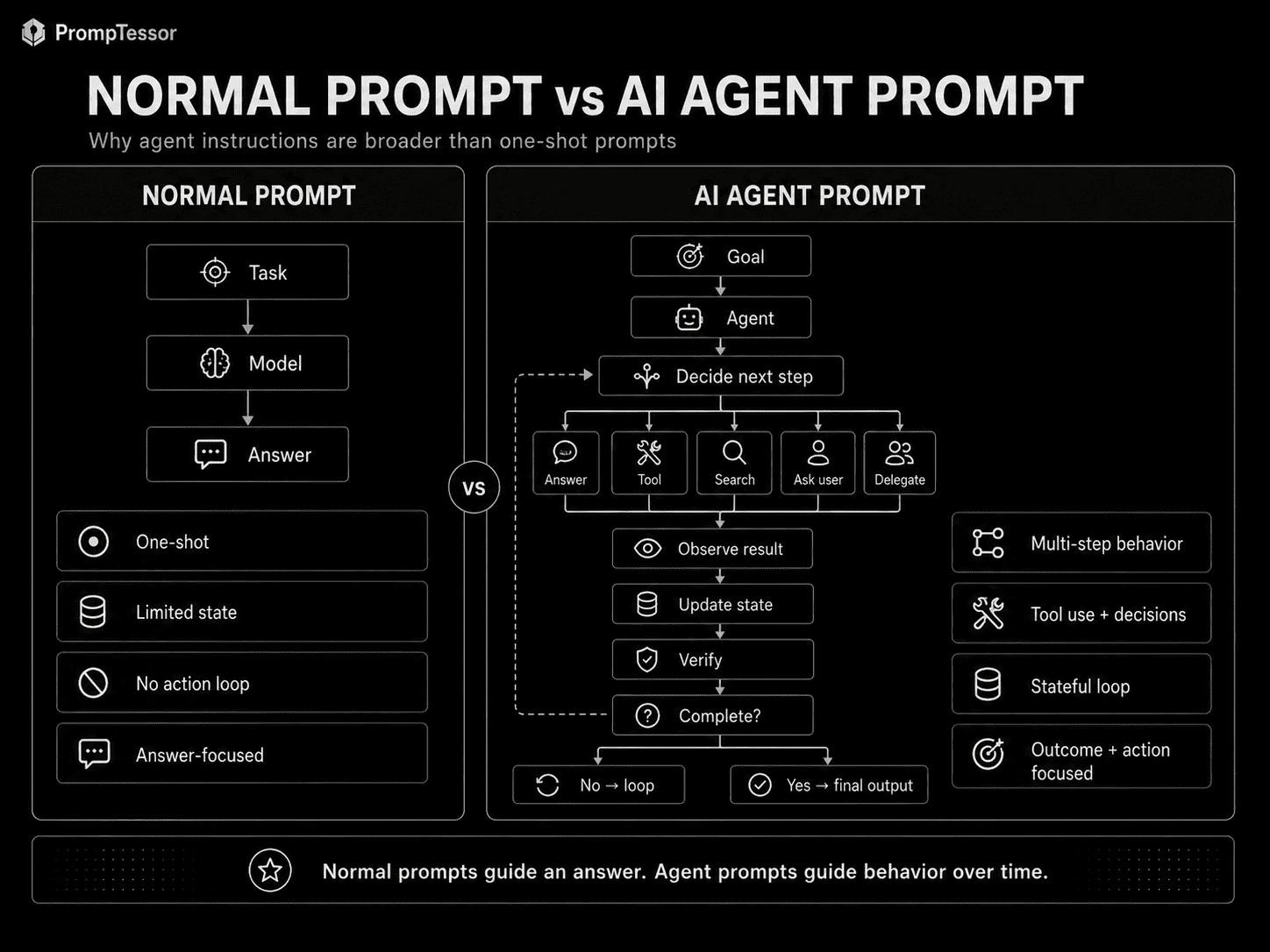
AI Agent vs. Workflow
Not every multi-step AI system should be called an agent.
Anthropic makes a useful architectural distinction:
- Workflows use predefined code paths to orchestrate LLMs and tools.
- Agents allow the model to dynamically direct its own process and tool usage.
Workflow
INPUT
↓
STEP A
↓
STEP B
↓
STEP C
↓
OUTPUT
The developer decides the path.
Agent
GOAL
↓
MODEL DECIDES
├ Search
├ Tool A
├ Tool B
├ Ask user
├ Delegate
└ Finish
The model chooses the next action within the boundaries of the system.
When to Prefer a Workflow
- the sequence is known in advance,
- predictability matters more than flexibility,
- the task can be decomposed into fixed stages,
- or each stage has a clear deterministic gate.
When to Prefer an Agent
- the required number of steps is unknown,
- the model must inspect the environment and adapt,
- tool choice changes depending on intermediate results,
- or the problem is open-ended enough that a fixed path is impractical.
Anthropic currently recommends starting with the simplest solution possible and increasing agentic complexity only when the extra flexibility justifies the cost and latency tradeoff.
Agent Instructions vs. System Prompts
Agent instructions often live in a system- or developer-level instruction field, but the concepts are not identical.
A system prompt commonly defines:
- identity,
- behavior,
- response style,
- rules,
- and constraints.
Agent instructions may also need to define:
- tool selection,
- delegation,
- action boundaries,
- state handling,
- verification,
- retry behavior,
- and stopping conditions.
For a deeper discussion of system-level instruction design, see System Prompts: How They Work and How to Write Better AI Instructions.
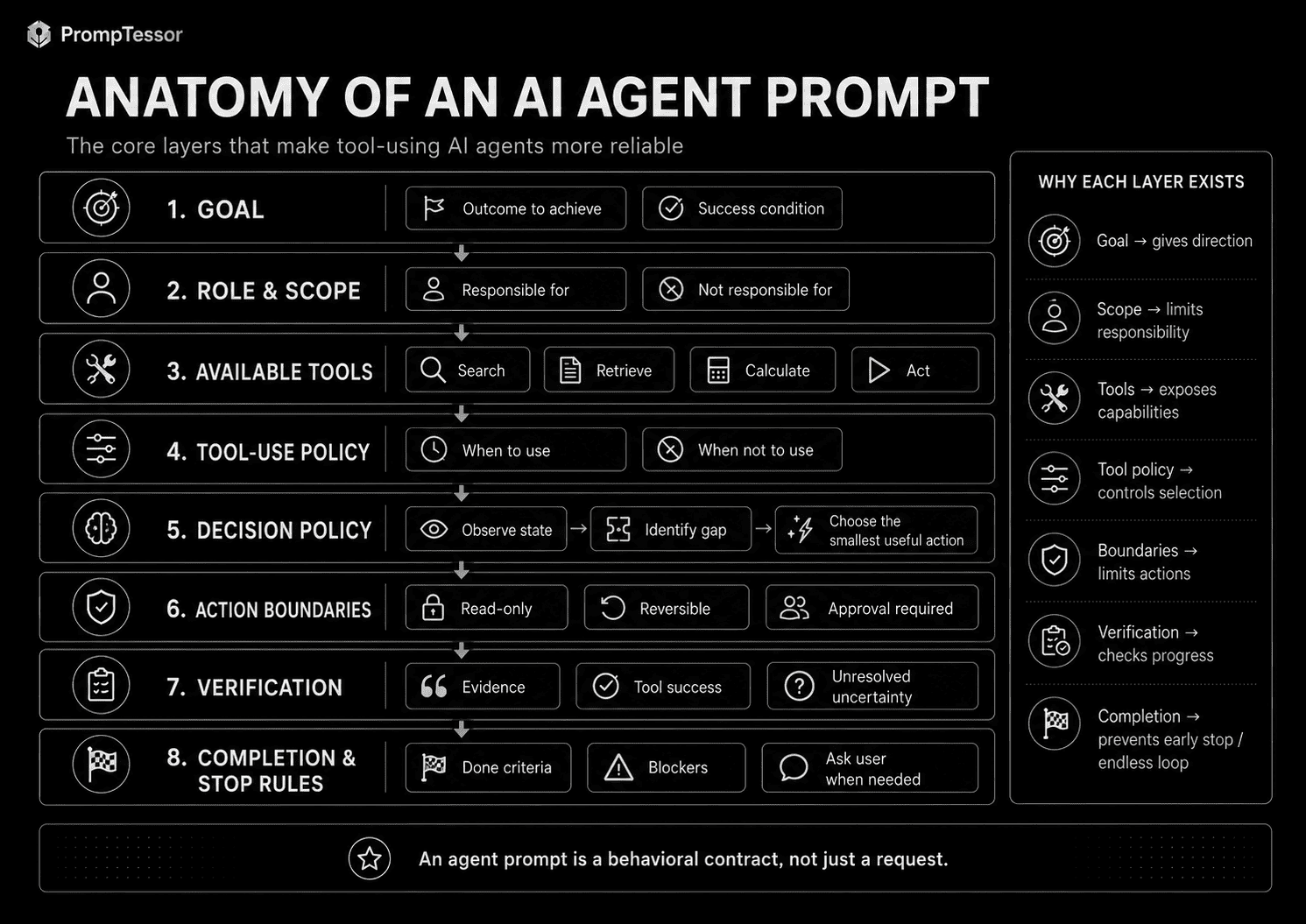
Anatomy of an AI Agent Prompt
A useful agent prompt can be modeled as eight layers.
1. GOAL
   What outcome should be achieved?

2. ROLE & SCOPE
   What is the agent responsible for?

3. TOOLS
   What capabilities are available?

4. TOOL-USE POLICY
   When should each tool be used?

5. DECISION POLICY
   How should the agent choose the next step?

6. ACTION BOUNDARIES
   What actions require approval or must be blocked?

7. VERIFICATION
   How should work be checked?

8. COMPLETION & STOP RULES
   When is the task finished or blocked?
The eight layers do not need to appear as eight literal headings in every prompt. The important part is that the behavior is defined somewhere in the effective agent context.
Define the Outcome, Not Just the Persona
One of the most common weak agent prompts begins with a persona and stops there.
Weak
You are an expert research agent.This says what the agent is supposed to sound like, but not what success means.
Better
GOAL
Produce a verified research brief that answers the user's question
using current, high-quality sources.

Success means:
- the question is answered directly
- material claims are supported
- disagreements between sources are surfaced
- uncertainty is reported
- the final brief is concise enough to act on
Why Goals Matter
Agents operate over multiple steps. A clear goal provides a stable target when the model must choose between several possible next actions.
For example:
Should I search again?
Should I use another tool?
Should I ask the user?
Do I already have enough evidence?
Should I stop?
Those decisions are easier when success is explicit.
Goal vs. Method
Avoid overconstraining an agent with a method when the method is not essential.
Weak:
Search the web five times, then summarize the results.Better:
Find enough current evidence to answer the question reliably.
Search again only when material uncertainty remains.
The second version gives the agent room to adapt while still defining the desired outcome.
Define Role and Scope
Scope tells the agent what it owns.
YOU ARE RESPONSIBLE FOR
- finding relevant public sources
- comparing evidence
- identifying disagreement
- producing the final research brief

YOU ARE NOT RESPONSIBLE FOR
- contacting sources
- making purchases
- modifying user data
- publishing content externally
Why Negative Scope Helps
Agents with tools may have many possible actions. Explicit exclusions reduce unnecessary autonomy.
Scope Should Match Runtime Permissions
If the prompt says an agent cannot send email but the runtime exposes an unrestricted send-email tool, the prompt alone is not a reliable security boundary.
The application should enforce the same boundary through permissions, approval gates, or tool availability.
Tool Descriptions Are Part of the Prompt Surface
Tools are not merely backend functions.
The model typically sees tool names, descriptions, argument schemas, and sometimes examples. Those descriptions influence whether the model understands when and how a tool should be used.
OpenAI's current Agents SDK supports hosted tools, local/runtime tools, function tools, agents as tools, and other tool categories. Anthropic also emphasizes that tool definitions deserve the same prompt-engineering attention as the overall agent prompt.
Weak Tool Description
search(query)
Search things.
Better Tool Description
search_web(query)
Search current public web sources.

Use when:
- the answer depends on current information
- the user asks for verification
- a named company, product, person, or event may have changed

Do not use when:
- the task only transforms text already supplied by the user
Tool Names Matter
Prefer descriptive names:
get_current_order_status
search_product_docs
calculate_tax
create_support_ticket
over ambiguous names:
lookup
process
do_action
helper
Argument Schemas Matter
Structured arguments can reduce ambiguity.
create_refund_request(
  order_id,
  reason,
  amount,
  user_confirmed
)
is clearer than:
refund(data)Tell the Agent When to Use a Tool
Giving an agent access to a tool does not guarantee that the model will use it correctly.
OpenAI's current Agents SDK explicitly notes that merely supplying tools does not always mean a model will invoke them; tool choice can also be configured at runtime.
Useful Tool Policy
TOOL POLICY

Use web_search when:
- current public information is required
- a factual claim should be verified externally

Use document_search when:
- the answer depends on uploaded or internal documents

Use calculator when:
- arithmetic or unit conversion is required

Do not use a tool when:
- current context already contains sufficient evidence
- the tool cannot materially improve the answer
Use the Smallest Necessary Action
Before using a tool:
1. identify what information is missing
2. choose the smallest action that can resolve it
3. use only the tool needed for that gap
4. re-evaluate after the result returns
This reduces unnecessary calls and helps control latency and cost.
Write an Operational Decision Policy
Agent prompts should guide behavior without requiring the model to reveal hidden chain-of-thought.
Instead of:
Think through every step and show your complete reasoning.use operational instructions:
DECISION POLICY

Before acting:
- determine whether required information is missing
- choose the smallest useful next action
- prefer direct answers when no tool is necessary
- after every tool result, reassess whether the goal is complete
- if uncertainty remains material, gather more evidence or report it
- do not repeat equivalent actions without new information
This tells the agent what to do without demanding private reasoning traces.
Define Action Boundaries
An agent that can only search is different from an agent that can send messages, modify records, purchase products, delete files, or deploy code.
Agent instructions should distinguish action types.
Read-Only Actions
READ-ONLY
Examples:
- search
- fetch
- inspect
- calculate

May proceed automatically when needed for the user's task.
Reversible Writes
REVERSIBLE WRITES
Examples:
- create a draft
- add a temporary label
- save a local working note

Proceed only when clearly within scope.
External or Irreversible Actions
EXTERNAL / IRREVERSIBLE
Examples:
- send an email
- publish content
- purchase an item
- delete data
- deploy production changes

Require explicit authorization when the application policy requires it.
Prompt Rules Are Not Enforcement
This distinction is critical.
INSTRUCTION
"Do not send email without confirmation."

RUNTIME ENFORCEMENT
The send-email tool is blocked until approval is recorded.
The second mechanism is the actual control.
State Management for Agents
Agents may operate over many turns. They need a useful representation of what is currently true.
A practical state block can look like:
CURRENT GOAL
{goal}

CURRENT STATE
{state}

COMPLETED ACTIONS
{completed_actions}

OPEN QUESTIONS
{open_questions}

IMPORTANT ARTIFACTS
{artifacts}

NEXT POSSIBLE ACTIONS
{possible_actions}
State Is Not the Same as the Full Transcript
A full conversation contains every step that led to the current situation.
State describes what matters now.
Anthropic's current context-engineering guidance for agents emphasizes that context is finite and that an agent loop continually generates information that must be curated over time.
Keep Raw Evidence Retrievable
Summarizing state does not mean deleting important source material. Store or retrieve raw evidence when exact wording, logs, code, or audit history may still matter.
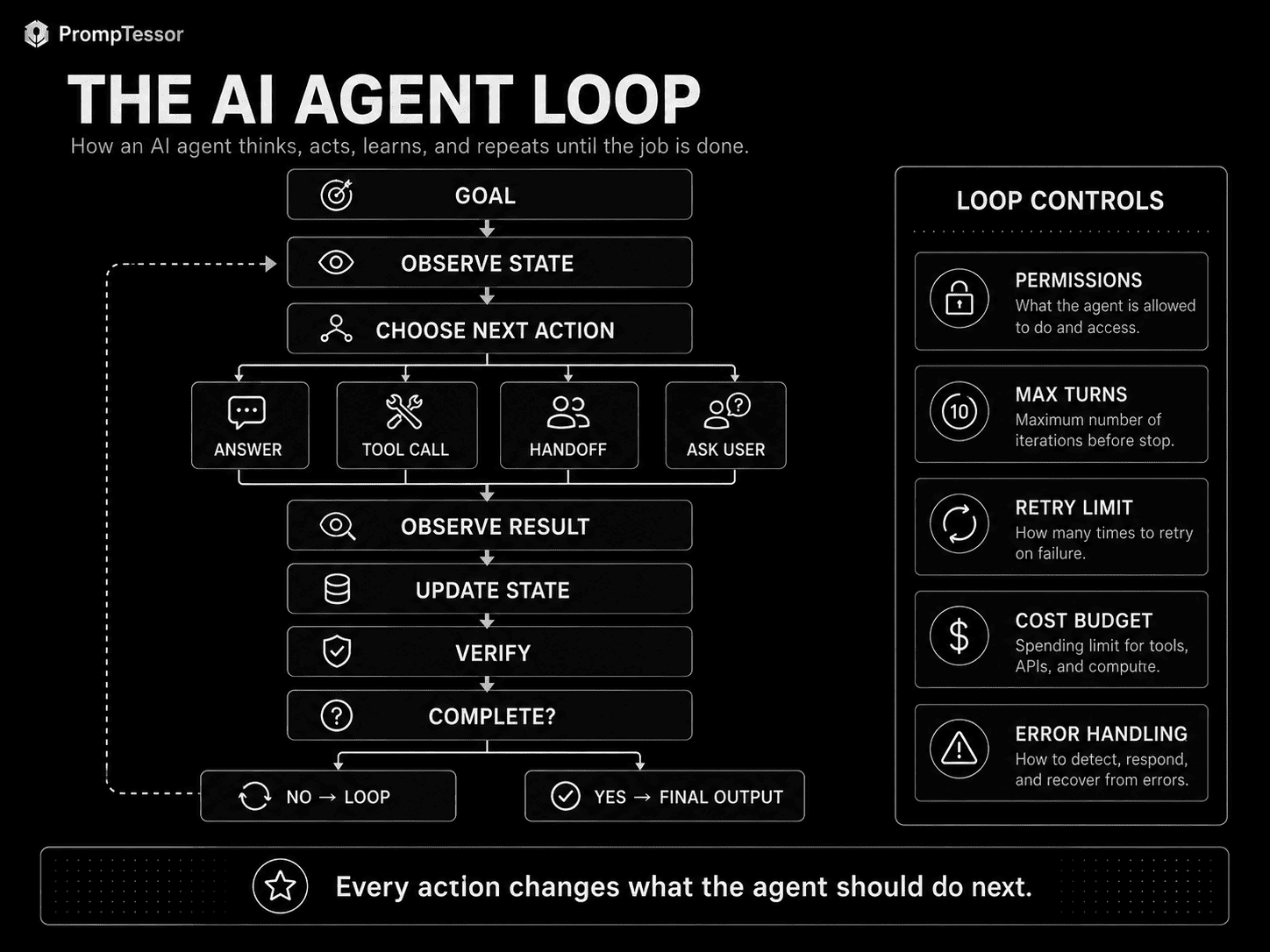
Observation → Decision → Action → Verification
A useful runtime model is:
GOAL
 ↓
OBSERVE CURRENT STATE
 ↓
CHOOSE NEXT ACTION
 ├ ANSWER
 ├ TOOL CALL
 ├ HANDOFF
 └ ASK USER
 ↓
OBSERVE RESULT
 ↓
UPDATE STATE
 ↓
VERIFY
 ↓
COMPLETE?
 ├ NO → LOOP
 └ YES → FINAL OUTPUT
Anthropic's description of agents follows this general pattern: the model uses environmental feedback such as tool results to assess progress, continue, pause for human input, or finish.
Why Observation Matters
Tool outputs are ground truth from the environment.
For example:
EXPECTED
Order is refundable.

TOOL RESULT
Order refund window expired yesterday.
The agent should update its plan based on the tool result rather than continue from its earlier assumption.
Why State Update Matters
Without state updates, agents can repeat work, ignore completed actions, or contradict prior decisions.
Verification Instructions
An agent should not stop simply because it produced an answer.
Verification instructions tell the agent what must be checked before completion.
General Verification Block
BEFORE COMPLETING

- confirm every requested item was addressed
- verify material claims against available evidence
- confirm required tool actions actually succeeded
- check for unresolved contradictions
- identify remaining uncertainty
- confirm the final output matches the required format
Verification Should Match the Task
A coding agent may verify:
- tests pass,
- linting succeeds,
- the intended file changed,
- and no unrelated behavior regressed.
A research agent may verify:
- sources are current,
- claims are supported,
- conflicts are reported,
- and citations point to the correct evidence.
A support agent may verify:
- the account state is current,
- the requested action actually completed,
- and the response does not promise an outcome the system did not confirm.
Completion Criteria and Stop Conditions
Agent prompts often explain how to begin but not how to finish.
That creates two common failure modes:
- the agent stops too early,
- or the agent keeps searching and calling tools after the task is already complete.
Completion Criteria
THE TASK IS COMPLETE ONLY WHEN

- all requested items are addressed
- required evidence has been collected
- required actions have succeeded
- material claims have been verified
- unresolved limitations are reported
- no required next action remains pending
Stop Conditions
STOP AND ASK THE USER WHEN

- required authorization is missing
- a required parameter cannot be safely inferred
- two authoritative sources conflict and the conflict blocks action
- the next action would be irreversible and approval is required
- the task cannot continue with available tools or information
Runtime Stop Limits
The application should also enforce practical limits such as:
- maximum turns,
- maximum tool calls,
- maximum execution time,
- or cost budgets.
Anthropic explicitly notes that agent systems commonly use stopping conditions such as maximum iterations to maintain control.
Failure Recovery and Retry Rules
Tool failure is normal in production.
APIs time out. Searches return nothing. Permissions fail. External services change.
The agent needs a failure policy.
IF A TOOL FAILS

1. identify whether the failure appears transient or permanent
2. retry only when a retry is reasonable
3. modify the request only when new information justifies it
4. use an appropriate alternative tool if available
5. do not invent the missing result
6. report the blocker if the task cannot continue
Avoid Infinite Retry Loops
Weak:
Keep trying until it works.Better:
Do not repeatedly call the same tool with equivalent inputs
after it has failed without new information.

After two equivalent failures, reassess the plan or report the blocker.
Recover From Partial Failure
If five independent searches are required and one fails, the agent may still be able to complete a partial result while clearly reporting the missing source.
Handoffs and Delegation
Some tasks benefit from specialist agents.
A triage agent may handle the user initially and delegate when the request belongs to another domain.
HAND OFF TO BILLING WHEN
- refund eligibility is involved
- invoice correction is required
- payment disputes must be reviewed

HAND OFF TO TECHNICAL SUPPORT WHEN
- debugging is required
- integration behavior must be investigated
- logs or API errors need analysis
OpenAI's current Agents SDK supports handoffs as a first-class mechanism for delegating to another agent. Handoff descriptions are exposed to the routing model so the description itself becomes part of the routing prompt surface.
Good Handoff Descriptions
Weak:
Billing Agent
Handles billing.
Better:
Billing Agent
Use for refunds, invoices, payment disputes,
subscription billing, and transaction corrections.
Handoff Criteria Should Be Mutually Understandable
If two specialist descriptions overlap heavily, routing becomes ambiguous.
Prefer:
BILLING
Payments, invoices, refunds

TECHNICAL
Errors, APIs, integrations

ACCOUNT
Login, profile, access
Handoffs vs. Agents as Tools
OpenAI's current Agents SDK distinguishes two useful multi-agent patterns.
Manager / Agents as Tools
USER
 ↓
MANAGER AGENT
 ├ calls Research Specialist
 ├ calls Pricing Specialist
 └ calls Data Specialist
 ↓
MANAGER PRODUCES FINAL ANSWER
The manager retains ownership of the conversation and uses specialists as callable tools.
Handoff
USER
 ↓
TRIAGE AGENT
 ↓
HANDOFF
 ↓
SPECIALIST AGENT
 ↓
SPECIALIST TAKES OVER
The specialist becomes the active agent for the conversation.
When to Use a Manager Pattern
- one agent should own the final response,
- specialists provide bounded expertise,
- or the manager needs to combine several specialist results.
When to Use a Handoff
- ownership of the conversation should change,
- the specialist needs to interact directly with the user,
- or a domain-specific policy should take over.
Single-Agent vs. Multi-Agent Prompts
Multi-agent architecture is not automatically better.
Anthropic's current guidance strongly favors simple, composable systems and adding complexity only when needed.
Prefer One Agent + Tools When
- the task has one coherent goal,
- the same instructions work across subtasks,
- tool access can be controlled cleanly,
- and specialist context does not need separate ownership.
Add Specialists When
- subtasks require clearly different expertise,
- tool sets differ substantially,
- instruction sets conflict,
- parallel work adds measurable value,
- or isolation reduces context noise.
Decision Pattern
SIMPLE TASK
→ one agent

ONE AGENT + MANY CAPABILITIES
→ one agent + tools

SPECIALIZED BOUNDED SUBTASKS
→ manager + specialist tools

OWNERSHIP / DOMAIN CHANGE
→ handoff

INDEPENDENT PARALLEL INVESTIGATION
→ multi-agent coordination
Agent Instructions vs. Guardrails
Instructions and guardrails serve different purposes.
Instruction
Do not send emails without user approval.This influences model behavior.
Guardrail or Permission Check
send_email()
is unavailable until approval_state == confirmed
This enforces behavior.
OpenAI's current Agents SDK provides input, output, and tool guardrails. Tool guardrails can inspect or block custom function-tool calls before or after execution.
Why Both Matter
Instructions help the model make good decisions.
Runtime controls protect the system when the model makes a bad decision.
| Prompt Instruction | Runtime Guardrail |
|---|---|
| Behavioral guidance | Programmatic enforcement |
| Probabilistic | Deterministic when implemented correctly |
| Useful for reasoning about boundaries | Useful for blocking prohibited actions |
| Can be misunderstood or ignored | Controls actual execution path |
Structured Outputs for Agents
Structured output can make agent decisions easier for the application to interpret.
For example, a planning step could return:
{
  "action": "search",
  "query": "current API pricing",
  "done": false
}
Or an agent could return a final result:
{
  "status": "complete",
  "summary": "...",
  "sources": ["source_a", "source_b"],
  "unresolved_issues": []
}
OpenAI's current Agents SDK supports structured output types on agents.
Structured output is useful when the application needs predictable fields, but it is not required for every agent interaction.
For more, see Structured Outputs: How to Make AI Return Reliable JSON and Schema-Constrained Responses.
Agent Context and Memory
An agent's effective context can contain much more than the instruction string.
AGENT CONTEXT

- instructions
- user request
- runtime state
- conversation history
- tool definitions
- tool results
- retrieved documents
- files
- memory
- specialist results
Memory vs. Runtime State
MEMORY
Durable information that may matter across sessions.

RUNTIME STATE
Information needed to complete the current task.
Do not put every historical fact into every agent turn.
Anthropic's current context-engineering guidance emphasizes curating the finite context available to agents as their loop continually generates new data.
For more, see Context Engineering and Long-Context Prompting.
Agent Prompts and Prompt Caching
Agent instructions and tool definitions are often stable across many turns.
That can make them good candidates for provider-side prompt caching when supported.
STABLE PREFIX
- agent instructions
- tool definitions
- schemas
- fixed policies

DYNAMIC SUFFIX
- current state
- current user message
- fresh tool results
Prompt caching does not manage agent behavior or memory. It can reduce repeated input processing for stable prefixes.
See Prompt Caching: How to Reduce LLM Cost, Latency, and Repeated Context.
Agent Prompts and Long Context
Long-running agents naturally accumulate context:
Instructions
+
Messages
+
Tool calls
+
Tool results
+
Files
+
Retrieved evidence
+
Specialist outputs
=
Growing context
That creates a lifecycle problem.
The application may need to:
- summarize completed phases,
- compact older state,
- externalize artifacts,
- retrieve evidence just in time,
- or keep only recent relevant history in the active context.
Anthropic's current agent context-engineering guidance explicitly describes this continual context curation problem.
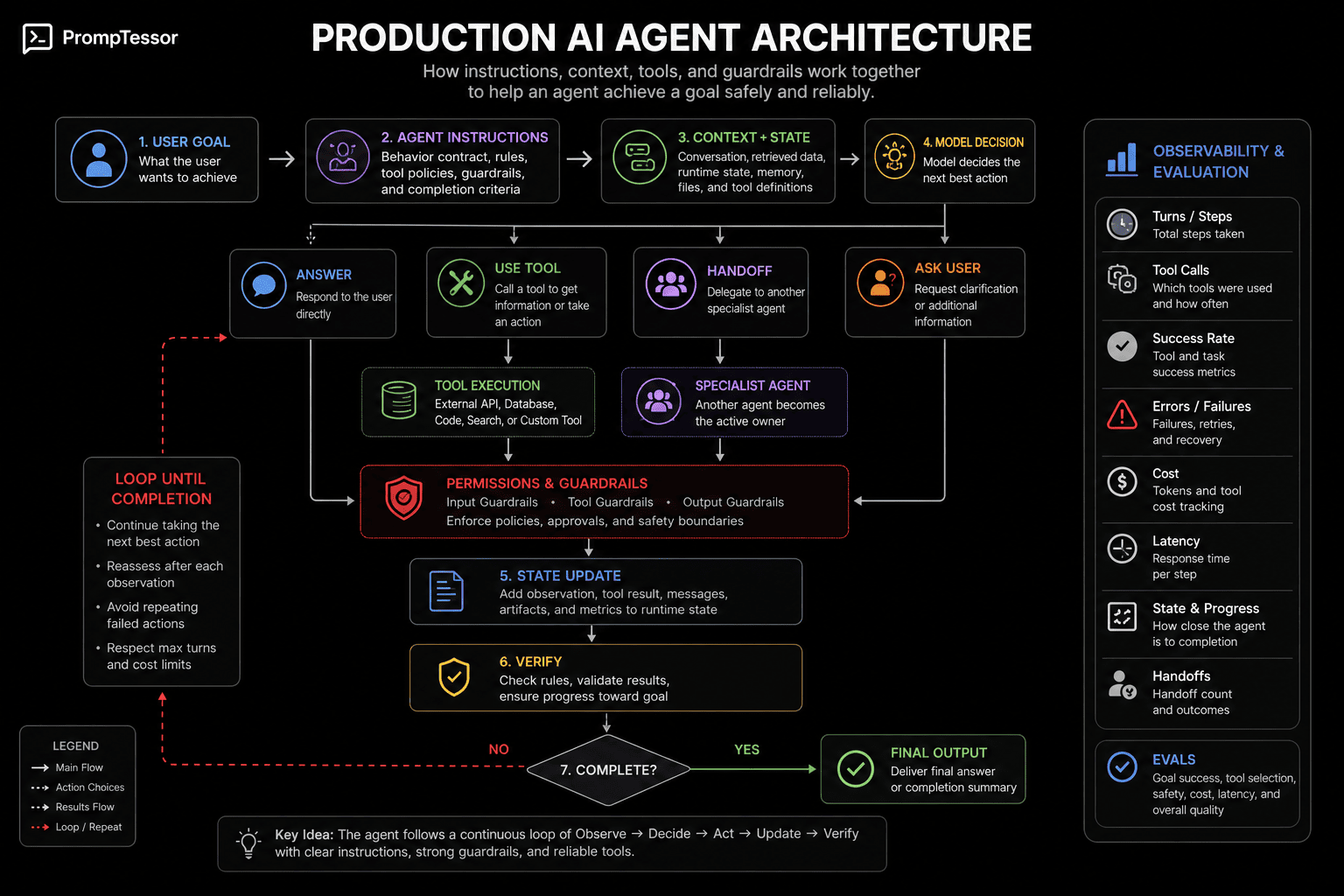
How to Evaluate Agent Prompts
Agent evaluation is more complex than evaluating one final answer.
Anthropic's current agent-evals guidance emphasizes that agents are harder to evaluate precisely because they operate across many turns, call tools, modify state, and adapt based on intermediate results.
Useful Agent Eval Dimensions
- Goal success: Did the agent complete the task?
- Tool selection: Did it choose appropriate tools?
- Tool arguments: Were calls formed correctly?
- Action safety: Did it avoid unauthorized actions?
- State correctness: Did it preserve and update state correctly?
- Handoff correctness: Did it delegate to the right specialist?
- Failure recovery: Did it respond well to tool failures?
- Verification: Did it check results before finishing?
- Completion: Did it stop at the right time?
- Efficiency: How many turns and tool calls were used?
- Latency: How long did the run take?
- Cost: What did the complete trajectory cost?
Evaluate the Trajectory, Not Only the Answer
Two agents can produce the same final answer through very different paths.
AGENT A
2 correct tool calls
verified result
stopped

AGENT B
14 unnecessary calls
one unauthorized attempt
same final text
A final-answer-only evaluator may rate them equally.
A production agent evaluator should not.
AI Agent Prompt Examples
These examples focus on the instruction architecture rather than one specific framework.
Example 1: Research Agent
GOAL
Produce a concise, verified research brief.

TOOLS
- web_search
- document_search

POLICY
Use current primary sources when possible.
Search again only when material uncertainty remains.

VERIFICATION
Cite sources for important claims and report disagreements.

COMPLETE WHEN
The user's question is directly answered and key claims are verified.
Example 2: Customer Support Agent
GOAL
Resolve the customer's issue accurately without promising unsupported outcomes.

TOOLS
- get_account
- get_order
- search_help_center
- create_support_ticket

ACTION BOUNDARIES
Read-only checks may proceed automatically.
Account changes require the appropriate authorization state.

STOP
Ask when identity, authorization, or a required account detail is missing.
Example 3: Coding Agent
GOAL
Implement the requested change with the smallest safe patch.

TOOLS
- search_repository
- read_file
- edit_file
- run_tests

POLICY
Inspect relevant code before editing.
Do not modify unrelated files.

VERIFY
Run targeted tests, then broader tests when appropriate.

COMPLETE WHEN
The requested behavior works and required tests pass.
Example 4: Sales Research Agent
GOAL
Create a factual account brief for a salesperson.

TOOLS
- web_search
- company_database

SCOPE
Research only.
Do not contact prospects.

OUTPUT
- company overview
- recent developments
- likely use cases
- evidence
- uncertainty
Example 5: Travel Planning Agent
GOAL
Build an itinerary matching the user's dates, budget, and preferences.

TOOLS
- search_flights
- search_hotels
- maps
- weather

ACTION BOUNDARY
Do not purchase or book anything without explicit approval.

STOP
Ask if dates, destination, or budget are required but missing.
Example 6: Data Analysis Agent
GOAL
Answer the analysis question using the supplied dataset.

TOOLS
- python
- calculator

POLICY
Inspect data quality before analysis.
Do not silently drop missing values.

VERIFY
Recalculate key metrics and flag assumptions.

OUTPUT
Findings, evidence, limitations, and recommended next checks.
Example 7: Documentation Agent
GOAL
Draft documentation that matches current product behavior.

TOOLS
- repository_search
- docs_search

SOURCE PRIORITY
Current code and official product behavior outrank stale documentation.

COMPLETE WHEN
Every documented command, field, and behavior has a current source.
Example 8: Bug Investigation Agent
GOAL
Identify the most likely root cause of the reported bug.

TOOLS
- logs
- deployment_history
- repository_search

DECISION POLICY
Start with evidence that can distinguish between likely causes.
Do not patch until the failure path is understood.

OUTPUT
Root cause, evidence, alternatives, and next diagnostic step.
Example 9: Email Triage Agent
GOAL
Classify incoming messages and prepare the appropriate next step.

TOOLS
- search_mail
- create_draft
- add_label

ACTION BOUNDARY
Drafting is allowed.
Sending requires explicit user approval.

OUTPUT
Priority, category, recommended action, and draft when appropriate.
Example 10: Knowledge Base Agent
GOAL
Answer using current internal documentation.

TOOLS
- knowledge_search

POLICY
Prefer current official documentation.
If no source supports the answer, say so.

VERIFY
Return source IDs for material claims.
Example 11: Competitive Research Agent
GOAL
Compare named competitors using current public information.

TOOLS
- web_search

RULES
Separate verified facts from inference.
Use official pricing and product pages where available.

OUTPUT
Comparison table, major differences, evidence, and unknowns.
Example 12: Content Research Agent
GOAL
Build a research packet for an article without writing the final article.

TOOLS
- web_search
- document_search

OUTPUT
- key claims
- primary sources
- counterpoints
- examples
- data points
- unresolved questions
Example 13: Product Support Agent
GOAL
Help the user solve a product problem with the least disruptive action.

TOOLS
- docs_search
- status_check
- account_read

POLICY
Check current service state before assuming local user error.

STOP
Escalate when the issue requires privileged account changes.
Example 14: Order Management Agent
GOAL
Help the customer understand or modify an order.

TOOLS
- get_order
- update_shipping_address
- cancel_order

BOUNDARIES
Read actions may proceed.
Address changes require confirmation.
Cancellation requires explicit confirmation immediately before execution.
Example 15: Multi-Agent Research Manager
GOAL
Produce one coherent research report.

SPECIALISTS
- market_research_agent
- technical_research_agent
- financial_research_agent

POLICY
Delegate bounded specialist questions.
Retain ownership of synthesis and final response.

VERIFY
Reconcile contradictions across specialist outputs.
Example 16: Specialist Handoff Agent
GOAL
Route the user to the correct specialist.

HANDOFFS
BILLING: invoices, refunds, payment disputes
TECHNICAL: bugs, APIs, integrations
ACCOUNT: access, login, profile settings

RULE
Hand off when one domain clearly owns the issue.
Ask a clarifying question when ownership is ambiguous.
Example 17: Long-Running Project Agent
GOAL
Move the project toward the stated milestone across multiple sessions.

STATE
- current milestone
- completed work
- decisions
- blockers
- artifacts
- next actions

POLICY
Do not reopen resolved decisions without new evidence.
Externalize large artifacts instead of carrying them in every turn.

VERIFY
At the end of each phase, update state and open work.
Example 18: Browser / Computer-Use Agent
GOAL
Complete the requested browser task accurately.

POLICY
Observe the current UI before acting.
Prefer reversible navigation before destructive actions.

BOUNDARIES
Do not submit purchases, forms, messages, or irreversible changes
without the authorization required by the application.

VERIFY
Confirm the resulting UI state after each consequential action.
Common AI Agent Prompting Mistakes
1. Persona Without a Goal
“You are an expert agent” does not define success.
2. Vague Scope
If responsibility is unclear, the agent may overreach or underperform.
3. Listing Tools Without Usage Rules
Tool access alone does not explain when a tool is appropriate.
4. Ambiguous Tool Names
Names like process or lookup make selection harder.
5. Weak Tool Descriptions
Tool documentation is part of the model's decision context.
6. No Action Boundaries
Read-only and irreversible actions should not be treated the same.
7. Treating Prompt Rules as Security Enforcement
Permissions and guardrails should be implemented in the runtime.
8. “Do Whatever Is Necessary”
This grants vague autonomy without defining limits.
9. No Completion Criteria
The agent may stop too early or continue too long.
10. No Stop Conditions
The agent needs to know when missing information or authorization should block progress.
11. Unlimited Retries
Repeated equivalent tool calls can create runaway loops.
12. No Failure Policy
Agents should know how to respond when tools fail.
13. No Verification
Tool execution does not guarantee the task actually succeeded.
14. Verifying Only the Final Text
Agent trajectories can contain unnecessary or prohibited actions even when the final answer looks correct.
15. Asking for Hidden Chain-of-Thought
Use operational decision rules instead of requiring private reasoning traces.
16. Overly Rigid Step Lists
If the path is fully predefined, a workflow may be more appropriate than an agent.
17. Excessive Autonomy for Simple Tasks
A one-shot model call may be cheaper and more predictable.
18. Premature Multi-Agent Architecture
Multiple agents add coordination cost and failure modes.
19. Overlapping Specialist Responsibilities
Ambiguous ownership makes handoffs unreliable.
20. Unclear Handoff Descriptions
The routing model needs concise descriptions of when specialists should take over.
21. Confusing Handoff With Agent-as-Tool
One changes conversation ownership; the other lets a manager invoke a specialist while retaining control.
22. No State Representation
Long-running agents need to know what has already happened.
23. Carrying Raw History Forever
Context should be curated as the loop grows.
24. Stale Runtime State
Current tool results should supersede old assumptions.
25. No Context Budget
Tools, history, files, and specialist results can consume the available window.
26. No Cost or Turn Budget
Open-ended agents can become expensive.
27. No Observability
Without traces, it is difficult to understand why an agent selected a tool or failed.
28. No Agent-Specific Evals
Single-response benchmarks do not capture multi-turn behavior.
29. No Test Cases for Tool Failure
Production reliability depends on failure recovery as much as happy-path behavior.
30. Assuming Frameworks Replace Instruction Design
Frameworks provide runtime primitives; the agent still needs clear goals, tool semantics, boundaries, and evaluation criteria.
Where PrompTessor Fits
PrompTessor fits naturally at the agent instruction design layer.
AGENT IDEA
    ↓
PrompTessor
Generate / Analyze / Optimize / Refine
    ↓
CLEARER AGENT INSTRUCTIONS
- goal
- scope
- tool rules
- decision policy
- action boundaries
- verification
- completion criteria
    ↓
AGENT FRAMEWORK / APPLICATION
- tools
- state
- permissions
- guardrails
- handoffs
- runtime loop
    ↓
MODEL
PrompTessor should not be described as the runtime that executes tools, enforces authorization, stores all agent state, or orchestrates every multi-agent workflow.
Responsibility Split
- PrompTessor: helps generate and improve the instruction layer.
- Agent framework/application: manages tools, orchestration, state, handoffs, sessions, and execution.
- Permissions/guardrails: enforce actual action boundaries.
- Model: chooses actions within the context and capabilities it receives.
- Evaluation layer: tests whether the complete trajectory achieves the goal reliably.
Example Transformation
Rough instruction:
You are a customer support agent. Help users.Stronger instruction:
GOAL
Resolve customer questions accurately using current account state
and official support documentation.

SCOPE
You may inspect account and order data and search documentation.

TOOL POLICY
Use account tools only when the answer depends on current user-specific state.
Use documentation search for product-policy questions.

ACTION BOUNDARIES
Do not change account data or send external communications
without the authorization required by the application.

VERIFICATION
Before completing, confirm that account facts came from current tool results
and that any requested action actually succeeded.

STOP
Ask when required account identifiers or authorization are missing.
AI Agent Prompt Checklist
- The desired outcome is explicit.
- Success is measurable enough to recognize.
- The agent's role is defined.
- The agent's scope is defined.
- Out-of-scope actions are clear.
- Every tool has a descriptive name.
- Every tool has a useful description.
- Tool arguments are unambiguous.
- Tool-use criteria are defined.
- Unnecessary tool calls are discouraged.
- The decision policy is operational rather than chain-of-thought oriented.
- Read-only and write actions are distinguished.
- Irreversible actions have an approval policy.
- Runtime permissions enforce important boundaries.
- The agent updates state after consequential actions.
- Raw evidence remains retrievable when needed.
- Failure recovery behavior is defined.
- Equivalent retries are bounded.
- Verification criteria match the task.
- Completion criteria are explicit.
- Stop conditions are explicit.
- Maximum turns or execution budgets are enforced when appropriate.
- Handoff destinations have clear responsibilities.
- Handoff descriptions are non-overlapping where possible.
- Multi-agent complexity is justified.
- Structured outputs are used when the application needs predictable fields.
- Context growth is monitored.
- Caching is considered for stable repeated prefixes.
- Agent trajectories are observable.
- Evals test tools, state, safety, recovery, completion, cost, and latency.
Official Resources
- OpenAI Agents SDK
- OpenAI Agents SDK: Agents
- OpenAI Agents SDK: Tools
- OpenAI Agents SDK: Handoffs
- OpenAI Agents SDK: Guardrails
- Anthropic: Building Effective Agents
- Anthropic: Effective Context Engineering for AI Agents
- Anthropic: Demystifying Evals for AI Agents
- Google ADK: Agent Instruction Reference
FAQ About AI Agent Prompts
What is an AI agent prompt?
An AI agent prompt is the instruction layer that guides a tool-using or multi-step AI system across decisions, actions, observations, verification, and completion.
How is an agent prompt different from a normal prompt?
A normal prompt usually targets one response, while an agent prompt often guides behavior across multiple turns, tool calls, state changes, and decision points.
What should an AI agent prompt include?
At minimum, define the goal, role and scope, available tools, tool-use policy, decision rules, action boundaries, verification behavior, and completion or stop criteria.
Should an agent prompt start with a persona?
A persona can help, but the outcome matters more. Define what success looks like before spending tokens on identity or tone.
What is the difference between an AI agent and a workflow?
A workflow follows predefined code paths, while an agent dynamically chooses actions and tool usage based on the current state and intermediate results.
Are agent instructions the same as a system prompt?
Agent instructions may be delivered through a system-level instruction, but they often cover additional concerns such as tools, handoffs, state, verification, retries, and completion.
How should I describe tools to an AI agent?
Use descriptive names, clear descriptions, unambiguous arguments, and explicit guidance about when each tool should and should not be used.
Do I need to tell an agent when to use each tool?
Usually yes. Listing tools without usage criteria can lead to unnecessary or incorrect tool selection.
Should an agent always use a tool if one is available?
No. The agent should use tools only when they add information, perform a required action, or materially improve confidence.
Should I ask an agent to show its chain of thought?
No. Use operational decision rules such as checking what information is missing, choosing the smallest useful action, and re-evaluating after tool results.
What are action boundaries in an agent prompt?
Action boundaries define which actions may proceed automatically, which require approval, and which should be blocked or escalated.
Are prompt instructions enough to stop unsafe actions?
No. Important boundaries should also be enforced with runtime permissions, approval gates, or guardrails.
What is agent state?
Agent state is the current operational information needed to continue the task, such as goals, completed actions, open questions, decisions, and artifacts.
What is the difference between agent memory and state?
Memory is durable information that may matter across sessions, while runtime state is information needed to complete the current task.
What is an agent loop?
An agent loop is the recurring cycle of observing state, choosing an action, executing or delegating, observing the result, updating state, verifying progress, and deciding whether to continue.
Why do agents need completion criteria?
Without explicit completion criteria, agents may stop before the task is actually finished or continue taking unnecessary actions after the goal is satisfied.
What are stop conditions?
Stop conditions define situations where the agent should pause or ask the user, such as missing authorization, non-inferable information, unresolved blocking conflicts, or unavailable capabilities.
How should an agent handle tool failure?
It should determine whether retrying is reasonable, avoid equivalent infinite retries, try a suitable alternative when available, and report blockers instead of inventing results.
How many times should an agent retry a failed tool?
There is no universal number, but retries should be bounded and should not repeat equivalent calls without new information. Runtime limits are useful.
What is a handoff in a multi-agent system?
A handoff transfers responsibility from one agent to a specialist agent that becomes the active agent for that part of the conversation or task.
What is the difference between a handoff and an agent as a tool?
With a handoff, the specialist takes over. With an agent-as-tool pattern, a manager agent calls the specialist and retains ownership of the final response.
Should I use multiple agents?
Use multiple agents when specialization, isolation, parallel work, or distinct tool/instruction sets provide measurable value. Otherwise, one agent plus tools is usually simpler.
What are agent guardrails?
Guardrails are runtime checks that validate or block inputs, outputs, or tool actions. They complement instructions by providing enforceable controls.
Can agents use structured outputs?
Yes. Structured outputs are useful when the application needs predictable fields for planning, actions, status, citations, or final results.
How does context engineering affect agents?
Agents continually accumulate instructions, history, tool results, files, and state, so the context must be curated to preserve relevant information without unnecessary growth.
How does prompt caching help AI agents?
Stable agent instructions, tool definitions, and schemas can sometimes be reused through provider-side prompt caching, reducing repeated input processing when supported.
How does long context affect AI agents?
Long-running agents accumulate context over time, which can increase cost, latency, and distraction. Retrieval, summarization, compaction, and state externalization can help.
How should I evaluate an AI agent prompt?
Evaluate the full trajectory: goal success, tool selection, tool arguments, state updates, handoffs, failure recovery, action safety, verification, completion, cost, and latency.
Can PrompTessor run AI agents?
PrompTessor is best positioned at the prompt and instruction design layer. The agent framework or application handles tool execution, state, permissions, handoffs, and runtime orchestration.
How can PrompTessor help with AI agent prompts?
PrompTessor can help generate, analyze, optimize, and refine agent instructions so goals, tool rules, constraints, verification behavior, and completion criteria are clearer.
Conclusion
AI agent prompts are not just longer system prompts.
They define how a model should behave when it has the ability to act over time.
The durable architecture is:
GOAL
  ↓
ROLE & SCOPE
  ↓
TOOLS + TOOL RULES
  ↓
DECISION POLICY
  ↓
ACTION BOUNDARIES
  ↓
OBSERVE → ACT → UPDATE STATE
  ↓
VERIFY
  ↓
COMPLETE?
├ No → continue
└ Yes → final output
The most important design principle is to separate behavioral guidance from runtime enforcement.
Use the prompt to tell the agent what a good decision looks like.
Use the application to control what the agent is actually allowed to do.
Then test the entire trajectory, not only the final answer.
That means measuring whether the agent:
- chose the right tools,
- used them correctly,
- updated state accurately,
- respected action boundaries,
- recovered from failures,
- delegated correctly,
- verified its work,
- and stopped at the right time.
Start simple.
If one model call solves the problem, use one model call.
If a fixed workflow solves it reliably, use a workflow.
Use an agent when the task genuinely benefits from model-driven decisions, tools, environmental feedback, and flexible multi-step execution.
And when you do use an agent, treat the instruction layer as a behavioral contract:
Define the goal, define the boundaries, make tools understandable, verify progress, and make completion explicit.
Build better prompts in one workspace
Generate prompts from ideas, analyze and optimize quality, refine with feedback, reverse-engineer content, and save reusable prompts in your Prompt Library.
Try PrompTessor Free