Long-Context Prompting: How to Use Large Context Windows Without Losing Important Information
Large context windows changed what is possible with AI systems.
Instead of sending only a short prompt, an application can now provide entire documents, long conversations, code repositories, policy collections, research packets, transcripts, images, audio, video, and other supporting material in one request.
But a larger context window does not automatically create a better prompt.
More context can also mean:
- more irrelevant information,
- more conflicting sources,
- more stale data,
- more tokens to process,
- more latency,
- and more opportunities for important instructions to become difficult to locate.
That is why long-context prompting is not simply “put everything into the prompt.”
It is the practice of organizing large amounts of information so the model can still understand:
- what the task is,
- which sources matter,
- how sources should be prioritized,
- what to do when documents conflict,
- which information is current,
- and what the final output must contain.
A useful mental model is:
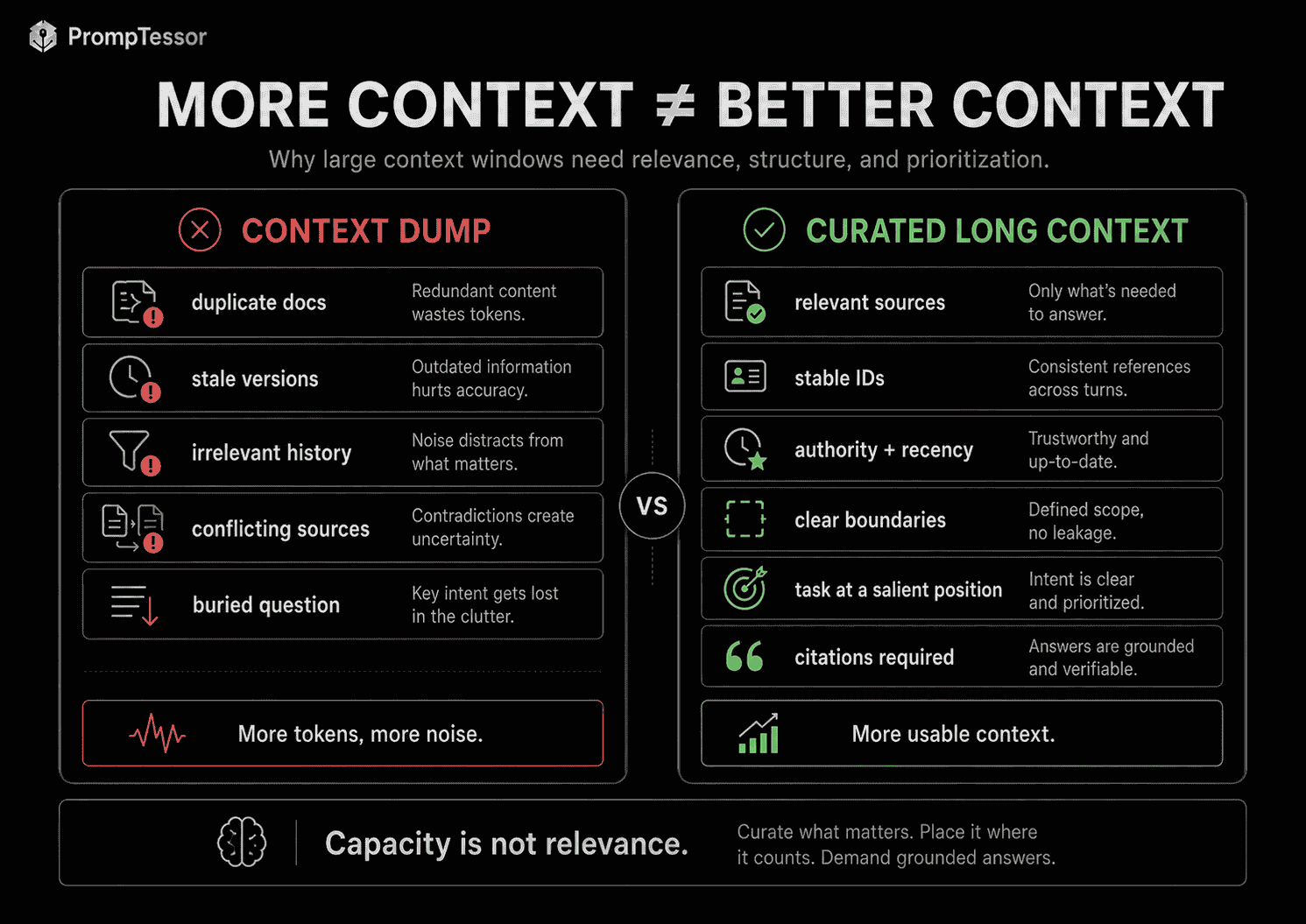
MORE CONTEXT
≠
BETTER CONTEXT


BETTER LONG-CONTEXT WORKFLOW

Relevant information
+
Clear structure
+
Stable source IDs
+
Authority rules
+
Explicit task
+
Output requirements
+
Retrieval / caching / compaction when useful
Current provider documentation reinforces this.
Google documents Gemini models with context windows of one million tokens or more and recommends putting the question near the end of a long prompt after the supporting context. Anthropic explicitly warns that more context is not automatically better and uses the term context rot for the degradation that can occur as context grows. OpenAI provides compaction mechanisms for long-running Responses API workflows so important state can be carried forward with fewer tokens.
This guide explains how long-context prompting works, how it differs from context engineering and RAG, how to structure large documents, how to handle source conflicts, where to place the task, when to summarize or compact context, how to manage long-running conversations and agents, and how current OpenAI, Claude, and Gemini workflows differ.
Quick Answer
A strong long-context prompt usually has five layers:
1. STABLE INSTRUCTIONS
What the model should do and what rules it must follow

2. LARGE CONTEXT
Documents, files, code, history, evidence, transcripts

3. SOURCE / AUTHORITY RULES
How to identify, prioritize, and resolve conflicting information

4. CURRENT TASK
The question or operation to perform now

5. OUTPUT REQUIREMENTS
What the answer must contain and how evidence should be cited
For example:
INSTRUCTIONS
Compare the supplied policies and identify meaningful changes.

SOURCE RULES
- Prefer newer policy versions over older versions.
- Treat official policy documents as authoritative.
- If two current sources conflict, report the conflict instead of guessing.
- Cite the source ID for every material finding.

CONTEXT

<document id="policy_2025">
...
</document>

<document id="policy_2026">
...
</document>

CURRENT TASK
What changed in cancellation, refund, and account termination rules?

OUTPUT
For each change return:
- topic
- previous rule
- current rule
- source IDs
- operational impact
- unresolved uncertainty
The context window gives the model capacity.
The prompt architecture gives that capacity direction.
Key Takeaways
- A context window is the working information available to the model for the current generation, not the model's entire training knowledge.
- A larger context window increases capacity but does not guarantee better recall, reasoning, or relevance.
- Context rot can occur as long contexts accumulate irrelevant, stale, or competing information.
- Long-context prompting should prioritize relevant, authoritative, current information over maximum token usage.
- Large documents should have stable IDs and clear boundaries.
- Source authority and recency rules should be explicit when documents can conflict.
- For long Gemini prompts, current Google guidance generally recommends placing the query after the long context.
- Long context and RAG are different strategies: one loads a large context directly; the other retrieves a smaller relevant subset first.
- Long context and prompt caching are complementary: caching can reduce repeated processing when the same large context is reused.
- Long context and context engineering are also complementary: context engineering decides what belongs in context, while long-context prompting decides how to organize large amounts of it.
- Needle-in-a-haystack retrieval results do not automatically predict performance on complex multi-document synthesis.
- Logical chunking remains useful even when the entire corpus fits in one context window.
- Map-reduce workflows can outperform one-shot synthesis when the task requires many local analyses before a global conclusion.
- Conversation transcripts should not grow forever without management.
- State-first representations can be more useful than carrying every raw message indefinitely.
- Compaction can preserve important state while reducing long-running context size.
- Tool outputs, files, images, and multimodal inputs also consume context capacity.
- Longer context generally increases input cost and can increase time-to-first-token.
- Prompt caching can improve the economics of repeated long-context workloads but does not increase the context-window limit itself.
- PrompTessor can help improve the instructions that operate on long context, while the application or model provider remains responsible for assembling, retrieving, caching, compacting, and managing the actual context.
Table of Contents
- What Is Long-Context Prompting?
- What Is a Context Window?
- Why Bigger Context Windows Change Prompt Engineering
- Why More Context Is Not Always Better
- What Is Context Rot?
- Anatomy of a Long-Context Prompt
- Where Should the Question Go?
- Use Clear Context Boundaries
- Give Documents Stable Source IDs
- Source Authority, Recency, and Conflict Rules
- Long-Context Citation Strategy
- Long Context vs. RAG
- Long Context vs. Prompt Caching
- Long Context vs. Context Engineering
- How to Order Large Context
- Logical Chunking Inside a Large Context
- Needle-in-a-Haystack vs. Real Long-Context Tasks
- Map-Reduce for Large Documents
- When to Summarize Context
- Context Compaction
- State-First vs. Transcript-First Context
- Long-Running Agents and Tool Context
- Long Multimodal Context
- OpenAI Long-Context Workflows
- Claude Long-Context Workflows
- Gemini Long-Context Workflows
- Cost and Latency
- Long-Context Prompt Examples
- Common Long-Context Prompting Mistakes
- Where PrompTessor Fits
- Long-Context Prompting Checklist
- Official Resources
- FAQ
What Is Long-Context Prompting?
Long-context prompting is the design of prompts that operate on large amounts of supporting information while preserving task clarity, source traceability, and useful model behavior.
“Long” is relative.
A prompt may be long because it contains:
- a 200-page PDF,
- 50 code files,
- thousands of customer reviews,
- a complete conversation history,
- a research corpus,
- a long audio transcript,
- a video plus related metadata,
- or hundreds of few-shot examples.
The core challenge is not merely fitting the tokens.
It is preserving a reliable relationship between:
INSTRUCTIONS
        ↓
EVIDENCE
        ↓
CURRENT TASK
        ↓
OUTPUT
What Is a Context Window?
A context window is the amount of information a model can reference during one generation workflow.
It is closer to working memory than permanent knowledge.
Depending on the provider and API, context can include:
- system or developer instructions,
- conversation history,
- user messages,
- assistant messages,
- tool definitions,
- tool results,
- documents,
- images,
- audio,
- video,
- reasoning-related state,
- and the output being generated.
Context Window Is Not Training Knowledge
A model's training knowledge is what it learned during training.
Context is information supplied or carried into the current request.
TRAINING
Long-term learned model parameters

CONTEXT
Working information available right now
Maximum Context Is a Capacity Limit, Not a Recommendation
If a model supports a very large context window, that does not mean every request should use the maximum.
Use only the amount of context needed to produce a reliable result.
Why Bigger Context Windows Change Prompt Engineering
Smaller context windows forced developers to aggressively reduce information before generation.
Common strategies included:
- chunking,
- sliding windows,
- RAG,
- summaries,
- dropping old conversation turns,
- or splitting tasks into multiple calls.
Large context windows allow a more direct option:
MORE RELEVANT SOURCE MATERIAL
        ↓
ONE MODEL REQUEST
        ↓
CROSS-DOCUMENT REASONING
This is useful for tasks where information is distributed across many sources and the relationships between those sources matter.
Examples
- compare multiple contract versions,
- understand an entire code module before suggesting a change,
- analyze a long meeting history,
- synthesize a large research packet,
- or reason across a complete set of policy documents.
But the availability of more context creates a new optimization problem:
Which information should be included, how should it be organized, and how should the model know what matters most?
Why More Context Is Not Always Better
Adding context can help when it contains useful evidence.
Adding irrelevant, redundant, conflicting, or stale context can make the task harder.
More Context Can Introduce Noise
RELEVANT POLICY
+
OLD POLICY
+
UNRELATED FAQ
+
MARKETING PAGE
+
STALE SUPPORT NOTE
+
CURRENT USER QUESTION
The model now has more tokens but also more ambiguity.
More Context Can Increase Conflict
Suppose the prompt contains:
- Policy v1 from 2024,
- Policy v2 from 2025,
- Policy v3 from 2026,
- and an old support article that contradicts v3.
Without explicit authority and recency rules, the model must infer which source should win.
More Context Costs More
Even when the provider can process a million tokens, sending a million tokens can materially affect input cost and latency.
More Context Can Hide the Task
If the user question appears between thousands of lines of documents, the model may have to distinguish task instructions from data and other prose.
What Is Context Rot?
Context rot describes the tendency for model performance to degrade as context grows and attention must be distributed across more information.
Anthropic's current context-window documentation explicitly warns that larger context is not automatically better and notes that recall and accuracy can degrade as token count grows.
Context rot does not mean long context is useless.
It means developers should treat context quality as a limited resource.
Common Contributors
- irrelevant older messages,
- repeated tool output,
- duplicate documents,
- conflicting versions,
- stale plans,
- long reasoning artifacts no longer needed,
- and raw transcripts that have already been converted into stable state.
Context Rot vs. Context Overflow
They are different.
CONTEXT ROT
Performance degrades before the hard limit is reached.

CONTEXT OVERFLOW
The request reaches or exceeds the model's allowed context capacity.
Anatomy of a Long-Context Prompt
A strong long-context prompt should make the relationship between instructions, evidence, task, and output visually obvious.
STABLE INSTRUCTIONS
Task rules
Safety / scope
Source-use rules

        ↓

LARGE CONTEXT
Document A
Document B
Document C
Code / media / history

        ↓

CONTEXT ANCHOR
Source IDs
Authority rules
Recency rules
Conflict handling

        ↓

CURRENT QUESTION
What should the model do now?

        ↓

OUTPUT REQUIREMENTS
Structure
Citations
Uncertainty
Limits
1. Stable Instructions
Define the task behavior before the model reaches the long evidence block.
INSTRUCTIONS
Analyze only the supplied evidence.

Do not invent missing facts.

When sources conflict, apply the authority rules below.

Cite source IDs for material claims.
2. Large Context
Provide the relevant documents or media with clear boundaries.
3. Context Anchor
Remind the model how the context should be interpreted.
SOURCE RULES
- policy_2026 is newer than policy_2025
- official policy text outranks blog summaries
- unresolved current-source conflicts must be reported
4. Current Question
State the task cleanly after the context when that ordering matches the target model's guidance and your evaluation results.
5. Output Requirements
Define what a useful answer looks like.
OUTPUT
For each finding return:
- claim
- source_id
- evidence
- confidence
- unresolved conflict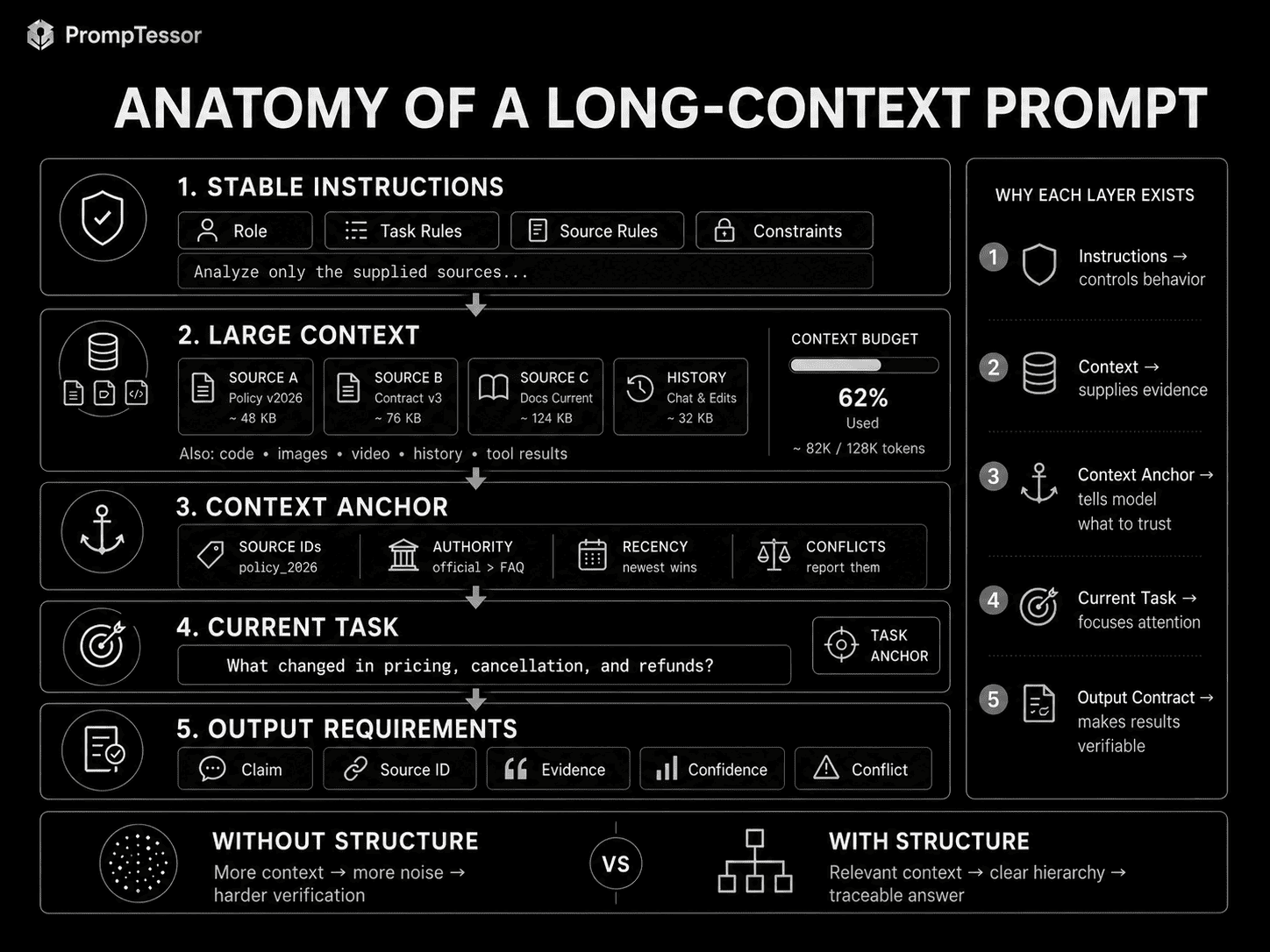
Where Should the Question Go?
Prompt ordering becomes more important as context grows.
Google's current Gemini long-context documentation states that, in most long-context cases, performance is better when the query or question appears at the end of the prompt after the supporting context.
Useful Pattern
INSTRUCTIONS

DOCUMENTS

SOURCE RULES

CURRENT QUESTION

OUTPUT FORMAT
This gives the model the evidence before the final task request.
But Do Not Treat Query-at-End as a Universal Law
Provider behavior differs.
System-level or high-priority instructions may still belong before the context because they define how the model should interpret the data.
A practical hybrid is:
HIGH-LEVEL INSTRUCTIONS
        ↓
LONG CONTEXT
        ↓
TASK REMINDER / CURRENT QUESTION
        ↓
OUTPUT REQUIREMENTS
This preserves instruction priority while making the immediate task salient near the end.
Use Clear Context Boundaries
Long prompts are easier to reason about when each source has an explicit boundary.
XML-Style Boundaries
<document id="policy_a">
...
</document>

<document id="policy_b">
...
</document>
Markdown Boundaries
## DOCUMENT: policy_a

...

## DOCUMENT: policy_b

...
Delimiter Boundaries
===== SOURCE policy_a =====
...
===== END SOURCE policy_a =====
No single syntax is universally superior.
The goal is to make it obvious:
- where one source ends,
- where another begins,
- which text is instruction,
- and which text is data.
Give Documents Stable Source IDs
Long-context workflows become much easier to verify when sources have stable identifiers.
Instead of:
first document
second document
old one
new one
use:
policy_2025
policy_2026
contract_master_v3
pricing_page_2026_08
support_article_refunds
Why IDs Matter
They improve:
- citation,
- conflict reporting,
- recency comparison,
- debugging,
- evaluation,
- and downstream structured output.
Example
For every material claim, return:
- source_id
- relevant section
- quoted or paraphrased evidence
- confidence
Source Authority, Recency, and Conflict Rules
Long context often contains multiple versions of reality.
The prompt should tell the model how to resolve that.
Authority Rule
Prefer:
1. signed contract
2. official policy
3. official documentation
4. support article
5. marketing copy
Recency Rule
When two sources have the same authority level,
prefer the newer effective version.
Conflict Rule
If two current authoritative sources conflict,
do not silently choose one.

Return:
- conflicting claim
- source A
- source B
- why they conflict
- what must be verified
Do Not Ask the Model to Infer Source Authority From Tone
A polished marketing page may sound more confident than the actual policy document.
Authority should come from metadata and explicit application rules.
Long-Context Citation Strategy
When a model analyzes many documents, citations become a reliability mechanism rather than a cosmetic feature.
Claim-Level Citation
FINDING
Refund eligibility changed from 30 days to 14 days.

SOURCE
policy_2026, Section 4.2
Structured Citation
{
  "finding": "Refund eligibility changed",
  "source_ids": ["policy_2025", "policy_2026"],
  "evidence_sections": ["4.2", "4.2"],
  "confidence": 0.98
}
Citations Help Evaluation
A downstream evaluator can check whether:
- the source exists,
- the cited section supports the claim,
- the model used the current version,
- and important conclusions are actually grounded.
Long Context vs. RAG
Long context and Retrieval-Augmented Generation solve related but different problems.
| Long Context | RAG |
|---|---|
| Load a large body of information directly | Retrieve a smaller subset before generation |
| Useful when cross-document relationships matter | Useful when the corpus is much larger than the context budget |
| Less retrieval infrastructure | More retrieval infrastructure |
| Can include irrelevant material if not curated | Can miss relevant evidence if retrieval fails |
| Cost grows with context size | Cost can be lower if retrieval selects a small subset |
| Direct access to full included corpus | Model sees only retrieved subset unless more is fetched |
Use Long Context When
- the corpus fits comfortably,
- global relationships matter,
- the source set is relatively stable,
- and retrieval errors would be costly.
Use RAG When
- the corpus is enormous,
- only a small subset is relevant per question,
- the knowledge base changes frequently,
- or cost and latency favor selective retrieval.
Hybrid Workflow
LARGE CORPUS
      ↓
RETRIEVE RELEVANT SET
      ↓
ASSEMBLE RICH LONG CONTEXT
      ↓
MODEL
RAG does not eliminate long-context prompting.
It can be the mechanism that chooses what enters the long context.
Long Context vs. Prompt Caching
These concepts are complementary.
LONG CONTEXT
How much relevant information can be provided?

PROMPT CACHING
How can repeated input context be reused efficiently?
Suppose a user uploads ten large PDFs and asks twenty questions.
The context is long because the PDFs are large.
The workload is cache-friendly because the same PDFs may be reused across many questions.
Google explicitly identifies context caching as a primary optimization for repeated Gemini long-context workloads.
For a deeper guide, see Prompt Caching: How to Reduce LLM Cost, Latency, and Repeated Context.
Long Context vs. Context Engineering
Context engineering asks:
What information should the model have at this moment?
Long-context prompting asks:
How should a large amount of that information be organized so the task remains reliable?
CONTEXT ENGINEERING
Selects the right information

        ↓

LONG-CONTEXT PROMPTING
Structures large information

        ↓

MODEL
For more, see Context Engineering: How to Give AI the Right Information at the Right Time.
How to Order Large Context
Good ordering reduces ambiguity.
Recommended Conceptual Order
1. HIGH-LEVEL INSTRUCTIONS
2. SOURCE METADATA / AUTHORITY RULES
3. LARGE DOCUMENT SET
4. CURRENT RUNTIME CONTEXT
5. CURRENT TASK
6. OUTPUT REQUIREMENTS
Why Put Metadata Before Documents?
If the model knows that:
policy_2026 supersedes policy_2025before reading both documents, the interpretation rule is clear.
Why Repeat the Current Task Near the End?
In a long prompt, a concise task reminder after the context can improve salience and matches current Gemini guidance for long-context query placement.
Do Not Duplicate Full Instructions Repeatedly
Repeating an entire system prompt before and after every document can create noise.
Use a short task anchor instead:
CURRENT TASK
Compare only cancellation and refund rules.
Logical Chunking Inside a Large Context
Even if the entire corpus fits, logical chunking remains useful.
Chunking can mean structural organization, not necessarily separate model calls.
DOCUMENT A
  Section A1
  Section A2
  Section A3

DOCUMENT B
  Section B1
  Section B2

DOCUMENT C
  Section C1
  Section C2
Why Logical Chunks Help
- source references are clearer,
- the model can identify document boundaries,
- local findings can be attributed,
- and debugging becomes easier.
Do Not Arbitrarily Split Semantic Units
If a clause depends on the previous paragraph, preserve enough local context to interpret it.
Needle-in-a-Haystack vs. Real Long-Context Tasks
Long-context benchmark results are often described with “needle-in-a-haystack” tests.
A simple version asks:
Can the model find one specific fact hidden in a very large context?
That is useful, but it is not the same as:
- finding 100 relevant facts,
- resolving contradictions,
- comparing 40 versions,
- or synthesizing evidence distributed throughout a corpus.
Google's current long-context documentation explicitly notes that performance on multiple “needles” can differ from single-target retrieval.
Real Long-Context Evaluation Should Test
- single-fact retrieval,
- multi-fact retrieval,
- cross-document synthesis,
- conflict detection,
- recency selection,
- and citation correctness.
Map-Reduce for Large Documents
Some long-context tasks are better decomposed into local analysis followed by synthesis.
LARGE CORPUS
     ↓
MAP
Analyze each logical section
     ↓
STRUCTURED FINDINGS
     ↓
REDUCE
Synthesize global answer
Map Stage
For each document return:
- key findings
- source ID
- dates
- contradictions
- unresolved questions
Reduce Stage
Using the structured findings:
- merge duplicates
- resolve recency
- compare sources
- identify global conclusions
When Map-Reduce Helps
- many similar documents,
- large review corpora,
- legal discovery,
- research synthesis,
- or tasks requiring traceable intermediate findings.
When One-Shot Long Context May Be Better
If the task requires subtle global relationships that could be lost during local summarization, giving the model the whole relevant corpus may preserve more information.
When to Summarize Context
Summarization is useful when raw context contains details that are no longer operationally important.
Good Candidates
- old conversation turns,
- completed tool phases,
- resolved debugging paths,
- long meeting transcripts after decisions are extracted,
- or research notes already converted into verified findings.
What a Useful Summary Should Preserve
GOAL
DECISIONS
ASSUMPTIONS
CONSTRAINTS
IMPORTANT FACTS
OPEN QUESTIONS
ARTIFACTS
NEXT ACTIONS
Do Not Summarize Away Evidence Needed for Verification
If exact clauses, numbers, citations, or code are still needed, keep access to the original source or retrieve it again when required.
Context Compaction
Compaction is a context-management technique for long-running workflows.
Instead of carrying every previous token forever, the system compresses earlier state into a smaller representation that preserves what matters for continuation.
RAW HISTORY
Messages
Tool calls
Tool results
Intermediate work
        ↓
COMPACTION
        ↓
PRESERVED STATE
Goals
Decisions
Relevant artifacts
Open work
Important constraints
        ↓
CONTINUE
Why Compaction Matters
Long-running agentic sessions can accumulate:
- conversation turns,
- tool outputs,
- files,
- intermediate plans,
- and repeated context.
Eventually, the session approaches the model's context limit or suffers from unnecessary context growth.
OpenAI Compaction
OpenAI's current Responses API provides compaction for long-running conversations. The current documentation describes a compacted response object that can be carried forward with reduced context size while preserving important prior state.
OpenAI also documents server-side compaction for supported Responses workflows, where compaction can run automatically when a configured threshold is crossed.
Claude Compaction
Anthropic's current context-window guidance identifies server-side compaction as the primary context-management strategy for long-running conversations and agentic workflows as they approach context limits.
Compaction Is Not the Same as Deleting Random Old Messages
A useful compaction process should preserve:
- the current objective,
- critical decisions,
- important constraints,
- relevant user preferences for the task,
- open work,
- and references to important artifacts.
It should remove or compress:
- resolved dead ends,
- duplicated evidence,
- obsolete plans,
- and verbose intermediate results that no longer affect the task.
State-First vs. Transcript-First Context
Many long-running AI applications begin by carrying the entire transcript forward.
Transcript-First
User message 1
Assistant response 1
Tool call 1
Tool result 1
User message 2
Assistant response 2
...
Everything forever
This is simple, but context grows continuously.
State-First
CURRENT GOAL
{goal}

CURRENT STATE
{state}

DECISIONS
{decisions}

IMPORTANT ARTIFACTS
{artifacts}

OPEN TASKS
{open_tasks}

RECENT RELEVANT EXCHANGE
{recent_messages}
A state-first representation tries to preserve what the application needs to continue rather than every raw token that led there.
When Transcript History Still Matters
Keep raw or retrievable history when:
- exact wording matters,
- the user asks what was said,
- auditability is required,
- the task depends on nuanced dialogue,
- or the state summary could omit important evidence.
The application can keep raw history outside the immediate model context and retrieve relevant parts when needed.
Long-Running Agents and Tool Context
Agents can fill context quickly because every tool interaction may add both a request and a result.
AGENT
↓
TOOL CALL
↓
LARGE RESULT
↓
NEXT TOOL CALL
↓
MORE RESULT
↓
CONTEXT GROWS
Do Not Keep Every Tool Result Forever
After a tool result has been converted into durable state, you may not need the full raw output in every later turn.
Separate Current State From Historical Evidence
CURRENT STATE
The deployment failed because migration 42 is missing.

EVIDENCE REFERENCE
tool_result_18

RAW TOOL OUTPUT
Stored externally / retrievable if needed
Keep Action Boundaries Visible
Compaction or summarization should not accidentally remove:
- approval requirements,
- permission boundaries,
- prohibited actions,
- or completion criteria.
Agents Need Context Budgets
A practical agent can budget context across:
- system instructions,
- tool definitions,
- task state,
- retrieved evidence,
- recent history,
- and room for the next output.
Long Multimodal Context
Long context is not limited to text.
Current multimodal models can include combinations of:
- PDF pages,
- images,
- audio,
- video,
- and text.
These inputs still consume context or request capacity according to the provider's tokenization and media-processing rules.
Video
A long video may contain:
- visual frames,
- dialogue,
- audio events,
- and temporal relationships.
Do not assume that a transcript alone captures all of the information in the video.
PDFs
PDF analysis may include both extracted text and visual page content depending on the provider and model.
Multimodal Source IDs
Use IDs such as:
video_demo_v2
pdf_policy_2026
image_architecture_03
audio_interview_07
Then ask the model to cite both source and timestamp/page where supported by the workflow.
OpenAI Long-Context Workflows
OpenAI model context limits vary by model, so production applications should use the current model catalog rather than hard-coding one universal OpenAI context-window size into prompt architecture.
The important current architectural feature for long-running workflows is compaction.
Responses API Compaction
OpenAI currently provides a Responses API compaction endpoint that returns a compacted response object for continuation with reduced context.
Current OpenAI guidance describes compaction as useful for long-running conversations where context needs to continue beyond the practical size of the raw accumulated history.
Server-Side Compaction
OpenAI also documents server-side compaction for supported Responses workflows. The application can configure a compaction threshold so the service compacts prior state when the rendered context grows beyond that threshold.
OpenAI Long-Context Design Pattern
STABLE INSTRUCTIONS
        ↓
CURRENT STATE
        ↓
RELEVANT FILES / EVIDENCE
        ↓
CURRENT TASK
        ↓
MODEL
        ↓
SESSION GROWS
        ↓
COMPACT WHEN NEEDED
        ↓
CONTINUE
Do Not Depend on Compaction Internals
OpenAI's current guidance treats compacted items as continuation state rather than human-readable summaries whose internals should be parsed or depended upon.
Claude Long-Context Workflows
Anthropic's current documentation states that several current Claude models support context windows up to 1 million tokens.
But Anthropic also explicitly warns that more context is not automatically better.
Claude Context Rot
Anthropic describes context rot as degradation in accuracy and recall as context grows.
This makes context curation a first-class concern even when the model technically has enough capacity.
Everything Counts
Anthropic's current context-window documentation notes that the context can include:
- system prompt,
- conversation messages,
- tool definitions,
- tool results,
- images,
- documents,
- and generated output.
Prompt-cached tokens still occupy context-window capacity even if their billing treatment differs.
Claude Long-Running Strategy
Anthropic currently recommends server-side compaction as a primary context-management strategy for long-running conversations and agentic workflows approaching context limits.
Claude Long-Context Pattern
HIGH-LEVEL INSTRUCTIONS

<sources>
  <source id="A">...</source>
  <source id="B">...</source>
</sources>

SOURCE RULES

CURRENT TASK

OUTPUT REQUIREMENTS
XML is useful here because it can make complex source boundaries explicit, but it is not mandatory.
Gemini Long-Context Workflows
Google's current Gemini documentation says many Gemini models support context windows of 1 million tokens or more.
Google presents long context as useful for text, code, audio, video, multimodal analysis, question answering, and agentic workflows.
Query Placement
Google's current long-context guide states that, in most cases—especially when total context is long—performance is better when the query appears at the end after the supporting context.
Avoid Unnecessary Tokens
The same guide also says that if tokens are not needed, it is generally better not to send them.
Large capacity is not a reason to add irrelevant content.
Needle Limitations
Google notes that high performance on a single needle-in-a-haystack retrieval task does not imply the same accuracy when the model must retrieve many separate pieces of information from the same long context.
Context Caching
Google identifies context caching as a primary optimization for repeated long-context Gemini workloads.
If the same PDFs, videos, or document set are queried repeatedly, caching can make the workflow more economical.
Latency
Google's current documentation notes that longer queries generally have higher time-to-first-token.
Gemini Long-Context Pattern
SYSTEM / TASK RULES

LARGE SOURCE SET

SOURCE METADATA

CURRENT QUESTION

OUTPUT REQUIREMENTS
This architecture keeps the final task salient while preserving high-level instruction rules at the beginning.
Cost and Latency of Long Context
Long context is an engineering tradeoff.
Input Cost
More input tokens generally mean more input cost unless caching or provider-specific pricing reduces repeated processing.
Latency
More context can increase time-to-first-token.
Output Budget
The application must also leave room for the output within the model's request limits.
Repeated Context
If the same context is used repeatedly, prompt caching may be valuable.
One-Off Context
If the context is used once, caching may not provide enough reuse to justify creation or storage overhead.
Cost-Aware Architecture
DO WE NEED ALL OF THIS CONTEXT?
        ↓
YES
        ↓
IS IT REUSED?
├ NO → send directly if worthwhile
└ YES → evaluate prompt caching

IS ONLY A SMALL SUBSET RELEVANT?
├ YES → evaluate RAG
└ NO → direct long context may be appropriate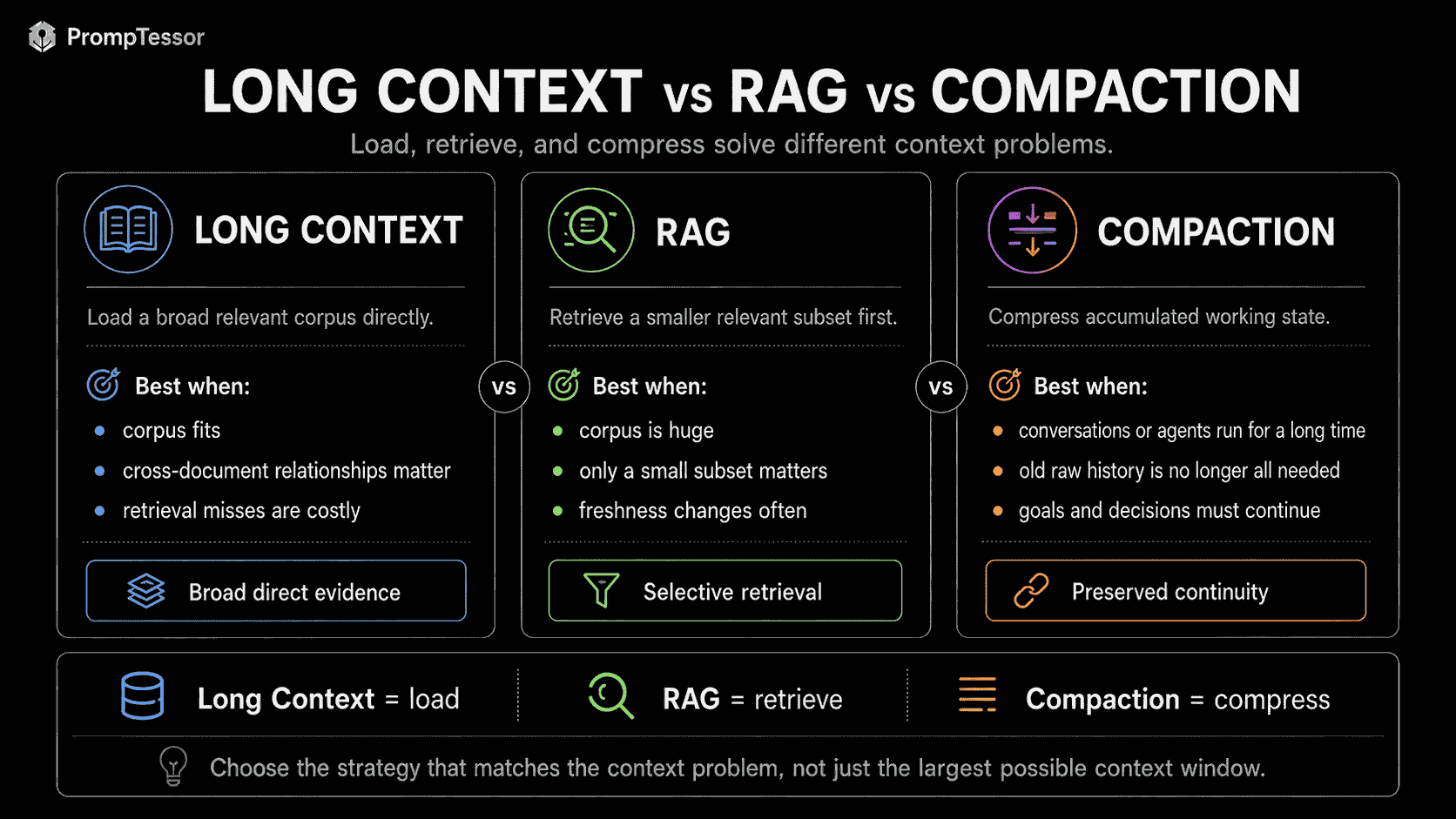
Long-Context Prompt Examples
These examples focus on prompt architecture rather than provider-specific syntax.
Example 1: Contract Version Comparison
INSTRUCTIONS
Compare the supplied contract versions.

SOURCE RULES
- Newer signed versions supersede older drafts.
- Report unresolved conflicts.
- Cite source IDs and section numbers.

CONTEXT
{contract_v1}
{contract_v2}
{contract_v3}

TASK
Identify all material changes to termination, payment, liability,
and renewal provisions.

OUTPUT
For each change:
- topic
- previous language
- current language
- source IDs
- operational impact
Example 2: Large Codebase Review
ROLE
Review this repository for authentication and authorization risks.

REPOSITORY MAP
{repo_map}

FILES
{relevant_files}

TASK
Trace the authorization path from incoming request to database access.

OUTPUT
- security issue
- file
- function
- evidence
- severity
- recommended fix
Example 3: Multi-Document Research
SOURCE PRIORITY
1. primary research
2. official technical documentation
3. secondary analysis

DOCUMENTS
{research_packet}

QUESTION
What conclusions are consistently supported across the sources?

REPORT
- consensus findings
- disputed findings
- missing evidence
- source IDs
Example 4: Long Meeting History
MEETING HISTORY
{meeting_transcripts}

TASK
Build the current project state.

RETURN
- decisions already made
- owners
- deadlines
- unresolved questions
- decisions that changed later
- source meeting/date for each item
Example 5: Customer Support History
ACCOUNT HISTORY
{support_history}

CURRENT ACCOUNT STATE
{current_state}

CURRENT REQUEST
{user_request}

RULES
- Current account state outranks old support assumptions.
- Do not claim an action happened unless confirmed.
- Identify previous promises that remain unresolved.
Example 6: Policy Comparison
DOCUMENTS
{old_policy}
{new_policy}
{related_faq}

AUTHORITY
Official policy > FAQ summary.

TASK
Identify changes that affect customers.

OUTPUT
- change
- effective date
- old rule
- new rule
- source
- customer impact
Example 7: Long PDF Analysis
DOCUMENT
{annual_report_pdf}

QUESTION
What changed in revenue concentration, operating expenses,
cash position, and material risks?

REQUIREMENTS
- Cite page or section references.
- Separate reported facts from interpretation.
- Preserve uncertainty.
Example 8: Video Transcript and Visual Analysis
VIDEO
{video}

TASK
Identify every section discussing product pricing.

FOR EACH SECTION
- timestamp
- speaker
- pricing claim
- visible supporting text
- whether audio and visual information agree
Example 9: Due Diligence Packet
SOURCES
Financial statements
Customer concentration report
Contracts
Cap table
Product metrics
Management notes

TASK
Identify material diligence risks.

PRIORITIZE
- revenue quality
- customer concentration
- legal obligations
- cash runway
- metric inconsistencies

CITE
Source ID for every material risk.
Example 10: Knowledge-Base Q&A
KNOWLEDGE BASE
{documentation}

CURRENT QUESTION
{question}

RULES
- Use current documentation only.
- If multiple versions exist, prefer the latest effective version.
- If no source answers the question, say so.
Example 11: Long Agentic Coding Session
CURRENT GOAL
Fix checkout failures after migration v42.

CURRENT STATE
{state_summary}

IMPORTANT ARTIFACTS
{files_and_logs}

COMPLETED WORK
{completed_steps}

OPEN QUESTIONS
{open_questions}

NEXT TASK
Determine the smallest safe code change to test next.
Example 12: Academic Literature Synthesis
PAPERS
{paper_set}

TASK
Compare evidence for {research_question}.

FOR EACH CONCLUSION
- supporting papers
- contradictory papers
- study limitations
- confidence
- whether the conclusion is causal or correlational
Example 13: Legal Discovery Review
DOCUMENT SET
{discovery_documents}

DATE RANGE
{date_range}

ISSUE
{legal_issue}

TASK
Build a chronology of relevant events.

OUTPUT
- date
- event
- people involved
- source IDs
- direct evidence
- ambiguity
Example 14: Product Documentation Migration
OLD DOCS
{v1_docs}

NEW DOCS
{v2_docs}

TASK
Find user-facing behavior that changed.

IGNORE
Pure copy edits unless they change meaning.

OUTPUT
- feature
- previous behavior
- new behavior
- migration impact
- source IDs
Example 15: Financial Report Analysis
REPORTS
{quarterly_reports}

TASK
Analyze trends across periods.

TRACK
- revenue
- gross margin
- operating expenses
- cash flow
- guidance
- risk disclosures

RULE
Do not compare non-equivalent periods without explaining the difference.
Example 16: Multi-File Debugging
ERROR LOG
{logs}

RELEVANT FILES
{files}

ARCHITECTURE NOTES
{architecture}

TASK
Trace the likely failure path.

OUTPUT
- most likely root cause
- evidence
- alternative causes
- file/function to inspect next
- smallest diagnostic step
Example 17: Long Conversation Continuation
GOAL
{goal}

CURRENT STATE
{state}

PAST DECISIONS
{decisions}

OPEN ITEMS
{open_items}

RECENT RELEVANT MESSAGES
{recent_history}

TASK
Continue from the current state without reopening resolved decisions
unless new evidence contradicts them.
Example 18: Multimodal Research Packet
SOURCES
PDF reports
Charts
Screenshots
Interview audio
Demo video

TASK
Build a unified findings report.

FOR EACH FINDING
- claim
- source type
- source ID
- timestamp/page
- confidence
- conflict with other sources
Common Long-Context Prompting Mistakes
1. Treating Maximum Context as Recommended Context
A large context window is capacity, not a target.
2. Dumping Everything Into the Prompt
Irrelevant context can distract from the task.
3. No Document Boundaries
Long sources should be clearly separated.
4. No Stable Source IDs
Without IDs, citation and debugging become harder.
5. Mixing Instructions and Untrusted Documents
Make instruction/data boundaries explicit.
6. No Source Authority Rules
The model should not have to guess whether a contract or marketing page is more authoritative.
7. No Recency Rules
Old and new versions can conflict.
8. Silently Resolving Conflicting Sources
Require unresolved current conflicts to be surfaced.
9. Burying the Current Task
Use a clear question or task anchor after long context when appropriate.
10. Repeating the Entire Instruction Block Everywhere
Redundant instructions create noise and consume tokens.
11. Assuming One Needle Benchmark Predicts Synthesis Quality
Multi-fact reasoning is a different problem.
12. No Citation Requirements
Long-context claims become harder to verify without source attribution.
13. Asking for Exact Quotes Without Keeping Exact Source Text
A summary cannot reliably substitute for the original when wording matters.
14. Summarizing Too Early
Premature summaries can discard evidence needed later.
15. Never Summarizing
Raw conversation and tool history can grow indefinitely.
16. Carrying Every Tool Result Forever
Keep durable state and retrieve raw output when needed.
17. Treating Prompt Caching as Context Compression
Cached tokens still occupy context capacity even when billing changes.
18. Treating RAG as Obsolete
Selective retrieval remains useful when only a small subset of a huge corpus is relevant.
19. Treating Long Context as Automatically Better Than RAG
Compare quality, retrieval risk, cost, and latency for the actual workload.
20. No Logical Chunking
Even one-request workflows benefit from clear sections and document structure.
21. Arbitrary Chunking
Do not split semantic units so aggressively that local meaning is lost.
22. No Output Budget
Leave enough capacity for the model to produce the required answer.
23. Ignoring Multimodal Token Usage
Images, audio, video, and PDFs also consume request capacity.
24. Ignoring Latency
Longer context can increase time-to-first-token.
25. Ignoring Cost
Large context can be expensive even when technically supported.
26. Keeping Stale Runtime State for Continuity
Fresh account, inventory, market, or permission data should replace stale versions.
27. Compaction Without Preserving Critical Constraints
Goals, permissions, decisions, and open work must survive context reduction.
28. Parsing Provider Compaction Internals
Treat provider-generated compacted state according to the provider's supported contract rather than depending on undocumented internal representation.
29. No Regression Tests for Long Context
Test retrieval, synthesis, conflict handling, citations, and long-context edge cases.
30. Assuming All Providers Behave the Same
Context limits, query-order guidance, caching, compaction, multimodal accounting, and long-context behavior differ by model and provider.
Where PrompTessor Fits
PrompTessor can help at the prompt-design layer of a long-context workflow.
It does not need to be the system that stores a million-token corpus, performs retrieval, manages context windows, runs provider compaction, or chooses which documents fit into a request.
Instead, PrompTessor can help improve the instructions that operate on that context.
LONG-CONTEXT TASK IDEA
        ↓
PrompTessor
Generate / Analyze / Optimize / Refine
        ↓
CLEARER TASK INSTRUCTIONS
Source rules
Conflict handling
Context boundaries
Output requirements
Uncertainty handling
        ↓
APPLICATION
Attach / retrieve / cache / compact context
        ↓
MODEL
        ↓
RESULT
Example
A rough instruction:
Read these documents and tell me what changed.can become a stronger long-context task contract:
TASK
Compare the supplied document versions and identify material changes.

SOURCE RULES
- Prefer newer effective versions.
- Official source text outranks summaries.
- Report unresolved current conflicts.

SCOPE
Focus on:
- pricing
- cancellation
- refunds
- account termination

OUTPUT
For each material change return:
- topic
- old rule
- new rule
- source IDs
- operational impact
- uncertainty
That instruction can then be combined with whichever large context the application assembles.
Responsibility Split
- PrompTessor: helps generate and improve the prompt instructions.
- Application: selects, retrieves, deduplicates, orders, caches, and compacts context.
- Model provider: enforces the model's context limits and provider-specific context-management features.
- Evaluation layer: tests whether the model retrieved, cited, and synthesized the long context correctly.
Long-Context Prompting Checklist
- The task genuinely benefits from large context.
- Irrelevant content is removed.
- Duplicate sources are removed or intentionally retained with version metadata.
- Every source has a stable ID.
- Document boundaries are explicit.
- Source dates or versions are available where relevant.
- Authority rules are defined.
- Recency rules are defined.
- Conflict handling is explicit.
- System/task instructions are separated from source content.
- The current question is easy to locate.
- Query placement follows model-specific guidance and evaluation results.
- Output requirements are explicit.
- Citations are required for material claims when useful.
- Uncertainty behavior is defined.
- Logical chunks preserve semantic units.
- Needle retrieval and multi-source synthesis are tested separately.
- Map-reduce is considered when local analysis can simplify global synthesis.
- RAG is considered when only a small subset of a very large corpus is relevant.
- Prompt caching is considered for repeated long context.
- Raw conversation history is not carried forever without review.
- Important state is externalized when useful.
- Compaction preserves goals, constraints, decisions, and open work.
- Raw source material remains retrievable when exact evidence may be needed.
- Tool results are summarized or externalized after they become durable state.
- Multimodal inputs are included in the context budget.
- Input-token usage is measured.
- Time-to-first-token is measured.
- Total latency and cost are measured.
- Model/provider changes trigger long-context regression tests.
Official Resources
- OpenAI API: Compact a Response
- OpenAI API: Compaction
- Claude Platform: Context Windows
- Claude Platform: Prompt Caching
- Gemini API: Long Context
- Gemini API: Prompt Design Strategies
- Gemini API: Context Caching
FAQ About Long-Context Prompting
What is long-context prompting?
Long-context prompting is the practice of organizing large amounts of supporting information so an AI model can use that context while still following clear instructions, source rules, and output requirements.
What is a context window?
A context window is the working information a model can reference during the current generation, including instructions, conversation history, documents, tool results, media, and the output being generated.
Is a larger context window always better?
No. A larger window provides more capacity, but irrelevant, stale, duplicated, or conflicting information can reduce usefulness and increase cost and latency.
What is context rot?
Context rot is the degradation in model recall or accuracy that can occur as context grows and attention is spread across more information.
How should I structure a long-context prompt?
A useful structure is high-level instructions, source metadata and rules, the large context, the current question, and explicit output requirements.
Should the question go before or after the long context?
It depends on the model, but current Gemini guidance generally recommends putting the query near the end after the supporting context for long prompts while keeping high-level instructions clear at the beginning.
Why should long documents have source IDs?
Stable IDs improve citations, conflict reporting, version handling, evaluation, and debugging.
Should I use XML tags for long context?
XML-style tags can be useful for clear document boundaries, especially with complex prompts, but Markdown headings and other consistent delimiters can also work well.
What is the difference between long context and RAG?
Long context loads a large body of information directly into the model request, while RAG retrieves a smaller relevant subset before generation.
Does long context make RAG obsolete?
No. RAG remains useful when the corpus is much larger than the context window, only a small subset is relevant, or retrieval reduces cost and latency.
Can I combine long context and RAG?
Yes. A retrieval layer can select a rich subset of a large corpus, and that subset can then be assembled into a long-context prompt.
What is the difference between long context and context engineering?
Context engineering decides what information the model should receive, while long-context prompting focuses on how to organize large amounts of that information.
How does prompt caching relate to long context?
Prompt caching can reduce repeated processing when the same large context is reused across multiple requests, but cached tokens still occupy context-window capacity.
Should I put every available document into a large context window?
No. Include information that is relevant, authoritative, and useful for the task rather than maximizing token usage.
How do I handle conflicting documents?
Define source authority, recency, and conflict rules, and require unresolved conflicts to be reported instead of silently resolved.
How do I handle old and new document versions?
Include version or effective-date metadata and explicitly state which version should take precedence.
Why are citations important in long-context tasks?
Citations make conclusions traceable to the source material and enable downstream verification of grounding, recency, and authority.
What is needle-in-a-haystack testing?
It tests whether a model can retrieve a specific fact hidden in a long context. It does not fully measure multi-fact synthesis, conflict resolution, or complex reasoning across many sources.
What is map-reduce for long documents?
Map-reduce first analyzes logical sections or documents independently, then combines structured intermediate findings into a global synthesis.
When should I summarize long context?
Summarize when older raw detail is no longer needed directly but goals, decisions, constraints, important facts, and open work still need to be preserved.
What is context compaction?
Compaction reduces the size of accumulated context while preserving important state needed to continue a long-running conversation or agent workflow.
Does OpenAI support context compaction?
Yes. OpenAI currently provides Responses API compaction mechanisms for carrying long-running state forward with reduced context size.
Does Claude support long context?
Yes. Anthropic currently documents context windows up to 1 million tokens on several Claude models, while also warning about context rot as context grows.
Does Gemini support million-token context windows?
Yes. Google's current Gemini documentation states that many Gemini models support context windows of one million tokens or more.
Does longer context increase latency?
It can. Google explicitly notes that longer Gemini queries generally have higher time-to-first-token, and similar input-processing tradeoffs should be measured on other providers.
Does long context increase cost?
Usually, because more input tokens are processed. Prompt caching, selective retrieval, and summarization can sometimes improve the economics.
Do images, audio, and video count toward long context?
Yes. Multimodal inputs consume request or context capacity according to the target provider's media-processing and tokenization rules.
Should I keep the entire conversation transcript forever?
Not necessarily. Long-running workflows often benefit from carrying structured state, recent relevant messages, and retrievable raw history instead of every token indefinitely.
How should I evaluate long-context prompts?
Test single-fact retrieval, multi-fact retrieval, cross-document synthesis, conflict detection, source selection, citation correctness, cost, and latency.
How can PrompTessor help with long-context prompting?
PrompTessor can help generate, analyze, optimize, and refine the instructions that operate on long context, while the application and model provider manage the actual context assembly, retrieval, caching, compaction, and limits.
Conclusion
Long-context prompting is not about filling a context window.
It is about making a large amount of information usable.
The core architecture is:
HIGH-LEVEL INSTRUCTIONS
        ↓
RELEVANT LARGE CONTEXT
        ↓
SOURCE IDs + AUTHORITY RULES
        ↓
CURRENT QUESTION
        ↓
OUTPUT + CITATION REQUIREMENTS
When context grows further, the architecture expands:
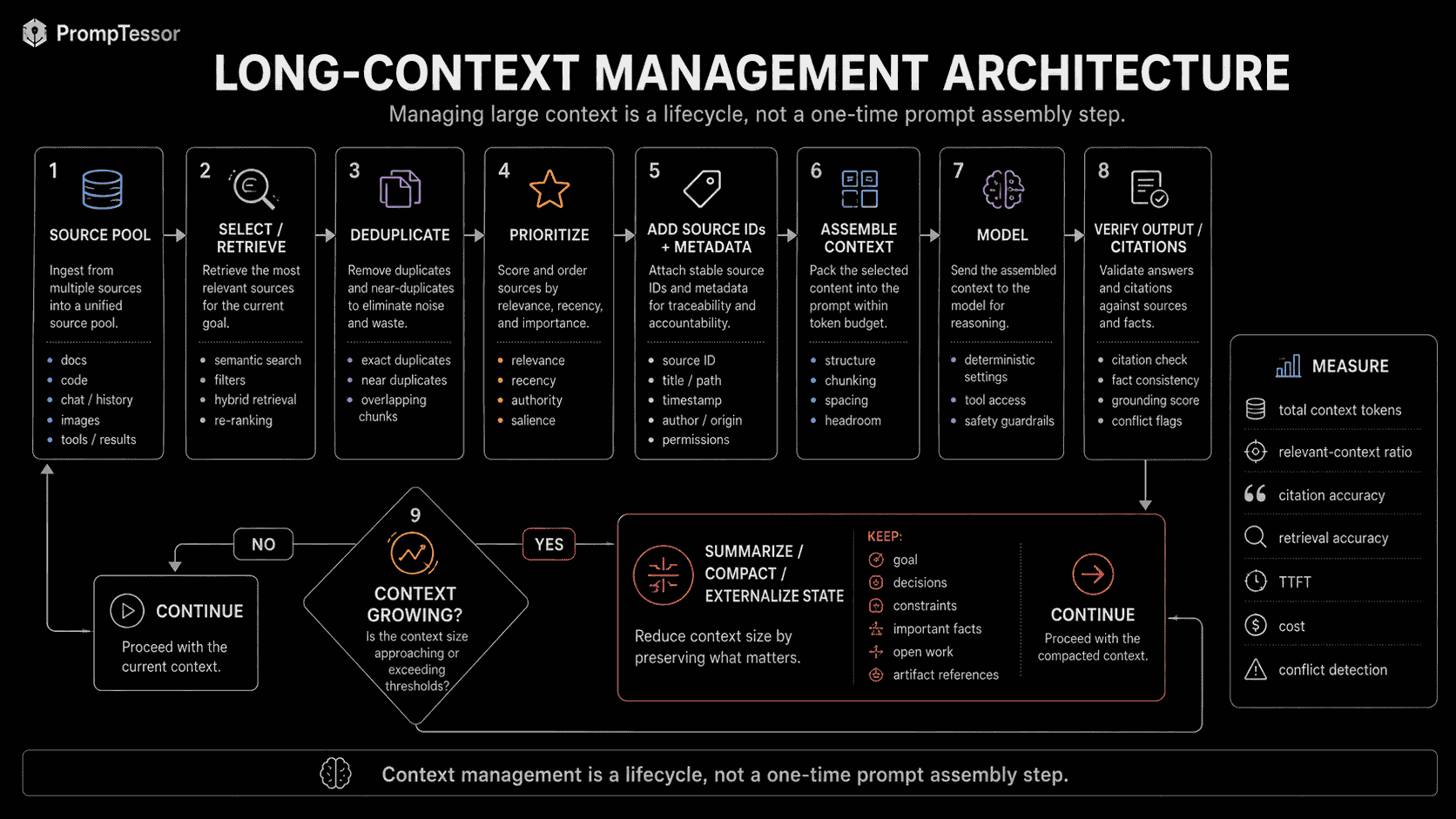
SOURCES
        ↓
SELECT / RETRIEVE
        ↓
DEDUPLICATE
        ↓
PRIORITIZE
        ↓
ASSEMBLE CONTEXT
        ↓
MODEL
        ↓
CONTEXT GROWING?
├ NO → continue
└ YES → summarize / compact / externalize state
        ↓
CONTINUE
That distinction matters because large model context windows create two very different possibilities.
The first is useful:
Give the model enough relevant information to understand relationships that would be difficult to recover from small disconnected chunks.
The second is dangerous:
Use the extra capacity as permission to include everything.
The first improves the task.
The second often increases noise.
Current provider guidance points in the same direction.
Anthropic warns that context quality matters even on models with very large windows because context rot can degrade recall and accuracy.
Google documents million-token-scale Gemini context, but still recommends avoiding unnecessary tokens, putting the current query near the end of long context, and recognizing that multiple-information retrieval is harder than finding one needle.
OpenAI's Responses API compaction mechanisms show another side of the same problem: long-running workflows need ways to preserve important state without carrying raw history forever.
So the practical long-context workflow is:
INCLUDE WHAT MATTERS
        ↓
MAKE SOURCE BOUNDARIES CLEAR
        ↓
DEFINE AUTHORITY AND RECENCY
        ↓
KEEP THE TASK SALIENT
        ↓
REQUIRE TRACEABLE OUTPUT
        ↓
MEASURE QUALITY
        ↓
MANAGE CONTEXT GROWTH
Use direct long context when broad relationships matter.
Use RAG when selective retrieval is more efficient.
Use prompt caching when large context is repeated.
Use summarization or compaction when historical context has become larger than its current usefulness.
And keep raw source material retrievable whenever exact evidence may still be needed.
The durable principle is:
A large context window gives the model more room. Good context architecture decides what deserves to occupy that room.
Build better prompts in one workspace
Generate prompts from ideas, analyze and optimize quality, refine with feedback, reverse-engineer content, and save reusable prompts in your Prompt Library.
Try PrompTessor Free