Prompt Caching: How to Reduce LLM Cost, Latency, and Repeated Context
Long prompts often repeat the same content again and again.
A production AI request may include:
- a large system prompt,
- tool definitions,
- structured-output schemas,
- few-shot examples,
- product documentation,
- conversation history,
- or a large reference file.
Then only one small part changes:
USER QUESTION
What changed in the latest invoice?
If the application sends the same 40,000-token prefix on hundreds of requests, repeatedly processing that stable context can increase input cost and time-to-first-token.
Prompt caching is designed to reduce that repeated work.
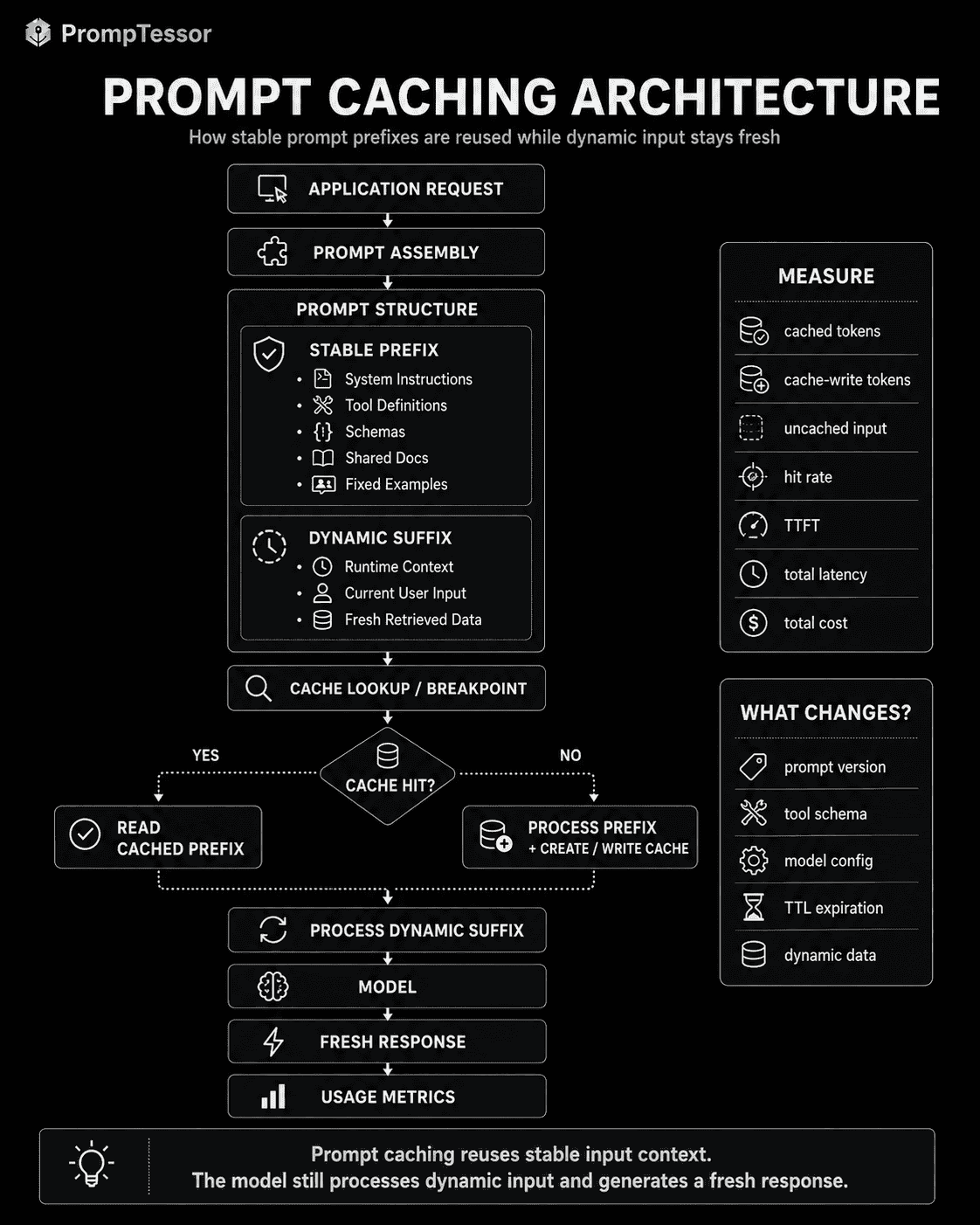
At a high level:
REQUEST 1

STABLE PREFIX
System instructions
Tools
Documentation
Examples

+
DYNAMIC INPUT
User question

        ↓

PROCESS + CACHE ELIGIBLE PREFIX


REQUEST 2

SAME STABLE PREFIX
        ↓
CACHE HIT

+
NEW DYNAMIC INPUT
        ↓

NEW MODEL RESPONSE
The response is still generated fresh.
The cached object is the reusable prompt context or prefix, not the final answer.
This distinction matters because prompt caching is often confused with response caching, semantic caching, memory, or retrieval.
They solve different problems.
Prompt caching is primarily about reusing repeated input processing.
And the architecture of the prompt determines whether that reuse is possible.
Cache-friendly prompts put stable, repeated content before volatile request-specific content.
This guide explains how prompt caching works, what a cache hit and cache miss mean, how to structure stable prefixes, what should and should not be cached, how caching interacts with system prompts, tools, few-shot examples, RAG, long context, prompt versioning, and how current OpenAI, Claude, and Gemini caching systems differ.
Quick Answer
Prompt caching lets an AI provider reuse a previously processed prompt prefix when later requests contain the same eligible content.
Instead of repeatedly processing:
SYSTEM PROMPT
+
TOOL DEFINITIONS
+
STATIC DOCUMENTATION
+
FEW-SHOT EXAMPLES
+
NEW USER INPUT
the application can benefit from an architecture like:
STABLE PREFIX
System
Tools
Shared Context
Examples

──────── CACHE BOUNDARY ────────

DYNAMIC SUFFIX
Runtime State
Current User Input
The exact mechanics are provider- and model-specific.
As of August 2026:
- OpenAI supports prompt caching on recent models, with GPT-5.6-and-later models using exact prefix matching at eligible cache breakpoints and a 1,024-token minimum cacheable prefix.
- Claude supports automatic caching and explicit cache breakpoints, with a default 5-minute TTL and an optional 1-hour TTL at a higher cache-write price.
- Gemini 2.5 and newer models use implicit caching by default, while explicit cached-content objects are available through the Generate Content API for supported models and workflows.
The most important design rule across providers is still simple:
Keep repeated content stable and early. Put request-specific content after the reusable prefix.
Key Takeaways
- Prompt caching reuses previously processed input context; it does not reuse the previous model answer.
- A cache hit happens when an eligible prompt prefix matches content that has already been cached.
- A cache miss happens when no reusable cache entry matches the required prefix or cache conditions.
- Stable prompt content should generally appear before volatile request-specific content.
- System instructions, tool definitions, schemas, static documents, and fixed few-shot examples are natural cache candidates.
- Current user queries, timestamps, volatile account state, and fresh retrieval results usually belong after the stable prefix.
- Prompt caching and context engineering are complementary: context engineering chooses information; caching reuses the stable portion efficiently.
- Prompt caching is different from response caching and semantic caching.
- Cache creation can have its own cost, so caching is most valuable when content is reused enough times.
- TTL, minimum token thresholds, cache-write pricing, and invalidation rules differ across providers.
- OpenAI GPT-5.6-and-later caching uses eligible cache breakpoints and exact matching; earlier OpenAI model families use different automatic best-effort behavior.
- OpenAI exposes cached-token usage and supports prompt cache keys for improving cache routing and reuse.
- Claude supports both automatic caching and explicit cache breakpoints.
- Claude's default cache lifetime is 5 minutes, with a 1-hour option for workflows that need longer reuse.
- Gemini implicit caching is enabled by default on Gemini 2.5 and newer models.
- Gemini explicit caching lets developers create a cached-content object with a configurable TTL through supported Generate Content workflows.
- Changing content before a cache boundary can invalidate reuse; changing content after it can preserve the earlier cached prefix.
- Prompt versioning and cache behavior are connected because a prompt change may create a new cacheable prefix.
- Long context is not automatically worth caching; reuse frequency matters.
- Cached input can still count toward provider rate limits even when it is billed differently.
- PrompTessor does not provide provider-side prompt caching; it can help improve and structure the prompt before that prompt is integrated into a cache-aware application.
Table of Contents
- What Is Prompt Caching?
- Why Prompt Caching Exists
- Prompt Caching vs. Response Caching
- Prompt Caching vs. Semantic Caching
- Cache Hit vs. Cache Miss
- Why Prefix Stability Matters
- Stable vs. Dynamic Prompt Content
- What Should You Cache?
- What Should Not Be in the Stable Prefix?
- Cache-Friendly Prompt Architecture
- Prompt Caching and Context Engineering
- Prompt Caching and System Prompts
- Prompt Caching and Few-Shot Examples
- Prompt Caching and Tool Definitions
- Prompt Caching and RAG
- Prompt Caching and Long Context
- OpenAI Prompt Caching
- Claude Prompt Caching
- Gemini Context Caching
- Automatic vs. Explicit Caching
- Cache Lifetime and TTL
- What Invalidates a Prompt Cache?
- Cache-Friendly Prompt Design
- How to Measure Prompt Cache Performance
- Prompt Caching Cost Model
- Prompt Caching and Latency
- Cache Warming and First-Request Behavior
- Prompt Versioning and Caching
- Prompt Caching Examples
- Common Prompt Caching Mistakes
- Where PrompTessor Fits
- Prompt Caching Checklist
- OpenAI vs. Claude vs. Gemini
- Official Resources
- FAQ
What Is Prompt Caching?
Prompt caching is a provider or application technique for reusing previously processed prompt content across later model requests.
The exact implementation differs, but the common pattern is:
REQUEST A
Stable Prompt Prefix
+
Dynamic Input A
      ↓
Model processes request
      ↓
Eligible prefix becomes reusable


REQUEST B
Same Stable Prompt Prefix
+
Dynamic Input B
      ↓
Cached prefix reused
      ↓
Model generates a fresh response
Prompt caching is especially valuable when the stable prefix is large and the dynamic suffix is comparatively small.
Example
8,000 tokens  — system instructions
7,000 tokens  — tool definitions
20,000 tokens — documentation
5,000 tokens  — few-shot examples
100 tokens    — current user request
If the first 40,000 tokens remain identical across many requests, repeatedly processing them from scratch is inefficient.
A cache-aware workflow attempts to reuse that stable prefix while processing the current request normally.
Prompt Caching Does Not Freeze the Model
The model still generates a new response.
Two requests that reuse the same cached prefix can still produce different outputs because:
- the dynamic input changed,
- the model is nondeterministic,
- generation settings differ,
- tools return different results,
- or the runtime state changed.
Why Prompt Caching Exists
Modern AI applications often have a large ratio of repeated context to new input.
Common examples:
- an assistant with a long system prompt,
- an agent with many tool schemas,
- a documentation assistant answering many questions about the same corpus,
- a coding assistant repeatedly working with the same repository context,
- a classifier using a large fixed demonstration set,
- or a multimodal workflow repeatedly analyzing the same file.
The repeated prefix may dominate input tokens.
Prompt caching exists to reuse that work when provider rules allow it.
Without Caching
Request 1 → process 40k shared tokens + question
Request 2 → process 40k shared tokens + question
Request 3 → process 40k shared tokens + question
Request 4 → process 40k shared tokens + question
With Reusable Prefix Caching
Request 1 → process/write stable prefix
Request 2 → read stable prefix + process new suffix
Request 3 → read stable prefix + process new suffix
Request 4 → read stable prefix + process new suffix
The amount saved depends on provider pricing, cache-write cost, TTL, hit rate, and how frequently that prefix is reused.
Prompt Caching vs. Response Caching
Prompt caching and response caching solve different problems.
| Prompt Caching | Response Caching |
|---|---|
| Reuses processed input context | Reuses a previous final result |
| Model still generates a new response | Model may not be called at all |
| Different dynamic input can follow the same cached prefix | Usually requires the request to be considered equivalent |
| Provider/model feature or infrastructure concern | Often application-layer concern |
| Good for stable long prefixes | Good for repeated identical or equivalent requests |
Prompt Cache
Same 30k-token documentation
+
Question A
→ New Answer A

Same cached documentation
+
Question B
→ New Answer B
Response Cache
Same request
→ Return stored previous answer
Prompt caching preserves generation.
Response caching may skip generation.
Prompt Caching vs. Semantic Caching
Semantic caching usually tries to determine whether two requests are meaningfully similar.
For example:
How do I cancel my subscription?

and

Where can I end my paid plan?
An application might treat those requests as semantically equivalent and reuse an existing answer or retrieval result.
Prompt caching is different.
It is usually based on provider-defined prefix identity or cache matching, not semantic similarity between user questions.
PROMPT CACHING
Same reusable prompt prefix
→ reuse input processing

SEMANTIC CACHING
Similar meaning
→ potentially reuse previous result
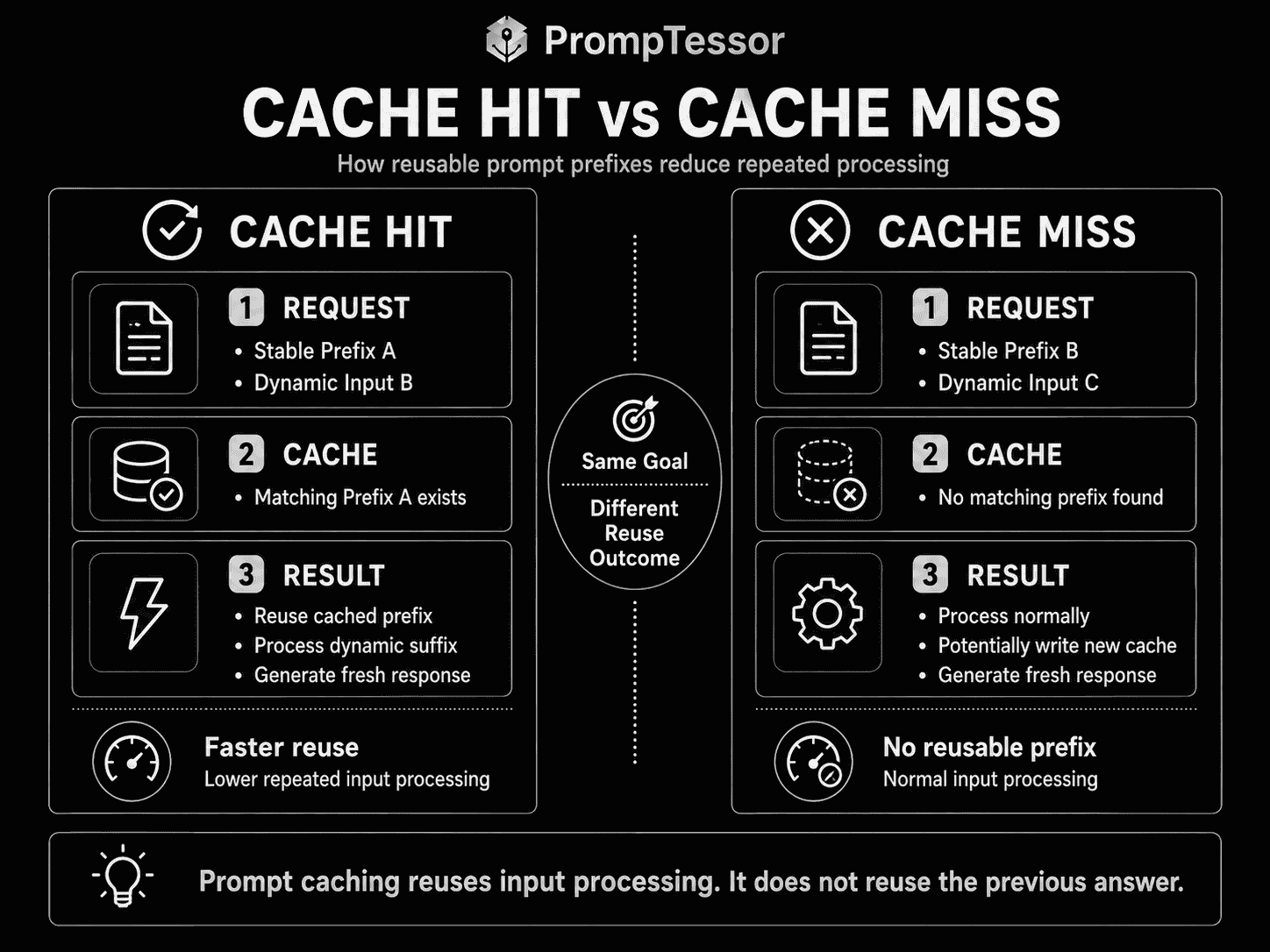
Cache Hit vs. Cache Miss
Cache Hit
A cache hit occurs when the provider finds a reusable cached prefix that satisfies the request's matching rules.
REQUEST

Stable Prefix A
Dynamic Input 2

        ↓

CACHE LOOKUP

Stable Prefix A exists
        ↓
CACHE HIT
Cache Miss
A cache miss occurs when the required reusable prefix is unavailable or does not match.
REQUEST

Stable Prefix B
Dynamic Input

        ↓

CACHE LOOKUP

No matching Prefix B
        ↓
CACHE MISS
        ↓
Process normally
        ↓
Potentially create cache entry
A miss is not necessarily an error.
It may simply be the first request, an expired cache, a changed prompt version, or a request that did not meet the provider's cache conditions.
Why Prefix Stability Matters
Prompt caching usually depends on reusing a stable prefix.
That means prompt order matters.
Cache-Friendly Order
SYSTEM INSTRUCTIONS
TOOL DEFINITIONS
SHARED DOCUMENTATION
FIXED EXAMPLES
──────── CACHEABLE PREFIX ────────
CURRENT ACCOUNT STATE
CURRENT QUESTION
The most reusable material appears first.
Cache-Unfriendly Order
CURRENT TIMESTAMP
REQUEST ID
USER-SPECIFIC STATE
SYSTEM INSTRUCTIONS
TOOL DEFINITIONS
SHARED DOCUMENTATION
If the provider requires matching content from the beginning of the prompt, volatile data near the front can prevent reuse of the larger stable content that follows.
Google's current Gemini guidance explicitly recommends placing large and common content near the beginning of the prompt to improve the probability of implicit cache hits.
OpenAI likewise recommends keeping instructions, tools, schemas, examples, and shared context stable and putting request-specific content after the reusable prefix.
Changing Content After the Boundary
In breakpoint-based systems, content after the cache boundary can usually change without invalidating the earlier cached prefix.
STABLE PREFIX
[cache breakpoint]

Current timestamp: {timestamp}
User: {question}
This is one reason explicit cache boundaries can be useful when an application sends many independent requests that share a stable instruction block.
Stable vs. Dynamic Prompt Content
| Usually Stable | Usually Dynamic |
|---|---|
| System instructions | Current user request |
| Tool definitions | Current account state |
| Structured-output schemas | Fresh search results |
| Static product documentation | Current timestamp |
| Fixed few-shot examples | Session-specific values |
| Long reference files reused across requests | Request IDs |
| Stable policy text | Volatile prices or inventory |
The exact classification depends on the application.
A product catalog updated once per day may be stable enough for one cache lifecycle and too volatile for another.
Stable Does Not Mean Permanent
Stable content means:
Content that remains identical for long enough, and is reused often enough, to justify caching.
A policy document can be stable for twenty minutes and change afterward.
A system prompt may be stable for a week but change when a new release is deployed.
The cache architecture should follow actual reuse patterns rather than assuming any content is immutable forever.
What Should You Cache?
1. Large System Instructions
If every request uses the same long application instructions, that content is a natural candidate.
2. Tool Definitions
Agentic applications may include many tool names, descriptions, and parameter schemas.
If those definitions remain stable across requests, caching can reduce repeated input processing.
3. Structured-Output Schemas
Large schemas repeated across many calls can be part of the reusable prompt prefix on providers that support caching them.
4. Documentation
A support or product assistant may answer many questions against the same large documentation set.
5. Fixed Few-Shot Examples
A stable classification prompt with many demonstrations can benefit from caching if those examples remain identical.
6. Long Conversation Prefixes
Multi-turn conversations naturally accumulate repeated history. Some provider caching systems are designed to reuse that growing prefix.
7. Reused Files or Media
Gemini's explicit-caching documentation includes workflows where the same uploaded video or document is referenced by multiple later questions.
8. Codebase Context
If an AI coding workflow repeatedly asks questions about a stable code snapshot, reusable context may be cache-friendly.
9. Shared Policy or Compliance Text
Large policy blocks that every request needs can be cached if their version is stable and application policy permits it.
What Should Not Be in the Stable Prefix?
Some content is too volatile to belong inside the repeated prefix.
Current User Query
What happened to invoice 3941?This naturally changes every request.
Current Timestamp
If a timestamp changes on every call and appears before the cache boundary, it can destroy prefix reuse.
Random Request Identifiers
Request IDs, nonce values, trace IDs, or unique tokens belong outside a reusable prefix unless the provider/API handles them separately.
Fresh Search or Retrieval Results
RAG results may change per query.
Volatile Account State
Balances, permissions, inventory, live status, and rapidly changing state should be supplied fresh.
Personalized Context
User-specific data may still be reusable within the same user/session, but it should not be accidentally shared as a global stable prefix.
Do Not Cache Just Because Content Is Large
If a 100,000-token document is used once, creating or storing a cache may provide no economic benefit.
Reuse frequency matters as much as size.
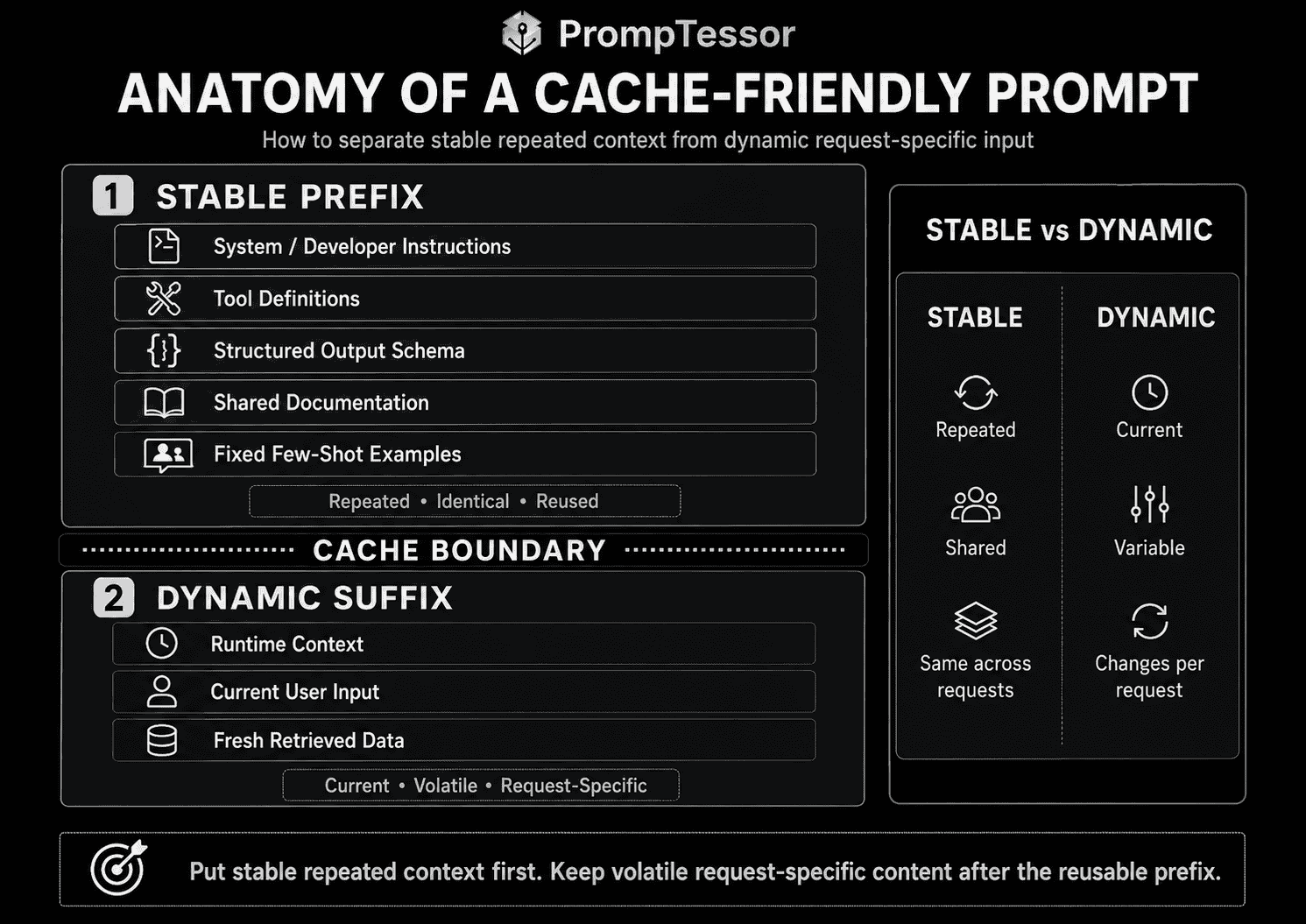
Cache-Friendly Prompt Architecture
A useful architecture separates the prompt into layers.
STABLE PREFIX

SYSTEM / DEVELOPER INSTRUCTIONS
        ↓
TOOL DEFINITIONS
        ↓
STATIC SCHEMAS
        ↓
SHARED DOCUMENTS
        ↓
FIXED EXAMPLES

════════ CACHE BOUNDARY ════════

DYNAMIC SUFFIX

CURRENT RUNTIME CONTEXT
        ↓
CURRENT USER INPUT
        ↓
LATEST RETRIEVED DATA
This structure helps three things at once:
- prompt readability,
- context engineering,
- and cache reuse.
Prompt Caching and Context Engineering
Prompt caching and context engineering solve different layers of the same system.
CONTEXT ENGINEERING
What information should the model receive?

        ↓

PROMPT ARCHITECTURE
Where should that information appear?

        ↓

PROMPT CACHING
Which stable portion can be reused efficiently?
For example, context engineering may decide that a support assistant needs:
- product documentation,
- current account state,
- the latest invoice,
- and current user request.
Caching then asks:
- Is the product documentation stable?
- Is it reused across many requests?
- Should it be placed before dynamic account state?
- Does the provider support caching this input form?
For more on selecting context, see Context Engineering: How to Give AI the Right Information at the Right Time.
Prompt Caching and System Prompts
System-level instructions are common caching candidates because they are often stable across many requests.
For example:
SYSTEM

You are a support assistant for ExampleCorp.

Rules:
- Use current account state.
- Do not claim an action happened unless a tool confirms it.
- Preserve uncertainty.
- Ask for approval before account-changing actions.

[cache boundary]

USER
{current_request}
Do Not Inflate the System Prompt for Caching
Caching should optimize a prompt that already has a reason to be long.
It is not a reason to add unnecessary instructions.
Version Changes Matter
If the system prompt changes, the cacheable prefix changes.
This makes prompt versioning and cache observability useful together.
For system-level design, see System Prompts: How They Work and How to Write Better AI Instructions.
Prompt Caching and Few-Shot Examples
Fixed examples are one of the strongest caching use cases.
SYSTEM
Classification rules

FIXED EXAMPLES
Example 1
Example 2
Example 3
...
Example 50

──────── CACHE ────────

NEW INPUT
{message}
If the examples are identical across requests, their repeated token cost can become significant.
Dynamic Few-Shot Examples Are Different
If examples are retrieved for each query:
NEW INPUT
      ↓
RETRIEVE RELEVANT EXAMPLES
      ↓
DYNAMIC EXAMPLE SET
      ↓
MODEL
then the example block may vary too frequently to behave like one stable cached prefix.
You may still cache a stable instruction layer before the dynamic examples.
For example-selection strategy, see Few-Shot Prompting: How to Use Examples for More Reliable AI Responses.
Prompt Caching and Tool Definitions
Tool definitions can consume a large number of tokens in agentic systems.
A workflow with dozens of tools may repeatedly send:
- tool names,
- descriptions,
- parameter schemas,
- usage instructions,
- and ordering.
If these remain identical, they can be good cache candidates.
Tool Changes Can Invalidate Reuse
Provider behavior differs here.
OpenAI documentation notes that tool definitions, descriptions, parameter schemas, and ordering can contribute to the reusable prefix.
Claude's documentation also treats tools as part of the cacheable prompt prefix and documents model-specific invalidation behavior when tool configuration, thinking configuration, or effort settings change.
Do Not Randomize Tool Ordering
If the same tool set is serialized in a different order every request, the rendered prompt prefix can change.
Stable ordering improves reproducibility and cacheability.
Prompt Caching and RAG
Prompt caching is not the same as Retrieval-Augmented Generation.
RAG
USER QUERY
      ↓
RETRIEVAL
      ↓
RELEVANT DOCUMENTS
      ↓
MODEL
Prompt Caching
REPEATED PREFIX
      ↓
CACHE
      ↓
NEW REQUEST
      ↓
MODEL
RAG chooses what evidence to retrieve.
Caching optimizes repeated context.
When They Work Together
A RAG application may have:
STABLE
System instructions
Tool definitions
Citation schema

──────── CACHE ────────

DYNAMIC
User query
Retrieved documents
The stable application layer can be cached even when retrieved evidence changes every request.
When Retrieved Documents Are Reused
If many questions target the same document set, the documents themselves may become explicit-cache candidates on providers that support that workflow.
Prompt Caching and Long Context
Long context increases the potential value of caching because repeated input can be very large.
But long context alone does not justify caching.
Three conditions matter:
- the context is large,
- the same content is reused,
- and the reuse happens within provider cache rules and lifetime.
A 500,000-token document used once is not automatically a good cache.
A 50,000-token document queried 100 times may be.
Prompt caching therefore belongs inside a broader long-context cost strategy rather than being treated as a universal switch.
OpenAI Prompt Caching
OpenAI's prompt-caching behavior now differs meaningfully between GPT-5.6-and-later families and earlier supported models.
That distinction is important because older summaries of OpenAI prompt caching can now be incomplete.
Common OpenAI Principle
OpenAI recommends placing stable content such as:
- instructions,
- tools,
- schemas,
- examples,
- and shared context
before request-specific content.
OpenAI caching works on eligible prompt prefixes, not semantically similar text.
GPT-5.6 and Later
For GPT-5.6-and-later model families, OpenAI currently documents:
- exact matching at eligible cache breakpoints,
- a strict minimum cacheable prefix of 1,024 tokens,
- support for explicit cache breakpoints,
- implicit caching by default,
- cache-write pricing separate from ordinary uncached input pricing,
- and a 30-minute exact TTL controlled through current prompt-cache options.
The first request writes an eligible prefix. A later request can read it when the content through the relevant breakpoint matches and the request uses the same appropriate cache key.
STABLE INSTRUCTIONS
[explicit cache breakpoint]

TIMESTAMP
{changes every request}

USER
{changes every request}
This is useful when separate requests share instructions but do not share the same changing user-message prefix.
prompt_cache_key
OpenAI exposes prompt_cache_key to improve cache routing and reuse for requests that share long, common prefixes.
A cache key does not make different prompts equivalent.
The prefix itself still needs to satisfy matching requirements.
Earlier OpenAI Models
Earlier supported OpenAI model families use automatic best-effort reuse of matching prefixes rather than GPT-5.6's newer exact-breakpoint system.
The minimum cacheable prefix can vary by model from roughly 1,024 to 2,048 tokens.
Some earlier model families also support extended prompt-cache retention through prompt_cache_retention, including supported 24-hour policies.
Do not assume that the GPT-5.6 cache-lifetime settings and earlier-model retention settings are interchangeable.
What OpenAI Can Cache
Current OpenAI documentation lists reusable prompt content including:
- system, developer, user, and assistant messages,
- images when their order and detail settings stay the same,
- tool definitions and parameter schemas,
- structured-output schemas,
- and supported audio inputs.
Measure Cached Tokens
OpenAI exposes cached_tokens in usage details so applications can measure cache reads.
For GPT-5.6-and-later workflows, current documentation also exposes cache-write token accounting, which matters because cache writes have their own pricing behavior.
Privacy and Retention
Prompt caches are isolated between organizations, but data-retention behavior depends on the selected model and retention policy.
If your application has Zero Data Retention or residency requirements, verify the current supported cache-retention mode before enabling an extended policy.
Claude Prompt Caching
Anthropic currently provides two main prompt-caching styles:
- automatic caching,
- explicit cache breakpoints.
Automatic Caching
Automatic caching places the cache point at the last eligible block and moves it forward as a multi-turn conversation grows.
This is especially useful when conversation history keeps accumulating but earlier turns remain identical.
System
User 1
Assistant 1
User 2
Assistant 2
User 3
        ↑
automatic cache point moves forward
Explicit Cache Breakpoints
Explicit breakpoints let the application mark specific content blocks with cache_control.
This is useful when you want finer control over:
- system prompts,
- large documents,
- few-shot examples,
- tool definitions,
- or different TTL regions.
Claude Cache Lifetime
Anthropic's default cache lifetime is currently 5 minutes.
The lifetime refreshes when cached content is reused.
Anthropic also provides a 1-hour TTL at a higher cache-write price.
The current pricing model uses different multipliers for:
- 5-minute cache writes,
- 1-hour cache writes,
- and cache reads.
This means “cache everything” is not automatically optimal. The cache needs enough reuse to pay back the write cost.
Claude Cache Prefix Order
Claude evaluates the prompt prefix in provider-defined order, including tools, system content, and messages up to the relevant breakpoint.
Changing content in that prefix can affect reuse.
Claude Cache Metrics
Anthropic exposes:
cache_creation_input_tokens,cache_read_input_tokens,input_tokensafter the final cache breakpoint.
This makes it possible to calculate how much of the prompt was written, read, and processed uncached.
Tool and Thinking Configuration
Claude's invalidation behavior can depend on model family and configuration.
Changing tool choice, thinking configuration, or effort settings can invalidate parts of the cache on supported models.
For production systems, cache testing should therefore include configuration changes, not only text changes.
Gemini Context Caching
Google currently describes two caching mechanisms in Gemini workflows:
- implicit caching,
- explicit caching through supported Generate Content workflows.
Implicit Caching
Implicit caching is enabled by default for Gemini 2.5 and newer models.
Google automatically applies cost savings when an eligible request matches cache content.
No explicit cache object is required.
Improve Gemini Implicit Cache Hits
Google's current recommendations include:
- put large and commonly reused content near the beginning of the prompt,
- send requests with similar prefixes within a relatively short period.
The minimum input size currently depends on the Gemini model family.
Current documentation lists 2,048-token minimums for Gemini 2.5 Flash/Pro and 4,096-token minimums for several newer Gemini 3.x models.
Explicit Gemini Caching
For workflows that need more deterministic cache management, Google's Generate Content API supports explicit cached-content objects on supported models.
The developer can cache content once and then reference that cached content in later generation requests.
Use cases in Google's documentation include:
- large system instructions,
- repeated analysis of long videos,
- repeated queries against large documents,
- and code-repository analysis.
Gemini Explicit TTL
Explicit caches have a configurable TTL.
If a TTL is not supplied, Google's current documentation defaults explicit cached content to 1 hour.
Storage duration itself can contribute to cost, so long TTLs should be justified by expected reuse.
Interactions API vs. Generate Content API
Google's current Interactions API supports implicit caching only.
Manual explicit cached-content management requires the Generate Content path described in Google's caching documentation.
Gemini Cache Metrics
Gemini exposes cached-token information in response usage metadata.
For current Interactions API SDKs, Google documents usage.total_cached_tokens. Generate Content caching exposes related cached-token usage through its metadata structures.
Automatic vs. Explicit Caching
There is no single provider-neutral “automatic vs. explicit” API.
The concepts are useful, but implementation differs.
| Automatic / Implicit | Explicit |
|---|---|
| Provider decides or places cache point automatically | Developer marks a breakpoint or creates a cache object |
| Lower setup complexity | More control |
| Good for repeated/growing prefixes | Good for known stable content |
| Cache hit may depend more on provider routing and heuristics | Reuse conditions are usually more deliberate |
| Less lifecycle management | TTL and cache lifecycle may need management |
OpenAI
GPT-5.6-and-later supports implicit and explicit breakpoint behavior.
Claude
Claude supports top-level automatic caching and block-level explicit breakpoints.
Gemini
Gemini supports implicit caching by default on modern models and explicit cached-content objects through supported Generate Content workflows.
Cache Lifetime and TTL
A cache is not permanent.
Providers use a lifetime or time-to-live policy.
CACHE WRITE
    ↓
ACTIVE WINDOW
    ↓
CACHE READS / REFRESH
    ↓
TTL EXPIRES
    ↓
MISS / RECREATE
Why TTL Matters
Suppose a 50,000-token document receives:
- 20 questions in 2 minutes,
- then no activity for six hours.
A short cache lifetime can capture most of the value.
Keeping it cached for hours may provide no extra benefit and can add storage/write cost on providers that price longer retention.
Current Provider Examples
- OpenAI GPT-5.6-and-later currently documents a 30-minute exact TTL through its current prompt-cache options.
- Earlier OpenAI model families may support model-dependent in-memory or extended retention, including 24-hour maximum policies on supported models.
- Claude defaults to 5 minutes and offers a 1-hour cache option.
- Gemini explicit cached content defaults to 1 hour when no TTL is provided, while implicit caching is provider-managed.
Always verify model-specific documentation because TTL options are one of the most likely caching details to change.
What Invalidates a Prompt Cache?
Cache invalidation depends on the provider, but several patterns are broadly important.
Changing Early Instructions
Version A:
You are a support assistant.

Version B:
You are a billing specialist.
If that content is inside the cacheable prefix, the prefix has changed.
Changing Tool Definitions
Tool schema changes can alter the rendered prompt context.
Changing Example Order
Even if examples are semantically equivalent, exact-prefix systems may treat a changed ordering as a different prefix.
Adding Volatile Values Before the Boundary
Timestamp: 2026-08-20T19:42:00
System instructions...
Tools...
Docs...
The changing timestamp appears too early.
Reordering Conversation History
Appending messages is usually more cache-friendly than rewriting or reordering earlier turns.
Provider Configuration Changes
Model, thinking, effort, tool-choice, image settings, or other request configuration may affect cache validity depending on the provider.
Expiration
An identical prefix can still miss if the cache expired or the required cache entry is no longer available.
Cache-Friendly Prompt Design
A cache-friendly prompt is not necessarily a shorter prompt.
It is a prompt whose stable and dynamic content are ordered intentionally.
Pattern 1: Stable First, Dynamic Last
SYSTEM
{stable_system}

TOOLS
{stable_tools}

DOCUMENTATION
{stable_docs}

EXAMPLES
{stable_examples}

──────── CACHE BOUNDARY ────────

RUNTIME CONTEXT
{dynamic_state}

USER
{current_request}
Pattern 2: Keep Serialization Deterministic
If the application serializes the same object differently each time, exact cache matching can suffer.
Prefer stable ordering for:
- tool arrays,
- schema properties where ordering affects serialization,
- example sets,
- and generated instruction blocks.
Pattern 3: Separate Volatile Metadata
Do not inject request IDs, timestamps, or trace data into the beginning of the model-visible prompt unless the model actually needs them.
Pattern 4: Cache Around Real Reuse Boundaries
A shared system prompt used by every user might have one cache boundary.
A user-specific document reused across one session may justify another provider-supported cache layer.
Pattern 5: Keep Versioned Stable Blocks
system_v12
tools_v7
schema_v4
docs_2026_08_20
Version identifiers can help your application understand why a cache hit rate changed after deployment, even if those identifiers are stored outside the model-visible prefix.
Pattern 6: Do Not Trade Correctness for Cache Hits
Never keep stale instructions, stale permissions, or outdated data merely because changing them would invalidate a cache.
Correctness comes first.
How to Measure Prompt Cache Performance
Prompt caching should be measured, not assumed.
1. Cached Input Tokens
How many input tokens were read from cache?
2. Cache Write Tokens
How many tokens were written into a new cache entry?
3. Uncached Input Tokens
How many tokens still had to be processed normally?
4. Cache Hit Rate
cache_hit_requests
------------------
eligible_requests
Do not define the denominator as all requests if many are too small or intentionally uncached.
5. Cached-Token Ratio
cached_input_tokens
-------------------
total_input_tokens
This can be more informative than request-level hit rate.
6. Time to First Token
For long prompts, cache reuse can reduce the time spent before output begins.
7. End-to-End Latency
Generation time may still dominate, so measure total user-visible latency.
8. Input Cost
Compare:
- uncached input cost,
- cache-write cost,
- cache-read cost,
- and storage/TTL cost where applicable.
9. Cache Expiration Rate
If most cache entries expire before reuse, your TTL or workload may not justify caching.
10. Invalidations After Deployments
Track cache performance before and after prompt, tool, schema, and model changes.
Prompt Caching Cost Model
Prompt caching can reduce cost, but the savings are not:
cached tokens = free tokensProviders can charge:
- cache-write tokens,
- cache-read tokens,
- cache storage time,
- uncached suffix tokens,
- and output tokens.
Conceptual Example
Suppose a workflow has:
50,000 stable input tokens
500 dynamic input tokens
1,000 requests
Without caching, the stable content is transmitted and processed as ordinary input on every request.
With effective caching, the provider may charge one or more cache writes plus discounted cache reads for much of the repeated prefix.
The actual savings depend on:
- provider,
- model,
- cache hit rate,
- write/read pricing,
- TTL,
- and how many requests reuse the prefix.
Break-Even Thinking
A useful question is:
How many successful cache reads are needed to recover the extra cost of creating or storing the cache?
This is particularly relevant for Claude and Gemini explicit caches, where write or storage costs are visible parts of the pricing model.
Do Not Hard-Code Savings Percentages
Provider prices and models change.
Calculate expected savings using current model pricing and your measured workload.
Prompt Caching and Latency
Caching can reduce repeated input processing, especially for large prefixes.
That can improve time-to-first-token.
But prompt caching does not make generation instantaneous.
Total latency can still include:
- network time,
- routing,
- uncached input processing,
- reasoning,
- tool calls,
- and output generation.
Measure the Right Latency
Track both:
TTFT
Time to first token

and

E2E
End-to-end request latency
A cache may dramatically improve TTFT while having a smaller effect on a long reasoning response.
Cache Warming and First-Request Behavior
A cache normally needs an eligible entry before later requests can reuse it.
This creates a common pattern:
FIRST REQUEST
cache miss / cache write

SECOND REQUEST
potential cache read

THIRD REQUEST
potential cache read
Cache Warming
Some applications deliberately send an initial request or create an explicit cached-content object before peak traffic.
Whether that is worth doing depends on the provider and workload.
Do Not Warm Content That May Never Be Used
Pre-creating thousands of caches can waste write or storage cost if only a small fraction receive follow-up requests.
Concurrency
If many requests arrive before a reusable cache entry is available, multiple requests may perform uncached work depending on provider behavior.
Applications with very high concurrency should measure this rather than assuming one first request always warms every parallel worker instantly.
Prompt Versioning and Caching
Prompt caching makes versioning operationally visible.
PROMPT v12
      ↓
CACHE PREFIX A

PROMPT v13
      ↓
CACHE PREFIX B
Even a small text change can create a different exact prefix.
Deployment Effect
A new prompt release may temporarily lower cache hit rate while new entries are created.
Version Tools and Schemas Too
If tool definitions or output schemas are part of the stable prefix, their deployment changes can have the same effect as a system-prompt change.
Roll Back Correctly
If a prompt version is rolled back, the previous prefix may or may not still be available depending on cache lifetime.
Do not make rollback correctness depend on the cache still existing.
For reusable prompt design, see Prompt Templates and Variables: How to Build Reusable AI Prompts.
Prompt Caching Examples
Example 1: Customer Support Assistant
CACHEABLE
System support rules
Tool definitions
Product documentation
Policy definitions

DYNAMIC
Account state
Current support message
This is a classic stable-prefix architecture.
Example 2: Documentation Q&A
CACHEABLE
Large product manual

DYNAMIC
Question A
Question B
Question C
Explicit cached-content APIs can be useful when the same long document receives many questions.
Example 3: Long Video Analysis
CACHEABLE
Uploaded 30-minute video

DYNAMIC
"Summarize chapter 1"
"List characters"
"Find every scene with the red car"
Gemini documentation specifically uses repeated media analysis as an explicit-caching use case.
Example 4: Code Repository Assistant
CACHEABLE
Repository snapshot
Architecture instructions

DYNAMIC
Current bug question
Example 5: Fixed Few-Shot Classifier
CACHEABLE
Label definitions
50 curated examples

DYNAMIC
New ticket
Example 6: Agent With Many Tools
CACHEABLE
System instructions
25 tool schemas

DYNAMIC
Current task
Example 7: Structured Extraction
CACHEABLE
Extraction rules
Large output schema

DYNAMIC
Document to extract
Example 8: Multi-Turn Chat
TURN 1
History prefix A

TURN 2
History prefix A + new messages

TURN 3
History prefix A + turn 2 + new messages
Automatic moving cache points are particularly useful for growing conversations.
Example 9: RAG Assistant
CACHEABLE
System rules
Tool schema
Citation format

DYNAMIC
User query
Retrieved evidence
Example 10: Static Knowledge Snapshot
CACHEABLE
Monthly policy handbook snapshot

DYNAMIC
Employee question
Example 11: Personalized Session
SESSION-STABLE
User preferences
Session instructions
Long working document

DYNAMIC
Current edit request
Use a scoped key or provider-supported cache object so user-specific context is not accidentally treated as globally shared content.
Example 12: Product Catalog Analysis
CACHEABLE
Catalog snapshot v42

DYNAMIC
"Find products under $100"
"Compare these categories"
Example 13: Legal Document Review
CACHEABLE
Contract
Review rubric

DYNAMIC
"Find termination clauses"
"Compare liability sections"
Example 14: Research Corpus
CACHEABLE
Stable research packet

DYNAMIC
Different analysis questions
Example 15: Image Analysis
CACHEABLE
Same reference image
Stable analysis rules

DYNAMIC
Different questions about the image
Provider support for image caching and exact matching should be verified for the target model.
Example 16: Prompt Chain Stage
CACHEABLE
Stable stage instructions
Output contract

DYNAMIC
Previous stage output
Example 17: Batch Classification
CACHEABLE
Taxonomy
Decision rules
Examples

DYNAMIC
Record 1
Record 2
Record 3
Example 18: AI Evaluation Rubric
CACHEABLE
Evaluation rubric
Scoring definitions
Examples

DYNAMIC
Current model output to grade
Common Prompt Caching Mistakes
1. Confusing Prompt Caching With Response Caching
Prompt caching reuses input processing. The model still generates a new response.
2. Putting Volatile Data at the Beginning
Changing timestamps, IDs, or user-specific values before the stable prefix can reduce cache reuse.
3. Assuming Semantically Similar Prompts Will Match
Provider prompt caches generally depend on prefix identity or explicit cache objects, not semantic similarity.
4. Assuming Every Prompt Is Eligible
Minimum token thresholds and model support differ.
5. Assuming Every Repeated Token Is Cached
Check provider usage metadata rather than inferring cache behavior from prompt length.
6. Ignoring Cache-Write Cost
Some modern provider caching modes charge more for writing a cache than ordinary input.
7. Ignoring Cache-Read Cost
Cached input is discounted, not necessarily free.
8. Ignoring Storage Cost
Explicit caches can have TTL-dependent storage costs.
9. Caching Content Used Only Once
A large one-off request may not recover cache-creation overhead.
10. Using an Excessively Long TTL
Match lifetime to actual reuse cadence.
11. Using a TTL That Is Too Short
If follow-up requests arrive after expiration, the cache repeatedly misses.
12. Changing the System Prompt Every Request
Personalize later in the prompt where possible instead of rewriting the shared instruction prefix.
13. Randomizing Tool Order
Stable tool serialization helps exact-prefix reuse.
14. Reordering Few-Shot Examples
Changing example order can change the rendered prefix.
15. Embedding Request IDs in Model Instructions
Keep operational metadata outside the model-visible stable prefix unless the model needs it.
16. No Cache Metrics
Without cached-token, hit-rate, latency, and cost metrics, you do not know whether caching is helping.
17. Optimizing Hit Rate Instead of Total Cost
A high hit rate can still be uneconomical if writes, storage, or oversized prefixes dominate cost.
18. Optimizing Cost at the Expense of Freshness
Never keep outdated policies or user state simply to preserve a cache.
19. Treating RAG Results as Permanently Stable
Retrieved evidence often changes per request.
20. Treating Prompt Caching as Memory
A cache is an infrastructure optimization, not a semantic user-memory system.
21. Treating Prompt Caching as Retrieval
Caching does not decide which document is relevant.
22. Ignoring Provider Differences
OpenAI, Claude, and Gemini expose different matching, TTL, and explicit-cache mechanisms.
23. Using Outdated OpenAI Caching Assumptions
GPT-5.6-and-later caching now differs from earlier OpenAI model behavior, including explicit breakpoints and cache-write pricing.
24. Assuming Claude's 5-Minute TTL Is Universal
Claude also supports a 1-hour option, and other providers use different lifetimes.
25. Assuming Gemini Explicit Caching Exists in Every API Surface
Google's current Interactions API is implicit-only; explicit cached-content management uses supported Generate Content workflows.
26. No Prompt Versioning
Prompt changes create new prefixes and can change cache behavior.
27. No Model-Migration Testing
A model upgrade can change token thresholds, cache controls, or pricing.
28. Ignoring Rate Limits
Cached tokens can still count toward provider rate-limit calculations.
29. Sharing User-Specific Cache Keys Carelessly
Scope cache routing and cache objects appropriately for user/session boundaries.
30. Assuming Caching Improves Model Quality
Prompt caching primarily changes input reuse, cost, and latency. It does not inherently make the model smarter or the answer more accurate.
Where PrompTessor Fits
Prompt caching happens at the model-provider or application-infrastructure layer.
PrompTessor does not need to provide provider-side prompt caching for it to be useful in a cache-aware workflow.
The relevant PrompTessor role is earlier:
ROUGH / COMPLEX PROMPT
        ↓
PrompTessor
Generate / Analyze / Optimize / Refine
        ↓
CLEARER PROMPT STRUCTURE
        ↓
APPLICATION ARCHITECTURE
Separate stable and dynamic content
        ↓
MODEL PROVIDER
Prompt caching
        ↓
MODEL RESPONSE
For example, a large production prompt may mix:
- stable task instructions,
- examples,
- dynamic user information,
- runtime context,
- and output requirements.
Improving the prompt structure can make those responsibilities easier to identify before engineering integrates the prompt with a provider's caching API.
Example
Before:
User: {user_name}
Timestamp: {timestamp}

You are a support assistant...

Here are the tools...
Here are 20 examples...
Here is the documentation...

Question: {question}
A cache-aware application might reorganize the model input as:
STABLE
Support instructions
Tool definitions
Examples
Shared documentation

──────── CACHE BOUNDARY ────────

DYNAMIC
User-specific state
Timestamp if genuinely needed
Current question
PrompTessor can help with the clarity and design of the prompt itself.
The application remains responsible for:
- choosing the provider and model,
- placing provider-specific cache breakpoints,
- creating explicit cache objects,
- setting TTLs,
- choosing cache keys,
- measuring cache hits,
- calculating savings,
- and enforcing data-retention requirements.
Prompt Caching Checklist
- The target model supports prompt or context caching.
- The prompt is large enough to satisfy the provider's minimum threshold.
- Stable content is identified.
- Dynamic content is identified.
- Stable content appears before request-specific content where provider matching benefits from it.
- System instructions remain deterministic across reusable requests.
- Tool definitions and ordering remain stable where practical.
- Structured-output schemas remain stable where practical.
- Fixed few-shot examples do not change unnecessarily.
- Current timestamps are not inserted before the reusable prefix without a reason.
- Random request identifiers are kept out of the cacheable model prefix.
- Fresh user or account state remains dynamic.
- RAG evidence is treated according to its actual reuse pattern.
- Explicit cache boundaries are placed after genuinely stable content.
- Cache keys are deterministic and appropriately scoped.
- TTL matches the expected request cadence.
- Cache-write cost is measured.
- Cache-read cost is measured.
- Storage cost is included where relevant.
- Cached input token usage is monitored.
- Uncached input tokens are monitored.
- Cache hit rate is measured.
- Time to first token is measured.
- End-to-end latency is measured.
- Rate-limit behavior is understood.
- Data-retention requirements are checked.
- Prompt versions are traceable.
- Tool and schema versions are traceable.
- Model upgrades trigger caching regression tests.
- Correctness and freshness take priority over preserving a cache hit.
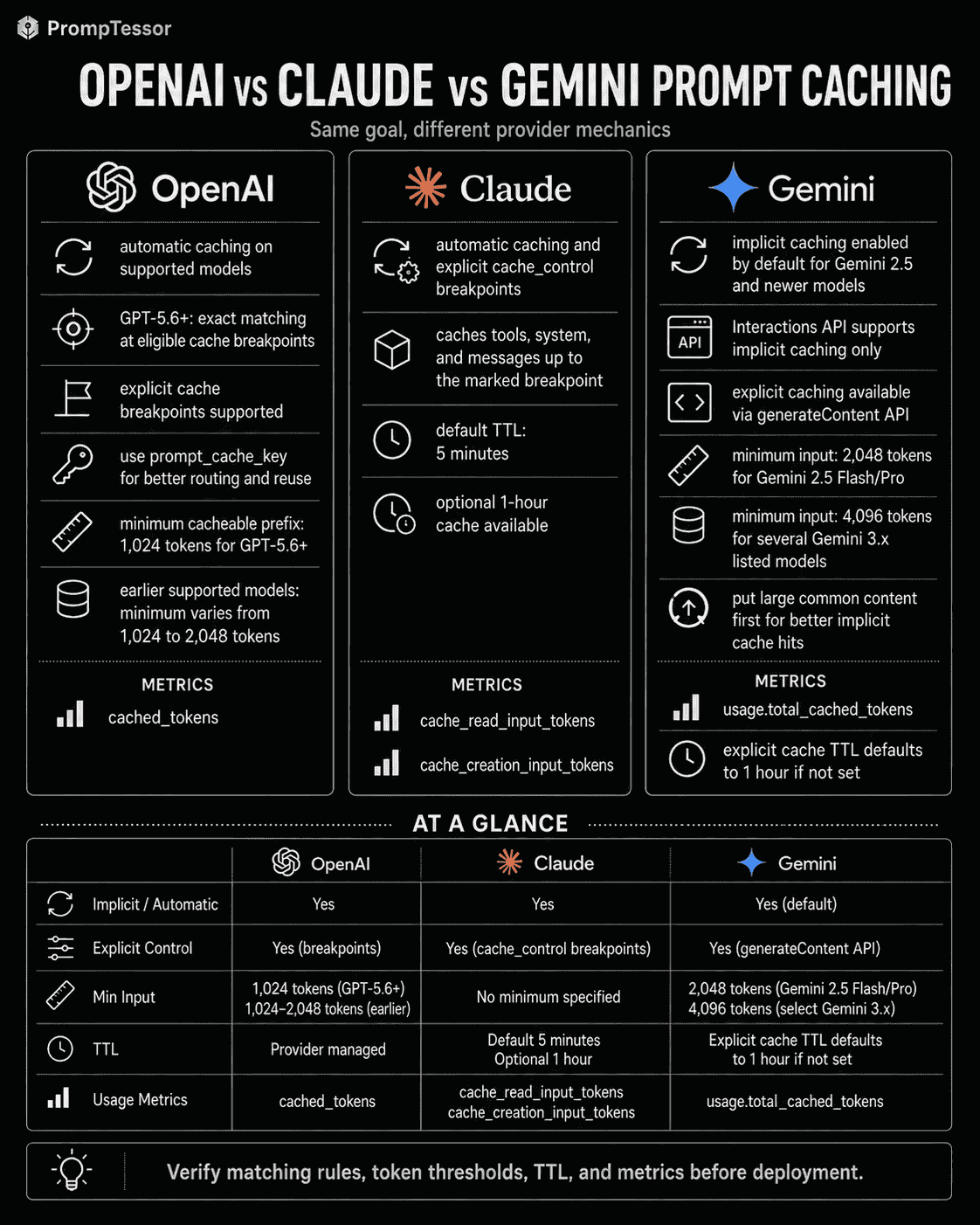
OpenAI vs. Claude vs. Gemini Prompt Caching
| Dimension | OpenAI | Claude | Gemini |
|---|---|---|---|
| Automatic / implicit caching | Yes on supported recent models | Yes, automatic caching available | Yes, enabled by default on Gemini 2.5+ |
| Explicit control | GPT-5.6+ supports explicit breakpoints | Explicit block-level cache breakpoints | Explicit cached-content objects in supported Generate Content workflows |
| Matching model | Exact breakpoint matching on GPT-5.6+; earlier models differ | Prefix through cache breakpoint | Implicit provider matching or explicit cache-object reference |
| Minimum size | 1,024 tokens for GPT-5.6+; earlier models vary | Model/platform-specific minimum | Model-specific; current 2.5 and 3.x thresholds differ |
| Typical TTL controls | GPT-5.6+: current 30m exact TTL; earlier models have separate retention policies | 5m default; 1h option | Explicit cache defaults to 1h; implicit managed by provider |
| Usage metrics | cached_tokens; newer models also expose cache-write accounting | cache_creation_input_tokens, cache_read_input_tokens, input_tokens | cached-token usage in provider usage metadata |
| Large/common content first | Recommended | Prefix order matters | Explicitly recommended for implicit caching |
| Fresh response generated | Yes | Yes | Yes |
Official Resources
- OpenAI API: Prompt Caching
- OpenAI API: Cost Optimization
- Claude Platform: Prompt Caching
- Claude Platform: Tool Use With Prompt Caching
- Gemini API: Context Caching
- Gemini Generate Content: Context Caching
FAQ About Prompt Caching
What is prompt caching?
Prompt caching reuses previously processed prompt context or prefixes so repeated input does not always need to be processed from scratch.
Does prompt caching reuse the previous AI response?
No. The model still generates a fresh response. Prompt caching reuses input processing, not the final answer.
What is a cache hit?
A cache hit occurs when the provider finds a reusable cached prefix or explicit cache object that matches the current request under its caching rules.
What is a cache miss?
A cache miss occurs when no reusable cache entry matches, the cache expired, the prompt changed, or the request does not satisfy provider caching requirements.
What content is best for prompt caching?
Stable repeated content such as system instructions, tools, schemas, documentation, fixed few-shot examples, long files, or conversation prefixes is usually the strongest candidate.
What content should stay dynamic?
Current user requests, timestamps, request IDs, live account state, volatile inventory, fresh search results, and request-specific retrieval usually belong after the stable prefix.
Why should stable content come first?
Many provider caching systems reuse prompt prefixes. Putting stable content first increases the amount of context that can remain identical across requests.
Is prompt caching the same as response caching?
No. Prompt caching reuses processed input and still generates a new response, while response caching can return a previously stored result without a new model generation.
Is prompt caching the same as semantic caching?
No. Semantic caching usually detects similar meaning between requests. Prompt caching typically relies on matching prompt prefixes or explicit cached-content references.
Is prompt caching the same as memory?
No. Prompt caching is an infrastructure optimization for repeated context. Memory is a semantic mechanism for retaining or retrieving information across interactions.
Does prompt caching improve answer quality?
Not inherently. It primarily affects repeated input processing, cost, and latency. The model still receives the same effective context and generates a new response.
Can prompt caching reduce latency?
Yes, especially for large repeated prefixes. It can improve time-to-first-token, although generation, reasoning, tools, and network time still contribute to total latency.
Can prompt caching reduce cost?
Yes when cached reads are cheaper than ordinary repeated input and the cache is reused enough times to recover write or storage costs.
Are cached tokens free?
No. Providers usually price cache writes and reads differently. Cached input may be discounted but is not universally free.
Does OpenAI support prompt caching?
Yes. Current OpenAI models support prompt caching, with GPT-5.6-and-later using exact matching at eligible cache breakpoints and earlier model families using different caching behavior.
What is prompt_cache_key in OpenAI?
It is a request field used to improve routing and cache reuse for requests that share long common prompt prefixes. It does not make different prefixes equivalent.
What is the OpenAI minimum cacheable prefix?
Current GPT-5.6-and-later documentation specifies a strict 1,024-token minimum through the cache breakpoint. Earlier supported models can have different minimums.
Does Claude support prompt caching?
Yes. Claude currently supports automatic caching and explicit cache breakpoints through cache-control configuration.
How long does Claude cache content?
Claude currently defaults to a 5-minute TTL and also offers a 1-hour option at a higher cache-write price.
Does Gemini support prompt caching?
Yes. Gemini 2.5 and newer models use implicit caching by default, and supported Generate Content workflows also provide explicit cached-content objects.
What is Gemini implicit caching?
It is provider-managed context caching that is enabled automatically on supported Gemini models. Cost savings are applied when requests hit the cache.
What is Gemini explicit caching?
It lets developers create a cached-content object, choose a TTL, and reference that content in later supported Generate Content requests.
What is TTL in prompt caching?
TTL means time to live: the period a cache entry remains eligible before expiration or deletion under the provider's rules.
What can invalidate a prompt cache?
Changes to early prompt content, tools, schemas, examples, conversation history, model configuration, or provider-specific settings can prevent reuse, as can expiration.
Can few-shot examples be cached?
Yes when the examples remain identical across requests and the provider supports caching that portion of the prompt.
Can tool definitions be cached?
Yes on supported providers, but changes to tool definitions, ordering, or configuration can affect cache validity.
Can RAG use prompt caching?
Yes. Stable system instructions, tool schemas, or citation rules can be cached even when the retrieved evidence changes per query.
Should long-context prompts always use caching?
No. Caching is most useful when long content is reused frequently enough within the provider's caching rules and lifetime.
How should I measure prompt caching?
Track cached tokens, cache-write tokens, uncached input, hit rate, cached-token ratio, time-to-first-token, end-to-end latency, and total cost.
How does PrompTessor relate to prompt caching?
PrompTessor can help generate, analyze, optimize, and refine the prompt structure. Provider-side cache keys, breakpoints, TTLs, cache objects, and metrics remain application and model-provider responsibilities.
Conclusion
Prompt caching is not a prompting trick.
It is an infrastructure optimization that becomes valuable when an AI application repeatedly sends the same large input context.
The key design pattern is:
STABLE FIRST

System instructions
Tools
Schemas
Shared documents
Fixed examples

──────── CACHE BOUNDARY ────────

DYNAMIC LAST

Runtime state
Retrieved evidence
Current user input
That architecture does more than improve cacheability.
It also makes the prompt easier to understand.
Stable instructions are separated from request-specific data.
Tool and schema versions are easier to reason about.
Few-shot examples have an explicit lifecycle.
Runtime state stays fresh.
And cache behavior becomes observable instead of accidental.
But prompt caching should not be treated as free performance.
Cache writes may cost more than normal input.
Explicit caches can have storage cost.
Entries expire.
Changes can invalidate reuse.
Cached tokens can still count toward rate limits.
And a cache that is rarely reused may save nothing.
The correct optimization loop is:
IDENTIFY REPEATED CONTEXT
        ↓
SEPARATE STABLE / DYNAMIC
        ↓
DESIGN CACHE BOUNDARY
        ↓
MEASURE FIRST REQUEST
        ↓
MEASURE CACHE READS
        ↓
COMPARE COST + LATENCY
        ↓
ADJUST TTL / PREFIX / KEYS
        ↓
RETEST AFTER PROMPT OR MODEL CHANGES
Provider differences matter.
OpenAI's current GPT-5.6-and-later caching uses exact prefix matching at eligible breakpoints and differs from earlier OpenAI caching behavior.
Claude provides automatic caching and explicit breakpoints with 5-minute and 1-hour lifetimes.
Gemini provides implicit caching on modern model families and explicit cached-content objects in supported Generate Content workflows.
Those APIs will continue to evolve.
The durable principle is simpler:
Keep shared context stable, put volatile input later, and measure whether reuse actually reduces the cost and latency of your workload.
Prompt caching works best when it is treated as part of prompt architecture, context engineering, versioning, and observability—not as a switch you turn on after the system is already designed.
Build better prompts in one workspace
Generate prompts from ideas, analyze and optimize quality, refine with feedback, reverse-engineer content, and save reusable prompts in your Prompt Library.
Try PrompTessor Free