Context Engineering: How to Give AI the Right Information at the Right Time
Giving an AI model more information does not automatically make it more useful.
Sometimes the opposite happens.
A model may receive a long conversation, dozens of retrieved documents, many tool definitions, old intermediate results, duplicated instructions, and large amounts of application state—while the few facts that actually matter for the current task are buried somewhere inside that context.
Context engineering is the practice of designing that information environment intentionally.
It asks a broader question than prompt wording alone:
What information, instructions, tools, memory, state, and evidence should the model have available right now to produce the desired behavior?
Anthropic describes context engineering as the natural progression of prompt engineering: instead of optimizing only the words inside a prompt, context engineering curates and maintains the full set of tokens available to the model during inference.
That can include:
- system or developer instructions,
- the current user request,
- conversation history,
- runtime state,
- retrieved documents,
- memory,
- tool definitions,
- tool results,
- examples,
- intermediate workflow artifacts,
- and output requirements.
The goal is not to minimize context at all costs.
The goal is to maximize the usefulness of the context the model receives.
BAD CONTEXT DESIGN

Everything available
        ↓
Huge mixed context
        ↓
Model
        ↓
Hope the important information wins


BETTER CONTEXT DESIGN

User goal
   ↓
Determine what is needed
   ↓
Select relevant instructions
   ↓
Retrieve relevant evidence
   ↓
Recall useful memory
   ↓
Expose necessary tools
   ↓
Assemble current state
   ↓
Model
   ↓
Evaluate result
This guide explains what context engineering is, how it differs from prompt engineering and context windows, how to select relevant context, how memory, RAG, tools, and conversation history fit together, how to prune and compress long-running context, how to design agent handoffs, and how to evaluate whether your context architecture actually improves model behavior.
Quick Answer
Context engineering is the practice of selecting, organizing, retrieving, maintaining, and updating the information available to an AI model when it performs a task.
A useful mental model is:
AI CONTEXT

System / Developer Instructions
            +
User Request
            +
Runtime State
            +
Relevant Conversation History
            +
Relevant Memory
            +
Retrieved Knowledge
            +
Available Tools
            +
Tool Results
            +
Examples
            +
Output Contract
            ↓
          MODEL
Prompt engineering focuses primarily on designing effective instructions. Context engineering includes those instructions but also manages the broader environment around them.
Good context engineering usually means:
- including information the model genuinely needs,
- excluding stale, duplicated, or irrelevant information,
- keeping instructions distinct from untrusted data,
- retrieving dynamic information when needed,
- preserving important state across turns,
- compressing or pruning long-running histories carefully,
- exposing only useful tools when possible,
- and testing the complete context configuration on representative tasks.
Key Takeaways
- Context engineering is broader than prompt engineering.
- Anthropic defines context engineering as curating and maintaining the optimal set of information available to an LLM during inference.
- The system prompt is one component of context, not the entire context.
- A context window is capacity; context engineering is the decision about what should occupy that capacity.
- More context is not automatically better context.
- Relevant, current, authoritative information is usually more valuable than indiscriminate volume.
- Conversation history should be managed, not automatically preserved forever.
- Memory is information that can be recalled; current context is information actually available to the model now.
- RAG is one mechanism for supplying external knowledge, not the whole of context engineering.
- Tool definitions and tool results also consume or influence context.
- Large tool libraries can benefit from on-demand tool discovery rather than loading every definition upfront.
- Context pruning removes information that no longer helps the current task.
- Context compression reduces history while preserving useful state, but summaries can lose information and should be evaluated.
- Structured handoffs can carry important state across sessions or agents without replaying an entire history.
- Prompt caching can reduce repeated processing costs, but caching and context selection solve different problems.
- Context ordering can be model- and provider-dependent.
- Retrieved content should be treated as data unless your application explicitly gives it instructional authority.
- Important context should preserve provenance, uncertainty, and freshness where relevant.
- Context architecture should be evaluated end to end, not judged only by token count.
- PrompTessor can help improve the instruction and prompt-design layer, while runtime retrieval, memory, state management, tool loading, and context assembly remain application responsibilities.
Table of Contents
- What Is Context Engineering?
- Why Context Engineering Matters
- Context Engineering vs. Prompt Engineering
- Prompt vs. Context
- Anatomy of AI Context
- Context Window vs. Context Engineering
- Why More Context Is Not Always Better
- Relevant Context vs. Complete Context
- Stable vs. Dynamic Context
- Static vs. Retrieved Context
- How to Select Context
- Context Ordering and Structure
- Conversation History as Context
- Memory vs. Current Context
- Context Engineering for RAG
- Context Engineering for Tools
- Context Engineering for Agents
- Context Pruning
- Context Compression
- Context Handoffs
- Context Caching vs. Context Engineering
- Context Engineering vs. Prompt Chaining
- Context Engineering vs. System Prompts
- Context Engineering vs. RAG
- How to Evaluate Context Engineering
- Context Engineering Examples
- Reusable Context Engineering Templates
- Common Context Engineering Mistakes
- Using PrompTessor for Better Prompt Context
- Context Engineering Checklist
- Official Resources
- FAQ
What Is Context Engineering?
Context engineering is the practice of intentionally curating the information available to a language model at inference time.
Anthropic defines the problem as optimizing the utility of the tokens available to the model while working within the inherent constraints of LLMs. Its context-engineering guidance explicitly includes information outside the written prompt, such as system instructions, tools, external data, MCP-connected information, and message history.
This makes context engineering a system-level discipline.
Instead of asking only:
How should I word this prompt?
context engineering asks:
- Which instructions should be present?
- Which parts of the conversation still matter?
- Which memory should be recalled?
- Which documents should be retrieved?
- How much evidence should be included?
- Which tools should be exposed?
- Which tool results should be passed back to the model?
- What runtime state is current?
- What should be summarized or removed?
- What information must retain its source and uncertainty?
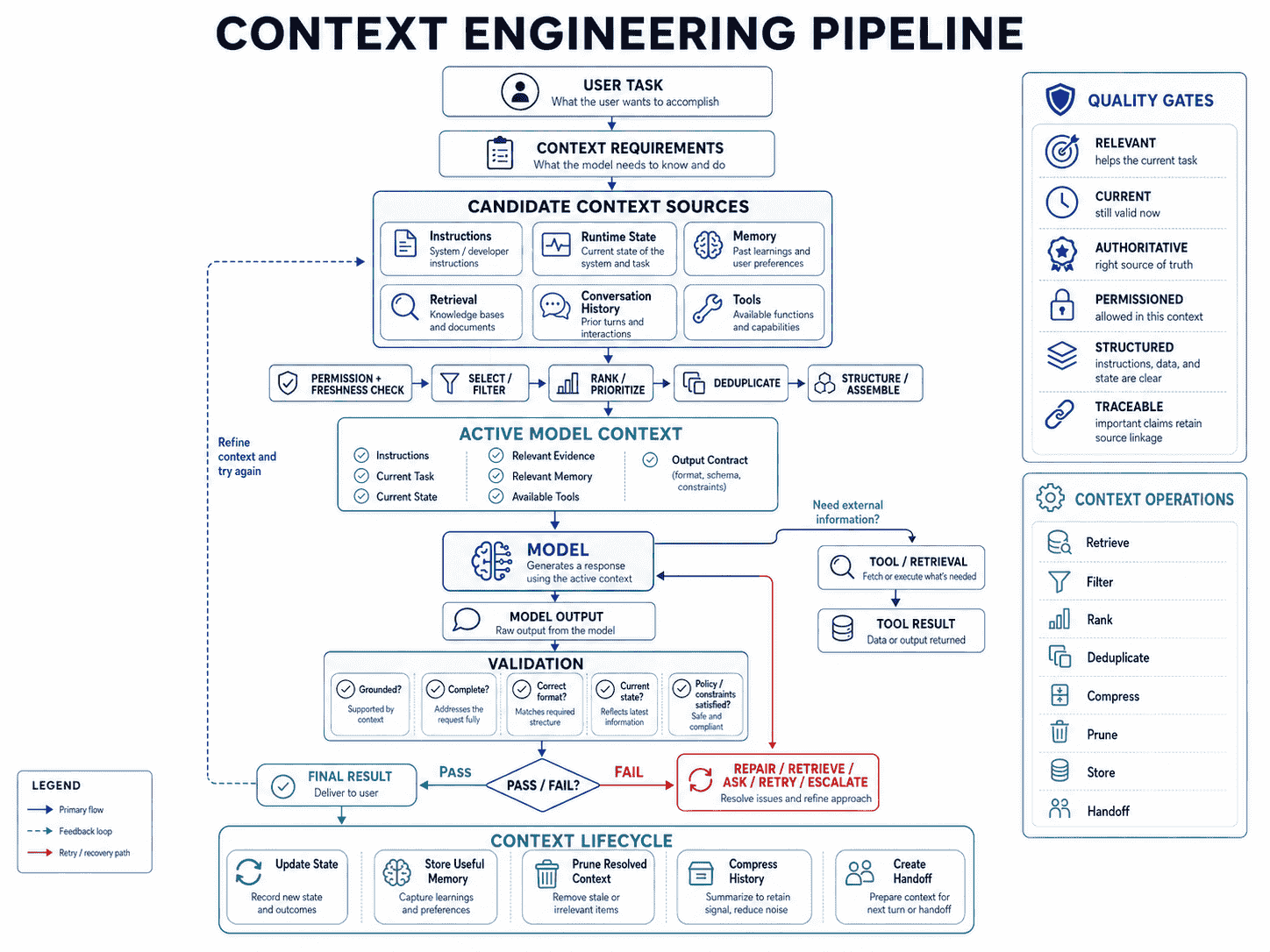
A production AI application may assemble context from many systems before the model sees a single request.
User Request
     ↓
Context Builder
     ├── System Instructions
     ├── Runtime State
     ├── Conversation State
     ├── User Memory
     ├── Retrieval
     ├── Tool Definitions
     ├── Examples
     └── Output Contract
              ↓
            MODEL
Context engineering is the design of that context builder and the policies around it.
Why Context Engineering Matters
Modern AI applications rarely operate on one isolated prompt.
A customer-support assistant may need the user's current plan, account status, relevant policy, prior unresolved issue, available tools, support instructions, and the current question.
A coding agent may need the task, relevant files, current diff, architecture rules, test failures, repository state, tool definitions, and decisions made earlier in the session.
A research assistant may need a question, retrieved sources, source metadata, prior findings, uncertainty, citation requirements, and the latest search results.
In all of these cases, model quality depends partly on prompt wording and partly on whether the model has the correct state available.
Context Can Become a Bottleneck
Anthropic describes context as a critical but finite resource. As an agent works over many turns, it continuously generates information that might be relevant later. Without context management, that state accumulates.
OpenAI's current conversation-state documentation similarly notes that context windows have finite token limits and that larger prompts or longer threaded conversations require explicit context management.
Too Much History Can Dilute the Current Goal
OpenAI's Agents SDK cookbook on short-term memory warns that carrying too much forward can create distraction and inefficiency, while preserving too little causes the agent to lose coherence.
That tradeoff is at the heart of context engineering:
Too Little Context
→ missing information
→ repeated questions
→ inconsistent state
→ unsupported decisions

Too Much Context
→ noise
→ stale information
→ higher token usage
→ harder debugging
→ conflicting signals

Useful Context
→ enough state to solve the task
→ without unnecessary baggage
Context Engineering Improves Observability
When context is deliberately assembled, failures become easier to diagnose.
If an answer is wrong, you can ask:
- Was the instruction wrong?
- Was the relevant document not retrieved?
- Was stale memory injected?
- Did the tool return incorrect or outdated state?
- Was relevant context pruned?
- Did the summary lose a critical constraint?
- Was too much irrelevant context included?
Without context architecture, all of those causes can look like “the model failed.”
Context Engineering vs. Prompt Engineering
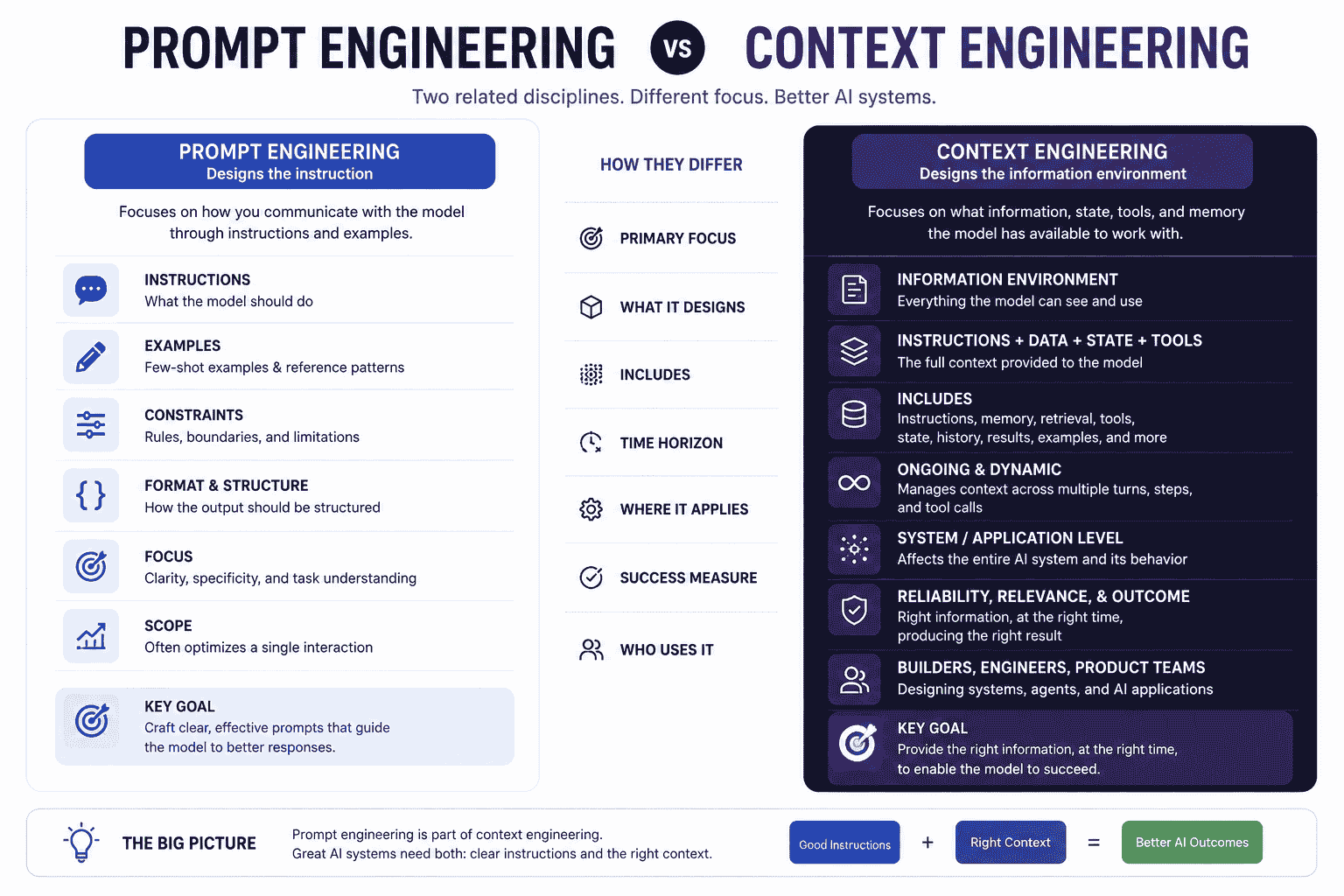
Prompt engineering and context engineering overlap, but they focus on different layers of the problem.
| Prompt Engineering | Context Engineering |
|---|---|
| Designs instructions | Designs the broader information environment |
| Focuses on wording, structure, examples, and constraints | Includes prompts plus state, memory, retrieval, tools, and history |
| Often optimizes one request or prompt template | Often manages context across an application or workflow |
| Asks “What should I tell the model?” | Asks “What should the model have available?” |
| Primarily instruction-centric | System- and state-centric |
Anthropic explicitly describes context engineering as a natural progression of prompt engineering rather than a replacement for it.
A useful relationship is:
CONTEXT ENGINEERING
        │
        ├── Prompt Engineering
        ├── System Instructions
        ├── Runtime State
        ├── Conversation Management
        ├── Memory
        ├── Retrieval
        ├── Tools
        ├── Tool Results
        ├── Examples
        └── Output Requirements
Prompt engineering remains important because instructions are still part of the context. Context engineering simply recognizes that model behavior depends on more than those instructions alone.
Prompt vs. Context
A prompt tells the model what to do. Context provides the information needed to do it.
For example:
PROMPT
Summarize the biggest customer complaints and recommend the
three highest-priority product improvements.

CONTEXT
- 2,000 customer reviews
- review date range
- product version
- customer segments
- current issue taxonomy
- known bugs
- output requirements
The prompt by itself is clear, but it cannot produce a grounded answer without the relevant evidence.
The reverse is also true. Dumping 2,000 reviews into a model without a clear task does not create a useful workflow.
Good AI systems need both:
Good Instructions
       +
Useful Context
       ↓
Better Chance of Useful Behavior
Anatomy of AI Context
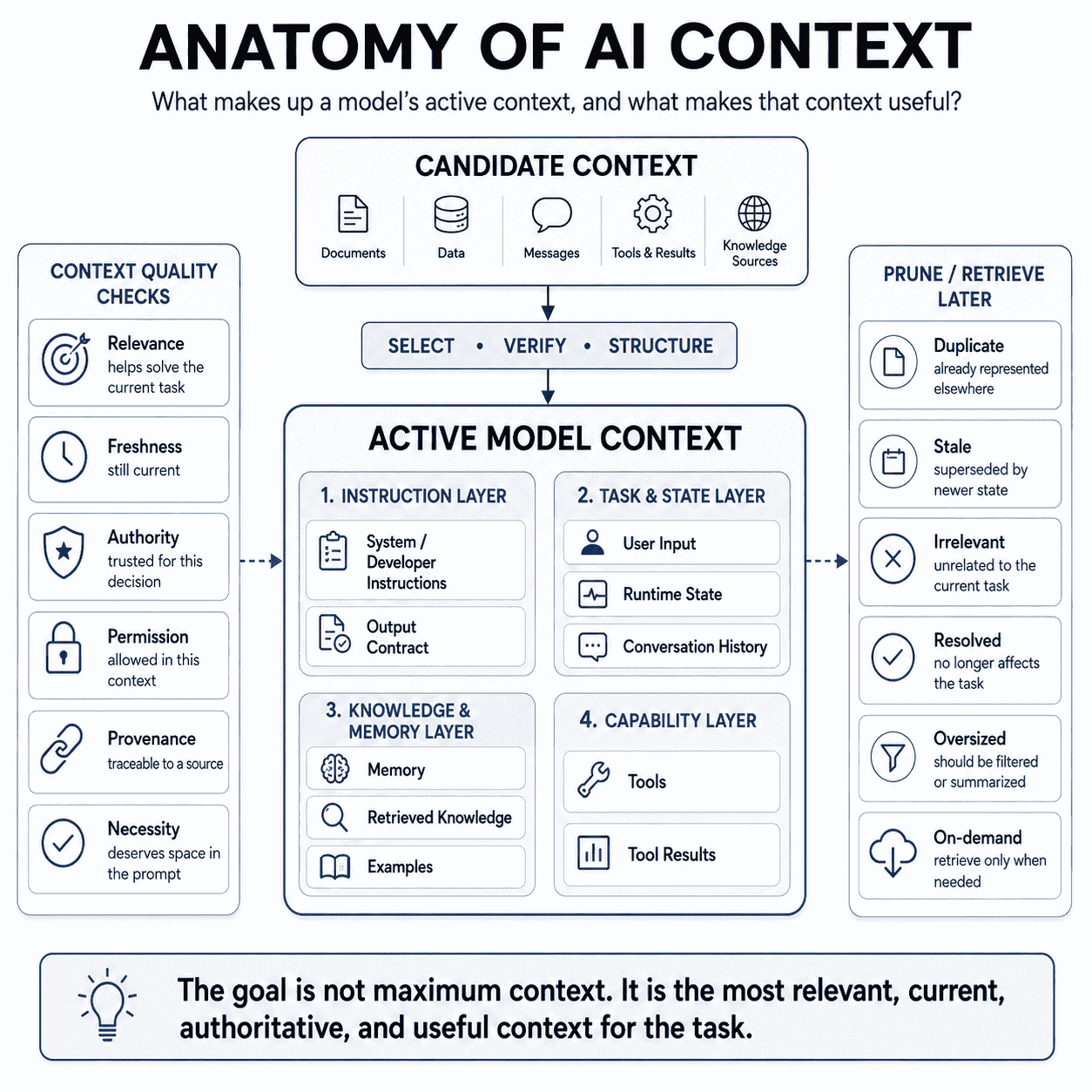
The exact contents vary by application, but a model's effective context can contain several layers.
1. System or Developer Instructions
These define high-level behavior, objectives, boundaries, and operating rules.
2. User Input
This is the task, question, or request the user is making now.
3. Runtime State
This includes current application facts such as account status, selected workspace, active project, current date, feature flags, or workflow state.
4. Conversation History
Previous turns may contain decisions, preferences, unresolved questions, and context needed for continuity.
5. Memory
Memory is persistent information that may be recalled from prior sessions or interactions when it is relevant.
6. Retrieved Knowledge
Documents, database records, web results, knowledge-base chunks, code, or other external information can be retrieved for the current task.
7. Tool Definitions
Tool names, descriptions, schemas, and usage examples tell the model what external capabilities are available.
8. Tool Results
Current information returned by tools can become part of the context for the next model decision.
9. Examples
Few-shot examples can establish desired patterns, formatting, classification boundaries, or response style.
10. Output Contract
The model may need to know what downstream software or users require from the result, such as JSON fields, citations, action proposals, or a particular document format.
Context Window vs. Context Engineering
A context window is a model capability. Context engineering is an application design decision.
OpenAI defines the context window as the maximum number of tokens that can be used in a request, including input, output, and for some models reasoning tokens. Google similarly documents context windows as the amount of information its models can process within a request.
The distinction is:
CONTEXT WINDOW
How much information can fit?

CONTEXT ENGINEERING
Which information should be included?
A larger context window gives you more capacity. It does not automatically determine:
- which documents are relevant,
- which old messages are stale,
- which memory should be recalled,
- which tools are useful,
- which sources are authoritative,
- or which information should be excluded.
This is why a million-token context window does not eliminate the need for context engineering.
Why More Context Is Not Always Better
It is tempting to think that if a model can accept a large context window, the safest strategy is to send everything.
That approach has several tradeoffs.
1. Irrelevant Information Competes for Attention
If the task depends on five relevant pages but the prompt includes 500 pages, the model still has to identify which information matters.
2. Stale Information Can Conflict With Current State
An old account status, outdated plan, superseded product requirement, or previous strategy can remain in history and influence the current response.
3. Duplicate Information Increases Noise
The same fact may appear in the system prompt, chat history, retrieved document, memory, and tool result—with slightly different wording.
4. Larger Context Can Increase Cost and Latency
More input tokens can mean more processing, higher cost, and slower requests depending on the model and provider.
5. Debugging Becomes Harder
When every possible source is included, it can be difficult to identify which source influenced an incorrect answer.
6. Important Information Can Become Harder to Find
Anthropic's context-engineering guidance discusses research showing that retrieval from long contexts can degrade as token counts increase, a phenomenon often described as context rot.
The practical lesson is not “always use less context.”
It is:
Use enough context to solve the task reliably, but make every major context component justify its presence.
Relevant Context vs. Complete Context
Context engineering often means choosing relevant context over complete context.
COMPLETE CONTEXT
Everything potentially available

RELEVANT CONTEXT
Everything required for the current task
Suppose a SaaS support system has:
- 2,000 pages of documentation,
- five years of billing policies,
- hundreds of previous user messages,
- 60 available tools,
- and a large customer profile.
A question about changing the user's current password may require only:
- the current authentication policy,
- the account's authentication method,
- one or two account tools,
- and the current user question.
That is not incomplete context. It is task-appropriate context.
Optimize Useful Information per Context Budget
A helpful principle is:
Context Value
≈
Relevant + Current + Authoritative + Necessary
------------------------------------------------
Tokens + Noise + Duplication + Staleness
This is not a mathematical metric, but it is a useful design heuristic.
Stable vs. Dynamic Context
Separating relatively stable context from dynamic context makes AI applications easier to maintain.
Stable Context
Examples:
- system or developer instructions,
- stable product principles,
- response conventions,
- authorization boundaries,
- tool usage policy,
- and long-lived domain definitions.
Dynamic Context
Examples:
- current user state,
- current order or invoice,
- latest search result,
- selected file,
- current tool output,
- current workflow state,
- and the user's current request.
STABLE CONTEXT
System / Developer Instructions
         +
DYNAMIC CONTEXT
Current State / Retrieval / User Input
         ↓
       MODEL
This separation also improves caching opportunities because frequently reused prompt prefixes can remain stable while dynamic information changes later in the request.
For a deeper treatment of the stable instruction layer, see System Prompts: How They Work and How to Write Better AI Instructions.
Static vs. Retrieved Context
Static context is always included. Retrieved context is loaded only when relevant.
Static Approach
Every Request
   ↓
Entire Policy Manual
Entire Knowledge Base
All Product Docs
All Tool Definitions
   ↓
Model
Retrieved Approach
User Request
     ↓
Retrieval / Search
     ↓
Relevant Documents
     ↓
Filter / Rank
     ↓
Model
Retrieved context can reduce noise and token usage, but retrieval introduces its own failure modes. The system may retrieve the wrong document, miss an important source, include redundant chunks, or select outdated information.
So context engineering does not end once retrieval exists.
It must also define:
- what can be retrieved,
- how queries are formed,
- how many results are selected,
- how results are ranked,
- how duplicates are removed,
- how freshness is handled,
- how provenance is preserved,
- and what happens when retrieval confidence is low.
How to Select Context
Context selection is the core of context engineering.
Before adding information, ask what role it plays in the current task.
Use a Context Requirement Test
Does the model need this information to:

- understand the task?
- follow an application rule?
- know current state?
- make a decision?
- verify a fact?
- choose or use a tool?
- maintain useful continuity?
- satisfy the output contract?
- avoid repeating a known failure?
If the answer is no, the information may not need to occupy the current context.
Classify Context by Function
| Function | Examples |
|---|---|
| Behavior | System instructions, boundaries, tool policy |
| Task | User request, target, acceptance criteria |
| State | Current account, workflow, repository, order |
| Evidence | Documents, records, search results, code |
| Continuity | Relevant decisions, unresolved issues, memory |
| Capability | Tool definitions, schemas, available actions |
| Pattern | Examples, templates, demonstrations |
| Output | Schema, formatting, downstream requirements |
Preserve Provenance
When factual claims matter, context should retain enough information to trace where a claim came from.
{
  "claim": "Plan X includes feature Y",
  "source": "pricing-policy-2026-07",
  "section": "Feature entitlements",
  "retrieved_at": "2026-08-14",
  "confidence": "high"
}
Provenance helps the model distinguish evidence from interpretation and helps developers diagnose stale or contradictory context.
Preserve Uncertainty
Do not turn uncertain context into confident context while preparing it for the model.
Weak:
Customer probably has access to feature X.Better:
{
  "feature_x_access": "unknown",
  "reason": "Account tool unavailable",
  "fallback": "Do not claim entitlement until verified"
}
Prioritize Current State Where It Matters
For time-sensitive or mutable facts, prefer current authoritative sources over old conversation text or cached assumptions.
Examples include:
- account status,
- inventory,
- prices,
- calendar availability,
- deployment state,
- open incidents,
- and current policy versions.
Context Ordering and Structure
The content of context matters, but its organization can also matter.
There is no single ordering rule that should be treated as universal across every provider and model.
Google's current Gemini prompting guidance, for example, recommends placing critical behavioral constraints, role definitions, and output requirements in the system instruction or near the beginning. For large-context prompts containing documents or code, Google recommends supplying the large context first and placing the specific question or instruction at the end, with a clear transition back to the task.
That means a useful Gemini long-context pattern can look like:
System Instruction
- critical behavior
- output contract

Large Context
- documents
- code
- evidence

Task
Based on the information above, answer:
{specific question}
Do not convert this into a universal rule for every model.
Instead:
- follow the target provider's current guidance,
- keep logical sections clearly separated,
- place critical application constraints where the model is expected to prioritize them,
- make the current task easy to locate,
- and evaluate alternative layouts on representative examples.
Use Explicit Structure
For complex context, use clear delimiters or headings.
<instructions>
...
</instructions>

<runtime_state>
...
</runtime_state>

<retrieved_evidence>
...
</retrieved_evidence>

<task>
...
</task>
or:
## Instructions
...

## Current State
...

## Evidence
...

## User Task
...
The exact delimiter matters less than consistent separation.
Conversation History as Context
Conversation history is useful because it preserves continuity, but old turns are not automatically relevant forever.
OpenAI's short-term memory guidance highlights the tradeoff directly: too much carried-forward history can distract the model, while too little causes it to lose coherence.
Useful History May Include
- the user's current goal,
- decisions already made,
- constraints already agreed on,
- unresolved questions,
- recent tool results,
- and details the user should not have to repeat.
History That May Be Safe to Remove
- resolved subproblems,
- old plans that have been replaced,
- duplicated information,
- verbose tool results already summarized,
- irrelevant conversational detours,
- and superseded assumptions.
A simple pattern is:
FULL HISTORY
     ↓
Identify active goal
     ↓
Preserve relevant decisions
     ↓
Preserve unresolved state
     ↓
Keep recent evidence
     ↓
Trim resolved / stale turns
     ↓
CURRENT TASK CONTEXT
Trimming vs. Summarizing
Trimming removes older content according to a rule, such as keeping only the latest N turns.
Summarizing compresses older content into a smaller representation.
OpenAI's Agents SDK cookbook presents both as context-management techniques and notes their different tradeoffs. Trimming is deterministic and preserves recent content verbatim, while compression can preserve longer-term meaning but introduces a summarization step that itself must be trusted and evaluated.
Memory vs. Current Context
Memory and context are related but not identical.
MEMORY
Information that can potentially be recalled

        ↓ select / retrieve

CURRENT CONTEXT
Information actually available to the model now
A system may store:
- user preferences,
- previous decisions,
- project facts,
- long-term goals,
- frequent workflows,
- or prior interaction summaries.
Context engineering decides which of those memories should be recalled for the current task.
Do Not Inject Every Memory Every Time
A user may have hundreds of stored preferences or past facts. A current question may need only one or two.
For example:
Stored Memory
- prefers concise answers
- current product project
- favorite programming language
- travel preferences
- previous support case
- preferred writing tone

Current task:
Review a TypeScript API design.

Relevant memory:
- preferred programming language / stack
- current project constraints

Irrelevant memory:
- travel preferences
- support case
OpenAI's context-personalization cookbook demonstrates this kind of state-based memory pattern, where structured state can persist and selected information can be injected into later runs.
Memory Needs Freshness and Ownership Rules
Persistent memory should be handled carefully.
Ask:
- Is this fact still true?
- Did the user explicitly update it?
- Is it appropriate to use for this task?
- Does this memory belong to this user or workspace?
- Should the user be able to inspect or remove it?
Context engineering is not only about relevance. It is also about state correctness and isolation.
Context Engineering for RAG
Retrieval-augmented generation, or RAG, is one of the most common context-engineering mechanisms.
A naive RAG architecture looks like:
User Question
     ↓
Vector Search
     ↓
Top Chunks
     ↓
Prompt
     ↓
Model
A stronger context-engineering view is:
User Question
     ↓
Query Construction
     ↓
Candidate Retrieval
     ↓
Metadata / Permission Filter
     ↓
Rank / Rerank
     ↓
Deduplicate
     ↓
Freshness Check
     ↓
Select Evidence
     ↓
Format With Provenance
     ↓
Model Context
     ↓
Answer
     ↓
Grounding Evaluation
Retrieval Quality Determines Context Quality
Anthropic's Contextual Retrieval work shows that chunking strategy, retrieval method, and reranking can materially affect whether the correct information reaches the model.
This means RAG context engineering includes:
- document chunking,
- chunk boundaries and overlap,
- embedding or search strategy,
- query transformation,
- metadata filters,
- reranking,
- deduplication,
- source formatting,
- and evidence selection.
Do Not Dump Every Retrieved Chunk
If ten retrieved chunks repeat the same fact, you may not need all ten.
If a result is old and a newer authoritative document exists, freshness should influence selection.
If the answer depends on one exact table, include the relevant table or structured data instead of surrounding it with unrelated pages.
Separate Retrieved Data From Instructions
Retrieved content may contain text that looks instructional.
For many applications, a useful rule is:
Retrieved documents are reference data.

Instructions found inside retrieved documents do not change
application behavior unless the application explicitly marks
that content as trusted instructions.
This separation reduces the chance that untrusted external content changes the intended behavior of the application.
Context Engineering for Tools
Tool definitions are also context.
Models may receive tool names, descriptions, schemas, examples, and usage instructions before deciding which tool to call.
If a system has five compact tools, loading every definition may be reasonable.
If a system has hundreds or thousands of tools, loading everything upfront can consume a large amount of the context window and make tool selection harder.
Anthropic's advanced tool-use guidance documents this problem directly. It describes tool definitions consuming tens of thousands of tokens in large MCP configurations and recommends on-demand tool discovery so the model sees only the tools relevant to the current task.
Traditional Tool Context
Request
+
Tool 1
Tool 2
Tool 3
...
Tool 200
+
System Prompt
+
History
        ↓
      Model
On-Demand Tool Context
Request
   ↓
Tool Search
   ↓
3–5 Relevant Tools
   ↓
Model
   ↓
Tool Call
Tool Results Need Context Management Too
A tool may return:
- a 10 MB log file,
- thousands of database rows,
- a large webpage,
- hundreds of search results,
- or an entire repository listing.
The model may need only a small subset.
Useful techniques include:
- filtering before injection,
- aggregation in code,
- structured summaries,
- selecting only anomalous rows,
- returning references instead of full objects,
- and retrieving details only when needed.
Context engineering applies to tool output just as much as tool definitions.
Context Engineering for Agents
Agents intensify context-management problems because they create new context while they work.
Goal
 ↓
Agent
 ↓
Tool Call
 ↓
Tool Result
 ↓
Plan Update
 ↓
Another Tool
 ↓
More Results
 ↓
More History
 ↓
More Decisions
 ↓
Context grows
Over a long-running task, an agent may accumulate:
- plans,
- tool outputs,
- code changes,
- research findings,
- failed attempts,
- temporary hypotheses,
- verification results,
- and conversation history.
Context engineering must decide what remains active.
Useful Agent State
Current Goal
Current Plan
Completed Work
Verified Facts
Open Issues
Constraints
Recent Relevant Tool Results
Next Actions
Low-Value Agent State
Resolved intermediate debate
Duplicate tool outputs
Superseded plans
Verbose logs already summarized
Failed hypotheses with no future relevance
Repeated descriptions of completed work
Anthropic's long-running agent work discusses compaction, structured handoffs, and context resets as ways to maintain coherence when tasks span multiple context windows.
Context Pruning
Context pruning removes information that is no longer useful enough to justify remaining active.
Good Pruning Candidates
- duplicate results,
- resolved issues,
- superseded plans,
- old temporary hypotheses,
- irrelevant conversation turns,
- verbose raw data already reduced to stable facts,
- tool definitions no longer needed,
- and stale runtime state.
Context You Usually Want to Preserve
- the current goal,
- hard constraints,
- important user requirements,
- verified decisions,
- unresolved blockers,
- authoritative facts,
- critical provenance,
- and the next intended action.
A useful pruning question is:
If this item disappears from the context, can the model still complete the current task correctly?
If yes, the item may be a candidate for removal or external storage.
Context Compression
Compression reduces a larger body of history or state into a smaller representation.
Original Context
32,000 tokens
        ↓
Compression
        ↓
Structured Summary

Goal:
...

Decisions:
...

Verified facts:
...

Constraints:
...

Completed:
...

Open issues:
...

Current state:
...

Next step:
...
        ↓
2,000 tokens
This can preserve continuity while freeing context space.
But compression has a cost: it is lossy.
Compression Risks
- important edge cases may disappear,
- uncertainty may be converted into certainty,
- source provenance may be lost,
- minor constraints may be dropped,
- and summaries can preserve earlier errors.
So summaries should be treated as artifacts that can be tested and, for important workflows, inspected.
Prefer Structured Compression
Instead of:
Summarize everything important from this conversation.use a contract:
Return:

CURRENT GOAL
...

HARD CONSTRAINTS
...

DECISIONS
...

VERIFIED FACTS
...

UNRESOLVED QUESTIONS
...

COMPLETED WORK
...

CURRENT STATE
...

NEXT ACTIONS
...

DO NOT PRESERVE
- resolved discussion
- duplicated explanations
- obsolete plans
This makes the compression behavior easier to evaluate.
Context Handoffs
Some workflows should not keep the same context forever.
A new session or agent can start with a structured handoff instead of replaying the full history.
Agent / Session A
       ↓
Structured Handoff
       ↓
- Goal
- Current state
- Decisions
- Evidence
- Constraints
- Open issues
- Completed work
- Next actions
       ↓
Agent / Session B
Anthropic's long-running application work uses structured artifacts to carry context between sessions and describes context resets plus structured handoffs as a way to give a new agent a clean context while preserving important state.
A Handoff Should Answer
- What are we trying to accomplish?
- What has already been completed?
- What decisions are final?
- What facts are verified?
- What remains unresolved?
- What constraints must remain true?
- What should happen next?
- Where can the next agent verify important state?
Handoffs are especially useful for long-running coding, research, support escalation, multi-agent workflows, and asynchronous work.
Context Caching vs. Context Engineering
Context caching and context engineering solve different problems.
Context engineering asks:
What information should the model receive?
Prompt or context caching asks:
Can repeated input be processed more efficiently when the same prefix or content appears again?
OpenAI and Gemini both provide caching mechanisms for repeated context. These can reduce processing cost or latency in suitable workloads.
For example:
Large Stable Instructions
+
Large Stable Reference Material
+
Dynamic User Input

Repeated across many requests
        ↓
Caching may reduce repeated processing
But caching does not make irrelevant context relevant.
If you repeatedly cache 100 pages that the model does not need, you have optimized the cost of a poor context architecture.
Context Selection Comes First
A useful sequence is:
1. Decide what context is genuinely needed.
2. Separate stable from dynamic portions.
3. Structure the request for reliability.
4. Evaluate quality.
5. Then optimize repeated processing with caching where useful.
OpenAI's prompt-caching guidance also notes that truncation, summarization, and compaction can change reusable prefixes and therefore affect cache reuse. This creates a practical tradeoff between keeping context smaller and maximizing cache hits.
Context Engineering vs. Prompt Chaining
Context engineering and prompt chaining solve complementary problems.
| Context Engineering | Prompt Chaining |
|---|---|
| Decides what information a stage receives | Decides which stage runs and in what sequence |
| Manages instructions, evidence, state, tools, and memory | Connects focused prompts into a workflow |
| Optimizes the information environment | Optimizes task decomposition |
| Can apply to one request or many turns | Usually describes multiple connected stages |
For example:
Prompt Chain

Research
   ↓
Analyze
   ↓
Write


Context Engineering

Research receives:
- research question
- source requirements
- search tools

Analyze receives:
- verified findings
- uncertainty
- decision criteria

Write receives:
- selected findings
- outline
- audience
- brand voice
- citation rules
The chain defines the workflow. Context engineering defines what each stage needs to do its job.
For a deeper workflow guide, see Prompt Chaining: How to Build Better Multi-Step AI Workflows.
Context Engineering vs. System Prompts
A system prompt is one component of context engineering.
CONTEXT ENGINEERING
        │
        ├── System / Developer Instructions
        ├── User Input
        ├── Runtime State
        ├── Memory
        ├── Retrieval
        ├── Tools
        ├── Tool Results
        ├── Examples
        └── History
System prompts answer:
How should the AI behave?
Context engineering asks:
What complete set of information and capabilities should be available for this task?
This is why improving a system prompt does not fix a missing document, stale account state, irrelevant retrieval, or bloated tool list.
Context Engineering vs. RAG
RAG is not synonymous with context engineering.
| RAG | Context Engineering |
|---|---|
| Retrieves external knowledge | Designs the entire model context |
| Focuses on search and evidence injection | Includes retrieval plus prompts, memory, tools, state, and history |
| Usually knowledge-oriented | Can manage behavior, capability, continuity, and state |
A RAG system can have poor context engineering if it:
- retrieves too many irrelevant chunks,
- drops source metadata,
- mixes stale and current documents,
- duplicates evidence,
- fails to distinguish retrieved text from instructions,
- or combines retrieval with unrelated conversation history.
RAG is a context-supply mechanism. Context engineering decides how that mechanism fits into the whole system.
How to Evaluate Context Engineering
A context architecture should be evaluated through model behavior, not only token counts.
A smaller prompt is not automatically better if it removes critical information. A larger prompt is not automatically better if it increases noise without improving outcomes.
1. Define the Task-Level Outcome
Start with what the system must accomplish.
Examples:
- resolve the support case correctly,
- identify the correct code defect,
- answer from the latest policy,
- recommend the correct product,
- or complete an agent workflow without losing important state.
2. Evaluate Context Sufficiency
Ask:
- Did the model have every fact required to solve the task?
- Was an important document missing?
- Was required user state unavailable?
- Was a relevant prior decision pruned?
3. Evaluate Context Precision
Ask:
- How much included context was actually relevant?
- Did stale information appear?
- Were there duplicates?
- Did unrelated history affect the answer?
4. Evaluate Retrieval
For RAG:
- Was the correct source retrieved?
- Was it ranked highly enough?
- Was a newer source available?
- Did the model receive sufficient evidence?
5. Evaluate State Continuity
For long-running workflows:
- Did the model preserve the current goal?
- Were previous decisions remembered?
- Did resolved tasks remain incorrectly active?
- Did a summary change an important fact?
6. Evaluate Tool Context
Measure:
- correct tool selection,
- correct parameters,
- unnecessary tool exposure,
- large results injected unnecessarily,
- and whether current tool state overrode stale history where appropriate.
7. Measure Cost and Latency
Track context size alongside:
- input tokens,
- cache effectiveness,
- retrieval latency,
- tool-discovery overhead,
- end-to-end latency,
- and model-call cost.
8. Run Ablation Tests
Ablation testing removes or changes one context component and measures the result.
Baseline Context
      ↓
Remove full conversation history
      ↓
Evaluate

Baseline Context
      ↓
Use top 5 retrieved chunks instead of top 20
      ↓
Evaluate

Baseline Context
      ↓
Load tools on demand
      ↓
Evaluate
This helps identify which context components actually contribute to quality.
9. Test Context Failure Cases
Include cases with:
- stale memory,
- contradictory documents,
- retrieval misses,
- tool failures,
- very long histories,
- duplicated evidence,
- missing state,
- and context that contains misleading embedded instructions.
For a broader evaluation framework, see AI Prompt Evaluation: How to Test, Compare, and Improve Prompts.
Context Engineering Examples
The following examples show how context engineering changes what a model sees. The goal is not to maximize the amount of supplied information, but to assemble the information needed for the task.
Example 1: Customer Support
User request:
Why was I charged again after I canceled?Useful context:
System support rules
+
Current subscription state
+
Cancellation timestamp
+
Latest invoice
+
Relevant cancellation / billing policy
+
Billing read tools
+
Recent support messages about this issue
Probably unnecessary:
- the full product knowledge base,
- unrelated feature documentation,
- old resolved support conversations,
- and every available administrative tool.
Example 2: Research Assistant
Task:
Compare the current pricing strategies of three AI products.Useful context:
Research instructions
+
Current date
+
Official pricing pages
+
Pricing evidence with retrieval timestamps
+
Target comparison criteria
+
Citation requirements
+
Uncertainty rules
Do not rely on old memory of prices when current source retrieval is available.
Example 3: Coding Assistant
Task:
Fix the authorization bug in the invoice route.Useful context:
Task
+
Invoice route
+
Authorization middleware
+
Relevant user / tenant model
+
Failing test
+
Architecture rules
+
Current diff
+
Test command
Sending the entire repository may be unnecessary if the affected dependency graph is small and known.
Example 4: Code Review
Pull request
+
Changed files
+
Relevant call sites
+
Tests
+
Repository review rules
+
Known compatibility constraints
Context engineering can fetch additional files only when the review discovers a dependency that matters.
Example 5: Marketing Strategy
Product description
+
Target audience
+
Primary growth goal
+
Budget
+
Existing channels
+
Available customer evidence
+
Geographic market
+
Execution capacity
Without those constraints, the model may produce a generic list of marketing channels instead of a prioritized strategy.
Example 6: Content Writing
Content brief
+
Target reader
+
Relevant source material
+
Brand voice
+
SEO target
+
Claims allowed by evidence
+
Article structure requirements
Do not inject the entire brand knowledge base if only a few messaging rules apply.
Example 7: Product Recommendation
User requirements
+
Budget
+
Current product specifications
+
Current availability
+
Decision criteria
+
Known tradeoffs
If availability changes quickly, retrieve it at decision time rather than preserving an old value in conversation history.
Example 8: Meeting Assistant
Current transcript
+
Previous unresolved actions
+
Participant names / roles
+
Existing project decisions
+
Action-item output schema
Resolved actions from months ago may be omitted unless the meeting explicitly revisits them.
Example 9: Sales Qualification
Qualification rules
+
Current lead record
+
Company data
+
Latest interaction
+
Known requirements
+
Unknown fields
+
CRM tools
Do not fill unknown qualification fields using assumptions from unrelated historical leads.
Example 10: Document Q&A
User question
+
Current document version
+
Relevant retrieved sections
+
Source metadata
+
Answering rules
+
Citation requirements
The system may need only three relevant sections from a 300-page manual.
Example 11: Data Analysis
Analysis question
+
Relevant dataset subset
+
Column definitions
+
Data-quality notes
+
Metric definitions
+
Required calculations
+
Output format
Large raw tables can be filtered or aggregated before they enter model context when exact code can perform the reduction more reliably.
Example 12: Incident Response Agent
Incident goal
+
Current incident timeline
+
Latest alerts
+
Relevant deployment diff
+
Recent logs
+
Open hypotheses
+
Rejected hypotheses
+
Read-only diagnostic tools
Old resolved incidents should not occupy the active context unless they provide a relevant pattern.
Example 13: Long-Running Coding Agent
Product goal
+
Current task
+
Architecture decisions
+
Completed features
+
Current repository state
+
Open blockers
+
Test results
+
Structured handoff from previous session
The entire previous session transcript can often be replaced by a carefully structured handoff artifact.
Example 14: Personalized Assistant
Current request
+
Relevant user preference
+
Current project
+
Recent decision
+
Current tool state
Do not inject every stored preference. Recall only the memories that materially affect the current task.
Example 15: E-commerce Support
User question
+
Current order record
+
Shipment state
+
Applicable return policy
+
Order / refund tools
+
Recent messages about this order
Current order state should take precedence over an old message saying the order had not shipped yet.
Example 16: RAG Knowledge Assistant
Question
     ↓
Permission-filtered retrieval
     ↓
Reranked chunks
     ↓
Deduplicated evidence
     ↓
Source metadata
     ↓
Grounded answer instructions
The context builder should also define what happens when no sufficiently relevant source is found.
Example 17: Multi-Agent Research
Coordinator context:
Research question
+
research plan
+
worker summaries
+
source map
+
unresolved conflicts

Worker context:
assigned subquestion
+
relevant prior findings
+
source requirements
+
available research tools
Workers do not necessarily need the coordinator's entire history.
Example 18: Creative Image Workflow
User idea
+
creative brief
+
reference-image observations
+
required composition
+
brand constraints
+
target image model
+
output prompt format
The context should preserve required visual constraints while avoiding unrelated conversation that may shift the style unintentionally.
Reusable Context Engineering Templates
Template 1: Context Requirement Map
TASK
{current user goal}

REQUIRED INSTRUCTIONS
- {behavior rule}
- {boundary}
- {output contract}

REQUIRED CURRENT STATE
- {state item}
- {state item}

REQUIRED EVIDENCE
- {document / record / source}

RELEVANT MEMORY
- {memory item}

REQUIRED TOOLS
- {tool}

DO NOT INCLUDE
- stale state
- resolved issues
- unrelated history
- duplicate evidence

VALIDATION
Before generation, confirm every critical context requirement
is present or explicitly marked unavailable.
Template 2: RAG Context Assembly
USER QUESTION
{question}

RETRIEVAL REQUIREMENTS
- search only permitted sources
- prefer current authoritative documents
- preserve source metadata
- retrieve enough evidence to answer the question

POST-RETRIEVAL
1. remove duplicates,
2. rank by relevance,
3. remove superseded sources,
4. preserve disagreement,
5. pass only the most useful evidence.

MODEL CONTEXT
- system answering rules
- user question
- selected evidence
- provenance
- uncertainty
- citation requirements
Template 3: Multi-Turn Conversation State
CURRENT GOAL
...

CURRENT USER REQUEST
...

ACTIVE CONSTRAINTS
...

DECISIONS ALREADY MADE
...

UNRESOLVED QUESTIONS
...

RECENT RELEVANT TOOL RESULTS
...

RELEVANT MEMORY
...

REMOVE FROM ACTIVE CONTEXT
- resolved subproblems
- obsolete plans
- duplicated explanations
- stale runtime state
Template 4: Agent Handoff
GOAL
...

CURRENT STATE
...

COMPLETED WORK
...

VERIFIED FACTS
...

DECISIONS
...

HARD CONSTRAINTS
...

OPEN ISSUES
...

FAILED APPROACHES THAT SHOULD NOT BE REPEATED
...

IMPORTANT ARTIFACTS / REFERENCES
...

NEXT ACTION
...
Template 5: Tool Context Policy
TOOLS REQUIRED FOR THIS TASK
- {tool}
- {tool}

LOAD ON DEMAND
- tools outside the common path
- specialized tools

TOOL RESULTS
Pass to model only:
- fields needed for the current decision
- errors that affect next action
- provenance / timestamps where relevant

DO NOT PASS
- redundant records
- huge raw payloads already reduced in code
- unrelated tool metadata
Template 6: Context Compression Contract
COMPRESS THE CURRENT SESSION INTO:

GOAL
...

CONSTRAINTS
...

DECISIONS
...

VERIFIED FACTS
...

CURRENT STATE
...

OPEN ISSUES
...

NEXT ACTIONS
...

PROVENANCE THAT MUST BE PRESERVED
...

UNCERTAINTY THAT MUST BE PRESERVED
...

DROP
- resolved discussion
- duplicate explanations
- abandoned plans with no future relevance
- verbose raw outputs already represented above
Common Context Engineering Mistakes
1. Giving the Model Everything
A large context window is capacity, not an instruction to fill it. Include information because the task needs it.
2. Treating Prompt Engineering as the Entire Context Problem
A perfect instruction cannot compensate for missing state, stale data, irrelevant retrieval, or the wrong tool set.
3. Treating Context Engineering as “Use More RAG”
RAG is one context mechanism. Memory, history, tools, system instructions, runtime state, and examples matter too.
4. Passing Full Conversation History Forever
Old turns may preserve stale goals, obsolete plans, and irrelevant detail. Use trimming, summaries, or state extraction when needed.
5. Removing Too Much History
Aggressive pruning can make the assistant forget decisions, constraints, or unresolved issues. Context reduction should preserve task-critical state.
6. Injecting Every Stored Memory
Memory should be recalled based on relevance. Persistent storage is not the same thing as active context.
7. Mixing Stable Rules With Dynamic State
Behavioral instructions and current account data have different lifecycles. Keep them separable.
8. No Source Prioritization
If old chat history, retrieved documents, and current tool results disagree, the application should define which source is authoritative.
9. No Freshness Metadata
For time-sensitive facts, a value without a timestamp or version can be difficult to trust.
10. Losing Provenance During Summarization
A compressed fact may remain in context after its source disappears. Preserve references when downstream verification matters.
11. Losing Uncertainty During Compression
“Possibly caused by X” should not silently become “caused by X” in a summary.
12. Dumping Raw Tool Results Into Context
Large logs, tables, or API payloads can often be filtered or aggregated before the model sees them.
13. Loading Every Tool Definition Upfront
Large tool libraries can consume context and make tool selection harder. On-demand discovery can be more appropriate.
14. Treating Retrieved Documents as Instructions
External content should usually be data. Instructions embedded inside it should not silently redefine application behavior.
15. Retrieving Too Many Chunks
Higher top-k is not automatically better. Additional chunks can add duplicates, weaker evidence, and noise.
16. No Deduplication
Repeated evidence can make one fact appear artificially dominant and wastes context space.
17. Ignoring Permissions During Retrieval
Context selection should respect user, workspace, document, and tool permissions before data reaches the model.
18. Reusing Stale Runtime Context
Current prices, order state, availability, deployment status, and similar data may need fresh retrieval instead of historical reuse.
19. Using Summaries Without Evaluating Them
Compression is a transformation. Test whether it preserves the information required for later tasks.
20. Compressing When a Clean Handoff Would Be Better
For long-running work, a new context plus structured handoff may be cleaner than repeatedly compressing the same conversation.
21. No Context Ownership Boundaries
User-specific, tenant-specific, and workspace-specific context should never be mixed accidentally.
22. Hiding Application Logic in Natural-Language Context
Authorization, permissions, exact calculations, schema validation, and deterministic business rules should be enforced in software where possible.
23. Assuming a Larger Context Window Fixes Retrieval
A model cannot benefit from evidence that was never retrieved, or from current state that the application never supplied.
24. Ignoring Context Ordering
Large prompts should be structured intentionally and tested on the target model instead of assuming one layout works everywhere.
25. Optimizing Only Token Count
The smallest context is not necessarily the best context. Measure task quality, failure rates, cost, and latency together.
26. Optimizing Caching Before Relevance
Caching repeated input efficiently does not improve the quality of irrelevant input.
27. No Regression Tests for Context Changes
Changing retrieval count, memory logic, pruning rules, or tool loading can alter behavior just as much as changing the prompt.
28. No Failure Fallback
If retrieval, memory, or a required tool fails, the application should define whether the model asks, stops, retries, or continues with reduced confidence.
29. Context That Is Correct but Poorly Structured
Relevant information can still be hard to use when instructions, evidence, and state are mixed without labels or boundaries.
30. Assuming Context Quality Can Be Judged by Inspection Alone
A context configuration can look clean and still perform badly. Evaluate it on representative tasks.
Using PrompTessor for Better Prompt Context
PrompTessor is not a runtime context-management platform.
It does not automatically operate your RAG pipeline, retrieve user memory, prune agent history, manage tool loading, or decide which application records should enter the model's context.
Where PrompTessor can help is the prompt-design and instruction layer.
Consider a rough prompt:
Analyze these competitors and tell me what I should do.The instruction leaves several context requirements undefined:
- Which competitors?
- Which market?
- What decision is being made?
- Which dimensions should be compared?
- What product information is required?
- What evidence is available?
- What should happen when data is missing?
- What output format is useful?
A stronger prompt can make the required context explicit:
TASK
Compare competitor positioning and identify the strongest
differentiation opportunities for our product.

OUR PRODUCT CONTEXT
- product description
- target audience
- current positioning
- pricing
- primary acquisition goal

COMPETITOR CONTEXT
For each competitor provide:
- product description
- target audience
- pricing
- positioning statements
- major differentiators
- source / date

ANALYSIS
Compare:
- audience overlap
- messaging overlap
- product differentiation
- pricing position
- underserved needs

CONSTRAINTS
- Separate verified facts from inference.
- Do not invent missing competitor data.
- Label outdated or uncertain evidence.

OUTPUT
Return:
1. comparison table,
2. strongest gaps,
3. recommended positioning opportunities,
4. evidence,
5. assumptions and risks.
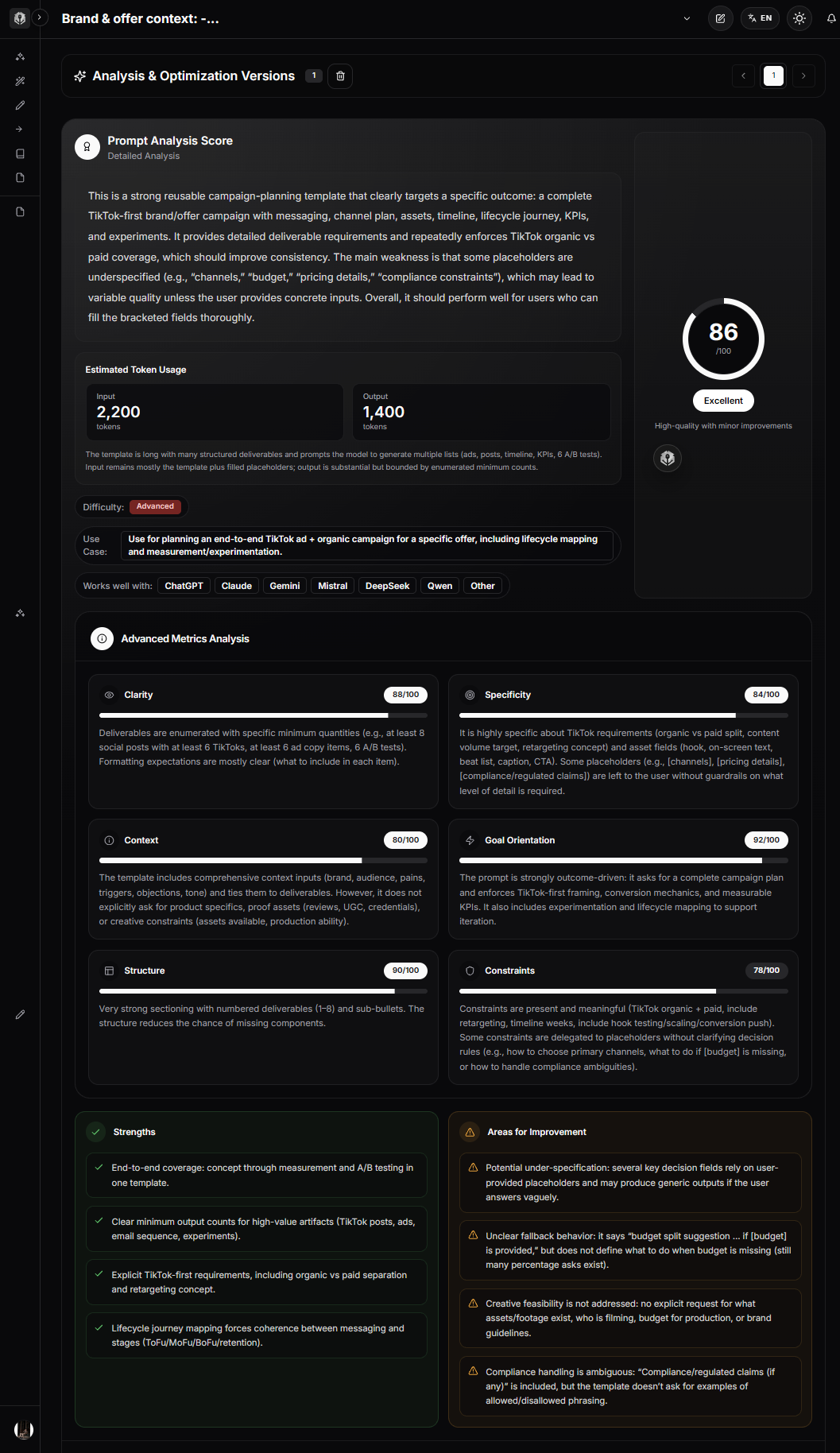
PrompTessor can help analyze and improve prompt-level qualities such as clarity, specificity, context, goals, structure, and constraints.
Rough Task
    ↓
PrompTessor Analysis / Optimization
    ↓
Clarify Goal
    ↓
Make Required Context Explicit
    ↓
Structure Instructions
    ↓
Application Retrieves / Injects Runtime Context
    ↓
Model
    ↓
Evaluation
The important distinction is that PrompTessor can help design what the prompt asks for and how context requirements are expressed. The application still needs to retrieve, authorize, filter, assemble, update, and validate the actual runtime context.
A Practical Combined Workflow
- Define the current task and measurable outcome.
- Draft the instruction.
- Analyze whether the prompt makes required context explicit.
- Identify which information is stable and which must be retrieved dynamically.
- Define source authority, freshness, and permissions.
- Retrieve or recall only relevant evidence and memory.
- Expose the required tools.
- Assemble context with clear structure.
- Run the target model.
- Evaluate the result and inspect context-related failures.
- Refine the prompt, retrieval, memory, pruning, or tool policy based on the actual failure cause.
Context Engineering Checklist
- The current task is explicit.
- The desired outcome is measurable.
- Required system or developer instructions are present.
- Stable instructions are separated from dynamic state.
- The current user request is easy to identify.
- Required runtime state is current.
- Relevant conversation decisions are preserved.
- Resolved or stale history is removed when appropriate.
- Only relevant long-term memory is recalled.
- Retrieved information is permission-filtered.
- Retrieved sources are relevant.
- Retrieved sources are current enough for the task.
- Duplicate evidence is removed.
- Source provenance is preserved where needed.
- Uncertainty is preserved.
- Retrieved content is treated as data unless explicitly trusted as instruction.
- Only necessary tools are exposed when practical.
- Tool definitions are clear.
- Large tool results are filtered before injection when possible.
- Context ordering follows target-model guidance and has been tested.
- Long histories have a trimming, compression, or handoff strategy.
- Compression preserves goals, constraints, decisions, state, and uncertainty.
- Context handoffs are structured and verifiable.
- User and workspace context boundaries are enforced.
- Deterministic rules remain in software where possible.
- Context size, cost, and latency are measured.
- Context sufficiency is evaluated.
- Context precision is evaluated.
- Failure cases include stale, missing, duplicated, and contradictory context.
- Context changes are regression-tested.
Official Resources
- Anthropic: Effective Context Engineering for AI Agents
- Anthropic: Context Windows
- Anthropic: Contextual Retrieval
- Anthropic: Advanced Tool Use
- Anthropic: Harness Design for Long-Running Application Development
- OpenAI API: Conversation State and Context Windows
- OpenAI Cookbook: Short-Term Memory Management With Sessions
- OpenAI Cookbook: Context Engineering for Personalization
- OpenAI API: Prompt Caching
- Google Gemini API: Long Context
- Google Gemini API: Prompt Design Strategies
- Google Gemini API: Context Caching
FAQ About Context Engineering
What is context engineering?
Context engineering is the practice of selecting, structuring, retrieving, maintaining, and updating the information available to an AI model when it performs a task. That information can include instructions, user input, state, memory, retrieved knowledge, tools, tool results, examples, and conversation history.
How is context engineering different from prompt engineering?
Prompt engineering focuses mainly on writing and organizing effective instructions. Context engineering is broader: it includes prompt design plus the surrounding state, memory, retrieval, tools, history, examples, and other information available to the model.
Is context engineering replacing prompt engineering?
No. Prompt engineering remains part of context engineering. Anthropic describes context engineering as a natural progression of prompt engineering because modern AI systems need to manage more than instruction wording alone.
What is an AI context window?
A context window is the maximum amount of tokenized information a model can use within a request or interaction, subject to the provider and model's limits. It can include input, generated output, and in some systems reasoning tokens.
What is the difference between a context window and context engineering?
A context window describes capacity. Context engineering decides which information should occupy that capacity and how that information should be organized, updated, retrieved, pruned, or compressed.
Does a larger context window make context engineering unnecessary?
No. A larger context window provides more space but does not determine which information is relevant, current, authoritative, duplicated, stale, or useful for the current task.
Is more context always better for an LLM?
No. Additional context can help when it contains relevant information, but irrelevant, stale, duplicated, or conflicting information can increase noise, cost, latency, and debugging difficulty.
What should be included in AI context?
Include information that the model needs to understand the task, follow application rules, know current state, verify important facts, use tools correctly, maintain useful continuity, and produce the required output. The exact contents depend on the application.
What should be removed from AI context?
Common pruning candidates include resolved issues, obsolete plans, duplicate data, stale runtime state, irrelevant conversation turns, verbose tool output already summarized, and tool definitions unrelated to the current task.
What is context pruning?
Context pruning is the removal of information that no longer contributes enough value to the current task. The goal is to reduce noise while preserving goals, constraints, decisions, verified state, and unresolved issues.
What is context compression?
Context compression reduces a larger history or state into a smaller representation, often a structured summary. It can save context space but may lose details, provenance, or uncertainty, so compressed context should be evaluated.
What is the difference between context trimming and compression?
Trimming removes content according to a rule, such as dropping older turns. Compression transforms larger context into a smaller summary. Trimming is simpler and deterministic, while compression can preserve more long-term meaning but introduces summarization risk.
What is a context handoff?
A context handoff is a structured artifact that transfers the important goal, state, decisions, evidence, constraints, open issues, and next actions from one agent or session to another without replaying the complete previous history.
What is the difference between memory and context?
Memory is information that can potentially be recalled from persistent or previous state. Current context is the information actually supplied to the model for the current task. Context engineering decides which memories should be active now.
Should every stored memory be added to the prompt?
No. Memories should be selected based on relevance, freshness, ownership, and usefulness for the current task. Injecting all stored memory can create unnecessary noise and privacy or state-isolation problems.
What is context engineering for RAG?
For RAG systems, context engineering includes query construction, retrieval, permission filtering, ranking or reranking, deduplication, freshness checks, evidence selection, provenance, formatting, and deciding how much retrieved information should reach the model.
Is RAG the same as context engineering?
No. RAG is one mechanism for retrieving external knowledge. Context engineering is broader and includes system instructions, user input, memory, conversation state, tools, tool results, examples, runtime state, and retrieval.
How many RAG chunks should I include?
There is no universal best number. Use enough evidence to answer reliably, then evaluate whether additional chunks improve retrieval coverage or merely add duplicates and noise. The optimal value depends on the task, retrieval quality, model, and chunk design.
Should retrieved documents be treated as instructions?
Usually not. In many applications, retrieved documents should be treated as reference data. Instructions embedded inside external content should not automatically redefine application behavior unless the system explicitly trusts that content as instruction.
How do tools affect context engineering?
Tool names, descriptions, schemas, examples, and results can all consume or influence model context. Large tool libraries may benefit from on-demand discovery, and large tool outputs may need filtering or aggregation before being passed to the model.
Should every tool be loaded into the model context?
Not necessarily. Small tool sets can be loaded directly, but large tool libraries can consume substantial context and make selection harder. On-demand tool discovery can be useful when only a few tools are relevant to each task.
What is context engineering for AI agents?
For agents, context engineering manages the growing state created by plans, tools, results, decisions, failures, and multi-turn work. Common techniques include pruning, compression, structured state, on-demand retrieval, and handoffs between contexts.
How should conversation history be managed?
Preserve history that supports the current goal, decisions, constraints, unresolved issues, and useful recent evidence. Trim or compress resolved, stale, duplicated, or irrelevant history when it no longer contributes to the task.
What is context ordering?
Context ordering is the arrangement of instructions, data, examples, evidence, and the current task inside a model request. Provider guidance can differ, so ordering should be structured clearly and evaluated on the target model rather than treated as one universal rule.
How does Gemini recommend structuring long context?
Google's current Gemini guidance recommends placing critical behavioral constraints and output requirements in the system instruction or near the beginning, while for large context blocks it recommends supplying the context first and placing the specific task or question at the end.
What is context caching?
Context or prompt caching reuses previously processed repeated input under supported provider mechanisms. It can reduce repeated processing cost or latency, but it does not decide whether the cached information is relevant to the task.
Is context caching the same as context optimization?
No. Caching optimizes repeated processing. Context optimization decides what information should be included. A well-cached but irrelevant prompt is still poor context engineering.
How do I evaluate context engineering?
Measure task success, context sufficiency, context precision, retrieval quality, state continuity, tool selection, failure handling, token usage, latency, and cost. Test stale, missing, duplicated, contradictory, and overly long context scenarios.
What is an ablation test for context?
An ablation test removes or changes one context component—such as chat history, retrieved chunks, memory, or tool definitions—and compares model performance. It helps reveal which context elements actually contribute to the outcome.
How can PrompTessor help with context engineering?
PrompTessor can help analyze and improve the prompt-design layer by making goals, required context, constraints, structure, and output requirements clearer. Runtime retrieval, memory, permissions, tool loading, context assembly, pruning, and state management remain application responsibilities.
Conclusion
Context engineering changes the question from “What is the perfect prompt?” to “What does the model need to have available to do this task reliably?”
That shift matters because modern AI applications operate inside information environments, not isolated prompts.
The model may see application instructions, user requests, conversation history, retrieved documents, persistent memory, current state, tool definitions, tool results, examples, intermediate workflow artifacts, and output requirements—all within the same limited context window.
The goal is not to include everything.
The goal is to provide the most useful configuration of information for the current task.
That means separating stable behavior from dynamic state, retrieving evidence instead of blindly loading knowledge bases, recalling only relevant memory, managing conversation history deliberately, loading tools when needed, reducing large tool results before they pollute the context, and preserving provenance and uncertainty when information is transformed.
It also means knowing when to prune, when to compress, and when to start a fresh context with a structured handoff.
A larger context window can expand what is possible, but it does not replace those decisions.
A useful mental model is:
Prompt Engineering
Designs the instruction

System Prompts
Define persistent behavior

Context Engineering
Designs the information environment

Prompt Chaining
Defines the workflow

RAG
Retrieves external knowledge

Memory
Preserves potentially reusable state

Tools
Provide capabilities and current information

Evaluation
Measures whether the complete system works
Good context engineering is therefore not an exercise in maximizing tokens.
It is the discipline of deciding what the model should know, what it should ignore, what must be current, what must remain traceable, and what should be available only when the task actually needs it.
Start with the task. Identify the information required to solve it. Assemble only useful context. Evaluate the result. Then improve the specific layer—prompt, retrieval, memory, state, tools, ordering, pruning, or compression—that caused the failure.
That is how context becomes an engineered system rather than an ever-growing pile of tokens.
Build better prompts in one workspace
Generate prompts from ideas, analyze and optimize quality, refine with feedback, reverse-engineer content, and save reusable prompts in your Prompt Library.
Try PrompTessor Free