Human-in-the-Loop AI Agents: How to Design Approval, Escalation, and Review Workflows
Human-in-the-loop AI is often explained too simply.
The usual description is: let the AI work, but keep a human available to approve important decisions.
That is directionally correct, but it is not enough to design a reliable agent system.
Production AI agents can send emails, update records, publish content, run shell commands, modify code, issue refunds, trigger purchases, call MCP tools, or change external state. The important design problem is therefore not whether a human exists somewhere in the workflow.
It is deciding exactly where human judgment belongs, what should trigger it, what context the reviewer receives, how long approvals remain valid, and how the agent resumes safely after the decision.
Human-in-the-loop is not about making humans approve everything. It is about putting human judgment at the points where mistakes actually matter.
OpenAI's current agent guidance separates automatic guardrails from human review: guardrails validate inputs, outputs, or tool behavior automatically, while human review pauses a run before sensitive side effects such as cancellations, edits, shell commands, or sensitive MCP actions. OpenAI's Guardrails and Human Review guide.
The OpenAI Agents SDK implements this as an interruptible run: a tool call can require approval, the run returns a resumable state, the application approves or rejects the pending action, and the same run continues from that state. The state can also be serialized when approval may take longer. OpenAI Agents SDK human-in-the-loop documentation.
Microsoft Agent Framework uses a similar workflow concept through RequestPort: execution pauses, an external request is emitted, and the workflow resumes when the response arrives. Pending requests can also be stored in checkpoints and re-emitted after restoration. Microsoft Agent Framework HITL documentation.
Quick Answer: What Is Human-in-the-Loop AI?
Human-in-the-loop (HITL) AI is a workflow design pattern where an AI system can operate autonomously within defined boundaries but pauses for human input, approval, modification, or escalation at selected decision points.
AGENT PROPOSES NEXT ACTION
        ↓
RISK / POLICY CHECK
        ↓
CAN IT RUN AUTOMATICALLY?
   ├─ YES → EXECUTE → VERIFY
   └─ NO
        ↓
PAUSE WORKFLOW
        ↓
PRESENT REVIEW CONTEXT
        ↓
HUMAN DECISION
   ├─ APPROVE
   ├─ MODIFY
   ├─ REJECT
   └─ ESCALATE
        ↓
REVALIDATE CURRENT STATE
        ↓
IS APPROVAL STILL VALID?
   ├─ YES → RESUME
   └─ NO  → REQUEST NEW DECISION
The strongest HITL systems treat approval as a real workflow state, not a sentence in the system prompt.
Key Takeaways
- Human-in-the-loop should be risk-based, not applied to every agent action.
- Low-risk read or drafting work can often run automatically, while consequential writes may need approval.
- Pre-action approval and post-action review are different controls.
- Approval should pause the existing run or workflow rather than start an unrelated new interaction.
- Long approval delays require durable state, checkpoints, or serialized run state.
- Approval can become stale if external conditions change while the workflow is paused.
- Reviewers need the proposed action, reason, evidence, external effect, reversibility, and policy context.
- Approve / reject is often too limited; modify and escalate are useful decision types.
- Reviewer identity and authorization matter.
- Approval fatigue can make human oversight meaningless.
- Audit trails should record what was proposed, what the reviewer saw, who decided, and what executed.
- Prompts can explain when to ask, but runtime policy must enforce high-impact approval boundaries.
Table of Contents
- What Is Human-in-the-Loop AI?
- What HITL Means for AI Agents
- Human-in-the-Loop vs Human-on-the-Loop
- Which Actions Should Require Approval?
- Risk-Based Approval Policies
- Pre-Action Approval
- Post-Action Review
- Approve, Reject, Modify, or Escalate
- How to Design an Approval Gate
- Pause and Resume Architecture
- Persisting Workflow State
- Revalidating State After Approval
- Approval Expiration
- What Context Should the Reviewer See?
- Reviewer Identity and Authorization
- Approval Queues
- Timeouts and Missing Reviewers
- Escalation Paths
- Avoiding Approval Fatigue
- Audit Trails and Accountability
- Practical HITL Use Cases
- HITL in Multi-Agent Systems
- Common HITL Mistakes
- Production Checklist
- Where PrompTessor Fits
- FAQ
What Is Human-in-the-Loop AI?
Human-in-the-loop AI is a system design where human judgment is intentionally inserted into selected parts of an AI workflow. The human may approve a proposed action, reject it, change parameters, provide missing information, resolve ambiguity, choose between alternatives, review a high-impact output, or take over entirely.
The important word is selected. If every tool call requires manual approval, you may have built a slow interface rather than an autonomous system. If nothing requires approval, you may have granted the agent more authority than the workflow can safely support.
What Human-in-the-Loop Means for AI Agents
A chatbot usually produces information. An agent may also create external effects.
CHATBOT
User asks → Model responds → Human decides what to do

AGENT
User gives goal → Model decides → Tool call → External state may change
Once the model can act, approval should be tied to the action boundary, not only to generated text.
A prompt such as Do not refund more than $500 without approval is useful guidance. A stronger runtime also enforces the threshold independently.
This is the same separation discussed in LLM Guardrails: prompts describe desired behavior, while permissions, policy, approval gates, limits, and execution controls enforce consequential boundaries.
Human-in-the-Loop vs Human-on-the-Loop
Human-in-the-loop blocks a designated workflow step until a person responds. Human-on-the-loop allows the agent to continue within allowed boundaries while a person supervises, samples, audits, or intervenes when needed.
HUMAN-IN-THE-LOOP
Agent → Proposed action → Pause → Human decision → Resume

HUMAN-ON-THE-LOOP
Agent → Automatic actions → Logs / monitoring → Human intervenes if needed
Many production systems need both.
Which Agent Actions Should Require Human Approval?
| Action Class | Examples | Typical Control |
|---|---|---|
| Read-only, low risk | Search docs, inspect logs, read allowed records | Automatic |
| Draft / preparation | Draft email, prepare report, propose code change | Automatic; review output as needed |
| Reversible internal write | Add internal note, create draft ticket, change noncritical metadata | Automatic with logging or sampling |
| External communication | Send email, publish, message customer | Approval depending on policy |
| Financial | Refund, purchase, transfer, subscription change | Approval above explicit limits |
| Production / infrastructure | Deploy, delete data, privileged shell action | Approval or block |
| Identity / security | Change access, credentials, account ownership | Strict approval or user-only action |
| Prohibited | Outside authorization or policy | Block |
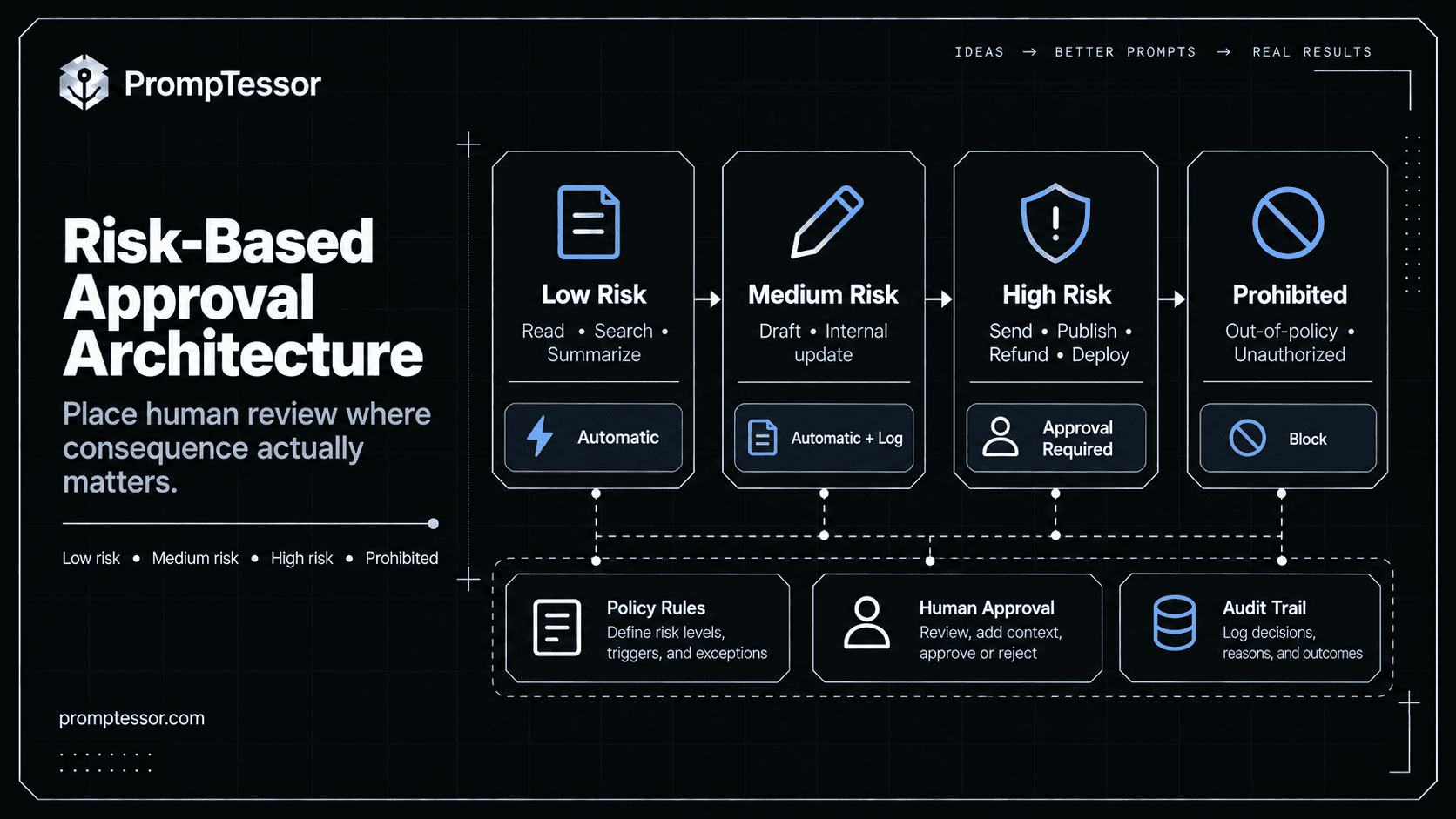
Risk-Based Approval Policies
LOW RISK
Read, search, summarize, draft
→ AUTOMATIC

MEDIUM RISK
Reversible internal changes
→ AUTOMATIC + LOG / SAMPLE REVIEW

HIGH RISK
External, financial, privileged, irreversible
→ EXPLICIT HUMAN APPROVAL

PROHIBITED
Outside authority or policy
→ BLOCK
Risk classification can use tool name, action type, arguments, amount, target resource, user identity, environment, reversibility, data sensitivity, and current authorization.
OpenAI recommends placing validation close to the side effect: if every custom tool call needs checks in a manager-style workflow, tool-level controls are more reliable than depending only on top-level agent guardrails. OpenAI workflow-boundary guidance.
Pre-Action Approval
Pre-action approval happens before the external side effect.
AGENT PROPOSES REFUND $420
      ↓
POLICY REQUIRES APPROVAL
      ↓
PAUSE
      ↓
HUMAN APPROVES
      ↓
EXECUTE REFUND
      ↓
VERIFY RESULT
Use it when mistakes would be difficult, expensive, public, or unsafe to undo.
Post-Action Review
Post-action review means the action occurs first and a human inspects it later. This can fit low-risk, reversible, high-volume work such as classifying tickets, creating internal drafts, or updating low-impact metadata.
It is not a substitute for pre-action approval when the action creates immediate external consequence.
Approve, Reject, Modify, or Escalate
| Decision | Meaning |
|---|---|
| Approve | Execute the proposed action as presented |
| Reject | Do not execute; return rejection reason to the workflow |
| Modify | Change parameters, content, amount, target, or scope |
| Escalate | Route to a reviewer with greater authority or expertise |
| Request information | Pause until missing evidence or user input is available |
The modification itself should be part of the audit trail.
How to Design an Approval Gate
A strong approval gate has three layers: trigger, review package, and resume policy.
APPROVAL RECEIVED
       ↓
CHECK REVIEWER AUTHORITY
       ↓
RELOAD CURRENT STATE
       ↓
REVALIDATE POLICY + ARGUMENTS
       ↓
EXECUTE OR RE-REQUEST APPROVAL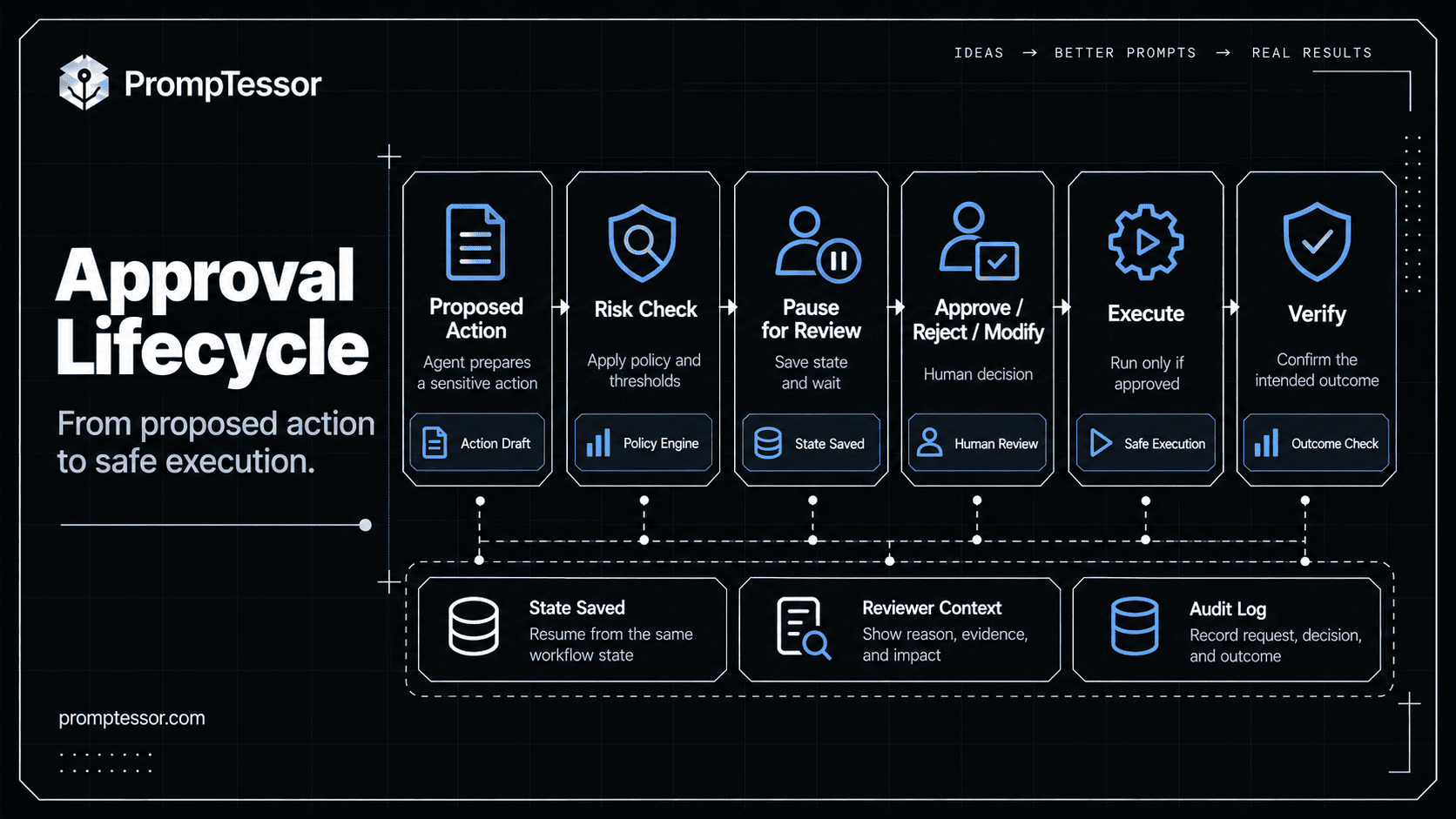
Pause and Resume Architecture
Approval may take milliseconds, minutes, hours, or days. A production workflow should therefore be able to pause without keeping one server process alive.
OpenAI's Agents SDK exposes approval interruptions and a resumable RunState. The state can be serialized and restored later so the original run continues after a reviewer approves or rejects the action. OpenAI explicitly recommends resuming from the same run state rather than treating approval as a new user turn. OpenAI Agents SDK HITL guide.
Microsoft Agent Framework uses typed request/response ports. When the workflow reaches a human request, it pauses and waits for an external response. Microsoft RequestPort documentation.
RUNNING
  ↓
APPROVAL REQUIRED
  ↓
PERSIST WORKFLOW STATE
  ↓
STATUS = WAITING_FOR_REVIEW
  ↓
RELEASE COMPUTE
  ↓
... time passes ...
  ↓
REVIEW RESPONSE ARRIVES
  ↓
RESTORE STATE
  ↓
REVALIDATE
  ↓
RESUME
Persisting Workflow State
When a workflow pauses, preserve more than natural-language conversation.
{
  "workflow_id": "wf_123",
  "status": "waiting_for_approval",
  "proposed_action": {
    "tool": "refund_order",
    "arguments": {"order_id": "O-948", "amount": 420}
  },
  "policy_version": "refund-policy-2026-10",
  "external_state_version": "order-v17",
  "required_role": "support_manager",
  "approval_status": "pending"
}
Microsoft's checkpoint system preserves pending requests so they can be re-emitted when a workflow is restored. Microsoft checkpoint behavior.
Revalidating State After Approval
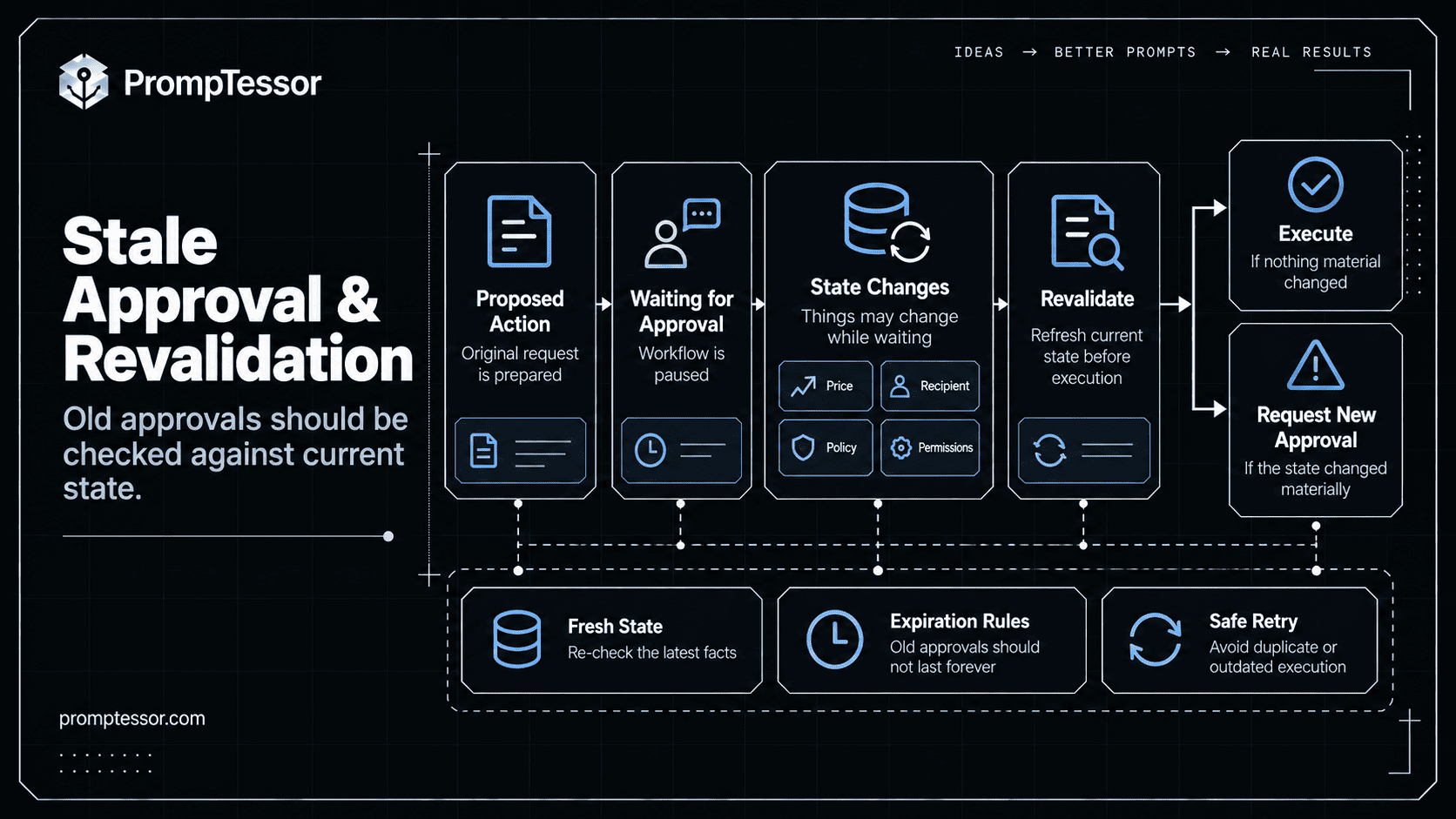
An approval authorizes a proposed action under a particular state. It should not automatically authorize materially different conditions later.
09:00  Agent proposes purchase: $500
09:05  Approval request sent
13:00  Vendor price changes: $900
15:00  Reviewer approves old request

Correct behavior:
approval arrives
→ re-fetch current state
→ detect material change
→ old approval invalid
→ request new approval
This same rule applies to recipient changes, refund amounts, document content, production code, permissions, or policy.
Approval Expiration
Some approvals should expire after a time limit or state transition.
Approval invalid when:
- time window expires
- proposed arguments change
- policy version changes
- reviewer permissions change
- target resource changes
- execution window closes
What Context Should the Reviewer See?
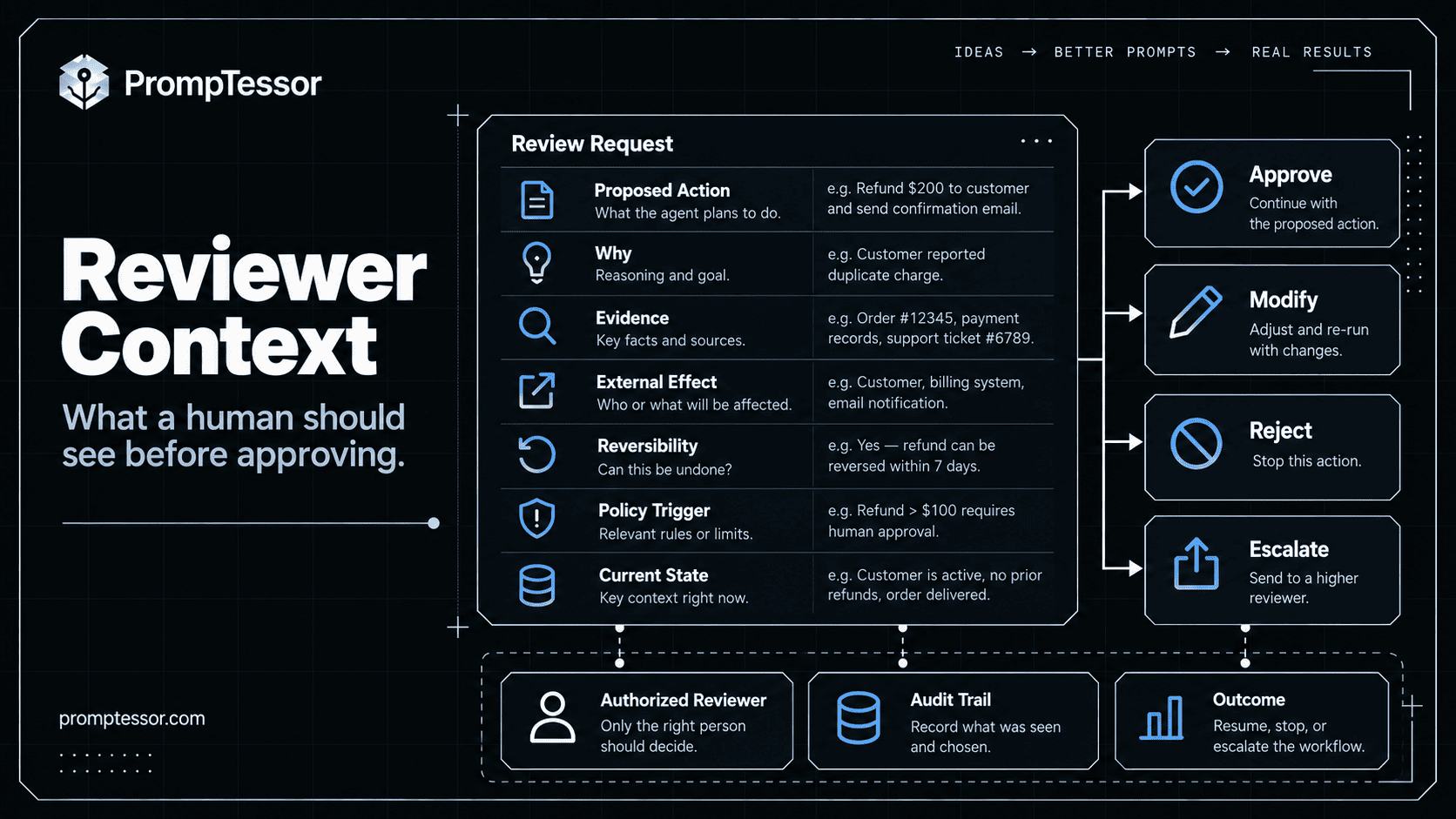
A reviewer cannot make a good decision from Approve? [Yes] [No].
PROPOSED ACTION
Refund $420 to Order #123

WHY
Customer reported damaged item.
Order and delivery record verified.

EVIDENCE
- customer photo
- delivery status
- refund policy section 4.2

EXTERNAL EFFECT
$420 returned to original payment method

REVERSIBILITY
Limited after settlement

POLICY TRIGGER
Amount exceeds $250 auto-refund threshold

[APPROVE] [MODIFY] [REJECT] [ESCALATE]
OpenAI's safety guidance says human reviewers should have access to information needed to verify AI output. The same principle applies to agent actions. OpenAI Safety Best Practices.
Reviewer Identity and Authorization
The system should verify that the reviewer is authorized for the specific decision.
$50 refund → support agent may approve
$2,000 refund → support manager required
Production database migration → authorized engineer required
Contract exception → legal / designated approver required
Useful checks include reviewer identity, tenant, role, approval scope, transaction limit, and separation-of-duties requirements.
Approval Queues
When multiple agents create approval requests, reviewers need a queue rather than disconnected notifications. Prioritize by urgency, risk, deadline, customer impact, amount, required role, and time waiting. Deduplicate equivalent requests where possible.
Timeouts and Missing Reviewers
TIMEOUT
  ├─ cancel action
  ├─ keep waiting
  ├─ escalate to another reviewer
  ├─ downgrade to safe alternative
  └─ return blocked to user
High-impact actions should usually fail closed when review becomes unavailable. OpenAI's current human-review guidance uses the same fail-closed principle for sensitive approval workflows. OpenAI human review guidance.
Escalation Paths
An approval asks whether an action may proceed. An escalation says the decision is outside the current agent or reviewer's authority.
Agent
  ↓
Support Reviewer
  ↓
Policy exception?
  ├─ NO → decide
  └─ YES → Support Manager
                ↓
          Legal issue?
             ├─ NO → decide
             └─ YES → Legal
Avoiding Approval Fatigue
If an agent asks for approval too often, reviewers stop reviewing. They click approve reflexively.
Reduce approval fatigue by approving based on action class rather than every tool invocation, auto-approving safe repeated actions when policy allows, batching related actions, using thresholds, sampling low-risk work, and measuring reviewer behavior.
The OpenAI Agents SDK supports run-level approval patterns that can avoid repeated prompts for the same bounded action class when appropriate. OpenAI Agents SDK HITL documentation.
Audit Trails and Accountability
An HITL workflow should record the full approval trajectory: proposed action, tool arguments, risk class, policy version, state version, reason for review, reviewer identity and role, decision, modifications, timestamps, execution result, and verification result.
This also supports agent evaluation. The AI Agent Evaluation guide explains why trajectory-level metrics matter: a plausible final answer can hide skipped approvals, incorrect tool use, or unsafe state changes.
Practical Human-in-the-Loop AI Agent Use Cases
Financial Actions
Agent prepares refund
→ amount <= $100? execute automatically
→ otherwise manager approval
→ revalidate order + refund state
→ execute
→ verify processor result
Customer Support
An agent can retrieve account context, search policy, classify the issue, and draft a reply automatically. Human review may be required for policy exceptions, account closure, high-value refunds, legal complaints, or sensitive external commitments.
Coding and Production Changes
The agent can inspect code, prepare a patch, run tests, and create a review artifact. Privileged deployment or destructive production actions can remain approval-gated. OpenAI's general safety guidance specifically highlights code generation as an area where human review can be important. OpenAI Safety Best Practices.
Content Publishing
Research → Draft → SEO check → CMS draft → HUMAN REVIEW → PublishEmail and External Messaging
A useful approval request shows final recipient, subject, exact content, attachments, and external consequence before sending.
Procurement and Purchasing
Approval can depend on price, vendor, budget, category, contract status, and whether price or availability changed since the request was prepared.
HITL in Multi-Agent Systems
Human approval becomes more important in orchestrated systems because the agent that proposes an action may not be the agent that originally received the user's goal.
MANAGER AGENT
      ↓
RESEARCH AGENT
      ↓
OPERATIONS AGENT
      ↓
PURCHASE TOOL
      ↓
APPROVAL REQUIRED
The approval should still surface at the workflow level with enough context to explain which specialist proposed the action, why it is necessary, which arguments will be used, and what parent goal it serves.
OpenAI's Agents SDK explicitly supports approvals across handoffs and nested agents-as-tools: the interruption can surface on the outer run even when the sensitive tool belongs to a nested specialist. OpenAI nested HITL behavior.
For the broader workflow architecture, see AI Agent Orchestration.
Common Human-in-the-Loop Mistakes
- Putting approval only in the prompt. “Ask before sending” is guidance; the send tool should still enforce the boundary.
- Requiring approval for everything. This creates friction and approval fatigue.
- Showing too little context. Reviewers need evidence and consequences, not just a tool name.
- Resuming without revalidating state. Approval may become stale.
- Treating approval as a new conversation. Resume the paused workflow state.
- Ignoring reviewer authorization. A human response is not enough if the person lacks authority.
- Retrying an ambiguous write blindly. Inspect external state first.
- No timeout or escalation policy. The workflow should know what happens when nobody responds.
- No audit trail. Proposal, decision, execution, and verification should be reconstructable.
- Measuring approval rate instead of decision quality. Evaluate whether the right actions are being reviewed.
Human-in-the-Loop Production Checklist
- Define automatic, review-required, and prohibited action classes.
- Enforce thresholds deterministically.
- Show reviewers the exact action, evidence, consequence, and current state.
- Verify reviewer identity, role, tenant, and authority.
- Persist pending approval state durably.
- Resume from the same workflow state.
- Revalidate external state before execution.
- Expire approvals when relevant state or policy changes.
- Define timeout and escalation behavior.
- Prevent duplicate execution after retries or restarts.
- Log proposal, decision, modification, execution, and verification.
- Measure reviewer latency, unnecessary approvals, skipped approvals, and decision quality.
Where PrompTessor Fits
PrompTessor works at the instruction-design layer of an agent workflow.
AUTHORITY
What may the agent do automatically?

APPROVAL RULES
When should it stop and ask?

ESCALATION
When is the decision outside its authority?

REVIEW CONTEXT
What should it prepare for the reviewer?

VERIFICATION
What should be checked after an approved action?

COMPLETION
What proves the workflow is finished?
The ChatGPT Prompt Generator can help turn a rough agent responsibility into a structured instruction draft. The AI Prompt Analyzer can help identify unclear authority, missing approval conditions, weak escalation rules, and ambiguous completion criteria. The AI Prompt Optimizer can generate stronger instruction candidates after a failure mode is identified.
For deeper agent instruction design, see AI Agent Prompts. For long-running autonomous behavior, see Autonomous AI Agents. For connected tool workflows, see the MCP Prompting Guide. For a real-world always-on agent example, see the OpenAI Dots guide.
PrompTessor can help clarify what the agent should ask, explain, and verify. The application runtime should enforce who can approve, what requires approval, how state is preserved, and what may actually execute.
Official Resources
- OpenAI — Guardrails and Human Review
- OpenAI Agents SDK — Human-in-the-Loop
- OpenAI Agents SDK — RunState
- OpenAI — Safety Best Practices
- Microsoft Agent Framework — Human-in-the-Loop
FAQ
What is human-in-the-loop AI?
Human-in-the-loop AI is a workflow design where an AI system can work autonomously within defined boundaries but pauses for human input, approval, modification, or escalation at selected decision points.
What is human-in-the-loop for AI agents?
For AI agents, HITL usually means pausing before a sensitive tool call or consequential action, presenting the proposed action to an authorized reviewer, recording the decision, and safely resuming or stopping the workflow.
Should every AI agent action require human approval?
No. Approval should be risk-based. Low-risk read and drafting work can often run automatically, while external, financial, privileged, irreversible, or policy-sensitive actions may require explicit review.
What is the difference between human-in-the-loop and human-on-the-loop?
Human-in-the-loop blocks a designated workflow step until a person responds. Human-on-the-loop allows the agent to continue within defined boundaries while a person supervises, audits, or intervenes when necessary.
Can an AI workflow pause for hours or days?
Yes. Agent runtimes can persist or serialize workflow state and resume later. OpenAI's Agents SDK uses resumable RunState, while Microsoft Agent Framework can preserve pending requests inside workflow checkpoints.
Should an approved action be revalidated before execution?
Yes when relevant state may have changed. Price, recipient, policy, permissions, code, or other external conditions can make an old approval stale.
What should an approval request show?
It should show the exact proposed action, reason, relevant evidence, external effect, reversibility, policy trigger, current state, and available reviewer decisions.
How can teams avoid approval fatigue?
Use risk tiers, thresholds, sampling for low-risk actions, batching where appropriate, deterministic policy, and approval only where human judgment meaningfully changes safety or quality.
Can PrompTessor enforce human approvals?
PrompTessor focuses on prompt and instruction design. Runtime authorization, approval state, reviewer identity, persistence, and tool execution must be enforced by the agent application.
Conclusion
Human-in-the-loop design is not a fallback for weak AI. It is an authority architecture.
WHAT MAY RUN AUTOMATICALLY?
        ↓
WHAT NEEDS A HUMAN?
        ↓
WHO IS AUTHORIZED TO DECIDE?
        ↓
WHAT MUST THEY SEE?
        ↓
HOW IS THE WORKFLOW PAUSED?
        ↓
HOW IS STATE PRESERVED?
        ↓
IS THE APPROVAL STILL VALID?
        ↓
WHAT ACTUALLY EXECUTES?
        ↓
HOW IS SUCCESS VERIFIED?
The goal is not to maximize autonomy or maximize oversight. The goal is to place each decision at the layer best able to make it safely.
Let agents handle routine, bounded work. Let deterministic policy enforce hard limits. Put human judgment at consequential or ambiguous boundaries. Preserve state while the workflow waits. Revalidate before execution. Record the full decision trail. And reduce unnecessary approvals so that when a reviewer is asked to decide, the decision actually receives attention.
Build better prompts in one workspace
Generate prompts from ideas, analyze and optimize quality, refine with feedback, reverse-engineer content, and save reusable prompts in your Prompt Library.
Try PrompTessor Free