OpenAI Dots: What It Is, How It Works, and What It Can Do
OpenAI Dots change the basic interaction model of ChatGPT.
A normal AI conversation usually starts when you ask for something and stops when the response is complete. A Dot is designed to keep responsibility for an ongoing goal. It can continue working between conversations, use connected apps, operate its own cloud computer and browser, monitor relevant changes, ask for approval when necessary, and bring completed work back for review.
OpenAI introduced Dots on September 29, 2026 and describes them as always-on agents powered by GPT-6 Astra. Each Dot has its own cloud computer, can connect to more than 4,000 apps through ChatGPT's plugin ecosystem, learns from feedback, and can work toward goals around the clock. OpenAI's Dots announcement.
That makes Dots more than another chatbot feature.
The important shift is from prompting an AI for individual outputs to giving an AI agent ongoing responsibility inside explicit boundaries.
This guide explains what OpenAI Dots are, how they work, what they can do, how their permissions and approvals operate, how they differ from ordinary ChatGPT conversations and other agent patterns, and how to write better instructions for an AI that may keep working long after the first prompt.
Quick Answer: What Are OpenAI Dots?
OpenAI Dots are persistent, always-on AI agents inside the ChatGPT ecosystem.
A simplified Dot workflow looks like this:
GOAL
  ↓
PERSISTENT CONTEXT
  ↓
GPT-6 ASTRA
  ↓
PLAN / DECIDE
  ↓
CONNECTED APPS + CLOUD COMPUTER + BROWSER
  ↓
ACT / RESEARCH / PREPARE
  ↓
OBSERVE RESULT
  ↓
VERIFY / AUTO-REVIEW
  ↓
NEED USER DECISION?
  ├─ YES → ASK / REQUEST APPROVAL
  └─ NO  → CONTINUE
  ↓
RETURN RESULT / PROGRESS UPDATE
  ↓
KEEP WORKING WHEN RESPONSIBILITY CONTINUES
OpenAI says a Dot can work on several projects, receive new tasks without forcing the user to manage separate threads, carry context across ChatGPT, Slack, and Microsoft Teams, and message the user when it needs input. OpenAI describes the current interaction model here.
Key Takeaways
- Dots are always-on agents powered by GPT-6 Astra.
- Each Dot has its own cloud computer and browser.
- A Dot can connect to more than 4,000 apps through OpenAI's plugin ecosystem.
- Dots can keep progressing on ongoing work instead of waiting for a new prompt after every step.
- They carry context across ChatGPT, Slack, and Teams; texting is planned.
- When working proactively in the background, connected-app tools are restricted to read-only access.
- Custom Rules can allow an action, require approval, or block it, subject to OpenAI's built-in safety requirements.
- Auto-review checks actions that may affect accounts or share information before deciding whether work can proceed, needs approval, or must be performed by the user.
- Specialist Dots are being piloted for organizations with dedicated identities, credentials, systems access, and responsibilities.
- Prompts for always-on agents should define ongoing goals, standards, authority, approval boundaries, monitoring scope, verification, and escalation—not only the next output.
Table of Contents
- What Is OpenAI Dots?
- How OpenAI Dots Work
- Dots vs Regular ChatGPT
- Dots vs ChatGPT Work
- Dots vs Traditional AI Agents
- Cloud Computer and Browser
- Connected Apps and Plugins
- Persistent Context and Feedback
- Proactive Research
- Permissions and Custom Rules
- Action Review and Human Approval
- What Can OpenAI Dots Do?
- Real-World Dots Examples
- Specialist Dots for Organizations
- Dots and Microsoft Agent 365
- Privacy and Security
- OpenAI Dots Availability
- Do You Still Need to Prompt a Dot?
- How to Write Better Instructions for Dots
- Limitations and Risks
- Where PrompTessor Fits
- FAQ
What Is OpenAI Dots?
OpenAI Dots are AI agents designed to maintain an ongoing working relationship with a user rather than handle only isolated requests.
OpenAI's own description emphasizes five properties:
- Always on: the agent can continue working toward goals between conversations.
- Personalized: it learns from feedback, preferences, standards, and how the user works.
- Tool-connected: it can use connected apps, a browser, and a cloud computer.
- Cross-channel: the same Dot can be reached through multiple communication surfaces.
- Bounded: permissions, Custom Rules, approvals, auto-review, and platform safeguards constrain what it can do.
That puts Dots in the broader category of personal AI assistants and autonomous AI agents, but with a specific OpenAI product architecture around ChatGPT, GPT-6 Astra, plugins, cloud execution, and long-running responsibility.
If you want the more general architecture behind these systems, see What Is an AI Agent?.
How OpenAI Dots Work
OpenAI has not published every internal implementation detail, but the product behavior supports a useful high-level model:
USER / TEAM
     ↓
GOAL + FEEDBACK + RULES
     ↓
DOT
Powered by GPT-6 Astra
     ↓
WORKING CONTEXT
Projects, preferences, standards, current state
     ↓
CAPABILITIES
Cloud computer
Browser
Connected apps / plugins
ChatGPT Work
Codex
     ↓
ACTION LOOP
Understand → plan → inspect → act → observe → verify
     ↓
CONTROL LAYER
Permissions
Custom Rules
Auto-review
Built-in safeguards
Human approval
     ↓
RESULT / PROGRESS / QUESTION
     ↓
ONGOING RESPONSIBILITY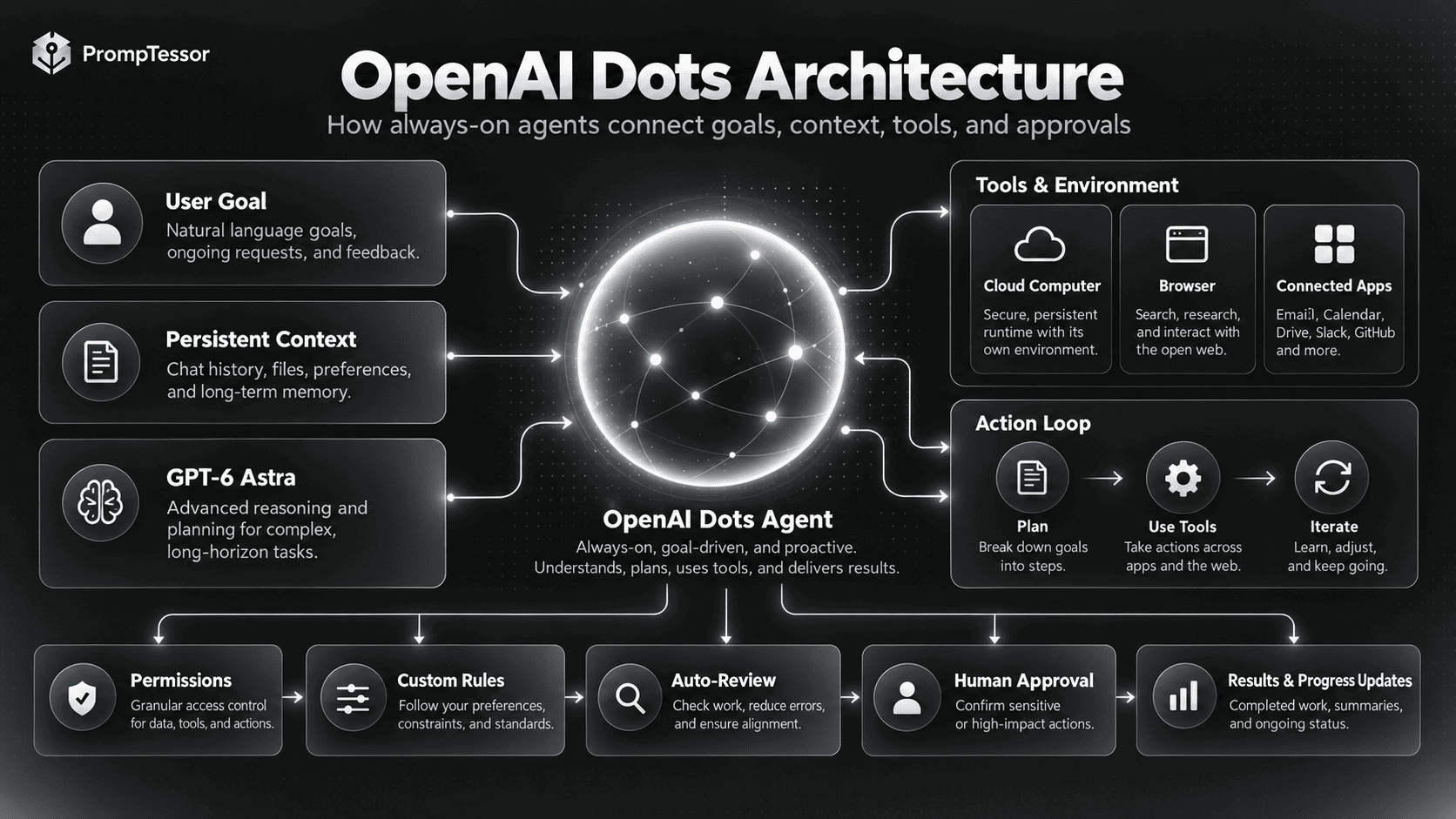
The model is only one part of the system. GPT-6 Astra provides the reasoning capability, while the surrounding product provides identity, tool access, execution, permissions, review, progress tracking, and persistence.
This distinction matters. A prompt can tell an agent not to send an email without approval, but the product's permission and approval systems are what make that boundary enforceable.
OpenAI Dots vs Regular ChatGPT
A regular ChatGPT conversation is primarily request-driven. A Dot is responsibility-driven.
| Area | Regular ChatGPT Conversation | OpenAI Dot |
|---|---|---|
| Starting point | User asks a question or gives a task | User gives an ongoing goal or responsibility |
| Typical duration | Conversation / task | Can continue between conversations |
| Working model | Interactive assistant | Always-on agent |
| Environment | Depends on available ChatGPT tools | Own cloud computer and browser |
| Apps | Can use connected capabilities when available | Designed to work across connected apps and plugins |
| Proactive work | Normally initiated by user interaction | Can perform read-only proactive research in the background |
| Approvals | Task-dependent | Built around Custom Rules, auto-review, and approval decisions |
| Communication | ChatGPT surfaces | ChatGPT, Slack, Teams, voice; texting planned |
The useful mental model is:
REGULAR CHAT
Prompt → response → stop

DOT
Goal → work → observe → continue → ask when needed → deliver → monitor / continue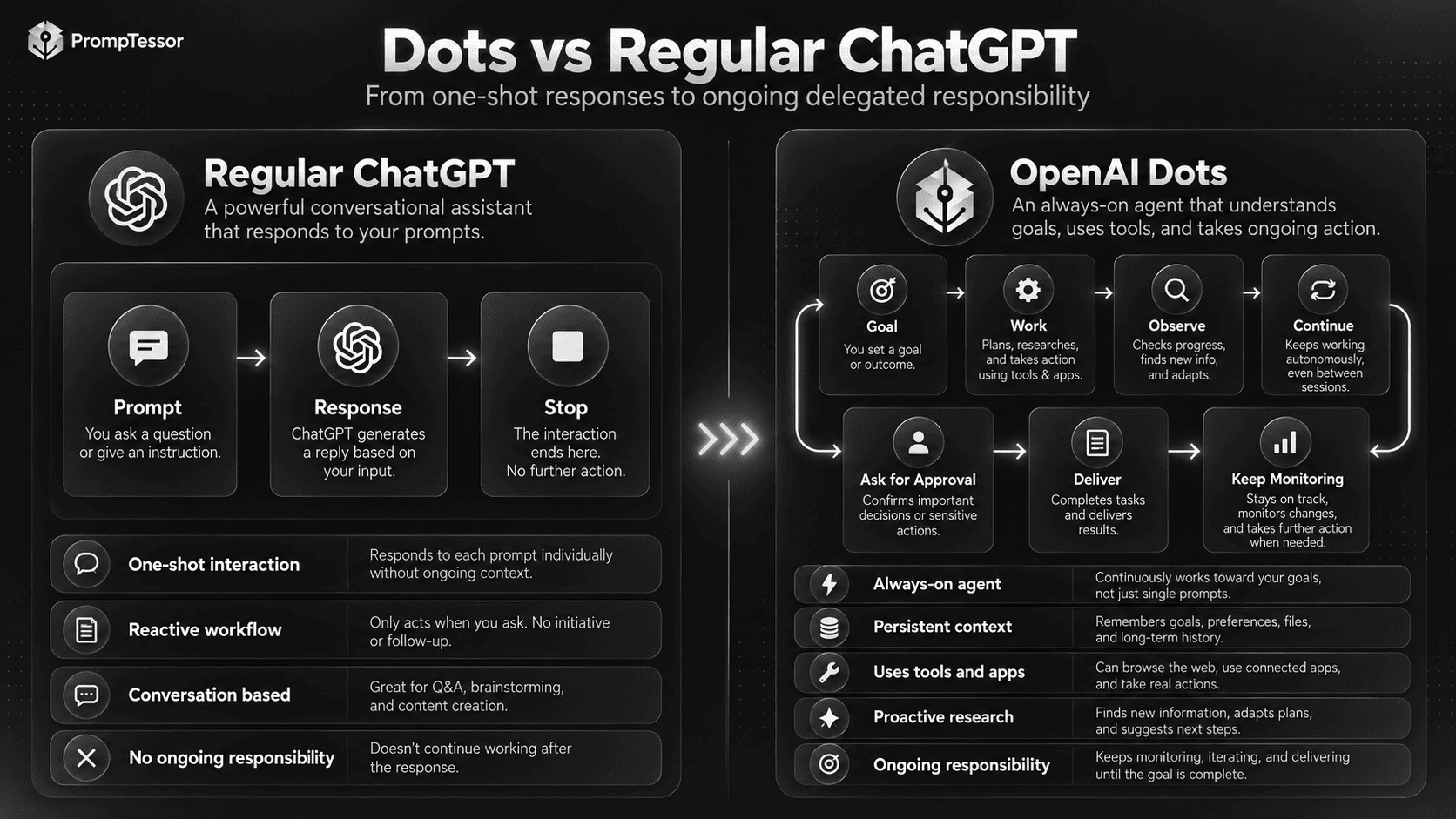
OpenAI Dots vs ChatGPT Work
Dots and ChatGPT Work are related, but they solve different parts of the workflow.
A useful distinction is:
- Dot: the ongoing agent relationship that remembers the project, monitors progress, communicates with you, and keeps responsibility over time.
- ChatGPT Work: an execution environment for substantial tasks that can involve research, files, apps, a browser, and multi-step work.
OpenAI says conversations with a Dot do not count toward regular ChatGPT usage limits, while tasks that a Dot starts or manages in ChatGPT Work or Codex count toward those products' usage limits as usual. OpenAI explains this usage relationship in its launch documentation.
Conceptually:
DOT
"Own this responsibility over time."
     ↓
May delegate / manage execution in
CHATGPT WORK or CODEX
     ↓
Bring progress and results back
     ↓
Continue responsibility
A Dot is therefore not simply a renamed Work task.
Dots vs Traditional AI Agents
Dots use familiar agent architecture, but package it as a persistent user-facing product.
A traditional developer-built agent may require you to design:
- the model,
- system instructions,
- tool schemas,
- memory and state,
- identity,
- credentials,
- authorization,
- approval gates,
- background execution,
- retries,
- observability,
- and user interfaces.
Dots provide much of that product layer inside ChatGPT.
That does not eliminate agent design. It moves more of the infrastructure into OpenAI's product and shifts the user's job toward defining goals, standards, access, approval boundaries, and feedback.
For examples of other agent architectures, see 15 AI Agent Examples and Real-World Use Cases.
Cloud Computer and Browser
Every Dot works on its own cloud computer, according to OpenAI. It can use that computer and its browser to complete tasks without operating directly on the user's local machine.
You can inspect the Dot's computer while it works. A Dot can also connect to other devices, and the user can explicitly give it permission to connect to and use a laptop. OpenAI Dots product documentation.
This separation matters for both usability and security:
DEFAULT
Dot cloud computer
      │
      ├─ cloud browser
      ├─ connected apps
      └─ task environment

USER COMPUTER
Separate by default

OPTIONAL
User explicitly permits connection
      ↓
Dot can work on the user's laptop
OpenAI also says supported websites can use saved passwords without exposing the password itself to the model.
That is a stronger architecture than placing raw credentials in a prompt.
Connected Apps and Plugins
OpenAI says Dots can connect to more than 4,000 apps through its plugin ecosystem.
This is important because an always-on agent becomes more useful when it can observe and act across the software where work actually happens.
A connected-app workflow might look like:
SLACK
New customer report appears
   ↓
DOT
Understands issue + project context
   ↓
ISSUE TRACKER / DOCS / CODE
Collect evidence
   ↓
CODE / TEST ENVIRONMENT
Prepare fix
   ↓
PR
Prepare work for review
   ↓
CHATGPT / SLACK
Notify user
But connectivity should not be confused with unrestricted authority. The user chooses which apps a Dot can access, and individual actions remain subject to platform permissions, Custom Rules, built-in safety requirements, and approval logic.
Persistent Context and Learning From Feedback
OpenAI says Dots learn from feedback over time: preferences, how the user thinks, and what the user considers good work.
That means useful feedback is not only:
"Looks good."It can be operational:
"When you prepare a release note, prioritize user-visible changes.
Keep internal refactors out unless they change behavior.
For breaking changes, flag migration steps before drafting the post."
Or:
"For research briefs, I care more about primary sources and current data
than about having many sources. Surface conflicting evidence instead of
forcing one conclusion."
The goal is to make standards explicit enough that the agent can generalize them to later work.
This overlaps with personal AI assistant design, where personalization can come from current context, explicit preferences, connected apps, memory, and ongoing feedback. See Personal AI Assistant: How It Works and What It Can Do for the broader pattern.
What Is Proactive Research in OpenAI Dots?
One of the most important Dots features is proactive research.
When you are not actively working with a Dot, it can look for ways to help using the apps you have already connected.
OpenAI places an important restriction on this mode: proactive-research tools are read-only. They cannot send messages, change app content, or control the browser or computer. OpenAI's safeguards description.
That creates a useful trust boundary:
PROACTIVE BACKGROUND MODE

READ
✓ inspect connected information
✓ research changes
✓ identify relevant updates
✓ prepare findings

WRITE / ACT
✗ send messages
✗ modify app content
✗ control browser
✗ control computer
This is a strong example of why production agent safety should be enforced at the capability layer, not only through instructions.
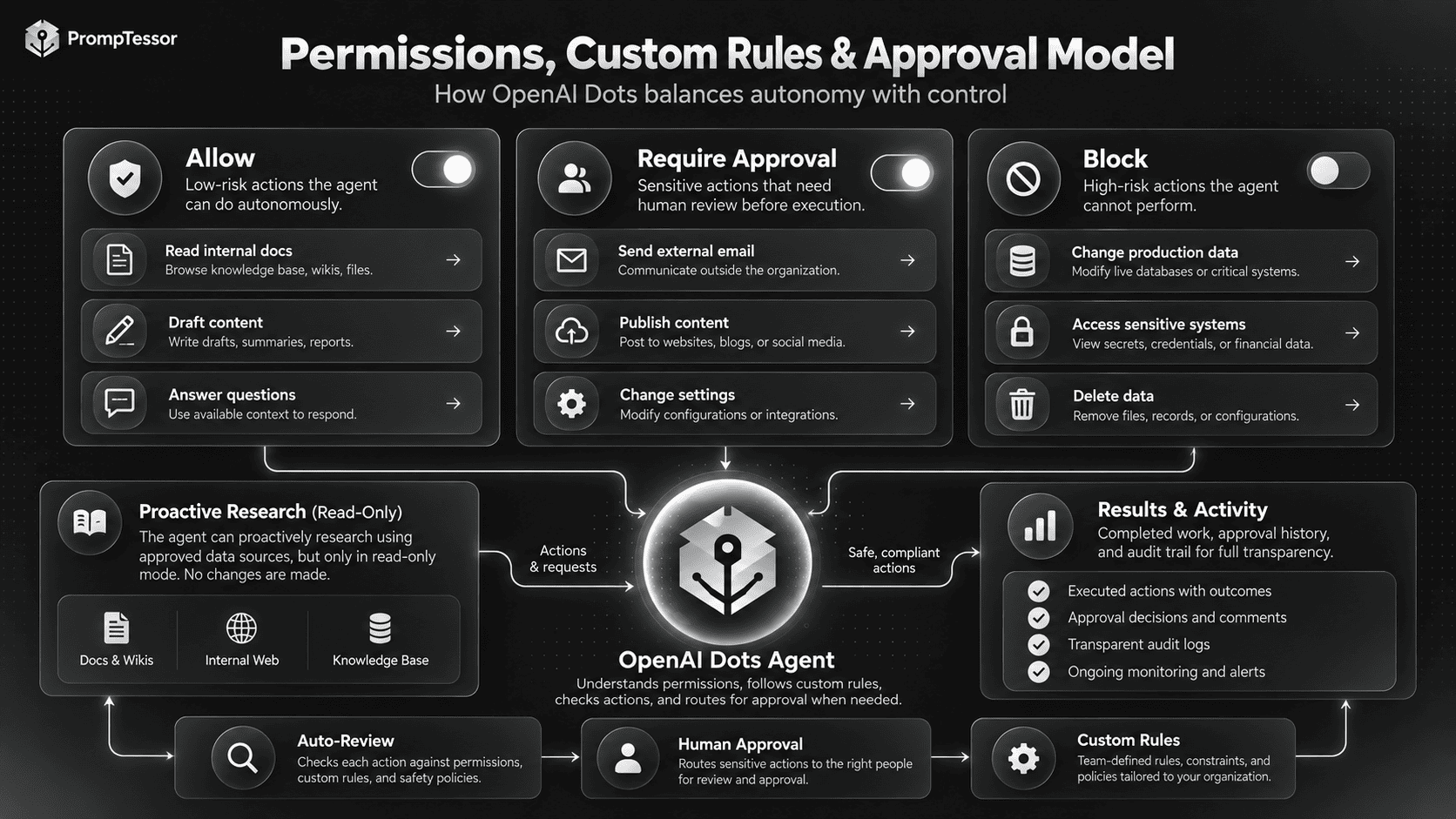
Permissions and Custom Rules
The user chooses which apps a Dot can access through existing ChatGPT app controls.
On top of those permissions, OpenAI provides Custom Rules that can define whether particular actions should be:
- allowed,
- sent for approval,
- or blocked.
Built-in safety requirements still apply.
A conceptual rule set could look like:
ALLOW
- read project docs
- inspect issue tracker
- prepare internal drafts
- run approved test suites

REQUIRE APPROVAL
- send external email
- publish content
- open a pull request against production
- create a purchase
- change a customer record

BLOCK
- delete production data
- change account ownership
- disclose secrets
- modify security settings outside scope
This mirrors a principle from LLM Guardrails: prompts guide behavior, but hard runtime controls should enforce consequential boundaries.
Action Review and Human Approval
OpenAI says Dots use auto-review for actions that could affect accounts or share information.
Auto-review evaluates a proposed action against:
- the user's instructions,
- Custom Rules,
- and OpenAI safety requirements.
The result can be:
PROPOSED ACTION
      ↓
AUTO-REVIEW
      ↓
┌──────────────────────────────┐
│ Can proceed automatically    │
│ Requires user approval       │
│ User must perform it         │
└──────────────────────────────┘
OpenAI gives password changes as an example of a sensitive task that stays with the user.
The important lesson for any agent architecture is that “human in the loop” should be attached to concrete action boundaries. It is much more useful than a vague final instruction such as “ask me if anything is risky.”
What Can OpenAI Dots Actually Do?
OpenAI's launch examples span software development, product launches, scientific research, enterprise sales, invoicing, and content production.
The common pattern is not a single task. It is ongoing responsibility under changing conditions.
| Use Case | What Makes It Dot-Like? |
|---|---|
| Software development | Monitors feedback, scopes fixes, builds, tests, and returns PRs over time |
| Launch management | Updates materials as scope, positioning, or requirements change |
| Scientific research | Re-runs analysis as new evidence arrives and updates figures/explanations |
| Enterprise sales | Tracks requirements, product fit, proof-of-concept work, and proposal changes |
| Content production | Processes new source material, drafts derivatives, applies feedback across assets |
| Admin / finance | Notices outstanding work, prepares artifacts, and acts after approval |
The trigger is often an event or changing environment rather than a new prompt.
Real-World OpenAI Dots Examples
1. Developer Feedback Agent
ONGOING GOAL
Reduce repeated product friction reported by customers.

WATCH
Customer feedback + issue tracker.

WHEN A RECURRING ISSUE APPEARS
- group related reports
- inspect relevant code and history
- scope a small fix
- implement in a branch
- run tests
- prepare PR
- attach evidence

APPROVAL
Human reviews and merges the PR.
This resembles OpenAI's own example of a Dot turning recurring feedback into tested fixes.
2. Product Launch Agent
GOAL
Keep launch material aligned with the current product scope.

CONTEXT
Audience, positioning, approved claims, launch plan.

WATCH
Scope changes, product updates, creative feedback.

WHEN SOMETHING CHANGES
- identify affected assets
- update messaging drafts
- revise launch plan
- flag claims requiring confirmation
- prepare changes for review.
3. Research Agent
GOAL
Keep the analysis current as new evidence arrives.

WATCH
Approved datasets and research inputs.

WHEN NEW DATA ARRIVES
- rerun defined analyses
- inspect unexpected changes
- update figures
- identify conclusions affected
- revise supporting explanation
- flag interpretation that needs scientist review.
4. Sales Deal Agent
GOAL
Keep the technical sales process moving.

WATCH
Customer requirements, account history, test results.

ACTIONS
- compare requirements with product docs
- identify unverified requirements
- prepare proof-of-concept work
- update test plan
- revise proposal drafts

APPROVAL
Commercial commitments stay with sales / solutions team.
5. Content Operations Agent
GOAL
Turn each new interview into a complete content package.

WHEN TRANSCRIPT ARRIVES
- identify strong moments
- draft show notes
- prepare clip suggestions
- draft social posts
- apply editorial feedback consistently

APPROVAL
Publishing remains subject to the creator's rules.
Specialist Dots for Organizations
OpenAI is also previewing specialist Dots.
A personal Dot works primarily on behalf of an individual. A specialist Dot is designed to own a defined organizational responsibility.
OpenAI says specialist Dots can have their own:
- identity,
- credentials,
- access permissions,
- IT-provisioned hardware,
- and deeper connections to company systems of record.
OpenAI says it has tested this pattern internally across areas including procurement, invoice processing, email marketing, customer support, and commercial contracting. Initial access is through focused enterprise pilots. OpenAI specialist Dots preview.
This is closer to an organizational agent than a personal assistant:
PERSONAL DOT
Identity tied to user relationship
Broad personal/project assistance

SPECIALIST DOT
Dedicated organizational identity
Defined responsibility
Scoped credentials
Specific systems
Team feedback
Enterprise governance
Dots and Microsoft Agent 365
OpenAI says it is working with Microsoft to integrate specialist Dots with Microsoft Agent 365 governance and security controls.
The stated goal is to let organizations manage Dots through Microsoft tools they already use.
This matters because enterprise agents need more than reasoning quality. They need lifecycle management:
- identity,
- access provisioning,
- credentials,
- policy,
- review,
- auditability,
- and deprovisioning.
That is also why agent-framework selection and enterprise-agent governance are separate design problems. For the developer-framework side, see AI Agent Frameworks Compared in 2026.
Privacy and Security
Always-on agents create a larger security surface because they can maintain context, inspect connected information, and potentially perform actions over long periods.
OpenAI currently describes several safeguards for Dots:
- The Dot's cloud computer is separate from the user's computer unless the user explicitly connects it.
- Supported saved passwords can be used without exposing the password itself to the model.
- Background proactive research uses read-only tools.
- Security systems monitor for malicious instructions and potentially harmful behavior.
- Monitoring can pause or stop work when a safety concern is detected.
- Users control app access through ChatGPT app controls.
- Custom Rules constrain action behavior.
- Auto-review checks consequential actions.
- Some sensitive tasks always remain with the user.
OpenAI also says content from ChatGPT Business, Enterprise, and Edu workspaces is not used to improve its models by default. On personal plans, users can control whether eligible conversations and Dot work are used for model improvement. OpenAI says it does not train directly on proactive research or a Dot's notes to itself, though information from those sources may inform an eligible conversation or task depending on settings. OpenAI privacy details for Dots.
These safeguards reduce risk, but OpenAI explicitly notes that Dots can still make mistakes and consequential work should be reviewed.
OpenAI Dots Availability
As of October 2, 2026, Dots are rolling out rather than universally available.
OpenAI's current Help Center says:
- Pro: rolling out in supported markets excluding the European Economic Area, Switzerland, and the United Kingdom.
- Business Premium: available across supported ChatGPT regions.
- Enterprise: available as a beta when the workspace admin enables it; initially off by default.
OpenAI Help Center: Getting started with your Dot.
OpenAI says the first Dot is included in Pro or Business Premium at no additional cost. The plan includes an allowance for deeper work, with extended limits during the first month after launch. OpenAI plans to support additional Dots and higher output capacity later.
Initial setup is available through the ChatGPT desktop app or desktop browser. After setup, the Dot can also be messaged in the mobile app.
Do You Still Need to Prompt a Dot?
Yes—but the prompt design changes.
For a one-shot chatbot, the prompt might be:
Analyze these support tickets and summarize the top issues.For an always-on agent, that is incomplete.
A persistent agent needs to know what responsibility it owns over time:
GOAL
Continuously identify recurring customer issues that are likely to be
small, high-impact fixes.

WATCH
New support tickets and approved feedback channels.

STANDARDS
Prioritize frequency, user impact, and reproducibility.
Do not prioritize based only on how strongly one customer phrases a complaint.

AUTHORITY
You may:
- group related reports
- inspect relevant documentation and code
- reproduce issues
- prepare a fix in a branch
- run approved tests

APPROVAL
Ask before:
- creating externally visible communication
- changing production state
- merging code
- changing issue priority owned by another team

VERIFICATION
A proposed fix should include:
- evidence for the root cause
- a regression test where practical
- test results
- a concise explanation of user impact

ESCALATE
Ask when the issue is ambiguous, security-sensitive,
or requires product-policy judgment.

DELIVER
Bring completed PRs and a short evidence-backed summary for review.
The prompt is no longer only a request. It is an operating specification for an ongoing relationship.
For the deeper general framework, see AI Agent Prompts: How to Write Better Instructions for Tool-Using AI Agents.
How to Write Better Instructions for OpenAI Dots
A useful persistent-agent instruction framework has eight parts.
1. Ongoing Goal
Describe what the Dot should continuously help achieve.
Weak:
Help with marketing.

Better:
Keep our product-launch materials aligned with the current product scope,
approved positioning, and launch calendar.
2. Monitoring Scope
Define which changes are relevant enough to trigger work.
Watch:
- approved project updates
- changes to launch scope
- new creative feedback
- material changes to timeline

Ignore:
- unrelated internal conversations
- speculative ideas not marked for launch consideration
3. Standards
Explain what good work looks like.
For launch copy:
- preserve approved product claims
- keep language concrete
- flag unsupported metrics
- prefer clarity over hype
- maintain consistent terminology across assets
4. Authority
Separate reversible preparation from consequential actions.
May do automatically:
- research
- draft
- organize
- run read-only analysis
- prepare files

Needs approval:
- publish
- send externally
- spend money
- commit contractual language
- modify production systems
5. Evidence and Verification
Define what must be checked before the Dot reports completion.
Before marking work complete:
- confirm source material is current
- verify required assets are present
- reconcile conflicting instructions
- flag anything that could not be verified
6. Feedback Rules
Tell the Dot which corrections should generalize.
When I correct terminology, apply the correction to future work in this project.
Do not generalize a one-off stylistic change unless I say it is a standing preference.
7. Escalation
Define when uncertainty should stop autonomous progress.
Ask when:
- two authoritative sources conflict
- the next step creates an irreversible commitment
- required permission is missing
- the business decision depends on a preference you do not know
8. Delivery
Define how the agent should surface work.
For completed work, return:
1. what changed
2. what you did
3. evidence / verification
4. approvals still needed
5. next issue worth attention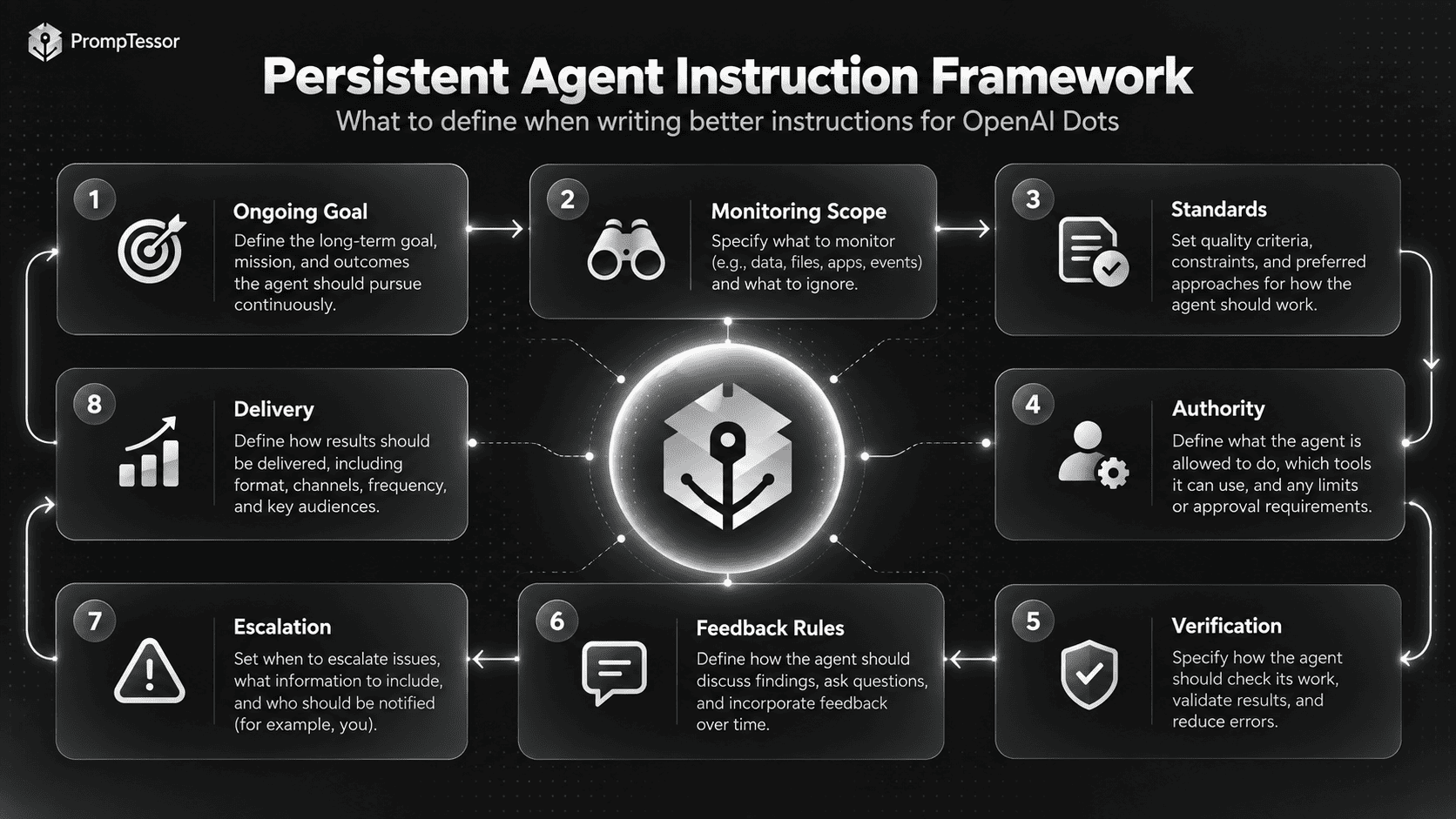
If you are starting from a rough task description, the ChatGPT Prompt Generator can help turn that idea into a more structured prompt before you adapt it into long-running agent instructions.
Limitations and Risks
Dots make agents easier to use, but they do not remove the core problems of agent reliability.
Agents Can Still Make Mistakes
OpenAI explicitly warns that Dots can make errors. A model may misunderstand context, choose the wrong next step, or produce an incorrect conclusion.
Persistent Context Can Preserve Bad Assumptions
Memory and continuity are useful only when the stored interpretation remains correct. If a project changes direction, tell the agent explicitly rather than assuming it will infer which old assumptions are obsolete.
Connected Apps Increase the Impact of Errors
A wrong answer in chat is different from a wrong action in a connected system. Use approval boundaries for consequential writes.
Proactivity Can Create Noise
Notify me immediately:
- launch blocker
- security concern
- missed deadline risk

Include in daily summary:
- minor copy changes
- non-blocking feedback
- low-impact opportunities

Do not surface:
- duplicate signals already resolved
“Always On” Does Not Mean Unlimited
Plans include allowances for deeper work, and tasks delegated into Work or Codex continue to use their respective limits. Design recurring responsibilities around actual capacity.
Product Safeguards Do Not Replace Organizational Policy
Enterprise teams still need their own governance, identity, data classification, approval policy, and audit requirements.
Where PrompTessor Fits
PrompTessor does not replace Dots, their cloud computers, ChatGPT app permissions, connected plugins, or OpenAI's approval system.
PrompTessor fits at the instruction-design layer:
ROUGH RESPONSIBILITY
      ↓
DEFINE
- ongoing goal
- monitoring scope
- standards
- authority
- approval boundaries
- verification
- escalation
- delivery format
      ↓
PROMPTESSOR
Generate / Analyze / Optimize / Refine
      ↓
PERSISTENT AGENT INSTRUCTIONS
      ↓
OPENAI DOT
Context + apps + computer + browser
      ↓
WORK / OBSERVE / VERIFY / ASK / CONTINUE
      ↓
FEEDBACK
      ↓
REFINE INSTRUCTIONS WHEN NEEDED
The ChatGPT Prompt Generator can create a structured starting prompt. The AI Prompt Analyzer can help identify unclear goals, missing boundaries, weak context, or ambiguous outputs. The AI Prompt Optimizer can create stronger alternatives after you identify a real failure mode.
For Dots powered by GPT-6 Astra, the GPT-6 Astra Prompting Guide provides model-specific guidance on autonomy, tools, instruction priority, verification, long-running work, and stopping behavior.
For tool-connected agent design, see the MCP Prompting Guide.
Use PrompTessor to improve what the agent is told to achieve and how it should behave. Use Dots' runtime controls to enforce what the agent can actually access and do.
Official OpenAI Dots Resources
- OpenAI — Introducing Dots
- OpenAI Help Center — Getting Started With Your Dot
- OpenAI Deployment Safety — GPT-6 Astra and Auto-Review
FAQ
What are OpenAI Dots?
OpenAI Dots are always-on AI agents in the ChatGPT ecosystem. They are powered by GPT-6 Astra, have their own cloud computer and browser, can use connected apps, maintain context across ongoing work, and continue making progress between conversations.
When were OpenAI Dots released?
OpenAI announced Dots on September 29, 2026 and began a staged rollout the same day.
What model powers OpenAI Dots?
OpenAI says Dots are powered by GPT-6 Astra.
Do Dots have their own computer?
Yes. OpenAI says each Dot works on its own cloud computer and has its own browser. The user's computer remains separate unless the user explicitly gives the Dot permission to connect to it.
How many apps can OpenAI Dots connect to?
OpenAI says Dots can readily connect to more than 4,000 apps through the ChatGPT plugin ecosystem.
Can OpenAI Dots work while I am away?
Yes. Dots are designed to continue ongoing work and perform proactive research in the background. Proactive-research tools are restricted to read-only access.
Can a Dot send messages without approval?
It depends on permissions, Custom Rules, the action, and OpenAI's safety requirements. Users can configure actions to be allowed, require approval, or be blocked. Proactive research itself uses read-only tools and cannot send messages.
What is proactive research in Dots?
Proactive research is the background mode where a Dot looks for relevant ways to help using already-connected apps. OpenAI says the tools used in this mode are read-only and cannot change app content or control the browser or computer.
What are Custom Rules in OpenAI Dots?
Custom Rules let users define whether specific actions may proceed automatically, need approval, or should be blocked. OpenAI's built-in safety requirements continue to apply.
What is auto-review?
Auto-review is an OpenAI control that checks actions that could affect accounts or share information against the user's instructions, Custom Rules, and safety requirements. It helps determine whether the action can proceed, requires approval, or must be done by the user.
Where can I talk to my Dot?
OpenAI says Dots can be reached through ChatGPT on desktop, web, and mobile, as well as Slack and Microsoft Teams. Voice calling is supported, and texting is planned.
Who can use OpenAI Dots?
As of October 2, 2026, rollout includes eligible Pro users outside the EEA, Switzerland, and the UK; Business Premium users in supported ChatGPT regions; and Enterprise users through an admin-enabled beta.
Are OpenAI Dots free?
OpenAI says the first Dot is included in Pro or Business Premium at no additional cost. Deeper work has plan allowances, and OpenAI plans to offer additional Dots and capacity options later.
What are specialist Dots?
Specialist Dots are organization-focused agents with dedicated responsibilities, identities, credentials, and systems access. OpenAI is initially testing them through focused enterprise pilots.
Do I still need prompts with OpenAI Dots?
Yes, but the instruction style changes. Persistent agents benefit from an ongoing goal, standards, monitoring scope, authority, approval rules, verification criteria, feedback rules, escalation conditions, and a delivery format rather than only a one-shot request.
Can PrompTessor help with OpenAI Dots instructions?
PrompTessor can help generate, analyze, optimize, and refine the instruction layer for persistent agents. Dots themselves remain responsible for runtime capabilities such as connected apps, cloud execution, permissions, approvals, and ongoing task execution.
Conclusion
OpenAI Dots represent a meaningful change in how general-purpose AI assistants can be used.
The interaction no longer has to be:
ask → answer → stopIt can become:
define responsibility
        ↓
give relevant context and access
        ↓
let the agent work
        ↓
observe changing state
        ↓
continue within boundaries
        ↓
ask when judgment or approval is needed
        ↓
verify the result
        ↓
learn from feedback
        ↓
keep responsibility over time
The most important design question is therefore not “what prompt should I send next?”
It is:
What ongoing responsibility can I safely delegate, what standards should guide it, and where should the agent be required to come back to me?
Dots provide the infrastructure for that style of work: GPT-6 Astra, persistent context, connected apps, cloud computing, cross-channel communication, proactive research, permissions, Custom Rules, auto-review, and human approvals.
The quality of the result will still depend on how clearly the responsibility is defined.
Start with one bounded responsibility. Define what good work looks like. Give the minimum access needed. Attach approval to consequential actions. Verify results. Then expand autonomy only when the workflow proves reliable.
Build better prompts in one workspace
Generate prompts from ideas, analyze and optimize quality, refine with feedback, reverse-engineer content, and save reusable prompts in your Prompt Library.
Try PrompTessor Free