15 AI Agent Examples: Real-World Workflows and Use Cases in 2026
AI agent examples are easy to list and surprisingly hard to explain well.
A list that says “customer support agent,” “sales agent,” and “coding agent” tells you where agents can be used, but not what actually makes the workflow agentic, what the agent is allowed to do, how it knows whether it succeeded, or where a human should remain in control.
That distinction matters because an AI agent is not simply a chatbot with a longer prompt. In a real agent workflow, the model may inspect context, choose a tool, take an action, observe the result, update its state, verify progress, and decide what to do next. OpenAI’s current agent documentation describes agents as systems that can plan and complete tasks using tools, work with other agents, and maintain context across steps. Its Agents SDK also treats instructions, tools, guardrails, handoffs, and structured outputs as separate parts of the runtime. OpenAI’s agents documentation provides the current implementation overview.
The practical lesson is simple:
A useful AI agent example should show the whole workflow, not just the job title.
This guide uses that approach. Each example is broken down into the trigger, goal, context, tools, decisions, actions, validation, human checkpoint, and final result so you can see where the model adds flexibility and where deterministic controls still belong.
Quick Answer
A practical AI agent workflow usually looks like this:
TRIGGER / USER GOAL
        ↓
LOAD RELEVANT CONTEXT
        ↓
DECIDE NEXT STEP
        ↓
USE TOOL / TAKE ACTION
        ↓
OBSERVE RESULT
        ↓
UPDATE STATE
        ↓
VALIDATE PROGRESS
        ↓
COMPLETE?
   ├─ YES → RETURN RESULT
   ├─ NO  → CONTINUE
   └─ BLOCKED / HIGH RISK → ASK / ESCALATE
The examples in this guide include customer support, coding, research, data analysis, sales operations, email triage, recruiting, marketing, SEO, incident response, ecommerce operations, finance, contract review, personal administration, and multi-agent launch readiness.
Key Takeaways
- An AI agent becomes useful when the path to the result cannot be fully predetermined in advance.
- The most useful examples combine a clear goal, reliable context, bounded tools, observable actions, verification, and stopping conditions.
- A tool call does not make a system agentic by itself. The model must participate in deciding what happens next.
- Read-only actions are easier to automate than external writes, irreversible changes, purchases, deployments, or other consequential actions.
- Human approval should be placed around sensitive actions rather than added as a vague sentence at the end of a prompt.
- Verification is part of the workflow. An agent should confirm that an action succeeded instead of assuming success from an attempted tool call.
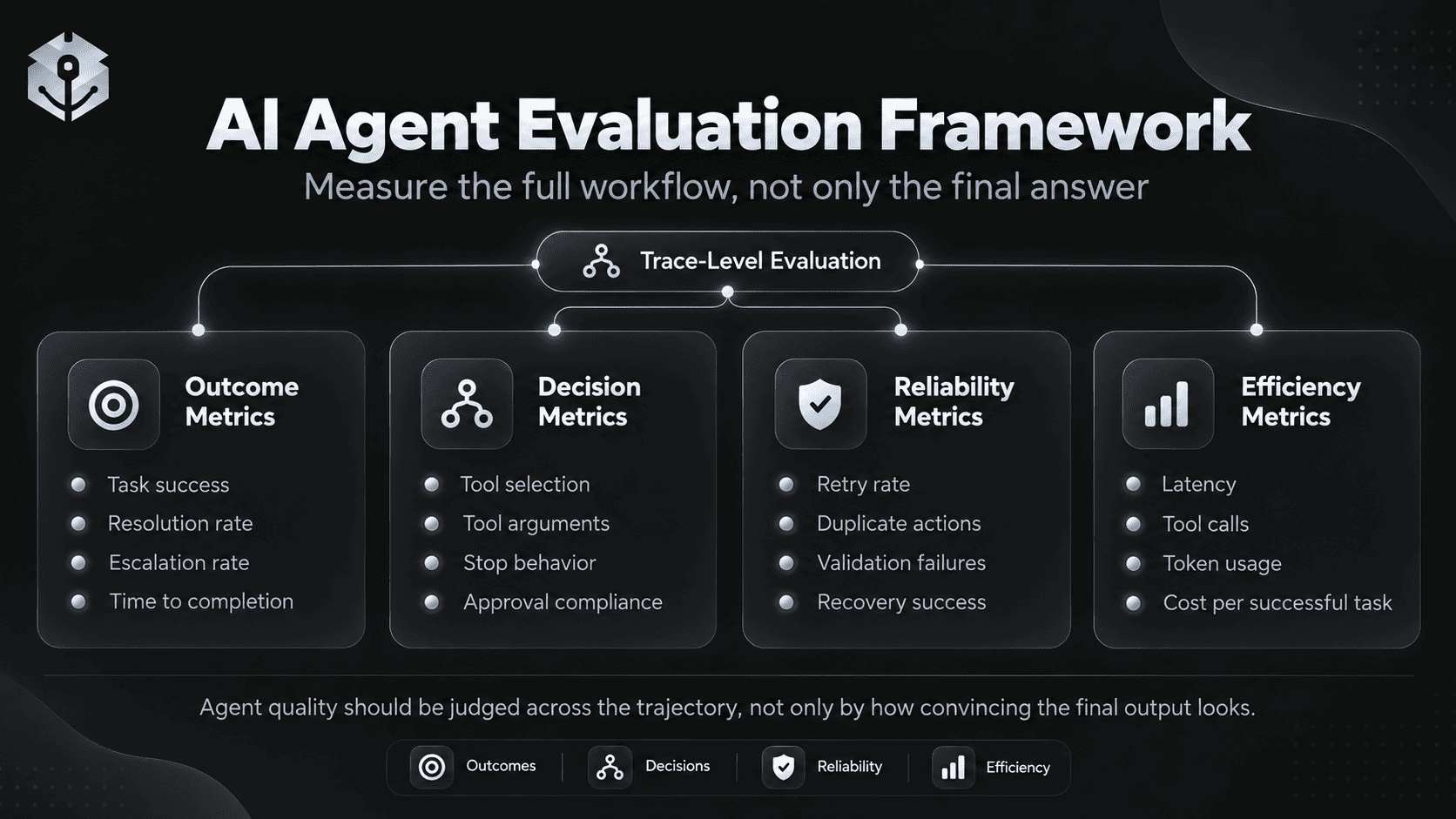
- Agent quality should be evaluated across the trajectory: tool selection, arguments, state changes, retries, handoffs, approvals, verification, stopping behavior, and final outcome.
- The best first agent is usually a narrow workflow with useful tools and observable success criteria, not a general “do everything” assistant.
- PrompTessor can help generate, analyze, optimize, and refine the instruction layer, while the runtime remains responsible for tools, permissions, state, execution, and enforcement.
Table of Contents
- What Counts as an AI Agent Example?
- The Anatomy of a Useful AI Agent Workflow
- 1. Customer Support Agent
- 2. Coding and Debugging Agent
- 3. Research Agent
- 4. Data Analysis Agent
- 5. Sales Operations Agent
- 6. Email Triage and Follow-Up Agent
- 7. Recruiting Coordination Agent
- 8. Marketing Campaign Operations Agent
- 9. SEO Research and Content Operations Agent
- 10. SRE and Incident Response Agent
- 11. Ecommerce Order Operations Agent
- 12. Finance Operations Agent
- 13. Contract Review Agent
- 14. Personal Travel and Admin Agent
- 15. Multi-Agent Launch Readiness Workflow
- When You Should Not Use an AI Agent
- How to Choose Your First Agent Use Case
- How to Evaluate AI Agent Workflows
- Where PrompTessor Fits
- Official Resources
- FAQ
What Counts as an AI Agent Example?
There is no perfectly standardized industry definition of an AI agent, but a useful practical boundary is whether the model controls meaningful parts of a multi-step task.
A one-shot classifier is usually not an agent:
INPUT
  ↓
MODEL
  ↓
LABEL
A fixed automation may use AI without becoming an agent:
NEW TICKET
  ↓
SUMMARIZE WITH AI
  ↓
ALWAYS CREATE CRM NOTE
  ↓
ALWAYS SEND TEMPLATE B
The sequence is predetermined.
An agent is different when the model can choose the next useful action based on the current state:
NEW TICKET
  ↓
UNDERSTAND REQUEST
  ↓
NEED ACCOUNT DATA?
  ├─ YES → LOOK UP ACCOUNT
  └─ NO
       ↓
NEED POLICY?
  ├─ YES → SEARCH POLICY
  └─ NO
       ↓
CAN RESOLVE?
  ├─ YES → PROPOSE / EXECUTE ALLOWED ACTION
  ├─ NEED APPROVAL → PAUSE
  └─ BLOCKED → ESCALATE
       ↓
VERIFY CURRENT STATE
       ↓
RESPOND
Google Cloud’s current overview describes AI agents as systems that use AI to pursue goals and complete tasks on behalf of users, with capabilities including reasoning, planning, memory, and action. Google Cloud’s AI agent overview is a useful general reference.
For a deeper foundation, see What Is an AI Agent? and Autonomous AI Agents.
The Anatomy of a Useful AI Agent Workflow
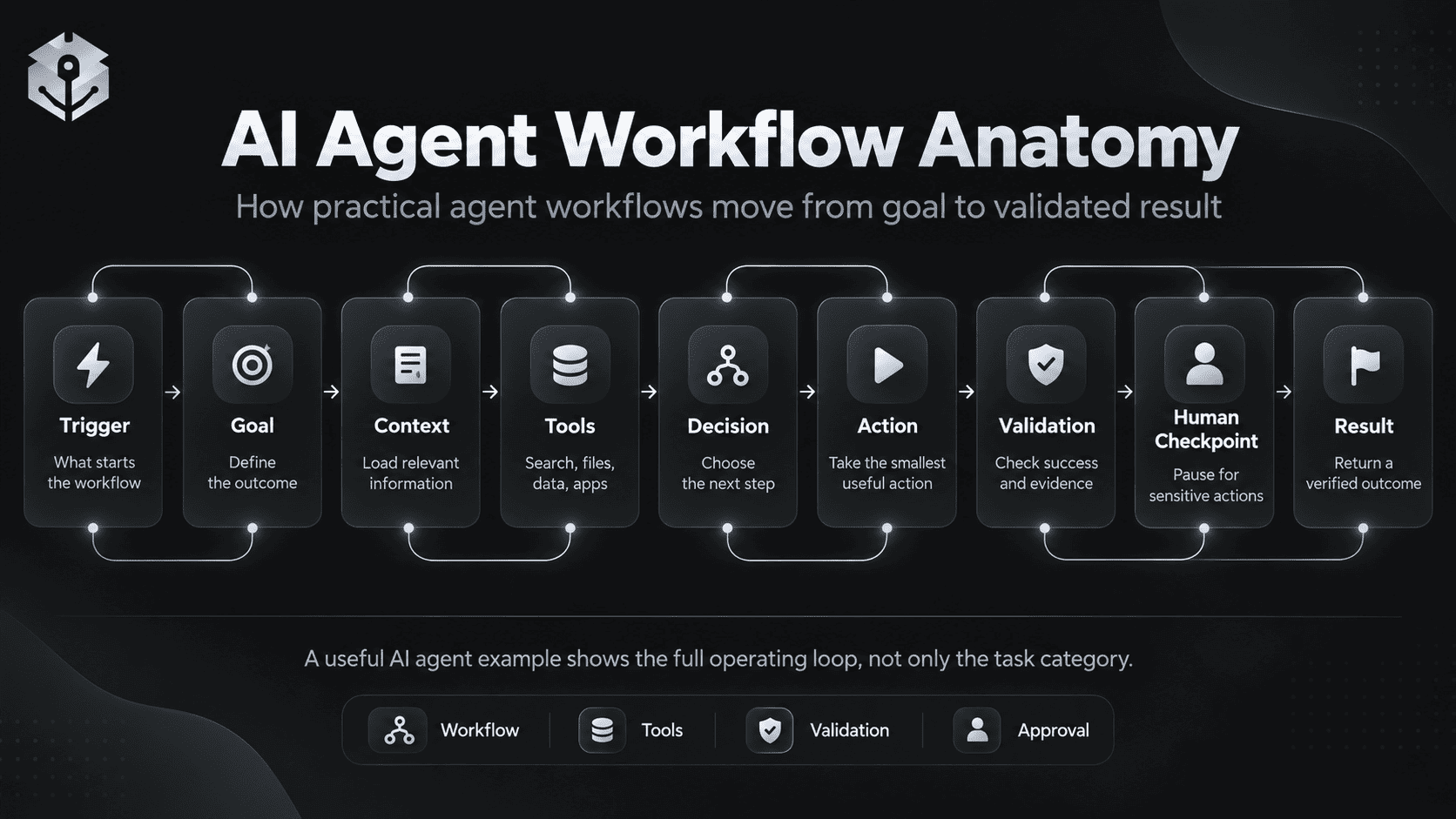
Instead of describing examples as job titles, this guide uses eight parts.
| Part | Question |
|---|---|
| Trigger | What starts the workflow? |
| Goal | What outcome should the agent achieve? |
| Context | What information does the agent need? |
| Tools | What can the agent read, calculate, or change? |
| Decisions | What does the model choose dynamically? |
| Validation | How is progress or success checked? |
| Human checkpoint | What requires review or approval? |
| Result | What observable output or state proves completion? |
1. Customer Support Agent
Customer support is a strong agent use case because the correct path depends on the customer’s issue, account state, policy, and the actions available to resolve it.
TRIGGER
New support ticket

GOAL
Resolve the customer’s issue or route it correctly.

CONTEXT
- ticket history
- customer account
- order / billing state
- current product documentation
- current support policy

TOOLS
- search_help_center
- get_customer
- get_order
- inspect_payment
- update_ticket
- create_refund_request

AGENT DECISIONS
- identify issue type
- decide which records are needed
- decide whether policy lookup is necessary
- choose a safe resolution path
- determine whether approval is required

VALIDATION
- confirm current account state
- confirm requested action succeeded
- verify response matches actual system state

HUMAN CHECKPOINT
High-value refund, policy exception, or ambiguous account ownership.

RESULT
Resolved ticket or clearly escalated case with evidence.
The important design choice is to separate language generation from business authority. The agent can explain a verified refund decision, but eligibility should come from trusted policy and account state rather than from improvisation.
OpenAI’s practical guide to building agents specifically uses customer service as an example of a workflow where agents can make decisions, use tools, correct actions, and hand control back when necessary. OpenAI’s practical guide also emphasizes human intervention for failure thresholds and high-risk actions.
2. Coding and Debugging Agent
A coding agent is useful when the exact files, commands, or fixes are not known before investigation begins.
TRIGGER
A test fails or a user describes a bug.

GOAL
Find the cause, implement the smallest safe fix, and verify it.

CONTEXT
- repository
- issue description
- test output
- project instructions
- recent relevant changes

TOOLS
- repository search
- file read / edit
- terminal
- test runner
- lint / typecheck

AGENT DECISIONS
- which files to inspect
- what hypothesis to test
- whether a code change is needed
- which tests should run first
- whether broader regression testing is necessary

VALIDATION
- targeted tests pass
- lint / typecheck pass when relevant
- intended behavior is fixed
- unrelated files were not changed accidentally

HUMAN CHECKPOINT
Production deployment, destructive migration, secret access, or high-risk infrastructure change.

RESULT
Verified patch plus concise summary of cause, changes, and tests.
This is agentic because the workflow adapts to what the repository and test results reveal. A deterministic script cannot know in advance which file will contain the root cause.
3. Research Agent
A research agent goes beyond a single search-and-summarize call by deciding what evidence is still missing and whether another source is needed.
TRIGGER
A decision or research question.

GOAL
Produce a current, evidence-backed brief.

CONTEXT
- decision criteria
- required geography / market
- source priorities
- date constraints
- known facts

TOOLS
- web search
- document search
- calculator
- spreadsheet / code analysis

AGENT DECISIONS
- which claims need current evidence
- which sources are authoritative
- whether evidence conflicts
- whether more search is necessary
- whether uncertainty remains material

VALIDATION
- material claims have evidence
- dates and source scope are current
- conflicts are surfaced
- calculations are reproducible

HUMAN CHECKPOINT
Decision itself remains with the user when the task is advisory.

RESULT
Cited brief with findings, uncertainty, and decision-relevant evidence.
A strong research agent should not keep searching simply because another search is possible. Completion criteria should explain when the evidence is sufficient.
4. Data Analysis Agent
Data analysis often requires iterative exploration: inspect schema, clean a field, test a hypothesis, produce a chart, notice an anomaly, and investigate further.
TRIGGER
Dataset + analytical question

GOAL
Answer the question with reproducible analysis.

CONTEXT
- dataset
- metric definitions
- business rules
- time range
- known data-quality limitations

TOOLS
- SQL
- Python
- spreadsheet
- charting
- data catalog

AGENT DECISIONS
- which tables / columns matter
- what cleaning is required
- which calculation answers the question
- whether an anomaly needs deeper inspection

VALIDATION
- row counts / filters checked
- calculation logic inspected
- outputs reconcile with source data
- assumptions documented

HUMAN CHECKPOINT
Metric definition changes, destructive database operations, or sensitive-data access.

RESULT
Answer, reproducible query or code, and supporting table / visualization.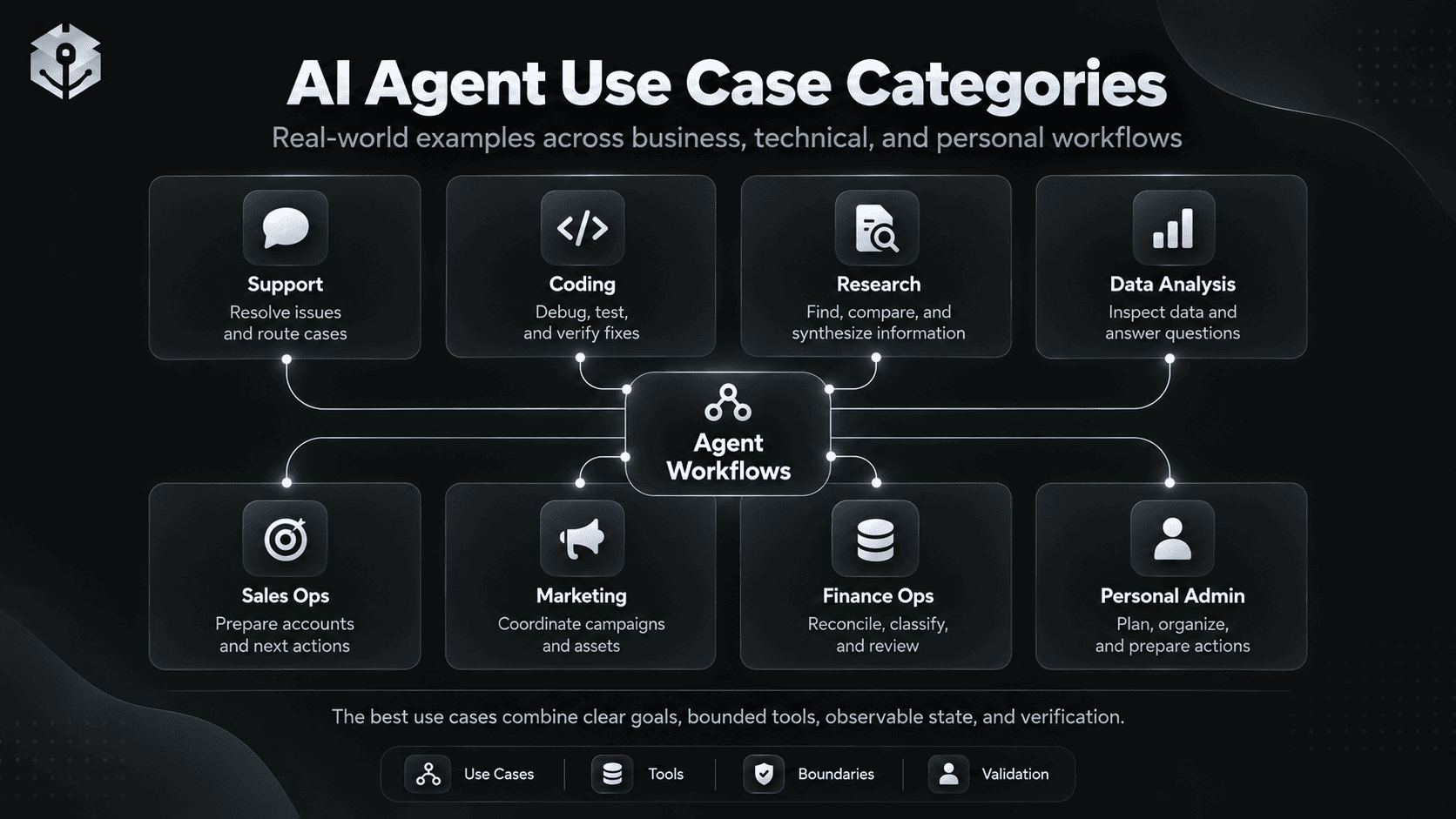
5. Sales Operations Agent
A sales operations agent can prepare account briefs, qualify inbound leads, update records, or prepare follow-ups while keeping outbound communication behind explicit approval.
TRIGGER
New lead or upcoming sales meeting

GOAL
Prepare the account and next action.

CONTEXT
- CRM
- prior communication
- company profile
- product fit criteria
- meeting history

TOOLS
- CRM search
- email search
- web research
- calendar
- CRM update

AGENT DECISIONS
- what information is missing
- whether the lead matches qualification rules
- what recent changes matter
- which opportunity or risk should be highlighted

VALIDATION
- account identity matches
- facts are current
- CRM fields use approved values
- no unsupported claims are added

HUMAN CHECKPOINT
Sending external email, changing commercial terms, or committing pricing.

RESULT
Account brief, qualification state, draft follow-up, and updated internal record.
6. Email Triage and Follow-Up Agent
Email is a useful agent domain when the system can distinguish between messages that need no action, messages that require a draft, and messages that require another system to be checked first.
TRIGGER
New email

GOAL
Triage and prepare the correct next step.

CONTEXT
- email thread
- sender
- calendar
- relevant account / project state
- user preferences

TOOLS
- search email
- calendar lookup
- CRM / project lookup
- create draft
- apply label

AGENT DECISIONS
- classify intent
- determine urgency
- identify missing context
- decide whether to draft, label, schedule, or escalate

VALIDATION
- sender and thread verified
- dates reconciled with calendar
- draft does not promise unsupported action

HUMAN CHECKPOINT
Sending external mail, accepting commitments, or changing appointments.

RESULT
Correctly triaged message and safe draft / next action.
7. Recruiting Coordination Agent
Recruiting has several repetitive but context-dependent steps that can benefit from an agent while keeping hiring decisions human-owned.
TRIGGER
New candidate, interview stage change, or recruiter request

GOAL
Prepare the next recruiting operation.

CONTEXT
- role requirements
- candidate materials
- interview feedback
- availability
- hiring process rules

TOOLS
- ATS
- calendar
- document search
- email draft
- interview scorecard

AGENT DECISIONS
- what information is missing
- which interviewer / stage is next
- what scheduling options work
- which evidence should be summarized

VALIDATION
- role and candidate IDs match
- interview feedback is attributed correctly
- schedule conflicts are checked

HUMAN CHECKPOINT
Candidate ranking, hiring decision, compensation offer, rejection.

RESULT
Prepared schedule, structured candidate brief, and approved communication draft.
8. Marketing Campaign Operations Agent
A marketing agent can coordinate research, campaign planning, asset preparation, and reporting, but publishing and ad spend should have explicit boundaries.
TRIGGER
Campaign brief

GOAL
Prepare a campaign plan and execution package.

CONTEXT
- audience
- product
- brand guidelines
- channel history
- campaign goal
- approved claims

TOOLS
- analytics
- web research
- content repository
- ad platform read access
- project management

AGENT DECISIONS
- which channel deserves priority
- which audience insight needs evidence
- what content formats are required
- what KPI should be monitored

VALIDATION
- claims match approved source material
- asset requirements are complete
- tracking plan is defined
- budget math is correct

HUMAN CHECKPOINT
Publishing, ad spend, external outreach, legal / regulated claims.

RESULT
Campaign brief, content plan, measurement plan, and approval-ready assets.
9. SEO Research and Content Operations Agent
An SEO agent is most useful when it coordinates several information sources rather than simply generating an article.
TRIGGER
Topic, page, or traffic goal

GOAL
Identify a defensible search opportunity and prepare an evidence-backed content brief.

CONTEXT
- existing site inventory
- target market
- product relevance
- current rankings
- internal-link opportunities

TOOLS
- search
- Search Console / analytics
- site crawl
- content inventory
- keyword data source

AGENT DECISIONS
- whether a topic overlaps existing content
- which search intent is primary
- which competing pages matter
- what content gap is real
- where internal links belong

VALIDATION
- existing URLs checked for cannibalization
- SERP intent reviewed
- cited product facts verified
- recommended internal links exist

HUMAN CHECKPOINT
Publishing or major site architecture changes.

RESULT
Prioritized brief with intent, outline, evidence, internal links, and cannibalization notes.
For prompt-level design, see AI Agent Prompts: How to Write Better Agent Instructions. That guide covers goals, scope, tools, tool-use policy, decision rules, action boundaries, verification, and stopping conditions in much more detail.
10. SRE and Incident Response Agent
Incident response is highly agentic because each observation changes what should happen next. It is also high-risk, so read access, write access, and production actions should be separated.
TRIGGER
Alert, anomaly, or incident ticket

GOAL
Identify the likely cause, reduce time to diagnosis, and prepare safe remediation.

CONTEXT
- alerts
- logs
- traces
- recent deployments
- service topology
- runbooks

TOOLS
- observability search
- deployment history
- logs
- metrics
- read-only cloud APIs
- approved remediation tools

AGENT DECISIONS
- which service to inspect first
- whether a recent change correlates
- which logs / metrics are diagnostic
- whether a runbook applies

VALIDATION
- hypothesis matches telemetry
- proposed change targets the affected component
- system health is rechecked after action

HUMAN CHECKPOINT
Production restart, rollback, scaling change, credential action, or destructive command.

RESULT
Evidence-backed diagnosis, safe remediation proposal, and verified recovery state.
OpenAI’s current cookbook includes agent examples for SRE incident response, data analysis, Slack workflows, and other production tasks, reflecting the shift from one-shot chat toward longer tool-using workflows. OpenAI’s agents cookbook is a useful source of implementation examples.
11. Ecommerce Order Operations Agent
Ecommerce agents can investigate orders, shipments, refunds, inventory, and exceptions because the path varies by current order state.
TRIGGER
Customer or operations request

GOAL
Resolve the order issue with the smallest safe action.

CONTEXT
- order
- payment
- shipment
- inventory
- refund policy

TOOLS
- lookup_order
- lookup_payment
- lookup_shipment
- inventory lookup
- create support case
- refund / cancellation request

AGENT DECISIONS
- determine actual order state
- choose whether payment, shipping, or inventory is the blocker
- select the appropriate remedy

VALIDATION
- check final order state after action
- prevent duplicate refund / cancellation
- confirm tool result before claiming success

HUMAN CHECKPOINT
High-value refund, unusual fraud signal, irreversible cancellation.

RESULT
Resolved order state or correctly escalated exception.
12. Finance Operations Agent
Finance operations contain many structured, repetitive tasks, but authority boundaries are especially important.
TRIGGER
Invoice, expense, reconciliation request, or month-end task

GOAL
Extract, reconcile, classify, and prepare a reviewable result.

CONTEXT
- invoice / expense
- chart of accounts
- vendor records
- policy
- ledger state

TOOLS
- OCR / document extraction
- accounting lookup
- calculator / code
- policy search
- draft journal / review queue

AGENT DECISIONS
- which fields are missing
- whether records match
- whether a policy exception exists
- whether a discrepancy needs review

VALIDATION
- totals reconcile
- currency and dates verified
- vendor identity matches
- proposed classification is allowed

HUMAN CHECKPOINT
Payment release, final journal posting, exception approval.

RESULT
Structured reconciliation package and clearly flagged exceptions.
13. Contract Review Agent
A contract review agent can accelerate issue spotting and comparison without turning the model into the final legal decision-maker.
TRIGGER
New contract or redline

GOAL
Identify relevant deviations and prepare a review summary.

CONTEXT
- contract
- approved clause library
- negotiation playbook
- jurisdiction / deal context

TOOLS
- document parser
- clause search
- comparison
- internal policy retrieval

AGENT DECISIONS
- which clauses map to policy
- which deviations are material
- what information is missing
- which issues require specialist review

VALIDATION
- quoted clause maps to correct section
- comparison uses current playbook
- uncertainty is reported

HUMAN CHECKPOINT
Legal interpretation, final negotiation position, signature.

RESULT
Issue list with evidence, deviations, and review priorities.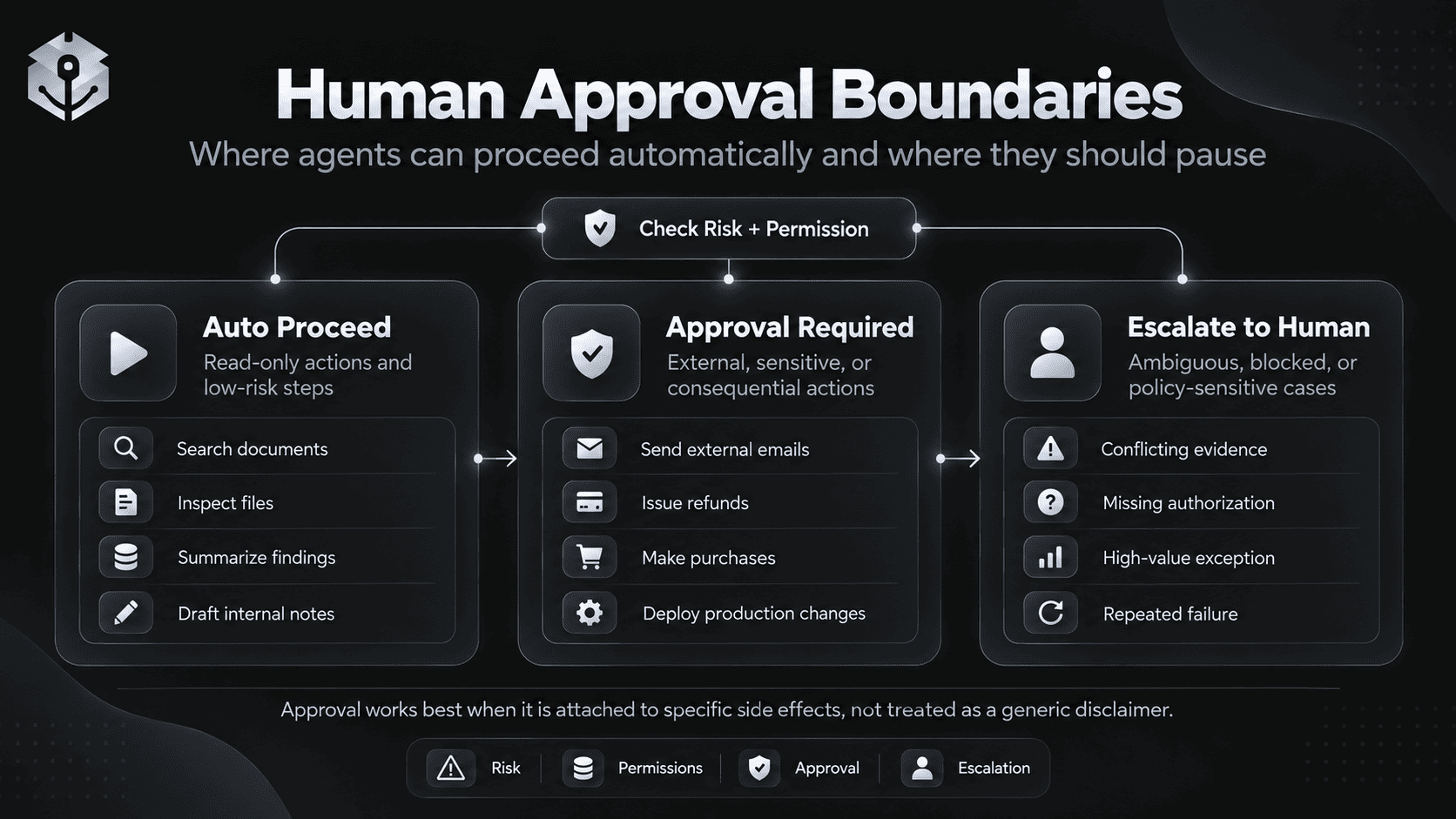
14. Personal Travel and Admin Agent
A personal admin agent can combine calendar, travel, email, and research tools, but it should distinguish recommendations from actions that create commitments.
TRIGGER
"Plan my trip and prepare the bookings."

GOAL
Create a feasible itinerary and prepare approved actions.

CONTEXT
- dates
- budget
- preferences
- calendar
- existing bookings

TOOLS
- web search
- maps / travel search
- calendar
- email
- booking tools

AGENT DECISIONS
- identify feasible itinerary
- compare options
- detect schedule conflicts
- determine what needs user preference

VALIDATION
- dates and time zones align
- availability is current
- total cost is calculated
- cancellation terms are visible

HUMAN CHECKPOINT
Purchase, booking, cancellation, sending messages.

RESULT
Feasible itinerary plus approval-ready booking choices.
The value comes from coordinating several systems and adapting when constraints conflict. A deterministic checklist would struggle when flight times, calendar commitments, price, and user preferences interact.
15. Multi-Agent Launch Readiness Workflow
Multi-agent architecture is useful when separate specialists genuinely need different tools, context, or responsibilities.
TRIGGER
Release candidate ready

GOAL
Determine whether the product is ready to launch.

MANAGER AGENT
Owns launch-readiness state.

SPECIALISTS
├─ Code Review Agent
├─ Test Agent
├─ Security Review Agent
├─ Documentation Agent
└─ Release Notes Agent

MANAGER DECISIONS
- which specialist to invoke
- what evidence is still missing
- whether findings conflict
- whether a blocker is resolved

VALIDATION
- required tests pass
- security blockers cleared
- docs updated
- release artifact matches approved commit
- unresolved risks recorded

HUMAN CHECKPOINT
Final production release.

RESULT
Evidence-backed readiness report and explicit go / blocked state.
More agents do not automatically create a better system. OpenAI’s current orchestration guide distinguishes between handoffs, where a specialist takes over the conversation, and agents-as-tools, where a manager remains in control. OpenAI’s orchestration documentation explains the difference.
When You Should Not Use an AI Agent
Agent flexibility is useful only when flexibility is actually needed.
Use a Simple Model Call When
- one response can solve the task,
- all required context is already available,
- no external action is required,
- and success does not depend on iterative environmental feedback.
Use a Deterministic Workflow When
- the sequence is known in advance,
- every input should follow the same path,
- compliance requires predictable execution,
- or branching can be expressed more reliably in ordinary code.
Use an Agent When
- intermediate results change later decisions,
- the number of steps is not known in advance,
- the model must choose among several tools or actions,
- the environment provides feedback,
- and success can be verified.
The goal is not maximum autonomy. The goal is the minimum autonomy needed to solve the workflow well.
How to Choose Your First Agent Use Case
A good first agent workflow usually has five properties.
1. The Work Is Multi-Step
If one model response solves the problem, an agent adds unnecessary complexity.
2. The Environment Can Provide Feedback
Good agent environments expose observable state:
- test result,
- order status,
- search result,
- database record,
- tool response,
- metric,
- approval state.
3. The Tools Have Clear Boundaries
A tool called do_action is harder to control than specific capabilities such as lookup_order, search_docs, and create_refund_request.
Anthropic’s engineering guidance on agent tools emphasizes that tool design and evaluation materially affect agent performance. Anthropic’s guide to writing tools for agents is useful here.
4. Success Is Observable
Prefer:
"The test passes."
"The ticket state changed to resolved."
"The query returns the expected reconciliation."
"The customer record now shows the verified update."
over:
"The agent did a good job."5. Risk Can Be Bounded
Read-only tools are easier to start with than payments, deletion, production deployment, or external communication.
OpenAI’s current guardrails and human review documentation recommends placing automatic validation around inputs, outputs, and tool behavior, while using approval interruptions for sensitive side effects. OpenAI’s guardrails and human review guide describes this pattern.
How to Evaluate AI Agent Workflows
Agent evaluation should inspect the trajectory, not only the final answer.
Outcome Metrics
- task success rate,
- resolution rate,
- correct completion rate,
- human escalation rate,
- time to successful completion.
Decision Metrics
- correct tool selection,
- correct tool arguments,
- appropriate handoff,
- appropriate stop behavior,
- approval compliance.
Reliability Metrics
- unnecessary retry rate,
- duplicate action rate,
- unsupported assumption rate,
- validation failure rate,
- recovery success rate.
Efficiency Metrics
- latency,
- tool calls per successful task,
- token usage,
- cost per successful task,
- human review cost.
OpenAI’s current agent evaluation guidance recommends trace-level analysis because traces capture model calls, tool calls, guardrails, and handoffs across a run. OpenAI’s agent evaluation guide describes trace grading, datasets, graders, and evaluation runs.
AI Agent Example Template
You can use this structure when designing a new agent use case:
TRIGGER
{What starts the workflow?}

GOAL
{What observable outcome should be achieved?}

CONTEXT
Use:
- {source}
- {source}
- {source}

TOOLS
- {tool}: {what it does}
- {tool}: {what it does}

DECISION POLICY
- determine what information is missing
- choose the smallest useful next action
- use only tools relevant to the current gap
- reassess after every result
- do not repeat equivalent actions without new information

ACTION BOUNDARIES
May proceed automatically:
- {read-only / reversible action}

Requires approval:
- {sensitive / external / irreversible action}

VALIDATION
Before completion:
- {check}
- {check}
- {check}

STOP / ESCALATE
Stop or ask when:
- required authorization is missing
- critical information cannot be safely inferred
- repeated attempts fail
- the next action exceeds the allowed scope

RESULT
Return:
- {final artifact}
- {evidence / status}
- {remaining uncertainty}
For a deeper prompt-design framework, use the existing AI Agent Prompts guide. For tool-connected agents, see the MCP Prompting Guide. For production boundaries, see LLM Guardrails.
Where PrompTessor Fits
PrompTessor operates at the prompt and instruction-design layer.
AGENT IDEA
   ↓
DEFINE GOAL / SCOPE / TOOLS / RULES
   ↓
PrompTessor
- Generate
- Analyze
- Optimize
- Refine
   ↓
AGENT INSTRUCTION CANDIDATE
   ↓
YOUR AGENT RUNTIME
- model
- tools
- permissions
- state
- memory
- approvals
- guardrails
- execution
   ↓
TRACE / EVALUATE
   ↓
IMPROVE
The AI Prompt Generator can help turn a rough agent goal into a structured instruction draft. The AI Prompt Analyzer can help inspect clarity, missing context, constraints, structure, and model fit. The AI Prompt Optimizer can help produce stronger prompt candidates after a failure mode is understood.
PrompTessor does not replace the runtime that executes tools, stores state, grants permissions, pauses for approvals, enforces authorization, or evaluates production traces.
Use PrompTessor to improve the instruction layer. Use the application runtime to control what the agent can actually access and do.
Official Resources
- OpenAI — Agents
- OpenAI — A Practical Guide to Building AI Agents
- OpenAI — Guardrails and Human Review
- OpenAI — Evaluate Agent Workflows
- OpenAI — Orchestration and Handoffs
- Anthropic — Writing Effective Tools for Agents
- Anthropic — Building Effective AI Agents
- Google Cloud — What Are AI Agents?
FAQ
What are examples of AI agents?
Examples include customer support agents, coding agents, research agents, data-analysis agents, sales operations agents, email triage agents, recruiting coordination agents, marketing agents, SEO agents, incident-response agents, ecommerce operations agents, finance operations agents, contract-review agents, personal admin agents, and multi-agent coordination systems.
What makes an AI agent different from a chatbot?
A chatbot primarily responds to a message. An AI agent can pursue a multi-step goal, choose tools or actions, observe results, update state, verify progress, and decide whether to continue, ask, escalate, or stop.
What is a simple AI agent example?
A support agent is a simple example: it receives a ticket, identifies the issue, retrieves relevant account information, looks up policy when necessary, proposes or performs an allowed action, verifies the resulting state, and responds or escalates.
What is an AI agent example in software engineering?
A coding agent can inspect a failing test, search the repository, form a hypothesis, edit the relevant files, run targeted tests, observe the result, revise if needed, and return a verified patch.
What is an AI agent example in business?
A sales operations agent can research an account, inspect CRM history, summarize recent communication, qualify a lead against explicit criteria, prepare a meeting brief, and create a follow-up draft while leaving external sending or commercial commitments behind approval.
What is an AI agent example in marketing?
A marketing operations agent can research an audience, inspect campaign performance, plan content, prepare assets, define measurement, and coordinate internal tasks. Publishing, ad spend, or regulated claims should remain within explicit permission and approval boundaries.
Do AI agents always need memory?
No. Many agents only need current task state or short-term session context. Persistent memory is useful when information must carry across sessions, but unnecessary memory can increase privacy, relevance, and context-management problems.
Do AI agents need tools?
Not every conceptual agent requires external tools, but practical agents usually become more useful when they can retrieve current information, inspect files, call functions, use software, or act on an environment.
What should an AI agent verify before finishing?
The agent should verify that requested items are complete, required actions actually succeeded, material claims are supported, no important contradictions remain, the output matches the required format, and any unresolved uncertainty is clearly reported.
When should an AI agent ask for human approval?
Approval is especially important before sensitive, external, high-impact, or irreversible actions such as sending consequential messages, making purchases, issuing large refunds, deleting data, deploying production changes, or overriding policy.
How do you evaluate an AI agent?
Evaluate the complete trajectory: task success, tool selection, tool arguments, handoffs, state changes, approvals, retries, recovery, verification, stopping behavior, latency, token use, cost, and final user outcome.
Can PrompTessor help create AI agent prompts?
Yes. PrompTessor can help generate, analyze, optimize, and refine the instruction layer for an agent. The production application remains responsible for model settings, tools, permissions, state, memory, approvals, guardrails, execution, and evaluation.
Conclusion
The most useful AI agent examples are not defined by flashy autonomy.
They are defined by a practical loop:
GOAL
 ↓
CONTEXT
 ↓
DECIDE
 ↓
ACT
 ↓
OBSERVE
 ↓
VALIDATE
 ↓
CONTINUE / ASK / ESCALATE / COMPLETE
Customer support agents resolve cases because they can inspect account state and policy.
Coding agents are useful because tests and repository evidence change what should happen next.
Research agents can gather more evidence when uncertainty remains.
Operations agents can coordinate tools while keeping consequential actions behind explicit approval.
Across all of these examples, the same design principles keep appearing: narrow goals, useful tools, clear action boundaries, observable state, verification, and explicit stopping conditions.
A good AI agent is not the one that acts the most. It is the one that can reliably decide what should happen next, act within its boundaries, and prove when the job is done.
Build better prompts in one workspace
Generate prompts from ideas, analyze and optimize quality, refine with feedback, reverse-engineer content, and save reusable prompts in your Prompt Library.
Try PrompTessor Free