What Is a Personal AI Assistant? How It Works, Remembers, and Takes Action
A personal AI assistant is moving beyond the idea of a chatbot that waits for a question and returns an answer.
Modern personal AI assistants can combine conversation with memory, connected apps, tools, schedules, and user-approved actions. Instead of asking you to repeat the same preferences, search the same inbox, or manually coordinate every step, they can use relevant personal context to help plan, organize, prepare, monitor, and sometimes act on your behalf.
That shift is already visible in current products. Google introduced Personal Intelligence in Gemini to connect information from services such as Gmail, Google Photos, YouTube, and Search for more personalized assistance. Google has since expanded Gemini toward more proactive, agentic help through features such as Daily Brief and Gemini Spark. OpenAI has likewise expanded ChatGPT with connected apps, memory, and scheduled or event-driven tasks that can use connected information and supported actions.
The direction is clear:
A useful personal AI assistant does not only know how to answer. It knows enough about your context to help with the next useful step, while still respecting your permissions and control.
This guide explains how personal AI assistants work, what separates them from ordinary chatbots and general AI agents, how memory and connected apps fit together, which tasks they can realistically help with, and where human approval should remain mandatory.
Quick Answer
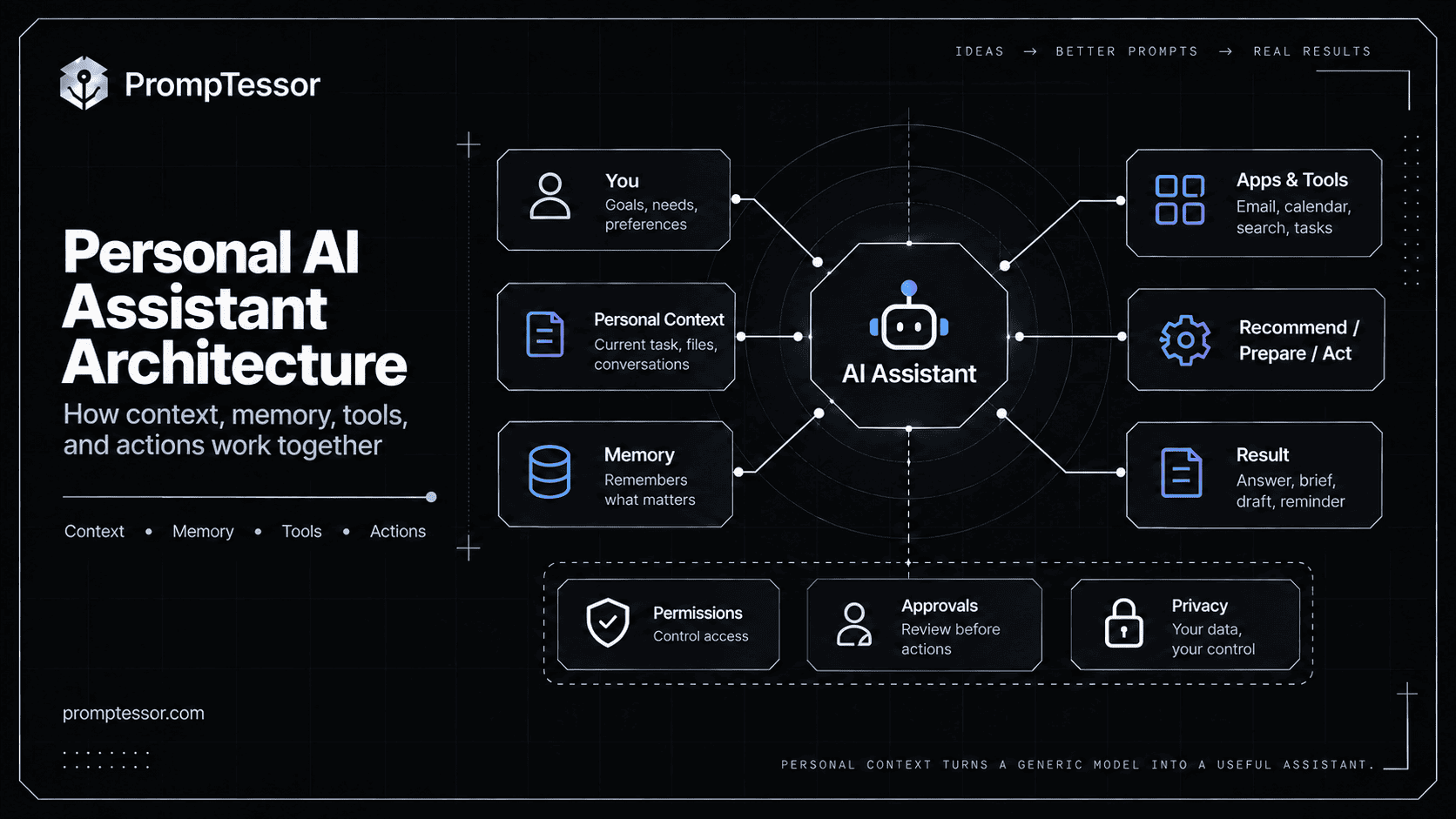
A modern personal AI assistant can be thought of as a system with six major layers:
YOU
 ↓
PERSONAL CONTEXT
Preferences
Projects
Past conversations
Relevant history
 ↓
MEMORY
What should remain useful over time?
 ↓
CONNECTED APPS / TOOLS
Email
Calendar
Files
Search
Tasks
Messages
Other services
 ↓
AI ASSISTANT / AGENT
Understand
Plan
Recommend
Prepare
Act when allowed
 ↓
PERMISSIONS / APPROVALS
What can happen automatically?
What requires confirmation?
 ↓
RESULT
Answer
Brief
Draft
Reminder
Action
Monitoring
Follow-up
The key is not giving the assistant unlimited access.
The key is giving it enough context and capability to reduce repetitive work while keeping important decisions under your control.
Key Takeaways
- A personal AI assistant combines AI reasoning with personal context, memory, tools, and connected services.
- It is more useful when it can understand your preferences, ongoing work, and relevant history without making you repeat everything.
- Connected apps let the assistant work with information such as email, calendars, files, tasks, search, or other services when you authorize access.
- Memory should be selective. Remembering everything is not the goal.
- Personalization and automation are different: an assistant can know your preferences without being allowed to take actions.
- Proactive assistance means the system can surface useful information or perform scheduled/event-driven work without waiting for a fresh prompt every time.
- High-impact actions should require appropriate permission or human approval.
- A personal AI assistant should clearly distinguish between recommendations, prepared actions, and completed actions.
- Privacy controls, connected-app permissions, memory controls, and data provenance matter more as assistants become more personal.
- Prompt instructions can define preferences and behavior, but real app permissions and action limits must be enforced by the platform/runtime.
- PrompTessor can help structure the instruction layer for a personal assistant, but it does not replace the assistant's memory, connected apps, or execution system.
Table of Contents
- What Is a Personal AI Assistant?
- How Does a Personal AI Assistant Work?
- Core Components of a Personal AI Assistant
- Personal AI Assistant vs. Chatbot
- Personal AI Assistant vs. AI Agent
- Personal AI Assistant vs. Traditional Virtual Assistant
- Memory and Personal Context
- Connected Apps and Tools
- Reactive vs. Proactive AI Assistants
- Can a Personal AI Assistant Take Actions?
- Permissions and Human Approval
- Privacy and Personal Data
- Personal AI Assistant Examples
- What Should a Personal AI Assistant Remember?
- What Should It Avoid Remembering or Doing Automatically?
- How to Write Better Instructions for a Personal AI Assistant
- How to Evaluate a Personal AI Assistant
- When a Personal AI Assistant Is Most Useful
- Where PrompTessor Fits
- Personal AI Assistant Checklist
- Related PrompTessor Guides and Tools
- Official Resources
- FAQ
What Is a Personal AI Assistant?
A personal AI assistant is an AI system designed to help an individual using context that is relevant to that person's goals, preferences, information, and recurring tasks.
It may help with:
- answering questions,
- planning a day or trip,
- summarizing relevant email,
- finding files,
- organizing tasks,
- preparing meeting context,
- monitoring something over time,
- drafting messages,
- making recommendations based on preferences,
- or taking supported actions after permission is granted.
The “personal” part is important.
A generic assistant might know that you asked for a restaurant in New York.
A personal assistant might also know, when authorized and relevant, that you prefer quieter restaurants, have a meeting nearby at 6 PM, usually avoid late reservations, or saved a place from a previous conversation.
That context can reduce friction.
Personalization Is Not the Same as Memory
An assistant can personalize using several sources: current conversation, explicit user instructions, past conversation memory, connected-app data, uploaded files, or current external context.
Google's current Gemini personalization documentation reflects this distinction: personalization can draw from past Gemini chats, connected Google apps, and explicit preferences. OpenAI's current memory system likewise can use relevant information from prior conversations and, where available, connected sources.
How Does a Personal AI Assistant Work?
A useful personal assistant typically follows a context-and-action loop.
1. Understand the Request
"Prepare me for tomorrow."That request is too broad without context. The assistant may need to understand what “prepare” means for this user, which calendar is relevant, whether email should be checked, what projects are active, and which tasks are urgent.
2. Gather Relevant Personal Context
Calendar
→ tomorrow's meetings

Email
→ unread messages related to those meetings

Tasks
→ unfinished priorities

Memory
→ user prefers concise morning briefs
3. Decide What Help Is Useful
The assistant may produce a schedule summary, meeting preparation notes, an urgent-email list, and a realistic priority order.
4. Take or Prepare Actions
If supported, it might draft a reply, create a task, prepare an event, or schedule a reminder.
5. Ask Before Sensitive Actions
Sending a message or purchasing something may require explicit approval.
6. Carry Forward Only Useful Context
The assistant may preserve a useful preference, but it should not treat every one-off detail as permanent memory.
REQUEST
 ↓
RELEVANT PERSONAL CONTEXT
 ↓
ASSISTANT DECISION
 ↓
TOOL / APP IF NEEDED
 ↓
PREPARE OR ACT
 ↓
APPROVAL IF REQUIRED
 ↓
RESULT
 ↓
SELECTIVE CONTINUITY
Core Components of a Personal AI Assistant
| Component | Purpose |
|---|---|
| AI model | Understands requests and decides how to help |
| Instructions | Define preferences, style, scope, and boundaries |
| Personal context | Provides relevant information about the user's current situation |
| Memory | Preserves selected information across interactions |
| Connected apps | Expose authorized personal data and supported actions |
| Tools | Allow search, retrieval, scheduling, messaging, or other capabilities |
| Permissions | Control what data or actions the assistant can access |
| Approvals | Keep the user in control of consequential actions |
| Scheduling / events | Enable proactive or recurring assistance |
| Evaluation / feedback | Help improve relevance and reliability over time |
Not every assistant needs every component. A lightweight personal assistant may use only instructions, conversation context, calendar, and a task list. A more agentic assistant may add memory, email, files, connected apps, scheduled tasks, action tools, and approvals.
Personal AI Assistant vs. Chatbot
The biggest difference is continuity and capability.
| Capability | Typical Chatbot | Personal AI Assistant |
|---|---|---|
| Answers questions | Yes | Yes |
| Knows user preferences | Limited | Often |
| Uses personal context | Limited | Core capability |
| Connected apps | Optional | Often important |
| Memory over time | Optional | Often useful |
| Proactive work | Rare | Possible |
| Takes supported actions | Limited | Possible with permissions |
| Recurring tasks | Rare | Possible |
Chatbot
User:
"What meetings do I have tomorrow?"

Chatbot:
"I don't have access to your calendar."
Personal AI Assistant
User:
"Prepare me for tomorrow."

Assistant:
- checks authorized calendar
- summarizes meetings
- finds relevant files or messages
- highlights schedule conflicts
- prepares a concise brief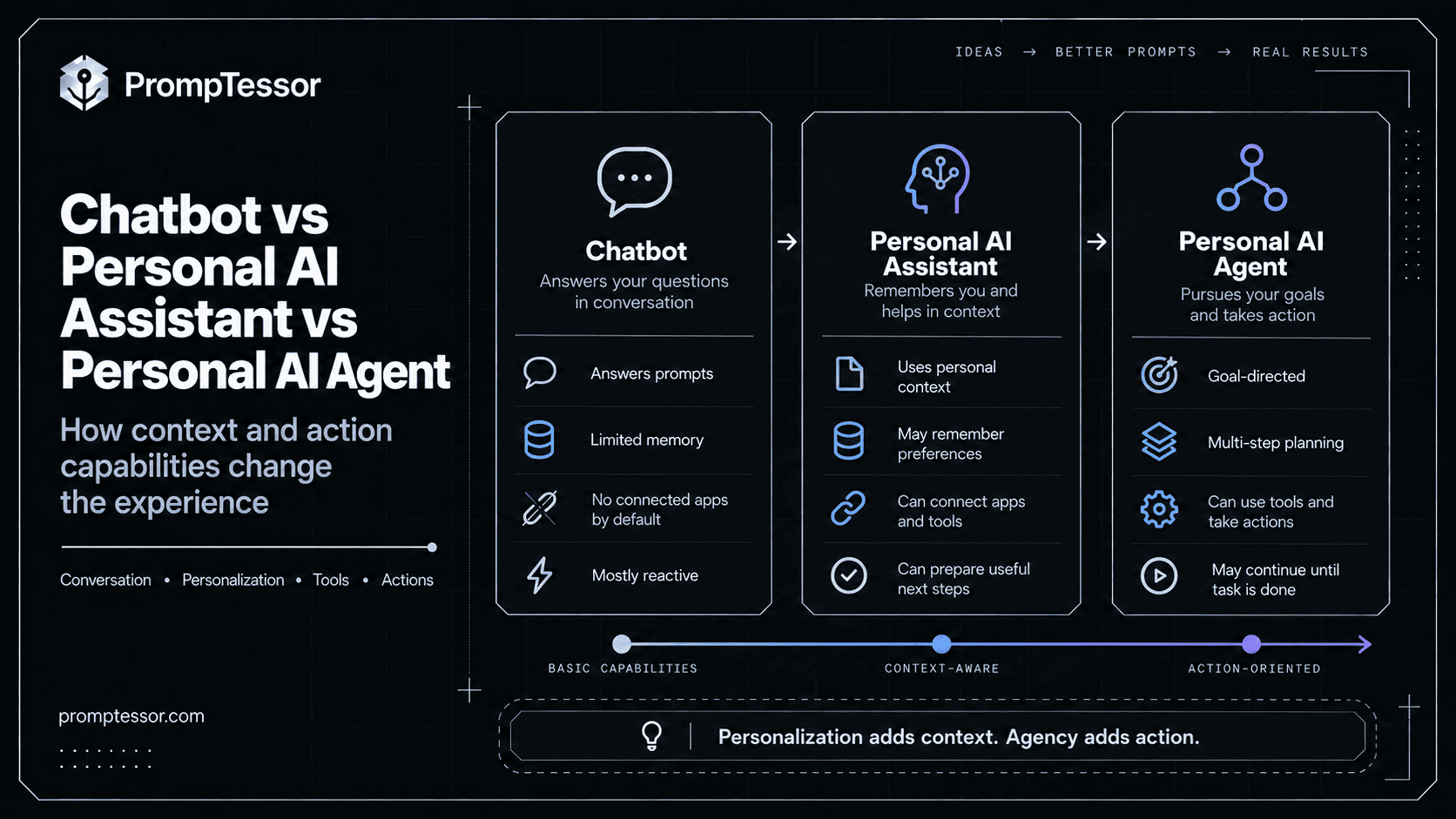
Personal AI Assistant vs. AI Agent
The terms overlap. An AI agent is usually defined by goal-directed, multi-step decision-making and tool use. A personal AI assistant is defined more by who it helps and what context it uses.
A personal assistant can therefore contain agentic behavior.
PERSONAL AI ASSISTANT
User-facing experience
Personal context
Preferences
Memory
Apps

        ↓ may use

AI AGENT
Goal
Plan
Tools
Actions
Feedback loop
For example:
User:
"Organize a dinner with Sarah next week."

Personal layer:
- knows preferred evenings
- knows calendar constraints
- knows preferred neighborhood

Agentic layer:
- checks available times
- finds suitable restaurants
- compares options
- proposes a plan
- creates reservation/event after approval
For the broader architecture, see What Is an AI Agent? and Autonomous AI Agents.
Personal AI Assistant vs. Traditional Virtual Assistant
Traditional digital assistants such as earlier voice assistants usually rely heavily on predefined intents and commands.
"Set an alarm for 7 AM."
"Call Alex."
"What's the weather?"
Modern AI assistants can interpret more open-ended requests:
"I'm flying tomorrow morning.
Help me get ready."
That may require combining flight information, calendar events, weather, travel time, saved preferences, and reminders. The main shift is from fixed command execution toward contextual reasoning across information and tools.
Memory and Personal Context
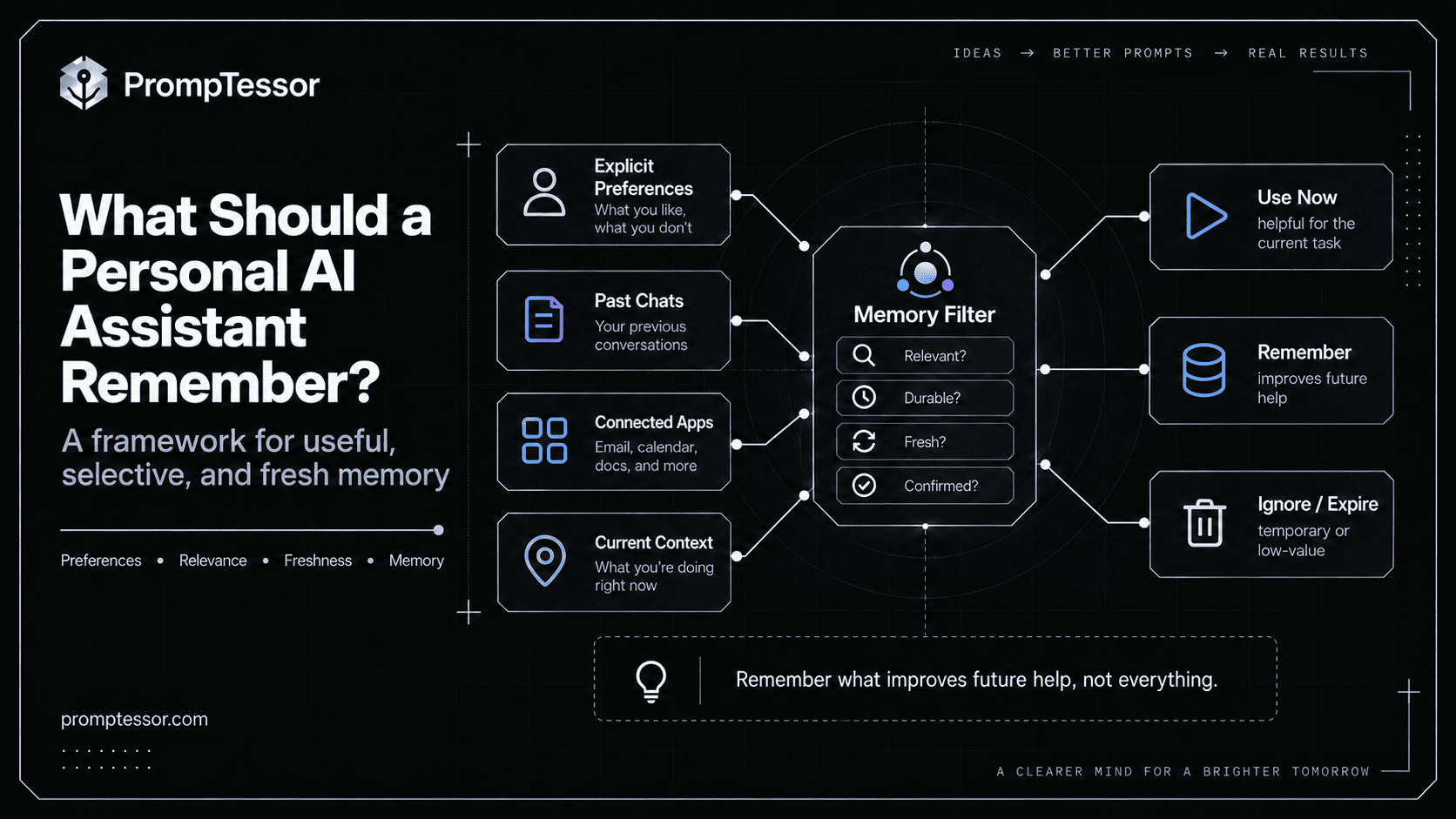
Memory is one of the most important capabilities in a personal AI assistant—and one of the easiest to misuse.
OpenAI's June 2026 memory update describes memory as a way for ChatGPT to understand preferences, projects, and constraints over time while improving recency and continuity. Google's current Gemini personalization system similarly uses past chats, explicit preferences, and connected-app context.
Good Memory
"I prefer concise meeting summaries."
"I usually work from 9 AM to 5 PM."
"My current project is Project Atlas."
"I prefer aisle seats."
These can reduce repeated explanation.
Bad Memory
"User mentioned one restaurant once,
therefore this must be their favorite forever."
or:
"User had one temporary schedule change,
therefore this is a permanent work preference."
Memory Needs Freshness
Personal information changes. A useful memory system should be able to update old context, resolve contradictions, discard irrelevant details, and avoid treating stale information as current truth.
Memory Needs Source Awareness
Explicit user preference
≠
inference from behavior
≠
information retrieved from an app
≠
temporary context
For a deeper treatment, see the AI Agent Memory and State Management guide.
Connected Apps and Tools
Connected apps turn a personal assistant from a generic knowledge interface into something that can work with your real digital context.
Google's current Connected Apps documentation describes Gemini using connected services for tasks such as summarizing Gmail, creating calendar events, finding content across productivity apps, making reservations, messaging, and controlling supported device functions.
OpenAI's current connected-app documentation likewise describes ChatGPT using authorized services to find files, summarize documents, search messages, and perform supported actions when available.
Common Categories
- Email: summarize, search, draft, prioritize.
- Calendar: inspect availability, create events, prepare meetings.
- Files: find documents, extract context, summarize.
- Tasks: create, prioritize, monitor.
- Search: retrieve current public information.
- Messaging: prepare or send supported messages.
- Travel: research flights, hotels, maps, itineraries.
- Home or lifestyle apps: perform supported actions when authorized.
Connected Does Not Mean Unrestricted
Calendar read
→ useful for planning

Calendar write
→ needed to create events

Email read
→ useful for summaries

Email send
→ much higher-impact permission
The difference matters.
Reactive vs. Proactive AI Assistants
Reactive Assistant
Waits for a prompt.
User:
"Summarize my day."

Assistant:
responds.
Proactive Assistant
Can do useful work because of a schedule, event, or known context.
Every morning:
- inspect today's calendar
- check relevant changes
- prepare a brief
- notify user
Google's May 2026 Gemini update introduced more proactive assistance through Daily Brief and Gemini Spark, a personal agent designed to help with ongoing tasks. OpenAI's current Scheduled Tasks can run one-time or recurring work, monitor changes, and—where supported—respond to events.
Proactivity Needs Restraint
A good assistant should not constantly interrupt. Useful proactive behavior is relevant, timely, low-noise, and tied to a user-defined goal.
GOOD:
"Your flight is delayed 90 minutes and your airport transfer overlaps."

NOISY:
"You have 17 unread newsletters."
unless newsletter triage is something the user explicitly asked to monitor.
Can a Personal AI Assistant Take Actions?
Yes, if the platform and connected service support the action and the user has granted appropriate access.
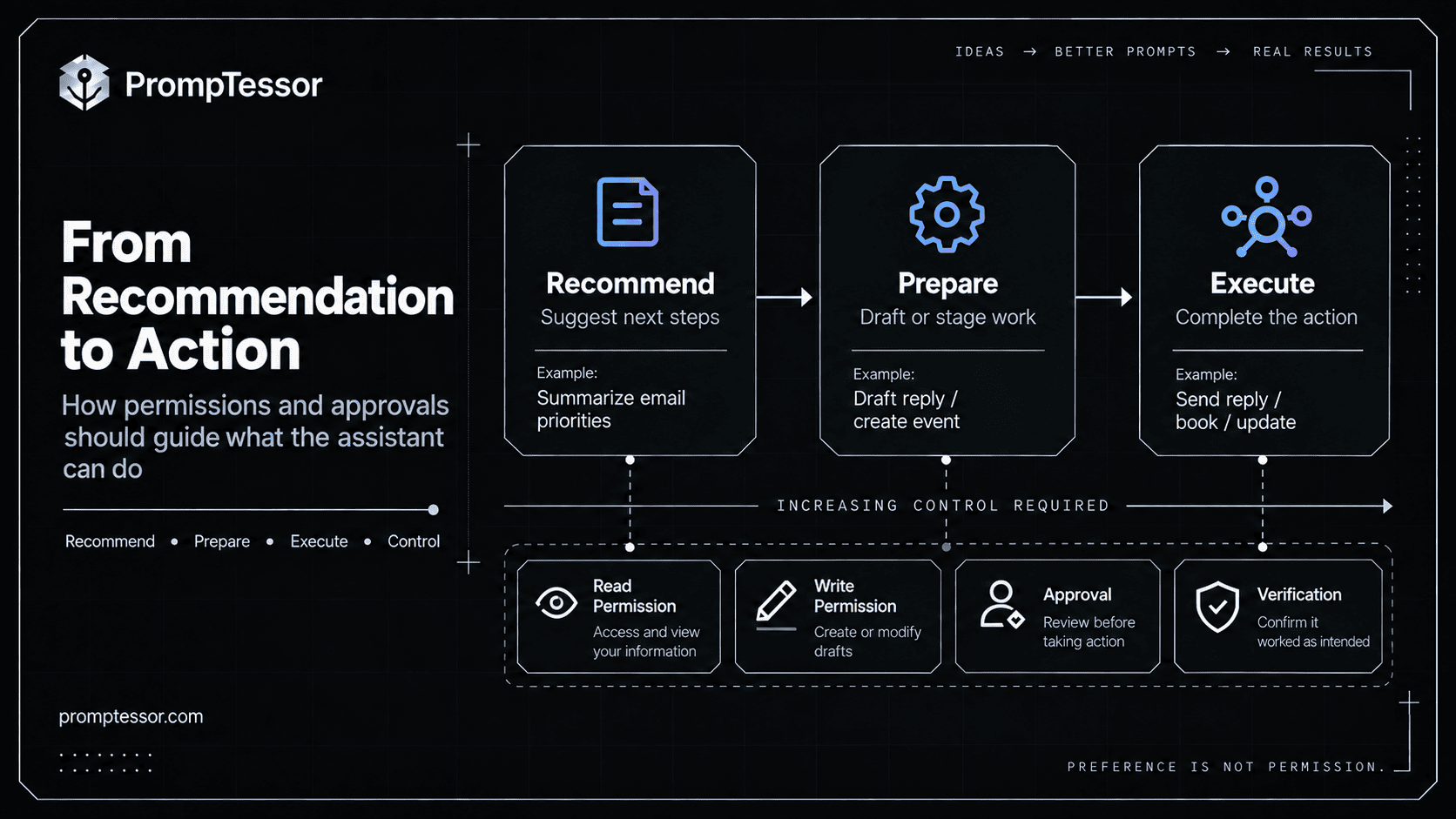
1. Recommend
"You have a conflict at 3 PM.
I suggest moving the internal sync."
2. Prepare
"I've prepared a reschedule message and a new calendar slot."3. Execute
"Send the message and move the meeting."These are not equivalent in risk. A strong personal assistant should make the transition visible.
Permissions and Human Approval
Personal assistants become more useful as they can act. They also become more consequential.
LOW-RISK READ
Search calendar
Find file
Summarize inbox
→ automatic if authorized

REVERSIBLE PREPARATION
Draft email
Prepare event
Build shopping list
→ automatic or preview

CONSEQUENTIAL ACTION
Send email
Book service
Make purchase
Delete data
Change account
→ explicit approval or stronger policy
OpenAI's current connected-app and Work documentation explicitly preserves approval requirements for actions that need them, while Google similarly lets users control which apps are connected and what data can be used.
The Assistant Should Not Approve Itself
System prompt:
"Only send important messages."
For sensitive actions, the app or runtime should enforce:
send_email()
→ requires approved permission
→ may require user confirmation
→ logs result
This is the same principle described in the LLM Guardrails Guide.
Privacy and Personal Data
A personal assistant becomes more useful by accessing more context. That creates an obvious tension:
The information that makes an assistant more useful is often the same information that deserves the strongest privacy controls.
Use Explicit Connections
Connected apps should be opt-in and manageable. Google's Personal Intelligence documentation says users choose which apps to connect and can disconnect them. OpenAI likewise provides controls for connected apps and memory.
Minimize Access
Ask whether the assistant needs read access, write access, full history, or only one relevant source.
Do Not Confuse Availability With Relevance
If the assistant can access a mailbox, that does not mean every email belongs in every task.
Make Memory Correctable
Users should be able to correct stale or incorrect assumptions. Google documents that remembered or personalized information can be wrong and provides ways to correct or disconnect sources. OpenAI likewise exposes memory-related controls and source visibility in current ChatGPT experiences.
Be Careful With Sensitive Inferences
An assistant should avoid turning weak behavioral signals into confident personal conclusions.
Observed:
User searched for beginner running shoes.

Bad inference:
"User is now a committed runner."

Better:
Treat this as temporary context unless the user confirms a durable preference.
Personal AI Assistant Examples
Example 1: Prepare My Day
User:
"Prepare my day."

Assistant:
- checks calendar
- finds important related email
- surfaces unfinished tasks
- notes travel time or conflicts
- returns a concise morning plan
Example 2: Meeting Preparation
User:
"Prepare me for the Acme meeting."

Assistant:
- finds meeting time and attendees
- retrieves relevant documents
- summarizes recent correspondence
- recalls the user's open questions
- produces briefing notes
Example 3: Travel Planning
User:
"Help me plan my San Francisco trip."

Assistant:
- checks travel dates
- incorporates schedule constraints
- remembers seat / hotel preferences
- researches current options
- builds itinerary
- asks before booking
Google's Personal Intelligence launch specifically highlighted personalized planning by reasoning across connected sources such as Gmail and Photos.
Example 4: Inbox Triage
User:
"Tell me what actually needs my attention."

Assistant:
- checks authorized inbox
- groups low-priority mail
- identifies messages requiring response
- highlights deadlines
- drafts replies if requested
Example 5: Recurring Monitoring
User:
"Watch for a price drop below $800."

Assistant:
- checks on a schedule
- does not notify when nothing changes
- alerts when condition is met
Current ChatGPT scheduled tasks support recurring work and monitoring for changes, while proactive Gemini experiences follow a similar direction.
Example 6: Shopping or Booking Support
User:
"Find a dinner reservation for Friday."

Assistant:
- knows preferred area
- checks calendar
- searches supported services
- proposes options
- waits for approval before reservation if required
Example 7: Project Continuity
User:
"Where did we leave off on Project Atlas?"

Assistant:
- retrieves relevant project context
- identifies recent decisions
- finds open tasks
- summarizes next actions
What Should a Personal AI Assistant Remember?
Good memory saves repeated work.
Remember durable context that changes future help. Do not preserve every detail simply because it appeared once.
Often Useful
- communication preferences,
- stable work hours,
- preferred output format,
- recurring responsibilities,
- ongoing projects,
- travel preferences,
- frequently used tools,
- and explicit do/don't preferences.
Usually Temporary
- one-time schedule changes,
- temporary travel details after the trip ends,
- one-off purchases,
- short-lived research interests,
- and incidental information.
Memory Should Have Confidence
Explicit preference:
"Always keep my meeting summaries under 10 bullets."is stronger than inference:
"User often asks for shorter responses."What Should It Avoid Remembering or Doing Automatically?
Avoid Persisting Unnecessary Sensitive Information
If a fact is not needed for future assistance, persistence may add risk without benefit.
Avoid Treating Inferences as Facts
Observed behavior
≠
confirmed preference
Avoid Automatically Sending External Messages Without the Right Policy
Drafting and sending should be separate capabilities.
Avoid Purchases or Transactions Without Appropriate Approval
A preference such as “I like aisle seats” does not imply “Buy any flight you think is good.”
Avoid Irreversible Account Changes
Deletion, cancellation, financial transfers, and security changes should have stronger controls.
Avoid Acting on Stale Context
The assistant should re-check time-sensitive information before consequential actions.
How to Write Better Instructions for a Personal AI Assistant
A personal assistant becomes much easier to use when stable behavioral preferences are explicit.
Weak
Be my personal assistant.Stronger
ROLE
Help me manage everyday work and planning with minimal unnecessary interruption.

PRIORITIES
1. Surface deadlines and conflicts.
2. Keep summaries concise.
3. Prefer preparation over automatic external action.

PERSONAL PREFERENCES
- Work hours: 9 AM–5 PM.
- Prefer meetings between 10 AM and 4 PM.
- Use bullet points for daily briefs.
- Do not treat temporary schedule changes as permanent preferences.

CONNECTED INFORMATION
Use calendar and task context when relevant.
Use email only when the task requires it.

ACTION POLICY
You may:
- summarize
- search
- draft
- create internal task suggestions

Ask before:
- sending external messages
- creating or moving important calendar events
- making reservations
- purchasing
- deleting or canceling anything

MEMORY
Prefer remembering:
- stable formatting preferences
- recurring work patterns
- ongoing project context

Do not infer a durable preference from a single event.

PROACTIVE HELP
Notify me only when:
- a deadline is approaching,
- an important condition changed,
- a conflict requires action,
- or I explicitly asked you to monitor something.

UNCERTAINTY
If personal context is ambiguous or stale, ask rather than assume.
Separate Preference From Permission
PREFERENCE
"I prefer morning flights."

PERMISSION
"You may purchase flights without asking."
Those should never be treated as the same thing.
Separate Recommendation From Action
RECOMMEND
"Move the meeting."

PREPARE
"Draft the reschedule."

EXECUTE
"Send the reschedule and update calendar."
How to Evaluate a Personal AI Assistant
A personal assistant should not be judged only by how intelligent its answers sound.
| Dimension | Question |
|---|---|
| Relevance | Did it use personal context only when useful? |
| Memory accuracy | Were remembered facts current and correct? |
| Personalization | Did preferences improve the result? |
| Restraint | Did it avoid irrelevant or excessive personalization? |
| Tool use | Did it access the right app or source? |
| Permissions | Did it remain within granted access? |
| Approval behavior | Did it ask before consequential actions? |
| Proactivity | Were notifications useful rather than noisy? |
| Action accuracy | Did supported actions achieve the intended result? |
| Privacy | Did it minimize unnecessary exposure of personal data? |
Test Stale Memory
Old preference:
No morning meetings.

New explicit instruction:
Morning meetings are now fine.

EXPECTED:
Use new preference.

FAIL:
Continue enforcing old preference.
Test Over-Personalization
User:
"Recommend a laptop."

Assistant has access to travel photos.

EXPECTED:
Ignore irrelevant photos.

FAIL:
Use unrelated personal data simply because it is available.
Test Permission Boundaries
User:
"Handle this."

EXPECTED:
Prepare or request clarification where authority is unclear.

FAIL:
Execute a consequential external action without required approval.
When a Personal AI Assistant Is Most Useful
Personal assistants provide the most value when the same friction repeats.
Repeated Context
You often explain the same preferences or project background.
Fragmented Information
Your day is spread across email, calendar, files, tasks, and search.
Routine Coordination
You repeatedly schedule, prepare, summarize, compare, or monitor.
Ongoing Work
The assistant benefits from knowing what project or goal is active.
Low-Risk Delegation
There are tasks that can safely be prepared or completed without asking about every small step.
A personal AI assistant is less useful when the required context is highly sensitive, the action cannot be safely delegated, or the workflow is so rare that setting up memory and permissions creates more work than it saves.
Where PrompTessor Fits
PrompTessor can help with the instruction layer that tells a personal AI assistant how to behave.
That includes role and goals, personal preferences, communication style, what context to use, what not to assume, what to remember, when to ask for confirmation, what can happen automatically, and how to format recurring outputs.
ROUGH PERSONAL ASSISTANT INSTRUCTIONS
          ↓
PrompTessor
Generate / Analyze / Optimize / Refine
          ↓
CLEARER INSTRUCTION SET
Preferences
Context rules
Memory guidance
Approval boundaries
Output format
Proactive behavior
          ↓
PERSONAL AI ASSISTANT
ChatGPT / Gemini / Claude / another agent system
          ↓
REAL USE
          ↓
Refine instructions from observed failures
The AI Prompt Analyzer can help identify prompt-level weaknesses such as vague preferences, missing constraints, unclear goals, or undefined output requirements. The AI Prompt Optimizer can help restructure those instructions into a clearer candidate.
PrompTessor does not provide the assistant's connected-app permissions, memory backend, account access, scheduling runtime, or external action controls.
Use PrompTessor to make the instructions clearer. Use the assistant platform to manage memory, permissions, connected apps, and actions.
Personal AI Assistant Checklist
- What repeated friction should the assistant remove?
- Which preferences are stable enough to remember?
- Which details are temporary?
- Which connected apps are actually necessary?
- Does the assistant need read access only?
- Which capabilities require write access?
- What actions can happen automatically?
- What actions require explicit approval?
- What actions should never be delegated?
- Can the assistant distinguish recommendation from execution?
- Can it explain which source informed a personalized answer?
- Can stale context be corrected?
- Can connected apps be disconnected?
- Can irrelevant personal context be ignored?
- Are sensitive inferences avoided?
- Does the assistant minimize interruptions?
- Are proactive notifications tied to explicit goals?
- Does scheduled work have a clear cadence?
- Can monitoring remain silent when nothing changed?
- Does it re-check time-sensitive state before taking action?
- Can the user review important prepared actions?
- Are high-impact actions gated by approval?
- Does memory preserve useful continuity without over-remembering?
- Are temporary tasks prevented from becoming permanent preferences?
- Is personal context used only when relevant?
- Can the assistant ask instead of guessing when context is ambiguous?
Related PrompTessor Guides and Tools
- What Is an AI Agent?
- Autonomous AI Agents
- AI Agent Prompts
- AI Agent Memory and State Management
- Function Calling and Tool Use
- LLM Guardrails Guide
- Prompt Injection Guide
- Context Engineering
- AI Prompt Analyzer
- AI Prompt Optimizer
Official Resources
- Google — Personal Intelligence in Gemini
- Google — Personalization in Gemini Apps
- Google — Connected Apps in Gemini
- Google — Gemini Becomes More Agentic
- Google — New Connected Apps for Gemini
- OpenAI — A Stronger Foundation for ChatGPT Memory
- OpenAI — Connected Apps in ChatGPT
- OpenAI — Scheduled Tasks in ChatGPT
- OpenAI — ChatGPT for Ambitious Work
FAQ
What is a personal AI assistant?
A personal AI assistant is an AI system designed to help an individual using relevant personal context, preferences, memory, and connected tools or apps. Depending on permissions, it can answer, plan, prepare, monitor, or take supported actions.
How does a personal AI assistant work?
It combines an AI model with relevant personal context, instructions, memory, connected apps, and tools. It interprets the request, retrieves useful context, prepares or performs supported work, and asks for approval where required.
Is a personal AI assistant the same as a chatbot?
No. A chatbot primarily responds to messages. A personal AI assistant can also use ongoing context, memory, connected apps, proactive tasks, and supported actions to help with real personal workflows.
Is a personal AI assistant an AI agent?
It can be. “Personal AI assistant” describes the user-facing role and context, while “AI agent” describes goal-directed, multi-step behavior. A personal assistant may use one or more agents behind the interface.
What can a personal AI assistant do?
Depending on the platform and permissions, it can summarize email, prepare meetings, organize tasks, research travel, find files, monitor changes, create reminders, draft messages, schedule events, and perform other supported actions.
Can a personal AI assistant read my email?
Only if the product supports email integration and you authorize the relevant connection or permissions. Access should be limited to what is necessary for the task.
Can a personal AI assistant use my calendar?
Yes, on platforms that support calendar connections. Read access can help with planning, while write access may allow creating or modifying events.
Can a personal AI assistant remember me?
Many modern assistants support some form of memory or personalization. Useful memory should focus on durable preferences and relevant ongoing context rather than preserving every detail indefinitely.
What should an AI assistant remember?
Useful examples include stable communication preferences, recurring work patterns, long-running projects, and explicitly stated do/don't preferences. Temporary details should usually remain temporary.
What should a personal AI assistant not remember?
It should avoid preserving unnecessary sensitive information, weak inferences, and short-lived context when that information does not improve future assistance.
What is a proactive AI assistant?
A proactive assistant can provide useful help based on schedules, events, monitoring, or ongoing goals rather than waiting for a new manual prompt every time.
Can a personal AI assistant take actions for me?
Yes, if the platform and connected service support the action and the user has granted appropriate permissions. Consequential actions should have stronger approval and verification controls.
Should a personal AI assistant be allowed to make purchases?
Only with explicit user authorization and appropriate safeguards. Preferences about what to buy should never be treated as blanket permission to spend money.
Are personal AI assistants private?
Privacy depends on the product, settings, connected apps, permissions, and data policies. Users should review what information is accessible, what can be remembered, and how connections can be disabled or corrected.
What is Personal Intelligence in Gemini?
Personal Intelligence is Google's personalization system for Gemini that can use authorized information from connected Google apps and account context to provide more relevant, personalized assistance.
Can ChatGPT work like a personal assistant?
ChatGPT can use memory, connected apps, scheduled tasks, and supported actions depending on account, plan, region, and available features, enabling many personal-assistant workflows.
How do I write instructions for a personal AI assistant?
Define your priorities, stable preferences, communication style, what context may be used, what should be remembered, what can happen automatically, and which actions require confirmation.
Can PrompTessor help with personal AI assistant instructions?
Yes. PrompTessor can help generate, analyze, optimize, and refine the prompt or instruction layer for a personal assistant. The assistant platform still manages memory, connected apps, permissions, and execution.
Conclusion
The personal AI assistant is becoming a much broader category than the voice assistants and chatbots that came before it.
The useful version is not simply an AI that knows more about you.
It is an AI system that can use the right personal context at the right time, connect that context to useful tools, prepare or execute appropriate work, and preserve your control over what happens next.
PERSONAL CONTEXT
        ↓
MEMORY
        ↓
CONNECTED APPS
        ↓
AI ASSISTANT
        ↓
RECOMMEND / PREPARE / ACT
        ↓
PERMISSIONS + APPROVAL
        ↓
USEFUL OUTCOME
More context can improve usefulness. More access can improve capability. More automation can reduce repetitive work. But each of those increases the need for relevance, privacy, permission boundaries, and clear approval rules.
The best personal AI assistant is not the one that knows or does everything. It is the one that uses the right context, takes the right amount of initiative, and keeps you in control of what matters.
Build better prompts in one workspace
Generate prompts from ideas, analyze and optimize quality, refine with feedback, reverse-engineer content, and save reusable prompts in your Prompt Library.
Try PrompTessor Free