AI Agent Frameworks Compared in 2026: LangGraph, CrewAI, OpenAI Agents SDK, Microsoft Agent Framework, and Google ADK
Choosing an AI agent framework in 2026 is less about finding the framework with the longest feature list and more about choosing the right execution model for your workflow.
Some applications need a graph with durable state, resumability, branching, and human approval. Others need a lightweight agent loop with tools and handoffs. Some teams want role-based multi-agent collaboration. Others are already committed to Microsoft, Google, or OpenAI infrastructure and want a framework that fits naturally into that ecosystem.
That is why “which AI agent framework is best?” is usually the wrong first question.
Start with the architecture your workflow needs. Then decide whether you need a framework at all.
This guide compares five major approaches that matter in 2026:
- LangGraph
- CrewAI
- OpenAI Agents SDK
- Microsoft Agent Framework
- Google Agent Development Kit (ADK)
It also explains where AutoGen fits now, because Microsoft has moved AutoGen into maintenance mode and directs new projects toward Microsoft Agent Framework.
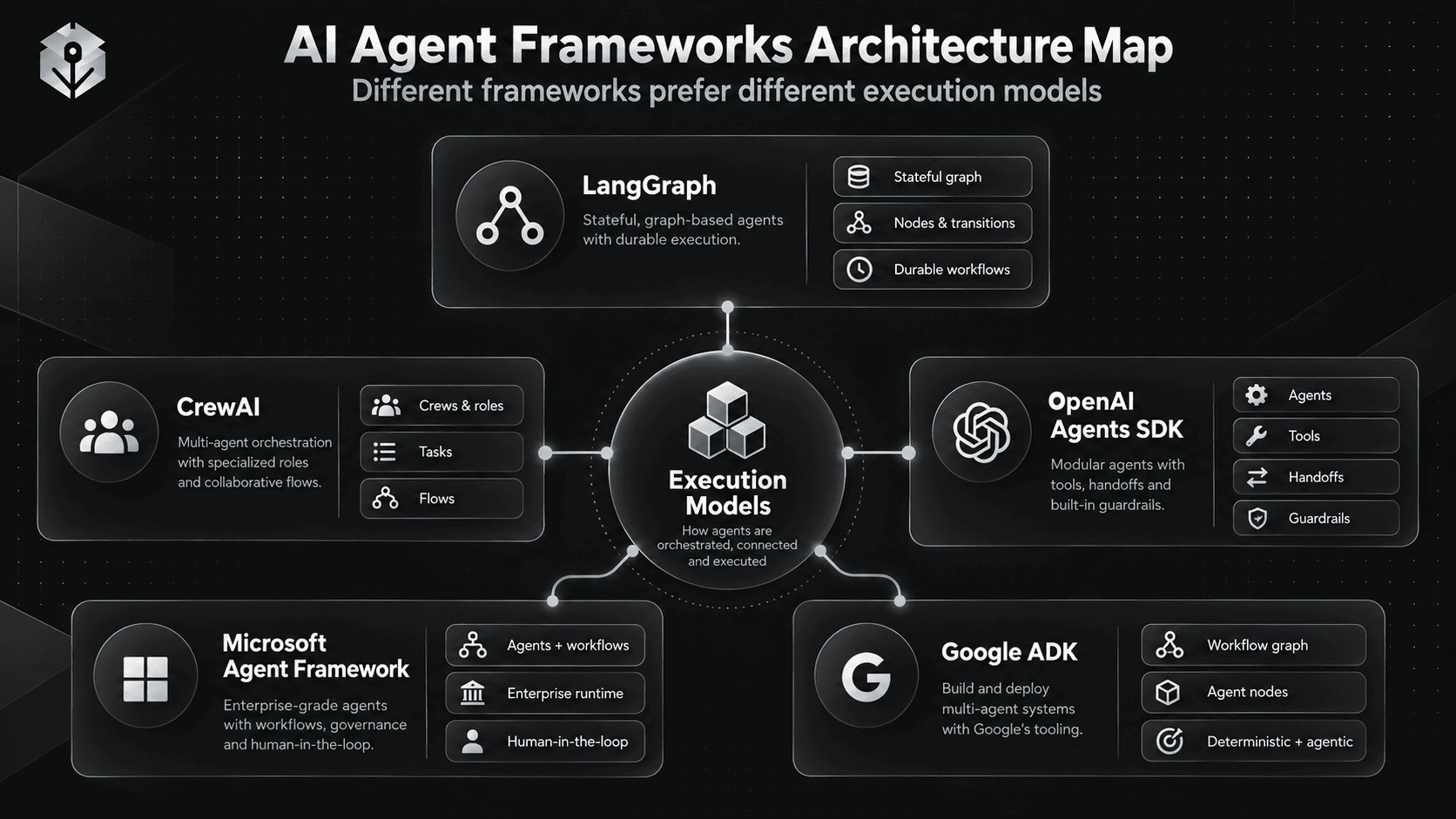
The goal is not to rank frameworks from “best” to “worst.” The useful comparison is architectural: how each framework handles state, orchestration, tools, approvals, multi-agent coordination, observability, and long-running execution.
Quick Answer
If you already know roughly what your application needs, this is the shortest mental model:
Need a highly explicit graph,
durable state, branching, resumability?
        → LangGraph

Need role-based teams of agents
plus a structured Flow layer?
        → CrewAI

Already building around OpenAI
and want a small set of agent primitives?
        → OpenAI Agents SDK

Building in the Microsoft / Azure / .NET ecosystem,
or migrating from AutoGen / Semantic Kernel?
        → Microsoft Agent Framework

Building around Gemini / Google Cloud,
or want ADK's multi-language workflow direction?
        → Google ADK

Only need one model call + a few tools?
        → You may not need a full agent framework.
Microsoft's own current Agent Framework guidance makes the last point explicitly: use an agent for open-ended or tool-using work, use workflows when execution order needs explicit control, and use a normal function instead of an agent when a function is enough. Microsoft Agent Framework overview.
Table of Contents
- What Is an AI Agent Framework?
- Do You Actually Need One?
- What to Compare in an Agent Framework
- Quick Comparison Table
- LangGraph
- CrewAI
- OpenAI Agents SDK
- Microsoft Agent Framework
- Google ADK
- What Happened to AutoGen?
- State and Memory
- Single-Agent vs Multi-Agent Orchestration
- Human-in-the-Loop
- Tools, MCP, and Interoperability
- Tracing and Observability
- Long-Running and Durable Workflows
- Language and Ecosystem Fit
- Framework vs Raw Model SDK
- The Same Agent in Five Frameworks
- How to Choose
- Where PrompTessor Fits
- FAQ
What Is an AI Agent Framework?
An AI agent framework is a software layer that helps developers build applications where a model can do more than generate a single response.
A practical agent runtime often needs to manage:
- instructions,
- tools,
- tool execution,
- state,
- conversation context,
- routing,
- retries,
- handoffs,
- human approval,
- structured output,
- tracing,
- and completion or stopping behavior.
A minimal agent loop can be written manually:
while not complete:
    response = model(context, tools)

    if response.requests_tool:
        tool_result = run_tool(response.tool_call)
        context.append(tool_result)
    else:
        return response
The framework becomes useful when the application needs more structure around that loop.
For a foundation on the underlying system design, see What Is an AI Agent? and 15 AI Agent Examples and Real-World Use Cases.
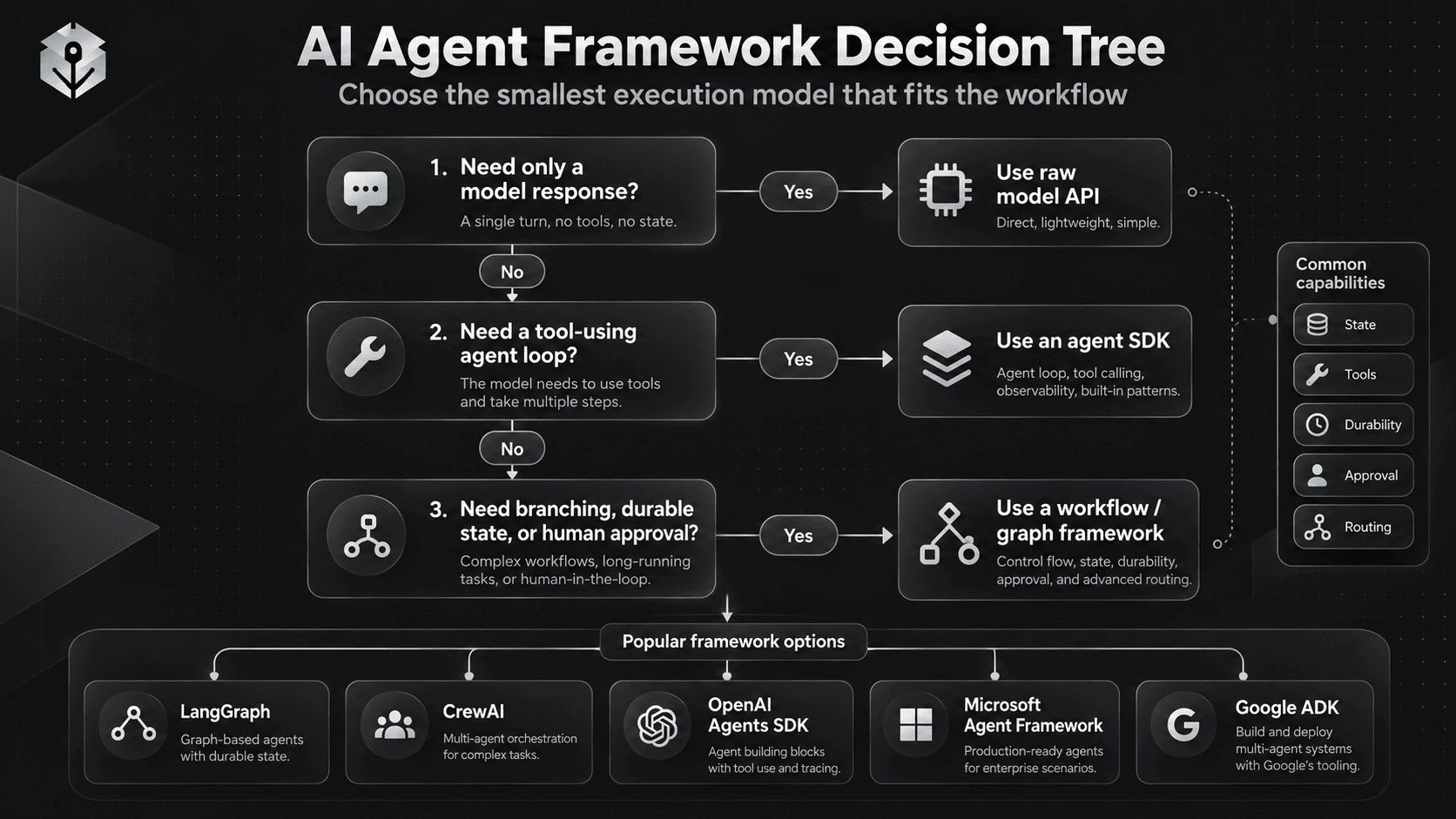
Do You Actually Need an Agent Framework?
Before comparing frameworks, separate three application shapes.
1. A Model Call
INPUT
  ↓
MODEL
  ↓
OUTPUT
If this is enough, use the model API directly.
2. An Agent Loop
GOAL
 ↓
MODEL
 ↓
TOOL?
 ├─ YES → EXECUTE → OBSERVE → MODEL
 └─ NO  → RETURN
This is where a lightweight agent SDK can save implementation work.
3. A Workflow / Graph
START
  ↓
CLASSIFY
  ├─ A → AGENT / FUNCTION
  ├─ B → HUMAN APPROVAL
  └─ C → PARALLEL SPECIALISTS
               ↓
             JOIN
               ↓
            VALIDATE
               ↓
           RETRY / END
This shape benefits from explicit state, branching, durable execution, checkpoints, and observability.
Google's ADK 2.0 guidance makes a similar distinction: if the business process already defines a deterministic sequence, encode that sequence directly rather than making an LLM infer every transition. ADK 2.0's workflow layer is explicitly designed to combine deterministic steps with open-ended agent steps. Google: Why we built ADK 2.0.
What to Compare in an Agent Framework
Framework comparisons often become feature checklists. A more useful comparison starts with the runtime decisions that affect architecture.
Control Model
Is the application primarily an autonomous agent loop, a deterministic workflow, an explicit graph, or a hybrid?
State
Where does working state live, and can it survive across steps, sessions, or restarts?
Durability
Can the workflow pause and resume later without rebuilding the entire execution state?
Tools
How are functions, APIs, MCP servers, code execution, files, search, and remote agents exposed?
Orchestration
Does the framework favor one agent with tools, manager-worker patterns, handoffs, graph nodes, or role-based crews?
Human-in-the-Loop
Can execution pause for approval, correction, or missing information and resume safely?
Observability
Can you inspect model calls, tool calls, routing decisions, retries, handoffs, and failures?
Language and Ecosystem
Does the framework fit your team's language, cloud, model providers, hosting environment, and existing infrastructure?
Quick Comparison Table
| Framework | Primary Mental Model | Languages | Strongest Architectural Fit |
|---|---|---|---|
| LangGraph | Stateful graph of nodes and transitions | Python, JavaScript / TypeScript | Explicit state, branching, durable workflows, custom control |
| CrewAI | Role-based Crews + event-driven Flows | Python | Agent teams, task collaboration, hybrid autonomous + deterministic flows |
| OpenAI Agents SDK | Agents, tools, handoffs / agents-as-tools, guardrails | Python, JavaScript / TypeScript | OpenAI-centered applications with lightweight orchestration primitives |
| Microsoft Agent Framework | Agents + graph workflows + enterprise runtime capabilities | Python, C#; Go also available with some features still in preview | Microsoft / Azure ecosystems, explicit workflows, AutoGen / Semantic Kernel migration |
| Google ADK | Agents + workflow graphs / deterministic orchestration | Docs span Python, JavaScript, Go, Java, Kotlin; feature parity varies | Google / Gemini ecosystem, multi-language agent development, graph workflows |
This table is deliberately architectural. The frameworks evolve quickly, so exact API coverage can change faster than the underlying mental model.
LangGraph
LangGraph is the most graph-explicit option in this comparison.
The core mental model is:
STATE
 ↓
NODE
 ↓
TRANSITION
 ↓
NODE
 ↓
STATE UPDATE
 ↓
...
You define discrete nodes, state shared across those nodes, and transitions that determine what runs next.
LangGraph 1.0 emphasizes production features such as durable state, persistence, and human-in-the-loop execution. LangChain's 1.0 announcement specifically highlights persisted execution state, workflow resumption, and pausing for human review or approval. LangGraph 1.0 announcement.
The current LangGraph documentation also frames state as shared memory accessible to nodes and recommends decomposing workflows into LLM steps, data steps, action steps, and user-input steps. Thinking in LangGraph.
LangGraph Strengths
- Explicit control flow
- State as a first-class concept
- Durable execution and checkpointing
- Pause / resume patterns
- Fine-grained retry and recovery logic
- Good fit for workflows where different nodes need different responsibilities
- Works well when deterministic routing and model-driven decisions need to coexist
LangGraph Trade-Off
The same explicitness that makes LangGraph powerful also means you are designing a workflow runtime, not only declaring an agent persona.
If your application is simply:
Agent
  ↓
3 tools
  ↓
final response
a full graph may be more structure than you need.
When LangGraph Fits Well
- long-running workflows,
- human approval,
- branching and looping,
- recoverable failures,
- stateful multi-step operations,
- complex routing,
- and systems where developers want to see the execution topology clearly.
CrewAI
CrewAI uses a different mental model. Instead of starting from a graph, it starts from teams, roles, goals, tasks, and processes.
CREW
 ├─ Research Agent
 ├─ Analysis Agent
 └─ Writer Agent

TASKS
 ├─ Research
 ├─ Analyze
 └─ Produce Report
CrewAI's documentation separates two important concepts:
- Crews for autonomous collaboration between role-based agents.
- Flows for event-driven, structured orchestration with state, conditions, sequencing, and deterministic execution.
That distinction is important. CrewAI is not only “several personas talking to one another.” Its Flow layer exists specifically to give developers more control over execution paths and state. CrewAI core concepts.
CrewAI Strengths
- Intuitive role-based multi-agent abstraction
- Clear separation between agents, tasks, crews, and processes
- Flows for deterministic orchestration
- Ability to combine structured workflows with autonomous agent teams
- Python-first developer experience
CrewAI Trade-Off
Role-based abstraction is useful when the domain genuinely maps to specialized collaborators. It is less useful when the application is fundamentally a state machine with explicit routing and only occasional model calls.
Bad reason for multi-agent:
"Step 1 needs an agent.
Step 2 needs another agent.
Step 3 needs another agent."

Better question:
"Do these steps require different context,
tools, autonomy, or responsibility?"
When CrewAI Fits Well
- research and synthesis teams,
- role-based business processes,
- multi-agent collaboration,
- content or analytical pipelines,
- and applications where a deterministic Flow should surround pockets of autonomous work.
OpenAI Agents SDK
OpenAI Agents SDK deliberately uses a small set of primitives.
Its current Python documentation centers on agents, tools, agents as tools, handoffs, guardrails, sessions, human-in-the-loop, and tracing.
The SDK is designed to manage the agent loop, tool execution, handoffs, guardrails, and sessions while keeping the abstraction relatively small. OpenAI Agents SDK documentation.
Two Important Orchestration Patterns
Agents as Tools
MANAGER AGENT
   ├─ call Research Agent
   ├─ call Analysis Agent
   └─ synthesize final output
The manager remains in control.
Handoffs
TRIAGE AGENT
   ↓
HANDOFF
   ↓
REFUND AGENT
The specialist becomes the active agent for that part of the interaction.
The official orchestration documentation recommends agents-as-tools when one manager should own the final response and handoffs when the specialist should take over. OpenAI agent orchestration.
OpenAI Agents SDK Strengths
- Small, understandable primitive set
- Strong fit with OpenAI Responses API models
- Built-in function tools
- Built-in handoff patterns
- Sessions for conversation history
- Guardrails around inputs, outputs, and function tools
- Built-in tracing
- MCP integration
- Human approval support
Tracing records model generations, tool calls, handoffs, guardrails, and custom events, which makes the execution path inspectable. OpenAI Agents SDK tracing.
OpenAI Agents SDK Trade-Off
The SDK is less graph-first than LangGraph. If your primary problem is a complex business process with many deterministic branches, joins, checkpoints, and compensating paths, you may prefer a framework where those transitions are the central abstraction.
When OpenAI Agents SDK Fits Well
- applications already centered on OpenAI models,
- single-agent tool use,
- manager + specialists,
- handoff-based routing,
- agent applications that need guardrails and tracing without designing a full graph runtime.
Microsoft Agent Framework
Microsoft Agent Framework is particularly important in a 2026 comparison because it changes how developers should think about AutoGen and Semantic Kernel.
Microsoft describes Agent Framework as the direct successor to both. The framework combines AutoGen-style agent abstractions with enterprise-oriented capabilities associated with Semantic Kernel and adds graph-based workflows for explicit multi-agent execution. Microsoft Agent Framework overview.
Its current documentation covers agents, tools, sessions and conversations, memory and persistence, workflows, agents inside workflows, human-in-the-loop, checkpoints and resume, orchestrations, hosting, background agents, and provider integrations. Microsoft Agent Framework documentation hub.
Microsoft Agent Framework Strengths
- Clear Microsoft-supported successor path for AutoGen / Semantic Kernel users
- Agents and explicit workflows in the same framework
- Session-based state
- Long-running and human-in-the-loop workflow support
- Microsoft / Azure ecosystem alignment
- Python and C# as core development paths
- A2A support for cross-boundary agent communication
Microsoft's A2A documentation describes remote-agent interoperability across HTTP boundaries and exposes A2A agents through the framework's normal agent abstraction. Microsoft Agent-to-Agent documentation.
Microsoft Agent Framework Trade-Off
The framework is broad. That is an advantage for enterprise systems, but a small application may not need the full surface area.
When Microsoft Agent Framework Fits Well
- Azure-heavy organizations,
- .NET / C# teams,
- Python teams using Microsoft infrastructure,
- AutoGen migration,
- Semantic Kernel migration,
- multi-agent workflows requiring explicit execution control,
- and long-running enterprise workflows with human checkpoints.
Google Agent Development Kit (ADK)
Google ADK has moved toward a stronger graph-and-workflow model in 2026.
Google's ADK 2.0 direction explicitly separates language reasoning from deterministic orchestration. The goal is to let developers use strict workflow logic where the process is known and reserve LLM-driven decisions for the parts that actually require reasoning. Why Google built ADK 2.0.
ADK Go 2.0 introduced a first-class graph workflow engine, human-in-the-loop primitives, dynamic orchestration, state persistence, retries, concurrency controls, and a unified runtime for agents and workflows. ADK Go 2.0 announcement.
Google ADK Strengths
- Strong Google / Gemini ecosystem fit
- Graph-based workflow direction
- Deterministic steps and agentic steps can coexist
- Human-in-the-loop support
- Multi-agent workflows
- Stateful execution
- Multiple language tracks in current documentation
- Google Cloud deployment and tooling integrations
Current ADK documentation exposes language tracks for Python, JavaScript, Go, Java, and Kotlin, although exact feature parity varies by language and version. Google ADK documentation.
Google ADK Trade-Off
Because the SDK family is multi-language and evolving quickly, developers should verify the exact capability they need in the language they plan to use rather than assuming every feature lands everywhere at the same time.
When Google ADK Fits Well
- Gemini-based applications,
- Google Cloud teams,
- multi-language organizations,
- graph workflows,
- human-in-the-loop systems,
- and applications that mix deterministic control with model-driven reasoning.
What Happened to AutoGen?
AutoGen still matters historically and existing systems may continue using it, but it should no longer be treated as a peer choice for a brand-new framework comparison.
The official AutoGen repository now carries a maintenance-mode notice:
- no new features or enhancements,
- community-managed going forward,
- new users directed to Microsoft Agent Framework,
- existing users encouraged to migrate.
AutoGen legacy / existing project?
        ↓
Stay temporarily or migrate

New Microsoft-oriented project?
        ↓
Evaluate Microsoft Agent Framework first
State and Memory Comparison
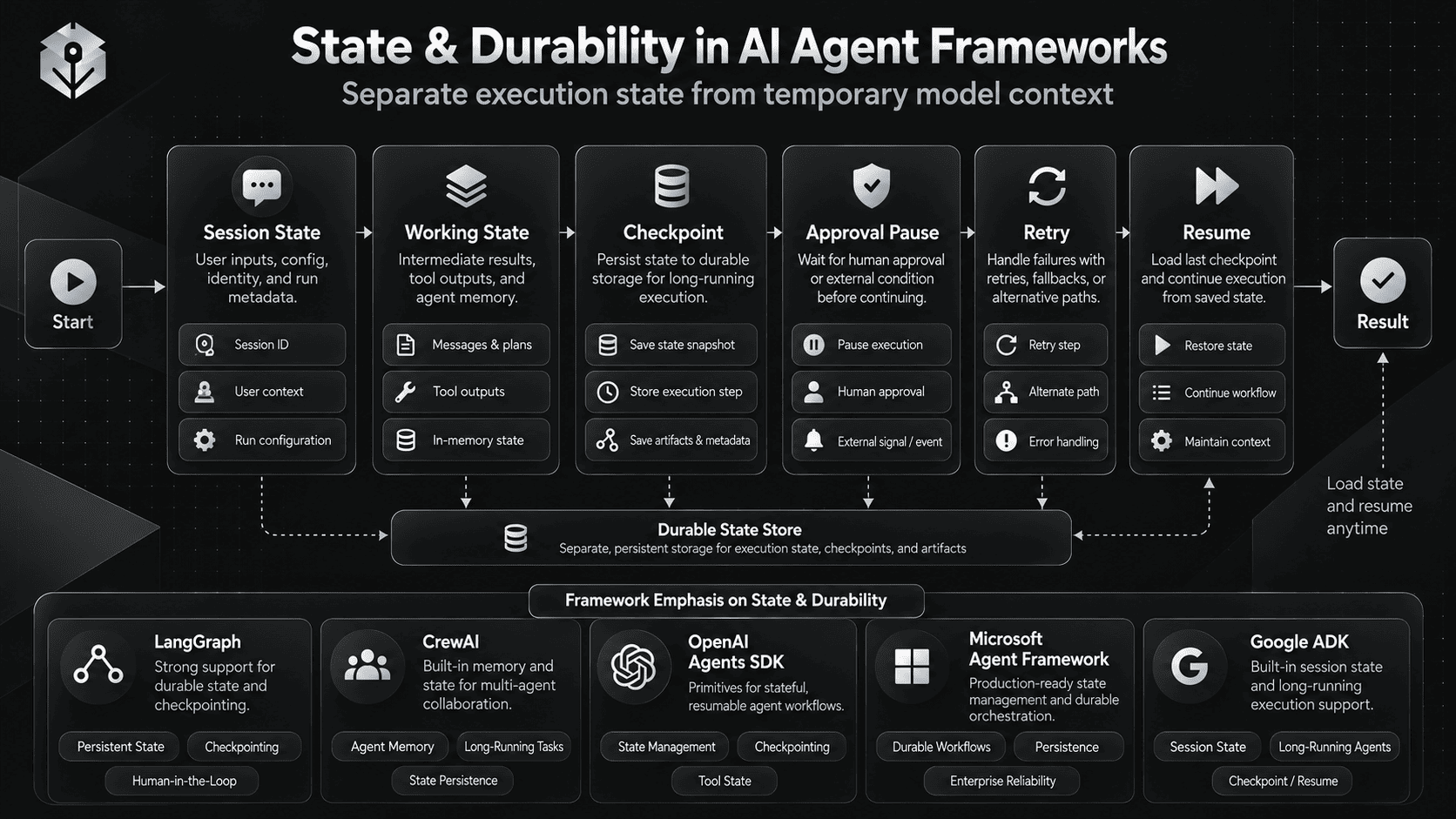
“Memory” is often discussed as one feature, but agent systems usually need several different kinds of state.
Working State
What happened during the current workflow?
{
  "ticket_id": "...",
  "classification": "...",
  "customer_record": {...},
  "draft": "...",
  "approval_status": "pending"
}
Conversation State
What messages or interaction history should remain available?
Durable Workflow State
What must survive if the process pauses for an hour, a day, or a restart?
Long-Term Memory
What information should be available in future sessions?
Frameworks emphasize different layers.
- LangGraph is strongly state-centric and treats shared graph state and checkpointing as core concepts.
- CrewAI Flows maintain execution state and support resumable structured workflows.
- OpenAI Agents SDK provides sessions for maintaining conversation history, while application context can carry runtime dependencies and state.
- Microsoft Agent Framework includes sessions, memory, persistence, workflow state, and resumability as major framework concepts.
- Google ADK supports session state and its 2.0 graph direction adds workflow-level persistence and resume behavior.
Do not put every kind of state into the prompt.
Application state, authorization, credentials, workflow checkpoints, and durable job metadata belong in the runtime, not inside natural-language instructions.
Single-Agent vs Multi-Agent Orchestration
Multi-agent design is useful when specialization creates a real boundary.
Examples:
- different tools,
- different context,
- different authority,
- different model choice,
- different security boundary,
- or a specialist should own a bounded subtask.
It is not useful merely because a workflow has several steps.
LangGraph
Multi-agent behavior is naturally represented as nodes, subgraphs, routers, and shared state.
CrewAI
Multi-agent collaboration is a first-class concept through role-based Crews.
OpenAI Agents SDK
The two common patterns are agents-as-tools and handoffs.
Microsoft Agent Framework
Agents can run directly or inside explicit workflows; the framework also supports orchestration patterns and A2A integrations.
Google ADK
Agent nodes can be composed inside workflow graphs, with routing, fan-out / fan-in, and human interaction.
For deeper agent-instruction design, see AI Agent Prompts: How to Write Better Instructions for Tool-Using AI Agents.
Human-in-the-Loop
Human-in-the-loop is not the same as “a human can look at the result later.”
Production workflows often need execution to stop before a sensitive action:
AGENT DECIDES
"Refund is appropriate"
        ↓
APPROVAL INTERRUPT
        ↓
HUMAN APPROVES?
   ├─ YES → EXECUTE REFUND
   └─ NO  → RETURN / REVISE
LangGraph
Interrupt patterns can pause execution, save state, and resume later.
OpenAI Agents SDK
Supports human involvement in runs and tool-approval patterns. Tool guardrails can also validate function tool calls before or after execution. OpenAI guardrails documentation.
Microsoft Agent Framework
Human-in-the-loop, checkpoints, and resuming are explicit workflow capabilities.
Google ADK
ADK 2.0 supports nodes that pause a workflow for human input and resume durably.
CrewAI
CrewAI's structured Flow layer is the natural place to keep approval logic deterministic around autonomous subtasks.
Attach approval to the action boundary, not to a vague “be careful” instruction.
Tools, MCP, and Interoperability
Tool support is now a baseline capability. The more interesting question is how tools are exposed, filtered, authorized, traced, and shared across systems.
OpenAI Agents SDK
Supports function tools and MCP-backed tools. Its MCP layer includes tool filtering and support for local MCP tool guardrails. OpenAI Agents SDK MCP documentation.
CrewAI
CrewAI supports agent tools and its project annotations include MCP server integration for hydrating tools into Crew workflows. CrewAI annotations and MCP integration.
Microsoft Agent Framework
Microsoft Agent Framework supports remote-agent interoperability through A2A and its ecosystem includes function, hosted, local, and MCP-style tool integrations depending on provider and runtime.
Google ADK
Google's ADK ecosystem includes MCP tooling and examples, and Google publishes ADK-based systems that consume remote MCP servers. The framework also participates in the broader A2A ecosystem.
LangGraph
LangGraph applications commonly receive their tools through LangChain integrations or application-defined nodes. Its core advantage is that the graph can explicitly control when and how tool-driven nodes execute.
For a deeper explanation of Model Context Protocol and prompt behavior around tool-connected systems, see the MCP Prompting Guide.
Tracing and Observability
Agent applications need more than request logs.
A useful trace should answer:
- which agent ran,
- which model was called,
- which tool was selected,
- what arguments were passed,
- what the tool returned,
- whether a handoff happened,
- whether a guardrail or approval fired,
- how many retries occurred,
- and why execution stopped.
OpenAI Agents SDK
Tracing is built into the SDK and records generations, function calls, handoffs, guardrails, and custom spans.
LangGraph
LangGraph is commonly paired with LangSmith for tracing and workflow observability.
CrewAI
CrewAI's managed AMP offering includes workflow tracing and logs for deployed crews and agents. CrewAI AMP.
Microsoft Agent Framework
Telemetry is part of the framework's enterprise positioning and broader runtime concepts.
Google ADK
ADK's current workflow direction emphasizes consistent telemetry across agent and workflow execution, while integrations provide additional observability options.
For the broader production topic, see LLM Observability: Traces, Metrics, Logs, and Agent Monitoring.
Long-Running and Durable Workflows
Durability matters when an agent cannot finish in one request.
- approval arrives tomorrow,
- a background job takes 40 minutes,
- the worker restarts,
- a rate limit forces a delayed retry,
- a user must supply missing information,
- or a workflow crosses multiple sessions.
Without durable state, developers often end up reconstructing the workflow from logs or conversation text.
LangGraph, Microsoft Agent Framework, and Google's 2.0 workflow direction place strong emphasis on resumable execution. CrewAI's Flow state model is aimed at structured, resumable orchestration. OpenAI Agents SDK has sessions and resumable execution patterns, while developers can still choose to own lower-level state depending on the application.
Language and Ecosystem Fit
Language support is not merely developer preference. It affects deployment, existing libraries, team ownership, observability, authentication, and the infrastructure surrounding the agent.
LangGraph
Strong Python and JavaScript / TypeScript ecosystem.
CrewAI
Primarily Python.
OpenAI Agents SDK
Official SDKs exist for Python and JavaScript / TypeScript.
Microsoft Agent Framework
Strong Python and C# paths, with Go support also developing; Microsoft currently documents some Go capabilities as preview.
Google ADK
Current documentation spans Python, JavaScript, Go, Java, and Kotlin, but exact feature support varies by implementation.
Do not choose a framework only because its demo is shorter. Choose the ecosystem your team can operate, debug, secure, and maintain in production.
Framework vs Raw Model SDK
A framework adds value only when it removes complexity you would otherwise have to build.
Use the Raw Model API When
- the workflow has one or two model calls,
- tool execution is simple,
- state is already managed by your application,
- you want full control of the loop,
- or the framework would only wrap a few functions you already understand.
Use an Agent SDK When
- you want managed tool loops,
- you need handoffs or manager-specialist patterns,
- you want built-in tracing or guardrails,
- or you want sessions and agent abstractions without designing a graph.
Use a Workflow / Graph Framework When
- execution has many branches,
- state must persist,
- humans interrupt execution,
- parallel branches need to join,
- retries and compensation are part of the process,
- or the execution topology itself is an important production artifact.
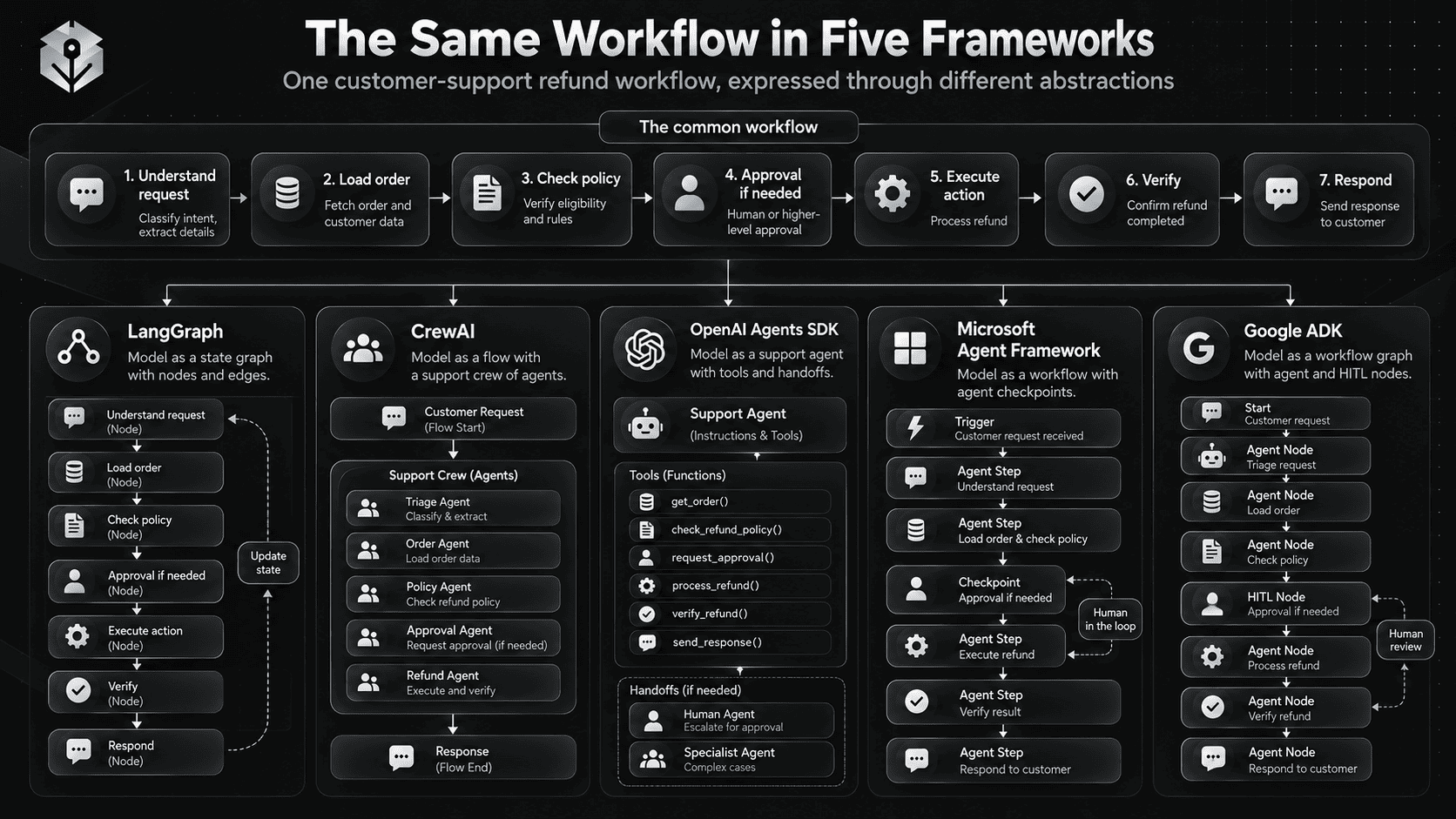
The Same Agent in Five Frameworks
Consider one workflow: a customer-support refund agent.
1. Understand the request
2. Load customer + order
3. Check policy
4. Decide whether refund is allowed
5. If high value → human approval
6. Execute allowed action
7. Verify final state
8. Respond
The business workflow is the same. What changes is the framework's mental model.
LangGraph Mental Model
StateGraph
 ├─ classify_request
 ├─ load_order
 ├─ check_policy
 ├─ route_decision
 ├─ approval_interrupt
 ├─ execute_refund
 ├─ verify
 └─ respond
State and transitions are the center of the design.
CrewAI Mental Model
Flow
 ├─ load context
 ├─ route
 ├─ invoke Support Crew when reasoning is needed
 ├─ approval step
 ├─ execute action
 └─ verify
Use a Crew when autonomous collaboration helps; use the Flow to keep the business process explicit.
OpenAI Agents SDK Mental Model
Support Agent
  tools:
    get_order
    search_policy
    request_refund

  guardrails:
    validate request / output

  specialist:
    Refund Agent as tool
    OR handoff to Refund Agent

  approval:
    gate sensitive tool call
The agent loop and delegation primitives are central.
Microsoft Agent Framework Mental Model
Agent + Workflow

Workflow:
  load order
  → agent decision
  → approval checkpoint
  → execute
  → verify
  → return
Use workflows when you need explicit execution order; use agents for the open-ended decision points.
Google ADK Mental Model
Workflow Graph
  function node: load order
  agent node: reason about policy
  router: choose path
  HITL node: approval
  tool node: execute refund
  function node: verify
The graph keeps deterministic business logic deterministic while inserting agent nodes only where language reasoning is useful.
How to Choose an AI Agent Framework
Start with these questions.
1. Is the Workflow Mostly Deterministic?
If yes, prioritize a workflow system and use agents only at ambiguous decision points.
2. Do You Need Durable State?
If execution must survive interruptions or long delays, state and checkpointing should be core requirements, not afterthoughts.
3. Do You Need Multi-Agent Collaboration or Just Several Functions?
If specialists do not need separate context, tools, permissions, or responsibilities, a single agent with good tools may be simpler.
4. Where Should Humans Interrupt the Workflow?
Identify approval boundaries before choosing the framework.
5. How Will You Debug It?
If you cannot reconstruct why an agent chose a tool, repeated a call, handed off, or stopped, production failures will be difficult to diagnose.
6. What Ecosystem Already Owns the Application?
LangChain / graph-first architecture
    → evaluate LangGraph

Python + role-based teams
    → evaluate CrewAI

OpenAI-centered runtime
    → evaluate OpenAI Agents SDK

Azure / Microsoft / .NET / AutoGen migration
    → evaluate Microsoft Agent Framework

Gemini / Google Cloud / ADK ecosystem
    → evaluate Google ADK
7. Can You Build a Smaller Version First?
Prototype the workflow with one agent and a few tools before introducing five specialists, distributed state, and cross-agent protocols.
Complexity should enter the architecture because the workflow demands it, not because the framework makes it easy to add.
Where PrompTessor Fits
An agent framework manages runtime behavior. PrompTessor works at the instruction layer.
WORKFLOW DESIGN
      ↓
DEFINE:
- goal
- scope
- tools
- tool-use policy
- decision rules
- action boundaries
- output contract
- validation
- stopping conditions
      ↓
PROMPTESSOR
- Generate
- Analyze
- Optimize
- Refine
      ↓
AGENT INSTRUCTIONS
      ↓
FRAMEWORK RUNTIME
- LangGraph
- CrewAI
- OpenAI Agents SDK
- Microsoft Agent Framework
- Google ADK
      ↓
TOOLS / STATE / APPROVALS / TRACES
      ↓
EVALUATE
      ↓
IMPROVE
The AI Prompt Generator can help turn an agent goal into a structured instruction draft. The AI Prompt Analyzer can help identify missing context, ambiguous constraints, weak tool instructions, and unclear output expectations. The AI Prompt Optimizer can produce stronger candidates after you understand the failure mode.
PrompTessor does not replace the framework runtime, tool authorization layer, workflow state, checkpoints, or tracing.
For deeper instruction design, see AI Agent Prompts. For production controls, see LLM Guardrails.
FAQ
What is the best AI agent framework in 2026?
There is no single framework that is best for every architecture. LangGraph is strongly suited to explicit stateful graphs, CrewAI to role-based agent teams and structured Flows, OpenAI Agents SDK to lightweight OpenAI-centered agent orchestration, Microsoft Agent Framework to Microsoft-oriented enterprise workflows and AutoGen migration, and Google ADK to Google/Gemini ecosystems and multi-language workflow development.
Is LangGraph better than CrewAI?
They optimize for different mental models. LangGraph starts from explicit state, nodes, and transitions. CrewAI starts from agents, roles, tasks, crews, and Flows. A graph-heavy state machine may map more naturally to LangGraph, while role-based collaboration may map more naturally to CrewAI.
Is OpenAI Agents SDK a framework?
Yes. It is a lightweight agent framework / SDK that provides agents, tools, handoffs, guardrails, sessions, human-in-the-loop support, and tracing while intentionally keeping the number of abstractions small.
Should new projects still use AutoGen?
Microsoft currently places AutoGen in maintenance mode and directs new users to Microsoft Agent Framework. Existing projects can continue using AutoGen while evaluating migration.
What replaced AutoGen?
Microsoft describes Microsoft Agent Framework as the direct successor to AutoGen and Semantic Kernel for its current agent-development direction.
What is the difference between an agent framework and a workflow engine?
An agent framework often manages model-driven loops, tools, context, and agent behavior. A workflow engine focuses on explicit execution paths, state transitions, retries, branching, and durability. Modern frameworks increasingly combine both approaches.
Do I need a multi-agent framework?
Not necessarily. Use multiple agents when specialists need separate context, tools, permissions, models, or responsibilities. If one agent with several tools can solve the workflow reliably, that is usually simpler.
Which framework is best for durable workflows?
LangGraph, Microsoft Agent Framework, and Google ADK's 2.0 workflow direction all explicitly emphasize persistent or resumable workflow execution. The right choice still depends on ecosystem, language, and orchestration style.
Which framework is best for OpenAI models?
OpenAI Agents SDK has the most direct fit with OpenAI's Responses API ecosystem. Other frameworks can also use OpenAI models, so model provider alone does not determine the architecture.
Which framework is best for Gemini?
Google ADK has the most natural ecosystem alignment with Gemini and Google Cloud. Other frameworks can also connect to Gemini depending on their model integration layer.
Which framework is best for .NET?
Microsoft Agent Framework is the most natural option in this comparison for C# and Microsoft/.NET environments.
Can I use MCP with agent frameworks?
Yes, several modern agent frameworks support MCP directly or through their tool integration layer. The exact transport, approval, filtering, and tracing behavior varies by framework.
Can PrompTessor replace an agent framework?
No. PrompTessor improves the prompt and instruction layer. An agent framework manages runtime concerns such as tool execution, state, routing, approvals, handoffs, checkpoints, and traces.
Conclusion
The AI agent framework market in 2026 is converging around an important idea:
Use language models where reasoning is valuable, and use explicit software control where the process must be reliable.
LangGraph expresses that control through stateful graphs.
CrewAI combines role-based agent teams with structured Flows.
OpenAI Agents SDK keeps the abstraction small around agents, tools, handoffs, guardrails, sessions, and traces.
Microsoft Agent Framework combines agents with enterprise-oriented workflows and becomes the main migration direction for AutoGen and Semantic Kernel users.
Google ADK is moving toward graph-based, deterministic-plus-agentic orchestration across a broad language ecosystem.
The right choice depends less on which framework has the most features and more on what kind of system you are building.
START WITH THE WORKFLOW
        ↓
IDENTIFY STATE
        ↓
IDENTIFY TOOL BOUNDARIES
        ↓
IDENTIFY HUMAN APPROVAL
        ↓
IDENTIFY DURABILITY NEEDS
        ↓
IDENTIFY ORCHESTRATION MODEL
        ↓
THEN CHOOSE THE FRAMEWORK
If a simple function works, use a function.
If one agent with a few tools works, use one agent.
If the workflow genuinely needs graphs, durable state, specialists, approvals, or long-running execution, choose the framework whose mental model matches that architecture.
Build better prompts in one workspace
Generate prompts from ideas, analyze and optimize quality, refine with feedback, reverse-engineer content, and save reusable prompts in your Prompt Library.
Try PrompTessor Free