AI Agent Orchestration: How to Coordinate Agents, Tools, State, and Human Approval
AI agent orchestration begins when one model call is no longer enough.
A simple agent can receive a goal, call a few tools, observe the results, and return an answer. But production workflows quickly become more complicated. One specialist may need to research, another may need to write code, several tasks may be safe to run in parallel, a human may need to approve a consequential action, and the system may need to preserve state across retries or long pauses.
At that point, the difficult problem is no longer only prompting the model.
The difficult problem is deciding who or what should act next, what context they should receive, which state they may change, what happens when they fail, and who owns the final result.
Good agent orchestration is not about adding more agents. It is about making ownership, routing, state, verification, and failure handling explicit.
OpenAI's current agent orchestration guidance starts from a similar design question: should a specialist take over the interaction, or should a manager remain responsible and call specialists as bounded capabilities? OpenAI implements those choices through handoffs and agents-as-tools. OpenAI's orchestration and handoffs guide.
Microsoft Agent Framework exposes a broader set of built-in orchestration patterns, including sequential, concurrent, handoff, group chat, and manager-driven Magentic orchestration. Microsoft Agent Framework orchestration documentation.
This guide explains the underlying design patterns independently of any one framework.
Quick Answer: What Is AI Agent Orchestration?
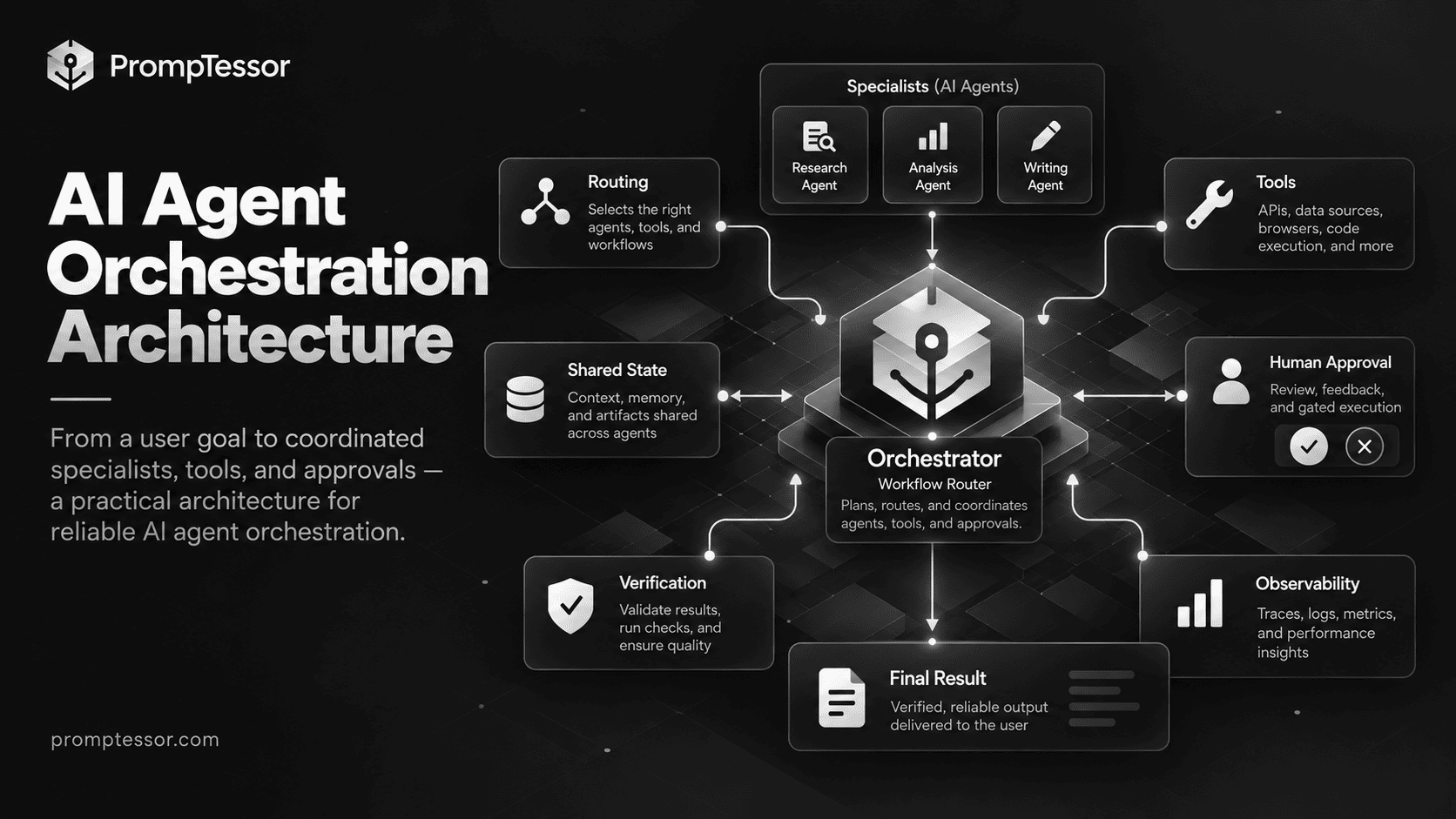
AI agent orchestration is the control layer that coordinates models, agents, tools, state, human input, and workflow logic across a multi-step task.
USER GOAL
   ↓
ORCHESTRATOR / WORKFLOW
   ↓
WHAT SHOULD HAPPEN NEXT?
   ├─ deterministic function
   ├─ tool call
   ├─ specialist agent
   ├─ several agents in parallel
   ├─ human approval
   └─ wait / retry / escalate
   ↓
STATE UPDATE
   ↓
VERIFY PROGRESS
   ↓
COMPLETE?
   ├─ YES → FINAL RESULT
   └─ NO  → ROUTE NEXT STEP
The orchestrator does not have to be another LLM. Routing can be deterministic, model-driven, rule-based, graph-based, or hybrid.
The best architecture uses the least flexible control mechanism that can reliably solve each part of the workflow.
Key Takeaways
- Agent orchestration coordinates ownership, routing, tools, state, approvals, retries, and completion across a workflow.
- Not every multi-step task needs multiple agents. One agent plus several tools is often simpler.
- Sequential orchestration fits tasks with clear stage-to-stage dependencies.
- Concurrent orchestration fits independent work that can run in parallel.
- Handoffs are useful when a specialist should take ownership of the next interaction.
- Manager-worker patterns are useful when one coordinator should retain responsibility for planning and final synthesis.
- Fan-out / fan-in is useful when several independent branches can run simultaneously and later be aggregated.
- State should be explicit. Do not rely on every agent receiving an ever-growing conversation transcript.
- Human approval belongs at consequential action boundaries, not as a vague final instruction.
- Retries need limits, idempotency awareness, and a recovery path.
- Orchestrated systems should be evaluated on the complete trajectory, not only the final answer.
- Multi-agent systems can improve performance on genuinely parallel tasks, but they also increase token use, latency, coordination complexity, and failure surface.
Table of Contents
- What Is AI Agent Orchestration?
- Why Orchestration Becomes Necessary
- Agent Orchestration vs Simple Tool Use
- Core Components
- Routing
- Sequential Orchestration
- Parallel / Concurrent Orchestration
- Manager-Worker Orchestration
- Handoffs
- Agents as Tools
- Fan-Out and Fan-In
- Group Chat / Collaborative Orchestration
- Shared State
- Context Passing Between Agents
- Human-in-the-Loop
- Retries and Failure Recovery
- Verification and Aggregation
- Stop Conditions
- Observability and Tracing
- When Multi-Agent Orchestration Is Overkill
- Practical Examples
- Production Checklist
- Where PrompTessor Fits
- FAQ
What Is AI Agent Orchestration?
AI agent orchestration is the process of coordinating several possible participants in an agentic workflow. Those participants can include one or more LLM agents, deterministic functions, APIs, retrieval systems, MCP servers, workflow state, background jobs, human reviewers, and validation or guardrail layers.
The orchestrator decides how those pieces interact.
REQUEST
"Investigate this production incident and prepare a safe remediation."

        ↓
ORCHESTRATOR

        ├─ Logs Agent
        ├─ Metrics Agent
        └─ Deployment Agent

        ↓
AGGREGATE EVIDENCE
        ↓
DIAGNOSIS AGENT
        ↓
HIGH-RISK ACTION?
   ├─ YES → HUMAN APPROVAL
   └─ NO
        ↓
EXECUTE REMEDIATION
        ↓
VERIFY RECOVERY
The word orchestration does not imply that every box must be an autonomous agent. The logs branch may be a deterministic query. The approval step should usually be deterministic. The verification step may be a test or health check.
Why Agent Orchestration Becomes Necessary
A single agent loop is often enough at the beginning:
GOAL
 ↓
MODEL
 ↓
TOOL?
 ├─ YES → TOOL RESULT → MODEL
 └─ NO  → FINAL RESULT
This architecture becomes harder to manage when different parts of the job need different context, different tools have different permissions, some work can happen independently, specialists need separate instructions, a workflow can pause for hours or days, humans must approve certain steps, or failures must resume from a checkpoint.
Orchestration turns those implicit behaviors into explicit system design.
Agent Orchestration vs Simple Tool Use
A model calling several tools does not automatically require multi-agent orchestration.
SUPPORT AGENT
  ├─ get_customer
  ├─ get_order
  ├─ search_policy
  └─ create_refund_request
If one agent can understand the task, use those tools, preserve context, and verify the result, this may be the simplest architecture.
Orchestration becomes more useful when responsibility or control boundaries genuinely change.
Create another agent only when the new agent needs meaningfully different instructions, tools, context, model behavior, security boundaries, or ownership.
This aligns with OpenAI's current guidance to split into specialists only when the next branch truly needs different instructions, tools, or policy. OpenAI orchestration guide.
Core Components of an Orchestrated Agent System
| Component | Responsibility |
|---|---|
| Goal | Defines the observable outcome |
| Router / Orchestrator | Determines the next participant or path |
| Agents | Handle open-ended reasoning within bounded responsibilities |
| Tools | Read or change external state |
| Workflow state | Stores facts, progress, artifacts, approvals, and current status |
| Context policy | Determines what each agent sees |
| Permissions | Constrains what each participant can access or execute |
| Human checkpoints | Pause consequential actions for review |
| Verification | Checks whether intermediate or final work is correct |
| Recovery | Handles timeouts, tool failures, invalid output, and stalled progress |
| Observability | Records routing, tool calls, handoffs, retries, state changes, and outcomes |
| Completion logic | Determines when the workflow should stop |
1. Routing
Routing chooses which path should handle the current work. A router can be deterministic when categories are known and structured, model-driven when the request is ambiguous or language-heavy, or hybrid when hard boundaries are enforced first and a model chooses among safe remaining options.
ROUTER AGENT

Available specialists:
- Billing: invoices, refunds, payments
- Technical: product behavior, errors, integrations
- Account: access, ownership, profile

Choose exactly one specialist.
If the request spans multiple domains, identify the primary owner
and note the secondary issue for later routing.
2. Sequential Orchestration
Sequential orchestration passes work through stages in a defined order:
RESEARCH
   ↓
ANALYZE
   ↓
DRAFT
   ↓
REVIEW
   ↓
FINALIZE
Microsoft defines sequential orchestration as agents executing one after another in a defined order. Microsoft orchestration patterns.
It fits multi-stage content workflows, extract-validate-transform pipelines, planning-implementation-testing, and any workflow where each stage depends on the artifact produced by the previous stage.
A common failure is passing the full prose output from one agent to the next. Prefer explicit handoff artifacts with fields such as claims, source references, assumptions, unresolved questions, and required next action.
3. Parallel / Concurrent Orchestration
Concurrent orchestration runs independent work at the same time.
                     ┌─ Market Research ─┐
USER QUESTION ───────┼─ Technical Review ├──→ AGGREGATE
                     └─ Risk Review ─────┘
Microsoft's current documentation defines concurrent orchestration as agents executing in parallel. Microsoft Agent Framework orchestration patterns.
Anthropic's production Research system uses parallel subagents for open-ended research. Anthropic reports strong gains on breadth-first research in its internal evaluations, while also warning that multi-agent systems consume substantially more tokens and are not suitable for every domain. Anthropic's multi-agent research engineering report.
Parallel work is useful only when branches are independent enough to proceed without constantly waiting for one another.
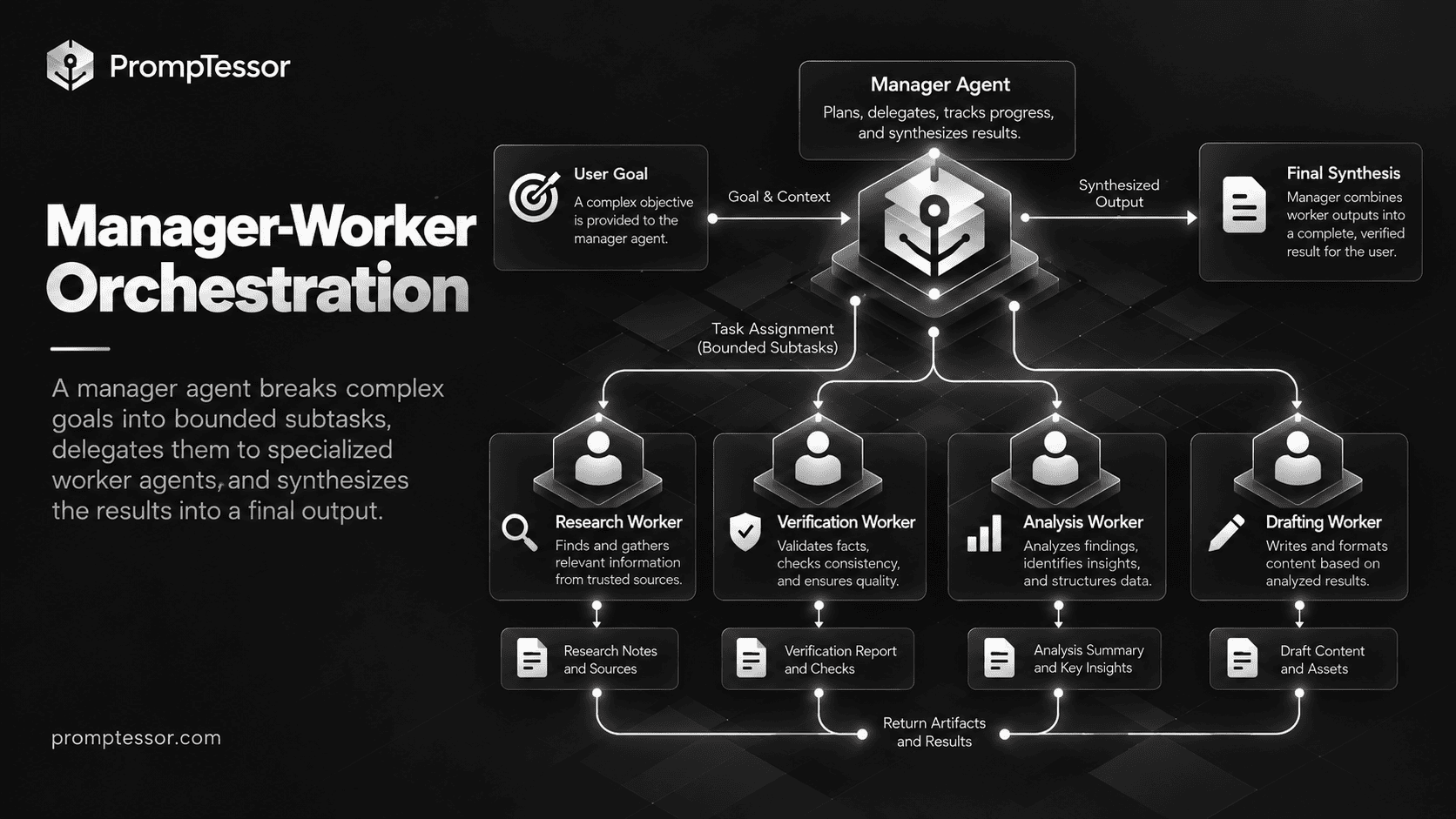
4. Manager-Worker Orchestration
Manager-worker orchestration keeps one coordinator responsible for decomposition, delegation, progress, and final synthesis.
MANAGER
  ├─ Worker A: research
  ├─ Worker B: calculations
  ├─ Worker C: source verification
  └─ Worker D: domain review

MANAGER
  ↓
inspect outputs
  ↓
request more work if needed
  ↓
synthesize final result
Anthropic's Research architecture is a production example: a lead agent creates specialized subagents, those subagents investigate independently, and the lead agent decides whether more work is needed before synthesizing the result. Anthropic's multi-agent research system.
Microsoft's Magentic orchestration follows a related manager pattern for complex open-ended work: the manager plans, selects specialists, assesses progress, can replan after stalls, and synthesizes the final output. Microsoft Magentic orchestration.
The manager should own task decomposition, worker selection, subtask boundaries, budgets, progress tracking, gap detection, and final synthesis. Workers should receive a bounded objective, relevant context, allowed tools, an output contract, verification expectations, and a clear stopping condition.
5. Handoffs
A handoff transfers ownership from one agent to another.
TRIAGE AGENT
    ↓
"This is a billing issue"
    ↓
HANDOFF
    ↓
BILLING AGENT
becomes responsible for the interaction
OpenAI recommends handoffs when the specialist should take over the conversation for that branch. OpenAI orchestration guidance.
A good handoff contract defines why control changes, what context transfers, what does not transfer, what the specialist owns, and whether control can return.
6. Agents as Tools
Sometimes a specialist should contribute expertise without taking over the interaction.
MANAGER AGENT
    ├─ call Pricing Specialist
    ├─ call Technical Specialist
    └─ call Policy Specialist

MANAGER
    ↓
combines outputs
    ↓
returns one final answer
OpenAI calls this agents as tools: the main agent remains responsible for the final response while invoking specialists as bounded capabilities. OpenAI orchestration and handoffs.
7. Fan-Out and Fan-In
Fan-out splits one goal into independent branches. Fan-in waits for the required branches, validates them, and combines their outputs.
              ┌─ Branch A ─┐
INPUT ─ FAN OUT├─ Branch B ─┤ FAN IN → SYNTHESIS
              └─ Branch C ─┘
The hard part is fan-in. The aggregator needs rules for required versus optional branches, failed branches, contradictory findings, duplicates, evidence quality, and completion.
Aggregate the three reports.

Rules:
- preserve claims supported by primary evidence
- merge duplicate findings
- surface material conflicts instead of silently choosing one
- mark any required branch that failed
- do not infer missing evidence from another branch
- return the source reference for every material conclusion
8. Group Chat / Collaborative Orchestration
Group-chat orchestration lets several agents participate in a shared iterative discussion while an orchestrator controls who acts next.
Microsoft Agent Framework uses this pattern for iterative refinement, collaborative problem-solving, content creation, multi-perspective analysis, and review workflows. Its orchestrator synchronizes context and chooses the next speaker. Microsoft group-chat orchestration.
This works for writer-reviewer loops and genuine collaborative refinement. It is a poor fit when strict sequencing, independent parallel work, or direct ownership transfer would be simpler.
Shared State
State is the factual record of workflow progress. Do not confuse it with chat history.
{
  "case_id": "C-1042",
  "owner": "billing_agent",
  "issue_type": "refund",
  "order_verified": true,
  "policy_version": "2026-09",
  "refund_amount": 420,
  "approval_required": true,
  "approval_status": "pending",
  "attempts": 1,
  "status": "waiting_for_approval"
}
Useful categories include task state, evidence state, artifact state, approval state, error state, and ownership state. Explicit state makes routing, recovery, observability, and authorization easier.
The AI Agent Frameworks guide explains how different runtimes represent state, persistence, and resumability.
Context Passing Between Agents
More context is not automatically better context. Giving every specialist the complete workflow transcript creates token waste, instruction conflicts, unnecessary exposure to sensitive data, role confusion, and dependence on irrelevant intermediate reasoning.
SPECIALIST RECEIVES
- its objective
- relevant verified facts
- required artifacts
- tool access
- constraints
- output contract

SPECIALIST DOES NOT RECEIVE
- unrelated internal discussion
- secrets it does not need
- other branches' speculative notes
- permissions outside its task
Anthropic describes using separate subagent context windows and external artifacts to reduce information loss and keep specialists focused. Anthropic multi-agent research system.
Human-in-the-Loop
Human review should be part of the workflow topology.
AGENT DECISION
"Refund customer $420"
       ↓
POLICY CHECK
Amount > auto-approval threshold
       ↓
PAUSE
       ↓
HUMAN APPROVAL
   ├─ APPROVE → execute refund
   ├─ REJECT  → close / revise
   └─ MODIFY  → execute approved amount
Microsoft Agent Framework supports human-in-the-loop interactions by pausing orchestration for approval or requested information before continuing. Microsoft orchestration documentation.
For broader runtime controls, see LLM Guardrails: How to Build Safer AI Agents, Tools, and Workflows.
Retries and Failure Recovery
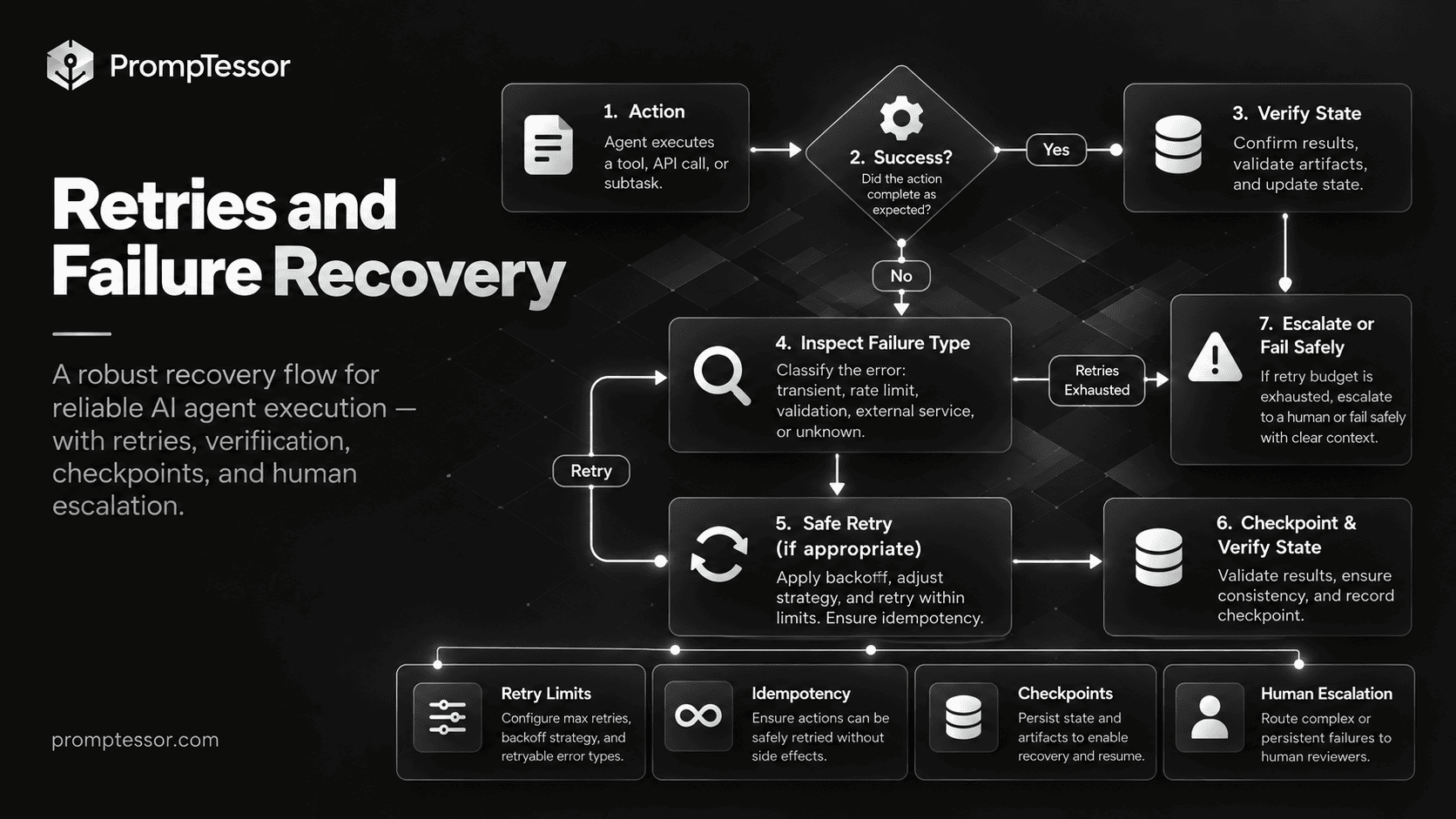
Orchestrated systems fail in more ways than one-shot prompts. A tool can time out. A worker can return invalid structure. One parallel branch can fail while four others succeed. An external write can succeed but return an ambiguous response.
ACTION
  ↓
SUCCESS?
  ├─ YES → verify state
  └─ NO
       ↓
WAS FAILURE DEFINITELY NON-COMMITTING?
  ├─ YES → retry if budget remains
  └─ NO  → inspect current state before retrying
       ↓
RETRY LIMIT REACHED?
  ├─ NO → retry / alternate path
  └─ YES → escalate / fail safely
Use retry limits, backoff where appropriate, idempotency awareness, checkpoints, and explicit escalation. After an ambiguous write, inspect external state before repeating the operation.
Anthropic describes combining model adaptability with deterministic retries and checkpoints because restarting long agent runs from the beginning is expensive and unreliable. Anthropic production reliability notes.
Verification and Aggregation
Orchestration should not end when all agents have returned text. It should end when the required outcome has been verified.
For code, run tests and inspect expected behavior. For research, deduplicate evidence, verify dates, expose conflicts, and check coverage. For external writes, retrieve the current state and confirm the requested change exists.
The evaluator should inspect both final result and trajectory. The AI Agent Evaluation guide covers task success, tool choices, arguments, state transitions, recovery, approvals, stopping behavior, cost, and latency.
Stop Conditions
A workflow can stop because the goal is verified complete, the requested artifact exists, required evidence has been collected, permission is denied, retry budget is exhausted, a human decision is required, or continuing is unlikely to materially improve the result.
Do not create another specialist task unless you can name
a specific unresolved gap that affects the final answer.

Stop when:
- all required sections have evidence,
- no material contradiction remains unresolved,
- required validation has passed,
- and further work is unlikely to change the conclusion.
Observability and Tracing
Multi-agent systems are difficult to debug from the final output alone. A useful trace should capture workflow ID, agent ID, prompt version, routing decisions, tool calls, tool results, state transitions, handoffs, parallel branch timing, retries, approvals, validation, token usage, latency, cost, and final outcome.
OpenAI recommends inspecting traces early because traces expose model calls, tool calls, handoffs, and guardrails before prompt tuning begins. OpenAI Agents quickstart.
Anthropic similarly reports that production tracing was necessary to understand why subagents used weak queries, chose poor sources, or hit tool failures. Anthropic engineering report.
For the broader telemetry layer, see LLM Observability: How to Monitor, Trace, and Debug AI Applications.
When Multi-Agent Orchestration Is Overkill
Multi-agent systems are powerful, but complexity has a cost.
Anthropic reports strong gains from multi-agent research on tasks that benefit from broad parallel exploration, but also reports substantially higher token consumption than normal chat interactions. It notes that domains with tightly coupled dependencies or limited parallelism may be poor fits. Anthropic multi-agent research system.
Use one agent when the task fits in one coherent context, one agent can use all required tools safely, work is mostly sequential, or specialists would have nearly identical instructions.
Use deterministic code when the transition is already known, the operation is rule-based, the data is structured, or predictability matters more than flexible reasoning.
Use multiple agents when work is meaningfully parallelizable, specialists require different tools or context, separation of responsibility improves reliability, or a coordinator must dynamically choose among distinct experts.
Do not measure sophistication by agent count. Measure it by task success, reliability, cost, latency, and operational simplicity.
Practical Orchestration Examples
Research Workflow
USER GOAL
"Prepare an evidence-backed market brief."
        ↓
LEAD RESEARCH AGENT
        ↓
FAN OUT
├─ Market Size Worker
├─ Competitor Worker
├─ Customer Demand Worker
└─ Regulation Worker
        ↓
STRUCTURED FINDINGS
        ↓
GAP CHECK
├─ missing evidence → targeted follow-up
└─ complete
        ↓
EVIDENCE VALIDATION
        ↓
SYNTHESIS
Coding Workflow
ISSUE
 ↓
PLANNING AGENT
 ↓
PLAN VALIDATION
 ↓
PRIMARY CODING AGENT
 ↓
TEST WORKER
 ↓
REVIEW WORKER
 ↓
PRIMARY AGENT RECONCILES FINDINGS
 ↓
FINAL VERIFICATION
Coding is often less parallel than research because files and implementation choices depend on one another. Do not let several agents edit the same files simultaneously unless your merge and ownership strategy is explicit.
Customer Support Workflow
NEW REQUEST
   ↓
TRIAGE ROUTER
   ├─ Billing
   ├─ Technical
   └─ Account

BILLING BRANCH
   ↓
get_customer
get_order
search_policy
   ↓
REFUND?
   ├─ NO → respond
   └─ YES
        ↓
AMOUNT > THRESHOLD?
   ├─ YES → human approval
   └─ NO  → execute
        ↓
VERIFY STATE
        ↓
RESPOND
The 15 AI Agent Examples guide provides additional workflows across coding, research, support, finance, marketing, operations, and personal administration.
AI Agent Orchestration Production Checklist
- Can one agent solve the workflow more simply?
- Does each specialist have a distinct reason to exist?
- Are deterministic steps implemented deterministically where practical?
- Is final ownership explicit?
- Are routing categories clear?
- What happens when no specialist fits?
- Is workflow state separate from chat history?
- Can work resume after interruption?
- Does each participant receive only the context it needs?
- Are sensitive fields scoped appropriately?
- Does each agent have least-privilege tool access?
- Are write actions distinguishable from read actions?
- Are irreversible actions gated?
- Are retry limits explicit?
- Can one failed parallel branch be retried independently?
- Is success observable?
- Are stop conditions explicit?
- Is there a step, token, or cost budget?
- Can the workflow return blocked instead of looping?
- Can you reconstruct routing, handoffs, tool calls, retries, and approvals from traces?
Where PrompTessor Fits
PrompTessor works at the instruction-design layer of an orchestrated system.
ROLE / RESPONSIBILITY
What does this agent own?

INPUT CONTRACT
What context and artifacts will it receive?

TOOLS
What can it use?

DECISION POLICY
When should it act, delegate, ask, or stop?

BOUNDARIES
What may it not do?

HANDOFF CONTRACT
When and how should ownership change?

OUTPUT CONTRACT
What artifact must it return?

VERIFICATION
What must be checked before returning?

COMPLETION
What proves the subtask is done?
The ChatGPT Prompt Generator can help turn a rough specialist role or workflow task into a more structured starting prompt. The AI Prompt Analyzer can help identify unclear responsibilities, missing context, ambiguous constraints, weak handoff instructions, and incomplete output requirements. The AI Prompt Optimizer can produce stronger instruction candidates after a failure mode is understood.
For detailed agent instruction design, see AI Agent Prompts. For tool-connected systems, see the MCP Prompting Guide.
PrompTessor does not replace runtime orchestration, state persistence, authorization, approval gates, retries, tracing, or workflow execution.
Use PrompTessor to make each agent's responsibility and instructions clearer. Use the orchestration runtime to control who acts, what they can access, how state moves, and what happens when the workflow fails.
Official and Engineering Resources
- OpenAI — Orchestration and Handoffs
- OpenAI — Agents Quickstart and Tracing
- Microsoft — Agent Framework Orchestrations
- Microsoft — Group Chat Orchestration
- Microsoft — Magentic Orchestration
- Anthropic — How We Built Our Multi-Agent Research System
FAQ
What is AI agent orchestration?
AI agent orchestration is the control layer that coordinates agents, tools, workflow state, routing, approvals, retries, verification, and completion across multi-step AI workflows.
What is the difference between an AI agent and agent orchestration?
An agent can independently reason and use tools toward a goal. Orchestration coordinates several possible participants or workflow steps, deciding who acts next, what context is passed, how state changes, and how the overall task completes.
Does agent orchestration require multiple agents?
No. An orchestrated workflow can combine one agent with deterministic functions, tools, approvals, state transitions, and validation. Multi-agent architecture is only one form of orchestration.
What are the main AI agent orchestration patterns?
Common patterns include routing, sequential workflows, concurrent execution, manager-worker systems, handoffs, agents-as-tools, fan-out / fan-in, and collaborative group-chat workflows.
What is a handoff in an AI agent system?
A handoff transfers ownership of the next part of the interaction from one agent to another specialist. It is useful when the specialist should become responsible for the branch rather than merely return a bounded result to a manager.
What is the manager-worker agent pattern?
A manager agent decomposes a task, delegates bounded subtasks to workers, tracks progress, detects gaps, and synthesizes the final result.
What is fan-out / fan-in?
Fan-out splits a task into independent branches that can run in parallel. Fan-in waits for the required branches, validates outputs, resolves conflicts or failures, and aggregates the results.
When should I use multiple AI agents?
Use multiple agents when work is genuinely parallelizable or when specialists need distinct instructions, context, tools, models, permissions, or responsibilities. If one agent can reliably handle the task, a single-agent design is usually simpler.
How should agents share context?
Pass each agent the smallest useful context contract: its objective, verified facts, relevant artifacts, constraints, allowed tools, and expected output. Avoid automatically giving every agent the full workflow transcript.
How do you make multi-agent workflows reliable?
Use explicit state, bounded responsibilities, deterministic controls where possible, approval gates, retry limits, checkpoints, structured handoff artifacts, observable success criteria, verification, and full trajectory tracing.
How do you evaluate agent orchestration?
Evaluate both outcome and trajectory: routing accuracy, delegation quality, tool choices, handoffs, state transitions, parallel branch success, retries, approvals, verification, stop behavior, latency, token use, cost, and final task success.
Can PrompTessor orchestrate AI agents?
PrompTessor is focused on the prompt and instruction layer. It can help generate, analyze, optimize, and refine manager or specialist instructions, while the application runtime remains responsible for orchestration, state, authorization, approvals, retries, and execution.
Conclusion
AI agent orchestration is not primarily a multi-agent problem. It is a control problem.
WHO OWNS THE NEXT STEP?
        ↓
WHAT CONTEXT DO THEY NEED?
        ↓
WHAT CAN THEY ACCESS?
        ↓
CAN THE WORK RUN IN PARALLEL?
        ↓
WHAT STATE CHANGES?
        ↓
DOES A HUMAN NEED TO APPROVE?
        ↓
HOW IS THE RESULT VERIFIED?
        ↓
WHAT HAPPENS IF IT FAILS?
        ↓
WHEN SHOULD THE WORKFLOW STOP?
Sometimes the right answer is a handoff. Sometimes it is a manager delegating to specialists. Sometimes several branches should run in parallel. And sometimes the best orchestration decision is to use one agent, one function, or ordinary deterministic code.
The goal is not to coordinate the largest number of agents. The goal is to build the smallest workflow that can reliably produce the required outcome.
Build better prompts in one workspace
Generate prompts from ideas, analyze and optimize quality, refine with feedback, reverse-engineer content, and save reusable prompts in your Prompt Library.
Try PrompTessor Free