OpenAI Dots vs Meta Muse: Which AI Agent Is Right for You?
OpenAI Dots and Meta Muse look similar from a distance.
Both are always-on AI agents. Both can work in the background, use a dedicated cloud environment, connect to apps, maintain context over time, and ask for approval before consequential actions.
But they are not the same product wearing different branding.
Dots are built around the ChatGPT ecosystem and professional work. Muse is built around a broader personal-agent experience that extends into everyday tasks, messaging, shopping, small-business operations, and Meta's hardware ecosystem.
OpenAI introduced Dots on September 29, 2026. Dots are powered by GPT-6 Astra, have their own cloud computer and browser, can connect to more than 4,000 apps through OpenAI's plugin ecosystem, and are designed to keep responsibility for ongoing work between conversations. OpenAI's Dots announcement.
Meta introduced Muse on September 8, 2026. Muse runs on Muse Secure VM, has its own browser, is powered by Muse Spark, can act across connected services, and continues working after the app is closed. Meta positions Muse as a personal AI agent for everyday use, with extensions into small business and eventually AI glasses. Meta's Muse announcement.
The useful question is not “which agent has more features?” It is “what kind of responsibility do you want the agent to own, and which ecosystem already contains your work?”
Quick Answer
If your work already lives inside ChatGPT, Codex, ChatGPT Work, Slack, Teams, and a broad set of business apps, OpenAI Dots is the more natural fit.
If you want a consumer-first personal agent that can handle everyday tasks, messaging, purchases, long-term personal goals, small-business work, and eventually interact through Meta's AI glasses, Meta Muse is the more natural fit.
OPENAI DOTS
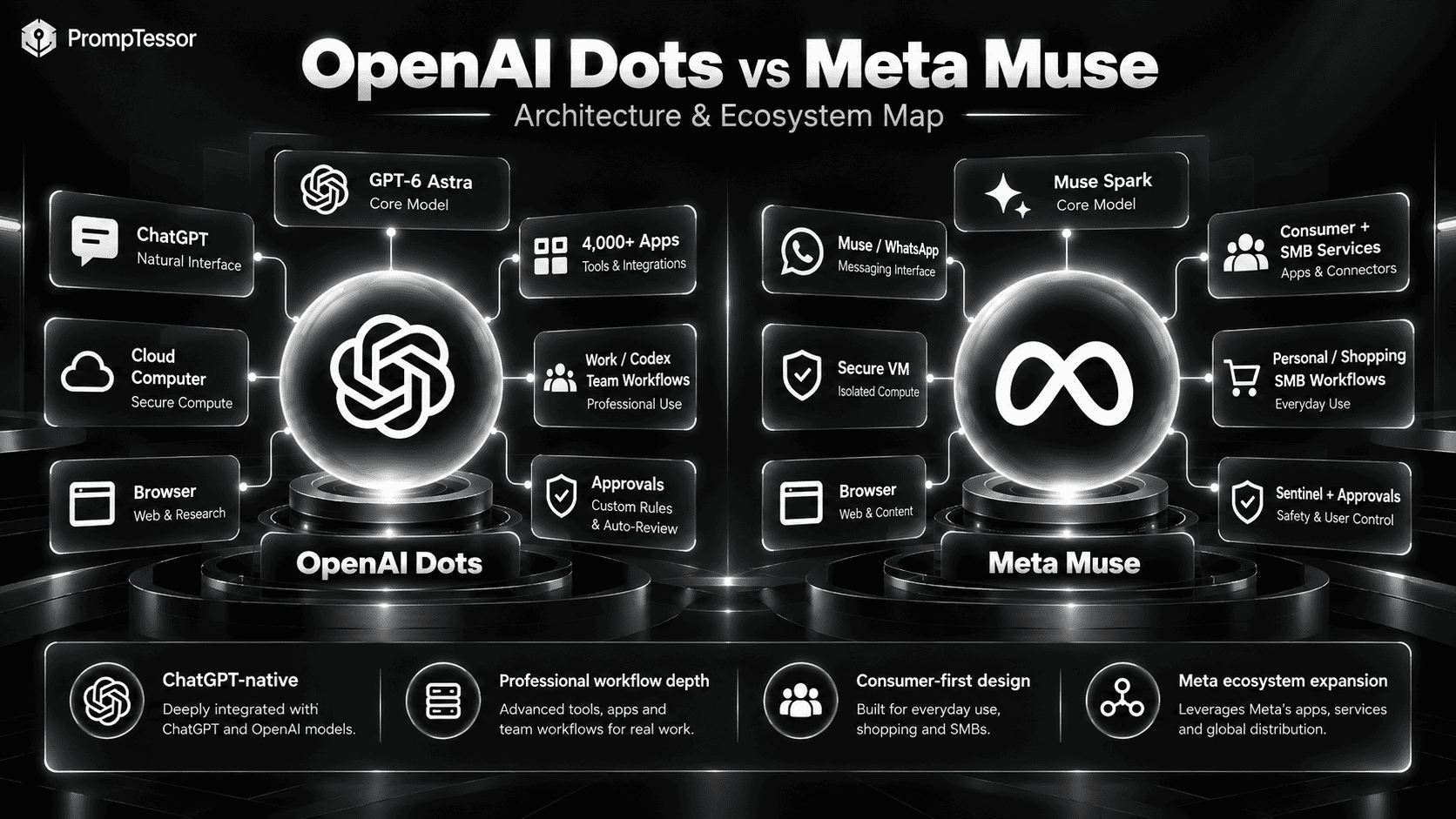
ChatGPT
   ↓
GPT-6 Astra
   ↓
Cloud computer + browser
   ↓
4,000+ connected apps
   ↓
Work / Codex / team workflows
   ↓
Professional + enterprise responsibility

META MUSE
Muse / WhatsApp
   ↓
Muse Spark
   ↓
Muse Secure VM + browser
   ↓
Consumer + business connectors
   ↓
Shopping / admin / SMB / everyday tasks
   ↓
Personal + small-business responsibility
OpenAI Dots vs Meta Muse: Quick Comparison
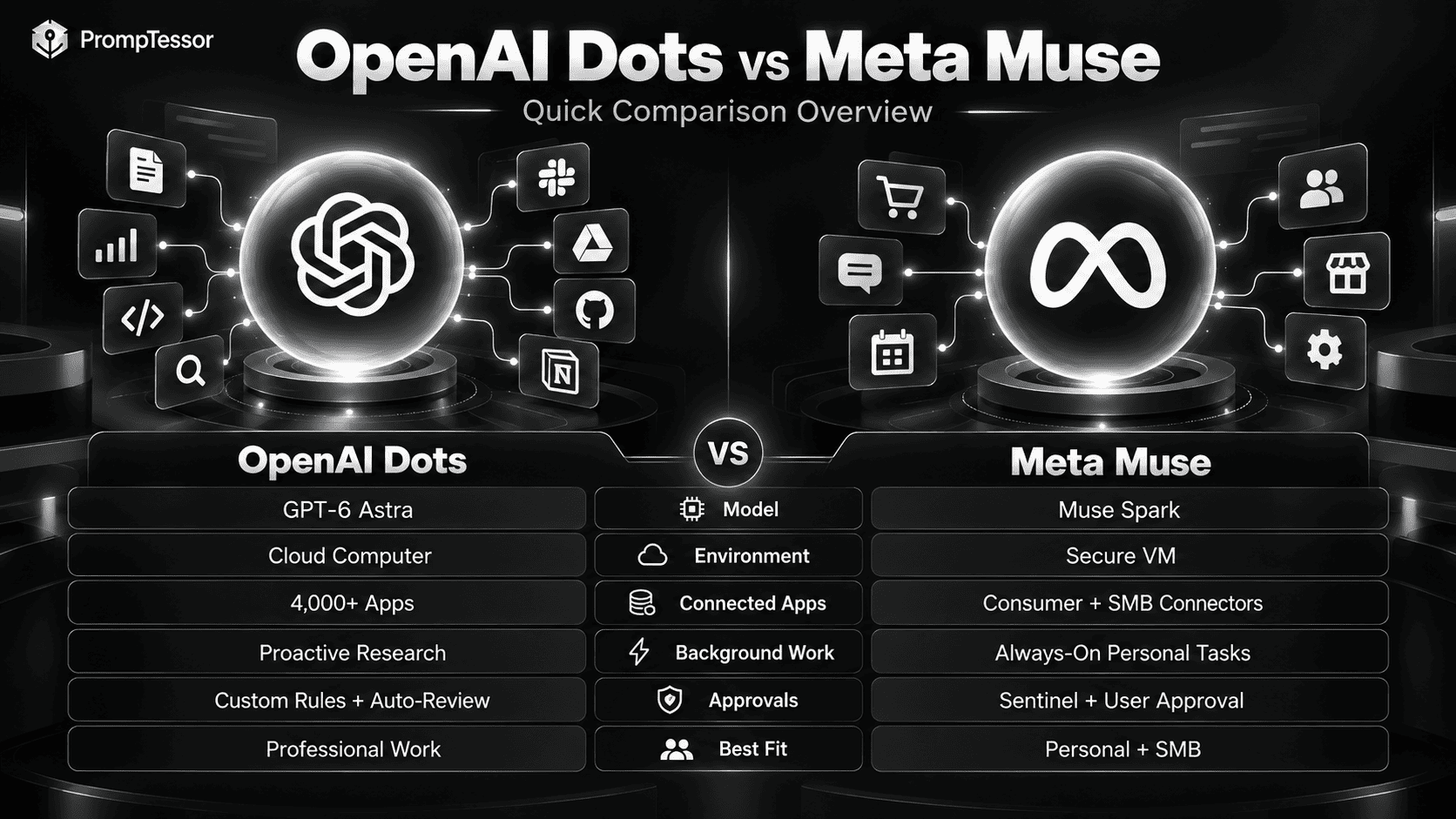
| Area | OpenAI Dots | Meta Muse |
|---|---|---|
| Launch date | September 29, 2026 | September 8, 2026 |
| Core model | GPT-6 Astra | Muse Spark |
| Agent environment | Own cloud computer + browser | Muse Secure VM + browser |
| Primary ecosystem | ChatGPT, Work, Codex, plugins, Slack, Teams | Muse app, WhatsApp, Meta ecosystem, connected services |
| Connected apps | 4,000+ through OpenAI's plugin ecosystem | Growing personal + SMB connector set |
| Background work | Yes; proactive research is read-only when running in the background | Yes; can continue working after the app closes |
| Approval model | Built-in rules, Custom Rules, auto-review, human approval | Sentinel system + explicit approval for sensitive actions |
| Pricing direction | First Dot included with eligible Pro or Business Premium plans; Enterprise beta | Free for most use cases; subscriptions available for higher usage |
| Current availability | Rolling out to eligible Pro, Business Premium, and Enterprise users in supported markets | Consumer Muse available in the US and Canada |
| Best fit | Professional, technical, team, and enterprise workflows | Personal, consumer, shopping, admin, and SMB workflows |
What Is OpenAI Dots?
OpenAI Dots are always-on AI agents inside the ChatGPT ecosystem.
OpenAI says each Dot is powered by GPT-6 Astra, has its own cloud computer and browser, can connect to more than 4,000 apps, learns from feedback, can work toward goals 24/7, can keep several projects moving at once, and can contact the user when it needs feedback or approval.
Dots can be reached through ChatGPT, Slack, and Microsoft Teams, with texting planned. They also carry context across those channels. OpenAI Dots product overview.
For a full product explanation, see OpenAI Dots: What It Is, How It Works, and What It Can Do.
What Is Meta Muse?
Meta Muse is a personal AI agent designed to take actions on a person's behalf rather than only answer questions.
Meta says Muse can send email with approval, book travel, fill forms, negotiate on a user's behalf, turn long-term goals into action plans, continue working after the app closes, remember relevant personal context, make purchases through supported checkout systems, and work across connected apps.
Muse is powered by Muse Spark and runs inside Muse Secure VM, a dedicated virtual machine with its own browser and secure storage for connected credentials. Meta Muse launch details.
How Their Architectures Differ
At a high level, both products use the same modern agent pattern:
GOAL
 ↓
PERSISTENT CONTEXT
 ↓
FRONTIER MODEL
 ↓
DEDICATED COMPUTE ENVIRONMENT
 ↓
CONNECTED APPS
 ↓
ACTION LOOP
 ↓
SAFETY / APPROVAL LAYER
 ↓
RESULT / CONTINUED WORK
The difference is where each company places emphasis. Dots are deeply connected to the existing ChatGPT work environment. Muse is designed first as a personal agent, with stronger emphasis on day-to-day tasks, consumer services, shopping, WhatsApp, and Meta's device ecosystem.
GPT-6 Astra vs Muse Spark
OpenAI Dots are powered by GPT-6 Astra. Meta Muse is powered by Muse Spark, which Meta describes as its most powerful model and as a model built for real-world agentic work. Meta's Muse Spark announcement.
For an always-on agent, model quality is only one part of the system. Reliability also depends on tool integrations, state, credentials, approval policy, browser execution, retry behavior, and user controls.
For GPT-6 Astra-specific prompting guidance, see the GPT-6 Astra Prompting Guide.
Cloud Computer vs Muse Secure VM
OpenAI Dots
Every Dot gets its own cloud computer and browser. The user's local computer stays separate unless the user explicitly gives the Dot permission to connect to it. OpenAI also says supported saved passwords can be used without exposing the password to the model.
Meta Muse
Muse runs in Muse Secure VM, a dedicated cloud computer containing the agent and the user's connected data. Meta says another user's agent cannot access that VM.
Muse also runs a separate Sentinel agent at the system level. Meta says nothing Muse does reaches the internet unless Sentinel approves it, and Sentinel requests user permission when needed. Credentials and payment methods can be stored so Muse can use them without seeing them directly.
Both products therefore recognize the same design principle: an agent that can act across the internet needs stronger runtime controls than a chatbot that only generates text.
Connected Apps and Ecosystems
Dots: Breadth Through Plugins
OpenAI says Dots can connect to more than 4,000 apps through the ChatGPT plugin ecosystem.
Muse: Consumer + SMB Connectors
Meta's September 29 update lists connectors including Asana, Box, Canva, Dropbox, Figma, Granola, HighLevel, Intuit QuickBooks, Klaviyo, Lovable, Notion, Shopify, Slack, Stripe, Zoom, Facebook business accounts, and Instagram business accounts. Meta Muse for Small Business.
Dots currently has the stronger stated integration breadth, while Muse's connector set reveals a strong consumer and small-business orientation.
Background Work and Proactivity
OpenAI Dots
Dots can continue work between conversations. OpenAI calls one background mode proactive research. In that mode, tools are restricted to read-only access: they cannot send messages, change app content, or control the browser or computer.
Meta Muse
Meta says Muse keeps working after the app closes, comes back when something changes, and asks for approval when required. For small businesses, Muse can proactively flag emails that need responses and prepare first drafts.
Permissions, Approvals, and Safety
OpenAI Dots
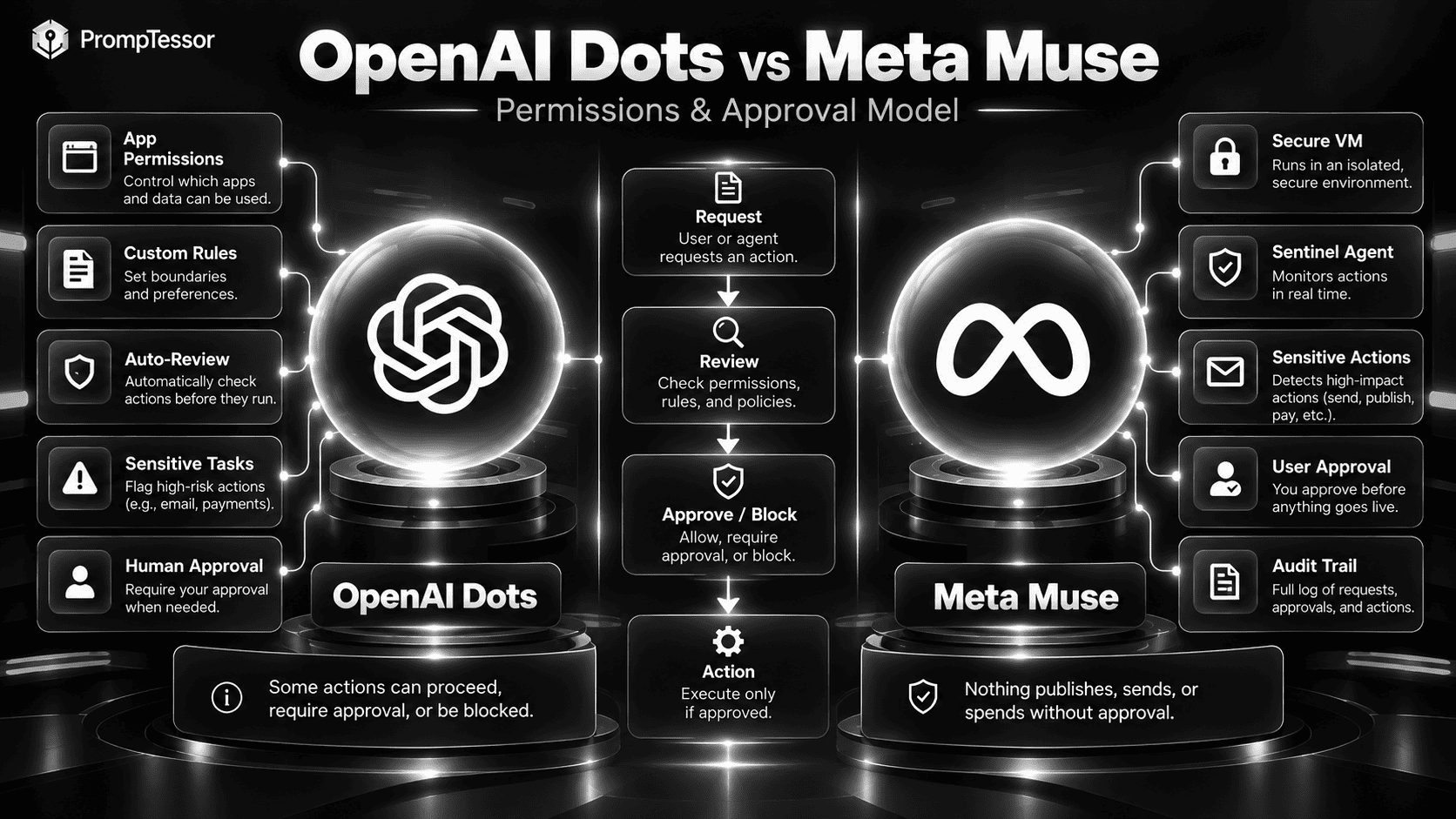
Dots use app-level permissions, built-in rules, Custom Rules that can allow, require approval, or block actions, and auto-review for actions that may affect accounts or share information. OpenAI says some tasks, such as changing a password, always remain with the user.
Meta Muse
Muse uses its Secure VM and separate Sentinel agent to review external actions. Meta says Muse checks before sensitive actions such as sending an email or making a purchase. Muse also provides an audit trail of what it has done and plans to do.
For Muse for Small Business, Meta's rule is especially simple: nothing publishes, sends, or spends without approval. Meta's small-business announcement.
Privacy and Data Controls
OpenAI Dots
OpenAI says content from ChatGPT Business, Enterprise, and Edu workspaces is not used to improve its models by default. Personal-plan users can control whether eligible Dot conversations and work are used for model improvement.
Meta Muse
Meta says Muse data and credentials are stored inside its dedicated VM, Muse does not see raw passwords or payment methods, users can disconnect services at any time, users can opt out of interactions being used to train Meta's AI models, and Muse conversations and VM data are not shared with Meta's ad systems.
Meta has also announced Muse Confidential VM, planned for later in 2026, where the entire VM would be encrypted with a user-held key. Meta Muse privacy details.
Which Is Better for Personal Use?
Muse currently has the clearer consumer-first design.
Meta's examples include sending emails, booking travel, shopping, negotiating bills, turning saved Instagram content into plans, remembering personal preferences, managing long-term goals, and eventually working through AI glasses.
Dots can perform personal work too, but OpenAI's examples and surrounding ecosystem are more heavily oriented toward professional work and projects.
Which Is Better for Professional Work?
Dots currently has the stronger professional-work positioning.
OpenAI's launch examples include turning customer feedback into tested code changes, maintaining product-launch assets, updating scientific analysis as new data arrives, supporting enterprise sales proposals, and automating content-production workflows.
Which Is Better for Small Businesses?
This category is more competitive. Muse has a strong explicit SMB story with QuickBooks, Shopify, Stripe, Canva, Slack, Notion, Asana, Zoom, Klaviyo, and Meta business accounts.
Dots has broader stated integration breadth and stronger links to advanced professional tooling. For a small business already centered on ChatGPT and a large SaaS stack, Dots may fit better; for a consumer/commerce-heavy business, Muse may feel more purpose-built.
Which Is Better for Coding?
Dots is the more natural choice for coding workflows today.
Dots are powered by GPT-6 Astra and can coordinate with Codex. OpenAI's launch example describes a Dot watching customer feedback, identifying recurring requests, building and testing fixes, and bringing complete pull requests back for review.
Meta has broader developer ambitions through Muse API, Muse Code, and Meta Enterprise Platform, but the consumer Muse product is not primarily positioned as a coding agent. Meta Enterprise Platform announcement.
Which Is Better for Research?
Dots currently has the clearer professional research story. OpenAI explicitly describes scientists using a Dot to monitor new evidence, rerun analyses, investigate unexpected results, update figures, revise explanations, and flag changes that need review.
Muse can browse, reason, remember goals, and continue work over time, so it can also support personal or business research. The difference is mostly product positioning and ecosystem.
Which Is Better for Shopping and Transactions?
Muse has the stronger consumer transaction story.
Meta has built payments directly into the product story. Muse supports checkout through Link by Stripe, with a one-time card mechanism designed to prevent Muse from seeing the user's real card details. Meta says Shop Pay support is also planned.
Cross-Device and Hardware Strategy
Dots
Dots work through ChatGPT on desktop, web, and mobile, and can also communicate through Slack and Teams. OpenAI says texting is coming.
Muse
Muse is available through its app and WhatsApp, and Meta is bringing Muse to its AI glasses. Meta says users will eventually be able to ask Muse to act on what they are looking at without manually describing it. Meta Connect 2026 announcement.
DOTS
AI agent embedded into work software

MUSE
AI agent embedded into daily life + devices
Pricing
OpenAI Dots
OpenAI says the first Dot is included in eligible Pro or Business Premium plans at no extra cost. Enterprise users can access Dots through an admin-enabled beta. The plan includes an allowance for deeper work, and OpenAI says users will later be able to add more Dots and increase capacity. OpenAI Dots plan information.
Meta Muse
Meta says Muse is free for most of what people need, with subscription plans for people who want to do more. As of this writing, Meta's official announcements do not provide a complete public pricing table for the higher-usage plans. Meta Muse pricing direction.
Availability
OpenAI Dots
Dots are rolling out to Pro users in eligible markets excluding the European Economic Area, Switzerland, and the UK. Business Premium users can access Dots in supported ChatGPT regions. Enterprise users, including Edu and Healthcare, can try the beta when an admin enables it. OpenAI Dots availability.
Meta Muse
Meta initially launched Muse in the United States. Its September 29 small-business announcement states that Muse is available in the US and Canada. Meta has not yet announced universal global availability. Current Muse availability.
Which AI Agent Is Right for You?
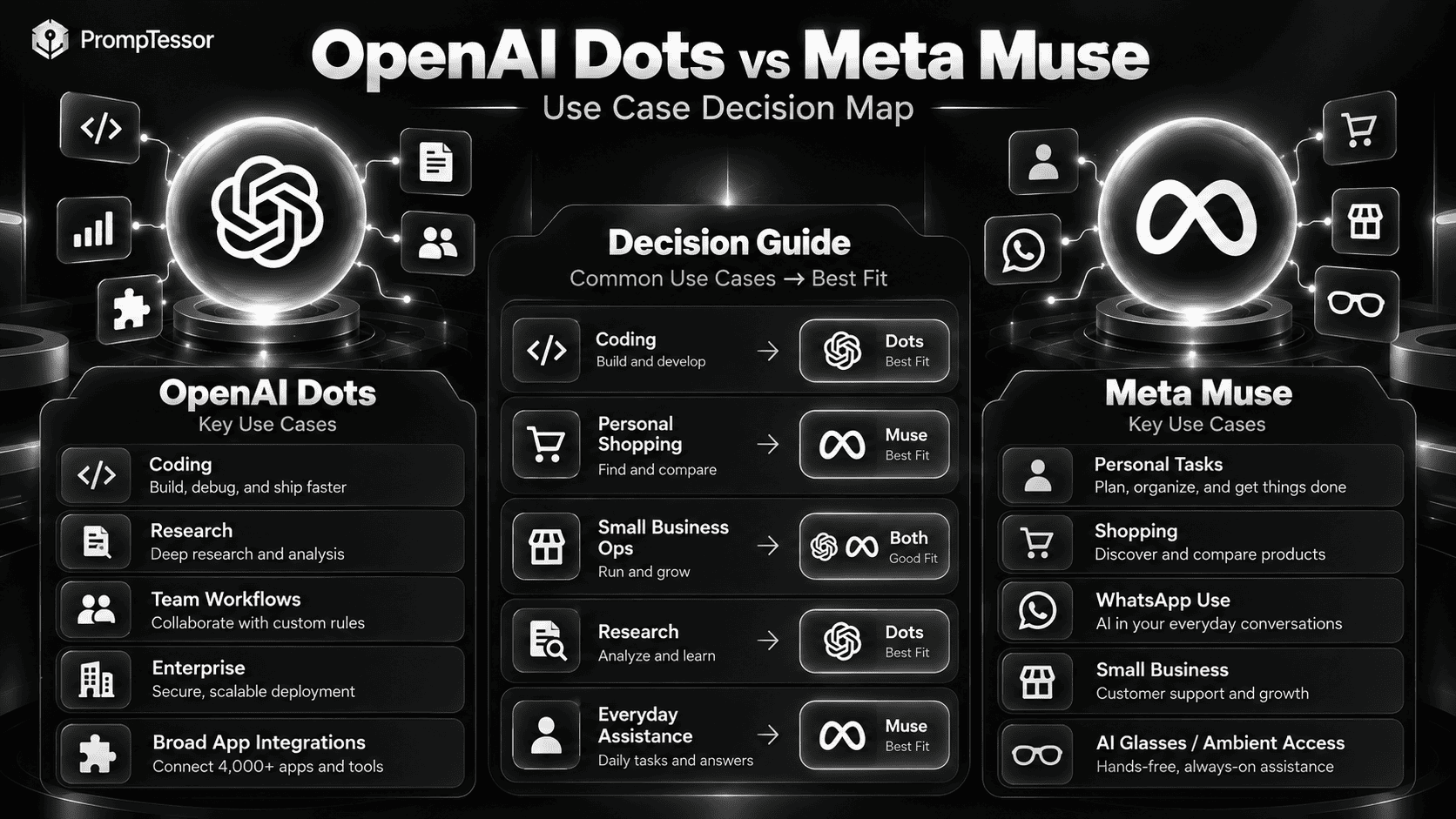
| If You Need... | Better Fit | Why |
|---|---|---|
| ChatGPT-native professional workflows | Dots | Deep connection to ChatGPT, Work, Codex, plugins, Slack, and Teams |
| Coding and software workflows | Dots | GPT-6 Astra + Codex + developer workflow examples |
| Enterprise / team agent workflows | Dots | Specialist Dots and enterprise governance direction |
| Everyday personal assistance | Muse | Consumer-first product design and personal goal workflows |
| Shopping and purchases | Muse | Built-in consumer transaction direction |
| WhatsApp-centric use | Muse | Native Muse / WhatsApp interaction model |
| Small-business operations | Muse or Dots | Muse has strong SMB connectors; Dots has broader professional app breadth |
| AI glasses / ambient agent access | Muse | Meta is bringing Muse to its AI glasses |
| Maximum app integration breadth | Dots | OpenAI states 4,000+ app connections |
Do Dots and Muse Still Need Good Instructions?
Yes. Always-on agents reduce the need to prompt every step, but they increase the importance of defining the ongoing operating contract.
GOAL
What should the agent continuously help achieve?

CONTEXT
What should it understand about you, the project, or the business?

STANDARDS
What does good work look like?

AUTHORITY
What may it do automatically?

APPROVAL
What must come back to you first?

MONITORING
What changes should it watch?

VERIFICATION
What must be confirmed before work is considered complete?

ESCALATION
When should it stop and ask?

DELIVERY
How should finished work or progress be presented?
The ChatGPT Prompt Generator can help turn a rough task or responsibility into a more structured instruction draft before adapting it to an always-on agent.
For deeper agent instruction design, see AI Agent Prompts.
What Both Products Tell Us About AI Agent Design
Dots and Muse converge on several important architecture decisions: agents need a dedicated execution environment, credentials should not be exposed directly to the model, permissions should be scoped, consequential actions need approval, background work should be constrained, users need auditability, and the agent should know when to return control to a human.
That is the same pattern discussed in AI Agent Orchestration and LLM Guardrails.
Where PrompTessor Fits
PrompTessor operates at the instruction layer rather than the runtime layer.
ROUGH RESPONSIBILITY
      ↓
DEFINE
- goal
- context
- standards
- authority
- approval boundaries
- verification
- escalation
- output
      ↓
PROMPTESSOR
Generate / Analyze / Optimize / Refine
      ↓
PERSISTENT AGENT INSTRUCTIONS
      ↓
DOTS OR MUSE
      ↓
TOOLS / APPS / BROWSER / WORK
      ↓
RESULTS + FEEDBACK
      ↓
REFINE INSTRUCTIONS
The AI Prompt Analyzer can help identify unclear goals, missing context, weak boundaries, or ambiguous approval rules. The AI Prompt Optimizer can generate stronger candidates after you understand the failure mode.
PrompTessor does not replace Dots' or Muse's permissions, execution environments, credential storage, approval systems, or safety controls.
FAQ
What is the difference between OpenAI Dots and Meta Muse?
Both are always-on AI agents with dedicated cloud environments, connected apps, persistent context, and approval systems. Dots is more tightly integrated with ChatGPT and professional workflows, while Muse is more consumer-first and extends into personal tasks, shopping, WhatsApp, small-business operations, and Meta's hardware ecosystem.
Which model powers OpenAI Dots?
OpenAI Dots are powered by GPT-6 Astra.
Which model powers Meta Muse?
Meta Muse is powered by Muse Spark.
Do OpenAI Dots and Meta Muse have their own computers?
Yes. Dots have their own cloud computer and browser. Muse runs inside Muse Secure VM, a dedicated virtual machine with its own browser and secure credential storage.
Which has more app integrations?
OpenAI says Dots can connect to more than 4,000 apps through its plugin ecosystem. Meta has not published an equivalent total count, but Muse supports a growing set of consumer and business connectors.
Can both agents work in the background?
Yes. Dots can continue work between conversations and perform read-only proactive research in the background. Muse can continue working after the app closes and return when something changes or approval is needed.
Is Meta Muse free?
Meta says Muse is free for most of what people need and offers subscription plans for people who want to do more.
Is OpenAI Dots free?
The first Dot is included at no extra cost for eligible ChatGPT Pro or Business Premium users. Enterprise users can access Dots through an admin-enabled beta.
Which is better for coding?
Dots is currently the stronger fit for coding because it is powered by GPT-6 Astra, integrates with Codex, and is explicitly positioned for ongoing software-development workflows.
Which is better for personal everyday tasks?
Muse currently has the stronger consumer-first positioning, including messaging, shopping, travel, personal planning, and eventual integration with Meta AI glasses.
Which is better for small businesses?
Both can fit. Muse has a strong dedicated SMB story with connectors such as QuickBooks, Shopify, Stripe, Canva, Slack, Notion, and Zoom. Dots offers broader app integration and deeper alignment with professional ChatGPT workflows.
Can PrompTessor help with Dots or Muse?
PrompTessor can help generate, analyze, optimize, and refine the instruction layer for always-on agents. The agent platforms themselves remain responsible for permissions, apps, credential handling, execution, approvals, and safety controls.
Conclusion
OpenAI Dots and Meta Muse are two of the clearest examples of the shift from chatbots to persistent AI agents.
They share many architectural ideas: persistent context, a dedicated cloud environment, connected apps, background work, approval controls, and ongoing responsibility.
Choose OpenAI Dots if your work already lives in ChatGPT, Codex, Work, Slack, Teams, and a broad professional app ecosystem, especially for coding, research, knowledge work, and team workflows.
Choose Meta Muse if you want a consumer-first personal agent for everyday tasks, messaging, shopping, long-term goals, small-business operations, and eventually more ambient interaction through Meta's devices.
The long-term decision may be less about which agent is smarter and more about which ecosystem you trust with an AI that is always working on your behalf.
Build better prompts in one workspace
Generate prompts from ideas, analyze and optimize quality, refine with feedback, reverse-engineer content, and save reusable prompts in your Prompt Library.
Try PrompTessor Free