How to Prompt Gemini 4 Argon: Best Practices, Thinking Levels, and Examples
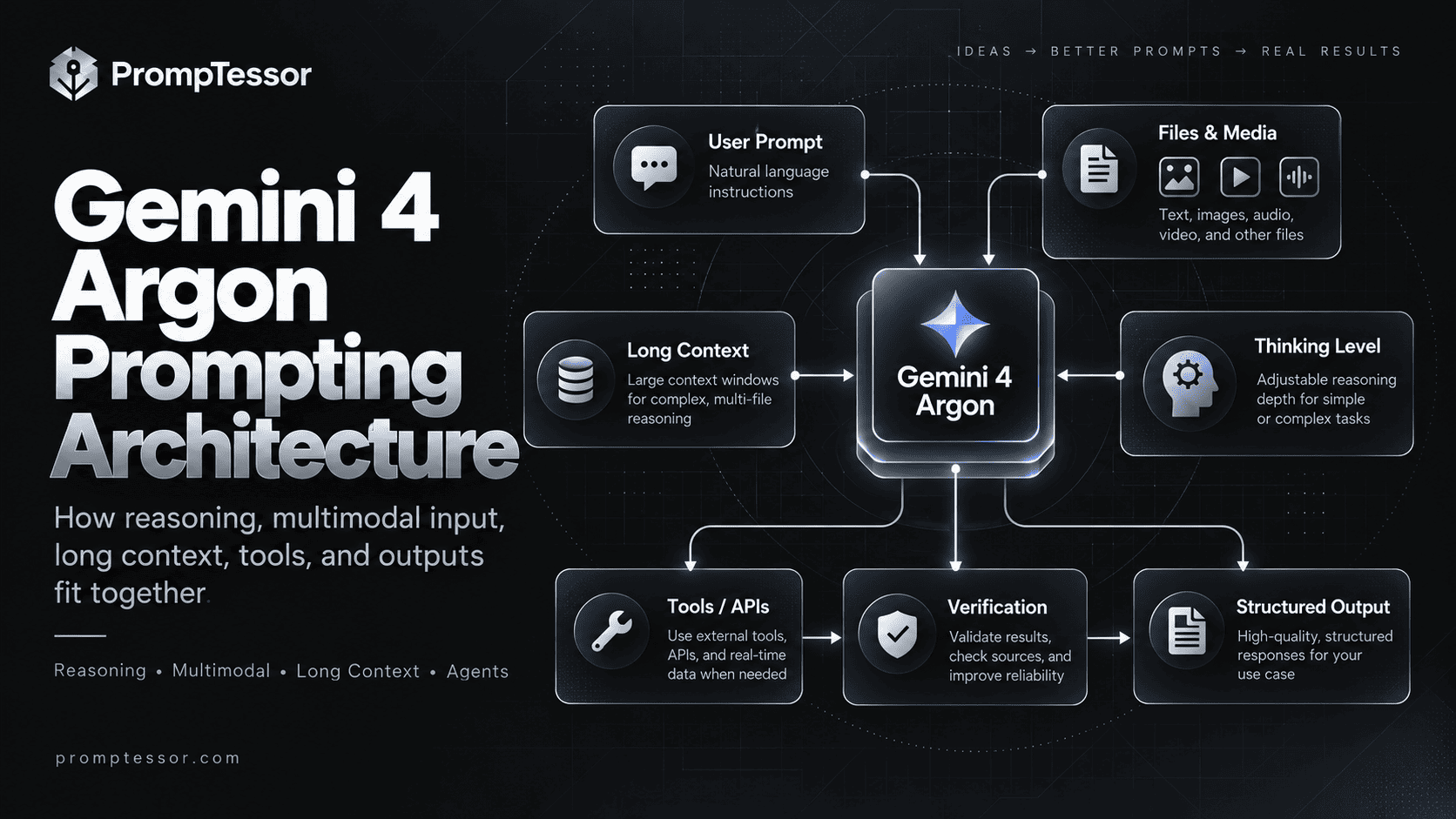
Gemini 4 Argon is designed for problems that rarely fit into one quick question: difficult code changes, large evidence sets, multi-step analysis, and tool-using workflows. But a more capable model does not eliminate the need to define the task, context, constraints, and evidence standard.
The practical challenge is choosing what belongs in the prompt and what belongs in the runtime configuration. A well-written request cannot switch an API thinking level, enforce a tool permission, or turn a synchronous call into background execution by itself.
The best Gemini 4 Argon prompt makes the required outcome and evidence explicit, then pairs it with the right thinking level, tools, and verification steps.
Google introduced Gemini 4 Argon on October 13, 2026 for developers and eligible users. The model targets complex software engineering, deep reasoning, and agentic work. This guide combines the official Gemini 4 Argon developer guide, model specification, and Google prompt design strategies with practical prompts that you can adapt.
Quick Answer: How Should You Prompt Gemini 4 Argon?
Start with a concise statement of the goal, supply only relevant context, specify definitions and constraints, ask for a concrete output, and define a verification standard. Then choose the API thinking level based on task difficulty rather than always selecting the highest level.
# Goal
What successful completion looks like.

# Context
Relevant files, facts, assumptions, and source boundaries.

# Rules
Requirements, exclusions, definitions, and tool permissions.

# Task
The concrete analysis or action to perform.

# Output
Required sections, format, detail, and audience.

# Verification
Checks to perform and unknowns to disclose.
Use a shorter version for straightforward requests. For large document collections, present the evidence first and place the exact question and output requirements near the end. Keep higher-priority system and policy rules separate from untrusted source text.
Key Takeaways
- Gemini 4 Argon uses model ID
gemini-4-argonand supports text, image, video, audio, and PDF inputs with text output. - The context window is 1,048,576 tokens shared across input, thinking, and output; it is not a separate 1M-token allowance for each.
- API thinking levels are
low,medium(default), andhigh. Start at medium and evaluate alternatives on real work. - The normal synchronous output limit is 65,536 tokens. Longer decode requires background execution and an explicitly larger output limit.
- Ground research in identifiable sources, distinguish evidence from inference, and require an explicit unknown-state when sources are insufficient.
- For coding, specify scope, constraints, tests, and an expected diff or patch review before claiming completion.
- For multimodal input, identify which file or timestamp supports each important observation.
- For agents, prompts describe intended behavior; the application enforces tool access, approvals, state, and execution safety.
- Gemini 4 Argon supports function calling, structured outputs, grounding, code execution, and additional tools, but availability depends on the API or product surface.
- More thinking or a larger context window is not automatically better or cheaper.
Table of Contents
- What Is Gemini 4 Argon?
- How to Access Gemini 4 Argon
- Capabilities and Limits
- What Changes in Prompting?
- Reusable Prompt Framework
- Thinking Levels: Low, Medium, High
- Best Practices for Gemini 4 Argon
- Long-Context Prompting
- Multimodal Prompting
- Copy-and-Paste Prompt Examples
- Coding and Software Engineering
- Research and Source-Grounded Analysis
- Agentic Tasks and Tool Use
- Structured Outputs
- Gemini 4 Argon API Examples
- Long Decode and Background Execution
- API Pricing and Availability
- Common Prompting Mistakes
- Prompting Checklist
- Where PrompTessor Fits
- Official Sources
- Frequently Asked Questions
- Conclusion
What Is Gemini 4 Argon?
Gemini 4 Argon is Google's flagship reasoning model released in October 2026. Google positions it for challenging software engineering, mathematics, scientific work, and autonomous multi-step agents, rather than only fast everyday answers. Google developer launch announcement.
In practice, this makes Argon particularly relevant when the task requires a sequence of dependent checks: reviewing a codebase, comparing conflicting documents, diagnosing a complex issue, or producing a carefully constrained technical artifact.
It is still a model, not an automatic guarantee of factual correctness. Correct tool configuration, usable evidence, and a verification process remain essential.
How to Access Gemini 4 Argon
- Gemini app: Google states that Google AI Pro and Ultra subscribers have access, subject to product rollout and limits.
- Gemini API: Developers can use the stable
gemini-4-argonmodel on supported paid API tiers. It is not available in the API Free tier or under a Google AI Pro consumer subscription alone. - Google AI Studio: Argon is available for eligible development accounts and applicable billing/subscription access.
- Google Antigravity and managed agents: Access depends on the relevant product and entitlement.
- AI Mode in Search: Google reports access for eligible Pro and Ultra subscribers.
Do not confuse consumer Gemini app access with API billing eligibility. Verify current entitlements before building a production dependency. See Google's Gemini app update and official API release notes.
Gemini 4 Argon: Capabilities and Limits
| Feature | Officially documented behavior |
|---|---|
| Model ID | gemini-4-argon (stable) |
| Input | Text, image, video, audio, PDF |
| Output | Text; no native image or audio generation |
| Unified context | 1,048,576 total tokens shared by input, thinking and output |
| Normal synchronous output cap | 65,536 tokens |
| Long decode | Up to the shared 1,048,576-token ceiling with background execution |
| Thinking levels | low, medium, high |
| Tool support | Function calling, code execution, search grounding, file search, URL context and others |
| Structured outputs | Supported |
| Caching | Implicit only; explicit cache creation is unsupported |
| Computer use | Preview |
These capabilities are listed in the official Argon model card. “Supports a tool” does not mean that every Gemini app conversation or every SDK configuration automatically has access to it.
What Changes When Prompting Gemini 4 Argon?
Many good principles remain the same: direct instructions, clear task structure, strong source boundaries, and outputs that can be checked. What changes is that Argon can be paired with more deliberate reasoning effort and unusually long generation workflows.
For example, the prompt “Find problems in this architecture” is underspecified. A better request makes the engineering decision explicit:
# Task
Review the attached architecture for reliability risks.

# Scope
Focus on retry safety, idempotency, state durability,
permission boundaries, and observability.

# Evidence rule
Separate what is visible in the diagram from assumptions.
Do not infer undocumented components.

# Output
1. Risk and severity
2. Evidence from the diagram
3. Failure scenario
4. Minimum practical mitigation
5. How to validate the mitigation
This is more useful because a reviewer can judge each finding. The prompt defines the decision surface, while a thinking-level setting defines the model's compute tradeoff.
A Reusable Gemini 4 Argon Prompt Framework
For a complex task, the following template balances clarity with controllability. Copy it and replace the bracketed values:
# Objective
[The outcome you need and why it matters]

# Relevant Context
[Files, facts, definitions, current state, constraints]

# Scope
Include: [in-scope items]
Exclude: [out-of-scope items]

# Source of Truth
Use [specified files/sources]. If a required fact is missing,
mark it unknown instead of inventing it.

# Workflow
1. Identify key dependencies or questions.
2. Work through the task using supplied evidence.
3. Surface contradictions and blocked assumptions.
4. Verify material conclusions before finishing.

# Output Contract
[Format, sections, detail level, examples, audience]

# Completion Standard
[Observable checks that must pass]

# Uncertainty
List unresolved questions and what evidence would resolve them.
Not every prompt needs every section. For a simple email rewrite, a short task plus tone and output requirements is enough. For an autonomous tool-using workflow, more detailed policy and recovery sections become important.
Thinking Levels: Low, Medium, and High
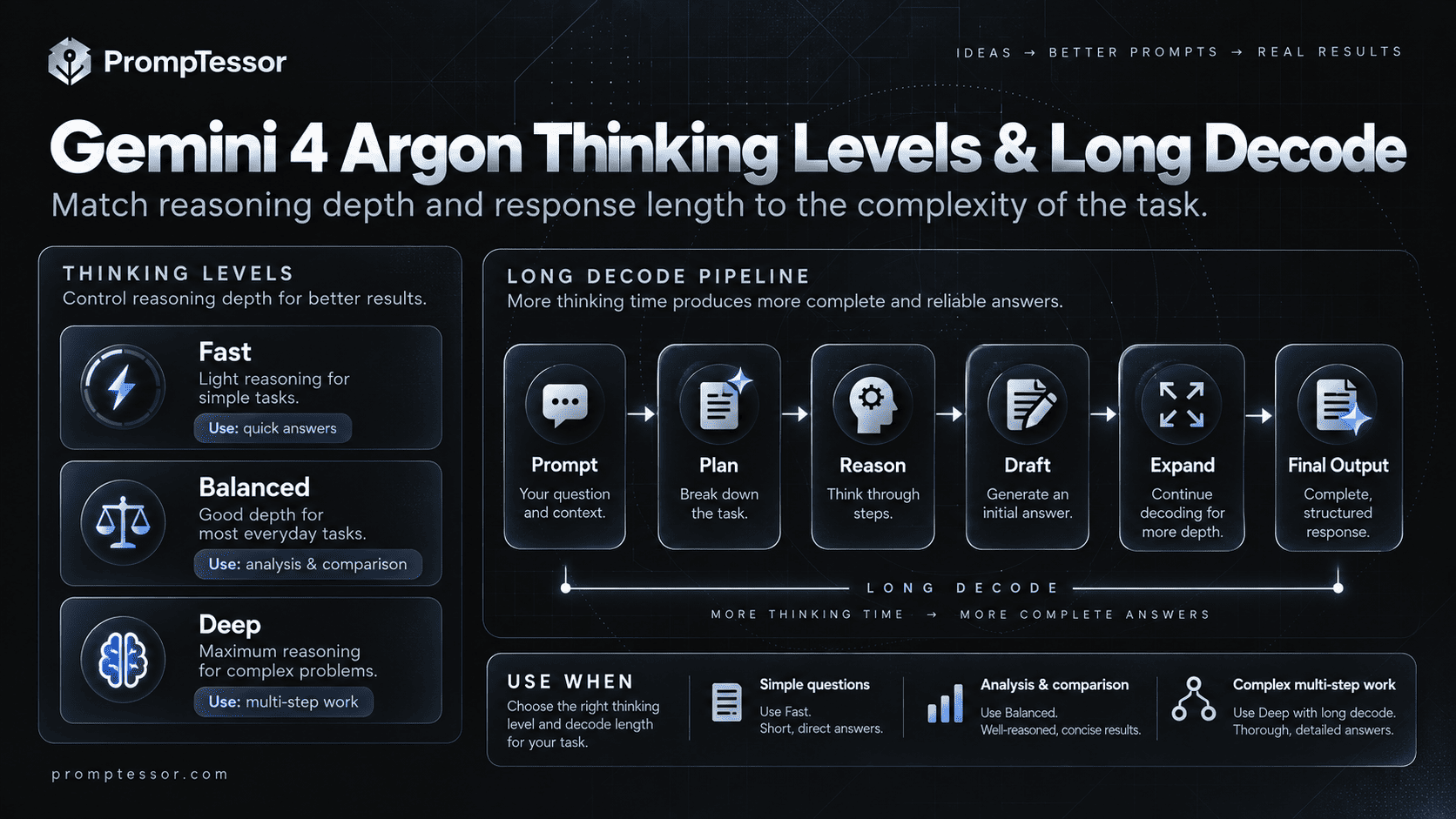
Argon supports three configurable thinking levels in the Gemini API. Google recommends testing all three on representative tasks and using the lowest level that meets your quality bar. Official Argon developer guide.
| Level | Use it for | Tradeoff |
|---|---|---|
low | Light rewriting, categorization, extraction, straightforward tasks | Fastest and generally fewer thinking tokens; weaker on difficult reasoning |
medium (default) | Most professional work, standard code review, research synthesis | Balanced cost, latency, and quality |
high | Hard debugging, math, scientific analysis, complex multi-step decisions | More thinking tokens and slower first useful token |
Important: writing “think harder” in a prompt does not programmatically select high. API users set thinking_level in the generation configuration; app users should use whatever controls the product makes available.
More reasoning can consume more of the output token budget. A too-small max_output_tokens limit may cut off a complex answer while the model is still reasoning. Do not optimize cost merely by setting an unrealistically low hard cap.
Best Practices for Gemini 4 Argon
1. State the outcome, not just the topic
“Analyze our API” is open ended. “Identify the three most consequential failure modes in our API retry behavior, cite the relevant code paths, and propose testable patches” is actionable.
2. Define ambiguous business or technical terms
Specify what counts as “conversion,” “high risk,” “duplicate,” “ready to deploy,” or “current” rather than leaving critical definitions implicit.
3. Put important rules in the correct place
System-level policy and allowed tools belong in the application configuration. User prompts describe the immediate goal. Retrieved files are evidence, not instructions that can override system policy.
4. Request evidence and note missing information
For research, ask which document, row, file, or timestamp supports each material conclusion. A model should not treat plausible interpretation as confirmed fact.
5. Define the format and verification standard
Ask for a checklist, JSON fields, test suite, or decision table when the artifact must be reviewed or consumed downstream. Use API structured output schemas for actual machine-enforced JSON shapes.
6. Prefer progressive disclosure over dumping everything
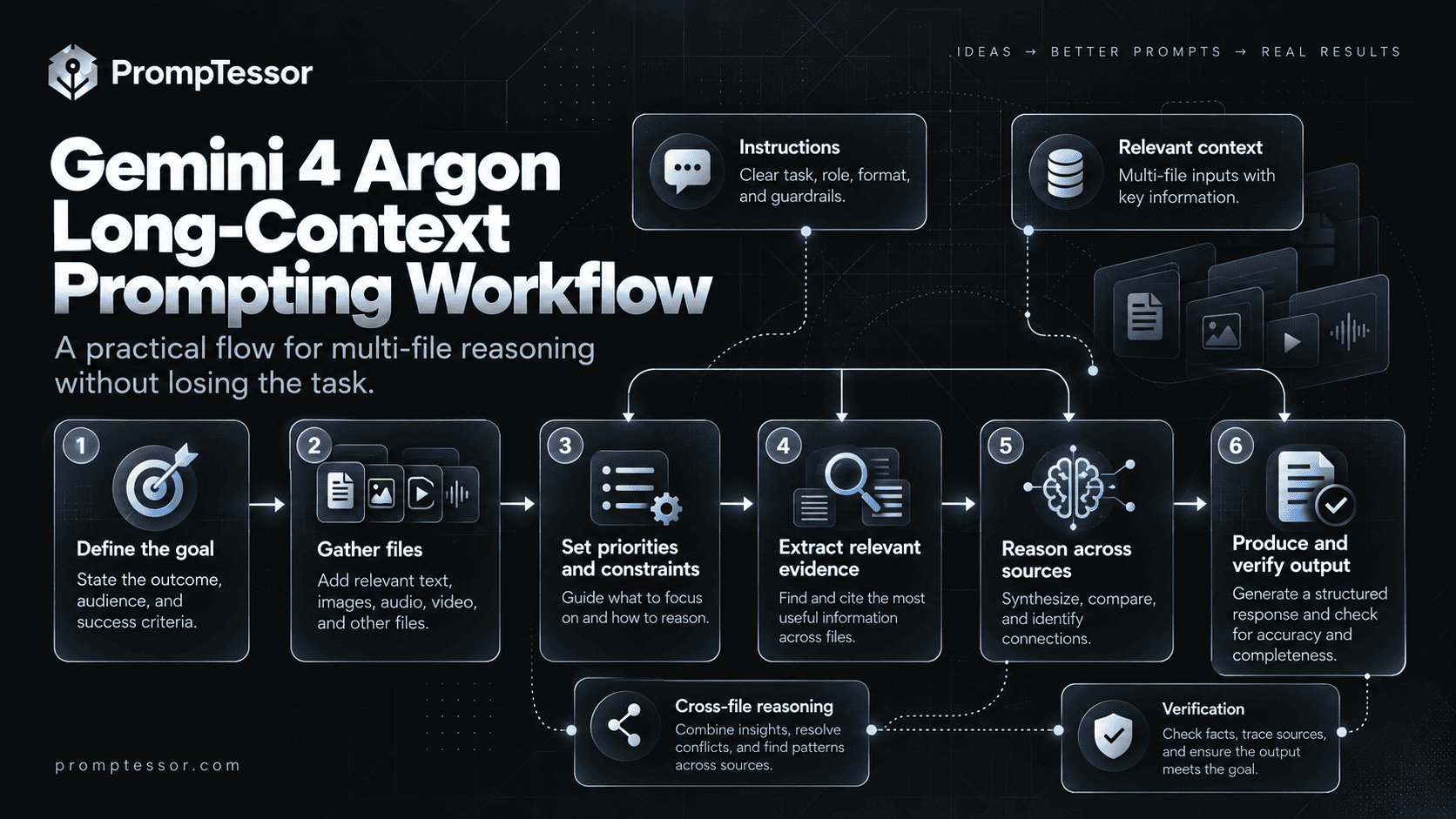
Use relevant files and summaries. A million-token context window is capacity, not an instruction to insert every available document.
7. Match thinking effort to difficulty
Benchmark low, medium, and high against representative jobs. Use the cheapest acceptable setting rather than declaring high universally best.
Long-Context Prompting: Documents, Repositories, and Large Evidence Sets
Argon can accept very large inputs, but evidence organization still matters. Identify each source, separate source text from instructions, define which materials take precedence, and specify how conflicting sources should be handled.
For large contexts, Google's Gemini prompting guidance favors placing the long material before the final specific question. Keep critical operating rules at higher priority, then clearly anchor the task after the supplied documents.
# Context package
DOCUMENT A: [file, date, version]
[content]

DOCUMENT B: [file, date, version]
[content]

# Analysis request
Compare A and B on [criteria].
Use only the supplied sources unless I enable external research.
For each difference, cite the document and section.
Flag contradictions and missing evidence.

# Output
Executive summary, comparison table, open questions,
and recommended verification steps.
Important: the 1,048,576-token limit covers the input together with thinking and output. Long documents reduce space available for thinking and the answer. Split a workflow by source or decision boundary when that is more reliable.
Multimodal Prompting with Image, Video, Audio, and PDF
Argon accepts multiple kinds of evidence. The prompt should tell it how to use each input rather than treating a media attachment as self-explanatory.
For screenshots, define which UI problems to inspect. For PDFs, cite section or page references where available. For video, request timestamps. For audio, distinguish a transcript-based claim from a judgment about the sound itself. Actual modality processing and tool availability can vary across surfaces.
Inputs:
- video: [uploaded walkthrough]
- screenshot: [mobile checkout state]
- brief: [expected behavior]

Task:
Identify the three strongest usability blockers in the checkout flow.

For each:
- observed behavior and timestamp or screenshot region
- expected behavior from the brief
- user impact
- suggested fix
- confidence and any uncertainty

Do not invent screens or behaviors not visible in the inputs.
Argon's model card lists text output and does not list native image generation or audio generation. If your goal is to produce a new image or sound clip, select the appropriate generation model or product rather than assuming Argon itself generates those files.
Practical Gemini 4 Argon Prompts You Can Copy
These examples are original reusable templates, not claims that Google has tested or endorsed every wording. Replace bracketed values and verify real outputs in your own workflow.
Example 1: Complex Reasoning and Decision Brief
Evaluate whether [business] should prioritize [Option A] or [Option B].
Context: [key metrics, constraints, user segments, budget].
Decision criteria: impact, implementation cost, time-to-value,
reversibility, and evidence quality.

Distinguish facts from assumptions. Explain the strongest case
against your recommendation. Provide one recommended choice,
three decision drivers, two reversal conditions, and the next
three experiments that would reduce uncertainty.

Do not invent customer data or estimated market sizes.
Example 2: Debug an Intermittent Production Failure
You are reviewing a TypeScript/Node.js service.
Goal: diagnose intermittent duplicate webhook processing.
Inputs: [handler code], [retry policy], [event log sample].

Investigate:
- possible race conditions and repeated delivery
- missing idempotency or transaction boundaries
- logging gaps and ambiguous success states

Return:
1. Evidence-backed root-cause hypotheses, ranked
2. Which code path supports each hypothesis
3. Minimal patch options and tradeoffs
4. Regression tests with clear pass conditions
5. Facts still needed before deployment

Do not claim a fix is verified unless tests have actually run.
Example 3: Safe Code Migration Plan
Plan a migration from [current stack/version] to [target].
Constraints: preserve public API behavior, avoid breaking data
migrations, and keep rollback possible.

Using the attached repository inventory:
- identify impacted packages, modules, and config
- construct an ordered dependency plan
- flag incompatible APIs and changes requiring confirmation
- provide staged patches or implementation instructions
- list validation commands and rollback checkpoints

Separate confirmed repository findings from assumptions.
Do not modify production or delete data without authorization.
Example 4: Evidence-Based Research Synthesis
Question: [decision or research question].
Sources: [uploaded reports / permitted URLs].
Time scope: [date range].

Synthesize the evidence without treating a single source as
conclusive. For each material claim, identify its source and
publication date. Explain conflicting findings and limitations.

Output:
- answer in 5 sentences
- evidence table
- disagreements and unknowns
- next research steps

If sources are insufficient, say what cannot be concluded.
Example 5: Contract or Policy Difference Analysis
Compare the attached policy documents: [Version A] and
[Version B]. Focus on payment terms, termination, data access,
liability, and approval authority.

For each change, provide:
- exact section references
- practical effect
- affected teams or workflows
- action needed for review

Label interpretations as interpretations.
Do not present this as legal advice or infer missing clauses.
Example 6: Video Workflow Review
Review the attached product walkthrough video.
Goal: find where first-time users could fail to complete
[primary task].

Return a timestamped table with:
- what is visibly happening
- the specific friction or ambiguity
- why it could matter to the user
- one measurable improvement experiment

Only make timestamp claims grounded in the supplied video.
Do not invent hidden app states or analytics outcomes.
Example 7: Agent Task Plan with Approval Boundaries
Goal: prepare a launch readiness report for [release].
Tools available: [read-only sources].
Out of scope: publishing, spending, emailing external contacts,
or changing production systems.

Plan the necessary checks, gather evidence, and update progress.
For each task record: status, evidence, blocker, and next step.
Escalate only when a required input is genuinely unavailable.

Completion criteria:
- each requirement is verified or explicitly blocked
- no external action was executed
- all unresolved issues are listed with owners or next steps.
Example 8: Structured Business Insight
Using the attached CSV, analyze monthly revenue by channel.
Check date formats, missing values, refunds, and duplicate rows
before calculating metrics.

Return these fields:
- summary
- metrics: current, prior, delta_percent
- top_drivers: array of observations with evidence
- anomalies: array of observations and uncertainty
- recommended_actions: array of actions tied to findings

Do not fabricate missing data. Flag assumptions and calculations
that could not be validated.
Example 9: Scientific Hypothesis Review
Review the attached experimental notes for the claim:
[claim].

Identify assumptions, controls, possible confounders, and
alternative explanations. Distinguish observational evidence
from causal inference. Recommend an experiment or analysis
that could falsify the leading hypothesis.

Output a structured critique and a short uncertainty statement.
Do not invent numerical results or references.
Example 10: Professional Writing with a Fact-Check Pass
Draft a 900-word explainer for [audience] about [topic].
Use only the attached source brief for factual claims.
Tone: clear, accessible, specific, not promotional.

Include a concise introduction, explanatory headings, practical
examples, and a limitations section.

After drafting, list each claim requiring external verification.
Remove unsupported statistics, quotations, and invented examples
presented as real events.
Coding and Software Engineering: Better Prompt Design
For advanced coding, the most useful improvement is often defining an operational test rather than merely asking for clean code. Specify the language/runtime, allowed dependencies, behavioral contract, relevant files, failure examples, and tests.
A coding prompt should separate analysis from execution. If the agent has repository or shell tools, describe exactly what it may read and modify. Require a diff, test evidence, and an explicit status when execution is incomplete.
Research and Source-Grounded Analysis
When Argon has external search or URL context enabled, ask it to distinguish retrieved evidence from its own inferences. Source access must be configured in the target product or API; writing “browse the web” cannot grant a tool that is absent.
For fast-changing topics, request source dates and a cut-off date. Do not assume a model's confident answer represents current facts. See also Context Engineering for selecting and managing relevant source material.
Agentic Tasks, Planning, and Tool Use
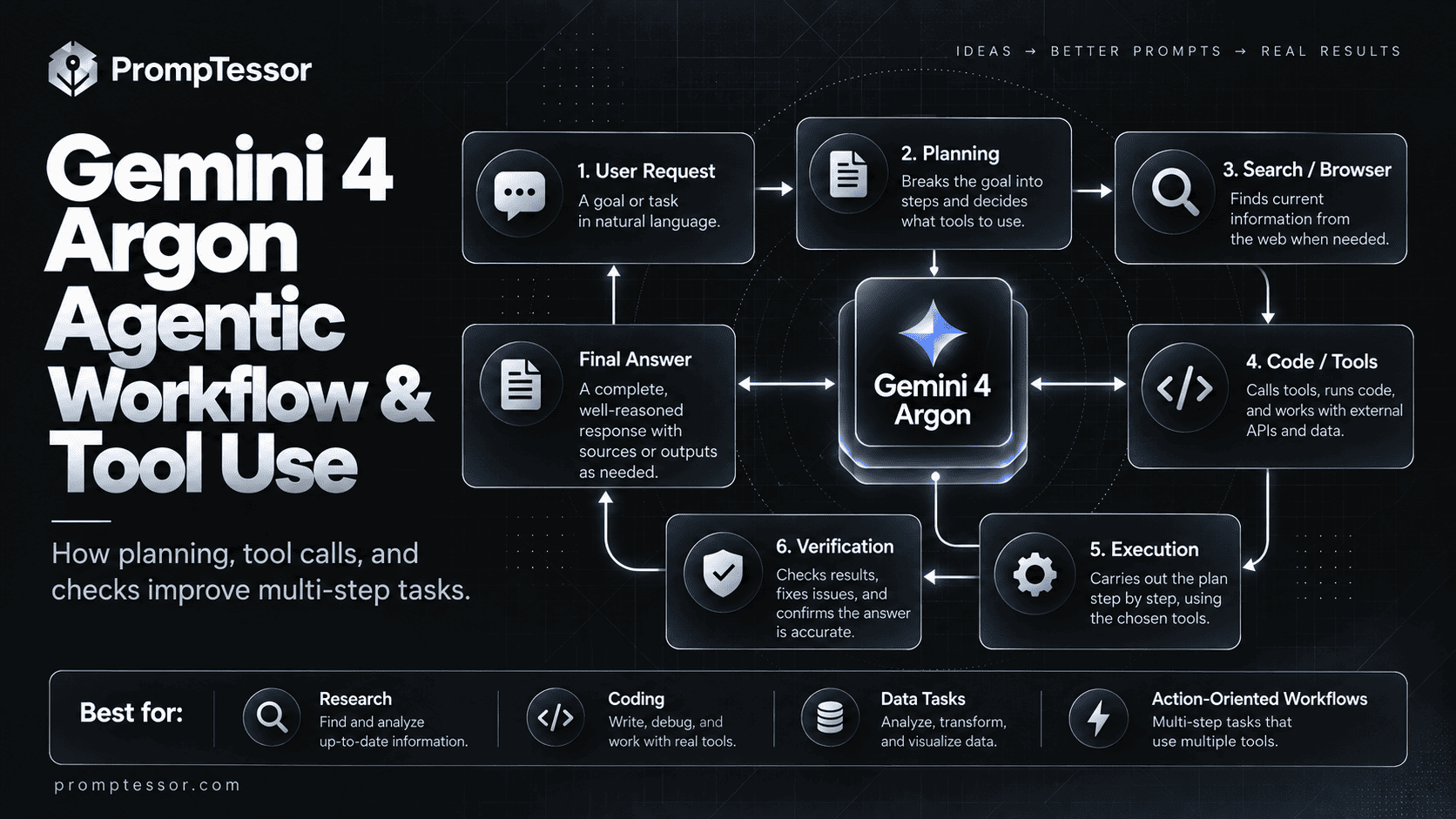
Multi-step instructions become most reliable when they explicitly cover preconditions, action boundaries, and completion rules. But the application still needs runtime controls for tool arguments, authorization, retries, and idempotency.
GOAL: [user objective]
ALLOWED ACTIONS: [explicit tool list]
PRECONDITIONS: [data and authorization required]
PLAN: list bounded milestones, not every UI click
EXECUTE: complete one verifiable step at a time
AFTER EACH TOOL RESULT: check success/error and update state
ON AMBIGUOUS WRITE: reconcile before retrying
APPROVAL: request explicit approval for [sensitive actions]
STOP: when verified complete, blocked, or budget exceeded
REPORT: completed, pending, errors, and next safe action
For more detailed workflow design, see AI Agent Prompts, AI Agent Planning, and Function Calling and Tool Use.
Structured Outputs and Verification
If the output is consumed by a program, use Gemini's structured-output capability instead of trusting a plain-text prompt to always produce valid JSON. The schema constrains shape; the prompt should still define what each field means, when to return null, and what evidence supports a value.
Analyze [source]. Return one item per finding.
Every finding must have:
- id: stable short identifier
- category: one of [risk, opportunity, unknown]
- observation: what the source actually shows
- evidence: document, line, timestamp, or record ID
- confidence: low, medium, or high
- next_action: specific verification or follow-up

Never assign "high" confidence without traceable evidence.
If information is absent, return an explicit unknown value.
Gemini 4 Argon API: Minimal JavaScript Example
Google recommends the Interactions API for new applications. This example follows the official Argon SDK configuration and selects a balanced thinking level.
import { GoogleGenAI } from "@google/genai";

// Install: npm install @google/genai
// Configure your GEMINI_API_KEY securely in your environment.
const client = new GoogleGenAI({});

const interaction = await client.interactions.create({
  model: "gemini-4-argon",
  input: `Review this architecture for failure recovery gaps.
List the three highest-risk issues and how to test each one.`,
  generation_config: {
    thinking_level: "medium",
  },
});

console.log(interaction.output_text);
The thinking level is in generation_config, not in the prompt. The sample assumes the appropriate API access and billing are configured. It does not turn on external tools or authorize real-world actions.
Long Decode: When a Task Needs More Than 64K Output Tokens
Gemini 4 Argon has a default synchronous output cap of 65,536 tokens. To generate more than that, Google documents background execution with max_output_tokens greater than 65,536, subject to the remaining shared context window. The server continues in multiple hops, and callers must collect the text from all completed model-output steps.
This is useful for unusually large artifacts, but it is not a reason to request massive output by default. Long generation costs more, can be slower, and still needs external validation. Use a shorter response for typical articles, summaries, and analysis.
// Pattern only: long-running output requests
const interaction = await client.interactions.create({
  model: "gemini-4-argon",
  input: "[very large deliverable with measurable requirements]",
  background: true,
  generation_config: {
    thinking_level: "high",
    max_output_tokens: 131072,
  },
});

// Poll by interaction ID until completion, then collect every
// model_output text step in order. Handle failed/incomplete status.
Follow Google's long decode guide for complete polling and output reconstruction code. Google also recommends allowing longer timeouts or background execution for difficult requests. For standard requests, avoid configuring huge output limits without a clear need.
Gemini 4 Argon API Pricing and Availability (October 2026)
Google lists an introductory rate through November 30, 2026. These are published per-token API prices, not the prices of Google AI Pro or Ultra consumer subscriptions.
| API usage per 1M tokens | Through Nov 30, 2026 | From Dec 1, 2026 |
|---|---|---|
| Input | $2.00 | $4.00 |
| Cached input (eligible implicit cache hits) | $0.10 | $0.20 |
| Output, including thinking tokens | $10.00 | $20.00 |
Actual usage charges depend on input, generated output, thinking, caching eligibility, and any separate tool charges. Implicit caching can apply to eligible inputs of at least 4,096 tokens; explicit caching is not supported on Argon. For live billing policies check Google's official Gemini API pricing page.
Editorial update note: Recheck this section on or after December 1, 2026, when Google's stated introductory rate is scheduled to end.
Common Gemini 4 Argon Prompting Mistakes
- Using high thinking for every task. More cost and latency does not always produce a useful gain.
- Writing vague goals. “Analyze everything” hides the real decision.
- Dumping an entire archive without source boundaries. More context can introduce contradictions and distract from the task.
- Confusing instruction with API configuration. A prompt cannot grant tools, approvals, or paid API access.
- Trying to force old sampling parameters. Google says
temperature,top_p, andtop_kare ignored for Argon in the current integration guidance. - Setting the hard output cap too low. Reasoning can exhaust the budget before an answer is complete.
- Claiming successful action without verification. An agent response is not proof that an external change occurred.
- Assuming Argon generates images or audio. The documented model output is text.
- Using plain JSON instructions as a substitute for structured outputs. API schemas are the appropriate control for reliable machine-readable shape.
- Skipping evaluation. Test prompt and configuration changes on representative tasks before adopting them broadly.
Gemini 4 Argon Prompting Checklist
- Is the objective observable and specific?
- Are relevant sources and their authority clear?
- Are ambiguous terms, scope, and constraints defined?
- Is the response format useful for the next step?
- Have thinking level, latency, and token cost been considered?
- For large context, is the question placed where it can be applied to the evidence?
- For media, are files and timestamps referenced explicitly?
- For tool use, are permission boundaries enforced in the runtime?
- Does the prompt distinguish observed facts, assumptions, and unknowns?
- Are success criteria and external verification steps defined?
How PrompTessor Fits into a Gemini 4 Argon Workflow
The Gemini Prompt Generator helps turn a rough idea into a clearer Gemini-oriented request with context, requirements, and an output structure. The AI Prompt Analyzer can identify missing constraints or ambiguous expectations. The AI Prompt Optimizer helps create revised prompt candidates for testing.
For prompt examples across the Gemini family, see Best Gemini Prompts for Work and Everyday Tasks. If you work with the earlier Flash family, use the more specific Gemini 3.8 Flash Prompting Guide. For reusable principles across providers, see ChatGPT vs Claude vs Gemini vs Grok: Prompting in 2026 and Reasoning Model Prompting Guide.
PrompTessor helps with instruction quality; it does not itself set Google API thinking levels, guarantee Argon model availability, enforce production permissions, execute tools in your app, or verify that external actions committed. Test the improved prompt using the exact Gemini runtime you plan to deploy.
Official Sources and Further Reading
- Gemini 4 Argon developer guide
- Gemini 4 Argon model specification
- Gemini prompt design strategies
- Gemini thinking controls
- Gemini Interactions API
- Long decode guide
- Gemini API pricing
- Gemini app availability
Frequently Asked Questions
What is Gemini 4 Argon?
Gemini 4 Argon is Google's flagship reasoning model released in October 2026 for complex coding, research, math, science, and multi-step agent workflows.
How do I prompt Gemini 4 Argon effectively?
Specify a concrete goal, the relevant context, definitions and constraints, an output contract, and checks for important conclusions. Choose the API thinking level independently of the prompt wording.
What thinking levels does Gemini 4 Argon support?
The Gemini API supports low, medium, and high thinking levels. Medium is the documented default; the best setting depends on task accuracy, latency, and cost requirements.
Is Gemini 4 Argon available on the free Gemini API tier?
No. Google lists Gemini 4 Argon as unavailable on the API Free tier. Consumer Gemini app access follows a separate subscription and entitlement model.
How large is the Gemini 4 Argon context window?
Its 1,048,576-token context window is shared by input, thinking, and output; it is not 1M tokens for each category separately.
Can Gemini 4 Argon produce more than 65,536 output tokens?
Yes, with supported background long-decode configuration and a larger max_output_tokens value. The total request must stay within the shared context window.
Does Gemini 4 Argon support images, videos, audio, and PDFs?
Yes as input modalities. The model card lists text output, not native image or audio generation.
Can Gemini 4 Argon browse or use tools automatically?
It supports tool capabilities such as grounding, code execution, and function calling, but actual tool access must be enabled by the product or API configuration and may vary by surface.
How much does Gemini 4 Argon API cost?
Google lists introductory API prices through November 30, 2026 of $2 per 1M input tokens and $10 per 1M output tokens, including thinking tokens, with higher published rates scheduled afterward.
Can PrompTessor optimize Gemini 4 Argon prompts?
PrompTessor can help generate, analyze, and optimize prompt wording and structure. Thinking-level selection and tool execution remain controlled by the Gemini application or API environment.
Conclusion
Gemini 4 Argon is especially relevant when the work is complex enough to benefit from deliberate reasoning, strong source control, structured tasks, or multi-step tool use. The strongest prompts do not attempt to control everything with theatrical instructions. They define the outcome, evidence, boundaries, and the checks that make the answer usable.
Start with a minimal direct prompt. Add context only where it changes the decision. Move risk controls into the runtime. Test thinking levels against realistic cases. Verify code, calculations, citations, and external actions before relying on them.
A better Gemini 4 Argon prompt is one whose success can be observed and checked, not merely one that sounds sophisticated.
Build better prompts in one workspace
Generate prompts from ideas, analyze and optimize quality, refine with feedback, reverse-engineer content, and save reusable prompts in your Prompt Library.
Try PrompTessor Free