How to Write Prompts for ChatGPT, Claude, Gemini, and Grok in 2026
A prompt that works well in one AI model may work differently in another.
Sometimes the difference is small.
Sometimes the same instruction produces a noticeably different level of detail, formatting, reasoning, tool behavior, or compliance with constraints.
That does not mean every model needs an entirely different prompting philosophy.
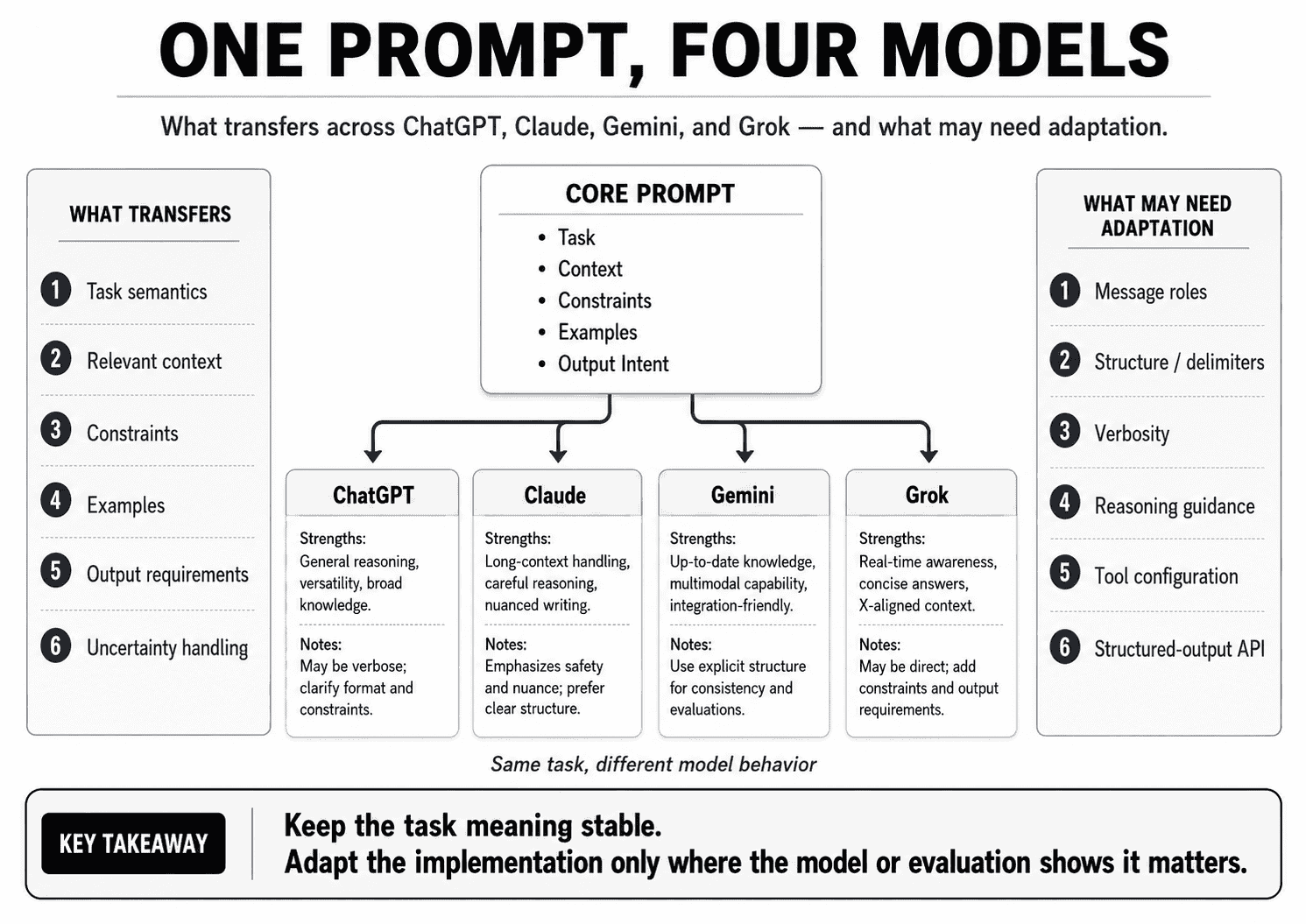
Most good prompting principles transfer:
- state the task clearly,
- provide relevant context,
- define important constraints,
- use examples when they genuinely help,
- make the expected output explicit,
- separate instructions from untrusted data,
- and evaluate the result instead of assuming the prompt works.
What changes is the implementation.
OpenAI, Anthropic, Google, and xAI expose different model families, message interfaces, reasoning controls, tool systems, structured-output features, context behavior, and provider-specific prompting guidance.
Current documentation also shows that “more prompt engineering” is not automatically better. OpenAI's latest guidance for reasoning-capable models emphasizes simple, direct prompts and avoiding unnecessary chain-of-thought instructions. Google's current Gemini 3.x guidance similarly recommends concise, precise instructions and warns that overly verbose or over-engineered prompts can make the model over-analyze. Anthropic provides detailed Claude-specific guidance around clarity, examples, XML structure, thinking, and agentic workflows. xAI documents Grok's system/user prompting, reasoning, tools, and structured-output interfaces, but provides less prescriptive general prompt-writing guidance than some other providers.
The practical conclusion is:
Keep the task semantics stable. Adapt the prompt implementation only where the target model, provider interface, or evaluation results show that adaptation is useful.
CORE TASK

Task
Context
Rules
Examples
Output intent

        ↓

MODEL-SPECIFIC ADAPTER

OpenAI / ChatGPT
Claude
Gemini
Grok

        ↓

EVALUATION

Accuracy
Instruction adherence
Format
Latency
Cost
Consistency
This guide explains which prompting principles transfer across ChatGPT, Claude, Gemini, and Grok in 2026, which techniques should be model-specific, how current provider guidance differs, how to build cross-model prompt templates, how to compare the same prompt across models, and how to decide when a universal prompt is enough versus when a model-specific variant is worth maintaining.
Quick Answer
You usually do not need four completely different prompts for ChatGPT, Claude, Gemini, and Grok.
Start with a strong core prompt:
TASK
Analyze the customer reviews.

IDENTIFY
- recurring issues
- frequency
- severity
- supporting evidence

RULES
- Do not invent issues unsupported by the reviews.
- Preserve uncertainty when evidence is weak.

OUTPUT
Return the findings in a consistent structure.
Then adapt only the parts that are genuinely model- or provider-specific:
- message roles and instruction placement,
- prompt verbosity,
- example formatting,
- reasoning guidance,
- long-context organization,
- tool instructions,
- structured-output API configuration,
- and any model-specific behavior that your evaluation confirms.
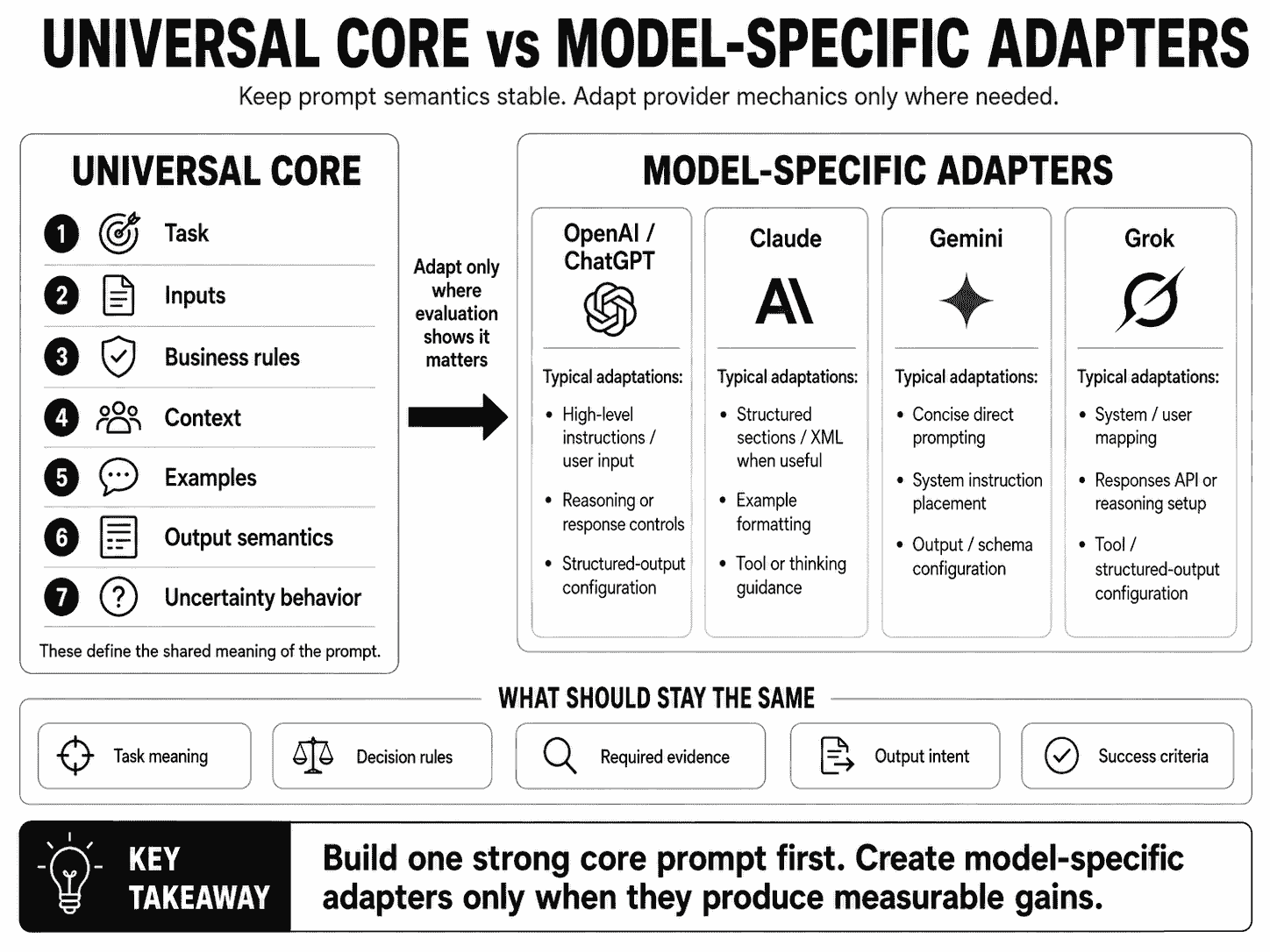
A useful architecture is:
UNIVERSAL CORE
Task
Context
Constraints
Examples
Output semantics

        +

MODEL ADAPTER
Formatting
Message roles
Reasoning guidance
Tool configuration
Schema configuration

        ↓

TARGET MODEL
The most important rule is to test the actual model you deploy. Provider guidance is a starting point; your own evaluation data should decide whether a model-specific variant is worth keeping.
Key Takeaways
- Good prompt semantics transfer better than prompt hacks.
- Clear task definitions, relevant context, explicit constraints, examples, and output requirements remain useful across major model families.
- One identical prompt should not be assumed to be optimal across every model.
- OpenAI's current reasoning guidance favors simple, direct prompts and discourages unnecessary chain-of-thought prompting.
- OpenAI's latest model guidance also emphasizes lean prompts, explicit autonomy boundaries, and clear response-length requirements.
- Claude's current prompting guidance strongly emphasizes clarity, examples, XML-style structuring for complex prompts, thinking guidance, and agentic patterns.
- Claude does not require XML; XML is one useful structuring technique.
- Gemini 3.x guidance currently recommends concise, direct, precise instructions and warns against over-engineered prompting inherited from older model generations.
- Gemini prompt engineering is explicitly described by Google as iterative.
- xAI documents Grok's system/user prompting, reasoning, structured outputs, tools, and Responses API, but publishes less prescriptive general prompt-writing guidance.
- For Grok, model-specific prompt optimization should therefore be driven heavily by evaluation.
- “You are an expert” is not automatically useful; roles should define a meaningful perspective or responsibility.
- “Think step by step” should not be added mechanically to every reasoning prompt.
- Markdown, XML, and plain text are structuring options, not universal winners.
- Few-shot examples can transfer across models, but example count and placement should be evaluated per model.
- Structured-output semantics can remain stable while provider API syntax differs.
- System/developer instruction hierarchy is provider-specific and should not be treated as identical across APIs.
- Long context increases capacity, not automatic relevance.
- Cross-model prompt portability should be measured with accuracy, adherence, format reliability, latency, token usage, and cost.
- Use one universal prompt when the task is simple and performance is similar across models.
- Maintain model-specific variants only when measured gains justify the maintenance cost.
- PrompTessor can help generate, analyze, optimize, and refine the underlying prompt before you evaluate it across target models.
Table of Contents
- Why the Same Prompt Behaves Differently Across Models
- Universal Prompting Principles
- How to Prompt ChatGPT and OpenAI Models
- How to Prompt Claude
- How to Prompt Gemini
- How to Prompt Grok
- ChatGPT vs. Claude vs. Gemini vs. Grok Prompting Comparison
- Same Task, Four Prompt Variants
- What Transfers Reliably Across Models?
- What Does Not Transfer Reliably?
- Do You Need “You Are an Expert”?
- Do “Think Step by Step” Prompts Still Matter?
- XML vs. Markdown vs. Plain Text
- Few-Shot Prompting Across Models
- Structured Outputs Across Models
- System Prompts Across Models
- Context Engineering Across Models
- Cross-Model Prompt Templates
- Model-Specific Prompt Optimization
- What Is Prompt Portability?
- How to Evaluate Prompts Across Models
- Universal Prompt or Model-Specific Variant?
- Cross-Model Prompt Versioning
- Cross-Model Prompt Examples
- Common Cross-Model Prompting Mistakes
- Using PrompTessor for Cross-Model Prompting
- Cross-Model Prompting Checklist
- Official Resources
- FAQ
Why the Same Prompt Behaves Differently Across Models
Large language models share broad capabilities, but they are not interchangeable execution engines.
The same prompt can produce different results because models and providers differ in several practical ways.
1. Instruction-Following Behavior
Models may interpret vague instructions differently.
For example:
Summarize this document concisely.“Concisely” may produce one paragraph in one model and five bullets in another.
If the distinction matters, define the output more explicitly.
2. Reasoning Behavior
Modern reasoning-capable models can perform substantial internal reasoning without being asked to expose a step-by-step chain.
Provider guidance increasingly reflects this.
OpenAI currently recommends keeping reasoning-model prompts simple and direct. Gemini 3.x is also documented as a reasoning-model family where concise, precise prompts often work better than older, heavily scaffolded prompting patterns.
3. Default Verbosity
Some models naturally produce more explanation than others.
If response length matters, specify it:
Return:
- one recommendation
- three tradeoffs
- maximum 200 words
4. Message and Instruction Architecture
Provider APIs expose different ways to represent high-level instructions, user input, system behavior, tools, and structured outputs.
The conceptual task may be portable while the API representation is not.
5. Tool Interfaces
OpenAI, Claude, Gemini, and Grok all support tool-oriented workflows, but exact tool definitions, invocation patterns, built-in tools, and execution semantics differ.
6. Structured Output Interfaces
Several providers support JSON-schema-like constrained outputs, but schema support and API syntax differ.
7. Long-Context Behavior
Context-window size, ordering recommendations, caching, and context-management strategies vary across providers.
8. Multimodal Capabilities
A prompt that references images, video, audio, or files may need adaptation based on the model's supported input modalities and provider API.
9. Model-Specific Updates
Prompting recommendations can change as model generations change.
This is why model-aware prompting should be treated as an evaluation discipline, not a permanent collection of prompt tricks.
Universal Prompting Principles
Before optimizing for a provider, make the underlying prompt good.
1. Define the Task Clearly
Weak:
Analyze this.Better:
Analyze the customer feedback and identify the three recurring
product issues most strongly supported by the reviews.
2. Supply Relevant Context
Tell the model what information matters for the task.
PRODUCT
{product_description}

TARGET USER
{target_user}

REVIEWS
{reviews}
3. Define Constraints
CONSTRAINTS
- Use only the supplied reviews.
- Do not invent frequency counts.
- Preserve uncertainty where evidence conflicts.
4. Separate Instructions From Data
INSTRUCTIONS
Analyze the document.

DOCUMENT
{document}
This distinction is useful across providers even if the exact delimiter style changes.
5. Use Examples When They Add Information
Examples are valuable when they demonstrate:
- category boundaries,
- output semantics,
- tone,
- normalization,
- or edge-case handling.
6. Define the Output
OUTPUT
Return:
1. top issue
2. supporting evidence
3. severity
4. confidence
5. unresolved uncertainty
7. Define Missing-Information Behavior
If the evidence is insufficient, say so explicitly instead of
guessing.
8. Evaluate on Real Inputs
Prompt engineering is not complete when one example looks good.
Test:
- normal inputs,
- edge cases,
- ambiguous inputs,
- long inputs,
- and known failure cases.
How to Prompt ChatGPT and OpenAI Models
“ChatGPT prompting” and “OpenAI API prompting” overlap, but they are not exactly the same interface.
In ChatGPT, users primarily provide conversational instructions and context through the product interface.
In the OpenAI API, developers can separately control higher-level instructions, user input, tools, response formats, reasoning effort, and other model settings depending on the endpoint and model.
For production work, do not assume that a prompt copied from ChatGPT maps one-to-one onto an API message hierarchy.
Current OpenAI Guidance: Keep Reasoning Prompts Lean
OpenAI's current reasoning best-practices documentation recommends simple, direct prompts for reasoning models.
It specifically advises against automatically adding chain-of-thought instructions such as:
Think step by step and explain every reasoning step before answering.Instead, describe the task and the success criteria:
Compare the three options against:
- total cost
- implementation risk
- expected reliability

Resolve conflicting evidence before choosing a winner.

Return:
- winner
- key tradeoffs
- confidence
- unresolved uncertainty
The second prompt defines the work without prescribing an artificial reasoning transcript.
Outcome-First Instructions
OpenAI's current prompt guidance also emphasizes shorter, outcome-first prompts over process-heavy stacks when the model already has strong reasoning capability.
Weak over-scaffolding:
You are an extremely intelligent expert.
First deeply analyze everything.
Then brainstorm all possible interpretations.
Then reason step by step.
Then critique every thought.
Then reconsider everything.
Then provide the answer.
Stronger:
Review the proposal for:
- security risk
- operational complexity
- cost

Identify the highest-risk issue first.
Return a recommendation and the evidence supporting it.
Define Autonomy and Approval Boundaries
For tool-using or agentic OpenAI models, current model guidance emphasizes making action boundaries explicit.
For example:
You may:
- inspect files
- run read-only searches
- propose code changes

Ask for approval before:
- deleting data
- sending external messages
- making purchases
- changing production configuration
This is more useful than simply saying “be careful.”
Set Response Length Explicitly
If you need a concise answer, say what concise means.
Return:
- one recommendation
- three supporting bullets
- maximum 250 words
Use Few-Shot Examples Selectively
OpenAI documents few-shot prompting as a useful technique, but current reasoning-model guidance recommends trying zero-shot first for many tasks and adding examples when they improve the target behavior.
That means the default should not be:
Every OpenAI prompt needs examples.
The better rule is:
Add examples when evaluation shows they clarify behavior, semantics, or difficult boundaries.
OpenAI Prompt Pattern
TASK
Analyze the customer feedback.

GOAL
Identify recurring product issues that should influence the next
product iteration.

RULES
- Use only the supplied feedback.
- Merge semantically equivalent complaints.
- Keep unrelated issues separate.
- Preserve uncertainty.

OUTPUT
Return:
- issue
- frequency
- severity
- evidence IDs
- uncertainty
How to Prompt Claude
Anthropic's current Claude prompting documentation is one of the most detailed provider-specific prompting guides.
Its recurring themes include:
- clear and explicit instructions,
- context for motivation and goals,
- relevant and diverse examples,
- structured prompts,
- XML tags for complex component separation,
- role prompting where useful,
- thinking/reasoning guidance,
- and agentic/tool-use patterns.
Be Explicit About the Desired Behavior
Claude guidance generally rewards specificity.
Instead of:
Review this code.use:
Review this code for:
- authorization bugs
- tenant-isolation failures
- unsafe input handling
- data exposure

Prioritize issues that could affect production security.
Use XML Tags When They Improve Structure
Claude does not require XML.
But Anthropic explicitly recommends XML-style tags as a useful way to separate complex prompt components.
<instructions>
Analyze the customer feedback.
</instructions>

<product_context>
{product_context}
</product_context>

<reviews>
{reviews}
</reviews>

<output_requirements>
Return the top recurring issues with supporting evidence.
</output_requirements>
This can be especially useful when a prompt mixes:
- instructions,
- long documents,
- examples,
- user input,
- and output requirements.
Examples Are Strong Steering Signals
Anthropic's current best-practices guide emphasizes examples as a reliable way to steer Claude's format, tone, and structure.
For example:
<example>
  <input>
  "I was charged after canceling."
  </input>

  <output>
  Billing
  </output>
</example>
As always, examples should be relevant, correct, and consistent with the written rules.
Give Claude Context About Why a Rule Matters
For some tasks, motivation can improve behavior.
Instead of:
Do not omit source IDs.you can write:
Include source IDs for every important claim because the result
will be checked against the retrieved documents before it is
shown to the user.
This connects the requirement to the task objective.
Claude Prompt Pattern
<task>
Analyze the customer feedback and identify recurring product issues.
</task>

<rules>
- Use only the supplied reviews.
- Merge semantically equivalent issues.
- Preserve meaningful differences between unrelated problems.
- Do not invent frequency counts.
</rules>

<reviews>
{reviews}
</reviews>

<output>
For each issue, return:
- issue
- frequency
- severity
- evidence IDs
- uncertainty
</output>
How to Prompt Gemini
Google's current Gemini 3.x guidance is especially important because it explicitly warns against carrying overly complex prompt-engineering habits from older model generations into newer reasoning models.
Be Concise and Precise
Google currently states that Gemini 3 responds best to direct, clear instructions and may over-analyze verbose or overly complex prompting techniques designed for older models.
Instead of:
You are a world-class expert market analyst with decades of
experience. Carefully consider every possible dimension, reason
through all implications, examine multiple viewpoints, critique
your assumptions, and then...
prefer a direct task contract:
Compare the three products on:
- price
- reliability
- integration effort
- support quality

Return:
1. winner
2. tradeoffs
3. confidence

Use only the supplied evidence.
Explicitly Request More Verbosity When Needed
Google's current Gemini 3 guidance notes that the model tends toward direct, efficient answers by default.
If the task needs a more conversational or detailed response, state that:
Explain the recommendation in a detailed, conversational way for
a non-technical founder. Define unfamiliar terms.
Prompt Engineering Is Iterative
Google's general Gemini prompt-design guide explicitly describes its strategies and templates as starting points.
That means you should not treat a Google example as a universal recipe.
Test the prompt against:
- your target Gemini model,
- your actual data,
- your expected output,
- and your failure cases.
Use Examples When They Clarify the Pattern
Gemini guidance strongly supports few-shot examples for demonstrating desired behavior.
But concise examples are often preferable to bloated examples that repeat the same pattern.
Gemini Prompt Pattern
Analyze the customer reviews.

Identify recurring issues using only the supplied reviews.

For each issue return:
- issue
- frequency
- severity
- evidence IDs
- uncertainty

Merge equivalent complaints.
Keep unrelated issues separate.
Do not invent missing evidence.

REVIEWS
{reviews}
The prompt is direct, explicit, and does not add reasoning scaffolding that the task does not need.
How to Prompt Grok
xAI's current documentation provides detailed API guidance for Grok's text generation, reasoning, tools, function calling, structured outputs, and stateful Responses API.
However, xAI currently publishes less prescriptive general prompt-writing guidance than OpenAI, Anthropic, or Google.
That means it is important not to invent unsupported rules such as:
“Grok always prefers this tone” or “Grok requires this prompt structure.”
For Grok, start with strong general prompt engineering and optimize from evaluation results.
Use Clear System and User Instructions
xAI documents both system-level and user-level prompting in its APIs.
A simple pattern is:
SYSTEM
You are a product analyst. Use supplied evidence and preserve
uncertainty.

USER
Analyze these customer reviews and identify recurring issues.
Use the Responses API for Current xAI Workflows
xAI currently describes its Responses API as the preferred way to interact with Grok models for text generation, including optional stateful interactions.
This matters architecturally because conversation state, reasoning content, tools, and follow-up input can be managed differently than a single static prompt string.
Use Structured Outputs When You Need a Contract
xAI currently supports structured outputs through a response-format mechanism that can use JSON Schema on supported models and schema features.
So if your application expects:
{
  "issue": "...",
  "severity": "...",
  "evidence_ids": [...]
}
do not rely only on:
Return JSON.Use the provider's structured-output mechanism where appropriate.
Tool Prompting Should Define Intent and Boundaries
xAI supports built-in tools and custom function calling.
A tool-aware prompt should make clear:
- when external information is needed,
- what the tool is authoritative for,
- which actions are allowed,
- and when the application must intervene.
Grok Prompt Pattern
SYSTEM
Analyze only the supplied customer-feedback evidence.
Preserve uncertainty and do not invent missing data.

USER
Identify recurring product issues.

For each issue return:
- issue
- frequency
- severity
- evidence IDs
- uncertainty

REVIEWS
{reviews}
This is intentionally straightforward. If a different structure improves your Grok evaluation set, adapt it based on measured behavior rather than provider stereotypes.
ChatGPT vs. Claude vs. Gemini vs. Grok Prompting Comparison
| Dimension | OpenAI / ChatGPT | Claude | Gemini | Grok |
|---|---|---|---|---|
| Clear direct instructions | Yes | Yes | Yes | Yes |
| Few-shot examples | Useful when needed; reasoning guidance often starts zero-shot | Strongly emphasized for many tasks | Strongly supported in prompt-design guidance | Use when evaluation shows benefit |
| XML-style structure | Optional | Explicitly recommended for complex separation | Optional | Optional |
| Concise reasoning prompts | Strongly emphasized for reasoning models | Depends on task/model guidance | Strongly emphasized for Gemini 3.x | Evaluate on target model |
| Structured outputs | Supported on compatible APIs/models | Supported on compatible APIs/models | Supported on compatible APIs/models | Supported on compatible APIs/models |
| Tool use | Supported | Supported | Supported | Supported |
| Provider-specific general prompting guidance | Extensive | Extensive | Extensive | More limited |
| Need model-specific evaluation | Yes | Yes | Yes | Yes |
The most important row is the last one.
No provider guide can tell you exactly how your application, data, taxonomy, evaluation criteria, and target model will interact.
Same Task, Four Prompt Variants
The best way to understand cross-model prompting is to keep the task constant and vary only the implementation.
Suppose the task is:
Analyze customer reviews and identify recurring product issues.
Core Task Contract
TASK
Analyze the customer reviews.

IDENTIFY
- recurring issues
- frequency
- severity
- supporting evidence

RULES
- Use only the supplied reviews.
- Merge equivalent complaints.
- Keep unrelated issues separate.
- Preserve uncertainty.
- Do not invent evidence.

OUTPUT
Return a consistent list of issues.
This is the portable semantic core.
OpenAI-Oriented Variant
Analyze the customer reviews.

Identify recurring product issues.

For each issue return:
- issue
- frequency
- severity
- supporting review IDs
- uncertainty

Rules:
- Use only the supplied reviews.
- Merge semantically equivalent complaints.
- Keep unrelated issues separate.
- Do not invent missing evidence.

Return the most important issues first.

REVIEWS
{reviews}
The prompt remains direct and outcome-focused.
Claude-Oriented Variant
<task>
Analyze the customer reviews and identify recurring product issues.
</task>

<rules>
- Use only the supplied reviews.
- Merge semantically equivalent complaints.
- Keep unrelated issues separate.
- Preserve uncertainty.
- Do not invent missing evidence.
</rules>

<reviews>
{reviews}
</reviews>

<output_requirements>
For each issue return:
- issue
- frequency
- severity
- supporting review IDs
- uncertainty
</output_requirements>
The task semantics are almost identical. The main adaptation is stronger component separation.
Gemini-Oriented Variant
Analyze the reviews and identify recurring product issues.

For each issue return:
- issue
- frequency
- severity
- supporting review IDs
- uncertainty

Use only the reviews.
Merge equivalent complaints.
Keep unrelated issues separate.
Do not invent evidence.

REVIEWS
{reviews}
This version keeps the instruction especially concise.
Grok-Oriented Variant
SYSTEM
Use only supplied customer-feedback evidence.
Preserve uncertainty and do not invent missing data.

USER
Analyze the reviews and identify recurring product issues.

For each issue return:
- issue
- frequency
- severity
- supporting review IDs
- uncertainty

REVIEWS
{reviews}
This variant makes the system/user responsibility explicit in a way that maps naturally to xAI's documented chat and Responses-style interfaces.
The Important Point
These are not four fundamentally different prompting philosophies.
The stable semantics remain:
- same task,
- same evidence rules,
- same output meaning,
- same uncertainty behavior.
Only the implementation changes.
What Transfers Reliably Across Models?
Some prompting principles are broadly useful because they reduce ambiguity regardless of provider.
Task Clarity
Bad:
Help me with this.

Better:
Compare these two pricing plans for a 10-person startup and
recommend the lower-risk option.
Relevant Context
Models cannot use information they do not have.
COMPANY SIZE
10 employees

EXPECTED USAGE
2,000 requests per month

PRIMARY CONSTRAINT
Keep monthly cost below $100
Explicit Constraints
Do not recommend a plan that exceeds the budget.Clear Output Requirements
Return:
- recommendation
- monthly cost estimate
- two tradeoffs
- confidence
Useful Examples
When examples reduce ambiguity, they can be valuable across model families.
Defined Uncertainty
If current pricing is not available in the supplied data,
return "insufficient information" rather than estimating.
Instruction/Data Separation
Whether you use headings, Markdown, XML, or provider message roles, clearly distinguishing trusted instructions from task data is generally useful.
Evaluation
The most portable prompting principle is to measure the result.
What Does Not Transfer Reliably?
Several prompt details are much more model-sensitive.
1. Exact Verbosity
A long prompt that improves one model can be unnecessary or harmful for another.
2. Reasoning Scaffolding
Instructions such as:
Think step by step.
Reflect.
Critique your thoughts.
Reconsider everything.
should not be assumed to help modern reasoning models.
3. Example Count
One model may improve with three examples while another already performs well zero-shot.
4. Delimiter Preference
XML can be particularly useful with Claude, but that does not mean XML is universally superior.
5. Role Wording
Long persona descriptions may add little value when the task itself already defines the needed perspective.
6. Long-Context Ordering
Provider-specific long-context guidance can differ.
7. Tool Instructions
Tool schemas, built-in tools, tool choice configuration, and execution behavior differ by API.
8. Structured-Output Syntax
The desired JSON semantics can be portable, but provider configuration is not identical.
9. System / Developer Hierarchy
Do not assume OpenAI, Claude, Gemini, and xAI expose identical instruction layers.
10. Model Names and Defaults
Prompt behavior can change even within one provider when the model generation changes.
Do You Need “You Are an Expert”?
Not automatically.
A role is useful when it changes the perspective, responsibility, or decision criteria.
Weak Role
You are an expert.Expert in what? Responsible for what? Optimizing for what?
Better Role
Act as a security reviewer evaluating this API change for:
- authorization failures
- tenant isolation
- sensitive data exposure
- unsafe input handling
The second role defines the lens through which the task should be performed.
When Roles Help
- security review,
- legal-style issue spotting,
- editorial voice,
- teaching level,
- domain-specific review,
- or support responsibilities.
When Roles Add Noise
If the task already says exactly what to do, a dramatic persona may add tokens without changing behavior.
Do “Think Step by Step” Prompts Still Matter?
This advice should be treated carefully in 2026.
Modern reasoning models often reason internally without needing a user to demand a visible step-by-step trace.
OpenAI's current reasoning guidance specifically recommends avoiding chain-of-thought prompting as a default and keeping prompts simple and direct.
Gemini 3.x guidance similarly warns that over-engineered reasoning prompts can lead to unnecessary over-analysis.
Weak Generic Scaffolding
Think step by step.
Take a deep breath.
Analyze every possibility.
Explain every reasoning step.
Better Process Requirements
Compare each option against the stated criteria.

Check whether any source conflicts with another source.

Do not choose a winner if the evidence is insufficient.

Return:
- recommendation
- evidence
- unresolved uncertainty
The second version defines what quality looks like without requiring a hidden reasoning transcript.
Ask for Useful Artifacts, Not Private Reasoning
Useful:
- assumptions,
- evidence,
- calculations,
- decision criteria,
- tradeoffs,
- confidence,
- and uncertainty.
These are inspectable outputs that help users validate the answer.
XML vs. Markdown vs. Plain Text
Formatting is a means of separating prompt components.
It is not a universal ranking where one syntax always wins.
Plain Text
Good for simple tasks:
Summarize this article in five bullets for a beginner audience.Markdown
Good general-purpose structure:
## Task
Analyze the reviews.

## Rules
- Use supplied evidence only.
- Preserve uncertainty.

## Reviews
{reviews}

## Output
Return the top issues.
XML-Style Tags
Useful when a prompt contains many components:
<instructions>
...
</instructions>

<context>
...
</context>

<examples>
...
</examples>

<input>
...
</input>
Claude's documentation explicitly recommends XML-style structure for complex prompts, but the same tags can also be understandable to other models.
Choose Based on Clarity
The best structure is the one that makes the prompt:
- easy for the model to distinguish,
- easy for developers to maintain,
- and easy to test.
Few-Shot Prompting Across Models
Few-shot prompting demonstrates behavior through examples.
INSTRUCTIONS
        +
EXAMPLES
        +
NEW INPUT
The concept transfers well across models.
The optimal example strategy may not.
What Can Transfer
- the label taxonomy,
- representative examples,
- boundary examples,
- output semantics,
- and edge-case examples.
What Should Be Re-Evaluated
- number of examples,
- example order,
- example formatting,
- whether examples improve the task at all,
- and token/cost impact.
For the full framework, see Few-Shot Prompting: How to Use Examples for More Reliable AI Responses.
Structured Outputs Across Models
The semantic output contract can often be portable even when provider configuration differs.
Core contract:
{
  "category": "...",
  "confidence": 0.0,
  "evidence_ids": [...]
}
What changes is how each provider asks the model to conform to that structure.
OpenAI, Claude, Gemini, and xAI all currently document structured-output mechanisms for compatible models and APIs.
But you should not assume:
- identical schema subsets,
- identical required-field semantics,
- identical API parameters,
- or identical refusal/failure behavior.
For a deeper guide, see Structured Outputs: How to Make AI Return Reliable JSON and Schemas.
System Prompts Across Models
“System prompt” is a useful general concept, but exact instruction hierarchy is provider-specific.
OpenAI APIs may use high-level instructions or developer messages depending on the API and model.
Claude exposes system-level prompting in its Messages API.
Gemini exposes system instructions.
xAI documents system and user roles in its chat-style interfaces and system-level configuration in supported SDK patterns.
The cross-model principle is:
Keep stable application behavior separate from the current user task, then map that separation to the provider's supported instruction interface.
For more, see System Prompts: How They Work and How to Write Better AI Instructions.
Context Engineering Across Models
Prompt portability is not only about wording.
It is also about what information each model receives.
A cross-model application might supply:
- system instructions,
- user input,
- runtime state,
- conversation history,
- retrieved evidence,
- few-shot examples,
- and tool results.
Different models may have different context-window capacities and long-context guidance, but larger context does not automatically mean better context.
Google currently documents Gemini workflows with context windows of one million or more tokens. xAI's current Grok documentation also lists large context windows on frontier models. OpenAI and Anthropic likewise support long-context workflows on current model families.
The architectural principle remains:
Give each model the most relevant, current, authoritative context required for the task—not simply the largest amount of context available.
For the full framework, see Context Engineering: How to Give AI the Right Information at the Right Time.
Cross-Model Prompt Templates
A practical way to support multiple models is to separate the stable task contract from the provider-specific adapter.
CORE TEMPLATE
Task
Inputs
Business rules
Output semantics

        ↓

MODEL ADAPTER

OpenAI
Claude
Gemini
Grok
Core Template
TASK
Classify the support message.

LABELS
{labels}

DECISION RULES
{rules}

CURRENT MESSAGE
{message}

OUTPUT SEMANTICS
Return:
- category
- confidence
- evidence
This core should describe the business meaning of the task.
OpenAI Adapter
The adapter may decide:
- which content goes into high-level instructions versus user input,
- whether to use reasoning controls,
- whether to provide few-shot examples,
- and how structured outputs are configured.
Claude Adapter
The adapter may:
- use XML-style component boundaries,
- format examples in Claude-friendly sections,
- and adjust thinking or tool instructions for the selected Claude model.
Gemini Adapter
The adapter may:
- keep instructions especially concise,
- set system instructions separately,
- configure structured output,
- and adapt long-context placement for the specific task.
Grok Adapter
The adapter may:
- map stable behavior to system-level instructions,
- use the xAI Responses API state model,
- configure reasoning effort,
- and add structured outputs or tools when needed.
Keep Provider Syntax Out of the Business Contract
When practical, do not make your business logic depend on one provider's exact message format.
Instead of:
if provider == "x":
  business_category = "billing"
else:
  business_category = "billing"
define the category once and adapt only the prompt mechanics.
For reusable prompt architecture, see Prompt Templates and Variables: How to Build Reusable AI Prompts.
Model-Specific Prompt Optimization
Model-specific optimization should begin only after you have a strong baseline prompt.
BASE PROMPT
     ↓
TEST ON TARGET MODELS
     ↓
COMPARE FAILURES
     ↓
ADAPT ONLY WHERE NEEDED
     ↓
RETEST
Possible Adaptation Dimensions
- prompt length,
- instruction ordering,
- role placement,
- few-shot examples,
- delimiter style,
- response-length instruction,
- reasoning guidance,
- tool-use instructions,
- and structured-output configuration.
Do Not Optimize From Stereotypes
Weak reasoning:
Claude likes XML, therefore every Claude prompt should use XML.

Gemini likes short prompts, therefore every Gemini prompt should be short.

Grok is conversational, therefore every Grok prompt should be casual.
Better:
Evaluation shows that:
- XML improves this Claude task,
- a shorter Gemini version reduces errors,
- and Grok performs similarly with the shared core.

Keep only the changes that improve measured behavior.
Optimize the Failure Mode
If the model's main problem is:
- wrong category selection, add or retrieve better boundary examples;
- format drift, use structured outputs or stronger output constraints;
- missing evidence, improve context retrieval;
- unnecessary verbosity, specify response length;
- unsafe action selection, clarify autonomy and application-side permission boundaries.
Do not rewrite the entire prompt when the failure is localized.
What Is Prompt Portability?
Prompt portability is the degree to which a prompt maintains useful behavior when moved between models or providers.
A highly portable prompt might produce comparable results across all four models with only API-level changes.
A low-portability prompt might depend heavily on:
- one provider's message hierarchy,
- one model's preferred verbosity,
- one tool interface,
- one structured-output schema implementation,
- or one model-specific prompting trick.
Portability Is Not Binary
Measure several dimensions:
PROMPT PORTABILITY

Task accuracy
Instruction adherence
Format adherence
Evidence use
Consistency
Latency
Input tokens
Output tokens
Cost
A prompt can be highly portable in accuracy and poorly portable in cost.
Or it can produce the same answer quality but different formatting reliability.
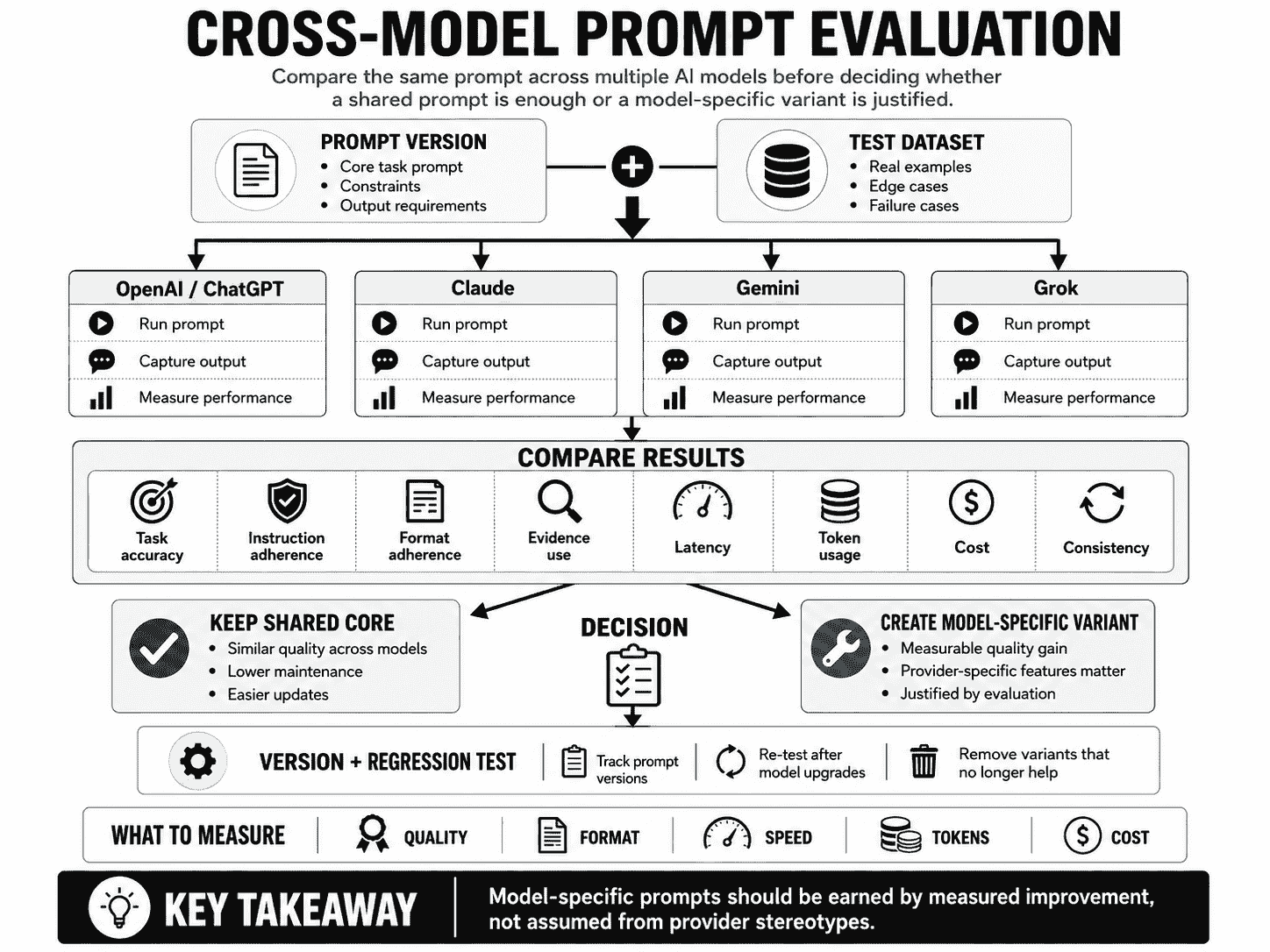
How to Evaluate Prompts Across Models
Cross-model prompting should be evaluated with the same test set.
PROMPT VERSION
      ↓
TEST DATASET
      ↓
┌───────────────┬─────────────┬─────────────┬───────────┐
│ OpenAI       │ Claude      │ Gemini      │ Grok      │
└───────────────┴─────────────┴─────────────┴───────────┘
      ↓
COMPARE
      ↓
KEEP CORE
or
CREATE MODEL VARIANT
1. Use the Same Task Dataset
Do not compare one easy example in one model with a hard example in another.
2. Define Task-Specific Quality Metrics
Examples:
- classification accuracy,
- extraction precision and recall,
- grounding accuracy,
- rubric score,
- human preference,
- or business success rate.
3. Measure Instruction Adherence
Does the model:
- respect constraints,
- use the required source material,
- avoid unsupported claims,
- and follow the expected output behavior?
4. Measure Format Reliability
Especially when software consumes the response.
5. Measure Latency
A slightly better answer may not justify much slower execution for an interactive workflow.
6. Measure Token Usage and Cost
Prompt variants with long examples or repeated context can change economics significantly.
7. Track Variance
Run repeated or broad test cases where nondeterminism matters.
8. Test Boundary Cases
The model that wins on easy examples may lose on:
- ambiguous inputs,
- missing evidence,
- long context,
- conflicting sources,
- or complex tool workflows.
9. Test Provider-Specific Features Separately
If one workflow uses structured outputs or tools, compare equivalent capabilities rather than raw text generation only.
10. Re-Evaluate After Model Upgrades
A model migration can change which prompt variant is best.
Universal Prompt or Model-Specific Variant?
Use One Universal Prompt When
- the task is simple,
- performance is similar across models,
- provider-specific features are minimal,
- maintenance simplicity matters,
- and the evaluation gap is not meaningful.
Examples:
- simple summarization,
- basic rewriting,
- short classification with obvious labels,
- or straightforward extraction.
Use Model-Specific Variants When
- the workflow is high value,
- evaluation shows a meaningful quality gap,
- the task uses provider-specific tools,
- structured-output behavior differs materially,
- long-context performance is sensitive to prompt layout,
- latency or token cost differs significantly,
- or one model needs different examples or constraints.
Maintenance Cost Matters
Four variants mean:
- four prompts to update,
- four sets of regressions to understand,
- four model migrations to monitor,
- and more chances for semantic drift.
Create a variant only when it earns its maintenance cost.
Cross-Model Prompt Versioning
Once you maintain provider-specific variants, version them together.
Example:
classify-support/
  core-v4
  openai-v4
  claude-v4
  gemini-v4
  grok-v4
or:
corePrompt.ts
adapters/
  openai.ts
  claude.ts
  gemini.ts
  grok.ts
Track the Relationship to the Core
If the business rule changes from:
Billing includes subscription changes.to:
Subscription plan changes are now Account Management.every adapter needs the updated semantics.
Keep Model-Specific Changes Small
A useful adapter should ideally contain only the differences.
That reduces semantic drift.
Version With Evaluation Results
For each deployed version, record:
- model tested,
- prompt version,
- dataset version,
- quality metrics,
- latency,
- cost,
- and known failure cases.
Cross-Model Prompt Examples
These examples focus on portable task semantics. The exact provider wrapper can then be adapted for the target model.
Example 1: Summarization
TASK
Summarize the document for {audience}.

FOCUS
{focus}

RULES
- Preserve important numbers and dates.
- Do not add facts not present in the source.

OUTPUT
- 5 key points
- 1 short conclusion
This usually needs little provider-specific adaptation.
Example 2: Classification
TASK
Classify the support message into one category.

LABELS
Billing
Technical
Feature Request

RULES
{classification_rules}

MESSAGE
{message}

OUTPUT
Return one label and a short justification.
If accuracy differs by model, adapt the few-shot examples before rewriting the whole task.
Example 3: Data Extraction
TASK
Extract:
- company
- plan
- renewal date
- currency
- amount

SOURCE
{source_text}

MISSING DATA
Return null or the defined missing-value state instead of guessing.
For production parsing, pair the task with the provider's structured-output mechanism.
Example 4: Research Synthesis
QUESTION
{research_question}

SOURCES
{sources}

RULES
- Distinguish sourced findings from inference.
- Identify conflicting evidence.
- Preserve uncertainty.

OUTPUT
Findings
Conflicts
Open Questions
Conclusion
Example 5: Product Comparison
OPTIONS
{options}

USER GOAL
{goal}

CONSTRAINTS
{constraints}

CRITERIA
{criteria}

OUTPUT
- winner
- criteria-by-criteria comparison
- tradeoffs
- confidence
Example 6: SEO Content Brief
TOPIC
{topic}

SEARCH INTENT
{search_intent}

AUDIENCE
{audience}

REQUIREMENTS
- primary angle
- important subtopics
- likely questions
- internal-link opportunities
- content gaps to avoid
Example 7: Customer Support Reply
USER MESSAGE
{message}

ACCOUNT STATE
{account_state}

RELEVANT POLICY
{policy}

TASK
Draft a helpful reply that follows the current account state and policy.

DO NOT
Invent actions that have not been completed.
Example 8: Code Review
REVIEW THE DIFF FOR
- correctness
- authorization
- data exposure
- performance regressions
- maintainability

CODE
{diff}

OUTPUT
For each issue:
- severity
- location
- problem
- recommendation
Provider-specific coding models may benefit from different scaffolding, but the review contract remains portable.
Example 9: RAG Answer
QUESTION
{question}

RETRIEVED EVIDENCE
{evidence}

RULES
- Answer from the evidence.
- Cite source IDs for important claims.
- If evidence is insufficient, say so.

OUTPUT
Answer
Sources
Uncertainty
Example 10: Tool Selection
AVAILABLE CAPABILITIES
{tools}

USER REQUEST
{request}

RULES
- Use a tool only when it is needed.
- Do not claim a tool succeeded before receiving its result.
- Follow application approval boundaries.
The business rules transfer; tool schemas and invocation syntax do not.
Example 11: Writing Style
TASK
Rewrite the text for {audience}.

STYLE
- clear
- direct
- natural
- no inflated marketing language

TEXT
{text}

LENGTH
{length}
Example 12: Translation
Translate from {source_language} to {target_language}.

PRESERVE
- meaning
- names
- numbers
- formatting where practical

STYLE
{translation_style}

TEXT
{text}
Example 13: Image Prompt Generation
Create an image-generation prompt.

SUBJECT
{subject}

COMPOSITION
{composition}

LIGHTING
{lighting}

STYLE
{style}

TECHNICAL DETAILS
{camera_or_render_details}

CONSTRAINTS
{constraints}
The generated prompt may later need adaptation for the target image model, which is a separate cross-model problem.
Example 14: Data Analysis
DATA
{data}

QUESTION
{question}

ANALYZE
- relevant patterns
- anomalies
- limitations

RULES
- Do not infer causation from correlation alone.
- Show calculations when they are needed to verify the result.
Example 15: Structured Classification
TASK
Classify the input using {taxonomy}.

INPUT
{input}

OUTPUT SEMANTICS
category
confidence
evidence

Use the provider-supported schema configuration for enforcement.
Example 16: Few-Shot Boundary Classification
TASK
Choose between Billing and Technical.

EXAMPLE A
Input:
"My card was declined when I upgraded."
Output:
Billing

EXAMPLE B
Input:
"The upgrade page crashes before payment."
Output:
Technical

NEW INPUT
{message}
Keep the examples portable, then test whether each model actually benefits from them.
Example 17: Long-Context Analysis
TASK
Analyze the supplied documents for {question}.

DOCUMENT SET
{documents}

PRIORITIES
- use the most relevant sections
- prefer current versions
- identify conflicts
- cite document IDs

OUTPUT
Findings
Evidence
Conflicts
Uncertainty
Example 18: Agent Task
GOAL
{goal}

CURRENT STATE
{state}

AVAILABLE TOOLS
{tools}

ALLOWED ACTIONS
{allowed_actions}

REQUIRES APPROVAL
{approval_required_actions}

COMPLETION CRITERIA
{completion_criteria}
For agentic workflows, provider-specific tool and reasoning behavior usually requires more adaptation than a simple text task.
Common Cross-Model Prompting Mistakes
1. Assuming All Models Interpret the Same Prompt Identically
A shared semantic core is useful, but behavior should still be tested per model.
2. Writing Four Completely Different Prompts Before Establishing a Baseline
Start with one strong prompt so you know whether model-specific changes are actually necessary.
3. Optimizing From Provider Stereotypes
Use official guidance and evaluation, not folklore such as “Model X always likes long prompts.”
4. Carrying Old Prompt Hacks Into New Reasoning Models
New model generations may perform better with simpler instructions.
5. Adding “Think Step by Step” Everywhere
Define the process requirements and useful evidence instead of mechanically requesting a visible reasoning transcript.
6. Assuming Claude Requires XML
Anthropic recommends XML as a useful structuring technique for complex prompts; it is not mandatory for every Claude task.
7. Over-Engineering Gemini Prompts
Current Gemini 3.x guidance explicitly favors concise and precise instructions.
8. Inventing Grok-Specific Prompt Rules Without Documentation or Tests
xAI publishes strong API documentation but less prescriptive general prompting guidance, so rely heavily on evaluation.
9. Using the Same Few-Shot Count Everywhere
Example count and utility are model- and task-dependent.
10. Using the Same Example Set Without Testing
The examples may be portable, but their effect may differ across models.
11. Mixing Provider Message Syntax Into the Core Business Prompt
Keep stable semantics separate from API adapters where practical.
12. Treating System-Prompt Hierarchy as Universal
Provider instruction layers differ.
13. Assuming Structured Outputs Work the Same Everywhere
Schema capabilities and API configuration differ by provider.
14. Using Prompt Formatting Instead of Native Schema Enforcement
If software requires a strict contract, use the provider's structured-output feature where available.
15. Ignoring Default Verbosity
Specify response length when it matters.
16. Using Long Persona Descriptions Without a Functional Purpose
A role should define a useful perspective, responsibility, or decision lens.
17. Ignoring Long-Context Placement
Large document workflows may need provider-specific context organization and testing.
18. Assuming Bigger Context Means Better Answers
Irrelevant or stale context can still degrade the task.
19. Comparing Models on Different Inputs
Use the same evaluation dataset for meaningful comparison.
20. Evaluating Only One Example
A single result says little about reliability.
21. Measuring Quality but Ignoring Latency
The best model for an offline research task may not be the best for an interactive UI.
22. Ignoring Token Cost
Model-specific prompt variants can change input and output token usage significantly.
23. Ignoring Format Adherence
Two models can have similar answer quality but different reliability for downstream parsing.
24. No Boundary-Case Tests
Easy examples hide model differences.
25. No Model-Migration Regression Tests
A new model generation can change which prompt structure works best.
26. Maintaining Variants That No Longer Provide a Benefit
Delete unnecessary adapters when the core prompt performs equally well.
27. Allowing Provider Variants to Drift Semantically
The OpenAI, Claude, Gemini, and Grok versions should still implement the same business task.
28. Hard-Coding Temporary Model Names Into Core Prompt Logic
Keep model routing and model IDs outside the reusable task semantics when practical.
29. Treating Tool Availability as a Prompting Detail Only
Tool execution, permissions, confirmation, and error handling are application architecture concerns.
30. Choosing a “Winner” Without Defining the Task
There is no universally best prompting model. The relevant question is which model and prompt combination performs best for your workflow, constraints, and evaluation criteria.
Using PrompTessor to Prepare Prompts for Different AI Models
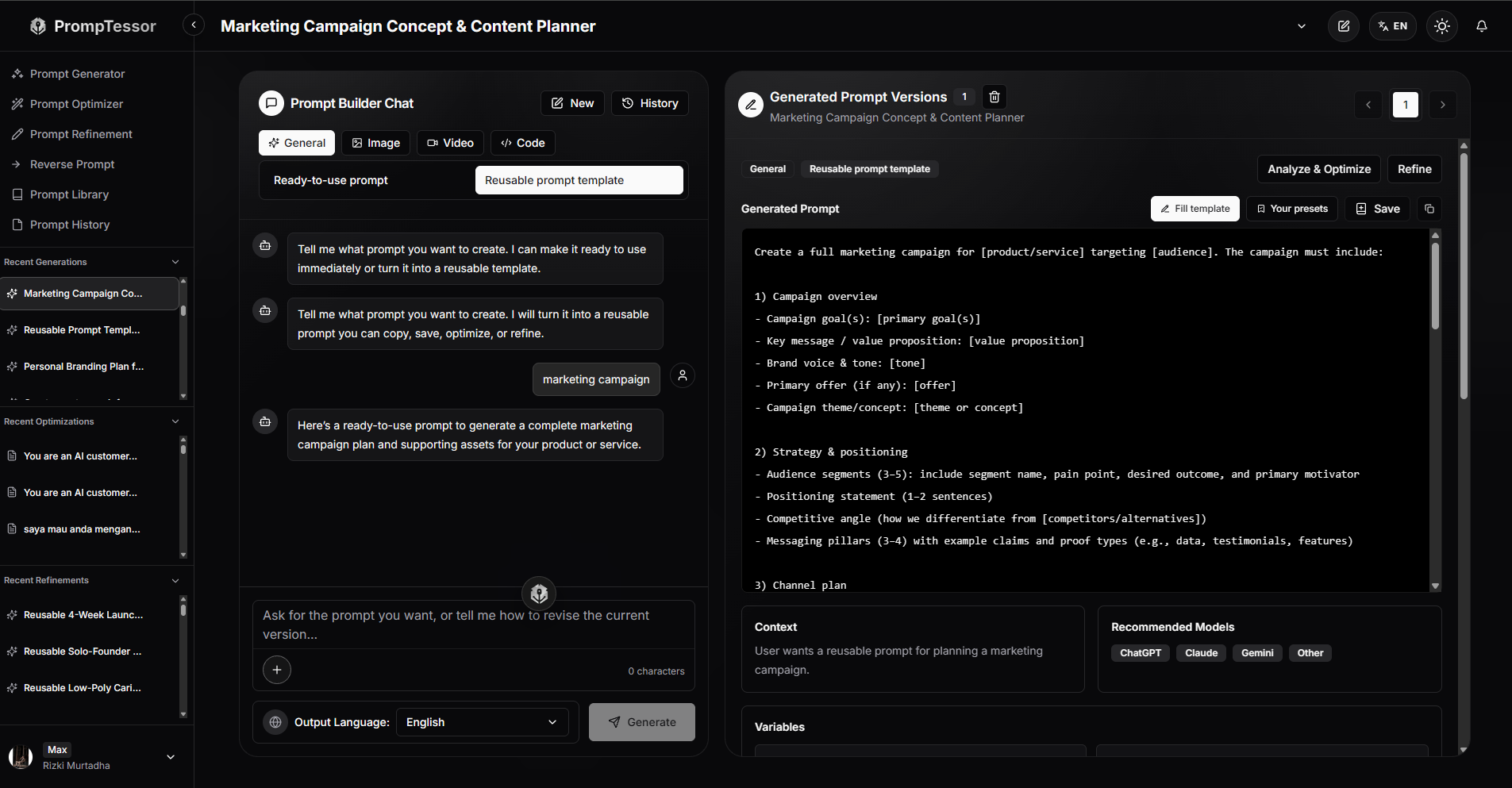
PrompTessor can help at the prompt-design layer by generating, analyzing, optimizing, and refining the underlying prompt before you use it with the AI model of your choice.
PrompTessor does not need to act as a model selector, router, or cross-model benchmarking system for this workflow.
Instead, the goal is to create a clearer core prompt whose task, context, constraints, structure, examples, and output requirements are explicit enough to be reused and tested across different models.
For example, a rough request such as:
Compare these AI tools and tell me which one is best.can be turned into a more portable prompt:
TASK
Compare the supplied AI tools for {target_user}.

GOAL
{decision_goal}

CRITERIA
- {criterion_1}
- {criterion_2}
- {criterion_3}
- {criterion_4}

CONSTRAINTS
{constraints}

EVIDENCE
{source_material}

RULES
- Use supplied evidence.
- Identify missing information.
- Explain meaningful tradeoffs.
- Do not choose a winner when evidence is insufficient.

OUTPUT
Return:
- winner
- criterion-by-criterion comparison
- tradeoffs
- confidence
- unresolved uncertainty
That clearer prompt can then be used as the shared baseline when you want to try the same task with ChatGPT, Claude, Gemini, Grok, or another AI model.
For generated prompts, PrompTessor can also display a Recommended Models section. This is a recommendation layer, not a model-selection or cross-model evaluation workflow. The user or application still decides which model to use and whether to compare the results across multiple models.
ROUGH IDEA
    ↓
PrompTessor
Generate / Analyze / Optimize / Refine
    ↓
CLEARER CORE PROMPT
    +
RECOMMENDED MODELS
    ↓
USER OR APPLICATION CHOOSES A MODEL
    ↓
USE THE PROMPT
    ↓
EVALUATE THE RESULT
    ↓
ADAPT FOR A SPECIFIC MODEL IF NEEDED
This keeps responsibilities clear:
- PrompTessor: helps generate and improve the underlying prompt and can surface recommended models for generated prompts.
- User or application: chooses the actual AI model, uses the prompt, and decides whether multiple models should be compared.
- Provider or model: generates the response using its own message roles, reasoning behavior, tools, context handling, and structured-output capabilities.
- Evaluation: determines whether the shared prompt works well enough or whether a model-specific variant provides a measurable improvement.
If you are integrating multiple model providers in an application, provider-specific adapters can still map the same core task to different message roles, tool configurations, or structured-output APIs. That routing and execution logic remains part of the application architecture rather than the PrompTessor model-recommendation feature.
Cross-Model Prompting Checklist
- The task has a clear provider-independent definition.
- The business rules are separated from provider API syntax.
- The expected output semantics are stable across models.
- Relevant context is supplied consistently.
- Missing-information behavior is explicit.
- Response length is defined when important.
- Examples are included only when they improve the target behavior.
- Few-shot example count is evaluated per model.
- Instruction and user-data boundaries are clear.
- System-level behavior is mapped to the provider's actual instruction interface.
- Reasoning prompts follow current provider/model guidance.
- Unnecessary chain-of-thought scaffolding is avoided.
- Claude XML structure is used only when it improves clarity.
- Gemini prompts are checked for unnecessary verbosity or over-engineering.
- Grok-specific changes are justified by documentation or evaluation.
- Structured-output configuration is provider-specific.
- Tool definitions and execution are handled through the target API.
- Permission and approval boundaries remain in application logic.
- Long-context workflows are tested per model.
- The same evaluation dataset is used across models.
- Task quality is measured.
- Instruction adherence is measured.
- Format adherence is measured.
- Latency is measured.
- Input and output tokens are measured.
- Cost is compared.
- Boundary cases are included.
- Prompt variants are versioned together.
- Provider-specific adapters preserve the same core semantics.
- Model migrations trigger regression tests.
- Model-specific variants are removed when they no longer justify their maintenance cost.
Official Resources
- OpenAI API: Prompt Engineering
- OpenAI API: Reasoning Best Practices
- OpenAI API: Prompt Guidance
- OpenAI API: Latest Model Guidance
- Claude Platform: Prompting Best Practices
- Claude Platform: Prompt Engineering Overview
- Google Gemini API: Prompt Design Strategies
- Google Gemini API: Gemini 3 Developer Guide
- Google Gemini API: Long Context
- xAI Docs: Generate Text
- xAI Docs: Structured Outputs
- xAI Docs: Tools Overview
- xAI Docs: Function Calling
FAQ About ChatGPT, Claude, Gemini, and Grok Prompting
Do I need a different prompt for ChatGPT, Claude, Gemini, and Grok?
Not always. Start with one strong core prompt and create model-specific variants only when provider interfaces or evaluation results show a meaningful benefit.
What prompting principles work across all four models?
Clear tasks, relevant context, explicit constraints, useful examples, defined outputs, uncertainty handling, and evaluation are broadly useful across major model families.
Why can the same prompt produce different results across models?
Models differ in instruction following, reasoning behavior, default verbosity, message architecture, tools, context handling, structured outputs, and model-specific training.
Is ChatGPT prompting the same as OpenAI API prompting?
No. They share underlying prompt principles, but the OpenAI API exposes developer-controlled instruction layers, tools, reasoning settings, and response formats that do not map one-to-one to the ChatGPT user interface.
How should I prompt OpenAI reasoning models?
OpenAI's current guidance favors simple, direct, outcome-focused prompts and recommends avoiding unnecessary chain-of-thought prompting.
Should I use “think step by step” with ChatGPT or OpenAI reasoning models?
Not as a default. Define the task, evidence requirements, constraints, and useful output artifacts rather than mechanically requesting a visible reasoning transcript.
What is special about Claude prompting?
Anthropic's current guidance strongly emphasizes clarity, relevant examples, structured prompts, XML-style separation for complex prompts, and model-appropriate thinking and agentic guidance.
Does Claude require XML prompts?
No. XML is one useful structuring technique recommended by Anthropic for separating complex prompt components. Simple prompts can work well without XML.
How should I prompt Gemini 3?
Google's current Gemini 3.x guidance recommends concise, direct, precise instructions and warns that verbose or overly complex prompting patterns from older models can lead to over-analysis.
Should Gemini prompts always be short?
No. The prompt should contain all necessary task information. The goal is to remove unnecessary scaffolding, not necessary context or requirements.
How should I prompt Grok?
Start with clear general prompt engineering, use xAI's documented system/user, reasoning, tool, and structured-output interfaces, then optimize based on evaluation because xAI currently publishes less prescriptive general prompt-writing guidance.
Does Grok support system prompts?
xAI documents system-level instructions and user prompts in its supported chat-style interfaces and SDK patterns.
Does Grok support structured outputs?
Yes. xAI currently documents structured outputs with response formats including JSON Schema on supported models and schema features.
Do OpenAI, Claude, Gemini, and Grok all support tools?
Yes, current provider APIs support tool-oriented workflows, but tool schemas, built-in tools, execution behavior, and configuration differ.
Can I use one JSON Schema across all providers?
The business semantics can often be shared, but supported schema subsets and API syntax differ. Validate the schema against each provider's current documentation.
Should I use the same few-shot examples across models?
You can start with the same representative examples, but test whether each model benefits from the same example count, ordering, and formatting.
Which model is best for few-shot prompting?
There is no universal winner. The answer depends on the task, examples, target model, context budget, latency, and evaluation criteria.
Do roles such as “You are an expert” improve prompts?
Only when the role adds a meaningful perspective, responsibility, domain lens, or output behavior. Generic expert labels often add little.
Is Markdown better than XML for prompts?
Not universally. Markdown is a strong general-purpose structure, XML-style tags can be useful for complex component separation, and plain text can be best for simple tasks.
What is prompt portability?
Prompt portability is the degree to which a prompt preserves useful task behavior when moved between models or providers.
How do I measure prompt portability?
Compare the same prompt and test dataset across models using task accuracy, instruction adherence, format reliability, evidence use, consistency, latency, token usage, and cost.
When should I use one universal prompt?
Use one prompt when the task is simple, quality is similar across models, provider-specific features are minimal, and model-specific variants do not justify their maintenance cost.
When should I create model-specific prompt variants?
Create variants when evaluation shows meaningful gains or when the workflow depends on provider-specific tools, reasoning behavior, long-context organization, or structured-output configuration.
How do cross-model prompt templates work?
They keep task semantics, variables, business rules, and output meaning in a shared core, then use small provider-specific adapters for message roles, structure, tools, reasoning settings, or schema configuration.
Should model names be hard-coded into prompt templates?
Usually not in the core task contract. Model routing and provider IDs are better managed in application configuration unless the prompt itself genuinely needs to reference the model.
How do system prompts differ across providers?
The general concept of stable high-level behavior transfers, but exact message roles, hierarchy, and API terminology differ across OpenAI, Claude, Gemini, and xAI.
Does long context reduce the need for prompt engineering?
No. A larger context window increases capacity but does not decide which information is relevant, current, authoritative, or useful for the task.
How often should I re-test cross-model prompts?
Re-test after meaningful prompt changes, model upgrades, provider migrations, tool changes, schema changes, or when production metrics indicate a regression.
Should I choose a model based only on prompt quality?
No. Compare quality together with latency, cost, context needs, tools, structured-output reliability, multimodal requirements, and operational constraints.
How can PrompTessor help with cross-model prompting?
PrompTessor can help generate, analyze, optimize, and refine the underlying prompt before you evaluate that prompt across ChatGPT, Claude, Gemini, Grok, or other target models.
Conclusion
The best cross-model prompting strategy is not to memorize four separate collections of prompt tricks.
It is to separate what is stable from what is model-specific.
STABLE

Task
Context requirements
Business rules
Examples
Output semantics
Uncertainty behavior

        ↓

ADAPT WHEN NEEDED

Message roles
Formatting
Verbosity
Reasoning guidance
Tool configuration
Structured outputs
Long-context organization

        ↓

EVALUATE
That approach avoids two opposite mistakes.
The first is assuming every model behaves identically.
The second is over-engineering a separate prompt for every model before you know whether the differences matter.
Current provider guidance reinforces this middle path.
OpenAI's modern reasoning guidance favors lean, direct, outcome-focused prompting rather than unnecessary reasoning scaffolding.
Anthropic provides detailed Claude-specific techniques around clarity, examples, XML structure, and agentic workflows.
Google's Gemini 3.x guidance explicitly warns against verbose, over-engineered prompting and recommends concise, precise instructions.
xAI documents a capable Grok API surface for reasoning, structured outputs, tools, and stateful interactions, but model-specific prompt optimization should be established through testing rather than unsupported folklore.
So start with a portable task contract.
Make the goal clear.
Supply the right context.
Define important constraints.
Use examples when they teach something useful.
Specify the output.
Then run the same prompt against the models you actually plan to deploy.
If the shared prompt performs well everywhere, keep it.
If one model shows a consistent failure mode, adapt that failure mode.
If a provider-specific feature requires a different implementation, isolate it in an adapter.
And if a model-specific variant no longer provides a measurable advantage, remove it.
A useful final mental model is:
CORE PROMPT
Defines the task

CONTEXT ENGINEERING
Supplies the right information

FEW-SHOT EXAMPLES
Demonstrate behavior when useful

SYSTEM INSTRUCTIONS
Define broader application behavior

STRUCTURED OUTPUTS
Define machine-readable response shape

MODEL ADAPTER
Maps the core to provider-specific interfaces

EVALUATION
Decides whether the prompt is actually good
Prompt portability is not about forcing every model to behave identically.
It is about preserving the same task meaning while adapting only the parts that genuinely need to change.
That is a more maintainable way to prompt ChatGPT, Claude, Gemini, Grok, and whatever model comes next.
Build better prompts in one workspace
Generate prompts from ideas, analyze and optimize quality, refine with feedback, reverse-engineer content, and save reusable prompts in your Prompt Library.
Try PrompTessor Free