AI Prompt Templates You Can Reuse for ChatGPT Claude Gemini and Other AI Tools
AI tools can help with writing, coding, marketing, research, brainstorming, planning, design, and everyday productivity.
But getting useful results from AI still depends on one important thing:
The prompt.
A weak prompt can produce a generic answer. A vague prompt can make the AI guess what you want. A prompt without context can create an output that looks polished but does not match your goal.
That is why reusable AI prompt templates are useful.
An AI prompt template is a reusable prompt structure that you can adapt for different tasks, topics, tools, audiences, and workflows. Instead of writing a new prompt from scratch every time, you can start with a proven structure and customize the variables.
For example, instead of repeatedly asking AI to “write a blog post,” you can use a reusable blog post template with fields for topic, audience, tone, search intent, outline, examples, and call to action.
This makes prompting faster, clearer, and more consistent.
In this guide, you will learn what AI prompt templates are, how they are different from prompt examples, how to create reusable templates, and how to use them across ChatGPT, Claude, Gemini, and other AI tools.
Quick Answer
AI prompt templates are reusable prompt structures that help users create more consistent AI outputs. A good prompt template usually includes a task, context, audience, tone, output format, constraints, examples, and reusable variables. Prompt templates can be used across ChatGPT, Claude, Gemini, image tools, coding assistants, and other AI workflows.
Key Takeaways
- AI prompt templates help users avoid starting from scratch every time they use AI.
- A prompt template is different from a prompt example because it is designed to be reused with variables.
- Good prompt templates include clear tasks, useful context, output format, constraints, and placeholders.
- Reusable prompt templates can support writing, marketing, coding, research, product work, and visual content workflows.
- PrompTessor helps users generate, optimize, refine, save, and reuse prompt templates inside a broader AI prompt workspace.
Table of Contents
- What Are AI Prompt Templates?
- Prompt Templates vs Prompt Examples
- Why Reusable Prompt Templates Matter
- What Makes a Good AI Prompt Template?
- AI Prompt Template Structure
- AI Prompt Templates for Content Creation
- AI Prompt Templates for Marketing
- AI Prompt Templates for Coding
- AI Prompt Templates for Research
- AI Prompt Templates for Image and Video Prompts
- How to Customize AI Prompt Templates
- How to Optimize Weak Prompt Templates
- How to Save and Reuse Prompt Templates
- Common Mistakes When Using Prompt Templates
- How PrompTessor Helps With AI Prompt Templates
- FAQ About AI Prompt Templates
- Build Better AI Workflows With Reusable Prompt Templates
What Are AI Prompt Templates?
AI prompt templates are reusable prompt structures that help users get more consistent results from AI tools.
A normal prompt is usually written for one task. A prompt template is designed to be reused across many similar tasks.
For example, this is a simple prompt:
Write a product description.
This may work once, but it does not provide much direction.
A reusable prompt template might look like this:
You are a professional ecommerce copywriter. Write a product description for {product_name}. The target audience is {target_audience}. Highlight {main_benefits}. Use a {tone} tone. Keep the description under {word_count} words. Include a short headline, benefit-focused description, and one call to action.
The second prompt is stronger because it can be reused. You only need to replace the variables such as product name, audience, benefits, tone, and word count.
This is what makes prompt templates useful. They turn repeatable AI tasks into structured workflows.
Prompt Templates vs Prompt Examples
Prompt templates and prompt examples are related, but they are not the same.
A prompt example shows one specific prompt for one specific situation.
A prompt template gives you a reusable structure that can be adapted for many situations.
| Type | Purpose | Example |
|---|---|---|
| Prompt Example | Shows one complete prompt for one use case | Write a LinkedIn post about AI productivity for founders |
| Prompt Template | Creates a reusable structure with variables | Write a {platform} post about {topic} for {audience} using a {tone} tone |
Prompt examples are useful for inspiration. Prompt templates are useful for repeated work.
If you only need one result, a prompt example may be enough. If you need to repeat the same kind of task across different topics, clients, products, campaigns, or projects, a prompt template is usually better.
For more prompt examples, you can read 10 AI Prompt Examples and Techniques for Better AI Outputs.
Why Reusable Prompt Templates Matter
AI workflows become more valuable when they are repeatable.
If you create a strong prompt once and never save it, you may need to recreate the same structure again later. This wastes time and creates inconsistent results.
Reusable prompt templates help solve that problem.
They can help users:
- Save time on repeated AI tasks
- Reduce prompt writing from scratch
- Keep outputs more consistent
- Standardize workflows across projects
- Improve prompt quality over time
- Reuse successful prompt patterns
- Build a personal or team prompt library
For example, a marketer may use one reusable template for campaign planning, another for ad copy, another for audience research, and another for launch emails.
A developer may use templates for code review, debugging, documentation, test planning, and architecture review.
A writer may use templates for blog outlines, article drafts, newsletters, editing, and repurposing content.
When prompt templates are organized properly, they become reusable assets instead of one-time instructions.
What Makes a Good AI Prompt Template?
A good AI prompt template should be clear, flexible, and reusable.
It should not be so generic that it produces weak outputs, but it should not be so specific that it can only be used once.
Strong prompt templates usually include these elements:
1. A Clear Role
A role tells the AI what perspective to use.
Examples:
- You are a senior SEO strategist
- You are a SaaS product marketer
- You are a technical documentation writer
- You are a code reviewer
- You are a research assistant
2. A Specific Task
The template should clearly explain what the AI should do.
Examples:
- Create a blog outline
- Review this code
- Summarize this research paper
- Generate landing page copy
- Create an image prompt
3. Useful Context
Context helps the AI understand the situation behind the task.
This can include product details, audience, goal, platform, use case, background information, or source material.
4. Variables
Variables make the prompt reusable.
Examples:
- {topic}
- {audience}
- {product_name}
- {tone}
- {platform}
- {word_count}
- {output_format}
5. Output Format
The template should tell the AI how to structure the answer.
Examples:
- Return the answer as a table
- Use bullet points
- Create a step-by-step plan
- Return valid JSON
- Use Markdown headings
6. Constraints
Constraints help control quality.
Examples:
- Keep the answer under 500 words
- Use simple language
- Avoid hype words
- Do not invent facts
- Include examples
- Focus on practical advice
7. Success Criteria
Success criteria explain what a useful result should look like.
For example:
The final output should be specific, practical, easy to execute, and suitable for a small SaaS team.
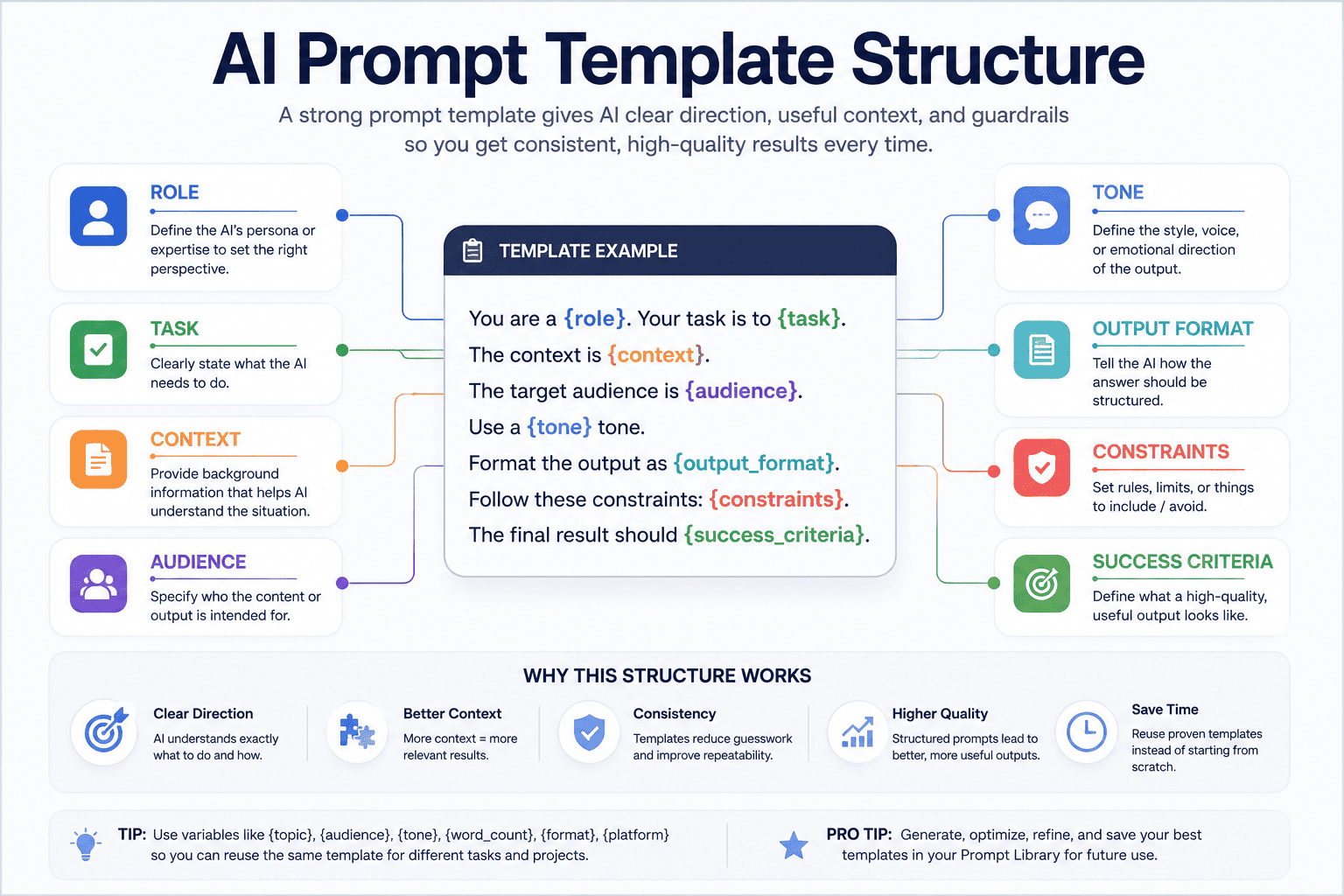
AI Prompt Template Structure
Here is a simple reusable structure you can use for many AI prompt templates:
You are a {role}. Your task is to {task}. The target audience is {audience}. The context is {context}. Use a {tone} tone. Format the output as {output_format}. Follow these constraints: {constraints}. The final result should {success_criteria}.
This structure can be adapted for writing, marketing, coding, research, design, planning, and analysis.
For example, a blog writing template could look like this:
You are a senior SEO content strategist. Create a blog outline for {keyword}. The target audience is {audience}. The search intent is {search_intent}. Include H2 sections, FAQ ideas, internal link suggestions, and practical examples. Use a clear and helpful tone. Avoid generic advice. The final outline should be useful for writing a complete article.
A coding review template could look like this:
You are a senior software engineer. Review the following {language} code for readability, performance, security, maintainability, and edge cases. Return the feedback in a table with issue, severity, explanation, and suggested fix. Do not rewrite the entire code unless requested.
A visual content template could look like this:
Create a detailed image prompt for {subject}. Use a {style} style, {lighting} lighting, {camera_angle} camera angle, and {mood} mood. Include details about composition, background, color palette, texture, and atmosphere. Avoid {negative_constraints}.
The best templates are specific enough to guide the AI but flexible enough to reuse.
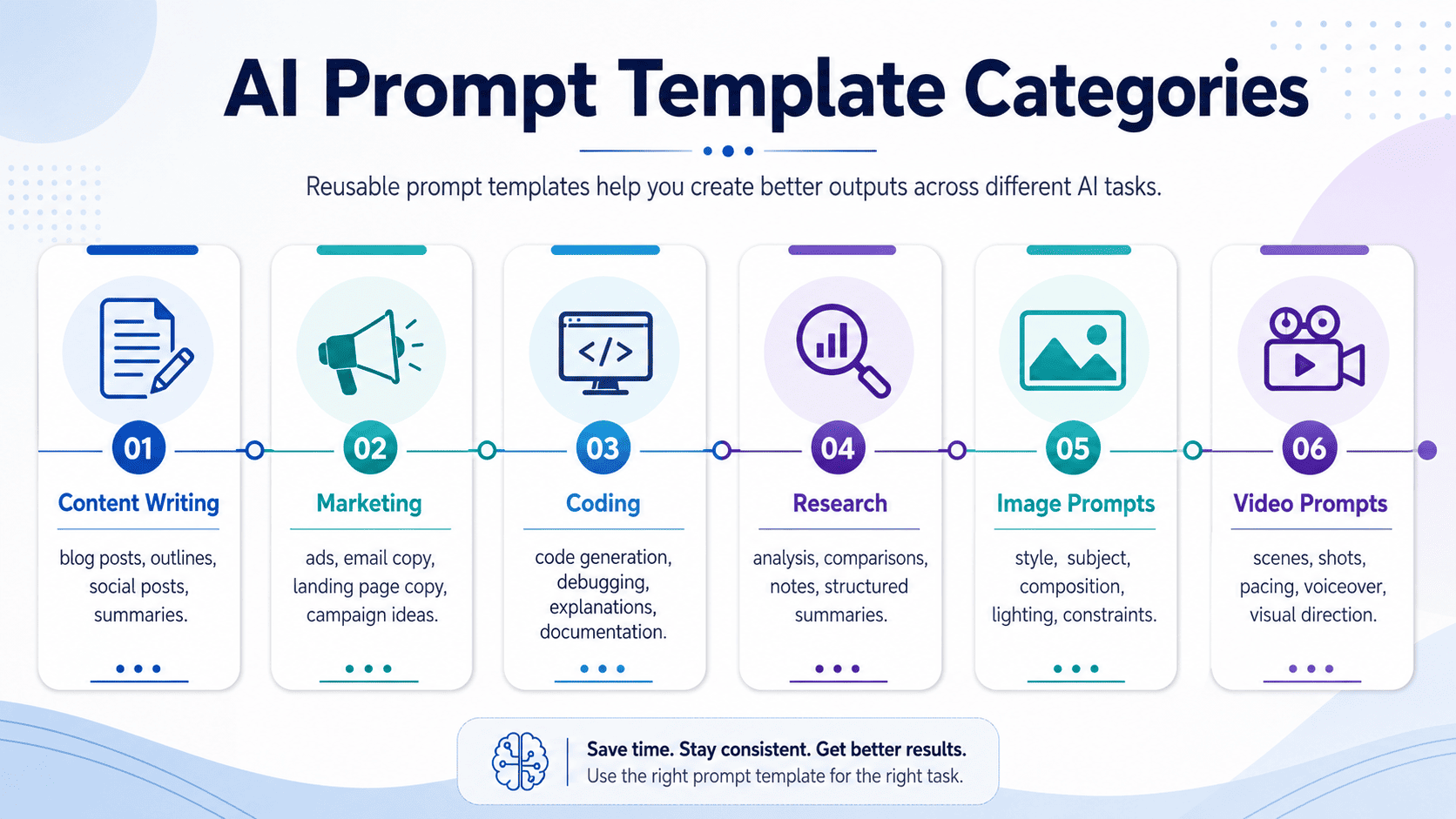
AI Prompt Templates for Content Creation
Content creators can use AI prompt templates for blog posts, newsletters, scripts, captions, outlines, repurposing, editing, and content briefs.
Blog Outline Template
You are an SEO content strategist. Create a detailed blog outline for the keyword {keyword}. The target audience is {audience}. The search intent is {search_intent}. Include a strong introduction angle, H2 sections, H3 subpoints, FAQ ideas, internal link suggestions, and examples. Use a practical tone and avoid generic advice.
Social Media Post Template
You are a social media strategist. Write a {platform} post about {topic} for {audience}. Start with a strong hook, explain the idea clearly, include practical points, and end with a memorable takeaway. Use a {tone} tone. Keep the post concise and easy to scan.
Newsletter Template
You are a newsletter writer. Create a newsletter issue about {topic} for {audience}. Include a short intro, 3 main insights, practical examples, recommended action steps, and a closing note. Use a helpful and conversational tone.
These templates help creators move faster without losing structure.
AI Prompt Templates for Marketing
Marketers can use prompt templates for campaign planning, landing pages, email sequences, ad copy, positioning, audience research, and product messaging.
Campaign Planning Template
You are a senior marketing strategist. Create a campaign plan for {product_name}. The target audience is {target_audience}. The campaign goal is {campaign_goal}. Include positioning, key message, content pillars, channel strategy, timeline, KPI targets, and execution checklist. Use a practical tone and format the output as a campaign playbook.
Landing Page Copy Template
You are a SaaS landing page copywriter. Write landing page copy for {product_name}, a product that helps {target_audience} achieve {main_benefit}. Include hero headline, subheadline, benefit bullets, feature sections, social proof ideas, FAQ, and final CTA. Use clear conversion-focused language and avoid exaggerated claims.
Email Sequence Template
You are an email marketing strategist. Create a {number_of_emails}-email sequence for {campaign_goal}. The audience is {audience}. Include subject lines, preview text, email body, CTA, and the purpose of each email. Use a {tone} tone and keep the emails concise.
Marketing templates are especially useful because teams often repeat similar workflows across campaigns, launches, products, and audiences.
AI Prompt Templates for Coding
Developers can use AI prompt templates to make coding assistant workflows more consistent.
Code Review Template
You are a senior software engineer. Review this {language} code for readability, performance, security, maintainability, and edge cases. Return feedback in a table with issue, severity, explanation, and suggested fix. Do not rewrite the full code unless asked.
Debugging Template
You are an expert debugging assistant. Help me debug this issue in {framework_or_language}. Here is the error: {error_message}. Here is the relevant code: {code}. Explain the likely cause, suggest possible fixes, and provide the safest recommended solution first.
Documentation Template
You are a technical documentation writer. Create clear documentation for {feature_or_function}. Explain what it does, when to use it, parameters, return values, examples, edge cases, and common mistakes. Use simple technical language and format the output in Markdown.
Reusable coding templates help developers ask more precise questions and reduce back-and-forth with AI tools.
AI Prompt Templates for Research
Students, researchers, analysts, and professionals can use prompt templates for summaries, comparisons, literature reviews, learning plans, and structured analysis.
Research Summary Template
You are a research assistant. Summarize the following source about {topic}. Include the main argument, key findings, supporting evidence, limitations, practical implications, and follow-up questions. Use clear language for {audience}.
Comparison Template
You are an analyst. Compare {option_a} and {option_b} based on {criteria}. Return the answer in a table with strengths, weaknesses, trade-offs, best use cases, and final recommendation. Explain your reasoning clearly.
Learning Plan Template
You are a learning coach. Create a {time_period} learning plan for {topic}. The learner is {skill_level}. Include weekly goals, recommended resources, practice tasks, checkpoints, and common mistakes to avoid.
Research templates help make AI outputs more structured and easier to evaluate.
AI Prompt Templates for Image and Video Prompts
AI prompt templates are not only useful for text.
They can also help with image generation, video generation, visual concepts, product photography, thumbnails, storyboards, and creative direction.
Image Prompt Template
Create a {style} image of {subject} in {environment}. Use {lighting} lighting, {camera_angle} composition, {color_palette} colors, and {mood} atmosphere. Include details about texture, background, depth, and visual focus. Avoid {negative_constraints}.
Video Prompt Template
Create a {duration}-second video of {subject} performing {action} in {environment}. Use {camera_movement}, {shot_type}, {lighting}, and {visual_style}. Include motion details, pacing, scene atmosphere, and any constraints. The video should feel {mood}.
Storyboard Template
You are a storyboard director. Create a storyboard for {video_concept}. Include scene number, visual description, camera angle, movement, dialogue or text overlay, duration, and transition. Keep the structure clear and production-friendly.
For visual workflows, reusable templates can help creators maintain style consistency across multiple images, scenes, or campaigns.
How to Customize AI Prompt Templates
A prompt template is only useful if you customize it properly.
Do not copy a template and use it without replacing the important variables.
Before using a template, adjust these parts:
- Topic: What is the specific subject?
- Audience: Who is the output for?
- Goal: What should the output achieve?
- Tone: Should it be professional, casual, technical, persuasive, or educational?
- Format: Should the output be a table, checklist, JSON, outline, draft, or plan?
- Constraints: What should the AI include, avoid, or limit?
- Model: Will the prompt be used in ChatGPT, Claude, Gemini, or another tool?
For ChatGPT, you may want clear step-by-step instructions and a specific output format.
For Claude, you may want more context and structured evaluation criteria for long-form analysis.
For Gemini, you may want to include visual, document, or multimodal context when relevant.
The same template can often work across different AI models, but small adjustments can improve the result.
How to Optimize Weak Prompt Templates
Not every prompt template is good.
A weak prompt template may be too broad, too vague, too long, or missing important details.
For example, this template is weak:
Write content about {topic}.
It is reusable, but it does not give enough direction.
A better version would be:
You are a content strategist. Create a {content_type} about {topic} for {audience}. The goal is {goal}. Use a {tone} tone. Include {required_sections}. Format the output as {output_format}. Avoid {things_to_avoid}.
To optimize a weak prompt template, check whether it includes:
- A clear role
- A specific task
- Useful context
- Reusable variables
- Output format
- Constraints
- Success criteria
For a deeper workflow, you can read What Is an AI Prompt Workspace? to understand how prompt generation, optimization, refinement, library, and history work together.
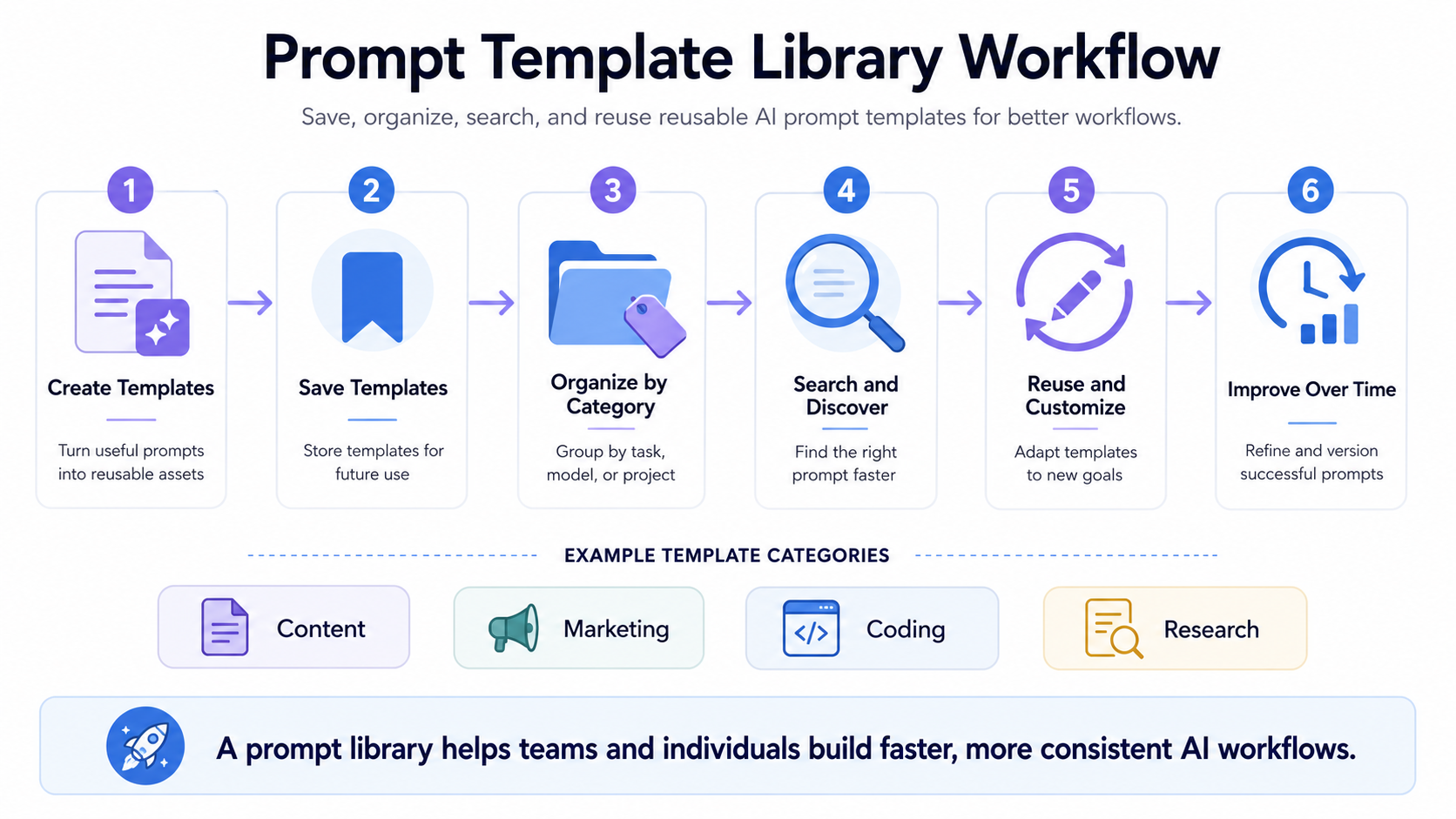
How to Save and Reuse Prompt Templates
A good prompt template should not be lost inside chat history, notes, screenshots, or documents.
Once a template works, save it in a structured place where you can find and reuse it later.
A good prompt template library should help you organize templates by:
- Category
- Use case
- Project
- AI model
- Visibility
- Workflow type
- Team or personal use
For example, you may create categories such as:
- Content Creation
- Marketing
- Coding
- Research
- Visual Prompts
- Business Strategy
- Customer Support
A prompt library helps turn templates into reusable knowledge assets.
PrompTessor includes a Prompt Library for saving, organizing, discovering, sharing, and reusing prompts across private, community, and official collections.
Common Mistakes When Using Prompt Templates
Prompt templates can improve AI workflows, but only when used properly.
1. Using Templates Without Customization
A template is not meant to be copied blindly.
You should replace the variables and adjust the prompt for your specific goal, audience, format, and tool.
2. Making Templates Too Generic
If a template is too broad, it may produce generic outputs.
For example, “Write about {topic}” is reusable, but it is not useful enough.
3. Adding Too Many Instructions
A long template is not always better.
If the prompt has too many instructions, the AI may lose focus. Keep the structure clear and purposeful.
4. Forgetting Output Format
Many weak templates fail because they do not define the output format.
If you want a table, checklist, JSON, outline, email draft, or content brief, say it clearly.
5. Not Saving Successful Templates
If a prompt template works well, save it.
Successful templates can become reusable assets for future workflows.
6. Never Updating Old Templates
AI tools, models, and workflows change.
Review your prompt templates regularly and improve them based on real results.
How PrompTessor Helps With AI Prompt Templates
PrompTessor helps users create better prompt workflows, including reusable AI prompt templates.
Instead of writing prompts from scratch every time, users can generate structured prompts from ideas, analyze prompt quality, optimize weak prompts, refine prompts with feedback, and save useful prompts in a Prompt Library.
PrompTessor can help with prompt templates in several ways:
- Generate prompt templates from rough ideas
- Analyze whether a prompt template is clear and reusable
- Optimize weak prompt templates into stronger versions
- Refine templates for tone, format, model, or workflow
- Reverse prompt existing content into reusable prompt structures
- Save useful templates in the Prompt Library
- Track prompt versions through prompt history
For example, you can start with a rough idea like:
Create a prompt template for launch campaigns.
PrompTessor can help turn that into a reusable campaign template with variables such as brand name, target audience, campaign goal, channels, offer, timeline, and KPIs.
Then you can optimize it, refine it, save it, and reuse it for future campaigns.
This is the difference between a one-time prompt and a reusable prompt workflow.
FAQ About AI Prompt Templates
What are AI prompt templates?
AI prompt templates are reusable prompt structures that help users create more consistent AI outputs. They usually include variables such as topic, audience, tone, format, context, constraints, and goals.
What is the difference between prompt templates and prompt examples?
A prompt example is a specific prompt for one use case. A prompt template is a reusable structure that can be adapted for different topics, audiences, tools, and workflows.
Can I use prompt templates in ChatGPT?
Yes. Prompt templates can be used in ChatGPT to create repeatable workflows for writing, brainstorming, summarizing, planning, coding, and analysis.
Can AI prompt templates work with Claude and Gemini?
Yes. Many prompt templates can work across Claude, Gemini, and other AI models. You may need to adjust formatting, context, or instructions depending on the model and task.
What should a good prompt template include?
A good prompt template should include a clear role, specific task, useful context, reusable variables, output format, constraints, and success criteria.
Why are reusable prompts useful?
Reusable prompts help users save time, improve output consistency, reduce repeated prompt writing, and build better AI workflows over time.
How do I organize AI prompt templates?
You can organize AI prompt templates by category, use case, project, AI model, workflow type, team, or visibility. A prompt library makes this easier by giving templates a structured place to live.
Can PrompTessor help create AI prompt templates?
Yes. PrompTessor can help users generate, analyze, optimize, refine, reverse-engineer, save, and reuse AI prompt templates as part of a broader AI prompt workspace.
Build Better AI Workflows With Reusable Prompt Templates
AI prompt templates help turn repeated AI tasks into reusable workflows.
Instead of starting from scratch every time, you can create a strong prompt structure, customize the variables, optimize the result, and save the template for future use.
This is useful for content creation, marketing, coding, research, visual content, business strategy, and many other workflows.
The best prompt templates are clear, specific, flexible, and easy to reuse.
PrompTessor helps users build this workflow by combining prompt generation, analysis, optimization, refinement, reverse prompt, prompt library, and prompt history in one workspace.
Better prompt templates lead to better AI workflows. PrompTessor helps you create, improve, and reuse them.
Build better prompts in one workspace
Generate prompts from ideas, analyze and optimize quality, refine with feedback, reverse-engineer content, and save reusable prompts in your Prompt Library.
Try PrompTessor Free