Best Gemini Prompts for Work Writing Research Coding and Images in 2026
Gemini can support writing, research, coding, file analysis, image generation, planning, learning, and workflows connected to Google services.
However, simply asking Gemini to “research this,” “summarize my files,” or “help with my work” may produce results that are too broad or incomplete.
A stronger prompt tells Gemini what to do, what information to use, who the output is for, how the response should be structured, and what a useful result should achieve.
This guide contains reusable Gemini prompts for writing, Deep Research, Gmail, Google Drive, coding, Canvas, productivity, business, learning, image generation, image editing, file analysis, and everyday tasks.
Each prompt includes customizable variables such as {topic}, {audience}, {goal}, {source}, and {output_format}.
You can copy the prompts, replace the placeholders, attach relevant files when needed, and refine the instructions based on the results Gemini produces.
Quick Answer
The best Gemini prompts clearly define the task, context, sources, audience, output format, constraints, and success criteria. For Gemini-specific workflows, also explain whether Gemini should use Deep Research, Canvas, uploaded files, Gmail, Google Drive, Calendar, GitHub, image generation, or image editing.
Key Takeaways
- Tell Gemini exactly what action to perform instead of describing only a broad topic.
- Specify which sources Gemini should use, such as the web, uploaded files, Gmail, Drive, or a GitHub repository.
- Define the output format before asking for a report, plan, comparison, draft, table, app, or image.
- Use Deep Research for source-based investigations that require broader evidence and structured findings.
- Use Canvas when you want to build or iteratively edit a document, app, slide deck, or code project.
- When editing images, clearly state what must change and what must remain unchanged.
- Review important facts, sources, calculations, code, and recommendations before relying on them.
- Save prompts that work well as reusable templates for future Gemini workflows.
Table of Contents
- What Makes a Good Gemini Prompt?
- How to Customize Gemini Prompts
- Gemini Prompts for Writing
- Gemini Prompts for Deep Research
- Gemini Prompts for Gmail and Google Drive
- Gemini Prompts for Coding and Canvas
- Gemini Prompts for Productivity
- Gemini Prompts for Business
- Gemini Prompts for Learning
- Gemini Prompts for Image Generation
- Gemini Prompts for Image Editing
- Gemini Prompts for File and Document Analysis
- Gemini Prompts for Everyday Tasks
- Gemini Prompts vs ChatGPT Prompts
- How to Improve Weak Gemini Prompts
- Common Gemini Prompt Mistakes
- How PrompTessor Helps With Gemini Prompts
- FAQ About Gemini Prompts
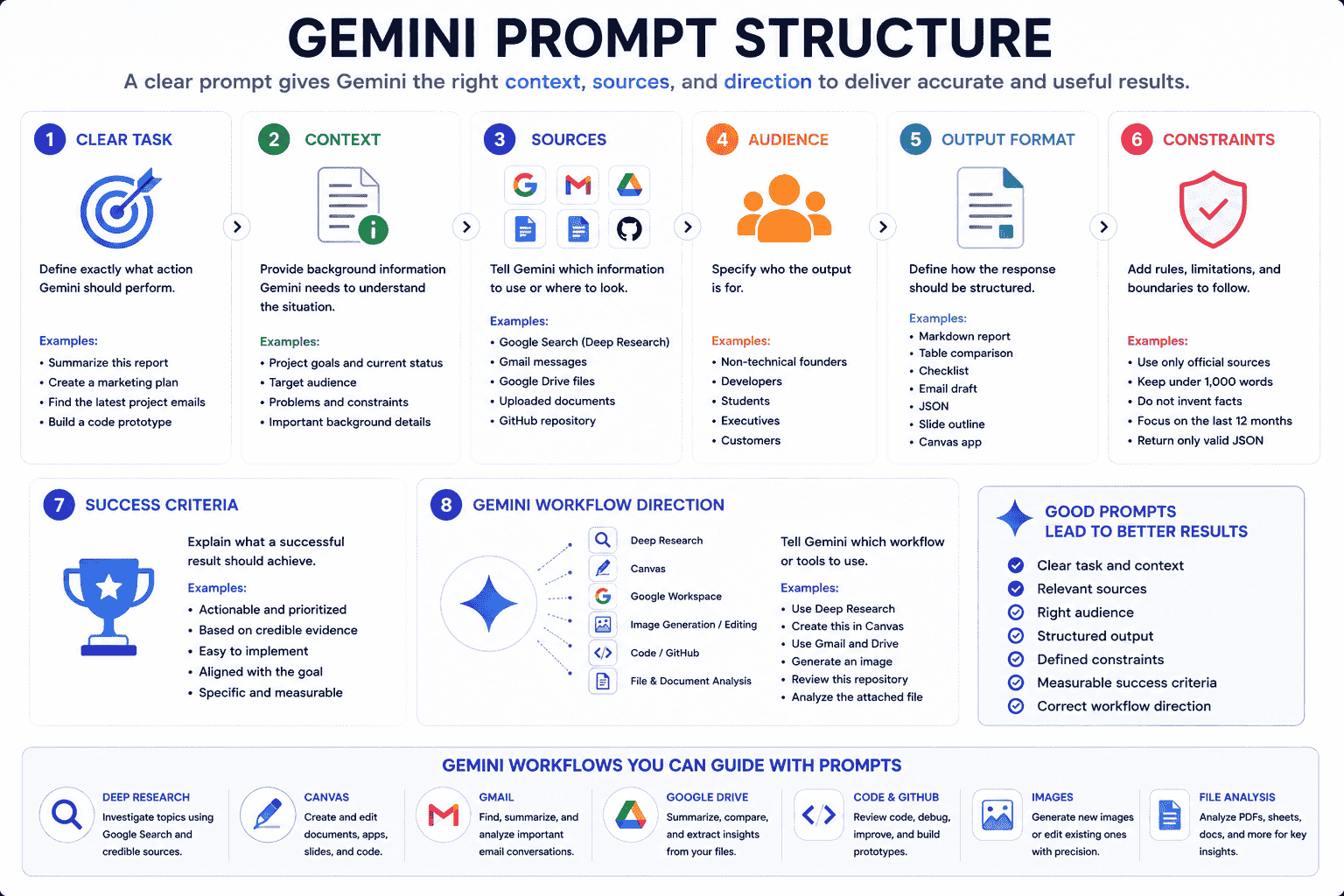
What Makes a Good Gemini Prompt?
A good Gemini prompt explains more than the topic.
It tells Gemini what action to perform, what information to use, what boundaries to follow, and how the result should be presented.
Most effective Gemini prompts contain the following elements.
1. A Clear Task
Start with a specific action.
Weak:
Help me with this project.
Stronger:
Review the attached project brief and create a prioritized execution plan with milestones, dependencies, risks, and immediate next actions.
2. Relevant Context
Gemini needs enough background information to understand your situation.
Useful context may include:
- The product or project
- The target audience
- The current problem
- The desired outcome
- The available resources
- The deadline
- Previous attempts
- Known constraints
3. Defined Sources
Explain which information Gemini should use.
Depending on your workflow, this could include:
- Uploaded documents
- A spreadsheet
- An image or video
- A GitHub repository
- Google Search through Deep Research
- Relevant Gmail messages
- Files stored in Google Drive
- A NotebookLM notebook
When accuracy matters, tell Gemini not to invent missing information.
4. Target Audience
The same answer should be written differently for beginners, developers, executives, customers, students, or researchers.
Defining the audience helps Gemini adjust:
- Vocabulary
- Depth
- Tone
- Examples
- Technical detail
- Recommended actions
5. Output Format
Tell Gemini how the response should be structured.
Examples include:
- Table
- Markdown report
- Checklist
- Email draft
- Decision memo
- Slide outline
- JSON
- Step-by-step implementation plan
- Interactive app in Canvas
6. Constraints
Constraints help prevent unwanted output.
Examples:
- Keep the answer under 1,000 words.
- Use simple English.
- Do not invent facts or sources.
- Separate facts from assumptions.
- Return only valid JSON.
- Do not change unrelated parts of the code.
- Preserve the image composition and change only the lighting.
7. Success Criteria
Explain what a useful result should achieve.
Example:
The final plan should be practical for a solo founder, executable within four weeks, and prioritized by expected impact and effort.
8. Tool or Workflow Direction
When relevant, state which Gemini workflow you intend to use.
Examples:
- Use Deep Research and produce a source-based report.
- Build the result in Canvas as an editable document.
- Use the attached spreadsheet as the only data source.
- Find relevant messages in Gmail and summarize them.
- Review the imported GitHub repository.
- Edit the uploaded image without changing the subject.
How to Customize Gemini Prompts
The prompts in this guide use variables inside curly brackets.
Example:
You are a {role}.

Use {source} to complete this task:

{task}

The result is intended for {audience}.

Return the answer as {output_format}.

Follow these constraints:
{constraints}

A successful result should:
{success_criteria}
Replace every variable with information relevant to your workflow.
| Variable | What to Add | Example |
|---|---|---|
{role} |
The perspective Gemini should use | Product marketing strategist |
{task} |
The action Gemini should perform | Create a launch plan |
{source} |
The information Gemini should use | Attached brief and competitor notes |
{audience} |
Who the output is for | Non-technical founders |
{goal} |
The intended outcome | Choose the best launch strategy |
{output_format} |
How the response should be structured | Comparison table and action plan |
{constraints} |
Rules or limitations | Low budget, four-week timeline, no paid ads |
{success_criteria} |
What makes the answer useful | Specific, prioritized, and immediately executable |
Do not leave important placeholders empty. Missing context forces Gemini to make assumptions.
Gemini Prompts for Writing
Gemini can help with outlines, drafts, editing, rewriting, documents, and presentation planning.
1. Article Outline Prompt
You are an experienced content strategist.

Create a detailed article outline about {topic} for {audience}.

The article goal is to {goal}.

Include:
- Search intent
- Recommended angle
- Introduction direction
- H2 and H3 sections
- Key points for every section
- Examples or evidence needed
- Common mistakes
- FAQ questions
- Conclusion direction

Use a {tone} tone.

Avoid overlapping sections, filler, and generic advice.

The outline should be detailed enough for a writer to create the full article without guessing what each section should cover.
2. Source-Grounded Article Draft Prompt
You are a professional writer with expertise in {topic}.

Use only the attached source materials to write a {word_count}-word article for {audience}.

The article should:
- Explain {main_subject}
- Answer {key_questions}
- Use clear H2 and H3 headings
- Include examples supported by the sources
- Separate established facts from interpretation
- Mention important limitations
- End with practical takeaways

Use a {tone} tone.

Do not invent statistics, quotations, sources, or product capabilities.

When the source material does not provide enough information, clearly state what is missing.
3. Editing Prompt
You are a senior editor.

Review the following draft:

{draft}

The audience is {audience}, and the goal is to {goal}.

Evaluate:
- Clarity
- Logical structure
- Repetition
- Weak transitions
- Unnecessary wording
- Tone consistency
- Unsupported claims
- Missing examples
- Alignment with the audience

Return:
1. Overall assessment
2. Highest-priority issues
3. Specific recommendations
4. A revised version

Preserve the original meaning and voice unless a change is required for clarity or accuracy.
4. Canvas Document Prompt
Use Canvas to create an editable {document_type} about {topic}.

The document is for {audience}, and its goal is to {goal}.

Use this structure:
{required_sections}

Requirements:
- Use clear headings
- Keep paragraphs concise
- Include practical examples
- Add a summary at the beginning
- Add an action checklist at the end
- Use a {tone} tone
- Keep the document under {word_count} words

After creating the first version, identify three areas that may need clarification or supporting evidence.
Gemini Prompts for Deep Research
Deep Research is useful when a task requires broader source collection, comparison, evidence evaluation, and a structured report.
5. Market Research Prompt
Use Deep Research to investigate the market for {product_category} in {region}.

Research:
- Market definition
- Target customer segments
- Important customer problems
- Existing alternatives
- Major competitors
- Pricing patterns
- Distribution channels
- Recent market developments
- Adoption barriers
- Opportunities for differentiation

Prioritize sources from:
- Official organizations
- Government publications
- Company documentation
- Reputable industry research
- Established news publications

Return:
1. Executive summary
2. Key findings
3. Competitor comparison table
4. Opportunities
5. Risks
6. Unanswered questions
7. Recommended validation steps
8. Source list

Clearly separate verified findings, estimates, and your own inferences.
6. Product Comparison Research Prompt
Use Deep Research to compare the following products:

{products}

The comparison is for {user_profile} whose main goal is {goal}.

Evaluate:
- Core capabilities
- Current pricing
- Important limitations
- Ease of use
- Integrations
- Privacy or security considerations
- Best use cases
- Reported customer concerns
- Long-term suitability

Use current official product pages as the primary sources.

Supplement them with reputable independent reviews when useful.

Return:
1. Comparison table
2. Best option for each user type
3. Main trade-offs
4. Overall recommendation
5. Confidence level
6. Information that may change over time

Do not fill missing information with assumptions.
7. Evidence Review Prompt
Use Deep Research to investigate this claim:

{claim}

Find and evaluate evidence from:
- Primary research
- Official statistics
- Government or academic institutions
- High-quality systematic reviews
- Reputable expert organizations

For each important source, evaluate:
- What it claims
- Study or data quality
- Sample or scope
- Limitations
- Potential conflicts or bias
- Whether it directly supports the claim

Return:
1. Short conclusion
2. Evidence supporting the claim
3. Evidence challenging the claim
4. Areas of uncertainty
5. Confidence assessment
6. Source list

Do not present correlation as causation.
8. Content Research Brief Prompt
Use Deep Research to create a content research brief about {topic}.

The final content is intended for {audience} and should help them {goal}.

Research:
- Search intent
- Core questions
- Important definitions
- Current data and developments
- Common misconceptions
- Practical examples
- Expert perspectives
- Areas where reliable sources disagree
- Related subtopics

Return:
1. Recommended content angle
2. Key facts with sources
3. Suggested H2 and H3 structure
4. Examples to include
5. Claims that require careful wording
6. FAQ questions
7. Internal linking opportunities
8. Source list

Prioritize primary and authoritative sources.
Gemini Prompts for Gmail and Google Drive
When using connected Google services, name the service and describe the information Gemini should look for.
Review the listed sources before acting on important information.
9. Email Thread Summary Prompt
Use Gmail to find the most recent email thread about {project_or_topic} involving {people_or_company}.

Summarize:
- The original request
- Important discussion points
- Decisions made
- Unresolved questions
- Commitments
- Mentioned deadlines
- Required follow-up actions

Return the result as a table with:
- Topic
- Summary
- Owner
- Deadline
- Status

Do not assign an owner or deadline unless it is explicitly stated.

Flag any conflicting or outdated information.
10. Find Important Emails Prompt
Use Gmail to find emails from the last {time_period} related to {project_or_goal}.

Prioritize messages that include:
- A required response
- A deadline
- A decision request
- A payment or contract issue
- A blocker
- A scheduled meeting
- A customer problem

Return:
1. Highest-priority emails
2. Why each email matters
3. Required action
4. Deadline when stated
5. Suggested response order

Exclude newsletters, automated promotions, and unrelated notifications.
11. Drive Document Summary Prompt
Use Google Drive to find the latest document related to {document_name_or_topic}.

Summarize:
- Document purpose
- Main points
- Decisions
- Requirements
- Risks
- Deadlines
- Open questions
- Recommended next actions

Include the document title and explain why you selected it as the most relevant version.

If multiple versions appear current, compare them and flag the differences.
12. Compare Drive Documents Prompt
Use Google Drive to find these documents:

{document_descriptions}

Compare them for:
- Scope
- Goals
- Requirements
- Pricing or budget
- Responsibilities
- Deadlines
- Risks
- Contradictions
- Missing information

Return:
1. Comparison table
2. Important differences
3. Potential conflicts
4. Questions that need clarification
5. Recommended next step

Do not assume that the most recently modified document is automatically the authoritative version.
13. Email to Calendar and Tasks Planning Prompt
Use Gmail to find the latest confirmed details about {event_or_project}.

Identify:
- Confirmed date and time
- Location or meeting method
- Participants
- Preparation requirements
- Deadlines
- Follow-up tasks

Then create a proposed plan containing:
- Calendar event details
- Preparation checklist
- Tasks and due dates
- Notes to save for reference

Before creating or changing anything, show me the proposed details and flag any uncertainty.
Gemini Prompts for Coding and Canvas
Gemini can work with pasted code, uploaded code folders, imported repositories, and projects built in Canvas.
Generated code should still be reviewed and tested before deployment.
14. GitHub Repository Architecture Prompt
Review the imported GitHub repository.

Create an architecture overview for a developer who is new to the project.

Explain:
- Main purpose of the repository
- Technology stack
- Important directories
- Application entry points
- Major components or services
- Data flow
- External dependencies
- Configuration
- Authentication and authorization
- Testing structure
- Deployment-related files

Return:
1. High-level architecture summary
2. Directory map
3. Important files to read first
4. Potential complexity or risk areas
5. Questions that cannot be answered from the repository alone

Do not claim that code is used in production unless the repository proves it.
15. Repository Debugging Prompt
Review the imported repository and help diagnose this issue:

{issue_description}

Expected behavior:
{expected_behavior}

Actual behavior:
{actual_behavior}

Known error:
{error_message}

Please:
1. Identify the most likely files involved
2. Trace the relevant code path
3. Explain the likely root cause
4. Suggest the smallest safe fix
5. Show the proposed code changes
6. Identify side effects
7. Recommend tests

Do not rewrite unrelated architecture.

Clearly label assumptions and missing runtime information.
16. Canvas App Prototype Prompt
Use Canvas to create a functional prototype for this app:

{app_description}

Target user:
{target_user}

Core workflow:
{workflow}

Required features:
{features}

Design requirements:
{design_requirements}

Technical constraints:
{technical_constraints}

Build:
- Clear interface structure
- Main user flow
- Input validation
- Empty states
- Loading states
- Error handling
- Responsive layout
- Sample data

After creating the prototype:
1. Explain the architecture
2. List assumptions
3. Identify missing production requirements
4. Suggest the next three improvements

Do not add unrelated features.
17. Code Review Prompt
You are a senior {programming_language} reviewer.

Review the attached code for:

- Correctness
- Readability
- Maintainability
- Security
- Performance
- Error handling
- Accessibility when relevant
- Testability
- Framework best practices
- Edge cases

Return findings in a table with:
- Issue
- File or section
- Severity
- Explanation
- Recommended fix

Then provide corrected code only for sections that require changes.

Preserve existing behavior unless you explain why it should change.
Gemini Prompts for Productivity
18. Weekly Planning Prompt
You are a realistic productivity advisor.

Help me plan the week using:

Goals:
{goals}

Tasks:
{tasks}

Deadlines:
{deadlines}

Fixed commitments:
{commitments}

Available working hours:
{working_hours}

Limitations:
{limitations}

Return:
1. Three highest priorities
2. Recommended schedule
3. Focus blocks
4. Tasks to defer, delegate, or remove
5. Buffer time
6. Risk points
7. End-of-week review questions

Do not fill every available hour.

Prioritize sustainable execution over an idealized schedule.
19. Calendar Review Prompt
Review my Google Calendar for {time_period}.

Identify:
- Meetings requiring preparation
- Overlapping commitments
- Days with insufficient focus time
- Travel or transition conflicts
- Deadlines mentioned in event details
- Opportunities to group related work

Return:
1. Schedule overview
2. Potential conflicts
3. Recommended preparation
4. Suggested focus blocks
5. Events that may need clarification

Do not change any calendar events.
20. Task Prioritization Prompt
You are an operations advisor.

Prioritize the following tasks:

{task_list}

Main objective:
{objective}

Deadlines:
{deadlines}

Dependencies:
{dependencies}

Available resources:
{resources}

Evaluate each task by:
- Impact
- Urgency
- Effort
- Dependency
- Risk of delay

Return a table with:
- Task
- Priority
- Reasoning
- Recommended next action
- Suggested deadline

Then identify what should be done, deferred, delegated, or removed.
Gemini Prompts for Business
21. Business Idea Evaluation Prompt
You are a skeptical startup advisor.

Evaluate this business idea:

{business_idea}

Target customer:
{target_customer}

Problem:
{problem}

Proposed solution:
{solution}

Revenue model:
{revenue_model}

Available resources:
{resources}

Evaluate:
- Problem importance
- Customer clarity
- Existing alternatives
- Differentiation
- Willingness-to-pay assumptions
- Distribution difficulty
- Operational complexity
- Defensibility
- Main risks
- Validation difficulty

Return:
1. Strongest assumptions
2. Weakest assumptions
3. Questions that must be answered
4. Low-cost validation experiments
5. Evidence that would support or reject the idea
6. Recommended next step

Do not treat assumptions as verified facts.
22. Customer Feedback Analysis Prompt
You are a customer insights analyst.

Analyze the attached customer feedback.

Product context:
{product_context}

Identify:
- Repeated problems
- Desired outcomes
- Positive themes
- Negative themes
- Feature requests
- Confusing product areas
- Customer language useful for messaging
- High-priority issues
- Contradictory feedback

Return:
1. Executive summary
2. Theme table
3. Frequency estimates based only on the provided data
4. Representative examples
5. Recommended product actions
6. Questions requiring more research

Do not invent percentages or customer counts.
23. Decision Memo Prompt
You are a strategic decision advisor.

Help evaluate this decision:

{decision}

Options:
{options}

Primary objective:
{objective}

Criteria:
{criteria}

Constraints:
{constraints}

Known information:
{known_information}

Uncertainties:
{uncertainties}

Return a decision memo with:
1. Decision summary
2. Option comparison
3. Benefits and risks
4. Reversible and irreversible consequences
5. Missing information
6. Recommended option
7. Confidence level
8. Conditions that would change the recommendation
9. Immediate next action

Do not hide uncertainty.
Gemini Prompts for Learning
24. Concept Tutor Prompt
You are a patient tutor.

Teach me {concept} at a {learner_level} level.

I already understand:
{existing_knowledge}

I am confused about:
{confusing_part}

Use:
- A simple definition
- Step-by-step explanation
- One analogy
- One practical example
- One common misconception
- A short summary

Then ask me three questions to check my understanding.

Do not move to the next topic until I answer.
25. Study Plan Prompt
You are a learning strategist.

Create a {duration} study plan for {subject_or_skill}.

Current level:
{current_level}

Target:
{target_level}

Available time:
{available_time}

Preferred learning method:
{learning_method}

Resources:
{resources}

Return:
1. Learning milestones
2. Weekly topics
3. Daily practice
4. Review schedule
5. Exercises
6. Progress checks
7. Final project or assessment

Keep the workload realistic and prioritize active practice.
26. Quiz and Flashcard Prompt
Use the attached study material to create:

- {number} multiple-choice questions
- {number} short-answer questions
- {number} application questions
- {number} flashcards

Difficulty:
{difficulty}

Focus areas:
{focus_areas}

For every question, include:
- Correct answer
- Explanation
- Source section
- Common misconception tested

Use only information from the attached material.

Do not create questions whose answers are not supported by the source.
Gemini Prompts for Image Generation
Strong image prompts define the subject, environment, composition, lighting, colors, mood, and intended use.
27. Marketing Image Prompt
Create a premium campaign image for {product}.

Subject:
{product_description}

Environment:
{environment}

Composition:
{composition}

Lighting:
{lighting}

Color palette:
{color_palette}

Mood:
{mood}

Output requirements:
- {aspect_ratio}
- Product clearly visible
- Realistic materials
- Negative space for campaign copy
- No visible watermark
- No additional products
- No generated text

The image should feel suitable for {platform_or_campaign}.
28. Editorial Illustration Prompt
Create a modern editorial illustration about {topic}.

Use one clear visual metaphor:
{visual_metaphor}

Visual style:
{style}

Composition:
{composition}

Color palette:
{color_palette}

Mood:
{mood}

Requirements:
- Strong focal point
- Simple background
- Clear visual hierarchy
- Space reserved for a headline
- No generated text
- Suitable for {platform_or_article}
29. Character Concept Prompt
Create a full-body character concept of {character_identity}.

Include:
- {costume}
- {equipment}
- {pose}
- {environment}
- {lighting}
- {color_palette}
- {mood}
- {important_material_details}

Use a clear recognizable silhouette and a {visual_style} style.

Output:
- Vertical composition
- Full body visible
- No text
- No additional characters
For a broader image-prompting guide, read AI Image Prompts How to Write Better Prompts for Any AI Image Generator in 2026.
Gemini Prompts for Image Editing
Image-editing prompts should explain both what should change and what must remain unchanged.
30. Targeted Image Edit Prompt
Edit the uploaded image.

Change only:
{requested_change}

Preserve:
- Main subject
- Facial identity
- Pose
- Camera angle
- Composition
- Clothing
- Background layout
- Image dimensions

Additional requirements:
{requirements}

Do not add new objects, text, people, or decorative elements.
31. Product Background Replacement Prompt
Edit the uploaded product image.

Keep the product unchanged, including:
- Shape
- Packaging
- Label placement
- Materials
- Camera angle
- Scale

Replace the background with:
{new_background}

Use:
- {lighting}
- {color_palette}
- {shadow_direction}
- {mood}

The final image should look like a realistic professional product photograph.

Do not modify the logo or text on the packaging.
32. Combine Reference Images Prompt
Create a new image using the uploaded references.

Use:
- The subject from image 1
- The clothing or product design from image 2
- The environment and lighting direction from image 3

Final composition:
{composition}

Visual style:
{style}

Color palette:
{color_palette}

Preserve the recognizable characteristics of the primary subject.

Do not merge facial features, add extra subjects, or introduce unrelated objects.
Gemini Prompts for File and Document Analysis
33. Document Analysis Prompt
Analyze the attached document.

Return:
1. Document purpose
2. Executive summary
3. Main arguments
4. Important requirements
5. Decisions
6. Deadlines
7. Risks
8. Contradictions
9. Missing information
10. Recommended next actions

For every important finding, identify the relevant section or page when possible.

Do not add information that is not in the document.
34. Spreadsheet Analysis Prompt
Analyze the attached spreadsheet.

Goal:
{analysis_goal}

Evaluate:
- Important trends
- Highest and lowest values
- Unexpected changes
- Missing or inconsistent data
- Relationships between variables
- Potential outliers
- Business implications

Return:
1. Executive summary
2. Key findings
3. Supporting calculations
4. Recommended charts
5. Risks or limitations
6. Recommended next actions

Do not infer causation from correlation.

Clearly explain any assumptions used in calculations.
35. Image or Screenshot Analysis Prompt
Analyze the uploaded {image_or_screenshot} for {goal}.

Evaluate:
- Main content
- Visual hierarchy
- Clarity
- Layout
- Readability
- Important objects or elements
- Potential problems
- Missing information
- Recommended improvements

Return findings in a table with:
- Element
- Observation
- Impact
- Priority
- Suggested improvement

Do not assume details that are not visible.
36. Video Analysis Prompt
Analyze the uploaded video.

The purpose is to {goal}.

Identify:
- Main topic
- Important scenes
- Key statements
- Timeline of events
- Visual or audio problems
- Strongest moments
- Repetitive sections
- Missing context
- Recommended edits

Return:
1. Short summary
2. Timestamped scene breakdown
3. Key takeaways
4. Editing recommendations
5. Suggested title and description

Do not invent dialogue that cannot be clearly understood.
Gemini Prompts for Everyday Tasks
37. Compare Options Prompt
You are a neutral decision assistant.

Compare these options:

{options}

My goal:
{goal}

Criteria:
{criteria}

Constraints:
{constraints}

Known information:
{known_information}

For each option, evaluate:
- Benefits
- Drawbacks
- Cost or effort
- Risks
- Long-term suitability
- Fit with my goal

Return:
1. Comparison table
2. Best option for each priority
3. Overall recommendation
4. Main trade-off
5. Information I should verify

Do not invent missing prices, features, or specifications.
38. Travel Planning Prompt
Create a realistic travel plan for:

Destination:
{destination}

Dates:
{dates}

Travelers:
{travelers}

Budget:
{budget}

Interests:
{interests}

Limitations:
{limitations}

Return:
1. Daily itinerary
2. Travel time between activities
3. Estimated cost categories
4. Reservation priorities
5. Backup activities
6. Packing considerations
7. Information that should be verified before booking

Avoid overloading each day.

Clearly label estimates and time-sensitive information.
39. Difficult Message Prompt
You are a thoughtful communication advisor.

Help me write a message about:

{situation}

Recipient:
{recipient}

Goal:
{goal}

Context:
{context}

Tone:
{tone}

Things to avoid:
{things_to_avoid}

Write a message that:
- Clearly communicates the main point
- Shows appropriate empathy
- Avoids unnecessary blame
- Sets boundaries when needed
- Includes a practical next step

Provide:
1. Recommended version
2. Softer alternative
3. More direct alternative

Keep all versions natural and respectful.
Gemini Prompts vs ChatGPT Prompts
The core principles of writing strong prompts are similar across AI assistants.
Both benefit from clear tasks, useful context, output formats, constraints, and success criteria.
The main difference in this guide is workflow direction.
| Prompt Type | Main Focus | Example |
|---|---|---|
| General AI Prompt | Task, context, audience, format, and constraints | Create a structured marketing plan |
| Gemini Deep Research Prompt | Research scope, source quality, evidence, and report structure | Research a market using authoritative sources |
| Gemini Workspace Prompt | Finding or summarizing information from connected Google services | Find recent project emails and extract action items |
| Gemini Canvas Prompt | Creating or iteratively editing a document, app, slide deck, or code | Build an editable app prototype |
| Gemini File Prompt | Using uploaded documents, spreadsheets, images, videos, or code | Analyze a spreadsheet and identify trends |
| Gemini Image Edit Prompt | Defining what should change and what must remain unchanged | Replace the background without modifying the product |
The better question is not which prompt format is universally superior. It is which workflow best matches the task and available source material.
How to Improve Weak Gemini Prompts
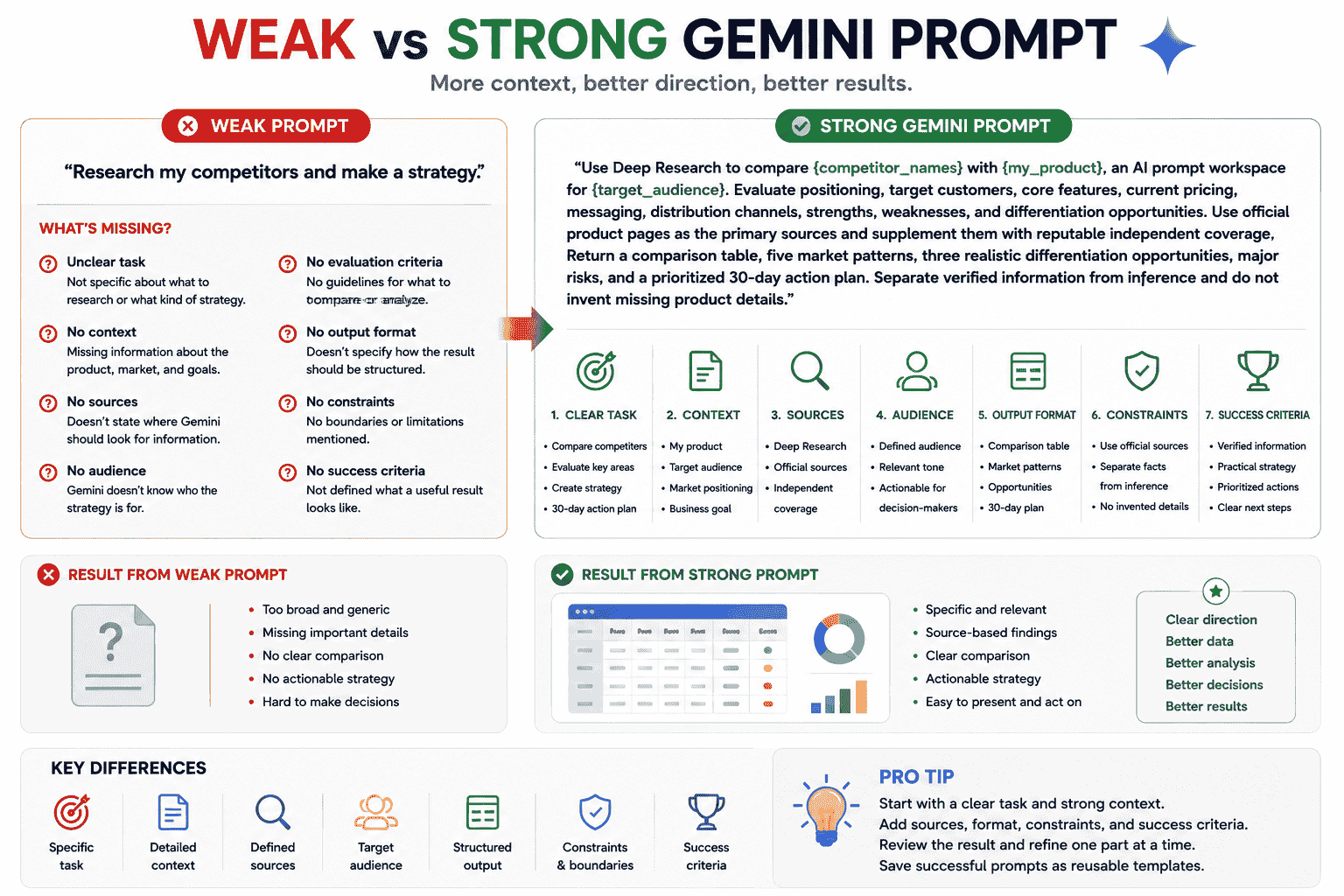
Consider this weak Gemini prompt:
Research my competitors and make a strategy.
The prompt does not explain:
- Which competitors to analyze
- What product is being compared
- Who the target customer is
- Which sources should be used
- What strategy is needed
- What criteria should be evaluated
- How the output should be structured
A stronger version could be:
Use Deep Research to compare {competitor_names} with {my_product}, an AI prompt workspace for {target_audience}. Evaluate positioning, target customers, core features, current pricing, messaging, distribution channels, strengths, weaknesses, and differentiation opportunities. Use official product pages as the primary sources and supplement them with reputable independent coverage. Return a comparison table, five market patterns, three realistic differentiation opportunities, major risks, and a prioritized 30-day action plan. Separate verified information from inference and do not invent missing product details.
Use this checklist when improving a weak prompt:
- Clarify the action Gemini should perform.
- Add the relevant context.
- Define the sources Gemini should use.
- Identify the audience or decision-maker.
- Specify the output format.
- Add boundaries and exclusions.
- Explain what a successful result should achieve.
- Name the Gemini workflow when relevant.
Common Gemini Prompt Mistakes
1. Not Naming the Source or Connected Service
If you want Gemini to use Gmail, Drive, Calendar, an uploaded file, or a repository, say so clearly.
2. Asking for Research Without Defining the Scope
A broad request may produce a broad report.
Define the question, region, timeframe, customer, criteria, and source priorities.
3. Not Providing the Required Files
Gemini cannot analyze a document, image, spreadsheet, or video that has not been attached or made available through a connected source.
4. Treating Every Retrieved Result as Current
Review the source and date, especially when Gemini retrieves information from emails, documents, pricing pages, or time-sensitive web sources.
5. Asking for Too Many Unrelated Tasks at Once
Researching, planning, writing, designing, coding, and evaluating in one prompt may produce shallow results.
Break complex workflows into stages.
6. Leaving the Output Format Undefined
If you need a decision memo, table, report, JSON object, slide outline, or app, specify it directly.
7. Asking Gemini to Invent Missing Information
Tell Gemini to identify gaps rather than filling them with unsupported assumptions.
8. Not Explaining What Must Remain Unchanged
This is especially important for image editing and code modification.
9. Using the First Output as the Final Output
Review the result and refine the parts that are inaccurate, incomplete, unclear, or poorly structured.
10. Ignoring Availability Differences
Some Gemini capabilities may vary by account, subscription, language, region, device, or administrator settings.
How PrompTessor Helps With Gemini Prompts
PrompTessor helps users generate, analyze, optimize, refine, save, and reuse prompts that can be used with Gemini and other AI models.
You can begin with a rough Gemini instruction such as:
Research competitors for my product.
Prompt Generator can help turn the idea into a structured prompt that defines the product, competitors, target audience, research criteria, preferred sources, output format, and success criteria.
Prompt Analysis can help identify missing elements such as:
- Unclear task
- Missing context
- Undefined sources
- No target audience
- Missing output format
- Weak constraints
- Unclear success criteria
Prompt Optimizer can improve the prompt’s clarity, specificity, structure, and constraints.
Prompt Refinement can then apply targeted feedback such as:
- Make the prompt suitable for Deep Research
- Use only official sources
- Return the result as a comparison table
- Make the prompt work with an uploaded spreadsheet
- Preserve the image subject while changing the background
- Turn the prompt into a reusable template
Once a Gemini prompt works well, you can save it in the Prompt Library and reuse it across writing, research, coding, Workspace, image, learning, and business workflows.
For more reusable structures, read AI Prompt Templates You Can Reuse for ChatGPT Claude Gemini and Other AI Tools.
FAQ About Gemini Prompts
What are Gemini prompts?
Gemini prompts are instructions, questions, source materials, files, images, or contextual information given to Gemini to guide the response or output it produces.
What makes a good Gemini prompt?
A good Gemini prompt usually contains a clear task, useful context, defined sources, target audience, output format, constraints, and success criteria.
How can I get better results from Gemini?
Explain exactly what Gemini should do, provide relevant context or files, define the sources it should use, specify the desired output format, and state what a successful result should achieve.
What is a good prompt for Gemini Deep Research?
A good Deep Research prompt defines the research question, scope, timeframe, source priorities, evaluation criteria, output structure, and rules for distinguishing verified findings from assumptions.
Can Gemini use Gmail and Google Drive?
Gemini can work with supported Google services when the relevant connected app is enabled and available for the user’s account. Prompts should name the service and clearly describe what information to retrieve or summarize.
Can Gemini analyze uploaded files?
Gemini can analyze supported files such as documents, spreadsheets, images, videos, and code. Availability and limits may depend on the account, plan, device, and file type.
Can Gemini review a GitHub repository?
Gemini can work with an imported GitHub repository in supported workflows to explain the codebase, answer questions, suggest improvements, and help debug issues.
Can Gemini generate and edit images?
Gemini supports image-generation and image-editing workflows in supported Gemini apps. Users can generate images, upload images for editing, or combine references, depending on availability.
Can I reuse Gemini prompts?
Yes. Replace task-specific details with placeholders such as {topic}, {audience}, {source}, and {output_format}, then save the prompt as a reusable template.
Can PrompTessor create Gemini prompts?
PrompTessor helps users generate, analyze, optimize, refine, save, and reuse prompts that can be adapted for Gemini research, writing, coding, image, file-analysis, and Workspace workflows.
Build Better Gemini Workflows With Reusable Prompts
The best Gemini prompts are not simply long instructions.
They are prompts that give Gemini the information and direction required for the task.
Define the action, context, source, audience, output format, constraints, and success criteria. Then identify whether the workflow requires Deep Research, Canvas, connected Google services, uploaded files, code, or images.
After Gemini produces the first result, review it carefully.
Refine unclear instructions, verify important information, and save successful prompts as reusable templates.
Better Gemini results begin with clearer tasks, better sources, and more deliberate instructions.
Build better prompts in one workspace
Generate prompts from ideas, analyze and optimize quality, refine with feedback, reverse-engineer content, and save reusable prompts in your Prompt Library.
Try PrompTessor Free