AI Image Prompts How to Write Better Prompts for Any AI Image Generator in 2026
AI image generators can turn a short text description into photography, illustrations, characters, products, logos, social media graphics, and cinematic scenes.
However, a vague instruction usually gives the model too much room to guess.
A prompt such as “create a futuristic city” does not explain the architecture, environment, time of day, camera angle, lighting, color palette, visual medium, or mood.
A stronger prompt provides clear visual direction without describing every individual pixel.
This guide explains how to write better AI image prompts for ChatGPT, Gemini, Midjourney, FLUX, Stable Diffusion, and other AI image generators.
You will learn how to structure text-to-image prompts, choose useful visual details, adapt prompts across different tools, fix weak instructions, and create reusable prompt templates for future projects.
Quick Answer
A strong AI image prompt clearly describes the subject, action, environment, visual medium, composition, camera perspective, lighting, color palette, mood, important details, exclusions, and intended output. The prompt should include only details that meaningfully affect the final image and should be refined through several generations rather than treated as final after one attempt.
Key Takeaways
- Start with the main subject and what should be happening in the image.
- Define the environment, composition, perspective, lighting, colors, and mood.
- Use concrete visual descriptions instead of vague words such as “beautiful” or “cool.”
- Different image generators may interpret the same prompt differently.
- Some tools respond well to natural-language instructions, while others work better with concise visual phrases.
- Add exclusions only when unwanted elements are likely to appear.
- Generate multiple versions and refine one important variable at a time.
- Turn successful prompts into reusable templates with customizable placeholders.
Table of Contents
- What Are AI Image Prompts?
- How AI Image Prompts Work
- AI Image Prompt Structure
- How to Write Better AI Image Prompts
- AI Image Prompts for Realistic Photos
- AI Image Prompts for Portraits
- AI Image Prompts for Products
- AI Image Prompts for Characters
- AI Image Prompts for Anime Art
- AI Image Prompts for Logos and Icons
- AI Image Prompts for Social Media
- AI Image Prompts for YouTube Thumbnails
- AI Image Prompts for Cinematic Scenes
- AI Image Prompts With Text and Typography
- How to Adapt Prompts for Different AI Image Generators
- Weak vs Strong AI Image Prompts
- Common AI Image Prompt Mistakes
- How PrompTessor Helps With AI Image Prompts
- FAQ About AI Image Prompts
What Are AI Image Prompts?
An AI image prompt is an instruction that describes the image you want an AI model to generate or edit.
The prompt may contain:
- A description of the main subject
- An action or pose
- The environment
- The intended visual medium
- The composition
- The camera perspective
- The lighting
- The dominant colors
- The mood
- Important visual details
- Elements to exclude
- Output requirements such as aspect ratio or text placement
For example, this is a basic image prompt:
A coffee shop at night.
The model understands the general subject, but most visual decisions remain undefined.
A more controlled prompt could be:
Wide cinematic photograph of a small independent coffee shop on a quiet city corner at night, warm amber light glowing through large windows, light rain reflecting neon signs on the pavement, two customers visible inside, deep blue evening tones, calm and inviting atmosphere, realistic architectural and street details.
The second prompt communicates a more complete visual direction by defining the setting, composition, lighting, colors, atmosphere, and level of realism.
How AI Image Prompts Work
AI image generators interpret relationships between words, visual concepts, compositions, colors, objects, and styles learned during training.
The model does not build an image by following your prompt as a rigid technical specification. It interprets the instruction and generates a visual result that statistically matches the described concepts.
This means the same prompt can produce different results:
- Across different image generators
- Across different model versions
- Across multiple generations using the same model
- When a reference image is added
- When the aspect ratio changes
- When the wording or order of details changes
A prompt therefore gives the model direction rather than guaranteeing one exact image.
The goal of image prompting is to reduce unnecessary guessing while leaving enough creative freedom for the model to construct a coherent result.
Prompt Specificity Controls Creative Freedom
A short prompt usually creates more variation because the model makes more creative decisions.
A detailed prompt gives you more control, but excessive or conflicting instructions can make the image less coherent.
Consider these three levels:
Open: A mysterious forest.
Directed: Ancient misty forest at dawn, towering trees, soft blue light, narrow path, quiet mysterious atmosphere.
Highly controlled: Wide cinematic view of an ancient evergreen forest at dawn, narrow moss-covered trail entering from the lower-left foreground, towering trees fading into blue mist, soft volumetric sunlight passing through the canopy, muted green and blue palette, quiet mysterious atmosphere, realistic natural textures.
None of these structures is automatically correct or incorrect. The best level of detail depends on how much control the project requires.
AI Image Prompt Structure
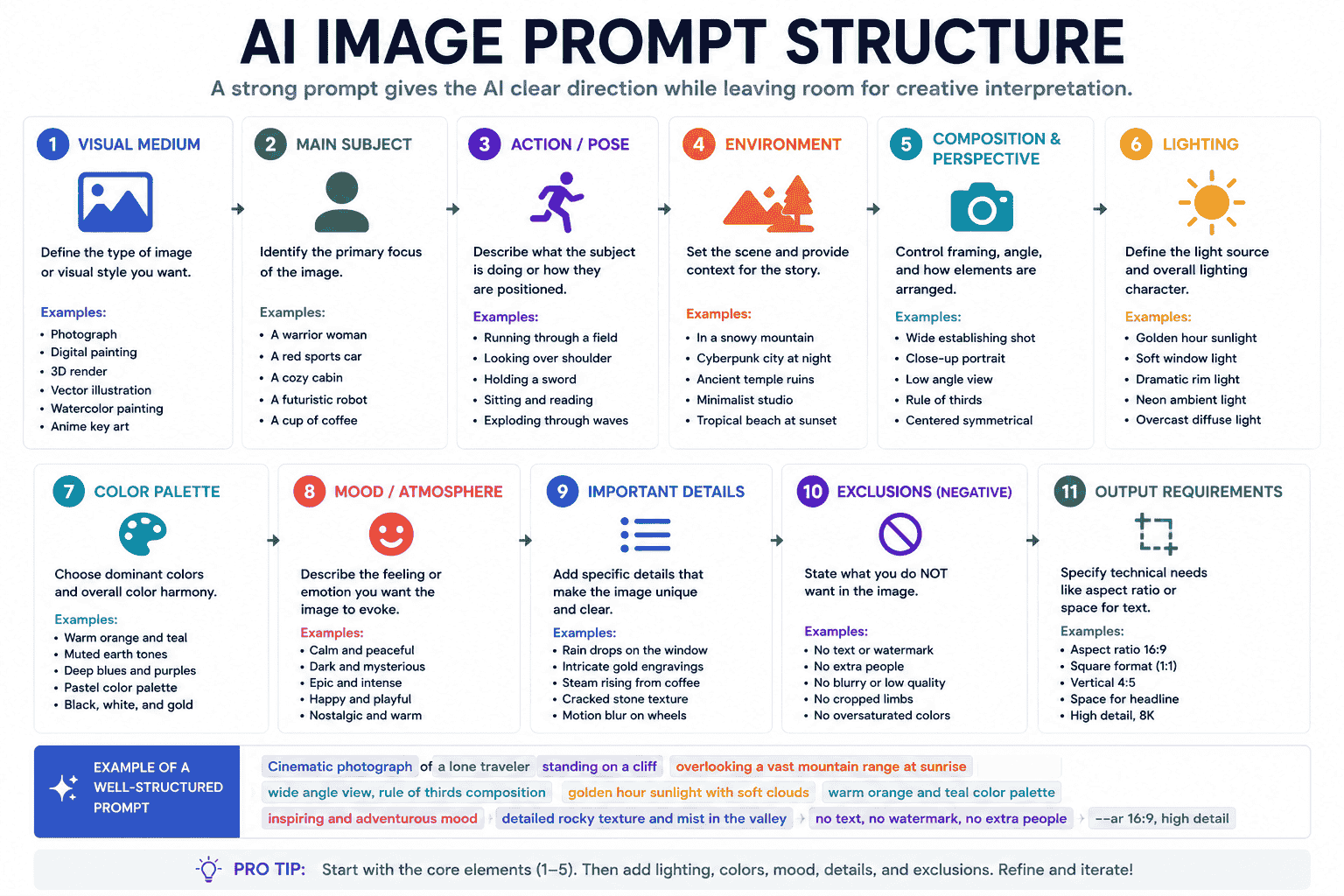
A practical universal structure for AI image prompts is:
{visual_medium} of {main_subject}, {action_or_pose}, in {environment}, {composition}, {camera_perspective}, {lighting}, {color_palette}, {mood}, {important_details}, {output_requirements}, {exclusions}Example:
Editorial photograph of an elderly ceramic artist examining a newly glazed tea bowl, inside a small traditional workshop, three-quarter composition, eye-level perspective, soft golden-hour window light, warm neutral color palette, quiet and authentic mood, realistic skin clay wood and fabric textures, landscape orientation, no visible text or watermark.1. Visual Medium
The visual medium tells the model what type of image to create.
Examples:
- Editorial photograph
- Documentary photograph
- Digital painting
- Anime key art
- Flat vector illustration
- 3D product render
- Architectural visualization
- Watercolor painting
- Pixel art
- Clay-style illustration
2. Main Subject
The subject is the primary focus of the image.
Be more specific than a broad category when the details matter.
Instead of:
A person.
Use:
An elderly Japanese ceramic artist with weathered hands and a warm expression.
3. Action or Pose
Explain what the subject is doing.
Examples:
- Walking through a crowded market
- Holding a product toward the camera
- Looking over one shoulder
- Standing in a defensive pose
- Sketching inside a notebook
- Running through shallow water
4. Environment
The environment gives the scene context.
Examples:
- Inside a minimalist photography studio
- On a neon-lit street at night
- Beside a mountain lake at sunrise
- Inside an abandoned space station
- In a bright Scandinavian kitchen
- At the entrance of an ancient sandstone city
5. Composition
Composition controls how visual elements are arranged.
Examples:
- Centered symmetrical composition
- Subject positioned on the left
- Wide establishing shot
- Close-up portrait
- Full-body character view
- Top-down flat lay
- Foreground, middle ground, and background separation
- Large negative space for headline text
6. Camera Perspective
Camera language can help define framing and scale, even when the result is an illustration rather than a photograph.
Examples:
- Eye-level view
- Low-angle perspective
- Bird’s-eye view
- Over-the-shoulder shot
- Macro close-up
- Wide-angle view
- Three-quarter view
7. Lighting
Lighting affects visibility, depth, atmosphere, and emotion.
Examples:
- Soft morning window light
- Golden-hour rim lighting
- Hard directional studio light
- Overcast natural light
- Neon blue and magenta lighting
- Low practical lighting
- Volumetric light through mist
8. Color Palette
Define dominant colors when visual consistency matters.
Examples:
- Warm cream and amber palette
- Muted earth tones
- Teal and orange contrast
- Deep indigo with violet accents
- Black, white, and one red accent
- Soft pastel colors
- Monochromatic blue palette
9. Mood
Mood describes how the image should feel.
Examples:
- Calm and contemplative
- Dark and suspenseful
- Bright and optimistic
- Luxurious and refined
- Epic and otherworldly
- Playful and energetic
- Quiet and nostalgic
10. Important Details
Add details that are necessary to communicate the concept.
Examples:
- Realistic skin and fabric texture
- Weathered metal armor
- Visible water droplets on the bottle
- Layered atmospheric fog
- Accurate product proportions
- Clean geometric icon construction
- Empty area reserved for text
11. Exclusions
Exclusions can reduce common unwanted elements.
Examples:
- No visible text
- No watermark
- No hands in the frame
- No additional products
- No crowded background
- No exaggerated facial expression
Use exclusions carefully. A long list of negatives can distract from the main visual direction.
How to Write Better AI Image Prompts
Step 1 Define the Purpose of the Image
Start by deciding what the image will be used for.
Possible goals include:
- A blog cover
- A product campaign
- A social media post
- A character concept
- A YouTube thumbnail
- An app icon
- A website hero image
- A cinematic storyboard
Purpose affects composition, aspect ratio, text placement, level of detail, and visual hierarchy.
Step 2 Choose One Clear Subject
Identify what viewers should notice first.
If several subjects are included, explain their relationship and visual priority.
Instead of:
A woman, a robot, a city, a spaceship, a dog, and several buildings.
Use:
A young engineer and her compact service robot standing in the foreground, overlooking a futuristic city where a distant spaceship is landing.
Step 3 Add Context Through the Environment
The environment should support the subject and story.
A product for outdoor travelers may appear in a mountain campsite. A luxury skincare product may work better in a controlled minimalist studio.
Step 4 Control the Framing
Tell the model how the subject should occupy the frame.
For example:
Product positioned in the center, photographed from a slight low angle, with generous negative space above for a headline.
Step 5 Design the Lighting
Choose lighting that supports the intended mood and use case.
Soft diffused light may suit skincare products. Dramatic side lighting may work better for a suspenseful character portrait.
Step 6 Build a Consistent Color Palette
Too many competing colors can weaken visual hierarchy.
Choose two or three dominant colors and describe how they should interact.
Step 7 Add Only Important Details
Do not add details simply to make the prompt longer.
Every phrase should help define the image.
Step 8 Define the Output Layout
Explain whether the image should be square, vertical, horizontal, or designed around text placement.
Even when the platform uses a separate aspect-ratio control, layout guidance remains useful.
Step 9 Generate Multiple Variations
Initial results help reveal which parts of the prompt are working.
Compare:
- Composition
- Subject accuracy
- Lighting
- Colors
- Background complexity
- Text readability
- Overall mood
Step 10 Refine One Variable at a Time
If the image is close to the goal, avoid changing the entire prompt.
Refine a single element:
- Make the lighting warmer
- Move the subject farther left
- Use a simpler background
- Change the wardrobe
- Increase the amount of negative space
- Make the perspective wider
This makes the workflow more predictable.
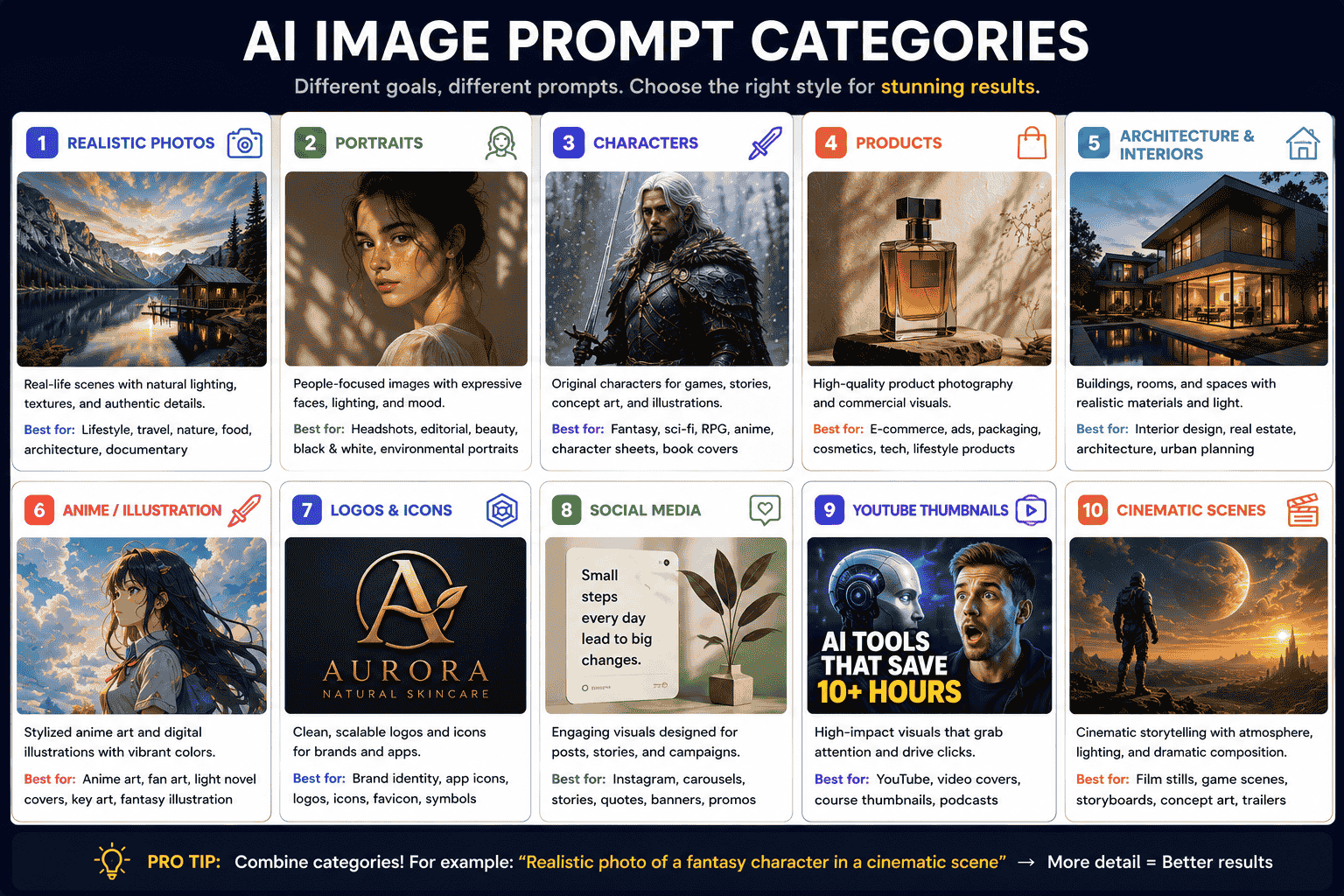
AI Image Prompts for Realistic Photos
Realistic image prompts benefit from believable environments, natural imperfections, photographic framing, and clear lighting.
Realistic Lifestyle Photography Template
Natural lifestyle photograph of {subject} {activity} in {environment}, candid and unposed moment, authentic expression, realistic proportions, soft available light, subtle environmental details, natural skin and fabric texture, gentle background separation, documentary photography, restrained color grading, {aspect_ratio}.Example
Natural lifestyle photograph of a freelance designer sketching interface ideas inside a quiet neighborhood coffee shop, candid and unposed moment, laptop and notebook on the wooden table, authentic concentrated expression, soft morning window light, realistic skin paper and fabric textures, warm neutral palette, gentle background separation, documentary editorial photography, horizontal composition.AI Image Prompts for Portraits
Editorial Portrait Template
Editorial portrait of {subject_description}, wearing {wardrobe}, photographed in {location_or_background}, {pose_or_expression}, {composition}, {lighting}, {color_palette}, realistic facial skin and fabric texture, {mood}, premium magazine photography, {aspect_ratio}.Example
Editorial portrait of an experienced female architect in her early forties, wearing a charcoal linen blazer, photographed inside a modern concrete studio, standing beside a scale building model with a calm confident expression, waist-up composition, soft directional window light, muted gray and warm beige palette, realistic skin and fabric texture, intelligent and understated mood, premium magazine photography, vertical composition.AI Image Prompts for Products
Studio Product Photography Template
Premium studio product photograph of {product}, positioned on {surface}, {background}, {camera_view}, {lighting}, {color_palette}, realistic materials and reflections, controlled shadows, clean commercial composition, {negative_space_requirement}, no additional objects, no visible text or watermark.Example
Premium studio product photograph of a transparent glass skincare serum bottle with a brushed silver cap, positioned on a smooth limestone pedestal, soft warm beige gradient background, three-quarter camera view, diffused side lighting with a subtle rim highlight, cream and pale gold palette, realistic glass reflections and liquid texture, controlled soft shadow, clean commercial composition, generous negative space on the left for campaign text, no hands, flowers, additional products, or watermark.AI Image Prompts for Characters
Character Concept Template
Full-body character concept of {character_identity}, wearing {costume_description}, carrying {equipment_or_accessory}, {pose}, in {environment_or_neutral_background}, clear recognizable silhouette, {lighting}, {color_palette}, detailed materials, {mood}, professional game or film concept art, {aspect_ratio}.Example
Full-body character concept of a desert guardian responsible for protecting an ancient water archive, wearing layered indigo robes and weathered bronze armor, carrying a crescent-shaped spear and small water canisters, standing in a calm defensive pose at the entrance of a sandstone city, clear recognizable silhouette, warm sunset rim lighting, indigo bronze and teal palette, detailed fabric metal and stone materials, heroic but grounded mood, professional fantasy game concept art, vertical composition.AI Image Prompts for Anime Art
Anime Key Art Template
Cinematic anime key art of {character_description}, {action_or_pose}, wearing {costume}, in {environment}, {composition_and_perspective}, expressive hair and fabric movement, {lighting}, {color_palette}, {mood}, detailed polished game illustration, {aspect_ratio}.Example
Cinematic anime key art of a silver-haired mage standing on a broken observatory platform, raising a glowing staff toward a fractured moon, wearing layered white and navy ceremonial robes, vast ruined city below, low-angle wide composition, wind moving her hair and fabric toward the left, cool moonlight mixed with violet magical rim lighting, indigo white and magenta palette, solemn and epic mood, detailed polished fantasy game illustration, widescreen composition.AI Image Prompts for Logos and Icons
AI-generated logo concepts should be treated as visual exploration rather than automatically trademark-ready assets.
Logo Symbol Template
Minimal symbol concept for a {industry_or_product_type} brand, combining the ideas of {concept_one} and {concept_two}, simple geometric construction, distinctive silhouette, balanced negative space, scalable flat vector appearance, {color_palette}, centered on a clean background, no mockup, no unnecessary text.App Icon Template
Modern app icon concept for {app_description}, one central symbol representing {core_idea}, simple recognizable silhouette, rounded square composition, {color_palette}, subtle dimensional depth, clear at small sizes, premium digital product aesthetic, no letters or words.AI Image Prompts for Social Media
Educational Social Graphic Template
Clean educational social media visual about {topic}, one clear visual metaphor, modern editorial illustration, simple geometric shapes, {brand_colors}, strong visual hierarchy, subject positioned on {side}, generous negative space for a headline, professional and approachable mood, vertical {aspect_ratio}, no generated text.Product Campaign Visual Template
Premium social media campaign visual featuring {product}, placed within an environment inspired by {campaign_theme}, clear product focus, {lighting}, bold but controlled {color_palette}, stylish commercial composition, minimal visual clutter, negative space for campaign copy, vertical format, no visible text.AI Image Prompts for YouTube Thumbnails
YouTube Thumbnail Background Template
High-impact YouTube thumbnail background for a video about {topic}, {main_subject} positioned on the {left_or_right}, clear emotional expression or visual action, dramatic lighting, strong contrast, simplified background, one obvious focal point, large negative space for a short headline, readable at small size, widescreen composition, no generated text.Example
High-impact YouTube thumbnail background for a video about AI replacing repetitive office work, surprised office worker positioned on the right looking toward a glowing robotic workstation on the left, dramatic blue and orange lighting, strong contrast, simplified futuristic office background, clear focal point, large dark negative space in the upper-left area for a headline, readable at small size, widescreen composition, no generated text.AI Image Prompts for Cinematic Scenes
Cinematic Scene Template
Cinematic film still of {subject_and_action} in {environment}, {shot_type}, {camera_perspective}, strong foreground middle ground and background separation, {lighting}, {color_palette}, atmospheric detail, realistic production design, {mood}, widescreen composition.Example
Cinematic film still of a lone astronaut walking toward a silent research station buried beneath red desert dust, wide establishing shot, low camera perspective behind the astronaut, layered foreground rocks and distant mountains, weak sunlight passing through a heavy dust storm, muted rust red and pale cyan palette, atmospheric particles and realistic worn equipment, isolated and suspenseful mood, widescreen composition.AI Image Prompts With Text and Typography
Generating readable text inside images remains more demanding than generating ordinary visual elements.
Keep requested text short and describe its placement, hierarchy, and appearance clearly.
Typography Poster Template
Minimal editorial poster for {topic_or_event}, featuring the exact headline “{short_headline}”, large {font_style} typography positioned in {location}, {supporting_visual}, {color_palette}, strong hierarchy, generous margins, clean grid-based composition, high contrast, no additional words.Packaging With Text Template
Premium packaging concept for {product}, featuring the exact brand name “{brand_name}” and the short label “{product_label}”, clear front-facing typography, {packaging_material}, {color_palette}, minimal graphic system, realistic studio presentation, no other text.Tips for Better Text Results
- Use short words or phrases.
- Place required wording inside quotation marks when supported.
- Explain where the text should appear.
- Specify hierarchy such as headline, subtitle, and small label.
- Avoid requesting several long paragraphs.
- Review spelling before publishing.
- Use a design editor to correct typography when necessary.
How to Adapt Prompts for Different AI Image Generators
A universal prompt provides a strong starting point, but each AI image generator may interpret wording, references, exclusions, and parameters differently.
ChatGPT Image Generation
Use clear natural-language instructions that explain both the image and its purpose.
For complex layouts, describe the hierarchy and placement of individual elements. After generation, use follow-up instructions to make specific changes while preserving the rest of the scene.
Example follow-up:
Keep the composition, product, camera angle, and background unchanged. Make only the lighting warmer and increase the negative space above the product.
Gemini Image Generation
Descriptive scene prompts can work well, especially when they explain the intended use, composition, camera treatment, and visual relationships.
For complicated scenes, break the direction into logical steps or ask for one focused revision at a time.
Midjourney
Midjourney often works well with focused visual phrases rather than long conversational explanations.
Describe the subject, medium, environment, lighting, colors, mood, and composition. Add supported parameters at the end of the prompt.
For more platform-specific examples, read Best Midjourney Prompts for Realistic Photos Characters Products and Art in 2026.
FLUX
Use clear descriptive language and place the most important concepts early in the prompt.
Define the subject and scene before adding stylistic details. For typography or editing workflows, clearly state what should remain unchanged and what should be modified.
Stable Diffusion Interfaces
Workflows can differ depending on the model, interface, checkpoints, and additional controls being used.
Some interfaces separate positive prompts and negative prompts. Others provide independent controls for image dimensions, guidance, sampling, reference strength, or structural conditioning.
Keep the core visual prompt clear before adjusting technical settings.
Universal Adaptation Checklist
- Keep the subject and visual goal consistent.
- Move tool-specific parameters outside the main descriptive text.
- Use the aspect-ratio control provided by the platform.
- Adapt exclusions to the tool’s supported syntax.
- Shorten the prompt if the model ignores important concepts.
- Use conversational follow-ups when the tool supports editing.
- Do not expect identical results across different models.
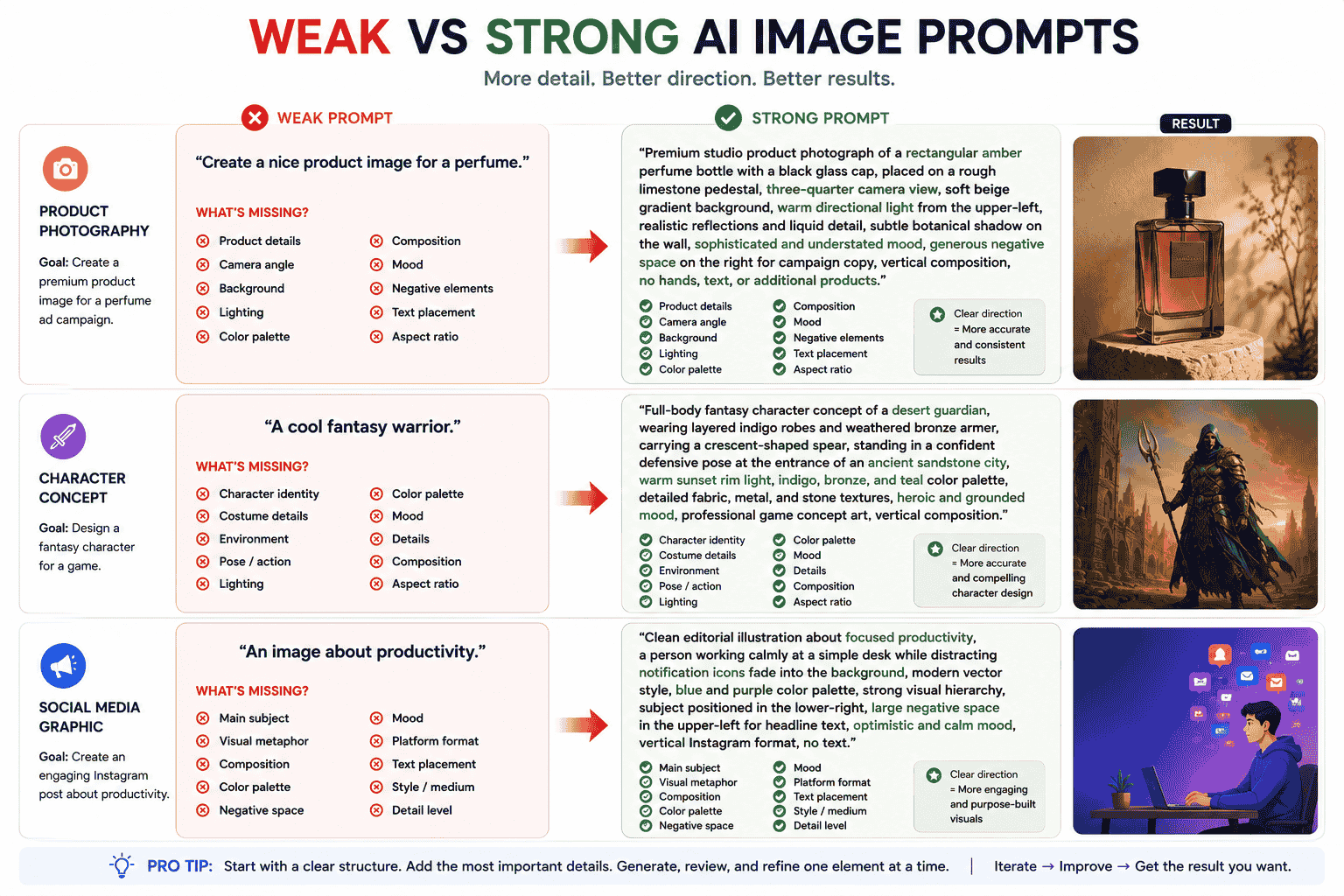
Weak vs Strong AI Image Prompts
Example 1 Product Image
Weak prompt:
Create a nice product image for a perfume.
What is missing:
- Product appearance
- Camera perspective
- Background
- Lighting
- Brand mood
- Color palette
- Composition
- Text placement
Stronger prompt:
Premium studio product photograph of a rectangular amber perfume bottle with a black glass cap, positioned on a rough limestone pedestal, three-quarter camera view, soft beige gradient background, warm directional light from the upper-left, realistic glass reflections and liquid detail, subtle botanical shadow on the wall, sophisticated and understated mood, generous negative space on the right for campaign copy, vertical composition, no hands, text, or additional products.
Example 2 Character Image
Weak prompt:
A cool science-fiction character.
Stronger prompt:
Full-body science-fiction character concept of a deep-space maintenance engineer, wearing a modular white and graphite pressure suit with visible repair patches, carrying a compact diagnostic device, standing inside a damaged orbital station corridor, practical believable technology, strong recognizable silhouette, cool overhead emergency lighting with red warning accents, focused and resilient mood, detailed film production concept art, vertical composition.
Example 3 Social Media Graphic
Weak prompt:
An image about productivity.
Stronger prompt:
Clean editorial illustration representing focused productivity, one person working calmly at a simple desk while distracting notification bubbles fade into the background, modern geometric vector style, blue violet and neutral palette, strong visual hierarchy, subject positioned in the lower-right, generous negative space in the upper-left for a headline, professional and optimistic mood, vertical social media composition, no generated text.
Common AI Image Prompt Mistakes
1. Using Vague Adjectives
Words such as “beautiful,” “amazing,” “professional,” and “cool” provide little visual direction on their own.
Describe what should make the image feel professional or visually effective.
2. Adding Conflicting Styles
A prompt that combines photography, watercolor, flat vector illustration, oil painting, pixel art, and 3D rendering may produce an incoherent result.
Choose one primary visual medium and a few compatible characteristics.
3. Ignoring Composition
A detailed subject can still be framed poorly when the prompt does not define placement, scale, or negative space.
4. Overloading the Scene
Too many subjects and objects can weaken the focal point.
Identify which element is most important and simplify the supporting environment.
5. Depending Only on Camera Names
Adding the name of a camera or lens does not replace subject, environment, lighting, and composition direction.
6. Using Too Many Negative Instructions
A large list of exclusions may distract from what the image should contain.
Describe the desired scene positively first, then add only necessary exclusions.
7. Expecting Exact Results From One Attempt
Image generation is iterative.
The first result can reveal which parts of the prompt need clarification.
8. Changing Everything During Refinement
If you rewrite the whole prompt after every result, it becomes difficult to understand which change improved the image.
Modify one major variable at a time.
9. Forgetting the Intended Platform
A website hero, app icon, Instagram post, and YouTube thumbnail require different layouts and aspect ratios.
10. Publishing Generated Text Without Review
Always check spelling, spacing, typography, factual content, and visual consistency before publishing an image containing text.
11. Reproducing Protected Assets Too Closely
Use references to understand broader qualities such as composition, color, medium, and mood. Avoid deceptive reproduction of protected brand assets or creative works.
How PrompTessor Helps With AI Image Prompts
PrompTessor helps users create, analyze, optimize, refine, reverse-engineer, save, and reuse AI image prompts inside one prompt workspace.
You can begin with a rough idea such as:
Create a futuristic product image.
Prompt Generator can help expand that idea into a more structured visual prompt with a clearer subject, environment, composition, lighting, palette, and output direction.
Prompt Analysis can help identify missing details such as:
- An unclear main subject
- No environment
- Undefined composition
- Missing lighting direction
- No color palette
- Unclear style or medium
- Missing aspect-ratio guidance
Prompt Optimizer can then improve weak image prompts by adding clearer and more specific visual instructions.
Prompt Refinement can apply targeted feedback such as:
- Make the image more realistic
- Use warmer golden-hour lighting
- Move the product to the right
- Add more negative space
- Simplify the background
- Adapt the prompt for a cinematic widescreen result
- Turn the prompt into a reusable template
PrompTessor also includes Reverse Prompt, which can analyze an existing image and reveal reusable visual attributes such as subject, style, composition, lighting, colors, mood, and details.
Once a prompt produces useful results, it can be saved in the Prompt Library and reused across product visuals, character designs, social media campaigns, thumbnails, or cinematic workflows.
FAQ About AI Image Prompts
What is an AI image prompt?
An AI image prompt is an instruction describing the image an AI model should generate or edit. It may define the subject, environment, composition, lighting, colors, style, mood, details, and output format.
How do I write a good AI image prompt?
Start with a clear subject and purpose. Then add the action, environment, visual medium, composition, camera perspective, lighting, color palette, mood, important details, and necessary exclusions.
Do AI image prompts need to be long?
No. A prompt should include enough useful visual information to communicate the goal. A shorter focused prompt can work better than a long prompt containing conflicting or unnecessary details.
What details should I include in a text-to-image prompt?
Useful details include the main subject, action, environment, medium, composition, perspective, lighting, dominant colors, mood, important textures, aspect ratio, and elements to exclude.
Can the same prompt work with every AI image generator?
The same core prompt can provide a useful starting point, but results will differ between models. Tool-specific parameters, reference controls, negative prompts, and editing workflows may need to be adapted.
How do I create realistic AI images?
Describe a believable subject, natural environment, realistic materials, authentic imperfections, photographic composition, and appropriate lighting. Avoid excessive styling words that conflict with realism.
How do I make AI-generated text more accurate?
Keep the requested wording short, state the exact text clearly, describe its placement and hierarchy, and review the result carefully. Complex typography may still require correction in a design editor.
Should I use negative prompts?
Use negative prompts or exclusions when unwanted elements commonly appear, but describe the desired image positively first. Avoid overly long lists of negative instructions.
How can I reuse AI image prompts?
Replace project-specific details with variables such as {subject}, {environment}, {lighting}, {color_palette}, and {aspect_ratio}. Save successful templates for future projects.
Can PrompTessor create AI image prompts?
PrompTessor helps users generate, analyze, optimize, refine, reverse-engineer, save, and reuse AI image prompts for different image generators and creative workflows.
Build Better Visual Workflows With AI Image Prompts
Better AI images begin with clearer visual decisions.
Define what the image is for, what viewers should notice first, how the scene should be composed, what lighting and colors support the mood, and which details are essential.
Do not try to solve everything with one extremely long prompt.
Start with a focused structure, generate several options, evaluate the results, and refine one important variable at a time.
Once a prompt works, turn it into a reusable template and save it for future product, character, marketing, social media, or cinematic projects.
A good AI image prompt does not describe every pixel. It communicates the visual decisions that matter.
Build better prompts in one workspace
Generate prompts from ideas, analyze and optimize quality, refine with feedback, reverse-engineer content, and save reusable prompts in your Prompt Library.
Try PrompTessor Free