Best Midjourney Prompts for Realistic Photos Characters Products and Art in 2026
Midjourney can generate realistic photography, character concepts, product visuals, architecture, fantasy environments, brand concepts, and cinematic artwork from text prompts.
However, simply naming a subject is rarely enough to produce a controlled and useful result.
A prompt such as “a futuristic city” leaves most creative decisions to the AI. It does not define the location, time of day, architecture, lighting, camera angle, visual mood, color palette, or composition.
A stronger prompt gives Midjourney a clearer visual direction while still leaving enough room for creative interpretation.
This guide contains reusable Midjourney prompts for realistic photos, portraits, characters, products, architecture, interiors, fantasy art, logos, social media visuals, and cinematic scenes.
Each prompt includes customizable variables such as {subject}, {location}, {lighting}, {color_palette}, and {aspect_ratio}, allowing you to adapt the same structure to different creative projects.
Quick Answer
The best Midjourney prompts clearly describe the subject, environment, medium, composition, camera perspective, lighting, color palette, mood, visual details, and desired aspect ratio. You can make the prompts reusable by replacing specific details with variables such as {subject}, {style}, {lighting}, and {aspect_ratio}.
Key Takeaways
- Start with the main subject and the action or scene you want to create.
- Add useful visual details such as environment, composition, lighting, colors, mood, and medium.
- Place Midjourney parameters such as
--ar,--raw, and--sat the end of the prompt. - Use reusable placeholders to adapt one prompt structure to multiple creative projects.
- Do not assume that adding more adjectives automatically creates a better image.
- Generate several versions, compare the results, and refine only the details that need improvement.
Table of Contents
- How to Write a Good Midjourney Prompt
- Midjourney Prompt Structure
- Useful Midjourney Parameters
- Midjourney Prompts for Realistic Photos
- Midjourney Prompts for Portraits
- Midjourney Prompts for Characters
- Midjourney Prompts for Product Photography
- Midjourney Prompts for Architecture and Interiors
- Midjourney Prompts for Fantasy Art
- Midjourney Prompts for Logos and Brand Concepts
- Midjourney Prompts for Social Media Visuals
- Midjourney Prompts for Cinematic Scenes
- How to Customize Midjourney Prompts
- How to Improve Weak Midjourney Prompts
- Common Midjourney Prompt Mistakes
- How PrompTessor Helps With Midjourney Prompts
- FAQ About Midjourney Prompts
How to Write a Good Midjourney Prompt
A good Midjourney prompt describes the visual result you want to see rather than explaining the process conversationally.
Instead of writing:
Can you please create a beautiful picture of a woman in a city?
Use a direct visual description:
Cinematic street portrait of a young woman walking through a neon-lit city at night, reflective wet pavement, teal and magenta lighting, shallow depth of field, natural expression, realistic skin texture, atmospheric haze, editorial photography.
The stronger version communicates several important visual decisions:
- The subject
- The environment
- The time and lighting
- The color palette
- The camera treatment
- The mood
- The intended medium
You do not need to include every possible detail in every prompt. Add only the information that materially affects the visual result.
Start With the Main Subject
Identify the most important person, object, animal, location, or scene.
Examples:
- A luxury perfume bottle
- An elderly fisherman
- A futuristic desert city
- A fantasy knight
- A minimalist living room
Describe the Environment
Explain where the subject appears.
Examples:
- Inside a dark photography studio
- On a misty mountain trail
- In a crowded cyberpunk market
- Beside a calm lake at sunrise
- Inside a modern concrete gallery
Define the Medium
The medium helps Midjourney understand the type of image you want.
Examples:
- Editorial photograph
- Watercolor illustration
- 3D product render
- Anime key art
- Architectural visualization
- Flat vector icon
- Oil painting
Add Lighting and Color
Lighting and color strongly influence mood and visual hierarchy.
Examples:
- Soft window light
- Dramatic golden-hour rim lighting
- Hard studio lighting
- Neon blue and magenta lighting
- Muted earth-tone palette
- Warm cream and amber colors
Define Composition and Camera Perspective
Composition controls how the scene is framed.
Examples:
- Centered composition
- Wide establishing shot
- Close-up portrait
- Low-angle perspective
- Top-down flat lay
- Three-quarter product view
- Subject positioned on the left with negative space on the right
Describe the Mood
Mood gives emotional direction to the image.
Examples:
- Calm and contemplative
- Dark and mysterious
- Playful and optimistic
- Luxurious and refined
- Epic and otherworldly
- Quiet and nostalgic
Midjourney Prompt Structure
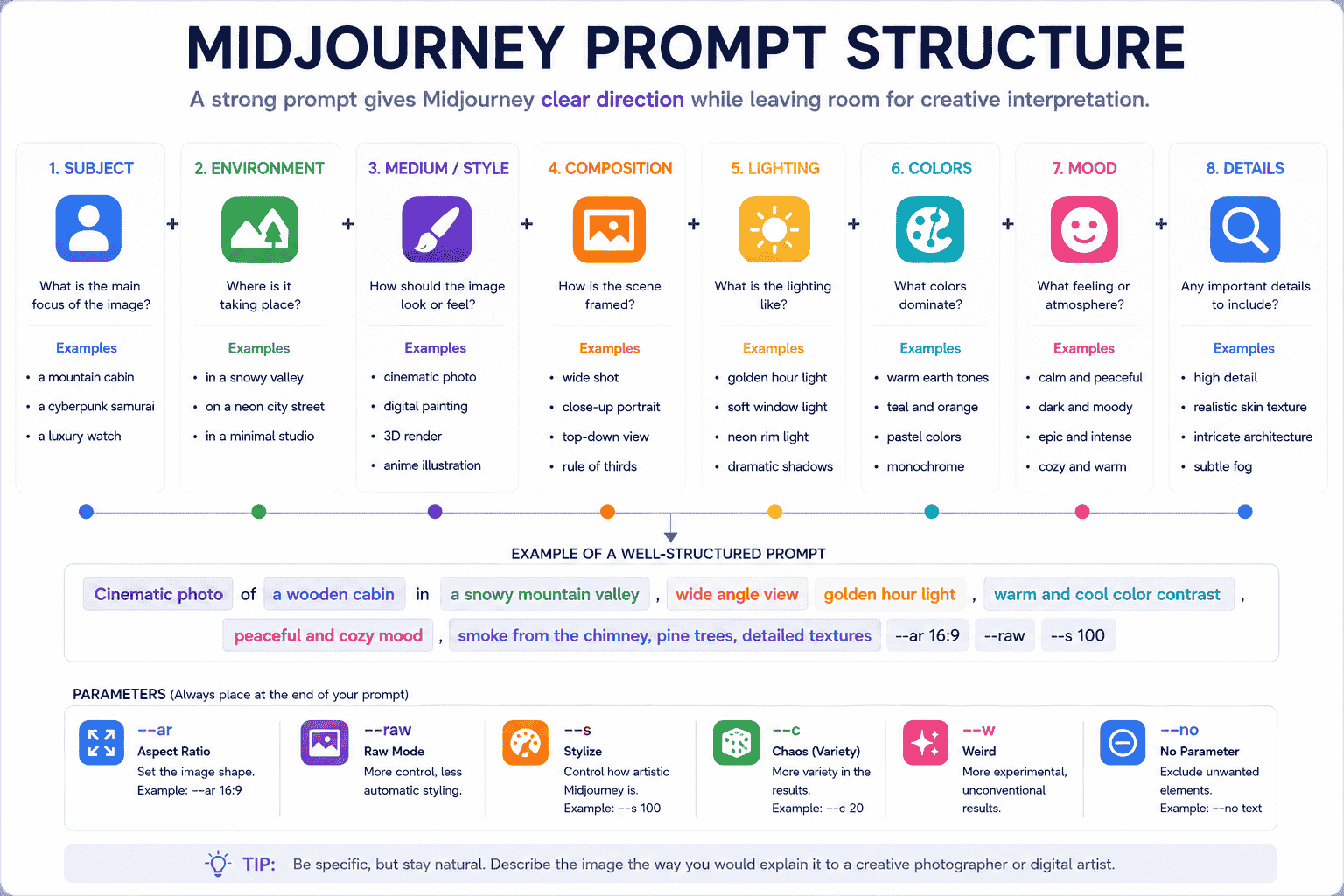
You can use the following reusable structure as a starting point:
{medium} of {main_subject}, {action_or_pose}, in {environment}, {composition}, {camera_perspective}, {lighting}, {color_palette}, {mood}, {important_visual_details}, {quality_direction} --ar {aspect_ratio} --s {stylize_value}Example:
Editorial photograph of a ceramic artist working in a sunlit studio, shaping a clay vase by hand, shelves of handmade pottery in the background, three-quarter composition, eye-level camera, soft morning window light, warm neutral color palette, calm and authentic mood, realistic hands, natural skin texture, subtle film grain --ar 3:2 --raw --s 100Here is what each part controls:
| Element | Purpose | Example |
|---|---|---|
| Main subject | Defines what the image is primarily about | Ceramic artist |
| Action or pose | Explains what the subject is doing | Shaping a clay vase |
| Environment | Sets the location and surrounding context | Sunlit pottery studio |
| Medium | Defines the visual form | Editorial photograph |
| Composition | Controls framing and placement | Three-quarter composition |
| Lighting | Shapes atmosphere and visibility | Soft morning window light |
| Color palette | Defines dominant colors | Warm neutral tones |
| Mood | Sets the emotional direction | Calm and authentic |
| Details | Adds important visual requirements | Natural skin texture and subtle grain |
| Parameters | Controls generation settings | --ar 3:2 --raw --s 100 |
Useful Midjourney Parameters
Midjourney parameters are placed at the end of the prompt. They should not be inserted between descriptive phrases.
Aspect Ratio
Use --ar to control the shape of the image.
--ar 1:1for square images--ar 4:5for portrait-oriented social posts--ar 2:3for traditional portrait photography--ar 3:2for landscape photography--ar 16:9for cinematic widescreen scenes--ar 9:16for vertical mobile visuals
Raw Mode
Use --raw when you want more direct control over the visual direction and less automatic styling from Midjourney.
Stylize
Use --s to adjust how much artistic interpretation Midjourney applies.
Lower values generally follow the written prompt more literally, while higher values allow more artistic freedom.
Chaos or Variety
Use --c to increase variation between the initial generated images.
A lower value creates more related options, while a higher value may produce more diverse and unpredictable compositions.
Weird
Use --w to encourage unconventional or experimental results.
This can be useful for surreal concepts, fashion editorials, abstract artwork, and unexpected character designs.
No Parameter
Use --no to reduce unwanted elements.
Example:
minimalist product photograph of a glass skincare bottle, warm beige studio background, soft shadows --ar 4:5 --no flowers, hands, textParameters and supported features can change as Midjourney releases new model versions. Review the official Midjourney parameter documentation when building workflows that depend on exact settings.
Midjourney Prompts for Realistic Photos
Realistic prompts work best when they describe the subject, environment, natural imperfections, lighting conditions, camera perspective, and photographic style.
1. Realistic Lifestyle Photography
Natural lifestyle photograph of {subject} {activity} in {location}, candid unposed moment, authentic expression, realistic body proportions, soft available light, subtle environmental details, natural skin texture, gentle background separation, documentary photography, understated color grading --ar 3:2 --raw --s 752. Golden-Hour Travel Photograph
Travel photograph of {location} during golden hour, {main_subject} in the foreground, warm sunlight passing through the environment, long natural shadows, atmospheric depth, realistic local details, balanced composition, subtle film grain, rich but natural colors, editorial travel photography --ar 16:9 --raw --s 1253. Urban Street Photography
Candid street photograph in {city_or_district}, {subject} moving through the scene, layered urban background, reflective pavement, available city light, realistic pedestrians, imperfect spontaneous framing, documentary mood, natural motion blur, muted cinematic color grade --ar 3:2 --raw --s 754. Food Photography
Editorial food photograph of {dish}, served on {surface_or_plate}, visible texture and fresh ingredients, soft side lighting, natural shadows, subtle steam, carefully controlled composition, realistic colors, shallow depth of field, premium restaurant photography --ar 4:5 --raw --s 100 --no text5. Nature Photography
Realistic landscape photograph of {natural_location}, {weather_condition}, layered foreground middle ground and background, natural atmospheric perspective, accurate environmental textures, dramatic but believable light, calm immersive mood, professional nature photography --ar 16:9 --raw --s 100Midjourney Prompts for Portraits
6. Natural Editorial Portrait
Editorial portrait of {subject_description}, wearing {wardrobe}, photographed in {location}, relaxed natural pose, authentic expression, realistic skin texture, individual facial features, soft directional light, subtle background blur, restrained color grading, premium magazine photography --ar 4:5 --raw --s 757. Dramatic Studio Portrait
Dramatic studio portrait of {subject_description}, {wardrobe_and_styling}, dark seamless background, controlled hard key light from one side, sculpted shadows, strong facial definition, realistic skin and fabric texture, confident expression, centered composition, high-end editorial photography --ar 4:5 --raw --s 1258. Environmental Portrait
Environmental portrait of a {profession_or_identity} inside {relevant_environment}, surrounded by meaningful tools and objects, subject engaged naturally with the space, balanced environmental composition, soft practical lighting, realistic detail, documentary editorial photography --ar 3:2 --raw --s 1009. Black-and-White Portrait
Black-and-white portrait of {subject_description}, close-up composition, thoughtful expression, soft directional window light, deep tonal range, realistic facial texture, subtle grain, timeless documentary mood, minimal background, classic monochrome photography --ar 4:5 --raw --s 75Midjourney Prompts for Characters
10. Fantasy Character Design
Full-body character concept of {character_role}, wearing {costume_description}, carrying {weapon_or_accessory}, influenced by {world_or_culture}, detailed materials and practical construction, clear silhouette, confident stance, neutral presentation background, front three-quarter view, professional fantasy game concept art --ar 2:3 --s 25011. Science-Fiction Character
Science-fiction character design of {character_description}, functional futuristic clothing, modular equipment, subtle signs of use and wear, believable technology, distinct silhouette, controlled color palette of {colors}, standing inside {environment}, cinematic concept art, precise material rendering --ar 2:3 --s 25012. Anime Character Key Art
Anime-style key art of {character_description}, {pose_or_action}, wearing {costume}, long expressive hair movement, detailed eyes, layered fabric, dramatic perspective, {environment}, strong atmospheric lighting, vibrant color accents, polished game illustration, cinematic composition --ar 2:3 --s 35013. Character Turnaround Sheet
Professional character turnaround sheet for {character_description}, front view, side view, back view and three-quarter view, consistent clothing and proportions across every pose, neutral standing position, clean light background, clearly separated views, production-ready concept design presentation --ar 16:9 --s 10014. Cute Mascot Character
Friendly mascot character based on {animal_or_object}, simple recognizable silhouette, large expressive eyes, {brand_colors} color palette, approachable personality, clean stylized 3D illustration, soft studio lighting, centered full-body pose, minimal background, suitable for an app or digital product --ar 1:1 --s 250 --no text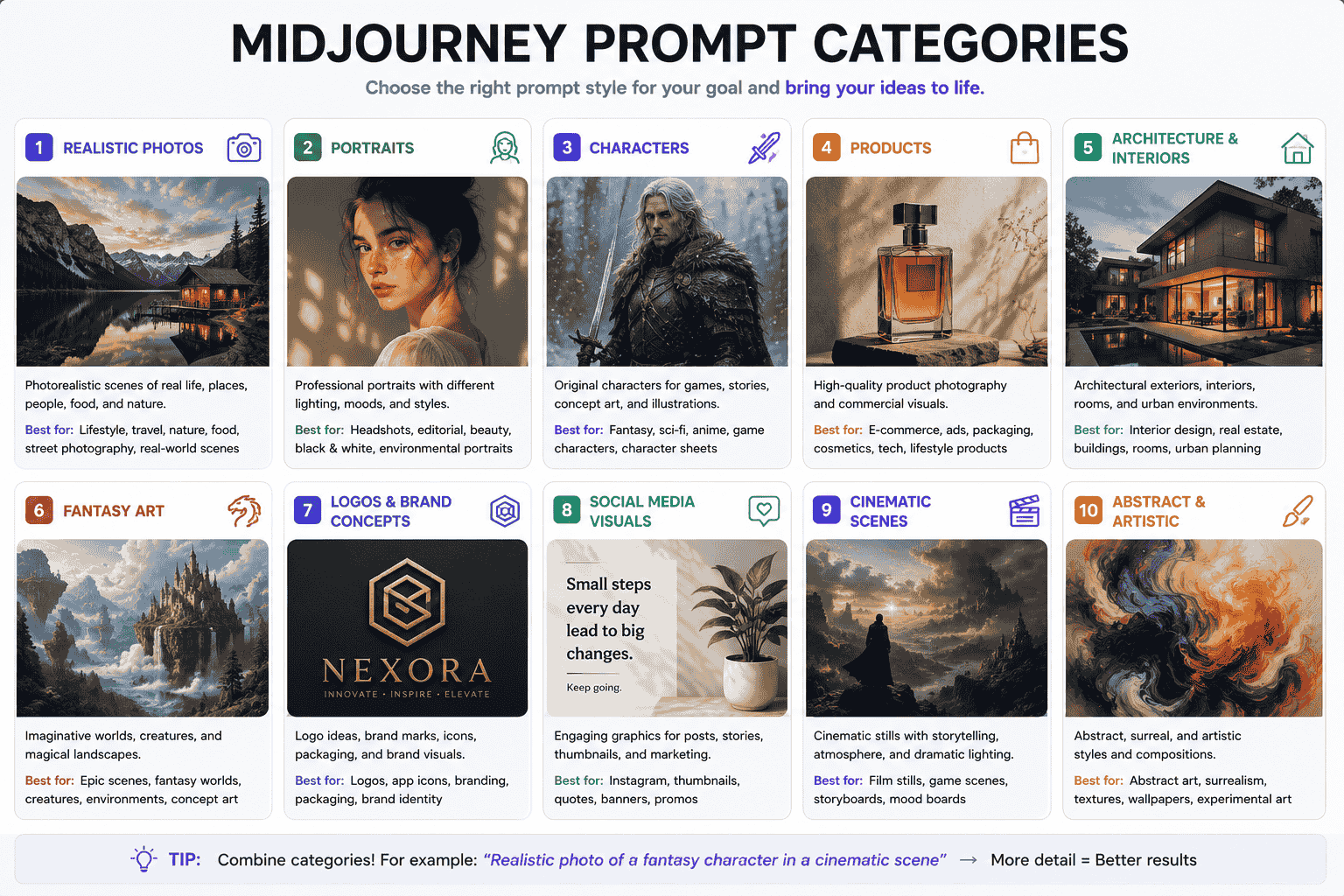
Midjourney Prompts for Product Photography
15. Minimalist Product Photograph
Premium product photograph of {product}, centered on {surface}, minimalist {background_color} studio background, soft directional lighting, realistic reflections, controlled shadow, detailed material texture, clean commercial composition, generous negative space, luxury advertising photography --ar 4:5 --raw --s 100 --no hands, text, watermark16. Lifestyle Product Scene
Lifestyle advertising photograph of {product} being used by {target_user} in {environment}, natural interaction, product clearly visible, authentic everyday context, soft daylight, realistic textures, warm approachable mood, balanced composition, commercial brand photography --ar 3:2 --raw --s 12517. Cosmetic Product Photography
Luxury beauty campaign photograph of {cosmetic_product}, placed on {surface}, surrounded by subtle elements inspired by {ingredient_or_brand_theme}, soft diffused studio light, luminous reflections, refined neutral color palette, clean high-end composition, realistic packaging materials --ar 4:5 --raw --s 175 --no hands, text18. Technology Product Render
High-end commercial visualization of {technology_product}, three-quarter view, floating slightly above a dark gradient surface, precise industrial design, realistic metal glass and plastic materials, controlled edge lighting, subtle reflections, premium futuristic mood, product launch campaign visual --ar 16:9 --s 175 --no text19. Product Flat Lay
Top-down flat lay photograph featuring {product} with {supporting_objects}, carefully arranged geometric composition, clean {background_color} background, soft overhead light, subtle shadows, consistent spacing, contemporary editorial styling, realistic material detail --ar 1:1 --raw --s 100 --no textMidjourney Prompts for Architecture and Interiors
20. Contemporary House Exterior
Architectural visualization of a {architectural_style} house in {location}, {building_materials}, large windows, realistic landscaping, human-scale details, late-afternoon natural light, accurate shadows, wide eye-level composition, refined contemporary atmosphere, photorealistic architectural rendering --ar 16:9 --raw --s 12521. Luxury Living Room
Interior visualization of a luxurious {interior_style} living room, {color_palette} palette, {key_materials}, carefully selected furniture, layered ambient and natural lighting, realistic fabric and surface textures, balanced wide composition, calm premium atmosphere, architectural photography --ar 16:9 --raw --s 15022. Small Apartment Interior
Realistic interior design of a compact {room_type} inside a small urban apartment, intelligent space-saving furniture, built-in storage, practical circulation, warm natural materials, soft daylight, uncluttered composition, functional and inviting atmosphere --ar 4:3 --raw --s 12523. Futuristic Architecture
Futuristic public building designed for {purpose}, located in {environment}, monumental but functional form, advanced sustainable materials, integrated landscape, visible human scale, dramatic atmospheric lighting, detailed architectural concept visualization --ar 16:9 --s 300Midjourney Prompts for Fantasy Art
24. Epic Fantasy Landscape
Epic fantasy landscape of {location_description}, enormous {landmark_or_creature} dominating the distance, winding path leading through the foreground, layered atmospheric depth, dramatic storm light, luminous magical details, rich environmental storytelling, cinematic fantasy concept art --ar 16:9 --s 40025. Enchanted Forest
Ancient enchanted forest at {time_of_day}, towering twisted trees, glowing plants and drifting particles, narrow path through dense vegetation, soft volumetric light, mysterious color palette of {colors}, intricate natural textures, immersive fantasy illustration --ar 3:2 --s 40026. Fantasy City
Grand fantasy city built across {terrain}, monumental towers and bridges, architectural influences from {inspiration}, active streets and distant figures, layered skyline, warm sunset mixed with magical illumination, epic scale, detailed world-building concept art --ar 16:9 --s 40027. Mythical Creature
Mythical creature combining features of {animal_one} and {animal_two}, adapted to live in {environment}, believable anatomy, detailed skin fur feathers or scales, powerful silhouette, interacting naturally with the landscape, dramatic atmospheric lighting, high-detail creature concept art --ar 3:2 --s 350Midjourney Prompts for Logos and Brand Concepts
AI-generated logo concepts should normally be treated as creative exploration rather than finished trademark-ready assets. Review originality and legal suitability before commercial use.
28. Minimal Symbol Concept
Minimal symbol concept for a {industry} brand named {brand_name}, combining the ideas of {concept_one} and {concept_two}, simple geometric construction, distinctive silhouette, balanced negative space, scalable flat vector appearance, {brand_colors} color palette, centered on a clean background --ar 1:1 --s 100 --no mockup, photograph29. App Icon Concept
Modern app icon concept for {app_description}, one clear central symbol representing {core_idea}, rounded square composition, bold recognizable silhouette, subtle dimensional depth, {color_palette} gradient, clean premium digital product aesthetic, readable at small size --ar 1:1 --s 175 --no text30. Brand Pattern Concept
Seamless brand pattern inspired by {brand_theme}, using simplified icons of {visual_elements}, consistent spacing, clean geometric rhythm, {brand_colors} palette, modern flat vector style, suitable for packaging websites and social media backgrounds --ar 1:1 --s 15031. Packaging Concept
Packaging design concept for {product_type}, designed for {target_audience}, {brand_personality} visual direction, clean hierarchy, {color_palette} palette, distinctive graphic system, realistic packaging structure, displayed as a premium studio product presentation --ar 4:5 --s 200Midjourney Prompts for Social Media Visuals
32. Educational Social Media Graphic
Clean educational social media illustration about {topic}, one clear visual metaphor, modern editorial vector style, simple geometric shapes, {brand_colors} palette, strong visual hierarchy, generous negative space reserved for headline and supporting copy, polished professional composition --ar 4:5 --s 175 --no text33. YouTube Thumbnail Background
High-impact YouTube thumbnail background for a video about {topic}, {main_subject} positioned on the {left_or_right}, dramatic lighting, strong contrast, bold visual storytelling, simplified background, clear focal point, large negative space for headline, highly readable composition --ar 16:9 --s 250 --no text, watermark34. Instagram Product Visual
Premium Instagram campaign visual featuring {product}, placed within a creative environment inspired by {campaign_theme}, controlled studio lighting, bold {color_palette} palette, refined commercial composition, clear product focus, stylish but uncluttered background --ar 4:5 --s 200 --no text35. LinkedIn Article Illustration
Modern editorial illustration representing {business_or_technology_topic}, intelligent visual metaphor, clean professional shapes, subtle depth, blue purple and neutral palette, trustworthy business aesthetic, balanced horizontal composition, negative space for article title --ar 1.91:1 --s 175 --no textMidjourney Prompts for Cinematic Scenes
36. Cinematic Establishing Shot
Wide cinematic establishing shot of {location_or_scene}, {main_subject} visible within the environment, strong foreground middle ground and background separation, dramatic natural lighting, atmospheric haze, controlled color contrast, immersive production design, film still composition --ar 16:9 --s 25037. Suspense Scene
Cinematic suspense scene inside {location}, {subject} cautiously approaching {object_or_area}, low practical lighting, deep shadows, subtle environmental clues, restrained color palette, tense composition, realistic production design, psychological thriller film still --ar 16:9 --raw --s 17538. Science-Fiction Film Scene
Science-fiction film still of {subject} inside {futuristic_environment}, believable advanced technology, functional production design, volumetric light, atmospheric particles, strong scale contrast, cinematic teal and amber palette, realistic materials, wide dramatic composition --ar 16:9 --s 25039. Historical Film Scene
Historical cinematic scene set in {period_and_location}, {subject_and_action}, period-accurate clothing architecture and objects, natural atmospheric lighting, rich environmental detail, restrained color grade, realistic human expressions, prestige historical drama film still --ar 16:9 --raw --s 17540. Emotional Close-Up
Emotional cinematic close-up of {character_description}, reacting to {situation}, subtle natural expression, realistic eyes and skin texture, shallow depth of field, soft directional light, restrained background, intimate framing, nuanced dramatic film still --ar 16:9 --raw --s 100How to Customize Midjourney Prompts
The examples in this guide are reusable frameworks rather than fixed instructions.
Replace variables such as:
{subject}{location}{activity}{visual_style}{lighting}{color_palette}{mood}{aspect_ratio}
For example, this template:
Editorial portrait of {subject}, wearing {wardrobe}, photographed in {location}, {lighting}, {mood}, realistic texture --ar 4:5 --rawCan become:
Editorial portrait of an elderly Japanese craftsman, wearing a navy linen work jacket, photographed inside a traditional wood workshop, soft morning window light, quiet and contemplative mood, realistic skin wood and fabric texture --ar 4:5 --raw --s 75When customizing a prompt, focus on the details that matter most to the visual objective.
Change One Major Variable at a Time
If a result is close to your goal, avoid rewriting the entire prompt immediately.
Change one important element, such as:
- Lighting
- Camera perspective
- Environment
- Color palette
- Wardrobe
- Aspect ratio
- Stylization level
This makes it easier to understand which instruction changed the output.
Use Image and Style References When Needed
Midjourney can use image prompts to influence visual content, composition, and colors. Style References can guide the overall visual treatment, such as medium, lighting, textures, and palette.
Reference images are best used as guidance rather than as a substitute for a clear text prompt.
How to Improve Weak Midjourney Prompts
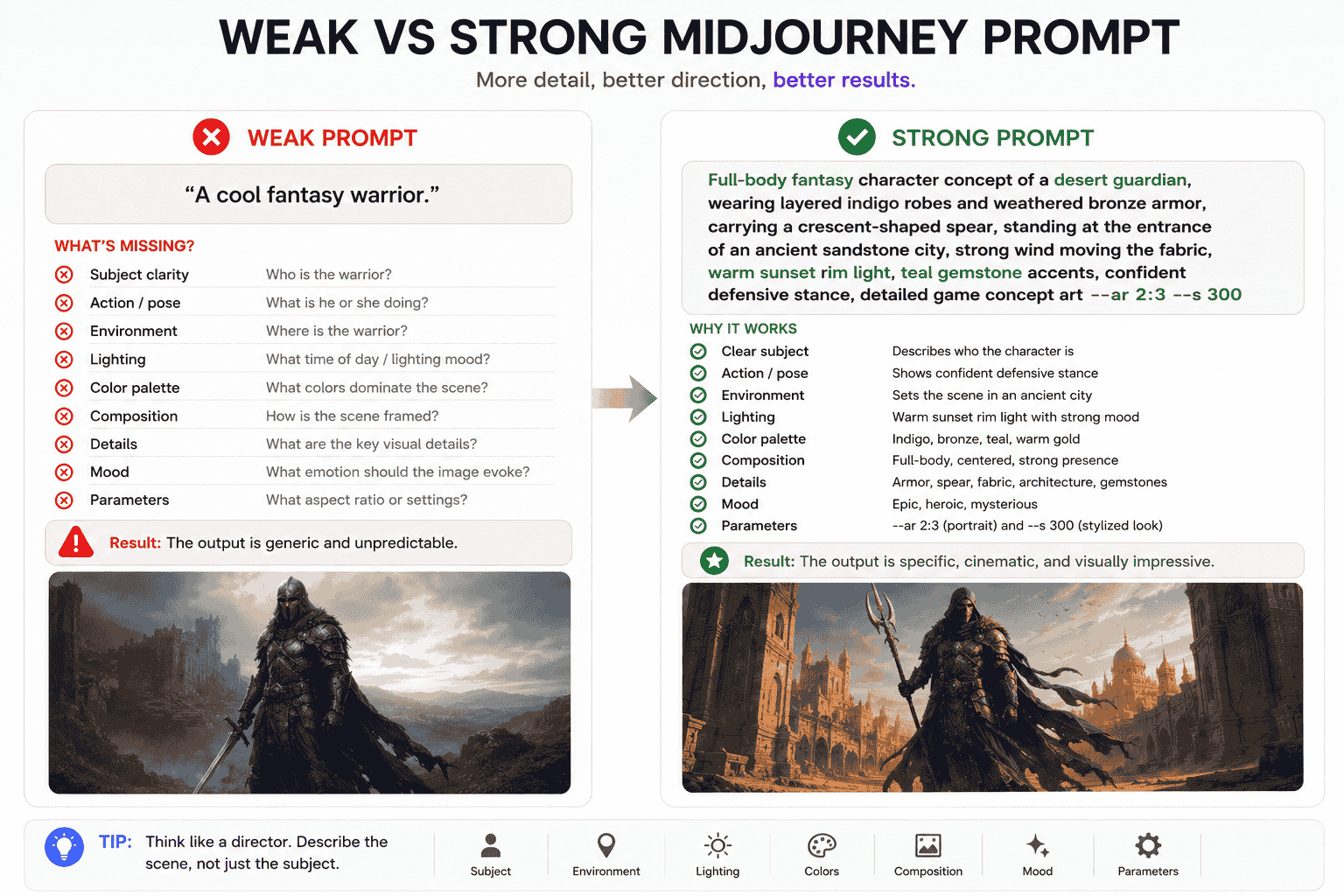
Consider this weak prompt:
A cool fantasy warrior.
The prompt identifies a subject but leaves almost everything else undefined.
It does not specify:
- The character identity
- The costume
- The pose
- The environment
- The lighting
- The color palette
- The visual medium
- The composition
A stronger version could be:
Full-body fantasy character concept of a desert guardian, wearing layered indigo robes and weathered bronze armor, carrying a crescent-shaped spear, standing at the entrance of an ancient sandstone city, strong wind moving the fabric, warm sunset rim light, teal gemstone accents, confident defensive stance, detailed game concept art --ar 2:3 --s 300
The second version gives Midjourney a more complete visual direction without describing every pixel.
Use this checklist when improving weak prompts:
- Clarify the main subject.
- Add an action, expression, or pose.
- Define the environment.
- Choose the visual medium.
- Describe the composition or camera angle.
- Set the lighting and color palette.
- Add a mood.
- Specify the aspect ratio.
- Remove conflicting or unnecessary adjectives.
- Generate, compare, and refine.
Common Midjourney Prompt Mistakes
1. Using Too Many Unrelated Style Words
Combining several conflicting media and aesthetics can make the visual direction unclear.
Choose one primary medium and a small number of compatible style characteristics.
2. Using Vague Adjectives
Words such as “beautiful,” “cool,” and “amazing” do not explain what should make the image visually effective.
Replace them with more concrete visual guidance.
3. Forgetting the Composition
A detailed subject description may still produce poor framing if the prompt does not explain how the image should be composed.
Add terms such as close-up, full-body, wide shot, centered composition, top-down view, or negative space.
4. Mixing Prompt Text and Parameters
Parameters should appear after the descriptive prompt, not between normal phrases.
5. Expecting Exact Text Inside Images
Short words or phrases can work better than large blocks of text, but generated typography may still need correction or external design tools.
6. Depending on Camera Specifications Alone
Adding a camera and lens name does not automatically create a compelling image.
Subject, composition, lighting, environment, and mood usually matter more.
7. Adding More Detail Without More Direction
A long list of adjectives can make a prompt longer without making it clearer.
Each phrase should contribute to the intended image.
8. Treating the First Generation as Final
Image generation is iterative. Compare results, create variations, and refine the instructions based on what is missing.
9. Copying Protected Styles or Assets Too Closely
Use references to understand broader qualities such as medium, color, texture, composition, and mood. Avoid using prompts to reproduce protected work or brand assets deceptively.
How PrompTessor Helps With Midjourney Prompts
PrompTessor helps users build, improve, reverse-engineer, save, and reuse visual prompts within one AI prompt workspace.
You can start with a rough visual idea and use Prompt Generator to turn it into a more structured image prompt.
If you already have a Midjourney prompt, AI Prompt Analysis can help identify missing details such as subject clarity, environment, composition, lighting, constraints, and expected output direction.
Prompt Optimizer can improve weak visual prompts by making the description clearer, more specific, and easier for an image model to interpret.
Prompt Refinement can then apply feedback such as:
- Make the composition more cinematic
- Change the lighting to golden hour
- Use a more realistic photographic style
- Add a wider aspect ratio
- Change the subject’s wardrobe
- Make the image suitable for a product campaign
- Create a more reusable version with placeholders
PrompTessor also includes Reverse Prompt, which can analyze an existing image and turn its reusable visual attributes into a prompt that can be adapted for similar outputs.
Once a prompt works well, it can be saved in the Prompt Library for future character, product, architecture, campaign, or visual content workflows.
FAQ About Midjourney Prompts
What is a Midjourney prompt?
A Midjourney prompt is a text description, image reference, or combination of inputs used to guide the images Midjourney generates.
What makes a good Midjourney prompt?
A good Midjourney prompt usually identifies the subject, environment, medium, composition, camera perspective, lighting, color palette, mood, important details, and desired aspect ratio.
Do Midjourney prompts need to be long?
No. A Midjourney prompt should include enough relevant visual direction to communicate the idea. A shorter focused prompt can perform better than a long prompt filled with conflicting or unnecessary descriptions.
How do I create realistic images in Midjourney?
Describe a believable subject, environment, natural lighting, realistic materials, authentic imperfections, and photographic composition. Raw mode can also provide more direct control over the visual direction.
How do I change the shape of a Midjourney image?
Add the aspect ratio parameter at the end of the prompt. For example, use --ar 16:9 for a wide image or --ar 4:5 for a vertical social media image.
What does the stylize parameter do?
The stylize parameter controls how much artistic interpretation Midjourney applies. Lower values generally follow the written prompt more closely, while higher values allow more creative interpretation.
Can I reuse Midjourney prompts?
Yes. Replace specific details with variables such as {subject}, {environment}, {lighting}, and {color_palette} to create reusable prompt templates.
Can I use an image as a Midjourney prompt?
Yes. Midjourney supports image prompts and visual references that can influence content, composition, colors, style, or the appearance of referenced subjects, depending on the feature and model version used.
Can PrompTessor create Midjourney prompts?
PrompTessor can help generate, analyze, optimize, refine, reverse-engineer, save, and reuse image prompts that can be adapted for Midjourney and other image-generation tools.
Build Better Midjourney Workflows With Reusable Prompts
Strong Midjourney prompts are not created by adding as many descriptive words as possible.
They are created by making intentional visual decisions.
Define the subject, environment, medium, composition, lighting, colors, mood, and aspect ratio. Then generate several options and refine the prompt based on the results.
The prompts in this guide can be copied and customized for realistic photos, characters, products, architecture, fantasy art, branding, social media visuals, and cinematic scenes.
Once you find a prompt that works, turn it into a reusable template and save it for future projects.
Better image workflows begin with prompts that communicate a clear visual direction.
Build better prompts in one workspace
Generate prompts from ideas, analyze and optimize quality, refine with feedback, reverse-engineer content, and save reusable prompts in your Prompt Library.
Try PrompTessor Free