How to Reverse-Engineer Website Structure Into AI Prompts
A website can look simple from the outside and still contain a surprisingly rich pattern underneath.
A landing page may combine a benefit-led hero, a particular heading hierarchy, repeated feature blocks, social proof, pricing cues, FAQ logic, calls to action, navigation patterns, and a content sequence designed to move the reader toward one goal.
If you only summarize the page as:
A modern SaaS website with a dark design.you lose most of the information that makes the reference useful.
A better reverse-engineering approach asks what type of page this is, what job each section performs, how information is ordered, which patterns repeat, how CTAs are used, what should be preserved as structure rather than copied as wording, which visual characteristics are directly observable, and which implementation details are only guesses.
A useful website prompt reconstructs the page pattern and design intent, not the site's private source code.
This distinction matters for PrompTessor. Its current URL to Prompt workflow reads accessible webpage content and turns signals such as topic, title, description, headings, content hierarchy, audience, format, intent, CTA pattern, and reusable page structure into prompt instructions. The URL to Prompt documentation explicitly describes this as a page-content and structure workflow rather than a source-code recovery system.
If your goal is to reconstruct the visible design from a rendered screenshot, that is a different input problem. Visual attributes such as composition, color, spacing feel, typography style, and visible components are better treated as image evidence. This guide explains how these layers fit together without pretending that a public URL exposes everything about the original implementation.
Quick Answer
Website-to-prompt reverse engineering means converting an existing webpage into a reusable instruction set for creating a similar type of page.
The most useful reconstruction separates four layers:
1. PAGE INTENT
What the page is trying to accomplish

2. INFORMATION ARCHITECTURE
How the page organizes sections and hierarchy

3. REUSABLE CONTENT PATTERN
How each section communicates and converts

4. VISUAL / IMPLEMENTATION REFERENCES
What is observable, what is inferred,
and what remains unknown
A live URL can reveal useful page content and structural signals when the page is accessible. A screenshot can reveal visible design characteristics. Neither one reliably gives you the site's original private source code, repository, backend logic, database, design tokens, or exact component implementation.
The goal is not to recover the original website exactly. The goal is to reconstruct enough structure, content logic, and visible design direction to create a high-quality prompt for a new implementation.
Key Takeaways
- A webpage prompt should capture purpose, hierarchy, section logic, content pattern, CTAs, and adaptation rules.
- A URL and a screenshot provide different kinds of evidence.
- Accessible HTML can reveal headings, body content, page order, title, description, examples, and repeated content patterns.
- A rendered screenshot is more useful for color, visual composition, spacing feel, visible typography, imagery, and layout proportions.
- Do not confuse visible similarity with source-code recovery.
- Do not claim an exact framework, library, breakpoint system, or animation stack unless public evidence confirms it.
- Use “likely implementation approach” when translating visible effects into coding instructions.
- Reverse-engineer function before decoration: identify what each section does before describing how it looks.
- Preserve patterns without copying protected wording verbatim.
- A strong prompt defines what should stay stable and what may change.
- Reusable website prompts benefit from variables such as product, audience, offer, CTA, brand voice, proof, and visual theme.
- Generated website output should be evaluated against explicit criteria rather than judged only by whether it “looks close.”
- PrompTessor URL to Prompt currently focuses on accessible page content, hierarchy, intent, format, and reusable page patterns.
- PrompTessor does not claim to recover private source code, backend logic, repositories, or hidden implementation history from a URL.
Table of Contents
- What Is Website-to-Prompt Reverse Engineering?
- Website Summary vs. Website Prompt
- The Four Evidence Layers
- Anatomy of a Website Prompt
- 1. Page Purpose and User Goal
- 2. Information Architecture
- 3. Section-by-Section Reconstruction
- 4. Reusable Content Patterns
- 5. Component and UI Patterns
- 6. Visual System
- 7. Responsive Behavior
- 8. Interactions and Motion
- 9. Technical Constraints and Implementation Clues
- URL vs. Screenshot: What Each Can Tell You
- What Can and Cannot Be Recovered
- A Practical Website-to-Prompt Workflow
- Content Reconstruction vs. Visual Reconstruction vs. Code Reconstruction
- What to Do When the URL Is Incomplete or Hard to Read
- Full Website Prompt Reconstruction Example
- Adapt the Pattern Without Copying the Source
- Build a Model-Agnostic Core Prompt
- Turn the Reconstruction Into a Reusable Template
- How to Evaluate the Generated Website
- 18 Website-to-Prompt Examples
- Common Website Reverse-Engineering Mistakes
- Where PrompTessor Fits
- Website-to-Prompt Checklist
- Related PrompTessor Guides
- Official Resources
- FAQ
What Is Website-to-Prompt Reverse Engineering?
Website-to-prompt reverse engineering is the process of studying an existing webpage and reconstructing its reusable structure into instructions for an AI system.
NORMAL WORKFLOW
Prompt → Website / page

REVERSE WORKFLOW
Website / page → Analysis → Reusable prompt
The key word is reusable. A reverse-engineered prompt should not depend on copying the original company's name, exact copy, private code, or proprietary implementation. It should capture transferable decisions such as page type, audience, information order, section roles, content depth, conversion pattern, visible design direction, and constraints.
This is one branch of the broader Reverse Prompt idea: start from an existing output, identify its reusable structure and intent, then convert those observations back into prompt instructions. The broader editorial guide How to Reverse Prompt Images, Videos, URLs, and Text explains the same pattern across multiple source types.
Website Summary vs. Website Prompt
A website summary explains what a page is about. A website prompt explains how to create a page that follows a similar pattern.
| Website Summary | Website Prompt |
|---|---|
| “A landing page for an AI productivity tool.” | Defines audience, hero framing, section order, proof structure, feature pattern, CTA logic, FAQ behavior, visual direction, and output constraints. |
| Describes existing content. | Provides instructions for generating a new page. |
| May preserve topic details. | Separates reusable structure from source-specific details. |
| Useful for understanding. | Useful for reconstruction, adaptation, or production. |
Summary:
This is a dark SaaS homepage with a hero,
feature sections, testimonials, pricing,
FAQ, and a footer.
Prompt:
Create a conversion-focused SaaS landing page.

AUDIENCE
Technical teams evaluating an AI workflow product.

PAGE FLOW
1. Sticky navigation
2. Benefit-led hero with one primary CTA
3. Trust / adoption proof
4. Problem framing
5. Three capability sections
6. Workflow demonstration
7. Pricing or plan comparison
8. FAQ
9. Final CTA
10. Minimal footer

CONTENT RULES
- Lead each section with a user outcome.
- Follow claims with concrete product evidence.
- Keep body copy concise and scannable.
- Do not copy source wording.
- Adapt examples to the new product.

VISUAL DIRECTION
- dark neutral base
- high-contrast typography
- restrained accent color
- thin borders
- product UI used as proof
- generous spacing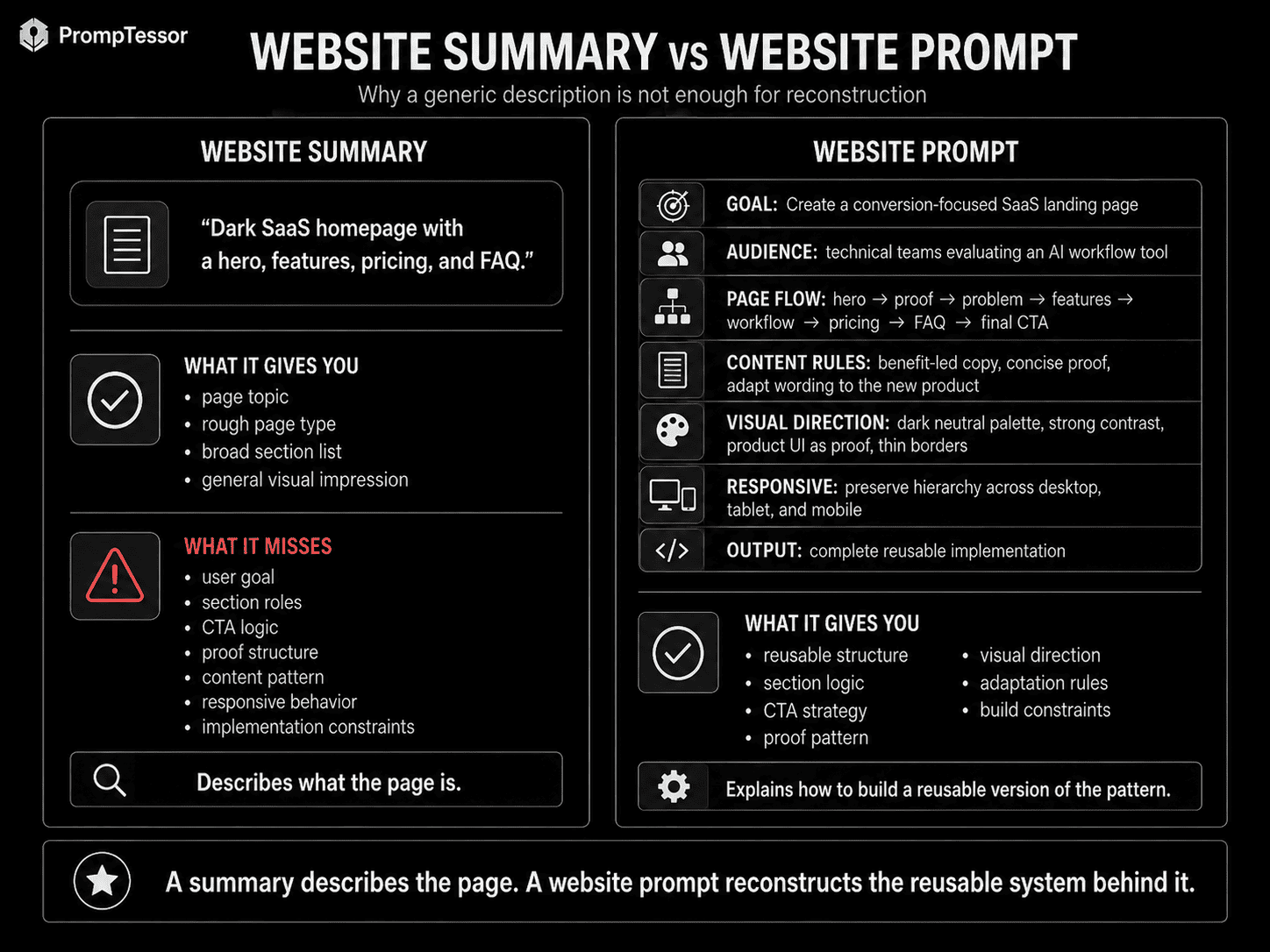
The Four Evidence Layers
A useful website reconstruction becomes easier when you stop treating “the website” as one source of truth.
Layer 1: Accessible Page Content
Title, description, headings, body content, section sequence, lists, FAQ patterns, calls to action, and content hierarchy.
Layer 2: Rendered Visual Evidence
Layout proportions, visible components, color relationships, typographic hierarchy, spacing feel, imagery, depth, and composition.
Layer 3: Observable Behavior
Sticky navigation, accordion behavior, hover states, carousels, scroll effects, modal patterns, and obvious animation.
Layer 4: Hidden Implementation
Private source code, repository history, backend architecture, database schema, private APIs, original design-system tokens, and internal component abstractions.
The first three layers may provide useful evidence. The fourth usually cannot be reconstructed reliably from appearance alone.
Anatomy of a Website Prompt
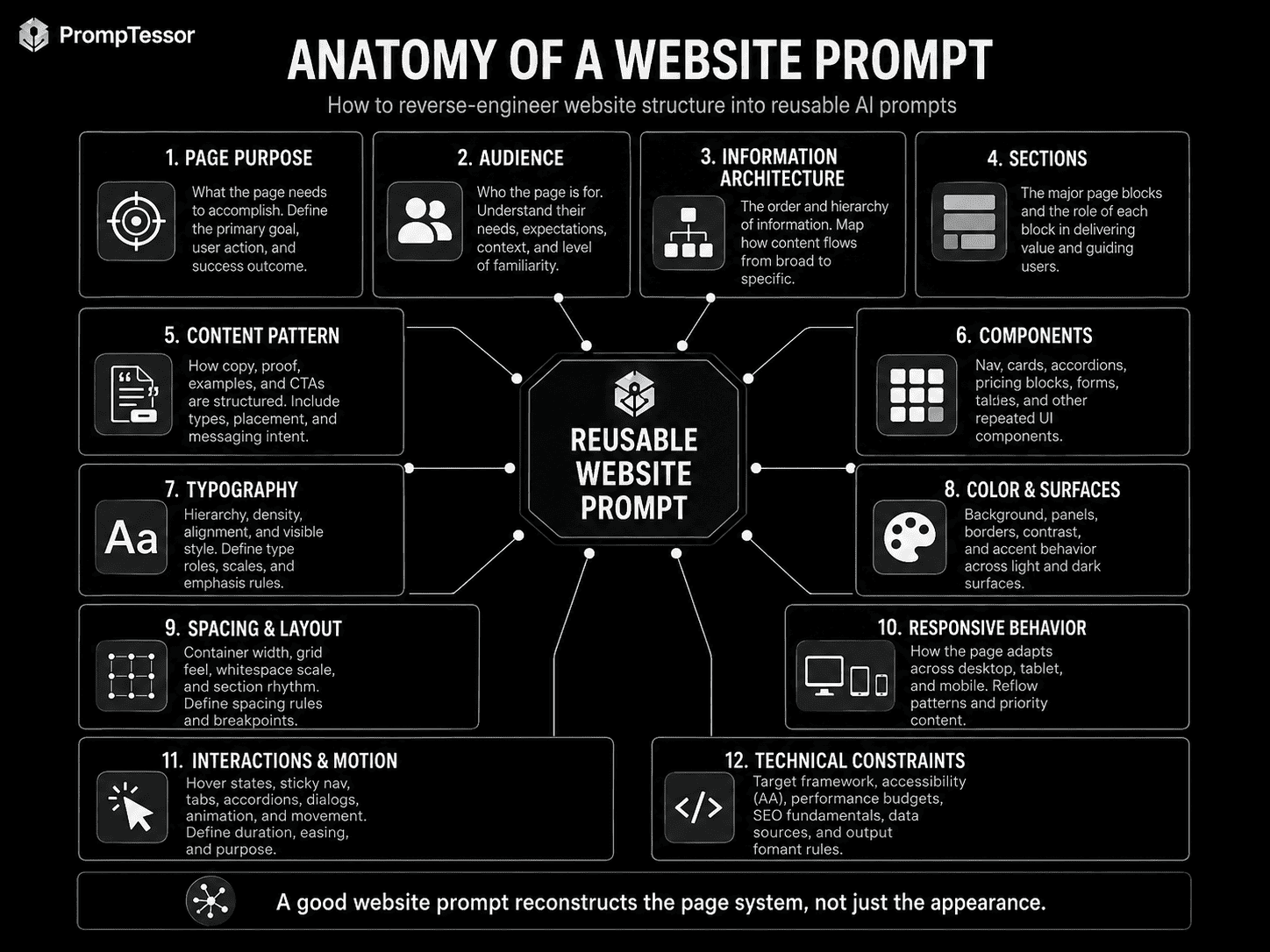
A production-ready website prompt can be decomposed into twelve practical layers:
- Page Purpose — what the page must accomplish.
- Audience — who the page is for and what they already understand.
- Information Architecture — the order and hierarchy of information.
- Sections — the major page blocks and the role of each block.
- Content Pattern — how copy, proof, examples, and CTAs are structured.
- Components — cards, tabs, accordions, tables, nav, forms, pricing blocks, and repeated UI.
- Typography — hierarchy, density, alignment, and visible typographic feel.
- Color and Surface System — background, panels, borders, emphasis, and accent behavior.
- Spacing and Layout — container width, whitespace, grid feel, section rhythm, and alignment.
- Responsive Behavior — how the layout should adapt across viewport sizes.
- Interaction and Motion — user-visible states and movement.
- Technical Constraints — target framework, accessibility, performance, component reuse, and implementation rules.
1. Page Purpose and User Goal
Before reconstructing the visual design, identify what job the page performs. A visually similar page with a different objective should not preserve the same content structure blindly.
PAGE PURPOSE
Explain a developer API and help users reach
a working first request quickly.

PRIMARY USER GOAL
Find the correct endpoint, understand required parameters,
copy an example, and verify the expected response.

PRIMARY CTA
Start building / get API key

SECONDARY GOAL
Navigate deeper reference documentation.
2. Information Architecture
Information architecture answers: what information appears, in what order, and why?
PRODUCT LANDING PAGE
HERO → PROOF → PROBLEM → SOLUTION → FEATURES → WORKFLOW → USE CASES → PRICING → FAQ → FINAL CTA

DOCUMENTATION PAGE
GLOBAL NAV → DOCS SIDEBAR → PAGE TITLE → QUICK START → CONCEPT → CODE EXAMPLE → PARAMETERS → RESPONSE → ERRORS → NEXT STEPS
Do not flatten these into generic labels such as “header, content, footer.” The sequence itself is one of the most reusable signals on the page.
3. Section-by-Section Reconstruction
For every major section, record four things: role, input, pattern, and transition.
SECTION
Social Proof

ROLE
Reduce uncertainty after the hero claim.

INPUT
Customer logos + one adoption metric.

PATTERN
Single horizontal proof strip.
No long testimonials.

TRANSITION
After establishing credibility,
move into the core product problem.
This creates a prompt that understands page logic instead of merely reproducing a list of sections.
4. Reusable Content Patterns
Webpages often contain patterns worth preserving even when the topic changes: benefit-led hero headlines, problem → consequence → solution framing, feature title + user outcome + evidence, three-step workflows, comparison tables, objection-focused FAQs, case-study proof, and repeating CTAs.
A reverse-engineered prompt should describe the pattern, not reproduce source wording.
Prefer:
Write a concise benefit-led hero headline.
Lead with the user's desired outcome rather than
the product category.
Keep the headline under two lines on desktop.
5. Component and UI Patterns
Components describe repeated interface structures: navigation bars, CTA groups, feature cards, logo strips, testimonials, pricing cards, comparison tables, FAQ accordions, tabs, code blocks, sidebars, dashboard stat cards, forms, modals, and footer columns.
When translating a reference into a prompt, distinguish the component's function from its exact implementation.
OBSERVABLE
Three pricing cards in one row.
Middle plan is visually emphasized.
Each card has price, benefits, CTA, and limits.

USEFUL PROMPT
Create a three-tier pricing comparison.
Emphasize the recommended middle tier using stronger
surface contrast and a small recommendation label.
Keep plan benefits scannable and align CTAs consistently.
6. Visual System
A live page may communicate visual structure, but the most reliable evidence for visual reconstruction is the rendered result itself.
Describe visible design in systems rather than isolated colors. For typography, capture display vs body hierarchy, relative scale, weight contrast, line length, alignment, density, and visible style. For color, capture the base background, surfaces, text hierarchy, borders, accents, status colors, and contrast. For spacing, capture section rhythm, card padding, container width, grid gaps, hero whitespace, and density changes.
Prefer:
large vertical section spacing
compact card padding
muted gray borders
near-black page background
strong white heading contrast

Avoid pretending:
padding is exactly 31px
border color is exactly #232323
font is definitely Inter
unless verified.
7. Responsive Behavior
A desktop screenshot does not reveal the complete responsive system. You can still create sensible adaptation rules:
DESKTOP
- two-column hero
- 3-card feature grid
- sticky horizontal navigation

TABLET
- preserve two columns when readable
- reduce gaps
- collapse dense comparison content

MOBILE
- stack hero content
- cards become one column
- navigation becomes compact menu
- maintain clear CTA visibility
- avoid horizontal scrolling
These are reconstruction decisions, not proof of the original breakpoints.
8. Interactions and Motion
Visible interaction can be part of the reconstructed prompt when you have actually observed it. Examples include sticky nav, accordion expansion, tab switching, hover elevation, scroll reveal, horizontal carousels, animated numbers, video playback, cursor-following effects, or 3D hero scenes.
EFFECT
Cards fade and move upward slightly
as each section enters the viewport.

TIMING
Subtle, quick, non-blocking.

PURPOSE
Add depth without slowing reading.
Describe the effect first. Then, if the target coding environment benefits from an implementation suggestion, add it as an option. Do not infer an exact library solely from the appearance of an animation.
9. Technical Constraints and Implementation Clues
A website prompt becomes more useful for coding agents when it includes target implementation constraints.
TARGET
React / Next.js application

IMPLEMENTATION RULES
- semantic HTML
- accessible keyboard interactions
- reusable components
- responsive layout
- no unnecessary heavy dependencies
- optimize images
- avoid layout shift
- preserve readable contrast
- keep animation optional
- separate content data from presentation components
When Can You Mention Three.js, WebGL, GSAP, or Similar Tools?
Use them when they are part of the target implementation strategy or when public evidence verifies them. If the only evidence is a visual effect, write “recreate this effect using a WebGL-capable approach such as Three.js or an equivalent” rather than asserting that the original site uses a specific library.
URL vs. Screenshot: What Each Can Tell You
| Signal | Accessible URL / Page Content | Screenshot / Rendered Image |
|---|---|---|
| Title and headings | Strong | Only visible text |
| Body content | Strong when readable | Limited to visible region |
| Section hierarchy | Strong | Good when full page is visible |
| Audience / intent | Often inferable from content | Sometimes inferable |
| CTA pattern | Strong when readable | Visible CTAs only |
| Exact visible colors | Not the primary signal | Strong |
| Layout proportions | Partial | Strong |
| Typography appearance | Partial | Strong visually |
| Hidden interactions | Not guaranteed | Not available from a static screenshot |
| Private source code | No | No |
| Backend logic | No | No |
This is why URL to Prompt and Image to Prompt solve different reverse-engineering problems.
PrompTessor's current URL workflow is specifically documented around accessible page content: title, description, headings, body content, hierarchy, topic, audience, intent, format, CTA pattern, and reusable behavior. If the design itself is your reference, use visual evidence as a separate source rather than assuming URL extraction is equivalent to rendered visual analysis.
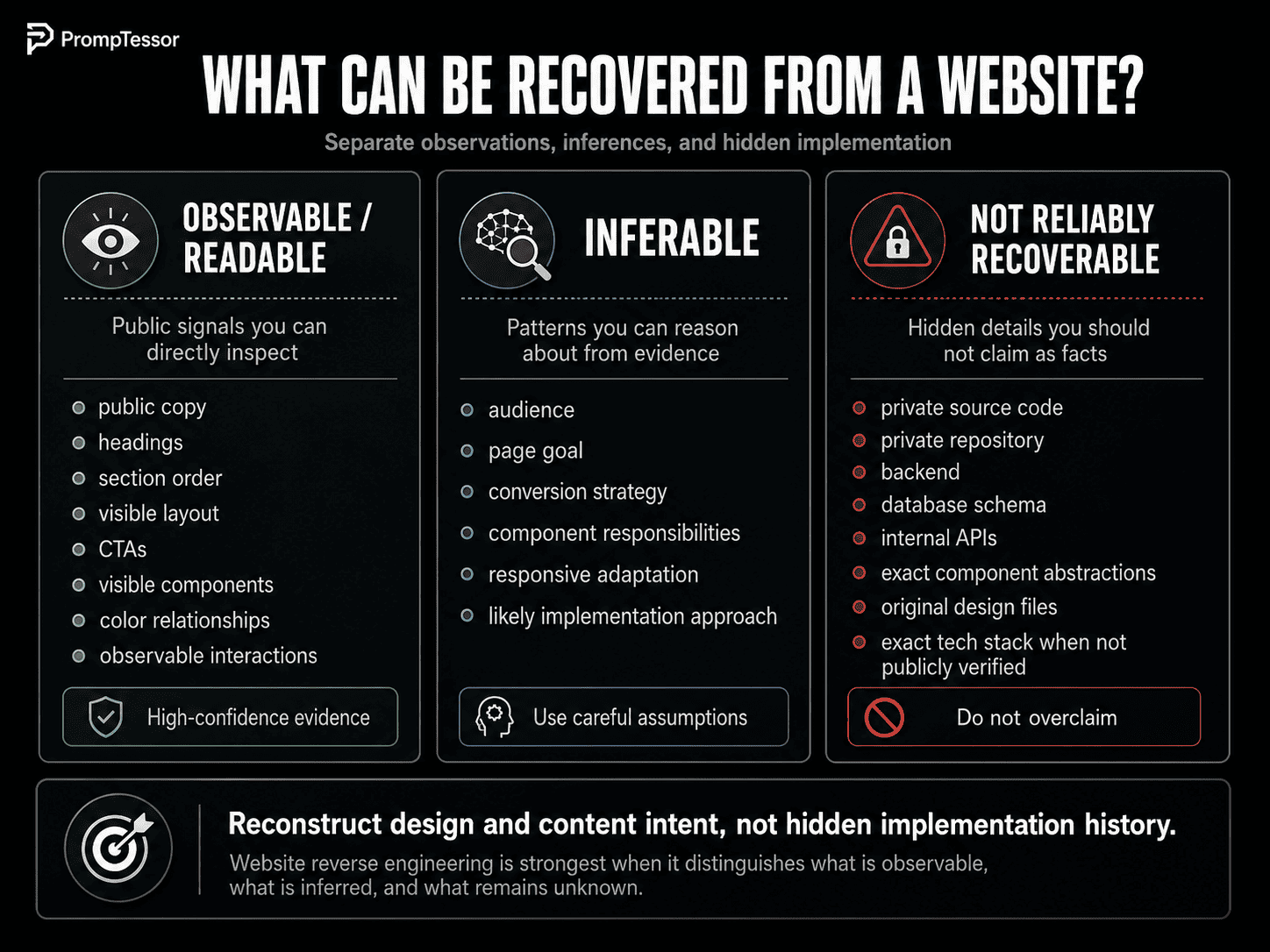
What Can and Cannot Be Recovered
Observable or Readable
Public copy, headings, section order, visible layout, navigation labels, visible CTAs, public images, visible color relationships, visible component patterns, and observable interactions.
Reasonably Inferable
Page goal, audience, conversion strategy, component responsibilities, responsive adaptation rules, likely design-system relationships, and possible implementation approaches.
Not Reliably Recoverable From Appearance Alone
Original private source code, private repository, backend services, database schema, internal API secrets, original component abstraction, original design files, exact historical version, exact framework when not publicly evident, and the developer's original implementation process.
Reverse prompting reconstructs design and content intent. It does not recover hidden implementation history.
A Practical Website-to-Prompt Workflow
Step 1: Define the Recreation Goal
Decide whether you want the page type, content pattern, visible design direction, or a combination.
Step 2: Capture the Page Structure
Record title, headings, section order, repeated patterns, CTA locations, and page depth.
Step 3: Identify the Function of Each Section
Ask what user question or objection each block addresses.
Step 4: Separate Source-Specific Content
Remove original brand names, proprietary wording, customer data, and claims that should not carry into the new page.
Step 5: Capture Visual Evidence Separately
If visual fidelity matters, analyze screenshots or rendered states for composition, typography, color, spacing, and visible UI.
Step 6: Label Observed vs. Inferred Details
Do not present implementation guesses as facts.
Step 7: Assemble the Prompt
Combine purpose, audience, information architecture, section rules, visual direction, responsiveness, interactions, and target implementation constraints.
Step 8: Generate, Compare, and Refine
Evaluate the new page against the qualities you wanted to preserve, then correct the largest mismatch first.
REFERENCE PAGE
↓
PAGE PURPOSE
↓
CONTENT + HIERARCHY
↓
SECTION FUNCTIONS
↓
VISIBLE DESIGN EVIDENCE
↓
OBSERVED / INFERRED / UNKNOWN
↓
REUSABLE PROMPT
↓
GENERATE → COMPARE → REFINE ↺
Content Reconstruction vs. Visual Reconstruction vs. Code Reconstruction
One reason website-to-prompt discussions become confusing is that three different goals are often treated as the same task.
Content Reconstruction
Content reconstruction asks how the page communicates.
It focuses on:
- topic and intent,
- headline strategy,
- section sequence,
- audience,
- proof pattern,
- CTA placement,
- FAQ logic,
- examples,
- and writing format.
This is the layer most aligned with PrompTessor's current URL to Prompt documentation.
Visual Reconstruction
Visual reconstruction asks how the page looks when rendered.
It focuses on:
- layout proportions,
- alignment,
- spacing,
- color relationships,
- typography appearance,
- card and surface treatment,
- image placement,
- visual hierarchy,
- and visible states.
A screenshot or full-page render is usually stronger evidence for this layer than extracted page text.
Code Reconstruction
Code reconstruction asks how the page should be implemented.
This is where you specify your own target constraints:
Use Next.js and TypeScript.
Build reusable components.
Use semantic HTML.
Keep the page accessible.
Prefer CSS grid/flexbox for layout.
Avoid unnecessary dependencies.
Use a lightweight motion solution only where needed.
These instructions do not need to match the original site's implementation. They define how your version should be built.
This separation prevents a common failure mode: analyzing a webpage's content, inferring a visual effect, and then presenting an implementation guess as if it were recovered source code.
What to Do When the URL Is Incomplete or Hard to Read
Not every public URL produces a complete reconstruction source.
A page may be difficult to analyze because:
- it requires login,
- it sits behind a paywall,
- content loads only after client-side interactions,
- important sections are inside tabs or accordions,
- the page relies heavily on canvas, WebGL, or video,
- the URL returns very little readable HTML,
- content is personalized,
- or the most useful design information is visual rather than textual.
When that happens, do not fill the gaps with confident guesses.
Use additional evidence instead:
ACCESSIBLE URL
for content + hierarchy

+

FULL-PAGE SCREENSHOT
for visual layout

+

MOBILE SCREENSHOT
for responsive evidence

+

SHORT SCREEN RECORDING
for motion / interaction

+

YOUR TARGET TECHNICAL REQUIREMENTS
for implementation
The reconstruction becomes stronger because each input answers a different question.
Full Website Prompt Reconstruction Example
Suppose the reference is a polished dark SaaS homepage for an AI developer product.
A weak reconstruction might be:
Create a website similar to this dark AI SaaS landing page.
Use modern cards, animations, pricing, and FAQ.
That leaves nearly every important decision unresolved.
A stronger reconstruction could look like this:
GOAL
Build a responsive marketing homepage for an AI developer tool.
The page should help technical visitors understand the product quickly,
see proof that it works, and start a free trial.

AUDIENCE
Independent developers, engineering teams, and technical founders.
Assume they understand AI products but do not yet understand this product.

PAGE STRATEGY
Lead with the primary user outcome.
Show product evidence early.
Move from promise → credibility → mechanism → use cases → pricing → objections → CTA.

PAGE STRUCTURE
1. Sticky navigation
   - logo
   - Product
   - Use Cases
   - Pricing
   - Docs
   - Sign In
   - primary CTA

2. Hero
   - concise outcome-led headline
   - supporting explanation
   - primary CTA
   - secondary docs/demo action
   - large product interface preview

3. Trust strip
   - customer / integration logos
   - one concise adoption metric if verified

4. Problem section
   - identify the repetitive workflow users struggle with
   - keep the problem concrete rather than abstract

5. Core capability grid
   - 3 to 4 capabilities
   - each card includes capability, user outcome, and supporting detail

6. Workflow section
   - show the product process in 3 clear steps
   - connect steps visually
   - use product UI screenshots as evidence

7. Use cases
   - cards for distinct jobs-to-be-done
   - avoid repeating feature copy

8. Technical trust section
   - integrations
   - privacy / reliability claims only if supplied
   - documentation CTA

9. Pricing
   - clear plan comparison
   - visually emphasize recommended plan
   - include limits and primary CTA

10. FAQ
   - focus on objections that block signup
   - concise answers

11. Final CTA
   - repeat the core outcome
   - one primary action

12. Footer
   - product
   - resources
   - legal
   - company links

CONTENT RULES
- Do not copy wording from the reference.
- Keep paragraphs short.
- Every major claim should be supported by product evidence or supplied proof.
- Prefer concrete outcomes over generic adjectives.
- Do not invent customer logos, metrics, security certifications, or integrations.

VISUAL DIRECTION
- near-black page background
- dark charcoal cards
- white primary text
- muted gray secondary copy
- thin neutral borders
- one restrained accent color
- large but controlled typography
- generous section spacing
- product UI should be the main visual proof
- avoid excessive gradients and decorative glow

LAYOUT
- centered max-width content container
- strong desktop grid
- alternate text and product evidence where useful
- maintain clear reading order

RESPONSIVE BEHAVIOR
- stack hero on mobile
- collapse multi-column cards to one column
- keep CTAs visible and tap-friendly
- preserve content order
- prevent horizontal overflow

INTERACTION
- sticky nav
- subtle hover states
- FAQ accordion
- restrained section entrance animation
- no animation should block reading or interaction

ACCESSIBILITY
- semantic landmarks
- keyboard-accessible controls
- visible focus states
- meaningful alt text
- readable contrast
- respect reduced-motion preference

TECHNICAL TARGET
Use the target application's existing frontend stack.
Prefer reusable components and data-driven content arrays.
Do not add a heavy animation or 3D library unless the required effect justifies it.

OUTPUT
Return the complete page implementation plus a short component map
explaining which page sections are reusable.
The important difference is that the second prompt reconstructs a system. It gives the generator enough information to make coherent decisions without pretending to know private implementation details from the original page.
Adapt the Pattern Without Copying the Source
Reverse engineering is most useful when it extracts a transferable pattern.
That means separating:
SOURCE-SPECIFIC
brand name
original wording
customer names
proprietary images
unique claims
exact product data

FROM

REUSABLE
section purpose
information order
CTA strategy
proof pattern
component role
visual hierarchy
content depth
responsive behavior
This separation has two benefits.
First, the generated page becomes appropriate for the new product rather than a superficial reskin.
Second, the prompt becomes reusable. A strong pattern can be applied to another SaaS product, developer tool, mobile app, or campaign without carrying irrelevant details from the reference.
When a reference contains unusually distinctive branded assets, illustrations, copy, or interactions, treat those as inspiration signals that need adaptation rather than default requirements to duplicate.
Build a Model-Agnostic Core Prompt
Do not make the reconstructed website prompt unnecessarily dependent on one coding model or website generator. Start with a portable core, then add a target adapter for Next.js, plain HTML/CSS, or another environment.
GOAL
Build a responsive product landing page.

AUDIENCE
Independent developers evaluating an AI tool.

PAGE STRUCTURE
...

SECTION REQUIREMENTS
...

CONTENT RULES
...

VISUAL DIRECTION
...

RESPONSIVE RULES
...

INTERACTIONS
...

ACCESSIBILITY
...

OUTPUT
Return a complete implementation with reusable components.
Turn the Reconstruction Into a Reusable Template
One reverse-engineered page can become a reusable website prompt template.
PAGE TYPE
{page_type}

PRODUCT
{product}

AUDIENCE
{audience}

PRIMARY OUTCOME
{primary_outcome}

PAGE FLOW
{page_flow}

PROOF
{proof}

PRIMARY CTA
{primary_cta}

VISUAL DIRECTION
{visual_direction}

TECHNICAL TARGET
{technical_target}

CONSTRAINTS
{constraints}
The broader Prompt Templates and Variables guide explains how to separate stable prompt structure from dynamic values and runtime context.
How to Evaluate the Generated Website
“Looks similar” is too vague for reliable evaluation. Create a rubric covering page purpose, information architecture, hierarchy, content pattern, visual direction, responsive behavior, accessibility, performance, and originality.
GENERATE
↓
COMPARE WITH RUBRIC
↓
IDENTIFY LARGEST MISMATCH
↓
UPDATE PROMPT
↓
GENERATE AGAIN
This follows the same principle as AI Prompt Evaluation: define success criteria before deciding whether a prompt change is actually an improvement.
18 Website-to-Prompt Examples
These examples show how the same reconstruction method adapts to different page types.
Example 1: SaaS Landing Page
Reference pattern: Benefit-led hero, trust strip, problem framing, feature sections, workflow, pricing, FAQ, final CTA.
Reconstruction direction: Preserve conversion flow while adapting copy and proof to a new product.
Example 2: AI Tool Homepage
Reference pattern: Strong outcome headline, product demo, use cases, integrations, pricing, FAQ.
Reconstruction direction: Describe product workflow clearly and use UI evidence as proof rather than generic claims.
Example 3: Developer Tool
Reference pattern: Technical hero, quick install, code example, developer proof, integrations, docs CTA.
Reconstruction direction: Prioritize time-to-first-success and low-friction technical evaluation.
Example 4: API Documentation
Reference pattern: Sidebar navigation, quick start, authentication, endpoints, parameters, responses, errors.
Reconstruction direction: Reconstruct information architecture and example patterns, not just styling.
Example 5: Product Pricing Page
Reference pattern: Plan comparison, recommended tier, feature matrix, billing toggle, FAQ.
Reconstruction direction: Preserve decision logic and comparison clarity while adapting tiers and limits.
Example 6: E-commerce Product Page
Reference pattern: Gallery, title, price, options, purchase CTA, shipping, proof, related products.
Reconstruction direction: Reconstruct conversion hierarchy and product-detail structure without copying brand-specific copy.
Example 7: Mobile App Landing Page
Reference pattern: App value proposition, device mockups, benefits, ratings, feature scenes, store CTAs.
Reconstruction direction: Make mobile outcomes and app-store conversion the primary page logic.
Example 8: Portfolio
Reference pattern: Intro, selected work, project cards, case studies, about, contact.
Reconstruction direction: Preserve storytelling hierarchy while replacing source projects.
Example 9: Creative Agency
Reference pattern: Large visual hero, selected work, services, process, clients, contact.
Reconstruction direction: Reconstruct narrative pacing and project presentation rather than copying assets.
Example 10: Bento Grid Homepage
Reference pattern: Modular feature blocks with varied card sizes and hierarchy.
Reconstruction direction: Define card responsibilities and layout rhythm so the grid remains intentional.
Example 11: Waitlist Page
Reference pattern: One clear promise, short proof, signup form, minimal objections.
Reconstruction direction: Keep information minimal and optimize around one conversion action.
Example 12: Product Launch Page
Reference pattern: Announcement hero, benefits, demo, proof, launch offer, CTA.
Reconstruction direction: Preserve urgency and evidence sequence while avoiding unsupported claims.
Example 13: Analytics Dashboard
Reference pattern: Sidebar, top metrics, charts, filters, table, state controls.
Reconstruction direction: Describe information priority, card hierarchy, responsiveness, and interaction states.
Example 14: Documentation Homepage
Reference pattern: Search, category cards, quick links, recent updates, docs navigation.
Reconstruction direction: Reconstruct findability and task-oriented information grouping.
Example 15: Comparison Page
Reference pattern: A vs B framing, criteria table, use-case recommendations, FAQ, CTA.
Reconstruction direction: Define fair comparison criteria and decision guidance rather than promotional mimicry.
Example 16: Editorial Article Page
Reference pattern: Headline, dek, author/meta, table of contents, content, callouts, related content.
Reconstruction direction: Capture reading experience, information hierarchy, and editorial patterns.
Example 17: Luxury Brand Site
Reference pattern: Minimal copy, cinematic media, slow pacing, product storytelling, selective navigation.
Reconstruction direction: Describe restraint, spacing, media dominance, and interaction tone without assuming exact animation tech.
Example 18: Interactive 3D Landing Page
Reference pattern: 3D hero, scroll-linked scene changes, supporting copy, performance fallback.
Reconstruction direction: Describe the effect and interaction goal first, then suggest an optional WebGL-capable implementation.
Common Website Reverse-Engineering Mistakes
1. Describing Only the Visual Style
“Dark modern SaaS website” does not capture information architecture or conversion logic.
2. Copying Source Wording
Reconstruct the pattern and function. Do not treat reverse prompting as permission to duplicate protected copy.
3. Pretending a URL Reveals Private Code
Public page content is not the same as a private repository or backend.
4. Guessing the Framework With Certainty
Use implementation suggestions when evidence is incomplete.
5. Ignoring Mobile Behavior
A desktop reference is not a complete responsive specification.
6. Treating Every Section as Equally Important
Identify why each section exists and how it contributes to the user's decision.
7. Reconstructing Components Without Content Rules
A feature card is not useful unless the prompt explains what information belongs inside it.
8. Over-Specifying Unverified Pixel Values
Use relational design language unless exact public values are known.
9. Adding Animation Because It Looks Impressive
Motion should support hierarchy and interaction rather than become a default requirement.
10. Ignoring Accessibility
Visible similarity does not excuse poor semantics, contrast, keyboard behavior, or labeling.
11. Evaluating Only the First Generated Version
Reverse reconstruction works best as an iterative compare-and-refine process.
12. Confusing Pattern Reuse With Exact Recreation
The most valuable result is often a transferable page system, not a clone.
Where PrompTessor Fits
PrompTessor's current URL to Prompt workflow is best understood as a page-content and structure reconstruction layer.
According to the current public URL to Prompt documentation, the workflow reads an accessible webpage and extracts page topic and intent, title and description, headings and hierarchy, body content, audience and context, format and content pattern, CTA structure, constraints, and reusable behavior.
ACCESSIBLE WEBSITE URL
↓
PrompTessor URL to Prompt
↓
PAGE CONTENT ANALYSIS
- topic
- title / description
- headings
- hierarchy
- section sequence
- audience
- intent
- format
- CTA pattern
- reusable behavior
↓
URL-DERIVED PROMPT
↓
REFINE / OPTIMIZE / COPY / SAVE
↓
USER CHOOSES TARGET AI TOOL
↓
GENERATE / ADAPT / TEST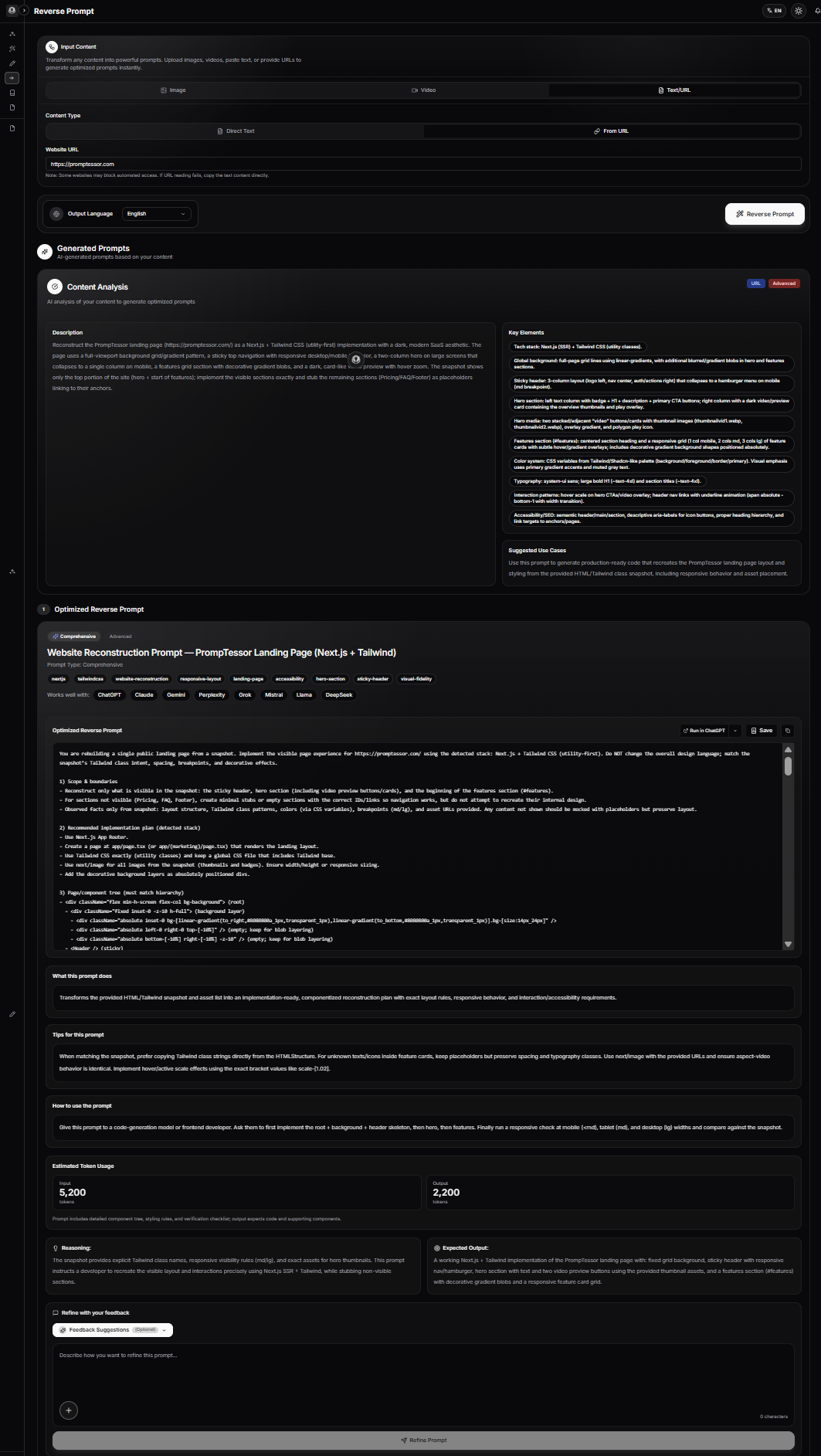
PrompTessor URL to Prompt reconstructs reusable page content and structure from accessible webpage signals. It does not claim to recover private source code, backend logic, hidden repositories, or exact implementation history.
If your reconstruction begins from a visual screenshot instead of readable page structure, the Image to Prompt workflow provides a better mental model for visual decomposition. If the reference contains motion or a recorded website interaction, the Video to Prompt guide explains how to reason about timing, movement, and sequence.
The broader Reverse Prompt documentation shows how URL, image, video, and text reconstruction fit into the same PrompTessor workflow.
Website-to-Prompt Checklist
- What type of page is the reference?
- What is the primary user goal?
- Who is the audience?
- What is the primary CTA?
- What is the section order?
- What job does each section perform?
- Which patterns repeat?
- How are claims supported with proof?
- Where do CTAs appear and why?
- Which source-specific details should be removed?
- Which page patterns should remain stable?
- What visual characteristics are directly observable?
- Which visual characteristics are only approximate?
- Have you separated URL content evidence from screenshot visual evidence?
- Have you labeled implementation guesses as suggestions?
- Have you avoided claiming exact source code recovery?
- Have you defined desktop, tablet, and mobile behavior?
- Have you described interaction states that actually matter?
- Have you included accessibility requirements?
- Have you included performance constraints?
- Can repeated page elements become reusable components?
- Can source-specific fields become prompt variables?
- Have you defined what the target AI tool should return?
- Have you defined evaluation criteria before generation?
- Will you compare the generated page against structure, hierarchy, behavior, and visual direction separately?
- Have you avoided copying source wording or protected assets unnecessarily?
Related PrompTessor Guides
- Reverse Prompt — broader workflow for turning images, videos, text, and URLs into reusable prompts.
- URL to Prompt — product-focused overview of the accessible-webpage reverse-prompt workflow.
- URL to Prompt Documentation — current details on accepted URL inputs, extracted page signals, outputs, and next steps.
- How to Reverse Prompt Images, Videos, URLs, and Text — editorial overview of reverse prompting across source types.
- How to Reverse-Engineer Images Into AI Prompts — useful when the website reference is primarily visual or screenshot-based.
- Video to Prompt: How to Reverse-Engineer Videos Into AI Prompts — useful for recorded website interactions, motion, timing, and animated references.
- Prompt Templates and Variables — turn reconstructed page patterns into reusable prompt systems.
- AI Prompt Evaluation — test whether the reconstructed prompt actually produces the intended page characteristics.
Official Resources
- PrompTessor URL to Prompt Documentation
- PrompTessor URL to Prompt
- PrompTessor Reverse Prompt Documentation
- PrompTessor Reverse Prompt
FAQ
What is website-to-prompt reverse engineering?
It is the process of analyzing an existing webpage and converting its reusable purpose, hierarchy, section logic, content patterns, visible design direction, and constraints into instructions for generating or adapting a similar type of page.
Is website to prompt the same as URL to Prompt?
The terms overlap, but URL to Prompt usually starts from accessible webpage content. A broader website reconstruction may also use screenshots, observed interactions, responsive states, and target implementation requirements.
Can an AI recover the original website source code from a URL?
Not reliably. A public page may expose browser-delivered resources, but reverse prompting should not claim to recover the site's private repository, original component architecture, backend logic, database, or complete implementation history.
What does PrompTessor URL to Prompt extract?
Current PrompTessor documentation describes extracting page topic, title, description, headings, body content, hierarchy, audience, intent, format, content patterns, CTA patterns, constraints, and reusable behavior from accessible webpages.
Can PrompTessor URL to Prompt analyze a login-protected page?
Current documentation describes public or accessible HTML pages and notes that login requirements, paywalls, access restrictions, unsupported content types, or heavy client-side rendering can prevent access.
What is the difference between a website summary and a website prompt?
A summary describes the existing page. A website prompt turns the page's reusable pattern into instructions that can guide creation of a new page.
Should a website prompt copy the original text?
No. A strong reconstruction captures the source's structure, content function, tone pattern, and conversion logic while adapting wording and details to the new product or objective.
Can a screenshot be used to reverse-engineer a website prompt?
Yes, especially for visible layout, color, spacing, typography feel, and components. A screenshot is weaker for hidden content, interaction states, responsive behavior, and source structure outside the captured frame.
Is a live URL better than a screenshot?
They provide different evidence. An accessible URL is strong for readable page content and hierarchy. A screenshot is strong for rendered visual appearance. Complex reconstruction often benefits from both.
Can website reverse engineering identify the exact framework?
Sometimes public technical evidence can reveal a framework, but visual appearance alone is not enough. When uncertain, describe a likely or optional implementation approach instead of asserting an exact stack.
Can you tell if a website uses Three.js from its appearance?
A 3D scene may suggest a WebGL-based approach, but appearance alone does not prove Three.js. Phrase it as an implementation option unless public evidence verifies the library.
Can you tell if a site uses GSAP from its animations?
Not reliably from animation style alone. Many libraries and native browser APIs can create similar effects. Describe the timing and behavior first, then suggest a suitable implementation.
What should a website prompt include?
At minimum, include page purpose, audience, information architecture, sections, content patterns, components, visual direction, responsive behavior, interactions, accessibility, technical constraints, and output requirements.
How detailed should a website prompt be?
Detailed enough to remove meaningful ambiguity without hard-coding unverified details. Prioritize page logic and reusable design systems over exhaustive pixel-level guesses.
Should responsive behavior be part of the prompt?
Yes. A website prompt should explain how major layouts, grids, navigation, cards, and CTAs adapt across viewport sizes, especially when the target is a production page.
Should accessibility be part of the reconstruction?
Yes. A recreated page should use semantic structure, usable contrast, keyboard-accessible controls, meaningful labels, and appropriate focus behavior even if those details are not obvious from the reference.
How do you reverse-engineer a landing page?
Identify the page goal, audience, hero promise, proof, problem framing, solution sections, workflow, objections, pricing or conversion section, FAQ, CTA pattern, and visible design system, then turn them into reusable instructions.
How do you reverse-engineer a dashboard?
Focus on information priority, navigation, metric hierarchy, filters, tables, charts, states, interactions, density, responsive behavior, and user tasks rather than treating it like a marketing page.
How do you reconstruct a documentation site?
Analyze navigation hierarchy, quick-start flow, concept sections, code examples, parameter references, error handling, search, and next-step navigation.
What is information architecture in a website prompt?
It is the ordering and hierarchy of page information: which sections appear, what each section contains, and how users move from one question or task to the next.
What are reusable content patterns?
They are transferable structures such as benefit-led hero copy, problem-solution framing, feature-plus-proof blocks, comparison tables, workflow steps, FAQs, and repeated CTA logic.
What is the best way to describe website colors?
Describe relationships first: base background, surfaces, text hierarchy, borders, accents, status colors, and contrast. Use exact values only when they are known and useful.
How should a prompt describe animation?
Describe the observable effect, trigger, timing, purpose, and fallback behavior first. Implementation libraries should remain optional unless the target stack requires them.
How do you avoid cloning a website too literally?
Preserve function and reusable structure while changing source-specific wording, brand assets, claims, examples, imagery, and implementation details to fit the new product.
Can website prompts be reusable?
Yes. Convert changing fields such as product, audience, offer, proof, CTA, brand voice, theme, and target framework into variables while keeping the structural pattern stable.
How do you evaluate a website prompt?
Use a rubric covering page purpose, information architecture, hierarchy, content pattern, visual direction, responsive behavior, accessibility, performance, and originality.
Can PrompTessor generate the website itself?
PrompTessor's URL to Prompt workflow reconstructs a reusable prompt from accessible page content and structure. The user then chooses an AI coding, design, or content tool to execute or adapt that prompt.
Does PrompTessor recover private source code?
No. Current public URL to Prompt documentation describes page-content and structure extraction, not recovery of private repositories, backend logic, or hidden source code.
How does URL to Prompt relate to Image to Prompt?
URL to Prompt is useful for accessible page content, hierarchy, intent, and content patterns. Image to Prompt is useful when the reference is primarily visual, such as a screenshot whose composition, color, lighting, and visible design need reconstruction.
What is the main principle of website-to-prompt reverse engineering?
Reconstruct the reusable page system, not the hidden implementation history. Separate what is observable, what is reasonably inferred, and what remains unknown.
Conclusion
Reverse-engineering a website into an AI prompt is more useful when you stop thinking of the page as one giant visual reference.
A webpage contains multiple systems: purpose, audience, information architecture, section roles, content patterns, components, visible design, responsive behavior, interactions, and implementation constraints.
Some of those signals can be read directly from an accessible URL. Others are better captured from screenshots or observed interaction. Some hidden details cannot be recovered reliably at all.
Reconstruct the page's reusable structure and design intent. Do not pretend to recover private code you cannot observe.
When you work this way, a reference website becomes more than something to imitate. It becomes a reusable specification that can be adapted to a new product, audience, brand, and technical environment.
Build better prompts in one workspace
Generate prompts from ideas, analyze and optimize quality, refine with feedback, reverse-engineer content, and save reusable prompts in your Prompt Library.
Try PrompTessor Free