How to Reverse Prompt Images Videos URLs and Text to Reveal the Prompt Behind Any Content
AI-generated content is everywhere now.
You may see an image with a specific cinematic style, a short video with a polished visual direction, a landing page with strong structure, a social post with a clear format, or a piece of writing that looks like it came from a well-crafted prompt.
But then one question appears:
What prompt could create something like this?
That is where Reverse Prompt becomes useful.
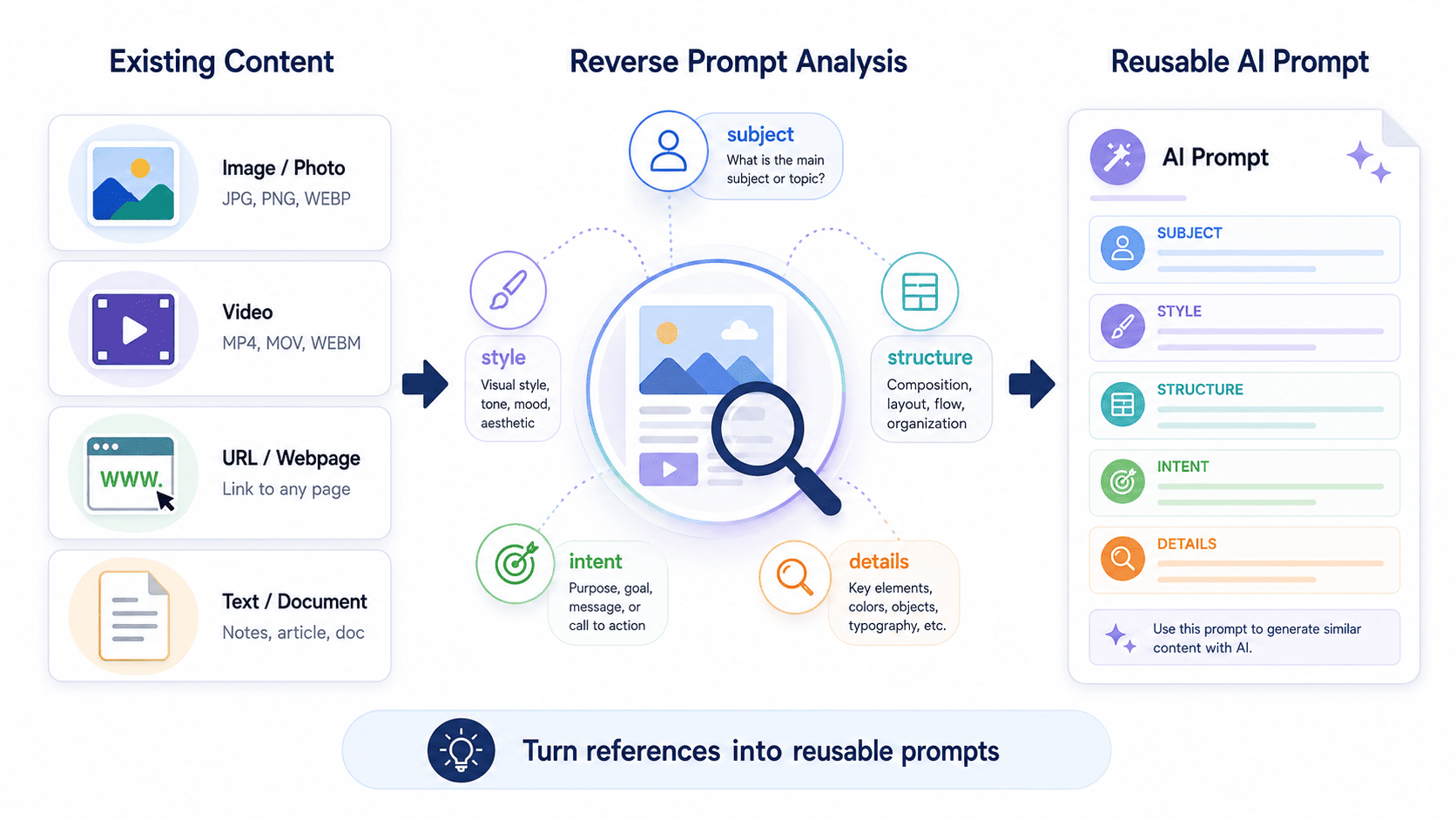
Reverse Prompt is the process of looking at existing content and turning it back into a reusable prompt. Instead of starting from a blank idea, you start from a reference such as an image, video, URL, or text sample.
The goal is not to copy content blindly. The goal is to understand the structure, style, intent, format, constraints, and creative direction behind it so you can create a better prompt for your own workflow.
In this guide, you will learn how to reverse prompt images, videos, URLs, and text to reveal the prompt behind existing content and turn references into reusable AI prompts.
Quick Answer
To reverse prompt content, start with an existing reference such as an image, video, URL, or text sample. Analyze its style, structure, subject, intent, format, details, and output direction. Then turn those observations into a reusable prompt that can help recreate, adapt, or produce a similar result. Reverse Prompt is useful for learning from references and building stronger prompt workflows.
Key Takeaways
- Reverse Prompt starts from existing content, while Prompt Generator starts from an idea, goal, or task.
- You can reverse prompt content such as images, videos, URLs, and text to understand the prompt structure behind it.
- A good reverse prompt should capture style, subject, format, context, constraints, and output direction.
- Reverse Prompt is useful for creators, marketers, designers, writers, developers, founders, and AI users who want to learn from references.
- PrompTessor helps users reverse-engineer prompts from existing content, refine the result, and save useful prompts to a Prompt Library.
Table of Contents
- What Is Reverse Prompt?
- Reverse Prompt vs Prompt Generator
- What Content Can You Reverse Prompt?
- How to Reverse Prompt Images
- How to Reverse Prompt Videos
- How to Reverse Prompt URLs
- How to Reverse Prompt Text
- What a Good Reverse Prompt Should Include
- How Reverse Prompt Fits Into an AI Prompt Workflow
- Common Use Cases for Reverse Prompt
- Common Mistakes When Reverse Prompting
- How PrompTessor Helps With Reverse Prompt
- FAQ About Reverse Prompt
- Turn Existing Content Into Reusable Prompts
What Is Reverse Prompt?
Reverse Prompt is a workflow for turning existing content into a reusable AI prompt.
Instead of asking AI to generate something from a simple idea, you provide a reference and try to uncover the prompt structure behind it.
That reference can be:
- An image
- A video
- A URL
- A text sample
- A landing page
- A social media post
- A product description
- A visual style reference
- An AI-generated output
For example, if you see a cinematic fantasy image and want to create a similar style, Reverse Prompt can help identify details such as subject, composition, lighting, camera angle, colors, atmosphere, style, background, and visual constraints.
If you see a landing page and want to understand its structure, Reverse Prompt can help identify the headline pattern, value proposition, section order, call to action, target audience, and conversion angle.
If you see a strong piece of writing, Reverse Prompt can help identify the writing style, tone, format, audience, structure, and content pattern.
The output is not only a description. The goal is to create a usable prompt that can help you produce similar results or adapt the idea for your own project.
Reverse Prompt vs Prompt Generator
Reverse Prompt and Prompt Generator are related, but they are not the same thing.
A Prompt Generator starts from an idea, goal, task, or instruction. You tell the tool what you want to create, and it helps build a structured prompt from that starting point.
Reverse Prompt starts from existing content. You provide a reference, and the goal is to infer the prompt, structure, or direction that could produce something similar.
| Workflow | Starting Point | Main Goal | Example |
|---|---|---|---|
| Prompt Generator | Idea, goal, topic, or task | Create a prompt from scratch | Create a prompt for a product launch campaign |
| Reverse Prompt | Existing image, video, text, URL, or content reference | Reveal or recreate the prompt structure behind the content | Turn a landing page, image, or video into a reusable prompt |
This difference matters because the workflow changes how you think.
Prompt Generator is intent-first.
Reverse Prompt is reference-first.
With Prompt Generator, you begin with what you want. With Reverse Prompt, you begin with something that already exists and ask what kind of prompt could lead to a similar output.
What Content Can You Reverse Prompt?
You can reverse prompt many types of content, but the most common formats are images, videos, URLs, and text.
Each format requires a slightly different analysis.
Images
Images are useful for reverse prompting visual style, composition, lighting, subject details, camera angle, background, mood, and aesthetic direction.
For example, an image reverse prompt may capture:
- Subject and character details
- Lighting and color palette
- Camera angle and composition
- Art style or rendering style
- Background environment
- Texture and material details
- Atmosphere and mood
- Negative constraints or things to avoid
Videos
Videos are useful for reverse prompting scene flow, motion, camera movement, transitions, pacing, visual consistency, lighting changes, and cinematic direction.
A video reverse prompt may include:
- Scene description
- Character or object movement
- Camera motion
- Shot type
- Lighting changes
- Visual style
- Timing and pacing
- Video generation instructions
URLs
URLs are useful when you want to reverse prompt a web page, landing page, article, product page, documentation page, or public content page.
A URL reverse prompt may extract:
- Page structure
- Content hierarchy
- Headline patterns
- Audience and intent
- Conversion flow
- Writing tone
- SEO structure
- Reusable content format
Text
Text reverse prompting is useful when you want to understand the structure behind a piece of writing.
For example, you may reverse prompt:
- A blog post
- A social media post
- An email
- A product description
- A script
- A content brief
- A research summary
- A technical explanation
The goal is to identify the writing style, content structure, audience, intent, constraints, and reusable prompt pattern behind the text.
How to Reverse Prompt Images
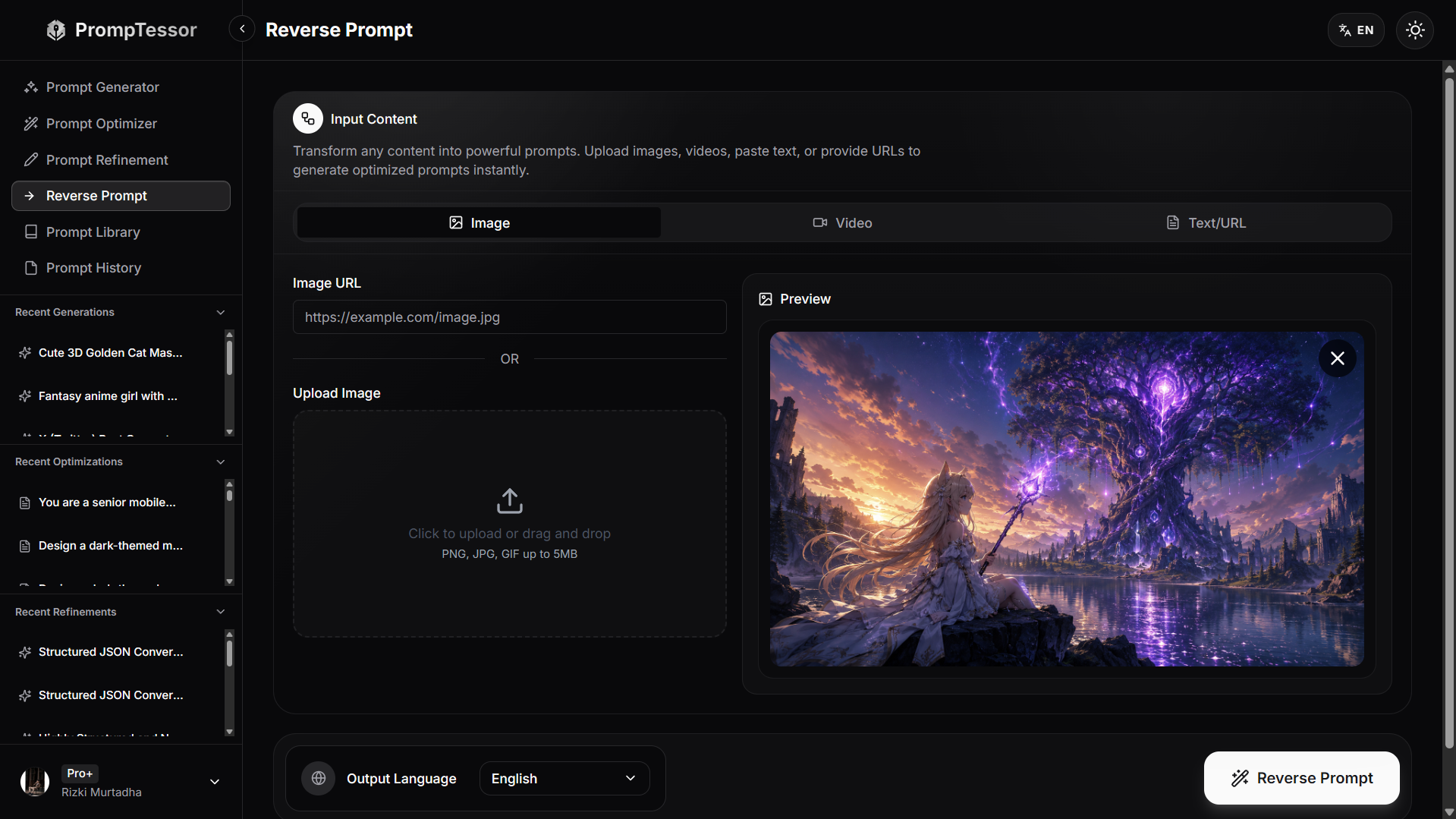
Image reverse prompting is one of the most common uses of Reverse Prompt.
When you reverse prompt an image, you are trying to understand what kind of prompt could produce a similar visual result.
Start by analyzing the visible elements:
- What is the main subject?
- What is the style?
- What is the composition?
- What lighting is used?
- What is the color palette?
- What is the background?
- What mood does the image create?
- What details make the image distinct?
For example, if the image shows a futuristic city at night, a reverse prompt should not only say:
A futuristic city at night.
That is too vague.
A stronger reverse prompt might include:
Create a cinematic futuristic city at night with towering glass skyscrapers, neon reflections on wet streets, flying vehicles, dense atmospheric fog, blue and purple lighting, wide-angle composition, high-detail cyberpunk architecture, dramatic contrast, and a polished sci-fi concept art style.
This prompt is more useful because it captures style, subject, environment, lighting, composition, and mood.
How to Reverse Prompt Videos
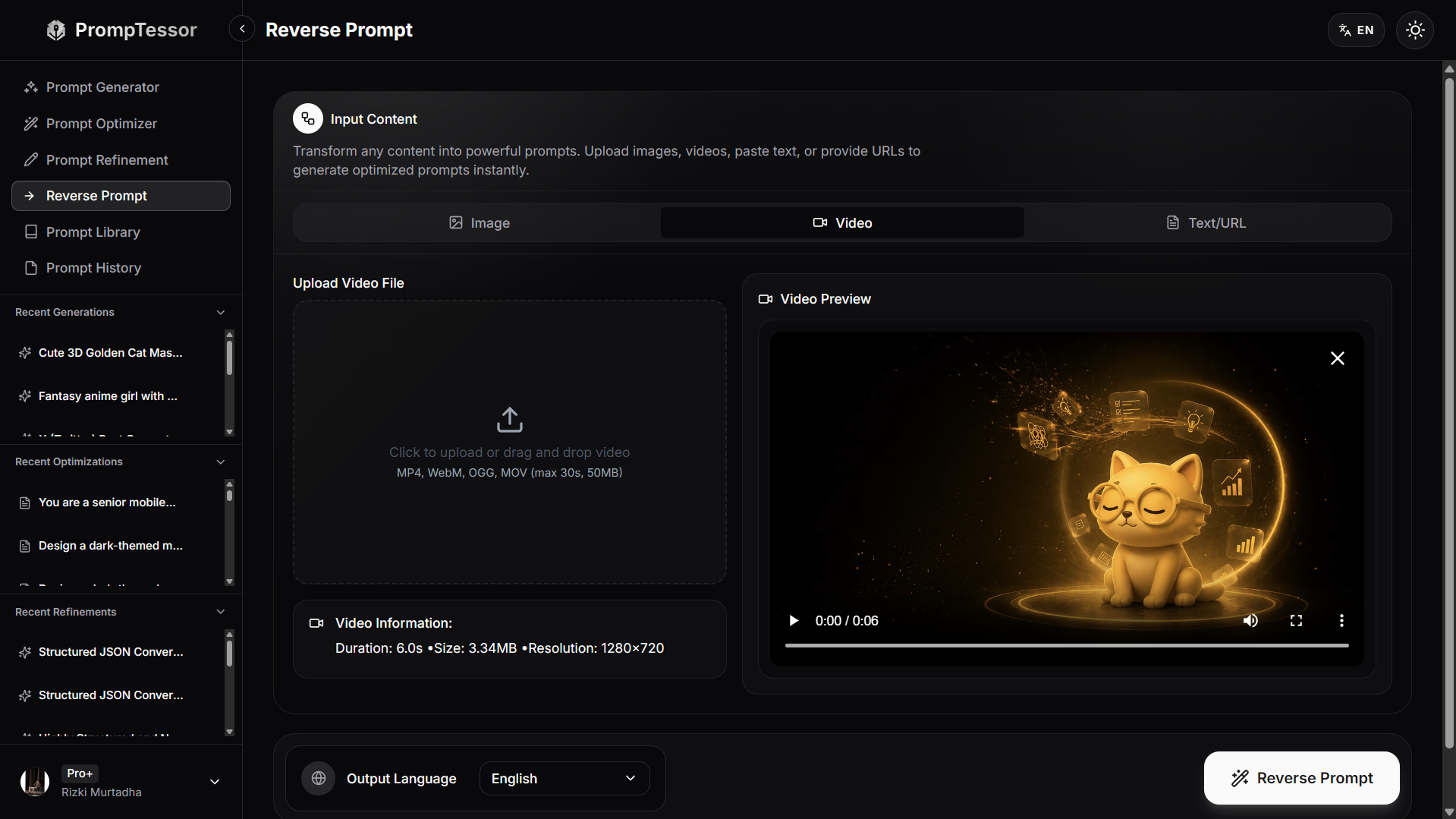
Video reverse prompting is different from image reverse prompting because video includes time, motion, pacing, and scene progression.
When reverse prompting a video, analyze both the visual style and the sequence of movement.
Look for:
- Main subject
- Scene setting
- Camera movement
- Shot type
- Object or character motion
- Lighting changes
- Scene transitions
- Duration and pacing
- Overall cinematic direction
For example, a weak video prompt might be:
A car driving through a city.
A stronger reverse prompt might be:
Create a 6-second cinematic video of a sleek black sports car driving through a rainy neon-lit city at night. Use a low tracking shot from behind the car, wet road reflections, smooth camera movement, blue and magenta city lights, light mist, realistic motion blur, and a dramatic cyberpunk atmosphere.
This gives the AI video tool more direction because it includes timing, camera angle, motion, environment, lighting, and style.
How to Reverse Prompt URLs
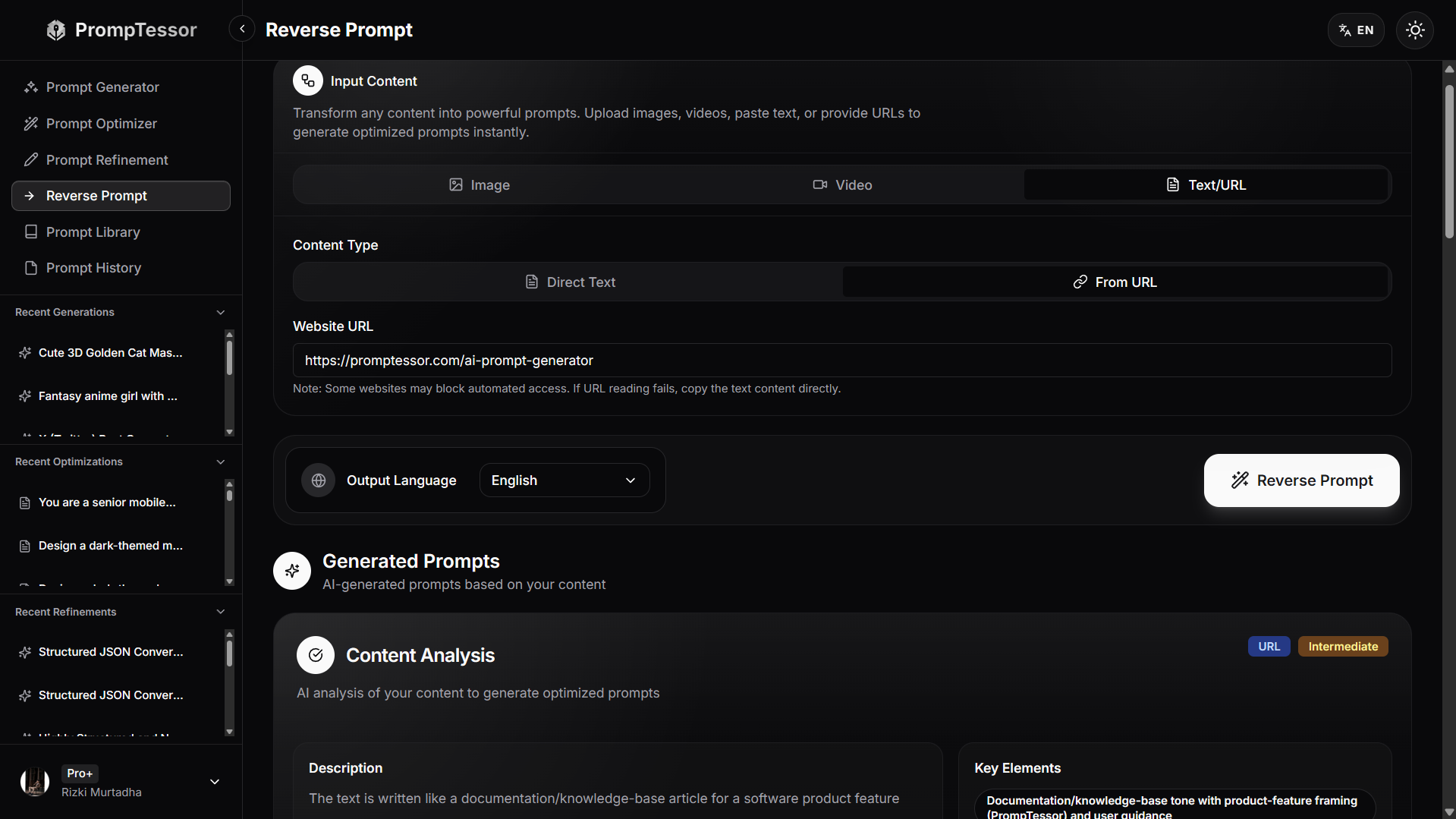
URL reverse prompting is useful when you want to understand the structure behind a public page.
This can be helpful for landing pages, blog posts, documentation, product pages, sales pages, directories, and educational content.
When reverse prompting a URL, look at:
- Page goal
- Target audience
- Headline structure
- Section order
- Content format
- CTA placement
- Trust signals
- SEO structure
- Writing tone
For example, if you reverse prompt a SaaS landing page, the result may become:
Create a SaaS landing page for an AI productivity tool targeting solo founders. Include a clear hero headline, benefit-focused subheadline, primary CTA, problem section, feature section, use cases, social proof, pricing summary, FAQ, and final CTA. Use simple conversion-focused copy and avoid exaggerated claims.
This turns a web page reference into a reusable page creation prompt.
URL reverse prompting is especially useful for marketers, founders, product teams, SEO writers, and content strategists who want to understand how strong pages are structured.
How to Reverse Prompt Text
Text reverse prompting helps you understand the prompt behind a written output.
This is useful when you see a strong article, email, social post, explanation, content brief, or script and want to create a reusable prompt that can produce a similar structure.
Start by analyzing:
- Topic
- Audience
- Tone
- Structure
- Length
- Formatting
- Examples
- Call to action
- Constraints
For example, a reverse prompt for a LinkedIn post might look like this:
Write a short educational LinkedIn post for SaaS founders. Start with a strong one-line insight, explain the idea in simple language, use short paragraphs, include 4 to 6 practical bullet points, avoid hype, and end with a clear takeaway. Keep the tone helpful, direct, and founder-friendly.
This prompt captures the structure and tone behind the content without copying the original text.
Text reverse prompting is especially useful for building reusable content templates.
What a Good Reverse Prompt Should Include
A good reverse prompt should not only describe what is visible.
It should turn the reference into instructions that an AI model can follow.
A strong reverse prompt usually includes:
1. Subject
What is the main thing being created, shown, explained, or described?
2. Context
What background information helps the AI understand the scene, topic, audience, or purpose?
3. Style
What visual style, writing style, format, or creative direction should be followed?
4. Structure
How should the output be arranged? This can include section order, layout, paragraph style, shot sequence, or content format.
5. Details
What specific details make the reference unique?
6. Constraints
What should the AI include, avoid, limit, or emphasize?
7. Output Format
Should the result be a visual prompt, video prompt, blog outline, landing page brief, JSON structure, checklist, script, or another format?
8. Reusability
Can the prompt be reused later with variables such as product name, audience, style, format, platform, or target model?
A reverse prompt becomes much more powerful when it is written as a reusable template instead of a one-time description.
How Reverse Prompt Fits Into an AI Prompt Workflow
Reverse Prompt is not only useful as a standalone feature.
It becomes more powerful when it is part of a full AI prompt workflow.
A practical workflow might look like this:
- Find a reference image, video, URL, or text sample.
- Analyze the content to identify style, structure, intent, and details.
- Generate a reverse prompt based on the reference.
- Refine the prompt for your own goal.
- Optimize the prompt for clarity, constraints, and format.
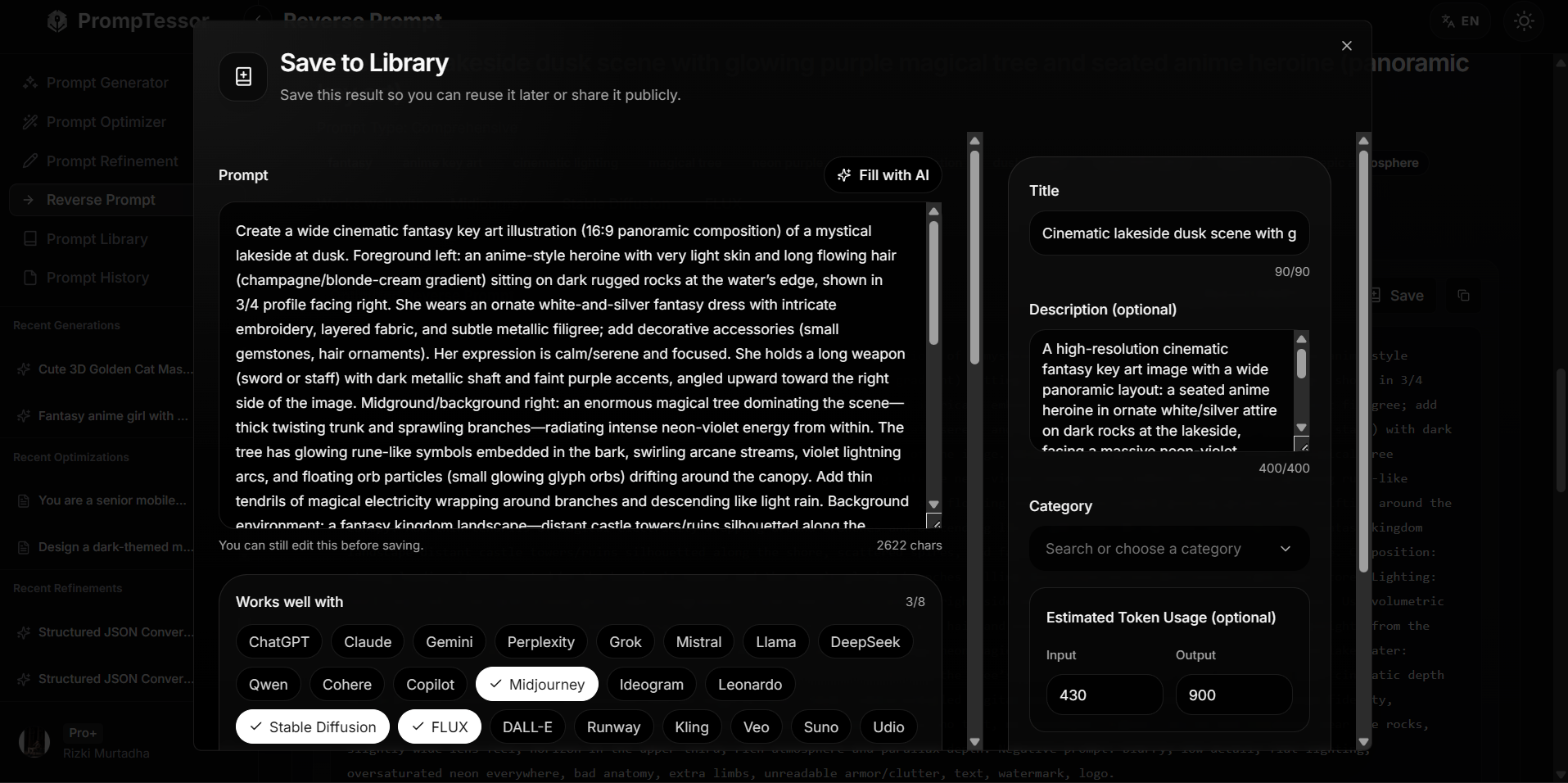
- Save the final prompt to a prompt library.
- Reuse or adapt the prompt for future projects.
This turns a reference into a reusable prompt asset.
Instead of saving screenshots, bookmarks, or random notes, you can save the actual prompt structure behind the content.
For a broader explanation of this workflow, you can read this guide on AI prompt workspaces.
Common Use Cases for Reverse Prompt
Reverse Prompt can be used across many AI workflows.
Image Prompt Creation
Creators can reverse prompt reference images to understand composition, lighting, atmosphere, subject details, and visual style.
Video Prompt Creation
Video creators can reverse prompt short clips to understand camera movement, shot type, motion, timing, pacing, and scene direction.
Landing Page Analysis
Founders and marketers can reverse prompt landing pages to understand page structure, section order, copywriting pattern, conversion flow, and CTA placement.
Content Template Creation
Writers can reverse prompt blog posts, social posts, newsletters, and email examples to create reusable writing templates.
Marketing Research
Marketers can reverse prompt ads, product pages, campaign assets, and messaging examples to understand audience angle and structure.
Design Inspiration
Designers can reverse prompt UI references, creative assets, thumbnails, and visual styles to create better design prompts.
Prompt Library Building
AI users can turn useful references into reusable prompts and save them in a prompt library for future workflows.
PrompTessor includes a Prompt Library where useful prompts can be saved, organized, and reused across private, community, and official collections.
Common Mistakes When Reverse Prompting
Reverse Prompt can be powerful, but it works best when used carefully.
1. Only Describing the Surface
A weak reverse prompt only describes what is visible.
For example:
A woman standing in a forest.
A stronger reverse prompt captures style, lighting, mood, composition, camera angle, clothing, environment, and intended output.
2. Ignoring the Output Format
A reverse prompt should define what kind of output you want.
For example, a prompt for an image tool should not be structured the same way as a prompt for a blog outline, landing page, or video generation tool.
3. Copying Instead of Adapting
Reverse Prompt should help you learn from a reference and create something useful for your own goal.
It should not be used to copy someone else's work directly.
4. Forgetting Constraints
Constraints help guide the AI output.
For visual prompts, constraints may include style, aspect ratio, lighting, composition, or things to avoid. For text prompts, constraints may include tone, length, format, audience, and examples.
5. Not Saving Useful Prompts
If a reverse prompt works well, save it.
Good prompts can become reusable assets for future content, design, marketing, product, research, or creative workflows.
How PrompTessor Helps With Reverse Prompt
PrompTessor is an AI prompt workspace that includes Reverse Prompt as part of a broader prompt workflow.
With PrompTessor Reverse Prompt, users can turn existing content into reusable prompts from formats such as images, videos, text, and URLs.
Instead of manually guessing the prompt behind a reference, PrompTessor helps analyze the content and generate a prompt that captures useful elements such as style, structure, intent, content pattern, output direction, and production details.
PrompTessor Reverse Prompt can help users:
- Reverse prompt images into visual prompt ideas
- Reverse prompt videos into scene and motion prompts
- Reverse prompt URLs into content or page structure prompts
- Reverse prompt text into reusable writing prompts
- Refine reverse prompt results with feedback
- Save useful reverse prompts to the Prompt Library
- Reuse prompts across future workflows
This makes Reverse Prompt useful for creators, marketers, designers, founders, prompt engineers, writers, and AI users who want to learn from references and build stronger prompts.
You can learn more on the PrompTessor Reverse Prompt page.
FAQ About Reverse Prompt
What is Reverse Prompt?
Reverse Prompt is a workflow for turning existing content into a reusable AI prompt. It helps users analyze content such as images, videos, URLs, or text and infer the prompt structure that could recreate or adapt similar results.
How do you reverse prompt an image?
To reverse prompt an image, analyze the subject, style, lighting, composition, background, color palette, mood, and visual details. Then turn those observations into a structured image prompt that can recreate or adapt a similar visual direction.
How do you reverse prompt a video?
To reverse prompt a video, analyze the scene, subject movement, camera motion, shot type, lighting changes, pacing, transitions, and overall style. Then turn those details into a video prompt with clear timing and visual direction.
Can you reverse prompt a URL?
Yes. URL reverse prompting can help analyze public pages such as landing pages, articles, documentation, product pages, or other web content. It can reveal structure, audience, intent, section order, tone, and reusable prompt patterns.
Can you reverse prompt text?
Yes. Text reverse prompting can help identify the tone, structure, audience, format, examples, constraints, and writing pattern behind a text sample so you can create a reusable writing prompt.
Is Reverse Prompt the same as Prompt Generator?
No. Prompt Generator starts from an idea, goal, topic, or task. Reverse Prompt starts from existing content such as an image, video, URL, or text sample. Prompt Generator is intent-first, while Reverse Prompt is reference-first.
What should a reverse prompt include?
A good reverse prompt should include the subject, context, style, structure, important details, constraints, output format, and reusable variables when needed.
Can Reverse Prompt help create reusable prompt templates?
Yes. Reverse Prompt can turn references into reusable prompt templates that can be refined, optimized, saved, and reused across future workflows.
Does PrompTessor support Reverse Prompt?
Yes. PrompTessor includes Reverse Prompt for turning images, videos, text, and URLs into reusable prompts as part of its broader AI prompt workspace.
Turn Existing Content Into Reusable Prompts
Reverse Prompt helps you understand what is behind existing content.
Instead of looking at an image, video, URL, or text sample and guessing how it was made, you can analyze the reference and turn it into a structured prompt.
This is useful for learning from examples, improving creative workflows, building reusable templates, and saving stronger prompts for future use.
The best reverse prompts do more than describe content. They reveal structure, intent, style, constraints, and output direction.
With PrompTessor, you can reverse prompt images, videos, URLs, and text, then refine, optimize, save, and reuse those prompts inside a broader AI prompt workflow.
If you want better prompts, start by learning from the content that already works.
Build better prompts in one workspace
Generate prompts from ideas, analyze and optimize quality, refine with feedback, reverse-engineer content, and save reusable prompts in your Prompt Library.
Try PrompTessor Free