How to Reverse-Engineer Images Into AI Prompts
Image-to-prompt tools look simple from the outside.
You provide an image, the system analyzes it, and a prompt comes back.
But the useful version of image-to-prompt is not just image captioning, and it is not a magical way to recover the exact hidden prompt that originally created an AI image.
The real task is more practical:
Reconstruct a reusable generation prompt from the visual characteristics that can actually be observed or reasonably inferred from the reference image.
That means identifying the subject, visible attributes, pose or action, environment, composition, camera feel, lighting, color palette, depth, style, texture, and useful output constraints—then assembling those elements into a prompt that another image model can understand.
A strong image-to-prompt workflow looks like this:
REFERENCE IMAGE
      ↓
OBSERVE VISUAL FEATURES
      ↓
DECOMPOSE THE IMAGE
      ↓
RECONSTRUCT A CORE PROMPT
      ↓
ADAPT TO THE TARGET IMAGE MODEL
      ↓
GENERATE
      ↓
COMPARE WITH THE REFERENCE
      ↓
REFINE
The distinction matters because a final image is usually influenced by much more than the visible text prompt.
FINAL IMAGE
=
PROMPT
+
MODEL
+
SEED / RANDOMNESS
+
MODEL SETTINGS
+
REFERENCE IMAGES
+
CONTROL INPUTS
+
EDITING
+
POST-PROCESSING
An image usually does not reveal those hidden generation details reliably.
So the best reverse prompt is not the one that pretends to know the hidden history of the image. It is the one that reconstructs the visible creative intent clearly enough to be reused.
This guide explains how image-to-prompt works, how it differs from image captioning, what can and cannot be recovered, how to decompose a visual reference, how to build model-agnostic prompts, why the first recreation may still look different, how to refine prompts iteratively, and how workflows differ across modern image generators.
Quick Answer
A useful image-to-prompt system should analyze at least these visual layers:
1. SUBJECT
Who or what is the focal point?

2. ATTRIBUTES
Appearance, clothing, materials, features

3. POSE / ACTION
What is the subject doing?

4. ENVIRONMENT
Where is the scene?

5. COMPOSITION
How are elements arranged in the frame?

6. CAMERA
Shot type, angle, lens feel, perspective

7. LIGHTING
Direction, softness, contrast, practical lights

8. COLOR
Palette, saturation, temperature, grading

9. DEPTH
Foreground, midground, background, focus

10. STYLE
Photo, illustration, 3D, editorial, cinematic, etc.

11. TEXTURE
Skin, fabric, metal, grain, surface detail

12. CONSTRAINTS
Aspect ratio, background, text, unwanted elements
Then reconstruct a prompt from those observations:
SUBJECT
+
ATTRIBUTES
+
ACTION
+
ENVIRONMENT
+
COMPOSITION
+
CAMERA FEEL
+
LIGHTING
+
COLOR
+
DEPTH
+
STYLE
+
TEXTURE
+
OUTPUT CONSTRAINTS
Do not confuse this with exact prompt recovery.
Image-to-prompt can often reconstruct a useful description of the visible result. It usually cannot reliably recover the original seed, exact model settings, hidden references, LoRA weights, negative prompt, or post-processing pipeline.
Key Takeaways
- Image-to-prompt reconstructs visible creative intent; it does not reliably recover the exact hidden original prompt.
- An image caption describes what is visible, while a generation prompt also describes how the image should look.
- Subject alone is not enough. Composition, camera feel, lighting, color, depth, and style often determine whether a recreation feels similar.
- Camera terms should usually be treated as visual approximations unless actual metadata is available.
- “85mm portrait lens look” is safer than claiming a reference definitely used an 85mm physical lens.
- Separate what is observed from what is inferred.
- Some details are fundamentally unknown from the final image alone, including seed, exact model parameters, hidden references, and parts of the post-processing workflow.
- Negative prompts are harder to reverse-engineer because they describe excluded content that may leave no visible trace.
- A model-agnostic core prompt is often more reusable than immediately writing provider-specific syntax.
- Different image generators interpret prompt length, style words, reference images, and parameters differently.
- Midjourney currently recommends concise prompts and explicitly lists subject, medium, environment, lighting, color, mood, and composition as useful prompt dimensions.
- OpenAI currently recommends GPT Image 2 for API image generation and editing, with support for both text and image inputs.
- Google's current Gemini image-generation stack supports conversational image generation and editing with text, images, or both.
- The first generated image may differ even when the reverse prompt is good because generation remains model-dependent and stochastic.
- Iterative comparison is usually more effective than treating reverse prompting as a one-shot process.
- For UI screenshots, reverse prompting can reconstruct visual design instructions, but it does not recover original source code.
- For text-heavy graphics, exact typography and layout may require dedicated extraction or manual correction.
- PrompTessor can reconstruct a reusable prompt from observable visual characteristics without claiming to recover hidden generation history.
Table of Contents
- What Is Image to Prompt?
- Image Caption vs. Image Prompt
- Can You Recover the Exact Original Prompt?
- Observed vs. Inferred vs. Unknown
- Anatomy of an AI Image Prompt
- Subject
- Attributes and Materials
- Pose and Action
- Environment
- Composition
- Camera Language
- Lighting
- Color Palette and Grading
- Foreground, Midground, Background, and Focus
- Style and Medium
- Texture and Surface Detail
- Positive vs. Negative Prompt Reconstruction
- Image-to-Prompt Reconstruction Workflow
- Reconstruction vs. Recreation
- Why the First Recreation May Still Look Different
- Iterative Reverse Prompting
- Build a Model-Agnostic Core Prompt
- Adapting for GPT Image
- Adapting for Gemini Image Generation
- Adapting for Midjourney
- Practical Image-to-Prompt Examples
- When Image-to-Prompt Fails
- Where PrompTessor Fits
- Image-to-Prompt Checklist
- Related PrompTessor Guides
- Official Resources
- FAQ
What Is Image to Prompt?
Image to prompt is the process of analyzing a reference image and converting its visible characteristics into textual instructions that can be used to generate a similar visual.
In PrompTessor, Image to Prompt is one specialized part of the broader Reverse Prompt workflow, which also covers video, text, and URL references. If you want the product-focused overview rather than this technical deep dive, see the Image to Prompt feature page.
The output might describe:
- the main subject,
- how the subject looks,
- what it is doing,
- where it is located,
- how the frame is composed,
- how the scene appears to have been photographed or rendered,
- how light falls across the scene,
- which colors dominate,
- what visual style is present,
- and which details are important to preserve.
A reverse prompt is useful because users often know what they want visually before they know how to describe it.
You may see a reference and think:
I want something like this, but I do not know the words that describe why it looks this way.
Image-to-prompt bridges that gap.
A still image contains no motion timeline, so it should not be analyzed like a video. If the reference includes camera movement, subject motion, pacing, transitions, or audio, use the dedicated Video to Prompt guide instead.
Image to Prompt Is a Translation Problem
VISUAL REPRESENTATION
      ↓
SEMANTIC DECOMPOSITION
      ↓
GENERATIVE LANGUAGE
The system is translating visual evidence into language that another image model can use.
This is the still-image version of a larger reference-first prompting pattern. For the broader concept across images, videos, text, and URLs, see How to Reverse Prompt Images, Videos, URLs, and Text.
Image Caption vs. Image Prompt
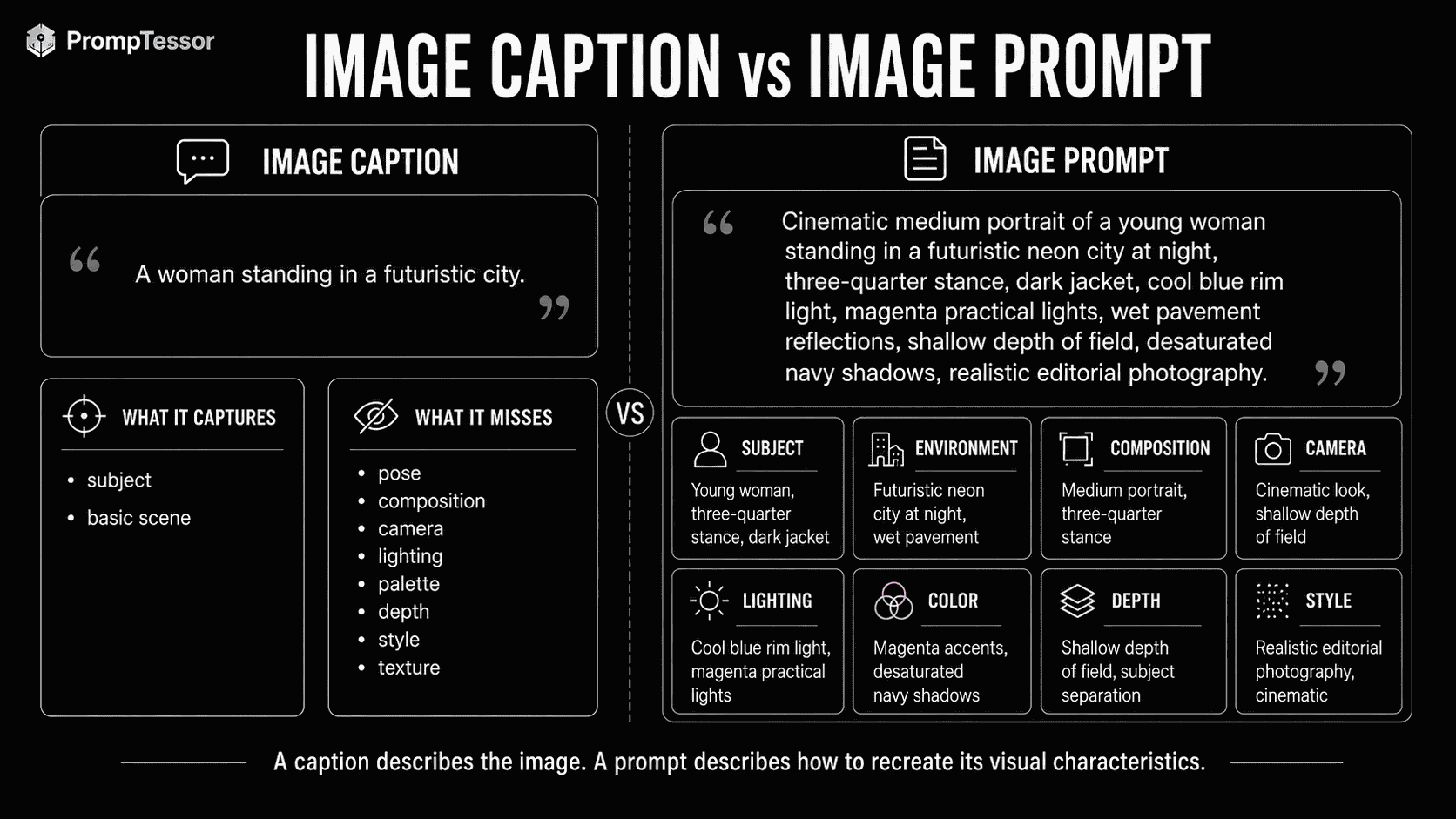
Image captioning and image-to-prompt overlap, but they are not the same task.
Caption
A woman standing in a futuristic city at night.This is semantically correct, but it leaves out most of the generation-relevant information.
Image Prompt
Cinematic medium portrait of a young adult woman standing
on a rain-soaked futuristic city street at night,
dark tactical jacket, shoulder-length silver hair,
three-quarter stance, neon signage reflected in wet pavement,
cool blue rim light with warm magenta practical lights,
85mm portrait-lens look, shallow depth of field,
soft atmospheric haze, high contrast,
desaturated navy shadows with saturated neon accents,
realistic skin texture, cinematic editorial photography.
The second description does more than identify objects.
It captures the visual construction of the image.
Captioning Optimizes for Recognition
Captioning generally asks:
What is visible here?
Reverse Prompting Optimizes for Recreation
Image-to-prompt asks:
Which visual instructions would help another generator produce something with similar characteristics?
Can You Recover the Exact Original Prompt?
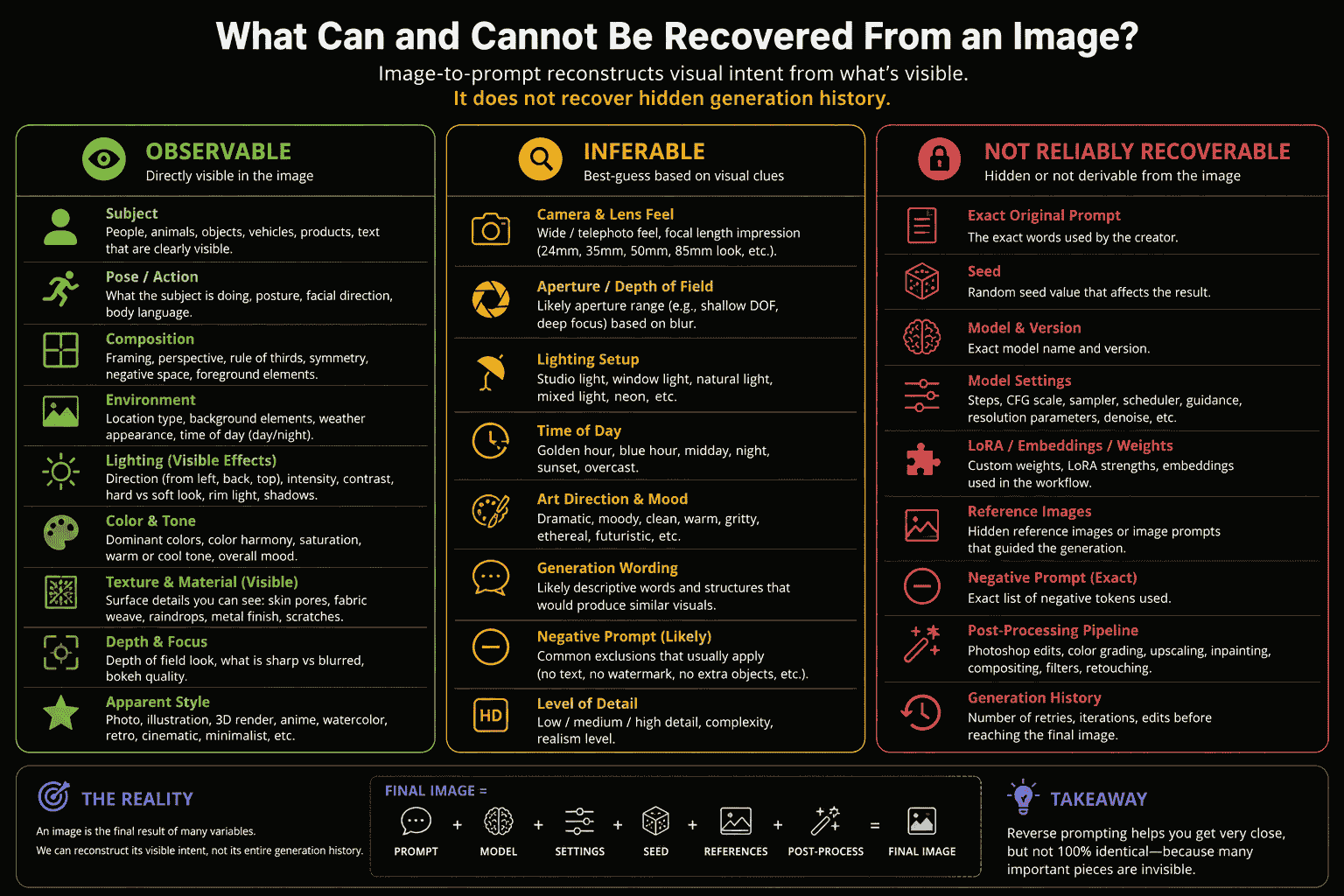
Usually, no.
A finished image rarely contains enough information to reconstruct the exact generation history.
Several different prompts can produce visually similar images, and the same prompt can produce different images across models, seeds, settings, and runs.
Information That Is Usually Hidden
- the exact original text prompt,
- the seed,
- the precise image-generation model or checkpoint,
- sampler or scheduler settings,
- step counts,
- guidance values,
- LoRA or adapter weights,
- ControlNet or similar control inputs,
- hidden reference images,
- negative prompts,
- masking or inpainting steps,
- compositing,
- upscaling,
- retouching,
- and color grading.
Even if metadata is embedded in the file, it may be missing, stripped, incomplete, or unrelated to the final edit.
The Better Goal
Do not optimize for:
RECOVER EXACT HIDDEN PROMPTOptimize for:
RECONSTRUCT A USEFUL GENERATION DESCRIPTIONThis makes the output more honest and often more useful.
Observed vs. Inferred vs. Unknown
A good reverse-prompt system should separate visual facts from plausible interpretation.
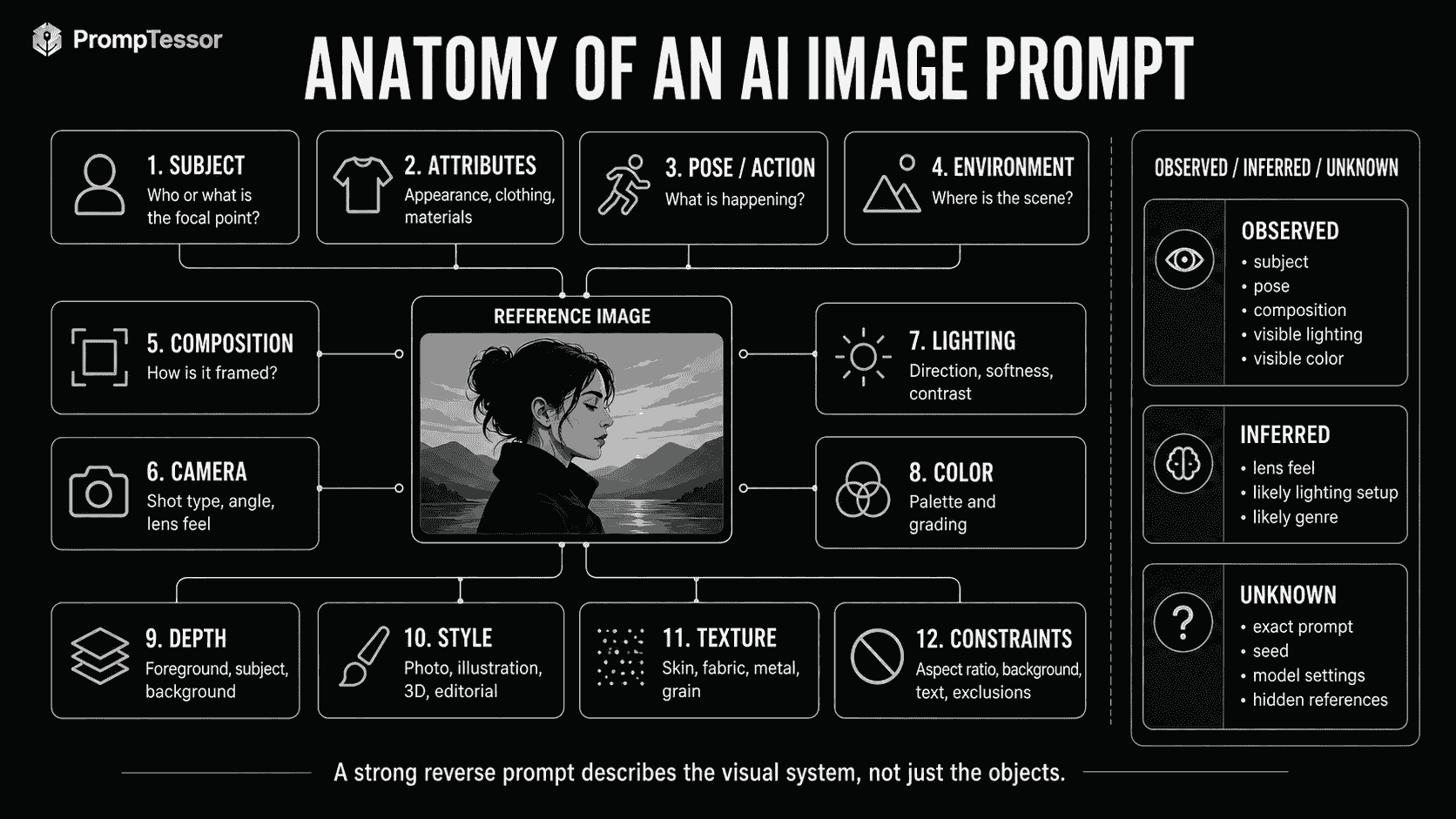
Observed
Directly visible:
- silver hair,
- blue rim light,
- subject positioned near the center,
- shallow-looking background blur,
- orange text overlay,
- wet pavement,
- high-contrast lighting.
Inferred
Useful generation language that is not directly provable:
- “85mm portrait-lens look,”
- “large softbox from camera-left,”
- “cinematic color grade,”
- “editorial fashion photography,”
- or “volumetric fog.”
Unknown
Details the image alone usually cannot establish:
- exact seed,
- exact model version,
- exact generation settings,
- hidden reference images,
- exact negative prompt,
- or the full editing pipeline.
Anatomy of an AI Image Prompt
A reusable image prompt usually combines several visual dimensions.
SUBJECT
+
ATTRIBUTES
+
POSE / ACTION
+
ENVIRONMENT
+
COMPOSITION
+
CAMERA FEEL
+
LIGHTING
+
COLOR
+
DEPTH
+
STYLE
+
TEXTURE
+
CONSTRAINTS
The exact order is flexible. What matters is that the prompt preserves the important visual relationships instead of turning into a random adjective list.
Subject
The subject is the main person, object, place, creature, product, or visual focus.
Weak
womanBetter
young adult woman with shoulder-length silver hairMore Specific When Useful
young adult woman with shoulder-length windswept silver hair,
calm expression, pale skin, dark tactical clothing
Do not overload the subject block with details that belong elsewhere. Lighting, environment, and camera should remain conceptually separate so the prompt is easier to edit.
Attributes and Materials
Visible attributes are often crucial for product, fashion, character, interior, and architectural references.
People
- hair length and texture,
- clothing silhouette,
- fabric type,
- accessories,
- makeup,
- visible age range,
- and distinctive non-sensitive physical features.
Objects
- material,
- surface finish,
- shape,
- color,
- wear,
- reflection,
- and construction detail.
Material Language
brushed aluminum
matte black plastic
polished chrome
translucent glass
soft woven cotton
weathered leather
wet asphalt
rough concrete
glossy ceramic
Material words are often more useful than vague quality terms such as “ultra detailed.”
Pose and Action
Pose controls body orientation, gesture, weight distribution, and the relationship between the subject and camera.
Person
standing in three-quarter view
looking over her left shoulder
head tilted slightly upward
one hand resting on the table
walking toward the camera
seated with shoulders turned away from the lens
Object
floating above the surface
stacked asymmetrically
partially submerged
tilted toward camera
exploded technical arrangement
Why Pose Matters
A prompt that reconstructs subject identity but misses pose can produce an image that feels completely different from the reference.
Environment
Separate the subject from the scene.
SUBJECT
silver sports car

ENVIRONMENT
underground concrete parking garage
with overhead fluorescent lighting
and damp reflective flooring
Useful Environment Dimensions
- indoor vs. outdoor,
- location type,
- time of day,
- weather,
- background architecture,
- surface conditions,
- crowd density,
- and atmospheric effects.
Composition
Composition describes how the visual elements occupy the frame.
This is one of the most important differences between a generic caption and a useful image prompt.
Composition Terms
- centered composition,
- symmetrical framing,
- rule-of-thirds placement,
- large negative space,
- tight crop,
- full-body portrait,
- top-down layout,
- foreground obstruction,
- subject occupying lower third,
- or strong leading lines.
Example
Centered upper-body portrait,
subject occupying the middle third,
large clean negative space above the head,
background elements kept minimal.
Composition Is Relational
Instead of listing objects:
person, chair, lamp, tabledescribe the arrangement:
person seated slightly left of center,
table entering from the lower-right foreground,
single floor lamp behind the subject on camera-right
Camera Language
Camera language helps describe perspective and framing even when the real camera metadata is unknown.
Shot Type
extreme close-up
close-up
medium close-up
medium shot
full-body shot
wide establishing shot
Angle
eye-level
low-angle
high-angle
top-down
bird's-eye view
ground-level
three-quarter view
Lens Feel
24mm wide-angle look
35mm documentary look
50mm natural perspective
85mm portrait-lens look
macro photography look
telephoto compression
Use “Lens Look” When Metadata Is Unknown
A finished image may visually resemble a portrait made with a long focal length, but that does not prove a real 85mm lens was used.
Prefer:
85mm portrait-lens lookover:
shot on an 85mm lensunless actual metadata confirms it.
Perspective
Also consider:
- distortion,
- compression,
- camera distance,
- horizon position,
- and depth-of-field appearance.
Lighting
Lighting can define the mood of an image more strongly than the subject description.
Break Lighting Into Components
KEY LIGHT
soft warm window light from camera-left

FILL
low cool ambient fill

RIM LIGHT
cyan edge light along hair and shoulders

CONTRAST
high

ATMOSPHERE
subtle volumetric haze
Useful Lighting Words
- soft diffused light,
- hard direct light,
- overcast daylight,
- golden-hour backlight,
- neon practical lighting,
- studio key light,
- rim light,
- silhouette,
- low-key lighting,
- high-key lighting,
- volumetric light,
- and reflected bounce light.
Infer Carefully
It can be useful to describe “softbox-like” lighting, but unless a light source is visible or metadata is available, the exact physical lighting equipment remains an inference.
Color Palette and Grading
Color is more useful when described as a relationship than as isolated names.
Weak
blue and orangeBetter
desaturated navy-blue shadows,
warm amber highlights,
muted natural skin tones,
small saturated orange accents
Useful Color Dimensions
- warm vs. cool,
- high vs. low saturation,
- monochromatic vs. complementary,
- pastel vs. deep tones,
- neutral skin vs. stylized grading,
- shadow color,
- highlight color,
- and accent color.
Foreground, Midground, Background, and Focus
Complex images become easier to reconstruct when spatial layers are explicit.
FOREGROUND
out-of-focus hand entering from lower-left

MIDGROUND
main subject in sharp focus

BACKGROUND
soft city lights and skyline bokeh
Depth-of-Field Language
shallow depth of field
sharp subject, soft background
deep focus
foreground blur
creamy bokeh
background gradually falling out of focus
Depth can also describe atmospheric separation:
foreground dark and sharp,
midground subject clearly defined,
distant background softened by haze
Style and Medium
Style tells the model what kind of visual object to generate.
Photography
- editorial photography,
- cinematic still,
- smartphone photo,
- commercial product photography,
- documentary photography,
- fashion campaign,
- macro photography.
Illustration
- watercolor illustration,
- ink drawing,
- colored-pencil illustration,
- cel-shaded animation,
- comic-book art,
- flat vector illustration.
Rendered Visuals
- photoreal 3D render,
- architectural visualization,
- isometric 3D scene,
- clay render,
- product CGI.
Prefer Visible Properties Over Empty Style Words
Instead of:
amazing cinematic masterpiecedescribe the actual visual system:
cinematic low-key portrait,
cool rim lighting,
warm practical lights,
shallow depth of field,
subtle film grain,
high contrast
Texture and Surface Detail
Texture often explains why an image feels realistic, tactile, polished, aged, or stylized.
Examples
visible skin pores
fine flyaway hair
soft woven fabric
brushed metal
scratched plastic
weathered paint
condensation on glass
fine film grain
rough concrete
glossy lacquer
paper fibers
dust particles in backlight
Texture terms are especially useful for close-ups, product images, macro photography, interiors, and character portraits.
Positive vs. Negative Prompt Reconstruction
Positive prompts describe what should appear.
Negative prompts describe what should be excluded.
Positive Prompt
clean studio product photograph,
white seamless background,
single centered perfume bottle,
soft shadow underneath
Possible Constraint Language
no additional props
no text
no watermark
no visible hands
But reverse-engineering a negative prompt is inherently uncertain.
If an image contains no watermark, that does not prove the original prompt explicitly said “no watermark.” The absence may simply be the default result.
Better Practice
Generate negative constraints based on the user's recreation goal, not by pretending they were recovered from the original generation.
Image-to-Prompt Reconstruction Workflow
A systematic reverse-prompt workflow can be organized into five phases. The process remains useful as a practical method even without a dedicated infographic because the article visuals now focus on prompt anatomy, caption-vs-prompt structure, recovery limits, and a real PrompTessor example.
Phase 1: Observe
Identify visible evidence without interpretation.
silver hair
black jacket
orange glasses
white background
blue edge light
large orange typography
Phase 2: Decompose
Assign observations to prompt dimensions:
SUBJECT
ATTRIBUTES
POSE
ENVIRONMENT
COMPOSITION
CAMERA
LIGHTING
COLOR
DEPTH
STYLE
TEXTURE
Phase 3: Infer Carefully
Add useful descriptive approximations:
editorial portrait
85mm portrait-lens look
studio backdrop
cinematic neon grading
Phase 4: Assemble
Turn the components into coherent generative language.
Phase 5: Test and Refine
Generate with the target model, compare the result to the reference, diagnose the largest mismatch, and revise the relevant prompt layer.
Reconstruction vs. Recreation
These terms are related but different.
Reconstruction
Reconstruction means producing a textual prompt that captures the visual characteristics of the reference.
Recreation
Recreation means using that prompt to generate an image that visually resembles the reference.
REFERENCE IMAGE
      ↓
RECONSTRUCTION
      ↓
PROMPT
      ↓
RECREATION
      ↓
GENERATED IMAGE
A good reconstruction does not guarantee an exact recreation.
The target model may interpret words differently, have different defaults, or use different rendering behavior.
Why the First Recreation May Still Look Different
Prompt quality is only one variable in image generation.
OUTPUT
=
PROMPT
+
TARGET MODEL
+
RANDOMNESS
+
MODEL DEFAULTS
+
REFERENCE INPUTS
+
GENERATION SETTINGS
+
EDITING
+
POST-PROCESSING
Model Differences
Different image generators can interpret the same phrase differently.
For example, “cinematic portrait” may produce:
- a high-contrast commercial still in one model,
- a softer editorial photo in another,
- or a more stylized result in a third.
Randomness
Even with the same prompt and model, multiple generations may vary in:
- face,
- pose,
- background details,
- lighting distribution,
- and composition.
Reference Inputs
If the original used one or more reference images, text alone may not be enough to reproduce the same subject, style, or composition.
Post-Processing
Retouching, compositing, typography, local color corrections, upscaling, and effects can create details that were never generated directly.
The Right Diagnostic Question
Instead of asking:
Why didn't the prompt copy the image exactly?
ask:
Which visual layer differs most from the reference?
That turns the problem into something you can refine.
Iterative Reverse Prompting
Reverse prompting works best as a loop.
REFERENCE
    ↓
RECONSTRUCT PROMPT
    ↓
GENERATE
    ↓
COMPARE
    ↓
IDENTIFY BIGGEST MISMATCH
├ subject
├ pose
├ composition
├ camera
├ lighting
├ color
├ depth
└ style
    ↓
REFINE THAT LAYER
    ↓
GENERATE AGAIN
Change One Major Variable at a Time
If the pose is wrong, do not rewrite the entire prompt.
Adjust the pose block:
standing in three-quarter view,
left shoulder closer to camera,
head turned back toward lens
If Composition Is Wrong
Add explicit framing:
upper-body framing,
subject positioned slightly right of center,
large negative space on camera-left
If Lighting Is Wrong
Strengthen relationships:
dominant cyan rim light from behind,
subtle warm light from camera-front,
background kept dark
If the Image Is Too Stylized
Replace broad style adjectives with concrete photographic properties.
Instead of:
epic cinematic masterpieceuse:
realistic editorial photography,
natural skin texture,
controlled studio contrast,
subtle film grain
Build a Model-Agnostic Core Prompt
A useful reverse prompt should usually begin with a model-agnostic visual description.
Core Prompt
Cinematic medium portrait of a young adult woman
with shoulder-length silver hair,
wearing a matte charcoal jacket,
standing in three-quarter view on a rainy neon-lit street at night.
Subject slightly right of center.
Cool cyan rim light, warm magenta practical lights,
shallow depth of field, wet pavement reflections,
desaturated navy shadows, realistic skin texture,
subtle atmospheric haze.
This captures the creative core.
Then adapt it for the target model.
Why This Helps
- the prompt remains portable,
- provider-specific parameters stay separate,
- comparison becomes easier,
- and you can evaluate whether the visual description or the model adapter caused the mismatch.
Core vs. Adapter
REFERENCE IMAGE
      ↓
MODEL-AGNOSTIC CORE
      ↓
TARGET ADAPTER
├ GPT Image
├ Gemini image generation
├ Midjourney
├ FLUX / Stable Diffusion workflow
└ Other model
Adapting for GPT Image
OpenAI's current API model catalog recommends GPT Image 2 for image generation and editing. The model supports text input as well as image input for image-generation and editing workflows.
This matters for recreation because text-only reverse prompting is not always the best route.
If the target workflow supports a reference image directly, you can use:
REFERENCE IMAGE
+
TEXT INSTRUCTIONS
=
IMAGE-TO-IMAGE / EDITING WORKFLOW
instead of trying to encode every visual detail into text.
Text-Only Recreation
Use the reconstructed prompt as a detailed scene specification.
Reference-Guided Recreation
When the goal is to preserve more visual information from the source image, use the image input together with text that specifies what should stay and what should change.
Example
Use the reference image as the composition and lighting guide.

Preserve:
- centered upper-body framing
- cool cyan rim light
- dark charcoal wardrobe
- shallow background blur

Change:
- replace the city background with a minimal black studio
- remove all typography
- keep realistic skin texture
The important principle is that a reverse prompt can act as a structured instruction layer even when the model also receives the reference image.
If your goal is not to recreate a still image but to animate a still reference over time, the task changes from image reverse prompting to motion direction. See Image to Video Prompts for that workflow.
Adapting for Gemini Image Generation
Google currently describes Gemini's native image-generation capabilities under the Nano Banana family. Current Gemini image models can generate and edit images conversationally using text, images, or a combination of both.
Google's image-generation documentation currently recommends rich, specific scene descriptions for photorealistic image generation and provides reusable prompt templates for image-generation and editing workflows.
Why Conversational Editing Matters
For reverse prompting, this enables a natural loop:
REFERENCE IMAGE
      ↓
RECONSTRUCT VISUAL PROMPT
      ↓
GENERATE / EDIT
      ↓
"Keep the composition, but reduce the saturation."
      ↓
"Make the rim light stronger without changing the face."
      ↓
ITERATE
Use Explicit Preservation Instructions
When editing from a reference, distinguish:
- what must remain,
- what should change,
- and what should not be introduced.
Example
Preserve the product's exact shape and material appearance.
Keep the camera angle and soft shadow direction.

Change the background from light gray to pure black.
Add a subtle cool rim light around the bottle.
Do not add text or extra props.
Google's current documentation also supports multi-turn image editing, which fits the iterative reverse-prompt workflow well.
Adapting for Midjourney
Midjourney's current prompt documentation recommends relatively short, clear prompts and explicitly highlights subject, medium, environment, lighting, color, mood, and composition as useful prompt dimensions.
That means a long reconstructed prompt may need compression before use.
Core Reverse Prompt
Cinematic medium portrait of a silver-haired woman,
three-quarter stance in a rainy neon city,
cyan rim light, magenta practical lights,
wet pavement reflections,
shallow depth of field,
desaturated navy shadows,
realistic editorial photography.
Midjourney-Style Compression
Silver-haired woman in a rainy neon city,
cinematic editorial portrait,
three-quarter stance,
cyan rim light, magenta practical lights,
wet reflections, shallow depth of field,
desaturated navy shadows
The goal is not to remove important visual information. It is to avoid turning the prompt into a long checklist when the target model performs better with concise descriptive phrases.
Reference Images
Midjourney currently supports Image Prompts as well as reference-oriented features such as Style References and Omni References. Its documentation says Image Prompts can influence content, composition, and colors.
That creates another option:
REFERENCE IMAGE
+
SHORT TEXT PROMPT
+
MODEL PARAMETERS
instead of relying entirely on a reverse-engineered text description.
Practical Image-to-Prompt Examples
The following examples show how the same decomposition approach works across different visual categories.
Example 1: Cinematic Portrait
Cinematic close-up portrait of a young adult woman
with short dark hair and natural skin texture,
head turned slightly toward camera-left,
soft warm key light from one side,
cool blue rim light around the hair,
dark blurred background,
85mm portrait-lens look,
shallow depth of field,
subtle film grain,
high-contrast editorial photography.
Example 2: Product Photography
Premium studio product photograph of a matte black perfume bottle,
centered on a dark reflective surface,
soft rectangular highlight along the glass edge,
subtle cool rim light,
controlled low-key lighting,
clean black background,
minimal composition,
sharp product detail,
soft shadow directly beneath the bottle.
Example 3: Cyberpunk Scene
Wide cinematic street scene in a dense futuristic city at night,
single figure walking through rain,
large neon signs reflected in wet pavement,
deep blue shadows with saturated red and magenta practical lights,
low camera angle,
atmospheric haze,
layered foreground silhouettes,
high contrast,
realistic sci-fi film still.
Example 4: Fashion Editorial
Full-body fashion editorial photograph,
model standing against a textured concrete wall,
structured black outfit with metallic accessories,
direct hard flash,
slightly off-center composition,
cool desaturated palette,
subtle motion in the fabric,
high-fashion magazine aesthetic.
Example 5: Interior Design
Warm minimalist living room interior,
light oak furniture, cream linen sofa, textured stone wall,
large window on camera-left,
soft afternoon daylight,
neutral beige and warm gray palette,
wide-angle architectural perspective,
clean lines,
natural materials,
subtle realistic shadows.
Example 6: Architecture
Contemporary concrete residence on a steep coastal site,
large cantilevered roof,
floor-to-ceiling glass walls,
ocean visible in background,
late-afternoon side light,
wide architectural composition,
clean geometric lines,
muted stone and warm wood palette,
photoreal architectural visualization.
Example 7: Food Photography
Close-up food photograph of handmade pasta in a shallow ceramic bowl,
soft warm window light,
dark rustic table,
fresh herbs and grated cheese,
45-degree camera angle,
shallow depth of field,
natural imperfections,
rich warm color palette,
editorial restaurant photography.
Example 8: Car Photography
Low-angle three-quarter front view of a black sports coupe
parked inside a brutalist concrete garage,
wet polished floor,
long overhead fluorescent lights reflected across the bodywork,
cool desaturated color grade,
wide 35mm lens look,
high contrast automotive campaign photography.
Example 9: Minimalist Poster
Minimal graphic poster on a pure off-white background,
single red geometric sphere centered slightly above the midpoint,
large negative space,
small black sans-serif typography aligned bottom-left,
precise Swiss-inspired grid,
flat color,
clean editorial graphic design.
Example 10: 3D Product Render
Photoreal 3D render of a silver wireless speaker,
floating above a soft gray surface,
brushed aluminum shell,
black fabric grille,
three-quarter product angle,
large soft studio light,
subtle ambient occlusion,
clean commercial CGI,
minimal background.
Example 11: Anime Illustration
Cel-shaded anime character portrait,
young woman with long dark hair standing in wind,
school rooftop at sunset,
warm orange sky,
cool shadow tones,
dynamic hair strands,
medium shot,
clean line art,
soft atmospheric perspective,
cinematic anime composition.
Example 12: Watercolor
Loose watercolor illustration of a small coastal village,
white houses with blue roofs,
soft sea horizon,
visible paper texture,
translucent washes,
muted ultramarine and warm ochre palette,
minimal ink outlines,
airy negative space.
Example 13: Fantasy Landscape
Epic fantasy valley viewed from a high cliff,
single ancient tree in the foreground,
distant mountains fading into mist,
large glowing moon behind clouds,
cool blue atmosphere with warm golden horizon,
wide panoramic composition,
volumetric light,
painterly realism.
Example 14: Macro Photography
Extreme macro photograph of water droplets on a dark green leaf,
one droplet in sharp focus,
soft circular bokeh in the background,
diffused natural light,
high micro-contrast,
shallow depth of field,
rich organic texture,
realistic botanical photography.
Example 15: Smartphone UGC Photo
Natural smartphone photo of a young woman standing near a bedroom window,
casual everyday outfit,
slightly imperfect framing,
soft daylight,
minimal processing,
realistic skin texture,
subtle background clutter,
eye-level camera,
authentic creator-content feel.
Example 16: UI Screenshot
Dark SaaS dashboard interface,
left navigation sidebar,
large analytics card grid,
white and gray typography,
subtle blue accent color,
rounded 12px cards,
thin dark borders,
high information density,
clean modern product-design aesthetic.
This describes the appearance. It does not recover the original HTML, CSS, React components, design tokens, or source repository.
Example 17: Album Cover
Square surreal album-cover artwork,
single human silhouette standing beneath a huge glowing red moon,
black desert foreground,
deep crimson sky,
minimal composition,
heavy grain,
high contrast,
small condensed typography at top center,
moody experimental music artwork.
Example 18: Surreal Composite
Surreal cinematic composite of two silhouetted hands
holding an ice-cream cone with a glowing full moon as the scoop,
twilight city skyline in background,
deep navy sky fading to burnt orange,
warm moon halo,
foreground hands underexposed,
shallow depth of field,
cinematic teal-and-orange grading.
When Image-to-Prompt Fails
Reverse prompting works best when important visual characteristics are visible and describable.
It becomes less reliable when the final image hides too much of the generation process.
1. Heavy Compositing
An image may combine photography, CGI, stock assets, painted elements, and typography. A single text prompt may not reproduce that layered production process.
2. Exact Identity
A textual reverse prompt can describe visible facial characteristics, but exact identity consistency is generally better handled with supported reference-image or identity-preservation workflows rather than text alone.
3. Complex Typography
Text-heavy posters, magazine layouts, packaging, and interfaces can require exact copy, font choice, spacing, alignment, and manual layout correction.
4. Hidden Reference Images
If the original generation depended heavily on one or more source images, text alone may miss the most important conditioning signal.
5. Proprietary Fine-Tunes or Adapters
Distinctive model behavior may come from fine-tuning, LoRA, adapters, or custom style systems that cannot be inferred reliably from the image alone.
6. Abstract Imagery
Highly abstract visuals can support many equally plausible interpretations, which makes reconstruction less deterministic.
7. Dense Mixed Styles
A visual may combine photography, illustration, 3D, collage, grain, typography, and manual paint-over. One style label may be insufficient.
8. Hidden Post-Processing
Color grading, retouching, sharpening, grain, bloom, masking, and compositing can substantially change the final appearance after generation.
9. Exact Layout Geometry
Reverse prompts can approximate structure, but exact pixel-level layout often needs reference-guided editing, design tools, or code.
10. Invisible Negative Constraints
You cannot reliably infer all of the things the creator explicitly told the model not to generate.
Common Image-to-Prompt Mistakes
1. Writing Only an Image Caption
“A woman in a city” identifies content but does not reconstruct the visual system.
2. Pretending to Recover the Exact Prompt
The final image usually does not expose its complete generation history.
3. Ignoring Composition
Correct objects in the wrong arrangement can still look completely different.
4. Ignoring Camera Perspective
Shot size, angle, perspective, and camera distance strongly affect the result.
5. Treating Inferred Camera Settings as Facts
Use visual approximations such as “85mm portrait-lens look” when metadata is unavailable.
6. Using Generic Quality Words Instead of Visual Detail
“Masterpiece, ultra detailed” is less informative than describing light, material, depth, and texture.
7. Overloading the Prompt With Adjectives
Long adjective lists can obscure the relationships that actually define the scene.
8. Mixing Subject and Environment
Keep the main subject distinct from the scene so each can be refined independently.
9. Ignoring Spatial Layers
Foreground, midground, background, and focus relationships often define the composition.
10. Missing Material Language
“Metal object” is weaker than “brushed aluminum with soft edge reflections.”
11. Missing Color Relationships
Describe shadows, highlights, and accent colors rather than listing color names.
12. Treating Style as a Single Magic Word
Break style into visible properties such as medium, lighting, texture, contrast, and rendering character.
13. Assuming Negative Prompts Can Be Recovered
Absence in the final image does not prove explicit exclusion in the original prompt.
14. Using One Prompt for Every Model
Different image generators have different prompt preferences, defaults, and reference-image systems.
15. Writing an Extremely Long Midjourney Prompt by Default
Current Midjourney guidance generally favors clear, concise descriptive phrases.
16. Ignoring Reference-Image Features
When the target generator can directly accept image references, text-only recreation may be unnecessarily difficult.
17. Trying to Recreate Source Code From a Screenshot
A screenshot can reveal visual design, not the original implementation.
18. Expecting Exact Text From a Visual Description
Typography should be handled explicitly when exact words matter.
19. Changing Every Prompt Layer at Once
Iterative refinement works better when the biggest mismatch is diagnosed first.
20. Failing to Separate Observed and Inferred Details
This makes the reverse prompt sound more certain than the evidence supports.
21. Ignoring Crop and Aspect Ratio
Framing can change dramatically if the target generation uses a different shape.
22. Ignoring Subject Scale
Specify how much of the frame the main subject occupies.
23. Ignoring Background Complexity
A minimal studio backdrop and a dense city street require very different prompt language.
24. Ignoring Lighting Direction
“Dramatic lighting” is weaker than specifying which side is bright and where rim or backlight appears.
25. Ignoring Surface Reflection
Gloss, matte finish, wet surfaces, and metallic reflections can dominate product or automotive images.
26. Treating the First Generation as the Final Test
Generation randomness means several attempts may be needed before judging the reconstructed prompt.
27. Comparing Only Subject Similarity
Evaluate composition, camera, lighting, palette, depth, and style separately.
28. Assuming a Better Prompt Can Reproduce a Missing Reference Signal
Some visual consistency requires direct image conditioning rather than more text.
29. Ignoring Model Updates
Image-model behavior changes. Re-test provider-specific adapters when models or versions change.
30. Confusing Reverse Prompting With Copyright or Ownership Analysis
A visual reconstruction prompt does not determine who created an image or who owns its rights.
Where PrompTessor Fits
PrompTessor's Image to Prompt workflow fits naturally at the reverse-prompt layer because it starts from the same thing this guide discusses: a visual reference.
Instead of beginning with an empty prompt box, the workflow uses the reference image as the source of visual intent, then reconstructs editable prompt language from the characteristics that can be observed or reasonably inferred.
REFERENCE IMAGE
      ↓
PrompTessor
Image to Prompt
      ↓
VISUAL ANALYSIS
- subject
- attributes
- pose / action
- environment
- composition
- camera feel
- lighting
- color
- depth
- style
- texture
      ↓
RECONSTRUCTED PROMPT
      ↓
USER CHOOSES TARGET IMAGE MODEL
      ↓
GENERATE
      ↓
COMPARE / REFINE
A real PrompTessor result is useful here because it shows the difference between a generic image caption and an actual reverse-prompt workflow: the reference image remains visible while PrompTessor produces a more detailed, reusable generation prompt.
For the exact PrompTessor workflow, accepted inputs, extracted visual attributes, generated outputs, and next steps such as refinement, analysis, optimization, and saving, see the Image to Prompt documentation. The broader Reverse Prompt documentation explains how the image workflow fits alongside video, text, and URL reverse prompting.
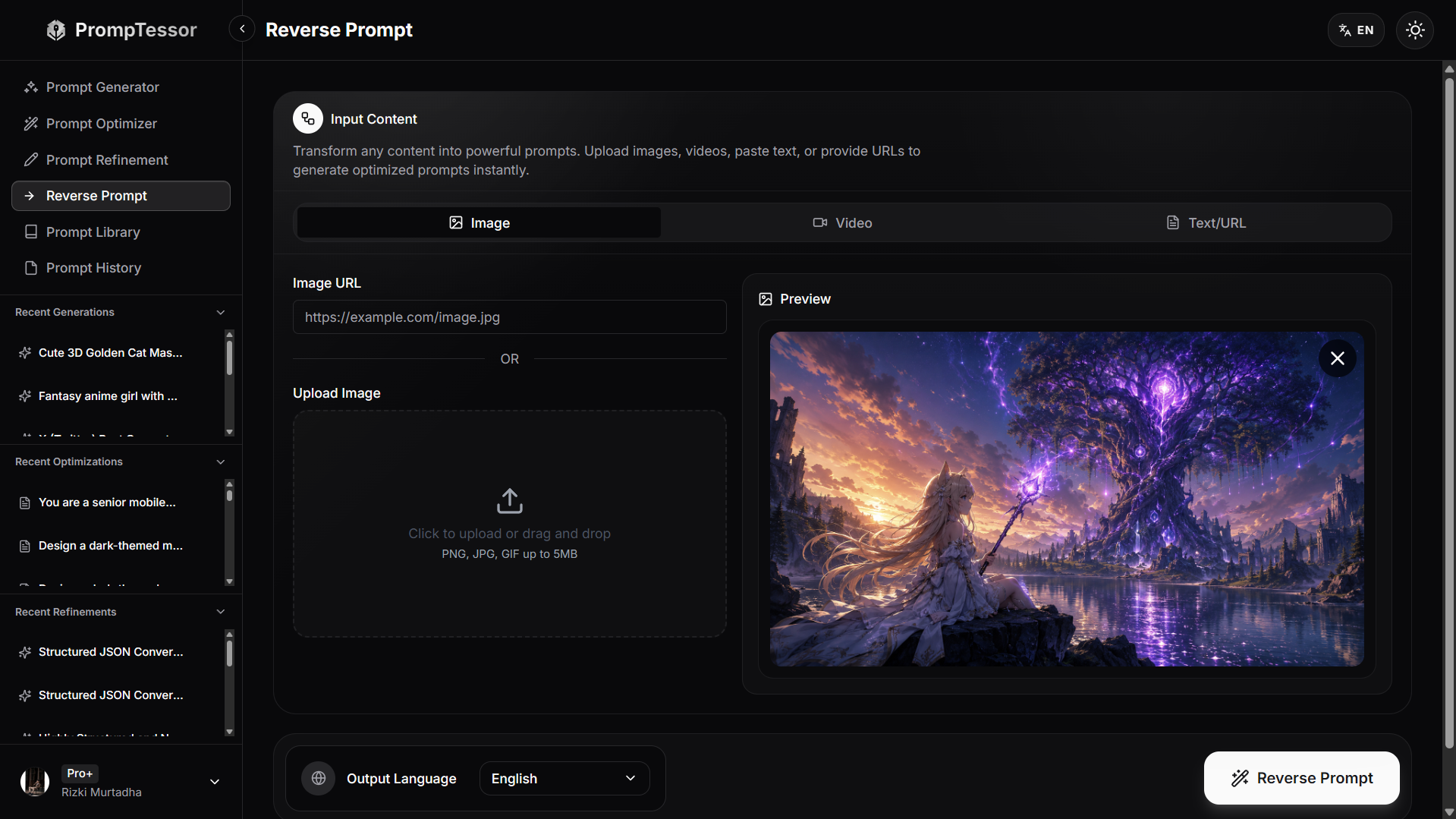
The screenshot should be treated as a product example, not evidence that the hidden generation history has been recovered.
The reconstructed prompt represents the visible creative intent of the image. It does not claim to recover the exact hidden original prompt, seed, model settings, hidden references, or post-processing history.
Why This Is Useful
A reference image can communicate visual intent more efficiently than a blank prompt box.
Instead of manually discovering terms such as:
three-quarter composition
cyan rim light
shallow depth of field
matte material
editorial portrait
volumetric haze
the image-to-prompt workflow can turn those visible characteristics into an editable prompt foundation.
PrompTessor Is Not the Image Generator
The workflow should remain conceptually separated:
- PrompTessor: analyzes the reference and reconstructs prompt language.
- User: chooses the target image model and decides what should be preserved or changed.
- Image model: generates or edits the new image.
- Iteration: compares output with the reference and refines the prompt or reference strategy.
Image to Prompt vs. Prompt Generator
These start from different inputs.
PROMPT GENERATOR
Idea
↓
Prompt

IMAGE TO PROMPT
Reference image
↓
Visual analysis
↓
Prompt
Both can eventually produce a generation-ready prompt, but the source of intent is different.
Image-to-Prompt Checklist
- The main subject is identified.
- Visible subject attributes are described.
- Pose or action is explicit.
- The environment is separated from the subject.
- Composition and subject placement are described.
- Shot type is identified.
- Camera angle is identified.
- Lens language is framed as a visual approximation unless metadata exists.
- Depth-of-field appearance is described.
- Lighting direction is described.
- Lighting softness or hardness is described.
- Rim, practical, or backlighting is captured when visible.
- Shadow and highlight color relationships are described.
- Foreground, midground, and background relationships are clear.
- Style is expressed through visible properties rather than generic quality words.
- Surface and material texture are described.
- Observed facts are separated from inferred generation language.
- Unknown generation settings are not presented as recovered facts.
- Negative constraints are based on the recreation goal rather than invented historical claims.
- Aspect ratio and crop are considered.
- Exact text is handled explicitly when needed.
- Reference-image workflows are considered when the target model supports them.
- The reconstructed prompt is model-agnostic before provider-specific adaptation.
- The target model's current prompting guidance is checked.
- The first generation is compared across multiple visual layers.
- The biggest mismatch is refined first.
- One major prompt variable is changed at a time when debugging.
- Several generations are tested before judging the prompt.
- Heavy post-processing is treated as a separate possibility.
- The final reverse prompt remains editable and reusable.
Related PrompTessor Guides
- Reverse Prompt — product-level overview of turning images, videos, text, and URLs into reusable prompts.
- Image to Prompt — product-focused page for the still-image reverse-prompt workflow.
- Image to Prompt Documentation — accepted inputs, extracted visual attributes, output structure, workflow, and next steps.
- How to Reverse Prompt Images, Videos, URLs, and Text — broader editorial guide to reference-first prompt reconstruction.
- Video to Prompt: How to Reverse-Engineer Videos Into AI Prompts — deep dive for motion, timing, camera movement, pacing, transitions, and audio.
- Image to Video Prompts — how to animate a still reference rather than reconstruct it as a still-image prompt.
Official Resources
- OpenAI API: GPT Image 2
- OpenAI API: Image Generation Guide
- Gemini API: Image Generation
- Midjourney: Prompt Basics
- Midjourney: Image Prompts
FAQ About Image to Prompt
What is image to prompt?
Image to prompt is the process of analyzing a reference image and converting its visible characteristics into textual instructions that can be used to generate a similar visual.
Can image-to-prompt recover the exact original prompt?
Usually not. A finished image rarely reveals the exact original prompt, seed, model settings, hidden references, negative prompt, or post-processing history.
How is image-to-prompt different from image captioning?
A caption mainly identifies what is visible. An image prompt also describes how the image should look, including composition, camera feel, lighting, color, depth, style, and texture.
What should an image prompt include?
A useful prompt usually includes subject, attributes, pose or action, environment, composition, camera feel, lighting, color, depth, style, texture, and relevant constraints.
What can be directly observed from an image?
Direct observations can include visible subjects, colors, pose, composition, apparent lighting, texture, background elements, and spatial relationships.
What should be treated as inferred rather than observed?
Likely lens feel, lighting equipment, photographic genre, or generation wording should generally be treated as useful inferences unless metadata confirms them.
Can you identify the exact lens from an image?
Not reliably from appearance alone. It is usually safer to describe an approximate lens look, such as an 85mm portrait-lens look, unless camera metadata is available.
Can image-to-prompt recover the seed?
No. The seed is generally not recoverable from the final image alone unless it is supplied separately in metadata or workflow records.
Can image-to-prompt identify the exact AI model used?
Sometimes visual clues suggest possibilities, but exact model identification is usually unreliable without metadata or provenance information.
Can image-to-prompt recover a negative prompt?
Not reliably. A negative prompt describes excluded content, and absence in the final image does not prove an explicit negative instruction was used.
Why is composition important in reverse prompting?
Composition determines where subjects and objects appear in the frame, their scale, spacing, crop, and relationship to negative space, all of which strongly affect similarity.
How should camera language be written in a reverse prompt?
Describe visible framing, angle, perspective, camera distance, depth of field, and approximate lens feel rather than presenting uncertain camera metadata as fact.
How should lighting be described?
Describe direction, softness, contrast, key light, fill, rim or backlight, practical lights, shadow behavior, and atmospheric effects when visible.
How should color be described?
Describe relationships such as warm highlights, cool shadows, saturation level, accent colors, and overall grading instead of listing isolated color names.
What is a model-agnostic image prompt?
It is a core visual description that avoids provider-specific syntax so it can later be adapted to GPT Image, Gemini, Midjourney, FLUX, Stable Diffusion, or another generator.
Why should I create a model-agnostic prompt first?
It keeps the creative intent portable and makes it easier to separate visual reconstruction quality from provider-specific prompting behavior.
Why can the same prompt generate different images?
Image generation can vary because of model behavior, randomness, hidden defaults, references, generation settings, and post-processing.
Should I use the reference image directly if the model supports image input?
Often yes. If preserving composition, identity, or style matters, reference-guided generation or editing may be more effective than encoding every detail into text.
Does GPT Image support reference images?
Current OpenAI image-generation workflows support image inputs for generation and editing, so a reconstructed prompt can be combined with a reference image when appropriate.
Can Gemini generate or edit from images?
Yes. Google's current Gemini image-generation documentation supports conversational generation and editing using text, images, or both.
How should I adapt a reverse prompt for Midjourney?
Compress the model-agnostic prompt into clear descriptive phrases and keep the most important subject, medium, environment, lighting, color, mood, and composition details.
Does Midjourney support image references?
Yes. Current Midjourney documentation includes Image Prompts and other reference-oriented features that can influence content, composition, colors, and style-related behavior.
What is iterative reverse prompting?
It is the loop of reconstructing a prompt, generating an image, comparing it with the reference, identifying the largest mismatch, and refining the relevant prompt layer.
What should I compare after generating a recreation?
Compare subject, pose, composition, camera perspective, lighting, palette, depth, texture, style, and any required text or constraints.
Can image-to-prompt recreate a UI screenshot?
It can reconstruct visual design instructions such as layout, spacing, colors, card style, and information hierarchy, but it does not recover the original source code.
Can image-to-prompt recreate exact typography?
It can describe visible typography, but exact font, kerning, line breaks, and production layout may require direct extraction or manual design work.
When does image-to-prompt work poorly?
It is less reliable for heavy compositing, abstract art, hidden reference workflows, proprietary fine-tunes, complex typography, exact identity reproduction, or images with substantial post-processing.
Should I use negative constraints in a reverse prompt?
Use them when they help the recreation goal, but do not claim they were recovered from the original prompt unless that information is actually available.
What is PrompTessor Image to Prompt?
PrompTessor Image to Prompt analyzes a reference image and reconstructs reusable prompt language from observable visual characteristics.
Does PrompTessor claim to recover the exact hidden original prompt?
No. The useful goal is to reconstruct a reusable prompt from visible visual intent, not to claim exact recovery of hidden seeds, settings, references, or generation history.
Conclusion
Image-to-prompt is most useful when it is treated as visual reverse engineering rather than hidden-prompt recovery.
The goal is not:
IMAGE
↓
MAGICALLY RECOVER ORIGINAL PROMPT
The practical workflow is:
REFERENCE IMAGE
↓
OBSERVE
↓
DECOMPOSE
↓
SEPARATE OBSERVED / INFERRED / UNKNOWN
↓
BUILD MODEL-AGNOSTIC CORE PROMPT
↓
ADAPT TO TARGET MODEL
↓
GENERATE
↓
COMPARE
↓
REFINE
The most important visual layers are usually:
- subject,
- attributes,
- pose or action,
- environment,
- composition,
- camera feel,
- lighting,
- color,
- depth,
- style,
- texture,
- and output constraints.
Some of those can be directly observed.
Some can only be inferred.
Others—the exact seed, hidden model settings, original negative prompt, private references, adapter weights, and full post-processing history—usually cannot be recovered reliably from the final image alone.
That uncertainty is not a weakness of reverse prompting.
It is simply the boundary between what the image shows and what the generation process kept hidden.
A good reverse prompt respects that boundary.
It describes what matters visually, makes uncertain details approximate rather than absolute, and produces a prompt that can be tested and refined on the target model.
When direct image references are supported, combine the reconstructed prompt with the reference instead of forcing every visual signal into text.
When a model prefers concise prompting, compress the core prompt without discarding the important visual relationships.
And when the first generation differs, debug the largest mismatch rather than rewriting everything at once.
The durable principle is:
Reverse prompting reconstructs visual intent, not hidden generation history.
Build better prompts in one workspace
Generate prompts from ideas, analyze and optimize quality, refine with feedback, reverse-engineer content, and save reusable prompts in your Prompt Library.
Try PrompTessor Free