15 AI Product Video Prompts for Ecommerce, Ads, and Social Media (2026)
An AI-generated product video can look polished and still fail at its job. The item might change shape between frames, the package may acquire a feature that does not exist, or a stylish camera move may hide the one detail a buyer needs to see. For ecommerce, these are not small artistic mistakes. They can weaken customer trust and misrepresent the product.
A useful AI product video prompt therefore combines commercial creative direction with product evidence. It specifies the actual item, the customer question the clip must answer, the motion or demonstration, the shot timing, the channel, and the details that must stay true to the approved product. A clean product listing loop, a lifestyle demonstration, and a conversion-focused social ad need different instructions.
This guide provides 15 copy-and-paste AI product video prompts for product pages, reveals, demonstrations, short ads, launches, and image-to-video workflows. Each can be adapted to compatible video-generation tools. You will also learn when to use real footage, how to preserve a SKU across multiple shots, and what to verify before publishing. The prompts help plan or generate video; they do not guarantee a truthful commercial video without human review.
Make the motion compelling. Keep the product, its capabilities, and the claims truthful.
Quick Answer: What Makes a Good AI Product Video Prompt?
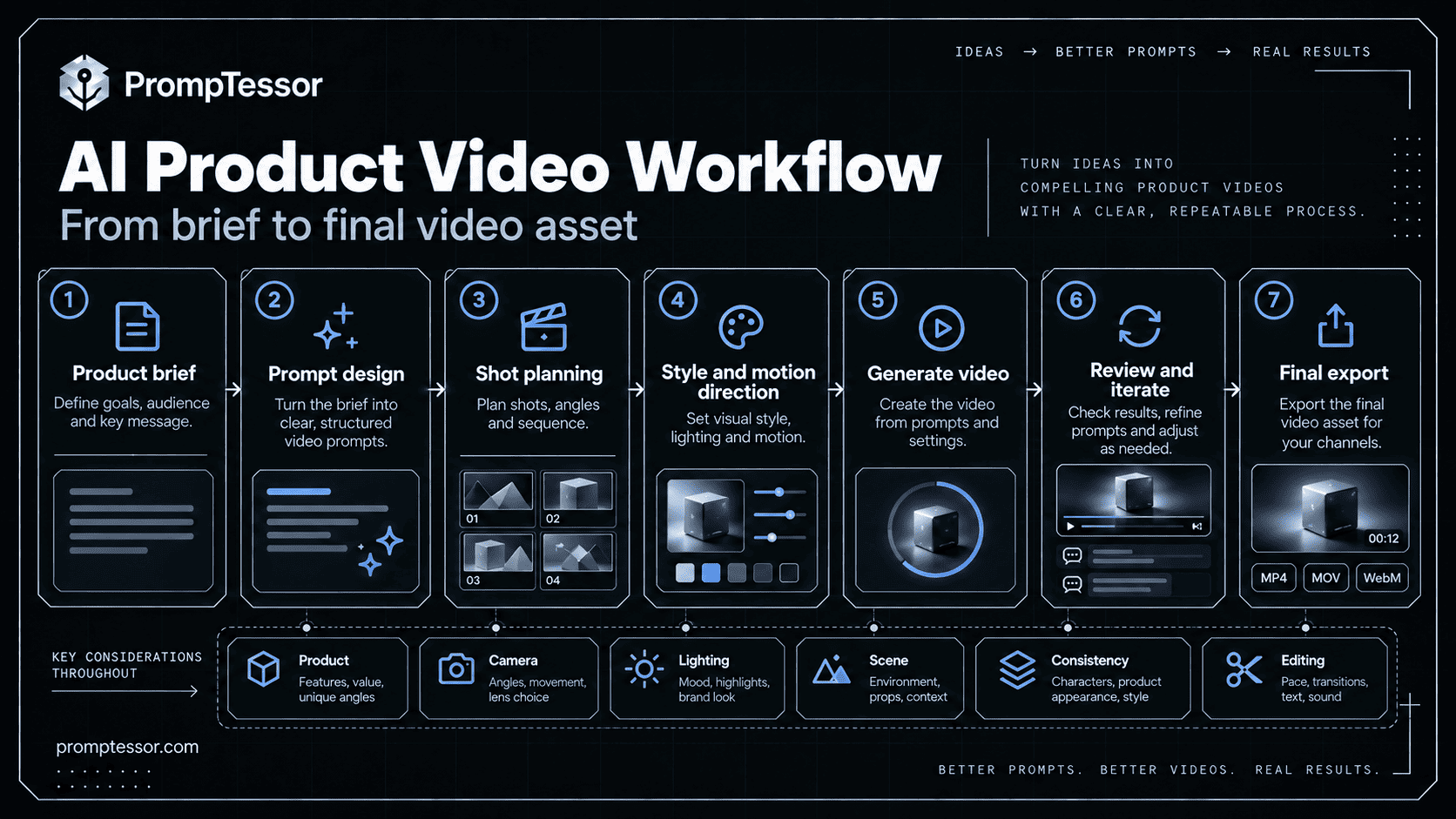
A strong AI product video prompt defines product identity + video goal + reference assets + on-screen action + camera direction + timing + continuity + output format + approval checks. For a real SKU, reference images or actual footage are more reliable than text-only descriptions. The fewer unseen surfaces, exaggerated mechanics, or invented facts a model must guess, the easier the clip is to validate.
VERIFIED PRODUCT + COMMERCIAL GOAL
             ↓
SHOT PLAN + CAMERA / OBJECT MOTION
             ↓
DURATION + PLATFORM / ASPECT RATIO
             ↓
PROTECT SKU + BRAND + VERIFIED CLAIMS
             ↓
GENERATE SHOTS → EDIT → FRAME-BY-FRAME QA
             ↓
APPROVE + EXPORT FOR PLACEMENT
Key Takeaways
- Use verified product photos, videos, or 3D assets when a real item must be represented accurately.
- Choose one primary message per short video; do not confuse elaborate camera motion with helpful product information.
- Describe subject motion, camera motion, duration, and the final state explicitly.
- Generate short shots separately when a commercial requires several actions, then edit them into a single ad.
- Keep actual logos, detailed labels, pricing, disclosures, and CTAs in editable post-production layers where practical.
- Test the product story without sound as well as with sound, especially for mobile placements.
- Check each destination’s latest aspect ratio, duration, file, audio, and safe-area requirements.
- Review visual consistency and substantiate all claims before publishing.
Table of Contents
- 1. Clean Product Showcase
- 2. Controlled Product Rotation
- 3. Product Feature Close-Up
- 4. Cinematic Product Reveal
- 5. One Benefit, One Visual Demonstration
- 6. New Product Launch Teaser
- 7. Everyday Lifestyle Product Video
- 8. Hands-On Functional Demo
- 9. Product Unboxing Sequence
- 10. Scroll-Stopping Vertical Product Ad
- 11. Six-Second Product Ad
- 12. Fifteen-Second Product Commercial
- 13. Animate an Approved Product Photo
- 14. Generate Three Testable Ad Variations
- 15. Product Video Quality Audit and Revision
Product Video Prompts vs. General AI Video Prompts
The difference is the job the clip must do. General AI video prompts can prioritize scenery, narrative, mood, and freeform movement. Product video prompts must also communicate an offer faithfully. That introduces several constraints: the exact SKU, all visible package details, actual functions, audience expectations, platform context, and claims that can be verified.
If you need fundamentals such as dolly moves, pan speeds, temporal progression, or dialogue direction, read the broader AI Video Prompts guide. If you are starting with a still frame of any subject, the Image-to-Video Prompts guide explains motion prompting in depth. This article focuses instead on commercial product use cases: which shot to create, why it matters, and what qualifies as an acceptable result.
Before You Start: Get the Commercial Brief Right
Collect the product’s exact name and variant, approved visual references, verified features and benefits, intended placement, primary customer action, and the available editing assets. Note which details may move or change and which must remain untouched. If you lack a reliable image of the actual SKU, treat generative footage as concept development—not confirmed product imagery.
| Brief field | What to provide | Why it matters |
|---|---|---|
| Product identity | Approved SKU, variant, photos, packaging, logo assets | Prevents invented or swapped details |
| Commercial goal | Inspect product, show use, explain benefit, or prompt action | Keeps the creative focused |
| Evidence | Real demo footage, specs, claim approval, included accessories | Separates facts from visual concepts |
| Placement | Product page, social ad, launch page, short bumper | Controls framing and pacing |
| Deliverable | Duration, aspect ratio, export, audio, caption and CTA plan | Avoids finishing in the wrong format |
| QA owner | Person who can verify the SKU, claims, and final footage | Keeps approval accountable |
Google DeepMind’s Veo prompting guide highlights shot framing, movement, action, lighting, and sound, while Runway’s prompting guidance emphasizes describing motion clearly and iterating from simple prompts. These are useful foundations, but the product-accuracy checks below are additional practical safeguards for ecommerce work.
A Reusable AI Product Video Prompt Formula
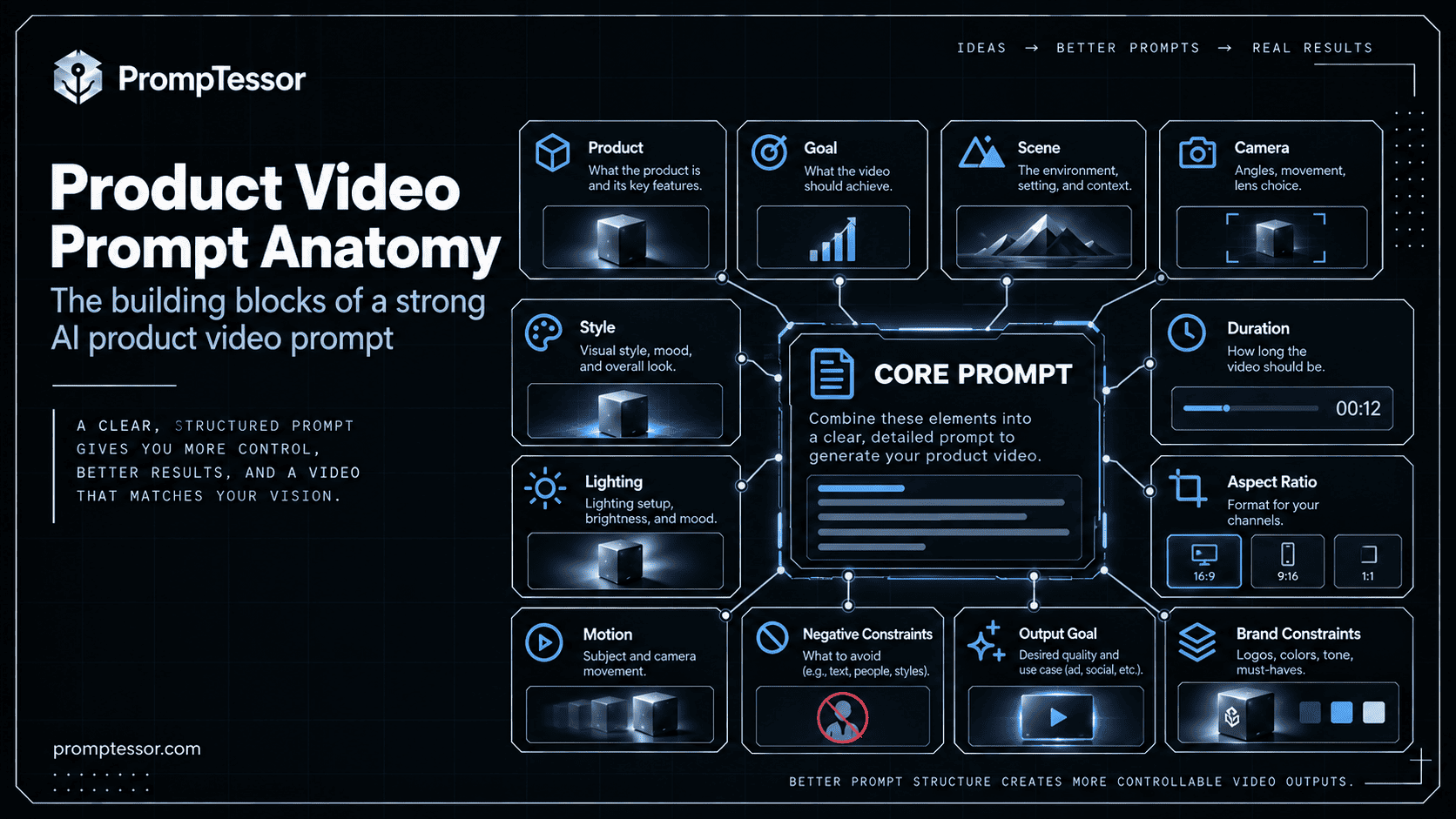
Use this adaptable brief to build a single video shot or a multi-shot sequence. The exact settings available depend on the model, so use its interface for supported length, aspect ratio, reference images, and audio controls.
PRODUCT / SKU: {approved_product_identity}
SOURCE: {reference_photos | footage | 3D model}
BUSINESS GOAL: {product-page | demonstration | launch | paid ad}
AUDIENCE + TAKEAWAY: {viewer_and_one_message}
SHOT: {visible_action_or_product_motion}
CAMERA: {shot_size + movement + direction}
ENVIRONMENT: {setting + light + props}
TIMELINE: {duration + shot_beats + ending_hold}
PRESERVE: {geometry + color + label + packaging + quantity}
FORMAT: {aspect_ratio + target_placement + audio}
POST-PRODUCTION: {editable_logo + captions + CTA + disclosures}
REVIEW: {product_accuracy + truthful_claims + continuity + export}
An image-to-video prompt can be much shorter. When the image already contains the product and scene, direct the model primarily on motion: "Keep the approved product image as the first frame. Use a slow lateral camera slide while reflections move naturally. Preserve the exact label, product geometry, lighting and background. End on a stable hero hold."
Choose Duration and Aspect Ratio by Placement
A 9:16 vertical composition can be an appropriate starting point for many mobile placements, while 16:9 and 1:1 are common alternatives. However, an aspect ratio alone does not make an export eligible for any specific advertisement. Requirements differ by product, campaign type, geography, and placement, and they can change. For example, Google Ads video specifications document supported landscape, vertical, and square asset formats. Check the chosen platform’s actual upload requirements before committing to a shoot.
| Typical use | Planning orientation | Editorial consideration |
|---|---|---|
| Mobile social ad | 9:16 vertical | Keep product and key visual away from interface overlays |
| Wide product or brand film | 16:9 landscape | Show the product clearly on different display sizes |
| Flexible social feed asset | 1:1 square | Do not crop out labels, controls, or use context |
| Short bumper concept | About six seconds | One message, one visual action, one hold |
| Multi-shot commercial | About 15 seconds | Storyboard several simple shots, then assemble |
The six- and fifteen-second durations below are creative briefs, not guarantees that every AI video model can render those exact lengths. A model may produce shorter clips, requiring an editor to trim or combine shots. Use normal editing for frame-accurate claims, logos, subtitles, disclosures, and end cards.
15 Copy-and-Paste AI Product Video Prompts
Replace each variable such as {product} or {approved_reference} with real information. The “Example brief” is an illustration, not a proof of a specific product feature. If a generator cannot accept visual references, do not assume it can preserve a real SKU simply because the prompt asks it to.
Product Listings & Detail Pages
1. Clean Product Showcase Prompt
Best for: A short product-detail-page clip that lets customers inspect the item without a distracting story.
Customize: {product_sku}, {approved_product_reference}, {surface}, {hero_angle}, {duration}, {aspect_ratio}
Example brief: A ceramic travel mug on a light stone tabletop, six-second product-page loop.
Create a {duration}-second product-page showcase video for {product_sku}. Use {approved_product_reference} as the source of truth for the real item. Open on a clear {hero_angle} full-product view against {surface}. Keep the item stationary while the camera executes a restrained, steady 10–15 cm lateral slide and gently returns to the opening composition; the motion should feel continuous when looped. Use soft, neutral lighting, accurate reflections, and an uncluttered background. Preserve every physical feature, logo, color, material, lid, connector, and label. Keep the entire product visible during the main hold. Deliver {aspect_ratio} framing with adequate padding for ecommerce layouts. No promotional claims or invented accessories. End on a frame that matches the opening closely enough for a smooth edit; if seamless motion is not achieved, report the gap rather than calling it seamless.What to verify: Compare the first, middle, and final frames; confirm the SKU, silhouette, readable details, and loop seam. Test whether the video works muted.
2. Controlled Product Rotation Prompt
Best for: Showing actual sides of a product when approved multi-angle photography or a 3D model exists.
Customize: {product}, {multi_angle_reference}, {rotation_range}, {duration}, {backdrop}
Example brief: A wireless mouse rotating 45 degrees across six seconds from a verified multi-view reference.
Create a {duration}-second controlled rotation video of {product} using {multi_angle_reference} as verified visual reference. Place it on {backdrop} and rotate the physical product through only {rotation_range}, smoothly, with a fixed camera and consistent perspective. Keep the rotation slow enough to inspect the profile; preserve button arrangement, openings, dimensions, material, branding, and every visible seam. Lighting stays constant while reflections update naturally. If the provided references do not show the requested sides, do not invent hidden ports or labels: reduce the rotation to angles supported by the references or flag the shot as a concept requiring verification. Conclude on a useful three-quarter angle with a clean product hold. No dramatic morphing or impossible geometry.What to verify: Check every newly revealed side against verified photographs or a 3D model. A single front-facing image cannot verify an accurate 360° rotation.
3. Product Feature Close-Up Prompt
Best for: Communicating a verified product detail or mechanism through a macro shot.
Customize: {product}, {verified_feature}, {reference_closeup}, {camera_path}, {duration}
Example brief: A close inspection of the stitching and zipper on a real backpack.
Produce a {duration}-second macro product clip of {product}, focused specifically on {verified_feature}. Use {reference_closeup} to define the actual material, construction, and shape. Start with a close view, then use {camera_path} to reveal the feature through one clear movement. Set the focus plane on the real detail, with physically plausible depth of field and lighting that reveals rather than hides texture. Avoid artificial animations suggesting a function that the product does not perform. Keep the motion stable and the feature readable for at least two seconds. Do not invent labels, indicators, stitching, joints, or durability claims. End with the relevant detail fully visible and sharp.What to verify: Verify construction and materials against the reference, inspect flickering edges, and confirm the claimed feature is genuinely visible.
Launches & Premium Campaigns
4. Cinematic Product Reveal Prompt
Best for: An aspirational launch shot that still presents the correct product.
Customize: {approved_reference}, {product}, {reveal_style}, {lighting}, {duration}, {aspect_ratio}
Example brief: A premium fragrance bottle emerging from shadow on a neutral plinth.
Create a {duration}-second premium reveal of {product}, using {approved_reference} for accurate product geometry and packaging. Begin with a partial silhouette on a minimal pedestal. Across the middle of the shot, introduce {lighting} to reveal the authentic product contours. Use a single slow {reveal_style} camera motion; avoid spinning both the product and camera. At the final two seconds, hold on a full, centered hero angle with deliberate negative space for an editor-added brand line. Keep colors, glass shape, cap, logo placement, and label proportions unchanged. Atmospheric effects should remain behind the product and never hide key information. Deliver {aspect_ratio}. Do not bake generated typography into the scene.What to verify: Inspect the reveal transition for brand drift and check whether the product is fully recognizable in the final hold.
5. One Benefit, One Visual Demonstration Prompt
Best for: Showing one documented advantage rather than claiming many benefits in a single short clip.
Customize: {product}, {verified_benefit}, {approved_evidence}, {visual_proof}, {duration}
Example brief: A clip showing how a compact desk organizer separates pens and cables, using real measurements.
Storyboard a {duration}-second product benefit video for {product}. Verified benefit: {verified_benefit}. Supporting reference or proof: {approved_evidence}. Show a concrete, observable {visual_proof} that viewers can understand without captions. Plan three beats: (1) ordinary use context, (2) the product performing the documented action, (3) a clear product hold. Use simple real-world camera movement and consistent object scale. If the benefit cannot be demonstrated visually or would require an unverified simulation, say so and propose an honest alternative. Reserve any technical numbers, claims, or disclaimer text for approved editing overlays. Never fabricate measurements, tests, before/after results, or performance superiority.What to verify: Match the visual to the approved claim. If the clip could mislead viewers about actual product performance, revise it.
6. New Product Launch Teaser Prompt
Best for: A short announcement video using confirmed launch information.
Customize: {product}, {reference_assets}, {launch_date_if_confirmed}, {brand_mood}, {duration}, {placement}
Example brief: An eight-second prelaunch teaser for a new backpack colorway with approved imagery.
Plan a {duration}-second launch teaser for {product}, intended for {placement}. Approved assets: {reference_assets}. Mood: {brand_mood}. Start with one striking but truthful detail in the first second, reveal more of the product through two coherent shots, then end with a clean hero frame. Keep branding, colorway, included components, and package quantity exact. Create a simple timing table and one generation prompt for each shot, because the target model may not support the full sequence in one render. If {launch_date_if_confirmed} is verified, specify a separate editor-added end-card line; otherwise omit dates and availability statements. Favor recognizable product motion over abstract effects that hide the item.What to verify: Check date, SKU, availability, and packaging; confirm the launch end card is editable outside the generated video.
For visual product continuity, start with approved stills where possible. The companion AI Product Photography Prompts article explains how to create reliable studio, listing, and lifestyle source imagery.
Lifestyle & Demonstration
7. Everyday Lifestyle Product Video Prompt
Best for: Helping a shopper imagine the product in an appropriate real-world setting.
Customize: {product}, {approved_reference}, {realistic_setting}, {actor_or_hand}, {duration}, {format}
Example brief: A coffee grinder being set on a home kitchen counter before use.
Generate a {duration}-second lifestyle clip featuring {product} in {realistic_setting}, using {approved_reference} to preserve its exact physical appearance. Start with the product naturally situated in the scene. {actor_or_hand} performs one realistic, approved interaction appropriate to the actual design. Keep the product large enough to recognize, with consistent scale relative to the surroundings. Use practical light, natural movement, and a calm camera follow that does not obscure the functional action. Do not portray accessories, connectivity, effects, or functions that are not verified. Frame for {format}; reserve uncluttered space for optional later captions. End with the product at rest in a believable context.What to verify: Review hand-object contact, ergonomics, accessory accuracy, and whether the scene depicts a real supported use.
8. Hands-On Functional Demo Prompt
Best for: Explaining a real setup or operation step-by-step, ideally from actual product footage.
Customize: {product}, {real_demo_footage}, {verified_steps}, {duration}, {audience}
Example brief: A genuine three-step setup demo for an adjustable monitor stand.
Prepare a product demo for {product} aimed at {audience}. Use {real_demo_footage} as the primary truth source for physical interactions and {verified_steps} as the approved sequence. Draft a shot plan with a wide establishing shot, one clear close-up per essential step, and a final successful-use state. For each proposed AI-generated or edited shot, specify camera lock or motion, action timing, and visible details. Keep button presses, assembly order, cables, indicator states, and human hand positions mechanically plausible. If any critical demonstration cannot be reliably generated, explicitly designate it 'use real footage' rather than simulate it. Produce a shot list that fits {duration}, with approximate seconds, editor captions, and a human verification plan.What to verify: Have someone who knows the product confirm each action; no AI-generated step should imply unproven functionality.
9. Product Unboxing Sequence Prompt
Best for: Showing exactly what customers receive, not an invented unboxing experience.
Customize: {sku}, {approved_packaging_images}, {verified_box_contents}, {duration}, {camera_style}
Example brief: Unboxing a wireless keyboard with the verified cable and instruction sheet.
Create a {duration}-second unboxing shot plan for {sku}. Approved packaging references: {approved_packaging_images}. Verified box contents: {verified_box_contents}. Use a clear overhead or {camera_style} perspective. Show only these confirmed beats: sealed package on table, realistic opening action, product revealed, and all included items arranged neatly. Maintain the exact number of objects, package proportions, printing, protective inserts, and variant color. Describe each beat as a separate short clip if necessary, with continuity notes for surface, hand position, and light direction. Never add gifts, free accessories, vouchers, cables, or claims not confirmed in the package list. End with a clean arrangement suitable for an editor-created contents label.What to verify: Compare every item and quantity to the SKU contents checklist and make sure the packaging opens realistically.
Social Ads & Short Commercials
10. Scroll-Stopping Vertical Product Ad Prompt
Best for: A social ad whose first seconds communicate a recognizable, truthful product use.
Customize: {product}, {verified_customer_problem}, {approved_solution}, {opening_visual}, {duration}, {cta_destination}
Example brief: A 12-second vertical clip showing a cluttered workstation and a real cable organizer.
Develop a {duration}-second vertical 9:16 product ad featuring {product}. Audience problem: {verified_customer_problem}. Approved product solution: {approved_solution}. Start immediately with {opening_visual}, a visual that introduces the actual product or a real use context in the first two seconds. Show one meaningful action, then hold briefly on the product and a clean area for an editor-added CTA pointing to {cta_destination}. Break the concept into two or three short renderable shots with time ranges, transitions, and camera directions. Use authentic everyday lighting, one clear benefit, and a simple visual progression. Keep the product reference stable and do not insert fictional review counts, exaggerated outcomes, fake endorsements, or unapproved pricing. Keep essential visuals away from platform UI overlays; verify safe zones at upload.What to verify: Check the first two seconds without sound, overlay-safe composition, accurate claims, and CTA destination.
11. Six-Second Product Ad Prompt
Best for: A concise paid creative, bumper concept, or fast brand reminder.
Customize: {product}, {approved_reference}, {single_takeaway}, {hero_motion}, {format}
Example brief: Six seconds focused on the silhouette and carrying handle of a travel tumbler.
Write a six-second commercial concept for {product} with exactly one takeaway: {single_takeaway}. Use {approved_reference} for the verified appearance. Timeline: 0–1.5 s, immediately show the item and one meaningful detail; 1.5–4.5 s, one smooth {hero_motion} with realistic lighting and physical continuity; 4.5–6 s, full product hold with negative space for post-production brand/CTA text. Recommend the simplest camera setup that communicates the takeaway; no extra scenes, invented features, or dense generated lettering. Format {format}. Provide one generation prompt for the visual shot and a separate editor overlay plan. If the video model cannot render six seconds directly, specify how to trim an appropriately generated shot without misrepresenting its duration.What to verify: Watch with sound off, check framing in its destination placement, and confirm the takeaway is perceptible within six seconds.
12. Fifteen-Second Product Commercial Prompt
Best for: A structured 15-second ad built from multiple verifiable shots.
Customize: {product}, {audience}, {verified_problem}, {approved_benefit}, {product_reference}, {format}
Example brief: A 15-second ad for an insulated lunch container, using actual product footage for lid operation.
Create a 15-second product commercial storyboard for {product}, targeted to {audience}. Customer problem: {verified_problem}. Verified benefit: {approved_benefit}. Reference: {product_reference}. Plan four beats: 0–3 s relatable situation/hook; 3–7 s product introduction; 7–12 s demonstrable real benefit; 12–15 s unmistakable hero shot and CTA space. For every beat provide a one-sentence visual prompt, shot size, primary action, camera movement, continuity constraints, audio suggestion, and duration. Generate complicated beats as separate clips and assemble in an editor rather than requiring a single model output to perform four different scenes. Use only verified functionality. Return suggested overlay text separately, avoiding fabricated savings, testimonials, or unsupported performance metrics. Format {format}.What to verify: Confirm the sequence adds up to 15 seconds; inspect continuity across shot boundaries and claim accuracy in overlays.
Image-to-Video & Optimization
13. Animate an Approved Product Photo Prompt
Best for: Turning a verified catalog or lifestyle photograph into a restrained motion clip.
Customize: {approved_photo}, {product}, {motion}, {camera}, {duration}, {destination}
Example brief: A slow push-in on a real product bottle while reflections change minimally.
Animate {approved_photo} into a {duration}-second video for {destination}. Treat the image as the visual authority for {product}; retain its exact product silhouette, proportions, packaging, color, label placement, materials, and scene layout. Animate only {motion}; the camera performs {camera}. Keep motion physically subtle, with natural reflections and stable contact shadows. Do not reconstruct unseen sides or add new product functions. The opening frame must match the reference composition, and the closing frame should show the product clearly with useful space for optional overlays. If visible text or logo details drift, mark the generated output for repair or substitute real footage. Provide one short image-to-video motion prompt rather than repeating an entire description already evident in the input image.What to verify: Review individual frames for logo/label flicker and match first-frame product geometry to the original photo.
14. Generate Three Testable Ad Variations Prompt
Best for: Creative testing with a single variable changed per version.
Customize: {product}, {approved_reference}, {core_claim}, {target_audience}, {channel}, {duration}
Example brief: Three versions of a product ad that vary the opening visual but keep the same verified benefit.
Act as an ecommerce creative strategist. Create three distinct video-ad prompt variations for {product}, targeting {target_audience} on {channel}. Use {approved_reference} and one constant verified claim: {core_claim}. Each version is {duration} seconds with the same aspect ratio, final CTA destination, product reference, and approval restrictions. Change only the opening creative angle: A = product-in-action, B = material/detail macro, C = lifestyle context. For each variation, give the first-two-second visual hook, shot timeline, camera/motion language, final hero hold, and editor-added caption placeholders. Do not invent data, discounts, social proof, or features. Finish with a simple test table showing the variable changed, what metric to compare, the minimum quality checks, and what not to conclude from a small sample.What to verify: Ensure the only planned variable is the hook angle; compare relevant performance after sufficient real campaign data.
15. Product Video Quality Audit and Revision Prompt
Best for: Reviewing a rendered ad before it goes into product listings or paid campaigns.
Customize: {draft_video_or_frames}, {approved_product_reference}, {claims_and_script}, {placement_requirements}, {target_audience}
Example brief: A QA review of a vertical video ad with a slightly warped logo and misleading extra accessory.
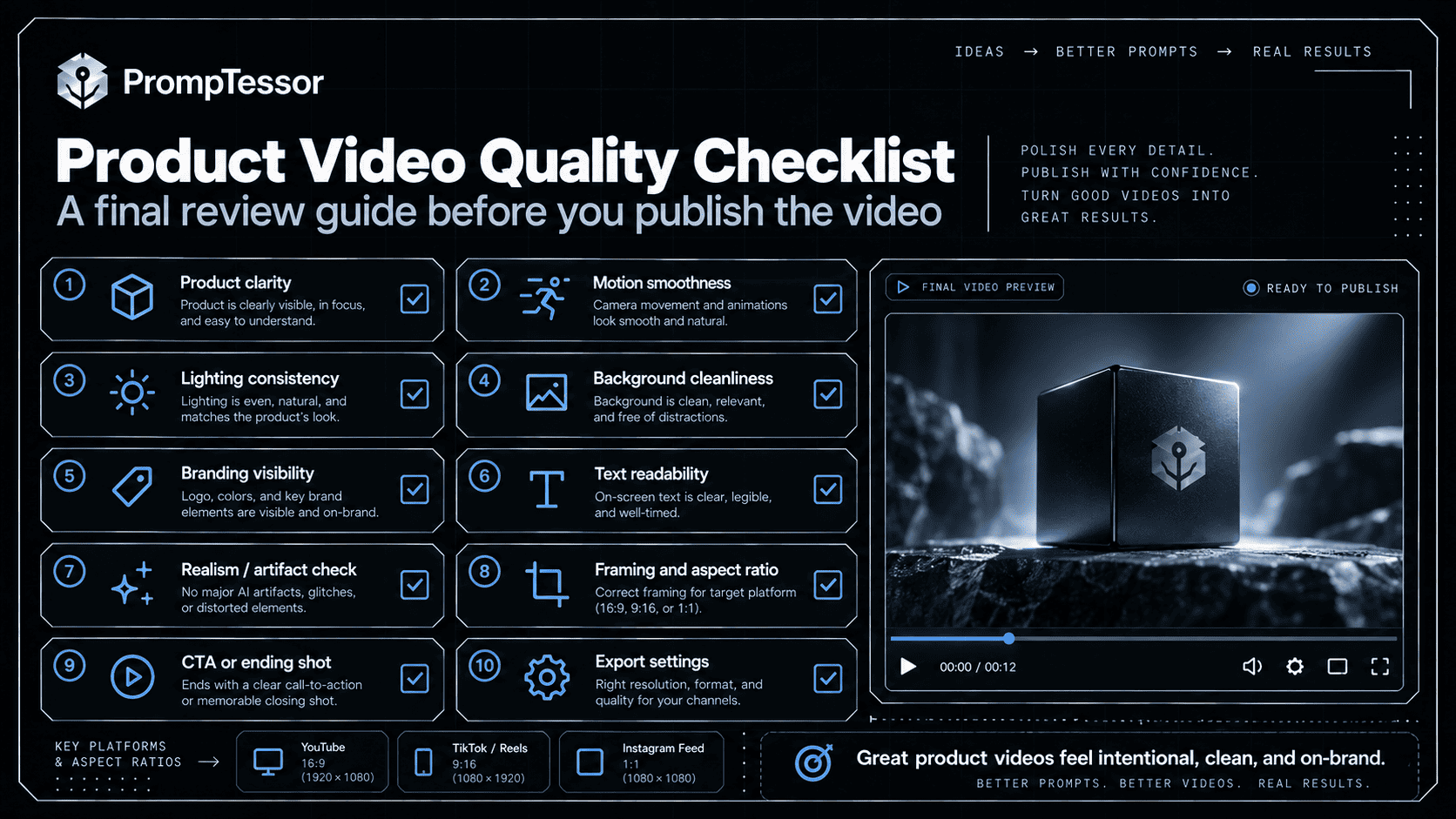
Act as a commercial-video QA reviewer. Examine {draft_video_or_frames} against {approved_product_reference}, {claims_and_script}, and {placement_requirements} for {target_audience}. Check (1) SKU, shape, color, labels, packaging and included accessories; (2) actions and product mechanics; (3) consistency between frames and shots; (4) clarity of the opening and primary benefit; (5) legibility and placement of editorial overlays; (6) aspect ratio, duration, audio, captions, safe areas, and export; (7) truthfulness and substantiation of product claims. Distinguish what can actually be verified from the provided evidence from what still needs a person to test. Return a table with issue, location/timecode, severity, evidence, smallest safe revision, and owner. Then produce targeted follow-up prompts for fixable visual issues and a separate list of changes better made in a conventional video editor. Do not approve the video unless critical issues are resolved.What to verify: Have a human reviewer sign off on SKU accuracy, advertisement claims, actual placement format, and final export.
Example: Six Seconds vs. Fifteen Seconds for the Same Product
Suppose a brand is advertising a reusable travel tumbler. A six-second concept should emphasize one feature through a compact visual. A fifteen-second concept has room to show the context of use, the real product, the approved benefit, and a closing shot. More time does not justify extra unsupported promises.
| Beat | 6-second version | 15-second version |
|---|---|---|
| Opening | 0–1.5 s: verified tumbler hero | 0–3 s: everyday carry context |
| Middle | 1.5–4.5 s: one smooth camera slide | 3–7 s: product close-up; 7–12 s: approved real-use shot |
| Ending | 4.5–6 s: centered product hold | 12–15 s: final product shot and edit-ready CTA space |
| Claim handling | Leave overlay text editable | Verify each spoken or written claim and demo |
How to Keep Products, Packaging, and Logos Consistent
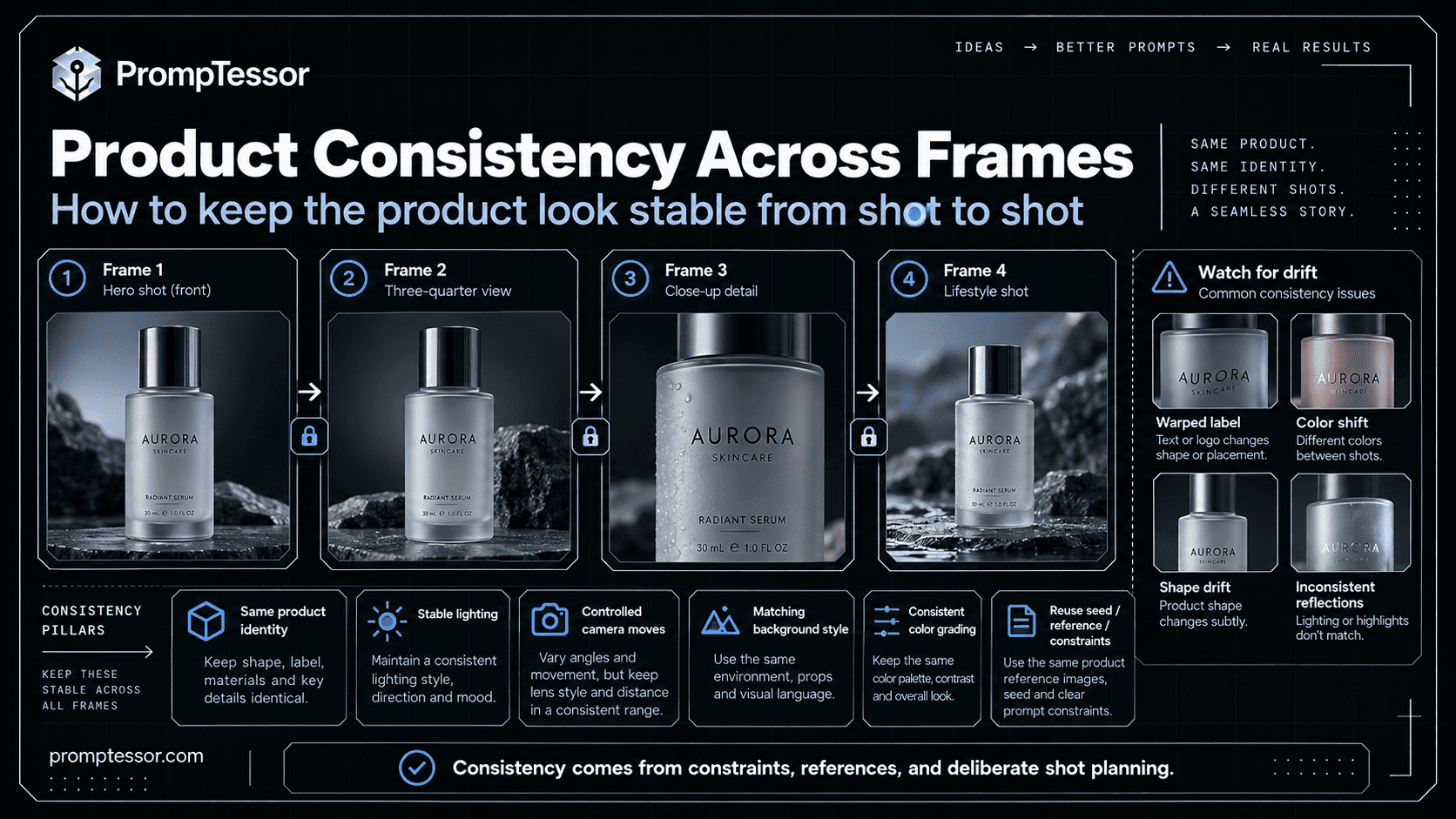
The biggest commercial risk is not always obvious distortion. A product can look almost correct while showing a different cap, button layout, material finish, color variant, or quantity. Even a single broken frame can be problematic when the product is the subject of a paid advertisement. The safest process is to start from a verified visual reference and reduce the amount of unseen geometry a video generator must invent.
- Lock identity: specify the exact product and source asset, not merely a descriptive category.
- Limit motion: use a stable hero angle, small camera move, or light sweep when product details are critical.
- Avoid invented views: supply real multi-angle material for rotations and mechanisms; otherwise mark the shot as conceptual.
- Protect text: keep packaging words and small logos in reference footage when possible, and add final overlays in an editor.
- Review time: examine opening, closing, feature moments, transitions, and multiple intermediate frames for flicker or shape shifts.
- Know when not to generate: for medical, safety-sensitive, highly technical, or mechanically specific demonstrations, genuine footage may be the right choice.
Commercial Claims, Endorsements, and AI-Generated Visuals
An AI-generated visual should not turn an imaginary result into a factual claim. If an ad shows a product surviving a fall, removing a stain instantly, changing someone’s appearance, or delivering a measurement, the advertiser needs appropriate evidence for what consumers will reasonably take away from that depiction. The US Federal Trade Commission guidance emphasizes truthful, non-deceptive, evidence-based advertising.
Do not generate fake customer testimonials, invented user reviews, unauthorized lookalike endorsements, or deceptive before-and-after results. Verify licensed use of music, voices, faces, branding, and source footage. Any required disclosure or disclaimer should be checked against applicable rules and placement policies, and should be added in a reliable editing workflow. AI-generation and labeling obligations can depend on the platform and jurisdiction; do not assume there is a single universal rule.
A Practical Product Video Production Workflow
- Choose one destination and KPI. A PDP explainer, launch teaser, and paid social creative are not interchangeable.
- Verify the item. Collect approved SKU photographs, video references, claims, and package contents.
- Pick the strongest shot. Define the visible action, one camera path, and an ending state.
- Generate the shortest useful unit. Make shot-by-shot clips when the narrative needs multiple beats.
- Review continuity. Compare the generated item against the reference and inspect inter-frame changes.
- Edit overlays and sound. Add verified copy, accurate labels, brand elements, captions, and required disclosures.
- Validate the actual export. Check placement specs, safe zones, links, permissions, and the full playback on mobile and desktop where relevant.
- Save what works. Keep the approved prompt, reference assets, QA notes, and export settings for the next variant.
Common AI Product Video Prompt Mistakes
- “Make it cinematic” without an action: give one physical camera move and a clear product-related outcome.
- Full 360° spin from one photograph: supply multi-angle reference or limit the view to known geometry.
- Too much in one short clip: split opening, demonstration, and hero hold into renderable shots.
- Unverified hands-on interaction: use genuine footage for precise mechanics and assembly steps.
- Embedding important typography in the generated shot: use editable overlays for exact logo, pricing, safety text, or CTA.
- Ignoring the buyer’s question: show what the product is or does, not only attractive lighting.
- Using a platform preset as a universal standard: confirm the exact placement’s latest policy and format.
- Changing all prompt variables at once: iterate on one issue at a time and document the result.
How to Create and Refine Product Video Prompts With PrompTessor
You can turn a rough product-video idea into structured shot direction using PrompTessor’s AI Video Prompt Generator. Describe the product, platform, duration, motion, style, and continuity requirements. The generator prepares a video prompt rather than rendering the actual video. Copy the result into a compatible video-generation platform and use that platform’s supported settings for image references, resolution, timing, and audio.
When a prompt is vague or fails to preserve the product, use the AI Prompt Analyzer to identify missing direction and the AI Prompt Optimizer to rewrite constraints more clearly. For inspiration from an existing video, Video to Prompt can reconstruct observable scene flow, movement, timing, and camera direction into a reusable prompt; it does not recover the creator’s exact original prompt. The separate Video-to-Prompt guide covers that workflow in detail.
Example: begin with “Make an ad for my bottle”, then add a verified SKU photo, a one-sentence customer benefit, a 9:16 placement, an eight-second target, a restrained camera move, a final hero hold, and preservation rules for the label and cap. Improve the instruction before generating, then review the exported video against the actual product.
Frequently Asked Questions About AI Product Video Prompts
What is an AI product video prompt?
An AI product video prompt directs a video model or a planning assistant to depict a product with specified motion, camera work, timing, environment, and output goals. Commercial prompts should also include verified product identity and quality checks.
Can AI create ecommerce product videos from one image?
Some tools can animate a product photo, but an image does not verify hidden surfaces or real mechanisms. Use subtle motion, review individual frames, and supply additional angles or real footage when accuracy matters.
What is the best AI product video prompt structure?
Define the approved product reference, business goal, visible action, camera behavior, timing, framing, preservation requirements, editing overlays, and verification criteria.
Should ecommerce product videos be 9:16 or 16:9?
Choose the aspect ratio for the actual destination. Vertical 9:16 is common for mobile short-form placements, while 16:9 and 1:1 are useful in other contexts. Verify the chosen channel’s current specifications.
Can I make a six-second AI product ad?
Yes, as a concept. Keep one takeaway, a simple motion, and a clear hero hold. Some video tools cannot render exactly six seconds, so trim or assemble the result in an editor.
How do I keep product logos and labels from changing?
Use verified reference assets, avoid unnecessary transformations, and inspect frames for flicker. For precise text and trademarks, retain genuine footage or add approved overlays in post-production.
Can I generate a 360-degree product rotation from one photo?
A single photo cannot prove how unseen sides look. For a faithful rotation, provide approved multi-view photography or a 3D model; otherwise create a limited conceptual orbit and verify it carefully.
Are AI-generated product videos suitable for paid advertising?
They may be, provided the item, demonstrations, claims, rights, disclosures, and placement requirements are reviewed and compliant. A polished generated video is not automatic approval for a specific channel.
How are product video prompts different from general AI video prompts?
Product prompts add product-specific constraints: SKU geometry, branding, packaging, verified performance, ad placement, and commercial approval. General video prompts may prioritize visual storytelling without those requirements.
Does PrompTessor generate the video file itself?
No. PrompTessor helps generate, analyze, optimize, and refine the prompt. The actual video is rendered in a compatible AI video-generation tool, followed by editing and human quality review.
Create Product Videos That Look Good and Stay True
An effective AI product video is not simply a moving version of a product image. It has a purpose: help shoppers inspect an item, understand a verified benefit, or take a clear next step. Start with the correct SKU, choose the one visual action that supports that goal, and make the camera and timeline easy to follow.
Use these 15 templates as production briefs, not substitutes for real product evidence. Generate a short shot, inspect the item carefully, refine what failed, and approve only the final edited export. For the next project, reuse the successful structure and change the product facts, audience, shot, and placement rather than rebuilding the workflow from scratch.
Start with the AI Video Prompt Generator if you need a structured prompt, or revisit the AI Product Photography Prompts guide to build a stronger still-image reference.
Sources and Further Reading
Build better prompts in one workspace
Generate prompts from ideas, analyze and optimize quality, refine with feedback, reverse-engineer content, and save reusable prompts in your Prompt Library.
Try PrompTessor Free