15 AI Product Photography Prompts for Ecommerce, Ads, and Product Images (2026)
An AI-generated product image can look like an expensive studio shoot. It can also quietly change a bottle cap, invent a label, add a feature the product does not have, or show the wrong color variant. For an ecommerce store, that difference is not cosmetic: customers need to see the item they will actually receive.
Effective AI product photography prompts combine commercial art direction with product accuracy. They specify the real item, where the image will appear, the camera view, lighting, background, output format, and—most importantly—which features must stay untouched. A clean catalog image, a lifestyle scene, and a promotional ad need different instructions and different checks.
This guide provides 15 copy-and-paste AI product photography prompts for studio images, lifestyle scenes, marketplace listings, advertising creatives, and reference-based editing. Each template is brand-neutral and can be adapted to image-generation or editing tools that support the required workflow. It also shows how to protect packaging and product identity, review synthetic images before publishing, and turn successful results into a repeatable workflow.
Make the scene creative, but keep the product truthful.
Quick Answer: What Makes a Good AI Product Photography Prompt?
A strong product photography prompt describes the exact product or approved reference, the intended channel, the photographic scene, the composition, lighting, materials, required output, and the elements that must not change. For real products, specify whether the job is generating a concept from text or editing an existing product photograph. An attractive text-only generation is not a substitute for verified SKU imagery.
PRODUCT / SKU + REFERENCE IMAGE
          ↓
USE CASE / CHANNEL + CAMERA VIEW
          ↓
SCENE + LIGHTING + COMPOSITION
          ↓
PRESERVE SHAPE / COLOR / LABEL / DETAILS
          ↓
GENERATE OR EDIT → COMPARE → VERIFY → PUBLISH
Key Takeaways
- Use reference-based editing when the output must represent a real product, not just a product concept.
- Specify what can change (background, lighting, framing) and what must remain exact (SKU, geometry, label, quantity, and color).
- Create different prompts for catalog listings, lifestyle images, and advertising campaigns.
- Keep promotional copy outside the image-generation step when possible; add final typography in a design editor.
- Review every result against real product photos and approved claims before placing it in a listing or ad.
- Check the latest rules of each marketplace and ad channel; they are not interchangeable.
- Save approved lighting, framing, and composition rules to build consistent product galleries across SKUs.
Table of Contents
- What Is AI Product Photography?
- Before You Start: Product References and Guardrails
- Reusable AI Product Photography Prompt Formula
- 15 AI Product Photography Prompts
- How to Keep the Product Accurate
- Product Listing Images vs. Advertising Creatives
- A Practical Batch Production Workflow
- Common AI Product Photography Mistakes
- How PrompTessor Fits Into the Workflow
- Pre-Publication Quality Checklist
- Frequently Asked Questions
What Is AI Product Photography?
AI product photography is the use of image-generation or image-editing models to create or transform product visuals. A text-to-image model may create a concept image of a fictional item; a reference-aware editing tool may help restyle an existing product photo with a different background, lighting treatment, or composition. Those are different workflows with different levels of confidence about accuracy.
Traditional product photography principles still matter. Controlled lighting reveals materials, consistent views help customers compare products, and the background should not compete with the item. Shopify's product photography guide emphasizes truthful color, sharp detail, controlled lighting, and appropriate product context. AI may accelerate creative iteration, but it does not eliminate the need for those fundamentals.
For an actual product, start with a clear reference image or approved packshot and product details. A model may still make subtle mistakes after being told to preserve the product. Treat every generated result as a draft until it has been visually checked against the real item.
Before You Start: Product References and Guardrails
Prepare a short product truth sheet before writing prompts. Include the SKU name, approved color, dimensions and proportions, materials, number of parts, exact packaging text, label positioning, logo artwork, and any features that must be visible. Gather front, side, and detail photographs whenever possible. If you use multiple reference images, clearly label which one establishes product identity and which one only illustrates a lighting style or background.
Choose the right starting point:
- Concept exploration: text-to-image is useful for moodboards and fictional products. Do not present an unverified generated concept as the actual item for sale.
- Actual SKU photography: favor an approved source photo and a tool that supports reference-conditioned edits or controlled compositing. Keep the original on hand for comparison.
- Listing enhancement: change only what the destination platform permits. Sometimes the safest option is a genuine packshot rather than AI reconstruction.
- Advertising creative: there may be more freedom with backgrounds and scenery, but the depicted product and implied claims still need to be truthful.
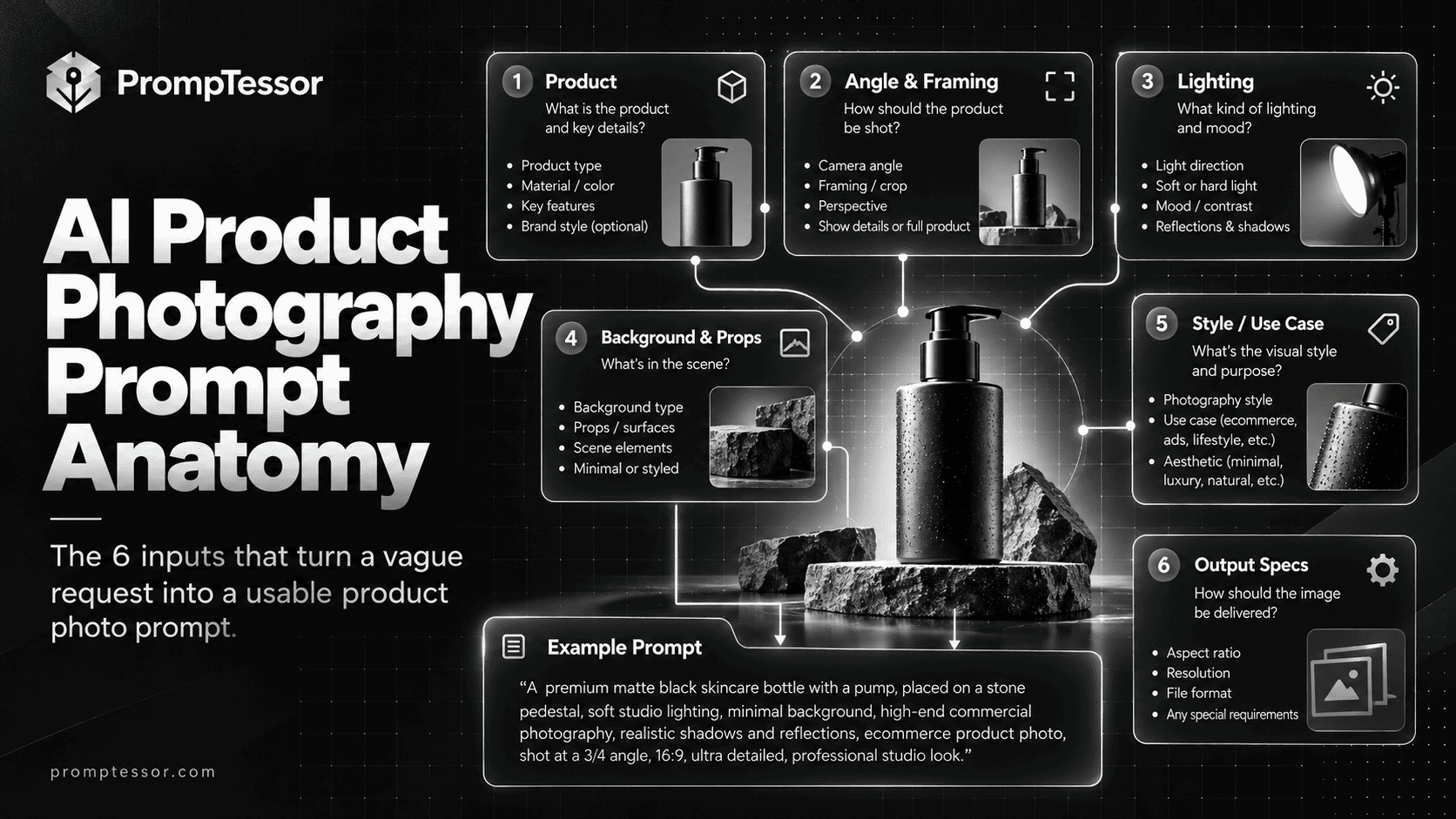
The AI Product Photography Prompt Formula
Use this general template to prepare an image-generation prompt or an editing instruction. Replace the bracketed variables with approved product details; do not leave the model to guess factual attributes.
TASK: {create concept | edit approved product photo}
PRODUCT: {exact SKU, appearance, materials, label, quantity}
IDENTITY REFERENCE: {approved product image or asset ID}
DESTINATION: {product detail page | marketplace | social ad | campaign hero}
CAMERA / FRAMING: {angle, crop, scale, focus}
SETTING: {background, props, scene context}
LIGHTING: {direction, softness, contrast, reflections}
COMPOSITION: {subject placement, negative space, aspect ratio}
ALLOWED CHANGES: {background, shadow, lighting, crop, etc.}
MUST PRESERVE: {shape, dimensions, colors, logo, readable label, features}
EXCLUSIONS: {unapproved claims, extra products, fabricated labels}
OUTPUT: {one image or controlled variation set}
CHECK: compare with references and target-channel requirements
For image models that do not support image references, the must preserve field remains useful art direction but cannot guarantee a faithful depiction of a real SKU. Use the output for concepts or verify it against real photography before commercial use.
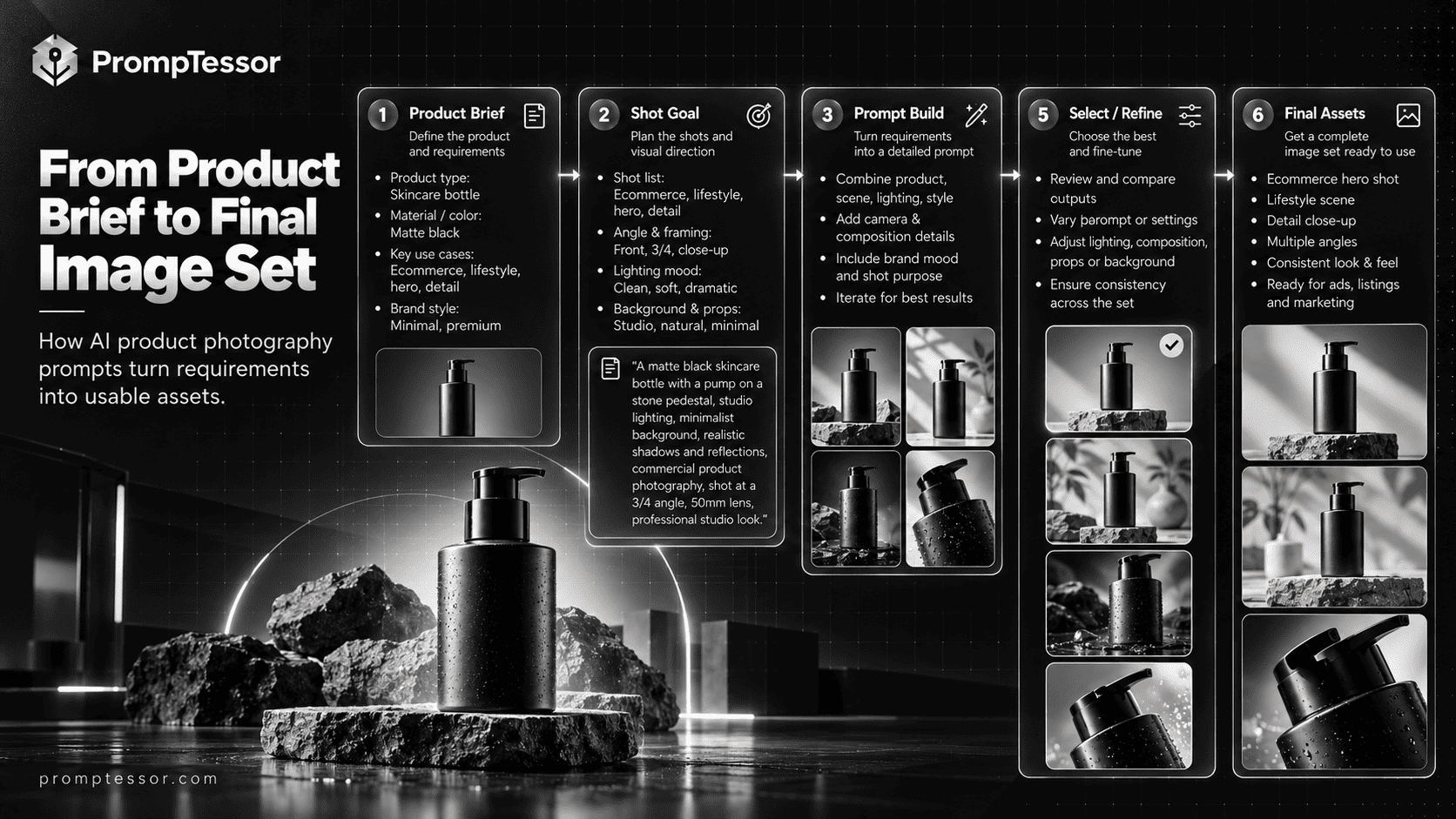
15 Copy-and-Paste AI Product Photography Prompts
These examples use flexible variables so they work across different image tools. If your destination model cannot accept a reference image or targeted edits, adapt the text to a concept workflow and do not assume exact preservation is possible.
Studio Photography
1. Clean White-Background Product Hero
Best for: A clear store product page image or catalog hero that does not distract from the item.
Customize: {product_sku}, {approved_reference}, {camera_angle}, {crop}, {output_dimensions}
Example brief: A matte-black insulated bottle photographed straight on with a white backdrop.
Edit the approved photo of {product_sku} using {approved_reference} as the definitive source for product identity. Create a clean ecommerce studio image with a seamless neutral white background, soft even illumination, realistic grounding shadow, accurate material texture, and {camera_angle} view. Center the item with {crop} framing and generous, balanced breathing room; output {output_dimensions}. Change only the backdrop, lighting treatment, shadow, and necessary crop. Preserve the exact silhouette, dimensions, lid or closure, color, label, printed text, finish, number of components, and all visible product features. Do not add decorations, extra products, marketing overlays, new branding, or invented details. If the editing tool cannot preserve a critical feature, flag the output for manual correction rather than replacing that feature.What to verify: Compare the cap, label, color, and quantity with the source; confirm the white image meets the destination channel’s current rules.
2. Premium Studio Campaign Shot
Best for: A polished hero for a brand website, editorial landing page, or campaign—not automatically a compliant marketplace main image.
Customize: {product_sku}, {reference_image}, {surface}, {backdrop}, {lighting_style}, {format}
Example brief: A premium ceramic diffuser on a dark limestone plinth.
Using {reference_image} to identify {product_sku}, create a high-end commercial studio composition. Place the unchanged product on {surface}, against {backdrop}, with {lighting_style} and carefully controlled reflections. Use a three-quarter eye-level camera view, refined depth, sharp product details, and a natural contact shadow. Reserve moderate uncluttered space for headline placement if {format} needs it. Preserve all real product geometry, typography, cap design, surface finish, and color. Do not imply extra accessories come with the product; omit unsupported awards, seals, and claims. Render for {format}. Produce a second lighting alternative that does not alter the camera position or product design.What to verify: Verify materials, glossy reflections, and whether any prop looks like an included accessory.
3. Macro Detail and Material Texture
Best for: A gallery detail image showing craftsmanship or a distinctive real feature.
Customize: {product_sku}, {macro_reference}, {specific_detail}, {material}, {crop_ratio}
Example brief: A close-up of the zipper and fabric texture of an everyday backpack.
Create a photorealistic macro product detail based on {macro_reference} of {product_sku}. Focus specifically on {specific_detail} and faithfully reproduce the real {material}, seams, texture, edge finishing, and hardware. Use soft side lighting to reveal texture without exaggerating defects or creating features that are not present. Keep shallow depth of field only in the surrounding area; the key detail must stay crisply visible. Crop to {crop_ratio}. Do not reconstruct hidden details from imagination. If reference resolution is insufficient to verify stitching, engraving, label text, or other micro-details, avoid inventing them and request a better reference.What to verify: Zoom in at 100%; check stitching count, hardware shape, and engraved text against the original.
Lifestyle Photography
4. Natural Home Lifestyle Scene
Best for: Show the actual product in a believable everyday context.
Customize: {product_sku}, {product_reference}, {room_type}, {audience}, {lighting}, {ratio}
Example brief: A reusable glass coffee cup on a home office desk.
Use {product_reference} as the fixed identity of {product_sku}. Place the real product naturally in {room_type}, styled for {audience}, under {lighting}. Make the scene feel lived-in but tidy: physically plausible props, scale, contact points, reflections, and shadows. Compose in {ratio} with the product instantly recognizable, not hidden behind decor. Preserve the source product’s shape, size relative to common objects, color, lid, typography, and visible features; change only the environment and scene lighting. Avoid additional copies of the product or implied accessories not included with purchase. No captions, artificial testimonials, or logos added to the scene.What to verify: Look for impossible scale, floating objects, altered details, or lifestyle claims the real product cannot support.
5. Product-in-Use Scene
Best for: Demonstrate a realistic use case without inventing product capabilities.
Customize: {product_sku}, {reference}, {approved_use}, {user_context}, {composition}
Example brief: A canvas tote bag being carried at a weekend farmers market.
Create a credible product-in-use photograph for {product_sku} based on {reference}. Show {approved_use} in {user_context}, with natural posture or interaction and realistic physics. Make the interaction clear while keeping key product details unobstructed. Use editorial lifestyle lighting, authentic hand proportions if people are visible, and {composition}. The product’s appearance, color, closures, attachment points, and quantity must match the approved reference. Only depict verified uses; do not invent water resistance, battery life, medical effects, strength, capacity, or other specifications. Keep supporting people and props secondary to the product. Output a clean visual without embedded promotional text.What to verify: Check that hand contact and material behavior make sense and that the scene does not imply an unverified feature.
6. Seasonal Product Photography
Best for: Adapt a single real product to a seasonal campaign without changing the SKU.
Customize: {product_sku}, {reference}, {season}, {palette}, {setting}, {ratio}
Example brief: A ceramic candle holder photographed in an autumn-inspired tabletop scene.
Using {reference} for the exact identity of {product_sku}, create a {season}-inspired lifestyle composition. Use {palette}, {setting}, seasonal textures and subtle supporting props, but make the real product the unmistakable focal point. Keep realistic lighting and shadows; avoid placing props over logos, labels, functional controls, or distinguishing parts. Preserve product color, shape, packaging, quantity, and all real features. Do not add gift-wrap, accessories, or bundles unless those are actually offered. Output a {ratio} image suitable for a seasonal marketing placement, leaving optional clean space for copy added later in a design tool.What to verify: Check that seasonal props do not create a false bundle or make the product look like a different variant.
7. Editorial Flat-Lay Product Arrangement
Best for: Create a tidy overhead composition for accessories and small products.
Customize: {product_sku}, {reference}, {surface}, {supporting_props}, {ratio}
Example brief: A leather notebook cover with a pen and loose sheets nearby.
Construct an overhead editorial flat-lay centered on {product_sku}, taking {reference} as the authoritative product appearance. Place it on {surface} with carefully separated {supporting_props}. Use natural soft light, realistic flat-lay shadows, disciplined spacing, and a restrained palette consistent with the product. Arrange the focal item so its dimensions, shape, material, branding, and key physical details remain visible. Props are visual context only, not included products; avoid arrangement that suggests otherwise. Do not create extra copies, change the SKU color, or manufacture printed words. Render {ratio} with a clean alternate crop suitable for social use.What to verify: Inspect overlaps and ensure no accessory is wrongly presented as part of the product listing.
Ecommerce Listings
8. Marketplace-Ready Product Image
Best for: Prepare a restrained product-first image for a specific listing channel.
Customize: {product_sku}, {approved_packshot}, {marketplace}, {current_marketplace_rules}, {size}
Example brief: Prepare a product-first image of a wireless mouse for a marketplace feed.
Using the original approved packshot {approved_packshot} of {product_sku}, prepare a restrained listing image for {marketplace}. Consult or follow {current_marketplace_rules}; if they are not supplied or verified, explicitly mark compliance as unconfirmed. Keep the item unobstructed, accurately colored, in sharp focus, and representative of the exact SKU. Prefer a clean neutral backdrop and minimal styling where required. Preserve physical packaging, exact logo, quantity, variant, and product details. Do not overlay pricing, badges, sale text, watermarks, or unrelated accessories. Deliver at {size} without stretching or redrawing the product, and provide a manual-review checklist for channel compliance.What to verify: Verify the up-to-date image requirements of the specific marketplace, not a generic “ecommerce compliant” claim.
9. Consistent Multi-Angle Product Gallery
Best for: Build a coherent gallery from real views without hallucinating the unseen rear or underside.
Customize: {product_sku}, {front_reference}, {side_reference}, {rear_reference}, {shot_list}
Example brief: A desk lamp photographed from front, side, three-quarter, and close-up views.
Prepare a consistent product gallery for {product_sku} using these approved identity references: front {front_reference}, side {side_reference}, rear {rear_reference}. Create the views specified in {shot_list} only when the corresponding geometry is supported by reference photography. Match studio lighting, camera height, color calibration, backdrop, and product scale across frames. Preserve the exact real components, connections, label position, and material finishes. Do not invent unseen sides, ports, buttons, or internal parts. If an angle is missing from the references, label that shot “requires source photography” rather than generating a guessed definitive product view. Return a shot-by-shot plan and separately reviewable image drafts.What to verify: Compare continuity across shots and confirm new views depict observed features, not plausible but fictional ones.
10. SKU Color and Variant Consistency
Best for: Create clearly differentiated assets for real, verified variants.
Customize: {product_family}, {sku_variant}, {variant_reference}, {approved_color}, {shared_scene}
Example brief: A travel pouch in its actual navy-blue SKU, not a recolored invention.
Create one product image for the verified variant {sku_variant} in the {product_family} family. Use {variant_reference} to preserve the correct construction, trim, branding, hardware, and exact {approved_color}. Use {shared_scene} and match the lighting, framing, and product scale of the existing gallery so variants look coordinated. Do not transfer features from another SKU. Do not change color values merely to make the composition more attractive. Produce one variant per final image, clearly named with the matching SKU. If exact material or shade cannot be determined from the reference, request clarification rather than approximating silently.What to verify: Check actual SKU color, finish, pattern, and components; avoid reusing one generic image for different variants.
Advertising & Marketing
11. Social Media Product Ad Creative
Best for: Prepare flexible imagery with usable copy space for mobile creative.
Customize: {product_sku}, {reference}, {audience}, {campaign_mood}, {aspect_ratio}, {copy_space}
Example brief: A reusable stainless water bottle for a minimal fitness-themed social ad.
Create a scroll-stopping but believable campaign image for {product_sku} using {reference} as the product-identity source. Audience: {audience}; mood: {campaign_mood}. Use high-contrast yet realistic lighting, simple visual hierarchy, and a clear product silhouette. Compose for {aspect_ratio}; leave {copy_space} as clean negative space so the headline and call to action can be added accurately in a separate layout tool. Preserve physical form, label, hue, proportions, and product functionality. Do not invent a promotion, discount, endorsement, certification, or results claim. Avoid tiny generated typography and keep the product entirely inside the safe crop area.What to verify: Preview on a phone-sized canvas; ensure the product survives platform crops and no false marketing claim is suggested.
12. Website Campaign Hero Image
Best for: Create a high-resolution hero background that supports a real product and page copy.
Customize: {product_sku}, {reference}, {brand_palette}, {hero_layout}, {background}, {ratio}
Example brief: A compact Bluetooth speaker positioned on the right of a wide site hero.
Design a premium ecommerce website hero photograph of {product_sku}, matching the exact item in {reference}. Use {brand_palette}, {background}, and {hero_layout} to keep the product visually dominant while reserving a low-detail text-safe zone opposite it. Add realistic shadows, product-appropriate reflections, and subtle depth. Crop to {ratio} with enough overscan to support responsive web layouts. Preserve all identifiable features, markings, buttons, and material finishes. Do not add generated headers, logos, promotional text, or decorative accessories that imply included items. Deliver a clean image layer intended for webpage typography and CTA elements to be added outside the image.What to verify: Test cropping across desktop and mobile; keep real page copy, buttons, and accessibility text in HTML.
13. Cohesive Three-Image Campaign Series
Best for: Create multiple creative placements without drifting product identity.
Customize: {product_sku}, {identity_reference}, {campaign_concept}, {scene_a}, {scene_b}, {scene_c}
Example brief: A series of three ceramic mug images using the same product for three placements.
Develop a three-image commercial campaign for {product_sku}. Use {identity_reference} as the single source of truth for the product across the series. Campaign concept: {campaign_concept}. Image A: {scene_a}. Image B: {scene_b}. Image C: {scene_c}. Keep product geometry, finish, logo, label, quantity, and material identical in every image. Hold a shared art direction for lighting temperature, contrast, camera quality, and background palette while allowing scene variety. Provide independent compositions and appropriate crops for each placement. Do not introduce a second SKU, fictional testimonial, performance claim, or packaging variation. Review the three images together for consistency before approval.What to verify: Compare all images side-by-side at the same size; look for drifting labels, caps, seams, and brand marks.
Product Editing & Consistency
14. Background Replacement Without Product Redesign
Best for: Change the context of an existing photo rather than regenerating the object.
Customize: {source_product_image}, {replacement_background}, {lighting_match}, {ratio}
Example brief: A genuine perfume bottle packshot placed on a neutral stone counter.
Edit {source_product_image}. Treat the existing photographed product as a protected subject, not an object to redesign. Replace only the surrounding background with {replacement_background}, adapting shadows and environmental reflections using {lighting_match} so the composite looks physically grounded. Keep the product mask, geometry, printed label, cap, color, transparency, exact texture, and all branding unchanged. Do not repaint the object or re-type any label text. Output {ratio}; if transparent or reflective edges make an accurate edit unreliable, identify the issue and recommend manual masking/compositing rather than silently hallucinating missing pixels.What to verify: Overlay the result against the original at identical scale and inspect edge fidelity, packaging text, and transparent materials.
15. Catalog Lighting and Style Standardization
Best for: Bring an entire product gallery into a coherent visual system without flattening real differences.
Customize: {approved_product_images}, {lighting_spec}, {background_spec}, {crop_spec}, {product_variants}
Example brief: A 12-item stationery collection photographed with inconsistent light and framing.
Using {approved_product_images}, standardize the presentation of a product catalog while keeping each photo’s original item intact. Apply a shared {lighting_spec}, {background_spec}, and {crop_spec} across the set. Preserve accurate colors, material differences, form, branding, labels, proportions, and unique attributes for {product_variants}; never make distinct SKUs look identical. Fix white balance, crop consistency, and distracting background differences only. Provide before/after pairs for review and a list of any images that need manual retouching or new photography. Do not upsample missing details into invented logos or text, and do not claim all images are approved until each SKU is verified.What to verify: Audit the batch against a consistent shot guide while verifying each SKU remains distinguishable and true to life.
How to Keep AI-Generated Product Images Accurate
Product identity is more than a logo. A product can look almost correct while changing a nozzle, losing a seam, swapping the position of a button, or changing a glossy material into matte plastic. That is why a preservation instruction should be paired with an actual comparison step.
Use one authoritative identity reference
Choose the highest-quality approved product image as the identity anchor and tell the model what it controls: real color, silhouette, packaging, text, quantity, and materials. A separate moodboard image can guide lighting or background only; it should not override product geometry. If a model accepts several images, label each reference by role in the prompt.
Prefer constrained edits over reconstruction
When possible, preserve the original product pixels and edit the background, crop, or ambient lighting. A full image regeneration may reimagine letters and micro-details even after a “do not change” instruction. For difficult reflective surfaces, fine print, transparent bottles, or highly detailed fabric patterns, conventional compositing or professional retouching may be safer.
Check the actual SKU, not just visual appeal
Compare results with approved photos at matching size. Review top and bottom edges, closures, handles, buttons, branding, type, dimensions, colorways, number of components, and whether lighting hides relevant features. If the output cannot be reconciled with the real item, do not publish it as a factual product view.
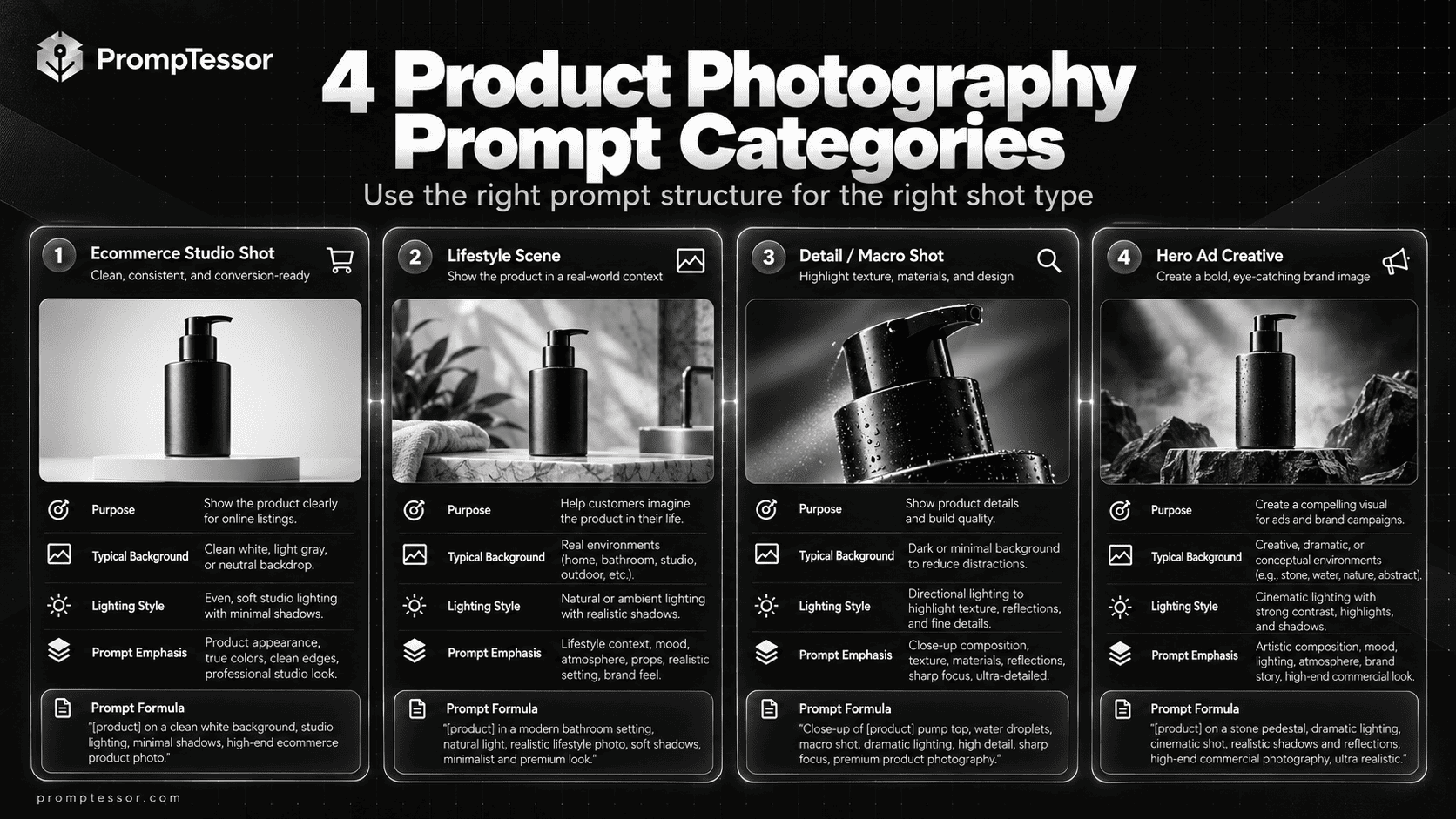
Product Listing Images vs. Advertising Creatives
A marketplace main image must help buyers understand what is actually being sold and follow the channel's image rules. A lifestyle image demonstrates real-world context. A social or display ad may make more room for graphic direction and messaging. The same prompt should not be reused unchanged for all three.
| Placement | Creative priority | What to verify |
|---|---|---|
| Marketplace primary image | Clear view of the exact SKU | Background, overlays, format, variant match, and current channel policy |
| Additional product gallery | Real angles, scale, materials, useful details | No fabricated features or unsupported views |
| Lifestyle photography | Believable real-world use | Scale, implied accessories, accurate capabilities |
| Website hero / social ad | Attention, art direction, safe space for copy | Truthful depiction, approved claims, crop, typography added separately |
For Google Shopping listings, the Google Merchant Center image requirements prohibit various promotional overlays and require the primary image to show the product accurately. Google distinguishes the primary image_link from additional images and lifestyle imagery; do not assume a campaign poster will be accepted as a primary listing image.
Google also documents metadata for AI-generated product imagery, including the relevant IPTC DigitalSourceType designation. Keep provenance metadata intact when required by the platform and verify current implementation requirements in your feed or asset workflow. Requirements can change, so treat official destination guidance as the final authority.
In the United States, the FTC's advertising guidance requires claims to be truthful, non-deceptive, and supported by evidence. A synthetic photograph that implies a product has an unverified feature, includes something that is not supplied, or shows a material difference from the sold item deserves the same scrutiny as advertising copy.
A Practical Batch Production Workflow
- Prepare product truth sheets. Build one approved reference package per SKU with exact names, variants, source images, label art, dimensions, and use restrictions.
- Choose placement first. Decide whether each asset is for product-detail pages, marketplaces, lifestyle galleries, a hero banner, or paid social ads.
- Create a shot matrix. For each SKU, list the required hero, detail, angle, in-use, and ad shots instead of generating random variations.
- Write or adapt prompts. Combine the appropriate template above with product references, scene direction, an explicit allowed-change list, and a preservation list.
- Generate controlled variations. Change one creative variable at a time—lighting, backdrop, or crop—so you can identify what caused a better or worse result.
- Compare at full size. Reject altered text, imaginary parts, wrong colors, inaccurate packaging, impossible reflections, and misleading usage.
- Finalize outside the image model. Add approved copy and brand typography in a design editor, apply correct crops, and export assets for each placement.
- Check publishing requirements. Preserve or add required AI provenance, validate the target platform's policies, and keep source and approval records.
A small, approved style guide—camera angle, background, lighting direction, crop, and product scale—helps create a coherent catalog. It also reduces the temptation to solve inconsistency with increasingly long prompts.
Common AI Product Photography Prompt Mistakes
1. Using “make it premium” as the entire brief
“Premium” communicates little about material, framing, lighting, or use case. Replace it with specific photographic decisions such as a three-quarter view, soft top-left light, controlled reflections, a limestone surface, and a restrained neutral background.
2. Asking a text-only model to reproduce a real SKU perfectly
A descriptive prompt can approximate a class of product, but it cannot reliably reconstruct every real brand mark or physical detail from text alone. Use an approved source photograph and reference-aware editing where accuracy matters.
3. Mixing listing images and promotional design
Marketplace feeds may reject image overlays that work perfectly in a website campaign. Write separate prompts for listings and ads, and add final ad copy in a layout tool.
4. Ignoring realistic size and interaction
In-use scenes can quietly misrepresent scale, grip, closures, or how the product performs. Describe authentic usage and check props, people, and physics in the final render.
5. Generating new product text or benefits
Image models can invent ingredients, certification seals, endorsements, testimonials, or technically impossible labels. Use official approved copy and packaging assets; never accept new claims just because they look polished.
6. Publishing without side-by-side checks
At thumbnail size, errors may be invisible. Zoom in, compare variant images, test crops, and confirm channel policy. A beautiful image that misrepresents the product can erode trust.
Build and Refine Product Photography Prompts With PrompTessor
For a new creative brief, the AI Image Prompt Generator can help turn a rough concept into a more complete prompt that specifies subject, composition, camera, light, references, and exclusions. It generates prompt instructions, not the final product image.
If you already have an inspiring photographic reference, the Image to Prompt workflow can describe observable style, composition, and lighting in reusable instructions. It cannot recover an exact original hidden prompt or guarantee that another image tool will recreate an actual branded SKU. For accuracy-critical edits, retain a separate approved product photo as the identity reference.
For prompts that produce inconsistent results, use the AI Prompt Optimizer to tighten constraints and remove ambiguity. For a broader introduction to composition and image prompting, see AI Image Prompts: How to Write Better Prompts. The complementary Image-to-Prompt Guide explains how to extract reusable visual attributes from reference images.
One practical sequence is: define the SKU and channel, create the prompt, generate or edit the image in a compatible tool, compare with the reference, then refine only the part of the prompt that failed. Save the approved prompt template alongside its approved product references and review notes.
AI Product Image Quality Checklist Before Publishing
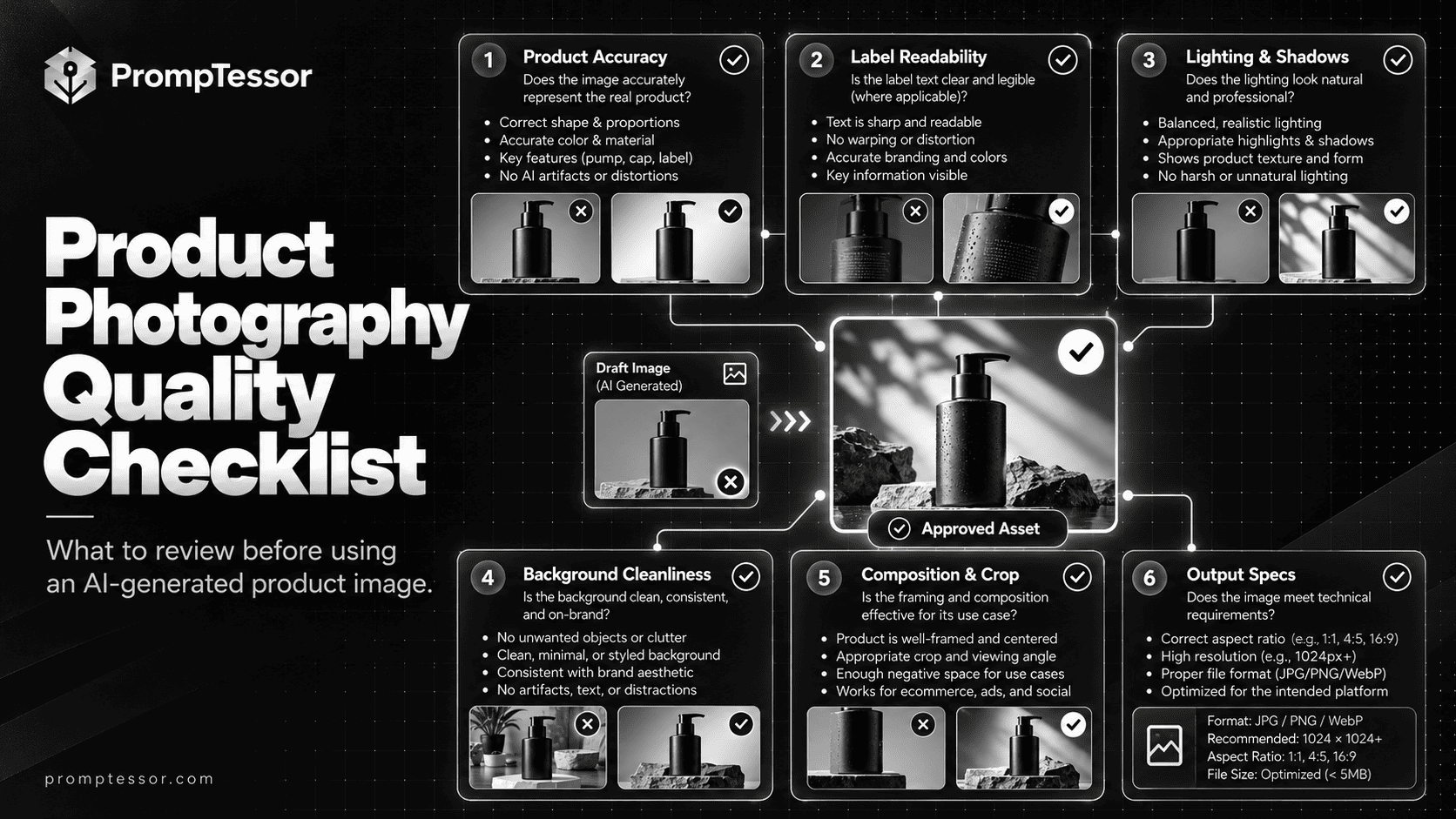
- Product identity: correct SKU, shape, material, colorway, package quantity, and real accessories.
- Brand fidelity: official logo unchanged, exact label words and graphics, no new seals or badges.
- Physical accuracy: no fictional ports, buttons, details, dimensions, or impossible contact shadows.
- Channel requirements: appropriate main image, clean background where required, valid dimensions, no prohibited overlays.
- Ad truthfulness: no unverified performance, results, endorsement, or included-item claims.
- Technical quality: sharp at real display size, no visual artifacts, sensible crop, consistent gallery style.
- Transparency: required generated-content metadata or labeling retained and correct for the destination platform.
- Human sign-off: compared against product references and approved for the exact intended placement.
Frequently Asked Questions About AI Product Photography Prompts
What is the best prompt for AI product photography?
The most useful prompt names the actual product or approved reference, the image placement, camera angle, lighting, background, composition, details to preserve, exclusions, and an accuracy check. There is no single best prompt for every channel.
Can AI create accurate ecommerce product photos?
AI can help create or edit convincing product images, especially when an approved product photograph is used as the reference. Accuracy is not guaranteed: humans must check labels, geometry, colors, and features before publishing.
Should I use AI-generated images for marketplace main images?
Only if the image accurately represents the sold item and meets the destination marketplace’s current rules. Main product images and lifestyle advertising images often have different requirements. Confirm policies before submission.
How do I keep a logo or packaging label unchanged?
Provide approved product photography or official packaging art, request a constrained edit, and explicitly forbid label or logo reconstruction. Compare the result against the source and use manual compositing if the model modifies critical detail.
How can I get a consistent set of product images?
Use a shared shot guide for background, camera height, crop, lighting direction, and product scale while preserving each SKU’s real differences. Review the gallery side by side and standardize only presentation—not the product itself.
Can I change the background of an existing product photo with AI?
Yes, if the selected tool supports image editing. Specify that the source product is protected and the background is the only requested change. Carefully inspect masks, shadows, reflective edges, and branding.
What aspect ratio should AI product photography use?
It depends on where the image will be published. A square may work for many catalog uses, while horizontal and vertical formats may suit website banners or social ads. Verify each channel’s current specifications and preserve safe cropping room.
Does Google Merchant Center require AI image metadata?
Google documents AI-generated image metadata requirements, including the IPTC DigitalSourceType designation. Review its current guidance and preserve required provenance information when preparing product feeds and assets.
Can I use AI images in product advertising?
AI-assisted visuals may be used subject to destination-platform rules and applicable advertising laws. The image and accompanying claims must not mislead customers about product features, included items, performance, or real-world results.
Can PrompTessor generate the product image itself?
The PrompTessor public AI Image Prompt Generator helps create detailed image prompts; it does not produce the final image file. You run the prompt in a compatible image-generation or editing service and review the output.
Final Thoughts
The strongest AI product photography prompts treat creative direction and product identity as separate responsibilities. The background, lighting, camera mood, and campaign composition can evolve; the real product must remain accurate. That distinction produces images that are not only attractive but also useful for shoppers and safer to publish.
Start with one verified item and one placement. Choose a template, supply references, generate a controlled draft, compare details, and document what passed review. Then reuse that working structure across the rest of the catalog—without turning visual consistency into product inaccuracy.
Build better prompts in one workspace
Generate prompts from ideas, analyze and optimize quality, refine with feedback, reverse-engineer content, and save reusable prompts in your Prompt Library.
Try PrompTessor Free