Best Claude Prompts for Writing Coding Research and Business in 2026
Claude can help with writing, research, coding, document analysis, data analysis, business planning, learning, and everyday work.
It can also support more specialized workflows through Projects, Research, Artifacts, file creation, and Claude Code.
However, a request such as “research this,” “review my code,” or “write a report” often leaves too many decisions undefined.
A stronger prompt tells Claude what task to perform, what information to use, who the output is for, how the result should be structured, what constraints to follow, and what a successful answer should achieve.
This guide contains reusable Claude prompts for writing, research, Projects, Artifacts, file analysis, data analysis, coding, Claude Code, business, learning, and everyday tasks.
Each prompt includes variables such as {topic}, {audience}, {source_material}, {goal}, and {output_format}. Replace these variables with details from your own workflow before using the prompt.
Quick Answer
The best Claude prompts clearly define the task, context, source material, audience, output format, constraints, and success criteria. For specialized workflows, also explain whether Claude should use web search, Research, a Project knowledge base, an Artifact, uploaded files, code execution, or Claude Code.
Key Takeaways
- Give Claude a specific task instead of only naming a broad topic.
- Provide relevant source material and tell Claude which information it should use.
- Define the audience, output format, limitations, and expected result.
- Use Projects for recurring work that requires persistent files, context, and instructions.
- Use Research for broader investigations that require multiple sources and verifiable citations.
- Use Artifacts when the result should become an editable document, tool, visualization, website, or interactive experience.
- Use Claude Code for repository-level tasks involving code exploration, changes, tests, and development workflows.
- Review important facts, calculations, code, and business recommendations before using them.
- Save prompts that work well as reusable templates.
Table of Contents
- What Makes a Good Claude Prompt?
- How to Customize Claude Prompts
- Claude Prompts for Writing
- Claude Prompts for Research and Web Search
- Claude Prompts for Projects
- Claude Prompts for Artifacts
- Claude Prompts for File and Document Analysis
- Claude Prompts for Data Analysis
- Claude Prompts for Coding
- Claude Code Prompts
- Claude Prompts for Business
- Claude Prompts for Learning
- Claude Prompts for Everyday Tasks
- Claude Prompts vs ChatGPT Prompts
- Claude Prompts vs Gemini Prompts
- How to Improve Weak Claude Prompts
- Common Claude Prompt Mistakes
- How PrompTessor Helps With Claude Prompts
- FAQ About Claude Prompts
What Makes a Good Claude Prompt?
A good Claude prompt gives the model enough information to understand the task without forcing it to guess your intent.
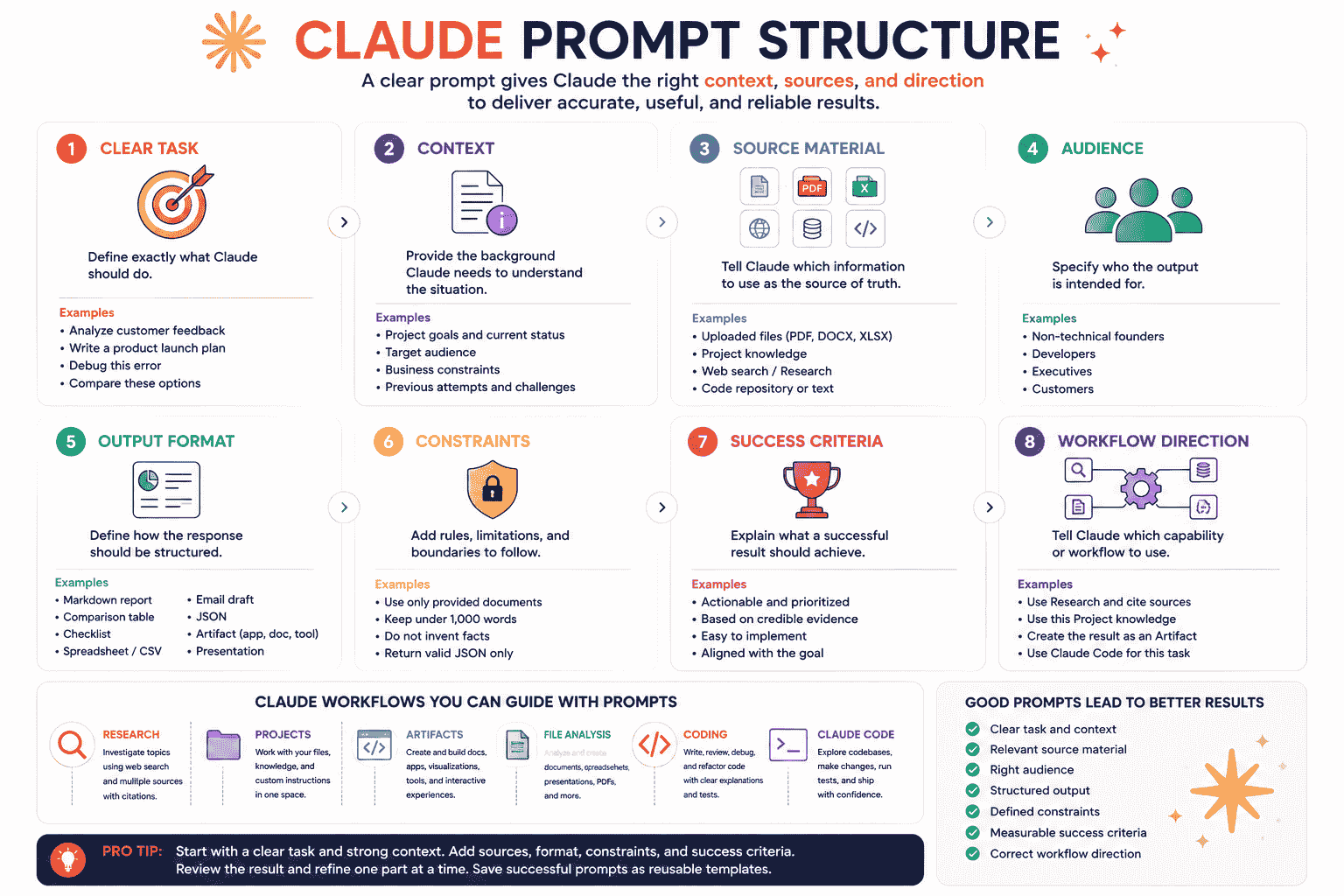
Most strong prompts contain eight core elements.
1. A Clear Task
Start with the action Claude should perform.
Weak prompt:
Help me with this report.
Stronger prompt:
Review the attached report and identify unsupported claims, unclear sections, repeated ideas, missing evidence, and the five highest-priority improvements.
The stronger version explains what “help” means.
2. Relevant Context
Context explains the situation behind the task.
Useful context can include:
- The product or project
- The current problem
- The target audience
- The intended outcome
- Previous attempts
- Available resources
- Deadlines
- Business limitations
3. Defined Source Material
Tell Claude what information it should use.
The source may be:
- An uploaded PDF
- A Word document
- A spreadsheet
- A set of customer reviews
- A Project knowledge base
- A website accessed through web search
- A code repository
- Text pasted directly into the conversation
When source accuracy matters, tell Claude not to add information that is absent from the provided material.
4. A Target Audience
Audience changes the vocabulary, tone, examples, depth, and recommendations Claude should use.
For example, a technical explanation for senior developers should not be written the same way as an explanation for non-technical founders.
5. A Defined Output Format
Describe how the answer should be structured.
Possible formats include:
- Markdown report
- Comparison table
- Checklist
- Decision memo
- Email draft
- JSON
- Implementation plan
- Spreadsheet
- Presentation
- Interactive Artifact
6. Useful Constraints
Constraints help control scope and prevent unwanted output.
Examples:
- Use only the supplied documents.
- Keep the answer under 1,000 words.
- Separate facts from assumptions.
- Do not change unrelated code.
- Return only valid JSON.
- Do not invent statistics or quotations.
- Focus on recommendations that a solo founder can execute.
7. Success Criteria
Explain what a useful result should accomplish.
Example:
The final plan should be prioritized, realistic for one person, executable within four weeks, and linked to measurable outcomes.
8. Workflow Direction
When relevant, explain which Claude capability should be used.
Examples:
- Use Research and cite every important factual claim.
- Use the files in this Project as the primary knowledge source.
- Create the result as an editable Artifact.
- Analyze the attached spreadsheet and create an Excel report.
- Use Claude Code to inspect the repository and run the tests.
How to Customize Claude Prompts
The prompts in this guide contain variables inside curly brackets.
For example:
You are a {role}.

Use {source_material} to complete this task:

{task}

The result is intended for {audience}.

Return the answer as {output_format}.

Follow these constraints:
{constraints}

A successful result should:
{success_criteria}
Replace every variable with information from your own workflow.
| Variable | What to Add | Example |
|---|---|---|
{role} |
The perspective or expertise Claude should use | Senior product strategist |
{task} |
The action Claude should perform | Evaluate three pricing options |
{source_material} |
The information Claude should use | Attached pricing data and customer interviews |
{audience} |
Who will use the result | A solo SaaS founder |
{goal} |
The desired outcome | Choose a sustainable pricing model |
{output_format} |
How Claude should structure the answer | Decision memo and comparison table |
{constraints} |
Rules and limitations | No unsupported market assumptions |
{success_criteria} |
What makes the result useful | Clear recommendation with risks and next steps |
A reusable prompt still needs relevant context. Do not copy a template without replacing its variables.
Claude Prompts for Writing
Claude can help with article planning, drafting, editing, rewriting, summarization, and document creation.
1. Detailed Article Outline Prompt
You are an experienced content strategist.

Create a detailed article outline about {topic} for {audience}.

The article should help readers {goal}.

Include:
- Search intent
- Recommended angle
- Introduction direction
- H2 and H3 sections
- Key points for every section
- Examples or evidence needed
- Common mistakes
- Frequently asked questions
- Conclusion direction

Use a {tone} tone.

Avoid overlapping sections, filler, generic advice, and unsupported claims.

The outline should be detailed enough for a writer to create the complete article without guessing what each section should cover.
2. Source-Grounded Article Prompt
You are a professional writer with expertise in {topic}.

Use only the attached sources to write a {word_count}-word article for {audience}.

The article goal is to {goal}.

Include:
- Clear introduction
- Logical H2 and H3 structure
- Important definitions
- Evidence supported by the sources
- Practical examples
- Limitations or uncertainty
- Actionable takeaways
- Frequently asked questions
- Concise conclusion

Use a {tone} tone.

Do not invent facts, statistics, quotations, sources, or product capabilities.

When the source material is insufficient, state what information is missing.
3. Editing and Revision Prompt
You are a senior editor.

Review the following draft:

{draft}

Audience:
{audience}

Goal:
{goal}

Evaluate:
- Clarity
- Logical structure
- Repetition
- Weak transitions
- Unnecessary wording
- Tone consistency
- Unsupported claims
- Missing context
- Missing examples
- Alignment with the audience

Return:
1. Overall assessment
2. Five highest-priority issues
3. Specific recommendations
4. Revised draft
5. Summary of the most important changes

Preserve the original meaning and voice unless a change is needed for clarity or accuracy.
4. Executive Summary Prompt
You are an executive communications specialist.

Summarize the attached document for {audience}.

The summary should include:
- Document purpose
- Main argument
- Important findings
- Decisions
- Risks
- Financial or operational implications
- Unresolved questions
- Recommended next actions

Keep the summary under {word_limit} words.

Use clear language and prioritize information that affects decisions.

Do not add claims that are not supported by the document.
Claude Prompts for Research and Web Search
Use web search for current factual questions and Research for investigations that require multiple searches, source comparison, and a more comprehensive report.
Feature availability may depend on your plan and settings.
5. Market Research Prompt
Use Research to investigate the market for {product_category} in {region}.

Focus on:
- Market definition
- Target customer segments
- Important customer problems
- Existing alternatives
- Major competitors
- Current pricing patterns
- Distribution channels
- Recent developments
- Adoption barriers
- Differentiation opportunities

Prioritize:
- Official company documentation
- Government publications
- Reputable industry organizations
- Primary research
- Established news publications

Return:
1. Executive summary
2. Key findings
3. Competitor comparison table
4. Customer segments
5. Opportunities
6. Risks
7. Unanswered questions
8. Recommended validation experiments
9. Source list

Cite every important factual claim.

Separate verified information, estimates, and your own inferences.
6. Evidence Review Prompt
Use Research to evaluate this claim:

{claim}

Search for evidence from:
- Primary research
- Official statistics
- Academic institutions
- Government organizations
- Systematic reviews
- Reputable expert organizations

For each important source, evaluate:
- Main finding
- Research method
- Sample or scope
- Limitations
- Potential bias
- Whether it directly supports the claim

Return:
1. Short conclusion
2. Evidence supporting the claim
3. Evidence challenging the claim
4. Areas of uncertainty
5. Confidence assessment
6. Questions requiring further research
7. Source list

Do not present correlation as causation.
7. Current Product Comparison Prompt
Use web search to compare the current versions of:

{products}

The comparison is for {user_profile}, whose main goal is {goal}.

Evaluate:
- Core features
- Current pricing
- Usage limits
- Integrations
- Important limitations
- Privacy or security considerations
- Best use cases
- Platform availability
- Recent changes

Use official product documentation as the primary source.

Return:
1. Comparison table
2. Best option for each use case
3. Main trade-offs
4. Overall recommendation
5. Confidence level
6. Information that may change over time

Cite every time-sensitive claim.

Do not fill missing information with assumptions.
8. Research Brief Prompt
Use Research to create a content brief about {topic}.

The content is intended for {audience} and should help them {goal}.

Investigate:
- Search intent
- Important definitions
- Core questions
- Current data
- Recent developments
- Common misconceptions
- Practical examples
- Expert perspectives
- Areas where credible sources disagree

Return:
1. Recommended content angle
2. Key findings with citations
3. Suggested H2 and H3 structure
4. Examples to include
5. Claims requiring careful wording
6. FAQ questions
7. Source list

Prioritize authoritative and primary sources.
Claude Prompts for Projects
Projects provide dedicated workspaces with their own chats, files, knowledge, and instructions.
They are useful for recurring workflows that require the same background information across multiple conversations.
9. Project Instruction Prompt
Use the following as the standing instructions for this Project.

Project purpose:
{project_purpose}

Primary audience:
{audience}

My role:
{user_role}

When responding:
- Use the Project files as the primary source of truth
- Separate documented facts from assumptions
- Cite the relevant file or section when possible
- Use a {tone} tone
- Keep recommendations aligned with {constraints}
- Ask for clarification when a critical detail is missing
- Do not invent product features, metrics, decisions, or deadlines
- Preserve terminology used in the Project files

Default output format:
{default_output_format}

Definition of a successful response:
{success_criteria}
10. Project Knowledge Audit Prompt
Review the knowledge currently available in this Project.

Create an audit covering:
- Main documents and their purpose
- Information that appears current
- Information that may be outdated
- Contradictions between files
- Duplicate documents
- Missing context
- Important terminology
- Decisions already documented
- Open questions

Return:
1. Knowledge map
2. Potential conflicts
3. Missing information
4. Recommended files to update or add
5. Questions I should answer

Do not assume that the most recently uploaded file is automatically authoritative.
11. Project Status Brief Prompt
Use the Project files and conversation history to create a current status brief.

Include:
- Project objective
- Current stage
- Completed work
- Decisions made
- Work in progress
- Known blockers
- Risks
- Upcoming deadlines
- Unresolved questions
- Recommended next actions

Return the result as:
1. Executive summary
2. Status table
3. Prioritized action list

Clearly identify the source of each deadline or decision.

Do not create missing status updates.
Claude Prompts for Artifacts
Artifacts are useful when the output should be developed separately from the conversation as an editable document, visualization, tool, website, or interactive experience.
12. Interactive Dashboard Artifact Prompt
Create an interactive Artifact that displays {data_or_topic}.

Purpose:
{purpose}

Target user:
{target_user}

Include:
- Clear dashboard header
- Summary metrics
- Filters
- Search when useful
- Main chart or visualization
- Detailed data table
- Empty state
- Loading state
- Error state
- Responsive layout

Design direction:
{design_direction}

Technical requirements:
{technical_requirements}

Use sample data only when real data is unavailable, and label it clearly.

After creating the first version:
1. Explain the structure
2. List assumptions
3. Identify accessibility concerns
4. Suggest three improvements
13. Interactive Calculator Artifact Prompt
Create an interactive calculator Artifact for {calculation_purpose}.

Inputs:
{inputs}

Calculations:
{calculation_rules}

Outputs:
{outputs}

Requirements:
- Clear labels
- Input validation
- Helpful error messages
- Reset button
- Explanation of the calculation
- Responsive layout
- Accessible keyboard interaction
- No external data unless specified

Display results in:
{result_format}

Do not hide assumptions used in the calculation.
14. Editable Document Artifact Prompt
Create an editable Artifact for a {document_type} about {topic}.

Audience:
{audience}

Goal:
{goal}

Required sections:
{sections}

Requirements:
- Clear hierarchy
- Concise paragraphs
- Practical examples
- Summary at the beginning
- Action checklist at the end
- Consistent terminology
- Professional formatting
- Maximum length of {word_count} words

After creating the draft, identify:
- Claims requiring evidence
- Sections that may be unclear
- Information that is still missing
15. Landing Page Artifact Prompt
Create a responsive landing page Artifact for {product_name}.

Product:
{product_description}

Target audience:
{audience}

Primary goal:
{conversion_goal}

Include:
- Hero section
- Clear value proposition
- Problem section
- Core capabilities
- How it works
- Use cases
- Trust section
- FAQ
- Primary CTA
- Footer

Design direction:
{design_direction}

Requirements:
- Mobile-responsive layout
- Accessible color contrast
- Clear visual hierarchy
- Natural copy without exaggerated claims
- No unsupported customer logos or metrics
- Functional buttons and interactions where relevant

After creating it, explain the conversion flow and recommend three improvements.
Claude Prompts for File and Document Analysis
Claude can work with uploaded documents and images, and supported file-creation capabilities can produce spreadsheets, presentations, Word documents, and PDFs.
16. PDF Analysis Prompt
Analyze the attached PDF.

Return:
1. Document purpose
2. Executive summary
3. Main arguments
4. Important findings
5. Requirements
6. Decisions
7. Risks
8. Contradictions
9. Missing information
10. Recommended next actions

For every important finding, identify the relevant page or section when possible.

Distinguish between:
- Information explicitly stated
- Reasonable interpretation
- Information not provided

Do not add facts that are absent from the PDF.
17. Contract Review Prompt
Review the attached agreement from a practical business perspective.

Identify:
- Parties and responsibilities
- Payment terms
- Renewal terms
- Termination conditions
- Refund provisions
- Intellectual property terms
- Confidentiality obligations
- Liability limitations
- Exclusivity restrictions
- Dispute provisions
- Deadlines
- Ambiguous language
- Clauses requiring professional legal review

Return:
1. Plain-language summary
2. Key obligations
3. Major risks
4. Unusual terms
5. Questions to ask
6. Negotiation points

Do not present this as legal advice.

Cite the relevant section for every important finding.
18. Compare Documents Prompt
Compare the attached documents.

Evaluate:
- Purpose
- Scope
- Requirements
- Responsibilities
- Pricing or budget
- Deadlines
- Risks
- Definitions
- Contradictions
- Missing information

Return:
1. Comparison table
2. Important differences
3. Potential conflicts
4. Information that appears outdated
5. Questions requiring clarification
6. Recommended next step

Use document content rather than file modification dates to determine which information appears authoritative.
19. Create a Presentation From Documents Prompt
Use the attached documents to create a PowerPoint presentation for {audience}.

Presentation goal:
{goal}

Include:
- Title slide
- Executive summary
- Main findings
- Supporting evidence
- Important charts or tables
- Risks or limitations
- Recommendations
- Next steps

Requirements:
- {number_of_slides} slides
- One main idea per slide
- Concise text
- Clear speaker notes
- Consistent visual hierarchy
- No unsupported claims
- Cite source documents in the notes

Before creating the file, provide the proposed slide outline for review.
Claude Prompts for Data Analysis
20. Spreadsheet Analysis Prompt
Analyze the attached spreadsheet.

Business question:
{business_question}

Evaluate:
- Data quality
- Missing values
- Duplicate records
- Important trends
- Highest and lowest values
- Unexpected changes
- Potential outliers
- Relationships between variables
- Segments with meaningful differences
- Business implications

Return:
1. Executive summary
2. Data-quality findings
3. Key calculations
4. Important insights
5. Recommended charts
6. Limitations
7. Recommended next actions

Do not infer causation from correlation.

Explain every assumption used in the analysis.
21. Create an Excel Report Prompt
Use the attached data to create an Excel report.

Purpose:
{purpose}

Required worksheets:
- Raw Data
- Cleaned Data
- Summary
- Analysis
- Dashboard

Include:
- Working formulas
- Clear column labels
- Data validation where useful
- Summary metrics
- Charts
- Filters
- Conditional formatting
- Notes explaining assumptions

Do not replace source values without documenting the transformation.

After creating the file, summarize:
1. What was changed
2. What formulas were used
3. Important findings
4. Data limitations
22. Customer Feedback Analysis Prompt
Analyze the attached customer feedback.

Product context:
{product_context}

Identify:
- Repeated problems
- Desired outcomes
- Positive themes
- Negative themes
- Feature requests
- Confusing product areas
- Customer language useful for messaging
- High-priority issues
- Contradictory feedback

Return:
1. Executive summary
2. Theme table
3. Frequency estimates based only on the data
4. Representative examples
5. Recommended product actions
6. Recommended messaging changes
7. Questions requiring more research

Do not invent customer counts or percentages.
Claude Prompts for Coding
For ordinary chat-based coding tasks, provide the relevant code, environment, expected behavior, and error information.
23. Debugging Prompt
You are a senior {programming_language} developer.

Help diagnose this issue.

Expected behavior:
{expected_behavior}

Actual behavior:
{actual_behavior}

Error message:
{error_message}

Relevant code:
{code}

Environment and dependencies:
{environment}

Please:
1. Identify the most likely cause
2. Explain why the issue occurs
3. Provide the smallest safe fix
4. Show the corrected code
5. Identify side effects
6. Mention edge cases
7. Recommend tests

Do not rewrite unrelated code.

Clearly label assumptions.
24. Code Review Prompt
You are a senior code reviewer.

Review the following code:

{code}

Language and framework:
{language_and_framework}

Intended behavior:
{intended_behavior}

Evaluate:
- Correctness
- Readability
- Maintainability
- Error handling
- Security
- Performance
- Accessibility when relevant
- Testability
- Framework best practices
- Edge cases

Return a table with:
- Issue
- Severity
- Explanation
- Recommended fix

Then provide improved code only for the sections that require changes.

Do not change existing behavior without explaining why.
25. Implementation Plan Prompt
You are a senior software architect.

Create an implementation plan for:

{feature_description}

Current stack:
{technology_stack}

Existing architecture:
{architecture_context}

Requirements:
{requirements}

Constraints:
{constraints}

Return:
1. Requirement clarification
2. Recommended architecture
3. Data-model changes
4. Backend changes
5. Frontend changes
6. Validation
7. Error handling
8. Security considerations
9. Testing strategy
10. Migration and rollout plan
11. Risks and trade-offs

Do not provide final implementation code unless requested.

Identify missing information and assumptions.
Claude Code Prompts
Claude Code is designed for development workflows involving an actual codebase. It can inspect project files, make changes, run commands, execute tests, and assist with Git workflows.
26. Understand an Unfamiliar Codebase Prompt
Analyze this codebase before making any changes.

Explain:
- What the application does
- Technology stack
- Main directories
- Entry points
- Important services
- Data flow
- Authentication
- External integrations
- Configuration
- Testing structure
- Deployment-related files

Return:
1. Architecture overview
2. Directory map
3. Five files I should read first
4. Important dependencies
5. High-risk or complex areas
6. Questions that cannot be answered from the codebase

Do not modify any files.
27. Repository Bug Fix Prompt
Investigate and fix this bug:

{bug_description}

Expected behavior:
{expected_behavior}

Actual behavior:
{actual_behavior}

Known reproduction steps:
{reproduction_steps}

Before editing:
1. Locate the relevant code path
2. Explain the likely root cause
3. Identify affected files
4. Propose the smallest safe change

Then:
- Implement the fix
- Add or update tests
- Run the relevant test suite
- Report the files changed
- Explain any remaining uncertainty

Do not refactor unrelated code.
28. Feature Implementation Prompt
Implement this feature in the existing codebase:

{feature_description}

Requirements:
{requirements}

Acceptance criteria:
{acceptance_criteria}

Constraints:
{constraints}

Before making changes:
1. Inspect the relevant architecture
2. Identify existing patterns to follow
3. Propose an implementation plan
4. Identify risks and missing information

After approval:
- Implement the feature
- Add validation and error handling
- Add or update tests
- Run linting and tests
- Summarize every changed file
- Mention any migration or configuration steps

Avoid introducing new dependencies unless necessary.
29. Refactoring Prompt
Refactor {target_area} without changing external behavior.

Goals:
{refactoring_goals}

Constraints:
- Preserve public APIs
- Preserve database behavior
- Preserve user-facing output
- Avoid unrelated changes
- Keep the change easy to review

Process:
1. Explain the current design
2. Identify the main maintainability problems
3. Propose a small-step refactoring plan
4. Add or verify tests that protect current behavior
5. Implement the refactor
6. Run relevant tests
7. Summarize changes and trade-offs

Stop and ask before proceeding if preserving behavior cannot be guaranteed.
Claude Prompts for Business
30. Business Idea Evaluation Prompt
You are a skeptical startup advisor.

Evaluate this business idea:

{business_idea}

Target customer:
{target_customer}

Problem:
{problem}

Proposed solution:
{solution}

Revenue model:
{revenue_model}

Available resources:
{resources}

Evaluate:
- Problem importance
- Customer clarity
- Existing alternatives
- Differentiation
- Willingness-to-pay assumptions
- Distribution difficulty
- Operational complexity
- Defensibility
- Main risks
- Validation difficulty

Return:
1. Strongest assumptions
2. Weakest assumptions
3. Questions that must be answered
4. Low-cost validation experiments
5. Evidence that would support or reject the idea
6. Recommended next step

Do not treat assumptions as verified facts.
31. Decision Memo Prompt
You are a strategic decision advisor.

Help evaluate this decision:

{decision}

Options:
{options}

Primary objective:
{objective}

Criteria:
{criteria}

Constraints:
{constraints}

Known information:
{known_information}

Uncertainties:
{uncertainties}

Return a decision memo with:
1. Decision summary
2. Evaluation criteria
3. Option comparison
4. Benefits and risks
5. Reversible and irreversible consequences
6. Missing information
7. Recommended option
8. Confidence level
9. Conditions that would change the recommendation
10. Immediate next action

Do not hide uncertainty.
32. Competitor Analysis Prompt
You are a product strategy consultant.

Analyze the following competitors using only the supplied information:

{competitor_information}

My product:
{product_information}

Target audience:
{audience}

Compare:
- Positioning
- Target customers
- Core features
- Pricing approach
- Strengths
- Weaknesses
- Messaging
- Distribution
- Differentiation opportunities

Return:
1. Comparison table
2. Market patterns
3. Positioning gaps
4. Realistic differentiation opportunities
5. Risks
6. Questions requiring additional research

Do not invent competitor details.
Claude Prompts for Learning
33. Personal Tutor Prompt
You are a patient tutor.

Teach me {concept} at a {learner_level} level.

I already understand:
{existing_knowledge}

I am confused about:
{confusing_part}

Use:
- Simple definition
- Step-by-step explanation
- One analogy
- One practical example
- One common misconception
- Short summary

Then ask me three questions to check my understanding.

Wait for my answers before moving to the next topic.
34. Study Plan Prompt
You are a learning strategist.

Create a {duration} study plan for {subject_or_skill}.

Current level:
{current_level}

Target:
{target_level}

Available time:
{available_time}

Preferred learning style:
{learning_style}

Available resources:
{resources}

Return:
1. Learning milestones
2. Weekly topics
3. Daily activities
4. Practice exercises
5. Review schedule
6. Progress checks
7. Final project or assessment

Keep the workload realistic and prioritize active practice.
35. Quiz From Source Material Prompt
Use only the attached study material to create:

- {number} multiple-choice questions
- {number} short-answer questions
- {number} application questions
- {number} flashcards

Difficulty:
{difficulty}

Focus areas:
{focus_areas}

For every question, provide:
- Correct answer
- Explanation
- Relevant source section
- Common misconception being tested

Do not create questions whose answers are unsupported by the material.
Claude Prompts for Everyday Tasks
36. Compare Options Prompt
You are a neutral decision assistant.

Compare these options:

{options}

My goal:
{goal}

Criteria:
{criteria}

Constraints:
{constraints}

Known information:
{known_information}

For each option, evaluate:
- Benefits
- Drawbacks
- Cost or effort
- Risks
- Long-term suitability
- Fit with my goal

Return:
1. Comparison table
2. Best option for each priority
3. Overall recommendation
4. Main trade-off
5. Information I should verify

Do not invent missing prices, features, or specifications.
37. Weekly Planning Prompt
You are a realistic productivity advisor.

Help me plan the week.

Goals:
{goals}

Tasks:
{tasks}

Deadlines:
{deadlines}

Fixed commitments:
{commitments}

Available working hours:
{working_hours}

Limitations:
{limitations}

Return:
1. Three highest priorities
2. Recommended daily schedule
3. Focus blocks
4. Tasks to defer, delegate, or remove
5. Buffer time
6. Main risks
7. End-of-week review questions

Do not fill every available hour.
38. Difficult Message Prompt
You are a thoughtful communication advisor.

Help me write a message about:

{situation}

Recipient:
{recipient}

Goal:
{goal}

Context:
{context}

Tone:
{tone}

Things to avoid:
{things_to_avoid}

Write a message that:
- Communicates the main point clearly
- Shows appropriate empathy
- Avoids unnecessary blame
- Sets boundaries when needed
- Includes a practical next step

Provide:
1. Recommended version
2. Softer alternative
3. More direct alternative

Keep all versions natural and respectful.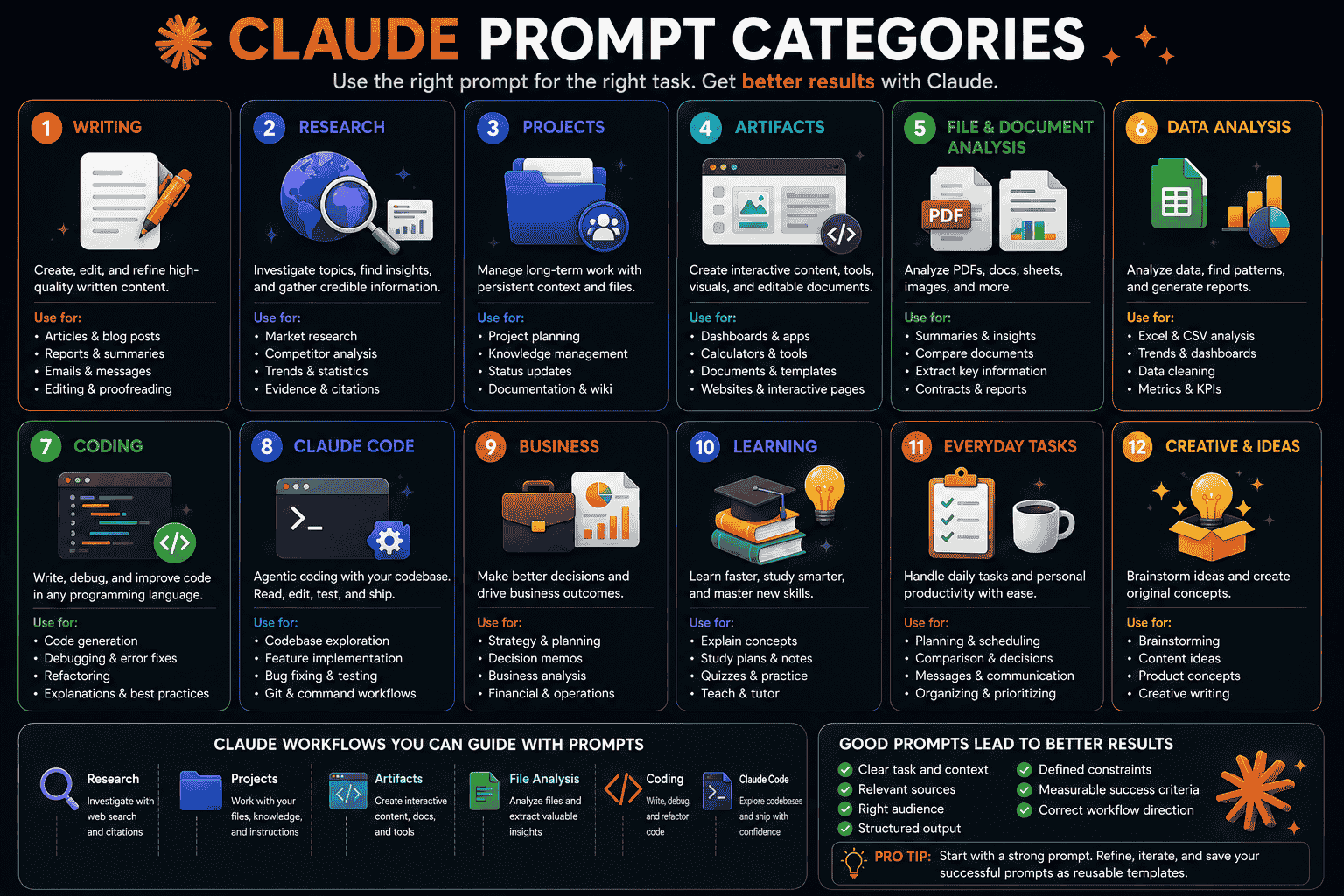
Claude Prompts vs ChatGPT Prompts
The foundations of strong prompts are similar across Claude and ChatGPT.
Both benefit from:
- Clear tasks
- Relevant context
- Defined sources
- Output formats
- Constraints
- Success criteria
The prompt should be adapted to the workflow rather than rewritten only because the model name changed.
| Workflow | Prompt Focus |
|---|---|
| General conversation | Task, context, audience, format, and constraints |
| Source-grounded analysis | Documents to use, citation requirements, and unsupported claims |
| Interactive creation | Artifact purpose, functionality, layout, and user flow |
| Persistent project | Project knowledge, standing instructions, and terminology |
| Repository development | Codebase context, tests, scope, and safe file changes |
For ready-to-use ChatGPT examples, read Best ChatGPT Prompts for Work Writing Marketing and Coding in 2026.
Claude Prompts vs Gemini Prompts
Claude and Gemini can both support writing, research, coding, file analysis, and business tasks.
The most important difference is often the source and workflow available for the task.
A Gemini workflow may emphasize Google Workspace or Gemini-specific tools. A Claude workflow may emphasize Projects, Research, Artifacts, file creation, or Claude Code.
The core prompt should still answer the same questions:
- What should the AI do?
- What information should it use?
- Who is the result for?
- How should the result be structured?
- What limitations must it follow?
- What makes the result successful?
For Gemini-specific examples, read Best Gemini Prompts for Work Writing Research Coding and Images in 2026.
How to Improve Weak Claude Prompts
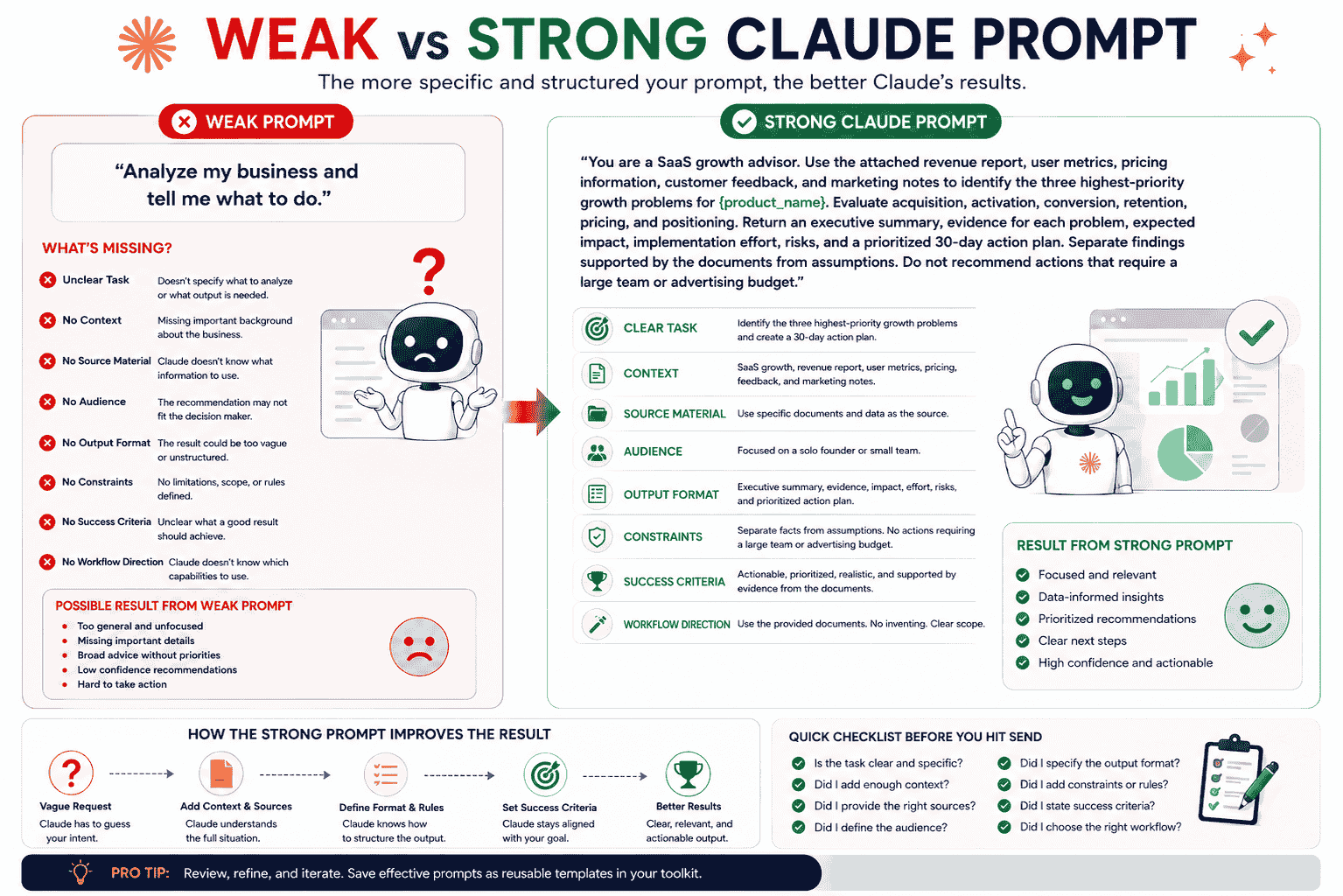
Consider this weak prompt:
Analyze my business and tell me what to do.
The prompt does not explain:
- What the business does
- Which problem needs to be analyzed
- What information Claude should use
- Who the recommendation is for
- What criteria should be considered
- How the answer should be structured
- What constraints apply
- What a useful recommendation should achieve
A stronger prompt could be:
You are a SaaS growth advisor. Use the attached revenue report, user metrics, pricing information, customer feedback, and marketing notes to identify the three highest-priority growth problems for {product_name}. Evaluate acquisition, activation, conversion, retention, pricing, and positioning. Return an executive summary, evidence for each problem, expected impact, implementation effort, risks, and a prioritized 30-day action plan. Separate findings supported by the documents from assumptions. Do not recommend actions that require a large team or advertising budget.
Use this checklist to improve a weak Claude prompt:
- Clarify the exact task.
- Add relevant context.
- Define the source material.
- Identify the audience or decision-maker.
- Specify the evaluation criteria.
- Set the output format.
- Add constraints.
- Define success criteria.
- Name the Claude workflow when relevant.
Common Claude Prompt Mistakes
1. Using Vague Requests
Requests such as “make this better” or “help with my project” do not define what should change.
Use targeted instructions.
2. Not Providing the Required Source Material
Claude cannot analyze a document, spreadsheet, image, or repository that is not available in the conversation, Project, or relevant workflow.
3. Not Explaining Which Sources to Use
If several files or sources are available, explain which ones are authoritative.
4. Requesting Research Without Defining Scope
Define the question, region, timeframe, audience, criteria, and source priorities.
5. Asking for Too Many Unrelated Tasks at Once
Researching, planning, writing, coding, and designing in one prompt may create a shallow result.
Break the workflow into stages.
6. Leaving the Output Format Undefined
Specify whether you need a table, report, checklist, spreadsheet, presentation, Artifact, or code change.
7. Asking Claude to Fill Gaps With Guesses
Tell Claude to identify missing information rather than inventing it.
8. Not Protecting Existing Behavior During Code Changes
For coding tasks, explain what must remain unchanged and require tests.
9. Treating the First Output as Final
Review the result, verify important information, and refine unclear instructions.
10. Not Saving Successful Prompts
A strong Claude prompt can become a reusable template, Project instruction, or repeatable workflow.
How PrompTessor Helps With Claude Prompts
PrompTessor helps users generate, analyze, optimize, refine, save, and reuse prompts that can be adapted for Claude and other AI models.
You can begin with a rough instruction such as:
Research my competitors.
Prompt Generator can help turn that idea into a structured prompt containing:
- A clear research task
- Product and market context
- Competitors to evaluate
- Source requirements
- Evaluation criteria
- Output structure
- Constraints
- Success criteria
Prompt Analysis can identify missing elements such as:
- Unclear task
- Missing context
- Undefined source material
- No target audience
- Missing output format
- Weak constraints
- No success criteria
Prompt Optimizer can improve clarity, specificity, structure, context, and constraints.
Prompt Refinement can apply targeted feedback such as:
- Make the prompt suitable for Claude Research
- Use only the attached Project files
- Return the result as a decision memo
- Turn the result into an Artifact
- Make the prompt suitable for Claude Code
- Preserve existing application behavior
- Turn the prompt into a reusable template
Once a prompt works well, it can be saved in the Prompt Library and reused across writing, research, coding, business, learning, and document workflows.
For reusable structures that work across models, read AI Prompt Templates You Can Reuse for ChatGPT Claude Gemini and Other AI Tools.
FAQ About Claude Prompts
What are Claude prompts?
Claude prompts are instructions, questions, files, source materials, context, and constraints given to Claude to guide the response, document, analysis, code change, or Artifact it produces.
What makes a good Claude prompt?
A good Claude prompt usually includes a clear task, relevant context, defined sources, target audience, output format, constraints, success criteria, and workflow direction when needed.
How can I get better results from Claude?
Explain exactly what Claude should do, provide relevant source material, define the audience and output format, add useful constraints, and state what a successful result should achieve.
What are Claude Projects?
Claude Projects are dedicated workspaces with their own conversations, files, knowledge, and instructions. They are useful for recurring tasks that require consistent context.
What is Claude Research?
Claude Research is a workflow for broader investigations that can perform multiple searches, explore different aspects of a question, and return findings with citations. Availability may depend on the user’s plan and settings.
What are Claude Artifacts?
Artifacts are substantial outputs displayed separately from the conversation. They can include documents, applications, tools, visualizations, websites, and other content that can be edited or developed further.
Can Claude analyze uploaded files?
Claude can analyze supported documents and image files. The available file types, limits, and processing capabilities may vary by platform and account configuration.
Can Claude create spreadsheets and presentations?
With code execution and file creation enabled, Claude can create supported files such as Excel spreadsheets, PowerPoint presentations, Word documents, and PDFs.
What is Claude Code?
Claude Code is an agentic coding system that can inspect a codebase, modify files, run commands and tests, and support software-development workflows.
Can I reuse Claude prompts?
Yes. Replace task-specific information with variables such as {topic}, {audience}, {source_material}, and {output_format}, then save the prompt as a reusable template.
Can PrompTessor create Claude prompts?
PrompTessor helps users generate, analyze, optimize, refine, save, and reuse prompts that can be adapted for Claude writing, research, Projects, Artifacts, coding, Claude Code, and file-analysis workflows.
Build Better Claude Workflows With Reusable Prompts
The best Claude prompts are not simply the longest instructions.
They are prompts that give Claude the information and direction required for the task.
Define the action, context, source material, audience, output format, constraints, and success criteria. Then identify whether the workflow requires Research, a Project, an Artifact, uploaded files, code execution, or Claude Code.
After Claude produces the first result, review it carefully.
Verify important facts, test code, examine calculations, and refine the parts that are incomplete or unclear.
Once a prompt consistently produces useful results, turn it into a reusable template and save it for future workflows.
Better Claude results begin with clearer tasks, stronger context, reliable sources, and deliberate instructions.
Build better prompts in one workspace
Generate prompts from ideas, analyze and optimize quality, refine with feedback, reverse-engineer content, and save reusable prompts in your Prompt Library.
Try PrompTessor Free