How to Prompt GPT-6.1 Sol: Best Practices, Reasoning, and Examples
GPT-6.1 Sol is not just GPT-6 Sol with a minor version number.
OpenAI released GPT-6.1 Sol on September 29, 2026 as an upgrade aimed at complex coding, computer use, professional work, document understanding, and multi-step agentic workflows. OpenAI positions it as a lower-cost model that can approach GPT-6 Astra on several demanding workloads while retaining the standard Sol price of $2 per million input tokens and $10 per million output tokens. Cached input is cheaper than GPT-6 Sol at $0.10 per million tokens. OpenAI's GPT-6.1 Sol announcement.
The prompting implications are important. GPT-6.1 Sol no longer supports none or minimal reasoning effort. Tool calling requires the Responses API. Its default reasoning effort is medium. It supports a 1,050,000-token context window, up to 128,000 output tokens, image input, Structured Outputs, computer use, code tools, MCP, web search, file search, and other hosted tools. OpenAI's GPT-6.1 Sol model documentation.
That means prompts and runtime settings that worked well for GPT-6 Sol should be re-evaluated rather than copied over unchanged.
The best way to prompt GPT-6.1 Sol is to define the outcome, boundaries, available evidence, tools, verification rules, and stopping conditions clearly, then give the model room to choose an efficient path.
If you want to turn a rough idea into a structured ChatGPT prompt before adapting it for GPT-6.1 Sol, the updated ChatGPT Prompt Generator can help create a stronger starting structure for the task, context, constraints, and expected output.
Quick Answer: How Should You Prompt GPT-6.1 Sol?
For most complex tasks, start with a prompt structure like this:
GOAL
State the outcome you want.

CONTEXT
Provide only the information the model needs.

CONSTRAINTS
Define requirements, boundaries, and prohibited actions.

TOOLS
Explain what tools are available and when they should be used.

SUCCESS CRITERIA
Define what a correct result must satisfy.

VERIFICATION
Require checks against evidence, tool results, tests, or source material.

STOP / ESCALATE
Explain when the model should stop, ask, or escalate.

OUTPUT
Specify the final artifact, format, and level of detail.
At the API level, GPT-6.1 Sol supports these reasoning settings:
low
medium  ← default
high
xhigh
max
Unlike GPT-6 Sol, it does not support none. OpenAI's migration guidance says workloads using none should move to low and be re-evaluated on representative tasks. OpenAI's GPT-6 migration guide.
Table of Contents
- What Is GPT-6.1 Sol?
- GPT-6.1 Sol vs GPT-6 Sol: What Changed?
- Specifications That Matter for Prompting
- The Core GPT-6.1 Sol Prompt Structure
- How to Choose Reasoning Effort
- Why none No Longer Works
- Prompting for Coding and Debugging
- Prompting for Agentic Workflows
- Tools, MCP, and the Responses API
- Prompting for Computer Use
- Prompting for PDFs and Complex Documents
- Long-Context Prompting
- Structured Outputs
- Verification and Factuality
- Prompt Caching and Reusable Context
- Practical GPT-6.1 Sol Prompt Examples
- Common Prompting Mistakes
- Migrating from GPT-6 Sol
- GPT-6.1 Sol vs GPT-6 Astra
- How to Test and Optimize Prompts
- Where PrompTessor Fits
- FAQ
What Is GPT-6.1 Sol?
GPT-6.1 Sol is the updated Sol-class model in OpenAI's GPT-6 family. OpenAI describes it as a model for complex coding, computer use, and professional work when you want near-Astra capability at a lower cost.
At launch, GPT-6.1 Sol is available through the OpenAI API as gpt-6.1-sol and is rolling out in ChatGPT Work and Codex for eligible paid plans. It is not yet available in regular Chat conversations. OpenAI's Work and Codex availability documentation.
OpenAI reports substantial gains over GPT-6 Sol in complex software engineering, professional document work, multi-step business automation, computer-use workflows, scientific workflows, and factual accuracy on deliberately difficult prompts.
On DeepSWE v1.1, OpenAI reports GPT-6.1 Sol beating GPT-6 Sol's best score by 6.4 percentage points while using a lower reasoning effort. On AutomationBench, it improves by 4.8 percentage points over GPT-6 Sol at medium effort. On the OSWorld 2.0 offline set, it improves by seven percentage points at maximum effort. These are benchmark results in specific evaluation settings, not guarantees that every production workload will improve by the same amount. See OpenAI's launch evaluation details.
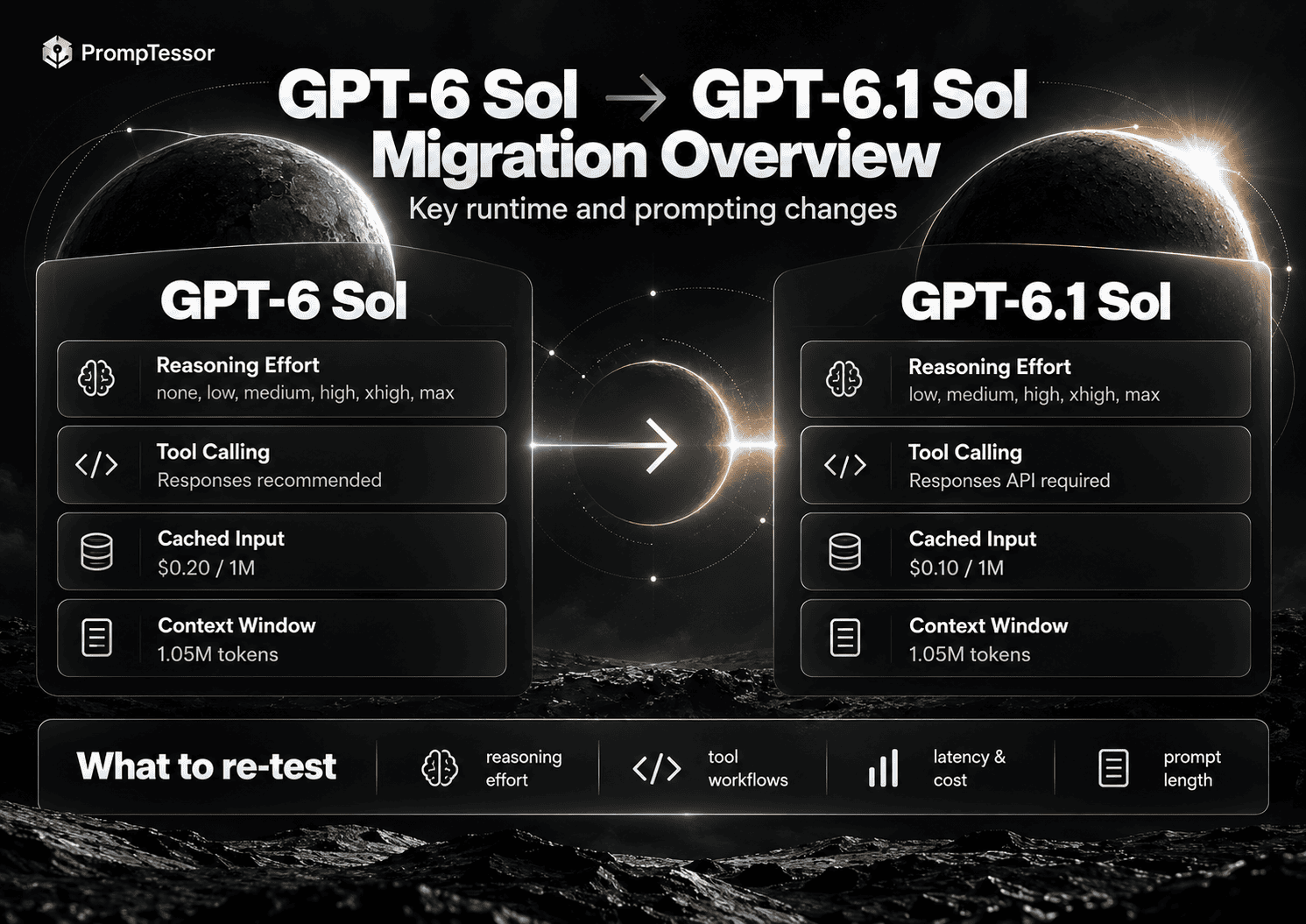
GPT-6.1 Sol vs GPT-6 Sol: What Changed?
| Area | GPT-6 Sol | GPT-6.1 Sol |
|---|---|---|
| Reasoning effort | none, low, medium, high, xhigh, max | low, medium, high, xhigh, max |
| Default reasoning | Configuration-dependent | medium |
| Tool calling | Responses recommended; limited Chat Completions function calling at none | Responses API required for tool calling |
| Standard input | $2 / 1M tokens | $2 / 1M tokens |
| Cached input | $0.20 / 1M tokens | $0.10 / 1M tokens |
| Standard output | $10 / 1M tokens | $10 / 1M tokens |
| Context window | 1.05M | 1.05M |
| Max output | 128K | 128K |
| Positioning | Sol-class general complex work | Near-Astra performance target for complex work at lower cost |
The key migration lesson is not that every prompt needs to become longer. It is that your runtime assumptions have changed.
If your GPT-6 Sol prompt depended on none reasoning for speed, simply changing the model ID can change latency, cost, and behavior. If your application uses tools, moving to the Responses API is now part of the migration. If your prompt contains detailed process instructions written to compensate for older model behavior, those instructions may also deserve simplification.
Keep the existing GPT-6 Sol Prompting Guide for workloads that still use the previous model. Treat this guide as version-specific guidance for GPT-6.1 Sol.
GPT-6.1 Sol Specifications That Matter for Prompting
- Model ID:
gpt-6.1-sol - Context window: 1,050,000 tokens
- Maximum output: 128,000 tokens
- Knowledge cutoff: April 30, 2026
- Input modalities: text and images
- Reasoning effort: low, medium, high, xhigh, max
- Default reasoning effort: medium
- Structured Outputs: supported
- Function calling: supported through the Responses API
- Tools: web search, file search, image generation, code interpreter, hosted shell, apply patch, skills, computer use, MCP, and tool search
- Fine-tuning: not supported at launch
OpenAI also applies long-context pricing when prompts exceed 272K input tokens: input and cache rates increase to 2× and output rates to 1.5× for the full request. That means a 1.05M context window should not be treated as permission to place every available document into every request. GPT-6.1 Sol model specifications.
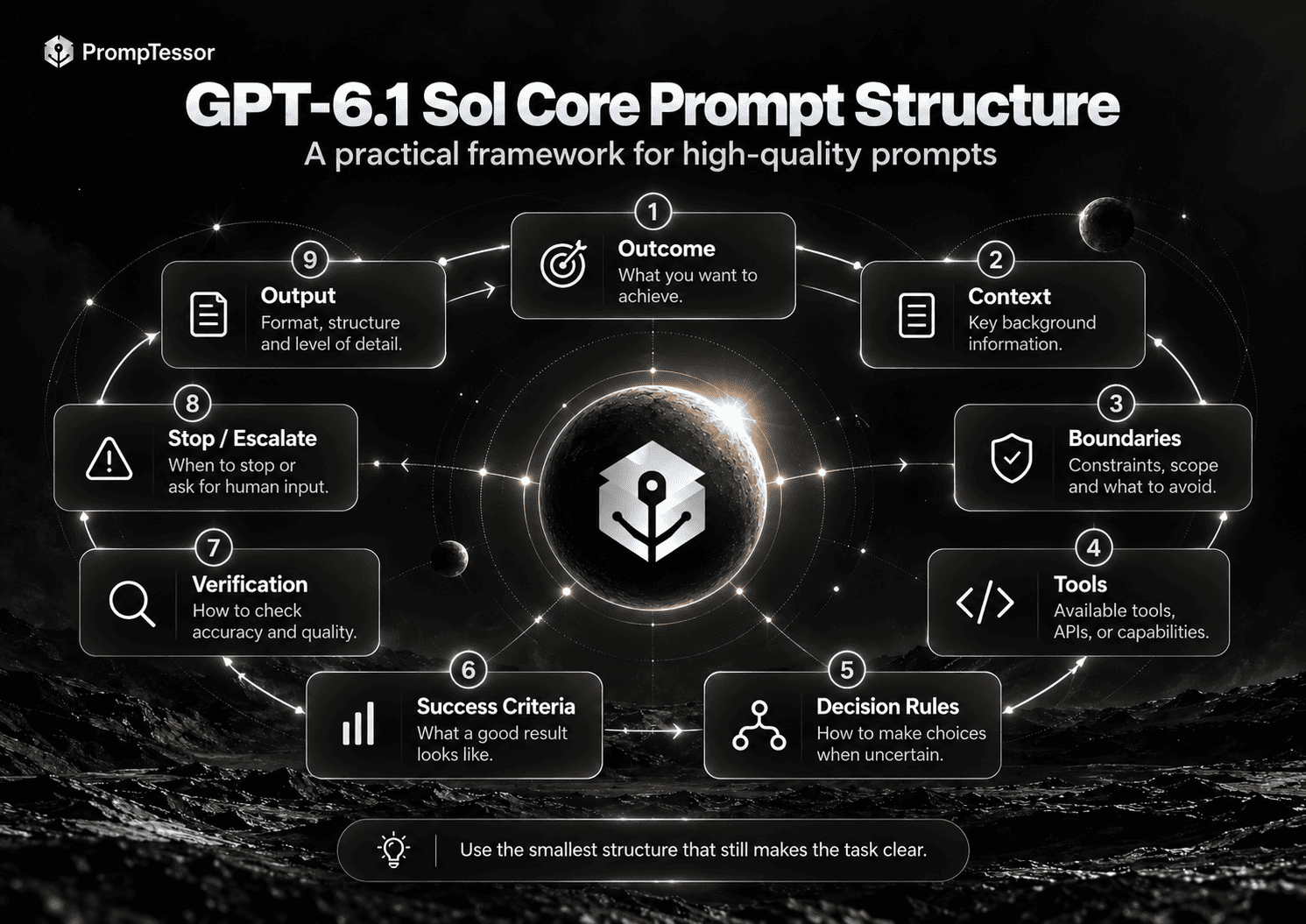
The Core GPT-6.1 Sol Prompt Structure
For GPT-6.1 Sol, a strong prompt should function more like a contract than a script.
OUTCOME
What must be achieved?

CONTEXT
What facts, files, records, or constraints matter?

BOUNDARIES
What must not happen?

TOOLS
What capabilities are available?
What may be used automatically?
What requires approval?

DECISION RULES
How should ambiguity, missing data, and conflicts be handled?

SUCCESS CRITERIA
What makes the task complete?

VERIFICATION
What should be checked before the result is accepted?

STOP / ESCALATE
When should the model stop, ask, or hand control back?

OUTPUT
What final artifact should be returned?
Do not add all of these sections mechanically to every prompt. A simple coding task may need only outcome, context, constraints, tests, and output. A tool-using production agent needs more explicit boundaries because it can change external state.
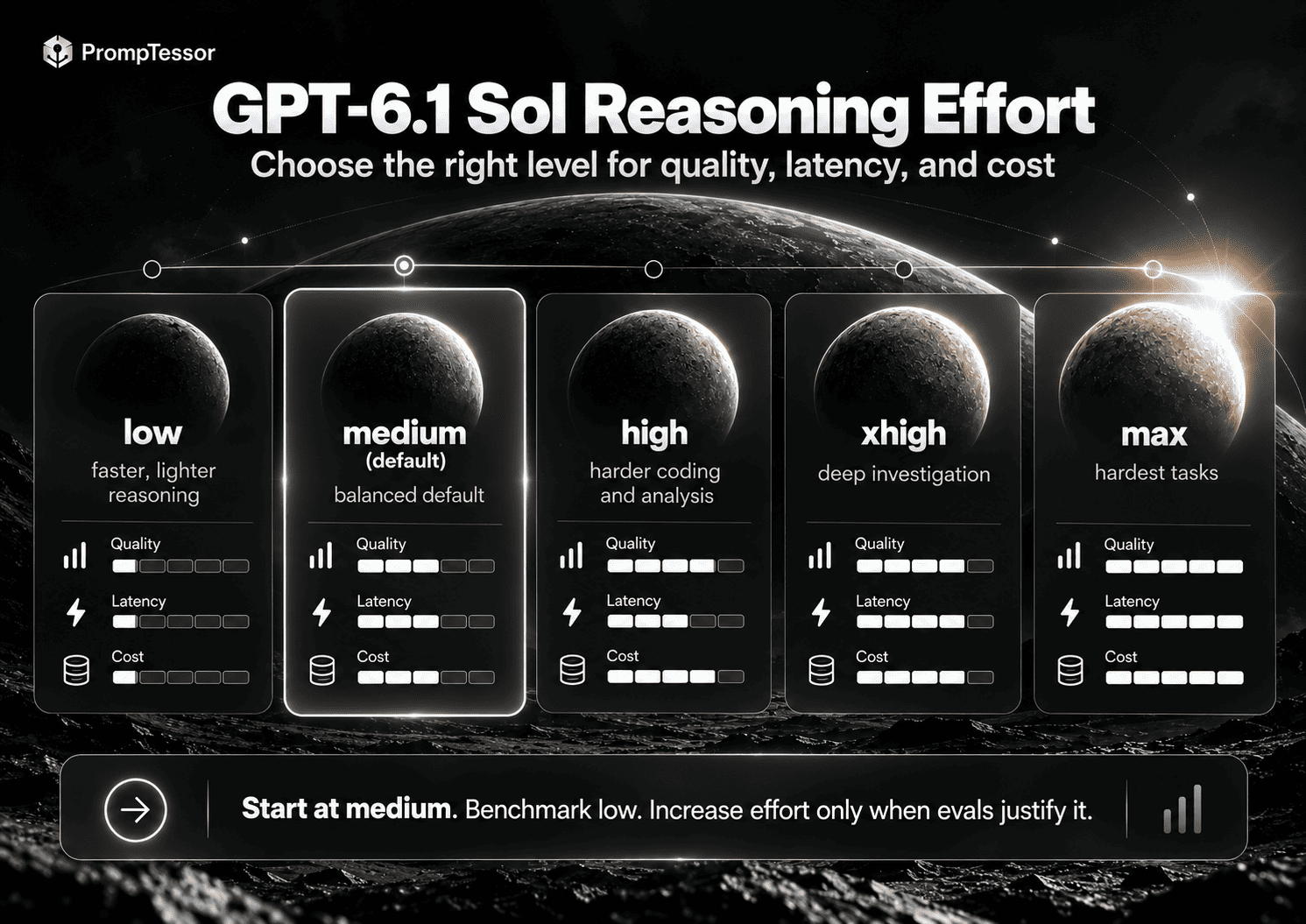
How to Choose GPT-6.1 Sol Reasoning Effort
| Effort | Good Starting Use Cases |
|---|---|
low | Cost- or latency-sensitive reasoning, bounded extraction, straightforward code changes, simpler tool decisions |
medium | Balanced starting point for coding, analysis, tools, professional workflows, and general production use |
high | Hard debugging, complex planning, ambiguous evidence, multi-step agent workflows |
xhigh | Very difficult asynchronous reasoning, deep codebase investigation, complex research or orchestration |
max | Rare hardest tasks where quality is more important than latency and cost |
A practical approach is to start with medium, because it is the model default; benchmark low if cost or latency matters; then move to high, xhigh, or max only when your evaluation set shows a measurable gain.
Do not assume higher effort automatically means better production quality. OpenAI's own launch results show GPT-6.1 Sol beating GPT-6 Sol's best DeepSWE score at a lower reasoning effort. OpenAI's benchmark discussion.
Why none No Longer Works
This is one of the most important differences from GPT-6 Sol. GPT-6.1 Sol does not support none or minimal.
If you previously used reasoning_effort: "none", the migration target is not “same behavior with a new model name.” OpenAI recommends starting with low where none or minimal was previously used, then comparing results on representative tasks.
For high-volume applications, re-test end-to-end latency, token use, tool-call count, task success rate, and cost per successful task.
Prompting GPT-6.1 Sol for Coding and Debugging
Coding is one of GPT-6.1 Sol's clearest upgrade areas. The model benefits from prompts that define target behavior and verification criteria without over-prescribing every implementation step.
Goal:
Fix the authentication regression that causes valid refresh tokens
to be rejected after access-token expiry.

Context:
- Next.js application
- Authentication code is under /src/auth and /src/api
- Existing public API behavior must remain backward compatible
- Do not change database schema unless necessary

Process:
- Inspect relevant code and tests before editing
- Identify the root cause
- Prefer the smallest coherent fix
- Reuse existing helpers and patterns
- Do not weaken security checks to make tests pass

Verification:
- Run the most relevant authentication tests first
- Add or update a regression test
- Run typecheck and lint if relevant
- Report any test you could not run

Return:
1. Root cause
2. Files changed
3. What changed
4. Tests run and results
5. Remaining risks
For large repositories, define the failure and evidence, then tell the model when exploration should stop:
Investigate this production error:
{ERROR}

Known context:
- It began after commit {COMMIT}
- Affected path: {PATH}
- Reproduction: {STEPS}

Work from evidence:
1. Inspect the most likely relevant files first.
2. Form a concrete hypothesis before broad edits.
3. Test the hypothesis using logs, tests, or reproduction.
4. If evidence contradicts it, revise the hypothesis.
5. Do not refactor unrelated code while debugging.

Stop when the root cause is supported by evidence and the fix passes verification.
If the failure cannot be reproduced, return the strongest remaining hypotheses and the next diagnostic evidence needed.
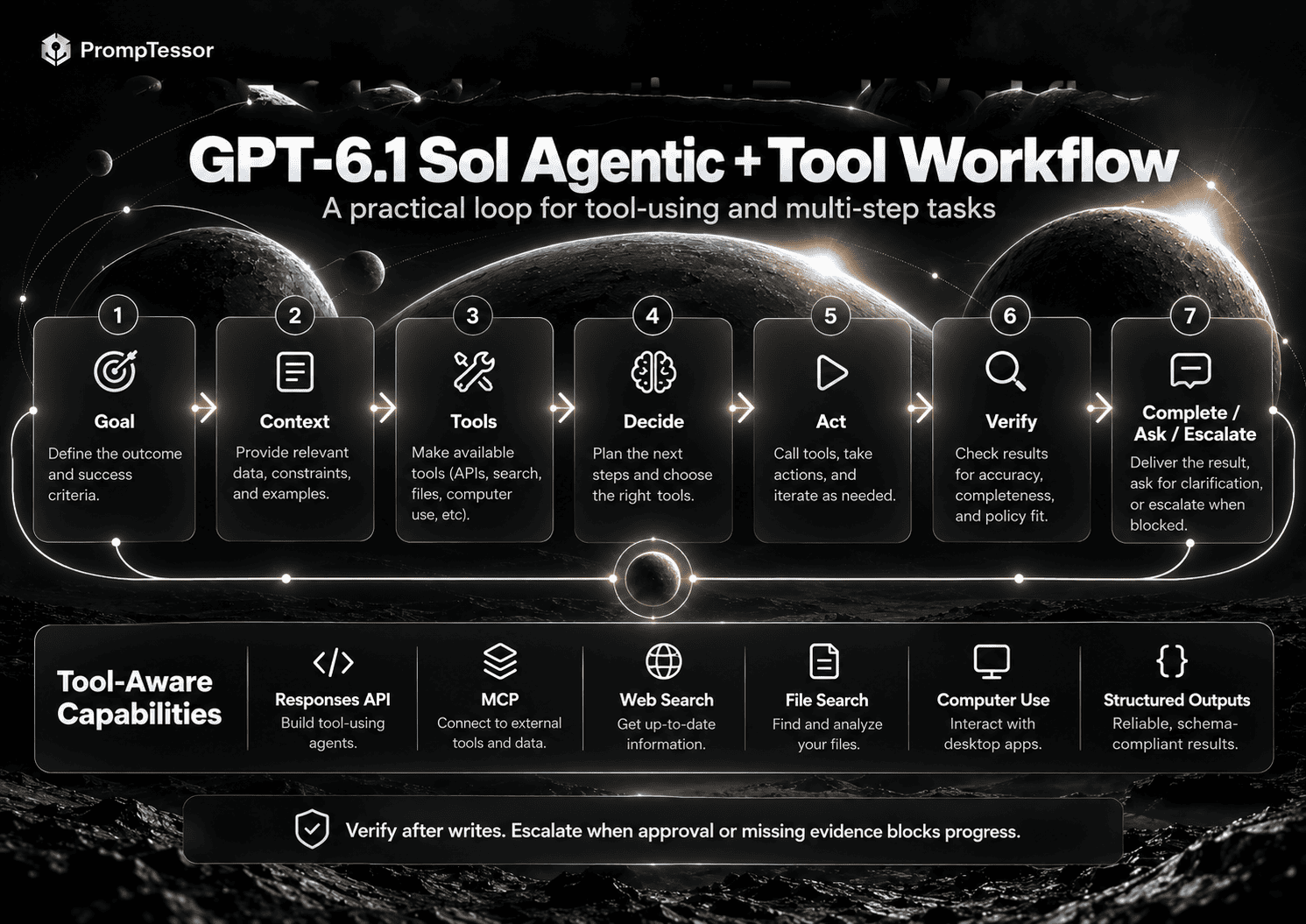
Prompting GPT-6.1 Sol for Agentic Workflows
OpenAI reports GPT-6.1 Sol improving by 4.8 percentage points over GPT-6 Sol on AutomationBench at medium reasoning effort. AutomationBench evaluates multi-step business workflows across tools in domains such as sales, marketing, operations, support, finance, and HR. OpenAI launch results.
Agent prompts need more than a role and a task.
GOAL
Resolve the support case accurately and efficiently.

AVAILABLE CONTEXT
- ticket history
- customer record
- order state
- current policy

TOOLS
- get_customer
- get_order
- search_policy
- create_refund_request
- update_ticket

TOOL POLICY
- Use read tools when current state is needed.
- Do not guess account or policy facts.
- Do not repeat equivalent tool calls without new information.
- After a write, retrieve or inspect the new state when practical.

AUTHORITY
May proceed automatically:
- read account and order data
- search policy
- draft an internal resolution

Requires approval:
- refund above {THRESHOLD}
- policy exception
- changing account ownership

VERIFICATION
Before completion:
- confirm the final account/order state
- ensure the response matches the verified state
- identify unresolved uncertainty

STOP / ESCALATE
Ask or escalate when:
- required authorization is missing
- customer identity is ambiguous
- policy evidence conflicts
- repeated attempts fail
For more detailed agent prompt design, see AI Agent Prompts: How to Write Better Instructions for Tool-Using AI Agents.
Prompting for Tools, MCP, and the Responses API
GPT-6.1 Sol tool calling requires the Responses API. Chat Completions is supported only for requests without tools. OpenAI model documentation.
const response = await client.responses.create({
  model: "gpt-6.1-sol",
  reasoning: { effort: "medium" },
  input: "Analyze the incident and use the available tools when needed.",
  tools: [...]
});
Tool quality depends on both prompt design and tool design. A vague tool named do_action gives the model less information than specific capabilities such as get_order, search_policy, create_refund_request, and verify_refund_status.
The prompt should define policy. The tool schema should define capability. For MCP-connected systems, keep permission and execution rules outside the prompt where possible. See the MCP Prompting Guide.
Prompting GPT-6.1 Sol for Computer Use
OpenAI reports a seven-percentage-point improvement over GPT-6 Sol on the OSWorld 2.0 offline set at maximum reasoning effort. Computer-use tasks are different from normal text prompts because every action changes the environment. OpenAI computer-use evaluation.
Goal:
Update the project deadline in the web application to October 15.

You may:
- navigate the application
- inspect the current project settings
- edit the deadline field

You must not:
- modify project members
- change billing
- delete or archive anything
- send notifications unless required

Before committing:
- verify you are editing project "{PROJECT_NAME}"
- verify the new date is October 15
- if the action will trigger an external notification, pause and ask for approval

After committing:
- re-open the relevant project state
- confirm the saved deadline is October 15
- report the verified result
Prompting for PDFs and Complex Documents
GPT-6.1 Sol showed strong results on GDP.pdf, a benchmark involving professional PDFs with tables, charts, diagrams, and fine-print details. That makes document analysis a particularly relevant use case, but large context alone does not guarantee grounded answers. OpenAI's GDP.pdf discussion.
Task:
Analyze the attached report and answer the questions below.

Evidence rules:
- Base factual claims only on the supplied document.
- Distinguish explicit statements from calculations or inference.
- When using a chart or table, identify the relevant section/table.
- Do not fill missing values from general knowledge.
- If the document does not support an answer, say "Not supported by the document."

Return for each answer:
- answer
- evidence
- calculation, if any
- uncertainty note
Long-Context Prompting
A 1.05M-token context window changes what is possible, but it should not change the basic rule: send relevant context, not maximum context.
Long prompts can introduce conflicting instructions, duplicate facts, outdated records, higher latency, higher cost, and weaker signal-to-noise ratio. GPT-6.1 Sol also has a pricing boundary above 272K input tokens, where long-context rates apply to the full request.
STABLE INSTRUCTIONS
- role / scope
- rules
- tool policy
- output contract

STABLE REFERENCE MATERIAL
- product specification
- policy
- schemas
- reusable examples

DYNAMIC TASK CONTEXT
- current user request
- relevant files / records
- current tool results

CURRENT QUESTION
- exact outcome to produce now
Keep stable content earlier and dynamic content later when possible. This also improves the usefulness of prompt caching.
Structured Outputs
When your application requires a machine-readable object, use Structured Outputs instead of relying only on prose instructions that describe JSON.
Let the prompt focus on semantics:
Classify the incident.

Rules:
- severity reflects user impact, not engineering difficulty
- choose "unknown" if evidence is insufficient
- list only evidence present in the incident record
The runtime can enforce the output schema separately.
Verification and Factuality
OpenAI reports that on a deliberately difficult factuality evaluation, GPT-6.1 Sol at low reasoning effort reduced the share of answers containing at least one factual error from 11.4% with GPT-6 Sol to 7.7%. OpenAI explicitly notes that these error-inducing prompts are not representative of typical usage. OpenAI factuality evaluation.
The practical lesson is not “verification is no longer necessary.” High-stakes or evidence-sensitive prompts should still tell the model how to ground claims.
Before finalizing:
- identify the claims that materially affect the conclusion
- verify each claim against the provided source or tool result
- distinguish observed facts from inference
- report unresolved contradictions
- do not invent a value to complete a missing field
Prompt Caching and Reusable Context
GPT-6.1 Sol's standard cached-input price is $0.10 per million tokens, half the $0.20 rate for GPT-6 Sol. OpenAI also lists cache writes at $2.50 per million tokens at the standard short-context rate. GPT-6.1 Sol pricing.
STATIC PREFIX
- product behavior
- policies
- tool definitions
- output rules
- long-lived examples

DYNAMIC SUFFIX
- user request
- current records
- current files
- tool observations
10 Practical GPT-6.1 Sol Prompt Examples
1. Complex Coding Feature
Implement {FEATURE} in this repository.

Outcome:
{DESIRED_BEHAVIOR}

Constraints:
- preserve public API compatibility
- follow existing architecture and naming
- do not introduce a new dependency unless necessary
- keep unrelated changes out of scope

Before editing:
- inspect relevant code, tests, and project instructions
- identify the smallest coherent implementation

Verification:
- run relevant tests
- run typecheck / lint when applicable
- add coverage for the new behavior

Return:
summary, files changed, tests, and remaining risk.
2. Bug Investigation
Investigate {BUG}.

Evidence:
{ERRORS}
{LOGS}
{REPRODUCTION_STEPS}

Do not patch immediately.
First identify the most likely root cause, state the supporting evidence, and test that hypothesis.
Then make the smallest safe fix and verify the original failure no longer occurs.
If evidence is insufficient, return the next diagnostic step instead of guessing.
3. Codebase Migration
Migrate {COMPONENT} from {OLD_API} to {NEW_API}.

Requirements:
- preserve current behavior
- remove deprecated usage in the target scope
- update tests
- do not migrate unrelated modules

Inspect current usage, identify shared abstractions, then execute the migration in coherent steps.
Afterward, search again for remaining deprecated usage and run the relevant test suite.
4. Tool-Using Research Agent
Research {TOPIC} for a decision that will be made today.

Use current sources when the fact can change over time.
Source priority:
1. official / primary sources
2. authoritative technical documentation
3. strong secondary reporting

For each material conclusion:
- verify it with evidence
- include the relevant date
- surface meaningful uncertainty

Stop researching when additional sources are unlikely to change the decision.
5. Computer-Use Task
In {APPLICATION}, update {SETTING} to {VALUE}.

Allowed:
- navigate
- inspect
- edit only the specified setting

Do not:
- change billing
- modify users
- delete data
- send external communications

Before the final action, verify the account, object, and value.
After the action, re-open the relevant screen and confirm the saved state.
6. Complex PDF Analysis
Analyze the attached document for {GOAL}.

Use only evidence from the document.
For every material claim:
- cite the relevant section, page, table, or chart when identifiable
- show calculations separately from source facts
- label inference as inference

If the document does not support a requested answer, say so explicitly.
7. Business Workflow Agent
Goal:
Complete {BUSINESS_WORKFLOW}.

Tools:
{TOOLS}

Decision rules:
- retrieve current state before making a decision
- use the smallest sufficient action
- do not repeat equivalent actions without new evidence
- verify successful writes before reporting completion

Requires human approval:
{SENSITIVE_ACTIONS}

Stop / escalate when:
{ESCALATION_RULES}
8. Long-Context Synthesis
You have a large set of project documents.

Goal:
Produce {ARTIFACT} for {AUDIENCE}.

Use this priority when sources conflict:
1. approved current specification
2. current policy
3. recent project decisions
4. older historical documents

Do not silently reconcile contradictions.
Focus only on information relevant to {SCOPE}.
9. Structured Data Extraction
Extract the requested fields from the supplied material.

Rules:
- copy explicit values faithfully
- normalize only where the schema requires it
- do not infer missing values
- use null / unknown according to the schema
- preserve source units unless conversion is explicitly requested
10. Production Incident Analysis
Analyze this incident:
{INCIDENT}

Goal:
Identify the most likely root cause and safest next action.

Use:
- logs
- metrics
- traces
- deployment history
- runbooks

Do not perform destructive actions, restart production services, or roll back deployments without explicit approval.
Verify that evidence supports the diagnosis and confirm recovery after any approved action.
If you want help generating a structured starting prompt for any of these workflows, use the updated ChatGPT Prompt Generator, then adapt the result to your tools, runtime permissions, and evaluation criteria.
Common GPT-6.1 Sol Prompting Mistakes
- Copying GPT-6 Sol settings without re-testing. The loss of
nonereasoning alone justifies a migration test. - Using Chat Completions for a tool-calling workflow. Use the Responses API when tools are involved.
- Increasing reasoning effort before fixing the prompt. An ambiguous task at
maxis still ambiguous. - Sending the entire knowledge base because the context window is large. Large context is a capability, not a retrieval strategy.
- Writing every implementation step for the model. Specify the path only when the path itself matters.
- Giving tools without tool policy. A list of tools says what the model can call, not when it should call them.
- Treating an attempted action as success. Require post-action verification when external state changes.
- Asking for JSON without enforcing a schema. Use Structured Outputs when the application depends on machine-readable structure.
- Mixing current and historical context without priority rules. Tell the model which source wins when documents conflict.
- Measuring token price instead of cost per successful task. Include retries and human review in the economics.
Migrating Prompts from GPT-6 Sol to GPT-6.1 Sol
1. Change the Model ID
gpt-6-sol
→
gpt-6.1-sol
2. Migrate Reasoning Effort
none    → low + re-evaluate
minimal → low + re-evaluate
low     → low
medium  → medium
high    → high
xhigh   → xhigh
max     → max
3. Move Tool Calling to Responses
If the old integration uses Chat Completions for function calling, migrate the tool workflow to Responses.
4. Review Sampling Parameters
OpenAI's GPT-6 migration guide says that when reasoning effort is not none, parameters such as temperature, top_p, and top_logprobs should be removed. Because GPT-6.1 Sol does not support none, do not carry those controls over as if it were a non-reasoning model.
5. Re-Benchmark Prompt Length
Start from the product contract rather than preserving every legacy instruction. Remove instructions that duplicate runtime enforcement or no longer change behavior.
6. Re-Test Tool Policy
Verify tool selection, arguments, retry behavior, approval boundaries, stopping behavior, and verification after writes.
7. Re-Test Cost and Latency
Measure end-to-end task performance at low and medium before assuming the previous configuration remains optimal.
8. Exploit Cheaper Cached Input
If the application reuses a long stable prefix, measure the impact of GPT-6.1 Sol's lower cached-input rate.
GPT-6.1 Sol vs GPT-6 Astra: Which Should You Use?
OpenAI positions GPT-6.1 Sol as a balance of speed, cost, and intelligence, while GPT-6 Astra remains the highest-intelligence GPT-6 option for the most demanding work. OpenAI GPT-6 model-selection guidance.
| Model | Input / 1M | Cached Input / 1M | Output / 1M |
|---|---|---|---|
| GPT-6.1 Sol | $2 | $0.10 | $10 |
| GPT-6 Astra | $10 | $1 | $50 |
Use your own workload to decide. Compare task success, quality of reasoning, tool accuracy, latency, output tokens, retry rate, human-review rate, and total cost per successful task.
OpenAI still recommends Astra for the hardest scientific research tasks; on Terminal-Bench Science 0.1, Astra remained the highest-scoring model in OpenAI's launch comparison. For many coding, computer-use, and professional workloads, GPT-6.1 Sol offers a different cost-quality tradeoff worth benchmarking.
For deeper prompting guidance on the flagship model, see the GPT-6 Astra Prompting Guide.
How to Test and Optimize GPT-6.1 Sol Prompts
Do not optimize prompts by reading one answer and deciding it “looks better.” Build a representative evaluation set.
For coding, measure task completion, tests passed, regressions, unnecessary files changed, and time to completion. For agents, measure tool selection, arguments, unnecessary tool calls, approval compliance, retry count, and final state correctness. For document analysis, measure grounding, table/chart interpretation, calculation accuracy, and unsupported inference. For computer use, measure completion, wrong-object actions, unintended side effects, verification success, and human intervention.
Baseline prompt
        ↓
Change reasoning effort
        ↓
Evaluate
        ↓
Restore baseline
        ↓
Change tool policy
        ↓
Evaluate
        ↓
Change verification rules
        ↓
Evaluate
Change one variable at a time so you can attribute the improvement.
Where PrompTessor Fits
PrompTessor works at the prompt and instruction-design layer.
ROUGH TASK
   ↓
PrompTessor ChatGPT Prompt Generator
   ↓
STRUCTURED STARTING PROMPT
   ↓
GPT-6.1 SOL-SPECIFIC ADAPTATION
- reasoning effort
- tool policy
- evidence rules
- approval boundaries
- verification
- output contract
   ↓
RUN + EVALUATE
   ↓
ANALYZE FAILURES
   ↓
OPTIMIZE / REFINE
   ↓
RETEST
The updated ChatGPT Prompt Generator is a useful starting point when you want to turn a rough request into a structured prompt for ChatGPT-style workflows. From there, adapt the prompt to GPT-6.1 Sol's actual runtime: reasoning effort, Responses API tools, permissions, Structured Outputs, and verification.
You can also use the AI Prompt Analyzer to inspect weaknesses in an existing prompt and the AI Prompt Optimizer to produce stronger candidates after you understand the failure mode.
PrompTessor does not replace API-level controls. Tool authorization, state, approvals, schemas, execution, caching, and observability should still be enforced by the application runtime.
Official GPT-6.1 Sol Resources
- OpenAI — Introducing GPT-6.1 Sol
- OpenAI — GPT-6.1 Sol Model Documentation
- OpenAI — Using GPT-6 and Migration Guidance
- OpenAI — ChatGPT Work and Codex
FAQ
What is GPT-6.1 Sol?
GPT-6.1 Sol is OpenAI's upgraded Sol-class GPT-6 model for complex coding, computer use, professional work, document understanding, and agentic workflows. OpenAI positions it as a lower-cost model that approaches GPT-6 Astra on several demanding evaluations.
What is the GPT-6.1 Sol model ID?
The API model ID is gpt-6.1-sol.
What reasoning efforts does GPT-6.1 Sol support?
GPT-6.1 Sol supports low, medium, high, xhigh, and max. The default is medium.
Does GPT-6.1 Sol support none reasoning?
No. GPT-6.1 Sol does not support none or minimal. OpenAI recommends moving old none or minimal workloads to low and re-testing them.
Can GPT-6.1 Sol call tools in Chat Completions?
No. GPT-6.1 Sol requires the Responses API for tool calling. Chat Completions is supported for requests without tools.
What is GPT-6.1 Sol's context window?
GPT-6.1 Sol has a 1,050,000-token context window and supports up to 128,000 output tokens.
How much does GPT-6.1 Sol cost?
At standard short-context API pricing, GPT-6.1 Sol costs $2 per million input tokens, $0.10 per million cached input tokens, $2.50 per million cache-write tokens, and $10 per million output tokens. Long-context pricing applies above 272K input tokens.
Is GPT-6.1 Sol available in ChatGPT?
At launch, GPT-6.1 Sol is available in ChatGPT Work and Codex for eligible paid users and through the API. OpenAI says it is not yet available in regular Chat conversations.
Should I replace GPT-6 Sol with GPT-6.1 Sol immediately?
Treat it as a migration rather than a blind model swap. Re-test reasoning effort, tool integration, latency, task success, cached-context economics, and output quality on representative tasks.
Should I use GPT-6.1 Sol or GPT-6 Astra?
GPT-6.1 Sol targets a lower-cost balance for complex work, while Astra remains OpenAI's highest-intelligence option for the hardest workloads. Benchmark both on your own tasks when the quality-cost tradeoff matters.
How should I prompt GPT-6.1 Sol?
Define the desired outcome, relevant context, boundaries, tools, success criteria, verification rules, stopping conditions, and output contract. Avoid prescribing every reasoning step unless the exact process is a requirement.
Can PrompTessor help create GPT-6.1 Sol prompts?
Yes. Start with the ChatGPT Prompt Generator to structure a rough request, then use PrompTessor's analysis and optimization workflows to refine the instruction layer for your GPT-6.1 Sol use case.
Conclusion
GPT-6.1 Sol changes the practical middle of the GPT-6 family. It keeps Sol-class standard token pricing while improving the capability profile for complex coding, computer use, professional documents, agentic business workflows, and difficult factual tasks. At the same time, it removes none reasoning, requires the Responses API for tool calling, and makes cached input cheaper.
The strongest migration strategy is not to make every prompt longer or push every workload to maximum reasoning. Instead, define the outcome, provide relevant context, set boundaries, choose reasoning effort intentionally, use tools deliberately, verify the result, measure task success, and iterate.
For prompts that start as rough ideas, the updated ChatGPT Prompt Generator can help create a structured base before you tune it for GPT-6.1 Sol's reasoning, tools, context, and verification requirements.
Build better prompts in one workspace
Generate prompts from ideas, analyze and optimize quality, refine with feedback, reverse-engineer content, and save reusable prompts in your Prompt Library.
Try PrompTessor Free