How to Prompt Claude Fable 5.2: Best Practices, Tips, and Examples
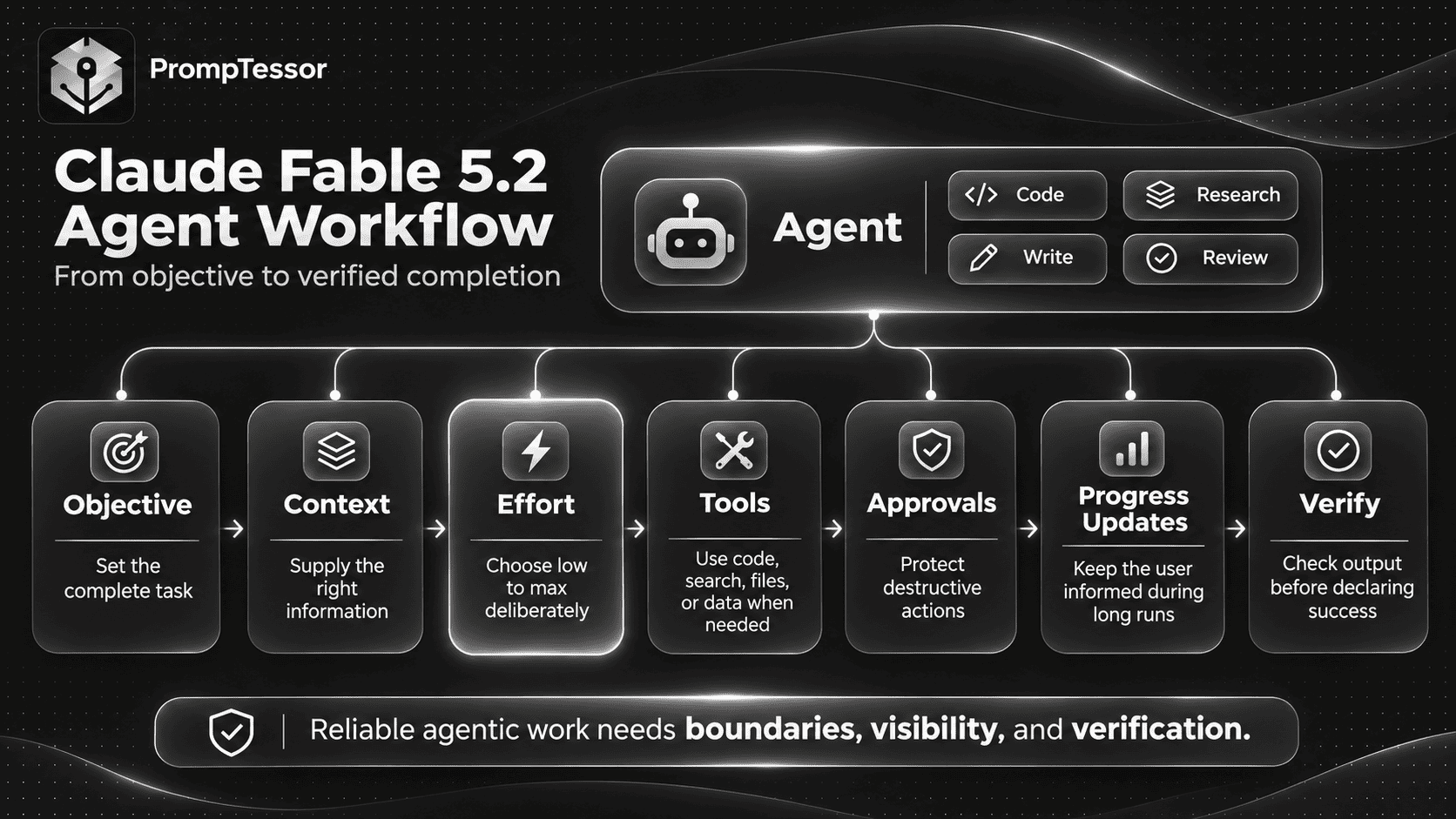
Claude Fable 5.2 is built for tasks that demand more than a quick answer. Its strengths include difficult reasoning, complex coding, multi-step research, and agentic workflows that continue across many tools and intermediate decisions.
But using a more capable model does not automatically make every prompt better.
A coding agent might finish implementing a feature and unexpectedly refactor related code. A research agent might spend too long analyzing a straightforward question. Another agent might stop before completing the work, or remain silent through a long sequence of tool calls.
These behaviors make prompt design especially important for Claude Fable 5.2.
Anthropic released Claude Fable 5.2 on November 9, 2026, alongside Claude Mythos 5.2. The release introduces improvements across demanding technical tasks, while Anthropic's model-specific prompting guidance highlights important behavioral differences from previous Claude generations.
For developers and advanced users, the biggest question is no longer simply how to write a clever instruction. It is how to define a complete task, provide the right evidence, choose an appropriate effort level, control tool actions, and verify that the work is finished.
This guide explains how to prompt Claude Fable 5.2 effectively, including adaptive thinking, effort settings, coding instructions, long-running agents, research workflows, approvals, subagents, progress updates, API configuration, and migration from Claude Fable 5.1.
It also includes reusable prompt examples for writing, coding, debugging, research, vision, document analysis, and multi-step automation.
The recommendations combine Anthropic's official documentation with practical prompt templates. Where behavior depends on the application or agent framework, that distinction is explained explicitly.
Quick Answer: How Should You Prompt Claude Fable 5.2?
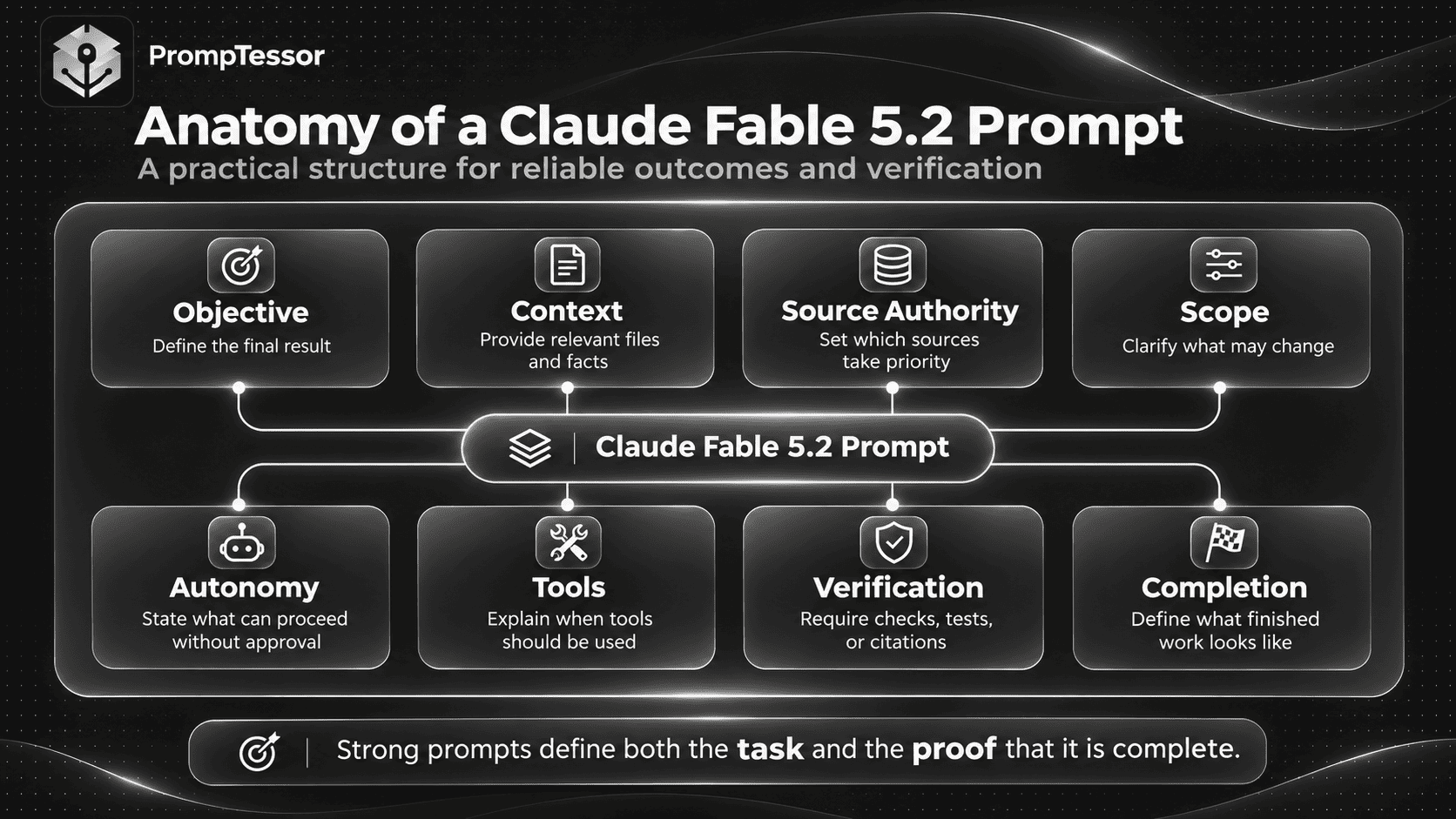
For Claude Fable 5.2, start with a clear outcome, relevant context, explicit scope, approved actions, verification requirements, and a concrete definition of completion.
Configure the model's effort separately. Anthropic recommends starting at high, then testing other levels against representative workloads.
A reusable prompt structure looks like this:
OBJECTIVE
What complete result should Claude deliver?

CONTEXT
Which files, documents, tools,
or facts are relevant?

SOURCE AUTHORITY
Which sources take precedence
when information conflicts?

SCOPE
What may change, and what
must remain untouched?

AUTONOMY
Which actions may proceed
without further approval?

TOOLS
When should Claude retrieve,
inspect, calculate, or execute?

EVIDENCE
Which claims require verification?

PROGRESS
When should Claude report
meaningful updates?

VERIFICATION
Which tests, checks, or
review steps are required?

OUTPUT
What must the final response contain?

COMPLETION
What proves the task is finished?
For short tasks, you may only need the objective, context, and output requirements. For long-running coding or research agents, the additional controls can prevent incomplete execution, unexpected changes, and unverifiable results.
Important: Prompt instructions define intended behavior. Runtime permissions, tool implementations, API settings, and human approval mechanisms still determine what actions an agent can actually perform.
Key Takeaways
- Claude Fable 5.2's Claude API model ID is
claude-fable-5-2. - The model supports a 1 million-token context window and up to 128,000 output tokens.
- Adaptive thinking is always enabled; use
effortto control thinking depth. - The default API effort level is
high, but simpler workloads may be better served bylowormedium. - Higher effort can increase latency and token consumption without proportional quality gains.
- Long agentic tasks may stop early, especially at lower effort levels. Define completion and safe continuation behavior explicitly.
- Coding instructions about code ownership can influence whether Claude makes localized changes or broader refactors.
- Approval rules should identify specific protected actions instead of relying on vague cautions.
- Progress updates may require both prompting and appropriate thinking-display configuration in the API client.
- Subagents can be useful for independent tasks, but excessive delegation can increase cost.
- Claude Fable 5.2 enforces preserved-thinking conversation-prefix integrity across accounts.
- Migration from older Claude versions requires checking tool compatibility, thinking blocks, and API parameters.
- Production prompt quality should be measured with actual task evaluations, not prompt length alone.
What Is Claude Fable 5.2?
Claude Fable 5.2 is an Anthropic model intended for demanding reasoning and extended agentic workflows.
Anthropic describes typical applications including long-running coding agents, multistep research, and complex work that results in finished documents, spreadsheets, or presentations.
The model accepts text and image input and produces text output. Developers can connect it to tools and build workflows that read files, inspect sources, execute permitted operations, and continue work across multiple steps.
Claude Fable 5.2 Specifications
| Specification | Claude Fable 5.2 |
|---|---|
| Release date | November 9, 2026 |
| Claude API model ID | claude-fable-5-2 |
| Context window | 1 million tokens |
| Maximum output | 128,000 tokens |
| Thinking | Adaptive, always on |
| Default effort | high |
| Effort levels | low, medium, high, xhigh, max |
| Input and output | Text and images to text |
| Standard input price | $8 per million tokens |
| Standard output price | $40 per million tokens |
| Prompt cache read price | $0.20 per million tokens |
| Reliable knowledge cutoff | June 2026 |
These specifications come from the official Claude Fable 5.2 model documentation.
The standard listed prices do not include every possible caching, batch, speed, or deployment-specific pricing arrangement. Always check the current pricing information for the platform you use.
Fable 5.2 vs. Mythos 5.2
Anthropic released Claude Fable 5.2 and Claude Mythos 5.2 together.
The models share the same underlying model and core specifications. The important distinction is access and safeguards.
Claude Fable 5.2 is broadly available through the Claude API, with additional safeguards for areas such as cybersecurity and biology. Claude Mythos 5.2 provides access to the same underlying capabilities for organizations verified through the applicable Anthropic programs.
These distinctions matter when choosing a deployment, but they do not mean that every general-purpose prompt requires a separate technique for each model.
This article focuses on Claude Fable 5.2 and workflows available to ordinary developers and users with appropriate access.
What Changed in Claude Fable 5.2 Prompting?
Claude Fable 5.2 builds on the same broad prompting principles used by earlier Claude models, but Anthropic identifies several differences that can affect actual task completion and cost.
| Behavior | What Can Happen | Prompting Response |
|---|---|---|
| Effort calibration | Simple requests use more thinking than necessary | Reduce effort through API configuration and evaluate quality |
| Early stopping | A multi-step agent ends before finishing | Define the complete deliverable and continuation rules |
| Code ownership | Claude duplicates code or performs broader refactors | Explicitly specify ownership and change scope |
| Approval behavior | An agent pauses for routine actions | Name actions that do and do not require confirmation |
| Progress communication | Long tool sequences appear silent | Define milestone updates and configure display appropriately |
| Subagent delegation | Too many agents are created for simple work | Explain when delegation is worth its cost |
| Inherited instructions | Old rules increase caution or unnecessary work | Audit outdated prompt, skill, and memory instructions |
| Final reporting | The handoff assumes too much context | Ask for a self-contained summary, verification, and remaining risks |
These are not guaranteed behaviors on every request. They are patterns documented by Anthropic that developers should evaluate within their actual workloads.
See the official Prompting Claude Fable 5.2 guide for the corresponding findings.
1. Calibrate Claude Fable 5.2 Effort Before Rewriting Your Prompt
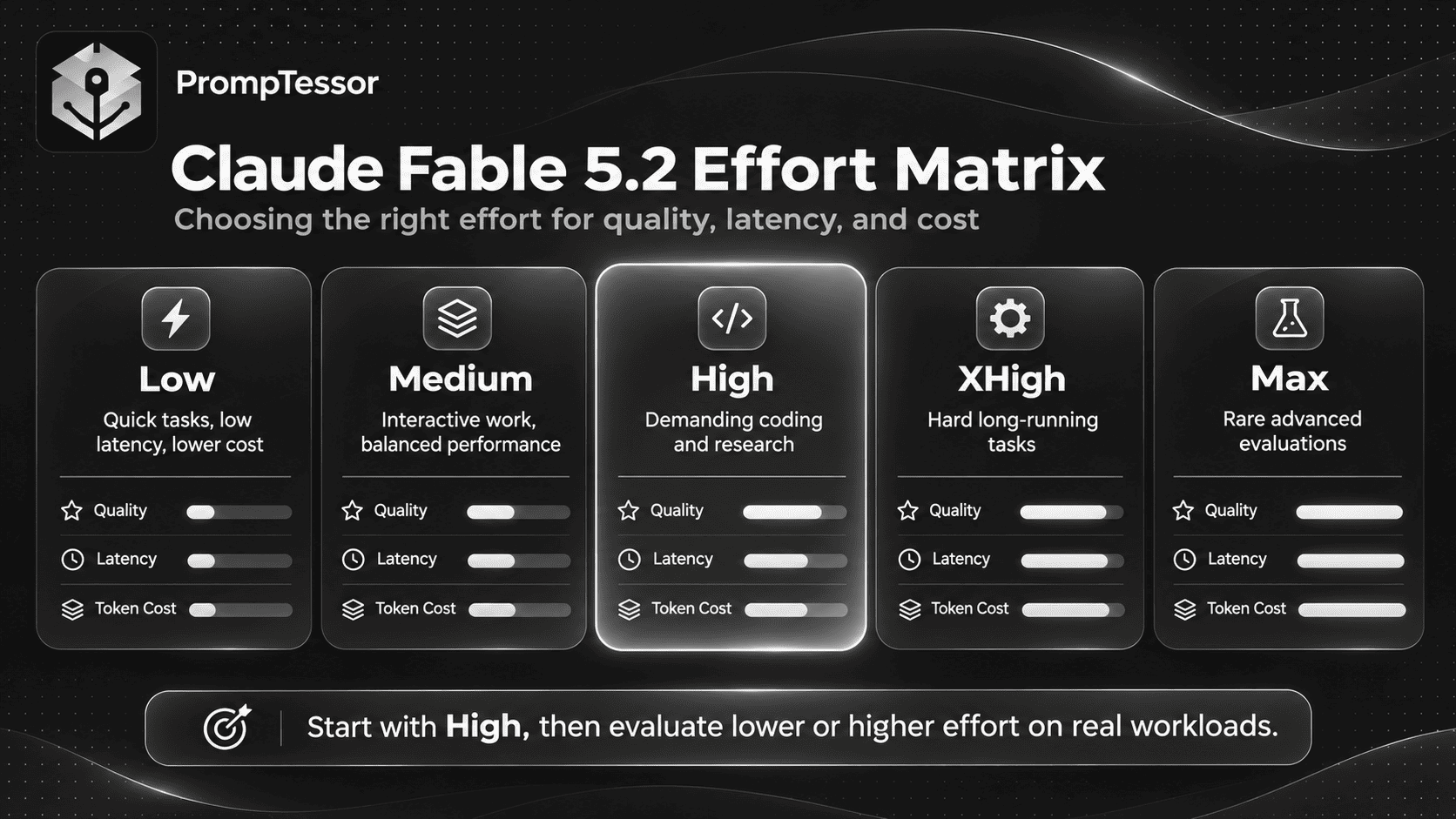
Effort is one of the most important controls for Claude Fable 5.2.
It influences how much the model thinks, how long a turn takes, how many output tokens it consumes, and aspects of its tool-using behavior.
Anthropic recommends starting with high, which is also the Claude API default, and then comparing alternative settings on actual tasks.
Claude Fable 5.2 Effort Levels
| Effort | Suitable Workloads | Tradeoff |
|---|---|---|
low | Quick responses, well-defined tasks, high-volume subagents | Lower cost and latency, but greater risk of incomplete agent work |
medium | Interactive coding, ordinary chat, everyday knowledge tasks | Balanced responsiveness and reasoning |
high | Difficult coding, deep research, complex agents | Strong baseline with higher latency and token use |
xhigh | Hard long-running tasks where evaluations show additional benefit | Higher token cost for task-dependent gains |
max | Rare open-ended technical or scientific problems and capability evaluations | Highest potential resource use, often substantial latency |
In Anthropic's internal evaluations, much of the observed capability improvement was already present at high. Moving beyond high did not consistently produce proportional benefits.
For routine work, a lower effort setting may be the more efficient choice.
Why "Think Less" Is Not a Reliable Optimization
In earlier workflows, developers sometimes inserted instructions such as "answer immediately without deliberating" to reduce reasoning time.
Anthropic reports that this approach does not reliably prevent Fable 5.2 from thinking at medium and higher effort levels.
If your task is straightforward, lowering the actual effort setting is more dependable than repeatedly asking the model to reason less.
Example: Effort Evaluation Plan
OBJECTIVE:
Evaluate Claude Fable 5.2 on
the same representative coding tasks.

TEST CASES:
{evaluation_dataset}

EFFORT SETTINGS:
low
medium
high
xhigh

SUCCESS CRITERIA:
- Required behavior is correct.
- No unrelated files are modified.
- Existing tests continue to pass.
- Final output satisfies the task.
- Tool usage stays within permissions.

MEASURE:
- Task success
- Completion rate
- Tool calls
- Output tokens
- End-to-end latency
- Estimated API cost

RULES:
Keep the prompt, tools,
test cases, and other settings
constant when comparing effort.

Do not select the highest effort
setting automatically.

RECOMMENDATION:
Choose the lowest effort level
that reliably meets the
required quality threshold.
When to use it: Before deploying a production agent, particularly when the workflow runs repeatedly and token costs matter.
What to verify: Record the exact model ID, test dataset, configuration, and results. Running multiple effort levels is an application-level evaluation, not something a text prompt executes on its own.
2. Build Prompts Around Outcomes, Not Elaborate Reasoning Scripts
Claude Fable 5.2 can handle complex tasks without requiring a manually written internal reasoning procedure.
Instructions are usually more useful when they specify what must be accomplished, which evidence is available, and how the result will be checked.
Weak Prompt
Think extremely hard about this code.

Analyze everything in many steps.

Keep reconsidering all possible
causes before you change anything.

Make the best possible fix.
The instruction does not establish which failure is being investigated, which files matter, or what counts as a successful fix.
Improved Prompt
OBJECTIVE:
Fix the failing authentication test.

CONTEXT:
{repository_and_test_output}

SCOPE:
Modify only the implementation
paths required for this issue.

EVIDENCE:
Use the failing test output,
current source code, and
relevant documentation.

EXECUTION:
Identify the most likely cause.
Inspect related implementation.
Make the smallest justified fix.

VERIFICATION:
Run the targeted test.
Check for relevant regressions.
Inspect the final diff.

OUTPUT:
- Root cause
- Files changed
- Tests performed
- Remaining limitations

Do not claim success unless
the verification supports it.
The improved prompt does not prescribe every internal reasoning step. It gives Claude a concrete task and measurable completion criteria.
Reusable Prompt Architecture
For complex work, use structured sections to separate instructions, source material, and required output.
OBJECTIVE
{final_deliverable}

AUTHORITATIVE CONTEXT
{source_documents_and_files}

SCOPE
{included_work}

EXCLUSIONS
{protected_files_or_activities}

ACTION POLICY
{permitted_and_approval_required_actions}

TOOL POLICY
{available_tools_and_usage_rules}

VERIFICATION
{acceptance_tests}

FINAL REPORT
{required_summary_fields}

STOP CONDITION
{complete_when}
This structure can be shortened for simple tasks and expanded for long-running work.
For a deeper explanation of source selection, memory, context ordering, and retrieved evidence, see Context Engineering: How to Give AI the Right Information at the Right Time.
3. Prompt Claude Fable 5.2 to Finish Long-Running Tasks
One of the most distinctive issues documented for Fable 5.2 is early stopping in multistep workflows.
The model may complete part of a task, describe what remains, and end the turn rather than continuing with work it can still perform.
Anthropic reports this behavior more often at low and medium effort.
For an agent expected to complete authorized work, a useful instruction should distinguish between ordinary obstacles and genuine blockers.
Example: Long-Running Task Completion Prompt
OBJECTIVE:
Complete the requested repository
migration and deliver verified changes.

WORK POLICY:
The requested deliverable is the
finished migration, not merely a plan.

Continue through in-scope,
reversible tasks without asking
for unnecessary confirmation.

When a routine operation fails:
- Inspect the error.
- Determine whether retrying is safe.
- Retry or use an appropriate
  alternative when authorized.
- Continue independent work.

Do not bypass:
- Explicit access restrictions
- Protected files
- Safety constraints
- Required approvals
- Destructive-action confirmations

PROGRESS:
Provide concise updates at
meaningful milestones, but
do not treat an update as completion.

STOP CONDITION:
Finish when the supported
migration steps are complete,
required verification is performed,
and any remaining blockers
are explicitly documented.

FINAL OUTPUT:
1. Completed work
2. Files changed
3. Verification performed
4. Unresolved blockers
5. Remaining risks
Best for: Agentic coding, document production, multi-step research, and other tasks where a complete deliverable requires many tool calls.
Important limitation: This prompt does not authorize destructive actions or override the application. Protected operations still need enforced runtime controls and human approval where applicable.
4. Define Code Ownership and Change Scope
Claude Fable 5.2 responds closely to instructions about who owns the codebase.
Anthropic's testing found that ownership wording can influence whether the model merges existing code, performs related improvements, or keeps changes localized.
However, broader ownership can also lead to unrequested refactoring, extra tests, and changes beyond the user's intended scope.
There is no single ownership instruction that fits every coding workflow.
Example A: Minimal Patch in an Existing Codebase
ROLE:
You are contributing to an
existing production repository.

OBJECTIVE:
Fix {specific_bug}.

OWNERSHIP:
The existing maintainers own
the architecture and scope.

RULES:
- Preserve existing behavior
  outside the reported issue.
- Do not rename unrelated symbols.
- Do not redesign the architecture.
- Do not create unrelated features.
- Prefer localized changes.
- Do not silently modify
  external interfaces.

VERIFICATION:
Run relevant tests and inspect
the final diff for scope changes.

OUTPUT:
Explain the fix and list
every file changed.
Use this version when a user expects a controlled, reviewable patch.
Example B: Authorized Codebase Improvement
ROLE:
You are the designated maintainer
of this project.

OBJECTIVE:
Implement {feature} and improve
the supporting code where necessary.

OWNERSHIP:
You may make architectural
improvements within the approved
feature area.

PERMITTED WORK:
- Consolidate duplicated code
  within the target subsystem.
- Simplify relevant interfaces.
- Update affected tests.
- Improve necessary documentation.

BOUNDARIES:
- Do not change unrelated products
  or external contracts.
- Obtain approval for destructive
  changes and major migrations.
- Record all behavior changes.

VERIFICATION:
Run relevant tests, check API
compatibility, and inspect the diff.

OUTPUT:
Report feature completion,
structural changes, tests,
and any compatibility risks.
Use this version only when broader improvements are genuinely authorized.
Practical lesson: Ownership language and scope boundaries should agree. Do not grant broad architectural ownership while expecting an entirely minimal patch without testing that behavior.
5. Write Precise Approval Rules for Agentic Work
Long-running agents may need to read files, send messages, modify records, run scripts, or deploy changes.
These actions have different consequences.
A vague rule such as "ask before doing anything important" can cause unnecessary interruptions. A rule that permits every action can be unsafe.
The better approach is to distinguish permitted preparation from protected execution.
Example: Tool and Action Approval Prompt
OBJECTIVE:
Investigate the incident
and prepare a verified resolution.

AUTOMATICALLY PERMITTED:
- Read authorized files.
- Inspect existing logs.
- Search approved documentation.
- Run non-destructive checks.
- Draft proposed code changes.
- Prepare a remediation plan.
- Retry safe read operations.

APPROVAL REQUIRED:
- Delete or overwrite production data.
- Change billing or access permissions.
- Deploy to production.
- Send external communications.
- Execute irreversible migrations.

WHEN APPROVAL IS REQUIRED:
Describe the exact action,
expected impact, and rollback
options if applicable.

Continue independent,
authorized work while the
approval decision is pending.

Do not assume silence
means approval.

Do not execute protected actions
without the required authorization.

FINAL REPORT:
Include what was observed,
what was verified, and which
actions still require approval.
Best for: Coding agents, administrative assistants, incident workflows, and systems that interact with external services.
What to verify: The application's actual permission system must enforce protected operations. Prompt wording alone is not an access-control boundary.
6. Prompt Fable 5.2 for Deep Research With Source Verification
Claude Fable 5.2 is designed for demanding research tasks, but the model's internal knowledge has a cutoff.
Research requiring current information needs accessible, appropriately dated sources.
Giving the model a large context window does not ensure that its evidence is relevant, accurate, or authoritative.
Example: Evidence-Based Research Prompt
ROLE:
Act as a technical research analyst.

RESEARCH QUESTION:
{research_question}

SOURCE MATERIAL:
{documents_and_links}

TARGET DATE:
{research_cutoff_date}

SOURCE AUTHORITY:
1. Current official specifications
2. Primary research and original data
3. Reputable secondary analysis

TASK:
- Identify the major findings.
- Compare relevant evidence.
- Explain meaningful disagreements.
- Separate reported facts
  from interpretation.
- Identify missing data.
- Develop a reasoned conclusion.

EVIDENCE RULES:
- Cite each important factual claim.
- Do not fabricate citations.
- Do not claim to have inspected
  inaccessible documents.
- Preserve exact source dates.
- Explain when evidence is outdated.
- Do not rely on model memory
  for current material claims.

OUTPUT:
1. Executive answer
2. Evidence table
3. Competing interpretations
4. Limitations
5. Recommendation
6. Further research needed

Do not treat an unsupported
hypothesis as a verified finding.
Expected output: A research summary grounded in actual sources, with transparent uncertainty.
What to verify: Confirm that every referenced source was genuinely accessed. If the model has no browsing or retrieval tools, supply the documents directly.
7. Prompt Fable 5.2 for Coding and Debugging
When debugging, the goal is not to generate the largest possible patch. It is to explain the observed failure and implement a fix justified by the available evidence.
Claude should know which logs, tests, and files provide the authoritative information.
Example: Root-Cause Analysis and Bug Fix
ROLE:
Act as a senior software engineer.

BUG:
{observed_failure}

ERROR OUTPUT:
{stack_trace_or_logs}

REPOSITORY:
{repository_context}

EXPECTED BEHAVIOR:
{acceptance_criteria}

INVESTIGATION:
1. Inspect the relevant code.
2. Identify plausible causes.
3. Use available evidence
   to narrow the diagnosis.
4. Explain the root cause.
5. Implement a minimal fix.

SCOPE:
Avoid unrelated refactors,
formatting changes, and
unnecessary dependencies.

VERIFICATION:
- Run the reproducing test.
- Run relevant regression tests.
- Check affected interfaces.
- Inspect the patch for side effects.

IF BLOCKED:
Explain the blocker precisely.
Do not invent test results.

FINAL RESPONSE:
- Root cause
- Changes made
- Tests and results
- Remaining uncertainty
For a debugging-only request, replace the implementation step with a request for a diagnosis and proposed patch. Make the output match the authorized task.
8. Prompt Fable 5.2 for Repository Migrations
Large repository migrations require more than a request to change a library or update an API.
The model needs to identify affected paths, understand compatibility requirements, preserve unrelated behavior, and verify that deprecated usage has been addressed.
Example: Full Repository Migration
OBJECTIVE:
Migrate {old_library_or_api}
to {new_library_or_api}.

CONTEXT:
- Repository source
- Existing tests
- Current dependency versions
- Official migration documentation
- Project architecture notes

PLAN:
Identify affected modules,
interfaces, and test coverage.

EXECUTION:
- Update in-scope usages.
- Preserve unrelated behavior.
- Adjust required types and imports.
- Update affected tests.
- Document compatibility changes.

AUTONOMY:
Proceed through authorized,
reversible implementation tasks.

Do not make irreversible
production changes without approval.

TOOLS:
Use existing repository tools
and supported test commands.

VERIFICATION:
- Search for remaining old usages.
- Run targeted tests.
- Run type checks and build checks.
- Review API compatibility.
- Inspect the final diff.

COMPLETION:
The supported migration is
implemented and verified,
or unresolved blockers are
documented with exact evidence.

FINAL REPORT:
1. Migration summary
2. Affected files
3. Compatibility decisions
4. Verification results
5. Remaining risks
Why this works: It establishes a complete migration as the deliverable while preserving scope and verification requirements.
It is particularly useful for long-running agentic environments where Claude can inspect the project and execute permitted development tools.
9. Prompt Claude Fable 5.2 for Vision and Document Analysis
Claude Fable 5.2 accepts image input and can analyze visual material such as screenshots, charts, and page imagery when provided through a supported interface.
For complex visual tasks, the prompt should specify what must be extracted, what can be inferred, and what requires closer inspection.
Example: Dashboard Screenshot Analysis
ROLE:
Act as a business dashboard
and visual data analyst.

INPUT:
{dashboard_screenshot}

OBJECTIVE:
Identify the dashboard's
reported metrics and important
trends without inventing values.

TASK:
1. List visible metric labels.
2. Extract readable values.
3. Explain the chart structure.
4. Identify supported trends.
5. Flag unclear annotations.
6. Distinguish observations
   from possible explanations.

RULES:
- Do not guess unreadable numbers.
- Do not invent axis labels.
- Do not infer hidden data.
- Do not invent the reporting period.
- If crop or zoom tools exist,
  inspect ambiguous regions.
- If a value remains unreadable,
  mark it as uncertain.

OUTPUT:
- Metric inventory
- Observed trends
- Possible interpretations
- Data visibility limitations
- Questions requiring source data
What to verify: Use the original dashboard or underlying data when numerical accuracy matters. Image interpretation should not replace the actual dataset for important calculations.
Example: Long Document Comparison
OBJECTIVE:
Compare the two supplied policy
documents and identify changes.

DOCUMENT A:
{earlier_policy}

DOCUMENT B:
{updated_policy}

TASK:
- Identify added provisions.
- Identify removed provisions.
- Identify material revisions.
- Compare dates and definitions.
- Highlight operational implications.

SOURCE RULES:
Use only the supplied documents.
Attribute each finding to its
relevant section or page.

Distinguish exact quotations
from paraphrases.

Do not invent absent clauses.

OUTPUT:
1. Executive summary
2. Change comparison table
3. Operational implications
4. Ambiguities and conflicts
5. Review checklist

Flag uncertain passages
instead of guessing.
Best for: Comparing contracts, policy updates, technical documentation, or other long-form materials.
For legally or financially consequential documents, specialist review remains necessary.
10. Keep Users Informed During Long Tool Runs
Claude Fable 5.2 can spend a long time interacting with tools without producing ordinary user-facing text.
Anthropic documents an important API detail: progress information may appear in thinking blocks rather than standard text blocks.
At the default thinking display setting of omitted, these blocks may not contain readable text. Consequently, an application that renders only ordinary text responses can appear silent.
Where supported, developers can enable appropriate progress-display options through the API. Prompting and user-interface rendering should be designed together.
Example: Progress Communication Instructions
ROLE:
You are carrying out a
multi-step authorized task.

COMMUNICATION:
Before beginning, provide
one concise sentence explaining
the immediate objective.

While working:
- Report meaningful milestones.
- Explain material discoveries.
- Identify blockers when relevant.
- Keep updates short.
- Avoid narrating every trivial step.

After an update, continue
authorized work.

Do not treat a progress report
as the completed deliverable.

FINAL RESPONSE:
Summarize the completed work,
verification, important decisions,
and unresolved issues.

Ensure the final summary
can be understood without
reading all intermediate updates.
Best for: Interactive coding agents, research assistants, and application workflows where users observe work in progress.
Developer note: For supported API configurations, Anthropic documents progress display through thinking.display options such as updates and summarized, with relevant beta headers. Prompt instructions do not automatically activate these options.
11. Control Subagent Delegation
Subagents can help divide large work into independent tasks, but delegation is not always beneficial.
A small task may finish faster and at lower cost without additional agents. A complex repository analysis may benefit from several independent investigations running concurrently.
Anthropic observed Claude Fable 5.2 delegating readily in agent frameworks that encourage delegation, including cases where higher effort led to additional review agents.
That makes delegation policy important for production workflows.
Example: Cost-Aware Subagent Orchestration
OBJECTIVE:
Analyze the repository and
prepare a migration plan.

AVAILABLE WORKERS:
{approved_subagent_tools}

DELEGATION POLICY:
Use a subagent only when
the work is materially independent
and the expected benefit
justifies its cost.

Good candidates:
- Independent module inspection
- Separate documentation research
- Distinct test investigation

Avoid delegation when:
- The task is straightforward.
- The work depends heavily
  on another agent's next result.
- Coordination costs outweigh
  likely benefits.

WHEN DELEGATING:
Provide a narrow objective,
relevant context, scope,
and expected output.

MAIN AGENT:
Continue independent work
while delegated tasks run.

FINAL INTEGRATION:
Resolve conflicting findings.
Verify important conclusions.
Produce one coherent report.

Do not create extra agents
solely to increase activity.
What to verify: Measure total token usage, latency, duplication, and task success. Subagents may use different models depending on the agent framework's configuration.
12. Avoid Accumulating Outdated Agent Instructions
Long-running systems often accumulate instructions in repository files, skills, session notes, memory, and previous agent outputs.
Some of these instructions may become obsolete.
Claude Fable 5.2 can follow old cautionary rules closely, even when they no longer apply to the current task.
For example, a previous incident may have resulted in an instruction to never retry a failed operation. That rule may later prevent harmless read-only retries after a temporary tool failure.
Rather than adding more broad instructions, audit the existing ones.
Example: Agent Instruction Audit
OBJECTIVE:
Review the supplied agent
instructions for conflicts
and outdated restrictions.

INPUTS:
{system_prompt}
{tool_descriptions}
{agent_rules}
{session_notes}

TASK:
Identify:
- Duplicated instructions
- Contradictory rules
- Vague approval requirements
- Outdated cautions
- Rules without clear scope
- Instructions that may
  increase unnecessary work

FOR EACH FINDING:
Explain:
- The conflicting wording
- Why the rule may be problematic
- Its intended original purpose
- A more precise alternative
- Whether human review is required

Do not silently remove
security-critical restrictions.

Do not weaken access controls.

Return a proposed revision
and a compatibility test plan.
Best for: Agents migrated from earlier models, especially systems using long-lived instruction files or multiple collaborating agents.
Important: Review changes in a new conversation or through supported append-only mechanisms. Do not casually rewrite earlier messages in a preserved-thinking conversation.
13. Make Final Reports Understandable Without the Tool History
After a long agentic task, the person reading the final report may not have watched every intermediate step.
A successful technical report should explain what was accomplished and which evidence supports the result.
Anthropic recommends clear, self-contained reporting that introduces important context early and avoids unnecessary jargon.
Example: Self-Contained Final Handoff
FINAL REPORT REQUIREMENTS:

Write for a technically capable
reader who has not seen the
intermediate tool calls.

Begin with:
- The user's original objective
- The main outcome
- Whether the task is complete

Then explain:
1. What changed
2. Why it changed
3. Important evidence
4. Verification performed
5. Remaining limitations
6. Decisions requiring attention

Use clear language and
define unfamiliar technical terms.

Do not refer to an earlier
tool result without enough
context to understand it.

Separate verified outcomes
from proposed next steps.

Do not hide incomplete work
behind a confident summary.
This is especially useful for coding handoffs, business analysis, incident reports, and multi-document research.
14. Prompt Claude Fable 5.2 for Structured Writing
Claude Fable 5.2 follows writing instructions closely. That is helpful when consistency matters, but overly strict style rules can make the result unnatural.
For example, forcing every sentence below an arbitrary word count may create choppy prose instead of an accessible explanation.
Use editorial goals rather than a collection of unnecessary prohibitions.
Example: Technical Explainer Writing
ROLE:
Act as a technical educator.

TOPIC:
{topic}

AUDIENCE:
{reader_profile}

SOURCE MATERIAL:
{verified_documents}

OBJECTIVE:
Write an accurate, readable
explanation of the topic.

STYLE:
- Use clear American English.
- Explain unfamiliar terms.
- Prefer concrete examples.
- Keep paragraphs coherent.
- Use headings for meaningful sections.
- Use tables only when they
  improve understanding.
- Avoid unsupported claims.
- Avoid unnecessary jargon.

STRUCTURE:
1. Direct answer
2. Background and context
3. Practical explanation
4. Worked example
5. Limitations
6. Key takeaways

Do not invent benchmarks
or quote inaccessible sources.

Return the complete article
in the requested format.
For production content, verify technical claims, examples, statistics, and attribution before publishing.
15. Evaluate Prompt Changes on Real Workloads
A prompt that looks more detailed is not automatically better.
The most useful way to improve Claude Fable 5.2 prompting is to compare prompt variants using the same representative workloads.
Example: Prompt Regression Evaluation
OBJECTIVE:
Evaluate whether a revised prompt
improves performance.

BASELINE PROMPT:
{existing_prompt}

CANDIDATE PROMPT:
{revised_prompt}

TEST DATA:
{representative_cases}

MODEL CONFIGURATION:
Claude Fable 5.2
Effort: {fixed_effort}
Tools: {tool_configuration}

RUBRIC:
- Task completion
- Factual accuracy
- Scope adherence
- Tool selection
- Verification quality
- Output usefulness
- Error recovery
- Token cost
- Latency

EVALUATION RULES:
Use the same test cases,
model, tools, and effort
for both prompt variants.

Include ordinary tasks,
difficult cases, and
previous failure cases.

Use deterministic tests
where possible.

Report uncertain judgments.

OUTPUT:
- Baseline results
- Candidate results
- Regression findings
- Cost and latency differences
- Recommendation
- Further tests needed
Best for: Production prompting, migration validation, quality assurance, and cost optimization.
When testing different effort levels, hold the prompt constant. When testing prompt revisions, hold effort constant. Otherwise, it becomes difficult to determine which change caused the observed result.
For more guidance, see AI Prompt Evaluation: How to Test, Compare, and Improve Prompts.
Complete Claude Fable 5.2 Agent Prompt Template
The individual examples above address specific problems. The following template combines the main requirements for a complex development task.
It is designed as a starting point for an authorized coding agent, not a mandatory template for every Claude conversation.
ROLE:
You are a senior software engineer
working within an authorized
development environment.

OBJECTIVE:
{complete_task}

REPOSITORY CONTEXT:
{project_description}

AUTHORITATIVE SOURCES:
{current_code_documentation_and_tests}

SCOPE:
{allowed_changes}

EXCLUSIONS:
{protected_areas}

OWNERSHIP:
This is an existing production
repository maintained by the user.

Preserve established behavior
outside the approved task.

EXECUTION:
Inspect relevant files and
identify the implementation plan.

Carry out authorized,
reversible steps.

Continue through ordinary
recoverable obstacles when safe.

Do not stop after merely
describing what remains.

TOOLS:
Use available tools when needed.

Verify paths, identifiers,
and arguments instead of guessing.

Batch independent tool work
when the framework supports it.

Keep dependent operations sequential.

APPROVALS:
Request confirmation for:
- Destructive operations
- Production deployments
- Irreversible data changes
- Unauthorized scope expansion

Do not bypass protected actions.

DELEGATION:
Delegate only independent tasks
when the benefit justifies
the coordination and token cost.

PROGRESS:
Provide concise updates after
meaningful milestones.

Do not confuse progress
messages with completion.

VERIFICATION:
- Run relevant tests.
- Check affected interfaces.
- Inspect the final diff.
- Confirm task acceptance criteria.
- Record tests that could not run.

FINAL OUTPUT:
1. Task outcome
2. Key implementation changes
3. Files changed
4. Test results
5. Risks and limitations
6. Remaining blockers

COMPLETION:
Stop only when the authorized
deliverable is complete or a
genuine blocker prevents
further permitted work.

Report incompleteness accurately.
The goal is a clear operating contract. Add instructions only when they solve a real requirement or observed failure.
Claude Fable 5.2 API: Model ID, Effort, and Python Example
Developers using the Claude API can configure the model directly rather than relying entirely on textual instructions.
The Claude Fable 5.2 model ID is:
claude-fable-5-2Its default effort is high. For reproducible evaluations, specify the desired effort explicitly.
Example: Python SDK Request
import anthropic

client = anthropic.Anthropic()

prompt = """
Analyze the supplied technical
requirements and recommend
a minimal implementation plan.

Separate confirmed requirements
from assumptions.

Return:
1. Proposed changes
2. Dependencies
3. Verification steps
4. Important uncertainties
"""

response = client.messages.create(
    model="claude-fable-5-2",
    max_tokens=8192,
    output_config={
        "effort": "high"
    },
    messages=[
        {
            "role": "user",
            "content": prompt
        }
    ],
)

for block in response.content:
    if block.type == "text":
        print(block.text)

print("Stop reason:", response.stop_reason)
This example uses the Anthropic Python SDK and assumes the API key has been configured in the environment.
max_tokens is an output budget, not a guarantee that all of it will become visible text. Adaptive thinking consumes output tokens too. A small budget can be exhausted before a substantial final answer is produced.
For more information, consult the official Fable 5.2 model reference and migration documentation.
Choosing Effort in the API
Use output_config.effort with one of the supported levels.
output_config={
    "effort": "low"
}

output_config={
    "effort": "medium"
}

output_config={
    "effort": "high"
}

output_config={
    "effort": "xhigh"
}

output_config={
    "effort": "max"
}
These are alternative configurations, not five fields to include in one request.
For workflows that require different levels of reasoning during a conversation, Anthropic also documents per-message effort changes in beta on supported platforms.
Where supported, those changes can preserve prompt caching behavior. Changing the top-level effort setting between requests may instead restart the cache for that conversation prefix.
Parameters to Avoid
Claude Fable 5.2 uses always-on adaptive thinking. It does not support disabling thinking as a way to reduce cost.
Anthropic also instructs developers to omit unsupported sampling parameters such as temperature, top_p, and top_k in this model's request configuration.
For tool selection, automatic choice is supported, but forcing a tool with tool_choice set to any or a specific tool produces an API error.
These restrictions are integration requirements, not problems that can be fixed by telling Claude to behave differently in the prompt.
Claude Fable 5.2 Pricing and Cost Optimization
Claude Fable 5.2's published standard API pricing is:
| Usage | Published Price |
|---|---|
| Standard input tokens | $8 per million |
| Standard output tokens | $40 per million |
| 5-minute cache writes | $10 per million |
| 1-hour cache writes | $16 per million |
| Cache reads | $0.20 per million |
| Message Batches | 50% discount on standard input and output rates |
Actual costs depend on the number of input and output tokens, caching behavior, tool workflow, effort setting, and any applicable premium modes or platform-specific arrangements.
Illustrative API Cost Calculation
Suppose a request uses 10,000 standard input tokens and 20,000 billed output tokens, without cache adjustments or other charges.
Input:
10,000 / 1,000,000 x $8
= $0.08

Output:
20,000 / 1,000,000 x $40
= $0.80

Illustrative total:
$0.88
This is an arithmetic example, not a prediction of typical task cost.
Long agentic work can involve many calls, larger contexts, delegated workers, and substantial thinking tokens.
Practical Cost Controls
- Benchmark
mediumandhighbefore selecting a default. - Use
lowfor appropriate high-volume, well-defined tasks. - Reserve
xhighandmaxfor workloads where measured quality gains justify them. - Remove unnecessary repeated context while preserving important instructions and evidence.
- Use supported caching and batching options where suitable.
- Limit unnecessary subagent delegation.
- Measure cost per successfully completed task, not just cost per individual request.
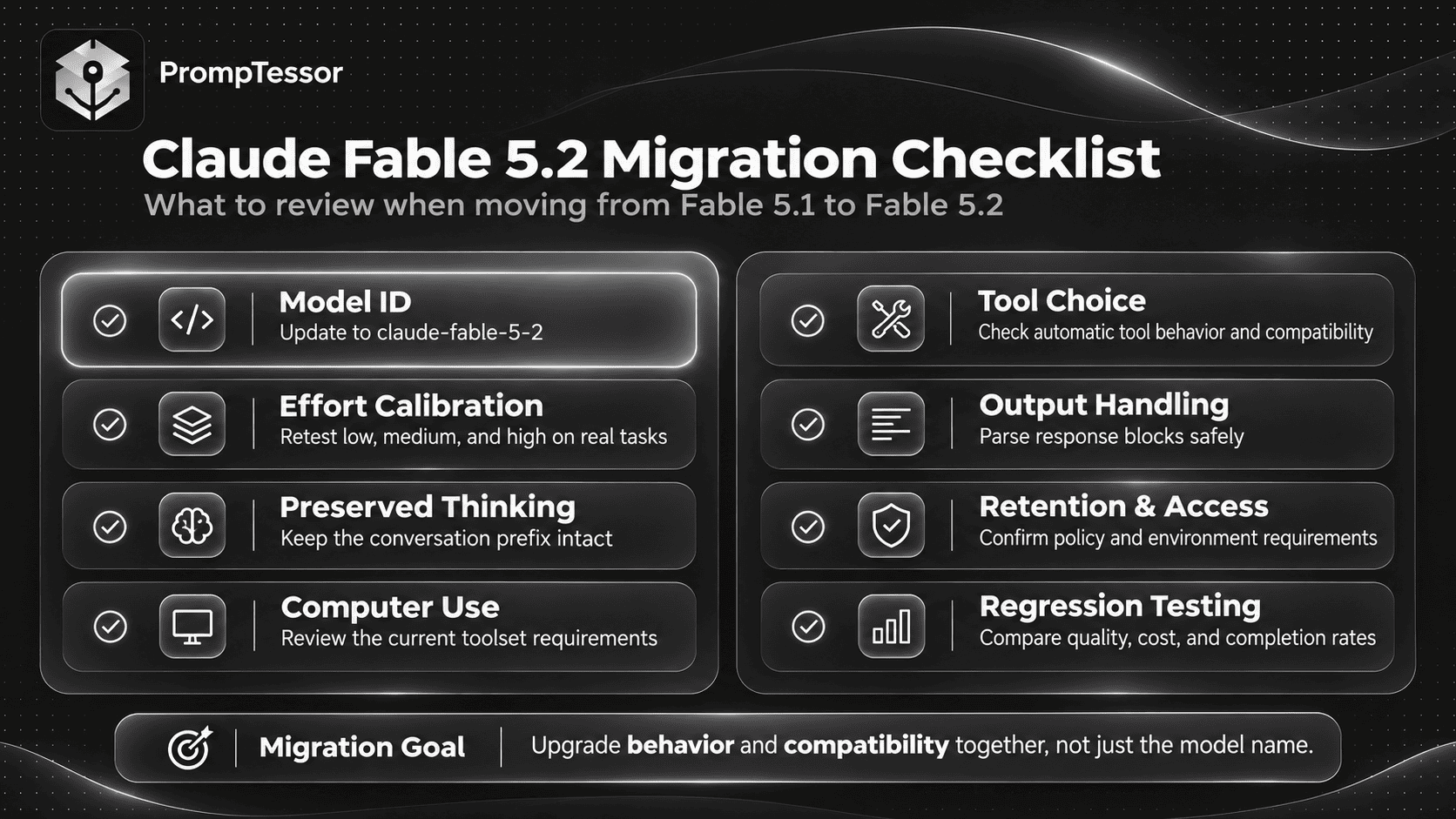
Migrating From Claude Fable 5.1 to Fable 5.2
Updating a model ID is only one part of migration.
Anthropic's Fable 5.2 migration guide identifies changes that can affect compatibility, conversation state, tool execution, and output handling.
1. Update the Model ID
BEFORE:
claude-fable-5-1

AFTER:
claude-fable-5-2
2. Recalibrate Effort
Do not assume that high on Fable 5.1 behaves identically to high on Fable 5.2.
Run the same evaluations with both versions and compare quality, latency, tokens, and completion rates.
Fable 5.2 may spend more time thinking even when an inherited prompt asks for a short answer. Use the effort control rather than relying on instructions to think less.
3. Preserve the Conversation Prefix
Claude Fable 5.2 enforces checks that bind preserved thinking blocks to the earlier conversation content.
If an application changes the system prompt, tool definitions, or previous messages and then replays preserved thinking blocks, the API can reject the request.
For custom integrations, a safe starting pattern is:
INITIAL SYSTEM AND TOOLS
        |
        v
USER MESSAGE
        |
        v
ASSISTANT RESPONSE
WITH ORIGINAL BLOCKS
        |
        v
TOOL RESULTS
        |
        v
NEW MESSAGES APPENDED
        |
        v
NEXT MODEL REQUEST

KEEP THE EARLIER PREFIX
UNCHANGED
When reusing assistant responses in a tool loop, preserve the required content blocks and their order exactly as documented.
Anthropic provides an optional drop_block behavior for certain prefix mismatches, but it should not be treated as a substitute for correctly managing conversation history. Dropping thinking blocks can increase repeated reasoning and token use.
4. Update Computer Use Integrations
For applicable platforms, the older computer_20251124 tool is not supported by Fable 5.2.
Anthropic directs developers to migrate to computer_toolset_20260801 and update the tool-handling loop accordingly.
Amazon Bedrock has a documented compatibility exception for the earlier tool, so check the requirements of your specific deployment.
5. Check Forced Tool Selection
Fable 5.2 does not accept forced tool_choice values of any or tool.
Use automatic tool choice with appropriate instructions, and use supported schema validation features when available.
Where an application requires a particular tool action, follow Anthropic's supported tool-use and mid-conversation instruction mechanisms rather than assuming a normal prompt can enforce an API-level requirement.
6. Audit Inherited System Prompts and Skills
Look for old instructions that encourage unnecessary delegation, discourage valid tool retries, force overly strict writing styles, or attempt to control thinking through text.
Remove or rewrite outdated guidance through an appropriate migration process and test the changed behavior.
7. Review Output Budgets and Response Parsing
Adaptive thinking can consume part of the max_tokens allowance.
Applications should also select response blocks by type rather than assuming the first block always contains ordinary text.
Test long responses and small-budget edge cases before moving a production workflow.
8. Check Retention and Access Requirements
According to Anthropic's current model documentation, Claude Fable 5.2 requires a 30-day data retention arrangement and is not generally available under zero-data-retention terms without explicit authorization.
Organizations with special privacy, encryption, or compliance requirements should confirm model eligibility and available features before migrating sensitive workloads.
9. Review Advisor and Fallback Compatibility
Applications using Anthropic's advisor tool must account for Fable 5.2-specific compatibility requirements.
A Fable 5.2 executor requires a compatible Fable 5.2 or Mythos 5.2 advisor. Older advisors are not automatically interchangeable.
Also test model fallback behavior and handling for refusal responses rather than assuming all models return identical response structures.
Claude Fable 5.2 vs. Claude Opus 5.5: Which Should You Use?
Fable 5.2 is not automatically the most economical choice for every task.
Anthropic recommends starting with Claude Opus 5.5 for most workloads and considering Fable 5.2 when higher-effort Opus evaluations do not satisfy the task's requirements.
| Consideration | Claude Fable 5.2 | Claude Opus 5.5 |
|---|---|---|
| Typical role | Most demanding reasoning and long-horizon agents | Broad advanced coding and knowledge work |
| Context window | 1M tokens | 1M tokens |
| Maximum output | 128K tokens | 128K tokens |
| Default effort | high | medium |
| Standard input price | $8 / million tokens | $4 / million tokens |
| Standard output price | $40 / million tokens | $20 / million tokens |
| Selection approach | Use when measured requirements justify it | Start here for many general advanced workloads |
These are current published specifications, not a claim that one model wins every benchmark.
For a broader explanation of prompting the Opus family, read How to Prompt Claude Opus 5.5: Best Practices, Tips, and Examples.
Common Claude Fable 5.2 Prompting Mistakes
1. Using Maximum Effort for Every Request
max can be expensive and slow for tasks that already succeed at a lower level.
Better approach: Benchmark effort levels and reserve expensive settings for demonstrated needs.
2. Asking the Model to Think Less Instead of Changing Effort
Text instructions may not suppress thinking at medium or higher.
Better approach: Change effort through the supported runtime configuration.
3. Providing a Task Without a Completion Condition
Long-running agents may stop after planning or after encountering routine obstacles.
Better approach: Specify what finished work looks like and when continuation is permitted.
4. Granting Broad Code Ownership Without Meaning To
Broad ownership language can encourage extra refactoring or behavioral changes.
Better approach: Align ownership wording with the intended change scope.
5. Writing Overly General Approval Rules
Vague caution can block harmless tasks while failing to clearly protect consequential actions.
Better approach: Name permitted actions and required approvals explicitly.
6. Expecting Progress Updates Without Client Support
Some progress messages may arrive in thinking blocks instead of ordinary text blocks.
Better approach: Configure the relevant display options and render the supported response format.
7. Creating Subagents for Every Small Task
Delegation may introduce coordination overhead and extra token consumption.
Better approach: Delegate independent work when there is a meaningful benefit.
8. Reusing Old Agent Instructions Without Auditing Them
Outdated rules can cause unnecessary caution, repeated work, or increased cost.
Better approach: Review inherited system prompts, skills, and notes during migration.
9. Rewriting Conversation History With Preserved Thinking
Changing earlier conversation content can invalidate bound thinking blocks.
Better approach: Preserve the prefix and use supported state-management mechanisms.
10. Assuming a Large Context Window Makes All Sources Reliable
A 1 million-token context window provides capacity, not evidence quality.
Better approach: Identify source authority, relevance, freshness, and uncertainty.
11. Treating a Progress Note as Final Completion
A progress update may describe work that is still unfinished.
Better approach: Use separate completion criteria and verify the actual deliverable.
12. Changing the Model, Prompt, and Effort at the Same Time
Multiple simultaneous changes make performance differences difficult to explain.
Better approach: Establish a baseline and test controlled variations.
13. Assuming Prompting Alone Provides Tool Access
Asking Claude to browse, execute code, or inspect a database does not grant it those capabilities.
Better approach: Configure authorized tools and verify actual results.
14. Ignoring API Compatibility Errors
Unsupported sampling parameters, forced tool settings, or outdated computer use definitions can cause requests to fail.
Better approach: Review model-specific API requirements before deploying.
How to Improve Claude Fable 5.2 Prompts With PrompTessor
Claude Fable 5.2 can handle demanding tasks, but real-world results still depend on the quality of the instructions and available context.
PrompTessor helps at the prompt-design layer, where rough instructions can be generated, analyzed, optimized, refined, and reused.
Start With a Structured Prompt
Use the PrompTessor AI Prompt Generator to turn a broad objective into a more structured instruction.
For example, instead of asking "fix my application," describe the observed problem, relevant files, allowed changes, testing requirements, and final deliverable.
Improve an Existing Prompt
Use the AI Prompt Optimizer when a prompt repeatedly produces vague answers, incomplete work, or poorly defined outputs.
For Claude Fable 5.2, useful changes may include:
- Defining the complete task instead of only the first step.
- Separating approved work from actions that require confirmation.
- Clarifying code ownership and scope.
- Adding evidence and verification requirements.
- Specifying a readable final report.
- Removing conflicting or outdated instructions.
Refine Based on Actual Model Behavior
Prompt changes should respond to observed failures.
If Fable 5.2 stops early, revise completion rules. If it changes unrelated code, revise scope and ownership. If it creates too many subagents, adjust delegation guidance.
Test each revision on representative tasks rather than assuming that the longer prompt will perform better.
Keep Runtime Configuration Separate
PrompTessor can help improve the prompt artifact, but the application using Claude controls the model ID, effort, permissions, tool implementations, caching, conversation history, and API compatibility.
The most reliable workflow is:
ROUGH REQUEST
      |
      v
PROMPTESSOR
Generate / Analyze / Optimize / Refine
      |
      v
PROMPT CANDIDATE
      |
      v
CLAUDE FABLE 5.2 RUNTIME
Effort / Tools / Permissions / Context
      |
      v
REAL TASK EXECUTION
      |
      v
EVALUATION
Accuracy / Completion / Cost / Latency
      |
      v
REVISE AND RETEST
The prompt should be evaluated in the same environment where it will be used.
Claude Fable 5.2 Prompting Checklist
Before using a prompt in an important or repeated workflow, review these questions:
- Is the complete deliverable explicit?
- Are the authoritative sources and relevant context identified?
- Is the change scope appropriate?
- Does the prompt avoid unnecessary reasoning scripts?
- Has the effort level been evaluated for this model?
- Are lower effort options considered when quality permits?
- Does the agent know when to continue after an ordinary obstacle?
- Are destructive and irreversible actions protected by actual runtime permissions?
- Are approval-required actions named precisely?
- Does coding ownership match the intended scope?
- Are unnecessary refactors and side effects prevented?
- Are tool capabilities and limitations understood?
- Is subagent delegation justified by expected benefit?
- Can users see appropriate progress updates where needed?
- Does the final report stand on its own?
- Are sources, quotations, and uncertain claims handled accurately?
- Are preserved thinking blocks and earlier messages managed correctly?
- Are API parameters compatible with Claude Fable 5.2?
- Are tests and acceptance criteria defined?
- Has the prompt been evaluated on representative failure cases?
- Does the system distinguish verified completion from an optimistic summary?
Frequently Asked Questions About Claude Fable 5.2 Prompting
What is Claude Fable 5.2?
Claude Fable 5.2 is an Anthropic model released on November 9, 2026, for demanding reasoning, complex coding, deep research, and long-horizon agentic workflows. It supports text and image input, always-on adaptive thinking, and a 1 million-token context window.
What is the Claude Fable 5.2 API model ID?
The Claude API model ID is claude-fable-5-2.
What is the best way to prompt Claude Fable 5.2?
Define the objective, relevant context, source authority, scope, action boundaries, required tools, verification, output format, and completion condition. Configure effort separately and evaluate the result on actual workloads.
What is the default effort for Claude Fable 5.2?
The default effort level is high. Anthropic recommends using it as a starting point and comparing other levels when quality, cost, and latency matter.
Which Claude Fable 5.2 effort level should I use?
Use low for suitable quick or well-defined tasks, medium for interactive work, and high for demanding coding and research. Reserve xhigh or max for tasks where evaluations justify the additional resources.
Is adaptive thinking always on in Claude Fable 5.2?
Yes. Anthropic documents adaptive thinking as always on for Fable 5.2. Use the effort parameter to influence thinking depth.
Can I disable thinking in Claude Fable 5.2?
No. The model does not support disabling thinking. For tasks that need lower latency or token consumption, evaluate lower effort levels.
Can I control thinking by telling Fable 5.2 to think less?
Not reliably. Anthropic found that instructions to answer without deliberating do not necessarily prevent thinking at medium or higher effort. Configure effort in the API instead.
Why does Claude Fable 5.2 stop before finishing?
Anthropic documents occasional early stopping during long, multistep tasks, particularly at low or medium effort. Clear completion instructions and appropriate agent runtime behavior can reduce premature stopping.
How do I prevent Claude Fable 5.2 from changing unrelated code?
Specify code ownership, the authorized scope, protected areas, expected behavior, and tests. For small patches, avoid broad ownership language that encourages unrelated improvements.
How should I handle approvals in Claude Fable 5.2 agents?
List the actions Claude may perform automatically and identify actions requiring explicit approval. Enforce protected operations through application permissions, not only through prompt text.
Why is Claude Fable 5.2 quiet during tool calls?
Progress messages may appear in thinking blocks rather than standard text blocks. Supported API configurations can expose progress updates, but the client must render them appropriately.
Should Claude Fable 5.2 use subagents?
Subagents can help with independent, parallel tasks. However, delegation may increase token usage and coordination overhead. Define when subagents are justified and evaluate the results.
Can Claude Fable 5.2 analyze images and documents?
Yes. The model supports text and image input and can assist with visual and document analysis through supported interfaces. For numerical or consequential work, verify extracted details against original sources.
How is Claude Fable 5.2 different from Fable 5.1?
Fable 5.2 introduces model improvements and behavioral differences involving effort, task completion, code ownership, subagents, and inherited instructions. It also has migration requirements concerning preserved thinking, tool compatibility, and API behavior.
Can I reuse Claude Fable 5.1 prompts with Fable 5.2?
Yes, many existing prompts are useful starting points. However, they should be tested against Fable 5.2, especially prompts that control thinking, coding scope, agent continuation, approvals, or delegation.
How much does Claude Fable 5.2 cost?
Anthropic currently lists standard API pricing of $8 per million input tokens and $40 per million output tokens. Caching, batching, premium options, and deployment arrangements may affect total costs.
Does Claude Fable 5.2 support a 1 million-token context window?
Yes. The official model documentation lists a 1 million-token context window and a maximum output of 128,000 tokens.
Is Claude Fable 5.2 better than Claude Opus 5.5?
That depends on the task, cost requirements, and evaluation results. Anthropic recommends starting with Opus 5.5 for many workloads and using Fable 5.2 when demanding tasks justify the additional capability and cost.
Can PrompTessor optimize Claude Fable 5.2 prompts?
Yes. PrompTessor can help generate, analyze, optimize, refine, and reuse prompts for Claude Fable 5.2. The target Claude application remains responsible for model settings, permissions, tools, preserved thinking, runtime execution, and performance evaluation.
Final Thoughts: Prompting Fable 5.2 Is About Reliable Execution
Claude Fable 5.2 is designed for difficult work that may require extended reasoning, many tools, and several independent decisions before a final result is ready.
That changes what good prompting means.
For straightforward tasks, clarity and concise output requirements may be enough. For demanding work, the prompt must describe the intended outcome, available evidence, permitted actions, scope, verification, and completion conditions.
Effort should be calibrated in the runtime, not controlled through increasingly elaborate requests to think harder or think less.
Long-running agents benefit from explicit continuation rules, precise approvals, purposeful delegation, and readable final reports. Coding agents need scope and ownership guidance that matches what the user actually authorized.
Developers upgrading from older Claude models should also verify API compatibility, preserved thinking behavior, computer use tool definitions, and inherited agent instructions before moving production workloads.
Most importantly, measure the actual work. A longer prompt, higher effort setting, or larger agent team is useful only when it improves successful task completion.
For additional context, see the Claude Fable 5.1 Prompting Guide and compare its recommendations with the changes explained here.
To create clearer, reusable prompting instructions for Claude Fable 5.2, start with the PrompTessor AI Prompt Generator and refine the prompt around your real task, context, and constraints.
The best Claude Fable 5.2 prompt is not the longest or most elaborate. It is the one that gives a capable model enough context and control to finish the right work, with evidence that the result is actually complete.
Official Anthropic Sources and Further Reading
Build better prompts in one workspace
Generate prompts from ideas, analyze and optimize quality, refine with feedback, reverse-engineer content, and save reusable prompts in your Prompt Library.
Try PrompTessor Free