Claude Code Dynamic Workflows: Examples, Ultracode, and Multi-Agent Orchestration
Claude Code can already use Skills for reusable procedures, Hooks for lifecycle automation, subagents for focused delegation, and Agent Teams for collaborative parallel work.
Dynamic Workflows add a different level of control.
Instead of asking Claude to decide what to delegate next on every turn, a Dynamic Workflow moves the orchestration into JavaScript.
The script can:
- Discover work.
- Fan tasks out across many subagents.
- Store intermediate results in variables.
- Branch based on those results.
- Repeat a stage until a condition is satisfied.
- Cross-check findings with independent agents.
- Filter failed or low-confidence results.
- Return one final result to the Claude Code session.
This makes Dynamic Workflows useful for jobs that are too broad, repetitive, or verification-heavy to coordinate comfortably inside one conversation.
Typical examples include codebase-wide authorization audits, hundreds-of-files migrations, file-by-file pull request reviews, repeated test repair loops, multi-source research, and plans drafted from several independent perspectives.
The important idea is not simply “run more agents.”
Move the plan, branching, loops, and intermediate state out of the main conversation and into a repeatable orchestration script.
This guide explains how Claude Code Dynamic Workflows work, when they are better than subagents or Agent Teams, how agent() and pipeline() fit together, how workflow scripts are generated and saved, how Ultracode changes orchestration behavior, how /deep-research works as a built-in example, and how to design practical multi-agent workflows that remain bounded, verifiable, and cost-aware.
Quick Answer
A Claude Code Dynamic Workflow is a JavaScript script that orchestrates many subagents in the background.
The workflow script owns the plan:
User task
   ↓
Claude writes workflow
   ↓
JavaScript runtime
   ↓
Discover work
   ↓
Fan out agents
   ↓
Store intermediate results
   ↓
Filter / branch / loop
   ↓
Independent verification
   ↓
Final result
   ↓
Claude Code session
Use a workflow when the task is larger than one agent can comfortably hold in context, the same operation must run across many items, branching or iteration should be repeatable, findings need independent verification, or the orchestration itself should become reusable.
Key Takeaways
- Dynamic Workflows require Claude Code v2.1.154 or later.
- A workflow is plain JavaScript with top-level
await. agent()starts one subagent.pipeline()applies an agent task across a list.- The script does not directly read files, edit files, or run shell commands; agents perform tool work.
- Workflow scripts cannot load modules with
import(). - Intermediate results remain in script variables instead of filling the main Claude context.
- Runs execute in the background and can be inspected through
/workflows. - The runtime supports up to 16 concurrent agents and 1,000 agents total per run.
- The current default size guideline is
medium, which aims for fewer than 15 agents. - Size guidelines are advice to Claude, not runtime caps.
- Saved project workflows live under
.claude/workflows/. - Saved workflows become slash commands and can receive structured
args. ultracodecan trigger a workflow for one human-entered prompt./effort ultracodeenables session-wide automatic workflow orchestration withxhighreasoning./deep-researchis a built-in workflow for multi-source research and claim cross-checking.- Paused runs are resumable within the same session, with cache-order rules.
- Large workflows can consume substantial tokens; test the orchestration on a small slice first.
Table of Contents
- What Are Claude Code Dynamic Workflows?
- Why Dynamic Workflows Exist
- How Dynamic Workflows Work
- Dynamic Workflows vs. Subagents
- Dynamic Workflows vs. Skills
- Dynamic Workflows vs. Agent Teams
- When to Use Dynamic Workflows
- When Not to Use Dynamic Workflows
- Requirements and Availability
- Your First Dynamic Workflow
- Anatomy of a Workflow Script
- agent() Explained
- pipeline() Explained
- Sequential and Parallel Execution
- Branching and Conditional Logic
- Loops and Iterative Verification
- Structured Agent Output
- Background Execution
- Monitoring With /workflows
- Saving Workflows for Reuse
- Passing Arguments to Saved Workflows
- Distributing Workflows With Plugins
- Permissions and Sandboxing
- Runtime Limits
- Dynamic Workflow Size Guidelines
- Pausing and Resuming Workflows
- Token Usage and Cost
- What Is Ultracode?
- Built-In /deep-research
- Best Claude Code Dynamic Workflow Examples
- Multi-Agent Orchestration Patterns
- Weak vs. Strong Workflow Design
- Common Dynamic Workflow Mistakes
- Using PrompTessor to Improve Workflow Instructions
- Dynamic Workflow Checklist
- Official Resources
- FAQ
What Are Claude Code Dynamic Workflows?
Claude Code Dynamic Workflows are JavaScript orchestration scripts that coordinate many subagents. Claude can write the script from a natural-language task, show the plan for approval, run the workflow in the background, and later save a useful orchestration as a reusable slash command.
The script is separate from the main conversation. Instead of making Claude remember which worker ran, what it returned, what must be verified, and which branch comes next, the workflow keeps that orchestration in code.
Conversation-driven orchestration

Claude
  ↓
spawn agent
  ↓
read result
  ↓
decide next agent
  ↓
read result
  ↓
decide next step


Workflow-driven orchestration

JavaScript
  ├── discover()
  ├── fanOut()
  ├── filter()
  ├── verify()
  ├── loop()
  └── return finalResult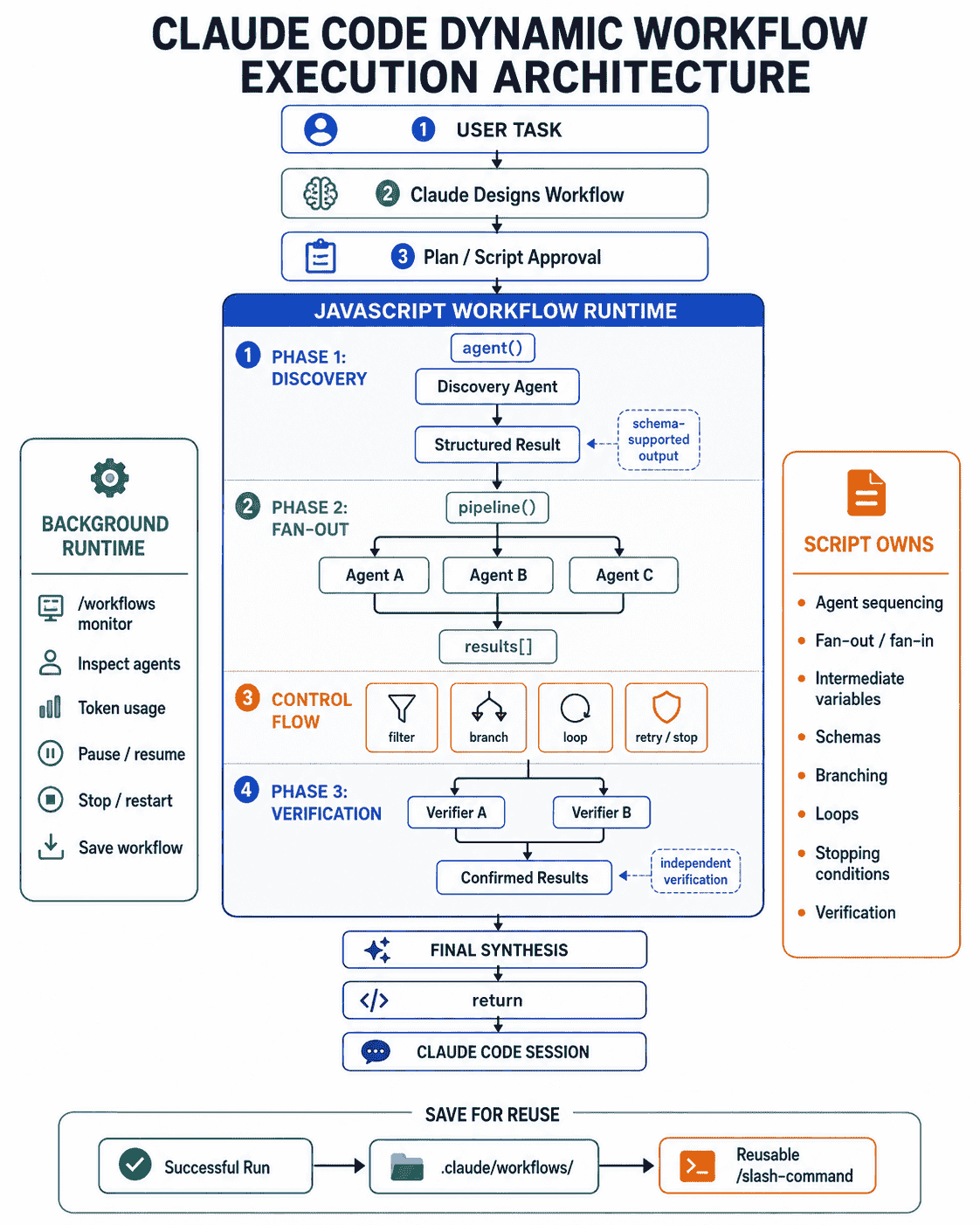
Why Dynamic Workflows Exist
Context Becomes a Bottleneck
If one Claude session reviews hundreds of files and reads every per-file result into the same context, orchestration consumes context that could be reserved for decisions. A workflow keeps those intermediate values in script variables and returns only the final result.
Large Fan-Out Is Awkward Turn by Turn
A task may require one worker per file, package, issue, test failure, migration unit, or source. Dynamic Workflows make this fan-out explicit and repeatable.
Verification Should Be Repeatable
Discover candidates
      ↓
Analyze candidates
      ↓
Verify every finding independently
      ↓
Reject unsupported findings
      ↓
Rank surviving findings
Orchestration Can Become a Reusable Asset
Once a branch review, migration audit, or release validation workflow performs well, save it and rerun the same structure instead of recreating the process from scratch.
How Dynamic Workflows Work
- You describe a task and request a workflow.
- Claude designs phases and writes JavaScript.
- Depending on permission mode, Claude Code may show the plan and raw script for approval.
- The runtime starts the workflow in the background.
- The script calls subagents.
- Intermediate values remain inside the workflow runtime.
- The script can filter, branch, repeat, or call verification agents.
- The final return value is delivered to the Claude Code session.
Dynamic Workflows vs. Subagents
| Capability | Subagents | Dynamic Workflows |
|---|---|---|
| Primary unit | Focused worker | Orchestration script |
| Who decides next? | Claude | JavaScript |
| Intermediate results | Claude context | Script variables |
| Typical scale | A few delegated tasks | Many agents across phases |
| Loops and branching | Model decides turn by turn | Encoded in script |
| Repeatability | Worker definition | Complete orchestration |
For reusable workers, see Claude Code Subagents and Custom Agent Examples.
Dynamic Workflows vs. Skills
A Skill packages reusable instructions. A Dynamic Workflow packages the orchestration itself.
SKILL.md
Reusable procedure
"What should Claude do?"

Dynamic Workflow
Reusable orchestration
"Which agents run, when, and how are results combined?"
For reusable procedures, see Claude Code Skills and SKILL.md examples.
Dynamic Workflows vs. Agent Teams
| Capability | Agent Team | Dynamic Workflow |
|---|---|---|
| Coordinator | Team lead | JavaScript |
| Worker relationship | Long-running peers | Subagents called by stages |
| Communication | Direct teammate messaging | Results passed through script state |
| Shared state | Task list | Variables and return values |
| Best use | Collaborative work | Programmable fan-out and verification |
| Typical scale | Handful of peers | Dozens or more when justified |
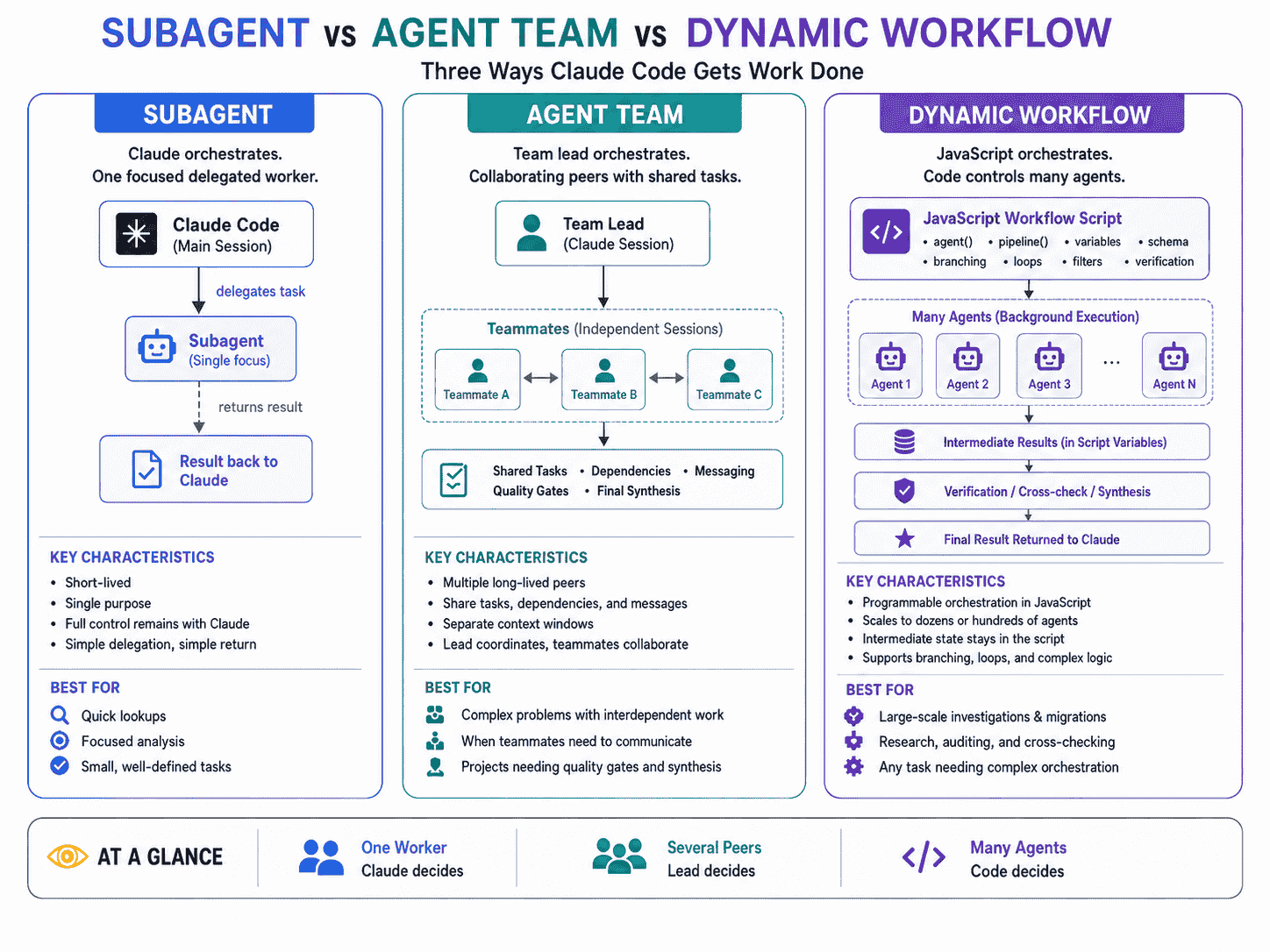
For collaborating peers, see Claude Code Agent Teams and multi-agent workflows.
When to Use Dynamic Workflows
- Many similar items: apply the same review or transformation across a large collection.
- Cross-checked findings: use independent verifiers before reporting results.
- Iterative repair: check, fix, rerun, and stop on success or no progress.
- Large migration: discover targets, partition work, transform, and verify.
- Multi-perspective planning: generate independent plans and compare them.
- Research with evidence validation: fan out research and cross-check claims.
When Not to Use Dynamic Workflows
- One small local task.
- Work requiring human sign-off between every stage.
- Peer workers that need rich direct conversation; use Agent Teams instead.
- A process whose useful stages are not understood yet.
Requirements and Availability
Dynamic Workflows require Claude Code v2.1.154 or later and are supported on paid plans and supported provider configurations documented by Anthropic. On Pro, enable them through the Dynamic workflows row in /config if needed.
Workflows are supported across Claude Code surfaces including the CLI, Desktop, IDE extensions, non-interactive usage, and Agent SDK integrations. The interactive Ultracode keyword trigger has stricter human-input requirements than workflow support itself.
Your First Claude Code Dynamic Workflow
Use a workflow to review every TypeScript route handler under
src/api/ for missing authorization checks.

Process:
1. Discover all route files.
2. Review each file independently.
3. For every possible issue, launch a separate verifier.
4. Remove findings that cannot be supported by code evidence.
5. Deduplicate overlapping findings.
6. Rank surviving issues by severity.

Return:
- Severity
- Route
- File and line
- Evidence
- Impact
- Recommended fix
- Verification method

Do not modify files.
Anatomy of a Dynamic Workflow Script
A saved workflow contains metadata and a JavaScript body. A simplified original example:
export const meta = {
  name: "review-routes",
  description: "Review API routes and verify authorization findings",
};

const discovery = await agent(
  "Find all TypeScript route handlers under src/api/ and return their paths.",
  {
    schema: {
      type: "object",
      required: ["files"],
      properties: {
        files: {
          type: "array",
          items: { type: "string" }
        }
      }
    }
  }
);

const reviews = await pipeline(
  discovery.files,
  file => agent(
    `Review ${file} for missing authorization checks.
Return only evidence-backed findings.`,
    { label: `review:${file}` }
  )
);

const completed = reviews.filter(Boolean);

const summary = await agent(
  `Deduplicate and rank these route review results:
${JSON.stringify(completed)}`,
  { label: "final-synthesis" }
);

return summary;
The body uses plain JavaScript with top-level await. The core concepts are meta, agent(), pipeline(), variables, JavaScript control flow, and the final return.
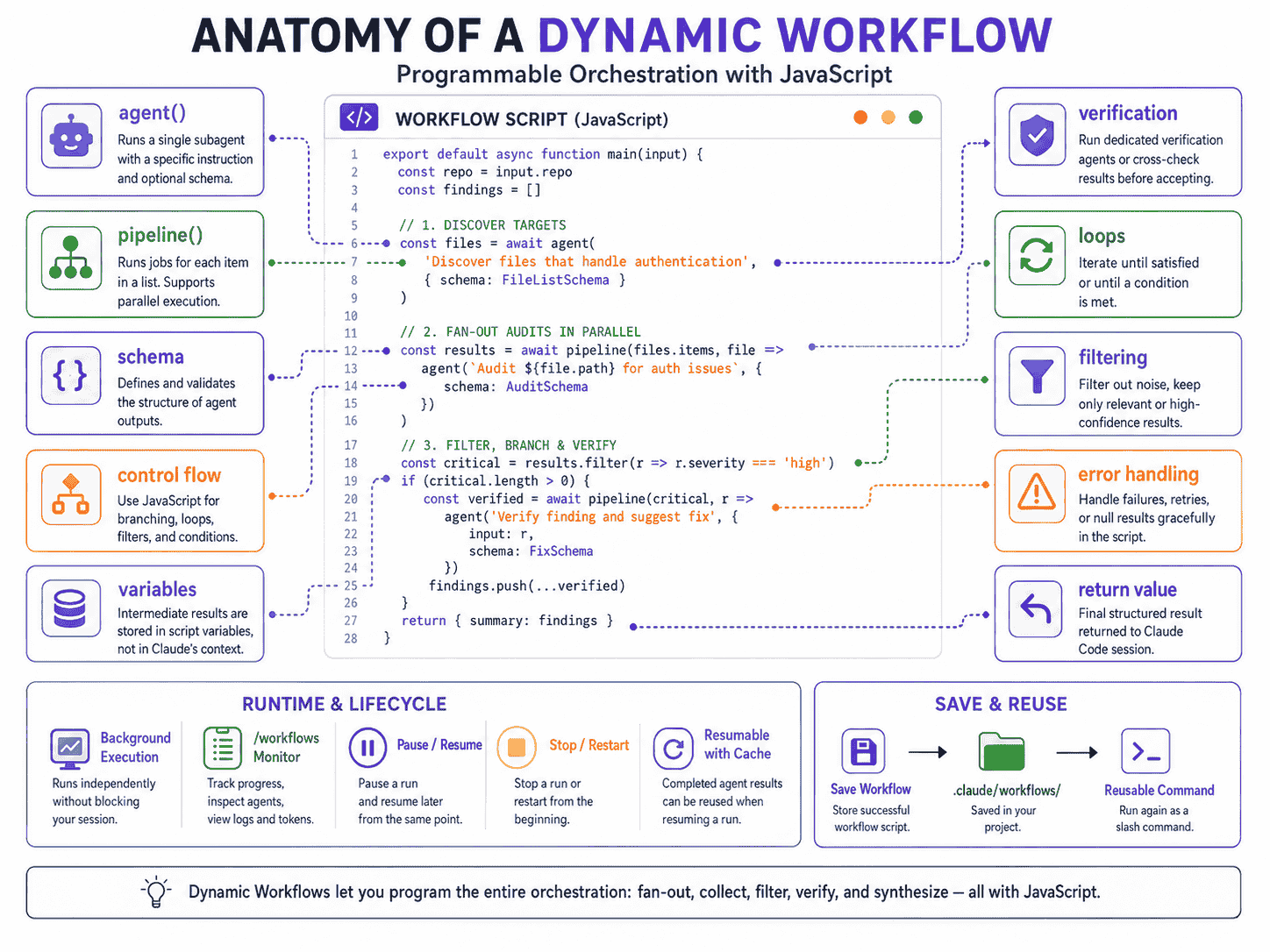
agent() Explained
agent() launches one subagent for a focused task.
const result = await agent(
  "Inspect the billing service and identify the current entitlement rules.",
  { label: "billing-analysis" }
);
Use Structured Output for Machine-Readable Stages
const routes = await agent(
  "List API route files only.",
  {
    schema: {
      type: "object",
      required: ["files"],
      properties: {
        files: {
          type: "array",
          items: { type: "string" }
        }
      }
    }
  }
);
Handle Missing Results
An agent may resolve to null if stopped or if it hits an unrecoverable API error.
if (!result) {
  return {
    status: "incomplete",
    reason: "The analysis agent did not return a usable result."
  };
}
pipeline() Explained
pipeline() is useful for repeated work over a list.
const reviews = await pipeline(files, file =>
  agent(
    `Review ${file} for correctness and return confirmed issues only.`,
    { label: file }
  )
);

const completed = reviews.filter(Boolean);
Sequential and Parallel Agent Execution
Sequential
const inventory = await agent("Map the current API.");
const plan = await agent(`Create a migration plan from: ${JSON.stringify(inventory)}`);
const verification = await agent(`Review this plan: ${JSON.stringify(plan)}`);
Fan-Out Then Fan-In
const findings = await pipeline(files, reviewFile);

const finalReport = await agent(
  `Merge, deduplicate, and rank these findings:
${JSON.stringify(findings.filter(Boolean))}`
);
Branching and Conditional Logic
const assessment = await agent(
  "Assess this migration and return riskLevel as low, medium, or high.",
  { schema: riskSchema }
);

if (assessment.riskLevel === "high") {
  return await agent(
    `Perform an adversarial migration review:
${JSON.stringify(assessment)}`
  );
}

return assessment;
Branching lets you spend expensive verification only where the result justifies it.
Loops and Iterative Verification
Loops are one of the clearest reasons to move orchestration into code.
let previousErrorCount = Infinity;
let stagnantRounds = 0;

for (let round = 0; round < 5; round++) {
  const check = await agent(
    "Run the project type check. Return errorCount and a concise list of errors.",
    { schema: checkSchema }
  );

  if (check.errorCount === 0) {
    return { status: "passed", round };
  }

  if (check.errorCount >= previousErrorCount) {
    stagnantRounds += 1;
  } else {
    stagnantRounds = 0;
  }

  if (stagnantRounds >= 2) {
    return { status: "stalled", remainingErrors: check };
  }

  await agent(
    `Fix these type errors without changing intended behavior:
${JSON.stringify(check)}`
  );

  previousErrorCount = check.errorCount;
}
Always bound iterative workflows with maximum rounds or a no-progress rule.
Structured Agent Output
Use schemas when JavaScript must reliably inspect values such as files, severity, confidence, verified status, error counts, changed paths, or remaining issues.
Background Execution
Dynamic Workflows run in the background while your Claude Code session remains responsive. This is useful for long audits and research tasks, but background does not mean invisible: progress remains available in the task panel and /workflows.
Monitoring With /workflows
/workflowsThe view exposes phases, agent status, token totals, elapsed time, prompts, recent tool activity, and results. It also lets you pause, resume, stop, restart, inspect, and save workflows.
Saving Workflows for Reuse
Project workflows:
.claude/workflows/Personal workflows:
~/.claude/workflows/or the workflows directory under your configured Claude config path. Saved workflows become slash commands.
Passing Arguments to Saved Workflows
export const meta = {
  name: "review-paths",
  description: "Review supplied paths with independent verification"
};

const targets = args?.paths ?? [];

if (!targets.length) {
  return { status: "no-input" };
}

const reviews = await pipeline(targets, path =>
  agent(`Review ${path} and return confirmed correctness issues only.`)
);

return reviews.filter(Boolean);
Distributing Workflows With Plugins
Claude Code plugins can ship reusable workflows. Plugin workflow commands are namespaced, for example:
/acme-tools:release-auditPermissions and Sandboxing
A workflow does not bypass permissions. Claude Code can show the planned phases and raw script before launch depending on permission mode, while workflow agents still operate under tool allowlists and sandbox controls.
For large mutating runs, inspect target discovery, likely agent count, file isolation, verification, stopping rules, and required commands before approval.
Dynamic Workflow Runtime Limits
| Constraint | Meaning |
|---|---|
| Up to 16 concurrent agents | Actual concurrency may be lower on machines with fewer CPU resources. |
| 1,000 agents total per run | Prevents unbounded spawning. |
| No arbitrary mid-run user input | Split workflows into stages when human sign-off is required. |
| No direct file or shell access from the script | Agents perform tool work; JavaScript coordinates them. |
| No module loading | Do not use import() in workflow scripts. |
Dynamic Workflow Size Guidelines
| Value | Target |
|---|---|
small | Fewer than 5 agents |
medium | Fewer than 15 agents |
large | Fewer than 50 agents |
unrestricted | No guideline |
The current default is medium. This is advice to Claude, not a hard runtime cap.
Pausing and Resuming Workflows
A stopped workflow can resume within the same Claude Code session. Completed results may be reused, but replay follows agent start order.
A → B → C → DIf the run is stopped while B is unfinished, A can be cached, but B, C, and D run again on resume even if C and D had already completed. Resume does not survive exiting the Claude Code session.
Token Usage and Cost
Dynamic Workflows can use tokens quickly because each worker is a separate model invocation. Before scaling:
- Run against one directory or small target set.
- Inspect output quality.
- Check token totals in
/workflows. - Adjust agent granularity.
- Remove redundant stages.
- Use stronger models only where needed.
Current Claude Code can surface a large-workflow warning when projected scale becomes unusually high. The warning is advisory rather than a hard stop.
What Is Ultracode?
Ultracode is a Claude Code setting, not a model. It combines xhigh reasoning with automatic Dynamic Workflow orchestration for substantive tasks.
One-Off Prompt
ultracode: audit every API route for missing authorization,
verify every candidate finding independently,
and return a ranked report
Session-Wide Ultracode
/effort ultracodeor on supported versions:
claude --effort ultracodeA single substantive request may become multiple workflows such as repository understanding, implementation, and independent verification.
Ultracode applies only to the current session. Return to routine work with:
/effort highBuilt-In /deep-research
/deep-research is Claude Code's built-in workflow for cross-checked research.
Research question
       ↓
Fan out search angles
       ↓
Fetch sources
       ↓
Extract claims
       ↓
Cross-check claims
       ↓
Verifier voting
       ↓
Filter unsupported claims
       ↓
Cited synthesis
It provides a useful design lesson: parallelize discovery, but add an independent verification stage before synthesis.
Best Claude Code Dynamic Workflow Examples
Example 1: Codebase-Wide Authorization Audit
Use a workflow to audit every protected server route.
Discover routes, review each independently, verify every candidate issue with a second agent, reject unsupported findings, deduplicate, and rank confirmed issues. Do not modify files.
Example 2: Security Vulnerability Sweep
Partition the repository by subsystem. Review authentication, authorization, input validation, secret handling, and sensitive logging. Independently verify high-severity candidates and separate confirmed vulnerabilities from defense-in-depth suggestions.Example 3: Large Framework Migration
Discover deprecated framework usage, group affected files by dependency and layer, migrate independent groups, verify each group, then run global tests, type checks, linting, and build validation. Stop if two rounds make no progress.Example 4: Hundreds-of-Files Mechanical Migration
Discover every old namespace import, partition targets into safe independent units, transform them, validate syntax and imports, and run a final repository search to prove old usage is gone.Example 5: Pull Request File-by-File Review
Review every changed file independently, collect correctness, compatibility, security, and test findings, independently verify candidates, remove duplicates, and return one ranked merge-readiness report.Example 6: TypeScript Repair Loop
Run the type checker, record errors, group related failures, assign repair agents, rerun the checker, and stop on success, five rounds, or two rounds with no reduction.Example 7: Flaky Test Discovery
Run relevant suites repeatedly, track intermittent failures, investigate candidates independently, and stop after two rounds find no new flaky tests. Return evidence and likely cause.Example 8: CI Failure Triage
Classify failures into product defect, test defect, configuration, environment, dependency, or likely flake. Investigate groups in parallel and cross-check failures that may share one root cause.Example 9: Database Migration Review
Run independent analysis for existing-data compatibility, locks, backfill, rollback, mixed-version deployment, indexes, and integrity. Have a final verifier challenge every high-risk conclusion.Example 10: API Version Migration
Discover all v1 callers, map behavioral differences, partition clients, migrate and test each partition, and report callers that cannot be safely migrated automatically.Example 11: Dependency Upgrade Audit
Research release notes and breaking changes, map repository usage, assign reviewers per affected package, generate required changes, and independently verify compatibility assumptions.Example 12: Accessibility Audit
Partition by page or feature. Review keyboard behavior, focus, forms, semantics, ARIA, state communication, and contrast-sensitive patterns. Deduplicate shared component findings.Example 13: Performance Pattern Audit
Fan out reviews across database queries, API handlers, rendering, bundling, caching, and repeated network calls. Require measurable evidence or a clear high-cost path.Example 14: Dead Code Investigation
Find candidate exports, routes, flags, and modules. Verify each against imports, runtime registration, tests, config, dynamic loading, and docs before marking removable.Example 15: Architecture Decision Workflow
Generate independent plans for multiple architecture options, score complexity, reliability, performance, migration cost, operability, maintainability, and reversibility, then run adversarial review.Example 16: Multi-Perspective Feature Planning
Use independent planners for product behavior, backend, frontend, security, and testing. Compare contradictions and return one implementation plan with explicit decisions and open questions.Example 17: Production Incident Analysis
Fan out deployment-diff analysis, log clustering, database investigation, infrastructure review, and request traces. Cross-check candidate causes against the incident timeline without changing production.Example 18: Multi-Source Technical Research
Assign source categories to independent researchers, extract claims, cross-check them with other sources, mark unverifiable claims explicitly, and return a cited synthesis.Example 19: Competitor Technical Research
Research each product independently from public technical sources, extract limits, algorithms, configuration, failure behavior, and controls, verify claims, then compare.Example 20: Regression Investigation
Map suspect commits, assign independent investigators to commit ranges or subsystems, run reproductions, eliminate unsupported hypotheses, and return the smallest evidence-backed suspect set.Example 21: Documentation Consistency Audit
Compare public documentation against current code, identify behavioral claims, verify implementation evidence, flag stale examples or removed configuration, and return only confirmed drift.Example 22: Release Readiness Workflow
Run parallel stages for test status, migrations, breaking changes, security-sensitive diffs, environment configuration, rollback readiness, and docs. Challenge every blocker and every ready conclusion.Example 23: Monorepo Package Audit
Run one analysis per package for public API, dependency graph, test health, build status, deprecated usage, and boundary violations, then separate systemic issues from local ones.Example 24: Independent Implementation Verification
Derive acceptance criteria from the original task, run independent implementation, test, security, compatibility, and edge-case reviewers, verify every finding, and return pass/fail per criterion.Example 25: Discover → Implement → Verify
Map affected code, create a plan, partition safe independent changes, implement, run targeted tests, run independent review, resolve confirmed findings, and finish with repository validation.Example 26: Risk-Weighted Verification
Classify changed files as low, medium, or high risk. Give low risk one pass, medium one reviewer plus verifier, and high risk several independent reviewers plus final verification.Multi-Agent Orchestration Patterns
Pattern 1: Fan-Out / Fan-In
       Item list
      /   |   |   \
     A    B   C    D
      \   |   |   /
       Aggregator
Pattern 2: Discover → Fan-Out
Discovery agent
      ↓
  targets[]
      ↓
  pipeline()
      ↓
 per-target agents
Pattern 3: Find → Verify → Report
Finder agents
      ↓
Candidate findings
      ↓
Verifier agents
      ↓
Confirmed findings
      ↓
Final synthesis
Pattern 4: Competing Plans
Planner A ─┐
Planner B ─┼→ Evaluators → Final plan
Planner C ─┘
Pattern 5: Iterative Repair
Check
 ↓
Failures?
 ├─ No → Done
 └─ Yes
      ↓
     Fix
      ↓
   Recheck
      ↺
Pattern 6: Risk-Gated Branching
Initial analysis
      ↓
Risk classification
 ┌────┼────┐
Low Medium High
 ↓    ↓     ↓
1x   2x   3x verification
Weak vs. Strong Dynamic Workflow Design
Weak
Use lots of agents to improve this repository.
Keep going until everything is perfect.
This has no scope, agent granularity, stopping condition, verification standard, mutation boundary, or output format.
Strong
Use a workflow to review every route under src/api/.

Scope:
- Authentication
- Authorization
- Tenant isolation

Process:
1. Discover route files.
2. Run one reviewer per route.
3. Return candidate findings with exact evidence.
4. Independently verify each candidate.
5. Remove unsupported and duplicate findings.
6. Rank confirmed findings.

Constraints:
- Read-only.
- Maximum 20 initial review agents.
- Do not report generic best-practice advice.
- Do not classify a finding as confirmed without code evidence.

Output:
- Severity
- Route
- File and line
- Evidence
- Impact
- Recommended correction
- Verification method
Common Dynamic Workflow Mistakes
- Using workflows for every task: orchestration has overhead.
- Unbounded loops: always define maximum rounds or no-progress conditions.
- One agent per tiny item: group items that share context.
- No independent verification: parallel first passes do not guarantee correctness.
- Strongest model everywhere: reserve expensive reasoning for ambiguous stages.
- Ignoring null results: handle stopped or failed workers explicitly.
- Tool work in JavaScript: agents should read files and run commands.
- Trying to import libraries: module loading is unsupported in workflow scripts.
- Assuming resume saves everything: cache replay stops at the first unfinished agent.
- Scaling before testing: validate the workflow on a small slice first.
Using PrompTessor to Improve Workflow Instructions
Dynamic Workflows amplify prompt quality. A vague request can cause dozens of agents to repeat the same ambiguity.
Use many agents to improve the code and verify everything.
This does not define scope, target discovery, parallel boundaries, structured outputs, verification, mutation limits, stopping rules, or completion.
PrompTessor can help analyze and improve a rough workflow request before Claude turns it into orchestration code.
- Define one measurable objective.
- Define the target set or discovery rule.
- Identify independent work.
- Use structured output where JavaScript needs reliable fields.
- Add verification for high-risk findings.
- Define loop limits and no-progress conditions.
- Define mutation boundaries.
- Define the final synthesis format.
- Start with a small workflow size.
- Scale only after reviewing quality and token usage.
Claude Code Dynamic Workflow Checklist
- The task is large enough to justify orchestration.
- The work can be divided into independent units.
- The target set is bounded or discovered through a bounded process.
- The workflow has a clear final return value.
- Structured output is used where JavaScript needs reliable fields.
- Agent failures or
nullresults are handled. - Loops have maximum rounds.
- Loops have a no-progress condition.
- Verification is independent from first-pass analysis.
- High-cost verification is targeted where appropriate.
- The script does not attempt direct filesystem or shell operations.
- No unsupported module imports are required.
- The chosen workflow size is appropriate.
- The expected agent count fits runtime limits.
- Permissions are prepared without being unnecessarily broad.
- Mutating work has explicit scope and verification.
- The workflow has been tested on a small slice.
- Token usage will be monitored through
/workflows. - Human approval boundaries are split into separate stages when needed.
- A useful recurring workflow is saved for reuse.
Official Resources
- Claude Code Dynamic Workflows
- Claude Code Model and Ultracode Configuration
- Claude Code Subagents
- Claude Code Agent Teams
- Claude Code Parallel Agent Approaches
- Claude Agent SDK TypeScript Reference
FAQ About Claude Code Dynamic Workflows
What are Claude Code Dynamic Workflows?
Claude Code Dynamic Workflows are JavaScript orchestration scripts that run many subagents in the background. The script controls sequencing, fan-out, branching, loops, intermediate results, and final return values instead of requiring Claude to coordinate every step turn by turn.
What version of Claude Code supports Dynamic Workflows?
Dynamic Workflows require Claude Code v2.1.154 or later. Some newer workflow capabilities, including the latest workflow-size defaults and Ultracode launch options, require later versions.
Who can use Claude Code Dynamic Workflows?
Dynamic Workflows are available on paid Claude Code plans and supported API or cloud-provider configurations documented by Anthropic. On Pro, they can be enabled from the Dynamic workflows setting in /config.
How are Dynamic Workflows different from subagents?
A subagent is a focused worker Claude spawns and coordinates from the conversation. A Dynamic Workflow moves the orchestration into a script, allowing loops, branching, structured intermediate state, and much larger fan-out.
How are Dynamic Workflows different from Agent Teams?
Agent Teams use a lead agent to coordinate a handful of collaborating peer sessions with shared tasks and messaging. Dynamic Workflows use JavaScript to control the orchestration and are designed for repeatable or larger-scale fan-out.
How are Dynamic Workflows different from Skills?
A Skill packages reusable instructions that Claude follows. A Dynamic Workflow packages the orchestration itself, including which agents run, in what order, how results are stored, and how branches or loops proceed.
What is Ultracode in Claude Code?
Ultracode is a Claude Code session setting that combines xhigh reasoning with automatic Dynamic Workflow orchestration for substantive tasks. It is not a separate model effort level and applies only to the current session.
How do I enable Ultracode?
Run /effort ultracode, select Ultracode from the effort menu, or launch a supported Claude Code version with claude --effort ultracode. Ultracode resets when the session ends.
Can I trigger a workflow for only one prompt?
Yes. Include the ultracode keyword in a prompt or explicitly ask Claude to use or run a workflow. This opts that task into workflow orchestration without changing the session effort setting.
Does the ultracode keyword work in claude -p prompts?
The interactive keyword trigger is limited to qualifying human-originated prompt surfaces. A prompt passed through claude -p does not activate the keyword trigger, although workflows themselves are supported in non-interactive mode through the appropriate workflow mechanisms.
What is /deep-research?
/deep-research is a built-in Claude Code workflow that fans research across multiple angles, fetches sources, cross-checks claims, and produces a cited report. It requires WebSearch availability.
What does agent() do in a workflow?
agent() starts one subagent and returns its result to the workflow script. The script can then store, filter, compare, or pass that result to later stages.
What does pipeline() do in a workflow?
pipeline() runs a worker function over items in a list, which makes it useful for patterns such as one reviewer per file, one investigator per issue, or one migration worker per module.
Can workflow scripts read files or run shell commands directly?
No. The workflow script is the orchestrator. Agents spawned by the workflow perform file access, edits, shell commands, web work, and other tool operations.
Can a workflow import npm packages?
No. Dynamic Workflow scripts do not support module loading with import(). Put work that requires libraries inside an agent task instead of the orchestration script.
How many agents can one workflow run?
The runtime supports up to 16 concurrent agents, potentially fewer on machines with limited CPU resources, and up to 1,000 agents total in a single workflow run.
What is the default Dynamic Workflow size guideline?
On current Claude Code versions, the default guideline is medium, which advises Claude to aim for fewer than 15 agents. It is guidance rather than a hard cap.
What do small, medium, large, and unrestricted workflow sizes mean?
Small aims for fewer than 5 agents, medium fewer than 15, large fewer than 50, and unrestricted provides no size guideline. The runtime's hard agent limits still apply.
Can I monitor a workflow while it runs?
Yes. /workflows shows running and completed runs, phases, agent status, token totals, elapsed time, and controls for pausing, stopping, restarting, inspecting, and saving workflows.
Can Dynamic Workflows be paused and resumed?
Yes, within the same Claude Code session. Completed agents can often return cached results on resume, while unfinished agents and agents that started after the first unfinished one may run again.
Can I resume a workflow after exiting Claude Code?
Workflow resume is session-scoped. If Claude Code exits while a workflow is running, a later session starts the workflow fresh rather than resuming the previous run.
Can I save a Dynamic Workflow?
Yes. Save a successful run from /workflows. Project workflows live under .claude/workflows/, personal workflows under ~/.claude/workflows/ or the configured Claude config directory, and saved workflows become slash commands.
Can a saved workflow accept arguments?
Yes. A saved workflow can receive structured input through the global args value, allowing the same orchestration to run against different paths, issue lists, questions, or configuration values.
Can workflows be distributed in Claude Code plugins?
Yes. A plugin can include workflows in its workflows directory or point to another location in its manifest. Plugin workflow commands are namespaced by the plugin name.
Do workflows bypass Claude Code permissions?
No. Starting a workflow follows the session's approval behavior, and agents still operate under Claude Code tool permissions, allowlists, and sandboxing rules. File edits run with accept-edits behavior while other non-allowed operations can still require approval.
Are Dynamic Workflows expensive?
They can be. Every agent consumes model tokens, and large fan-out can increase usage quickly. Start with a narrow slice, monitor token totals in /workflows, and only scale when the additional agents improve coverage or confidence.
When should I use a Dynamic Workflow instead of an Agent Team?
Use a Dynamic Workflow when the orchestration is repeatable, should be controlled by code, involves loops or branching, or needs many workers. Use an Agent Team when a smaller number of long-running peers need direct collaboration and shared task coordination.
What is a good first Dynamic Workflow to build?
A good first workflow is a bounded audit or review that fans out over a known list of files, collects structured findings, verifies them independently, and returns one deduplicated summary.
Conclusion
Claude Code Dynamic Workflows change multi-agent development by moving orchestration out of the conversation and into code.
That makes large fan-out, structured intermediate state, repeatable branching, bounded iteration, independent verification, reusable commands, and observable background execution practical without forcing the main Claude context to hold every intermediate result.
The most important design principle is not scale. It is control.
A strong workflow knows what must be discovered, what can run independently, which values must be structured, what requires verification, when to branch, when to stop looping, how to handle failed workers, and what final result should return to Claude.
Use subagents when a few delegated workers are enough. Use Skills when the reusable asset is a procedure. Use Agent Teams when long-running peers need to collaborate directly. Use Dynamic Workflows when the orchestration itself should become a reusable program.
Use Ultracode when a demanding session benefits from deeper reasoning plus automatic workflow orchestration, not simply because more agents sound better.
Start small, inspect the generated script, verify the output pattern, watch token usage, and scale only when additional agents measurably improve coverage, reliability, or execution time.
Build better prompts in one workspace
Generate prompts from ideas, analyze and optimize quality, refine with feedback, reverse-engineer content, and save reusable prompts in your Prompt Library.
Try PrompTessor Free