Best Claude Code Skills and SKILL.md Examples for Reusable Coding Workflows in 2026
Claude Code can inspect a repository, search for relevant files, edit code, run commands, execute tests, review changes, and coordinate multi-step development work.
But the quality of that work often depends on whether Claude understands the procedure you expect it to follow.
You may repeatedly tell it to:
- Explore the repository before proposing an implementation.
- Trace callers before changing a shared function.
- Reproduce a bug before attempting a fix.
- Review authentication and authorization separately.
- Run affected tests before the full test suite.
- Inspect migrations for compatibility and rollback risks.
- Prepare a pull request with a specific structure.
- Report assumptions, verification results, and remaining risks.
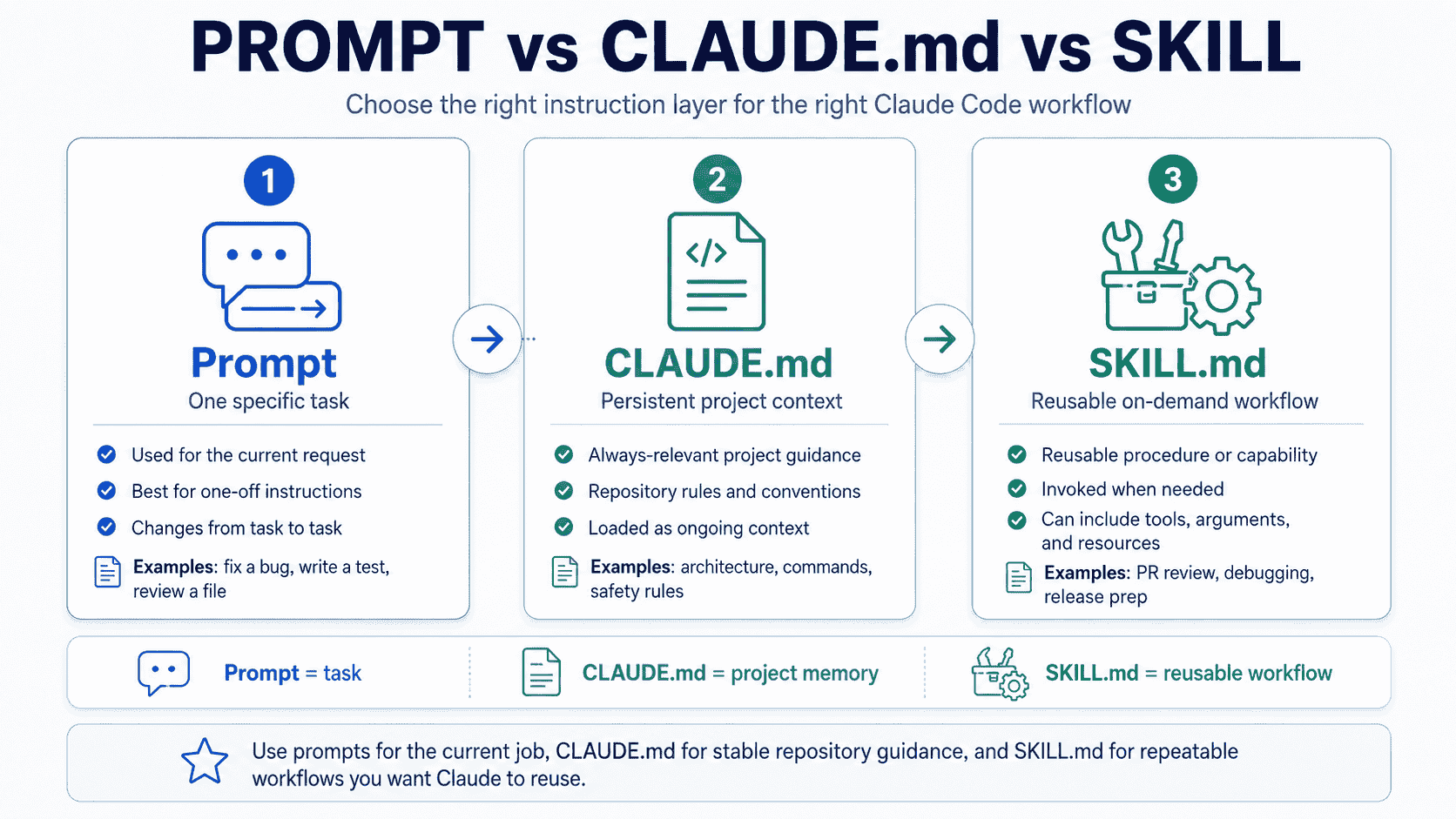
A one-time prompt can communicate these instructions for one task. A CLAUDE.md file can keep stable project context available across sessions. However, neither is always the best place for a detailed procedure that should be reused only when a certain type of work occurs.
Claude Code Skills solve that problem.
A Skill packages reusable instructions inside a directory whose entry point is SKILL.md. It can also include scripts, templates, examples, references, and other resources. Claude can discover the Skill automatically when a request matches its description, or you can invoke it directly with a command such as /review-pull-request.
This makes Skills useful for turning repeated development playbooks into reusable capabilities.
Instead of pasting the same debugging checklist into every conversation, you can create a debugging Skill. Instead of keeping a long release procedure permanently loaded in CLAUDE.md, you can package it as an on-demand release Skill. Instead of asking Claude to remember the output format for every review, you can define that format once in SKILL.md.
This guide explains how Claude Code Skills work, how they differ from prompts and project instructions, how to structure an effective SKILL.md, and how to create reusable Skills for feature planning, repository exploration, debugging, testing, pull request review, migrations, security, APIs, interfaces, documentation, dependencies, releases, incidents, and complete software tasks.
Quick Answer
A Claude Code Skill is a reusable folder containing a required SKILL.md file and optional supporting resources.
A portable Skill usually begins with:
---
name: review-pull-request
description: Review a pull request for correctness, security, compatibility, maintainability, and missing tests. Use when asked to inspect a pull request or determine whether a change is ready to merge.
---

# Pull Request Review

## Objective

Review the current pull request without modifying files.

## Process

1. Read the original task and pull request description.
2. Inspect the complete diff.
3. Read relevant surrounding code.
4. Trace affected callers and dependencies.
5. Review correctness, security, compatibility, and tests.
6. Prioritize findings by severity.
7. Return a merge-readiness verdict.
Store project Skills in:
.claude/skills/<skill-name>/SKILL.mdStore personal Skills that should be available across local projects in:
~/.claude/skills/<skill-name>/SKILL.mdThe directory name becomes the command used for project and personal Skills. For example:
.claude/skills/review-pull-request/SKILL.md

/review-pull-request
Key Takeaways
- Use prompts for one-time tasks, persistent instruction files for stable project context, and Skills for reusable on-demand procedures or knowledge.
- A Skill is a directory, not only a Markdown file. It can bundle scripts, references, examples, templates, and assets.
- Use both
nameanddescriptionfor portable Agent Skills, even though Claude Code can infer some missing metadata. - The description is part of the activation mechanism. It should explain what the Skill does and when Claude should use it.
- Keep the main
SKILL.mdfocused. Move detailed references and deterministic operations into supporting files. - Use
disable-model-invocation: truefor actions that should run only when explicitly requested, especially deployment, commits, releases, or other side-effecting workflows. - Use
allowed-toolscarefully. It grants approval for listed tools during the invoking turn; it is not merely documentation. - Use arguments to make one Skill reusable for different issues, files, branches, components, or environments.
- Use
context: forkwhen a Skill should run as an isolated task rather than consume the main conversation context. - Use dynamic context injection when the Skill needs current repository data such as a diff, branch name, test output, or pull request metadata.
- Use hooks when an action must run deterministically on a lifecycle event rather than relying on Claude to remember a procedural instruction.
- Evaluate Skills for both activation accuracy and output quality. A Skill that triggers successfully can still produce weak results.
Table of Contents
- What Are Claude Code Skills?
- Why Use Skills Instead of Repeating Prompts?
- Claude Code Skills vs. CLAUDE.md
- Claude Code Skills vs. AGENTS.md
- Claude Code Skills vs. Subagents and Hooks
- Where Claude Code Skills Are Stored
- Anatomy of a SKILL.md File
- How Claude Discovers and Invokes Skills
- How to Create a Claude Code Skill
- Best Claude Code Skills and SKILL.md Examples
- Reusable SKILL.md Templates
- Supporting Files, Scripts, and References
- Passing Arguments to Skills
- Controlling Skill Invocation
- Running Skills With Subagents
- Dynamic Context in Claude Code Skills
- Sharing Skills With a Team
- Weak vs. Strong Claude Code Skills
- Common Skill Design Mistakes
- Using PrompTessor to Improve SKILL.md Instructions
- Claude Code Skill Checklist
- Official Resources
- FAQ
What Are Claude Code Skills?
Claude Code Skills are reusable packages of instructions and resources that extend how Claude performs specialized tasks.
Each Skill is stored in a directory with SKILL.md as its entry point:
review-pull-request/
├── SKILL.md
├── references/
│   └── review-checklist.md
├── examples/
│   └── expected-review.md
└── scripts/
    └── collect-pr-context.sh
The main file contains metadata and instructions. Supporting files may provide:
- Detailed technical references.
- Expected output examples.
- Templates Claude should complete.
- Executable scripts for deterministic operations.
- Assets used when producing files or visual output.
Claude initially needs only enough metadata to understand that the Skill exists and when it may be relevant. The complete instructions load when the Skill is invoked. Supporting files can be read only when the procedure requires them.
This progressive loading model is one of the main advantages of Skills. A detailed release process, migration checklist, or security reference does not need to occupy the active context during unrelated tasks.
Skills Can Package Knowledge or Procedures
A knowledge-oriented Skill may provide conventions Claude should apply while working:
---
name: api-conventions
description: Apply the repository's API naming, validation, error, pagination, and compatibility conventions. Use when creating or modifying API endpoints.
---

# API Conventions

- Validate external input at the request boundary.
- Use the existing error response helpers.
- Preserve documented response structures.
- Include pagination for collection endpoints.
- Perform authorization before loading protected resources.
A task-oriented Skill may define a multi-step action:
---
name: prepare-release
description: Prepare a release candidate, validate the repository, update release documentation, and produce a release-readiness report. Use when explicitly asked to prepare a release.
disable-model-invocation: true
---

# Release Preparation

1. Confirm the target version.
2. Inspect changes since the previous release.
3. Run the required validation commands.
4. Update the changelog and version references.
5. Identify migration and compatibility risks.
6. Produce a release-readiness report.
7. Do not publish or deploy without approval.
Skills Follow an Open Format
Claude Code Skills follow the Agent Skills format, which makes the core directory and SKILL.md structure portable across compatible tools.
Claude Code also adds its own runtime features, including:
- Direct slash-command invocation.
- Automatic invocation controls.
- Arguments and string substitutions.
- Tool approval fields.
- Path-specific activation.
- Dynamic shell context injection.
- Forked subagent execution.
- Skill-scoped hooks.
When portability matters, keep the core procedure understandable without relying entirely on Claude Code-specific fields. Add platform-specific behavior only where it provides clear value.
Why Use Skills Instead of Repeating Prompts?
Repeated prompts create several problems.
Repeated Instructions Drift
You may begin with a detailed debugging procedure, then shorten it over time:
Find the bug, fix it, and test it.
The shortened prompt may omit reproduction, root-cause analysis, caller tracing, regression coverage, or a check for related failures.
A Skill preserves the full procedure.
Repeated Prompts Are Hard to Maintain
If the team changes its pull request format or migration process, copied prompts remain scattered across chat history, personal notes, and documentation.
A project Skill gives the workflow one version-controlled location.
Skills Improve Discoverability
A strong description allows Claude to connect a request with the appropriate procedure.
For example, this description communicates both scope and triggers:
description: Review a pull request for correctness, security, compatibility, maintainability, and missing tests. Use when asked to inspect a PR, review a branch diff, identify merge blockers, or determine whether a change is ready to merge.This is more useful than:
description: Reviews code.Skills Can Bundle Deterministic Tools
A prompt can tell Claude to write a migration-report script. A Skill can include a tested script that already performs the operation consistently.
Use scripts when:
- The same code would otherwise be recreated repeatedly.
- The operation requires deterministic behavior.
- Correct escaping, parsing, or transformation is important.
- A known command can produce data more reliably than natural-language reasoning.
Skills Support Progressive Disclosure
The main procedure can remain concise while detailed information stays in supporting files:
security-audit/
├── SKILL.md
├── references/
│   ├── authentication.md
│   ├── authorization.md
│   ├── data-handling.md
│   └── threat-checklist.md
└── examples/
    └── audit-report.md
Claude can load only the reference relevant to the current audit rather than receiving every security document for every coding task.
Claude Code Skills vs. CLAUDE.md
CLAUDE.md and SKILL.md solve related but different problems.
| Question | CLAUDE.md | SKILL.md |
|---|---|---|
| Primary purpose | Persistent project context and instructions | Reusable knowledge or procedure loaded when relevant |
| When it applies | Across many or all tasks in its scope | When invoked manually or matched automatically |
| Best for | Architecture, commands, conventions, safety boundaries | Debugging, review, migration, release, or other repeatable workflows |
| Supporting files | Usually references existing repository documentation | Can bundle references, scripts, examples, templates, and assets |
| Direct command | No dedicated command per section | Can be invoked with /skill-name |
| Isolated execution | Not its primary model | Can run with context: fork |
Put Stable Facts in CLAUDE.md
## Repository

- Use pnpm for package management.
- Put reusable business logic in `services/`.
- Use the authorization helpers in `lib/auth/permissions.ts`.
- Do not edit generated files manually.
- Run `pnpm typecheck` and `pnpm lint` before reporting completion.
Put Reusable Procedures in Skills
---
name: investigate-production-incident
description: Investigate a production incident using a read-only, evidence-first workflow. Use when given an incident, outage, error spike, or production regression to analyze.
context: fork
agent: Explore
---

# Production Incident Investigation

1. Establish the affected service, timeframe, and user impact.
2. Collect available logs, metrics, traces, and deployment history.
3. Build a timeline from evidence.
4. Identify confirmed facts, hypotheses, and missing data.
5. Trace the most likely failure path in the codebase.
6. Recommend safe containment and verification steps.
7. Do not modify production systems.
Move a CLAUDE.md Section When It Becomes a Playbook
A useful rule is:
- If the content states a fact or stable expectation, keep it in
CLAUDE.md. - If the content tells Claude how to perform a multi-step procedure, consider moving it into a Skill.
For a deeper explanation of persistent repository instructions, see the guide to AGENTS.md examples and templates for AI coding agents.
Claude Code Skills vs. AGENTS.md
AGENTS.md is an open repository-instruction format used by several coding tools. SKILL.md is an Agent Skills entry point for reusable capabilities.
The distinction is similar to CLAUDE.md versus Skills:
AGENTS.md
- Use pnpm.
- Keep route handlers thin.
- Run affected tests after application changes.
- Do not modify payment entitlements from the client.

SKILL.md
1. Read the original issue.
2. Inspect the complete branch diff.
3. Trace affected callers.
4. Review authorization and tenant isolation.
5. Run the required checks.
6. Report findings by severity.
7. Return a merge-readiness verdict.
Use AGENTS.md for stable repository instructions that should be available to compatible coding agents. Use Skills for reusable procedures that benefit from on-demand loading, direct invocation, arguments, bundled resources, or specialized execution.
Claude Code Skills vs. Subagents and Hooks
Skills, subagents, and hooks can work together, but they are not interchangeable.
| Extension | Primary role | Use when | Example |
|---|---|---|---|
| Skill | Reusable knowledge or workflow | A task should follow a repeatable procedure | Review a pull request |
| Subagent | Specialized execution context | A task benefits from isolation, a dedicated system prompt, model, or tool set | Security reviewer or repository explorer |
| Hook | Lifecycle automation or enforcement | An action must run when an event occurs | Run a formatter after file edits |
Skill vs. Subagent
A Skill defines what procedure should be followed. A subagent defines a specialized agent environment that can execute a task.
You can combine them in two directions:
- A Skill can run inside a forked subagent using
context: fork. - A custom subagent can preload one or more Skills as reference material.
Skill vs. Hook
A Skill says:
When performing a pull request review, inspect security and run the affected tests.
A hook can ensure a command or check runs when a specific lifecycle event occurs.
Use Skills for procedures that require judgment. Use hooks for operations that must happen deterministically.
Where Claude Code Skills Are Stored
The storage location determines who can use a Skill.
| Scope | Location | Use case |
|---|---|---|
| Personal | ~/.claude/skills/<skill-name>/SKILL.md |
Reusable across your local projects |
| Project | .claude/skills/<skill-name>/SKILL.md |
Shared with one repository |
| Nested project | packages/web/.claude/skills/<skill-name>/SKILL.md |
Specific to a package or subproject |
| Plugin | <plugin>/skills/<skill-name>/SKILL.md |
Distributed as part of a Claude Code plugin |
| Managed | Organization-managed configuration | Available across an organization |
Project Skills
Project Skills should be committed when they represent repository-specific workflows that teammates and coding agents should share.
repository/
├── .claude/
│   └── skills/
│       ├── review-pull-request/
│       │   └── SKILL.md
│       ├── review-migration/
│       │   └── SKILL.md
│       └── prepare-release/
│           └── SKILL.md
├── CLAUDE.md
├── package.json
└── src/
Personal Skills
Personal Skills are appropriate for workflows that reflect how you work across repositories, such as:
- Exploring an unfamiliar codebase.
- Preparing a structured debugging report.
- Simplifying code without changing behavior.
- Reviewing a branch before opening a pull request.
Nested Skills in Monorepos
A monorepo package can define its own Skills:
repository/
├── .claude/skills/deploy/SKILL.md
├── apps/
│   └── web/
│       └── .claude/skills/deploy/SKILL.md
└── services/
    └── payments/
        └── .claude/skills/review-change/SKILL.md
Use nested Skills only when a package needs a genuinely different procedure. Avoid copying the same Skill into several directories because duplicated workflows drift.
Anatomy of a SKILL.md File
A useful SKILL.md normally contains two layers:
- YAML frontmatter that describes and configures the Skill.
- Markdown instructions that define the reusable capability.
Portable Frontmatter
For compatibility with the Agent Skills specification, include:
---
name: review-pull-request
description: Review a pull request for correctness, security, compatibility, maintainability, and missing tests. Use when asked to inspect a PR or determine whether a change is ready to merge.
---
The name should use lowercase letters, numbers, and hyphens. The description should explain both what the Skill does and when it should activate.
Claude Code Frontmatter Options
Claude Code supports additional fields:
| Field | Purpose |
|---|---|
when_to_use |
Add trigger phrases or situations beyond the main description |
argument-hint |
Show expected arguments in autocomplete |
arguments |
Define named positional arguments |
disable-model-invocation |
Prevent Claude from invoking the Skill automatically |
user-invocable |
Hide the Skill from the slash-command menu when set to false |
allowed-tools |
Pre-approve listed tools for the invoking turn |
disallowed-tools |
Remove listed tools while the Skill is active |
model |
Override the model for the invoking turn |
effort |
Override the effort level while the Skill is active |
context |
Use fork to execute in a subagent context |
agent |
Select the subagent type used by a forked Skill |
background |
Control whether a forked Skill returns asynchronously |
hooks |
Define hooks scoped to the Skill lifecycle |
paths |
Limit automatic activation to matching file paths |
shell |
Select Bash or PowerShell for dynamic shell injection |
Recommended Markdown Sections
There is no mandatory body schema, but this structure works well for development workflows:
# Skill Name

## Objective

## Use When

## Required Context

## Process

## Tools and Resources

## Constraints

## Verification

## Output Format
Complete Base Template
---
name: skill-name
description: Explain what this Skill does and when Claude should use it.
argument-hint: "[target]"
---

# Skill Name

## Objective

State the result this Skill should produce.

## Required Context

- Current task or issue
- Relevant repository instructions
- Applicable code and tests
- Any user-provided constraints

## Process

1. Inspect the required context.
2. Confirm the current behavior.
3. Follow the repository's existing patterns.
4. Perform the requested work.
5. Verify the result.
6. Report evidence and limitations.

## Constraints

- Do not invent repository facts.
- Do not modify unrelated files.
- Do not claim checks passed unless they were executed successfully.
- Ask for approval before destructive or external operations.

## Verification

- Run the smallest relevant checks first.
- Run broader checks when shared behavior changes.
- Report commands, results, and anything not verified.

## Output

Return:

- Summary
- Files inspected or changed
- Important decisions
- Verification results
- Assumptions
- Remaining risks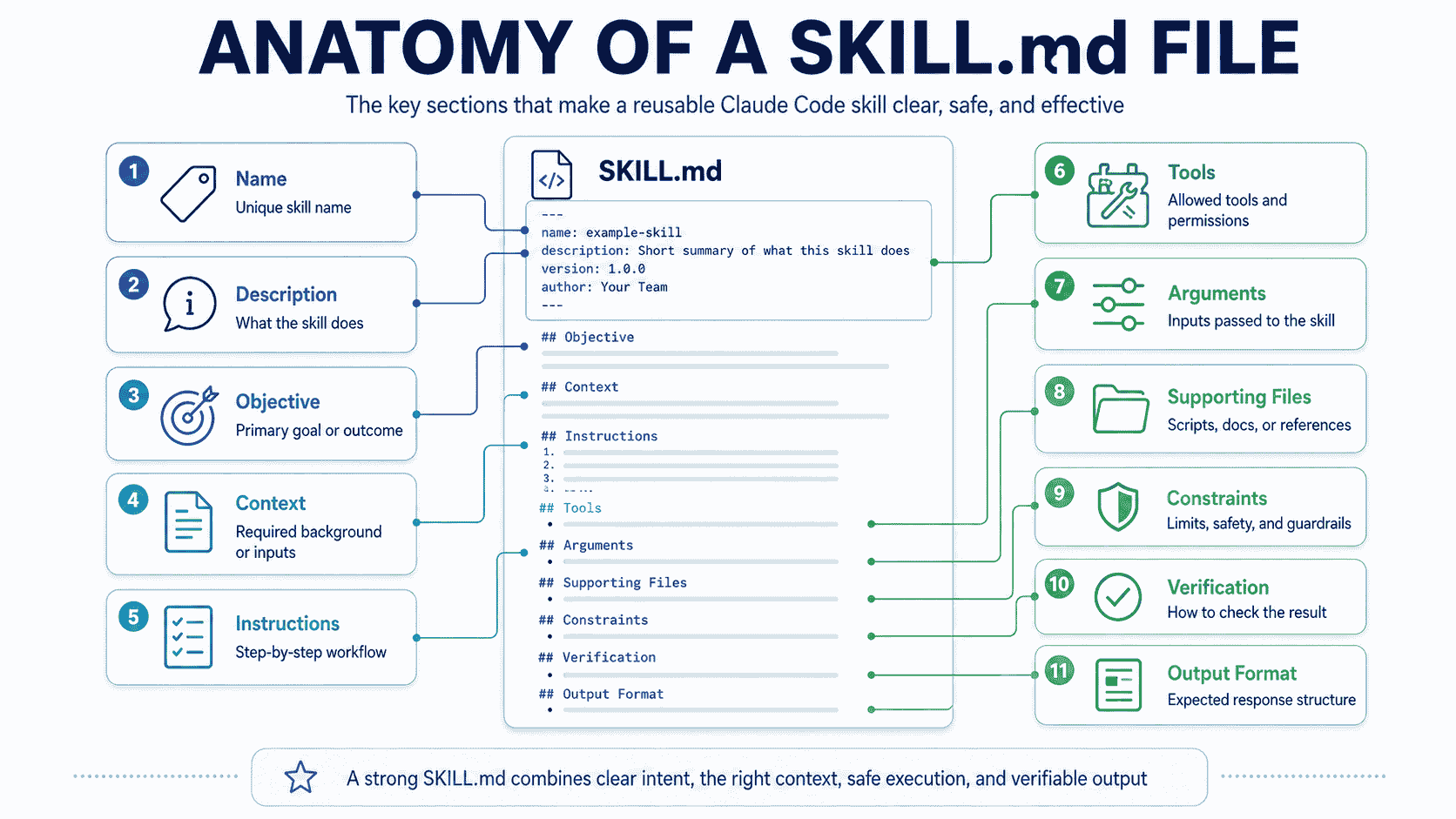
How Claude Discovers and Invokes Skills
Claude Code can use a Skill in two main ways.
Automatic Invocation
Claude sees the Skill metadata and decides whether the current request matches the description.
For example:
description: Investigate bugs by reproducing the issue, tracing the failure path, identifying the root cause, implementing a minimal fix, and adding regression coverage. Use when the user reports a bug, failing behavior, regression, unexpected result, or broken test.Requests such as these may match:
- “This endpoint returns the wrong status after a subscription expires.”
- “Find out why this test began failing.”
- “The dashboard is showing data from another workspace.”
- “Please investigate this regression before changing anything.”
Direct Invocation
You can invoke the Skill explicitly:
/debug-issue subscription cancellation returns 500Direct invocation is useful when:
- You want a specific procedure every time.
- The Skill has side effects.
- The description is intentionally narrow.
- You want to pass arguments.
- You are testing or evaluating the Skill.
Description Quality Determines Discoverability
Weak:
description: Helps with pull requests.Stronger:
description: Review a pull request for requirement coverage, correctness, security, data integrity, backward compatibility, maintainability, and missing tests. Use when asked to review a PR, inspect a branch diff, identify merge blockers, or assess merge readiness.Put the most important scope and trigger terms early. Avoid turning the description into a long instruction body.
Use when_to_use for Additional Triggers
---
name: review-migration
description: Review a database migration for data safety, compatibility, reversibility, locking, backfill, and deployment risks.
when_to_use: Use for schema changes, data migrations, backfills, index changes, destructive SQL, ORM migration files, or database rollout plans.
---
Use paths for File-Specific Activation
---
name: review-payment-change
description: Apply payment-service safety and verification requirements.
paths:
  - "services/payments/**"
  - "packages/billing/**"
---
Path activation can reduce irrelevant triggering in repositories with several frameworks or services.
How to Create a Claude Code Skill
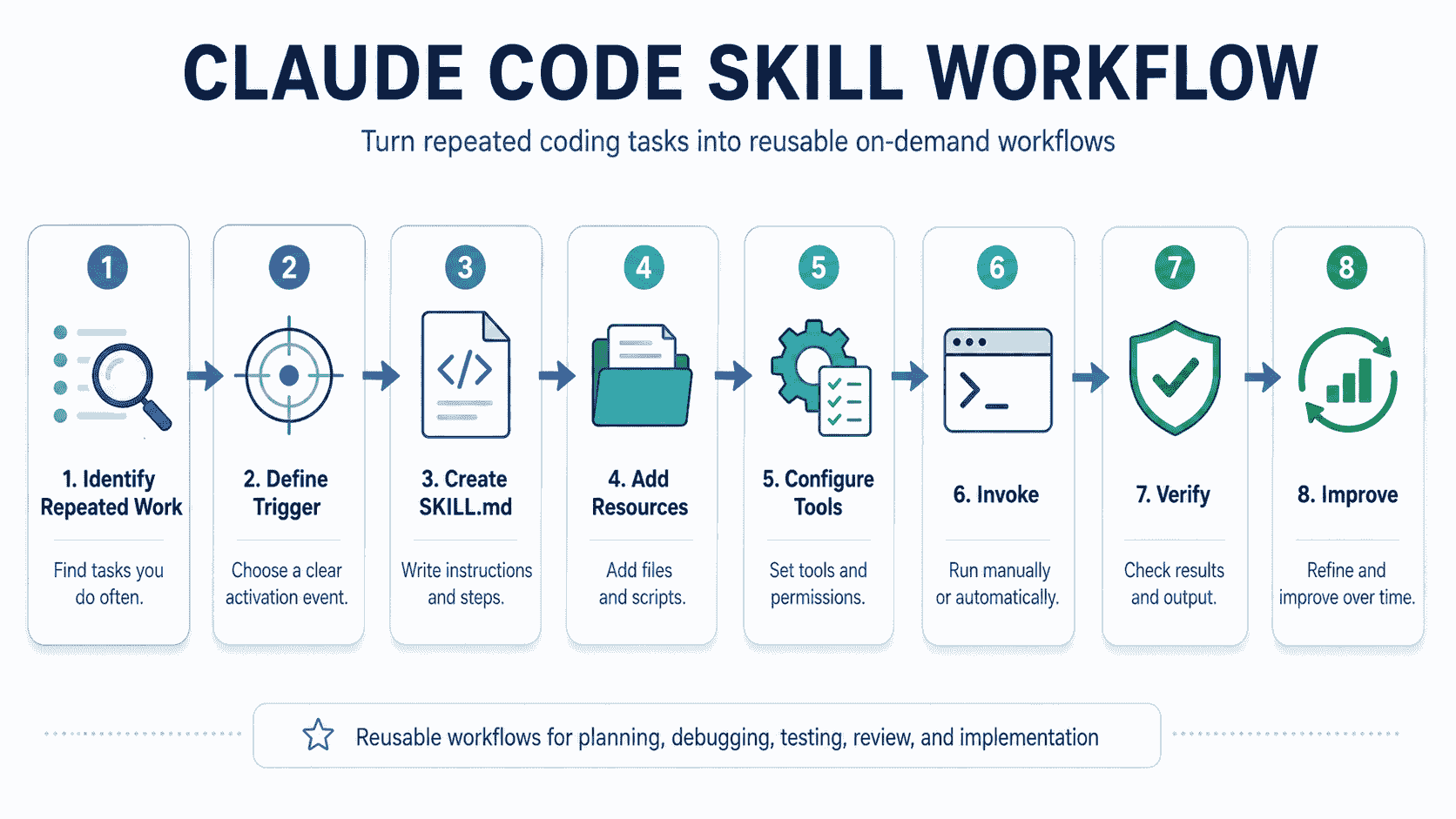
Step 1: Identify Repeated Work
Create a Skill when you repeatedly provide the same:
- Checklist.
- Review criteria.
- Investigation process.
- Implementation sequence.
- Verification procedure.
- Output format.
- Domain reference.
Do not create a Skill for a one-time feature request with no reusable procedure.
Step 2: Define the Trigger
Write down the requests that should activate the Skill and the requests that should not.
For a migration review Skill:
Should trigger:
- Review this Prisma migration.
- Is this schema change safe to deploy?
- Check the backfill and rollback plan.

Should not trigger:
- Explain what a database index is.
- Write a general SQL tutorial.
- Create a local SQLite database for a prototype.
Step 3: Choose the Scope
- Use personal scope for a general workflow you use everywhere.
- Use project scope for repository-specific procedures.
- Use nested scope when a package or service needs different instructions.
- Use a plugin when the Skill should be distributed with agents, hooks, commands, or MCP configuration.
Step 4: Create the Directory
mkdir -p .claude/skills/review-pull-request
touch .claude/skills/review-pull-request/SKILL.md
Step 5: Write Discoverable Metadata
---
name: review-pull-request
description: Review a pull request for correctness, security, compatibility, maintainability, and missing tests. Use when asked to inspect a PR, review a branch diff, identify merge blockers, or determine whether a change is ready to merge.
---
Step 6: Write the Smallest Complete Procedure
Include the steps that materially change the outcome. Remove general commentary that does not affect execution.
Step 7: Add Resources Only When Needed
Move detailed material into:
references/for domain documentation.examples/for representative outputs.scripts/for deterministic operations.assets/for templates or output resources.
Step 8: Test Activation and Output Separately
Test:
- Requests that should activate the Skill.
- Requests that should not activate it.
- Direct invocation.
- Expected output structure.
- Failure cases and missing context.
- Behavior in a fresh session.
Step 9: Compare With and Without the Skill
A Skill should produce a measurable improvement in consistency, completeness, safety, or efficiency.
If the output is not meaningfully better, revise the instructions or remove the Skill.
Best Claude Code Skills and SKILL.md Examples
The 20 examples below are starting points. Replace generic commands, paths, and requirements with evidence from the repository where the Skill will be used. Each example represents a meaningfully different workflow rather than a cosmetic variation of the same template.
| Workflow Category | Examples in This Guide | Primary Goal |
|---|---|---|
| Planning and exploration | Feature planning and repository exploration | Understand scope, architecture, and dependencies before editing |
| Diagnosis and review | Debugging, test failure investigation, pull request review, security audit, accessibility review, and API contract review | Find evidence, identify risks, and report actionable findings |
| Implementation | API implementation, UI implementation, documentation updates, and complete software tasks | Make bounded changes using repository-specific patterns |
| Maintenance and quality | Test generation, dependency upgrades, code simplification, and performance optimization | Improve reliability, compatibility, maintainability, and efficiency |
| Operations and delivery | Migration review, release preparation, incident investigation, and pull request preparation | Reduce operational risk and verify readiness |
1. Feature Planning Skill
---
name: plan-feature
description: Plan a repository-aware software feature before implementation. Use when asked to design, scope, estimate, or prepare an implementation plan for a feature or meaningful behavior change.
argument-hint: "[feature-or-issue]"
context: fork
agent: Plan
---

# Feature Planning

## Objective

Produce an implementation plan for $ARGUMENTS without modifying files.

## Required Context

- Original request or issue
- Relevant repository instructions
- Existing architecture and similar features
- Data, API, interface, security, and compatibility constraints
- Current tests and deployment model

## Process

1. Restate the requested outcome and acceptance criteria.
2. Explore the repository for relevant modules and existing patterns.
3. Trace the current data and control flow.
4. Identify affected interfaces, services, persistence, tests, and documentation.
5. Separate required work from optional improvements.
6. Identify risks, unknowns, migrations, and rollout considerations.
7. Produce an ordered implementation plan with verification steps.

## Constraints

- Do not modify files.
- Do not invent architecture that is not supported by repository evidence.
- Prefer existing abstractions over new systems.
- Flag decisions that require product or engineering confirmation.

## Output

Return:

- Goal and acceptance criteria
- Current implementation summary
- Files and systems likely affected
- Ordered implementation plan
- Testing plan
- Migration and rollout considerations
- Risks and open questions
2. Repository Exploration Skill
---
name: explore-repository
description: Map an unfamiliar repository, locate important entry points, trace a requested behavior, and summarize architecture with file evidence. Use when onboarding to a codebase or before planning work in an unfamiliar area.
argument-hint: "[area-or-behavior]"
context: fork
agent: Explore
---

# Repository Exploration

Explore $ARGUMENTS using read-only analysis.

## Process

1. Inspect repository instructions and top-level files.
2. Identify languages, frameworks, package managers, and build systems.
3. Map major applications, services, packages, and shared libraries.
4. Locate entry points related to the requested area.
5. Trace the relevant control flow and data flow.
6. Identify tests, configuration, generated files, and external integrations.
7. Record uncertainties and conflicting documentation.

## Output

- Repository overview
- Relevant directory map
- Entry points
- Control and data flow
- Canonical implementations
- Test locations
- Important constraints
- Unknowns requiring confirmation

## Constraints

- Do not modify files.
- Cite specific paths for repository claims.
- Separate confirmed facts from inference.
3. Debugging Skill
---
name: debug-issue
description: Investigate and fix a software bug using reproduction, evidence, root-cause analysis, minimal change, and regression testing. Use for bugs, regressions, failing tests, incorrect behavior, unexpected errors, or broken workflows.
argument-hint: "[issue-description]"
---

# Debugging Workflow

Investigate: $ARGUMENTS

## Process

1. Understand the expected and actual behavior.
2. Reproduce the problem or identify the closest reliable failing signal.
3. Collect logs, errors, failing tests, and relevant runtime context.
4. Trace the failure path through callers, state, data, and dependencies.
5. Form hypotheses and test them against evidence.
6. Identify the root cause before modifying code.
7. Implement the smallest complete fix.
8. Add or update regression coverage.
9. Run focused verification, then broader affected checks.
10. Review the final diff for unrelated changes.

## Constraints

- Do not hide the failure with broad exception handling.
- Do not weaken tests or validation to make the result pass.
- Do not claim reproduction when it was not achieved.
- Distinguish the root cause from secondary symptoms.

## Output

- Reproduction or failing signal
- Root cause
- Fix summary
- Files changed
- Tests added or updated
- Commands and results
- Remaining uncertainty
4. Test Generation Skill
---
name: generate-tests
description: Add meaningful tests for existing or changed behavior using repository conventions. Use when asked to create regression, unit, integration, authorization, validation, compatibility, or end-to-end coverage.
argument-hint: "[target-behavior]"
---

# Test Generation

Create tests for $ARGUMENTS.

## Process

1. Read the implementation and existing nearby tests.
2. Identify public behavior, invariants, and failure boundaries.
3. Select the smallest appropriate test level.
4. Reuse existing fixtures, factories, and helpers.
5. Cover the primary success case.
6. Cover relevant validation, authorization, and error cases.
7. Add regression coverage for any confirmed bug.
8. Run the focused tests and inspect failures.
9. Confirm tests fail for the intended reason without the behavior being tested.

## Constraints

- Test observable behavior rather than private implementation details.
- Keep tests deterministic and independent.
- Do not weaken existing assertions.
- Avoid duplicating coverage without a clear purpose.

## Output

- Behaviors covered
- Test files changed
- Fixtures or helpers used
- Commands and results
- Gaps not covered and why
5. Pull Request Review Skill
---
name: review-pull-request
description: Review a pull request for requirement coverage, correctness, security, data integrity, compatibility, maintainability, and missing tests. Use when asked to inspect a PR, branch diff, patch, or merge readiness.
context: fork
agent: general-purpose
---

# Pull Request Review

## Objective

Review the current pull request without modifying files.

## Required Context

- Original task or issue
- Pull request description
- Current branch diff
- Relevant repository instructions
- Existing tests and architecture

## Process

1. Understand the original requirements.
2. Inspect the complete diff.
3. Read relevant surrounding code.
4. Trace affected callers and dependencies.
5. Review correctness, security, compatibility, and tests.
6. Look for accidental behavior changes and missing migration steps.
7. Prioritize findings by severity.
8. Return a merge-readiness verdict.

## Output

For each finding, report:

- Severity
- File and location
- Evidence
- Impact
- Recommended correction
- Verification method

Finish with:

- Requirement coverage
- Tests reviewed
- Merge-readiness verdict
- Remaining risks

## Constraints

- Do not modify files.
- Do not invent defects without evidence.
- Separate confirmed problems from possible concerns.
- Avoid style-only comments unless they affect correctness or maintainability.
6. Pull Request Preparation Skill
---
name: prepare-pull-request
description: Inspect a branch, validate its changes, identify unrelated edits, and prepare a structured pull request summary. Use before opening or updating a pull request.
disable-model-invocation: true
allowed-tools:
  - "Bash(git status *)"
  - "Bash(git diff *)"
  - "Bash(git log *)"
---

# Pull Request Preparation

## Process

1. Inspect the branch status and complete diff.
2. Compare the change with the original task.
3. Identify unrelated, generated, or accidental modifications.
4. Confirm required tests and validation have run.
5. Identify user-visible behavior and compatibility impact.
6. Draft a concise title and pull request description.
7. Do not push, commit, or open the pull request without approval.

## Output

- Proposed title
- Problem
- Solution
- Important implementation details
- User-visible changes
- Tests and validation
- Migration or rollout notes
- Risks and follow-up work
- Unrelated changes to remove
7. Database Migration Review Skill
---
name: review-database-migration
description: Review schema changes, data migrations, backfills, and index operations for compatibility, locking, data loss, reversibility, deployment order, and rollback risks. Use when asked to review a database or ORM migration.
paths:
  - "**/migrations/**"
  - "**/prisma/**"
  - "**/schema.sql"
  - "**/schema.rb"
context: fork
agent: Explore
---

# Database Migration Review

## Process

1. Read the migration and current schema.
2. Identify affected tables, records, constraints, and application code.
3. Check compatibility with existing application versions.
4. Evaluate locking, table scans, index creation, and transaction behavior.
5. Check nullability, defaults, backfills, and existing data.
6. Assess reversibility and rollback limitations.
7. Verify deployment order between schema and application changes.
8. Identify monitoring and post-deployment verification.

## Output

- Change summary
- Data-loss risk
- Compatibility risk
- Locking and performance risk
- Backfill requirements
- Rollout order
- Rollback strategy
- Required tests and monitoring
- Verdict: safe, needs changes, or requires manual review

## Constraints

- Do not run migrations.
- Do not assume the database is empty.
- Do not treat a syntactically valid migration as operationally safe.
8. Security Audit Skill
---
name: security-audit
description: Audit code changes or a selected area for authentication, authorization, tenant isolation, input validation, injection, secret handling, unsafe file operations, data exposure, and dependency risks. Use for security reviews or sensitive changes.
argument-hint: "[scope]"
context: fork
agent: general-purpose
effort: high
---

# Security Audit

Audit $ARGUMENTS using evidence from the repository.

## Process

1. Define assets, trust boundaries, actors, and entry points.
2. Trace authentication and authorization separately.
3. Verify tenant and resource ownership checks.
4. Review external input validation and output handling.
5. Inspect database, command, file, template, and network operations.
6. Review secrets, logs, errors, and sensitive data exposure.
7. Check dependency and configuration changes.
8. Identify exploitability, impact, and existing mitigations.
9. Recommend corrections and verification.

## Output

For every finding:

- Severity
- Category
- File and location
- Evidence
- Exploit path or failure scenario
- Impact
- Existing mitigation
- Recommended fix
- Verification method

Finish with audited scope, unreviewed areas, and residual risk.

## Constraints

- Do not claim a vulnerability without evidence.
- Do not expose real secrets or sensitive records.
- Do not make production changes.
- Treat automated scans as evidence, not proof of security.
9. API Implementation Skill
---
name: implement-api-endpoint
description: Implement or modify an API endpoint using repository conventions for authentication, authorization, validation, business logic, errors, compatibility, observability, and tests. Use for API route or service changes.
argument-hint: "[endpoint-or-requirement]"
paths:
  - "app/api/**"
  - "src/api/**"
  - "routes/**"
  - "services/**"
---

# API Implementation

Implement $ARGUMENTS.

## Process

1. Read repository instructions and a canonical nearby endpoint.
2. Confirm the request, response, authentication, and permission requirements.
3. Trace existing domain services and persistence operations.
4. Validate external input at the boundary.
5. Perform authorization before protected reads or mutations.
6. Keep transport code thin and place reusable logic in the established layer.
7. Preserve response and error compatibility unless change is approved.
8. Add success, validation, authorization, and failure tests.
9. Run focused tests, type checking, and linting.

## Constraints

- Do not trust client-supplied identity, roles, prices, limits, or ownership.
- Do not duplicate existing business logic.
- Do not expose internal errors or sensitive data.

## Output

- Endpoint behavior
- Authorization model
- Validation rules
- Files changed
- Compatibility impact
- Tests and results
- Remaining risks
10. UI Implementation Skill
---
name: implement-ui
description: Implement a user interface change using existing design patterns, components, accessibility requirements, responsive behavior, states, and tests. Use for pages, components, forms, dashboards, and visual workflows.
argument-hint: "[interface-requirement]"
paths:
  - "app/**"
  - "components/**"
  - "src/ui/**"
  - "src/components/**"
---

# Interface Implementation

Implement $ARGUMENTS.

## Process

1. Inspect the current page and related components.
2. Identify reusable components, tokens, and layout patterns.
3. Confirm data, interaction, validation, and navigation requirements.
4. Implement semantic and accessible markup.
5. Include loading, empty, success, disabled, and error states where relevant.
6. Preserve keyboard navigation and visible focus behavior.
7. Verify mobile and desktop layouts.
8. Add or update component and end-to-end tests where appropriate.
9. Review the final visual scope for unrelated redesign.

## Constraints

- Reuse existing design-system components.
- Do not introduce a new component library without approval.
- Do not hide protected actions instead of enforcing authorization on the server.
- Do not redesign unrelated surfaces.

## Output

- User flow changed
- Components reused or added
- Accessibility considerations
- Responsive behavior
- States implemented
- Tests and verification
- Known visual limitations
11. Documentation Update Skill
---
name: update-documentation
description: Update technical or user documentation to match current repository behavior. Use when code, APIs, commands, configuration, workflows, or public behavior have changed.
argument-hint: "[changed-behavior]"
---

# Documentation Update

Update documentation for $ARGUMENTS.

## Process

1. Inspect the implemented behavior and related tests.
2. Locate all documentation that describes the affected behavior.
3. Identify outdated commands, examples, links, defaults, and screenshots.
4. Update the smallest complete set of documentation.
5. Prefer verified examples from the repository.
6. Preserve established terminology and style.
7. Check internal links and code samples.
8. Report documentation that remains uncertain.

## Constraints

- Do not document planned behavior as if it already exists.
- Do not copy outdated code from older documentation.
- Do not replace precise instructions with marketing language.

## Output

- Documentation changed
- Behavior documented
- Examples verified
- Links checked
- Remaining documentation gaps
12. Dependency Upgrade Skill
---
name: upgrade-dependency
description: Upgrade a dependency safely by reviewing release notes, compatibility, configuration, transitive impact, code changes, tests, build output, and rollback options. Use when asked to update a package, framework, SDK, runtime, or toolchain.
argument-hint: "[dependency] [target-version]"
arguments:
  - dependency
  - version
disable-model-invocation: true
---

# Dependency Upgrade

Upgrade $dependency to $version.

## Process

1. Confirm the current version, package manager, and supported runtime.
2. Read official release and migration documentation for the target range.
3. Identify breaking changes, deprecations, peer dependencies, and configuration changes.
4. Search the repository for affected APIs and patterns.
5. Update dependency declarations and required code.
6. Regenerate the lockfile using the repository package manager.
7. Run focused tests, full affected tests, type checking, linting, and build checks.
8. Inspect bundle, performance, or deployment impact where relevant.
9. Document rollback and unresolved compatibility risks.

## Constraints

- Do not update unrelated dependencies without justification.
- Do not suppress type errors caused by the upgrade.
- Do not claim compatibility based only on installation success.

## Output

- Version change
- Breaking changes addressed
- Files changed
- Validation results
- Remaining deprecations
- Rollback plan
13. Release Preparation Skill
---
name: prepare-release
description: Prepare and validate a software release candidate, including versioning, changelog, migrations, compatibility, tests, build output, rollout, rollback, and release notes. Use only when explicitly asked to prepare a release.
argument-hint: "[version]"
disable-model-invocation: true
---

# Release Preparation

Prepare release $ARGUMENTS.

## Process

1. Confirm the target version and release scope.
2. Compare changes with the previous release.
3. Identify user-visible changes, fixes, migrations, and breaking behavior.
4. Verify version references and changelog entries.
5. Run the repository's release validation commands.
6. Review migration and deployment ordering.
7. Draft release notes and rollback instructions.
8. Produce a release-readiness verdict.
9. Do not publish, tag, push, or deploy without approval.

## Output

- Release summary
- Included changes
- Breaking and compatibility notes
- Migrations
- Commands and results
- Rollout plan
- Rollback plan
- Release notes draft
- Readiness verdict
14. Production Incident Investigation Skill
---
name: investigate-incident
description: Investigate an outage, production regression, latency spike, elevated error rate, or user-impacting incident using a read-only evidence-first workflow. Use for incident analysis and post-incident investigation.
argument-hint: "[incident-description]"
context: fork
agent: Explore
effort: high
---

# Production Incident Investigation

Investigate $ARGUMENTS.

## Process

1. Establish impact, affected users, services, and timeframe.
2. Collect available logs, metrics, traces, alerts, and deployment history.
3. Build an evidence-based timeline.
4. Identify recent changes and affected dependencies.
5. Trace the likely failure path in the repository.
6. Separate confirmed facts, hypotheses, and missing evidence.
7. Recommend containment, recovery, and verification steps.
8. Identify follow-up fixes and monitoring improvements.

## Constraints

- Use read-only analysis unless explicit approval is provided.
- Do not expose customer data or credentials.
- Do not present correlation as confirmed causation.
- Do not modify production systems.

## Output

- Impact summary
- Timeline
- Confirmed evidence
- Most likely root cause
- Alternative hypotheses
- Containment recommendation
- Recovery verification
- Follow-up actions
- Missing data
15. Code Simplification Skill
---
name: simplify-code
description: Simplify code while preserving public behavior, interfaces, tests, errors, performance characteristics, and security boundaries. Use for focused refactoring, duplication removal, or complexity reduction.
argument-hint: "[file-or-area]"
---

# Code Simplification

Simplify $ARGUMENTS without changing behavior.

## Process

1. Read the target code, callers, tests, and public contracts.
2. Identify unnecessary indirection, duplication, branching, or state.
3. Establish the behavior that must remain unchanged.
4. Propose the smallest simplification.
5. Implement one coherent change at a time.
6. Run focused tests after each meaningful change.
7. Review performance, errors, compatibility, and security boundaries.
8. Remove only abstractions that no longer provide value.

## Constraints

- Do not combine simplification with unrelated feature changes.
- Do not alter public APIs without approval.
- Do not delete tests merely because implementation details changed.
- Do not replace readable code with compressed cleverness.

## Output

- Complexity removed
- Behavior preserved
- Files changed
- Tests and results
- Trade-offs
- Remaining complexity
16. Complete Software Task Skill
---
name: complete-software-task
description: Complete a bounded software task from repository exploration through implementation, verification, diff review, and final reporting. Use for well-defined coding tasks that require a complete engineering workflow.
argument-hint: "[task]"
---

# Complete Software Task

Complete $ARGUMENTS.

## Process

1. Read the task, acceptance criteria, and repository instructions.
2. Inspect the relevant architecture, code, tests, and documentation.
3. Clarify assumptions from evidence before editing.
4. Plan the smallest complete implementation.
5. Implement using existing patterns.
6. Add or update tests for changed behavior.
7. Run focused checks, then broader affected validation.
8. Review the final diff for correctness and unrelated changes.
9. Update documentation when public behavior or workflows changed.
10. Report the completed work with evidence.

## Constraints

- Do not invent requirements.
- Do not modify unrelated files.
- Do not bypass validation, authorization, or failing tests.
- Do not perform destructive, deployment, commit, or external actions without approval.
- Report incomplete verification honestly.

## Output

- Task summary
- Implementation details
- Files changed
- Tests added or updated
- Commands and results
- Acceptance criteria status
- Assumptions
- Known limitations
- Remaining risks
17. Test Failure Investigation Skill
---
name: investigate-test-failure
description: Investigate a failing, flaky, or unexpectedly slow test and identify the evidence-supported root cause. Use when a test command fails, CI reports a regression, or a test behaves inconsistently.
argument-hint: "[test-command-or-failure]"
context: fork
agent: Explore
background: false
---

# Test Failure Investigation

Investigate $ARGUMENTS without weakening the test or changing unrelated behavior.

## Required Context

- Failing command and complete error output
- Test file and production code under test
- Relevant fixtures, mocks, setup, and environment configuration
- Recent changes that may affect the behavior
- Repository testing instructions

## Process

1. Reproduce the smallest relevant failure when possible.
2. Record the exact assertion, exception, timeout, or environmental error.
3. Determine whether the failure is deterministic, flaky, order-dependent, or environment-specific.
4. Trace the test setup and the production behavior it exercises.
5. Compare expected behavior with the current implementation and recent changes.
6. Separate the root cause from secondary symptoms.
7. Recommend the smallest valid correction and the tests needed to prevent regression.
8. Re-run focused checks if a fix is requested.

## Constraints

- Do not delete, skip, quarantine, or weaken a test merely to make the suite pass.
- Do not increase timeouts without evidence that the expected operation legitimately needs more time.
- Do not treat one successful retry as proof that a flaky test is fixed.
- Distinguish confirmed causes from hypotheses.

## Output

- Failure summary
- Reproduction status
- Root cause evidence
- Flakiness or environment assessment
- Recommended correction
- Verification plan
- Remaining uncertainty
18. Accessibility Review Skill
---
name: review-accessibility
description: Review frontend changes for semantic structure, keyboard access, focus behavior, labels, announcements, and common accessibility regressions. Use for interface reviews, component changes, forms, dialogs, navigation, or interactive controls.
paths:
  - "app/**/*.tsx"
  - "app/**/*.jsx"
  - "components/**/*.tsx"
  - "components/**/*.jsx"
  - "src/**/*.vue"
  - "src/**/*.svelte"
context: fork
agent: Explore
background: false
---

# Accessibility Review

## Objective

Review the relevant interface without modifying files during the initial assessment.

## Process

1. Identify the user flows and interactive elements affected by the change.
2. Inspect semantic elements, heading order, landmarks, and document structure.
3. Check keyboard access, tab order, focus visibility, focus trapping, and focus restoration.
4. Review accessible names, labels, descriptions, validation messages, and error associations.
5. Check dialogs, menus, tabs, disclosures, and custom controls against expected interaction patterns.
6. Review dynamic updates for appropriate announcements and state changes.
7. Identify image, icon, media, motion, zoom, and responsive-accessibility concerns.
8. Separate code-confirmed defects from checks requiring rendering, assistive technology, or manual contrast testing.
9. Recommend focused tests and verification steps.

## Constraints

- Do not claim WCAG conformance from source review alone.
- Do not recommend ARIA when a native semantic element provides the correct behavior.
- Do not treat automated checks as a substitute for keyboard and screen-reader testing.
- Prioritize barriers that prevent task completion.

## Output

For each finding, report:

- Severity
- Component and location
- Affected interaction
- Evidence
- User impact
- Recommended correction
- Verification method
19. Performance Optimization Skill
---
name: optimize-performance
description: Investigate and improve a measurable performance problem while preserving behavior. Use for slow pages, expensive queries, high memory use, large bundles, latency regressions, or inefficient background work.
arguments:
  - target
  - metric
argument-hint: "[target] [metric]"
effort: high
---

# Performance Optimization

Improve the performance of $target using $metric as the primary success measure.

## Process

1. Define the affected workflow, environment, baseline, and acceptable target.
2. Reproduce or measure the problem before proposing changes.
3. Identify the dominant cost using available profiles, traces, query plans, bundle reports, or timing data.
4. Trace the relevant call path and data flow.
5. Rank possible changes by expected impact, implementation risk, and measurement confidence.
6. Implement the smallest high-confidence improvement when implementation is requested.
7. Measure the same scenario again under comparable conditions.
8. Check correctness, resource trade-offs, cache behavior, and regression risk.
9. Add or update performance guards when the repository supports them.

## Constraints

- Do not optimize from intuition alone when measurement is available.
- Do not trade correctness, accessibility, security, or maintainability for a small unverified gain.
- Do not compare measurements from materially different environments without noting the limitation.
- Do not claim improvement without before-and-after evidence.

## Output

- Performance problem
- Baseline
- Dominant bottleneck
- Change made or recommended
- Before-and-after result
- Correctness verification
- Trade-offs
- Remaining bottlenecks
20. API Contract Review Skill
---
name: review-api-contract
description: Review an API change for request and response compatibility, schemas, errors, authentication, pagination, versioning, and consumer impact. Use when modifying endpoints, OpenAPI files, SDK-facing behavior, webhooks, or shared API types.
paths:
  - "openapi/**"
  - "app/api/**"
  - "src/api/**"
  - "routes/**"
  - "schemas/**"
context: fork
agent: Explore
background: false
---

# API Contract Review

## Objective

Determine whether the proposed API change is correct, documented, testable, and safe for existing consumers.

## Required Context

- Original requirement or issue
- Current and proposed request and response contracts
- Authentication and authorization behavior
- Existing consumers, SDKs, integrations, and tests
- Versioning and deprecation policy

## Process

1. Identify every externally observable contract change.
2. Compare required fields, optional fields, types, defaults, nullability, and validation behavior.
3. Review status codes, error shapes, headers, pagination, filtering, sorting, and idempotency.
4. Trace authentication, authorization, ownership, rate limits, and tenant boundaries.
5. Check backward compatibility for existing callers and stored data.
6. Review webhook or event changes for signature verification, ordering, retries, and duplication.
7. Confirm that schemas, examples, generated clients, tests, and documentation remain aligned.
8. Classify changes as compatible, conditionally compatible, or breaking.
9. Recommend migration, versioning, rollout, and verification steps.

## Constraints

- Do not assume undocumented consumer behavior is safe to break.
- Do not approve a contract only because server-side tests pass.
- Do not expose internal errors or sensitive fields through a revised response.
- Separate confirmed incompatibilities from possible consumer risks.

## Output

- Contract changes
- Compatibility assessment
- Security and data-boundary findings
- Affected consumers
- Required tests and documentation
- Migration or versioning plan
- Merge-readiness verdict
Reusable SKILL.md Templates
The detailed examples above can be adapted directly, but most development Skills follow a small number of reusable patterns. Start with the pattern that matches the workflow, then add repository-specific context, commands, constraints, and output requirements.
| Template | Use It For | Important Configuration |
|---|---|---|
| Read-only review | PR review, security review, architecture review, and migration analysis | Forked context, explicit evidence, and no file modification |
| Bounded implementation | Features, fixes, APIs, interfaces, and documentation | Acceptance criteria, repository patterns, and required verification |
| Manual side-effect workflow | Commits, releases, deployments, and external messages | disable-model-invocation: true and narrow permissions |
| On-demand reference knowledge | Legacy systems, internal APIs, domain policies, and architecture context | user-invocable: false and progressive disclosure |
Template 1: Read-Only Review Skill
---
name: review-target
description: Review a target for correctness, risks, compatibility, and missing verification. Use when asked to assess whether a change is ready.
argument-hint: "[target]"
context: fork
agent: Explore
background: false
---

# Review Target

Review $ARGUMENTS without modifying files.

## Process

1. Understand the original requirement.
2. Inspect the complete change and relevant surrounding code.
3. Trace affected callers, data, permissions, and tests.
4. Report only evidence-supported findings.
5. Prioritize findings by user and operational impact.
6. Return a readiness verdict.

## Output

For each finding:

- Severity
- Location
- Evidence
- Impact
- Recommended correction
- Verification method
Template 2: Bounded Implementation Skill
---
name: implement-task
description: Implement a bounded repository task using existing architecture and verification practices. Use for well-defined feature work or bug fixes.
argument-hint: "[task]"
---

# Implement Task

Implement $ARGUMENTS.

## Process

1. Read the requirement and acceptance criteria.
2. Inspect repository instructions and similar implementations.
3. Plan the smallest complete change.
4. Implement without unrelated refactoring.
5. Add or update tests for changed behavior.
6. Run focused checks and broader affected validation.
7. Review the final diff.
8. Report evidence and limitations.

## Constraints

- Preserve public behavior unless the task requires a change.
- Do not bypass security, validation, or failing tests.
- Ask before destructive or external operations.
Template 3: Manual Side-Effect Skill
---
name: perform-controlled-action
description: Perform a controlled operational action after completing required checks. Use only when the user explicitly requests the action.
argument-hint: "[target]"
disable-model-invocation: true
allowed-tools:
  - "Bash(git status *)"
---

# Controlled Action

Perform the requested action for $ARGUMENTS.

## Before Acting

1. Confirm the target and current state.
2. Run the required verification.
3. Show the planned action and relevant risks.
4. Stop when approval, credentials, or required checks are missing.

## Constraints

- Do not infer authorization from context.
- Do not broaden the action beyond the supplied target.
- Do not expose secrets or sensitive output.
- Report the final state and verification evidence.
Template 4: On-Demand Reference Skill
---
name: domain-context
description: Provide authoritative context for a specific internal system or domain. Use when work touches the documented architecture, terminology, policies, or integration rules.
user-invocable: false
---

# Domain Context

Use this Skill as supporting knowledge, not as a standalone task.

## Load When Needed

- Read `references/architecture.md` for service boundaries.
- Read `references/contracts.md` for public data and API contracts.
- Read `references/policies.md` for approval and compliance requirements.
- Read `examples/` only when an output pattern is needed.

## Guidance

- Prefer current repository evidence when it conflicts with stale examples.
- Identify contradictions between supporting files and the codebase.
- Do not convert policy guidance into a claim of technical enforcement.
Supporting Files, Scripts, and References
A Skill directory can contain more than SKILL.md.
References
Use references/ for detailed information that Claude does not need on every invocation.
review-payment-change/
├── SKILL.md
└── references/
    ├── provider-events.md
    ├── entitlement-model.md
    ├── retry-behavior.md
    └── security-checklist.md
Tell Claude when to read each file:
## References

- Read `references/provider-events.md` when webhook mappings change.
- Read `references/entitlement-model.md` when plan access or usage limits change.
- Read `references/retry-behavior.md` when processing, cancellation, or retry logic changes.
Examples
Use examples/ when output shape matters.
## Expected Review Format

Read `examples/review-report.md` before writing the final report. Follow its section order, but base all findings on the current change.
Do not let examples become a source of invented findings. They should demonstrate structure, not predetermined content.
Templates
A release Skill may include:
prepare-release/
├── SKILL.md
├── templates/
│   ├── release-notes.md
│   └── rollback-plan.md
└── scripts/
    └── collect-changes.sh
Scripts
Use scripts for deterministic or repeated operations:
- Collecting a branch diff.
- Parsing test reports.
- Validating structured output.
- Generating dependency graphs.
- Checking migration files.
- Rendering a visual report.
Reference a bundled script using the Skill directory variable:
---
name: collect-change-report
description: Collect branch and test information for a change report.
allowed-tools: Bash(${CLAUDE_SKILL_DIR}/scripts/collect.sh *)
---

Run:

`${CLAUDE_SKILL_DIR}/scripts/collect.sh ${CLAUDE_PROJECT_DIR}`
Keep References Shallow
Prefer direct references from SKILL.md to supporting files. Deep chains such as SKILL.md → reference A → reference B → reference C make discovery less reliable and maintenance harder.
Passing Arguments to Skills
Arguments allow one Skill to handle different targets.
All Arguments
---
name: fix-issue
description: Investigate and fix a specified issue.
disable-model-invocation: true
---

Fix $ARGUMENTS following the repository's debugging workflow.
/fix-issue GitHub issue 184Indexed Arguments
---
name: migrate-component
description: Migrate a component between frameworks while preserving behavior and tests.
argument-hint: "[component] [source] [target]"
---

Migrate $0 from $1 to $2.

Preserve public behavior, accessibility, tests, and visual states.
/migrate-component SearchBar React VueNamed Arguments
---
name: upgrade-dependency
description: Upgrade a dependency and verify compatibility.
argument-hint: "[dependency] [version]"
arguments:
  - dependency
  - version
disable-model-invocation: true
---

Upgrade $dependency to $version.
Design Arguments Carefully
Arguments should select a target, not replace essential instructions.
Weak:
Do whatever the user says in $ARGUMENTS.Stronger:
Review $ARGUMENTS using the requirements, evidence, severity, and verification format defined below.Controlling Skill Invocation
Not every Skill should be available in the same way.
Available to Both Claude and the User
This is the default and works well for knowledge or safe procedures:
---
name: api-conventions
description: Apply API conventions when creating or modifying endpoints.
---
User-Only Invocation
Use disable-model-invocation: true for actions whose timing or side effects should remain under explicit control:
---
name: deploy-production
description: Validate and deploy the application to production.
disable-model-invocation: true
---
Common examples include:
- Commits.
- Pushes.
- Deployments.
- Production migrations.
- External messages.
- Release publication.
- Destructive cleanup.
Claude-Only Invocation
Use user-invocable: false for background knowledge that is useful when relevant but does not represent a meaningful command:
---
name: legacy-auth-context
description: Explain the legacy authentication flow and compatibility boundaries. Use when modifying sessions, tokens, account migration, or login compatibility.
user-invocable: false
---
Tool Approval
allowed-tools grants listed tools without a separate approval prompt during the invoking turn.
---
name: inspect-git-change
description: Inspect the current branch and summarize changes.
allowed-tools:
  - "Bash(git status *)"
  - "Bash(git diff *)"
  - "Bash(git log *)"
---
Review project Skills before trusting a repository. A Skill can include shell commands and tool grants, so treat third-party Skills like executable software rather than harmless documentation.
Tool Restrictions
Use disallowed-tools when a Skill must remain read-only or should not interrupt an autonomous workflow:
---
name: read-only-audit
description: Audit the selected code without editing files.
disallowed-tools:
  - Write
  - Edit
---
Do not rely on prose alone for boundaries that require enforcement.
Running Skills With Subagents
Use a forked context when a Skill should perform a focused task without filling the main conversation with every exploration step.
---
name: deep-repository-research
description: Research a repository area thoroughly and return file-based findings.
argument-hint: "[topic]"
context: fork
agent: Explore
---

Research $ARGUMENTS.

1. Find relevant files with search tools.
2. Read the implementation and tests.
3. Trace callers and dependencies.
4. Return findings with specific file paths.
5. Separate facts, inferences, and unknowns.
Use an Explicit Task
A forked Skill becomes the task given to the subagent. General guidance without an action may produce no useful result.
Weak forked Skill:
Use our API conventions.Stronger forked Skill:
Review the current API change against our API conventions and report violations with file evidence.Select the Right Agent
- Use
Explorefor read-only repository research. - Use
Planfor implementation planning. - Use
general-purposefor broader task execution. - Use a custom agent when you need a dedicated system prompt, model, tools, permissions, or persistent memory.
Background vs. Foreground
Forked Skills can run in the background by default in current Claude Code versions. Use:
background: falsewhen the main task must wait for the result or the Skill requires a tool set unavailable to background execution.
Preloading Skills Into a Custom Subagent
A custom subagent can load Skills at startup:
---
name: api-developer
description: Implement API endpoints following repository conventions.
skills:
  - api-conventions
  - error-handling-patterns
---

Implement API endpoints using the preloaded conventions.
Use this when the subagent's role stays stable while the delegated task changes.
Dynamic Context in Claude Code Skills
Dynamic context injection runs a shell command before Claude receives the Skill content and replaces the placeholder with the command output.
Current Git Diff
---
name: summarize-changes
description: Summarize uncommitted changes and identify risks.
allowed-tools: Bash(git diff *)
---

## Current Diff

!`git diff HEAD`

## Task

Summarize the changes, identify likely risks, and list tests that may need updating.
Pull Request Context
---
name: summarize-pull-request
description: Summarize the current pull request and identify risks.
context: fork
agent: Explore
allowed-tools: Bash(gh *)
---

## Pull Request Diff

!`gh pr diff`

## Changed Files

!`gh pr diff --name-only`

## Comments

!`gh pr view --comments`

## Task

Summarize the pull request, identify unresolved review concerns, and report risk areas.
Multi-Line Context
## Environment

```!
node --version
pnpm --version
git status --short
```
Use Dynamic Injection Carefully
Dynamic shell execution happens before Claude sees the instructions. Therefore:
- Use narrow commands.
- Avoid secrets and sensitive output.
- Do not inject unbounded logs or enormous diffs.
- Review third-party Skills before allowing shell execution.
- Use static references when live context is unnecessary.
Dynamic context is useful when the procedure should always begin with current evidence, but it should not replace deliberate repository exploration.
Sharing Skills With a Team
Commit Project Skills
Commit repository-specific Skills under .claude/skills/ so changes can be reviewed alongside code.
A Skill update should be included in the same pull request when related architecture, commands, or workflows change.
Assign Ownership
For sensitive workflows, identify maintainers:
- Payments Skills should be reviewed by payment-system owners.
- Security audit Skills should be reviewed by security owners.
- Release Skills should be reviewed by release maintainers.
- Migration Skills should be reviewed by database owners.
Package Reusable Collections as Plugins
A plugin can distribute Skills together with:
- Custom subagents.
- Hooks.
- MCP servers.
- Commands.
- Other plugin configuration.
Use a plugin when the capability should install as one package rather than requiring users to copy directories manually.
Review Third-Party Skills
Before installing a Skill:
- Read the complete
SKILL.md. - Review scripts and supporting files.
- Look for network calls and sensitive file access.
- Inspect tool grants and shell injection.
- Confirm that behavior matches the stated purpose.
- Test it in a restricted environment.
A malicious or careless Skill can instruct Claude to execute commands, access data, or transmit information. Treat installation as a software supply-chain decision.
Evaluate Before Standardizing
Test the Skill against realistic prompts in fresh sessions. Measure:
- Should-trigger accuracy.
- Should-not-trigger accuracy.
- Output completeness.
- Correctness.
- Token and time overhead.
- Consistency across common task types.
Weak vs. Strong Claude Code Skills
Weak Skill
---
name: code-review
description: Reviews code.
---

Review the code carefully.

- Find bugs.
- Check security.
- Make sure it is clean.
- Test everything.
- Give useful feedback.
This Skill does not define:
- What code should be reviewed.
- Which context is required.
- How to inspect surrounding behavior.
- Which review categories matter.
- How findings should be supported.
- How severity should be determined.
- Whether files may be modified.
- What the final verdict should contain.
Strong Skill
---
name: review-pull-request
description: Review a pull request for requirement coverage, correctness, security, data integrity, compatibility, maintainability, and missing tests. Use when asked to inspect a PR, branch diff, patch, or merge readiness.
context: fork
agent: general-purpose
---

# Pull Request Review

## Objective

Review the current pull request without modifying files.

## Required Context

- Original issue and acceptance criteria
- Pull request description
- Complete branch diff
- Relevant repository instructions
- Surrounding implementation and tests

## Process

1. Compare the change with the original requirements.
2. Inspect the complete diff, including generated and configuration files.
3. Read surrounding code and trace affected callers.
4. Review correctness, error behavior, data integrity, and concurrency.
5. Review authentication, authorization, input handling, and sensitive data.
6. Check backward compatibility, migrations, and rollout implications.
7. Review test coverage for success and failure cases.
8. Report only evidence-based findings.

## Output

For each finding:

- Severity
- File and location
- Evidence
- Failure scenario
- Impact
- Recommended correction
- Verification method

Finish with requirement coverage, checks reviewed, and a merge-readiness verdict.

## Constraints

- Do not modify files.
- Separate confirmed defects from concerns that need validation.
- Do not report style preferences as blockers.
- Do not claim tests passed unless they were run.
The stronger Skill defines scope, evidence, process, constraints, and output. This makes the result easier to evaluate and reuse.
Common Skill Design Mistakes
Using a Vague Description
Claude may not know when to load the Skill.
Better approach: Include the task, scope, and realistic trigger language.
Putting Everything in SKILL.md
A long main file consumes context after activation and makes the core procedure harder to find.
Better approach: Keep the workflow concise and move detailed references, examples, and scripts into supporting files.
Creating a Skill for Stable Repository Facts
If Claude needs the information across nearly every task, on-demand loading may be inappropriate.
Better approach: Put stable repository-wide facts in CLAUDE.md or AGENTS.md.
Putting One-Time Requirements in a Skill
A temporary feature specification is not necessarily a reusable workflow.
Better approach: Keep one-time product requirements in the current task, issue, or specification.
Allowing Automatic Side Effects
A deployment or commit Skill should not run merely because Claude thinks the repository is ready.
Better approach: Add disable-model-invocation: true.
Granting Tools Too Broadly
A Skill that pre-approves unrestricted shell access increases risk.
Better approach: Grant only the commands required by the procedure and rely on normal permission settings for everything else.
Using Forked Context for Passive Guidance
A forked Skill needs an actionable task. General conventions alone may produce an empty or irrelevant result.
Better approach: Use inline loading for reference guidance or turn it into an explicit review or implementation task.
Injecting Too Much Dynamic Context
Large diffs, logs, or command output can overwhelm the procedure.
Better approach: Collect only the evidence needed, summarize large data, or instruct Claude to read files directly.
Copying Repository Documentation
Duplicated architecture and command documentation becomes stale.
Better approach: Reference canonical files and include only procedural guidance.
Using Natural Language as Hard Enforcement
“Never deploy without approval” is useful, but it is not a technical permission boundary.
Better approach: Combine Skill instructions with permissions, hooks, credential restrictions, protected environments, and CI.
Not Testing Negative Triggers
A Skill may activate for unrelated requests and introduce unnecessary instructions.
Better approach: Test should-trigger and should-not-trigger prompts separately.
Testing in the Authoring Conversation
The current context may contain explanations that hide missing instructions.
Better approach: Test in fresh sessions and compare performance with the Skill disabled.
Failing to Maintain the Skill
Commands, architecture, tools, and workflows evolve.
Better approach: Review the Skill in the same pull request as the related code or process change.
Using PrompTessor to Improve SKILL.md Instructions
A rough Skill often begins like this:
Review the code carefully, find bugs, make sure it is secure, and check the tests.
The intention is clear to a human, but several operational questions remain unanswered:
- Which change should be reviewed?
- Should Claude modify files?
- Which security boundaries matter?
- Should it read surrounding code and callers?
- How should findings be prioritized?
- What evidence should accompany each finding?
- What determines merge readiness?
PrompTessor can help analyze and improve the instruction before it is placed in SKILL.md.
A practical workflow is:
- Start with the repeated task or correction.
- Define the objective and expected outcome.
- Add the context Claude must inspect.
- Replace vague quality statements with observable steps.
- Add constraints and approval boundaries.
- Define verification requirements.
- Specify an output format that can be evaluated.
- Write a description that explains both capability and activation.
- Remove details that belong in
CLAUDE.md, repository documentation, scripts, hooks, or permissions.
For example, PrompTessor can help transform:
Review this pull request and check everything.into a more useful instruction:
Review the current pull request without modifying files.

Compare the complete diff with the original issue and acceptance criteria. Read relevant surrounding code, trace affected callers, and evaluate correctness, error handling, authentication, authorization, data integrity, backward compatibility, migrations, and tests.

For every confirmed finding, report severity, file and location, evidence, impact, recommended correction, and verification method. Separate confirmed defects from concerns requiring validation, and finish with a merge-readiness verdict.
The same principles used to improve one-time coding prompts also apply to Skills: clarity, specificity, relevant context, constraints, verification, and an explicit output.
For task-level examples, see the guide to Claude Code prompts for building, debugging, testing, and reviewing software.
Claude Code Skill Checklist
Before sharing a Skill, check whether it:
- Represents a reusable procedure or body of knowledge.
- Uses a clear lowercase hyphenated name.
- Has a description explaining what it does and when to use it.
- Includes realistic trigger language.
- Has a clear objective.
- Lists the context Claude must inspect.
- Uses ordered and observable instructions.
- References repository evidence rather than generic assumptions.
- Defines what Claude may and may not modify.
- Defines approval boundaries for external or destructive actions.
- Includes verification requirements.
- Requires honest reporting of skipped or failed checks.
- Defines a predictable output format.
- Keeps the main file concise.
- Moves long references into supporting files.
- Uses scripts for deterministic repeated operations.
- References supporting files directly.
- Uses arguments only for values that legitimately vary.
- Prevents automatic invocation for side-effecting workflows.
- Uses narrow tool grants.
- Uses a forked subagent only when isolation adds value.
- Provides an explicit task when using
context: fork. - Limits dynamic context to relevant and safe output.
- Has been tested with should-trigger prompts.
- Has been tested with should-not-trigger prompts.
- Has been tested in a fresh session.
- Produces better results than the same task without the Skill.
- Has an owner or maintenance process.
- Does not duplicate
CLAUDE.md,AGENTS.md, or canonical documentation. - Uses technical controls where enforcement is required.
Official Resources
- Claude Code Skills Documentation
- Claude Code Subagents Documentation
- Claude Code Hooks Reference
- Claude Code Extension Features Overview
- Agent Skills Specification
- Agent Skills Authoring Best Practices
- Evaluating Agent Skills
- Anthropic Agent Skills Repository
FAQ About Claude Code Skills
What are Claude Code Skills?
Claude Code Skills are reusable directories containing instructions and optional resources that extend Claude with specialized knowledge or workflows. Each Skill uses SKILL.md as its main entry point.
What is SKILL.md?
SKILL.md is the primary file in an Agent Skill. It contains YAML frontmatter for metadata and Markdown instructions describing how Claude should perform the capability.
Where should Claude Code Skills be stored?
Store project Skills under .claude/skills/<skill-name>/SKILL.md. Store personal local Skills under ~/.claude/skills/<skill-name>/SKILL.md. Plugins can package Skills under their own skills/ directory.
How do I invoke a Claude Code Skill?
Invoke a user-accessible Skill with /skill-name. You can also pass arguments after the command. Claude may invoke the Skill automatically when the current request matches its description unless automatic invocation is disabled.
What is the difference between a prompt and a Skill?
A prompt gives instructions for a specific conversation or task. A Skill packages reusable instructions and resources that can be used across tasks and loaded when relevant.
What is the difference between SKILL.md and CLAUDE.md?
CLAUDE.md contains stable project context and instructions that commonly apply across sessions. SKILL.md contains reusable knowledge or procedures that load when invoked or relevant.
What is the difference between SKILL.md and AGENTS.md?
AGENTS.md provides persistent repository instructions for compatible coding agents. SKILL.md defines a reusable capability that can include procedures, scripts, references, arguments, and invocation behavior.
Are name and description required?
The portable Agent Skills specification requires name and description. Claude Code can infer some missing values, but using both fields is the safest choice for discoverability and portability.
How should I write a Skill description?
State what the Skill does and when Claude should use it. Include realistic terms users are likely to use, keep the scope specific, and put the most important trigger information first.
Can Claude invoke Skills automatically?
Yes. Claude can select a Skill when the request matches its metadata. Add disable-model-invocation: true when the Skill must be invoked only by the user.
Can a Skill accept arguments?
Yes. Use $ARGUMENTS for the complete argument string, indexed forms such as $0, or named arguments declared in frontmatter.
Can a Skill run shell commands?
Yes. Claude can execute commands during the workflow, and Claude Code also supports dynamic shell injection that runs before the Skill content is sent to the model. Review Skills carefully because shell execution can create security risk.
What does allowed-tools do?
allowed-tools pre-approves the listed tools during the turn that invokes the Skill. It does not permanently grant access and should be limited to the narrowest required commands.
Can a Skill run in a subagent?
Yes. Add context: fork and optionally select an agent type. The Skill content becomes the task for an isolated subagent.
When should I use a hook instead of a Skill?
Use a hook when an action must run automatically on a lifecycle event, such as formatting after an edit or validating commands before execution. Use a Skill when the workflow requires reusable instructions and model judgment.
Can Skills include scripts and templates?
Yes. A Skill directory may include scripts, references, examples, templates, assets, and other resources. Reference them from SKILL.md so Claude knows when to use them.
How long should SKILL.md be?
Keep it as short as possible while preserving the complete core procedure. Move detailed documentation and examples into supporting files so they load only when needed.
How do I test a Claude Code Skill?
Test realistic prompts that should trigger it, prompts that should not trigger it, direct invocation, expected output, and failure cases. Use fresh sessions and compare results with the Skill enabled and disabled.
Conclusion
Claude Code Skills provide a practical way to turn repeated development instructions into reusable capabilities.
The strongest Skills do more than store a long prompt.
They define:
- When the capability should be used.
- What outcome it should produce.
- Which repository context Claude must inspect.
- Which ordered procedure should be followed.
- Which tools, scripts, references, and templates support the work.
- Which constraints and approval boundaries apply.
- How the result should be verified.
- How evidence, limitations, and risks should be reported.
Use a prompt for a one-time task.
Use CLAUDE.md or AGENTS.md for stable context and repository-wide instructions.
Use SKILL.md when a procedure or body of knowledge should be reusable, discoverable, and loaded on demand.
Begin with one workflow you repeat often, such as debugging, pull request review, migration analysis, or release preparation. Keep the main file focused, add supporting resources only where they improve reliability, and test the Skill against real tasks in fresh sessions.
When a Skill remains specific, evidence-based, and maintained alongside the system it describes, it becomes more than a saved prompt. It becomes a reusable development capability that helps Claude Code work with greater consistency, safety, and precision.
Build better prompts in one workspace
Generate prompts from ideas, analyze and optimize quality, refine with feedback, reverse-engineer content, and save reusable prompts in your Prompt Library.
Try PrompTessor Free