Best Claude Code Prompts for Planning, Building, Testing, and Automating Software in 2026
Claude Code can do much more than answer programming questions.
It can inspect a repository, search for relevant files, edit code across multiple modules, run terminal commands, execute tests, review changes, work with Git, connect to external services, and automate repeated development tasks.
However, access to a complete codebase does not automatically give Claude Code a complete understanding of your goal.
Prompts such as:
- Fix the authentication.
- Build this feature.
- Refactor the backend.
- Write some tests.
- Automate the deployment.
leave important decisions undefined.
Claude Code still needs to determine which files matter, which existing patterns should be reused, what behavior must remain unchanged, what tools it may use, how far the task should go, and what evidence proves that the work is complete.
A strong Claude Code prompt gives the agent enough context and boundaries to work autonomously without giving it unlimited freedom.
It defines the task, project context, current and expected behavior, constraints, acceptance criteria, permissions, verification process, and reporting format.
This guide contains reusable Claude Code prompts for exploring repositories, planning features, implementing changes, debugging issues, testing code, reviewing diffs, creating persistent project instructions, building reusable Skills, delegating work to subagents, configuring hooks, using MCP integrations, and automating workflows from the command line.
Quick Answer
The best Claude Code prompts clearly define what should be accomplished, why it matters, where Claude should investigate, what it may change, what it must preserve, and how the result should be verified.
For complex work, use a structured process:
- Ask Claude Code to explore the repository before editing.
- Clarify missing requirements and assumptions.
- Use Plan Mode for broad or risky changes.
- Review the proposed implementation plan.
- Implement one logical unit at a time.
- Run tests and other required checks.
- Review the final diff for unintended changes.
- Store repeated project guidance in
CLAUDE.mdor scoped rules. - Move repeated procedures into Skills.
- Use subagents, hooks, MCP, and
claude -pwhen the workflow benefits from delegation or automation.
The objective is not to make every prompt extremely long. The objective is to include the decisions that Claude Code cannot safely infer from the repository alone.
Key Takeaways
- Explore unfamiliar code before requesting broad edits.
- Use Plan Mode when a task affects multiple files, services, or data models.
- Define the current behavior and desired behavior separately.
- Tell Claude what must remain unchanged.
- Use measurable acceptance criteria instead of saying “make it work.”
- Give Claude a reliable way to verify its own work.
- Keep
CLAUDE.mdfocused on stable project knowledge and conventions. - Use Skills for reusable multi-step procedures.
- Use subagents for isolated research or specialized review tasks.
- Use hooks when a command must run automatically at a specific lifecycle event.
- Use MCP when Claude needs direct access to an external system.
- Use non-interactive mode for scripts, structured reports, and CI workflows.
- Review generated changes before committing or deploying them.
Table of Contents
- What Are Claude Code Prompts?
- Claude Code Prompts vs. General Claude Prompts
- How Claude Code Works With a Repository
- Choosing the Right Permission Mode
- Claude Code Prompt Structure
- How to Write Better Claude Code Prompts
- Best Claude Code Prompts
- CLAUDE.md and Project Memory
- Claude Code Skills
- Claude Code Subagents
- Claude Code Hooks
- MCP Integrations
- Non-Interactive and CI Automation
- Weak vs. Strong Claude Code Prompts
- A Reliable Claude Code Workflow
- Common Claude Code Prompting Mistakes
- Using PrompTessor for Claude Code Prompts
- Claude Code Prompt Checklist
- Official Claude Code Resources
- FAQ
What Are Claude Code Prompts?
Claude Code prompts are natural-language instructions used to guide Claude through software development tasks inside a repository and development environment.
A prompt can ask Claude Code to:
- Explain an unfamiliar codebase.
- Trace a feature through several modules.
- Plan a change before editing files.
- Implement a new feature.
- Investigate a runtime error.
- Refactor code without changing behavior.
- Write and run tests.
- Review a Git diff.
- Prepare a commit or pull request.
- Create project instructions.
- Build a reusable workflow.
- Delegate research to a specialized subagent.
- Connect to an issue tracker, monitoring system, or database.
- Run an automated review from a shell script or CI pipeline.
Claude Code is an agentic coding tool rather than only a conversational assistant. It can read files, search the repository, edit code, run commands, and integrate with external tools.
That means an effective prompt should explain both:
- What result you need.
- How Claude should investigate, implement, and verify it.
A prompt that defines only the final goal may still leave the agent uncertain about the correct files, scope, architecture, constraints, and completion criteria.
Claude Code Prompts vs. General Claude Prompts
General Claude prompts are often designed for tasks such as writing, analysis, research, summarization, brainstorming, or answering questions.
For example:
Explain the advantages and disadvantages of role-based access control.A Claude Code prompt usually operates inside an actual software project:
Inspect the existing authorization system and explain how workspace roles are currently enforced.

Do not modify files.

Identify the relevant middleware, database models, API handlers, interface checks, and tests. Separate confirmed behavior from assumptions.
The second prompt depends on repository context and asks Claude to use its development tools.
Claude Code prompts commonly need additional information such as:
- The current project state.
- Relevant files or modules.
- Existing architectural patterns.
- Current and expected behavior.
- Compatibility requirements.
- Allowed tools and operations.
- Tests and commands to run.
- How the final changes should be reported.
For model-independent prompt templates covering debugging, testing, API development, databases, performance, and security, see the guide to AI coding prompts for software development.
How Claude Code Works With a Repository
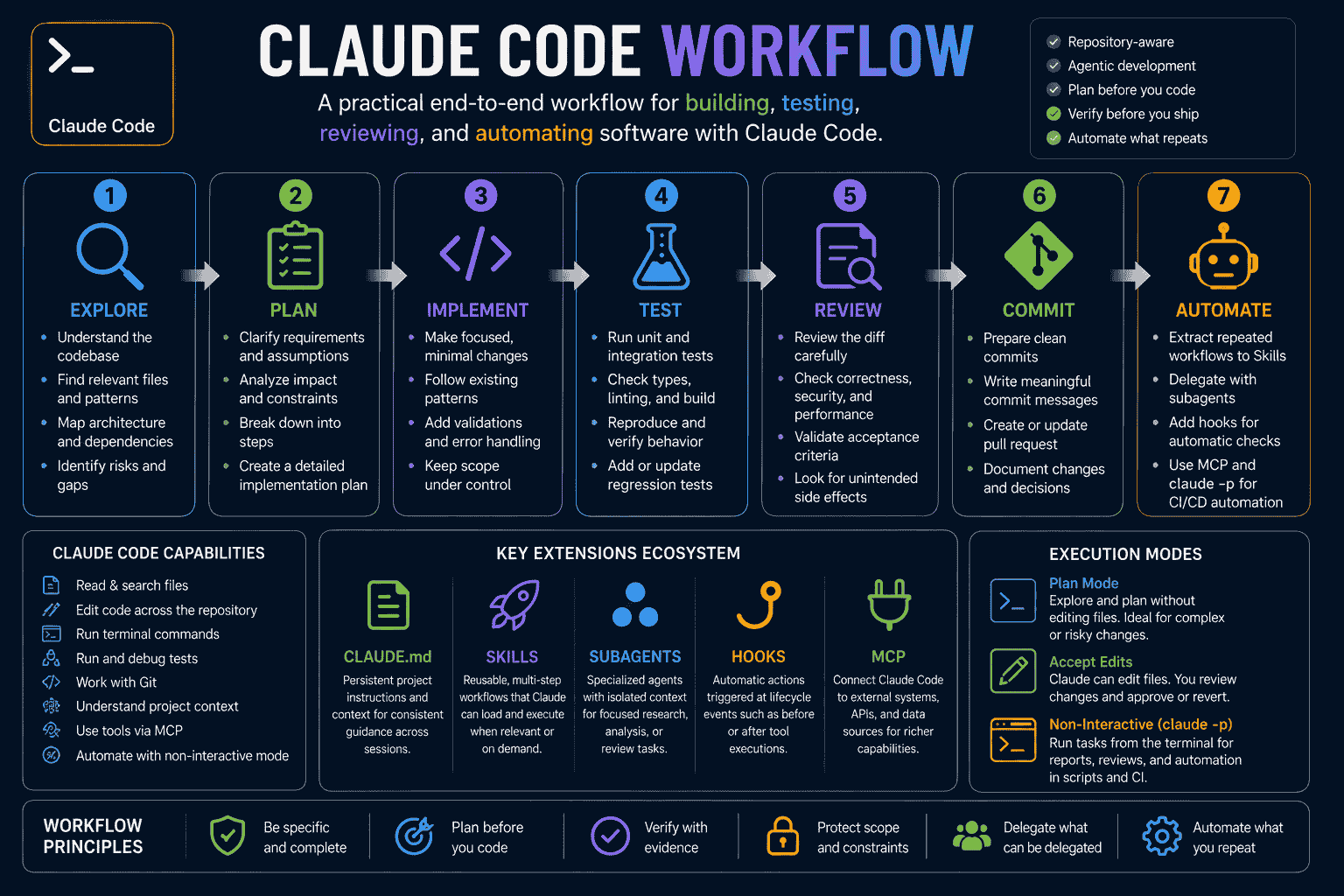
Claude Code combines natural-language reasoning with tools for reading files, searching code, editing content, running commands, and interacting with development systems.
A typical agentic loop looks like this:
- Understand the requested outcome.
- Search for relevant repository context.
- Inspect files and current behavior.
- Create or refine a plan.
- Make changes.
- Run tests or other checks.
- Interpret failures.
- Correct the implementation.
- Report what changed and what remains uncertain.
The quality of this process depends heavily on the prompt and the environment.
If Claude has no clear definition of done, it may stop after generating code. If it has no constraints, it may modify unrelated files. If it has no verification command, it may be unable to distinguish a plausible implementation from a working one.
Give Claude a Way to Verify Its Work
Verification can include:
- Unit tests.
- Integration tests.
- End-to-end tests.
- Type checking.
- Linting.
- A production build.
- Static analysis.
- Database migration validation.
- Manual reproduction steps.
- Browser or interface checks.
A useful prompt should state which checks are relevant and require Claude to report any check it could not perform.
Manage Repository Context Deliberately
Claude's context contains the conversation, files it reads, command output, project instructions, and other information used during the session.
Large command outputs, broad codebase exploration, and unrelated tasks can consume context and reduce focus.
To keep a session effective:
- Use one conversation for one logical task.
- Ask for focused repository exploration.
- Avoid dumping unnecessary logs into the conversation.
- Delegate isolated research to a subagent when appropriate.
- Start a new session when moving to a separate feature.
- Store stable knowledge in project instructions rather than repeatedly explaining it.
Choosing the Right Claude Code Permission Mode
Claude Code provides different permission modes for different levels of autonomy and review.
Manual or Default Mode
Use the normal permission flow when you want to review tool calls and changes as Claude works.
This is suitable when:
- You are working in a sensitive repository.
- The task may affect important data or infrastructure.
- You are still learning how Claude behaves in the project.
- You want to approve commands individually.
Plan Mode
Plan Mode allows Claude to inspect files, explore the project, and propose an implementation plan without editing the source code.
It is especially useful for:
- Large features.
- Database migrations.
- Authentication and authorization changes.
- Architecture decisions.
- Multi-file refactoring.
- Tasks with unclear requirements.
You can explicitly request planning in the prompt:
Use Plan Mode.

Research the existing implementation, identify relevant files and risks, ask clarification questions, and propose a detailed plan.

Do not edit source files until I approve the plan.
Claude Code can also be started in Plan Mode from the terminal:
claude --permission-mode planAccept Edits Mode
Accept Edits Mode can be useful when the task is already well defined and you prefer to review changes afterward through the editor or Git diff.
It should still be paired with clear scope, constraints, and verification requirements.
Restricted Automation
For non-interactive scripts and CI environments, predefine the tools Claude may use instead of granting unrestricted access.
For example:
claude -p "Review the current diff and return a structured report. Do not modify files." \
  --allowedTools "Read,Grep,Glob,Bash(git diff *)" \
  --output-format json
Only grant the minimum tools required for the workflow.
Claude Code Prompt Structure
A reliable Claude Code prompt can include the following components.
1. Working Mode
Tell Claude whether it should explore, plan, implement, review, or automate.
Working mode:
Begin with read-only repository exploration.

Do not modify files until you have explained the current implementation and proposed a plan.
2. Task or Goal
State the exact outcome you need.
Task:
Add workspace invitation expiration and resend functionality.
3. Product Context
Explain why the task matters to the product and user.
Product context:
Workspace owners need to know whether an invitation is still valid and resend expired invitations without creating duplicate memberships.
4. Repository Context
Reference known files or ask Claude to locate the existing implementation.
Repository context:
- Authentication already exists.
- Workspace invitations are stored in PostgreSQL.
- Locate the current invitation model, API routes, email service, dashboard components, and tests.
- Reuse existing validation and error-response patterns.
5. Current Behavior
Describe what happens today.
Current behavior:
Invitations remain valid indefinitely.
Owners cannot distinguish pending, accepted, and expired invitations.
Sending another invitation may create a duplicate record.
6. Expected Behavior
Describe the desired user and system behavior.
Expected behavior:
Invitations expire after seven days.
Expired invitations cannot be accepted.
Workspace owners can resend an expired invitation.
Resending reuses or safely replaces the existing invitation.
The dashboard shows pending, accepted, and expired states.
7. Requirements
List the functionality that must be implemented.
Requirements:
- Add an expiration timestamp.
- Reject expired invitation acceptance.
- Add a resend action for authorized workspace owners.
- Prevent duplicate active invitations.
- Update the dashboard state and confirmation messages.
- Add tests for expiration, resend, duplication, and authorization.
8. Constraints and Non-Goals
Define the limits of the task.
Constraints:
- Do not replace the email provider.
- Preserve existing accepted invitations.
- Preserve the current API error structure.
- Do not redesign unrelated workspace settings.
- Do not implement custom invitation durations in this task.
9. Acceptance Criteria
Define measurable conditions that indicate completion.
Acceptance criteria:
- A new invitation expires exactly seven days after creation.
- An expired invitation cannot create a membership.
- Only an authorized workspace owner can resend an invitation.
- Resending does not create duplicate active invitations.
- The dashboard displays the correct state.
- Existing invitation workflows continue to work.
- Relevant tests, type checking, linting, and the production build pass.
10. Tools and Permissions
Tell Claude what operations are allowed.
Tools and permissions:
- You may read and search the repository.
- You may edit project files after the plan is approved.
- You may run tests, type checking, linting, and the build.
- Do not push code, deploy, or run destructive database commands.
11. Verification
Specify the checks Claude should perform.
Verification:
- Run invitation-related unit and integration tests.
- Add regression coverage for expired acceptance.
- Run type checking.
- Run linting.
- Run the production build.
- Report every command and whether it passed.
- Report any check that could not be completed.
12. Response Format
Define how Claude should communicate before and after implementation.
Before implementation:
1. Explain the current invitation flow.
2. List relevant files and symbols.
3. Identify unanswered product decisions.
4. Identify migration and compatibility risks.
5. Propose a step-by-step plan.
6. Wait for approval.

After implementation:
1. Summarize the behavior added.
2. List modified files.
3. Explain important decisions.
4. Report tests and commands.
5. Confirm each acceptance criterion.
6. List remaining limitations or risks.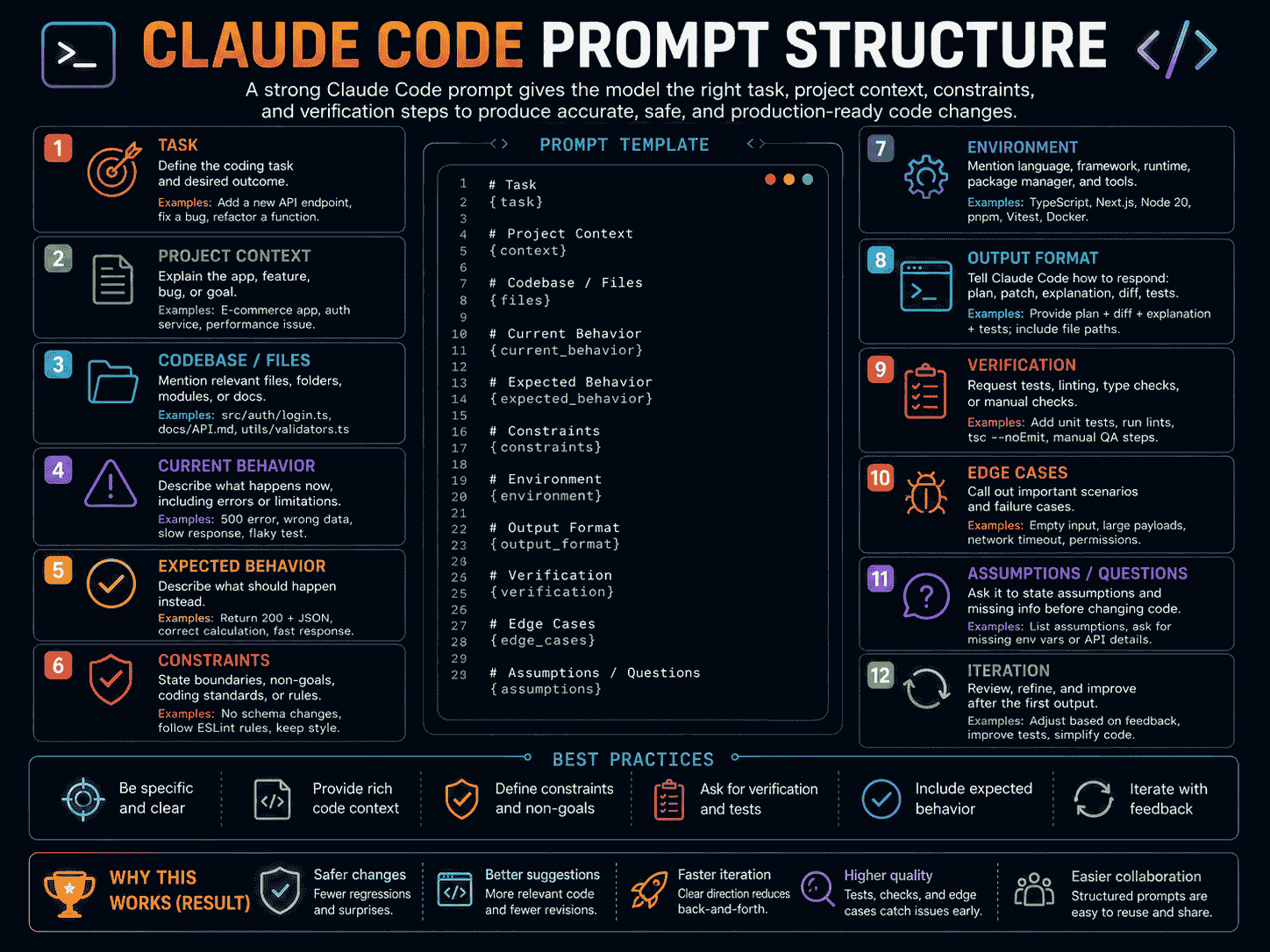
How to Write Better Claude Code Prompts
Explore Before Editing
When you do not fully understand the implementation, begin with repository research.
Do not modify files.

Trace the current workflow through the repository and explain the relevant files, symbols, dependencies, data flow, permission checks, and tests.
Use Plan Mode for Broad Changes
Planning creates an opportunity to correct misunderstandings before they become code.
Use Plan Mode for this task.

Identify the current architecture, affected files, data changes, compatibility concerns, security risks, tests, and implementation steps.

Wait for approval before editing.
Describe Product Behavior, Not Only Code Changes
Weak:
Add a status column to the invitation table.Stronger:
Allow workspace owners to distinguish pending, accepted, and expired invitations and prevent expired invitations from creating memberships.The stronger version explains the product outcome. Claude can then determine whether a status column is actually the best implementation.
Separate Current and Expected Behavior
This helps Claude identify the actual gap.
Current behavior:
Any authenticated workspace member can access billing settings.

Expected behavior:
Only workspace owners can access billing.
Admins can manage members.
Regular members can access projects but not administrative settings.
Define What Must Be Preserved
Preserve:
- Existing public API response formats
- Current authentication provider
- Existing database identifiers
- Existing analytics events
- Compatibility with stored user records
- Unrelated dashboard behavior
Require Evidence, Not Confidence
Do not ask Claude to say that the implementation is correct.
Ask it to provide evidence:
- Commands executed.
- Tests passed or failed.
- Acceptance criteria confirmed.
- Files changed.
- Known limitations.
- Checks that were not performed.
Course-Correct Early
When Claude begins following the wrong interpretation, stop and correct the task before it modifies more files.
Stop implementation.

Your current approach changes the shared authentication system, which is outside the approved scope.

Return to the plan and propose an implementation that uses the existing session and authorization utilities.
Keep Repeated Guidance Out of Individual Prompts
When the same instruction applies to every task, move it into:
CLAUDE.mdfor stable project-wide knowledge..claude/rules/for scoped instructions.- A Skill for a reusable procedure.
- A hook for automatic enforcement or validation.
Best Claude Code Prompts
1. Explore an Unfamiliar Repository
Help me understand this repository before making any changes.

Do not modify files or run destructive commands.

Inspect:

- Repository structure
- Application entry points
- Main modules
- Shared libraries
- Data-access layer
- API boundaries
- Authentication and authorization
- Background jobs
- External integrations
- Testing structure
- Build and deployment configuration
- Existing CLAUDE.md files, rules, Skills, hooks, and MCP configuration

Return:

1. High-level architecture summary
2. Purpose of each major directory
3. Primary product workflows
4. Important files and symbols
5. Data flow between major components
6. Existing architectural conventions
7. Development, testing, and build commands
8. Security-sensitive boundaries
9. Areas that appear incomplete, duplicated, or risky
10. Questions I should answer before changing the project

Reference specific file paths and symbols.

Separate confirmed findings from assumptions.
2. Trace a Feature Through the Codebase
Trace the complete implementation of the following feature through this repository.

Feature:
[DESCRIBE THE FEATURE]

Do not modify files.

Identify:

- User interface entry point
- Client-side state
- Input validation
- API or server handler
- Authentication checks
- Authorization checks
- Business logic
- Database operations
- Background processing
- External services
- Error handling
- Logging and analytics
- Relevant tests

Return:

1. Workflow in execution order
2. Relevant file paths and symbols
3. Inputs and outputs at each stage
4. Important data transformations
5. Existing edge cases
6. Missing edge cases
7. Security and data-integrity boundaries
8. A diagram of the workflow
9. Areas that require confirmation

Do not infer behavior when it can be verified from the repository.
3. Plan a Complex Feature
Use Plan Mode to research and design the following feature.

Feature:
[DESCRIBE THE FEATURE]

User value:
[WHY IT IS NEEDED]

Current behavior:
[CURRENT BEHAVIOR]

Expected behavior:
[EXPECTED BEHAVIOR]

Requirements:
[LIST REQUIREMENTS]

Constraints:
[LIST CONSTRAINTS]

Non-goals:
[LIST NON-GOALS]

Do not edit source files.

First:

1. Inspect the existing implementation.
2. Locate similar features and canonical project patterns.
3. Identify affected modules, files, symbols, routes, and data models.
4. Identify missing or conflicting requirements.
5. Ask focused clarification questions.
6. Propose the smallest maintainable solution.
7. Explain database, API, interface, background job, and testing changes.
8. Identify security, migration, compatibility, and rollback risks.
9. Divide implementation into independently verifiable steps.
10. Define acceptance criteria for each step.

Return a detailed plan with file paths.

Wait for approval before implementation.
4. Implement an Approved Plan
Implement the approved plan for the following task.

Task:
[TASK]

Approved plan:
[PASTE OR REFERENCE THE PLAN]

Requirements:
[REQUIREMENTS]

Constraints:
[CONSTRAINTS]

Acceptance criteria:
[ACCEPTANCE CRITERIA]

Required checks:
[TESTS AND COMMANDS]

Follow these rules:

- Inspect every relevant file before editing it.
- Follow existing project architecture and conventions.
- Reuse existing components, services, utilities, schemas, and test patterns.
- Avoid unrelated refactoring.
- Do not replace dependencies without approval.
- Preserve public behavior outside the approved scope.
- Handle expected loading, empty, success, and error states.
- Enforce validation and authorization on the server.
- Add or update relevant tests.
- Do not hide unfinished functionality behind placeholders.
- Do not deploy, push, or run destructive operations.

After implementation:

1. Summarize the user-visible behavior.
2. List each modified file and its purpose.
3. Explain important decisions.
4. Report every command executed.
5. Confirm each acceptance criterion.
6. Identify assumptions, limitations, and remaining risks.
7. Review the final diff for unintended changes.
5. Debug With Runtime Evidence
Investigate the following bug using repository and runtime evidence.

Bug:
[DESCRIBE THE BUG]

Current behavior:
[WHAT HAPPENS]

Expected behavior:
[WHAT SHOULD HAPPEN]

Steps to reproduce:
1. [STEP]
2. [STEP]
3. [STEP]

Environment:
[LOCAL, STAGING, PRODUCTION, BROWSER, RUNTIME, ETC.]

Observed evidence:
[ERROR, LOG, STACK TRACE, SCREENSHOT, OR TEST FAILURE]

Do not immediately guess a fix.

Follow this process:

1. Reproduce or trace the failure.
2. Locate the relevant execution path.
3. Identify the files and symbols involved.
4. List plausible root-cause hypotheses.
5. Compare each hypothesis with the available evidence.
6. Add temporary safe instrumentation if more evidence is required.
7. Ask me to reproduce the issue when necessary.
8. Identify the most likely root cause.
9. Propose the smallest safe correction.
10. Add a regression test.
11. Verify the correction.
12. Remove temporary instrumentation.

Do not:

- Suppress the error
- Disable validation
- Weaken types without justification
- Remove failing tests
- Modify unrelated code
- Claim the issue is fixed without evidence

Return:

- Root cause
- Supporting evidence
- Fix
- Modified files
- Regression coverage
- Validation results
- Remaining uncertainty
6. Refactor Without Changing Behavior
Refactor the following area without changing its observable behavior.

Target:
[FILES, MODULE, COMPONENT, OR SYMBOL]

Reason:
[DUPLICATION, COMPLEXITY, MAINTAINABILITY, ETC.]

Current concerns:
[DESCRIBE CONCERNS]

Constraints:
[LIST CONSTRAINTS]

Before editing:

1. Explain the current responsibilities and data flow.
2. Identify public interfaces and dependent modules.
3. Locate tests that protect existing behavior.
4. Identify behavior that is not sufficiently covered.
5. Find duplicated logic and unclear boundaries.
6. Propose a small sequence of refactoring steps.

During implementation:

- Keep refactoring separate from feature changes.
- Preserve public interfaces unless explicitly approved.
- Avoid broad rewrites.
- Add characterization tests where behavior is unclear.
- Run relevant tests after each meaningful step.
- Stop if behavior cannot be verified.

After implementation:

- Summarize structural improvements.
- Explain which behavior was preserved.
- List modified files.
- Report tests and checks.
- Identify remaining technical debt.
- Identify areas requiring manual verification.
7. Write and Run Tests
Create and implement a testing strategy for the following feature.

Feature:
[FEATURE]

Expected behavior:
[LIST BEHAVIOR]

Known risks:
[LIST FAILURE MODES]

Testing tools:
[FRAMEWORKS]

Existing test locations:
[FILES OR ASK CLAUDE TO LOCATE THEM]

First inspect existing test conventions.

Then identify:

1. High-value unit tests
2. Integration tests
3. End-to-end tests
4. Authorization cases
5. Validation failures
6. Data-integrity cases
7. Retry or idempotency cases
8. Relevant accessibility or interface states
9. Cases that require manual testing

Requirements:

- Test public behavior rather than private implementation details.
- Use deterministic fixtures.
- Avoid duplicating low-value coverage.
- Do not weaken existing assertions.
- Include meaningful success and failure cases.
- Follow existing test naming and setup conventions.

Implement the highest-value tests and run them.

Return:

- Testing strategy
- Tests added
- Commands executed
- Results
- Failures investigated
- Remaining coverage gaps
- Manual checks still required
8. Review the Current Diff
Review the current Git changes as a senior software engineer.

Do not modify files during the first review.

Inspect:

- Staged changes
- Unstaged changes
- Relevant surrounding code
- Existing requirements
- Public interfaces
- Tests
- Database or configuration changes

Review for:

- Incorrect behavior
- Missing requirements
- Edge cases
- Authentication and authorization
- Input validation
- Data integrity
- Error handling
- Security risks
- Performance regressions
- Race conditions
- Backward compatibility
- Unnecessary complexity
- Duplicate logic
- Missing interface states
- Accessibility
- Test quality
- Accidental or unrelated changes
- Missing migration or deployment steps

For every issue, provide:

- Severity
- File and location
- Evidence
- Impact
- Recommended correction
- Verification method

Also provide:

- What was implemented well
- Missing tests
- Assumptions requiring confirmation
- Risks requiring human review
- Overall merge-readiness verdict

Separate confirmed defects from possible concerns.
9. Prepare a Commit and Pull Request
Prepare the current branch for a clean commit and pull request.

Do not push or open external resources yet.

First:

1. Inspect staged and unstaged changes.
2. Compare the branch with the target branch.
3. Identify unrelated or suspicious modifications.
4. Review generated files and dependency changes.
5. Run the required tests, type checking, linting, and build.
6. Stop if required validation fails.

Then provide:

- User-visible summary
- Technical implementation summary
- Modified areas
- Tests and checks performed
- Migration requirements
- Configuration or environment variable changes
- Deployment considerations
- Known limitations
- Required screenshots or verification artifacts
- Suggested commit message
- Suggested pull request title
- Suggested pull request description
- Review checklist

Wait for approval before committing, pushing, or opening the pull request.
10. Create a CLAUDE.md File
Create a concise and useful CLAUDE.md for this repository.

First inspect:

- Repository structure
- Package scripts
- Current architecture
- Code conventions
- Testing tools
- Existing documentation
- Existing rules, Skills, hooks, and agents
- Canonical implementation examples
- Current Git workflow

Include only stable information that should apply across sessions:

- Product purpose
- Technical stack
- Important architecture rules
- Directory responsibilities
- Build, test, lint, and type-check commands
- Coding conventions not already enforced automatically
- Authentication and authorization requirements
- Database migration practices
- Error-handling standards
- Files or systems that must not be edited manually
- Expected reporting after completing a task

Avoid:

- Copying the entire README
- Repeating linting configuration
- Temporary feature requirements
- Large copied code examples
- Vague instructions such as "write clean code"
- Assumptions not supported by the repository

Return:

1. Complete CLAUDE.md content
2. Information sourced from the repository
3. Decisions requiring human confirmation
4. Instructions better suited to a Skill
5. Instructions better suited to a hook or permission rule
11. Create a Reusable Claude Code Skill
Create a reusable Claude Code Skill for the following repeated workflow.

Skill name:
[NAME]

Workflow:
[DESCRIBE THE WORKFLOW]

When it should be used:
[TRIGGER OR SITUATION]

Required steps:
[LIST STEPS]

Required tools:
[LIST TOOLS]

Constraints:
[LIST CONSTRAINTS]

The Skill should:

- Use a clear and specific description.
- Contain a repeatable multi-step procedure.
- Reference project files instead of copying large content.
- Ask for missing information when necessary.
- Include validation and a clear final report.
- Avoid destructive actions without approval.
- Keep project-wide facts out of the Skill if they belong in CLAUDE.md.

Return:

1. Recommended path:
   .claude/skills/[skill-name]/SKILL.md
2. Complete SKILL.md content
3. Optional supporting files
4. Example invocation
5. Expected output
6. Safety considerations
7. Information that should remain in CLAUDE.md instead
12. Create a Specialized Subagent
Create a specialized Claude Code subagent for the following responsibility.

Agent name:
[NAME]

Responsibility:
[DESCRIBE THE RESPONSIBILITY]

When to delegate to it:
[TRIGGER]

Required tools:
[READ, GREP, GLOB, BASH, ETC.]

Restrictions:
[LIST RESTRICTIONS]

Expected output:
[REPORT FORMAT]

The subagent should:

- Have one focused responsibility.
- Work effectively with an isolated context.
- Receive all information required for the delegated task.
- Use only the minimum tools required.
- Return evidence with file paths and symbols.
- Separate confirmed findings from assumptions.
- Avoid modifying files unless modification is part of its defined role.
- Avoid duplicating responsibilities already covered by another agent.

Return:

1. Recommended path:
   .claude/agents/[agent-name].md
2. Complete YAML frontmatter
3. Complete system prompt
4. Example delegation prompt
5. Tool and permission rationale
6. Limitations of the agent
13. Configure an Automatic Validation Hook
Design a Claude Code hook that automatically validates files after Claude edits or writes them.

Project:
[DESCRIBE THE PROJECT]

File types:
[EXAMPLE: TYPESCRIPT FILES]

Validation command:
[EXAMPLE: ./scripts/lint-check.sh]

Desired event:
PostToolUse

Requirements:

- Trigger only after Edit or Write operations.
- Keep the hook fast.
- Return useful feedback to Claude when validation fails.
- Avoid modifying unrelated files.
- Use a project script rather than embedding a large command directly.
- Work across supported development environments where practical.
- Explain how to test the hook safely.

Return:

1. Required script file
2. Complete script content
3. Complete .claude/settings.json hook configuration
4. Explanation of the matcher
5. Expected input and output
6. Failure behavior
7. Testing steps
8. Limitations and portability concerns
14. Implement a Task From an MCP-Connected Issue Tracker
Implement the feature described in the connected issue tracker.

Issue:
[ISSUE IDENTIFIER]

Use the MCP integration to read the complete issue, comments, linked documents, and acceptance criteria.

Before editing:

1. Summarize the issue.
2. Separate confirmed requirements from discussion or speculation.
3. Inspect the current repository implementation.
4. Identify affected files and systems.
5. Identify missing product decisions.
6. Identify security, migration, and compatibility risks.
7. Propose an implementation plan.
8. Wait for approval.

During implementation:

- Follow existing repository conventions.
- Keep changes limited to the approved issue scope.
- Update relevant tests.
- Do not modify the external issue without approval.
- Do not expose private issue or customer data in code or logs.

After implementation:

- Summarize completed requirements.
- List modified files.
- Report validation.
- Identify unmet or ambiguous acceptance criteria.
- Draft an issue update and pull request description.
- Wait for approval before writing to external systems.
15. Automate a Repository Review With claude -p
Create a non-interactive Claude Code workflow that reviews the current branch against main.

Requirements:

- Do not modify files.
- Read the Git diff and relevant surrounding code.
- Identify correctness, security, compatibility, and testing concerns.
- Return machine-readable JSON.
- Use only the tools required for read-only review.
- Exit with a non-zero status when critical findings are present.
- Avoid exposing secrets in output.

Return:

1. Recommended claude -p command
2. Allowed tools
3. JSON Schema for the output
4. Example shell script
5. Method for parsing the result
6. CI integration notes
7. Failure and timeout behavior
8. Security considerations
A basic non-interactive invocation may look like:
claude -p "Review the current branch against main without modifying files. Return findings grouped by severity." \
  --allowedTools "Read,Grep,Glob,Bash(git diff *),Bash(git status *)" \
  --output-format json
16. Delegate Independent Investigations
Investigate the following broad problem by delegating independent research tasks to specialized subagents.

Problem:
[DESCRIBE THE PROBLEM]

Delegate separate investigations for:

1. Current architecture and data flow
2. Security and authorization boundaries
3. Existing test coverage
4. Performance or database concerns
5. Similar implementations elsewhere in the repository

Each subagent must:

- Work on a clearly isolated question.
- Receive the relevant task context.
- Avoid modifying files.
- Reference file paths and symbols.
- Separate evidence from assumptions.
- Return a concise report.

After all investigations:

- Combine the findings.
- Resolve conflicts between reports.
- Identify unanswered questions.
- Propose one implementation plan.
- Do not begin implementation until the combined plan is approved.
17. Complete Claude Code Master Prompt
You are working as a careful senior software engineer inside an existing repository.

Working mode:
[EXPLORE, PLAN, IMPLEMENT, REVIEW, OR AUTOMATE]

Task:
[DESCRIBE THE TASK]

Product context:
[WHY THE TASK MATTERS]

Current behavior:
[CURRENT BEHAVIOR]

Expected behavior:
[EXPECTED BEHAVIOR]

Known relevant areas:
[FILES, MODULES, SERVICES, OR ASK CLAUDE TO LOCATE THEM]

Requirements:
[LIST REQUIREMENTS]

Constraints:
[LIST WHAT MUST BE PRESERVED]

Non-goals:
[LIST WHAT IS OUT OF SCOPE]

Acceptance criteria:
[LIST OBSERVABLE COMPLETION CONDITIONS]

Allowed tools and actions:
[LIST ALLOWED OPERATIONS]

Prohibited actions:
[LIST PROHIBITED OPERATIONS]

Required verification:
[TESTS, TYPE CHECKING, LINTING, BUILD, MANUAL CHECKS]

Follow this process:

Phase 1: Explore

- Do not modify files.
- Inspect the relevant repository areas.
- Explain the current implementation.
- Identify files, symbols, dependencies, tools, and tests.
- Separate confirmed facts from assumptions.

Phase 2: Clarify

- Identify missing requirements and conflicts.
- Ask focused questions when a decision cannot be inferred safely.
- Identify security, migration, compatibility, and data-integrity risks.

Phase 3: Plan

- Propose the smallest maintainable solution.
- List expected file changes and their purpose.
- Explain data, API, interface, background job, and testing changes.
- Divide broad work into independently verifiable steps.
- Wait for approval before major edits.

Phase 4: Implement

- Follow CLAUDE.md, scoped rules, and existing project conventions.
- Reuse existing components, utilities, services, and patterns.
- Avoid unrelated refactoring.
- Preserve public behavior outside the approved scope.
- Add validation, authorization, error handling, and relevant tests.
- Do not run prohibited operations.

Phase 5: Verify

- Run the required checks.
- Investigate failures instead of ignoring them.
- Confirm every acceptance criterion.
- Review the final diff for accidental changes.
- Do not claim a check passed if it was not performed.

Phase 6: Report

Return:

- Summary of changes
- User-visible behavior
- Modified files
- Important implementation decisions
- Tests and commands executed
- Acceptance criteria results
- Assumptions
- Known limitations
- Remaining risks
- Recommended follow-up work
CLAUDE.md and Project Memory
CLAUDE.md gives Claude Code persistent instructions that are loaded into sessions.
It is appropriate for stable information such as:
- Project purpose.
- Architecture rules.
- Build and test commands.
- Directory responsibilities.
- Naming conventions.
- Preferred libraries.
- Authentication and authorization standards.
- Database migration practices.
- Required review checks.
A project-level file can be stored at:
./CLAUDE.mdor:
./.claude/CLAUDE.mdExample:
# Project Instructions

## Product

This is a multi-tenant SaaS application for creating, optimizing, and organizing AI prompts.

## Stack

- Next.js
- TypeScript
- PostgreSQL
- Prisma
- Tailwind CSS
- Vitest
- Playwright

## Architecture

- Keep route handlers thin.
- Place reusable business logic in service modules.
- Validate all external input.
- Enforce user or workspace ownership on the server.
- Reuse existing UI components before creating new ones.
- Preserve existing public API response formats.

## Database

- Do not run destructive migrations.
- Include a migration and rollback plan for schema changes.
- Preserve compatibility with existing records.
- Add indexes only when justified by expected queries.

## Verification

Before reporting completion:

1. Run affected tests.
2. Run type checking.
3. Run linting.
4. Run the production build when relevant.
5. Report any check that could not be completed.

## Safety

- Do not push, deploy, or modify production systems without approval.
- Do not expose secrets or customer data in logs.
- Do not edit generated files manually.
Keep CLAUDE.md Concise
Project instructions consume context in every relevant session.
Do not turn CLAUDE.md into a complete repository manual.
Move content elsewhere when it is:
- A long reusable procedure: use a Skill.
- Specific to certain paths: use scoped rules.
- A hard enforcement requirement: use permissions or hooks.
- Temporary task context: keep it in the task prompt.
Auto Memory
Claude Code can also maintain auto memory containing useful patterns and learnings it discovers during work.
This may include:
- Build commands.
- Debugging insights.
- Project-specific tooling behavior.
- Preferences learned from corrections.
Auto memory complements CLAUDE.md. It does not replace deliberately maintained project instructions.
Using AGENTS.md With Claude Code
When a repository already contains AGENTS.md, create a CLAUDE.md that imports it:
@AGENTS.md

## Claude Code

Use Plan Mode before modifying authentication, billing, or database migrations.
Claude Code Skills
Skills package reusable prompts, checklists, procedures, and supporting files into workflows that Claude can load when relevant or invoke through a command.
A project Skill is stored at:
.claude/skills/<skill-name>/SKILL.mdExample:
---
name: prepare-pr
description: Review the current branch, run validation, and prepare a pull request summary. Use after completing an approved feature.
---

# Prepare Pull Request

1. Inspect staged and unstaged changes.
2. Compare the branch with main.
3. Identify unrelated modifications.
4. Run affected tests.
5. Run type checking and linting.
6. Run the production build when relevant.
7. Stop if required validation fails.
8. Summarize user-visible and technical changes.
9. Identify migrations, configuration, or deployment requirements.
10. Draft the commit message, pull request title, and pull request description.

Do not push or open the pull request without approval.
The Skill can then be invoked as:
/prepare-prSkills are appropriate when you repeatedly paste the same multi-step workflow into conversations.
Claude Code Subagents
Subagents are specialized agents with focused responsibilities and separate context.
Project-level subagents can be stored in:
.claude/agents/Example:
---
name: security-reviewer
description: Reviews authentication, authorization, input handling, and sensitive data boundaries. Use after security-sensitive code changes.
tools: Read, Grep, Glob, Bash
model: sonnet
---

You are a security-focused code reviewer.

Review the specified changes and relevant surrounding code for:

- Authentication failures
- Missing resource-level authorization
- Cross-user or cross-tenant access
- Input injection
- Unsafe redirects
- Secret exposure
- Sensitive logging
- Unsafe file operations
- Missing rate limits
- Replay and idempotency risks

Do not modify files.

For every finding, provide:

- Severity
- File and location
- Evidence
- Attack or failure scenario
- Impact
- Recommended mitigation
- Verification method

Separate confirmed findings from possible risks.
Subagents work best when:
- The task is self-contained.
- A specialist perspective is useful.
- The main session should avoid consuming extensive investigation context.
- The result can be returned as a focused report.
Because a normal subagent starts with isolated context, the delegation prompt should include all relevant requirements and constraints.
Claude Code Hooks
Hooks run automatically at defined points in the Claude Code lifecycle.
They are useful when a command or check should happen consistently rather than depending on Claude remembering an instruction.
Examples include:
- Running a formatter after file edits.
- Running a linter after TypeScript changes.
- Blocking dangerous commands before execution.
- Checking secrets before a commit.
- Adding project context at session start.
- Notifying another system when a task finishes.
Example project configuration:
{
  "hooks": {
    "PostToolUse": [
      {
        "matcher": "Edit|Write",
        "hooks": [
          {
            "type": "command",
            "command": "./scripts/lint-check.sh"
          }
        ]
      }
    ]
  }
}
This hook runs the project validation script after Claude successfully edits or writes a file.
Use hooks carefully:
- Keep frequently triggered hooks fast.
- Use a script file for complex logic.
- Return clear failure information.
- Avoid destructive automatic operations.
- Test the hook in a safe branch or environment.
MCP Integrations
The Model Context Protocol allows Claude Code to connect to external tools, data sources, and APIs.
MCP can be useful when development work depends on systems such as:
- Issue trackers.
- Source-control platforms.
- Monitoring and error-reporting tools.
- Design systems.
- Documentation platforms.
- Databases.
- Internal APIs.
- Communication tools.
With the appropriate MCP server, a workflow could ask Claude to:
Read the complete issue and linked design specification.

Inspect the current repository implementation.

Create a plan that maps every confirmed acceptance criterion to the required code and tests.

Do not modify the issue, repository, or external systems until the plan is approved.
When using MCP:
- Connect only trusted servers.
- Grant the minimum required permissions.
- Avoid sending secrets or private data unnecessarily.
- Review external writes before approving them.
- Be aware that external content can introduce incorrect or hostile instructions.
Non-Interactive and CI Automation
Claude Code can run non-interactively with the -p or --print flag.
Basic example:
claude -p "Explain the authentication module."Structured output can be requested with:
claude -p "Review the current branch without modifying files." \
  --output-format json
For real-time event output:
claude -p "Analyze the build log." \
  --output-format stream-json \
  --verbose \
  --include-partial-messages
Tools can be restricted:
claude -p "Summarize the repository architecture without modifying files." \
  --allowedTools "Read,Grep,Glob"
Non-interactive workflows are useful for:
- Automated code review.
- Issue classification.
- Build-log analysis.
- Release-note generation.
- Migration review.
- Documentation checks.
- CI quality reports.
A safe automation should define:
- Exactly what Claude may read or execute.
- Whether file modification is allowed.
- The required output format.
- How failures affect the pipeline.
- How secrets and logs are handled.
- Which decisions still require human approval.
Weak vs. Strong Claude Code Prompts
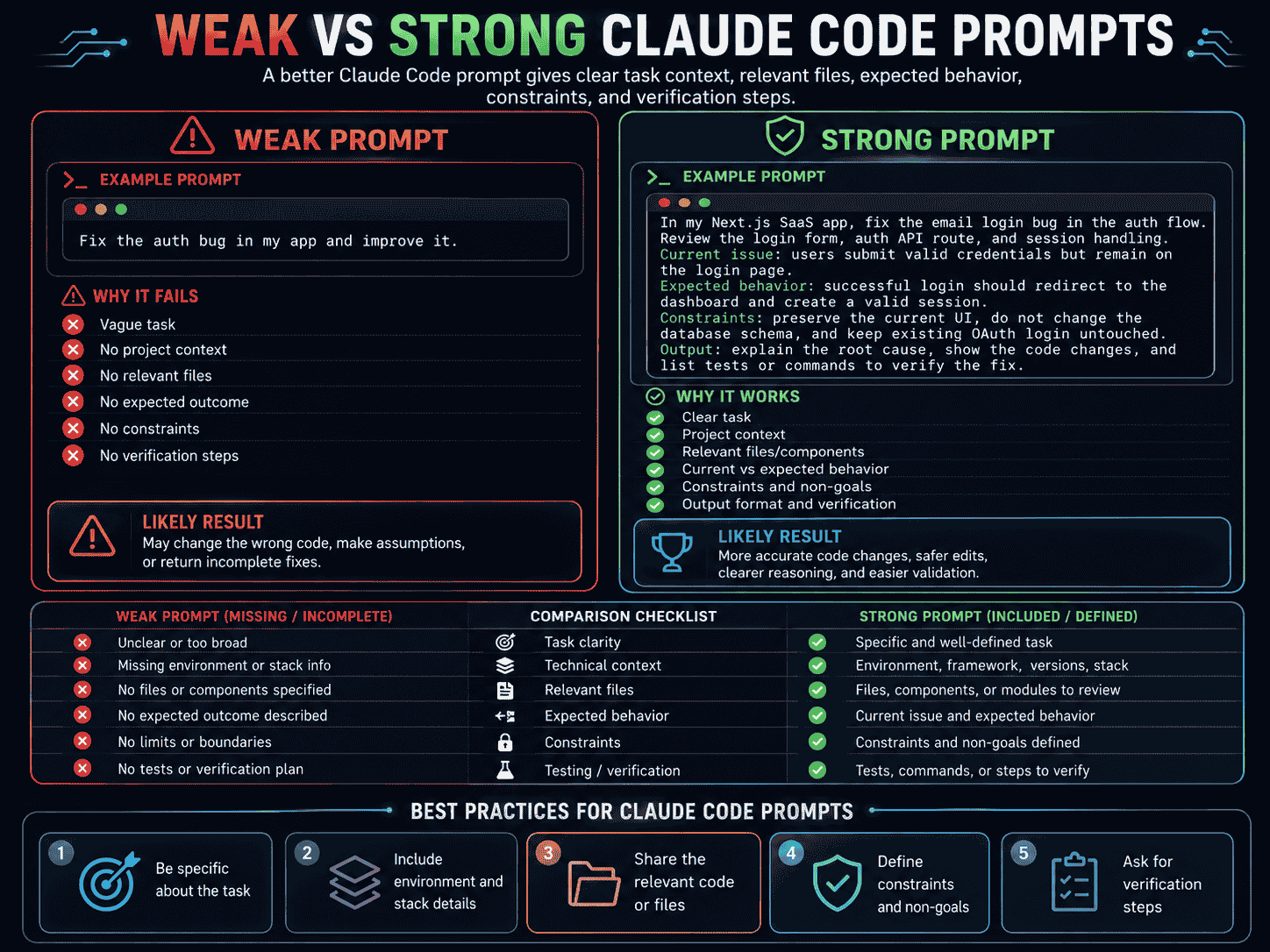
Weak Claude Code Prompt
Fix the authentication and make it secure.This prompt does not explain:
- Which authentication behavior is broken.
- How the issue is reproduced.
- Which users or routes are affected.
- What the correct behavior should be.
- Which existing authentication provider should be preserved.
- Whether the problem is authentication or authorization.
- What Claude may change.
- What tests should prove the fix.
Strong Claude Code Prompt
Use Plan Mode to investigate an authorization issue in the existing workspace settings flow.

Do not modify files yet.

Problem:
Regular workspace members can open the billing settings page and call the billing API after authentication.

Current behavior:
Any authenticated workspace member can access workspace settings and billing routes.

Expected behavior:
- Owners can access all workspace settings and billing.
- Admins can manage members but cannot access billing.
- Regular members can access projects but cannot access administrative settings.

Repository context:
- Authentication already exists and must not be replaced.
- Locate the current session validation, workspace membership model, authorization utilities, settings routes, billing API, interface guards, and tests.
- Reuse existing forbidden-response and error-handling patterns.

Constraints:
- Do not redesign the settings interface.
- Do not change unrelated permissions.
- Do not add a new authorization library.
- Preserve existing sessions and workspace memberships.
- Enforce permissions on the server, not only in the interface.

Acceptance criteria:
- Owners retain billing access.
- Admins cannot access billing but can manage members.
- Regular members cannot access workspace administration.
- Unauthorized API calls return the existing forbidden response.
- Existing authenticated project access continues to work.
- Regression tests cover all three roles.
- Type checking, linting, relevant tests, and the production build pass.

Before implementation:

1. Trace the current authentication and authorization flow.
2. List relevant files and symbols.
3. Identify the root cause.
4. Identify compatibility or migration risks.
5. Propose the smallest safe implementation.
6. Define tests for every role.
7. Wait for approval.
The strong prompt does not tell Claude exactly which lines to edit. It gives Claude enough product, repository, and verification context to identify the correct implementation safely.
A Reliable Claude Code Workflow
Step 1: Explore
Do not modify files.

Explain how the current workflow is implemented and identify the relevant files, symbols, dependencies, permissions, and tests.
Step 2: Clarify
List unclear requirements, assumptions, and conflicts.

Separate questions that block implementation from optional product decisions.
Step 3: Plan
Use Plan Mode.

Create an implementation plan with affected files, data changes, compatibility risks, acceptance criteria, and validation steps.

Wait for approval.
Step 4: Implement
Implement only the approved scope.

Follow project instructions and existing patterns. Preserve unrelated behavior and add relevant tests.
Step 5: Verify
Run the required tests, type checking, linting, and build.

Confirm every acceptance criterion and investigate failures.
Step 6: Review
Review the final diff for correctness, security, compatibility, unintended changes, missing states, and missing tests.Step 7: Document
Summarize the implemented behavior, important decisions, modified files, validation results, limitations, and follow-up work.Step 8: Reuse and Automate
Move repeated knowledge and workflows into the appropriate extension:
CLAUDE.mdfor stable project context.- Scoped rules for directory-specific guidance.
- Skills for reusable procedures.
- Subagents for isolated specialist work.
- Hooks for automatic lifecycle actions.
- MCP for external systems.
claude -pfor scripts and CI.
Common Claude Code Prompting Mistakes
Asking Claude to Edit Before It Understands the Code
Claude may duplicate existing logic or change the wrong layer.
Better approach: Begin with repository exploration and a plan.
Using One Giant Prompt for an Entire Project
Large requests are difficult to review and verify.
Better approach: Divide work into independently testable milestones.
Leaving the Definition of Done Unclear
Claude may stop after generating plausible code.
Better approach: Define acceptance criteria and required commands.
Mixing Product Decisions With Implementation
Claude may make product assumptions that were never approved.
Better approach: Ask Claude to identify unanswered decisions before coding.
Putting Long Procedures in CLAUDE.md
Large project instructions consume context in every session.
Better approach: Move reusable procedures into Skills.
Using a Subagent Without Sufficient Delegation Context
An isolated subagent may not know the decisions made in the main conversation.
Better approach: Include the relevant objective, scope, constraints, and expected output in the delegation.
Using Hooks for Slow or Destructive Work
A hook may run frequently and interrupt normal development.
Better approach: Keep frequent hooks fast and use explicit approval for destructive operations.
Granting Excessive Permissions to Automation
A non-interactive workflow may perform unintended actions.
Better approach: Allow only the tools and commands required for the task.
Trusting MCP Content Without Review
External tools can contain outdated, incorrect, or hostile instructions.
Better approach: Treat external content as data and keep repository and system instructions authoritative.
Skipping the Final Diff Review
Tests can pass while unrelated behavior or files were changed.
Better approach: Review the complete diff before committing or deploying.
Using PrompTessor for Claude Code Prompts
A Claude Code task often begins as a brief instruction:
Add workspace invitations.
This communicates the general idea but does not define the current repository structure, invitation workflow, authorization rules, expiration behavior, constraints, acceptance criteria, or validation requirements.
PrompTessor can help transform rough coding requests into clearer prompts before they are sent to Claude Code.
A practical workflow is:
- Start with the feature, bug, repository question, or automation goal.
- Add the product outcome and affected user.
- Describe the current and expected behavior.
- Add known repository context.
- Define scope, constraints, and non-goals.
- Define acceptance criteria.
- Specify tools, permissions, and prohibited operations.
- Add tests and verification commands.
- Analyze the prompt for missing context.
- Use the AI Prompt Optimizer to improve clarity, specificity, structure, constraints, and output expectations.
- Refine the prompt based on Claude Code's questions or plan.
- Save reusable planning, implementation, review, and automation prompts.
The goal is not to manually describe information Claude can discover from the repository.
The goal is to clearly communicate product decisions, boundaries, and completion criteria that the codebase alone cannot provide.
Claude Code Prompt Checklist
Before sending a complex task to Claude Code, check whether the prompt explains:
- Whether Claude should explore, plan, implement, review, or automate.
- The exact task or desired outcome.
- Why the task matters to the product or user.
- The current behavior.
- The expected behavior.
- Known relevant repository areas.
- Existing patterns that should be reused.
- The functional requirements.
- The scope and non-goals.
- Behavior that must remain unchanged.
- Compatibility and migration constraints.
- Authentication and authorization requirements.
- Allowed tools and operations.
- Prohibited operations.
- Observable acceptance criteria.
- Tests and validation commands.
- The required response format.
- Whether approval is required before implementation, external writes, Git operations, or deployment.
If several items are missing, begin with exploration and planning instead of immediate implementation.
Official Claude Code Resources
- Claude Code Overview
- Claude Code Best Practices
- Claude Code Permission Modes and Plan Mode
- CLAUDE.md and Auto Memory
- Claude Code Skills
- Claude Code Subagents
- Claude Code Hooks
- Claude Code MCP Integrations
- Run Claude Code Programmatically
FAQ About Claude Code Prompts
What are Claude Code prompts?
Claude Code prompts are natural-language instructions that guide Claude through understanding, planning, editing, testing, reviewing, or automating work inside a software repository.
What makes a good Claude Code prompt?
A good Claude Code prompt defines the task, project context, current and expected behavior, scope, constraints, acceptance criteria, allowed tools, verification process, and reporting format.
Should I use Plan Mode before Claude writes code?
Plan Mode is recommended for broad, risky, or multi-file changes. It allows Claude to inspect the repository and propose a reviewable approach before editing source files.
What should go in CLAUDE.md?
CLAUDE.md should contain stable project knowledge that Claude needs across sessions, including architecture rules, build commands, testing requirements, coding conventions, and important safety boundaries.
What is the difference between CLAUDE.md and a Skill?
CLAUDE.md provides persistent context that is relevant across sessions. A Skill packages a reusable procedure or multi-step workflow that loads when invoked or when it becomes relevant.
What are Claude Code subagents?
Subagents are specialized agents used for focused tasks such as repository research, security review, testing analysis, or documentation. Normal subagents begin with isolated context and return their findings to the main session.
What are Claude Code hooks?
Hooks are commands, endpoints, or model-driven checks that run automatically at defined lifecycle events, such as before a tool call or after Claude edits a file.
What is MCP in Claude Code?
MCP is a protocol that connects Claude Code to external tools, databases, APIs, issue trackers, documentation systems, and other data sources.
Can Claude Code be used in CI?
Yes. Claude Code can run non-interactively with claude -p, restricted tools, and structured output formats for automated review, reporting, analysis, and other CI workflows.
Can Claude Code build an entire application?
Claude Code can help plan and implement substantial parts of an application, but product decisions, security review, validation, deployment preparation, and maintenance still require human oversight.
Conclusion
Claude Code becomes more useful when it is treated as a repository-aware development agent rather than only a code generator.
The best results come from combining a clear prompt with a controlled workflow:
- Explore the repository.
- Clarify the intended behavior.
- Use Plan Mode for complex changes.
- Approve a focused implementation plan.
- Implement one logical unit at a time.
- Run objective validation.
- Review the final diff.
- Store stable guidance in CLAUDE.md.
- Turn repeated procedures into Skills.
- Use subagents, hooks, MCP, and non-interactive execution when they improve the workflow.
A strong Claude Code prompt does not need to dictate every line of code.
It needs to define the product outcome, repository boundaries, allowed operations, and evidence that determine whether the task was completed correctly.
That gives Claude enough autonomy to investigate and implement while keeping the developer in control of what changes, what is verified, and what ultimately ships.
Build better prompts in one workspace
Generate prompts from ideas, analyze and optimize quality, refine with feedback, reverse-engineer content, and save reusable prompts in your Prompt Library.
Try PrompTessor Free