Best AGENTS.md Examples for Codex, Cursor, and AI Coding Agents in 2026
AI coding agents can inspect repositories, modify files, run commands, create tests, review diffs, and complete multi-step development tasks.
But every new session may begin with the same unanswered questions:
- How is this repository organized?
- Which package manager should be used?
- Which commands should run after a change?
- Where should new business logic be placed?
- Which architectural patterns should be preserved?
- Which files are generated and should not be edited?
- How should authentication and authorization be enforced?
- What must happen before a task can be considered complete?
You can repeat these instructions in every prompt, but that approach is inefficient and inconsistent.
AGENTS.md provides a predictable place to store repository-specific guidance for AI coding agents.
It works like a README written specifically for agents. Instead of introducing the product to a human visitor, it explains how an agent should understand, modify, test, and review the codebase.
A useful AGENTS.md can document:
- The purpose and architecture of the project.
- Development, testing, linting, and build commands.
- Directory and module responsibilities.
- Coding and naming conventions.
- Authentication, authorization, and data-handling rules.
- Database migration practices.
- Files or systems that must not be changed casually.
- Pull request and verification requirements.
However, a longer instruction file is not automatically a better one.
If AGENTS.md becomes vague, repetitive, outdated, or filled with instructions that do not apply to the current task, important rules become harder for the agent to identify and follow.
This guide explains how AGENTS.md works, what it should contain, what should remain elsewhere, and how to create effective instruction files for applications, APIs, SaaS products, monorepos, security-sensitive systems, and open-source projects.
Quick Answer
AGENTS.md is a plain Markdown file containing persistent instructions for AI coding agents working in a repository.
A strong file usually explains:
- What the project does.
- How the repository is organized.
- How to install dependencies and run the project.
- Which commands verify a change.
- Which architectural and coding patterns should be followed.
- Which behavior or files must be preserved.
- Which security and data boundaries apply.
- How the agent should report completed work.
Keep the root file focused on stable repository-wide instructions. For large repositories, add nested AGENTS.md files only where a subproject needs genuinely different commands, conventions, or restrictions.
Key Takeaways
AGENTS.mdis an open Markdown format rather than a strict configuration schema.- It should contain stable instructions that agents need across many tasks.
- README files remain focused on human contributors, while
AGENTS.mdcan contain agent-specific workflow details. - Build commands, test commands, architecture rules, and safety boundaries are high-value instructions.
- Temporary feature requirements should remain in the task prompt.
- Long reusable procedures are often better placed in Skills or workflow files.
- Security guarantees should be enforced through permissions, hooks, CI, or infrastructure rather than relying only on natural-language instructions.
- Nested files can provide more specific guidance, but support and precedence vary between coding tools.
- Conflicting instructions should be removed rather than left for the agent to interpret.
- Treat
AGENTS.mdas living documentation and update it when the repository changes.
Table of Contents
- What Is AGENTS.md?
- How AGENTS.md Works
- AGENTS.md Support Across Coding Agents
- AGENTS.md vs. README.md
- AGENTS.md vs. CLAUDE.md, Cursor Rules, and Copilot Instructions
- What to Include in AGENTS.md
- What Not to Include
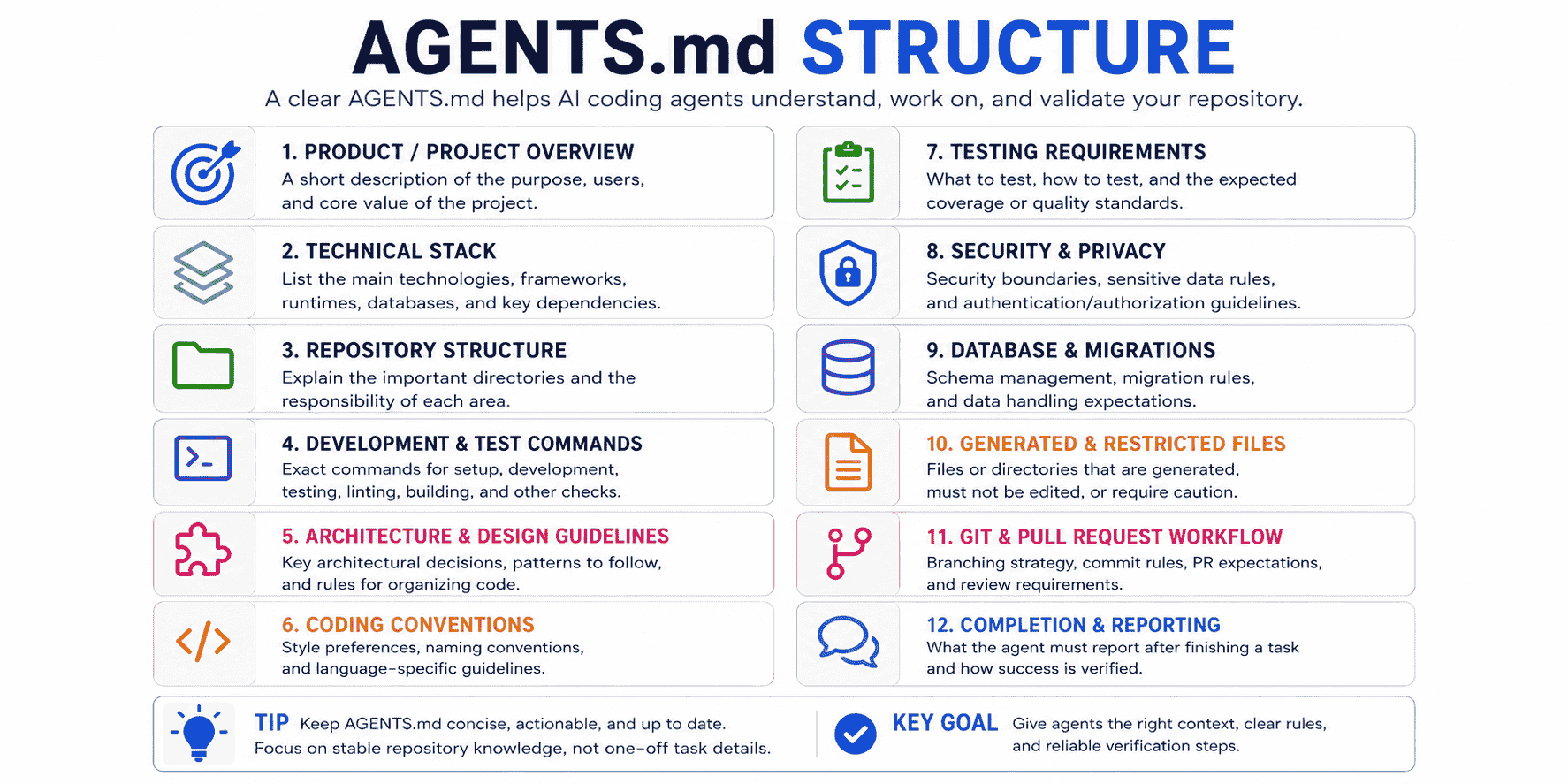
- Recommended AGENTS.md Structure
- How to Write an Effective AGENTS.md
- Best AGENTS.md Examples
- Root and Nested AGENTS.md Files
- Generate AGENTS.md With an AI Coding Agent
- Review and Maintain AGENTS.md
- Weak vs. Strong AGENTS.md Instructions
- Common AGENTS.md Mistakes
- Using PrompTessor for Agent Instructions
- AGENTS.md Checklist
- Official Resources
- FAQ
What Is AGENTS.md?
AGENTS.md is a Markdown file used to provide instructions and context to AI coding agents.
The format is intentionally simple. It does not require a fixed schema, special metadata, or a predefined set of headings.
A minimal file may look like this:
# Repository Instructions

## Setup

- Install dependencies with `pnpm install`.
- Start the development server with `pnpm dev`.

## Verification

- Run `pnpm test` after modifying application logic.
- Run `pnpm lint` and `pnpm typecheck` before reporting completion.

## Conventions

- Use TypeScript for new application files.
- Reuse existing components before creating new ones.
- Do not edit generated files manually.
The purpose is not to describe every detail of the repository.
The purpose is to communicate the information an agent needs to work effectively and safely without rediscovering the same rules during every task.
Why Use a Separate File?
A normal README often serves several human audiences:
- Visitors evaluating the project.
- Developers installing it for the first time.
- Contributors learning how to submit changes.
- Users looking for documentation.
AI coding agents may need additional operational details that would make the README unnecessarily long, such as:
- The canonical implementation to copy.
- Which test command applies to a specific package.
- Which layer owns validation or business logic.
- Which files are generated.
- Which migrations are unsafe.
- Which commands must not be run inside an interactive agent session.
AGENTS.md gives those instructions a dedicated and predictable location.
How AGENTS.md Works
The exact loading behavior depends on the coding tool, but the general workflow is:
- The coding agent opens or enters a repository.
- It discovers applicable instruction files.
- The instructions are added to its working context.
- The agent combines them with the current user request and repository evidence.
- More specific instructions may override broader instructions when the tool supports hierarchical files.
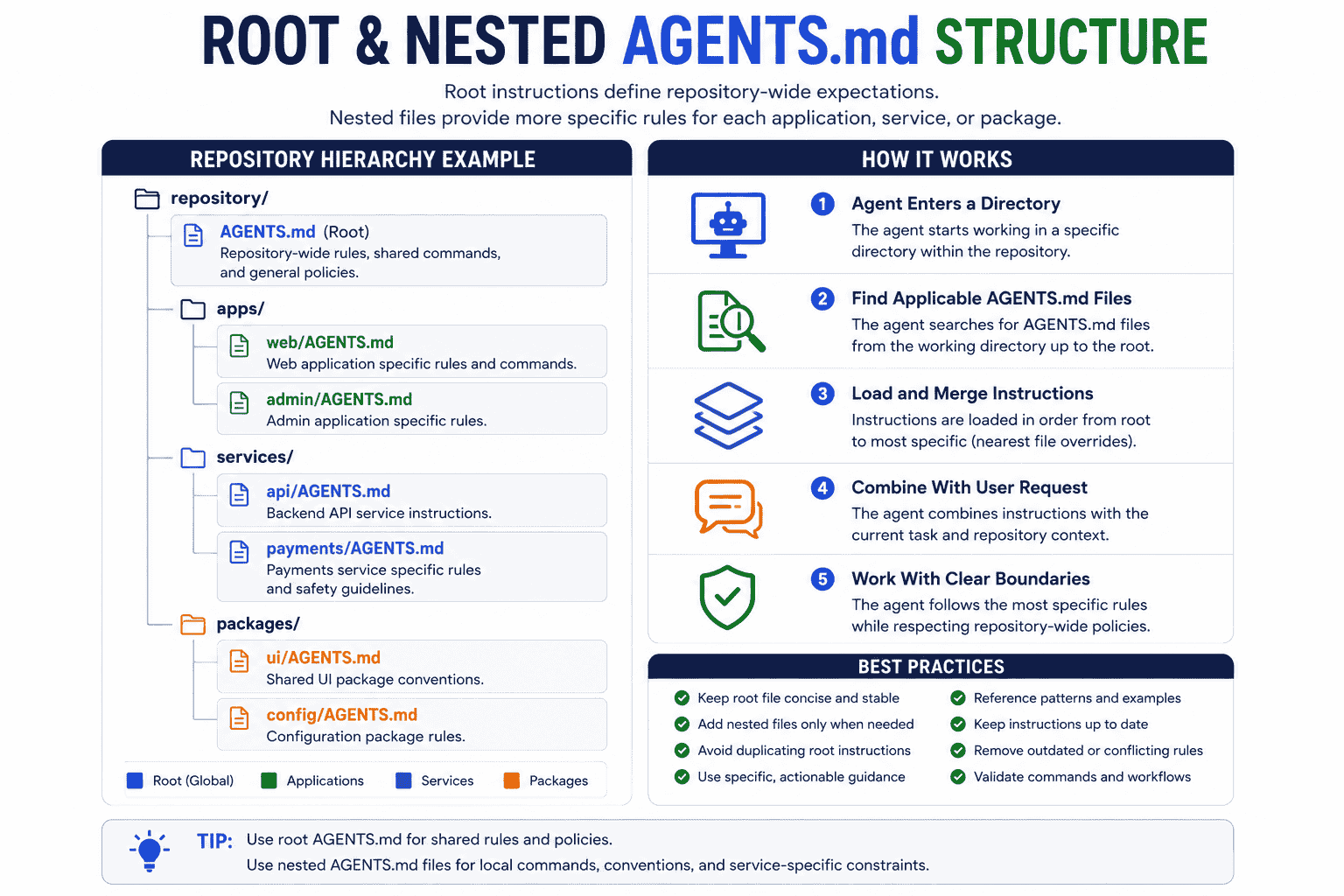
A root-level file normally contains repository-wide guidance:
repository/
├── AGENTS.md
├── package.json
├── apps/
├── packages/
└── services/
A larger repository may add more specific files:
repository/
├── AGENTS.md
├── apps/
│   └── web/
│       └── AGENTS.md
├── packages/
│   └── ui/
│       └── AGENTS.md
└── services/
    └── payments/
        └── AGENTS.md
The root file may define shared principles, while the nested files define local commands and conventions.
Instructions Are Guidance, Not Enforcement
A Markdown instruction can influence an agent, but it is not the same as a technical control.
For example:
- Never commit API keys.is useful guidance, but the repository should still use:
- Secret scanning.
- Git hooks.
- CI checks.
- Restricted permissions.
- Environment-variable validation.
Use AGENTS.md to explain how the project works. Use executable controls for rules that must always be enforced.
AGENTS.md Support Across Coding Agents
AGENTS.md is designed as an open format, but each coding tool implements instruction discovery differently.
| Tool | How AGENTS.md Is Used | Important Notes |
|---|---|---|
| OpenAI Codex | Reads global and project instruction files, including nested files while walking from the project root toward the working directory. | Supports AGENTS.override.md; more specific files later in the chain can override broader guidance. |
| Cursor | Supports AGENTS.md as a simple Markdown alternative to structured Cursor Project Rules. |
Support for scoping and nested behavior may depend on the Cursor surface and version. Use .cursor/rules when precise path scoping is required. |
| GitHub Copilot | Supports agent instruction files on several Copilot surfaces. | GitHub also provides repository-wide and path-specific instruction formats. The nearest applicable AGENTS.md can take precedence where nested support is enabled. |
| Claude Code | Uses CLAUDE.md as its native persistent instruction file. |
A CLAUDE.md file can import AGENTS.md using @AGENTS.md, allowing both formats to share one source of truth. |
Before relying on advanced hierarchy or override behavior, confirm how the specific coding tool discovers instruction files.
AGENTS.md vs. README.md
The two files should complement each other rather than contain the same content.
README.md Is Primarily for Humans
A README commonly explains:
- What the project does.
- How to install and use it.
- How to contribute.
- Where to find documentation.
- License and community information.
AGENTS.md Is Primarily for Coding Agents
An agent instruction file may explain:
- Which command is preferred during agent sessions.
- Which implementation is canonical.
- How modules are expected to interact.
- Which validation must run after particular changes.
- Which files are generated or sensitive.
- How to report uncertainty and incomplete verification.
Avoid Copying the Entire README
Reference existing documentation when possible:
## Documentation

- Read `README.md` for installation and product overview.
- Read `docs/architecture.md` before modifying service boundaries.
- Read `docs/authentication.md` before changing session or permission logic.
This keeps AGENTS.md concise while directing the agent to deeper sources when a task requires them.
AGENTS.md vs. CLAUDE.md, Cursor Rules, and Copilot Instructions
AGENTS.md vs. CLAUDE.md
CLAUDE.md is the native project instruction file used by Claude Code.
If the repository should support both Claude Code and agents that read AGENTS.md, use a small import file:
@AGENTS.md

## Claude Code

- Use Plan Mode before modifying authentication, billing, or database migrations.
- Do not run deployment commands without explicit approval.
This avoids maintaining two copies of the same project guidance.
AGENTS.md vs. Cursor Rules
AGENTS.md is useful for simple, readable project-wide guidance.
Cursor Project Rules are more appropriate when you need:
- Path-based scoping.
- Rules that apply only to certain file patterns.
- Several smaller instruction files.
- Rule metadata and different activation strategies.
A repository can use both, but avoid repeating or contradicting the same instruction in multiple places.
For Cursor-specific prompting and rules, see the guide to Cursor prompts for building apps and working with codebases.
AGENTS.md vs. GitHub Copilot Instructions
GitHub Copilot supports several customization formats, including:
.github/copilot-instructions.mdfor repository-wide instructions..github/instructions/*.instructions.mdfor path-specific instructions.AGENTS.mdfor agent instructions on supported surfaces.
Use the format supported by the Copilot experience your team relies on. Avoid storing conflicting versions of the same rule.
AGENTS.md vs. Skills
AGENTS.md should explain stable behavior and constraints.
A Skill should explain how to perform a reusable procedure.
For example:
AGENTS.md:
- Before opening a pull request, run linting, type checking, and affected tests.

Skill:
1. Inspect the branch diff.
2. Identify unrelated changes.
3. Run the required commands.
4. Draft the commit message.
5. Draft the pull request description.
6. Wait for approval before pushing.
Do not place every detailed workflow inside the always-loaded instruction file.
What to Include in AGENTS.md
1. Project Purpose
Provide a short description that helps the agent understand what the software is supposed to do.
## Product

This is a multi-tenant SaaS application that helps users create, optimize, organize, and reuse AI prompts.
Keep this concise. The file is not a landing page.
2. Technical Stack
List the technologies that affect implementation decisions.
## Stack

- Next.js
- TypeScript
- PostgreSQL
- Prisma
- Tailwind CSS
- Vitest
- Playwright
- Vercel
3. Repository Structure
Explain the responsibilities of important directories.
## Repository Structure

- `app/`: routes, layouts, and server endpoints
- `components/`: shared interface components
- `features/`: feature-specific interface and application logic
- `lib/`: reusable infrastructure and integrations
- `services/`: business logic and external-service coordination
- `prisma/`: schema and database migrations
- `tests/`: integration and end-to-end coverage
4. Development Commands
Give exact commands rather than saying “run the tests.”
## Commands

- Install: `pnpm install`
- Start development: `pnpm dev`
- Unit tests: `pnpm test`
- Type check: `pnpm typecheck`
- Lint: `pnpm lint`
- End-to-end tests: `pnpm test:e2e`
- Production build: `pnpm build`
5. Architecture Rules
Document project-specific decisions that an agent cannot infer reliably from general best practices.
## Architecture

- Keep route handlers thin.
- Place reusable business logic in `services/`.
- Validate external input at system boundaries.
- Perform authorization before loading or mutating protected resources.
- Do not call the database directly from reusable interface components.
- Reuse existing domain services before creating a parallel implementation.
6. Coding Conventions
Include conventions not already enforced automatically.
## Coding Conventions

- Use TypeScript for new application code.
- Prefer named exports for reusable modules.
- Use existing error classes and response helpers.
- Do not introduce a new state-management library.
- Keep public functions documented when behavior is not obvious.
Do not repeat every ESLint or formatter rule.
7. Testing Requirements
Explain what should be tested and which commands are relevant.
## Testing

- Add or update tests for changed public behavior.
- Include authorization and validation failures where relevant.
- Prefer behavior-based assertions over private implementation details.
- Use deterministic fixtures.
- Run affected tests before the full suite.
- Report any test that could not be executed.
8. Security and Privacy Boundaries
## Security

- Never trust user IDs, roles, prices, or usage limits supplied by the client.
- Enforce resource ownership on the server.
- Do not log access tokens, API keys, payment data, or prompt content.
- Use the existing secret-management and environment-variable system.
- Do not weaken validation or authorization to make a failing test pass.
9. Database Rules
## Database

- Do not run destructive migrations without approval.
- Preserve compatibility with existing records.
- Include a backfill plan when adding required fields.
- Do not edit an already-applied migration.
- Use transactions for operations that must succeed or fail together.
10. Generated and Restricted Files
## Generated Files

Do not edit these manually:

- `src/generated/`
- `prisma/generated/`
- `openapi/generated/`
- package-manager lockfiles unless dependencies change

Regenerate them using the documented project command.
11. Git and Pull Request Rules
## Git Workflow

- Do not commit, push, merge, or force-push without approval.
- Do not include unrelated formatting changes.
- Keep migrations and generated files in the same change as the code that requires them.
- Summarize user-visible behavior and validation in the pull request.
12. Completion and Reporting Requirements
## Completion Report

After completing a task, report:

- Summary of the behavior changed
- Modified files
- Important implementation decisions
- Commands executed
- Test and build results
- Acceptance criteria status
- Assumptions
- Known limitations
- Remaining risks
What Not to Include
Temporary Feature Requirements
Instructions that apply to only one task belong in the task prompt.
Avoid:
Build the new referral dashboard this week and use the design from the latest Slack message.Rules Already Enforced by Tools
Do not copy an entire formatter, linter, or compiler configuration into Markdown.
Instead:
- Run `pnpm lint` and fix all reported errors.
- Follow the repository's existing formatter configuration.
Large Code Samples
Reference the canonical file:
- Follow the service pattern used in `services/projects/create-project.ts`.Copied examples can become outdated while the original implementation evolves.
Vague Quality Statements
Avoid:
- Write clean code.
- Use best practices.
- Make everything scalable.
- Keep the application secure.
Replace them with observable instructions:
- Keep route handlers limited to authentication, validation, service invocation, and response mapping.
- Do not add a production dependency without explaining why the existing stack is insufficient.
- Add authorization tests for every new protected operation.
Conflicting Instructions
Do not leave both of these in the repository:
- Use `npm` for all commands.
- Use `pnpm` for dependency management.
Resolve the disagreement and maintain one source of truth.
Hard Security Guarantees
Natural-language instructions should not be the only protection against destructive or sensitive actions.
Use permissions, sandboxing, hooks, branch protection, CI, and infrastructure policies where enforcement is required.
Recommended AGENTS.md Structure
There is no required schema, but the following structure works well for many repositories:
# Repository Instructions

## Product

## Technical Stack

## Repository Structure

## Development Commands

## Architecture Rules

## Coding Conventions

## Testing Requirements

## Security and Privacy

## Database and Migrations

## Generated and Restricted Files

## Git and Pull Request Workflow

## Completion Report
Use only the sections that provide useful information for the project.
How to Write an Effective AGENTS.md
Inspect the Repository First
Do not create instructions based only on assumptions or generic best practices.
Inspect:
- Package scripts.
- CI workflows.
- Directory structure.
- Existing architecture documentation.
- Authentication and authorization patterns.
- Test setup.
- Database and migration workflow.
- Generated files.
- Existing agent configuration.
Write Instructions That Change Agent Behavior
Every instruction should answer at least one of these questions:
- What mistake does this prevent?
- What decision does this clarify?
- What workflow does this standardize?
- What evidence does this require?
If removing an instruction would not affect how the agent works, it may not belong in the file.
Use Exact Commands
Weak:
- Run the appropriate tests.Stronger:
- For changes under `apps/web`, run `pnpm --filter web test`.
- For shared package changes, run `pnpm turbo test --filter=...[HEAD^1]`.
- Before reporting completion, run `pnpm typecheck` and `pnpm lint`.
Explain Exceptions
When the obvious command is unsafe or inappropriate, explain why.
- Use `pnpm dev` while iterating.
- Do not run `pnpm build` while the shared development server is active because it replaces the development output directory.
- Run the production build only after stopping the development server.
Reference Canonical Implementations
- Follow `services/workspaces/create-workspace.ts` for service structure.
- Follow `app/api/projects/route.ts` for authenticated route handling.
- Follow `tests/integration/workspace-permissions.test.ts` for authorization test setup.
Keep Instructions Local to Their Scope
Do not place Python service conventions in the root file when only one subdirectory uses Python.
Move those rules closer to the files they affect if the agent supports nested instructions.
Separate Guidance From Enforcement
Guidance:
- Use the existing formatter and linting rules.

Enforcement:
- CI runs formatting and linting checks on every pull request.
The file can explain the enforcement mechanism without pretending the Markdown instruction itself guarantees compliance.
Best AGENTS.md Examples
Example 1: Minimal AGENTS.md
This example is appropriate for a small application with a straightforward architecture.
# Repository Instructions

## Project

This is a TypeScript web application.

## Commands

- Install dependencies: `pnpm install`
- Start development: `pnpm dev`
- Run tests: `pnpm test`
- Run linting: `pnpm lint`
- Run type checking: `pnpm typecheck`

## Conventions

- Use TypeScript for new files.
- Follow existing module and naming patterns.
- Reuse existing components and utilities.
- Avoid unrelated refactoring.
- Do not add a production dependency without approval.

## Verification

Before reporting completion:

1. Run affected tests.
2. Run `pnpm lint`.
3. Run `pnpm typecheck`.
4. Report any check that could not be completed.

## Safety

- Do not commit, push, deploy, or run destructive commands without approval.
- Do not edit generated files manually.
Example 2: Next.js and TypeScript Application
# Repository Instructions

## Product

This is a Next.js application used to create, manage, and analyze AI prompts.

## Stack

- Next.js
- TypeScript
- PostgreSQL
- Prisma
- Tailwind CSS
- Vitest
- Playwright

## Repository Structure

- `app/`: routes, layouts, server actions, and route handlers
- `components/`: shared interface components
- `features/`: feature-specific modules
- `services/`: reusable business logic
- `lib/`: infrastructure, providers, and shared utilities
- `prisma/`: database schema and migrations
- `tests/`: integration and end-to-end tests

## Development Commands

- Install: `pnpm install`
- Development server: `pnpm dev`
- Unit tests: `pnpm test`
- Type check: `pnpm typecheck`
- Lint: `pnpm lint`
- End-to-end tests: `pnpm test:e2e`
- Production build: `pnpm build`

## Architecture

- Keep route handlers and server actions thin.
- Put reusable business logic in `services/`.
- Validate all external input.
- Perform authorization on the server.
- Do not query the database directly from client components.
- Reuse existing components before adding a new component abstraction.
- Preserve current API response structures unless a change is approved.

## Interface

- Include loading, empty, success, disabled, and error states.
- Preserve keyboard accessibility.
- Follow the existing responsive layout patterns.
- Do not introduce a new component library.

## Database

- Do not run destructive migrations.
- Include a backfill plan when adding required fields.
- Preserve existing records.
- Do not edit an applied migration.
- Run `pnpm prisma validate` after schema changes.

## Testing

- Add tests for changed public behavior.
- Include authorization and validation failure cases.
- Use existing fixtures and test helpers.
- Do not weaken assertions to make a failing test pass.

## Completion

Report:

- User-visible behavior
- Modified files
- Commands executed
- Test results
- Acceptance criteria status
- Known limitations
- Remaining risks
Example 3: Multi-Tenant SaaS Application
# Repository Instructions

## Product

This is a multi-tenant SaaS application. Every protected record belongs to a user, workspace, or organization.

## Core Security Model

- Authentication confirms identity.
- Authorization determines whether the authenticated identity may access a resource.
- Enforce workspace or organization ownership on the server.
- Do not trust resource IDs, roles, prices, limits, or permissions supplied by the client.
- Never rely only on hidden interface elements for access control.

## Tenant Isolation

For every protected read or mutation:

1. Authenticate the request.
2. Resolve the active workspace or organization.
3. Verify membership.
4. Verify the required role or permission.
5. Scope the database operation to the tenant.
6. Return the existing forbidden or not-found response without exposing another tenant's data.

## Billing and Usage

- Grant paid access only from verified server-side subscription state.
- Treat payment webhooks as untrusted external input.
- Make webhook processing idempotent.
- Do not calculate plan access from client-provided values.
- Preserve current usage records during plan changes.

## Database

- Include tenant keys in protected models.
- Add indexes for common tenant-scoped queries when justified.
- Do not create cross-tenant queries unless the operation is explicitly administrative.
- Include migration, backfill, and rollback considerations.

## Required Tests

Add tests for:

- Unauthenticated access
- Unauthorized role access
- Cross-tenant access
- Invalid input
- Duplicate requests
- Expired or canceled subscription behavior
- Existing-user compatibility

## Prohibited Actions

- Do not bypass authorization to simplify a test.
- Do not log private prompt content, payment data, or credentials.
- Do not run production migrations or billing operations without approval.
Example 4: Python FastAPI Service
# Repository Instructions

## Service

This is a Python FastAPI service that exposes internal and public API endpoints.

## Environment

- Python 3.12
- FastAPI
- Pydantic
- SQLAlchemy
- Alembic
- pytest
- Ruff
- mypy

## Commands

- Create environment: `python -m venv .venv`
- Install dependencies: `pip install -r requirements-dev.txt`
- Start API: `uvicorn app.main:app --reload`
- Run tests: `pytest`
- Run focused tests: `pytest path/to/test_file.py -k "test_name"`
- Lint: `ruff check .`
- Format check: `ruff format --check .`
- Type check: `mypy app`
- Validate migrations: `alembic check`

## Structure

- `app/api/`: route definitions and request mapping
- `app/schemas/`: Pydantic request and response schemas
- `app/services/`: business logic
- `app/repositories/`: database operations
- `app/models/`: SQLAlchemy models
- `tests/`: unit and integration tests

## Architecture

- Keep route functions thin.
- Validate input with Pydantic schemas.
- Keep database queries inside repositories.
- Keep business rules inside services.
- Convert internal exceptions into the existing API error format.
- Do not expose stack traces or database errors in responses.

## Database

- Use Alembic for schema changes.
- Do not modify applied migration files.
- Include downgrade behavior where practical.
- Use transactions for multi-step state changes.
- Do not run migrations against production.

## Testing

- Use existing fixtures.
- Avoid network calls in unit tests.
- Add integration coverage for database and authorization behavior.
- Keep tests deterministic.
Example 5: Monorepo Root Instructions
# Monorepo Instructions

## Repository

This monorepo contains web applications, backend services, and shared packages.

## Package Manager

Use `pnpm`. Do not use npm or Yarn.

## Structure

- `apps/web`: customer-facing Next.js application
- `apps/admin`: internal administration application
- `services/api`: backend API
- `packages/ui`: shared interface components
- `packages/config`: shared configuration
- `packages/types`: shared public types
- `packages/testing`: shared test utilities

## Working With Packages

- Confirm the package name in its `package.json`.
- Use filtered commands instead of running every package when possible.
- Do not create cross-package imports that bypass package exports.
- Update dependency declarations when a package begins using another workspace package.
- Avoid circular dependencies.

## Commands

- Install: `pnpm install`
- Development: `pnpm turbo dev`
- Changed tests: `pnpm turbo test --filter=...[HEAD^1]`
- Changed linting: `pnpm turbo lint --filter=...[HEAD^1]`
- Changed type checks: `pnpm turbo typecheck --filter=...[HEAD^1]`
- Full build: `pnpm turbo build`

## Shared Contracts

- Changes to `packages/types` may affect several applications and services.
- Review consumers before changing an exported type.
- Preserve backward compatibility unless the task explicitly approves a breaking change.
- Update affected tests and documentation in the same change.

## Nested Instructions

Read the nearest nested `AGENTS.md` before changing a package or service. More specific package instructions may replace root-level commands.
Example 6: Nested Frontend Instructions
Place this inside apps/web/AGENTS.md when the frontend requires rules not shared by the rest of the monorepo.
# Web Application Instructions

These instructions apply to files under `apps/web/`.

## Stack

- Next.js
- React
- TypeScript
- Tailwind CSS
- Playwright

## Commands

Run from the repository root:

- Development: `pnpm --filter web dev`
- Tests: `pnpm --filter web test`
- Type check: `pnpm --filter web typecheck`
- Lint: `pnpm --filter web lint`
- End-to-end tests: `pnpm --filter web test:e2e`

## Components

- Reuse components from `packages/ui`.
- Create application-specific components under `apps/web/components`.
- Do not copy a shared component into the application to modify it.
- Keep data fetching out of purely presentational components.
- Preserve semantic HTML and keyboard behavior.

## Server and Client Boundaries

- Prefer server components when client-side state is not required.
- Add `"use client"` only when the component needs browser APIs, state, or event handlers.
- Do not expose server secrets through client bundles.
- Validate protected operations on the server.

## Visual Changes

- Follow existing spacing and typography tokens.
- Include mobile behavior.
- Include loading, empty, success, disabled, and error states.
- Do not redesign unrelated pages.
Example 7: Nested Payments Service Instructions
# Payments Service Instructions

These instructions apply to files under `services/payments/`.

## Safety

- Treat provider requests and webhooks as untrusted input.
- Verify webhook signatures before processing events.
- Make event processing idempotent.
- Do not grant entitlements from browser redirects.
- Do not log payment methods, full payloads, secrets, or personal billing data.

## Data Consistency

- Use transactions when subscription state and entitlements must change together.
- Preserve the original provider event ID.
- Store enough state to detect duplicate delivery.
- Do not delete billing history to simplify a migration.

## Commands

- Unit tests: `make test-payments`
- Integration tests: `make test-payments-integration`
- Static analysis: `make check-payments`

## Changes Requiring Approval

Ask before:

- Adding a new payment provider
- Changing webhook event mappings
- Changing entitlement policies
- Running data migrations
- Modifying retry or cancellation behavior

## Required Test Cases

- Valid webhook
- Invalid signature
- Duplicate event
- Out-of-order event
- Failed payment
- Cancellation
- Expired subscription
- Unauthorized customer access
Example 8: Security-Sensitive Repository
# Security-Sensitive Repository Instructions

## Scope

This repository handles private user data and privileged administrative actions.

## Least Privilege

- Request only the permissions required for the task.
- Prefer read-only investigation before editing.
- Do not access unrelated secrets, data exports, or production resources.
- Do not change permission policies without approval.

## Sensitive Data

Never include these in code, tests, logs, screenshots, commits, or reports:

- Access tokens
- API keys
- Private keys
- Passwords
- Session cookies
- Full customer records
- Payment data
- Production database exports

Use synthetic fixtures for tests.

## Input and Output

- Validate all external input.
- Encode or sanitize output for the target context.
- Use parameterized database queries.
- Do not reveal internal errors to users.
- Preserve audit logs for privileged actions.

## High-Risk Changes

Use read-only analysis and request approval before changing:

- Authentication
- Authorization
- Encryption
- Secret storage
- File uploads
- Administrative permissions
- Audit logging
- Data deletion
- Network or sandbox permissions

## Verification

Security-sensitive changes require:

- Relevant automated tests
- Authorization tests
- Static analysis
- Secret scanning
- Manual diff review
- A list of unverified assumptions

Do not claim the system is secure solely because automated checks pass.
Example 9: Open-Source Library
# Contributor and Agent Instructions

## Project

This repository contains a public library used by external applications.

## Compatibility

- Preserve documented public APIs unless a breaking change is explicitly approved.
- Consider users on supported runtime versions.
- Do not change default behavior silently.
- Include migration guidance for intentional breaking changes.

## Dependencies

- Avoid adding runtime dependencies when the standard library or existing dependencies are sufficient.
- Explain bundle-size and maintenance impact for every new runtime dependency.
- Update lockfiles only when dependency declarations change.

## Tests

- Add regression coverage for bug fixes.
- Add compatibility tests for public API changes.
- Keep examples executable.
- Run the full supported-version matrix when configuration is available.

## Documentation

Update the relevant documentation when changing:

- Public functions
- Configuration
- Default behavior
- Error behavior
- Supported environments

## Pull Requests

The final report must include:

- Problem solved
- Public behavior changed
- Compatibility impact
- Tests added
- Documentation changed
- Breaking-change assessment
Example 10: Testing and Code Review Instructions
# Testing and Review Instructions

## Test Strategy

- Test public behavior, not private implementation details.
- Add regression tests for confirmed bugs.
- Include expected failure cases.
- Include authorization and validation cases when relevant.
- Use deterministic fixtures.
- Do not rely on test order.
- Do not remove or weaken an existing test without explaining why it is invalid.

## Test Selection

- Run the smallest relevant test set during iteration.
- Run the broader affected suite before reporting completion.
- Run the full suite when changing shared infrastructure.
- Report commands that were skipped or unavailable.

## Code Review

Review changes for:

- Requirement coverage
- Correctness
- Edge cases
- Error handling
- Authentication and authorization
- Data integrity
- Security
- Backward compatibility
- Performance
- Unnecessary complexity
- Duplicate logic
- Missing tests
- Accidental changes

## Review Output

For each issue, report:

- Severity
- File and location
- Evidence
- Impact
- Recommended correction
- Verification method

Do not modify files during the initial review unless the task explicitly requests fixes.
Root and Nested AGENTS.md Files
One large instruction file may be sufficient for a small repository.
A monorepo or multi-service project may benefit from layered instructions.
Root File
The root file should contain rules shared across the repository:
- Package manager.
- Repository architecture.
- Shared Git policy.
- General safety restrictions.
- Cross-package compatibility rules.
- Default completion report.
Nested File
A nested file should contain rules specific to its directory:
- Local commands.
- Framework-specific conventions.
- Service-specific risks.
- Package ownership.
- Different test or build procedures.
Example Hierarchy
repository/
├── AGENTS.md
├── apps/
│   ├── web/
│   │   └── AGENTS.md
│   └── mobile/
│       └── AGENTS.md
├── services/
│   ├── api/
│   │   └── AGENTS.md
│   └── payments/
│       └── AGENTS.md
└── packages/
    └── ui/
        └── AGENTS.md
Avoid Repeating Root Instructions
The nested file should not copy the entire root file.
Instead, add or override only what is different:
# Payments Service Instructions

These instructions supplement the repository root instructions.

- Run `make test-payments` instead of the default JavaScript test command.
- Do not change provider event mappings without approval.
- Verify signatures and idempotency for all webhook changes.
Check Tool Compatibility
Not every coding tool handles nested files in the same way.
If the tool supports only a root-level file, use its native path-scoped instruction system for local rules.
Generate AGENTS.md With an AI Coding Agent
An AI coding agent can help draft the file, but it should inspect the repository before writing instructions.
Prompt: Generate AGENTS.md From the Repository
Create a concise AGENTS.md for this repository.

Do not rely on generic assumptions.

First inspect:

- Repository structure
- Package and dependency files
- Development scripts
- CI workflows
- Existing architecture documentation
- Existing tests and test configuration
- Authentication and authorization patterns
- Database schema and migration workflow
- Generated files
- Git and pull request conventions
- Existing CLAUDE.md, Cursor Rules, Copilot instructions, Skills, or agent configuration

Identify:

1. Stable repository facts
2. Commands that have been verified from project files
3. Architecture rules supported by existing code
4. Security-sensitive boundaries
5. Files that should not be edited manually
6. Required validation
7. Conflicting or outdated documentation
8. Decisions that require human confirmation

The AGENTS.md should:

- Be concise and actionable.
- Use exact commands.
- Reference canonical files instead of copying large examples.
- Separate repository-wide rules from task-specific requirements.
- Avoid repeating formatter or linter configuration.
- Avoid unsupported assumptions.
- Avoid vague instructions such as “write clean code.”
- Include a completion-report format.
- Mention where nested AGENTS.md files would be useful.

Return:

1. Proposed AGENTS.md
2. Evidence for every repository-specific instruction
3. Questions requiring confirmation
4. Suggested nested files
5. Instructions better suited to Skills, hooks, permissions, or CI

Do not modify the repository until I approve the draft.
Prompt: Review an Existing AGENTS.md
Review the existing AGENTS.md against the current repository.

Do not modify files during the first review.

Check for:

- Commands that no longer exist
- Outdated architecture descriptions
- Contradictory instructions
- Rules already enforced by tooling
- Vague instructions
- Repeated content
- Temporary task requirements
- Missing security boundaries
- Missing generated-file warnings
- Missing verification commands
- Instructions placed at the wrong scope
- Content that should move to a nested AGENTS.md
- Procedures that should move to a Skill
- Rules that require technical enforcement rather than natural-language guidance

For every finding, provide:

- Severity
- Current instruction
- Repository evidence
- Recommended correction
- Recommended destination

Finish with:

- Instructions to keep
- Instructions to remove
- Instructions to rewrite
- Suggested nested files
- Proposed revised outline
Review and Maintain AGENTS.md
Treat the file as living documentation.
Review It When:
- The package manager changes.
- Build or test scripts change.
- The repository is reorganized.
- A new application or service is added.
- Authentication or authorization architecture changes.
- The database migration process changes.
- A code review identifies a recurring agent mistake.
- The team adds a new coding agent.
Use Agent Mistakes as Feedback
Add an instruction when:
- The agent repeatedly selects the wrong command.
- It places logic in the wrong layer.
- It edits generated files.
- It forgets an important compatibility requirement.
- It skips a required verification step.
Do not add a rule for every one-time mistake. Add it when the information is stable and likely to matter again.
Remove Instructions That No Longer Help
Instruction files accumulate technical debt.
Remove or rewrite rules that are:
- Outdated.
- Redundant.
- Too broad.
- Contradictory.
- Already enforced automatically.
- Specific to a completed task.
Weak vs. Strong AGENTS.md Instructions
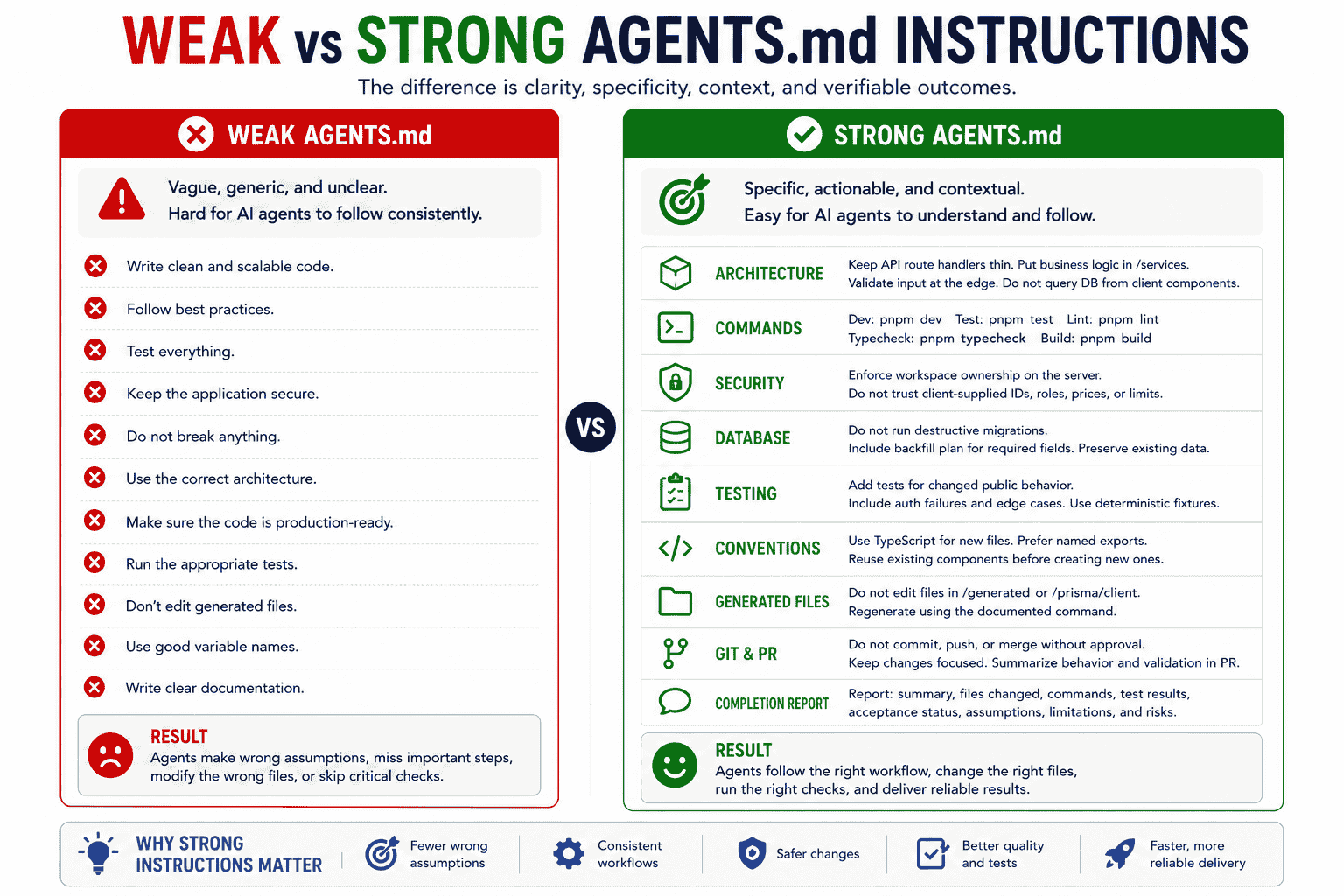
Weak Instructions
# Agent Instructions

- Write clean and scalable code.
- Follow best practices.
- Test everything.
- Keep the app secure.
- Do not break anything.
- Use the correct architecture.
- Make sure the code is production-ready.
These instructions sound reasonable, but they do not tell the agent:
- Which architecture is correct.
- Which commands should run.
- Which behavior must be preserved.
- What security boundary matters.
- What “production-ready” means.
- How completion should be verified.
Strong Instructions
# Repository Instructions

## Architecture

- Keep API route handlers limited to authentication, input validation, service invocation, and response mapping.
- Place reusable business logic in `services/`.
- Use the authorization helpers in `lib/auth/permissions.ts`.
- Do not access Prisma directly from client components.
- Follow `services/projects/create-project.ts` for new service modules.

## Verification

For changes to application logic:

1. Run the affected unit tests.
2. Run `pnpm typecheck`.
3. Run `pnpm lint`.
4. Run `pnpm build` when the change affects routing, configuration, or server code.
5. Report any command that could not be executed.

## Security

- Enforce workspace ownership on the server for every protected operation.
- Do not trust roles, limits, prices, or resource ownership supplied by the client.
- Do not log tokens, payment data, or private prompt content.
- Do not weaken validation or authorization to make a test pass.

## Database

- Do not run destructive migrations.
- Include a backfill plan when adding required fields.
- Preserve compatibility with existing rows.
- Do not edit applied migrations.

## Completion Report

Report:

- User-visible behavior
- Modified files
- Commands and results
- Acceptance criteria status
- Assumptions
- Known limitations
- Remaining risks
The strong version provides decisions, commands, references, boundaries, and evidence.
Common AGENTS.md Mistakes
Making the File Too Long
When every possible detail is always loaded, the instructions that matter to the current task become less prominent.
Better approach: Keep repository-wide guidance concise and use nested files or references for local detail.
Copying the README
This wastes context and creates duplicate documentation.
Better approach: Reference the README and include only additional agent-specific guidance.
Using Generic Advice
“Follow best practices” does not identify the repository's actual decisions.
Better approach: Name the exact pattern, module, command, or boundary.
Including Unverified Commands
An incorrect command can waste time or alter the project unexpectedly.
Better approach: derive commands from package scripts, Makefiles, task runners, and CI workflows.
Repeating Linter Configuration
Duplicating automated rules makes the instruction file harder to maintain.
Better approach: tell the agent to run the configured tooling.
Combining Conflicting Tool Instructions
Different agent files may give opposite directions.
Better approach: share one source of truth through imports or carefully scoped files.
Using Natural Language for Hard Enforcement
An instruction such as “never access production” is not a technical barrier.
Better approach: restrict credentials, tools, network access, and permissions.
Putting Task-Specific Requirements in the Root File
A temporary feature request should not affect every future task.
Better approach: keep it in the current prompt or issue.
Forgetting to Update the File
An outdated instruction file can be worse than no instruction file because it confidently directs the agent toward the wrong workflow.
Better approach: review it alongside meaningful architecture and tooling changes.
Using PrompTessor for Agent Instructions
An initial instruction may look like this:
Always follow the project architecture, test your changes, and keep the code secure.
The intent is reasonable, but the instruction is difficult for an agent to apply consistently because it does not define the architecture, tests, security boundaries, or evidence required.
PrompTessor can help analyze and improve rough agent instructions before they are added to AGENTS.md.
A practical workflow is:
- Start with the rule, convention, or repeated correction.
- Add the repository context that makes it meaningful.
- Replace general advice with observable behavior.
- Add exact commands, files, or canonical examples.
- Define what must be preserved.
- Define verification and reporting requirements.
- Remove instructions already enforced by tooling.
- Decide whether the instruction belongs in the root file, a nested file, a Skill, or a technical control.
The same principles used to improve a development prompt also apply to persistent repository instructions: clarity, specificity, relevant context, constraints, and verifiable outcomes.
For more examples of repository-aware task prompts, see the guide to Codex prompts for coding and multi-agent workflows.
AGENTS.md Checklist
Before committing the file, check whether it:
- Explains the project in one concise section.
- Lists commands verified from the repository.
- Explains important directory responsibilities.
- Documents architecture decisions agents cannot safely infer.
- Identifies canonical implementations to follow.
- Defines testing and verification expectations.
- Explains authentication, authorization, and data boundaries where relevant.
- Documents safe migration practices.
- Identifies generated or restricted files.
- Defines Git and deployment approval boundaries.
- Requires a useful completion report.
- Avoids vague advice.
- Avoids copying the README.
- Avoids repeating automated tooling rules.
- Avoids temporary task requirements.
- Avoids contradictions with other instruction files.
- Uses nested files only where local differences justify them.
- Separates guidance from technical enforcement.
- Has been checked against the current repository.
Official Resources
- AGENTS.md Open Format and Examples
- Codex Custom Instructions With AGENTS.md
- Cursor Rules and AGENTS.md
- GitHub Copilot Custom Instruction Support
- Claude Code Project Instructions and AGENTS.md Import
FAQ About AGENTS.md
What is AGENTS.md?
AGENTS.md is a plain Markdown file used to provide persistent repository context and instructions to AI coding agents.
Is AGENTS.md a strict configuration format?
No. It has no required schema or mandatory headings. You can organize it using the Markdown structure that best communicates your project's instructions.
Where should AGENTS.md be placed?
Begin with a file in the repository root. Some tools also support nested files for more specific instructions, but discovery and precedence behavior vary by coding tool.
What should I put in AGENTS.md?
Include stable project context, development commands, directory responsibilities, architecture rules, testing requirements, security boundaries, migration practices, restricted files, and completion-report expectations.
What should not go in AGENTS.md?
Avoid temporary task requirements, copied documentation, large code samples, vague advice, rules already enforced by tooling, and procedures that belong in a reusable Skill.
What is the difference between AGENTS.md and README.md?
README.md primarily helps human users and contributors understand and use the project. AGENTS.md provides operational context and instructions specifically for coding agents.
What is the difference between AGENTS.md and CLAUDE.md?
AGENTS.md is an open agent-instruction format supported by several tools. Claude Code uses CLAUDE.md natively, but a CLAUDE.md file can import AGENTS.md using @AGENTS.md.
Can Cursor use AGENTS.md?
Yes. Cursor supports AGENTS.md as a simple Markdown alternative to Cursor Project Rules. Use Project Rules when you need more precise scoping or rule metadata.
Does GitHub Copilot support AGENTS.md?
Several GitHub Copilot surfaces support agent instruction files. GitHub also provides separate repository-wide and path-specific custom instruction formats.
Can I use multiple AGENTS.md files?
Yes, when the coding tool supports hierarchical discovery. Root instructions can define shared expectations, while nested files provide more specific rules for a subproject or service.
Does the nearest AGENTS.md always override the root file?
That is a common hierarchical behavior, but the exact merge and precedence rules depend on the coding tool. Confirm the behavior in the tool's documentation.
How long should AGENTS.md be?
It should be long enough to communicate stable, high-value instructions and short enough that important rules remain easy to identify. Prefer concise instructions, references, and nested files over one large document.
Should AGENTS.md contain security rules?
Yes, it can explain security expectations and boundaries. However, permissions, hooks, CI, secret scanning, sandboxing, and infrastructure controls should enforce rules that must never be violated.
Can an AI coding agent generate AGENTS.md?
Yes, but the agent should inspect the repository first and provide evidence for repository-specific instructions. Review the draft before committing it.
How often should AGENTS.md be updated?
Update it when commands, architecture, directory structure, security boundaries, migration workflows, or recurring agent mistakes change.
Conclusion
AGENTS.md can make AI-assisted development more consistent by giving coding agents a stable understanding of how a repository should be modified and verified.
The most useful instruction files do not attempt to document everything.
They focus on decisions that matter repeatedly:
- What the project does.
- How the repository is organized.
- Which commands should be used.
- Which architectural patterns should be followed.
- Which behavior and data boundaries must be preserved.
- How changes should be tested and reviewed.
- Which operations require approval.
- What evidence must be reported before completion.
Start with a concise root file.
Add nested instructions only when a subproject has genuinely different requirements. Move long procedures into Skills, and use executable controls for rules that need guaranteed enforcement.
Treat the file as living documentation rather than a one-time configuration.
When it remains specific, accurate, and easy to follow, AGENTS.md becomes a practical bridge between the repository's real conventions and the AI agents working inside it.
Build better prompts in one workspace
Generate prompts from ideas, analyze and optimize quality, refine with feedback, reverse-engineer content, and save reusable prompts in your Prompt Library.
Try PrompTessor Free