Best Veo Prompts for Cinematic Videos Dialogue and Audio in 2026
Google Veo can generate cinematic scenes, realistic footage, character interactions, product advertisements, social media clips, documentary-style videos, dialogue, ambience, and synchronized sound effects.
However, a request such as “create a cinematic video” leaves most production decisions undefined.
It does not tell Veo what the subject looks like, where the scene happens, what action occurs, how the camera moves, how the scene is lit, what the characters say, what sounds should be heard, or how the clip should end.
A stronger prompt gives Veo the information needed to direct both the visual scene and its progression over time.
This guide contains reusable Veo prompts for cinematic videos, realistic footage, characters, dialogue, sound effects, product videos, advertisements, social media clips, comedy, documentaries, and image-to-video workflows.
You will also learn how to structure Veo prompts, direct camera movements, synchronize visible actions with audio, create a beginning, middle, and end, maintain character consistency, and improve weak video prompts.
Veo capabilities can vary depending on whether you use Gemini, Google Flow, Vertex AI, or another supported Google workflow. Review the current settings and documentation available in your selected product before relying on a specific model, duration, resolution, or reference feature.
Quick Answer
The best Veo prompts describe the video style, subject, environment, action, shot framing, camera movement, lighting, color palette, mood, pacing, dialogue, sound effects, ambience, continuity requirements, and ending state. For dialogue, identify the speaker and provide a concise spoken line. For sound, connect each audio cue to a visible action or environment.
Key Takeaways
- Start by defining the type and visual style of video you want Veo to create.
- Describe characters with consistent physical, wardrobe, voice, and behavioral details.
- Use concrete physical actions instead of vague direction such as “move dramatically.”
- Define the shot size, camera angle, and one primary camera movement.
- Keep dialogue short enough to fit naturally within the generated clip.
- Connect sound effects to visible actions and use ambience to establish the location.
- Give short scenes a clear beginning, middle, and end.
- Use image-to-video prompts primarily to describe motion and continuity.
- Generate several variations and refine one important variable at a time.
- Save effective Veo prompts as reusable templates for future workflows.
Table of Contents
- What Is Google Veo?
- What Makes a Good Veo Prompt?
- Veo Prompt Structure
- How to Write Better Veo Prompts
- Veo Prompts for Cinematic Scenes
- Veo Prompts for Realistic Videos
- Veo Prompts for Characters
- Veo Prompts With Dialogue
- Veo Prompts With Sound Effects and Ambience
- Veo Prompts for Product Videos
- Veo Prompts for Advertisements
- Veo Prompts for Social Media Videos
- Veo Prompts for Comedy Scenes
- Veo Prompts for Documentary Videos
- Veo Image-to-Video Prompts
- Veo Camera Movement Prompts
- How to Create a Beginning Middle and End
- How to Maintain Character Consistency
- How to Synchronize Visible Actions and Audio
- Weak vs Strong Veo Prompts
- Common Veo Prompt Mistakes
- How PrompTessor Helps With Veo Prompts
- FAQ About Veo Prompts
What Is Google Veo?
Veo is Google DeepMind’s video-generation model family for creating video from text and visual references.
The current Veo generation supports workflows such as:
- Text-to-video generation
- Image-to-video generation
- Native dialogue and audio generation in supported workflows
- Cinematic camera and shot direction
- First-and-last-frame generation on supported platforms
- Realistic and stylized visual outputs
Veo is available through several Google products and development platforms. The precise controls, model options, limits, and supported inputs may differ between them.
The principles in this guide are therefore written to remain useful across Veo workflows rather than depending entirely on one interface.
What Makes a Good Veo Prompt?
A good Veo prompt directs a short video rather than describing only a still image.
It explains what viewers see, what changes over time, how the camera observes the action, what is heard, and how the scene concludes.
1. Video Style
Define the overall type and visual treatment of the video.
Examples:
- Cinematic live-action film
- Realistic documentary footage
- Luxury product advertisement
- Stop-motion animation
- Anime action sequence
- Handheld social media video
- Retro VHS recording
- Stylized 3D animation
- Film noir scene shot on 35mm
2. Main Subject or Character
Describe the person, animal, product, object, or location that viewers should focus on.
Instead of:
A woman is waiting.
Use:
A woman in her early thirties with shoulder-length wavy black hair, light freckles, and a beige trench coat waits beneath a red umbrella.
3. Environment
Explain where the scene happens and add the environmental details that influence the action.
Examples:
- A narrow city street during light rain at night
- A warm independent coffee shop before sunrise
- An abandoned research station on Mars
- A luxury studio with a reflective black floor
- A quiet forest covered in early-morning mist
4. Action
Use clear physical actions that can be shown on screen.
Examples:
- Walks slowly toward the camera
- Turns toward a distant sound
- Raises the glass and takes one sip
- Opens the package and removes the product
- Places the sword into the ground
- Looks over one shoulder and smiles
Instructions such as “acts powerful” or “moves cinematically” are less useful because they do not describe visible behavior.
5. Shot Framing
Shot framing defines how much of the subject and environment viewers can see.
Common options include:
- Extreme close-up
- Close-up
- Medium shot
- Full-body shot
- Wide shot
- Establishing shot
- Over-the-shoulder shot
- Point-of-view shot
6. Camera Angle
The camera angle affects scale and emotional perspective.
Examples:
- Eye-level angle
- Low-angle view
- High-angle view
- Ground-level perspective
- Overhead view
- Dutch angle
7. Camera Movement
Describe how the camera moves through the scene.
Examples:
- Slow push-in
- Pull-back reveal
- Tracking shot
- Horizontal pan
- Vertical tilt
- Smooth orbit
- Crane upward
- Restrained handheld movement
- Completely locked camera
Use one primary camera movement when possible.
8. Lighting and Color
Lighting and color help define atmosphere, depth, and visual hierarchy.
Examples:
- Warm golden-hour backlighting
- Soft diffused window light
- Blue and amber city lighting
- Hard directional studio light
- Flickering fluorescent light
- Muted blue-gray palette
- Black and gold luxury palette
9. Mood and Pacing
Explain how the scene should feel and how quickly it should develop.
Examples:
- Slow and contemplative
- Tense and suspenseful
- Fast and energetic
- Playful and comedic
- Luxurious and controlled
- Quiet and documentary-like
10. Dialogue
Identify the speaker and provide a short spoken line.
Example:
The scientist looks toward the dark corridor and quietly says, “That door was closed a moment ago.”
Dialogue should be short enough to sound natural within the available clip.
11. Sound Effects and Ambience
Describe audio that supports the environment and visible action.
Examples:
- Rainfall and distant traffic
- Footsteps on wet pavement
- A mechanical door opening
- Soft wind through tall grass
- Low ventilation hum
- A glass placed on a wooden table
12. Continuity Requirements
State what must remain consistent throughout the scene.
Examples:
- Preserve facial identity and hairstyle.
- Keep the same clothing and accessories.
- Maintain the product shape and logo placement.
- Keep the background architecture unchanged.
- Maintain the same lighting direction.
13. Ending State
Explain what should be visible when the clip concludes.
Examples:
- End with the subject looking directly at the camera.
- End on a centered product hero shot.
- End as the door opens and bright light fills the corridor.
- End with the camera revealing the complete landscape.
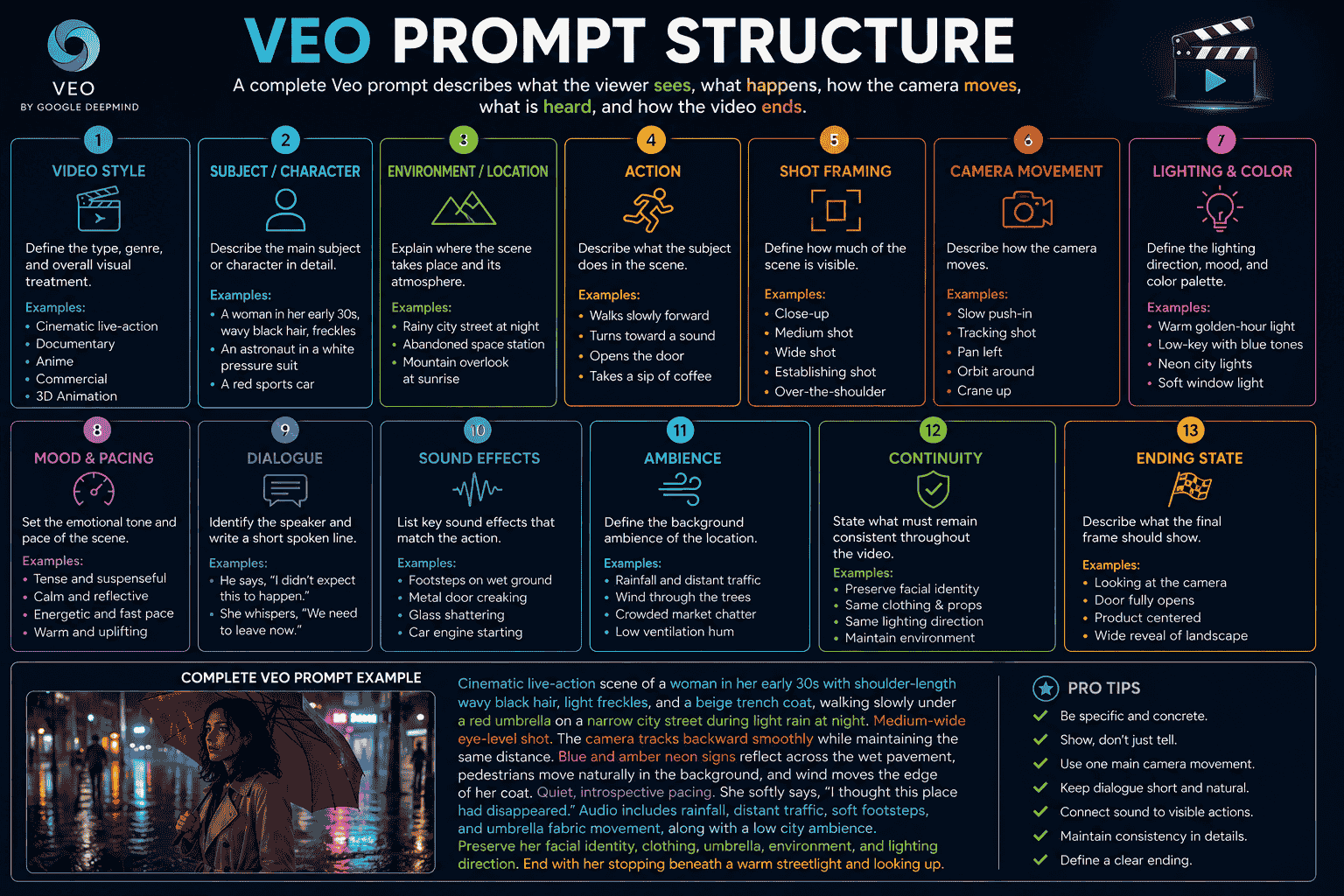
Veo Prompt Structure
A practical reusable Veo prompt formula is:
{video_style} of {subject_description} in {environment}. The subject {action}. {shot_framing_and_camera_angle}. The camera {camera_movement}. {environmental_motion}. {lighting_and_color_palette}. {mood_and_pacing}. The character says, “{dialogue}.” Audio includes {sound_effects_and_ambience}. Preserve {continuity_requirements}. End with {ending_state}.Example:
Cinematic live-action scene of a woman in her early thirties with shoulder-length wavy black hair, light freckles, and a beige trench coat standing beneath a red umbrella on a narrow city street during light rain at night. She walks slowly toward the camera and briefly looks toward a glowing shop window. Medium-wide eye-level shot. The camera tracks backward smoothly while maintaining the same distance. Blue and amber signs reflect across the wet pavement, pedestrians move naturally in the background, and wind moves the edge of her coat. Quiet, introspective pacing. She softly says, “I thought this place had disappeared.” Audio includes rainfall, distant traffic, soft footsteps, and quiet umbrella fabric movement. Preserve her facial identity, clothing, umbrella, environment, and lighting direction. End as she stops beneath a warm streetlight and looks upward.Compact Veo Prompt Template
Style: {video_style}

Subject:
{subject_description}

Environment:
{environment}

Action:
{subject_action}

Camera:
{shot_type}, {camera_angle}, {camera_movement}

Lighting and color:
{lighting_and_palette}

Mood and pacing:
{mood_and_pacing}

Dialogue:
{speaker}: “{spoken_line}”

Audio:
{ambience_and_sound_effects}

Continuity:
{elements_that_must_remain_consistent}

Ending:
{final_state}
The structured version can be easier to edit when dialogue, audio, and continuity are especially important.
How to Write Better Veo Prompts
Step 1 Define the Purpose
Decide what the video should accomplish.
Possible purposes include:
- Product advertisement
- Short cinematic scene
- Character introduction
- Social media clip
- Documentary-style footage
- Comedy sketch
- Website hero video
- Storyboard or previsualization
Step 2 Choose One Main Moment
A short clip should usually focus on one clear event.
Instead of:
A scientist discovers an alien, escapes the laboratory, flies a spaceship, returns to Earth, and gives a speech.
Use:
A scientist enters a dark laboratory and discovers an unknown creature inside an illuminated containment chamber.
Step 3 Establish the Opening Frame
Explain what viewers see at the beginning.
Example:
The scene opens with a wide shot of an empty research laboratory illuminated by red emergency lights.
Step 4 Describe the Main Action
Give the scene one readable physical action.
Example:
The scientist enters from the left, approaches the chamber, and stops when a shadow moves inside it.
Step 5 Direct the Camera
Choose a camera movement that supports the action.
Example:
The camera follows behind the scientist, then slowly arcs to reveal the chamber.
Step 6 Add Lighting and Environmental Motion
Use lighting and subtle movement to reinforce the atmosphere.
Example:
Red emergency lights pulse slowly while condensation moves down the chamber glass and steam escapes from a damaged pipe.
Step 7 Add Short Dialogue
Keep dialogue focused on one reaction, decision, or story beat.
Example:
The scientist whispers, “You were not in the report.”
Step 8 Add Synchronized Audio
Connect sound effects to visible events.
Example:
Audio includes ventilation hum, the scientist’s footsteps, warning beeps, and a heavy impact from inside the chamber.
Step 9 Define the Ending
Give the clip a clear destination.
Example:
The clip ends as a large hand presses against the chamber glass.
Step 10 Generate and Evaluate
Review:
- Subject appearance
- Action clarity
- Camera behavior
- Dialogue timing
- Audio synchronization
- Environmental movement
- Continuity
- Ending frame
Step 11 Refine One Variable at a Time
Examples:
- Shorten the dialogue.
- Slow down the camera movement.
- Remove one unnecessary action.
- Make the ambience quieter.
- Keep the camera locked.
- Preserve the character’s face and wardrobe.
- Change the final reaction.
Best Veo Prompts for Cinematic Scenes
1. Suspenseful Research Station
Cinematic science-fiction thriller scene inside an abandoned research station at night. A tired astronaut in a worn white pressure suit walks slowly through a narrow corridor illuminated by flickering emergency lights. Medium over-the-shoulder shot. The camera follows closely with restrained handheld movement. Steam escapes from damaged pipes and a loose cable swings above the corridor. Tense and quiet pacing. The astronaut stops when a metal door opens by itself and quietly says, “The power has been offline for three days.” Audio includes ventilation hum, electrical crackling, heavy breathing, soft footsteps, and the mechanical door opening. Preserve the astronaut’s face, suit, equipment, corridor layout, and red lighting. End with darkness visible beyond the open door.2. Rainy City Encounter
Cinematic live-action scene on a narrow neon-lit city street during heavy rain. A detective in a dark coat approaches a woman holding a red umbrella beneath a broken streetlight. Wide eye-level shot that gradually becomes a medium two-shot as the camera slowly pushes forward. Rain falls heavily, passing cars create reflections across the pavement, and distant pedestrians move through the mist. Blue and amber color palette, restrained suspenseful pacing. The detective says, “You knew I would find you.” The woman replies, “I was counting on it.” Audio includes rain, distant traffic, footsteps through water, and a low electrical buzz from the damaged light. Preserve both characters’ faces, clothing, positions, and umbrella. End as the streetlight turns off.3. Fantasy Gate Reveal
Epic fantasy film scene of a lone traveler approaching an enormous stone gate carved into a mountain. Begin with a close ground-level shot of the traveler’s boots moving through shallow snow. The camera slowly rises and pulls backward, revealing the traveler and the full scale of the gate. Snow blows across the valley, fabric moves strongly in the wind, and ancient symbols begin glowing across the stone. Cold blue mountain light with warm golden magical accents. Slow awe-filled pacing. Audio includes strong wind, footsteps in snow, distant stone movement, and a deep resonant magical tone. Preserve the traveler’s cloak, staff, proportions, mountain layout, and gate design. End as the gate begins to open.4. Emotional Train Platform
Intimate cinematic drama on an almost empty train platform before sunrise. A young man stands beside an old suitcase while a woman watches him from several meters away. Begin with a medium shot of the man, then slowly pan toward the woman as the train approaches in the distance. Cold morning mist moves across the platform and warm train lights grow brighter behind them. Quiet emotional pacing. The woman softly says, “You could still stay.” The man looks down and replies, “That is why I have to leave.” Audio includes distant rails, morning birds, light wind, and the approaching train. Preserve both characters’ faces, clothing, positions, suitcase, and platform environment. End as the train enters the frame between them.Best Veo Prompts for Realistic Videos
5. Coffee Shop Documentary Scene
Realistic observational footage inside a small independent coffee shop before opening. An experienced barista measures coffee beans, grinds them, and slowly pours hot water over a filter. Medium close-up from the side with a completely locked camera. Steam rises naturally, morning light enters through the window, and background equipment remains softly out of focus. Calm documentary pacing. Audio includes the grinder, water pouring, ceramic cups, quiet room ambience, and distant traffic outside. Preserve realistic hand movement, equipment positions, lighting, and natural colors.6. Wildlife Documentary
Realistic nature-documentary footage of a red fox emerging from tall grass at sunrise. Low ground-level medium shot. The camera remains still as the fox takes several cautious steps forward, listens, and turns its head toward a distant sound. Grass moves gently in the wind and morning mist drifts across the background. Natural golden backlight and restrained earth tones. Patient observational pacing. Audio includes birds, wind through grass, insects, and subtle animal movement. End as the fox looks directly toward the camera.7. Street Food Preparation
Realistic documentary-style footage of a street-food vendor preparing noodles at a busy night market. Medium close side angle with a subtle handheld camera. The vendor adds ingredients to a hot pan, tosses the noodles once, and serves them into a bowl. Steam, oil, and ingredients move naturally. Warm market lights, realistic skin and food textures, energetic but readable pacing. Audio includes sizzling food, metal utensils, nearby conversations, footsteps, and distant traffic. Preserve the vendor’s appearance, stall layout, ingredients, and lighting.8. Mountain Hiking Scene
Realistic travel footage of a hiker reaching a mountain viewpoint at sunrise. The camera follows from behind using a slow steady tracking shot. The hiker steps onto the ridge, stops, and looks across the valley. Clouds move below the mountain peaks and wind moves the hiker’s jacket and backpack straps. Soft golden backlight with natural blue shadows. Calm and rewarding pacing. Audio includes wind, footsteps on gravel, fabric movement, and distant birds. End with a wide view of the complete landscape.Best Veo Prompts for Characters
9. Fantasy Guardian Introduction
Cinematic character introduction of a desert guardian in her early thirties with dark braided hair, turquoise face markings, layered indigo robes, weathered bronze armor, and a crescent-shaped spear. She stands at the entrance of an ancient sandstone city during sunset. Begin with a close-up of her hand tightening around the spear, then slowly pull back to a full-body low-angle shot as she steps forward into a defensive stance. Strong wind moves the robes and dust across the courtyard. Warm sunset rim light with turquoise magical accents. Preserve her face, hair, costume, weapon, proportions, and environment. Audio includes wind, moving fabric, distant bells, and the spear striking the stone. End with her looking directly toward an approaching threat.10. Science-Fiction Engineer
Cinematic science-fiction scene of a deep-space maintenance engineer wearing a white and graphite pressure suit with visible repair patches. He kneels beside a damaged control panel inside an orbital station. Medium three-quarter shot with a slow push-in. He connects a diagnostic device, watches warning lights activate, and turns toward an unexpected noise. Cool overhead lighting with red emergency accents. The engineer says, “That signal is coming from outside the station.” Audio includes ventilation hum, electronic beeps, tool movement, and a distant metallic impact. Preserve his face, suit design, equipment, panel layout, and lighting.11. Elderly Sailor Story
Realistic cinematic portrait of an elderly sailor with a gray beard, weathered face, knitted navy cap, and heavy wool coat standing on the deck of a fishing boat. Medium close-up with a slow subtle push-in. The boat moves gently with the waves while wind affects his beard and coat. Overcast natural light and cool muted colors. He looks toward the horizon and says in a quiet rough voice, “The sea never repeats the same lesson twice.” Audio includes ocean waves, wood creaking, wind, and distant seabirds. Preserve his face, clothing, boat, lighting, and horizon.12. Friendly Robot Character
Stylized cinematic animation of a small service robot with a rounded white body, green display eyes, and a worn utility backpack exploring an ancient forest. The robot walks carefully along a moss-covered path, pauses beside glowing blue plants, and scans them with a thin green light. Low tracking shot that slowly arcs toward the robot’s left side. Mist drifts between trees and leaves move gently in the wind. Curious and calm pacing. The robot says in a soft synthetic voice, “Unknown species. Definitely beautiful.” Audio includes forest ambience, mechanical footsteps, scanning tones, and distant birds. Preserve the robot design, backpack, proportions, forest layout, and color palette.Best Veo Prompts With Dialogue
13. Two-Person Dramatic Conversation
Natural cinematic conversation between a restaurant owner and her younger brother inside an empty restaurant after closing. Stable medium two-shot at eye level with a very slow push-in. The owner wipes the counter and says, “We cannot keep pretending the numbers will fix themselves.” Her brother looks toward the empty tables and replies, “Then we change what this place is.” Warm practical lighting with quiet late-night ambience. Audio includes cloth moving across the counter, refrigerator hum, distant traffic, and restrained dialogue delivery. Preserve both characters’ faces, clothing, positions, and eye lines.14. Short Thriller Dialogue
Cinematic thriller scene inside a dim underground parking garage. A security guard approaches an abandoned car with its headlights on. Medium over-the-shoulder shot with restrained handheld movement. He speaks into his radio and says, “Control, the vehicle is here, but there is no driver.” A voice through the radio replies, “Then who just entered the elevator?” The guard turns quickly toward the elevator doors. Audio includes fluorescent hum, radio static, distant water dripping, and a sudden elevator bell. End as the elevator doors begin opening.15. Comedy Dialogue
Bright stop-motion comedy scene at a forest campsite. A cheerful camper sits beside a small tent while a large bear calmly eats food from the picnic table. Medium two-shot with a locked camera. The camper smiles nervously and says, “I think we are becoming friends.” The bear looks toward him and replies in a dry voice, “You brought sandwiches. Let us not overstate the relationship.” Audio includes birds, fire crackling, wrapper movement, and a short awkward silence. Playful timing with a brief pause before the bear’s response.16. Science-Fiction Dialogue
Cinematic science-fiction scene on the bridge of a damaged spacecraft. A captain and navigation officer watch an enormous unknown object appear outside the window. Begin with a wide shot, then slowly push toward the captain. The officer quietly says, “It is matching our velocity.” The captain replies, “No. It is waiting for us to notice.” Low blue emergency lighting and slow suspenseful pacing. Audio includes warning beeps, ventilation hum, distant structural vibration, and restrained dialogue. Preserve both characters, uniforms, control panels, and window view.17. Motivational Dialogue
Cinematic sports scene inside an empty boxing gym before sunrise. A young boxer sits exhausted beside the ring while an older coach wraps his hands. Medium close two-shot with warm side lighting. The boxer says, “What if I am still not ready?” The coach finishes the wrap, looks at him, and replies, “Ready is not a feeling. It is what you do next.” Audio includes cloth tightening, distant city ambience, quiet breathing, and one soft bell from the ring. End as the boxer stands.Best Veo Prompts With Sound Effects and Ambience
18. Storm Sound Design
Cinematic wide shot of a lighthouse during a violent nighttime storm. Enormous waves strike the rocks while the lighthouse beam sweeps across heavy rain. The camera slowly cranes upward from the rocks toward the light. Audio: powerful ocean waves synchronized with each impact, heavy rain, strong wind, distant thunder, metal railing vibration, and a low lighthouse mechanism hum. Dark blue-gray palette with brief white lightning flashes. End as lightning reveals a small boat in the distance.19. Mechanical Product Sound
Premium studio product video of a black wireless speaker on a dark stone surface. Begin with a macro close-up of the textured grille. A thin light ring activates while the camera slowly pulls back and arcs right. Fine dust responds subtly to the bass vibration. Audio: a low electronic pulse, soft mechanical activation click, controlled bass vibration, and one clean confirmation tone. No voice-over or music. Preserve the product design, logo, proportions, surface, and lighting.20. Quiet Forest Ambience
Realistic cinematic view of a misty forest at dawn. The camera glides slowly forward along a narrow moss-covered path. Mist moves between the trees, leaves shift gently, and small particles pass through beams of sunlight. Audio: soft wind through leaves, distant birds, occasional water drops, quiet footsteps on moss, and subtle natural room tone. Calm meditative pacing with no music or dialogue.21. Busy Market Ambience
Realistic handheld documentary footage moving through a crowded open-air market in the early evening. Vendors prepare food, customers walk naturally through the frame, and steam rises from several stalls. The camera follows one shopper at a steady walking pace. Audio: overlapping conversations without clear words, sizzling pans, metal utensils, footsteps, scooters in the distance, and occasional vendor calls. Warm practical lighting and energetic authentic pacing.Best Veo Prompts for Product Videos
22. Luxury Perfume Video
Luxury commercial video of a rectangular amber perfume bottle with a black glass cap resting on a limestone pedestal. Begin with an extreme close-up of a water droplet moving down the glass. The camera slowly pulls back and performs a smooth ten-degree orbit to reveal the full bottle. A warm highlight moves across the glass while fine mist drifts in the background. Black, amber, and cream palette with slow elegant pacing. Audio includes a quiet glass resonance, soft atmospheric pulse, and subtle mist. Preserve the bottle shape, cap, liquid level, label, logo, typography, pedestal, and lighting. End on a centered hero shot.23. Smartphone Product Reveal
Premium technology product film of a slim graphite smartphone resting on a reflective dark surface. Begin with a macro slide across the camera lenses, then pull back as the phone slowly rises and rotates ten degrees. Edge lighting reveals the metal frame and screen activates with a subtle glow. Cool blue and neutral lighting, precise controlled pacing. Audio includes a soft electronic pulse, subtle movement sound, and one clean screen activation tone. Preserve the phone dimensions, cameras, buttons, ports, logo, and screen proportions.24. Skincare Product Video
Clean luxury beauty advertisement featuring a transparent skincare serum bottle with a brushed silver cap. The bottle remains stationary while soft light moves from left to right across the glass. Small water droplets move gradually and a subtle botanical shadow passes across the warm beige background. The camera performs a gentle push-in. Quiet premium pacing. Audio includes soft water droplets, light glass resonance, and minimal atmospheric music. Preserve the bottle geometry, label, cap, liquid color, logo, background, and typography.25. Food Product Video
Commercial macro video of a freshly prepared burger on a dark wooden surface. Begin with a close-up of melted cheese moving slowly over the patty. The camera slides horizontally as steam rises and small sauce droplets reflect the warm light. Rich natural food texture, controlled shallow depth of field, and appetizing slow-motion pacing. Audio includes soft sizzling, subtle steam, and the plate touching the table. Preserve the burger structure, ingredients, plate, surface, and lighting.Best Veo Prompts for Advertisements
26. Problem and Solution Advertisement
Short commercial for a productivity application. Begin with a tired freelance designer surrounded by scattered notes, notifications, and several open windows on a laptop. Quick close-ups show missed deadlines and visible frustration. The scene transitions as the designer opens the application and organizes every task into one clear plan. Camera movement becomes smoother, lighting becomes warmer, and the environment becomes less cluttered. Audio begins with overlapping notification sounds, then shifts into calm keyboard taps and soft focused music. End with the designer closing the laptop confidently and clear negative space for a call to action. No generated text.27. Lifestyle Advertisement
Warm lifestyle advertisement for a reusable travel bottle. A young traveler fills the bottle at a mountain campsite during sunrise, attaches it to a backpack, and begins walking along the trail. Natural handheld camera with smooth transitions between close product detail and wider environmental views. Golden morning light, authentic outdoor movement, and optimistic pacing. Audio includes water pouring, birds, backpack straps, footsteps, and gentle acoustic music. Preserve the bottle design, logo, color, and proportions in every shot.28. Emotional Brand Film
Atmospheric brand film built around the idea of starting again. Show an empty bakery before sunrise as an owner unlocks the door, turns on the lights, prepares dough, and places the first bread into the oven. Slow cinematic camera movement with warm light gradually replacing the cool darkness. Audio includes keys, door movement, flour, kneading, oven mechanisms, and quiet city ambience. No dialogue. End as sunlight reaches the front window and the first customer approaches.29. Technology Advertisement
High-energy advertisement for wireless running headphones. A runner prepares before sunrise, places the headphones on, and accelerates along a coastal road. Begin with quick macro product details, then transition into a low tracking shot beside the runner. Cool blue dawn lighting gradually becomes warm sunlight. Audio includes a product activation tone, breathing, footsteps, ocean ambience, and an energetic rhythmic beat. Preserve the headphone design, color, logo, and fit throughout the video. End with the runner reaching a viewpoint.Best Veo Prompts for Social Media Videos
30. Vertical Product Reel
Vertical social media video featuring a compact camera. Open immediately with the camera dropping gently into frame and landing on a colorful studio surface. Use a fast smooth push-in followed by three quick product moments: the lens rotating, the screen opening, and the shutter activating. Bright controlled lighting with blue, yellow, and coral accents. Audio includes a soft landing, mechanical lens movement, screen click, and shutter sound synchronized with each action. Keep negative space in the upper area for text overlays. No generated text.31. Educational Social Clip
Short vertical educational animation explaining how a vague idea becomes a structured prompt. Begin with one small glowing idea icon on the left. It moves through five clear stages representing task, context, format, constraints, and success criteria before becoming a complete prompt card on the right. Modern editorial animation, clean geometric shapes, blue and violet palette, moderate pacing, and locked camera. Audio includes a soft tone for each stage and one final confirmation sound. Preserve empty space for captions. No generated text.32. Seamless Loop
Seamless vertical loop of a translucent glass sphere floating above a dark reflective surface. The sphere rises slowly, rotates, releases a ring of glowing particles, and returns naturally to its original position. Locked camera, centered composition, purple and blue lighting, smooth rhythmic pacing. Audio includes a low ambient pulse and a soft shimmer synchronized with the particles. Ensure the final frame connects seamlessly to the first.Best Veo Prompts for Comedy Scenes
33. Office Robot Comedy
Bright workplace comedy scene in a modern office kitchen. A small office robot carefully carries an overloaded tray of coffee cups while several employees watch nervously. Medium tracking shot as the robot moves toward the table. One cup begins sliding, and the robot extends a tiny mechanical arm to catch it perfectly. The robot says in a calm synthetic voice, “Risk assessment updated. Coffee remains the primary workplace hazard.” Audio includes office ambience, cup movement, mechanical footsteps, and a brief relieved laugh. End with another cup beginning to slide.34. Cat Interview
Playful mock-documentary interview with a serious orange cat sitting behind a small office desk. Static medium shot with professional interview lighting. An off-camera interviewer asks, “What would you describe as your greatest leadership strength?” The cat slowly pushes a glass off the desk, watches it fall, and replies in a calm human voice, “Decisive action.” Audio includes quiet room ambience, the glass sliding, a soft impact off-screen, and a brief pause before the reply.35. Medieval Customer Support
Cinematic comedy scene inside a medieval castle office. A knight in full armor sits behind a wooden customer-support desk while an angry wizard holds a smoking magic staff. Medium two-shot with warm torchlight. The wizard says, “Your dragon destroyed my tower.” The knight checks a large parchment and replies, “Was the dragon operating within the approved kingdom?” Audio includes fire crackling, armor movement, distant dragon sounds, and an awkward pause. End as the wizard’s staff begins glowing brighter.Best Veo Prompts for Documentary Videos
36. Craftsperson Documentary
Realistic documentary footage of an elderly ceramic artist working inside a traditional studio. Begin with close-ups of weathered hands shaping clay, then slowly pull back to reveal the artist and shelves of finished pottery. Soft morning window light, natural earth-tone colors, and patient observational pacing. The artist quietly says, “The clay remembers every time you hesitate.” Audio includes the pottery wheel, wet clay, wooden tools, birds outside, and natural room ambience. Preserve realistic movement and avoid commercial styling.37. Urban Night Documentary
Observational documentary footage of workers preparing a city train station before dawn. Handheld but stable camera follows staff cleaning platforms, checking signs, and opening gates. Cool fluorescent lighting gradually mixes with early morning light. Natural unposed movement and realistic pacing. Audio includes cleaning equipment, distant announcements, footsteps, train mechanisms, and quiet conversations without clear dialogue. End as the first passengers enter.38. Environmental Documentary
Realistic nature-documentary footage of a river returning after seasonal rain in a dry valley. Begin with a wide static shot of water entering the cracked riverbed, followed by close details of soil darkening and small plants moving with the current. Soft overcast lighting and patient educational pacing. Narrator in a calm voice says, “For months, the valley waits for this single change.” Audio includes flowing water, wind, insects, and distant birds. End with a wide view of water moving through the landscape.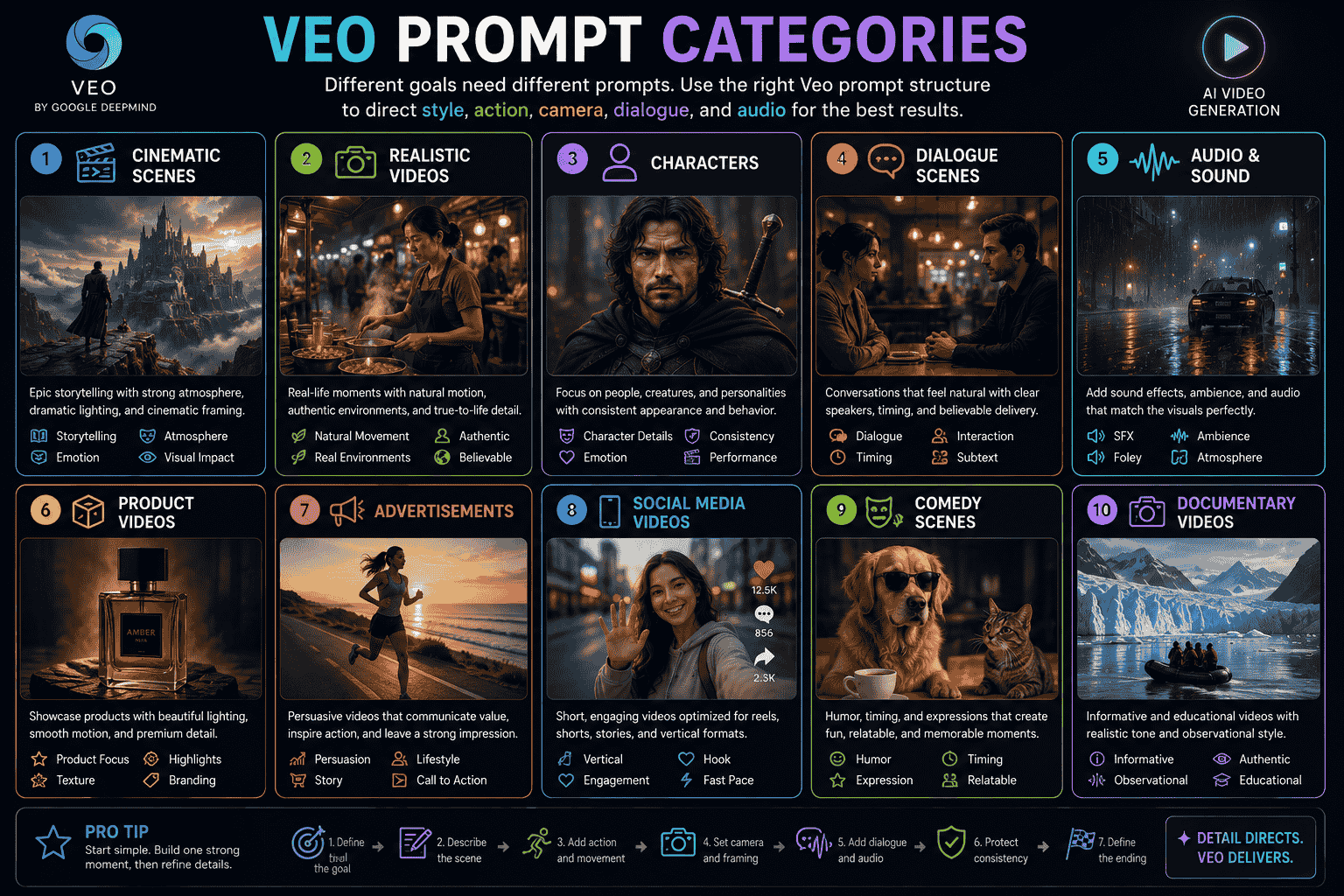
Best Veo Image-to-Video Prompts
When an input image already defines the subject, composition, lighting, and style, focus the Veo prompt primarily on motion and continuity.
39. Portrait Animation
Animate the reference portrait. The subject breathes naturally, blinks once, and slowly turns her gaze from the window toward the camera. Several loose strands of hair and the curtain move gently in a light breeze. The camera performs a very subtle push-in. Audio includes quiet room ambience, soft wind, and fabric movement. Preserve her exact facial identity, hairstyle, clothing, pose, background layout, lighting direction, and color palette. End with her looking directly at the camera.40. Product Animation
Animate the reference product image as a premium commercial shot. A narrow highlight moves slowly from left to right across the glass bottle while the camera performs a smooth ten-degree orbit to the right. Fine mist drifts behind the product. Audio includes subtle atmospheric tone and light glass resonance. Preserve the bottle shape, cap, liquid level, label, logo, typography, pedestal, background, and lighting. End with the product centered and fully visible.41. Anime Character Animation
Animate the reference anime artwork. The character blinks once and slowly turns her gaze toward the glowing tree. Wind moves her hair and ribbon details toward the left. Purple energy pulses through the branches while luminous particles rise upward. The camera performs a very slow push-in. Audio includes soft wind, magical energy hum, and subtle fabric movement. Preserve her facial design, pose, clothing, weapon, environment, composition, linework, and lighting direction.42. First-and-Last-Frame Transition
Begin exactly from the first reference frame and transition smoothly toward the final reference frame. The character raises the sword, turns the upper body, and steps into the final defensive pose. Hair and clothing respond naturally to the movement while the camera remains locked. Audio includes fabric movement, one controlled footstep, metal movement, and a soft energy tone as the sword reaches its final position. Preserve the character’s face, costume, body proportions, weapon, environment, lighting, and visual style.For more specialized image animation examples, read Image to Video Prompts How to Animate Photos Products Characters and Art in 2026.
Veo Camera Movement Prompts
Locked Camera
The camera remains completely locked and motionless for the entire shot. Movement occurs only from {subject_and_environmental_motion}.Slow Push-In
The camera slowly pushes toward {subject}, moving from a {starting_shot} to a {final_shot} while maintaining smooth stable framing.Pull-Back Reveal
Begin with a close-up of {foreground_detail}. The camera gradually pulls backward to reveal {subject_and_environment}, ending in a wide shot.Tracking Shot
The camera tracks alongside {subject} as they move from {direction}, maintaining a consistent distance and matching their speed.Orbit Shot
The camera performs a smooth {degree}-degree orbit around {subject}, keeping the subject centered while revealing {background_detail}.Crane Reveal
The camera begins close to the ground and rises smoothly above {foreground_element}, gradually revealing {location_or_subject} in the distance.Handheld Follow Shot
A handheld camera follows closely behind {subject}, using subtle realistic movement without excessive shake.Focus Shift
The camera remains still while focus gradually moves from {foreground_subject} to {background_subject}.Point-of-View Shot
First-person point-of-view camera moves through {environment}, responding naturally to footsteps and turning toward {important_event}.Macro Product Slide
The camera slides slowly across the surface of {product} in an extreme macro close-up, revealing material texture, edges, reflections, and construction details.How to Create a Beginning Middle and End
A Veo prompt can describe a complete narrative even when the generated clip is short.
The story does not need several locations or complex events.
It only needs a clear progression.
Beginning
Establish the subject, environment, and initial condition.
A paper boat rests at the edge of a rain-filled gutter.
Middle
Introduce movement, difficulty, discovery, or change.
The current carries it toward the camera, and it briefly spins around a fallen leaf.
End
Resolve the action or create a final reveal.
The boat regains its direction and disappears into a dark storm drain.
Reusable Narrative Structure
Beginning:
{initial_subject_and_condition}

Middle:
{main_action_change_or_discovery}

Ending:
{resolution_reveal_or_final_state}
Complete Example
Cinematic close water-level shot of a small paper boat resting at the edge of a rain-filled gutter on a quiet residential street. The current begins carrying it slowly toward the camera while raindrops create expanding ripples. The camera tracks backward at the same speed. The boat briefly spins around a fallen leaf, regains its direction, and moves toward a storm drain. Soft overcast lighting and calm adventurous pacing. Audio includes rainfall, flowing water, distant traffic, and paper moving against the current. End as the boat disappears into the dark drain.How to Maintain Character Consistency
Create a Compact Character Description
Use the same identifying details throughout your prompts.
Mara, a woman in her early thirties with shoulder-length wavy black hair, light freckles, a beige trench coat, and a red umbrella.Repeat Only Essential Details
Focus on:
- Age range
- Face and hair
- Wardrobe
- Important accessories
- Body proportions
- Voice qualities
Protect Wardrobe and Props
Continuity:
- Preserve the character’s facial identity
- Keep the same hairstyle
- Maintain the beige trench coat
- Keep the red umbrella in her right hand
- Maintain the same body proportions
- Preserve the same voice and speaking style
Avoid Excessive Changes
Large camera orbits, extreme facial expressions, transformations, and several actions may make consistency more difficult.
Maintain Spatial Relationships
For multiple characters, state where each person stands and where they look.
The detective remains on the left side of the frame. The woman remains on the right beneath the streetlight. Maintain consistent eye lines between them.Generate Separate Shots When Necessary
For greater control, create individual establishing, medium, and close-up shots, then edit them together.
How to Synchronize Visible Actions and Audio
Audio instructions become clearer when each sound is connected to something visible.
Weak Audio Direction
Add cinematic sounds.
Stronger Audio Direction
Synchronize a metallic click with the product opening, followed by a low activation tone as the light turns on.
Use Separate Audio Categories
Dialogue:
The engineer says, “The signal is getting stronger.”

Sound effects:
A diagnostic device beeps as its display turns red.

Ambience:
Low ventilation hum and distant structural vibration.

Music:
A restrained electronic pulse that gradually increases in intensity.
Keep Dialogue Short
Long speeches may not fit naturally in short clips.
Choose one concise line that advances the scene.
Avoid Competing Sounds
Prioritize sounds that support:
- The main action
- The location
- The emotional tone
- The ending or reveal
Use Precise Timing
Example:
As the door opens, synchronize one heavy mechanical sound. After a brief pause, add a single distant impact from inside the room.Weak vs Strong Veo Prompts
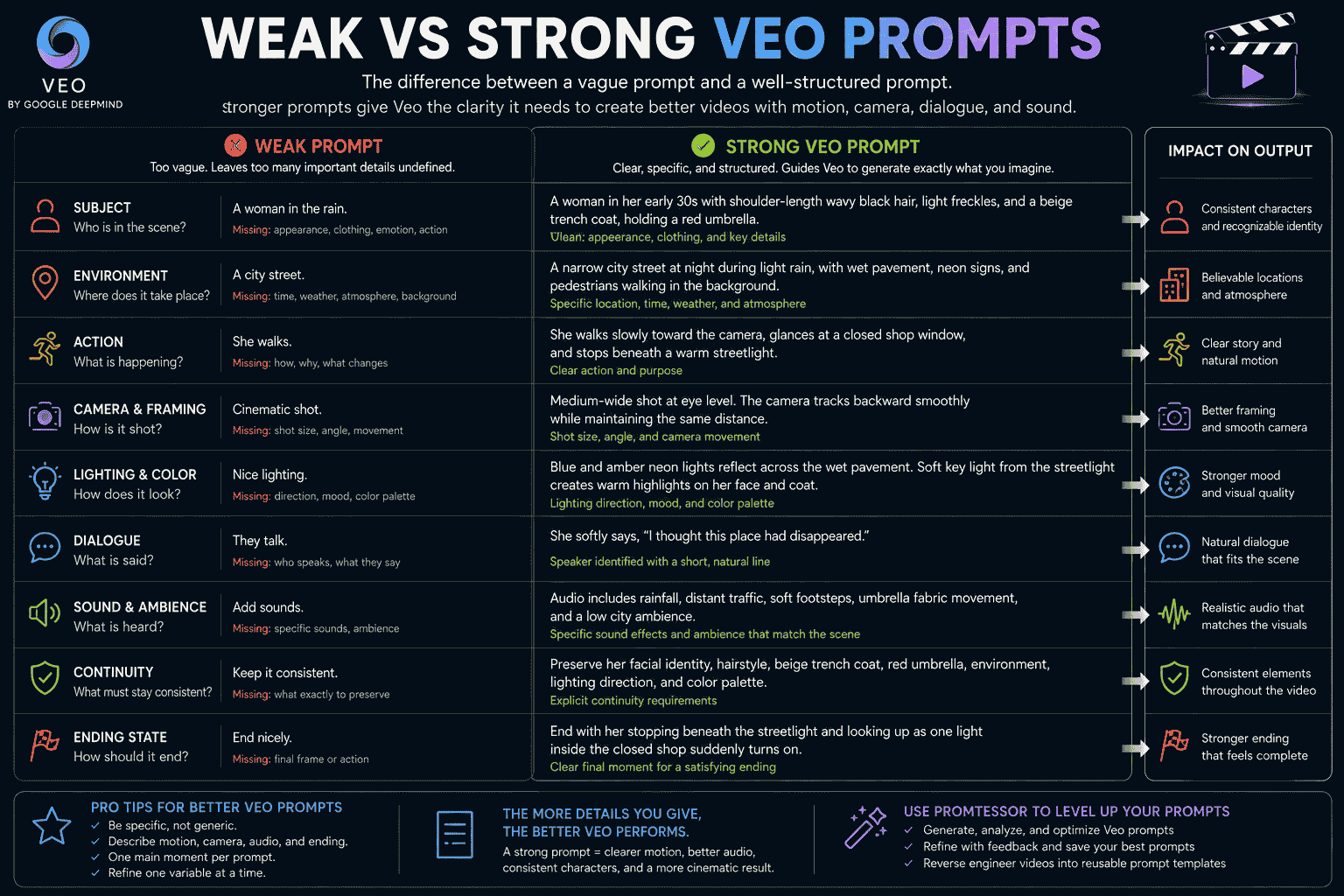
Example 1 Cinematic Scene
Weak prompt:
Create a cinematic video of a woman in the rain.
What is missing:
- Character description
- Environment
- Action
- Shot framing
- Camera movement
- Lighting
- Pacing
- Dialogue
- Audio
- Ending
Stronger prompt:
Cinematic live-action scene of a woman in her early thirties with shoulder-length wavy black hair, light freckles, and a beige trench coat walking beneath a red umbrella on a narrow city street during light rain at night. Medium-wide eye-level shot. The camera tracks backward smoothly while maintaining the same distance. Blue and amber signs reflect across the wet pavement while pedestrians move naturally in the background. Quiet introspective pacing. She looks toward a closed shop and says softly, “I remember when the lights were always on.” Audio includes rainfall, distant traffic, footsteps, and umbrella fabric movement. Preserve her face, clothing, umbrella, and lighting. End as one light inside the shop suddenly turns on.
Example 2 Product Video
Weak prompt:
Make a cool video of this perfume.
Stronger prompt:
Luxury commercial video of the reference amber perfume bottle resting on a limestone pedestal. Begin with an extreme close-up of one water droplet moving down the glass. The camera slowly pulls back and performs a smooth ten-degree orbit to reveal the complete bottle. A warm highlight moves across the glass while fine mist drifts behind it. Audio includes subtle glass resonance, soft atmospheric pulse, and quiet mist. Preserve the exact bottle shape, cap, liquid level, label, logo, typography, pedestal, background, and lighting. End with a clean centered hero shot.
Example 3 Dialogue
Weak prompt:
Two astronauts talk about something scary.
Stronger prompt:
Cinematic medium two-shot of two astronauts standing inside the damaged bridge of a spacecraft. Red emergency lights pulse while an enormous shadow moves outside the observation window. The navigation officer quietly says, “That object was not there ten seconds ago.” The captain watches the shadow and replies, “It was. It was simply behind us.” Audio includes warning beeps, ventilation hum, restrained dialogue, and a low structural vibration. The camera slowly pushes toward the captain. Preserve both characters, suits, positions, control panels, and window view. End as every light on the bridge turns off.
Common Veo Prompt Mistakes
1. Describing Only a Still Image
Explain what moves, how the scene develops, and how it ends.
2. Asking for Too Many Events
A short generated clip may not have enough time for several locations, conversations, transformations, and action sequences.
3. Using Vague Action Words
Replace “moves dramatically” with a visible action such as “steps forward, raises the sword, and lowers into a defensive stance.”
4. Combining Too Many Camera Movements
Do not request a pan, orbit, tilt, crane, zoom, and handheld movement in one short shot unless the sequence truly requires them.
5. Writing Dialogue That Is Too Long
Use one or two concise lines that fit naturally within the scene.
6. Not Identifying the Speaker
State which character says each line.
7. Adding Generic Audio
Connect sounds to visible actions, objects, and environmental elements.
8. Overloading the Soundscape
Several dialogue lines, music cues, ambience layers, and sound effects may compete with one another.
9. Ignoring Character Continuity
Repeat essential face, hair, wardrobe, accessory, and voice details.
10. Leaving the Ending Undefined
A clear final state gives the motion and narrative a destination.
11. Using Conflicting Visual Styles
Choose one primary medium and a small number of compatible characteristics.
12. Treating the First Generation as Final
Review motion, dialogue, audio, camera behavior, continuity, and framing before refining the prompt.
13. Changing the Entire Prompt During Refinement
Modify one major element at a time so you can identify what improved the result.
14. Assuming Every Veo Interface Has the Same Features
Model options and controls can differ between Gemini, Google Flow, Vertex AI, and other supported environments.
How PrompTessor Helps With Veo Prompts
PrompTessor helps users generate, analyze, optimize, refine, reverse-engineer, save, and reuse video prompts for Veo and other AI video generators.
You can begin with a rough idea such as:
Create a cinematic science-fiction scene with dialogue.
Prompt Generator can help transform the idea into a structured prompt containing:
- Video style
- Character description
- Environment
- Action
- Shot framing
- Camera movement
- Lighting and colors
- Dialogue
- Sound effects
- Ambience
- Continuity
- Ending state
Prompt Analysis can identify missing elements such as:
- Unclear action
- Undefined camera behavior
- Missing speaker information
- Dialogue that is too long
- No audio direction
- Weak continuity requirements
- No ending state
- Too many events for one clip
Prompt Optimizer can make a Veo prompt clearer, more specific, and easier for a video model to interpret.
Prompt Refinement can apply targeted feedback such as:
- Shorten the dialogue
- Add environmental ambience
- Synchronize the sound with the visible action
- Change the camera movement to a slow push-in
- Preserve the character’s facial identity
- Turn the prompt into an image-to-video prompt
- Create a clearer beginning, middle, and end
- Adapt the prompt for a vertical video
- Turn the result into a reusable template
PrompTessor also includes Video to Prompt as part of Reverse Prompt.
Video to Prompt starts from an existing video and turns reusable scene and motion details into a structured prompt, including:
- Scene progression
- Subject movement
- Camera behavior
- Timing
- Pacing
- Transitions
- Lighting
- Visual style
- Continuity
- Quality constraints
The difference is:
- Prompt Generator starts from an idea, task, or creative goal.
- Video to Prompt starts from an existing video reference.
Once a Veo prompt produces useful results, it can be optimized, refined, copied, and saved in the Prompt Library for future cinematic, product, advertising, social media, or character workflows.
For a model-agnostic guide, read AI Video Prompts How to Write Better Prompts for Any AI Video Generator in 2026.
FAQ About Veo Prompts
What is a Veo prompt?
A Veo prompt is an instruction describing the video Google Veo should generate. It can define the subject, environment, action, framing, camera movement, lighting, pacing, dialogue, audio, continuity, and ending state.
What makes a good Veo prompt?
A good Veo prompt gives clear visual and temporal direction. It explains what viewers see, what changes over time, how the camera behaves, what is heard, and which details must remain consistent.
Can Veo generate dialogue?
Supported Veo workflows can generate spoken dialogue. Identify the speaker, place the desired line in quotation marks, and keep it short enough for the clip.
Can Veo generate sound effects and ambience?
Supported Veo workflows can generate audio such as sound effects, environmental ambience, dialogue, and music direction. Connect important sounds to visible actions whenever possible.
How do I write dialogue in a Veo prompt?
Identify the character, provide a concise spoken line, and describe the delivery when it matters. For example: The scientist quietly says, “That door was closed a moment ago.”
How do I describe camera movement for Veo?
Use clear terms such as locked camera, slow push-in, pull-back reveal, tracking shot, pan, tilt, orbit, crane movement, handheld follow shot, or point-of-view shot.
How long should a Veo prompt be?
There is no universal ideal length. The prompt should contain enough detail to communicate the video clearly without adding conflicting styles, excessive action, or unnecessary instructions.
Can Veo create image-to-video clips?
Veo supports image-to-video workflows in supported products and model configurations. The image defines the initial appearance, while the prompt should primarily describe motion, camera behavior, audio, and continuity.
Can Veo use a first and last frame?
First-and-last-frame generation is available in supported Veo workflows. The prompt should describe how the scene transitions between the starting and ending images.
How do I maintain character consistency in Veo?
Repeat essential identifying details, preserve wardrobe and props, limit extreme perspective changes, maintain spatial relationships, and include explicit continuity instructions.
Should a Veo prompt have a beginning, middle, and end?
A simple narrative structure can make short scenes easier to understand. Establish the starting condition, describe the main action or change, and define how the clip concludes.
Can PrompTessor create Veo prompts?
PrompTessor helps users generate, analyze, optimize, refine, reverse-engineer, save, and reuse prompts that can be adapted for Veo video, dialogue, audio, image-to-video, and cinematic workflows.
Build Better Veo Videos With Structured Prompts
The best Veo prompts do not rely on the word “cinematic” alone.
They make deliberate production decisions.
Define the subject, environment, action, framing, camera movement, lighting, pacing, dialogue, audio, continuity, and ending.
Keep the scene focused enough to fit naturally inside a short generated clip.
Connect sound effects to visible actions, keep spoken lines concise, and use ambience to make the environment feel believable.
After generating the first version, review how Veo interpreted the motion, camera, character, dialogue, and sound.
Then refine one important element at a time.
Once a prompt consistently produces useful results, turn it into a reusable template and save it for future cinematic, product, advertising, character, documentary, or social media workflows.
A strong Veo prompt does not merely describe a video. It directs the scene, performance, camera, and sound together.
Build better prompts in one workspace
Generate prompts from ideas, analyze and optimize quality, refine with feedback, reverse-engineer content, and save reusable prompts in your Prompt Library.
Try PrompTessor Free