Best Runway Prompts for Text to Video and Image to Video in 2026
Runway can generate cinematic scenes, realistic footage, character moments, product videos, advertisements, social media clips, stylized animation, and visual effects from text or an existing image.
However, a prompt such as “make a cinematic video” leaves most of the important creative decisions undefined.
It does not explain what the scene looks like, what moves, how the camera behaves, how fast the action develops, or what should happen by the end of the shot.
A stronger Runway prompt gives the model clear visual and motion direction without adding unnecessary or conflicting instructions.
This guide contains reusable Runway prompts for Text to Video, Image to Video, cinematic scenes, realistic videos, characters, products, advertisements, social media, anime, stylized videos, and visual effects.
You will also learn how to use camera terminology, locked-camera instructions, sequential prompting, timestamp prompting, continuity instructions, and last-frame continuation.
The available models, settings, durations, aspect ratios, and product interfaces may change over time. Review the current Runway documentation before relying on a specific technical setting.
Quick Answer
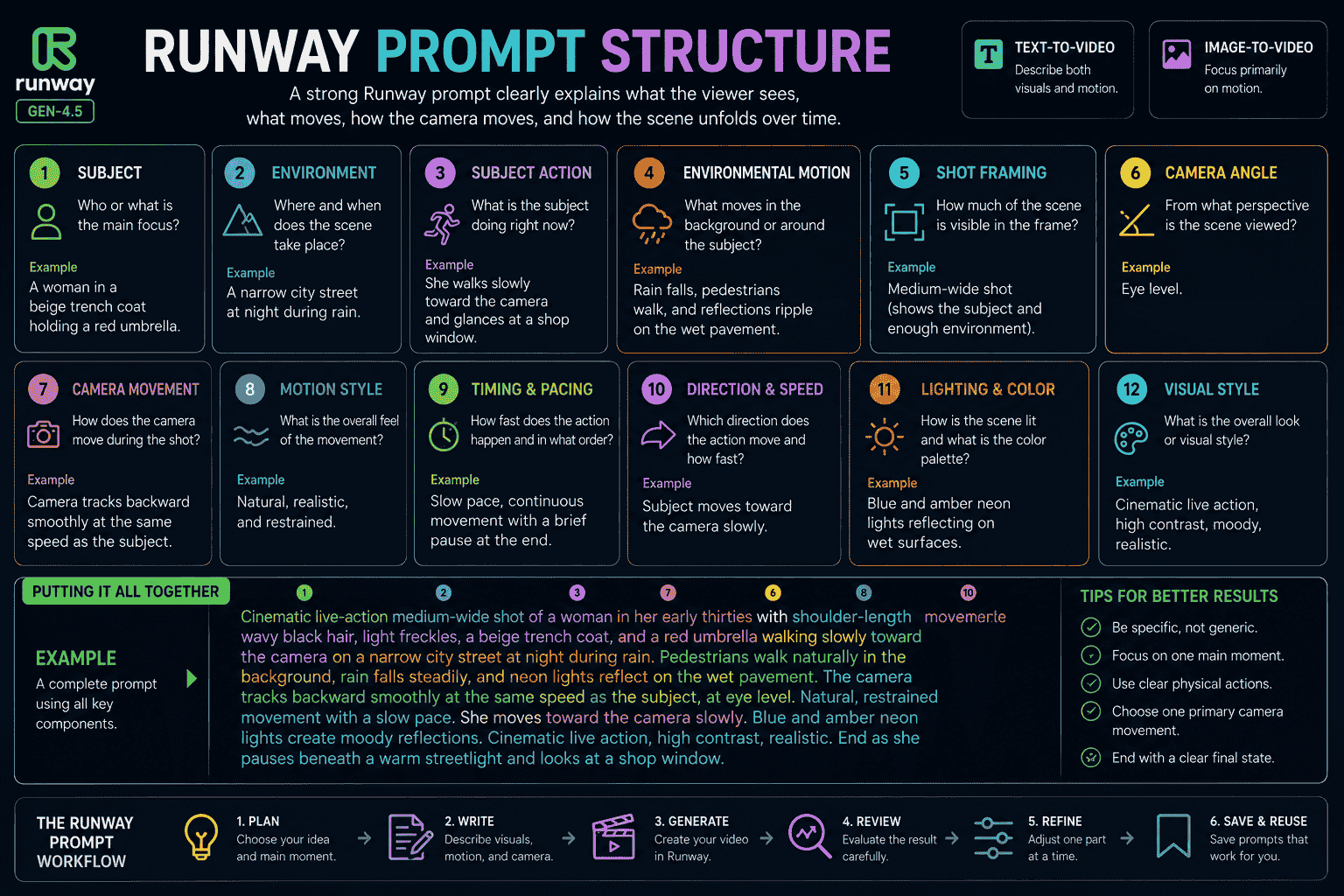
A strong Runway Text to Video prompt describes both the visual scene and its motion. Include the subject, environment, framing, lighting, visual style, subject action, environmental motion, camera movement, timing, direction, and speed.
For Image to Video, let the input image define the appearance. Use the text prompt primarily to describe what moves, how the camera moves, how the scene develops over time, and what should remain visually consistent.
Key Takeaways
- Text to Video prompts should describe both visuals and motion.
- Image to Video prompts should focus primarily on motion.
- Start with the most important action before adding secondary details.
- Use clear physical actions instead of abstract direction.
- Describe what should happen using positive language.
- Use one primary camera movement whenever possible.
- Choose a duration that gives every requested action enough time.
- Use sequential prompting when several events need a clear order.
- Use timestamps as approximate timing guidance, not frame-perfect commands.
- Continue longer scenes by using the final frame as the next input image.
- Refine one important prompt component at a time.
- Save prompts that work as reusable templates.
Table of Contents
- What Is Runway?
- What Is Runway Gen-4.5?
- What Makes a Good Runway Prompt?
- Text-to-Video vs Image-to-Video Prompts
- Runway Text-to-Video Prompt Structure
- Runway Image-to-Video Prompt Structure
- How to Write Better Runway Prompts
- Best Runway Text-to-Video Prompts
- Best Runway Image-to-Video Prompts
- Runway Prompts for Cinematic Scenes
- Runway Prompts for Realistic Videos
- Runway Prompts for Characters
- Runway Prompts for Product Videos
- Runway Prompts for Advertisements
- Runway Prompts for Social Media Videos
- Runway Prompts for Anime and Stylized Videos
- Runway Prompts for Visual Effects
- Runway Camera Movement Prompts
- Runway Static Camera Prompts
- Runway Sequential Prompting
- Runway Timestamp Prompting
- How to Create Longer Runway Videos
- How to Maintain Consistency
- How to Reduce Unwanted Motion
- Weak vs Strong Runway Prompts
- Common Runway Prompt Mistakes
- Runway Gen-4.5 vs Gen-4
- How PrompTessor Helps With Runway Prompts
- Official Runway Prompting Resources
- FAQ About Runway Prompts
What Is Runway?
Runway is a creative AI platform containing tools for generating, transforming, editing, and organizing visual media.
Its generative video workflows include:
- Text-to-video generation
- Image-to-video generation
- Video editing and transformation
- Task-specific creative applications
- Multi-step creative workflows
- Multi-shot video creation through supported tools
This article focuses on writing prompts for Runway Text to Video and Image to Video.
What Is Runway Gen-4.5?
Gen-4.5 is the current Runway video model recommended for its highest-quality Text to Video and Image to Video generation.
Runway describes it as especially capable of handling:
- Detailed camera choreography
- Sequenced actions
- Complex scene compositions
- Precise temporal direction
- Subtle atmospheric changes
- Improved visual fidelity
- Improved motion quality
- Improved prompt adherence
At the time of writing, the official Gen-4.5 documentation lists generation durations between two and ten seconds. More complex action sequences may benefit from a longer duration within the currently available options.
Because product specifications can change, review the official Gen-4.5 guide for the latest information.
What Makes a Good Runway Prompt?
A good Runway prompt communicates a clear visual idea and an understandable pattern of movement.
The model does not require one mandatory prompt format. Clarity and reduced ambiguity matter more than following a rigid formula.
However, using a consistent structure can make prompts easier to write, troubleshoot, and refine.
1. Subject
Identify the main person, animal, object, product, vehicle, or environment.
Examples:
- A woman in a beige trench coat
- A red sports car
- A transparent perfume bottle
- A small service robot
- A red fox
- An abandoned railway station
2. Subject Appearance
For Text to Video, describe important visual characteristics.
Instead of:
A warrior walks through a city.
Use:
A tired warrior with shoulder-length black hair, weathered bronze armor, a dark green cloak, and a chipped sword walks through an abandoned stone city.
For Image to Video, the image already provides most appearance details. Repeating them is usually unnecessary unless a specific detail must be protected or changed.
3. Environment
Describe where the scene happens.
Examples:
- A narrow city street during rain at night
- A bright kitchen during the early morning
- A misty forest at sunrise
- A reflective black product studio
- An orbital research station
- A crowded outdoor market
4. Subject Action
Describe what the subject physically does.
Examples:
- Walks slowly toward the camera
- Turns toward a distant sound
- Raises one hand
- Rotates clockwise
- Accelerates along the road
- Opens the package
Concrete actions are more useful than abstract instructions such as “acts confident” or “moves dramatically.”
5. Environmental Motion
Environmental motion describes how the scene changes around the subject.
Examples:
- Wind moves the grass and clothing.
- Rain creates ripples on the pavement.
- Mist drifts between the trees.
- Dust trails behind the vehicle.
- Steam rises from the food.
- Reflections move across the product.
6. Shot Framing
Shot framing determines how much of the subject and environment appears in the frame.
Common framing instructions include:
- Macro close-up
- Extreme close-up
- Close-up
- Medium shot
- Full-body shot
- Wide shot
- Establishing shot
- Over-the-shoulder shot
- Point-of-view shot
7. Camera Angle
Possible angles include:
- Eye level
- Low angle
- High angle
- Ground level
- Overhead
- Top down
- Dutch angle
8. Camera Movement
Camera movement determines how the viewer’s perspective changes.
Examples:
- Locked camera
- Slow push-in
- Pull-back reveal
- Tracking shot
- Pan
- Tilt
- Orbit
- Crane movement
- Handheld follow shot
- Crash zoom
- Whip pan
- Focus shift
9. Motion Style
Motion style describes the overall physical quality of movement.
Examples:
- Natural live-action movement
- Slow and controlled movement
- Fast energetic motion
- Restrained handheld movement
- Stop-motion movement
- Fluid stylized animation
- Weightless zero-gravity movement
10. Timing and Pacing
Timing explains when an action occurs and how quickly it develops.
Examples:
- The subject pauses before turning.
- The movement gradually accelerates.
- The camera holds the final shot briefly.
- The action remains slow throughout.
- The transformation completes near the end.
11. Direction and Speed
Use physical direction when it matters.
Examples:
- Moves from left to right
- Turns clockwise
- Falls toward the foreground
- Moves rapidly away from the camera
- Drifts slowly upward
- Rotates ten degrees to the right
12. Lighting and Color
For Text to Video, lighting can be defined directly in the prompt.
Examples:
- Warm golden-hour backlighting
- Soft window light
- Cold fluorescent lighting
- Blue and amber neon reflections
- Hard directional studio lighting
- Muted earth-tone palette
For Image to Video, the input image normally determines the starting lighting and colors.
13. Visual Style
Possible visual styles include:
- Cinematic live action
- Natural documentary footage
- Luxury commercial
- Raw independent film
- Anime animation
- Stop-motion animation
- Stylized 3D animation
- Retro VHS recording
- Surreal dream sequence
Runway Text-to-Video vs Image-to-Video Prompts
Text to Video and Image to Video use different prompting strategies.
| Element | Text to Video | Image to Video |
|---|---|---|
| Subject appearance | Describe in the prompt | Usually defined by the image |
| Environment | Describe in the prompt | Usually defined by the image |
| Composition | Describe through framing and angle | Primarily defined by the image |
| Lighting | Describe in the prompt | Primarily inherited from the image |
| Visual style | Describe in the prompt | Primarily inherited from the image |
| Subject motion | Describe in the prompt | Describe in the prompt |
| Environmental motion | Describe in the prompt | Describe in the prompt |
| Camera movement | Describe in the prompt | Describe in the prompt |
| Timing and direction | Describe when important | Describe when important |
| Continuity protection | Useful for repeated subjects | Especially useful |
Text-to-Video Prompt
Cinematic wide shot of a red sports car accelerating across a dry salt flat at sunset. Dust trails behind the rear wheels as the car moves from left to right. The camera tracks alongside the car at the same speed before gradually pulling upward into an aerial view. Warm golden backlighting, long shadows, high contrast, and realistic live-action motion.Image-to-Video Prompt
The car accelerates rapidly from left to right. Dust trails behind the rear wheels as the camera tracks alongside at the same speed, then gradually rises into a wider aerial view. Natural vehicle suspension and realistic wheel movement.The Text-to-Video version explains both appearance and movement.
The Image-to-Video version assumes the uploaded image already defines the car, environment, composition, lighting, and style.
Runway Text-to-Video Prompt Structure
A practical Text-to-Video formula is:
{shot_framing} of {subject_description} {subject_action} in {environment}. {environmental_motion}. The camera {camera_movement}. {motion_style_and_timing}. {lighting_color_and_visual_style}.Detailed Text-to-Video Template
Video style:
{visual_style}

Subject:
{subject_appearance}

Environment:
{location_time_weather_and_atmosphere}

Action:
{main_subject_action}

Environmental motion:
{background_or_reactive_motion}

Camera:
{shot_size}, {camera_angle}, {camera_movement}

Motion:
{speed_direction_timing_and_physical_quality}

Lighting and color:
{lighting_direction_and_palette}

Ending:
{optional_final_state}
Complete Example
Cinematic live-action medium-wide shot of a woman in her early thirties with shoulder-length wavy black hair, light freckles, a beige trench coat, and a red umbrella walking through a narrow city street during light rain at night. She moves slowly toward the camera and glances at a closed shop window. Pedestrians walk naturally behind her, rain creates ripples on the pavement, and neon signs reflect across the wet street. The camera tracks backward smoothly while maintaining the same distance. Natural walking motion, quiet pacing, blue and amber city lighting, shallow depth of field, and restrained cinematic realism. End as she stops beneath a warm streetlight.Runway Image-to-Video Prompt Structure
A practical Image-to-Video formula is:
The camera {camera_motion} as the subject {subject_action}. {environmental_motion}. {motion_style_timing_direction_and_speed}. Preserve {important_visual_details}. End with {final_state}.Compact Image-to-Video Template
Subject motion:
{what_the_subject_does}

Camera motion:
{how_the_camera_moves}

Environmental motion:
{what_moves_around_the_subject}

Timing:
{speed_order_and_pacing}

Continuity:
{what_must_remain_consistent}

Ending:
{final_state}
Complete Example
The subject breathes naturally, blinks once, and gradually turns her gaze toward the camera. Loose strands of hair and the curtain behind her move gently in a light breeze. The camera performs a very subtle slow push-in. Calm realistic pacing. Preserve her facial identity, hairstyle, clothing, pose, background layout, lighting direction, and color palette. End with her looking directly at the camera.How to Write Better Runway Prompts
Step 1 Choose Text to Video or Image to Video
Use Text to Video when you want the prompt to create both the visual scene and its movement.
Use Image to Video when you already have a visual starting point and primarily need to control motion.
Step 2 Define One Main Moment
Focus the generation on one readable visual event.
Instead of:
A traveler enters a city, meets a wizard, fights a dragon, escapes, and returns home.
Use:
A traveler approaches an enormous city gate as ancient symbols begin glowing across the stone.
Step 3 Describe the Most Important Motion
Start with the movement that defines the shot.
Examples:
- The subject turns toward the camera.
- The vehicle accelerates forward.
- The package opens and reveals the product.
- The camera pulls back to reveal the environment.
- The statue transforms into a living creature.
Step 4 Add Camera Direction
Choose one primary camera movement that supports the action.
Examples:
- Locked camera for controlled product motion
- Tracking camera for walking or running
- Slow push-in for emotional focus
- Pull-back for a reveal
- Orbit for product or character presentation
Step 5 Add Supporting Motion
Supporting motion may include:
- Wind moving hair or clothing
- Dust reacting to a vehicle
- Steam rising from food
- Rain moving across the environment
- Reflections shifting across a product
Step 6 Add Timing
Explain how the movement develops.
The subject remains still for a moment, then slowly turns toward the camera.
Step 7 Use Positive Language
Describe what should happen rather than only what should be avoided.
Instead of:
No camera movement. Do not zoom.
Use:
Locked camera. The camera remains perfectly still throughout the shot.
Step 8 Generate a Simple Version
Start with the main motion before adding many secondary details.
The camera slowly pushes in as the subject turns toward the window.Step 9 Evaluate the Output
Review:
- Subject appearance
- Action clarity
- Camera behavior
- Motion direction
- Physical realism
- Scene continuity
- Timing
- Ending state
Step 10 Refine One Component
Examples:
- Make the push-in slower.
- Keep the camera locked.
- Reduce the head turn.
- Add wind movement to the clothing.
- Move the car from left to right.
- Hold the final frame longer.
Best Runway Text-to-Video Prompts
1. Zero-Gravity Documentary Scene
Handheld documentary-style medium shot of a raccoon inside a plain research room in zero gravity trying to open a silver trash container. The lid comes loose and pieces of paper, packaging, and small objects float slowly into the room. The raccoon reaches through the floating debris while rotating gently in the air. Natural camera shake, soft fluorescent lighting, raw independent-film aesthetic, unpolished realism, and observational pacing.2. Cowboy Action Scene
Cinematic medium shot of a cowboy riding a dark horse across a dusty desert during golden hour. The horse suddenly rears and twists to the right, causing the cowboy to lose balance and begin falling toward the left. Dust rises around the hooves and trails through the warm backlight. Restrained handheld camera, high contrast, warm amber and deep orange palette, dramatic rim lighting, and realistic live-action movement.3. Rainy City Walk
Cinematic live-action medium-wide shot of a woman in a beige trench coat walking beneath a red umbrella on a narrow city street during rain at night. She moves slowly toward the camera while blue and amber neon signs reflect across the wet pavement. The camera tracks backward smoothly at the same speed. Pedestrians move naturally in the background, wind affects the coat, and rain creates small splashes beneath her shoes. Quiet introspective pacing.4. Fantasy Gate Reveal
Epic cinematic scene of a lone traveler approaching an enormous stone gate carved into a snowy mountain. Begin with a low close-up of boots moving through the snow. The camera gradually rises and pulls backward to reveal the traveler and the full scale of the gate. Strong wind moves the cloak and snow across the valley as ancient symbols begin glowing across the stone. Cold blue daylight with warm golden magical accents.5. Forest Robot
Stylized cinematic animation of a small white service robot with green display eyes and a worn utility backpack walking through an ancient misty forest. The camera tracks beside the robot at ground level as it pauses near glowing blue plants and scans them with a thin green light. Leaves move gently, mist drifts between trees, and small particles float through sunlight. Curious calm pacing and detailed 3D animation.6. Ocean Cliff Scene
Wide cinematic shot of a lone hiker standing on a high coastal cliff during sunrise. The camera begins behind the hiker and slowly cranes upward, revealing the ocean and distant mountains. Wind moves the jacket and grass while waves strike the rocks far below. Soft golden backlighting, natural blue shadows, realistic travel-film style, and slow expansive pacing.7. Retro Convenience Store
Retro VHS-style footage of an empty convenience store at midnight. A fluorescent ceiling light flickers as a shopping cart begins rolling slowly through an aisle by itself. The camera follows from a low handheld perspective. Reflections move across the tiled floor and a refrigerator door gradually opens in the background. Muted colors, visible tape noise, low-budget horror aesthetic, and slow suspenseful pacing.8. Surreal Floating Room
Surreal cinematic wide shot of a furnished living room floating above a sea of clouds. The sofa, lamps, books, and plants remain arranged as if the room still has walls. Curtains move in the wind while books gradually lift from a table and drift upward. The camera performs a slow circular orbit around the room. Soft sunrise light, pale blue and warm cream palette, dreamlike atmosphere, and smooth weightless motion.Best Runway Image-to-Video Prompts
9. Natural Portrait Animation
The subject breathes naturally, blinks once, and slowly shifts her gaze from the window toward the camera. Several loose strands of hair and the curtain behind her move gently in a light breeze. The camera performs a very subtle slow push-in. Preserve her facial identity, hairstyle, clothing, pose, background, lighting, and colors. End with her looking directly at the camera.10. Product Rotation
The product rotates slowly fifteen degrees clockwise and stops. The camera remains locked while reflections move naturally across the surface. Preserve the exact product shape, dimensions, label, logo, typography, materials, background, shadow direction, and lighting. End with the front label clearly visible.11. Car Tracking Shot
The vehicle accelerates forward from left to right. The camera tracks alongside at the same speed while dust trails behind the rear wheels. Natural suspension movement, realistic wheel rotation, and subtle vibration from the road. Preserve the vehicle design, paint, proportions, wheels, lights, environment, and direction of travel.12. Anime Character Animation
The character blinks once and slowly turns her gaze toward the glowing tree. Wind moves her hair and ribbon details toward the left. Purple energy pulses through the branches while luminous particles rise upward. The camera performs a very slow push-in. Preserve the facial design, pose, clothing, linework, colors, environment, and lighting direction.13. Landscape Animation
Mist drifts slowly between the mountain layers, clouds move gradually across the sky, and sunlight creates changing highlights across the valley. The camera performs a gentle forward glide along the visible path. Preserve the terrain, buildings, vegetation, composition, lighting direction, colors, and realistic visual style.14. Fashion Portrait
The model slowly turns her shoulders toward the camera while maintaining a composed expression. Wind moves the outer fabric and several loose strands of hair. The camera slides subtly to the right. Preserve her facial identity, makeup, hairstyle, outfit design, jewelry, body proportions, background, and editorial color grading.15. Food Animation
Steam rises naturally from the dish while sauce moves slowly across the surface and several herbs settle onto the food. The camera performs a slow macro slide from left to right. Preserve the food structure, ingredients, plate, table arrangement, lighting, colors, and shallow depth of field.16. Seamless Loop
The central object rises slowly, rotates once, releases a ring of small glowing particles, and returns naturally to its exact starting position. The locked-off camera remains perfectly still. Background particles move continuously. The camera and subject must start and end on the exact same frame to create a seamless loop.For more specialized examples, read Image to Video Prompts How to Animate Photos Products Characters and Art in 2026.
Runway Prompts for Cinematic Scenes
17. Abandoned Research Station
Cinematic science-fiction thriller inside an abandoned orbital research station. An astronaut in a worn white pressure suit walks slowly through a narrow corridor illuminated by flickering red emergency lights. Medium over-the-shoulder shot. The handheld camera follows closely behind. Steam escapes from damaged pipes, loose cables swing above the corridor, and dust floats through the light. The astronaut stops as a metal door opens by itself. End with complete darkness visible beyond the doorway.18. Train Platform Drama
Intimate cinematic scene on an almost empty train platform before sunrise. A young man stands beside an old suitcase while a woman watches from several meters away. Begin with a medium shot of the man, then slowly pan toward the woman as warm train lights approach through the mist. Cold morning colors, natural wind movement, restrained performance, and quiet emotional pacing. End as the train enters between them.19. Lighthouse Storm
Wide cinematic shot of a lighthouse during a violent nighttime storm. Enormous waves strike the rocks while heavy rain moves diagonally across the frame. The camera begins close to the water and cranes upward toward the lighthouse beam. Lightning briefly illuminates the coastline, metal railings move in the wind, and sea spray fills the foreground. Dark blue-gray palette and powerful realistic motion.20. Forest Discovery
Cinematic low tracking shot following a child in a yellow raincoat walking through a dark forest after rain. The child approaches a small glowing doorway hidden inside an ancient tree. The camera moves closer as the child raises one hand toward the light. Wet leaves move under each step, mist drifts between the trees, and blue light spreads gradually across the child’s face. End as the doorway begins opening.Runway Prompts for Realistic Videos
21. Coffee Preparation
Realistic observational medium close-up of an experienced barista preparing pour-over coffee inside a quiet café before opening. The camera remains locked. The barista measures the beans, starts the grinder, and pours hot water gradually over the filter. Steam rises naturally and soft morning light moves across the counter. Natural hand movement, authentic equipment detail, restrained documentary style, and warm neutral colors.22. Wildlife Scene
Realistic nature-documentary footage of a red fox emerging slowly from tall grass at sunrise. Low ground-level medium shot with a locked camera. The fox takes several cautious steps, pauses, listens, and turns toward a distant sound. Grass moves gently in the wind while morning mist drifts through the background. Natural golden backlight and patient observational pacing.23. Street Market
Realistic handheld documentary footage moving through a crowded outdoor night market. The camera follows one shopper at a steady walking pace while vendors cook food, customers cross the frame, and steam rises from several stalls. Warm practical lighting, natural crowd movement, authentic food preparation, moderate handheld motion, and energetic but readable pacing.Runway Prompts for Characters
24. Desert Guardian
Cinematic character introduction of a desert guardian with dark braided hair, turquoise face markings, layered indigo robes, weathered bronze armor, and a crescent-shaped spear. She stands at the entrance of an ancient sandstone city during sunset. Begin with a close-up of her hand tightening around the spear, then slowly pull back into a full-body low-angle shot as she steps into a defensive stance. Wind moves the robes and dust across the courtyard.25. Space Engineer
Cinematic science-fiction medium shot of a maintenance engineer wearing a white and graphite pressure suit kneeling beside a damaged control panel. The camera slowly pushes in as the engineer connects a diagnostic device, watches warning lights activate, and turns toward an unexpected movement outside the frame. Cool overhead lighting, red emergency accents, subtle steam, and restrained realistic motion.26. Elderly Sailor
Realistic cinematic portrait of an elderly sailor with a gray beard, weathered face, knitted navy cap, and heavy wool coat standing on the deck of a fishing boat. Medium close-up with a very slow push-in. The boat moves gently with the waves while wind affects his beard and coat. Overcast natural light, cool muted colors, shallow depth of field, and quiet reflective pacing.Runway Prompts for Product Videos
27. Luxury Perfume
Luxury commercial macro shot of an amber perfume bottle resting on a limestone pedestal. A water droplet moves slowly down the glass as the camera pulls back and performs a smooth ten-degree orbit to reveal the complete bottle. A warm highlight travels across the surface while fine mist moves behind it. Black, amber, and cream palette with slow controlled motion. End on a centered hero shot.28. Smartphone Reveal
Premium technology product film of a slim graphite smartphone on a reflective dark surface. Begin with a macro slide across the camera lenses. The camera pulls back while the phone rises slightly and rotates ten degrees. Edge lighting reveals the metal frame and the screen activates with a subtle glow. Precise controlled movement and cool neutral lighting.29. Skincare Bottle
Clean luxury beauty advertisement featuring a transparent serum bottle with a brushed silver cap. The bottle remains stationary while soft light moves from left to right across the glass. Water droplets travel slowly down the surface and a botanical shadow passes across the warm beige background. The camera performs a gentle push-in. End with the label centered and clearly visible.30. Headphones
Premium macro product shot of black wireless headphones floating above a dark reflective platform. The ear cups rotate gradually toward the camera while a narrow blue highlight moves across the edges. The camera performs a controlled horizontal slide and stops on a symmetrical front-facing hero shot. Preserve realistic materials, product proportions, logo placement, and clean studio lighting.Runway Prompts for Advertisements
31. Productivity Application
Short cinematic advertisement showing a freelance designer working at a cluttered desk surrounded by notes, notifications, and multiple open laptop windows. Quick close-ups show visible frustration. The scene becomes calmer as the designer organizes the work into one clear digital plan. Camera movement changes from nervous handheld motion to a smooth locked composition. Lighting shifts gradually from cold blue to warm natural light. End with clean negative space for a call to action. No generated text.32. Reusable Travel Bottle
Warm lifestyle advertisement for a reusable travel bottle. A young traveler fills the bottle at a mountain campsite during sunrise, attaches it to a backpack, and begins walking along the trail. Smooth handheld transitions between macro product details and wide environmental views. Golden morning light, natural outdoor movement, optimistic pacing, and consistent product design throughout every shot.33. Running Shoes
High-energy vertical advertisement for lightweight running shoes. Begin with macro close-ups of the material, sole, and laces. The runner tightens the shoes and accelerates along a wet city road before sunrise. The camera switches to a low tracking shot beside the feet as water moves away from each step. Cool blue dawn lighting gradually becomes warm sunlight. End with the runner stopping at a city overlook.Runway Prompts for Social Media Videos
34. Vertical Product Reel
Vertical social media product video featuring a compact digital camera. The camera drops gently into frame and lands on a colorful studio surface. A fast smooth push-in reveals the lens rotating, the screen opening, and the shutter activating in a clear sequence. Bright blue, yellow, and coral accents. Keep clean negative space in the upper area for text overlays. No generated text.35. Educational Animation
Short vertical editorial animation showing one small idea transforming into a structured creative plan. The idea moves through five clear visual stages represented by simple geometric cards, connecting lines, and icons. Locked camera, modern interface-inspired design, dark navy background, blue and violet accents, clean moderate pacing, and empty space for captions. No generated text.36. Satisfying Loop
Seamless vertical loop of a translucent glass sphere floating above a dark reflective surface. The sphere rises slowly, rotates, releases a circular wave of glowing particles, and returns naturally to its original position. The locked camera remains perfectly still. Purple and blue lighting, centered composition, smooth rhythmic motion, and an identical first and final frame.Runway Prompts for Anime and Stylized Videos
37. Anime Sword Scene
Cinematic anime scene of a young warrior standing on a rooftop above a futuristic city at sunset. The warrior raises a glowing sword into a defensive position while wind moves the dark coat and hair toward the left. The camera performs a slow low-angle orbit. Neon signs activate across the city and small luminous particles rise around the blade. Detailed linework, rich purple and orange palette, and fluid stylized motion.38. Stop-Motion Kitchen
Playful stop-motion animation of small vegetables preparing soup inside a miniature kitchen. A carrot rolls across the counter, a tomato jumps into the pot, and a wooden spoon begins stirring by itself. The locked camera observes the action from a medium-wide angle. Handmade felt and clay textures, warm practical lighting, slightly imperfect frame-by-frame movement, and cheerful pacing.39. Paper-Cut Landscape
Layered paper-cut animation of a train moving through mountains during sunrise. Foreground trees slide past quickly while distant mountains move slowly to create parallax depth. Clouds drift across the sky and warm light gradually spreads through the paper layers. Side-view tracking composition, visible paper texture, handcrafted shadows, and smooth rhythmic movement.Runway Prompts for Visual Effects
40. Stone Transformation
A pile of rough volcanic rocks begins shaking and assembling into a tall humanoid figure. Individual stones rise, rotate, and lock together to form arms, legs, a torso, and a head. Dust falls between the moving pieces as the completed figure takes one heavy step forward. Locked camera, realistic material weight, dramatic side lighting, and a continuous seamless transformation.41. Mirror Surface Effect
The subject inspects her reflection in an ornate mirror. The mirror surface begins forming large translucent bubbles that move slowly across the glass. Her reflection distorts naturally inside each bubble while the physical frame remains unchanged. Locked camera, restrained subject motion, soft editorial lighting, and a continuous seamless shot.42. Building Overgrowth
Vines emerge from cracks in the abandoned building and spread rapidly across the walls, windows, and roof. Leaves unfold as the growth continues while the surrounding street remains still. The camera slowly pulls backward to reveal the entire transformation. Natural plant movement, realistic shadows, continuous shot, and gradually accelerating growth.43. Liquid Metal Transformation
The solid chrome sphere begins melting into reflective liquid metal. The liquid spreads across the surface, rises into twisting ribbons, and gradually assembles into a futuristic helmet. Reflections move accurately across the changing form. Locked camera, dark studio environment, controlled transformation, high material realism, and a clean final hero shot.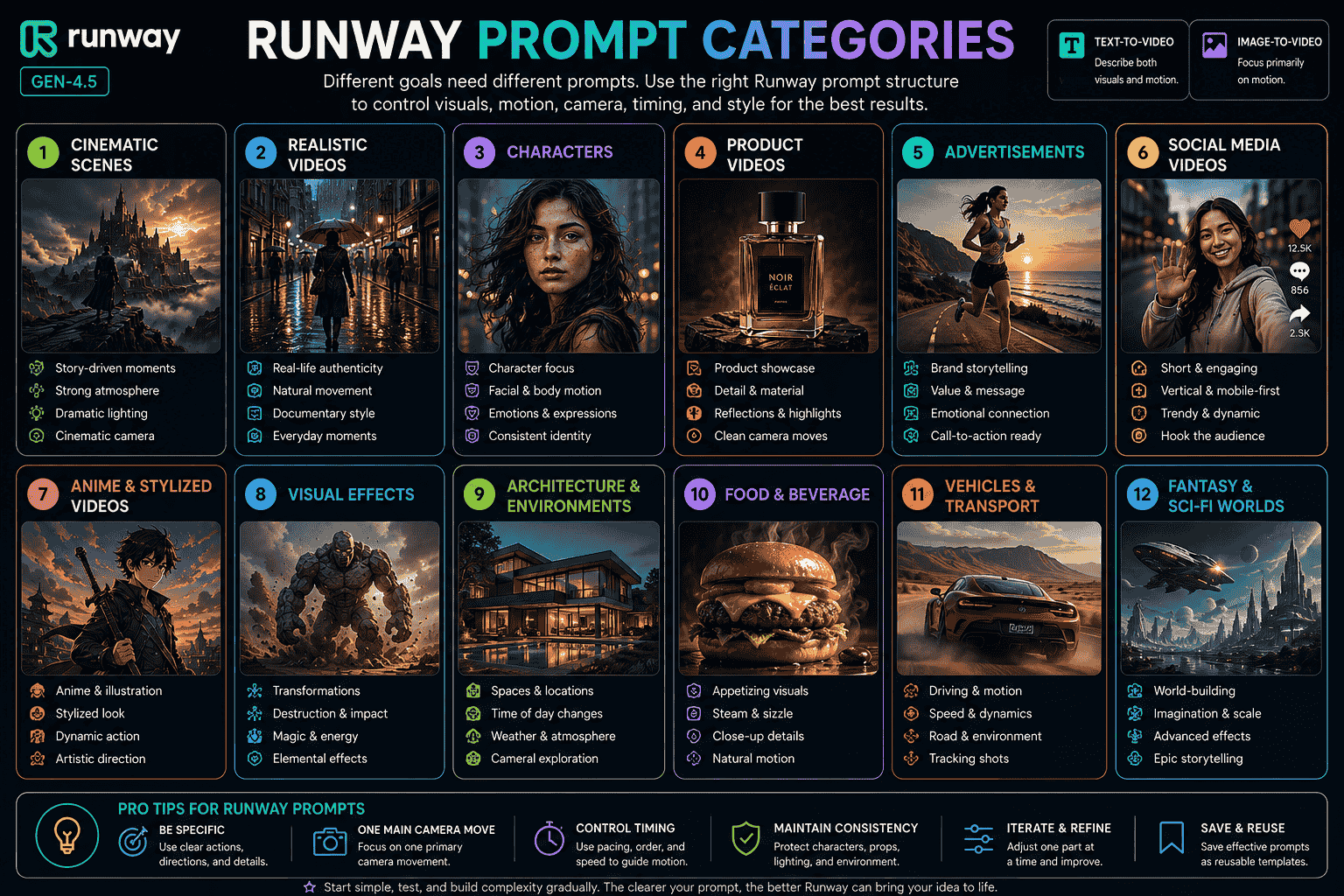
Runway Camera Movement Prompts
Locked Camera
The locked-off camera remains perfectly still throughout the entire shot.Slow Push-In
The camera slowly pushes toward the subject, moving gradually from a medium shot to a close-up while maintaining stable framing.Pull-Back Reveal
Begin with a close-up of {foreground_detail}. The camera slowly pulls backward to reveal {subject_and_environment}, ending in a wide shot.Tracking Shot
The camera tracks alongside the subject as they move from left to right, maintaining the same distance and matching their speed.Orbit Shot
The camera performs a smooth ten-degree orbit around the subject while keeping the subject centered.Crane Movement
The camera begins near the ground and gradually cranes upward, revealing the complete environment beyond the foreground.Handheld Follow Shot
A handheld camera follows closely behind the subject with restrained natural shake and realistic walking movement.Crash Zoom
The camera performs a rapid crash zoom toward the subject’s eyes and ends in sharp focus.Whip Pan
The camera performs a fast whip pan from the subject to {second_subject}, briefly creating directional motion blur before settling into focus.Focus Shift
The camera remains still while focus gradually shifts from {foreground_subject} to {background_subject}.Point-of-View Movement
First-person point-of-view camera moves slowly through the environment and turns toward {important_event}.Macro Slide
The camera slides slowly across the product surface in an extreme macro close-up, revealing the texture, edges, reflections, and material details.Runway maintains an official camera terms and prompt examples guide containing additional framing and motion terminology.
Runway Static Camera Prompts
Video models are designed to produce movement, so requesting a static shot works best when the prompt clearly states which motion should still occur inside the frame.
Completely Locked Camera
The locked-off camera remains perfectly still. Only the subject’s breathing, one natural blink, and subtle hair movement occur.Static Product Shot
The camera remains completely locked. The product stays centered and stationary while a narrow highlight moves gradually across its surface.Static Landscape Loop
The camera remains perfectly still. Clouds drift slowly, grass moves gently in the wind, and reflections shift naturally across the water.Perfect Loop
The camera must start and end on the exact same frame. The subject completes one subtle movement and returns naturally to the original position.Minimal Subject Motion
Minimal subject motion only. Natural breathing and one soft blink. Locked camera and stable background.Runway Sequential Prompting
Sequential prompting describes several actions in the order they should occur.
A simple natural-language structure is:
First, {action_one}. Then, {action_two}. Finally, {action_three}.Sequential Portrait Example
The subject begins looking through the window. She blinks once, then slowly turns her head toward the camera. Finally, she develops a small relaxed smile as the camera performs a subtle push-in.Sequential Product Example
The product remains still as a highlight moves across the front surface. The camera then begins a slow orbit to the right. Finally, the product rotates slightly toward the camera and stops on a centered hero shot.Sequential Character Example
The character looks toward the distant doorway, then raises the sword into a defensive position. Finally, the doorway opens and bright light fills the scene.Sequential Transformation Example
The stone surface begins cracking. Small fragments lift into the air, then the structure unfolds into a mechanical creature. Finally, the completed creature takes one step toward the camera.Keep the number of events realistic for the selected clip duration.
Runway Timestamp Prompting
Timestamps can provide approximate guidance for when actions should occur.
They are most useful when paired with a complete natural-language description.
Basic Timestamp Structure
[00:00–00:02] {first_action}
[00:02–00:05] {second_action}
[00:05–00:08] {third_action}
Portrait Timestamp Example
The subject stands beside a window in soft morning light. Her movement remains subtle and natural.

[00:00–00:02] She looks through the window and breathes naturally.
[00:02–00:04] She blinks once and begins turning toward the camera.
[00:04–00:07] The camera slowly pushes in as she develops a small smile.
Product Timestamp Example
Premium studio product shot with controlled motion and a dark reflective background.

[00:00–00:02] A narrow highlight moves across the front of the product.
[00:02–00:05] The camera performs a slow orbit to the right.
[00:05–00:08] The camera stops and holds a centered hero shot.
Action Timestamp Example
Cinematic low-angle shot of a warrior standing in a ruined courtyard during strong wind.

[00:00–00:02] The warrior remains still while fabric and dust move.
[00:02–00:05] The warrior raises the sword and steps forward.
[00:05–00:08] The camera pushes closer as the sword begins glowing.
Crash-Zoom Timestamp Example
A needle-felted character stands in a brightly lit store aisle.

[00:00–00:02] The character faces away from the camera.
[00:02–00:03] The character turns rapidly toward the camera.
[00:03–00:04] The camera performs a fast crash zoom toward the eyes.
[00:04–00:07] The character squints and slowly lowers the eyebrows.
Give every action enough time to unfold naturally. Timestamp direction is approximate and may still require iteration.
How to Create Longer Runway Videos
A single generation may not be long enough for a complete sequence.
You can continue the scene by using the final frame of one video as the starting image for another Image-to-Video generation.
Basic Workflow
- Generate the first clip.
- Move to the final frame.
- Use the current frame as a new image input.
- Write a continuation prompt.
- Generate the next clip.
- Combine both clips in a video editor.
- Trim or blend the shared transition frame.
Clip One
The traveler walks toward the ancient gate as glowing symbols gradually activate across the stone. The camera follows from behind and ends as the traveler reaches the center of the gate.Clip Two
Continue from the starting frame. The traveler remains in the same position as the gate begins opening inward. Bright golden light spreads across the traveler and the surrounding snow. The camera slowly pulls backward while preserving the traveler, gate, environment, lighting direction, and scale.Continuation Tips
- Keep the same camera direction.
- Repeat only essential continuity details.
- Begin the second prompt from the visible final state.
- Avoid changing the visual style between clips.
- Keep wardrobe, props, lighting, and spatial relationships consistent.
How to Maintain Character and Scene Consistency
Use a Compact Character Description
Mara, a woman in her early thirties with shoulder-length wavy black hair, light freckles, a beige trench coat, and a red umbrella.Repeat Essential Details
Protect:
- Face and hair
- Wardrobe
- Accessories
- Body proportions
- Product geometry
- Environment layout
- Lighting direction
- Color palette
Use Clear Subject References
For multiple subjects, use positions or simple identifiers.
The woman on the left turns toward the window. The man on the right remains still and watches her.Maintain Spatial Relationships
The woman remains on the left side of the frame. The man remains on the right. Maintain consistent eye lines and distance between them.Limit Extreme Perspective Changes
Large camera orbits may require the model to invent visual information that is not visible in the input image.
Use a locked camera, small orbit, or slow push-in when identity consistency matters most.
Generate Separate Shots
For a multi-shot sequence, generate individual establishing, medium, and close-up shots rather than requesting every camera angle inside one short generation.
How to Reduce Warping and Unwanted Motion
Start With a Clean Image
Visual problems in the input image may become more noticeable during animation.
Inspect:
- Faces
- Hands
- Product labels
- Object edges
- Background structures
- Motion blur
- Compression artifacts
Check for Implied Motion
An image containing dust trails, motion blur, a running pose, or directional lines may imply movement.
Requesting motion that contradicts those cues may require more iteration.
Reduce the Number of Actions
Begin with one primary action and one supporting movement.
Use a Locked Camera
The locked-off camera remains perfectly still. Movement occurs only from the subject and the wind affecting the clothing.Use Positive Stability Instructions
Instead of:
Do not change the background.
Use:
Maintain the same background layout, object positions, lighting direction, and perspective throughout the shot.
Shorten the Requested Motion
Replace a complete rotation with a ten-degree orbit.
Replace a large head turn with a slight gaze shift.
Use a Longer Duration for Several Actions
If a sequence contains multiple events, give the model enough time to complete them naturally.
Request a Continuous Shot
Continuous seamless shot with no change in camera angle or scene location.Weak vs Strong Runway Prompts
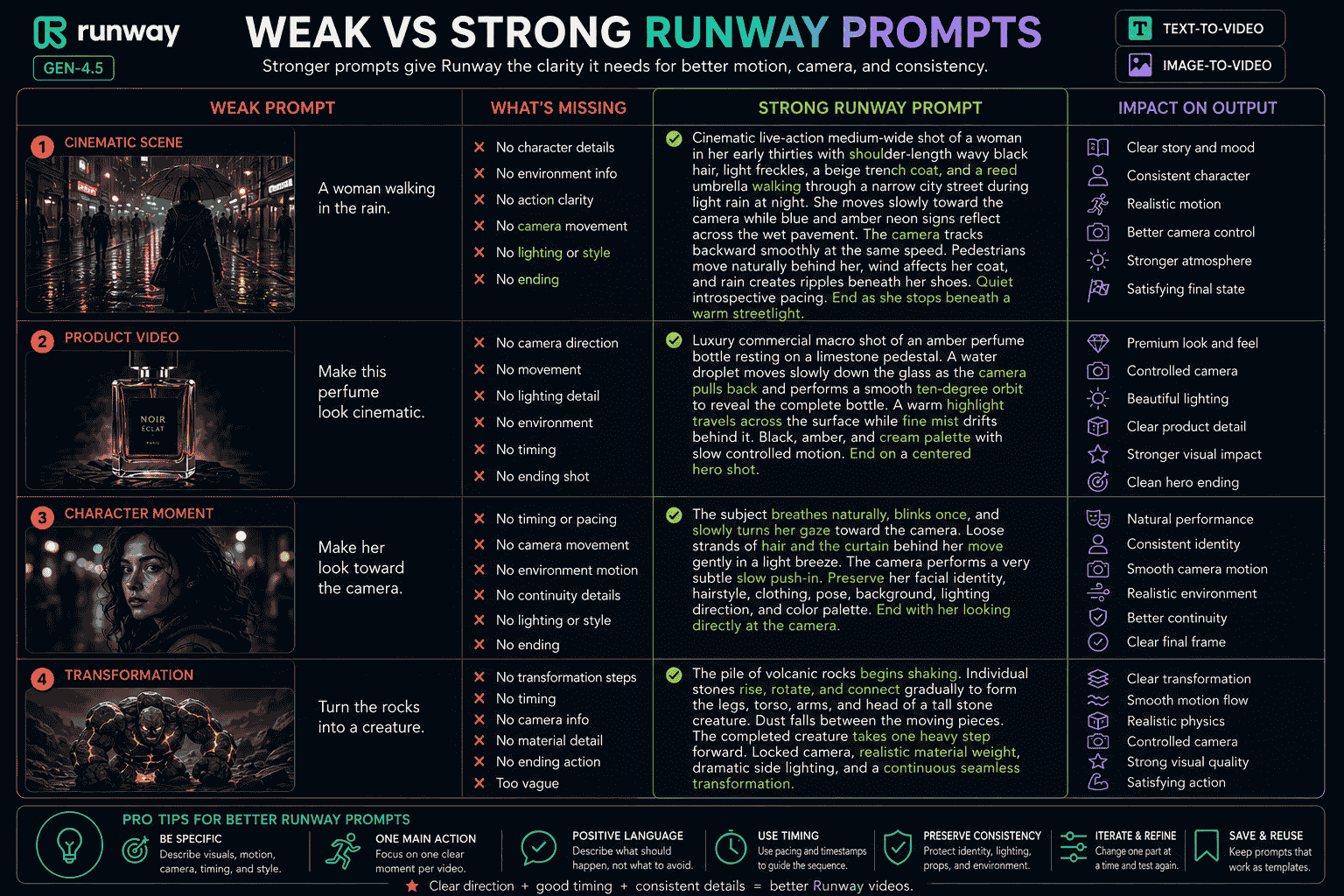
Example 1 Text to Video
Weak prompt:
A woman walking in a city.
What is missing:
- Character appearance
- Time and weather
- Action detail
- Shot framing
- Camera movement
- Environmental motion
- Lighting
- Visual style
- Ending
Stronger prompt:
Cinematic live-action medium-wide shot of a woman in her early thirties with shoulder-length wavy black hair, light freckles, a beige trench coat, and a red umbrella walking through a narrow city street during light rain at night. She moves slowly toward the camera while blue and amber signs reflect across the wet pavement. The camera tracks backward smoothly at the same speed. Pedestrians move naturally behind her, wind affects her coat, and rain creates ripples beneath her shoes. Quiet introspective pacing. End as she stops beneath a warm streetlight.
Example 2 Image to Video
Weak prompt:
Make the portrait move.
What is missing:
- Subject motion
- Camera movement
- Environmental motion
- Timing
- Continuity
- Ending state
Stronger prompt:
The subject breathes naturally, blinks once, and slowly turns her gaze toward the camera. Loose strands of hair and the curtain behind her move gently in a light breeze. The camera performs a very subtle slow push-in. Preserve her facial identity, hairstyle, clothing, pose, background layout, lighting direction, and color palette. End with her looking directly at the camera.
Example 3 Product Video
Weak prompt:
Make this product cinematic.
Stronger prompt:
The product remains centered while a narrow highlight moves slowly across the front surface. The camera performs a smooth ten-degree orbit to the right and stops on a symmetrical hero shot. Fine mist drifts behind the product. Preserve the exact product shape, dimensions, label, logo, typography, materials, background, and lighting.
Example 4 Transformation
Weak prompt:
Turn the rocks into a creature.
Stronger prompt:
The pile of volcanic rocks begins shaking. Individual stones rise, rotate, and connect gradually to form the legs, torso, arms, and head of a tall stone creature. Dust falls between the moving pieces. The completed creature takes one heavy step forward. Locked camera, realistic material weight, dramatic side lighting, and a continuous seamless transformation.
Common Runway Prompt Mistakes
1. Using the Same Strategy for Both Workflows
Text to Video needs visual and motion descriptions.
Image to Video should focus primarily on motion.
2. Repeating Everything Visible in the Input Image
Use the Image-to-Video prompt to explain what should happen next.
3. Writing Only Abstract Direction
Replace “make it dramatic” with specific subject and camera movement.
4. Using Too Many Actions
Make sure every event can occur naturally within the selected duration.
5. Combining Too Many Camera Movements
Choose one primary camera movement whenever possible.
6. Using Negative Phrasing
Describe the desired behavior positively.
Use “locked camera” rather than only “do not move the camera.”
7. Ignoring Direction
Specify left, right, forward, backward, clockwise, upward, or downward when direction matters.
8. Ignoring Motion Cues in the Image
Check for motion blur, dust, poses, and directional lines before prompting contradictory movement.
9. Using a Poor Input Image
Blurred faces, malformed hands, distorted labels, and unclear object boundaries may become more visible during animation.
10. Expecting Timestamps to Be Frame Perfect
Timestamps provide approximate temporal guidance and may still require iteration.
11. Leaving the Ending Undefined
A clear final state gives the motion a destination.
12. Changing the Entire Prompt During Refinement
Modify one important component at a time.
13. Requesting a Static Shot Without Internal Motion
State which subtle movement should still occur while the camera remains locked.
14. Expecting One Clip to Contain an Entire Story
Generate multiple connected shots when the idea contains several locations or major events.
Runway Gen-4.5 vs Gen-4
Gen-4.5 is the newer Runway model intended for the highest-quality Text to Video and Image to Video generation.
Gen-4 and Gen-4 Turbo remain older alternatives that may be useful when speed or lower credit usage is more important than using the newest model.
| Model | Best Used For | Prompting Focus |
|---|---|---|
| Gen-4.5 Text to Video | Creating a complete scene directly from text | Visual description plus motion description |
| Gen-4.5 Image to Video | Animating an existing visual reference | Motion, camera, timing, and progression |
| Gen-4 | Older image-based video workflow | Simple positive motion prompting |
| Gen-4 Turbo | Faster lower-cost iteration | Testing simple motion ideas quickly |
Older Gen-3 tutorials may still appear in search results, but current workflows should generally begin with the latest supported models and applications.
How PrompTessor Helps With Runway Prompts
PrompTessor helps users generate, analyze, optimize, refine, reverse-engineer, save, and reuse prompts for Runway and other AI video generators.
You can begin with a rough idea such as:
Create a cinematic product video.
Prompt Generator can help transform the idea into a structured Runway prompt containing:
- Subject description
- Environment
- Main action
- Environmental motion
- Shot framing
- Camera angle
- Camera movement
- Timing
- Direction and speed
- Lighting and color
- Visual style
- Ending state
Prompt Analysis can help identify missing or conflicting information such as:
- No clear subject action
- Missing camera direction
- Undefined movement speed
- Too many events
- Conflicting camera movements
- No continuity instruction
- No ending state
- Unnecessary visual descriptions for Image to Video
Prompt Optimizer can make the instruction clearer, more specific, and easier for a video model to interpret.
Prompt Refinement can apply targeted feedback such as:
- Convert this into an Image-to-Video prompt
- Keep the camera locked
- Add a slow push-in
- Make the movement more realistic
- Preserve the subject’s facial identity
- Add sequential prompting
- Add approximate timestamps
- Create a seamless loop
- Adapt the prompt for a vertical video
- Turn the prompt into a reusable template
Once a Runway prompt produces useful results, it can be saved and reused for similar cinematic scenes, product videos, characters, advertisements, transformations, or social media workflows.
For a broader model-independent guide, read AI Video Prompts How to Write Better Prompts for Any AI Video Generator in 2026.
Official Runway Prompting Resources
Runway maintains several official guides that can help you follow current model behavior and product capabilities:
- Creating with Gen-4.5
- Text to Video Prompting Guide
- Image to Video Prompting Guide
- Camera Terms, Prompts, and Examples
- Introduction to Prompting
FAQ About Runway Prompts
What is a Runway prompt?
A Runway prompt is an instruction describing the video or motion Runway should generate. Depending on the workflow, it may define the subject, environment, action, camera movement, timing, direction, lighting, visual style, and ending.
What makes a good Runway prompt?
A good Runway prompt communicates a clear visual idea and understandable motion. It reduces ambiguity without adding unnecessary or conflicting instructions.
What should a Runway Text-to-Video prompt include?
Text-to-Video prompts should generally describe both visual components and motion components, including the subject, environment, framing, lighting, style, action, environmental movement, camera movement, direction, and timing.
What should a Runway Image-to-Video prompt include?
Image-to-Video prompts should focus primarily on subject motion, environmental motion, camera movement, timing, direction, speed, and continuity. The image already provides the starting composition, subject, lighting, and style.
Should I describe the input image again?
Usually not. Describe visible elements only when introducing something new, requesting a significant transformation, explaining an interaction, or protecting an important detail.
How long should a Runway prompt be?
There is no universal ideal length. Use enough detail to communicate the idea clearly, but avoid unnecessary instructions and conflicting movements.
Should I use keywords or natural language?
Both can work, but complete natural-language instructions generally provide more context and control. Keywords can still help communicate an overall visual or motion style.
How do I keep the Runway camera still?
Use positive instructions such as “The locked-off camera remains perfectly still.” Also describe which internal movement should still occur within the frame.
Can Runway use timestamp prompts?
Runway supports approximate timestamp prompting for guiding the general order and timing of actions. Pair timestamps with a natural-language description for clearer control.
Can I create a longer Runway video?
You can continue a sequence by extracting the final frame from one generation, using it as the input image for another generation, and joining the clips in a video editor.
How do I reduce unwanted cuts?
Make sure the requested action fits the selected duration, remove wording that may imply a cut, and consider adding “continuous seamless shot” to the prompt.
How do I create a seamless loop?
Use a locked camera, describe motion that returns naturally to the starting state, and state that the camera and subject should begin and end on the same frame.
Why does the generated movement conflict with my prompt?
The input image may contain implied motion such as motion blur, dust trails, directional poses, or mid-action objects. Adjust the source image or refine the prompt to align with those visual cues.
Can PrompTessor create Runway prompts?
PrompTessor helps users generate, analyze, optimize, refine, save, and reuse prompts that can be adapted for Runway Text to Video, Image to Video, camera movement, sequential prompting, timestamps, and visual effects.
Create Better Runway Videos With Clear Motion Direction
The best Runway prompts do not simply ask the model to make something cinematic.
They explain what appears in the scene and how that scene moves.
For Text to Video, define both the visual components and motion components.
For Image to Video, let the image handle the appearance and use the prompt to direct motion, camera behavior, timing, direction, and continuity.
Start with one important visual moment.
Generate a simple version, evaluate how Runway interprets it, and refine one component at a time.
Use sequential prompting when actions require a clear order. Use approximate timestamps when timing matters. Use the final frame as a new input when the scene needs to continue beyond one generation.
Once a prompt consistently produces useful results, save it as a reusable template for future cinematic scenes, products, advertisements, characters, social media clips, or visual effects.
A strong Runway prompt clearly connects what the viewer sees with what moves, how it moves, and how the shot develops over time.
Build better prompts in one workspace
Generate prompts from ideas, analyze and optimize quality, refine with feedback, reverse-engineer content, and save reusable prompts in your Prompt Library.
Try PrompTessor Free