Best Claude Code Hooks Examples for Safer Automated Coding Workflows in 2026
Claude Code can inspect repositories, edit files, run commands, call external tools, delegate work to subagents, and continue through multi-step development tasks.
That flexibility is useful, but some actions should not depend on whether the model remembers an instruction at the right moment.
You may want formatting to run after every edit. You may need destructive shell commands blocked before they execute. You may want tests to start in the background, project context injected at session start, configuration changes recorded, or Claude prevented from stopping before required verification is complete.
Claude Code Hooks provide an event-driven layer for those workflows.
A hook can run automatically when Claude Code reaches a lifecycle event such as:
- A session beginning or resuming.
- A user prompt being submitted.
- A tool call being prepared.
- A permission decision being requested.
- A tool succeeding or failing.
- A subagent starting or stopping.
- A task being created or completed.
- Context being compacted.
- A configuration or watched file changing.
- Claude finishing a response or needing user attention.
Depending on the event and handler type, the hook can inspect JSON input, run a command, call an HTTP endpoint or MCP tool, ask a model to evaluate a condition, inject context, allow or deny an action, modify tool input, report feedback, notify the user, or stop processing.
This guide explains how Claude Code Hooks work, where they are configured, how events and matchers behave, how command, HTTP, MCP, prompt, agent, and asynchronous hooks differ, and how to build practical automations for safety, testing, validation, context management, and development workflow enforcement.
Quick Answer
Claude Code Hooks are event-driven handlers that run automatically at specific points in Claude Code's lifecycle.
A minimal project hook is configured in .claude/settings.json:
{
  "hooks": {
    "PostToolUse": [
      {
        "matcher": "Edit|Write",
        "hooks": [
          {
            "type": "command",
            "command": "${CLAUDE_PROJECT_DIR}/.claude/hooks/format-file.sh",
            "args": []
          }
        ]
      }
    ]
  }
}
In this example:
PostToolUseis the lifecycle event.Edit|Writelimits the hook to successful file edits and writes.- The inner object is the handler.
type: "command"runs a local script.- Claude Code sends event data to the script as JSON on standard input.
Use hooks when an action, check, notification, or policy should run because an event occurred rather than because Claude chose to remember and perform it.
Key Takeaways
- Hooks are automatic lifecycle handlers, not reusable prompts.
- Use
CLAUDE.mdfor persistent guidance, Skills for reusable procedures, and hooks for event-driven automation or guardrails. - Project hooks normally live in
.claude/settings.json; personal hooks live in~/.claude/settings.json. - Claude Code currently supports command, HTTP, MCP tool, prompt, and experimental agent hook handlers.
- Matchers filter an event by tool name, session source, agent type, notification type, or another event-specific field.
- The optional
iffield narrows tool events using permission-rule syntax such asBash(git *)orEdit(*.ts). - For most command hooks, exit code
0succeeds, exit code2blocks when the event supports blocking, and other non-zero codes are non-blocking errors. - Structured JSON output provides more control than exit codes, including permission decisions, additional context, user messages, tool-input updates, and stopping behavior.
- HTTP failures are non-blocking. An HTTP hook must return a successful response with structured JSON to block an action.
- Only command hooks support
async: true, and asynchronous hooks cannot block the triggering action. - Prompt hooks are useful when a decision requires judgment; agent hooks can inspect files and run tools but remain experimental.
- Keep policy scripts deterministic, fast, scoped, versioned, tested, and easy to run outside Claude Code.
- Hooks complement permissions, CI, branch protection, secret scanning, and infrastructure controls rather than replacing them.
Table of Contents
- What Are Claude Code Hooks?
- Why Use Hooks?
- How Claude Code Hooks Work
- Claude Code Hooks vs. CLAUDE.md
- Claude Code Hooks vs. Skills
- Claude Code Hooks vs. Subagents
- Hooks vs. CI and Git Hooks
- Where Hooks Are Configured
- Anatomy of a Hook Configuration
- Claude Code Hook Events
- Matchers and Tool Filtering
- Hook Handler Types
- Hook Input and Output
- Exit Codes and Blocking Behavior
- Asynchronous Hooks
- How to Create a Claude Code Hook
- Best Claude Code Hooks Examples
- Organizing Hook Scripts
- Security and Permission Considerations
- Testing and Debugging Hooks
- Weak vs. Strong Hook Configurations
- Common Claude Code Hook Mistakes
- Using PrompTessor to Improve Hook Prompts and Instructions
- Claude Code Hooks Checklist
- Official Resources
- FAQ
What Are Claude Code Hooks?
Claude Code Hooks are user-defined handlers that run automatically when a matching event occurs during a Claude Code session.
The handler can be:
- A local shell command or executable.
- An HTTP endpoint.
- A tool from an already-connected MCP server.
- A single-turn model evaluation.
- An experimental agentic verifier with tool access.
Hooks run across Claude Code surfaces that fire the same lifecycle events, including terminal sessions, supported IDE experiences, desktop usage, and Claude Code on the web.
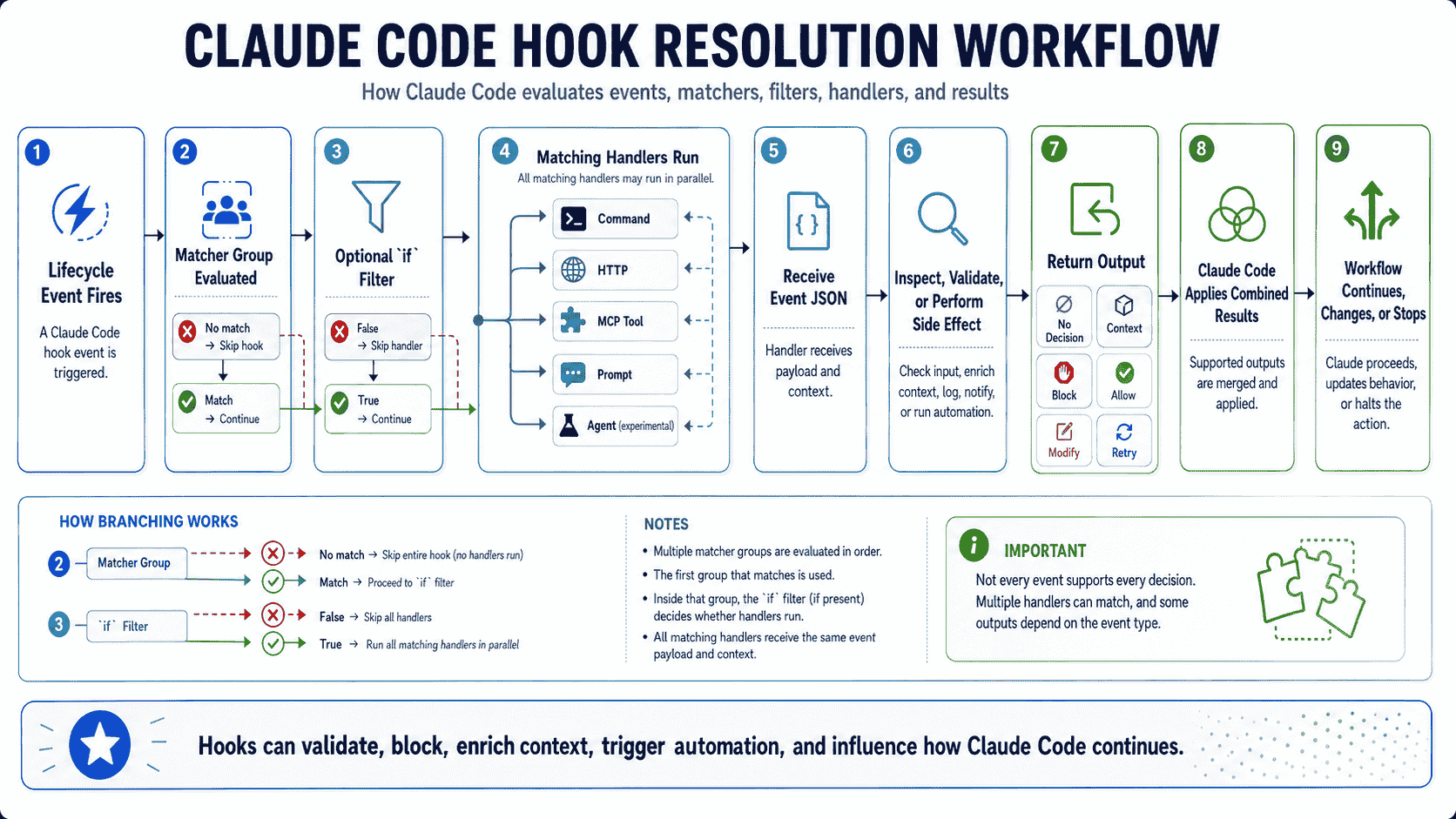
The central idea is:
Event occurs
    ↓
Matcher selects applicable hook groups
    ↓
Optional `if` rule filters tool arguments
    ↓
One or more handlers run
    ↓
Handlers return output, context, or a decision
    ↓
Claude Code continues, asks, blocks, modifies, or reports
Hooks are especially valuable when a workflow must be triggered by a concrete event.
Examples include:
- Run a formatter after a file is edited.
- Block a dangerous command before it reaches the shell.
- Inject current branch and issue context at session start.
- Send a notification when Claude needs input.
- Start tests in the background after source files change.
- Prevent Claude from stopping before required verification is complete.
Why Use Hooks?
Deterministic Automation
A natural-language instruction can influence Claude, but Claude still decides how to act on it. A hook runs because the event fired and its filters matched.
CLAUDE.md guidance:
- Run formatting after changing TypeScript files.

Hook automation:
- Every successful Edit or Write triggers the formatter.
Safety Before Side Effects
PreToolUse can inspect tool input before execution. This makes it useful for denying destructive shell commands, protecting sensitive paths, validating MCP writes, or escalating risky actions to the user.
Immediate Feedback After Tool Use
PostToolUse and PostToolUseFailure can run linters, formatters, focused checks, or diagnostics and return context that helps Claude correct the next step.
Dynamic Context
Hooks can load information that changes frequently, such as the current branch, open issue, changed packages, active environment, recent CI result, or worktree restrictions.
Integration With Existing Systems
HTTP and MCP tool handlers let hooks call internal policy services, security scanners, observability systems, issue trackers, or team automation without placing all logic inside a shell script.
Less Repetition
Once the hook is configured, developers do not need to repeat the same instruction in every prompt or remember to manually run the same command after each edit.
How Claude Code Hooks Work
A hook configuration has two nested levels:
- An event-level list containing matcher groups.
- An inner
hooksarray containing one or more handlers.
{
  "hooks": {
    "PreToolUse": [
      {
        "matcher": "Bash",
        "hooks": [
          {
            "type": "command",
            "command": "${CLAUDE_PROJECT_DIR}/.claude/hooks/check-command.py",
            "args": [],
            "timeout": 10
          }
        ]
      }
    ]
  }
}
When Claude proposes a Bash tool call:
PreToolUsefires.- The matcher checks whether the tool name is
Bash. - The command handler starts in Claude Code's current working directory.
- The event JSON is sent to the handler through standard input.
- The handler inspects
tool_input.command. - The handler exits silently, returns structured JSON, or blocks with the appropriate output.
- Claude Code processes the decision and continues the session.
Claude Code Hooks vs. CLAUDE.md
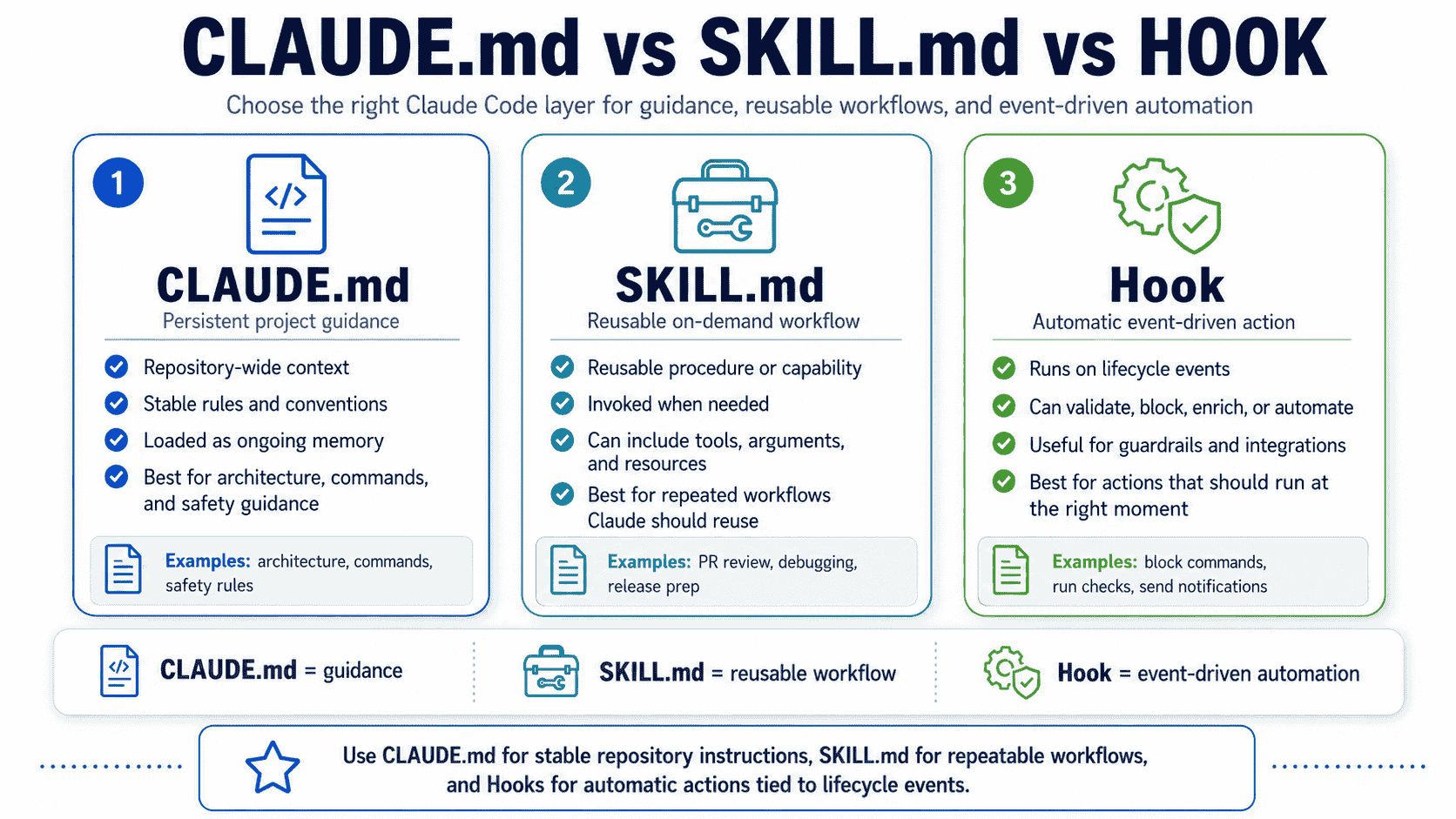
CLAUDE.md and hooks solve different problems.
| Question | CLAUDE.md | Hook |
|---|---|---|
| Primary purpose | Persistent project context and guidance | Automatic action or decision on an event |
| When it applies | While its instructions remain in scope | When the configured event and filters match |
| Authority | Advisory instruction interpreted by the model | Deterministic execution; some events can block or modify behavior |
| Best for | Architecture, commands, conventions, team norms | Formatting, validation, policy checks, notifications, dynamic context |
| Context cost | Instructions consume context while loaded | Configuration stays outside the main prompt; selected output may return |
Keep stable facts and expectations in CLAUDE.md. Use hooks when the system should react automatically to an event.
Claude Code Hooks vs. Skills
A Skill packages knowledge or a reusable procedure. A hook reacts to an event.
| Capability | Skill | Hook |
|---|---|---|
| Typical trigger | Manual invocation or relevance to a request | Lifecycle event |
| Main content | Instructions, scripts, references, templates, resources | Handler configuration and executable decision logic |
| Best use | PR review, debugging, release preparation, domain procedures | Run checks automatically, block actions, notify, inject context |
| Model discretion | Claude follows the procedure after invocation | The handler runs automatically when matched |
| Can work together? | Yes. Skills and subagents can declare lifecycle-scoped hooks in frontmatter. | |
For a detailed guide to reusable procedures, see Claude Code Skills and SKILL.md examples.
Claude Code Hooks vs. Subagents
A subagent is a specialized worker with an isolated context, prompt, tools, and permissions. A hook is a lifecycle handler.
Use a subagent when work should be delegated. Use a hook when an event should trigger automation, validation, context injection, or a decision.
The two can cooperate:
SubagentStartcan inject context into a newly spawned subagent.SubagentStopcan review whether the delegated task is complete.- Tool hooks also fire for tool calls made inside subagents and include agent-identifying fields.
- Subagent frontmatter can define hooks that remain scoped to that agent's lifetime.
Claude Code Hooks vs. CI and Git Hooks
Claude Code Hooks should complement repository and delivery controls.
| Mechanism | Runs when | Best role |
|---|---|---|
| Claude Code Hook | During Claude Code lifecycle events | Fast local feedback, context, guardrails, tool control |
| Git Hook | During local Git operations | Commit, merge, and push checks for all local Git users |
| CI | On remote pipeline triggers | Authoritative tests, builds, scans, and merge gates |
| Branch protection | At repository hosting layer | Enforced review and merge policy |
| Infrastructure permissions | At service or cloud boundary | Hard access control for production systems |
A hook that runs tests after edits improves feedback speed. CI should still run the required test suite before merge. A hook that warns about production commands is helpful, but production credentials and permissions should still enforce the boundary.
Where Claude Code Hooks Are Configured
| Scope | Location | Typical use |
|---|---|---|
| Personal | ~/.claude/settings.json | Notifications and preferences across projects |
| Project | .claude/settings.json | Shared repository automation committed to version control |
| Local project | .claude/settings.local.json | Machine-specific or private project automation |
| Managed policy | Organization-managed settings | Administratively enforced hooks and allowlists |
| Plugin | hooks/hooks.json | Portable automation distributed with a plugin |
| Skill or subagent | YAML frontmatter | Hooks active only while the component is running |
| Session | In-memory registration | Temporary runtime hooks |
Hook entries merge across settings sources. A project hook does not automatically replace a personal or managed hook. Use the read-only /hooks browser to inspect configured events, matchers, handler types, and source files.
Set "disableAllHooks": true to disable hooks allowed by the applicable settings hierarchy. Organization-managed hooks may remain active when lower settings scopes attempt to disable them.
Anatomy of a Claude Code Hook Configuration
{
  "hooks": {
    "PostToolUse": [
      {
        "matcher": "Edit|Write",
        "hooks": [
          {
            "type": "command",
            "if": "Edit(*.ts)",
            "command": "${CLAUDE_PROJECT_DIR}/.claude/hooks/check-typescript.py",
            "args": [],
            "timeout": 30,
            "statusMessage": "Checking TypeScript change"
          }
        ]
      }
    ]
  }
}
Event
PostToolUse determines when the group is considered.
Matcher
Edit|Write filters by tool name. Omitting the matcher, using an empty string, or using * matches every occurrence of the event.
Handlers
The inner hooks array contains one or more handlers. Matching handlers run in parallel.
Type
command selects a local executable. Other options are http, mcp_tool, prompt, and experimental agent.
If Rule
The optional if field applies permission-rule syntax to tool events. It can inspect both the tool name and relevant arguments.
Command and Arguments
Use an absolute path or ${CLAUDE_PROJECT_DIR}. Providing an args array uses exec-style invocation and avoids shell tokenization problems.
Timeout and Status
timeout limits runtime in seconds. statusMessage replaces the default spinner text while the handler runs.
Claude Code Hook Events
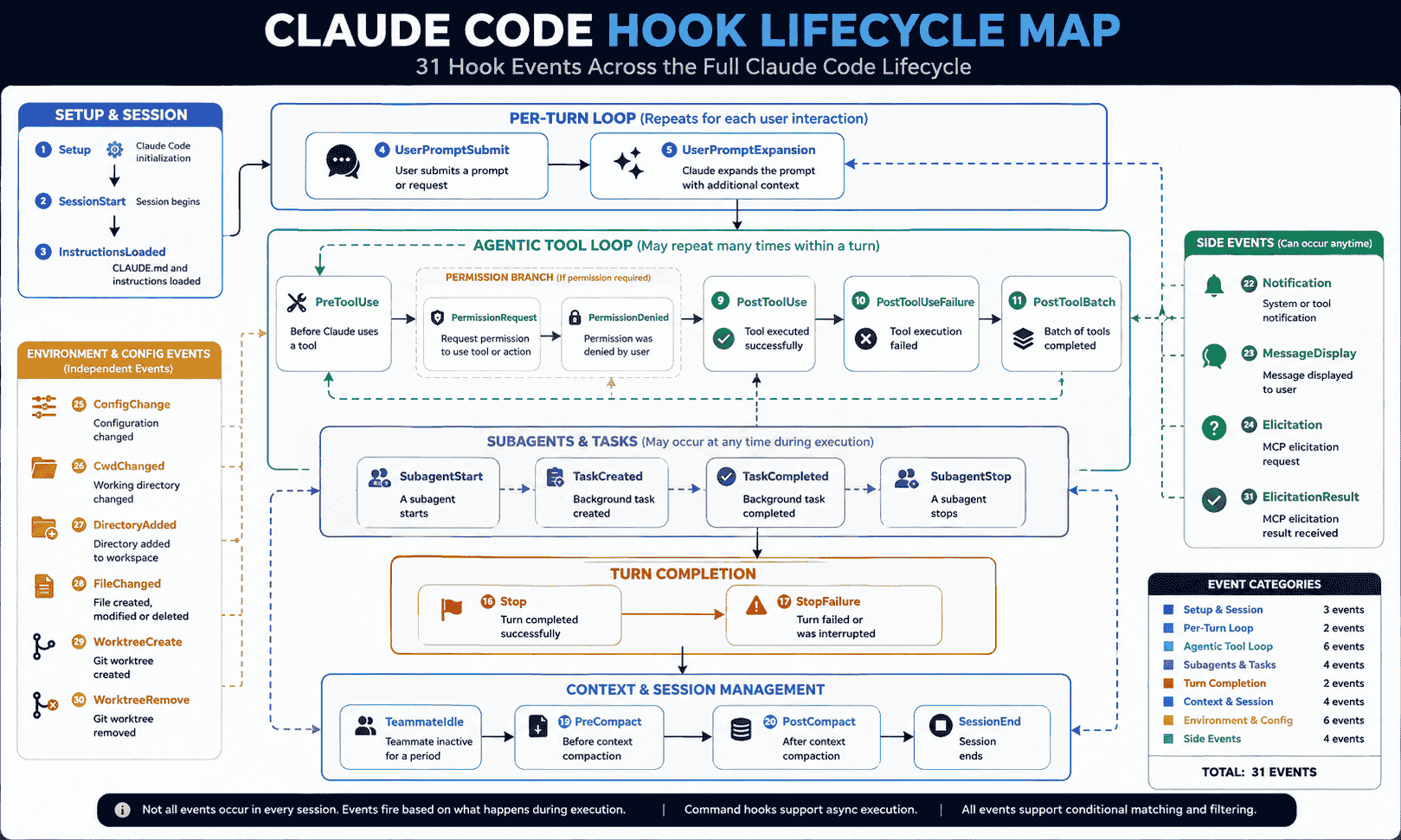
The official reference currently documents a broad lifecycle covering sessions, prompts, tools, permissions, subagents, tasks, compaction, configuration, worktrees, MCP elicitation, and display events.
| Event | When it fires | Common use |
|---|---|---|
SessionStart | Session starts or resumes | Load dynamic context or environment |
Setup | One-time initialization through supported CLI modes | Prepare CI or scripted environments |
UserPromptSubmit | Before Claude processes a prompt | Filter or enrich user input |
UserPromptExpansion | Before a typed command expands into a prompt | Validate command expansion |
PreToolUse | Before tool execution | Allow, ask, modify, or deny |
PermissionRequest | When a permission decision is needed | Automate selected approvals or denials |
PermissionDenied | After auto-mode denies a call | Record denial or permit retry guidance |
PostToolUse | After successful tool execution | Format, lint, scan, or add context |
PostToolUseFailure | After a tool fails | Diagnose or guide recovery |
PostToolBatch | After a parallel tool batch resolves | Review combined results before the next model call |
Notification | When Claude Code sends a notification | Desktop or external alerts |
MessageDisplay | While assistant text is displayed | Display-side integration |
SubagentStart | When a subagent is spawned | Inject agent-specific context |
SubagentStop | When a subagent finishes | Validate delegated work |
TaskCreated | When a task is created | Validate or record task creation |
TaskCompleted | When a task is marked complete | Check completion evidence |
Stop | When Claude finishes responding | Completion checks or continuation feedback |
StopFailure | When a turn ends from an API error | Observe failure type; output decisions are ignored |
TeammateIdle | Before an agent-team teammate becomes idle | Require additional work or evidence |
InstructionsLoaded | When instruction files load into context | Audit or observe instruction loading |
ConfigChange | When configuration changes during a session | Audit or block selected changes |
CwdChanged | When the working directory changes | Reload environment state |
DirectoryAdded | When another working directory is added | Validate or initialize the directory |
FileChanged | When a watched file changes on disk | React to environment or configuration files |
WorktreeCreate | When Claude Code creates a worktree | Replace or validate worktree creation |
WorktreeRemove | When a worktree is removed | Cleanup external state |
PreCompact | Before context compaction | Save state or block unsafe compaction |
PostCompact | After compaction | Restore or verify context |
Elicitation | When an MCP server asks the user for input | Approve, deny, or constrain elicitation |
ElicitationResult | After the user responds to MCP elicitation | Validate the response before sending it |
SessionEnd | When a session terminates | Logging, cleanup, or summaries |
Not every event supports every handler type or blocking behavior. Check the event-specific reference before relying on an output decision.
Matchers and Tool Filtering
The event chooses the lifecycle point. The matcher chooses which occurrences of that event activate a hook group.
Match All
"matcher": "*"
"matcher": ""
// or omit matcher
Exact Alternatives
"matcher": "Edit|Write"
"matcher": "Edit, Write"
Regular Expressions
"matcher": "^Notebook"
"matcher": "mcp__memory__.*"
"matcher": "^my-plugin:reviewer$"
Patterns containing regex characters use JavaScript regular-expression behavior and are unanchored unless you add ^ and $.
Event-Specific Fields
Tool events match the tool name. Session events may match the session source. Subagent events match agent type. Notification events match notification type. Compaction events match manual or automatic triggers.
The if Field
For supported tool events, if applies a permission rule to tool arguments:
"if": "Bash(git push *)"
"if": "Edit(*.ts)"
"if": "Read(.env*)"
Use separate handlers for separate if rules. The field accepts one permission rule, not a Boolean expression combining several rules.
Claude Code Hook Handler Types
| Type | What it runs | Best for | Important limitation |
|---|---|---|---|
command | Local executable or shell command | Deterministic checks and automation | Script dependencies must exist in the runtime environment |
http | HTTP POST request | Central policy and external integrations | Network failures and non-2xx responses are non-blocking |
mcp_tool | Tool on an already-connected MCP server | Reusable scanners and internal services | Server must already be connected |
prompt | Single-turn model evaluation | Judgment-based yes or no checks | Less deterministic than a script |
agent | Subagent with tool access | Verification requiring repository inspection | Experimental; prefer commands for production enforcement |
Command Hooks
Command hooks receive JSON through standard input. They communicate using exit codes, standard output, standard error, and structured JSON.
HTTP Hooks
HTTP hooks receive the same JSON as the POST body. Return a successful response with plain text or valid hook JSON. A non-success status does not block execution by itself.
MCP Tool Hooks
MCP tool hooks call a configured server and tool. String input fields can reference event data such as ${tool_input.file_path}.
Prompt Hooks
Prompt hooks send your instruction and hook input to a model for a structured yes or no decision. They are useful when a condition cannot be represented reliably as deterministic code.
Agent Hooks
Agent hooks can read files, search the repository, and use tools while evaluating a condition. They are more capable but slower and currently experimental.
Hook Input and Output
Common Input
Hook input commonly includes:
session_idprompt_idafter user input existstranscript_pathcwdpermission_modeon applicable eventshook_event_name- Event-specific fields such as
tool_name,tool_input,agent_type, orsource
Universal JSON Output
{
  "continue": false,
  "stopReason": "Required validation failed",
  "systemMessage": "The workflow was stopped by a project hook"
}
continue: false stops processing regardless of the event's own decision fields.
Additional Context
{
  "hookSpecificOutput": {
    "hookEventName": "PostToolUse",
    "additionalContext": "This file is generated. Edit src/schema.ts and regenerate it instead."
  }
}
PreToolUse Permission Decision
{
  "hookSpecificOutput": {
    "hookEventName": "PreToolUse",
    "permissionDecision": "deny",
    "permissionDecisionReason": "Production database writes are blocked"
  }
}
Structured output must be the only content on standard output. Log diagnostics to standard error or a file so they do not corrupt JSON parsing.
Exit Codes and Blocking Behavior
| Exit | General meaning | Result |
|---|---|---|
0 | Success | Claude Code may parse stdout as JSON |
2 | Blocking error | Blocks when the event supports blocking; stderr becomes feedback |
| Other non-zero | Non-blocking error for most events | Action usually continues and an error notice is recorded |
Do not assume exit code 1 blocks a tool call. For most events, only 2 has blocking semantics.
Blocking depends on the event:
PreToolUsecan prevent a tool call.PermissionRequestcan deny permission.UserPromptSubmitcan reject a prompt.Stopcan make Claude continue.TaskCompletedcan prevent completion.PostToolUsecannot undo a tool that already succeeded.PostToolUseFailurecannot prevent a failure that already occurred.
WorktreeCreate is a special case where any non-zero exit code aborts worktree creation.
Choose one communication style per command hook: either use exit-code signaling, or exit 0 and print structured JSON. JSON printed with exit code 2 is ignored.
Asynchronous Hooks
Add "async": true to a command handler when Claude should continue without waiting for the process.
{
  "hooks": {
    "PostToolUse": [
      {
        "matcher": "Edit|Write",
        "hooks": [
          {
            "type": "command",
            "command": "${CLAUDE_PROJECT_DIR}/.claude/hooks/run-tests-async.sh",
            "args": [],
            "async": true,
            "timeout": 300
          }
        ]
      }
    ]
  }
}
Asynchronous hooks:
- Are available only for
commandhandlers. - Receive the same JSON input as synchronous command hooks.
- Cannot block or return a permission decision because the triggering action has already continued.
- Can return
additionalContextfor a later conversation turn. - May be canceled when a non-interactive session exits unless they start a fully detached process.
Use asynchronous hooks for long tests, scans, telemetry, indexing, and notifications that do not need to delay the current tool call.
How to Create a Claude Code Hook
1. Define the Required Behavior
Describe the event, scope, expected action, and whether failure should block or only inform.
2. Choose the Event
Use the earliest event that can enforce the desired behavior. Protect commands at PreToolUse, not after execution.
3. Narrow the Matcher
Avoid running expensive handlers on every event when only one tool, agent, notification, or source is relevant.
4. Choose the Handler Type
- Use command hooks for deterministic local rules.
- Use HTTP hooks for centralized services.
- Use MCP tools when the capability already exists through MCP.
- Use prompt hooks for bounded judgment.
- Use experimental agent hooks only when repository inspection is necessary.
5. Build and Test the Handler Independently
Pipe representative JSON into the script and verify stdout, stderr, and exit codes before registering it.
6. Add the Configuration
Store shared project hooks in .claude/settings.json and scripts under a clear directory such as .claude/hooks/.
7. Inspect With /hooks
Confirm the event, matcher, handler, and source file through the built-in hook browser.
8. Test Allowed, Denied, and Failure Paths
Verify that safe operations proceed, risky operations produce useful feedback, malformed input fails safely, and unavailable dependencies do not silently weaken an important boundary.
9. Document Dependencies
State whether a hook requires Python, Node.js, jq, a package script, an MCP server, network access, credentials, or a platform-specific notification command.
10. Review It Like Production Code
Hooks can execute with access to your development environment. Keep them versioned, reviewed, and narrowly scoped.
Best Claude Code Hooks Examples
The examples below are starting points. Replace commands, paths, package names, policies, and tools with values verified from your repository. Test every handler before relying on it as a guardrail.
Example 1: Block Destructive Shell Commands
Use a PreToolUse command hook to inspect Bash commands before execution and deny clearly destructive patterns.
{
  "hooks": {
    "PreToolUse": [
      {
        "matcher": "Bash",
        "hooks": [
          {
            "type": "command",
            "command": "${CLAUDE_PROJECT_DIR}/.claude/hooks/block-dangerous-commands.py",
            "args": [],
            "timeout": 10
          }
        ]
      }
    ]
  }
}
#!/usr/bin/env python3
import json
import re
import sys
patterns = [
r"(^|\s)rm\s+-rf\s+/(?:\s|$)",
r"(^|\s)git\s+reset\s+--hard(?:\s|$)",
r"(^|\s)prisma\s+migrate\s+reset(?:\s|$)",
r"(^|\s)DROP\s+DATABASE(?:\s|$)",
]
payload = json.load(sys.stdin)
command = payload.get("tool_input", {}).get("command", "")
for pattern in patterns:
if re.search(pattern, command, flags=re.IGNORECASE):
print(json.dumps({
"hookSpecificOutput": {
"hookEventName": "PreToolUse",
"permissionDecision": "deny",
"permissionDecisionReason": "Potentially destructive command blocked by project policy"
}
}))
raise SystemExit(0)
raise SystemExit(0)Important: Avoid naive substring matching for serious policies. Parse commands carefully, include shell variations, and keep infrastructure permissions as the final enforcement layer.
Example 2: Prevent Force Pushes
Use the if field to run a focused hook only for matching Git push commands.
{
  "hooks": {
    "PreToolUse": [
      {
        "matcher": "Bash",
        "hooks": [
          {
            "type": "command",
            "if": "Bash(git push *)",
            "command": "${CLAUDE_PROJECT_DIR}/.claude/hooks/block-force-push.py",
            "args": []
          }
        ]
      }
    ]
  }
}
#!/usr/bin/env python3
import json
import shlex
import sys
payload = json.load(sys.stdin)
command = payload.get("tool_input", {}).get("command", "")
try:
tokens = shlex.split(command)
except ValueError:
tokens = command.split()
blocked = {"--force", "-f", "--force-with-lease"}
if any(token in blocked for token in tokens):
print(json.dumps({
"hookSpecificOutput": {
"hookEventName": "PreToolUse",
"permissionDecision": "deny",
"permissionDecisionReason": "Force pushes are not allowed by this repository policy"
}
}))Important: Branch protection should still reject unauthorized force pushes remotely. The hook provides faster local feedback.
Example 3: Protect Environment and Secret Files
Block Edit and Write calls targeting secret-bearing files while allowing normal source changes.
{
  "hooks": {
    "PreToolUse": [
      {
        "matcher": "Edit|Write",
        "hooks": [
          {
            "type": "command",
            "command": "${CLAUDE_PROJECT_DIR}/.claude/hooks/protect-sensitive-files.py",
            "args": []
          }
        ]
      }
    ]
  }
}
#!/usr/bin/env python3
import json
import os
import sys
payload = json.load(sys.stdin)
path = payload.get("tool_input", {}).get("file_path", "")
name = os.path.basename(path)
blocked_names = {".env", ".env.local", ".env.production", "credentials.json"}
blocked_suffixes = (".pem", ".key", ".p12")
if name in blocked_names or name.endswith(blocked_suffixes):
print(json.dumps({
"hookSpecificOutput": {
"hookEventName": "PreToolUse",
"permissionDecision": "deny",
"permissionDecisionReason": f"Editing sensitive file is blocked: {name}"
}
}))Important: Use permission deny rules for path-level access that must also cover files referenced directly with @, because those references do not necessarily trigger a Read tool hook.
Example 4: Prevent Edits to Generated Files
Protect generated output and tell Claude where the canonical source lives.
{
  "hooks": {
    "PreToolUse": [
      {
        "matcher": "Edit|Write",
        "hooks": [
          {
            "type": "command",
            "command": "${CLAUDE_PROJECT_DIR}/.claude/hooks/protect-generated.py",
            "args": []
          }
        ]
      }
    ]
  }
}
#!/usr/bin/env python3
import json
import pathlib
import sys
payload = json.load(sys.stdin)
path = pathlib.Path(payload.get("tool_input", {}).get("file_path", ""))
normalized = path.as_posix()
protected = ("src/generated/", "openapi/generated/", "prisma/generated/")
if any(segment in normalized for segment in protected):
print(json.dumps({
"hookSpecificOutput": {
"hookEventName": "PreToolUse",
"permissionDecision": "deny",
"permissionDecisionReason": "Generated files must not be edited manually. Update the source schema and run the generator."
}
}))Important: A precise correction path is more useful than only saying that the operation is forbidden.
Example 5: Require User Confirmation Before Deployment
Escalate deployment commands to the user instead of allowing or denying them automatically.
{
  "hooks": {
    "PreToolUse": [
      {
        "matcher": "Bash",
        "hooks": [
          {
            "type": "command",
            "if": "Bash(*deploy*)",
            "command": "${CLAUDE_PROJECT_DIR}/.claude/hooks/ask-before-deploy.py",
            "args": []
          }
        ]
      }
    ]
  }
}
#!/usr/bin/env python3
import json
print(json.dumps({
"hookSpecificOutput": {
"hookEventName": "PreToolUse",
"permissionDecision": "ask",
"permissionDecisionReason": "Deployment requires explicit user confirmation"
}
}))Important: Use a narrow matcher or command parser so unrelated commands containing the word deploy are not escalated unnecessarily.
Example 6: Block Production Database Mutations
Inspect database commands and deny state-changing operations when the target environment is production.
{
  "hooks": {
    "PreToolUse": [
      {
        "matcher": "Bash",
        "hooks": [
          {
            "type": "command",
            "command": "${CLAUDE_PROJECT_DIR}/.claude/hooks/protect-production-db.py",
            "args": []
          }
        ]
      }
    ]
  }
}
#!/usr/bin/env python3
import json
import os
import re
import sys
payload = json.load(sys.stdin)
command = payload.get("tool_input", {}).get("command", "")
environment = os.environ.get("APP_ENV", "development").lower()
mutation = re.search(r"(drop|delete|truncate|alter|update|insert|migrate|reset)", command, re.I)
if environment == "production" and mutation:
print(json.dumps({
"hookSpecificOutput": {
"hookEventName": "PreToolUse",
"permissionDecision": "deny",
"permissionDecisionReason": "Production database mutations are blocked in Claude Code sessions"
}
}))Important: Do not rely on environment-variable naming alone. Production credentials should be unavailable unless the operator intentionally enters an approved workflow.
Example 7: Validate MCP Write Operations
Target write-like tools from MCP servers using their namespaced tool names.
{
  "hooks": {
    "PreToolUse": [
      {
        "matcher": "mcp__.*__write.*",
        "hooks": [
          {
            "type": "command",
            "command": "${CLAUDE_PROJECT_DIR}/.claude/hooks/validate-mcp-write.py",
            "args": []
          }
        ]
      }
    ]
  }
}
#!/usr/bin/env python3
import json
import sys
payload = json.load(sys.stdin)
tool_name = payload.get("tool_name", "")
tool_input = payload.get("tool_input", {})
if tool_input.get("environment") == "production":
print(json.dumps({
"hookSpecificOutput": {
"hookEventName": "PreToolUse",
"permissionDecision": "deny",
"permissionDecisionReason": f"Production write denied for {tool_name}"
}
}))Important: MCP tool schemas differ. Validate fields against the actual server tool definition instead of assuming a universal input shape.
Example 8: Automatically Format Edited Files
Run Prettier after successful edits and writes.
{
  "hooks": {
    "PostToolUse": [
      {
        "matcher": "Edit|Write",
        "hooks": [
          {
            "type": "command",
            "command": "jq -r '.tool_input.file_path' | xargs npx prettier --write",
            "timeout": 30
          }
        ]
      }
    ]
  }
}
Important: For robust path handling, use a Python or Node script rather than a shell pipeline if filenames may contain spaces or platform-specific characters.
Example 9: Run ESLint on Changed JavaScript and TypeScript Files
Use a script to ignore unrelated file types and feed lint findings back after edits.
{
  "hooks": {
    "PostToolUse": [
      {
        "matcher": "Edit|Write",
        "hooks": [
          {
            "type": "command",
            "command": "${CLAUDE_PROJECT_DIR}/.claude/hooks/lint-file.sh",
            "args": [],
            "timeout": 60
          }
        ]
      }
    ]
  }
}
#!/bin/bash
set -u
input=$(cat)
file=$(jq -r '.tool_input.file_path // empty' <<<"$input")
case "$file" in
*.js|*.jsx|*.ts|*.tsx)
npx eslint "$file" || {
result=$?
jq -nc --arg context "ESLint reported problems in $file. Fix them before completion." '{hookSpecificOutput:{hookEventName:"PostToolUse",additionalContext:$context}}'
exit 0
}
;;
esacImportant: Because the file has already been edited, this hook should report useful feedback rather than pretending it can undo the edit.
Example 10: Run Type Checking After Relevant Changes
Trigger a project type check after TypeScript changes while avoiding unrelated assets.
{
  "hooks": {
    "PostToolUse": [
      {
        "matcher": "Edit|Write",
        "hooks": [
          {
            "type": "command",
            "if": "Edit(*.ts)",
            "command": "pnpm typecheck",
            "timeout": 180,
            "statusMessage": "Running TypeScript checks"
          },
          {
            "type": "command",
            "if": "Write(*.ts)",
            "command": "pnpm typecheck",
            "timeout": 180,
            "statusMessage": "Running TypeScript checks"
          }
        ]
      }
    ]
  }
}
Important: Running a full project check after every edit can be expensive. Prefer a faster package-scoped command or asynchronous execution in large monorepos.
Example 11: Run Focused Tests for the Edited Package
Map an edited path to the smallest relevant test command.
{
  "hooks": {
    "PostToolUse": [
      {
        "matcher": "Edit|Write",
        "hooks": [
          {
            "type": "command",
            "command": "${CLAUDE_PROJECT_DIR}/.claude/hooks/test-affected-package.py",
            "args": [],
            "timeout": 180
          }
        ]
      }
    ]
  }
}
#!/usr/bin/env python3
import json
import subprocess
import sys
payload = json.load(sys.stdin)
path = payload.get("tool_input", {}).get("file_path", "")
commands = [
("apps/web/", ["pnpm", "--filter", "web", "test"]),
("services/api/", ["pnpm", "--filter", "api", "test"]),
("packages/ui/", ["pnpm", "--filter", "@acme/ui", "test"]),
]
for prefix, command in commands:
if prefix in path.replace("\", "/"):
result = subprocess.run(command, text=True, capture_output=True)
if result.returncode:
message = (result.stdout + "
" + result.stderr)[-8000:]
print(json.dumps({
"hookSpecificOutput": {
"hookEventName": "PostToolUse",
"additionalContext": "Affected tests failed:
" + message
}
}))
breakImportant: Keep the mapping close to package scripts or generate it from repository configuration so it does not drift.
Example 12: Validate JSON and YAML Files
Check structured configuration immediately after it changes.
{
  "hooks": {
    "PostToolUse": [
      {
        "matcher": "Edit|Write",
        "hooks": [
          {
            "type": "command",
            "command": "${CLAUDE_PROJECT_DIR}/.claude/hooks/validate-structured-file.py",
            "args": []
          }
        ]
      }
    ]
  }
}
#!/usr/bin/env python3
import json
import pathlib
import sys
payload = json.load(sys.stdin)
path = pathlib.Path(payload.get("tool_input", {}).get("file_path", ""))
try:
if path.suffix == ".json":
json.loads(path.read_text(encoding="utf-8"))
elif path.suffix in {".yaml", ".yml"}:
import yaml
yaml.safe_load(path.read_text(encoding="utf-8"))
else:
raise SystemExit(0)
except Exception as exc:
print(json.dumps({
"hookSpecificOutput": {
"hookEventName": "PostToolUse",
"additionalContext": f"Structured file validation failed for {path}: {exc}"
}
}))Important: Document the PyYAML dependency or implement YAML validation through an existing project command.
Example 13: Validate Database Migrations
Run migration-specific checks only when migration files change.
{
  "hooks": {
    "PostToolUse": [
      {
        "matcher": "Edit|Write",
        "hooks": [
          {
            "type": "command",
            "if": "Edit(**/migrations/**)",
            "command": "${CLAUDE_PROJECT_DIR}/.claude/hooks/check-migration.sh",
            "args": [],
            "timeout": 120
          },
          {
            "type": "command",
            "if": "Write(**/migrations/**)",
            "command": "${CLAUDE_PROJECT_DIR}/.claude/hooks/check-migration.sh",
            "args": [],
            "timeout": 120
          }
        ]
      }
    ]
  }
}
#!/bin/bash
set -o pipefail
pnpm prisma validate && pnpm test:migrations
status=$?
if [ "$status" -ne 0 ]; then
jq -nc '{hookSpecificOutput:{hookEventName:"PostToolUse",additionalContext:"Migration validation failed. Review compatibility, backfill, rollback, and existing data before continuing."}}'
fi
exit 0Important: A local hook should not run production migrations. It should validate files and provide feedback.
Example 14: Validate API Contracts
Regenerate or validate OpenAPI contracts when routes or schemas change.
{
  "hooks": {
    "PostToolUse": [
      {
        "matcher": "Edit|Write",
        "hooks": [
          {
            "type": "command",
            "command": "${CLAUDE_PROJECT_DIR}/.claude/hooks/check-api-contract.py",
            "args": [],
            "timeout": 120
          }
        ]
      }
    ]
  }
}
#!/usr/bin/env python3
import json
import subprocess
import sys
payload = json.load(sys.stdin)
path = payload.get("tool_input", {}).get("file_path", "").replace("\", "/")
if not any(segment in path for segment in ("app/api/", "src/routes/", "src/schemas/")):
raise SystemExit(0)
result = subprocess.run(["pnpm", "api:validate"], text=True, capture_output=True)
if result.returncode:
output = (result.stdout + "
" + result.stderr)[-8000:]
print(json.dumps({
"hookSpecificOutput": {
"hookEventName": "PostToolUse",
"additionalContext": "API contract validation failed:
" + output
}
}))Important: The exact command should come from the repository, not from a generic assumption about the API toolchain.
Example 15: Scan Edited Files for Secrets
Run an existing secret scanner after writes and return findings to Claude.
{
  "hooks": {
    "PostToolUse": [
      {
        "matcher": "Edit|Write",
        "hooks": [
          {
            "type": "command",
            "command": "${CLAUDE_PROJECT_DIR}/.claude/hooks/scan-file-secrets.sh",
            "args": [],
            "timeout": 60
          }
        ]
      }
    ]
  }
}
#!/bin/bash
input=$(cat)
file=$(jq -r '.tool_input.file_path // empty' <<<"$input")
[ -z "$file" ] && exit 0
if ! gitleaks detect --no-git --source "$file" --redact; then
jq -nc --arg file "$file" '{hookSpecificOutput:{hookEventName:"PostToolUse",additionalContext:("Potential secret detected in " + $file + ". Remove it and use the approved secret-management system.")}}'
fi
exit 0Important: Keep repository-level secret scanning in CI as the authoritative check.
Example 16: Inject Git Context at Session Start
Provide the current branch and working-tree state before the first prompt.
{
  "hooks": {
    "SessionStart": [
      {
        "matcher": "startup|resume|fork",
        "hooks": [
          {
            "type": "command",
            "command": "${CLAUDE_PROJECT_DIR}/.claude/hooks/session-context.sh",
            "args": []
          }
        ]
      }
    ]
  }
}
#!/bin/bash
branch=$(git branch --show-current 2>/dev/null || true)
status=$(git status --short 2>/dev/null | head -40)
printf 'Current branch: %s
Working tree:
%s
' "$branch" "${status:-clean}"Important: Plain stdout from SessionStart is added as context. Keep it concise and avoid exposing secrets or massive diffs.
Example 17: Re-Inject Critical Context After Compaction
Use a SessionStart hook with the compact matcher to restore dynamic reminders after context compaction.
{
  "hooks": {
    "SessionStart": [
      {
        "matcher": "compact",
        "hooks": [
          {
            "type": "command",
            "command": "echo 'Current release branch: beta. Use pnpm. Run affected tests and pnpm typecheck before completion.'"
          }
        ]
      }
    ]
  }
}
Important: Static project rules belong in CLAUDE.md. Use this pattern for state that changes during the project or session.
Example 18: Reload Environment Variables When the Directory Changes
Pair SessionStart and CwdChanged to keep directory-specific environments synchronized.
{
  "hooks": {
    "SessionStart": [
      {
        "hooks": [
          {
            "type": "command",
            "command": "direnv export bash > \"$CLAUDE_ENV_FILE\""
          }
        ]
      }
    ],
    "CwdChanged": [
      {
        "hooks": [
          {
            "type": "command",
            "command": "direnv export bash > \"$CLAUDE_ENV_FILE\""
          }
        ]
      }
    ]
  }
}
Important: Approve each trusted .envrc with direnv and do not use this pattern to bypass environment security review.
Example 19: Audit Configuration Changes
Record settings changes during a session for debugging and governance.
{
  "hooks": {
    "ConfigChange": [
      {
        "matcher": "user_settings|project_settings|local_settings|skills",
        "hooks": [
          {
            "type": "command",
            "command": "${CLAUDE_PROJECT_DIR}/.claude/hooks/log-config-change.py",
            "args": []
          }
        ]
      }
    ]
  }
}
#!/usr/bin/env python3
import datetime
import json
import pathlib
import sys
payload = json.load(sys.stdin)
log = pathlib.Path.home() / ".claude" / "config-changes.jsonl"
log.parent.mkdir(parents=True, exist_ok=True)
entry = {"recorded_at": datetime.datetime.now(datetime.timezone.utc).isoformat(), **payload}
with log.open("a", encoding="utf-8") as handle:
handle.write(json.dumps(entry, default=str) + "
")Important: Redact private values before logging. Record the minimum data required for the operational purpose.
Example 20: Give Recovery Guidance After Failed Test Commands
Use PostToolUseFailure to detect failed shell tests and add targeted context for the next model step.
{
  "hooks": {
    "PostToolUseFailure": [
      {
        "matcher": "Bash",
        "hooks": [
          {
            "type": "command",
            "command": "${CLAUDE_PROJECT_DIR}/.claude/hooks/test-failure-guidance.py",
            "args": []
          }
        ]
      }
    ]
  }
}
#!/usr/bin/env python3
import json
import sys
payload = json.load(sys.stdin)
command = payload.get("tool_input", {}).get("command", "")
error = payload.get("error", "")
if any(token in command for token in (" test", "pytest", "vitest", "jest")):
context = (
"The test command failed. Identify the first actionable failure, reproduce it with the smallest relevant test, "
"inspect surrounding implementation and fixtures, and do not weaken assertions merely to make the suite pass.
"
+ error[-5000:]
)
print(json.dumps({
"hookSpecificOutput": {
"hookEventName": "PostToolUseFailure",
"additionalContext": context
}
}))Important: Do not parse the entire error string as a stable schema. Use the tool name, command, interruption fields, and the first exit-code line where available.
Example 21: Use a Prompt Hook as a Completion Gate
Ask a model to judge whether the requested work and verification are complete before Claude stops.
{
  "hooks": {
    "Stop": [
      {
        "hooks": [
          {
            "type": "prompt",
            "prompt": "Review the current task and hook input. Return {\"ok\": true} only if the requested work is complete, relevant tests or checks were run or explicitly reported unavailable, and the final response states limitations. Otherwise return {\"ok\": false, \"reason\": \"what remains\"}. $ARGUMENTS",
            "timeout": 30
          }
        ]
      }
    ]
  }
}
Important: Prompt hooks introduce model judgment and cost. Keep the evaluation narrow, state the required response schema, and avoid using them for rules that deterministic code can enforce.
Example 22: Use an Agent Hook to Verify Tests Before Stopping
Spawn an agentic verifier when completion requires reading repository files or running commands.
{
  "hooks": {
    "Stop": [
      {
        "hooks": [
          {
            "type": "agent",
            "prompt": "Inspect the changed files and repository test configuration. Run the smallest relevant tests, then return ok only if they pass or clearly explain why they cannot run. $ARGUMENTS",
            "timeout": 120
          }
        ]
      }
    ]
  }
}
Important: Agent handlers are experimental. Prefer a deterministic test command for production enforcement and use CI as the authoritative gate.
Example 23: Run Tests Asynchronously After Edits
Start longer tests in the background so Claude can continue working.
{
  "hooks": {
    "PostToolUse": [
      {
        "matcher": "Edit|Write",
        "hooks": [
          {
            "type": "command",
            "command": "${CLAUDE_PROJECT_DIR}/.claude/hooks/run-tests-async.sh",
            "args": [],
            "async": true,
            "timeout": 300
          }
        ]
      }
    ]
  }
}
#!/bin/bash
input=$(cat)
file=$(jq -r '.tool_input.file_path // empty' <<<"$input")
case "$file" in
src/*|app/*|packages/*)
if output=$(pnpm test 2>&1); then
jq -nc --arg context "Background tests passed after editing $file." '{hookSpecificOutput:{hookEventName:"PostToolUse",additionalContext:$context}}'
else
summary=$(printf '%s' "$output" | tail -120)
jq -nc --arg context "Background tests failed after editing $file:
$summary" '{hookSpecificOutput:{hookEventName:"PostToolUse",additionalContext:$context}}'
fi
;;
esacImportant: An async hook cannot block the edit that triggered it. Treat its result as delayed feedback and still run required checks before completion.
Example 24: Notify When Claude Needs Attention
Use a personal Notification hook for permission prompts or idle input requests.
{
  "hooks": {
    "Notification": [
      {
        "matcher": "permission_prompt|idle_prompt|agent_needs_input|agent_completed",
        "hooks": [
          {
            "type": "command",
            "command": "${CLAUDE_PROJECT_DIR}/.claude/hooks/notify.py",
            "args": []
          }
        ]
      }
    ]
  }
}
#!/usr/bin/env python3
import json
import subprocess
import sys
payload = json.load(sys.stdin)
message = payload.get("message", "Claude Code needs your attention")
# Replace with the native notification command for your operating system.
subprocess.run(["notify-send", "Claude Code", message], check=False)Important: For a cross-terminal approach, a command hook can return the supported terminalSequence JSON field instead of writing directly to a controlling terminal.
Example 25: Send PreToolUse Decisions to an HTTP Policy Service
Centralize policy logic in an internal service while keeping the Claude Code configuration small.
{
  "hooks": {
    "PreToolUse": [
      {
        "matcher": "Bash|Edit|Write|mcp__.*",
        "hooks": [
          {
            "type": "http",
            "url": "https://hooks.example.com/claude/pre-tool-use",
            "headers": {
              "Authorization": "Bearer $HOOK_SECRET"
            },
            "allowedEnvVars": ["HOOK_SECRET"],
            "timeout": 15
          }
        ]
      }
    ]
  }
}
Important: Return a 2xx response with valid decision JSON to block. Non-2xx responses, connection failures, and timeouts are non-blocking, so design fail-open versus fail-closed behavior consciously and use managed URL and environment-variable allowlists where appropriate.
Example 26: Call an MCP Security Scanner After File Changes
Use an already-connected MCP tool as a PostToolUse handler and pass the edited file path through input substitution.
{
  "hooks": {
    "PostToolUse": [
      {
        "matcher": "Edit|Write",
        "hooks": [
          {
            "type": "mcp_tool",
            "server": "security",
            "tool": "scan_file",
            "input": {
              "file_path": "${tool_input.file_path}",
              "mode": "changed-file"
            },
            "timeout": 60
          }
        ]
      }
    ]
  }
}
Important: The server must already be connected. SessionStart and Setup may occur before MCP connections are ready, so use MCP handlers there only when the first-run failure is acceptable.
Organizing Hook Scripts
Keep project hook code in a predictable directory:
repository/
├── .claude/
│   ├── settings.json
│   └── hooks/
│       ├── README.md
│       ├── block-dangerous-commands.py
│       ├── protect-sensitive-files.py
│       ├── lint-file.sh
│       ├── run-tests-async.sh
│       └── fixtures/
│           ├── safe-bash.json
│           ├── blocked-bash.json
│           └── edited-file.json
├── CLAUDE.md
├── package.json
└── src/
A useful hook README should document:
- Which event invokes each script.
- Expected JSON fields.
- Dependencies and supported operating systems.
- Exit-code and output behavior.
- How to run fixtures manually.
- Which policy owner reviews changes.
- Whether the hook is advisory, blocking, or asynchronous.
Use ${CLAUDE_PROJECT_DIR} for project-relative scripts. Prefer exec-style invocation with an args array when paths may contain spaces or shell-special characters.
Security and Permission Considerations
Treat Hooks as Executable Code
A hook can read input, access the working environment, call commands, contact services, and influence tool behavior. Review it with the same care as build scripts and CI configuration.
Use the Least Required Scope
Narrow the event, matcher, if rule, paths, tools, and environment access. Do not run a broad policy script for every event when only one command category is relevant.
Do Not Expose Secrets in Output
Hook output can appear in transcripts, context, debug logs, or external services. Redact credentials, tokens, private customer data, prompt content, and sensitive file contents.
Control HTTP Destinations
Organizations can restrict HTTP hook URLs and which environment variables may be interpolated into headers. Use allowlists for managed environments.
Fail Safely
HTTP errors are non-blocking. Most unexpected command exit codes are also non-blocking. A high-risk policy must explicitly produce the documented blocking decision and should be backed by independent permissions.
Avoid Shell Injection
Do not interpolate untrusted event values into a shell command. Pass values as arguments to a script and use language-native process APIs.
Keep Remote and Local Environments in Mind
Scripts, package managers, notification tools, and paths may differ between the local CLI and remote web environments. Check the environment and degrade clearly.
Use Technical Enforcement Beyond Hooks
Protect production systems with credentials, IAM, network boundaries, branch rules, CI, protected environments, database roles, and audited deployment systems.
Testing and Debugging Hooks
Validate JSON Configuration
Settings files are strict JSON. Comments and trailing commas are invalid.
Inspect Registered Hooks
Run /hooks to verify the event, matcher, type, source, and handler details.
Run the Handler Manually
echo '{
  "session_id": "test",
  "cwd": "/tmp/project",
  "hook_event_name": "PreToolUse",
  "tool_name": "Bash",
  "tool_input": {"command": "git push --force"}
}' | .claude/hooks/block-force-push.py

echo $?
Test a Fixture Matrix
- Safe input should pass.
- Blocked input should produce the correct decision.
- Missing optional fields should not crash the script.
- Malformed or unexpected tool input should fail predictably.
- Paths with spaces and Windows separators should be covered where supported.
- Timeout and dependency failures should produce understandable diagnostics.
Use Debug Logging
Run Claude Code with debug output when hook errors, JSON validation failures, timeouts, or missing handlers are difficult to diagnose.
Keep Standard Output Clean
If the handler returns JSON, standard output must contain only that JSON object. Shell profile output, debug prints, or dependency warnings can break parsing.
Avoid Recursive Stop Loops
A Stop hook that repeatedly asks Claude to continue should inspect the event's active-stop state and avoid re-blocking without progress.
Weak vs. Strong Claude Code Hook Configurations
Weak Configuration
{
  "hooks": {
    "PreToolUse": [
      {
        "hooks": [
          {
            "type": "command",
            "command": "check-everything.sh"
          }
        ]
      }
    ]
  }
}
Problems:
- Runs before every tool.
- Uses a relative command with unclear location.
- Does not state required input or policy.
- May be slow and platform-dependent.
- Has no documented output or exit-code contract.
- Provides no fixtures or troubleshooting path.
Stronger Configuration
{
  "hooks": {
    "PreToolUse": [
      {
        "matcher": "Bash",
        "hooks": [
          {
            "type": "command",
            "if": "Bash(git push *)",
            "command": "${CLAUDE_PROJECT_DIR}/.claude/hooks/validate-git-push.py",
            "args": [],
            "timeout": 10,
            "statusMessage": "Validating Git push"
          }
        ]
      }
    ]
  }
}
The stronger version:
- Uses the earliest relevant event.
- Scopes execution to Bash and Git push commands.
- References a versioned project script.
- Avoids shell path tokenization through exec form.
- Sets a short timeout.
- Can be tested with representative event fixtures.
- Can return a precise allow, ask, or deny decision.
Common Claude Code Hook Mistakes
Using the Wrong Event
A PostToolUse hook cannot prevent an action that already happened. Use PreToolUse when prevention matters.
Running on Every Tool Call
Missing matchers create unnecessary latency and noise. Scope hooks to relevant tools or event sources.
Assuming Exit Code 1 Blocks
For most events, exit code 1 is a non-blocking error. Use the documented exit code or structured decision.
Mixing JSON and Blocking Exit Codes
Claude Code parses JSON only when the handler exits successfully. Do not print JSON and exit 2 expecting both mechanisms to apply.
Returning Non-2xx From an HTTP Hook to Block
HTTP errors are non-blocking. Return a successful response containing the correct decision JSON.
Interpolating Tool Input Into Shell Commands
Untrusted paths and command text can create injection or quoting problems. Parse JSON inside a script and pass values through safe process APIs.
Creating Slow Synchronous Hooks
A heavy test suite after every edit interrupts the agentic loop. Use focused checks, batching, caching, or asynchronous handlers.
Using Prompt Hooks for Deterministic Rules
Do not ask a model whether rm -rf / is risky. Encode clear policies in code.
Treating Hooks as the Only Security Boundary
A development hook is not a replacement for IAM, branch protection, CI, protected environments, or database permissions.
Ignoring Cross-Platform Behavior
Shell syntax, executable paths, notification commands, and installed dependencies differ between operating systems and remote environments.
Duplicating Hooks Across Settings Files
Hook sources merge. Inspect /hooks to understand what actually runs and avoid accidental duplicate work.
Logging Sensitive Event Data
Do not store complete tool input or transcripts without a defined purpose, access control, redaction, and retention policy.
Not Maintaining the Hook
Commands, paths, tool names, event schemas, and project architecture change. Review hooks alongside the repository changes they enforce.
Using PrompTessor to Improve Hook Prompts and Instructions
Deterministic command hooks are primarily a software-design problem, but several hook types still depend on carefully written instructions.
A weak prompt hook may say:
Check whether the work is good and stop if it is not.
This leaves important questions unanswered:
- Which requirements must be checked?
- What evidence counts as verification?
- How should unavailable tests be handled?
- What response schema must the model return?
- Which concerns are blocking?
- How should the reason guide Claude's next action?
PrompTessor can help analyze and refine rough prompt-hook or agent-hook instructions before they are placed in project settings.
A practical workflow is:
- Define the exact event and decision.
- State the evidence available in
$ARGUMENTS. - Describe the acceptance criteria.
- Separate blocking failures from recommendations.
- Specify the required JSON response.
- Limit the evaluation to the current task.
- Remove vague quality language.
- Test examples that should return both
ok: trueandok: false.
The same clarity principles also help when asking Claude Code to create or review hook scripts. For reusable task instructions, see the guide to Claude Code prompts for planning, building, testing, and automation.
Claude Code Hooks Checklist
Before sharing or relying on a hook, check whether it:
- Uses the earliest correct lifecycle event.
- Has the narrowest useful matcher.
- Uses
ifonly on supported tool events. - Chooses the appropriate handler type.
- Uses deterministic code when a rule can be expressed deterministically.
- Documents its input fields.
- Handles missing and unexpected fields.
- Returns valid output for the selected event.
- Uses exit code 2 only where blocking is intended and supported.
- Does not mix blocking exit codes with JSON output.
- Keeps standard output clean when returning JSON.
- Uses safe argument handling instead of shell interpolation.
- Has a clear timeout.
- Uses asynchronous execution only for non-blocking work.
- Does not expose secrets in context, transcripts, or logs.
- Uses managed HTTP URL and environment-variable allowlists where required.
- Accounts for local, remote, and operating-system differences.
- Includes safe, blocked, error, and timeout fixtures.
- Can be executed independently from Claude Code.
- Is visible and understandable through
/hooks. - Is committed when it represents shared repository behavior.
- Has a documented owner and maintenance trigger.
- Complements CI, permissions, and infrastructure enforcement.
- Has been tested against the current Claude Code version and official event schema.
Official Resources
- Claude Code Hooks Reference
- Automate Actions With Claude Code Hooks
- Claude Code Settings
- Claude Code Best Practices
- Claude Code Tools Reference
- Claude Code Skills
- Claude Code Subagents
- Steering Claude Code With CLAUDE.md, Skills, Hooks, Rules, and Subagents
FAQ About Claude Code Hooks
What are Claude Code Hooks?
Claude Code Hooks are user-defined handlers that run automatically at specific lifecycle events. They can execute commands, call HTTP endpoints or MCP tools, ask a model for a decision, inject context, notify users, and control supported actions.
Where are Claude Code Hooks configured?
Personal hooks normally go in ~/.claude/settings.json, shared project hooks in .claude/settings.json, and machine-specific project hooks in .claude/settings.local.json. Plugins, managed settings, Skills, subagents, and runtime sessions can also define hooks.
What is the difference between Claude Code Hooks and CLAUDE.md?
CLAUDE.md provides persistent project context and advisory instructions. Hooks execute automatically when lifecycle events occur and can run automation or return decisions.
What is the difference between Hooks and Skills?
A Skill packages reusable knowledge or a procedure that Claude loads when relevant or invoked. A Hook reacts automatically to a lifecycle event such as tool use, session start, compaction, or completion.
Can Claude Code Hooks block commands?
Yes. A PreToolUse hook can deny a tool call through structured output or a blocking exit code. The hook must use the documented decision shape for the event.
What exit code blocks a Claude Code action?
For most command-hook events that support blocking, exit code 2 signals a blocking error. Exit code 1 is normally non-blocking. WorktreeCreate is an exception where any non-zero exit aborts creation.
Can a PostToolUse hook undo a tool action?
No. PostToolUse runs after the tool succeeds. It can report feedback, add context, modify the result exposed to Claude where supported, or stop further processing, but it cannot reverse the completed side effect automatically.
What hook handler types does Claude Code support?
Claude Code supports command, HTTP, MCP tool, prompt, and agent handlers. Agent handlers are experimental and may change.
Can Claude Code Hooks call an HTTP endpoint?
Yes. HTTP hooks send event JSON in an HTTP POST request. To block an action, the endpoint must return a successful response containing valid decision JSON; HTTP errors are non-blocking.
Can Hooks call MCP tools?
Yes. An mcp_tool handler can call a tool on an already-connected MCP server and can map event input values into the tool arguments.
What are prompt-based hooks?
Prompt hooks use a Claude model for a single-turn yes or no evaluation. They are suitable for narrow decisions requiring judgment rather than deterministic parsing.
What are agent-based hooks?
Agent hooks spawn an agentic verifier that can inspect files and use tools before returning a decision. They are experimental, so command hooks are preferred for stable production enforcement.
Can Claude Code Hooks run asynchronously?
Command hooks can use async: true to run in the background. Asynchronous hooks cannot block the triggering action, and their context output is delivered on a later conversation turn.
Do hooks run inside subagents?
Tool lifecycle hooks also fire for tool calls made by subagents, with agent-identifying fields in the input. Skills and subagents can also declare lifecycle-scoped hooks in frontmatter.
How do I see which hooks are active?
Run /hooks in Claude Code. The browser shows events, matchers, handler types, source files, and handler details.
Can hooks modify tool input?
PreToolUse supports structured output that can update tool input before execution. PermissionRequest can also allow with updated input in its event-specific decision object.
Should hooks replace CI?
No. Hooks provide fast local automation and guardrails during Claude Code sessions. CI, branch protection, permissions, and infrastructure controls should remain the authoritative enforcement layers.
How should I test a Claude Code Hook?
Run the handler independently with representative JSON fixtures, verify safe and blocked cases, inspect output and exit codes, validate the settings JSON, confirm registration through /hooks, and test the workflow in a controlled repository.
Why is my hook not firing?
Common causes include an invalid settings file, wrong event, unmatched matcher, an if rule on an unsupported event, a non-executable script, incorrect path, missing dependency, or a settings change that has not reloaded.
How many Claude Code Hooks should a project have?
There is no ideal fixed number. Add hooks for stable, repeated, high-value automation or guardrails. Avoid hooks that duplicate tooling, add large delays, or create noise without changing outcomes.
Conclusion
Claude Code Hooks add an event-driven automation layer around agentic development work.
They are most useful when a workflow should happen because a lifecycle event occurred:
- Inspect a command before execution.
- Block or escalate risky actions.
- Format or validate files after edits.
- Run focused or asynchronous tests.
- Inject current environment and repository context.
- Guide recovery after tool failures.
- Check completion before Claude stops.
- Notify users and external systems.
- Call centralized HTTP policy services or MCP tools.
- Observe configuration, compaction, task, and subagent events.
Start with one narrow, high-value hook.
Choose the correct event, scope it with a matcher, keep the handler deterministic where possible, test the input and output contract, and preserve independent enforcement through permissions and CI.
Use CLAUDE.md for stable guidance. Use Skills for reusable procedures. Use subagents for delegated work. Use Hooks for automatic event-driven behavior.
When these layers are separated clearly, Claude Code becomes easier to guide, safer to operate, and more consistent across repeated development workflows.
Build better prompts in one workspace
Generate prompts from ideas, analyze and optimize quality, refine with feedback, reverse-engineer content, and save reusable prompts in your Prompt Library.
Try PrompTessor Free