15 AI Website Builder Prompts to Design, Build, and Improve Websites
AI website builders can generate a striking homepage in minutes. That does not mean the page explains the offer, works on mobile, makes navigation obvious, or gives visitors a reason to act. A request like “make a modern website” leaves almost every important product and design decision to the model.
The best AI website builder prompts define what the website must accomplish, who it serves, which pages and components are required, what facts and assets are available, what must remain unchanged, and how to check the final result. They work as starting points for AI website builders, coding assistants, and design-to-code tools—without depending on a single brand.
Prompt for the user journey and the evidence of success, not just a visual style.
Below are 15 editable prompts for planning, building, and improving public-facing websites. They cover landing pages, SaaS marketing sites, local businesses, portfolios, design systems, mobile UX, copy, SEO, performance, and conversion. They are intentionally different from a full application-development plan: the focus here is the website experience, not database architecture, feature roadmaps, or shipping an entire app.
Quick Answer: What Makes a Good AI Website Builder Prompt?
A strong website builder prompt specifies the audience, website goal, required pages, content and proof, visual direction, behavior, accessibility, responsive rules, technical constraints, and acceptance criteria. For an existing website, it also says what may change and what must remain untouched.
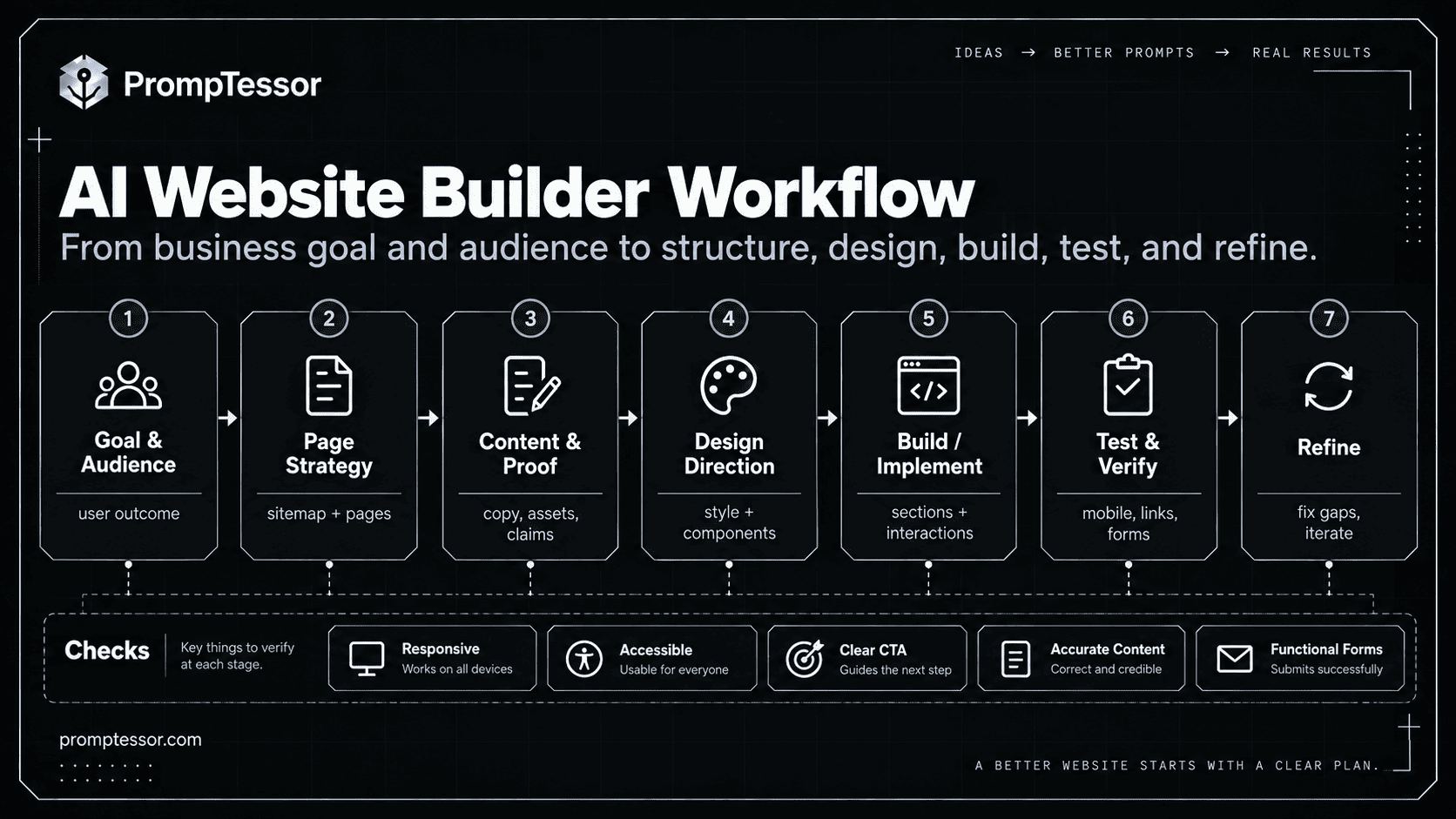
WEBSITE GOAL → TARGET AUDIENCE → PAGE STRUCTURE
                         ↓
CONTENT / VERIFIED FACTS → DESIGN DIRECTION
                         ↓
RESPONSIVE + ACCESSIBLE BEHAVIOR
                         ↓
BUILD / REFINE → TEST → VERIFY
Key Takeaways
- Start with one primary user outcome, not a list of visual buzzwords.
- Separate website planning prompts from implementation and improvement prompts.
- Tell the AI whether the site is new or existing; preserve working behavior during edits.
- Supply real content, logos, pricing, testimonials, and claims—or label them missing.
- Make mobile, accessibility, link behavior, and forms part of acceptance criteria.
- Ask for an explicit list of assumptions and unverified integrations.
- Iterate with a focused review instead of regenerating every page after a small issue.
- A good-looking preview is not proof the site is production-ready.
Table of Contents
- 1. Website Strategy and Requirements
- 2. Sitemap and Page Architecture
- 3. Conversion-Focused Landing Page
- 4. SaaS Marketing Website
- 5. Local Business Website
- 6. Portfolio Website
- 7. Visual Design System and Style Direction
- 8. Mobile-First Responsive Layout
- 9. Navigation and UX Clarity
- 10. Accessibility Audit and Fix
- 11. Website Copywriting and Messaging
- 12. On-Page SEO and Content Structure
- 13. Website Performance and Core Web Vitals
- 14. Conversion Rate Optimization
- 15. Full Website Audit and Prioritized Improvement Plan
Before You Use These Prompts
Decide whether the AI tool can directly edit code, only generate a visual preview, or output a specification. The same prompt can describe a target website, but not every tool can implement databases, forms, CMS integrations, hosting, deployment, or analytics. If the tool cannot complete an action, ask it to identify the missing integration rather than show a convincing but nonfunctional mockup.
Replace variables in braces, such as {audience} and {primary_goal}, with project-specific facts. If you have an existing website, attach the relevant source files or accessible page evidence, identify the components in scope, and specify what should not change. If facts are unknown, leave them explicitly unknown rather than allowing the model to improvise them.
The AI Website Builder Prompt Formula
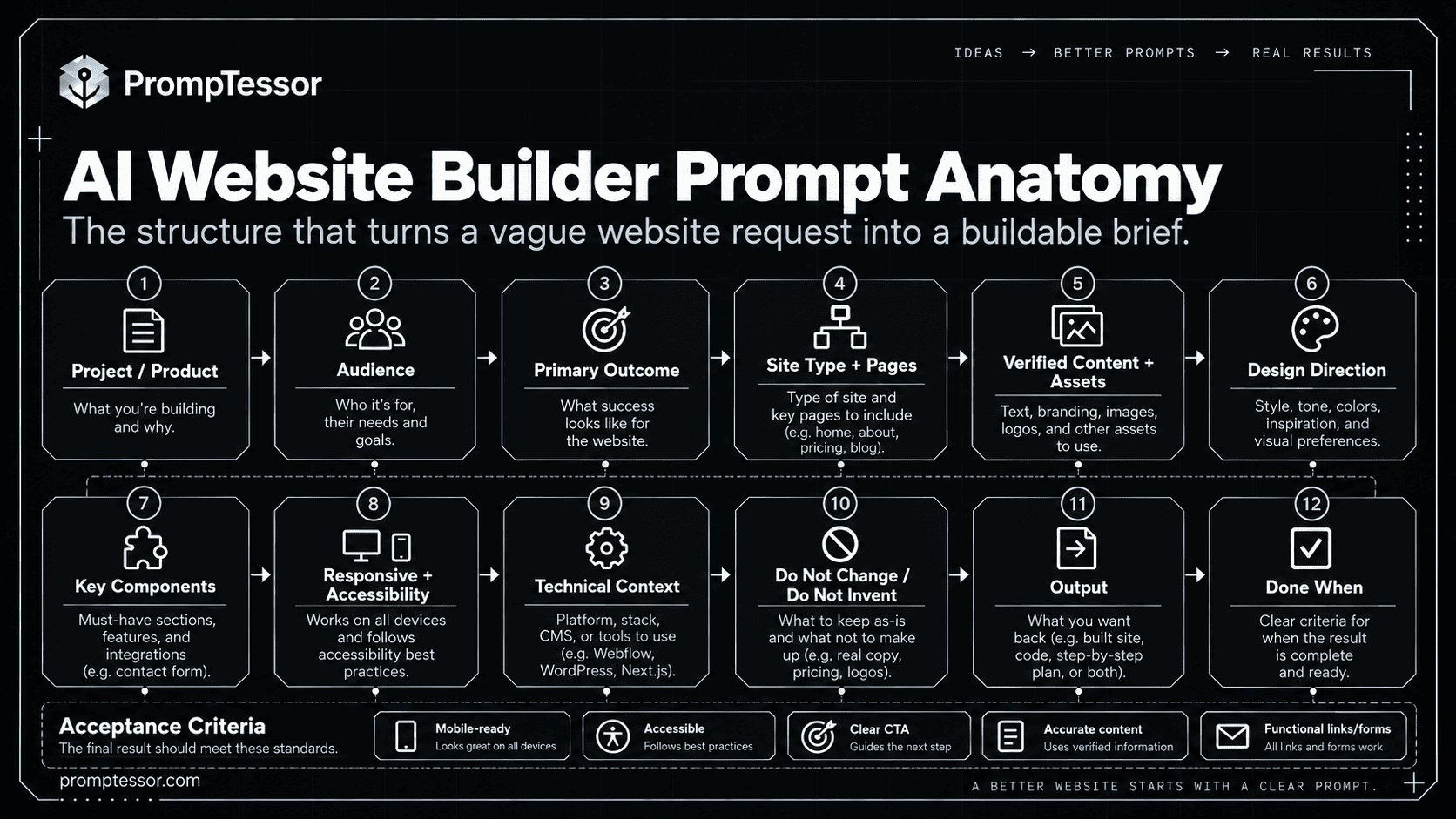
A reusable prompt benefits from the same predictable structure regardless of the website platform. Not every website needs a long specification, but the fields below prevent the most common omissions.
PROJECT: {business_or_product}
AUDIENCE: {target_users}
PRIMARY OUTCOME: {what_visitors_should_do}
SITE TYPE / PAGES: {website_type_and_pages}
VERIFIED CONTENT / ASSETS: {available_facts_and_media}
DESIGN DIRECTION: {visual_style_and_brand_constraints}
KEY COMPONENTS: {sections_and_interactions}
RESPONSIVE / ACCESSIBILITY: {requirements}
TECHNICAL CONTEXT: {stack_or_builder_limitations}
DO NOT CHANGE / DO NOT INVENT: {boundaries}
OUTPUT: {implementation_or_specification}
DONE WHEN: {testable_acceptance_criteria}
The most useful line may be “do not invent.” Generated pages can look complete while containing invented customer quotes, fictional metrics, broken booking buttons, unconnected newsletter forms, or made-up security badges. Specify approved proof and require visible placeholders for everything else.
15 Copy-and-Paste AI Website Builder Prompts
These templates can be adapted for different website builders and coding agents. If the tool is unable to inspect a real page or execute tests, treat its answer as a proposal and perform the checks yourself.
Planning & Structure
1. Website Strategy and Requirements Prompt
Best for: Use before generating any pages, particularly when the brief is just an idea.
Customize: {business_or_project}, {audience}, {primary_goal}, {offer}, {existing_assets}, {must_have_pages}, {constraints}
Act as a website strategist and UX planner. Create an actionable website brief for {business_or_project}, serving {audience}. The primary goal is {primary_goal}; the core offer is {offer}.
Existing assets: {existing_assets}. Required pages: {must_have_pages}. Constraints: {constraints}.
First identify the top user needs, one primary conversion action, and the information visitors need before acting. Propose a realistic page scope, each page's purpose, content inputs, primary CTA, and required interactions. List missing information separately. Do not invent customer testimonials, metrics, certifications, prices, or business facts.
Return: (1) one-paragraph website objective, (2) audience jobs and objections, (3) page requirements table, (4) content/assets checklist, (5) success criteria, and (6) questions that materially block implementation. This is a plan only: do not build or publish yet.
What to verify: Confirm that each proposed page serves a user need or business goal; remove unnecessary pages and resolve material unknowns before building.
2. Sitemap and Page Architecture Prompt
Best for: Use when navigation feels unclear or a site needs several distinct pages.
Customize: {website_type}, {audience}, {content_inventory}, {primary_conversion}, {navigation_limit}
Design the information architecture for a {website_type} serving {audience}.
Available content and offers: {content_inventory}. Primary conversion: {primary_conversion}. Maximum preferred primary-nav items: {navigation_limit}.
Create a sitemap and navigation hierarchy that helps first-time visitors discover the right page with minimal confusion. Group pages by user intent, propose descriptive navigation labels, define parent-child relationships, and identify the best path from the homepage to the primary conversion. Distinguish required pages from optional future pages.
Output a tree-style sitemap, a page inventory with page purpose and unique content angle, recommended header/footer navigation, an internal-linking plan, and mobile navigation behavior. Flag duplicate or overlapping pages. Do not add pages only to target more keywords; every page needs a distinct audience need.
What to verify: Check that every important page is reachable from navigation or contextual links, and that similar pages have distinct purposes.
Website Design & Building
3. Conversion-Focused Landing Page Prompt
Best for: Use for a campaign, waitlist, product launch, or single-offer landing page.
Customize: {offer}, {audience}, {pain_point}, {main_benefit}, {cta}, {proof_available}, {style}
Build or specify a responsive landing page for {offer}, targeted at {audience}. The user problem is {pain_point}; the main benefit is {main_benefit}; the primary CTA is {cta}.
Use this design direction: {style}. Only use authentic proof supplied here: {proof_available}.
Create a clear hero with outcome-led headline, supporting subheadline, product/example visual, and visible CTA. Follow with a concise problem section, benefits, how it works, available proof, objections/FAQ, and final CTA. Keep one primary conversion goal, consistent CTA wording, readable typography, and uncluttered mobile layouts. Implement functional links and states where the platform supports them; otherwise list integration requirements.
Never fabricate testimonials, client logos, statistics, awards, or urgency claims. Provide the page and a section-by-section rationale. Include a short list of assumptions and checks for CTA behavior, mobile overflow, and content accuracy.
What to verify: Open the page on mobile and desktop, test each CTA, and confirm proof, prices, and promises come from supplied facts.
4. SaaS Marketing Website Prompt
Best for: Use when building a multi-page public marketing site for software rather than the app dashboard.
Customize: {product}, {ideal_customer}, {problem}, {features}, {plans}, {signup_url}, {brand_direction}
Create a marketing website for the SaaS product {product}. Its ideal customers are {ideal_customer}; their problem is {problem}. Verified capabilities: {features}. Approved plan information: {plans}. Sign-up destination: {signup_url}. Brand direction: {brand_direction}.
Design a homepage plus a sensible navigation blueprint for product/features, use cases, pricing (only if pricing exists), FAQ, and contact/docs. Make the homepage answer: what is this, who is it for, how does it work, and why should I act? Explain features as user outcomes with accurate supporting detail. Use reusable components, clear headings, a focused demo/visual area, and a consistent CTA.
Do not invent integrations, security certifications, customer counts, free trials, or feature availability. Mark missing content as explicit placeholders rather than presenting guesses as facts. Return the implementation or builder specification, required assets, and verification checklist.
What to verify: Verify every stated feature and pricing claim, then test sign-up, navigation, and mobile pricing-table behavior.
5. Local Business Website Prompt
Best for: Use for service businesses that need clear contact paths and location-specific information.
Customize: {business_name}, {service_area}, {services}, {hours}, {contact_methods}, {booking_flow}, {brand_tone}
Build a professional, accessible website for {business_name}, serving {service_area}. Actual services: {services}; confirmed hours: {hours}; contact methods: {contact_methods}; appointment or inquiry flow: {booking_flow}; tone: {brand_tone}.
Plan a homepage with service overview, key service detail pages, service area information, genuinely provided trust signals, contact information, and a prominent booking/contact CTA. Make phone, email, and booking interactions usable on mobile. Add descriptive address/location elements only when supplied. Structure service FAQs around actual customer questions, not invented local facts.
Do not manufacture star ratings, reviews, awards, address details, business hours, or emergency availability. If maps, forms, booking, or payment require integrations, explicitly distinguish a functioning integration from a visual placeholder. Return the site, missing-assets list, and actionable review checklist.
What to verify: Call or test contact links, submit the form, verify business hours and address, and remove fictional trust signals.
6. Portfolio Website Prompt
Best for: Use for designers, developers, consultants, creators, and freelancers presenting work.
Customize: {professional_role}, {audience}, {projects}, {specialties}, {contact_cta}, {visual_tone}
Create a portfolio website for a {professional_role} targeting {audience}. Specialties: {specialties}. Real projects/case-study inputs: {projects}. Contact CTA: {contact_cta}. Desired visual tone: {visual_tone}.
Develop a hero that explains expertise and outcomes without exaggerated claims. Include selected work, case studies with problem → role → process → result, about section, capabilities, and an accessible contact path. Prioritize project evidence, strong image captions, and consistent spacing over decorative effects. Design project cards to work at mobile widths and make each project detail reachable.
Do not invent clients, outcomes, testimonials, credentials, or project screenshots. If results are missing, mark the field as 'add verified result.' Produce page content/components, suggested asset list, and checks for image load, keyboard navigation, and contact links.
What to verify: Check that every project is genuine, project links resolve, and the contact action works on a phone.
UI & User Experience
7. Visual Design System and Style Direction Prompt
Best for: Use when initial AI-generated designs look inconsistent across pages.
Customize: {brand_attributes}, {existing_colors}, {typography_preferences}, {references}, {target_pages}, {design_constraints}
Act as a product designer. Create a coherent, reusable website design system for {target_pages} using these brand attributes: {brand_attributes}. Existing colors: {existing_colors}; typography preferences: {typography_preferences}; allowed inspiration: {references}; constraints: {design_constraints}.
Define semantic color tokens, type scale, spacing scale, grid/container widths, radii, borders, card patterns, button variants, form styles, interactive states, and component usage rules. Make headings and CTAs visually distinguishable. Describe how the design adapts to dark and light surfaces if applicable. Prioritize readable contrast and hierarchy over fashionable decoration.
Apply the system to one representative page and list changes needed elsewhere. Preserve existing brand assets exactly. Do not recreate or alter logos. Return design tokens, component rules, example page composition, and an implementation checklist; avoid wholesale redesign unless requested.
What to verify: Compare three different pages for consistent tokens, CTA styles, heading hierarchy, and legibility.
8. Mobile-First Responsive Layout Prompt
Best for: Use when the desktop preview works but smaller screens have overflow or unusable controls.
Customize: {existing_website_or_component}, {breakpoints_or_viewports}, {critical_tasks}, {stack}
Improve the responsiveness of {existing_website_or_component} for {breakpoints_or_viewports} using the existing stack {stack}. The most important user tasks are {critical_tasks}.
Inspect or reason from the supplied page/code before changing anything. Identify rigid widths, horizontal scrolling, cramped navigation, overflowing tables, tiny targets, awkward images, and overly dense text. Propose responsive rules for header/nav, section grids, typography, spacing, media, cards, and forms. Prefer intrinsic sizing and flexible layout over device-specific hacks.
Preserve content meaning and primary CTAs across screen sizes. Do not remove important content from mobile simply to make the layout fit. Implement the smallest coherent set of changes, then provide a viewport testing matrix and list anything that still needs real-device verification.
What to verify: Review at narrow phone, large phone, tablet, and desktop widths; confirm no unintended horizontal scrolling or missing CTAs.
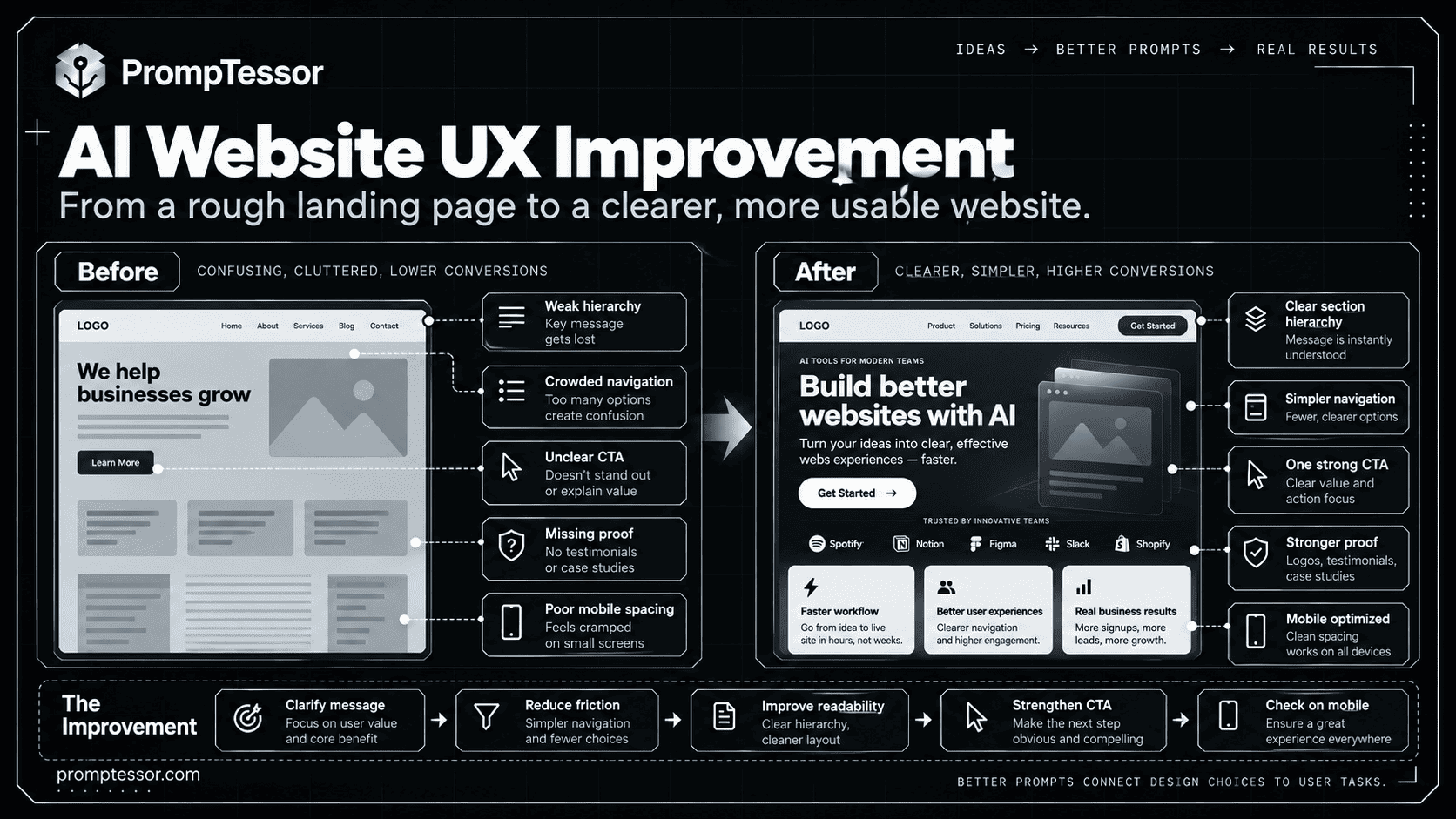
9. Navigation and UX Clarity Prompt
Best for: Use when users struggle to find information or understand the next step.
Customize: {page_or_navigation}, {target_users}, {top_tasks}, {observed_problems}, {non_negotiables}
Review the UX of {page_or_navigation} for {target_users}. Their top tasks are {top_tasks}. Observed issues: {observed_problems}. Elements that must remain: {non_negotiables}.
Map the user's path from entry to task completion. Identify unclear labels, competing CTAs, dead ends, unnecessary clicks, misleading affordances, and feedback gaps. Propose prioritized improvements to navigation, page hierarchy, CTA placement, search/filter behavior where appropriate, and empty/error states. For each change, explain the user problem it solves and which existing behavior must be preserved.
Implement changes only where enough context exists; otherwise propose a testable specification. Return a before/after issue table, suggested microcopy, interaction states, and a quick usability test script with three realistic tasks. Do not add features without a clear need.
What to verify: Ask a new user to complete three tasks without guidance and note where they hesitate or choose the wrong action.
10. Accessibility Audit and Fix Prompt
Best for: Use to improve a page for keyboard, screen reader, visual, and form usability.
Customize: {page_or_code}, {target_standard}, {components_in_scope}, {stack}
Audit {page_or_code} for accessible website use, targeting {target_standard} and these components: {components_in_scope}. Stack: {stack}.
Check semantic heading order, landmarks, links, button names, image alternatives, input labels, error messages, keyboard focus order and visible indicators, color contrast, dialogs, and meaningful state feedback. Distinguish issues visible in the provided code from those needing browser or assistive-technology testing. Prioritize barriers that prevent completing core tasks.
For each confirmed issue return location, impacted users, observed behavior, fix, and manual test. Implement scoped semantic and interaction improvements without changing unrelated visuals. Do not claim WCAG conformance from an AI review alone; include keyboard and screen-reader tests still required.
What to verify: Test tab order and focus visibility, submit invalid forms, and run a real screen-reader check before claiming compliance.
Content & SEO
11. Website Copywriting and Messaging Prompt
Best for: Use when generated pages are attractive but vague or filled with generic AI copy.
Customize: {website_type}, {offer}, {audience}, {pain_points}, {verified_benefits}, {voice}, {cta}
Rewrite website copy for a {website_type} that offers {offer} to {audience}. Pain points: {pain_points}. Verified benefits: {verified_benefits}. Brand voice: {voice}. Main CTA: {cta}.
Write a benefit-led hero headline, concise explanatory subheadline, feature-to-outcome copy, objection-handling section, CTA microcopy, and a helpful FAQ based only on the information provided. Favor concrete language over 'revolutionary,' 'seamless,' or other unsupported adjectives. Use scannable headings, plain English, and a consistent message hierarchy.
For each section state the reader question it answers and recommended placement. Offer two alternative hero directions with different emphasis. Explicitly flag claims that need evidence and do not invent testimonials, numerical outcomes, partner names, or guarantees. Return final copy as a section-by-section table plus verification notes.
What to verify: Read the page aloud, remove interchangeable claims, and confirm each promise can be substantiated.
12. On-Page SEO and Content Structure Prompt
Best for: Use after the page purpose and actual content are known—not as a substitute for useful content.
Customize: {page_url_or_draft}, {primary_query}, {search_intent}, {audience}, {existing_site_pages}
Improve on-page SEO for {page_url_or_draft}. Main search query: {primary_query}; intended search intent: {search_intent}; audience: {audience}; existing related pages: {existing_site_pages}.
First identify what the page genuinely answers and whether it overlaps with another site page. Recommend one accurate, distinctive title element; a useful meta description; descriptive H1/H2 structure; natural terminology; relevant internal links; clear link text; and image alt text that describes informative imagery. Retain readable copy written for users. Suggest schema markup only where content and eligibility genuinely support it.
Do not stuff exact-match keywords, generate doorway pages, invent ratings, or guarantee rankings. Explain missing information separately. Return an SEO change table with current issue, proposed change, reason, and how to verify in rendered HTML and Search Console.
What to verify: Check rendered title, H1, canonical, crawlable links, internal-link relevance, and whether the page uniquely satisfies intent.
Improvement & Optimization
13. Website Performance and Core Web Vitals Prompt
Best for: Use when real measurements show slow rendering, laggy interaction, or layout instability.
Customize: {website_or_code}, {measurements}, {platform}, {constraints}
Help diagnose performance problems on {website_or_code} built with {platform}. Available real measurements: {measurements}. Constraints: {constraints}.
Prioritize user-facing loading, interaction responsiveness, and layout stability. Identify likely causes only where evidence exists: oversized hero images, render-blocking resources, expensive scripts, font loading, unsized media, or unnecessary third-party embeds. Separate observed issues from hypotheses. Suggest a measured sequence of changes with expected tradeoffs and which metric each change may affect.
Do not fabricate before/after scores or claim optimizations are complete without rerunning tests. Provide a prioritized action table, safe implementation steps, rollback considerations, and a remeasurement plan for mobile and desktop using real-user data where available.
What to verify: Retest LCP, INP, and CLS after changes using both lab diagnostics and field data when available; compare the same conditions.
14. Conversion Rate Optimization Prompt
Best for: Use when a website gets relevant visitors but people are not completing the main action.
Customize: {page}, {audience}, {conversion_goal}, {analytics_or_research}, {business_constraints}
Audit {page} for the audience {audience}. Desired conversion is {conversion_goal}. Available analytics, feedback, and behavior evidence: {analytics_or_research}. Constraints: {business_constraints}.
Review value proposition clarity, visual hierarchy, CTA prominence, form friction, relevant trust information, pricing clarity, mobile usability, and objection handling. Rank potential issues by impact and confidence based on the evidence; explicitly label hypotheses when data is missing. Propose changes that preserve truthful claims and user choice. Do not add fake urgency, deceptive defaults, fabricated testimonials, or hidden fees.
Return a prioritized experiment backlog with hypothesis, proposed variation, primary metric, guardrail metric, and minimum QA steps. If traffic is too low for meaningful statistical testing, suggest qualitative research instead of claiming an A/B test will produce certainty.
What to verify: Check that forms and CTAs really work and monitor downstream conversion quality, not only button-click counts.
15. Full Website Audit and Prioritized Improvement Plan Prompt
Best for: Use after a website exists and you need the next high-value improvement backlog.
Customize: {website_or_repository}, {target_users}, {primary_goal}, {known_issues}, {available_evidence}, {change_scope}
Perform a structured website quality review of {website_or_repository} for {target_users}. The main business/user goal is {primary_goal}. Known problems: {known_issues}. Supplied evidence: {available_evidence}. Change scope: {change_scope}.
Assess information architecture, messaging, visual hierarchy, responsiveness, navigation, accessibility, SEO basics, performance evidence, forms and CTA behavior, and conversion path. Separate confirmed issues from assumptions requiring live checks. Classify findings as critical, high, medium, or low priority, with user impact, effort estimate, dependencies, and suggested owner/task.
Produce: (1) executive summary, (2) prioritized backlog, (3) quick wins, (4) larger structural changes, (5) acceptance criteria and test plan. Do not rewrite the whole site unless the evidence warrants it. Preserve existing working components; explain what cannot be assessed without site access, analytics, or a real browser.
What to verify: Complete the highest-impact issues first and verify each against a defined user task and before/after evidence.
How to Improve an AI-Generated Website Without Starting Over
A focused edit usually produces more predictable results than another full-site generation. Review the actual page against the original goal, identify the highest-impact mismatch, and give the AI a bounded change request. This is especially important if the website already has working navigation, forms, SEO metadata, and brand assets.
Review the current {page_or_component} against this goal: {goal}.
Observed problem: {specific_issue}.
Change only: {allowed_scope}.
Keep unchanged: {existing_components_and_behaviors}.
Do not replace real copy or approved brand assets with placeholders.
Explain the likely cause, make the smallest reasonable correction,
then list how to verify the change at mobile and desktop sizes.
If you lack the source or browser evidence, state what you cannot verify.
Examples of good follow-up requests include “make the pricing table readable on a 375px screen without hiding plan details,” “replace vague feature headings with accurate customer outcomes,” and “fix the form error state while preserving the existing submission endpoint.” These are more actionable than “make it more premium.”
SEO, Accessibility, and Performance Checks Worth Keeping in Every Build
Google Search Central recommends clear, descriptive title text and content that helps users understand the page. Google also recommends responsive website design as a practical mobile-friendly approach. The SEO Starter Guide and mobile-first indexing guide provide useful starting points.
For accessibility, W3C recommends properly labeled form controls and a visible keyboard focus indicator. Automated reviews help identify issues, but they do not replace keyboard and assistive-technology testing. See the WAI Forms Tutorial and WCAG focus-visible guidance.
For performance, measure Core Web Vitals instead of guessing from the preview. Google’s reference thresholds for good user experience are LCP within 2.5 seconds, INP of 200 milliseconds or less, and CLS of 0.1 or less, assessed at the 75th percentile. These are measurement targets—not promises a single AI prompt can deliver. See web.dev Core Web Vitals.
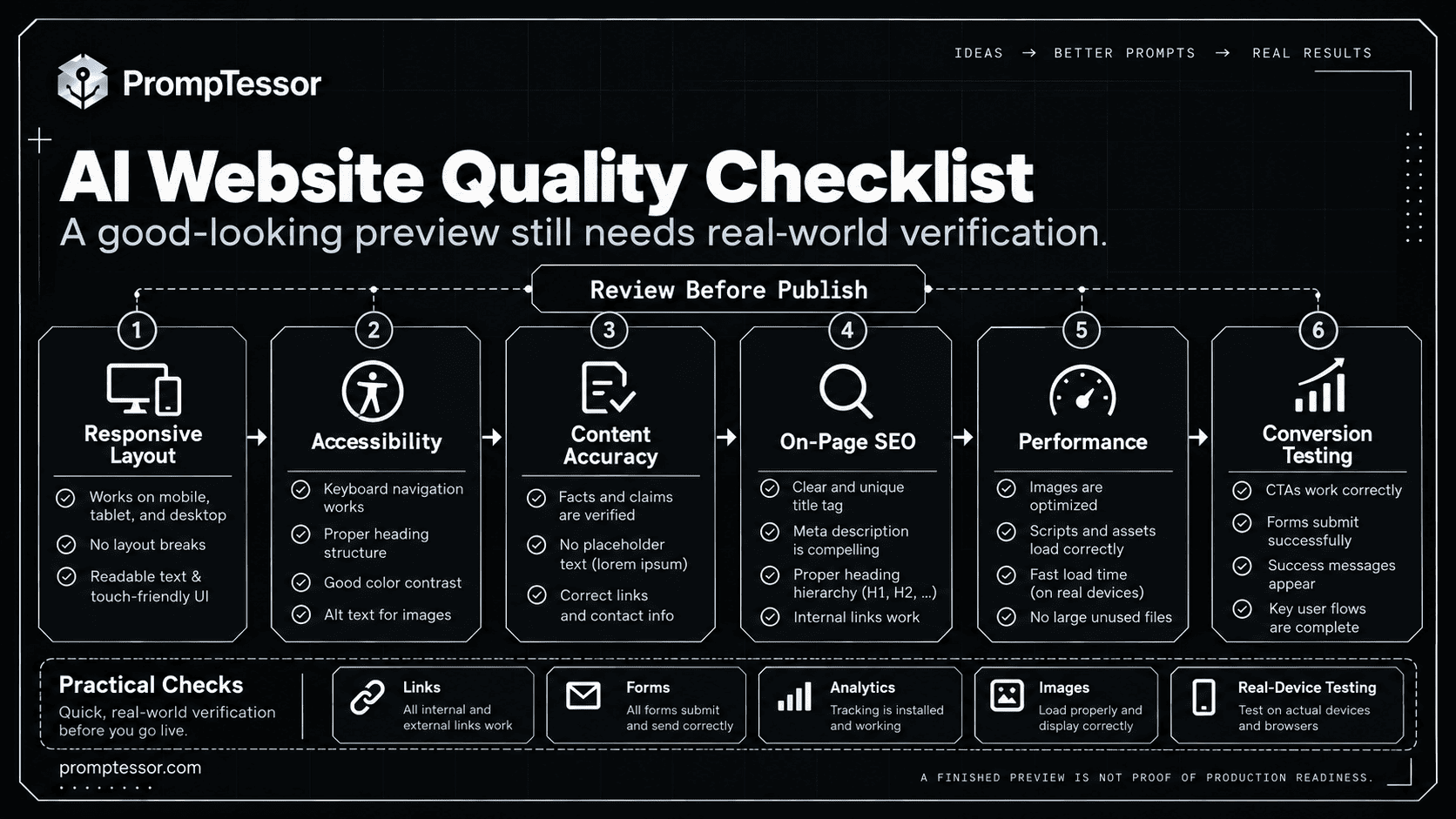
| Quality area | Evidence of a good result | How to check |
|---|---|---|
| Messaging | Page quickly explains what, who, and why | Read hero and ask a first-time user to summarize the offer |
| Navigation | Important pages and next steps are easy to find | Try three common visitor tasks |
| Responsive layout | Critical content and actions remain usable on mobile | Check multiple viewport widths and real devices |
| Accessibility | Keyboard, forms, focus, headings, and text alternatives work | Keyboard + screen reader + semantic inspection |
| SEO basics | Clear titles, headings, helpful content, crawlable internal links | Inspect rendered HTML and Search Console |
| Performance | Fast enough and stable in real use | PageSpeed Insights and field measurements |
| Conversions | Relevant visitors can complete the intended action | Submit forms and verify end-to-end destination |
Common AI Website Builder Prompt Mistakes
- Only describing aesthetics: “modern, sleek, minimal” does not define page purpose, content, or interaction.
- Asking for the entire site at once without content: unverified copy, fake proof, and placeholder flows are likely.
- No existing-site boundaries: a small design fix may unexpectedly rewrite working components.
- Ignoring mobile: a perfect desktop screenshot can mask cramped forms and overflowing tables.
- Decorative but inaccessible controls: links, dialogs, and buttons may not be keyboard-usable.
- Assuming every integration works: a demo booking button is not a connected booking service.
- Forcing SEO keywords into every section: visitor clarity and distinct intent matter more than repetition.
- Replacing human verification with AI confidence: only a real test can confirm the site works in the deployed environment.
- Rebuilding rather than refining: broad regeneration can erase approved design details and introduce new bugs.
Where PrompTessor Fits
PrompTessor helps at the prompt-design layer. Use the AI Prompt Generator to turn a rough website idea into a structured brief, then the AI Prompt Analyzer to inspect clarity, context, constraints, and output expectations. The AI Prompt Optimizer can help refine an existing instruction when the first iteration misses the goal.
WEBSITE IDEA
    ↓
GENERATE A STRUCTURED PROMPT
    ↓
CHECK GOAL / AUDIENCE / SCOPE / FACTS
    ↓
SEND TO THE WEBSITE BUILDER OR CODING AGENT
    ↓
REVIEW THE ACTUAL PAGE
    ↓
ANALYZE / OPTIMIZE THE NEXT INSTRUCTION
    ↓
TEST & VERIFY THE CHANGE
For repeated website work, the Prompt Templates and Variables guide explains how to save reusable instructions with clear fields. If you are building a complete app rather than a public website, use the Vibe Coding Prompts guide. If you start from an existing reference site and want to reconstruct its reusable structure, see Website-to-Prompt Reverse Engineering.
PrompTessor does not host, deploy, test, or publish the website for you. The website builder, coding environment, hosting provider, and real testing process remain responsible for those outcomes.
Website Prompt and Build Checklist
- Define one primary visitor outcome and CTA.
- Identify audiences, page purposes, and approved brand assets.
- Replace every placeholder before publishing—or label it clearly as not yet ready.
- Verify copy, feature claims, prices, logos, reviews, and legal statements.
- Test navigation and all external links.
- Test forms and connected services end-to-end.
- Check phone, tablet, and desktop layout behavior.
- Check keyboard operation, visible focus, accessible names, and form errors.
- Inspect page titles, heading hierarchy, useful content, and internal links.
- Measure performance and resolve the largest real bottlenecks.
- Document unverified integrations and incomplete work explicitly.
- Retest after changing components or copy.
Official Resources
- Google Search Central — SEO Starter Guide
- Google Search Central — Mobile-First Indexing
- web.dev — Core Web Vitals
- W3C WAI — Forms Tutorial
- W3C — Understanding Focus Visible
FAQ
What are AI website builder prompts?
AI website builder prompts are instructions for planning, creating, or improving a website with an AI tool. Good prompts describe the audience, page purpose, content, design rules, interactions, constraints, and how to verify results.
Can I use these prompts with different AI website builders?
Yes. The prompts are brand-neutral starting points. Adjust the output request for tools that generate site previews, edit code, or produce specifications, and verify what each tool can actually implement.
What information should I include in a website builder prompt?
Include your site goal, target audience, page types, verified content, brand assets, required components, mobile and accessibility needs, technical context, exclusions, and observable acceptance criteria.
How do I prompt AI to build a landing page?
State the target customer, product or offer, primary benefit, conversion action, approved proof, desired section flow, design direction, responsive behavior, and CTA tests. Avoid generic instructions like make it modern.
Can AI website builders create a complete working website?
Some can generate and publish functional sites, but capabilities vary. Forms, payment, booking, analytics, CMS, domain setup, hosting, and back-end integrations may require separate configuration and real testing.
How do I improve an existing AI-generated website?
Provide the existing page or code, name one observed problem, define exactly what may change and what must stay intact, then request a small fix and a verification checklist.
How do I make AI-generated websites mobile-friendly?
Specify responsive rules for navigation, typography, grids, images, tables, forms, and CTAs; then test at several widths and on real devices to catch overflow and interaction issues.
Can prompts guarantee website accessibility or SEO rankings?
No. Prompts can request good structure and checks, but accessibility needs manual testing and search rankings depend on more than on-page instructions. No single prompt can guarantee compliance or ranking.
How do I stop AI from inventing testimonials and statistics?
Supply approved business facts and proof. Instruct the tool to mark missing items as placeholders, prohibit invented claims, and require a content-accuracy checklist before publication.
How can PrompTessor help with website prompts?
PrompTessor can generate, analyze, optimize, refine, and save prompts. It improves the instruction layer, while the website builder or coding environment remains responsible for implementing and deploying the site.
Conclusion
AI website builders can accelerate production, but speed alone is not the target. The best result is a website that explains its offer clearly, guides visitors toward the right action, remains usable on mobile and with assistive technology, and behaves as expected after deployment.
Start with the audience and outcome. Use one of the 15 prompts above for the immediate task, supply verified facts and constraints, review the rendered page, and improve one meaningful problem at a time. Treat the AI output as a first implementation—not as proof that the job is complete.
A better website starts with a better brief—and finishes with real verification.
Build better prompts in one workspace
Generate prompts from ideas, analyze and optimize quality, refine with feedback, reverse-engineer content, and save reusable prompts in your Prompt Library.
Try PrompTessor Free