15 AI Social Media Prompts for Posts, Captions, Videos, and Content Calendars 2026
AI can write 30 social media captions in seconds. It can also produce 30 variations of the same vague message: an exaggerated hook, a generic benefit, a string of hashtags, and a call to action that does not match the post. Fast output is not the same as useful content.
The best AI social media prompts start with the audience and the job of the content. They specify the channel, format, key message, verified facts, voice, creative assets, and what the reader should do next. They also explain what the AI must not invent: customer quotes, current trends, performance statistics, claims about products, or details of a campaign that has not launched.
This guide gives you 15 copy-and-paste AI prompts for social media, from strategy and a 30-day calendar to captions, carousels, short-form videos, product launches, community engagement, cross-platform repurposing, and content audits. Each prompt is reusable, works as a brief for a compatible text AI, and includes checks before anything is published. The prompts are brand-neutral: they can support work for Instagram, LinkedIn, TikTok, YouTube Shorts, Facebook, and other channels without assuming those platforms follow identical rules.
Start with one useful message for one audience. Then choose the right format—not the other way around.
Quick Answer: What Makes a Good AI Social Media Prompt?
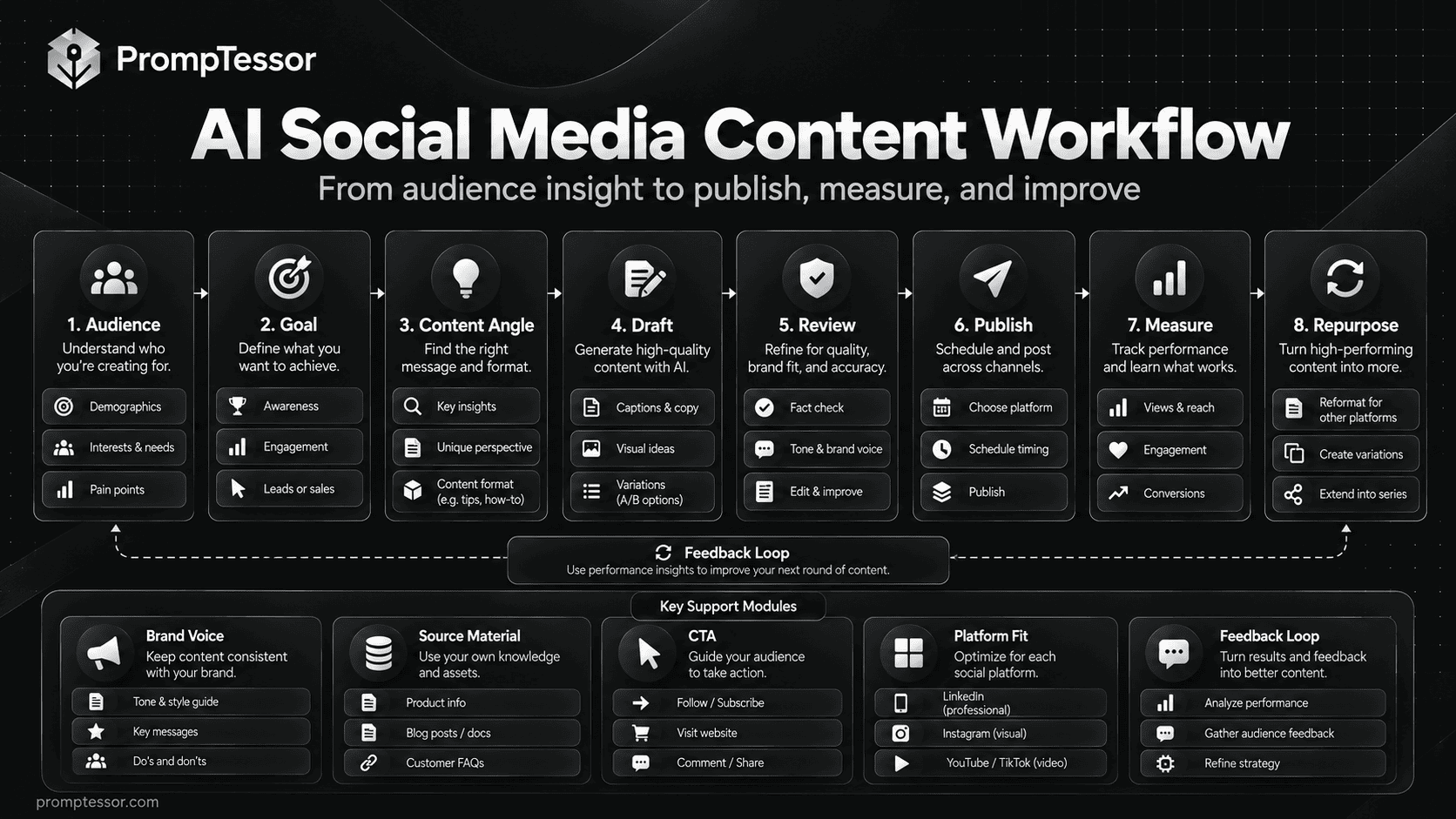
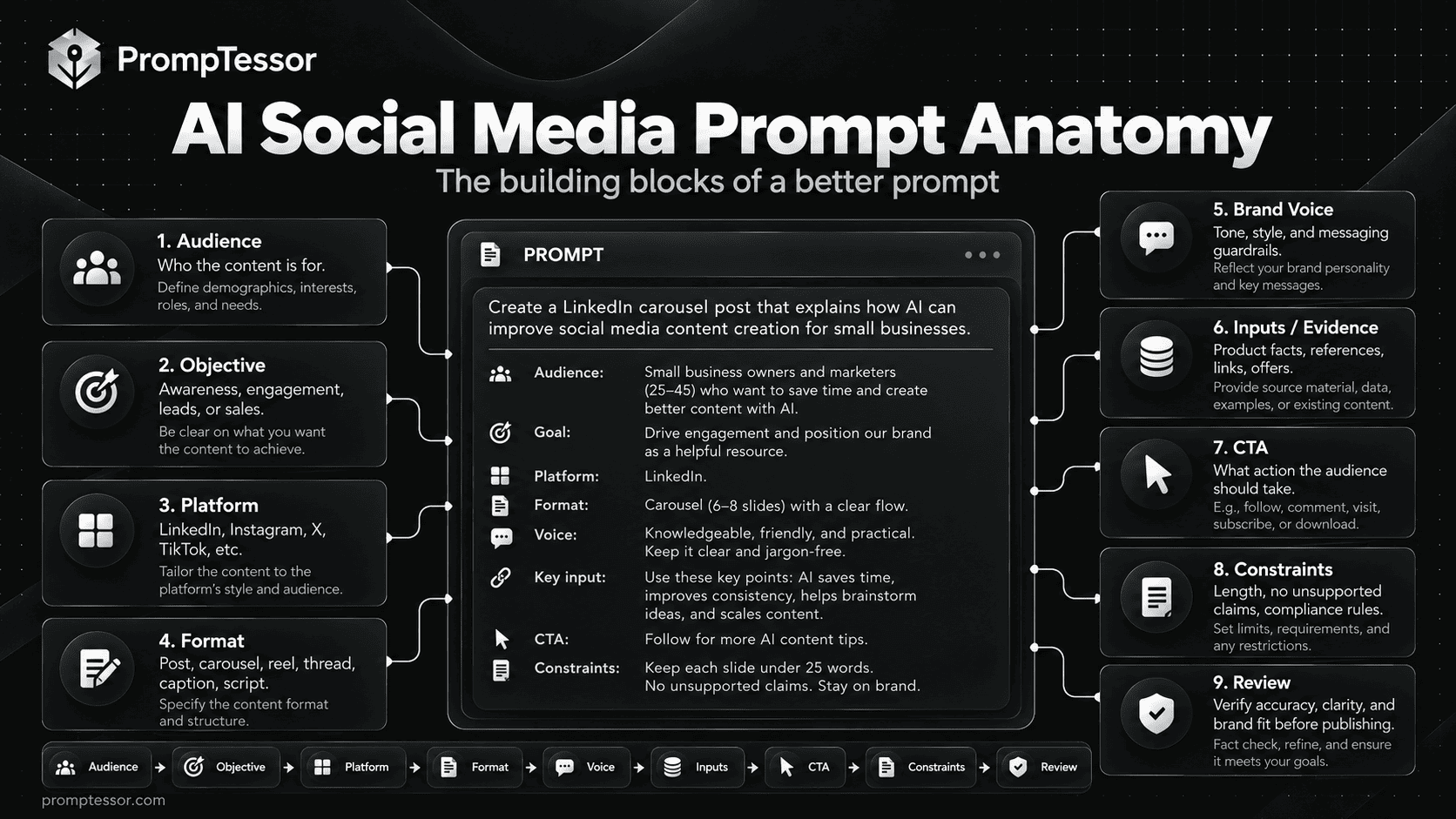
A strong social media prompt defines audience + objective + platform + content format + one takeaway + evidence + brand voice + CTA + constraints + review criteria. When the task involves analytics or current trends, it also needs dated source data; AI should not pretend it can see live platform performance unless that information has actually been provided.
AUDIENCE + CONTENT GOAL
           ↓
CONTENT PILLAR + APPROVED FACTS
           ↓
PLATFORM + FORMAT + BRAND VOICE
           ↓
HOOK → USEFUL MESSAGE → CTA
           ↓
ACCURACY + ACCESSIBILITY + DISCLOSURE CHECK
           ↓
PUBLISH → MEASURE → REFINE
Key Takeaways
- Use AI to clarify a message and accelerate drafting, not replace audience understanding.
- Give each post a primary purpose: educate, explain, invite discussion, or promote.
- Build repeatable content pillars instead of generating disconnected ideas.
- Write platform-aware adaptations without relying on imaginary algorithm rules.
- Include evidence, assets, and specific constraints in every production prompt.
- Review hooks for clickbait, captions for accuracy, and visual scripts for feasibility.
- Keep paid endorsements, affiliate relationships, and product claims transparent.
- Use actual post metrics to improve the calendar; never manufacture performance data.
Table of Contents
- Why Generic Social Media Prompts Underperform
- Before You Start: Build a Social Content Brief
- The Reusable AI Social Media Prompt Formula
- 1. Social Media Content Strategy
- 2. Audience-Led Social Media Post Ideas
- 3. 30-Day Social Media Content Calendar
- 4. Scroll-Stopping Hooks Without Clickbait
- 5. Social Media Captions for Different Goals
- 6. Consistent Brand Voice Across a Content Series
- 7. Educational Social Media Carousel
- 8. Short-Form Video Script for Reels, Shorts, or TikTok
- 9. Visual Content Brief for Designers and AI Tools
- 10. Non-Pushy Product Promotion Post
- 11. Social Media Product Launch Mini-Campaign
- 12. Community Engagement Questions and Replies
- 13. Adapt One Message Across Multiple Platforms
- 14. Turn Long-Form Content Into a Social Media Series
- 15. Social Media Content Audit and Iteration
- Example: Turn One Topic Into a Week of Posts
- Platform-Aware Prompts Without Chasing Algorithms
- A Practical Content Repurposing Framework
- Accuracy, Disclosure, and Copyright Checks
- Measure Results Without Inventing Data
- How PrompTessor Helps You Improve Social Media Prompts
- Pre-Publication Quality Checklist
- Frequently Asked Questions
Why Generic Social Media Prompts Underperform
"Write an engaging Instagram caption" leaves too many decisions to a model. It does not say whether the purpose is to answer a customer question, explain a feature, invite comments, or announce a product. Without examples or boundaries, the model is likely to choose familiar marketing language that could describe any business.
A useful prompt begins with the reason someone would care. For a fitness coach, a post about workout recovery needs a different angle and evidence standard from a gym's membership promotion. For a B2B software business, a LinkedIn post explaining a workflow is different from a short product-demo video. Format shapes the content, but audience intent determines whether it is worth making.
Platform guidance changes. Instagram's Best Practices hub covers creation, engagement, reach, monetization, and guidelines in its professional dashboard, with account-specific context. LinkedIn's creator resources likewise emphasize useful expertise, personal insight, and meaningful openings. Treat these as places to check current platform guidance, not as reasons to promise reach from one universal prompt formula.
Before You Start: Build a Social Content Brief
Before running the prompts, gather a small set of facts and decisions. A ten-minute brief often does more for consistency than producing fifty alternative captions without a direction.
| Input | Example | Why it matters |
|---|---|---|
| Audience | Independent online store owners | Defines questions, context, and vocabulary |
| Content goal | Teach one practical inventory habit | Prevents aimless copy |
| Channels | LinkedIn and Instagram | Guides format and presentation |
| Approved facts | Documented product features, real examples, cited research | Limits unsupported claims |
| Voice | Clear, pragmatic, not hype-driven | Keeps posts recognizable |
| Creative assets | Original images, screen recordings, approved brand files | Makes suggestions executable |
| CTA | Save a checklist or read an existing guide | Matches the post's purpose |
| Constraints | No invented quotes, no unapproved claims | Protects accuracy and trust |
For example, a small stationery business might teach its audience how to choose an everyday planner. Its audience might care about paper format, weekly layouts, or available sizes. A useful post draws from verified product information and reader questions; it does not claim "everyone is switching to our planner" without real evidence.
The Reusable AI Social Media Prompt Formula
You do not need an enormous instruction for every caption. However, these fields make a useful reusable brief when content must work across a team or multiple channels.
ROLE / TASK: {what_the_ai_should_create}
AUDIENCE: {who_should_care}
GOAL: {educate | engage | promote | inform}
CHANNEL / FORMAT: {platform_and_post_type}
ONE KEY MESSAGE: {single_takeaway}
APPROVED SOURCES / FACTS: {verifiable_input}
BRAND VOICE: {tone_and_examples}
ASSETS: {real_images | video | screenshots | none}
CTA: {specific_next_step}
DO NOT INVENT: {claims | trends | statistics | quotes}
OUTPUT: {format | structure | length | variants}
VERIFY: {accuracy | disclosures | accessibility | links}
Use clear variable names and replace the placeholders before sending the prompt. When facts are missing, ask the model to identify the gap instead of filling it with guesses. If you produce content repeatedly, the PrompTessor guide to prompt templates and variables explains how to make those instructions reusable.
15 Copy-and-Paste AI Social Media Prompts
Replace variables such as {audience} and {approved_facts} with actual information. The sample briefs are illustrative, not claims about real businesses or consumer behavior. If the model lacks current platform or campaign information, provide it directly and review the output before publishing.
Content Strategy & Planning
1. Social Media Content Strategy Prompt
Best for: Build a strategy before producing a stack of disconnected posts.
Customize: {business}, {audience}, {offer}, {channels}, {goal}, {proof}, {capacity}
Example brief: A small local coffee roaster wants to educate first-time home brewers.
Act as a social media strategist. Build a 30-day content direction for {business}, serving {audience}, promoting {offer} on {channels}. Business goal: {goal}. Approved facts and proof: {proof}. Team production capacity: {capacity}. First list the audience's key questions, objections, motivations, and realistic reasons to follow. Propose four content pillars that combine educational value, credibility, community, and appropriate promotion. For each pillar give a purpose, three sample angles, one suitable format, a relevant CTA, and a measurable signal. Recommend a feasible publishing cadence without claiming it is algorithmically optimal. Separate known facts from assumptions. Do not invent customer research, platform analytics, testimonials, or trends. Return a one-page strategy, channel-role table, sample week, and list of missing inputs that would change the plan.What to verify: Review whether the chosen pillars reflect customer questions, the actual offer, and realistic production capacity.
2. Audience-Led Social Media Post Ideas Prompt
Best for: Find specific ideas instead of repeating generic motivational posts.
Customize: {audience}, {content_pillars}, {verified_expertise}, {brand_examples}, {formats}, {number}
Example brief: A bookkeeping freelancer explaining cash-flow concepts to small business owners.
Generate {number} distinct social media post concepts for {audience}, aligned with {content_pillars}. Use only this verified expertise and approved information: {verified_expertise}. Existing examples for context: {brand_examples}. Allowed content formats: {formats}. For each concept provide the audience question or friction, one clear takeaway, opening-hook direction, best-fit format, suggested evidence or asset required, and a non-pushy CTA. Group ideas by customer awareness stage rather than guessing what is 'viral.' Exclude invented statistics, topical news, celebrity mentions, fake stories, and unverified trends. Identify repeated concepts and replace them with genuinely different reader benefits. Return a table ranked by usefulness and ease of production, with a missing-evidence flag for any idea that depends on facts not supplied.What to verify: Ask whether at least half the ideas solve specific audience problems rather than merely advertising the business.
3. 30-Day Social Media Content Calendar Prompt
Best for: Turn goals and ideas into a feasible publishing schedule.
Customize: {start_date}, {timezone}, {channels}, {pillars}, {assets}, {cadence}, {campaign_dates}
Example brief: A boutique fitness studio plans a month of beginner-friendly educational posts.
Draft a 30-day social media content calendar beginning {start_date} in {timezone} for {channels}. Content pillars: {pillars}. Available assets and subject-matter expertise: {assets}. Maximum sustainable publishing cadence: {cadence}. Confirmed launch or event dates: {campaign_dates}. Do not assign posts every day unless capacity permits. For each planned post include date, platform, pillar, audience question, format, angle, hook concept, CTA, needed assets, responsible owner placeholder, draft status, and how success will be measured. Balance education, community, and promotion rather than repeating sales messages. Do not invent holidays, event dates, trending sounds, posting-time performance, or product claims. Flag any date-dependent post as requiring fact verification. Provide the calendar as a clean table and a batch-production checklist.What to verify: Confirm dates, owner availability, asset dependencies, campaign deadlines, and whether each week has variety.
Social Media Copywriting
4. Scroll-Stopping Hooks Without Clickbait Prompt
Best for: Improve the first line while keeping the promise truthful.
Customize: {topic}, {audience}, {takeaway}, {verified_evidence}, {platform}, {voice}
Example brief: A post explaining three mistakes people make when setting up a home office.
You are editing a social media opening for {platform}. Topic: {topic}. Audience: {audience}. Main takeaway: {takeaway}. Verified evidence: {verified_evidence}. Voice: {voice}. Write 12 concise hook options grouped into question, problem-first, counterintuitive, practical promise, and personal-observation structures. Each hook must accurately preview the content and give the reader a concrete reason to continue. Do not claim a result is shocking, proven, secret, new, or universally true without evidence. Avoid fake urgency and misleading 'you won't believe' phrasing. Identify your three strongest candidates, explain what the reader expects from each, and draft a matching second sentence that fulfills the hook rather than changing the subject.What to verify: Check that the post truly delivers the outcome implied by the hook.
5. Social Media Captions for Different Goals Prompt
Best for: Write platform-appropriate copy with a real message and CTA.
Customize: {post_brief}, {platform}, {audience}, {goal}, {brand_voice}, {approved_facts}
Example brief: A sustainable stationery shop announcing a verified refillable notebook feature.
Write social media caption options from this post brief: {post_brief}. Platform: {platform}. Audience: {audience}. Communication goal: {goal}. Voice: {brand_voice}. Facts and links approved for use: {approved_facts}. Deliver three distinct captions: concise, conversational, and educational. Each should open with a relevant idea, communicate one main point, use readable line breaks where appropriate, and close with a CTA aligned to {goal}. Suggest optional hashtags only if specific and genuinely relevant; do not invent trending tags or promise reach. Preserve accurate product attributes, pricing, and offers; omit anything unverified. Return the captions, a short rationale for each, and a pre-publication fact check. Do not include made-up reviews or customer results.What to verify: Read aloud for naturalness; verify the offer, any link destination, the CTA, and disclosure requirements.
6. Consistent Brand Voice Across a Content Series Prompt
Best for: Keep posts recognizable without making every caption identical.
Customize: {brand_voice_guide}, {approved_samples}, {drafts}, {audience}, {avoid_phrases}
Example brief: A thoughtful B2B SaaS brand wants a consistent voice across weekly tips.
Act as a brand editor. Apply {brand_voice_guide} to these draft posts: {drafts} for {audience}. Use {approved_samples} to learn tone and rhythm, not to import factual claims. Avoid {avoid_phrases}. First define five observable writing rules covering sentence length, vocabulary, personality, point of view, and call-to-action style. Rewrite each draft to follow the rules while preserving its distinct message, evidence, links, and required disclosures. Do not add customer stories, benchmarks, prices, or competitive claims not in the original facts. Return the revised posts plus a before/after notes table and a final consistency checklist. Identify where a supposed voice issue is actually missing information instead of solving it with vague adjectives.What to verify: Verify that the edits maintain individual post purpose and do not flatten everything into identical marketing language.
Visual & Video Content
7. Educational Social Media Carousel Prompt
Best for: Plan an educational multi-slide narrative that earns the swipe.
Customize: {topic}, {audience}, {key_lesson}, {approved_sources}, {slide_count}, {brand_direction}
Example brief: An accounting educator explains what a cash-flow forecast can and cannot show.
Create a {slide_count}-slide educational social carousel about {topic} for {audience}. Intended lesson: {key_lesson}. Approved supporting facts and sources: {approved_sources}. Visual direction: {brand_direction}. Plan a cover that promises one clear benefit, followed by a logical progression: context, key steps or examples, common misunderstanding, practical takeaway, and a suitable closing CTA. For every slide provide a short headline, no more than two compact body-text blocks, suggested visual or diagram, accessibility/alt-text guidance, and how it connects to the previous slide. Avoid invented statistics, deceptive screenshots, and text-heavy slides. Return a slide-by-slide production table plus one companion caption and a checklist for source accuracy, contrast, mobile readability, and visual consistency.What to verify: Check every slide at phone size; the cover promise should be fulfilled by the final slide.
8. Short-Form Video Script for Reels, Shorts, or TikTok Prompt
Best for: Translate one useful takeaway into a short visual sequence.
Customize: {subject}, {audience}, {one_takeaway}, {duration}, {assets}, {platform}, {cta}
Example brief: A 30-second tutorial demonstrating a real notebook organization technique.
Write a {duration}-second short-form video script for {platform} about {subject}, serving {audience}. The one takeaway is {one_takeaway}. Available real footage, screenshots, or props: {assets}. CTA: {cta}. Output a timecoded beat sheet with visual action, spoken dialogue or voiceover, on-screen text, transitions, optional sound direction, and an end card. Make the first two seconds immediately useful rather than artificially dramatic. Use only actions and results supported by the available footage or a clearly labeled storyboard. Do not invent product demonstrations, interviews, statistics, customer reactions, or trending audio. Keep text readable inside typical mobile safe areas without asserting exact platform specifications; the producer must verify export rules before publishing. Also provide a 15-second adaptation if the topic remains coherent.What to verify: Read the script at normal speaking speed; verify any product shots and source evidence, plus captions and disclosure.
9. Visual Content Brief for Designers and AI Tools Prompt
Best for: Create a useful production handoff, not just an aesthetic adjective list.
Customize: {message}, {format}, {audience}, {brand_assets}, {references}, {constraints}
Example brief: A social post illustrating a three-step customer onboarding process.
Develop a visual production brief for a social post with the core message {message}, format {format}, and audience {audience}. Official brand assets: {brand_assets}. References approved for inspiration: {references}. Constraints: {constraints}. Describe the essential subject, composition, visual hierarchy, typography roles, negative space, safe text areas, palette, and required deliverables. Write a text-to-image or image-editing prompt where useful, clearly separating elements that may be generated from logos, product labels, and data that must remain exact. Recommend adding critical words and official logos in a design tool if the image model cannot preserve them reliably. Include an alt-text draft and reviewer checklist for contrast, factual imagery, brand fidelity, copyright/asset rights, and platform export size. Do not claim that the brief creates the final asset.What to verify: Ensure the design brief can be executed without guessing brand colors, exact logos, factual charts, or message hierarchy.
Marketing & Engagement
10. Non-Pushy Product Promotion Post Prompt
Best for: Explain a relevant product benefit with substantiated evidence.
Customize: {product_or_service}, {target_user}, {verified_benefits}, {offer_terms}, {channel}, {approved_proof}
Example brief: A desk organizer brand highlights its verified three-compartment design.
Draft a social media post for {product_or_service} aimed at {target_user} on {channel}. Verified benefits and specifications: {verified_benefits}. Offer terms, if any: {offer_terms}. Approved proof: {approved_proof}. Lead with a real customer problem or usage context, then explain one benefit that can be traced to approved facts. Provide an organic educational version, a direct promotional version, and a short caption suitable for a product visual. Include one honest CTA and any disclosure placeholder needed for sponsored or affiliate content. Do not invent urgency, discounts, stock limits, testimonials, performance results, certifications, or comparisons. Return a claim-to-evidence table and identify which copy requires legal, policy, or offer verification.What to verify: Check that the actual product, images, CTA page, pricing, and disclosures agree with the post.
11. Social Media Product Launch Mini-Campaign Prompt
Best for: Coordinate several posts without presenting guesses as news.
Customize: {launch_date}, {timezone}, {product}, {approved_features}, {approved_assets}, {channels}, {offer_terms}
Example brief: A small SaaS company launching a documented dashboard update next month.
Plan a social media mini-campaign around the confirmed {launch_date} in {timezone} for {product}. Approved features: {approved_features}; assets: {approved_assets}; channels: {channels}; offers: {offer_terms}. Propose a sequence for pre-launch education, announcement, feature demonstration, common questions, and post-launch feedback. For each touchpoint specify publish date or relative date, audience value, key message, format, creative asset, CTA, approval dependency, and success metric. Draft example copy for the announcement and one educational follow-up. Do not claim the product is available before confirmation, create false countdowns, manufacture launch testimonials, or invent time-sensitive offers. Flag items that must be revised if the launch date changes. Include a contingency plan for delay or a feature removed from release.What to verify: Cross-check launch status, working signup links, pricing, announced features, and any date-dependent claim.
12. Community Engagement Questions and Replies Prompt
Best for: Encourage authentic discussion and respectful responses.
Customize: {community}, {topic}, {goal}, {brand_boundaries}, {faq_facts}, {moderation_policy}
Example brief: A community of indie makers discusses how they prioritize product feedback.
Design a community engagement post for {community} on {topic} with the goal {goal}. Brand boundaries: {brand_boundaries}; verified FAQs: {faq_facts}; moderation policy: {moderation_policy}. Write five specific discussion prompts that invite first-hand experiences instead of shallow 'agree?' replies. Select the best prompt and produce a short post with a respectful call for participation. Then draft reply templates for a useful contribution, constructive criticism, an unanswered factual question, and a support issue needing a private channel. Do not fabricate audience responses, impersonate customers, promise support resolutions without authority, or ask users to share personal information publicly. Include escalation triggers and a note on what requires human review.What to verify: Verify that questions are genuinely relevant and replies avoid invented user stories or unsupported promises.
Optimization & Repurposing
13. Adapt One Message Across Multiple Platforms Prompt
Best for: Keep the core truth while changing format and presentation.
Customize: {source_message}, {audience}, {platforms}, {approved_facts}, {objective}, {assets}
Example brief: One approved customer education note adapted to LinkedIn, Instagram, and short video.
Repurpose {source_message} for {platforms}. Audience: {audience}. Objective: {objective}. Approved factual material: {approved_facts}. Existing assets: {assets}. Start by extracting the single essential claim, the evidence supporting it, and what must not change. For each platform, recommend an appropriate native content format, opening, structure, CTA, optional visual, and production effort. Draft platform-specific copy rather than pasting identical captions everywhere. Note where links, formatting, accessibility features, or disclosures require checking in the current platform interface. Do not assert that any format or publish time will maximize algorithmic reach. Return a side-by-side adaptation table and a single-source-of-truth checklist.What to verify: Compare the adaptations for factual consistency while ensuring each version feels appropriate to its channel.
14. Turn Long-Form Content Into a Social Media Series Prompt
Best for: Extract grounded ideas from a blog, webinar, or report.
Customize: {source_content}, {source_url}, {audience}, {allowed_formats}, {number_of_assets}, {rights_constraints}
Example brief: A 2,000-word beginner guide repurposed into a week of educational social posts.
You are a social content editor. Read {source_content} from {source_url} and create {number_of_assets} distinct social assets for {audience} in {allowed_formats}. Rights and reuse constraints: {rights_constraints}. Identify the source's main ideas, supporting examples, and important qualifications; create a source-to-post mapping before drafting. Output at least one practical tip, one misconception correction, and one question-led post if genuinely supported. Each asset needs a hook, core message, suggested format, CTA, and citation or internal source note. Keep numbers, quotes, dates, and claims faithful to the source. Do not add new findings, claim a report says something it does not, or invent 'fresh' research. If a claim lacks evidence, mark it as omitted. Finish with an editorial approval checklist.What to verify: Trace each proposed social claim back to the original material and confirm reuse rights for images and quotes.
15. Social Media Content Audit and Iteration Prompt
Best for: Use actual post-level metrics rather than speculative growth hacks.
Customize: {posts_and_captions}, {metrics_with_dates}, {objectives}, {audience}, {sample_limits}
Example brief: An account reviewing eight weeks of posts with impressions, saves, and link clicks.
Audit these social media posts and captions: {posts_and_captions}. Actual platform metrics with observation dates: {metrics_with_dates}. Business objectives: {objectives}. Audience: {audience}. Known data limitations: {sample_limits}. Separate descriptive findings from hypotheses: summarize which formats and topics earned relevant reach, saves, clicks, conversation, or conversions when data supports those claims. Normalize metrics where possible, but never compare unlike denominators as if identical. Do not infer causation from correlation or invent missing impressions or engagement data. Rank content improvements by expected learning value and production effort. Produce (1) a metric table with definitions, (2) observed patterns, (3) uncertainties, (4) three testable experiments changing one meaningful variable at a time, and (5) a two-week follow-up measurement plan.What to verify: Check metric definitions, dates, small samples, paid vs organic differences, and whether the recommendations follow the observed evidence.
Example: Turn One Topic Into a Week of Social Content
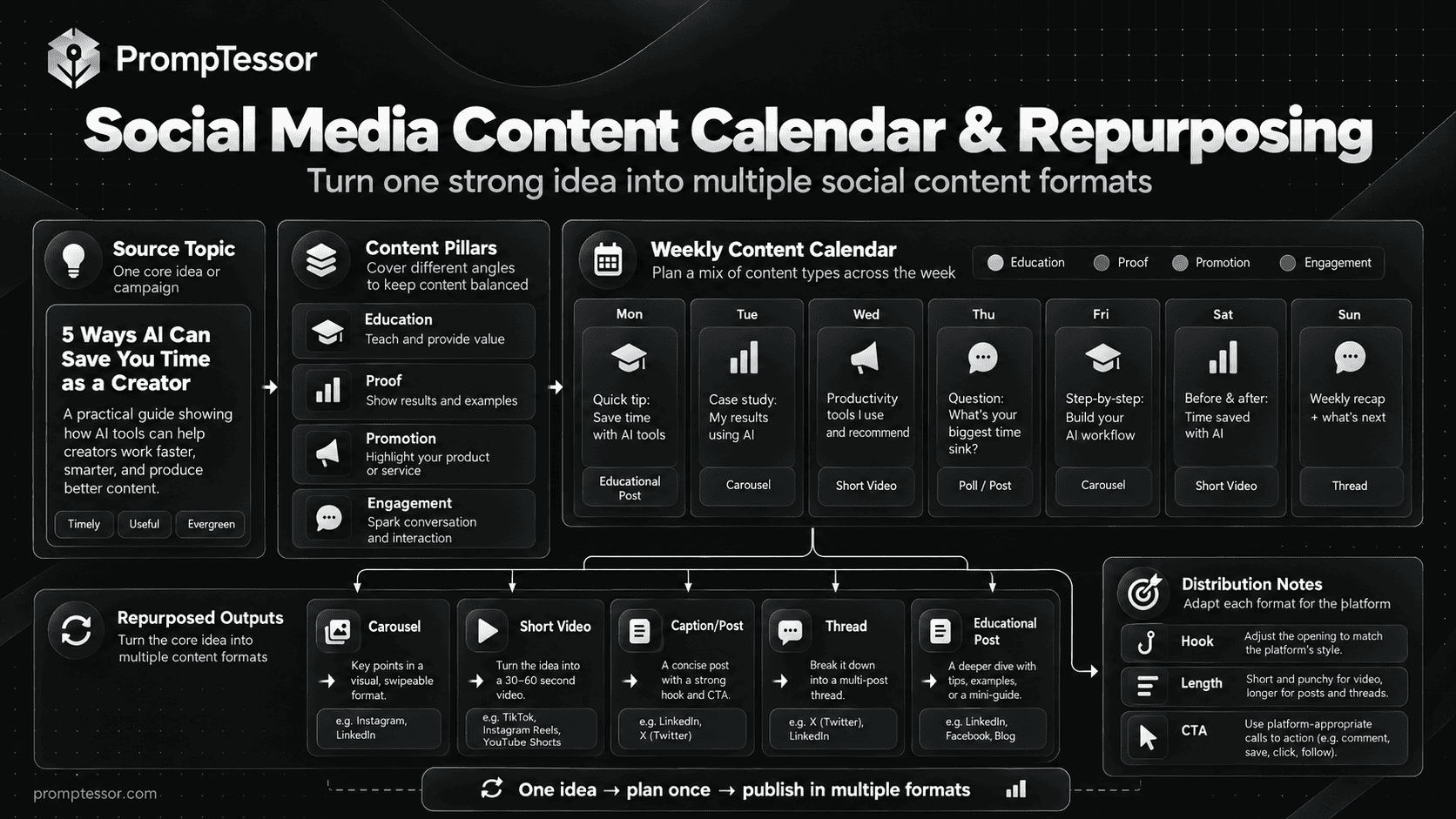
Imagine a fictional independent home-organization brand with one approved guide about organizing a small workspace. Instead of making five unrelated posts, the team can use one source document to tell a coherent story across the week. The example below is a planning illustration; publish dates and any specific platform capabilities still need local verification.
| Day | Format | Audience value | Suggested CTA |
|---|---|---|---|
| Monday | Educational text post | Explain the biggest setup mistake | Share your current obstacle |
| Tuesday | Carousel | Show a three-step organizing method | Save the checklist |
| Wednesday | Short video | Demonstrate the method using real footage | See the full explanation |
| Thursday | Community question | Collect practical audience questions | Comment with a workspace challenge |
| Friday | Optional product context | Explain where a real product fits, if relevant | View accurate product details |
The five assets are related but not identical. The educational post communicates the core idea, the carousel decomposes it, the video demonstrates it, and the discussion post reveals what readers still need. Only the optional product post becomes promotional. That balance makes the content series less repetitive and creates more useful feedback for future planning.
Platform-Aware Prompts Without Chasing Algorithms
A model can help change format and presentation, but no model should present one fixed posting schedule, hashtag count, or video duration as a guaranteed path to reach. Platform rules and recommendation systems evolve, and actual results depend on the audience, account, and content.
| Context | Good prompt emphasis | What to check manually |
|---|---|---|
| Instagram carousel | Readable slides, visual sequencing, saves and shares as possible goals | Current aspect ratio, typography legibility, asset rights |
| Short-form video | Early context, one clear demonstration, captions, feasible shot list | Current upload limits, safe areas, sound rights, accessibility |
| LinkedIn post | Professional relevance, real expertise, direct opening, discussion | Claims, sources, tagging permissions, audience fit |
| Facebook or community post | Useful context, a genuine question, respectful moderation | Group rules, link restrictions, disclosure, privacy |
| Paid social ad | Approved benefit, accurate creative, landing-page continuity | Ad policy, offer terms, disclosures, tracking and approval |
Use each platform's official guidance as the final source for technical specifications and policy. Ask AI to draft alternative hooks or format structures, but let campaign data and editorial judgment determine which version to use.
A Practical Content Repurposing Framework
Repurposing is not simply pasting the same caption into every platform. Start from one verified source—an original tutorial, product documentation, report, or webinar—and extract separate audience questions that the source can answer.
- Identify the source of truth. Save the original article, transcript, or approved notes and mark which claims need citations.
- Extract distinct reader needs. A guide might answer a beginner question, show a practical method, and explain a common mistake.
- Choose a format that fits each message. A comparison can become a carousel, a demonstration a short video, and a nuanced opinion a text post.
- Write native versions. Adjust structure and CTA instead of mechanically changing the word count.
- Verify claims and media rights. Preserve source qualifications and avoid reusing visuals without permission.
- Review actual results. Use saves, qualified comments, clicks, and conversions only where measured and relevant.
This is where an intentional calendar helps: it creates a publishing sequence from ideas that were already validated, rather than a queue of isolated AI-generated captions.
Accuracy, Disclosures, and Copyright Checks for AI Social Content
Social content can be casual in tone while still carrying real commercial responsibilities. When AI drafts an endorsement, a promotional caption, or a product demonstration, the team must review whether the claims are supported and whether a business relationship needs to be disclosed.
The FTC's Disclosures 101 explains that material connections—such as payment, free products, or certain personal relationships—may need clear disclosure that people can notice. Disclosures hidden among hashtags or only on a profile page may be insufficient. The FTC also warns against pretending to have personally tried a product when that is not true. See its broader endorsements and reviews guidance for further details.
Do not use AI to fabricate testimonials, community comments, customer photographs, before-and-after results, or product tests. For paid campaigns, verify what the real ad creative, landing page, offer terms, and approved evidence actually show. If content includes regulated claims or sensitive personal stories, obtain appropriate specialist review rather than treating an AI-generated disclaimer as approval.
Also verify you have permission to repurpose source content, licensed music, artwork, photographs, and user-generated material. A generative prompt cannot establish copyright ownership or platform usage rights. Keep original logos and brand assets intact; where image generators struggle with accurate text, add final labels and logos during editing.
How to Measure Social Media Content Without Inventing Data
A content calendar becomes a learning system when each post has a purpose and an appropriate measurement. Consider metrics in relation to the outcome: reach may matter for awareness; saves or qualified comments may signal usefulness; link clicks or signups can matter for actions. None of these single metrics proves content quality by itself.
| Content objective | Possible indicators | Important limitation |
|---|---|---|
| Awareness | Impressions, reach, relevant profile visits | High reach does not prove purchase intent |
| Education | Saves, meaningful questions, completion or watch signals where available | Platform definitions and measurement vary |
| Community | On-topic replies, repeat participation, answered questions | Raw comment counts may be misleading |
| Traffic and conversion | Verified link clicks, signups, purchases or qualified leads | Attribution and delayed actions complicate interpretation |
Provide the model a dated export and explain whether metrics are organic, paid, or mixed. Ask for observed patterns separate from testable hypotheses. If a post with a question hook performed better, it does not automatically prove the question caused the result; topic, audience, distribution, or timing may have differed.
For a useful experiment, test one meaningful content variable, set a sensible observation window, and compare the right denominators. If the available sample is small, use the outcome as directional learning rather than a guaranteed formula.
Create and Refine Social Media Prompts With PrompTessor
PrompTessor is useful at the prompt preparation stage of social media production. It helps structure the instructions you give to a compatible AI model, but it does not automatically fetch live engagement data, design every finished asset, schedule posts, or publish them to social platforms.
The AI Prompt Generator can turn a rough request such as "give me Instagram post ideas" into a clearer task with audience, goal, format, voice, constraints, and output rules. When an existing prompt repeatedly produces generic captions, the AI Prompt Optimizer can help refine those instructions. Use the AI Prompt Analyzer to inspect specificity and structure before reusing the prompt across a campaign.
For creative production briefs, the AI Image Prompt Generator and AI Video Prompt Generator can help describe visual scenes, camera direction, motion, layout, and constraints. You still need a separate image or video tool to generate the asset and a person to review the result. For more product-focused visual use cases, see the AI Product Photography Prompts and AI Product Video Prompts guides.
One practical loop is: build the content brief → select one template from this article → generate a draft with your chosen model → check accuracy, accessibility, and disclosures → refine the prompt → publish through your usual workflow → measure with real platform data.
Social Media Content Quality Checklist Before Publishing
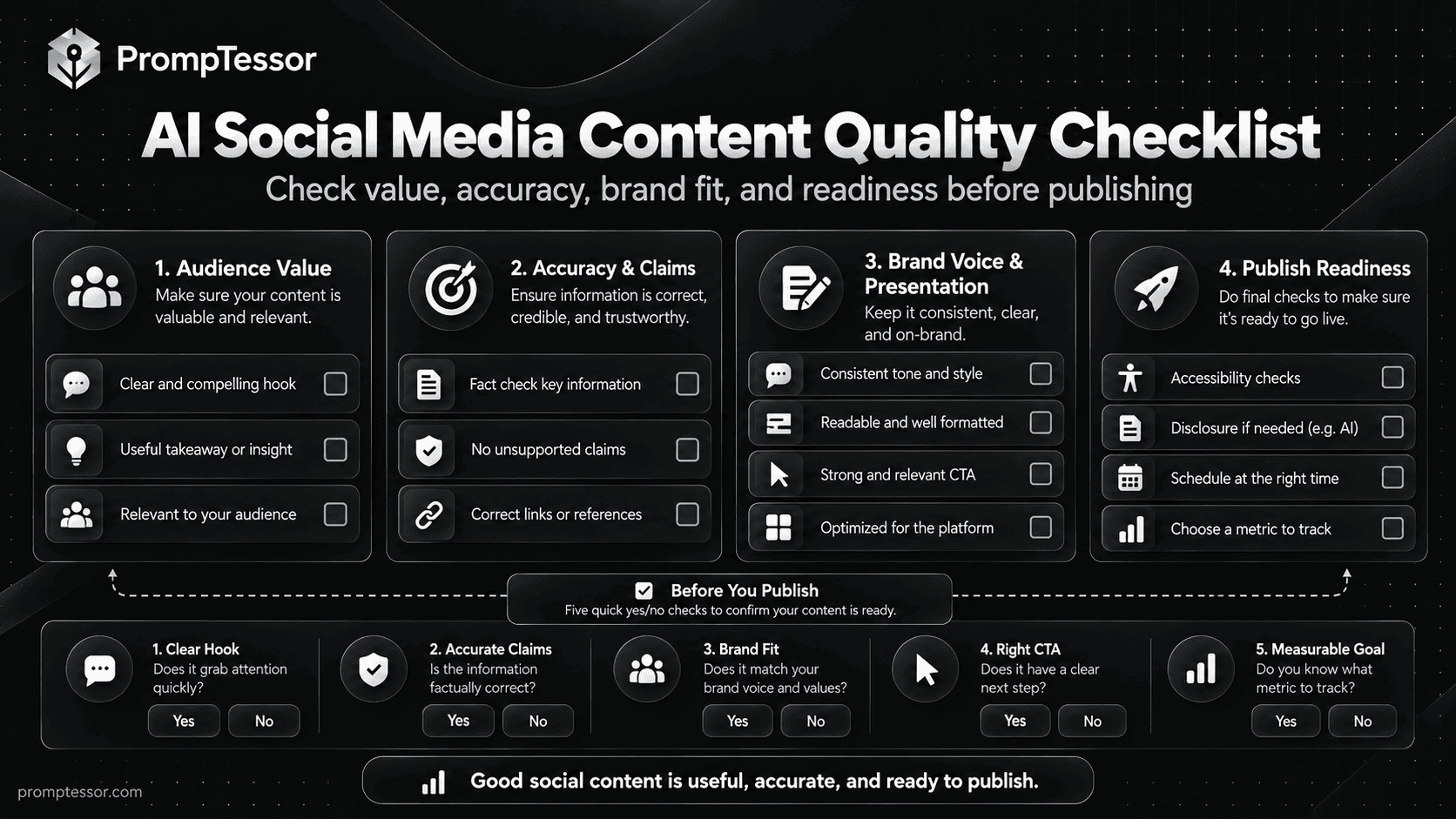
- Purpose: This post has one clear job and serves a real audience question or need.
- Opening: The first line or frame accurately promises what follows; it does not use misleading clickbait.
- Accuracy: Statistics, dates, quotes, product details, and testimonials come from verified sources.
- Brand voice: Language matches the brand without sounding interchangeable with other posts.
- Format: Copy, visual structure, duration, and CTA fit the destination and current requirements.
- Accessibility: Captions, text contrast, alt text, and mobile readability have been considered.
- Creative rights: Logos, photos, music, and third-party assets are approved for this use.
- Disclosures: Sponsored, affiliate, or incentivized endorsements are identified clearly where required.
- Landing-page match: Any link, offer, price, or claim matches the page where the visitor lands.
- Measurement: The team knows what success would look like and what actual data will be collected.
Frequently Asked Questions About AI Social Media Prompts
What are AI social media prompts?
They are instructions that tell a compatible AI model what social content to draft, for whom, on which platform, and under which constraints. Good prompts identify the audience, objective, format, verified facts, brand voice, CTA, and review requirements.
What is the best AI prompt for social media content?
The most useful prompt is the one tailored to the specific job. Define the audience, one outcome, platform, content type, source facts, voice, and output structure. Ask for missing information instead of allowing the AI to invent it.
Can AI create a 30-day social media content calendar?
Yes. AI can draft a calendar from your content pillars, campaign dates, assets, and team capacity. You should still verify dates, availability, actual platform requirements, and whether the proposed schedule can be sustained.
Can I use the same prompt for Instagram, LinkedIn, and TikTok?
You can reuse a core brief, but adapt the output for each platform and content format. A carousel, professional text post, and short-form video serve different reading and viewing contexts. Avoid assuming one caption works everywhere.
How do I make AI captions sound less generic?
Provide a real audience problem, one concrete takeaway, a few approved voice examples, relevant facts, and specific phrases to avoid. Request distinct approaches and edit the best result for naturalness and accuracy.
Can AI write scripts for Reels, TikTok, and YouTube Shorts?
Yes. Give it the topic, audience, intended duration, one takeaway, available footage, desired action, and any brand constraints. Review timing, feasibility, captions, sound rights, and current platform specifications before production.
Should AI-generated social media posts include hashtags?
Only when hashtags are relevant to the content and platform. Do not assume a fixed number or a model-generated trending tag guarantees distribution. Check actual relevance and current platform guidance.
How can I repurpose one blog post into multiple social posts?
Extract several distinct audience questions from the source, choose an appropriate format for each, then adapt the message while preserving accurate quotes, numbers, and qualifications. Verify asset rights and link back to the relevant source when helpful.
Can AI analyze which social posts performed best?
It can help analyze actual dated metrics you provide. Require the model to define metrics, distinguish observations from hypotheses, note small sample sizes, and avoid claiming it accessed live analytics unless that data was available.
Does PrompTessor publish social media posts automatically?
No. PrompTessor helps you create, analyze, and optimize prompts and prepare image or video prompt briefs. Publishing, scheduling, asset generation, live analytics collection, and final editorial approval happen in the tools and workflows you choose.
Final Thoughts: Useful Social Content Starts With a Better Brief
AI can remove friction from planning, drafting, and repurposing, but strong social content still depends on real audience knowledge, credible information, appropriate format, and human judgment. The goal is not to publish the greatest number of AI-written posts. It is to communicate something worth reading, watching, or discussing.
Use these 15 prompts as reusable starting points. Give the model one clear objective, approved facts, a realistic production brief, and a definition of quality. Then review what it creates, publish deliberately, and use genuine results to improve the next round.
Build better prompts in one workspace
Generate prompts from ideas, analyze and optimize quality, refine with feedback, reverse-engineer content, and save reusable prompts in your Prompt Library.
Try PrompTessor Free