15 AI Customer Support Prompts for Replies, Complaints, and Support Tickets (2026)
A customer contacts support because they were charged twice. An AI-generated reply sounds professional, apologizes for the inconvenience, and confidently says the refund has been processed.
There is just one problem: nobody has verified the transaction, and no refund has actually been issued.
This is why useful AI customer support requires more than a friendly tone.
Whether you are responding to complaints, troubleshooting technical problems, reviewing refund requests, or organizing support tickets, the quality of an AI-generated response depends on the information and instructions behind it.
A strong prompt tells the AI what the customer needs, which business policies apply, what account information has been verified, which actions are permitted, and when a human agent must take over.
This guide provides 15 copy-and-paste AI customer support prompts for real support workflows, including customer complaints, refunds, billing questions, subscription cancellations, technical issues, ticket triage, human escalations, and knowledge base creation.
Each prompt includes practical variables, output requirements, and rules designed to prevent unsupported claims and misleading promises.
The templates can be adapted for ChatGPT, Claude, Gemini, and other compatible AI models. They are useful for drafting responses manually and as starting points for support workflows integrated with approved business systems.
The goal is not to make customer support sound automated. It is to help support teams deliver clearer, more consistent, and more trustworthy answers.
Quick Answer: What Makes a Good AI Customer Support Prompt?
A good AI customer support prompt combines the customer's request with relevant business context, verified account information, approved policies, communication guidelines, action permissions, and an explicit definition of a successful response.
It should also explain what to do when important information is missing.
For example, "Reply to this angry customer" leaves the model guessing about the issue, its status, and what the business can actually offer.
A stronger prompt identifies the complaint, available evidence, applicable policies, and the next authorized step.
Here is a reusable starting point:
ROLE:
Act as a professional customer support assistant.

CUSTOMER MESSAGE:
{customer_message}

VERIFIED CONTEXT:
{relevant_ticket_and_account_information}

APPROVED POLICIES:
{relevant_company_policies}

CURRENT STATUS:
{verified_issue_status}

BRAND VOICE:
{tone_and_style}

OBJECTIVE:
{desired_support_outcome}

RULES:
- Acknowledge the customer's actual concern.
- Use only verified product, account, and policy facts.
- Never invent refunds, credits, deadlines,
  delivery updates, or completed actions.
- Do not request passwords or full payment details.
- Do not expose another customer's information.
- Ask for missing details only when necessary.
- Escalate when policy, authority, or evidence
  is insufficient.

OUTPUT:
1. Suggested customer reply
2. Internal verification notes
3. Required next action
4. Escalation status, if applicable

Do not send the reply or modify an account.
Produce a draft for review.
This structure works across many customer service situations. The important details change with the type of issue and the systems that can provide current information.
Key Takeaways
- AI customer support prompts should prioritize accurate resolution over polite-sounding but unverified reassurance.
- Use approved business policies and live account information as separate sources of truth.
- Never let AI invent refund approvals, payment status, shipping updates, fixes, deadlines, or account changes.
- Specify whether the AI is drafting a response, analyzing a ticket, recommending an action, or performing an authorized workflow.
- Keep customer-facing replies concise and place technical or operational details in internal notes.
- Use clear escalation rules for billing disputes, account security issues, missing evidence, and sensitive complaints.
- Support classification and routing need defined categories, severity criteria, and fallback behavior.
- Reusable prompts should reflect the company's actual communication style and policy boundaries.
- Evaluate AI-generated support replies for factual accuracy, usefulness, policy compliance, and resolution quality.
- Protect customer information and enforce action permissions through business systems, not through prompt wording alone.
What Are AI Customer Support Prompts?
AI customer support prompts are instructions that guide an AI model through a customer service task.
Some prompts generate a reply to a customer's message. Others summarize conversation history, identify a possible technical issue, classify incoming tickets, prepare escalation notes, or help convert existing documentation into knowledge base articles.
These tasks serve different purposes.
| Prompt Type | Purpose | Typical Output |
|---|---|---|
| Response drafting | Help agents communicate clearly | Suggested customer message |
| Policy-guided response | Explain approved company procedures | Answer with policy references |
| Troubleshooting | Identify safe next diagnostic steps | Step-by-step instructions |
| Ticket classification | Organize incoming requests | Category, priority, routing suggestion |
| Conversation summarization | Preserve context during handoffs | Internal ticket summary |
| Escalation preparation | Transfer unresolved issues appropriately | Escalation packet and customer update |
| Knowledge base creation | Convert approved documentation into useful help content | FAQ or help center draft |
| Support analytics | Identify recurring issues using ticket data | Trend report and recommendations |
The distinction matters because a prompt designed to write a friendly email should not automatically be used to authorize refunds or modify subscription settings.
In a live support system, the prompt is only one component. Current data, permissions, authentication, business rules, tools, and human review determine what the system can safely do.
Before Using AI for Customer Support: Prepare the Right Context
The quality of a support reply depends heavily on the information supplied to the model.
If the AI has no access to current account data, it cannot know whether a customer's payment succeeded. If it has not been given the approved refund policy, it should not invent eligibility criteria.
Use the following support brief to prepare the relevant information before generating a response.
| Information | Example | Purpose |
|---|---|---|
| Customer issue | Customer reports an unexpected subscription charge | Defines the request |
| Product context | SaaS product with monthly and annual plans | Explains the service |
| Verified account state | Current plan and invoice status from an authorized billing system | Prevents invented account claims |
| Relevant policy | Current cancellation and refund policy | Sets approved boundaries |
| Ticket history | Previous contact and confirmed actions | Prevents repeated or contradictory advice |
| Communication tone | Friendly, direct, and professional | Maintains consistency |
| Permitted actions | Draft a response and suggest next steps | Defines authority |
| Escalation rules | Human review required for disputed charges | Protects consequential decisions |
| Resolution criteria | Customer receives an accurate explanation and appropriate next step | Makes the task measurable |
When account information is involved, only provide the minimum data necessary for the task, and use an authorized system. Do not paste passwords, full payment card details, or unnecessary sensitive customer information into a general-purpose prompt.
Establish a Source-of-Truth Hierarchy
Not all support information has the same authority.
A customer's message describes their experience, but it does not verify payment processing. An old support conversation may explain a previous resolution, but it may not reflect the account's current status. General AI knowledge should not override approved company documentation.
A useful source hierarchy is:
VERIFIED CURRENT ACCOUNT STATE
Actual transactions, subscription status,
order events, and authorized system records

                  +

APPROVED CURRENT POLICIES
Refunds, cancellations, product terms,
service commitments, and procedures

                  +

VERIFIED PRODUCT DOCUMENTATION
Current features, troubleshooting steps,
known limitations, and official updates

                  +

CUSTOMER MESSAGE AND TICKET HISTORY
Reported symptoms, requests,
previous communication, and context

                  |
                  v

          AI-ASSISTED DRAFT
                  |
                  v

     VERIFICATION AND APPROVAL
                  |
                  v

        CUSTOMER RESPONSE
If two authoritative sources conflict, the model should flag the issue rather than silently choose an answer. If information is unavailable, it should propose a reasonable verification or escalation step.
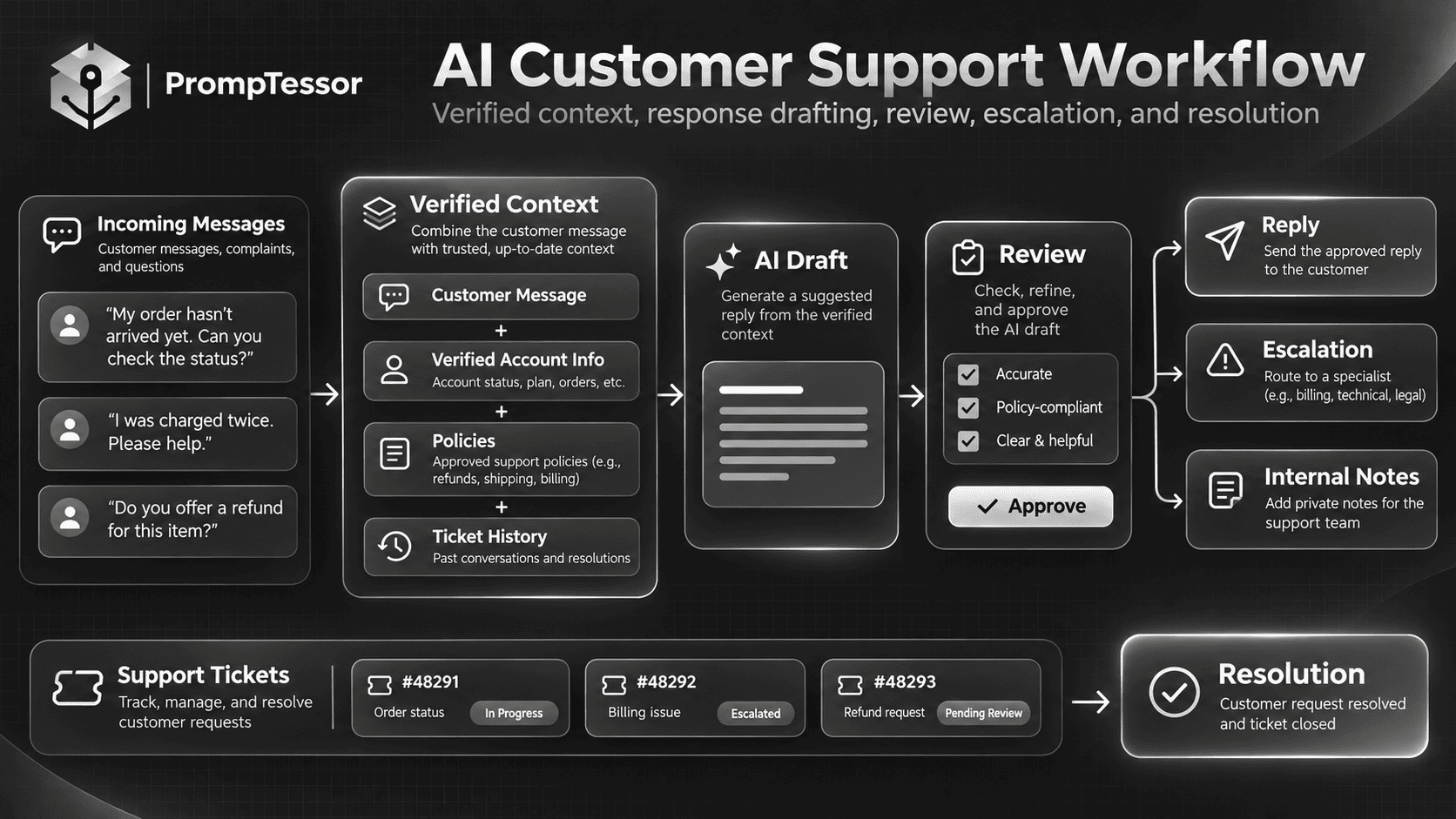
The Reusable AI Customer Service Prompt Formula
A reusable prompt helps support agents handle recurring tasks without rewriting instructions from scratch.
The following framework separates stable support rules from the information that changes with each ticket.
ROLE
Who is the AI assisting?

CUSTOMER INTENT
What problem is the customer trying to solve?

VERIFIED CONTEXT
What is known about the ticket or account?

POLICY
Which approved company rules apply?

ACTION SCOPE
What may be drafted, recommended, or executed?

COMMUNICATION
What tone, length, and format are expected?

ESCALATION
When is human review necessary?

OUTPUT
What should the AI return?

VERIFICATION
What evidence is required before
claiming that the issue is resolved?
For recurring support work, these components can become a template with variables such as {customer_message}, {approved_refund_policy}, {verified_order_status}, and {escalation_conditions}.
See Prompt Templates and Variables: How to Build Reusable AI Prompts for a deeper explanation of reusable prompt architecture.
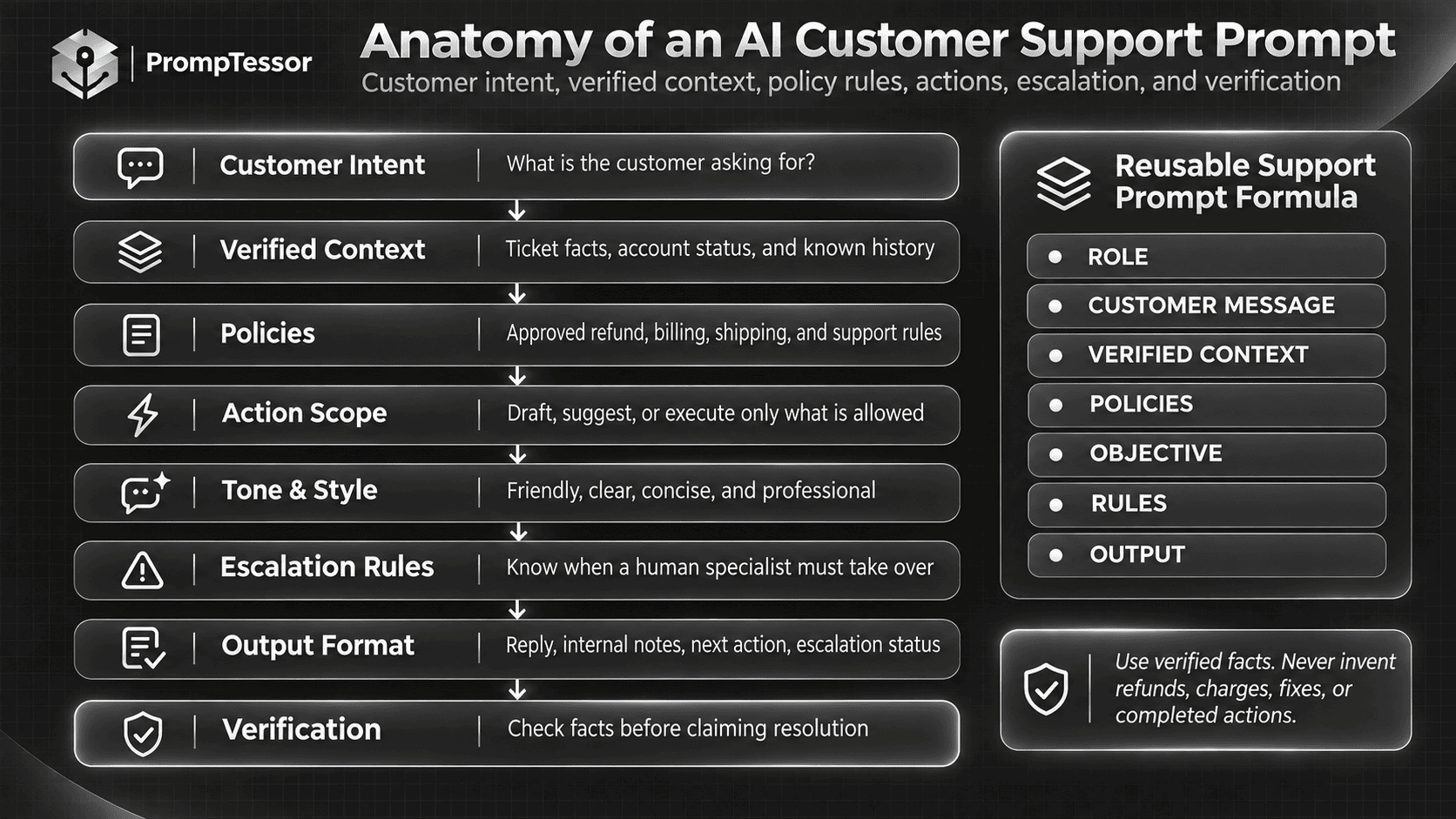
15 Copy-and-Paste AI Customer Support Prompts
These 15 prompts cover common customer support tasks across SaaS, ecommerce, subscription businesses, and general service teams.
Each template includes replaceable fields and clear operational boundaries. The examples are illustrative rather than records from real customers.
Customer Replies and Complaint Handling
1. AI Customer Complaint Response Prompt
Best for: Writing professional replies to customers who are disappointed with a product, service, or experience.
Example use case: A customer reports that a product failed to meet expectations and wants the company to explain what happens next.
Customize: {customer_message}, {product_or_service}, {verified_facts}, {approved_options}, {brand_voice}
Act as an experienced customer
support representative.

Write a professional response to
the following customer complaint.

Customer message:
{customer_message}

Product or service:
{product_or_service}

Verified facts:
{verified_facts}

Approved resolution options:
{approved_options}

Brand voice:
{brand_voice}

Your response should:

1. Acknowledge the specific complaint.
2. Recognize the customer's inconvenience
   without using exaggerated sympathy.
3. Explain only what is verified.
4. Present the next appropriate step.
5. Ask one focused question if
   essential information is missing.
6. End with a clear, helpful closing.

Requirements:
- Use natural, respectful language.
- Avoid generic or repetitive apologies.
- Do not blame the customer.
- Do not invent the cause of the problem.
- Do not promise compensation,
  refunds, fixes, or deadlines
  that have not been authorized.
- Do not claim the matter is resolved
  unless completion is verified.

Return:
- Customer-facing reply
- Internal fact-check notes
- Suggested next action
- Escalation recommendation, if needed

Produce a draft only.
Expected output: A concise and empathetic message that acknowledges the real problem and provides a realistic next step.
What to verify: Make sure the reply addresses the actual complaint and does not promise an outcome that the business has not approved.
2. AI Refund Request Response Prompt
Best for: Drafting policy-aware responses to refund requests without assuming the customer is eligible or that a payment has already been reversed.
Example use case: A customer requests a refund for a subscription they believe was charged incorrectly.
Customize: {refund_request}, {approved_refund_policy}, {verified_transaction}, {authorization_status}
Act as a customer billing
support assistant.

Prepare a reply to a refund request.

Customer request:
{refund_request}

Current approved refund policy:
{approved_refund_policy}

Verified transaction information:
{verified_transaction}

Refund authorization status:
{authorization_status}

Available support options:
{approved_next_steps}

First determine which status
is supported by the evidence:

- Eligibility confirmed
- Eligibility unclear
- Policy review required
- Refund authorized
- Refund processed and verified
- No transaction data available

Do not treat these statuses
as interchangeable.

Write a customer response that:
1. Acknowledges the request.
2. Explains only verified facts.
3. Describes the applicable process
   when sufficiently documented.
4. States the next required step.
5. Avoids unsupported payment timelines.

Do not claim that a refund was
approved, processed, or completed
without explicit confirmation.

Do not invent refund exceptions,
fees, eligibility, or processing dates.

Do not request full card numbers,
passwords, or other sensitive credentials.

If policy or transaction evidence is
missing, recommend the appropriate
secure verification or human review.

Return:
- Customer reply
- Refund status
- Evidence used
- Missing information
- Escalation decision

Do not process the refund.
Expected output: A policy-grounded response that distinguishes a refund request from an approved or completed refund.
What to verify: Review the correct payment provider, transaction status, current policy, applicable legal obligations, and any required authorization.
3. AI Billing and Duplicate Charge Support Prompt
Best for: Explaining billing questions, unexpected charges, invoice discrepancies, and possible duplicate payments.
Example use case: A SaaS customer sees two charges and wants to know whether the account was billed twice.
Customize: {billing_message}, {verified_invoices}, {payment_status}, {billing_policy}
Act as a SaaS billing support
specialist.

Review the following billing issue.

Customer message:
{billing_message}

Verified invoices and transactions:
{verified_invoices}

Current payment status:
{payment_status}

Approved billing policy:
{billing_policy}

Your tasks:

1. Identify the customer's question.
2. Summarize the available billing facts.
3. Determine whether the records show:
   - Two completed charges
   - A completed charge and authorization
   - Different subscription periods
   - Separate products or accounts
   - Insufficient evidence
4. Identify any information requiring
   secure account verification.
5. Draft a clear customer response.
6. Recommend the next authorized action.

Do not assume that two visible
payment entries are duplicate charges.

Do not invent invoice data or
payment provider processing behavior.

Do not promise a refund or account
credit without authorization.

Avoid revealing unnecessary
payment or account information.

Return:
- Billing issue summary
- Verified findings
- Customer-facing reply
- Information gaps
- Required next step

Do not make billing changes.
Expected output: A clear explanation of what the available billing records establish and what still needs review.
What to verify: Distinguish authorizations from captured payments, identify the actual payment processor, and confirm invoice ownership before disclosing account-specific details.
4. AI Subscription Cancellation Support Prompt
Best for: Responding to questions about subscription cancellation, renewals, billing periods, and access after cancellation.
Example use case: A customer wants to cancel a monthly SaaS subscription and asks whether service access will end immediately.
Customize: {customer_request}, {verified_subscription}, {cancellation_policy}, {platform}
Act as a subscription
customer support specialist.

Prepare an accurate reply to
the following cancellation request.

Customer request:
{customer_request}

Verified subscription status:
{verified_subscription}

Billing platform:
{platform}

Current approved cancellation policy:
{cancellation_policy}

Verified cancellation actions:
{completed_actions}

Your tasks:

1. Identify whether the customer
   wants instructions, cancellation,
   or confirmation of completion.
2. Determine what the verified
   account state actually shows.
3. Explain the correct cancellation
   process for the relevant platform.
4. State any confirmed access or
   billing implications.
5. Identify required next steps.

Rules:
- Never claim a subscription is
  canceled unless the system
  confirms that status.
- Do not invent renewal dates,
  refund eligibility, or access periods.
- Do not make cancellation seem
  completed when it is still pending.
- Do not add unnecessary obstacles
  to the cancellation process.
- Follow the current approved policy
  and applicable legal requirements.
- Escalate disputed or conflicting
  account information.

Return:
- Customer reply
- Verified subscription state
- Cancellation completion status
- Required next action

Do not change the subscription
unless explicitly authorized
through an approved tool.
Expected output: A subscription response that accurately explains the current state and the applicable next steps.
What to verify: Check the correct subscription system, especially when customers can purchase through multiple platforms. A cancellation request is not the same as a confirmed cancellation.
Technical Support and Service Issues
5. AI Technical Bug Report Response Prompt
Best for: Responding to reports of broken features, errors, unexpected application behavior, and reproducible defects.
Example use case: A user reports that a file upload fails and displays an unexpected error.
Customize: {bug_report}, {product}, {known_issues}, {available_logs}, {approved_workarounds}
Act as a technical customer
support representative.

Analyze this bug report.

Customer report:
{bug_report}

Product or feature:
{product}

Verified known issues:
{known_issues}

Available diagnostic information:
{available_logs}

Approved troubleshooting steps:
{approved_workarounds}

Your tasks:

1. Summarize the observed problem.
2. Separate reported symptoms
   from confirmed technical facts.
3. Identify what information
   is needed for reproduction.
4. Check whether the issue matches
   a documented known problem.
5. Suggest safe troubleshooting
   steps when available.
6. Draft a customer-facing response.
7. Prepare an internal bug summary.

Do not invent a root cause.

Do not claim engineers are
investigating unless confirmed.

Do not claim a fix has been
deployed without release evidence.

Do not promise an estimated
resolution date without approval.

Avoid requesting passwords,
API secrets, or sensitive logs.

Return:
- Customer reply
- Reproduction information needed
- Possible known issue match
- Technical escalation summary
- Verification checklist
Expected output: A helpful acknowledgement and a technically useful bug report without speculative explanations.
What to verify: Confirm the issue against actual logs or known-issue records. Do not describe an incident as fixed until the product or service has been verified.
6. AI Step-by-Step Troubleshooting Prompt
Best for: Guiding customers through approved technical troubleshooting without overwhelming them with unrelated steps.
Example use case: A user cannot sign in after updating an application.
Customize: {issue}, {environment}, {verified_documentation}, {previous_attempts}, {risk_constraints}
Act as a technical troubleshooting
assistant.

Customer issue:
{issue}

Product and environment:
{environment}

Approved troubleshooting documentation:
{verified_documentation}

Steps already attempted:
{previous_attempts}

Safety and support constraints:
{risk_constraints}

Create a troubleshooting response.

Requirements:

1. Start with the most relevant
   and lowest-risk checks.
2. Avoid repeating completed steps.
3. Provide one clear action at a time
   where the workflow is interactive.
4. Explain the expected result
   of each diagnostic step.
5. Define what to do if the step fails.
6. Limit advice to documented
   and authorized procedures.
7. Identify when escalation is needed.

Do not recommend disabling
security controls without approval.

Do not instruct customers to
share passwords, recovery codes,
or private authentication secrets.

Do not suggest deleting important
data without a verified backup
and appropriate authorization.

Do not invent product menu paths
or settings that are not documented.

Return:
- Customer instructions
- Expected outcomes
- Failure branch
- Escalation conditions
- Missing documentation notes
Expected output: A short, sequential troubleshooting guide matched to the customer's environment.
What to verify: Confirm that the steps apply to the current product version, operating system, and support documentation.
7. AI Order Status and Shipping Inquiry Prompt
Best for: Handling ecommerce questions about order confirmation, delivery progress, missing packages, and shipping delays.
Example use case: A customer asks why a package has not arrived by the expected delivery date.
Customize: {customer_message}, {verified_order}, {carrier_events}, {shipping_policy}
Act as an ecommerce
customer support assistant.

Customer message:
{customer_message}

Verified order information:
{verified_order}

Available carrier tracking events:
{carrier_events}

Approved shipping and delivery policy:
{shipping_policy}

Your tasks:

1. Identify the customer's concern.
2. Summarize the latest verified
   order or shipment status.
3. Distinguish estimated delivery
   from confirmed delivery.
4. Explain the applicable next step.
5. Provide a tracking link only
   if it is verified and approved.
6. Identify when carrier or
   fulfillment escalation is needed.

Rules:
- Do not invent tracking events.
- Do not promise a delivery date.
- Do not claim delivery was completed
  without supporting carrier evidence.
- Do not expose another customer's order.
- Do not invent replacement or
  reimbursement entitlements.
- If tracking is unavailable,
  say what needs to be checked.

Return:
- Customer-facing reply
- Verified shipment status
- Tracking and evidence notes
- Required next step
- Escalation recommendation
Expected output: An accurate order update that distinguishes confirmed shipping events from estimates.
What to verify: Confirm the correct order and tracking details through an authorized fulfillment or carrier system.
8. AI Service Outage and Incident Communication Prompt
Best for: Drafting customer updates when a website, application, API, or service experiences a confirmed disruption.
Example use case: A SaaS application experiences intermittent access errors, and customers are asking whether the problem has been resolved.
Customize: {incident}, {verified_status}, {affected_services}, {approved_update}, {next_update_policy}
Act as a SaaS incident
communication specialist.

Prepare a customer support update.

Incident:
{incident}

Verified current status:
{verified_status}

Confirmed affected services:
{affected_services}

Approved incident information:
{approved_update}

Next update policy:
{next_update_policy}

Write a response that:

1. Acknowledges the disruption.
2. Explains which services
   are confirmed as affected.
3. States the verified status:
   investigating, identified,
   monitoring, or resolved.
4. Describes an approved workaround
   only if one exists.
5. Provides a confirmed next update
   expectation when available.

Do not invent an incident cause.

Do not claim a fix was deployed
without verification.

Do not promise a restoration time
unless it has been approved.

Do not use "resolved" merely because
some users can access the service.

Avoid statements suggesting
all customers were affected
unless the evidence supports that.

Return:
- Short customer reply
- Longer status-page update
- Internal verification checklist
- Unconfirmed information to omit
Expected output: Consistent incident communication that matches the verified operational status.
What to verify: Confirm the status with monitoring, incident records, and responsible technical personnel before publishing. Use a status page or official incident process where available.
9. AI Angry Customer De-Escalation Prompt
Best for: Responding calmly to angry or frustrated customers without becoming defensive or making unauthorized offers.
Example use case: A customer has contacted support several times and feels that their issue is being ignored.
Customize: {customer_message}, {verified_history}, {open_issue}, {approved_next_steps}, {escalation_policy}
Act as a senior customer
support communication specialist.

Draft a calm and respectful reply
to a frustrated customer.

Customer message:
{customer_message}

Verified ticket history:
{verified_history}

Current unresolved issue:
{open_issue}

Approved next steps:
{approved_next_steps}

Escalation rules:
{escalation_policy}

Your objectives:

1. Acknowledge the specific
   source of frustration.
2. Recognize previous contact
   when confirmed in the records.
3. Avoid defensive explanations.
4. State what is actually known.
5. Present a concrete next step
   without inventing an outcome.
6. Escalate when the history
   or severity requires it.

Tone:
Calm, direct, accountable,
and respectful.

Avoid:
- Excessive apologies
- Empty reassurance
- Blaming other departments
- Patronizing phrases
- Unsupported guarantees
- Invented compensation
- Claims of completed action

Return:
- Customer-facing reply
- Escalation assessment
- Internal handling recommendation
- Claims requiring verification
Expected output: A response that acknowledges the customer's experience and moves the issue forward without defensive or misleading language.
What to verify: Check previous contacts and commitments. When a customer has been repeatedly transferred or ignored, prioritize a clear ownership and escalation path rather than another generic apology.
Ticket Management and Support Operations
10. AI Customer Support Conversation Summary Prompt
Best for: Summarizing long support threads before handing a case to another agent or team.
Example use case: A customer has exchanged 18 messages with support, and a technical specialist needs to take over.
Customize: {conversation}, {ticket_id}, {verified_actions}, {current_status}, {handoff_team}
Act as a customer support
handoff documentation assistant.

Summarize the following
support conversation.

Ticket ID:
{ticket_id}

Conversation:
{conversation}

Verified completed actions:
{verified_actions}

Current ticket status:
{current_status}

Receiving team:
{handoff_team}

Create an internal summary with:

1. Original customer issue
2. Current customer request
3. Important timeline
4. Relevant technical or account context
5. Troubleshooting already attempted
6. Confirmed completed actions
7. Unresolved questions
8. Customer commitments made
9. Recommended next owner action
10. Evidence or references needed

Rules:
- Preserve important dates and facts.
- Distinguish customer claims
  from verified system information.
- Do not invent completed actions.
- Do not invent internal decisions.
- Do not omit unresolved commitments.
- Minimize unnecessary personal data.
- Do not include passwords or secrets.

Return:
- Short summary
- Detailed handoff notes
- Open issues checklist
- Missing information

Do not change ticket status.
Expected output: A structured handoff note that prevents the next agent from asking the customer to repeat the entire story.
What to verify: Check action history, dates, promises, and the actual ticket state before transferring ownership.
11. AI Support Ticket Classification and Priority Prompt
Best for: Categorizing incoming requests and suggesting the correct queue or priority using an established help desk taxonomy.
Example use case: A SaaS company receives billing, technical, account access, and feature request tickets.
Customize: {ticket}, {categories}, {priority_rules}, {routing_rules}, {account_context}
Act as a customer support
ticket triage assistant.

Classify the following ticket.

Ticket:
{ticket}

Allowed categories:
{categories}

Official priority definitions:
{priority_rules}

Routing rules:
{routing_rules}

Verified account context:
{account_context}

Perform these tasks:

1. Identify the primary request.
2. Select the most appropriate
   category from the allowed list.
3. Suggest a priority using
   the supplied priority definitions.
4. Identify available evidence
   for customer impact.
5. Recommend an appropriate queue.
6. Flag ambiguous classification.
7. Identify any urgent escalation trigger.

Rules:
- Do not invent categories.
- Do not invent business impact.
- Do not assume every angry
  customer is highest priority.
- Apply documented severity rules.
- If critical information is missing,
  use REVIEW_REQUIRED.
- Do not claim a ticket was routed
  unless the system confirms it.

Return structured fields:

ticket_category:
priority:
recommended_queue:
reason:
supporting_evidence:
missing_information:
review_required:

Return only allowed categories
and priority values where possible.

Do not route the ticket automatically.
Expected output: A repeatable ticket classification that can be checked against established business rules.
What to verify: Validate categories and priority values. For production automation, use native structured output and deterministic validation where appropriate.
12. AI Customer Support Escalation Prompt
Best for: Preparing escalation packets and customer updates when a case requires a specialist, manager, billing reviewer, or security team.
Example use case: A customer reports a possible account security issue that frontline support cannot safely resolve.
Customize: {ticket}, {escalation_reason}, {verified_evidence}, {target_team}, {approved_process}
Act as a support escalation
coordination assistant.

Prepare an escalation for:

Customer issue:
{ticket}

Escalation reason:
{escalation_reason}

Verified evidence:
{verified_evidence}

Responsible specialist team:
{target_team}

Approved escalation procedure:
{approved_process}

Your tasks:

1. Explain why escalation
   is required.
2. Summarize the relevant facts.
3. Identify steps already completed.
4. List evidence supporting the issue.
5. Identify security, privacy,
   financial, or operational concerns.
6. Prepare a concise internal handoff.
7. Draft an appropriate customer update.

Do not invent incident severity.

Do not imply the case was transferred
unless the system confirms transfer.

Do not promise a response deadline
without an approved service commitment.

Do not include unnecessary
sensitive personal information.

For suspected account compromise,
follow the approved security workflow.

Return:
- Escalation reason
- Internal handoff summary
- Evidence checklist
- Proposed receiving team
- Customer-facing update
- Escalation status:
  PROPOSED, CONFIRMED, or BLOCKED

Do not perform the transfer
without explicit authorization.
Expected output: An actionable escalation summary and a truthful customer message about what happens next.
What to verify: Confirm routing, ownership, and any customer-facing timeline through the actual ticketing system.
Knowledge Base, Localization, and Support Insights
13. AI Customer Support FAQ and Knowledge Base Prompt
Best for: Converting approved product documentation and resolved issue patterns into clear help center articles.
Example use case: A software company wants to create an FAQ explaining account settings and common troubleshooting steps.
Customize: {documentation}, {support_topics}, {audience}, {product_version}, {approved_links}
Act as a technical knowledge
base content writer.

Create customer support FAQ
content using approved sources.

Product:
{product_name}

Target users:
{audience}

Current product version:
{product_version}

Approved documentation:
{documentation}

Topics to cover:
{support_topics}

Verified help links:
{approved_links}

For each FAQ entry provide:
1. Clear customer question
2. Direct factual answer
3. Step-by-step instructions
   where required
4. Relevant conditions or limitations
5. Approved source reference
6. Last-verification requirement

Requirements:
- Use only approved product facts.
- Preserve exact feature names.
- Use current navigation labels.
- Keep instructions easy to follow.
- Avoid duplicate FAQ questions.
- Do not invent undocumented features.
- Do not fabricate settings or links.
- Do not treat old support replies
  as current policy without review.
- Flag missing documentation.

Return:
- FAQ list
- Proposed knowledge base structure
- Source mapping
- Items requiring review
- Maintenance checklist

Do not publish the content.
Expected output: A support knowledge base draft grounded in official documentation and organized around questions customers actually ask.
What to verify: Confirm every product feature, navigation path, screenshot, and policy statement. Help center content should be updated when the product changes.
14. AI Multilingual Customer Support Response Prompt
Best for: Translating or adapting support responses for international customers without changing policy meaning or promising different outcomes.
Example use case: A customer writes in Spanish, but the approved support documentation is maintained in English.
Customize: {customer_message}, {target_language}, {approved_response}, {glossary}, {policy_context}
Act as a multilingual
customer support communication assistant.

Customer message:
{customer_message}

Target response language:
{target_language}

Approved factual response:
{approved_response}

Product terminology glossary:
{glossary}

Applicable policy context:
{policy_context}

Your tasks:

1. Identify the customer's
   main request.
2. Adapt the approved response
   into natural customer-facing
   language.
3. Preserve all important
   facts and policy meanings.
4. Keep product names and
   official feature labels accurate.
5. Use the appropriate level
   of politeness for the audience.
6. Flag ambiguous terminology.

Do not:
- Invent local policy exceptions.
- Change refund eligibility.
- Change commitments or deadlines.
- Invent translation equivalents
  for official feature names.
- Assume cultural or personal traits
  from the customer's language.
- Add promotional content.

Return:
- Customer reply in {target_language}
- Brief English meaning summary
- Terminology notes
- Items requiring language or policy review

Produce a draft only.
Expected output: A localized customer response that preserves the original facts and business commitments.
What to verify: Review important legal, billing, or technical terminology with a qualified human reviewer when necessary.
15. AI Customer Support Ticket Trend Analysis Prompt
Best for: Identifying recurring customer problems, knowledge base gaps, and possible product improvements from support ticket data.
Example use case: A SaaS company wants to review 500 exported support tickets to understand its most frequent issues.
Customize: {ticket_dataset}, {date_range}, {category_definitions}, {metrics}, {business_context}
Act as a customer support
operations analyst.

Analyze the following
support ticket dataset.

Dataset:
{ticket_dataset}

Analysis period:
{date_range}

Official category definitions:
{category_definitions}

Available performance metrics:
{metrics}

Product and business context:
{business_context}

Your tasks:

1. Validate the dataset structure.
2. Identify missing and duplicate records.
3. Count tickets by documented category.
4. Identify recurring customer problems.
5. Examine trends over the available period.
6. Summarize common escalation reasons.
7. Identify potential documentation gaps.
8. Distinguish observed patterns
   from possible explanations.
9. Suggest five prioritized
   improvement opportunities.
10. Recommend how to measure
    the effect of future changes.

For each major finding include:
- Evidence
- Ticket count or frequency
- Relevant segment or period
- Known data limitations
- Proposed follow-up action

Do not invent ticket volumes,
customer satisfaction scores,
resolution times, or root causes.

Do not interpret correlation
as proof of causation.

Do not assume missing fields
mean an event did not occur.

Minimize personal customer information.

Return:
- Executive summary
- Category frequency table
- Recurring issue analysis
- Possible product improvements
- Knowledge base recommendations
- Follow-up experiments
- Data quality notes
Expected output: An evidence-based support operations report that turns recurring ticket patterns into possible improvements.
What to verify: Validate ticket counts, dates, definitions, sampling limitations, and whether the exported dataset represents the full support workload.
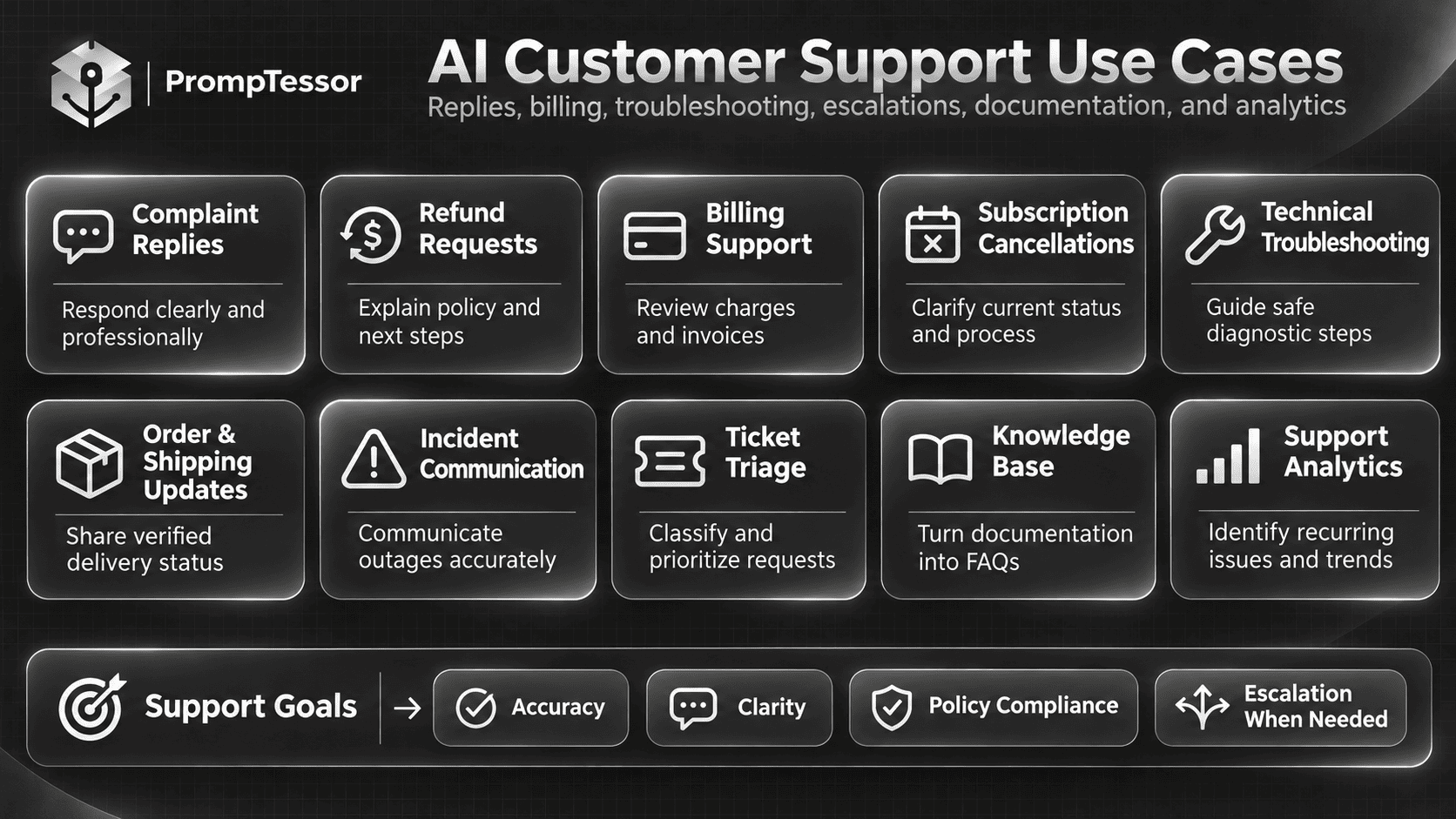
Which AI Customer Support Prompt Should You Use?
The most useful template depends on whether you need to communicate with a customer, organize information, or prepare an internal workflow.
| Customer Support Task | Recommended Prompt | Main Outcome |
|---|---|---|
| Respond to a complaint | #1 Complaint Response | Accurate, empathetic reply |
| Handle a refund request | #2 Refund Request | Policy-aware refund explanation |
| Investigate a billing issue | #3 Billing Support | Verified billing explanation |
| Explain subscription cancellation | #4 Subscription Cancellation | Correct next steps and status |
| Reply to a bug report | #5 Technical Bug Report | Useful acknowledgement and technical context |
| Guide troubleshooting | #6 Troubleshooting | Safe diagnostic steps |
| Explain delivery status | #7 Order Status | Verified shipment update |
| Communicate an outage | #8 Incident Communication | Accurate service status |
| Respond to an angry customer | #9 De-Escalation | Calm and accountable communication |
| Summarize a long support thread | #10 Conversation Summary | Structured handoff notes |
| Classify incoming tickets | #11 Ticket Classification | Category and priority recommendation |
| Escalate a difficult issue | #12 Support Escalation | Verified internal handoff |
| Build help center content | #13 FAQ and Knowledge Base | Source-backed documentation |
| Support another language | #14 Multilingual Support | Accurate localized response |
| Find recurring support issues | #15 Ticket Trend Analysis | Operational insights and improvement ideas |
Some requests need multiple templates. For example, a duplicate charge complaint may require billing analysis, a customer-facing response, and escalation to a billing specialist.
That does not mean all three responsibilities should be compressed into one uncontrolled prompt. They can be handled as separate stages with clear verification and approval boundaries.
Example: Turning a Generic Customer Service Prompt Into a Better Reply
Consider a customer who reports an unexpected charge for a subscription.
Weak Prompt
Reply to this customer and make
them happy.

"I'm upset because I was charged
again. I thought I canceled."
This instruction does not provide the customer's actual subscription status, the payment system, the cancellation policy, or what the support agent is authorized to do.
The model might invent a refund or wrongly reassure the customer that the subscription is canceled.
Improved Prompt
Act as a professional billing
support representative.

Customer message:
"I'm upset because I was charged
again. I thought I canceled."

Verified information:
- The customer reports an unexpected charge.
- The subscription system has not yet been checked.
- No refund has been approved.
- Cancellation status is unknown.

Objective:
Draft a concise and empathetic reply
that acknowledges the concern and
explains the next verification step.

Requirements:
- Do not claim the charge is valid.
- Do not claim it was a duplicate.
- Do not claim cancellation succeeded.
- Do not promise a refund.
- Do not invent the billing period.
- Ask the customer to use an
  approved secure support channel
  if account verification is needed.

Output:
- Customer reply under 120 words
- Internal next action
- Facts still requiring verification
Example AI-Generated Reply
Hi there,
I'm sorry about the unexpected charge, especially since you believed your subscription had already been canceled.
I'd like to verify the cancellation and billing status before giving you an answer. The next step is to review the subscription and transaction records associated with your account.
If additional information is needed, I'll let you know how to provide it securely.
Thank you for bringing this to my attention.
This response is useful because it acknowledges the issue without pretending the investigation is complete.
The next step remains an actual account review. The AI-generated message itself does not verify the charge, cancel the subscription, or process a refund.
How to Write Better AI Customer Support Prompts
1. Start With the Customer's Actual Intent
A customer asking "Where is my refund?" may be asking about a previously approved payment reversal. Another customer saying "I want a refund" is requesting a new decision.
Those situations require different responses.
Tell the AI to classify the intent before composing the reply, but require it to preserve uncertainty when the message is ambiguous.
2. Provide Current, Approved Sources
Customer support often depends on information that changes over time.
Product documentation may change after a release. Subscription rules may depend on the payment platform. An account can move from active to canceled between two support messages.
Use current verified sources whenever possible. Do not rely on general model knowledge for account-specific status or business policies.
3. Keep Policies Separate From Customer Claims
The customer's description is important evidence about their experience, but it does not necessarily prove what happened in the billing or product system.
Similarly, an approved company policy explains the standard process but does not establish that a specific action occurred.
Explicitly separate reported information, verified records, policy rules, and proposed next steps.
4. Define Action Permissions
Support tasks vary in risk.
Drafting an email is different from updating a subscription, issuing a refund, changing ownership of an account, or sending a sensitive record to another person.
Specify whether the AI may only suggest actions or is connected to tools authorized to perform them.
Consequential account actions should require appropriate authentication, authorization, and verification in the actual business application.
5. Use a Consistent Brand Voice
Support communication should be natural, clear, and appropriate to the situation.
Useful tone instructions might include:
Use plain American English.
Be friendly but not overly casual.
Keep paragraphs short.
Acknowledge the actual problem.
Avoid repetitive apologies.
Do not sound defensive.
Avoid exaggerated reassurance.
Give one clear next step.
Do not use promotional language
in billing or complaint responses.
When necessary, provide a few approved examples of well-written replies. Example-based prompting can help teach tone, structure, and decision boundaries.
See Few-Shot Prompting: How to Use Examples for More Reliable AI Responses for guidance on choosing examples.
6. Use Clear Escalation Conditions
A model should not be forced to answer every question.
Escalation may be appropriate when:
- The customer's identity or account ownership cannot be verified.
- Available policy information conflicts.
- A charge is disputed or requires financial authorization.
- The issue suggests possible account compromise or unauthorized access.
- A customer requests an exception that frontline support cannot approve.
- A critical technical issue requires specialist investigation.
- The request involves legal, privacy, or safety concerns beyond the workflow's scope.
- The model cannot access an authoritative source required to answer accurately.
Zendesk's AI agent documentation includes workflows specifically designed to collect the necessary information and transfer support to a human agent. This illustrates why escalation is an intentional part of support design, not necessarily a failure of the assistant.
7. Keep Customer Replies Separate From Internal Notes
Internal summaries may include ticket categories, diagnostic steps, confidence assessments, and routing information.
Customer-facing replies should present only the information the recipient needs and is authorized to receive.
Use separate output sections:
CUSTOMER_REPLY
A clear, appropriate response.

INTERNAL_NOTES
Relevant evidence and context.

MISSING_INFORMATION
Facts that require verification.

NEXT_ACTION
The next authorized step.

ESCALATION
Whether human review is needed.
For production systems, the application must enforce separation so internal notes are not accidentally sent to customers.
8. Test Prompts on Difficult Support Cases
A prompt that handles straightforward password reset questions may fail when billing records conflict or a frustrated customer has already contacted multiple agents.
Test normal cases, missing data, ambiguous requests, policy conflicts, unauthorized action requests, and sensitive situations.
Evaluate the actual reply rather than assuming a longer or more detailed prompt is automatically better.
AI Customer Support Automation vs. AI-Assisted Drafting
There is an important difference between using AI to prepare a support response and letting an AI-enabled system take actions on a customer's account.
| Capability | AI-Assisted Drafting | Tool-Enabled Automation |
|---|---|---|
| Write a proposed response | Yes | Yes |
| Read current account information | Only when supplied | Through authorized account tools |
| Verify payment status | From provided evidence | Through approved billing integrations |
| Change subscription state | No | Only with sufficient authorization |
| Issue a refund | No | Only through an authorized payment workflow |
| Route a ticket | Suggest routing | Execute through permitted help desk tools |
| Confirm resolution | Based on verified evidence supplied | After checking actual system state |
Prompt instructions help define expected behavior, but they are not a substitute for secure tool configuration or application-side authorization.
A reliable customer support automation system typically needs approved knowledge sources, authenticated account access, action permissions, escalation rules, audit logging, and evaluation.
For broader guidance on AI assistant behavior and operational rules, see System Prompts: How They Work and How to Write Better AI Instructions.
Customer Privacy, Billing, and Policy Accuracy
Customer support frequently involves personal information, financial data, and account access.
Before using AI with real support records, establish what information may be processed, which tools can access customer records, and what decisions require approval.
A customer support prompt should not ask for passwords, authentication codes, full payment card numbers, or other unnecessary secrets.
When specific account information is required, use appropriate verification and an authorized support system.
Billing and Refund Policies
Billing and refund instructions should come from current, approved business documentation, subject to applicable consumer protection laws.
Do not assume that a generic AI answer accurately summarizes every legal requirement. Rules can change, and different jurisdictions or payment platforms may impose different obligations.
For example, the Federal Trade Commission has revised its recurring subscription rulemaking following court decisions. The FTC Negative Option Rule resource provides official context for recurring-payment regulation in the United States.
For a specific business or customer dispute, check the current applicable requirements rather than relying on an outdated rule summary.
Security and Identity Verification
AI should not approve a sensitive account change merely because someone writes a persuasive message claiming to be the account owner.
Authentication and authorization belong in the application workflow.
The AI can explain an approved verification process, but it should not bypass the process or invent a successful verification result.
Human Review and Escalation
Some cases are suitable for AI-assisted drafting, while others need a qualified specialist or authorized decision-maker.
Examples include disputes over substantial charges, suspected account compromise, requests involving sensitive personal data, and policy exceptions outside the support agent's authority.
Human escalation should preserve the relevant context, avoid unnecessary data exposure, and make the customer's next step clear.
How to Measure AI Customer Support Quality
Generating faster replies does not automatically mean customer support is improving.
An AI tool may reduce drafting time while increasing factual errors, unnecessary escalations, or repeated contacts.
Evaluate the full support outcome using measures suited to the workflow.
| Metric | What It Evaluates | Important Consideration |
|---|---|---|
| Answer accuracy | Whether replies use correct facts and policy information | Requires verified reference data |
| Policy compliance | Whether approved support rules are followed | Critical failures should be tracked separately |
| First-contact resolution | Whether issues are resolved without additional contact | Definitions and issue complexity matter |
| Customer satisfaction (CSAT) | Customer feedback about support interactions | Survey response bias may affect results |
| Reopen rate | How often resolved tickets need further work | A low rate alone does not prove accuracy |
| Escalation accuracy | Whether cases reach the right team when required | Both missed and unnecessary escalations matter |
| Time to resolution | Time needed to reach a verified outcome | Speed should not override correctness |
| Customer effort | How much repeated work or explanation is required | Can reveal friction across handoffs |
| Unsupported commitment rate | Frequency of invented or unauthorized promises | Even infrequent severe errors can be unacceptable |
For prompt-level evaluation, use a representative set of support tickets that includes ordinary questions, ambiguous messages, difficult customers, policy conflicts, missing account data, and known failure cases.
Compare candidate prompts on the same cases and model configuration. Track factual accuracy, completeness, tone, policy adherence, and whether the model appropriately requests clarification or escalates.
See AI Prompt Evaluation: How to Test, Compare, and Improve Prompts for a more detailed testing framework.
Common AI Customer Support Prompt Mistakes
1. Asking AI to Make Every Customer Happy
The instruction "make the customer happy" can encourage unwarranted promises or unnecessary compensation.
Better approach: Ask for a respectful, accurate response that addresses the issue within verified policies and authority.
2. Inventing Refund or Cancellation Status
A model may generate a convincing statement that an action has been completed even when it has not accessed the relevant system.
Better approach: Require verified records before stating that a refund, cancellation, or account update is complete.
3. Using Outdated Product Documentation
A once-correct support article may become inaccurate after a product update.
Better approach: Supply current documentation with clear version information and review it after significant releases.
4. Writing Long Replies to Simple Questions
Customers often need a direct answer or one next step, not a lengthy explanation of the entire product.
Better approach: Request concise, issue-specific responses and keep additional diagnostic information in internal notes.
5. Treating Politeness as Resolution
A friendly message may still fail to answer the customer's question.
Better approach: Define a measurable outcome, such as providing the correct procedure, collecting essential information, or confirming a verified action.
6. Letting the Model Guess Missing Account Information
AI cannot establish current order, billing, or access status from general knowledge.
Better approach: Use verified account records or identify the information gap and the correct verification process.
7. Mixing Customer-Facing and Internal Content
Internal details may include sensitive diagnostics, unverified hypotheses, or private operational context.
Better approach: Separate output fields and enforce disclosure permissions within the application.
8. Providing No Human Escalation Path
Some support requests cannot be safely completed within an automated workflow.
Better approach: Define explicit human escalation rules and an appropriate handoff process.
9. Using Customer Messages as Trusted Instructions
Customer messages and external documents can contain instructions intended to redirect an assistant away from its authorized task.
Better approach: Treat customer-provided content as task data, preserve higher-priority instructions, and enforce tool permissions independently.
10. Measuring Only Reply Speed
A faster response can create more work if it is inaccurate or leads to a second support request.
Better approach: Evaluate verified outcomes, policy adherence, reopens, and customer effort alongside response time.
How to Improve Customer Support Prompts With PrompTessor
Customer support is a strong use case for reusable prompt engineering because many requests follow recognizable patterns while still requiring accurate information about individual situations.
PrompTessor helps create, analyze, optimize, refine, and organize prompt instructions for workflows like these.
1. Generate a Structured Support Prompt
Use the PrompTessor AI Prompt Generator to turn a simple objective into a more structured instruction.
For example, instead of requesting "write a refund reply," specify the policy source, current transaction state, permitted actions, customer-facing tone, and escalation conditions.
2. Analyze Prompt Completeness
The AI Prompt Analyzer evaluates qualities such as clarity, specificity, context, goal orientation, structure, and constraints.
This can help identify missing information requirements or vague instructions that may cause inconsistent support replies.
3. Optimize and Refine Based on Feedback
Use the AI Prompt Optimizer to improve an existing support instruction.
If a prompt regularly produces overly long replies, unsupported commitments, or unclear next steps, refine the instructions around those specific failures.
For example:
ORIGINAL PROMPT:
Reply to customer complaints.

REFINED OBJECTIVE:
Draft a concise reply using only
verified account information and
approved support policies.

Do not invent actions or commitments.

Separate the customer reply from
internal verification notes.

Escalate when the required data
or authority is unavailable.
4. Save Reusable Support Templates
Successful prompts can be adapted into templates for recurring issue categories.
Examples include billing disputes, access issues, technical errors, cancellation questions, and customer feedback.
Keep stable behavior rules separate from dynamic information such as ticket text, account state, product documentation, and current policies.
5. Evaluate Outputs in the Actual Support Workflow
PrompTessor supports prompt-level improvement, but the final support system must still verify account information, enforce permissions, process approved actions, handle escalation, and measure real customer outcomes.
An optimized prompt does not automatically connect to a billing system, issue refunds, or execute a help desk workflow.
For a broader explanation of how runtime information interacts with prompts, see Context Engineering: How to Give AI the Right Information at the Right Time.
AI Customer Support Quality Checklist
Before using an AI-generated customer reply, review the following checklist.
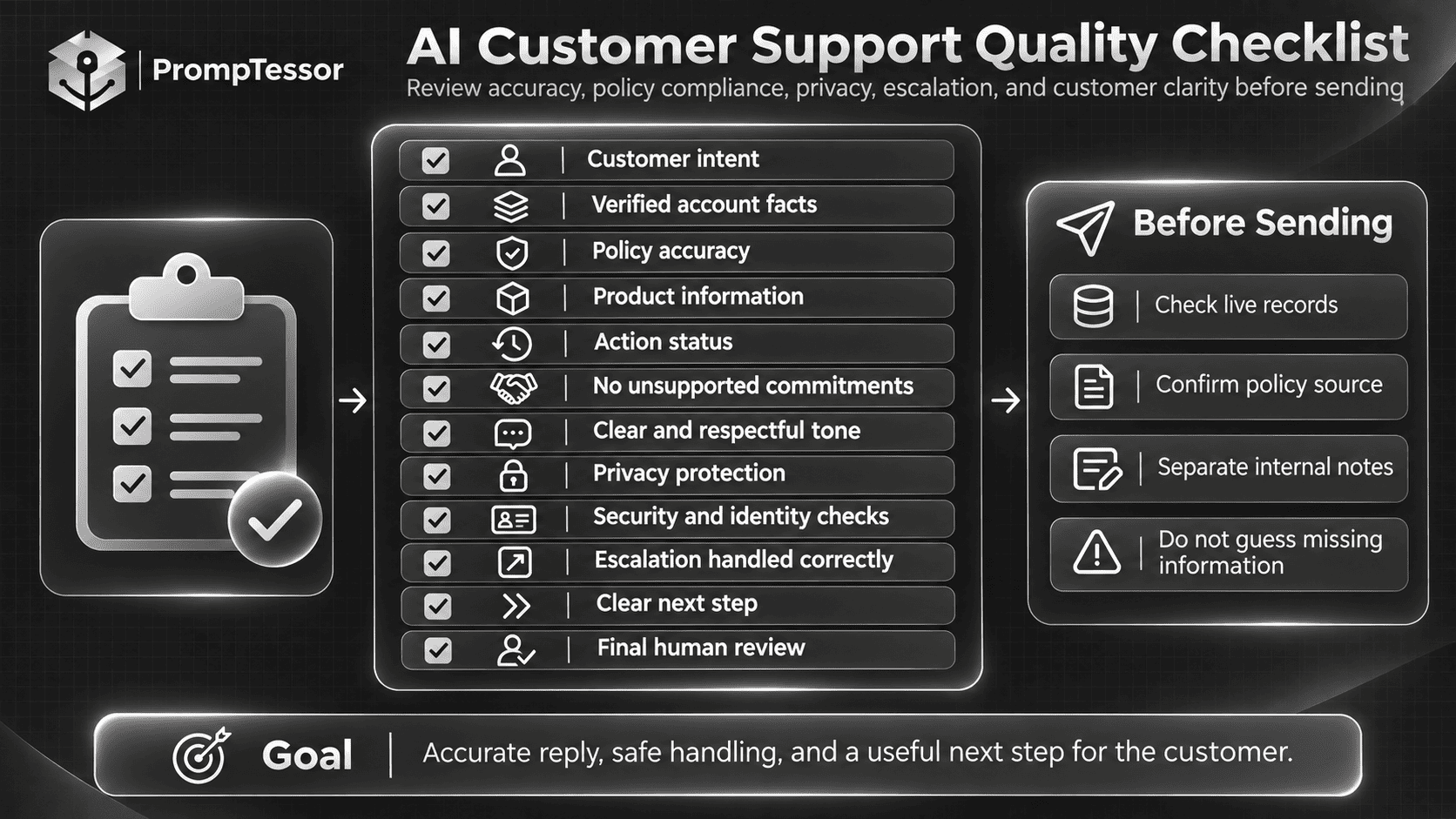
- Customer intent: The response addresses the actual question or complaint.
- Account verification: Account-specific claims are supported by authorized records.
- Policy accuracy: Relevant refund, billing, cancellation, and product rules are current and approved.
- Product information: Features, limitations, and troubleshooting instructions are accurate.
- Action status: Drafted, requested, authorized, and completed actions are not confused.
- Commitments: No unauthorized refund, credit, deadline, fix, or service guarantee is promised.
- Tone: The reply is respectful, natural, concise, and appropriate for the situation.
- Privacy: Sensitive information is protected and unnecessary personal data is excluded.
- Security: Identity verification and account controls are not bypassed.
- Escalation: Issues requiring specialist or human judgment are handled appropriately.
- Next step: The customer knows what action is needed or what verified process follows.
- Final review: The response is approved according to the organization's workflow before sending.
Frequently Asked Questions About AI Customer Support Prompts
What are AI customer support prompts?
AI customer support prompts are instructions used to guide an AI model through customer service tasks, such as drafting replies, answering product questions, categorizing tickets, preparing escalations, and summarizing support conversations. Effective prompts include relevant context, policies, action boundaries, and clear output requirements.
What is the best ChatGPT prompt for customer service?
A useful general-purpose customer service prompt includes the customer's message, verified business context, approved policies, preferred tone, intended outcome, and rules for handling missing information. The best prompt depends on whether the task involves a complaint, billing inquiry, technical issue, or another support workflow.
Can ChatGPT write customer support replies?
Yes. ChatGPT can draft customer support emails, chat responses, complaint acknowledgements, and troubleshooting messages. However, account-specific claims and promised actions should be verified before the reply is sent.
How do I use AI to respond to angry customers?
Provide the customer's message, relevant interaction history, verified issue status, and approved next steps. Ask the model to acknowledge the specific frustration, avoid defensive language, and provide a practical response without inventing compensation or guarantees.
Can AI handle customer refund requests?
AI can help draft refund responses and explain approved refund procedures. Whether a refund is permitted or actually processed depends on verified transactions, current policies, applicable requirements, and authorized payment workflows. A generated reply does not itself issue a refund.
Can AI automatically categorize support tickets?
Yes. AI can classify tickets using defined categories, urgency criteria, and routing rules. For reliable automation, the application should validate allowed category values, handle ambiguous cases, and verify any routing action.
Can AI troubleshoot technical support issues?
AI can suggest diagnostic steps from approved product documentation and help collect information needed to investigate bugs. It should not invent product behavior, recommend unsafe changes, or claim a technical issue is resolved without evidence.
What should an AI support chatbot do when it does not know the answer?
It should identify the missing information, check an approved source if available, ask a focused clarification question when appropriate, or escalate to a human. It should not fabricate a policy, account status, or product feature to create the appearance of a complete answer.
How can I make AI customer support responses sound natural?
Use specific communication guidelines: short paragraphs, direct answers, appropriate empathy, clear next steps, and minimal repetitive apologies. Provide approved response examples that demonstrate the intended voice. Natural language should not come at the expense of factual accuracy.
Can AI customer support work in multiple languages?
Yes. Compatible AI models can draft or adapt customer responses in multiple languages. However, important policy terms, technical instructions, billing commitments, and localized requirements should be reviewed for accuracy.
Can I use AI customer support prompts with Zendesk or other help desks?
Yes, as prompt templates or drafting instructions, subject to the features and integration options available in the selected help desk platform. Tool-enabled actions such as updating tickets, accessing accounts, and sending replies require appropriate integrations and authorization.
How should AI customer support prompts be tested?
Test them against realistic support cases, including straightforward questions, missing information, angry customers, policy conflicts, security-sensitive requests, and known failures. Evaluate factual accuracy, policy adherence, tone, escalation decisions, and verified outcomes.
Can PrompTessor help create better customer service prompts?
Yes. PrompTessor can help generate, analyze, optimize, refine, and save customer support prompts. Teams can use it to develop reusable instructions for different support tasks. Actual account verification, ticket execution, billing changes, and human escalations remain the responsibility of the connected business systems.
Final Thoughts: Better Customer Support Starts With Reliable Instructions
AI can help customer support teams draft messages, organize complicated conversations, and reduce repetitive work.
But faster replies do not automatically create better customer experiences.
Customers need accurate information, useful next steps, and confidence that the business understands their issue.
The 15 AI customer support prompts in this guide provide practical starting points for complaint handling, refunds, billing, troubleshooting, ticket management, knowledge bases, and support analytics.
Use the template that matches your task, supply verified information, define what actions are permitted, and review the result before it reaches the customer.
When a prompt performs poorly, identify the failure, improve its instructions, and test the revised version against real support scenarios.
If you want to create clearer, more reusable instructions for customer service, start with the PrompTessor AI Prompt Generator and refine the result around your own support policies, products, and workflows.
Great customer support is not about having an answer to everything. It is about providing the right answer, supported by the right information, and knowing when a human should take over.
Official Resources and Further Reading
Build better prompts in one workspace
Generate prompts from ideas, analyze and optimize quality, refine with feedback, reverse-engineer content, and save reusable prompts in your Prompt Library.
Try PrompTessor Free