AI Prompt Generator for Any AI Model: Create Better Prompts for ChatGPT, Claude, and Gemini
AI tools are now used for writing, coding, research, marketing, design, planning, automation, and everyday productivity.
But even as AI models become more capable, one thing still matters:
The quality of your prompt.
A weak prompt can lead to a weak output. A vague prompt can produce a generic answer. A prompt without context can make the AI guess what you actually want.
That is why many people are now looking for an AI prompt generator.
An AI prompt generator helps you turn rough ideas into clearer, more structured prompts that can work across different AI tools, including ChatGPT, Claude, Gemini, and other AI models.
Instead of starting from a blank page or guessing how to phrase your request, you can use an AI prompt generator to define the task, add context, set constraints, choose the output format, and create a prompt that is easier for AI systems to understand.
In this guide, you will learn what an AI prompt generator is, how it works, why it matters for any AI model, and how to use it to create better prompts faster.
Quick Answer
An AI prompt generator is a tool that helps users create clear, structured, and reusable prompts for AI models. A good AI prompt generator can help you define the task, add context, choose a format, set constraints, and create prompts that work better with ChatGPT, Claude, Gemini, and other AI tools.
Key Takeaways
- An AI prompt generator helps users create better prompts without starting from scratch.
- Good prompts usually include a clear task, useful context, output format, constraints, and success criteria.
- Prompt generators are useful for ChatGPT, Claude, Gemini, and other AI models because they help reduce ambiguity.
- The best AI prompt generator should help you generate, optimize, refine, and reuse prompts across workflows.
- PrompTessor helps users generate prompts, analyze prompt quality, optimize weak prompts, refine versions with feedback, reverse-engineer content into prompts, and save reusable prompts in a prompt library.
Table of Contents
- What Is an AI Prompt Generator?
- Why AI Prompt Generators Matter
- How an AI Prompt Generator Works
- AI Prompt Generator for Any AI Model
- What Makes a Good AI Prompt Generator?
- AI Prompt Generator vs Manual Prompt Writing
- How to Create Better Prompts With an AI Prompt Generator
- Common Use Cases for AI Prompt Generators
- Common Mistakes When Using AI Prompt Generators
- How PrompTessor Helps With AI Prompt Generation
- FAQ About AI Prompt Generators
- Create Better Prompts With PrompTessor
What Is an AI Prompt Generator?
An AI prompt generator is a tool that helps users create prompts for AI models.
A prompt is the instruction you give to an AI system. It can be a simple question, a detailed request, a creative direction, a coding task, a research instruction, or a structured workflow.
For example, this is a simple prompt:
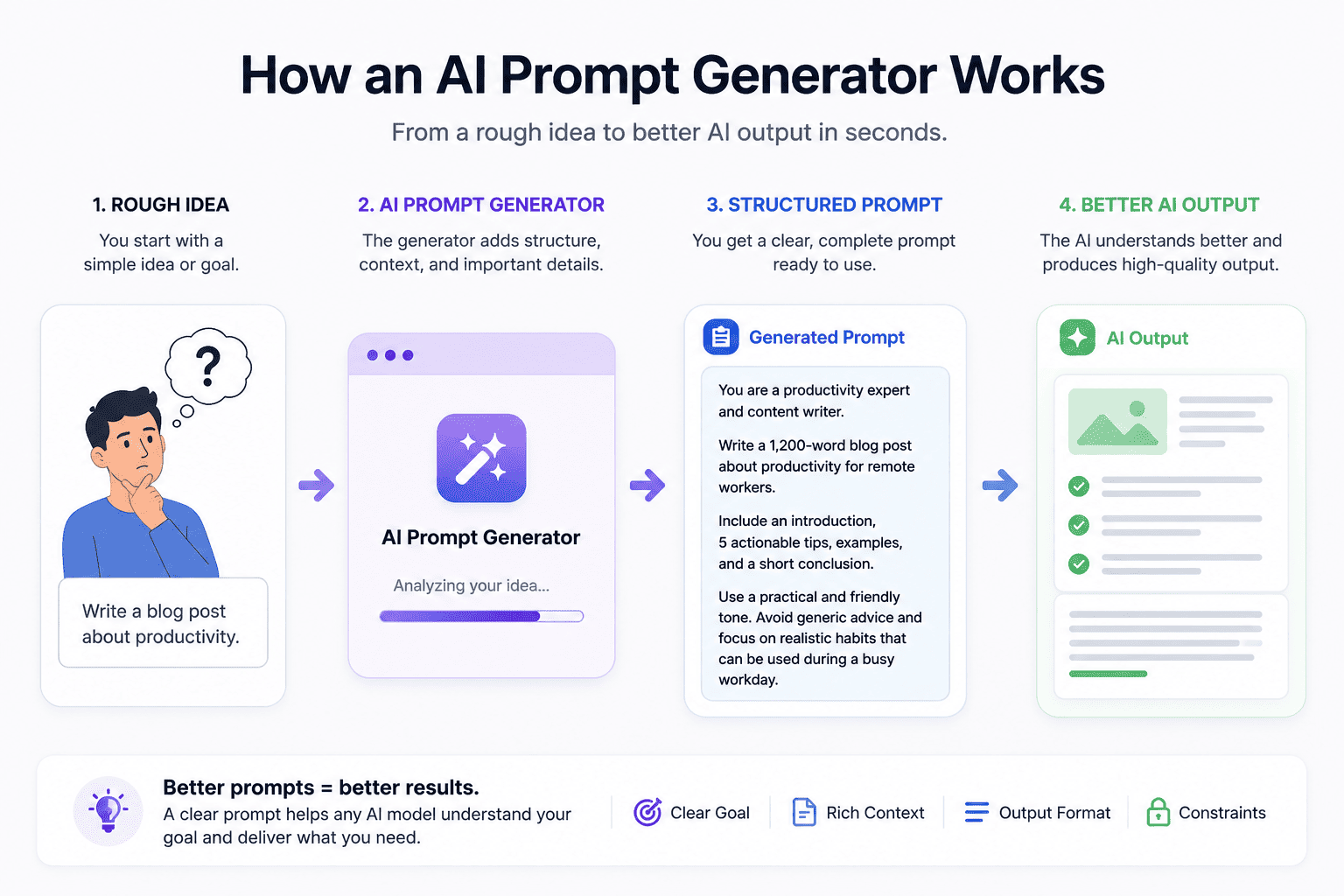
Write a blog post about productivity.
This prompt may produce an answer, but the output will likely be broad because the AI does not know the audience, tone, length, structure, goal, or examples you want it to follow.
A stronger prompt might look like this:
Write a 1,200-word blog post about productivity for remote workers. Use a practical and friendly tone. Include an introduction, 5 actionable tips, examples, and a short conclusion. Avoid generic advice and focus on realistic habits that can be used during a busy workday.
The second prompt is better because it gives the AI more direction.
An AI prompt generator helps you build prompts like this faster. It can help transform a rough idea into a complete instruction that includes the key details an AI model needs to produce a better response.
Why AI Prompt Generators Matter
AI models are powerful, but they still depend on the instructions they receive.
When the prompt is unclear, the AI may misunderstand the goal. When the prompt is missing context, the AI may make assumptions. When the prompt does not define the output format, the response may come back in a structure that is not useful.
This is why prompt generators matter.
They help users move from vague instructions to structured prompts that are easier for AI tools to follow.
An AI prompt generator can help improve:
- Prompt clarity
- Task definition
- Context quality
- Output structure
- Formatting consistency
- Prompt reuse
- Workflow speed
This is especially useful for users who work with AI regularly. Instead of rewriting prompts manually every time, you can generate a stronger starting point, then optimize and refine it based on your specific goal.
For a deeper foundation on prompt writing, you can also read What Is Prompt Engineering? How to Write Better AI Prompts.
How an AI Prompt Generator Works
An AI prompt generator usually starts with your goal.
You describe what you want to create, analyze, improve, or solve. Then the generator turns your input into a more complete prompt.
For example, you might start with:
Create a prompt for writing a landing page.
A prompt generator can expand that into a more useful prompt by adding:
- The role the AI should take
- The task it should complete
- The product or topic context
- The target audience
- The tone of voice
- The output format
- The constraints
- The success criteria
The generated prompt may become:
You are a senior SaaS copywriter. Write a landing page hero section for an AI productivity tool targeting solo founders. Include a headline, subheadline, 3 benefit bullets, and one CTA. Use clear, practical language. Avoid hype words and focus on the outcome users can achieve.
This version is more specific, more structured, and easier for an AI model to follow.
AI Prompt Generator for Any AI Model
A good AI prompt generator should not only work for one AI tool.
Many people use different AI models for different tasks. ChatGPT may be used for writing and brainstorming. Claude may be used for long-form analysis, summarization, or structured reasoning. Gemini may be used for multimodal workflows, research, documents, and visual tasks.
That is why the phrase AI prompt generator for any AI model matters.
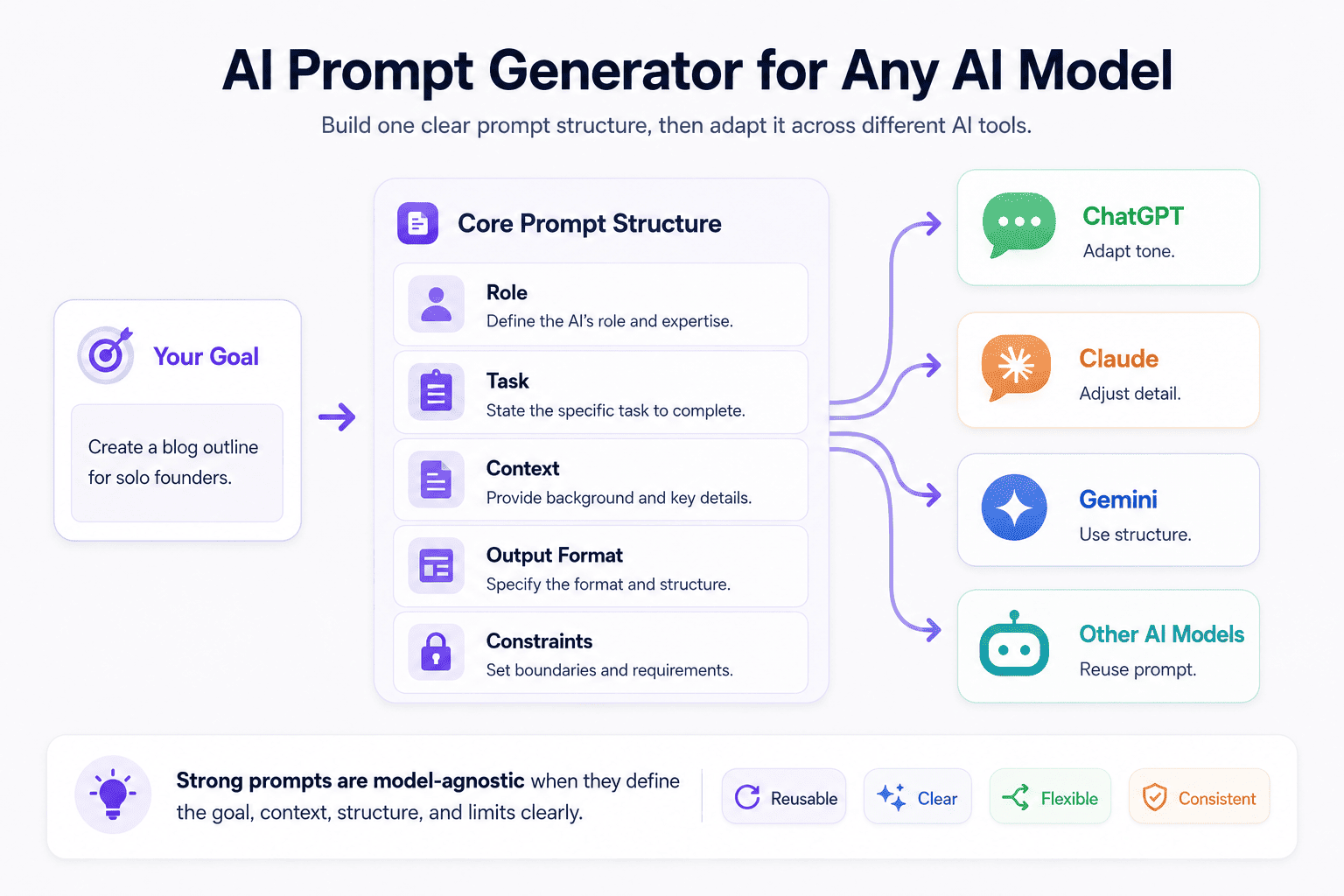
The goal is not to create prompts that only work in one chatbot. The goal is to create strong, flexible prompts that can be adapted across tools.
A model-agnostic prompt usually focuses on universal prompt elements:
- Role: Who should the AI act as?
- Task: What should the AI do?
- Context: What information does the AI need?
- Audience: Who is the output for?
- Format: How should the response be structured?
- Constraints: What should the AI include or avoid?
- Success criteria: What makes the answer useful?
These elements are useful across ChatGPT, Claude, Gemini, and many other AI models.
AI Prompt Generator for ChatGPT
When creating prompts for ChatGPT, clear instructions and output formatting can help produce more useful responses.
For example:
You are a content strategist. Create a blog outline for the keyword “AI prompt generator.” Include search intent, target audience, H2 sections, FAQ ideas, and internal link suggestions. Keep the outline practical and avoid generic advice.
This type of prompt gives ChatGPT a role, task, keyword, expected structure, and quality direction.
AI Prompt Generator for Claude
Claude is often used for long-form writing, document analysis, research, and structured feedback. For Claude prompts, it can be helpful to define the goal, success criteria, and the structure of the expected response.
For example:
You are a senior editor. Review this article draft for clarity, structure, accuracy, and usefulness. Return your feedback in four sections: strengths, weak areas, suggested improvements, and a revised outline. Do not rewrite the full article unless asked.
This prompt tells Claude how to evaluate the content and what kind of feedback to provide.
AI Prompt Generator for Gemini
Gemini is often used for multimodal and research-based tasks, so prompts may include images, documents, URLs, or structured input.
For example:
Analyze this landing page screenshot. Focus on headline clarity, visual hierarchy, CTA placement, trust signals, and possible conversion issues. Return the answer in three sections: what works, what needs improvement, and recommended changes.
This prompt gives Gemini a clear visual analysis framework instead of simply asking it what it sees.
What Makes a Good AI Prompt Generator?
Not every prompt generator is equally useful.
Some tools only create generic prompts. Others help you build prompts that are structured, reusable, and easier to improve over time.
A good AI prompt generator should help with more than just writing one prompt. It should help you create better prompt workflows.
1. It Understands the Goal
A strong prompt starts with a clear goal.
The prompt generator should help identify what you want the AI to do, whether that is writing, analyzing, summarizing, coding, brainstorming, planning, or creating visual directions.
2. It Adds Useful Context
Context helps AI understand the situation behind the task.
For example, a prompt for “write an email” becomes stronger when it includes the recipient, relationship, goal, tone, background, and desired outcome.
3. It Defines the Output Format
Output format matters because different tasks need different structures.
A blog outline, JSON response, campaign plan, code review, research summary, and image prompt should not all be formatted the same way.
A good prompt generator should help define the structure before the AI produces the answer.
4. It Includes Constraints
Constraints help control the output.
For example, you may want the response to be concise, avoid hype words, use simple English, return only JSON, follow a brand voice, or stay within a specific word count.
5. It Supports Prompt Refinement
The first generated prompt is not always the final version.
A good workflow lets you improve the prompt based on feedback, test results, or a more specific use case.
6. It Helps You Reuse Prompts
The best prompts should not disappear after one use.
If a prompt works well, you should be able to save it, reuse it, adapt it, and improve it over time.
AI Prompt Generator vs Manual Prompt Writing
You can write prompts manually. In many cases, that works fine.
But manual prompt writing can become slow when you need prompts for repeated tasks, complex workflows, or multiple AI models.
Here is a simple comparison:
| Method | Best For | Limitations |
|---|---|---|
| Manual Prompt Writing | Simple one-time tasks, quick questions, casual AI use | Can be vague, inconsistent, and time-consuming for complex workflows |
| AI Prompt Generator | Structured prompts, repeatable workflows, content creation, marketing, coding, research, and business tasks | Still needs review and refinement for the best result |
| Prompt Optimization Workflow | Improving weak prompts, testing versions, saving reusable prompts, and building prompt systems | Requires a clear goal and some evaluation of output quality |
The best approach is not always manual writing or automatic generation alone.
A stronger approach is:
- Generate a prompt from your idea
- Analyze the prompt quality
- Optimize weak parts
- Refine the prompt with feedback
- Save the best version for reuse
This turns prompting into a repeatable workflow instead of a guessing process.
How to Create Better Prompts With an AI Prompt Generator
To get better results from an AI prompt generator, do not only type a vague request and accept the first output.
Use the generator as part of a workflow.
Step 1: Start With a Clear Goal
Before generating a prompt, define what you want the AI to accomplish.
Instead of:
Create a prompt for marketing.
Use:
Create a prompt for planning a 30-day launch campaign for a new AI tool targeting creators, marketers, and founders.
The second version gives the prompt generator a clearer direction.
Step 2: Add Context
Context helps the generated prompt become more relevant.
You can add details such as:
- Product type
- Target audience
- Brand voice
- Use case
- Input data
- Examples
- Desired outcome
Step 3: Define the Output Format
Tell the prompt generator what kind of output you want the AI model to produce.
Examples include:
- Bullet list
- Table
- JSON
- Markdown
- Step-by-step plan
- Content brief
- Email draft
- Code review
- Image prompt
Step 4: Set Constraints
Constraints make the prompt more controlled.
For example:
- Use simple English
- Keep the answer under 500 words
- Do not use hype words
- Return only valid JSON
- Use a professional tone
- Include examples
- Focus on practical advice
Step 5: Optimize the Generated Prompt
After the prompt is generated, review it.
Ask:
- Is the task clear?
- Is the context specific enough?
- Is the output format defined?
- Are the constraints useful?
- Is anything missing?
- Can the prompt be reused?
This is where prompt optimization becomes important.
For a deeper guide, read Prompt Engineering Best Practices 2026: Build More Reliable AI Workflows.
Common Use Cases for AI Prompt Generators
An AI prompt generator can be used across many workflows.
Content Creation
Writers and creators can use prompt generators to create prompts for blog posts, social media content, YouTube scripts, newsletters, captions, outlines, and content briefs.
Example:
Create a prompt for writing a helpful SEO blog post about AI productivity tools for solo founders. Include search intent, outline, examples, FAQ, and a natural CTA.
Marketing
Marketers can use prompt generators to create prompts for ad copy, landing pages, email campaigns, product positioning, audience research, and launch plans.
Example:
Create a prompt for generating 10 landing page headline variations for a SaaS product. The target audience is small business owners who want to save time with automation.
Business and Product Work
Founders and product teams can use prompt generators for product briefs, feature prioritization, competitor analysis, customer research, and internal documentation.
Example:
Create a prompt for comparing three product feature ideas based on user demand, development effort, revenue potential, and launch complexity.
Developer Workflows
Developers can use prompt generators to create prompts for debugging, code review, documentation, architecture planning, testing, and implementation guidance.
Example:
Create a prompt for reviewing a React component for readability, performance, accessibility, and maintainability. Return the feedback in a table with issue, severity, and suggested fix.
Research and Learning
Students, researchers, and professionals can use prompt generators for summaries, explanations, study plans, literature reviews, and structured research questions.
Example:
Create a prompt for summarizing a research article for a non-technical audience. Include key findings, limitations, practical implications, and follow-up questions.
Visual Content and Image Prompts
Designers and creators can use prompt generators to create prompts for AI image tools, video concepts, product photography, thumbnails, storyboards, and visual direction.
Example:
Create a detailed image prompt for a cinematic product hero image of a modern AI workspace dashboard. Include lighting, composition, background, mood, and style direction.
For more examples, you can read 10 AI Prompt Examples and Techniques for Better AI Outputs in 2026.
Common Mistakes When Using AI Prompt Generators
An AI prompt generator can help you create better prompts, but the result still depends on how you use it.
Here are common mistakes to avoid.
1. Starting With a Vague Request
If your input is too vague, the generated prompt may also be generic.
Instead of asking for “a writing prompt,” describe the goal, audience, topic, tone, and format.
2. Not Reviewing the Generated Prompt
A prompt generator can create a strong starting point, but you should still review the output.
Check whether the generated prompt includes enough context, clear instructions, and useful constraints.
3. Forgetting the Target AI Model
Different AI models can respond differently to the same prompt.
A prompt that works well in ChatGPT may need slight adjustments for Claude, Gemini, or another model.
This does not mean you need a completely different prompt every time, but you should be ready to refine the structure based on the model and task.
4. Not Defining the Output Format
Many weak prompts fail because they do not define the final structure.
If you want a table, ask for a table. If you want JSON, ask for valid JSON. If you want a content brief, define the sections.
5. Treating the First Prompt as Final
Prompt generation is only the first step.
The best results usually come from generating, testing, optimizing, and refining the prompt until it produces consistent outputs.
How PrompTessor Helps With AI Prompt Generation
PrompTessor is built for users who want a more complete prompt workflow.
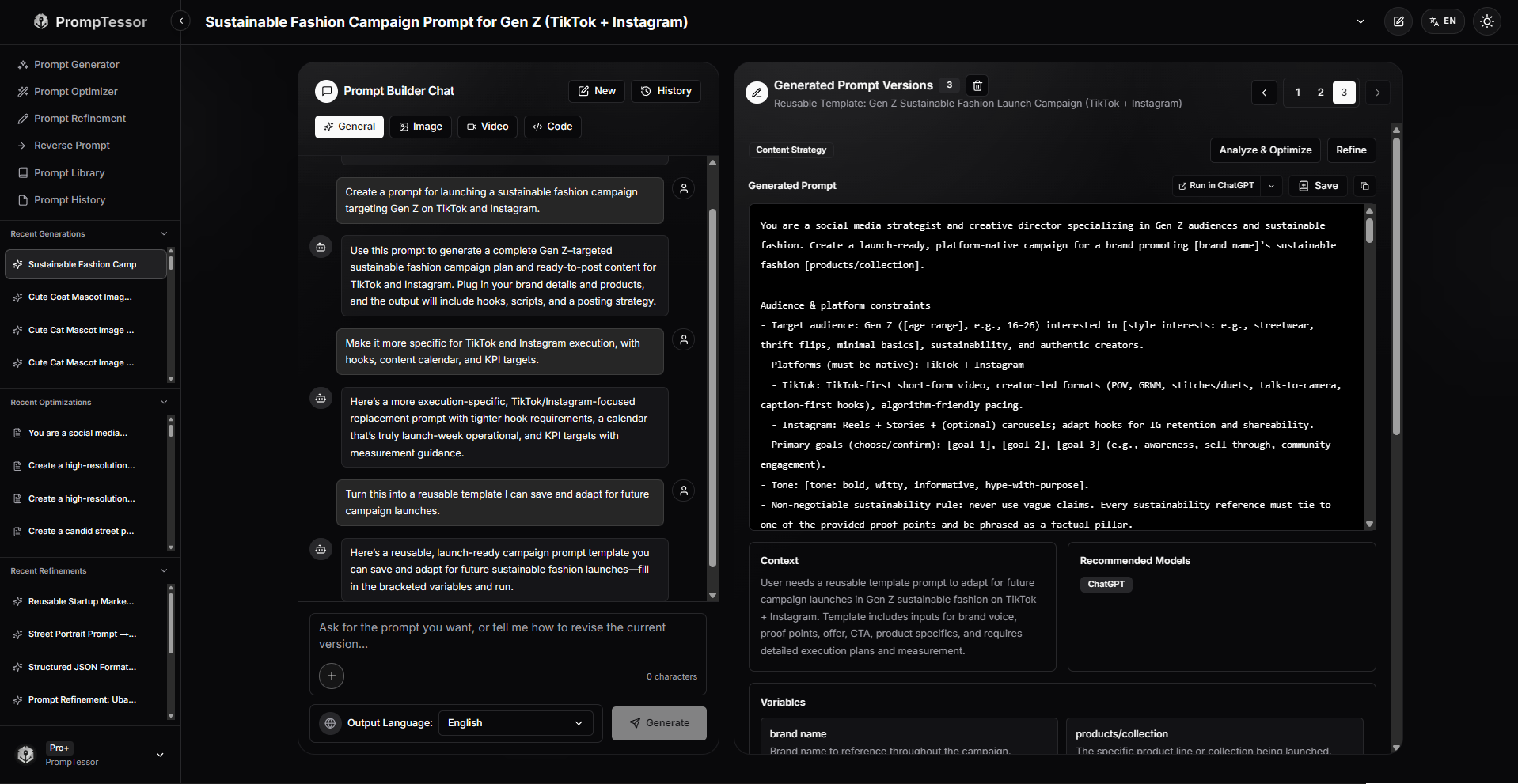
Instead of only generating one prompt and stopping there, PrompTessor helps users move through the full prompt process:
- Generate prompts from rough ideas
- Analyze prompt quality
- Optimize weak or incomplete prompts
- Refine prompt versions with feedback
- Reverse-engineer content into reusable prompts
- Save and organize prompts in a prompt library
- Track prompt history across generations, optimizations, refinements, and reverse prompts
This makes PrompTessor useful for people who use AI regularly and want better prompt workflows across ChatGPT, Claude, Gemini, and other AI models.
For example, you can start with a rough idea like:
Create a prompt for a product launch campaign.
PrompTessor can help turn that into a more structured prompt with audience, channels, campaign goal, content ideas, KPI targets, and reusable variables.
Then you can analyze the prompt, optimize it, refine it further, and save the final version for future campaigns.
This is the difference between a one-time prompt and a reusable prompt workflow.
FAQ About AI Prompt Generators
What is an AI prompt generator?
An AI prompt generator is a tool that helps users create prompts for AI models. It can turn rough ideas into clearer, more structured prompts with a task, context, output format, constraints, and success criteria.
What is the best AI prompt generator for any AI model?
The best AI prompt generator should help you create prompts that work across different AI models, including ChatGPT, Claude, Gemini, and other tools. It should also support prompt optimization, refinement, and reuse. PrompTessor is designed for this kind of workflow by helping users generate prompts, analyze prompt quality, optimize weak prompts, refine versions with feedback, and save reusable prompts in a prompt library.
Can an AI prompt generator improve ChatGPT prompts?
Yes. An AI prompt generator can improve ChatGPT prompts by making instructions clearer, adding relevant context, defining the output format, and setting useful constraints.
Can I use the same prompt for ChatGPT, Claude, and Gemini?
Often, yes. Many strong prompts can work across ChatGPT, Claude, Gemini, and other AI models. However, you may need to adjust formatting, detail level, or instructions depending on the model and task.
What should a good AI prompt include?
A good AI prompt usually includes a clear task, relevant context, target audience, output format, constraints, examples when needed, and success criteria.
Is an AI prompt generator better than writing prompts manually?
An AI prompt generator is useful when you want to create structured prompts faster. Manual prompt writing can still work, but a prompt generator can reduce guesswork and help create more reusable prompts.
How does PrompTessor help with AI prompt generation?
PrompTessor helps users generate prompts, analyze prompt quality, get optimization suggestions, refine prompts with feedback, reverse-engineer content into prompts, and save reusable prompts in a prompt library.
Who should use an AI prompt generator?
An AI prompt generator is useful for creators, marketers, founders, developers, students, researchers, prompt engineers, and anyone who wants better results from AI tools.
Create Better Prompts With PrompTessor
An AI prompt generator can help you create stronger prompts faster.
But the best prompt workflow does not stop at generation.
To get better AI results, you also need to analyze, optimize, refine, test, and reuse your prompts.
That is where PrompTessor can help.
PrompTessor is an AI prompt workspace for generating, optimizing, refining, reverse-engineering, and saving prompts in a reusable prompt library.
Whether you use ChatGPT, Claude, Gemini, or another AI model, PrompTessor helps you turn rough ideas into clearer prompts that are easier to reuse across real workflows.
Better prompts lead to better AI outputs. PrompTessor helps you build them.
Build better prompts in one workspace
Generate prompts from ideas, analyze and optimize quality, refine with feedback, reverse-engineer content, and save reusable prompts in your Prompt Library.
Try PrompTessor Free