Prompt Refinement How to Improve AI Prompts Through Feedback and Iteration
Writing a good AI prompt is rarely a one-step process.
You may start with a rough prompt, improve it, test the output, then realize it still needs a different tone, clearer format, stronger constraints, or better structure.
The prompt may already be useful, but not perfect yet.
That is where prompt refinement becomes important.
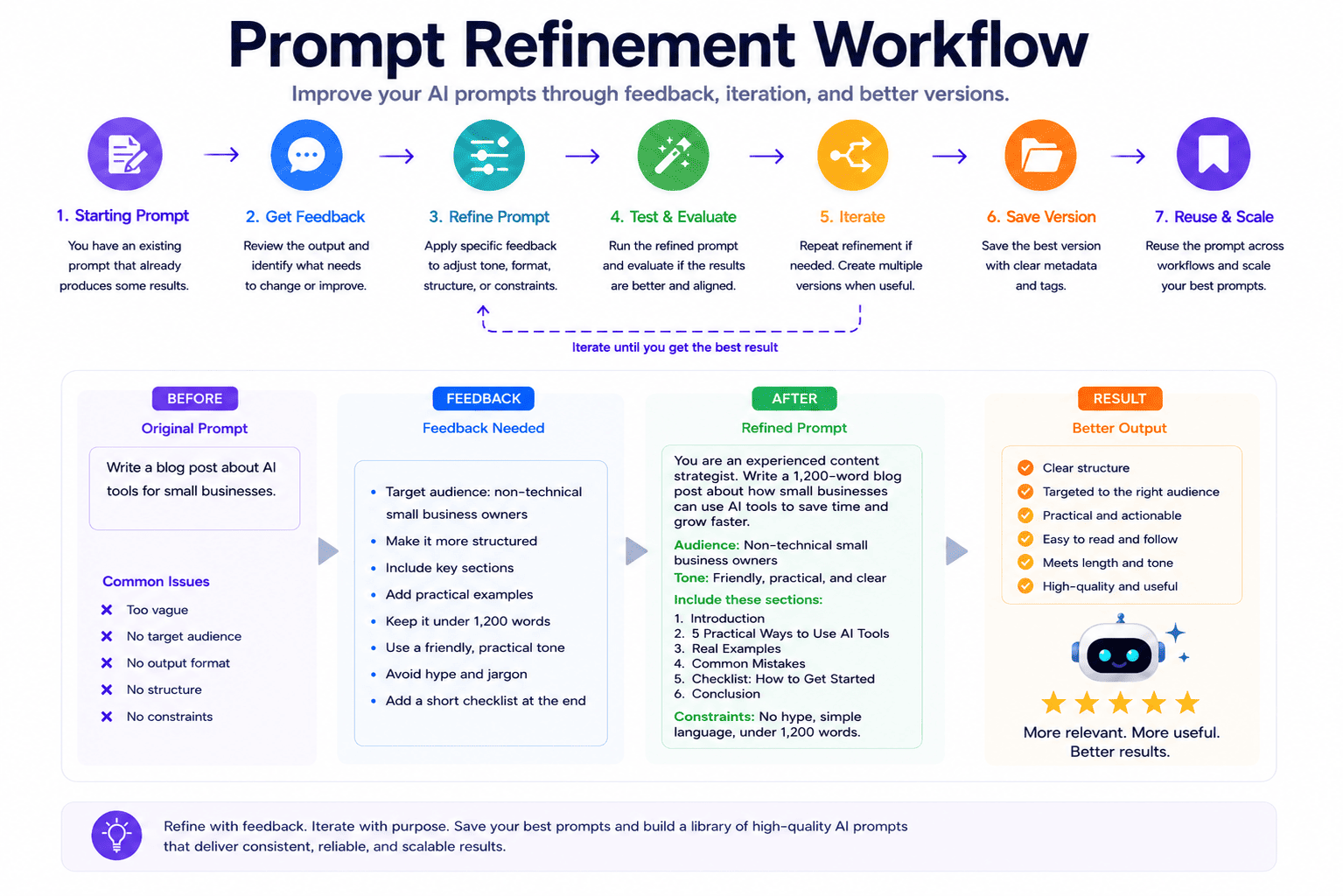
Prompt refinement is the process of improving an existing prompt through feedback and iteration. Instead of starting over from scratch, you keep the useful intent of the prompt and make targeted improvements based on what you want to change.
For example, you may refine a prompt to make it shorter, more structured, more detailed, more suitable for ChatGPT, more useful for Claude, easier to reuse as a template, or better formatted for a specific workflow.
In this guide, you will learn what prompt refinement is, how it differs from prompt optimization, how to refine AI prompts step by step, and how to turn improved prompts into reusable workflow assets.
Quick Answer
Prompt refinement is the process of improving an existing AI prompt through feedback and iteration. It helps users adjust tone, format, structure, length, constraints, examples, model target, or output style while preserving the useful intent of the original prompt.
Key Takeaways
- Prompt refinement improves an existing prompt through feedback, iteration, and targeted changes.
- It is useful when a prompt already works in part but needs a better tone, format, structure, audience, or output style.
- Prompt optimization improves core prompt quality, while prompt refinement applies specific feedback to an existing prompt version.
- A refined prompt can become easier to test, reuse, save, and adapt across different AI workflows.
- PrompTessor helps users refine prompts with feedback, compare versions, and save useful prompts to a Prompt Library.
Table of Contents
- What Is Prompt Refinement?
- Why Prompt Refinement Matters
- Prompt Optimization vs Prompt Refinement
- Prompt Refinement vs Prompt Rewriting
- When Should You Refine a Prompt?
- How to Refine AI Prompts Step by Step
- Prompt Refinement Examples
- How to Use Feedback for Prompt Refinement
- Prompt Refinement for ChatGPT Claude Gemini and Other AI Models
- How Prompt Refinement Fits Into an AI Prompt Workflow
- Common Prompt Refinement Mistakes
- How PrompTessor Helps With Prompt Refinement
- FAQ About Prompt Refinement
- Improve Your Prompts Through Feedback and Iteration
What Is Prompt Refinement?
Prompt refinement is the process of revising an existing prompt based on specific feedback.
The goal is not always to create a completely new prompt. The goal is to improve the current prompt while keeping the parts that already work.
For example, you may have a prompt like this:
You are a marketing strategist. Create a campaign plan for my product.
This prompt is not useless, but it is still too broad.
You may refine it with feedback such as:
Make it more structured, add reusable placeholders, include output sections, and make it suitable for a small SaaS launch campaign.
The refined version could become:
You are a SaaS marketing strategist. Create a reusable launch campaign plan for {product_name}. The target audience is {target_audience}. The campaign goal is {campaign_goal}. Include positioning, audience insight, content pillars, channel plan, four-week execution calendar, KPI dashboard, and improvement plan. Use practical recommendations for a small team with limited resources.
The refined prompt is stronger because it applies targeted feedback. It is more structured, more reusable, and easier for an AI model to follow.
Prompt refinement is especially useful when a prompt is already close to what you want but still needs adjustment.
Why Prompt Refinement Matters
Many AI prompts do not fail completely. They are often partially useful.
The prompt may produce a good answer, but the result may still be:
- Too long
- Too vague
- Too generic
- Too technical
- Not structured enough
- Not aligned with the audience
- Not formatted the way you need
- Not reusable for future workflows
This is why prompt refinement matters.
Instead of throwing away the prompt and starting again, refinement lets you improve it with a specific direction.
For example, you can refine a prompt by saying:
- Make it shorter
- Make it more detailed
- Use a professional tone
- Return the output as JSON
- Add reusable placeholders
- Make it suitable for beginners
- Adapt it for a specific AI model
- Turn it into a reusable prompt template
This gives you more control over the final prompt.
Prompt refinement is also important because AI workflows are iterative. You may need several versions before the prompt becomes clear, reusable, and reliable.
Prompt Optimization vs Prompt Refinement
Prompt optimization and prompt refinement are related, but they are not the same.
Prompt optimization improves the core quality of a prompt. It focuses on clarity, specificity, context, structure, constraints, and output format.
Prompt refinement improves a prompt based on specific feedback after a prompt version already exists.
| Concept | Main Focus | Example |
|---|---|---|
| Prompt Optimization | Improving the core quality of a weak prompt | Adding context, format, constraints, and clearer task instructions |
| Prompt Refinement | Applying specific feedback to an existing prompt version | Making the prompt shorter, more structured, more reusable, or better suited for a specific model |
A simple way to understand the difference:
- Optimization is diagnosis-led improvement.
- Refinement is feedback-led revision.
In a real workflow, you may use both.
First, you optimize a weak prompt to improve its foundation. Then, you refine the optimized version based on your preferred tone, format, model, audience, or use case.
For more detail about optimization, read AI Prompt Optimization How to Improve Weak Prompts for Better AI Results.
Prompt Refinement vs Prompt Rewriting
Prompt refinement is also different from prompt rewriting.
Prompt rewriting often replaces the original prompt with a new version.
Prompt refinement is more targeted. It keeps the useful intent of the current prompt and applies specific changes.
For example, if your prompt already has a good structure but the tone is too formal, you do not need a full rewrite. You can refine it by saying:
Keep the structure, but make the tone more conversational and beginner-friendly.
If your prompt already works for ChatGPT but needs to be better for Claude, you can refine it by saying:
Keep the same goal, but add more context, clearer evaluation criteria, and a more structured response format.
Refinement works best when you know what needs to change.
When Should You Refine a Prompt?
You should refine a prompt when the prompt is close to useful but not fully aligned with your goal.
Here are common situations where prompt refinement helps.
1. The Prompt Is Good but Too Long
Sometimes a prompt includes useful details but becomes too heavy or difficult to reuse.
You can refine it by asking for a shorter, cleaner version while preserving the important instructions.
2. The Prompt Needs a Different Tone
A prompt may work technically, but the output tone may not match your audience.
You can refine the prompt for a more professional, casual, persuasive, friendly, academic, technical, or founder-led tone.
3. The Prompt Needs a Better Output Format
Sometimes the prompt is clear, but the response format is not useful.
You can refine it to return a table, JSON, Markdown outline, checklist, campaign brief, technical spec, or step-by-step plan.
4. The Prompt Needs Stronger Constraints
Constraints help control AI output.
You may refine a prompt by adding rules such as:
- Use simple English
- Keep the answer under 500 words
- Do not invent facts
- Avoid hype words
- Include examples
- Return only valid JSON
5. The Prompt Needs to Become Reusable
A one-time prompt can be refined into a reusable template by adding placeholders.
For example:
Turn this prompt into a reusable template with placeholders for {product_name}, {target_audience}, {tone}, {platform}, and {output_format}.
6. The Prompt Needs to Fit a Specific AI Model
Different AI models may respond differently to the same prompt.
You may refine a prompt to be more suitable for ChatGPT, Claude, Gemini, image generation tools, video generation tools, or coding assistants.
How to Refine AI Prompts Step by Step
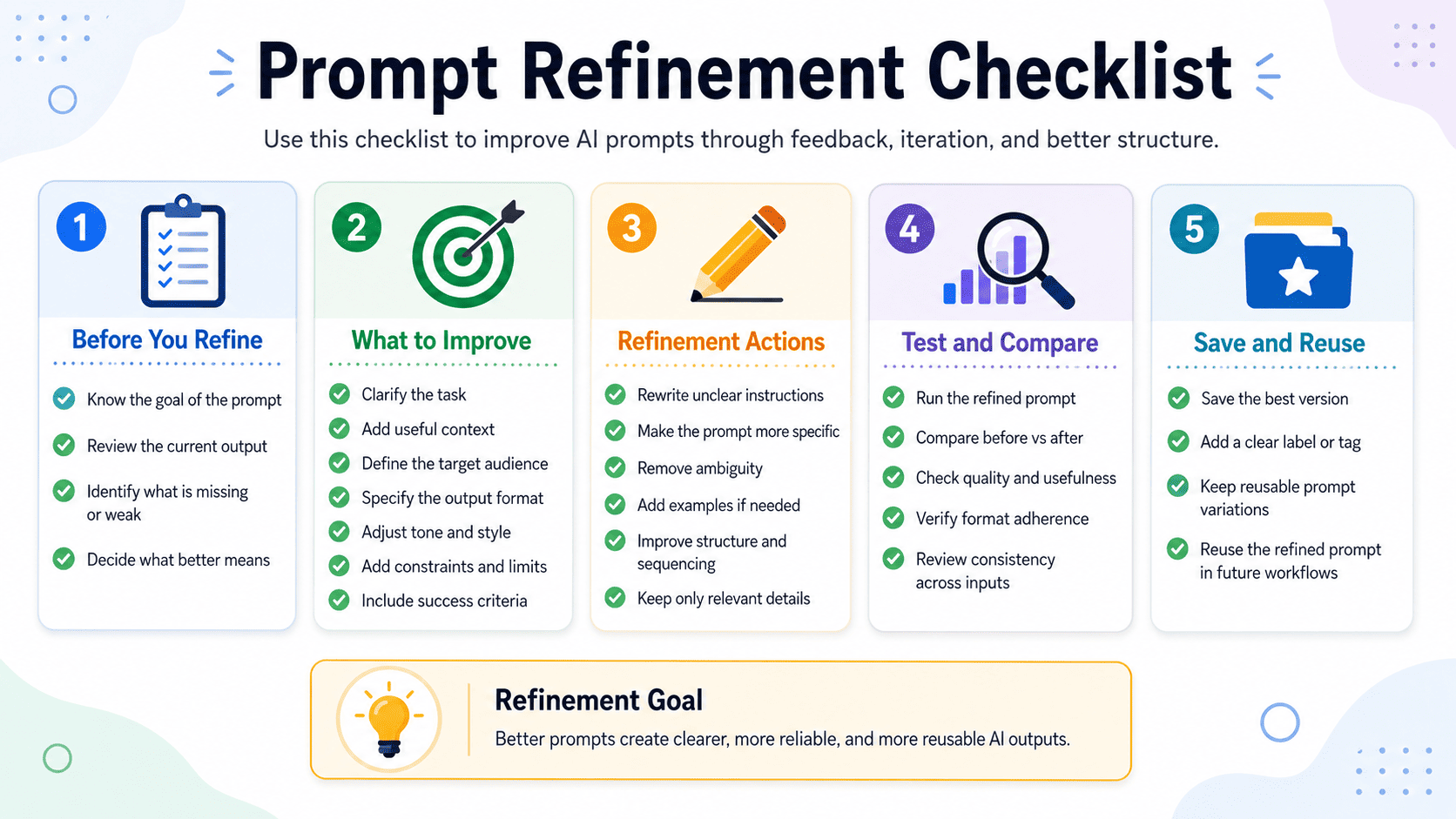
Prompt refinement becomes easier when you use a clear process.
Step 1 Review the Current Prompt
Start by reading the prompt carefully.
Ask yourself:
- What is already working?
- What is unclear?
- What is missing?
- What should stay the same?
- What should change?
Good refinement does not always mean changing everything. Often, the best result comes from preserving the useful parts and improving only the weak parts.
Step 2 Identify the Specific Feedback
Do not give vague feedback like:
Make it better.
That is too broad.
Use specific feedback such as:
- Make it more concise
- Add reusable placeholders
- Use a more professional tone
- Return the output as a table
- Add stronger constraints
- Make it suitable for beginners
- Adapt it for a product marketing workflow
Step 3 Adjust the Tone
Tone affects how the AI output feels.
A refined prompt can guide the AI to produce a response that is:
- Professional
- Friendly
- Direct
- Persuasive
- Educational
- Technical
- Simple
- Creative
Example feedback:
Keep the structure, but make the prompt produce a more direct and practical answer for busy founders.
Step 4 Improve the Output Format
A good prompt should tell the AI how to structure the output.
You can refine the prompt to ask for:
- Bullet points
- Tables
- Markdown sections
- JSON
- XML
- YAML
- Checklists
- Step-by-step plans
- Reusable templates
Example feedback:
Refine this prompt so the output is returned as a table with columns for issue, explanation, severity, and suggested fix.
Step 5 Add Stronger Constraints
Constraints make the prompt easier to control.
For example:
Keep the output under 700 words. Use simple English. Avoid unsupported claims. Include practical examples. Do not use hype language.
These constraints help the AI stay focused.
Step 6 Create Multiple Refined Versions
Sometimes one refinement is not enough.
You may want several versions:
- A concise version
- A detailed version
- A beginner-friendly version
- A technical version
- A reusable template version
Multiple versions make it easier to compare which prompt is best for your workflow.
Step 7 Save the Best Version
Once a refined prompt works well, save it.
A refined prompt can become a reusable asset for future content, marketing, coding, research, design, or business workflows.
If the prompt has placeholders and clear usage guidance, it can become a reusable prompt template.
Prompt Refinement Examples
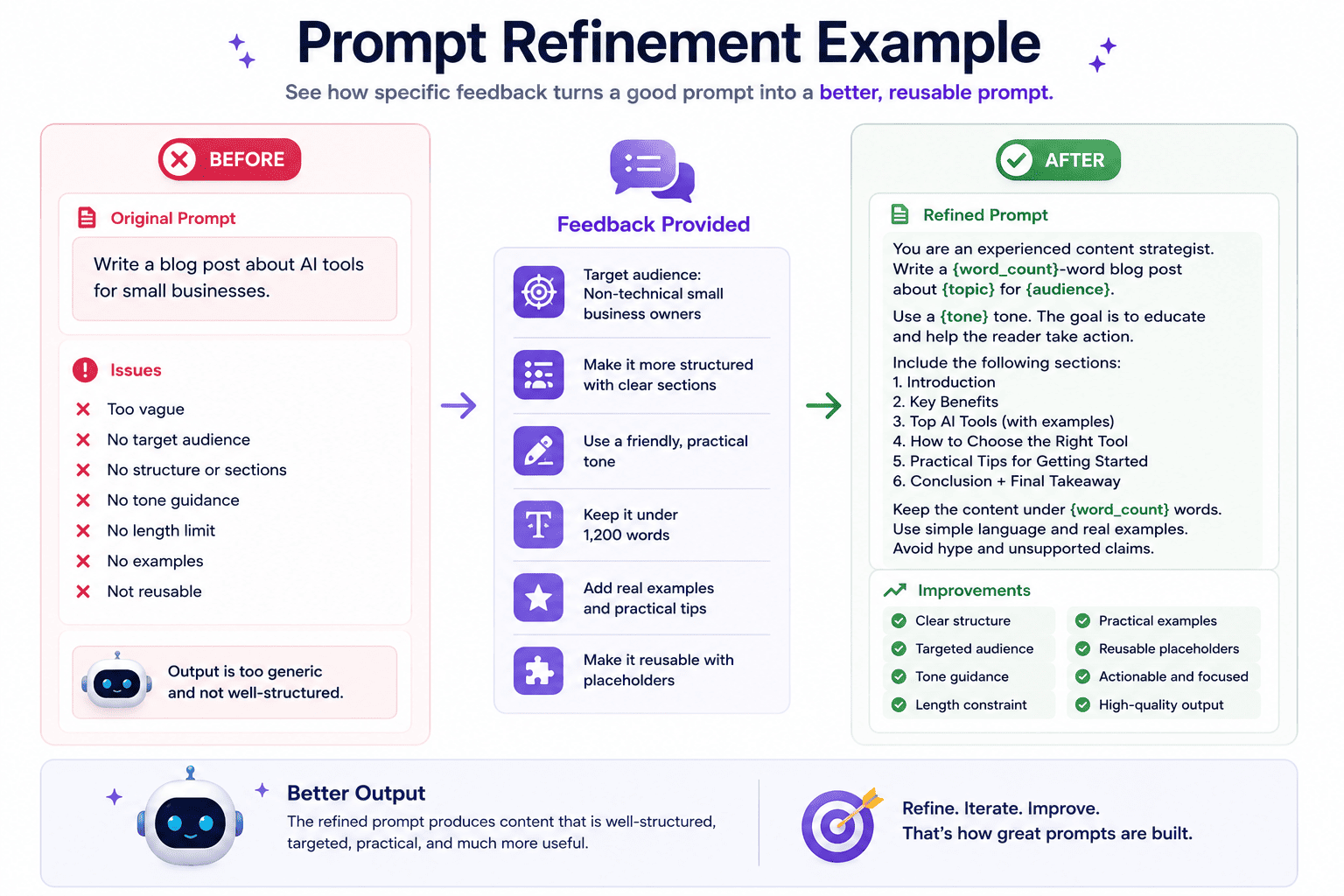
The easiest way to understand prompt refinement is to compare a current prompt with targeted feedback and a refined version.
Example 1 Make a Prompt Shorter
Current prompt:
You are a senior content strategist. Write a detailed blog outline about AI tools for small businesses. Include an introduction, audience analysis, search intent, H2 sections, FAQ, examples, internal linking ideas, keyword ideas, and conclusion. Make it useful, practical, detailed, and easy to understand.
Feedback:
Make this prompt shorter while keeping the same goal.
Refined prompt:
You are a senior content strategist. Create a practical blog outline about AI tools for small businesses. Include search intent, target audience, H2 sections, examples, FAQ ideas, internal links, and a short conclusion.
Example 2 Make a Prompt More Structured
Current prompt:
Create a campaign plan for my SaaS product.
Feedback:
Make it more structured and reusable for different SaaS campaigns.
Refined prompt:
You are a SaaS marketing strategist. Create a reusable campaign plan for {product_name}. The target audience is {target_audience}. The campaign goal is {campaign_goal}. Return the answer in sections: positioning, audience insight, core message, channel plan, content ideas, four-week timeline, KPI dashboard, and next-step checklist.
Example 3 Convert a Prompt to JSON
Current prompt:
Analyze these customer reviews and summarize the main issues.
Feedback:
Return the output as JSON so I can use it in a product dashboard.
Refined prompt:
You are a customer insights analyst. Analyze the following customer reviews and return only valid JSON with these fields: main_issues, frequency_estimate, customer_sentiment, example_quotes, product_area, priority_level, and recommended_action. Do not include explanations outside the JSON.
Example 4 Adapt a Prompt for a Different Audience
Current prompt:
Explain how APIs work.
Feedback:
Make this suitable for non-technical founders.
Refined prompt:
Explain how APIs work for non-technical founders. Use simple language, practical business examples, and analogies. Avoid code unless necessary. Focus on what APIs do, why they matter, and how they help software products connect with other tools.
Example 5 Turn a Prompt Into a Reusable Template
Current prompt:
Write a LinkedIn post about AI productivity for founders.
Feedback:
Turn this into a reusable template for different topics and audiences.
Refined prompt:
Write a {platform} post about {topic} for {audience}. Start with a strong hook, explain the idea in simple language, include 3 to 5 practical points, and end with a clear takeaway. Use a {tone} tone. Keep the post easy to scan and avoid generic advice.
How to Use Feedback for Prompt Refinement
The quality of your feedback affects the quality of the refined prompt.
Weak feedback often creates weak refinement.
For example:
Make it better.
This is vague. The AI does not know what “better” means.
Stronger feedback is more specific:
Make this prompt more reusable by adding placeholders, defining the output format, and adding constraints for tone, length, and audience.
Good feedback usually explains one or more of these:
- What should change
- What should stay the same
- Who the prompt is for
- What format the output should use
- What constraints should be added
- What model or tool the prompt is intended for
- What kind of result would be considered successful
Here are better feedback examples:
- Make it more concise but keep all important constraints.
- Add placeholders so I can reuse this prompt for different products.
- Make the output more suitable for a beginner audience.
- Convert the output format to Markdown with clear H2 and H3 sections.
- Make the prompt more suitable for a technical documentation workflow.
- Add a final checklist so I can evaluate the answer quality.
Specific feedback makes prompt refinement more useful.
Prompt Refinement for ChatGPT Claude Gemini and Other AI Models
Prompt refinement can help across different AI models, including ChatGPT, Claude, Gemini, coding assistants, image tools, video tools, and writing assistants.
The core idea is the same: improve the prompt based on the model, task, format, and desired output.
Refining Prompts for ChatGPT
For ChatGPT, refinement often works well when you make instructions direct and output formats clear.
Example feedback:
Make this prompt more structured for ChatGPT and ask for the output as a table with examples.
Refining Prompts for Claude
Claude is often used for long-form writing, analysis, and document-heavy tasks. Refinement may include more context, evaluation criteria, and structured sections.
Example feedback:
Refine this prompt for long-form analysis. Add evaluation criteria, ask for strengths and weaknesses, and include a final recommendation.
Refining Prompts for Gemini
Gemini is often used in multimodal workflows, so refinement may include visual context, document references, or structured analysis instructions.
Example feedback:
Refine this prompt so it can analyze a screenshot and return feedback on layout, visual hierarchy, CTA placement, and clarity.
The same prompt can often be adapted across models, but refinement helps make it more effective for the specific tool and use case.
How Prompt Refinement Fits Into an AI Prompt Workflow
Prompt refinement is most useful when it is part of a complete prompt workflow.
A practical workflow may look like this:
- Start with a rough idea or existing prompt.
- Generate or write the first prompt version.
- Analyze prompt quality.
- Optimize weak parts of the prompt.
- Refine the prompt with specific feedback.
- Create multiple prompt versions if needed.
- Test the refined prompt in an AI model.
- Save the best version to a Prompt Library.
- Track versions and improve the prompt over time.
This workflow turns prompt writing into an iterative system.
Instead of treating prompts as one-time instructions, you can build reusable prompt assets that improve over time.
For a broader explanation, read What Is an AI Prompt Workspace?.
Common Prompt Refinement Mistakes
Prompt refinement can improve AI workflows, but it can also become messy if the feedback is unclear.
1. Giving Vague Feedback
Feedback like “make it better” is not specific enough.
Use feedback that explains what should change.
2. Changing Too Many Things at Once
If you change tone, format, audience, length, constraints, and model target all at once, it may be harder to know what improved the prompt.
When possible, refine one major direction at a time.
3. Removing Useful Context
Sometimes users try to make a prompt shorter and accidentally remove important context.
A shorter prompt is only better if it still gives the AI enough direction.
4. Forgetting the Output Format
Refinement should often include format guidance.
If you want Markdown, JSON, a table, checklist, or structured sections, say it clearly.
5. Not Comparing Versions
Prompt refinement is iterative.
If you create multiple versions, compare them. The best version is not always the longest or most detailed one.
6. Not Saving the Final Prompt
If a refined prompt works well, save it.
A refined prompt can become a reusable prompt template or a saved prompt in your library.
How PrompTessor Helps With Prompt Refinement
PrompTessor helps users refine prompts as part of a broader AI prompt workspace.
With PrompTessor, prompt refinement can follow different starting points. You can refine a prompt after generating it, analyzing it, optimizing it, reverse prompting existing content, or writing it manually.
PrompTessor helps users refine prompts by applying specific feedback to an existing prompt version.
For example, you can ask PrompTessor to:
- Make a prompt shorter
- Make a prompt more detailed
- Change the tone
- Add placeholders
- Convert the prompt to JSON, XML, Markdown, YAML, or another format
- Make the prompt easier to reuse
- Adapt the prompt for a specific model or workflow
- Save the refined prompt to a Prompt Library
PrompTessor also supports prompt versions, which helps users compare refined prompts, continue improving them, and reuse the best version later.
This makes prompt refinement useful for creators, marketers, developers, founders, students, researchers, designers, and AI users who want more control over their prompts.
You can learn more on the PrompTessor Prompt Refinement page.
FAQ About Prompt Refinement
What is prompt refinement?
Prompt refinement is the process of improving an existing AI prompt through specific feedback and iteration. It helps adjust tone, format, structure, length, constraints, audience, model target, or output style while preserving the useful intent of the original prompt.
How do you refine an AI prompt?
To refine an AI prompt, review the current prompt, identify what needs to change, provide specific feedback, adjust tone or format, add constraints, create refined versions, test the result, and save the best version for reuse.
What is the difference between prompt optimization and prompt refinement?
Prompt optimization improves the core quality of a prompt by adding clarity, context, structure, and constraints. Prompt refinement applies specific feedback to an existing prompt version to make it better suited for a particular goal, audience, format, or model.
Is prompt refinement the same as prompt rewriting?
No. Prompt rewriting often replaces a prompt with a new version. Prompt refinement is more targeted because it preserves the useful intent of the current prompt while applying specific changes.
When should I refine a prompt?
You should refine a prompt when it already works in part but needs a different tone, format, length, structure, audience, model target, constraints, or reusable template format.
Can prompt refinement improve ChatGPT prompts?
Yes. Prompt refinement can improve ChatGPT prompts by making instructions clearer, changing tone, defining output format, adding constraints, or making the prompt more reusable.
Can prompt refinement work for Claude and Gemini?
Yes. Prompt refinement can help adapt prompts for Claude, Gemini, and other AI models by adjusting context, formatting, output instructions, and model-specific guidance.
Can refined prompts be saved and reused?
Yes. A refined prompt can be saved as a reusable prompt template or added to a prompt library so it can be used again in future workflows.
Does PrompTessor support prompt refinement?
Yes. PrompTessor includes Prompt Refinement to help users improve existing prompts with feedback, formatting options, version history, and reusable prompt metadata.
Improve Your Prompts Through Feedback and Iteration
Prompt refinement helps turn a good prompt into a better prompt.
It is useful when the prompt already has value but needs a clearer format, different tone, stronger constraints, better structure, or more reusable design.
The key is to give specific feedback.
Instead of asking AI to “make it better,” explain what should change and why.
Over time, this process helps you build prompt versions that are easier to test, compare, save, and reuse.
PrompTessor supports this workflow by helping users refine prompts with feedback, compare versions, and save useful prompts into a reusable Prompt Library.
Better prompts are built through iteration. Prompt refinement helps you get there.
Build better prompts in one workspace
Generate prompts from ideas, analyze and optimize quality, refine with feedback, reverse-engineer content, and save reusable prompts in your Prompt Library.
Try PrompTessor Free